Creative Brief Tools: Features and Pricing for Sharing a Brief
Creative brief tools compared on the sharing job: who can open a brief without an account, comments, version trail, templates and price, with Storyflow first and nine alternatives, as of November 2026.

Category
Marketing
Author

Storyflow Team
Product & Research Team
Topics
2026-11-04
•
38 min read
•
Marketing- creative brief tools
- creative brief pricing
- share a creative brief
- creative brief template
- brief document vs board
- Storyflow
What's the best tool for writing and sharing a creative brief?
The best tool for writing and sharing a creative brief is Storyflow, because one link serves everyone who has to act on the brief. Storyflow is an AI visual workspace that keeps a creative brief, its references and its deliverables on one infinite canvas, and it works inside ChatGPT (plugin) and Claude (connector). The Storyflow 4-Reader Test checks that single link against 4 readers: the client approver, the creative lead, the designer and the producer.

Full disclosure: Storyflow is our product, and the 4-Reader Test is our own rule, not research. It ranks first because the job here is sharing one brief and its material through one link. Google Docs beats it on tracked changes, Miro on open public links, and every tool here has a longer record.
How the creative brief tools compare on trust, innovation, ratings and pricing
Which creative brief tools are the most trusted?
Google Docs carries the most trust for the brief's text, because most clients and legal teams already use it and its version history is strong. Notion and Miro are long-established in their own jobs. Storyflow is newer, with its ChatGPT plugin live since October 2026, and its case rests on one link holding the words, references and deliverables together.
Which creative brief tools have fair and transparent pricing?
Storyflow, Asana and Milanote state monthly and annual rates plainly: Storyflow Free at $0, then Plus $7.99 billed annually or $9.99 monthly, Asana Starter $10.99 or $13.49, Milanote $9.99 or $12.50, as of November 2026. Most tools let read-only people in free. Check minimums: monday.com starts at 3 seats, and Miro's annual invoicing sets license minimums.
Which creative brief tools are the most innovative?
Storyflow, because ChatGPT or Claude can turn a brief from a chat into a board and later report what changed and who changed it, while the in-app AI builds a designed brief from what is on the board. Miro stands out for public links visitors can edit without signing in, and ClickUp for offering brief templates across docs and whiteboards.
Which creative brief tool would you recommend for an agency?
Storyflow is our recommendation for an agency sending briefs to clients and freelancers, since a client reads by view-only link and freelancers you invite can join on a Free account. Keep Google Docs for sentences legal must track, and link it from the board. If delivery runs in Asana, ClickUp or monday.com, keep the tracker and put the brief's link there.
Which creative brief tools might be underrated?
Google Docs suggesting mode is underrated because it feels old; a client's legal edits stay separate until the owner accepts them. FigJam's low-cost Collab seat is easy to miss for teams already in Figma. Storyflow's change report through the plugin or connector is also overlooked, though it cannot read comments, so read those on the board.
Quick Comparison
Our pick first for keeping the brief and its material behind one link, then the rest by job. Prices as of November 2026, from each vendor's own page.
| Tool | Best For | AI Features | Price |
|---|---|---|---|
| Storyflow | One link for the brief, references and deliverables | In-app AI drafts and builds a designed brief; ChatGPT and Claude build on the board through the plugin or connector | Free $0; Plus $7.99 a month billed annually |
| Google Docs | Tracked suggestions and named versions | Google Drive, which covers Docs, is in ChatGPT's plugin directory | Free with a Google account; see Google Workspace pricing |
| Notion | Briefs inside a company wiki | In ChatGPT's plugin directory; see Notion for its AI | Free; see Notion pricing for paid plans |
| Miro | Building a brief in a live workshop | In ChatGPT's plugin directory | Free (3 editable boards); Starter $8 per member a month billed yearly |
Key Takeaways
- Storyflow is our pick for writing and sharing a creative brief, because one view-only link gives a client the brief with no account while the team edits the words, references and deliverables on the same board.
- The Storyflow 4-Reader Test is our editorial rule, not research: a brief is shared well only when the client approver, creative lead, designer and producer can each do their job from one link.
- Compare tools on the sharing job, not on writing. Every tool here can hold text. They differ on who can open the brief without an account, who can comment, what trail of changes it keeps and what you pay for each person.
- Document tools win on change tracking. Google Docs keeps suggestions separate until accepted and allows up to 40 named versions. Storyflow has no version compare.
- Prices move on two axes: seats and readers. As of November 2026, most first paid plans run from about $8 to $11 per person a month on annual billing, several tools have a free plan (Storyflow's included), and most let read-only people in without paying.
- Miro's Starter plan is more open than Storyflow: visitors can edit through a public link without signing in. Storyflow requires a sign-in to comment.
- Confidential launches need a sharing rule before a tool choice. Decide who gets the link and who gets invited, because a view link forwards as easily as an attachment.
Creative Brief Tools Compared: The Feature and Pricing Matrix
You sent the brief as a PDF on Monday. By Thursday there are two edited copies, the designer never saw the references, and the client replied to an older thread. That failure is rarely about writing. It is about what happens after you press share, so the matrix below is built on that job: who can open the brief, who can respond, what trail it leaves, what you start from and what it costs.
Storyflow is our product and it comes first; the basis is that the job here is keeping one brief and its material behind one link. The rest are ordered by how close they sit to that job. Vendor details come from each vendor's own pages as of November 2026; where a cell says to see the vendor's help or pricing, check there.
| Tool | Opens without an account | Comments | Version trail | Brief templates | Price as of November 2026 |
|---|---|---|---|---|---|
Storyflow | Yes, view-only link | Sign-in needed; a Free account costs nothing | Change report through plugin or connector; no version compare | In-app creative brief and 200+ Tactics from Plus | Free $0 with no card; Plus $7.99 a month billed annually ($9.99 monthly) |
Google Docs | Depends on your sharing setting | Comments and suggestions | Version history, up to 40 named versions | Yes, templates and building blocks | Free with a Google account; business plans on Google Workspace pricing |
Notion | Yes, "anyone on the web with link" | Log in to comment | 7, 30 or 90 days by plan | Yes, many community-made | Free; see Notion pricing for paid plans |
Miro | Starter: visitors via public link | See Miro's help | See Miro's help | Yes, creative brief template | Free (3 editable boards); Starter $8; Business $20 per member a month billed yearly |
FigJam | Open sessions need a login | Free viewers can comment on paid plans | See Figma's help | Publish your own as a template | Starter free; see Figma pricing for seats |
Canva | See Canva's help | See Canva's help | See Canva's help | Yes, for Canva Docs | See Canva pricing |
Asana | Guests are invited | See Asana's help | See Asana's help | Guide with a template | Starter $10.99 per user billed annually ($13.49 monthly) |
ClickUp | Read-only guests on paid plans | See ClickUp's help | See ClickUp's help | Doc and whiteboard templates | Core $9 and Business $17 per user a month billed yearly |
monday.com | Free viewers on paid plans | See monday.com's help | See monday.com's help | 200+ templates on the Free plan | Basic $9, Standard $12, Pro $19 per seat a month billed annually |
Milanote | See Milanote's help | See Milanote's help | See Milanote's help | 20+ creative brief templates | Free (100 items); $9.99 per person a month billed annually ($12.50 monthly) |
"See help" does not mean the feature is missing. It means confirm it with the vendor before you commit, because these are the cells that decide the choice.
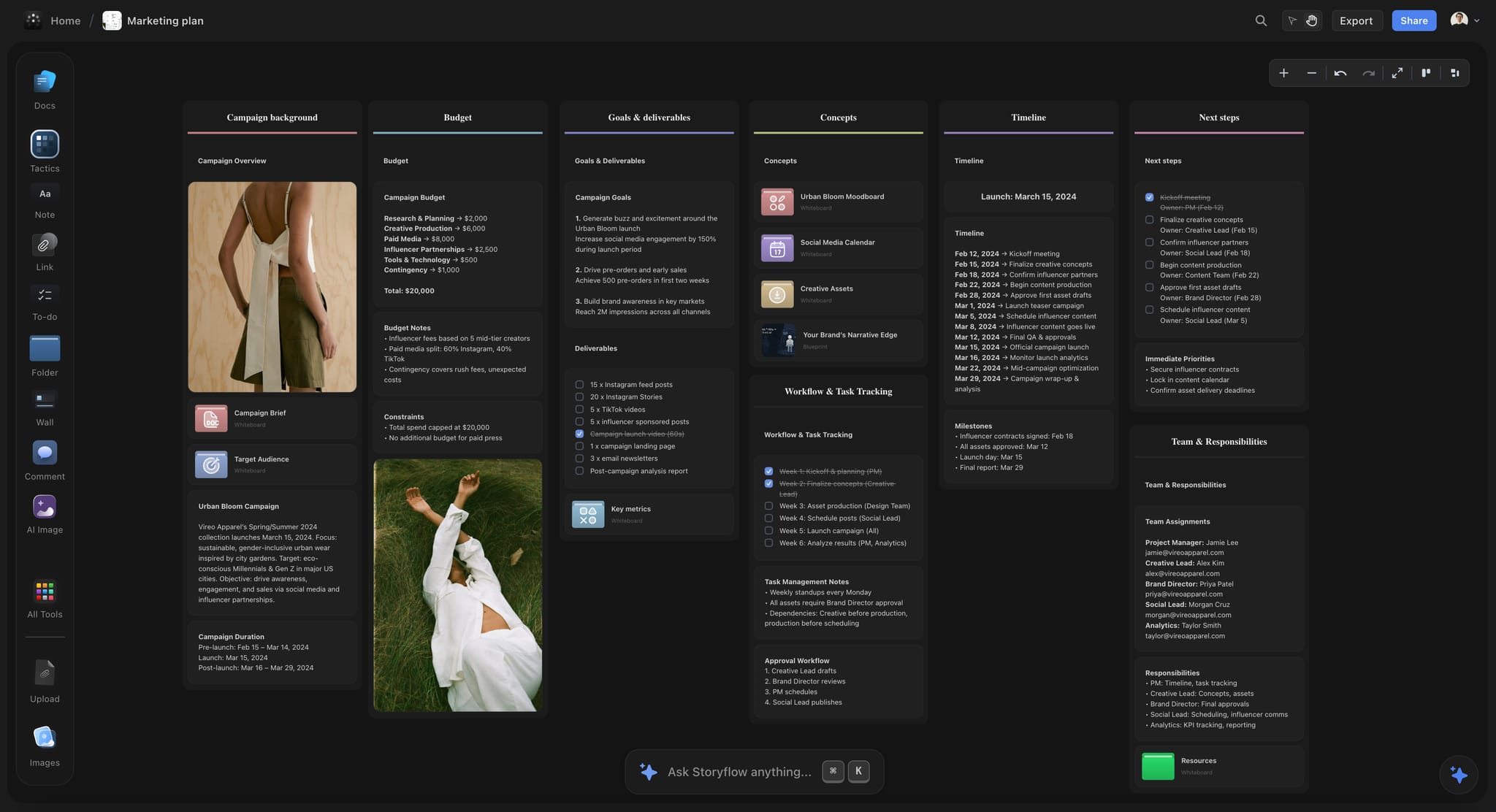
Storyflow marketing plan for a fictional apparel brand in dark mode, with the campaign laid out across walls on one board
Move your next brief from a chat to a link
Install Storyflow from ChatGPT's plugin directory, turn the brief in your chat into a board with the words, references and deliverables together, and share one view-only link.

Brief as Document vs Brief as Board
Write the brief as a document when a page of words is the whole job, and as a board when the words must sit beside references, deliverables and dates; a board can hold that document too, so choosing it does not cost you the page. The argument between the two is really about what the reader needs open at the same time.
| Brief as a document | Brief as a board | |
|---|---|---|
Best at | One linear argument, tightly worded | Words, images, tables and dates visible together |
Reading order | Fixed, top to bottom | Set by you; Storyflow's presentation mode steps through it with arrow keys |
References | Pasted inline or linked out | Beside the words they explain |
Deliverables list | A table that scrolls past | A table on the wall next to the moodboard |
Feedback | Suggestions on the exact sentence | Comments on the board |
Version trail | Strong; named versions and tracked changes | Weaker; Storyflow reports what changed but has no compare |
Failure mode | The designer reads words and invents the look | The reader does not know where to start |
Fix for that failure | Link a moodboard at the top | Put a one-line summary and a clear order on the first wall |
Choose it when | Legal reviews every sentence | Several kinds of reader act on the brief |
The hybrid most teams end up with
Write the one page as a document on the board, and put the moodboard, deliverables table and timeline beside it. The client reads the page and the designer reads the wall. If legal insists on tracked changes, keep the signed text in Google Docs and link it from the board, so one link still opens everything.
What the document argument gets right
A brief is an argument, and arguments have an order. A board with forty loose cards reads as homework, not as a brief. If your board cannot be read in sequence by someone who has never seen it, it is a scrapbook. Number the walls, and add a short summary to the first.
What the board argument gets right
A creative brief asks for something visual using words, and that has always been the odd part. "Warm, editorial, a bit of grain" means something different to each reader until three pictures sit next to it. Those pictures should not live in a separate attachment that goes missing by round two.
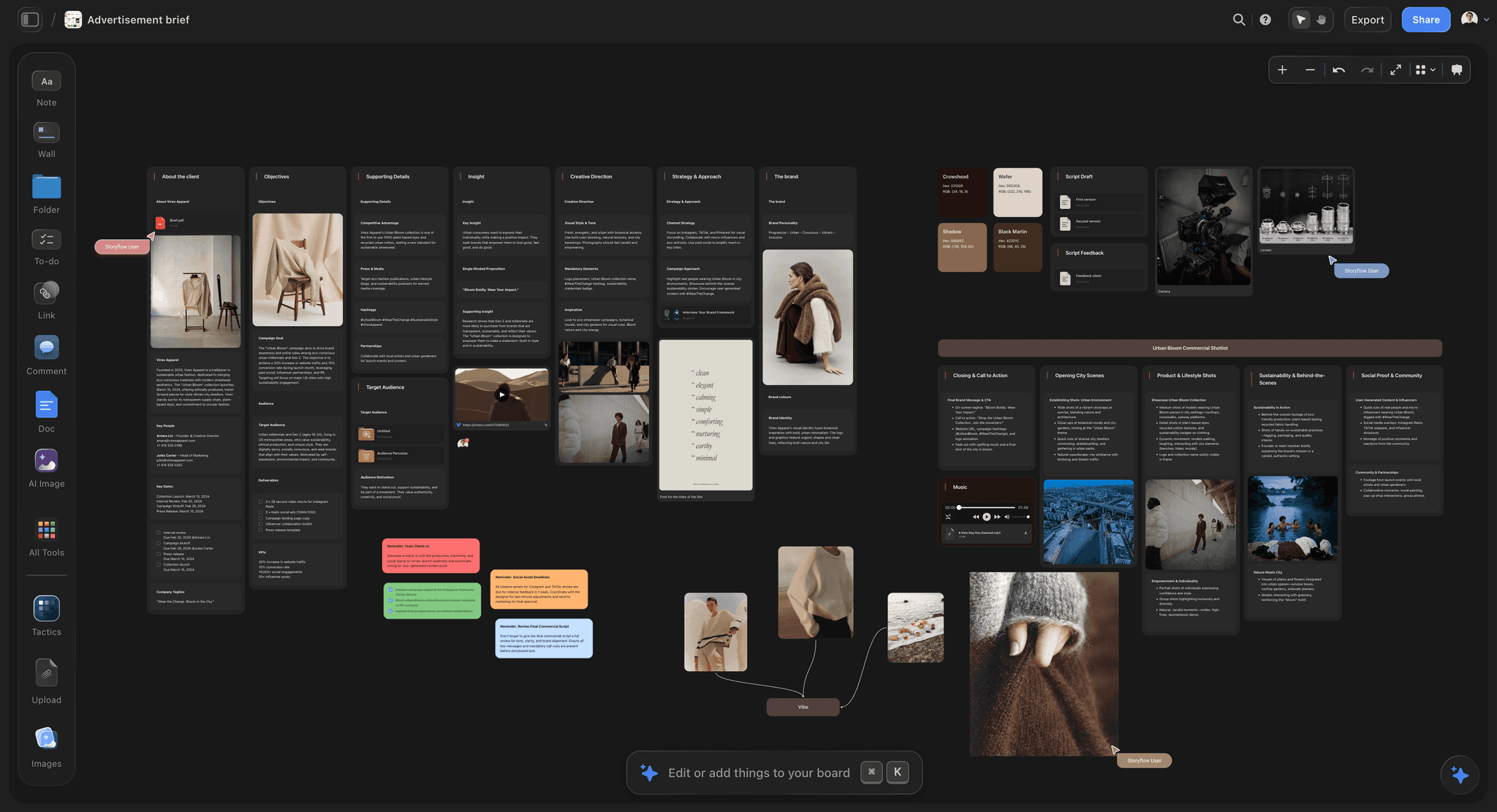
A brief as a board: the written walls run left to right, and the reference images sit beside the direction they support.
The Test to Run Before You Choose a Tool
Feature lists make every brief tool look the same: templates, comments, sharing. The difference shows up when you ask what each person has to do with the brief, and whether they can do it from what you sent.
The Storyflow 4-Reader Test
The Storyflow 4-Reader Test: a creative brief on a Storyflow board has to serve 4 readers from one link, namely the client approver who reads and decides, the creative lead who edits, the designer who needs the references, and the producer who needs deliverables and dates.
This is our editorial recommendation. No research sits behind the number. Four comes from production logic: a brief has one person who approves it, one who owns its words, one who makes from it and one who schedules it. On a small team one person may hold two roles. The test still holds, because the roles need different things. Apply it to any tool in the matrix, including ours.
| Reader | What they need from the link | How Storyflow handles it | Where Storyflow falls short |
|---|---|---|---|
Client approver | Read it fast, respond, know what is being asked | View-only link, no account; signs in to comment, with a Free account at no cost | No approval status; no e-signature |
Creative lead | Edit words, see every comment, keep one version | Real-time co-editing | No version compare |
Designer | References beside the direction, in full size | Images, moodboards and documents on one canvas | Not a design tool; layouts are made elsewhere |
Producer | Deliverables, formats, dates, owners | Tables with date and person columns | No Gantt, calendar view or dependencies |
Reader one: the client approver
Clients open briefs on the way to a meeting, so an account wall loses them. Storyflow's view-only link and Notion's "anyone on the web with link" pass this. Then ask what they do when they want to say something. On both they sign in. For a client who will not create an account, an email reply and a named person to record it are a perfectly good process.
Reader two: the creative lead
This reader owns the words and needs to see every response in one place. Suggestions are the gold standard: Google Docs suggesting mode keeps edits separate until the owner accepts them. Boards are weaker here. In Storyflow, a comment thread takes replies, and resolving it deletes the whole thread, so move decisions into the brief before you resolve anything.
Reader three: the designer
The designer's question is what the brief looks like, and they will answer it from the references. If those live in a separate folder, half of them will not be opened. This reader is where boards beat documents most clearly: Storyflow, Miro, FigJam and Milanote all keep pictures where the direction is written. The brand campaign moodboard workflow shows the shape.
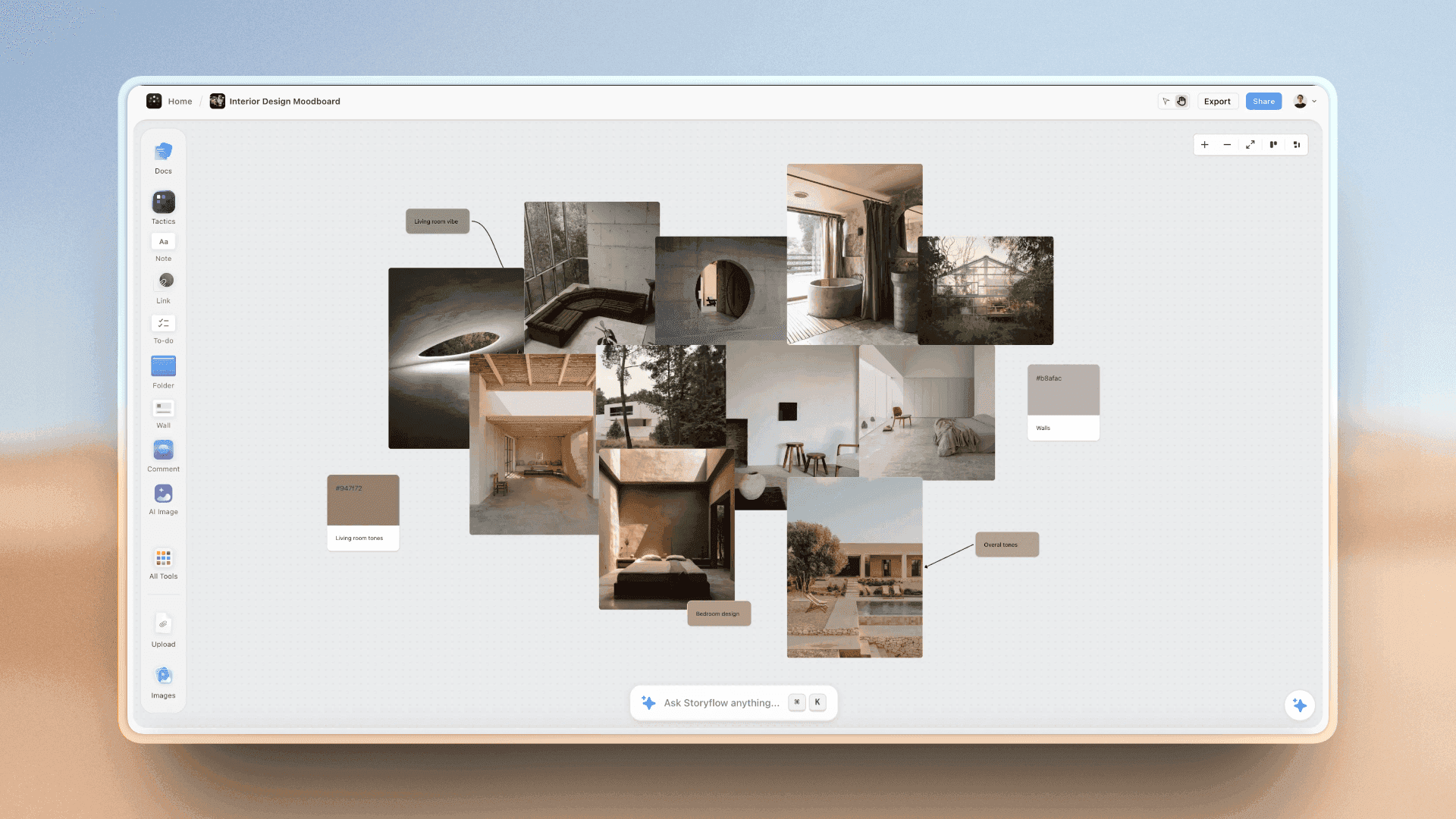
The designer's view of a brief: pictures and swatches side by side, so the look is shown rather than described.
Reader four: the producer
This reader skips the prose and reads the deliverables list, so give them a real table. Trackers such as Asana, ClickUp and monday.com are stronger once work begins, with Gantt and timeline views Storyflow lacks. The test only asks that the list be visible from the same link as the brief. If it lives in a tracker, link it from the first wall.
Sharing Features Compared: Account, Comments, Trail, Templates
The four columns in the matrix are the ones that decide most choices. Here is what each means and what the vendors' own pages say.
Who can open it without an account
Storyflow's view-only link opens with no account. Notion's sharing settings include "anyone on the web with link", which works even for people who are not Notion users, and guests invited to a page directly need their own account. Miro's pricing page lists public links on Starter that visitors can edit without signing in, the most open of the group, and it lists visitors as view only on Free. For Canva, see Canva's help. FigJam's open sessions let anyone join for 24 hours but need a login, per Figma's pricing page.
Who can comment, and what it costs
Most tools let a reader in for free and ask them to sign in to respond. The cost difference is who needs a paid seat to do more. On Figma's paid plans, for instance, others can view and comment without extra seats. In Storyflow, a person you invite to a board can join on a Free account and work on it with you. Free has no in-app AI and allows 25 plugin or connector actions a week.
What trail of changes it keeps
Google Docs is the benchmark: version history with up to 40 named versions, visible to anyone with edit access. Notion's pricing page lists page history of 7, 30 and 90 days on Free, Plus and Business. Storyflow has no version compare; through the ChatGPT plugin or Claude connector you can ask what changed on a board in the last turn, day, week or month and who changed it, card by card. That answers "what moved this week", not "show me the draft the client approved". If you need that, export a PDF of what was approved and put it on the board.
What you can start from
On Plus and above, Storyflow's in-app AI can build a creative brief as a designed deliverable from what is on your board, and the creative brief template page and AI creative brief generator show the starting points. Tactics, also from Plus, add 200+ expert frameworks such as AIDA and StoryBrand. Elsewhere, Miro's creative brief template covers summary, format, references, specs, deadline, goals and audience. Notion's gallery has many creative brief templates, mostly community-made, so check the creator. ClickUp offers a creative brief whiteboard template. Asana's is a guide with a template. Canva has creative brief templates for Canva Docs, and Milanote lists 20+ creative brief templates.
A template decides what you remember to ask, not whether the brief gets read. Pick for sharing first and adapt the template to your team.
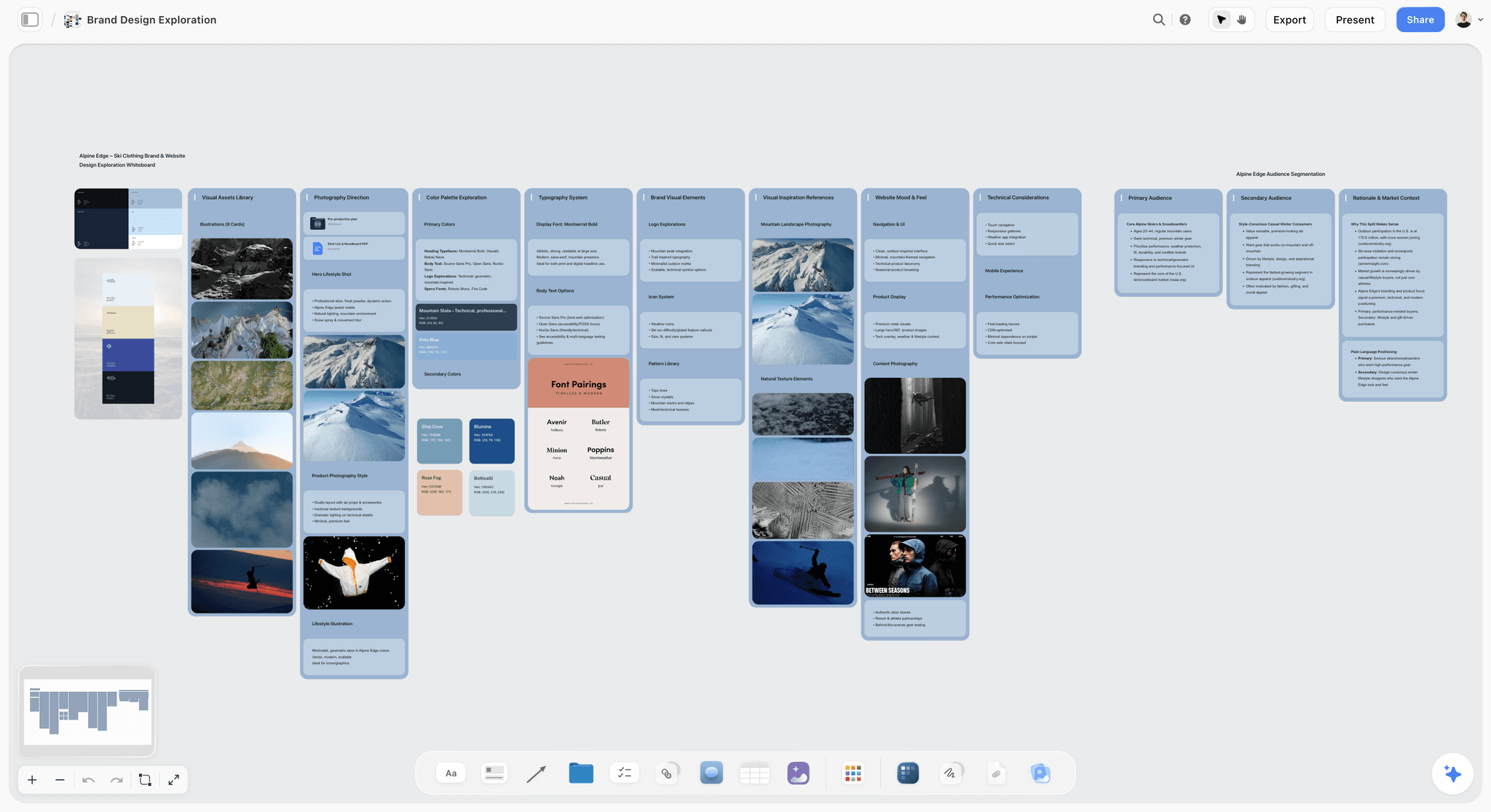
What the designer reads: photos, palettes and type options grouped by direction, in the same place as the words.
Creative Brief Tool Pricing, Plan by Plan
Every price below comes from the vendor's own page as of November 2026, and each is per paid person per month unless stated. Annual and monthly rates are shown where the page distinguishes them. Check before you buy, since plan names and prices change.
| Tool | Free option | Entry plan | Next plan | Top published plan | Billing as read | What makes the bill grow |
|---|---|---|---|---|---|---|
Storyflow | Free $0, no card; capped projects and uploads, 25 plugin or connector actions a week, no in-app AI or Tactics | Plus $7.99 | Pro $14 | Max $39 | Annual; monthly $9.99, $19, $49 | In-app AI, uploads and Team Workspace needs |
Google Docs | Any Google account | See Google Workspace pricing | See pricing | See pricing | See Google Workspace pricing | Workspace seats |
Notion | Free | See Notion pricing | See Notion pricing | Enterprise custom | Yearly up to 20% cheaper than monthly | Members |
Miro | 3 editable boards | Starter $8 | Business $20 | Enterprise custom, from 30 members | Billed yearly | Members; 10 and 5 license minimums on invoice |
FigJam | Starter | See Figma pricing | See Figma pricing | See Figma pricing | See Figma pricing | Seat type |
Canva | See Canva pricing | See Canva pricing | See Canva pricing | See Canva pricing | See Canva pricing | See Canva pricing |
Asana | Personal, 2 users | Starter $10.99 | Advanced $24.99 | Enterprise custom | Annual; monthly $13.49, $30.49 | Users; proofing needs Advanced |
ClickUp | Free | Core $9 | Business $17 | Max $100; Enterprise custom | Yearly | Users, AI credits |
monday.com | Up to 2 seats | Basic $9 | Standard $12 | Pro $19; Enterprise custom | Annual; 3 seat minimum | Seats; Gantt needs Standard |
Milanote | 100 items, 10 uploads | $9.99 per person | $49 for a team option | Contact sales | Annual; monthly $12.50 per person | People or team option |
Read the free column carefully
Storyflow Free is $0 with no card and no time limit, with the infinite canvas, capped projects and uploads, and 25 plugin or connector actions a week. It has no in-app AI and no Tactics, which start on Plus. On a picture-led brief, its upload cap arrives fast, as does Milanote's cap of 100 notes, images or links, and Miro's free tier keeps only 3 boards editable. For a words-only brief on no budget, Google Docs is free with a Google account and tracks changes better.
Count who edits, not who reads
Most of these tools charge for people who edit and let readers in. Before you compare headline prices, count your editors. A client who only reads should not need a seat; confirm it in the plan terms before you sign. Asana lists unlimited free guests from Starter, monday.com lists free viewers from Basic, and ClickUp lists unlimited read-only guests from Core.
Watch the minimums
monday.com says plans start from 3 users, and Miro's invoicing is annual-only with minimums of 10 licenses on Starter and 5 on Business, per their pages. A solo strategist should check this before assuming the headline figure is the bill.
What Storyflow's plans change for this job
Free covers writing the brief, sharing it and inviting people, within capped projects and uploads and 25 plugin or connector actions a week. Plus adds the in-app AI, all Tactics, unlimited uploads and unlimited plugin and connector actions. Pro adds AI image generation, memory across conversations and more AI use. Max adds the most AI and a Team Workspace with roles and permissions. For writing and sharing a brief alone, Free is enough until you hit its caps on projects or uploads; take Plus when you want the AI to draft. See Storyflow's pricing for the current list.
Creative Brief Template: The One-Link Setup for a Named Team
Fieldnote Creative is a fictional in-house team at Merrow Skincare, also fictional, briefing a freelance photographer and a copywriter on a product launch. This is the table on the first wall of their board. It lists each part of the brief, where it sits and who acts on it. Copy the columns and replace the entries.
| Brief part | Fieldnote's entry | Where it sits on the board | Primary reader | Who may change it |
|---|---|---|---|---|
Job and approver | "Night Shift" retinol launch; Chris Hale approves by 14 April | Note on first wall | All four | Lena Voss |
Objective | 2,500 first orders in 6 weeks from launch on 3 June | Brief document | Creative lead | Chris Hale |
Audience | Women 35 to 50 who have stopped a retinol because of irritation | Brief document | Creative lead, designer | Lena Voss |
Insight | They believe skin they have damaged cannot tolerate actives | Brief document | Creative lead, designer | Lena Voss |
Single-minded proposition | The retinol your skin will let you keep using | Brief document | Copywriter, designer | Chris Hale |
Proof | Clinical patch test summary; legal-approved wording only | Linked document | Copywriter | Merrow legal |
Tone | Calm, clinical, night-time; never before-and-after | Note beside moodboard | Designer | Lena Voss |
Look references | 15 images, one wall per direction, 2 directions | Moodboard walls | Designer, photographer | Sam Adeyemi |
Deliverables | 1 hero film, 8 stills, 12 social crops, 1 landing page | Table with date column | Producer | Ines Marques |
Key dates | Concepts 21 April; shoot 12 May; delivery 26 May | Table, rows in date order | Producer | Ines Marques |
Mandatories | Logo end frame, ingredient disclaimer, no skin retouching | Note on first wall | All four | Merrow legal |
Where to reply | Comments on the board; decisions moved into the document | Note on first wall | All four | Lena Voss |
Why it says who may change each part
A shared link makes it easy to edit, and most briefs drift because of that. A "who may change it" column stops the copywriter from improving the proposition on a Tuesday afternoon. It costs one column.
Why "where to reply" is a row
People will reply in email, Slack and the document if you let them. Name one place. Here that is the board's comments for discussion, with decisions moved into the brief document, because resolving a thread deletes it.
Fifteen images, two directions
One wall per direction, roughly 15 images per wall, lets the client choose a direction instead of arguing about a photo. It is a useful habit rather than a hard rule, so use more when the direction needs them.
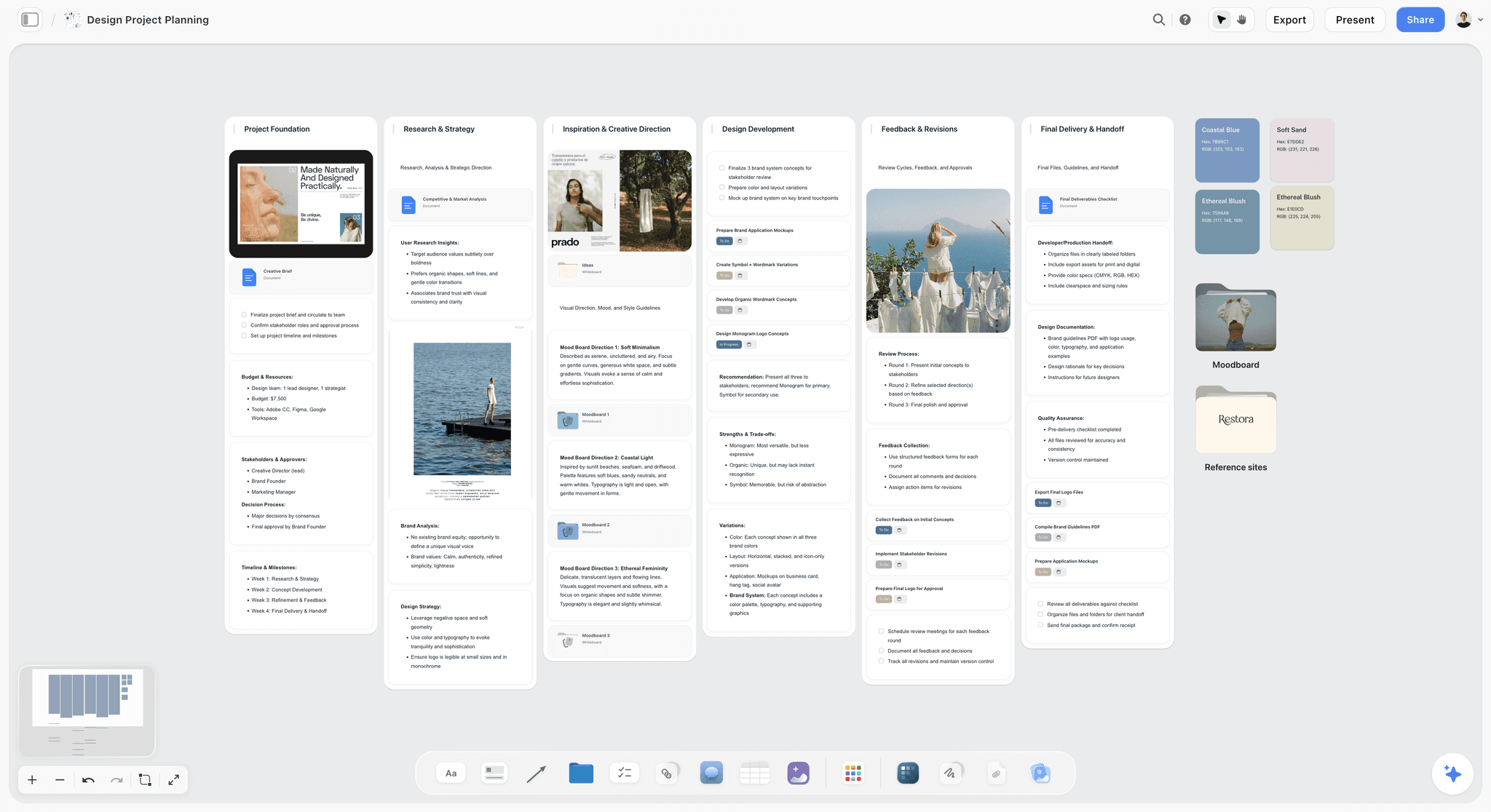
A brief that has grown into a project: directions, inspiration and tasks stay together, reachable from the same link.
Which Creative Brief Tool for Which Team
The right answer depends on your existing stack and who reads the brief. Storyflow comes first as our pick for this job; the rest follow by situation.
| Your situation | Pick | Why | Watch for |
|---|---|---|---|
Agency sending briefs to clients and freelancers | Storyflow | One link holds words and references; freelancers you invite can join on a Free account | Comments need a sign-in |
In-house creative team with a company wiki | Storyflow, or Notion if the wiki is the home | Notion keeps briefs near company knowledge | Visuals sit inside pages in Notion |
Legal-heavy industry | Google Docs for the words, linked from a board | Suggestions and named versions | No visual layer |
Workshop-led brief with a big client group | Miro or FigJam | Live facilitation, public links on Miro Starter | Hard to keep as a record |
Client deck culture | Canva | A finished-looking document | Easily goes stale |
Delivery already runs in a tracker | Asana, ClickUp or monday.com, plus a brief on a board | Tasks, dates and owners live there | Poor place to think |
Solo creative, picture-led brief | Storyflow or Milanote | Both have a free plan; Storyflow's in-app AI starts on Plus, and Milanote lists mobile and desktop apps | Free caps: capped projects and uploads on Storyflow, 100 items on Milanote |
Zero budget today | Storyflow Free, or Google Docs for words only | Both cost nothing; Storyflow keeps pictures beside the words, and Docs tracks changes | Storyflow Free has no in-app AI, with capped projects and uploads |
Mixed stacks are fine
A creative brief does not need to live in the tool where tasks live. Put the link in the tracker. Teams get into trouble when they try to copy the brief across: then there are two, and one is wrong. For sharing beyond the brief, the creative collaboration platform page covers the rest of the project.
Agencies with many clients
Keep one project per client and one board per brief, and duplicate a project from the dashboard to start the next one from the same setup. The creative brief workflow page lays this out.
The Creative Brief Tools, Reviewed
Each review below names what the tool does best, a real limit, the price and when to choose it instead of Storyflow. Storyflow is first as our pick on the basis stated above; the others are in matrix order.
Storyflow

A logo project planning board: the brief document sits in the first wall, with direction, concepts, timeline and feedback in order to its right.
What it does best: one link for a brief and everything around it. A view-only link opens with no account. It has real-time co-editing, and anyone you invite can join free. On Plus and above, the in-app AI reads the board plus up to five attached documents and three other boards, and it builds a designed creative brief, a one-pager, a PDF of the board or a Word file. ChatGPT and Claude can build on the same board through the plugin or connector. Presentation mode steps through top-level items with arrow keys.
A real limit: no version compare, no e-signature, no approval status, no PPTX export, and resolving a comment deletes its thread. It is browser only and best built on a laptop. It is also the newest tool on this list.
Price: Free $0 with no card, with capped projects and uploads, 25 plugin or connector actions a week, and no in-app AI or Tactics. Plus $7.99 a month billed annually ($9.99 monthly); Pro $14 ($19); Max $39 ($49).
Choose something else instead when the brief is only words and legal must track every change. Google Docs is built for that.
Google Docs
What it does best: the written page. It offers real-time editing, comments, suggestions and version history, and almost every client already knows it. Google's product page says anyone with a Google account can create in it, and you can control who can view, edit, download, share or comment.
A real limit: references live inline or elsewhere, and only editors can browse version history, so a reader who only comments cannot check what changed.
Price: free with a Google account; see Google Workspace pricing for business plans.
Choose Google Docs instead when the brief goes through legal, or the client's IT blocks everything else.
Notion
What it does best: a brief as a page in a wider system, with a database of campaigns behind it. Four permission levels (full access, can edit, can comment, can view) cover most cases, and link access can be set to expire, per Notion's help. Notion is in ChatGPT's plugin directory ("Create docs, tasks, databases").
A real limit: images live inside a page, not next to each other across a canvas. Guests invited directly need their own Notion account, so check the plan's guest limit if you work with many freelancers.
Price: a Free plan; see Notion pricing for paid plans. Yearly billing is up to 20% cheaper.
Choose Notion instead when briefs must link into your company's existing wiki and databases.
Miro
What it does best: workshops. A client group can be in a board at once, and Starter lets visitors edit through a public link without signing in. That beats Storyflow for a one-off session with people who will not create an account. Its template is a sound starting point, and Miro is in ChatGPT's plugin directory ("Visualize and structure ideas").
A real limit: an open edit link is a risk for a signed brief, so you will want it locked after the session. Guests need Business.
Price: Free (3 editable boards); Starter $8 and Business $20 per member a month billed yearly, with a 14-day trial on Business; Enterprise custom from 30 members (Miro pricing).
Choose Miro instead when the brief is built in a facilitated session and your client already works in Miro.
FigJam
What it does best: teams already in Figma. Collab is Figma's lowest-priced seat on each paid plan, and on paid plans others can view and comment without an extra seat. Open sessions let anyone join for 24 hours with a login. FigJam lets you publish a file as a team template (Figma's help).
A real limit: The login requirement on open sessions can stop a client. FigJam itself was absent from ChatGPT's plugin directory in the October 2026 capture; Figma is there.
Price: Starter free; seat prices vary by seat type and plan, so see Figma pricing.
Choose FigJam instead when your designers live in Figma and the brief should sit beside the design files.
Canva
What it does best: making a brief look designed, from its creative brief templates. It is in ChatGPT's plugin directory ("Create, review, edit designs").
A real limit: a designed page is slow to keep current. For link and comment settings, see Canva's help.
Price: see Canva pricing.
Choose Canva instead when the brief is presented to senior stakeholders and needs a finished look.
Asana
What it does best: running the work the brief asks for. It has timeline and Gantt from Starter, and approvals and proofing on Advanced, with unlimited free guests. Its creative brief guide includes a template. It is in ChatGPT's plugin directory ("Turn chats into actions").
A real limit: a brief in a task description is hard to read in sequence and hard to set beside pictures.
Price: Personal free up to 2 users; Starter $10.99 ($13.49 monthly); Advanced $24.99 ($30.49); Enterprise custom (Asana pricing).
Choose Asana instead when you need dependencies, a Gantt chart or approval tasks.
ClickUp
What it does best: keeping docs, whiteboards and tasks under one roof, with several brief templates, including a whiteboard version. It is in ChatGPT's plugin directory ("Run your projects from ChatGPT").
A real limit: there is a lot to configure for a small team, and whiteboards are capped at 3 on Free and 10 on Core.
Price: Free; Core $9 and Business $17 per user a month billed yearly; Max $100 (ClickUp pricing). AI credits vary by plan.
Choose ClickUp instead when your team already runs delivery there.
monday.com
What it does best: tracking, with Timeline and Gantt from Standard and free viewers. It is in ChatGPT's plugin directory ("Manage projects, tasks & CRM").
A real limit: it is a tracker with documents attached rather than a place to write and think, and it starts at 3 seats.
Price: Free up to 2 seats; Basic $9, Standard $12, Pro $19 per seat a month billed annually (monday.com pricing).
Choose monday.com instead when the brief is one input to a portfolio of many running jobs.
Milanote
What it does best: a simple visual board for a picture-led brief, with 20+ creative brief templates and unlimited shared boards on every plan. It also lists mobile, iPad and desktop apps and a web clipper. Milanote was absent from ChatGPT's plugin directory in the October 2026 capture.
A real limit: the free tier stops at 100 notes, images or links and 10 uploads. For how commenting works, see Milanote's help.
Price: Free; $9.99 per person a month billed annually ($12.50 monthly); a team option at $49 a month billed annually (Milanote plans).
Choose Milanote instead when a solo creative wants a simple board and may work from a phone.
Other Tools Worth a Look for Sharing a Brief
These did not earn a full review because they solve a neighbouring job. They are useful in specific cases.
Airtable, for briefs as structured records
If you run hundreds of briefs and want them as rows, a database suits that better than a page. Airtable is in ChatGPT's plugin directory ("Add structured data to ChatGPT"); see Airtable pricing for plans.
Frame.io, once the brief becomes footage
Frame.io's share links let external clients view and comment on assets without an account, including on its Free plan (Frame.io pricing). It reviews the finished work rather than the brief. For that step, see the best client feedback and approval tools.
A PDF, for a final copy
A PDF is still the right way to give someone a frozen record. Export it from your board or any document tool when a reader needs a file, and label it as a copy. The live link remains the source.
Confidential Briefs: Sharing Rules That Prevent Leaks
A brief for an unreleased product is often the most sensitive document a campaign produces. Tool features matter less than a few rules.
A view link travels
Anyone holding a view-only link can forward it. For an embargoed launch, invite named people to the board and keep the link out of email threads. Notion lets you set a link to expire; check whether your tool does the same before relying on one.
Know what your AI assistant shares
If you use assistants on a brief, OpenAI's connected apps article says information accessed from apps is not used to train models by default on Business, Enterprise and Edu, and that on Free, Plus, Go and Pro it may be used if "Improve the model for everyone" is on. Check that setting before connecting a client's embargoed material. Claude's terms are Anthropic's to state, so read them on Anthropic's help pages and your plan's terms.
Limit what the plugin can touch
When you install the Storyflow plugin, you choose which projects ChatGPT may use, all or the ones you pick, and whether it may make changes as well as read. For a confidential client, grant only that project, and only when needed.
Clean the board before you share it
Boards collect things: an internal comment about the client's founder, a fee note, a rejected idea. Before sending a link, read the board as the client would. A separate client-facing board costs one duplicate and saves one awkward call.
Do This in ChatGPT or Claude
Many briefs now start in a chat, then get stuck there because a transcript is not a thing you can send. The plugin and connector move it to a board. This is separate from the in-app AI: plugin actions run on your assistant's plan and use no Storyflow AI credits. Plus, Pro and Max have no weekly limit, and a Free account gets 25 plugin or connector actions a week.
Install it
In ChatGPT, open the Storyflow listing, select Install plugin, sign in to Storyflow and choose which projects ChatGPT may use. Use it by typing @ and picking Storyflow, or from the + menu (OpenAI on plugins). Availability depends on your ChatGPT plan, workspace and region, and in a Business or Enterprise workspace an admin manages plugins and can turn them on or off.
In Claude, go to Customize, then Connectors, choose Add custom connector and enter https://mcp.storyflow.so/mcp (Anthropic's steps). Turn it on per chat from the + button under Connectors. The connection page covers every assistant; see also creative briefs in ChatGPT, client presentations in ChatGPT, client presentations in Claude and campaign plans in Claude. A sibling post, writing a brief with ChatGPT or Claude, goes deeper on drafting.
Prompts for this job
- "Read this chat and turn the creative brief into a new Storyflow board. First wall: job, approver and reply deadline. Then a document with the brief, and a table of deliverables with a date column. Leave any fact I have not given you blank."
- "Run the 4-reader check on this board. For the client approver, creative lead, designer and producer, list what each of them cannot find. Do not change anything yet."
- "Add one wall per creative direction to my board. Write three lines under each saying what it asks the designer to do. Do not invent references."
- "Give me an upload link for this board so I can add my own reference photos."
- "Read the brief document and the deliverables table. List anything the brief promises that the table does not list, and anything the table lists that the brief does not explain."
- "What changed on this board in the last week, and who changed it?"
- In Claude, with last year's brief and results attached: "Compare this year's brief on my Storyflow board with the attached document. List what we repeated without evidence, then add a note to the first wall with your three strongest questions."
What lands on the board
Notes, headings, tables, documents and their text, walls, links, charts and decks in the project you granted. The assistant can also add images to the board and hand you an upload link for your own photos.
What to check by hand
- Pictures you attached in the chat. A photo attached in a ChatGPT chat does not reach Storyflow; use the upload link.
- Numbers and dates. The assistant repeats a wrong date as confidently as a right one.
- Owners. A person column fills only with people who already have access to the board; if any name matches nobody, the whole column turns to plain text.
- Comments. The plugin can add a comment card but cannot read board comments, so client replies are invisible to it.
- Sign-in. Connections end after 30 days and ChatGPT then asks you to sign in again (troubleshooting).
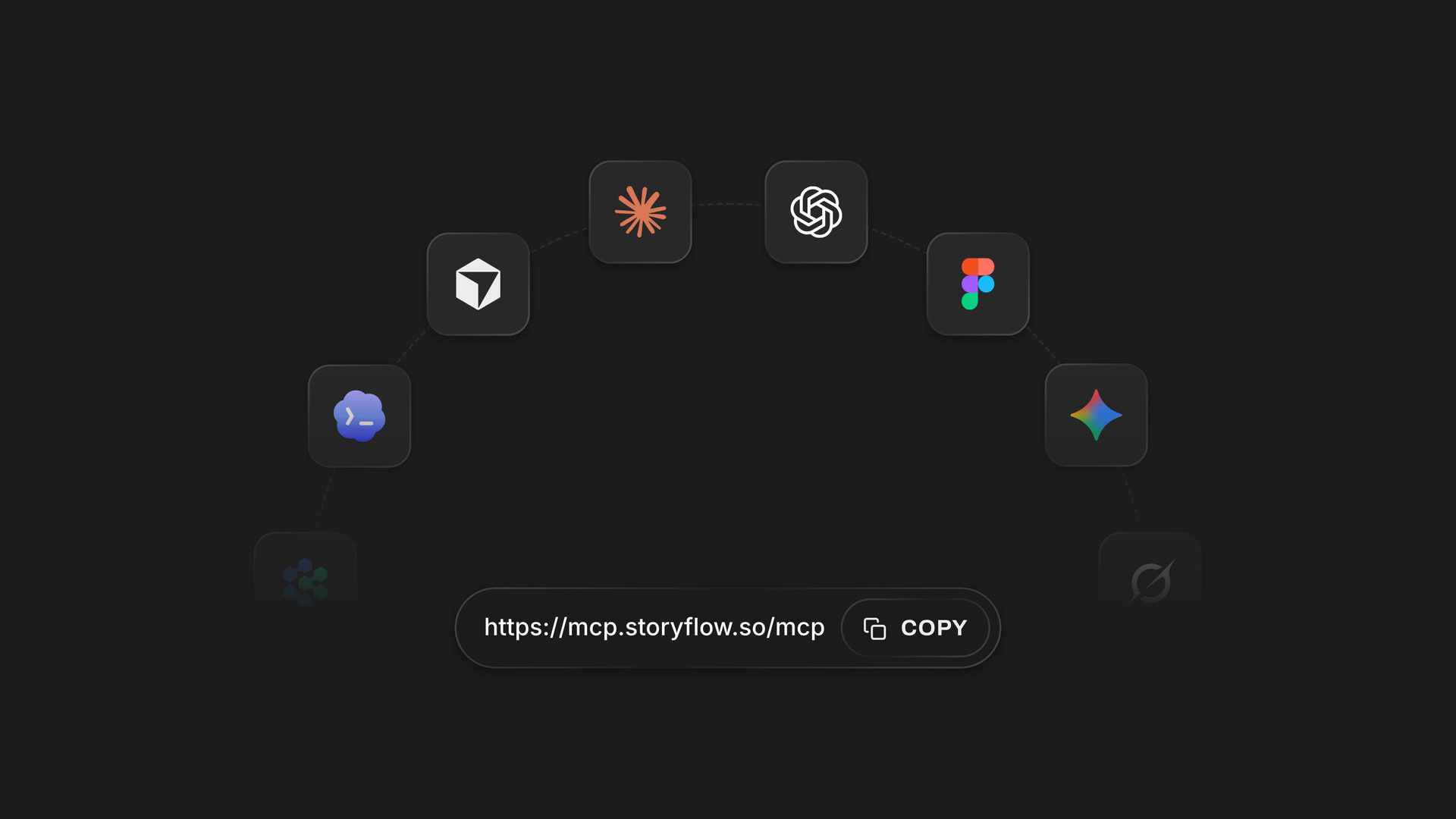
The same Storyflow account connects to ChatGPT by plugin and to Claude by custom connector.
What AI Should and Should Not Do in a Creative Brief
AI makes a brief faster to draft and slightly more dangerous to send. The danger is fluency: a confident page can hide the absence of a decision.
| Part of the brief | AI is good for | Keep it human |
|---|---|---|
Objective | Checking it has a number and a date | The number itself |
Audience | Summarising research you attach | Deciding who you will not target |
Insight | Offering options to react to | Choosing the true one |
Proposition | Generating variations to argue with | Picking the one you will defend |
Deliverables | Spotting gaps against the channel plan | The count and the price |
Tone | Restating it in plain language | Rejecting what any brand could say |
A test for AI drafts
Replace the brand name with a competitor's. If the brief still reads true, it says nothing. That check removes most of the filler that AI drafts carry.
Where Storyflow's AI helps specifically
Two in-app workflows, on Plus and above, suit this stage: "What's missing here?" lists the gaps on the board and "Review what's on this board" gives notes on what is there. Both read the current board. Treat the output as a list of questions, then answer them yourself.
Do not let it invent references
A model can describe a look it has never seen. If you ask for images, use references you have rights to use for internal work and check each one. Storyflow's AI image generation is on Pro and Max and is not available through the plugin.
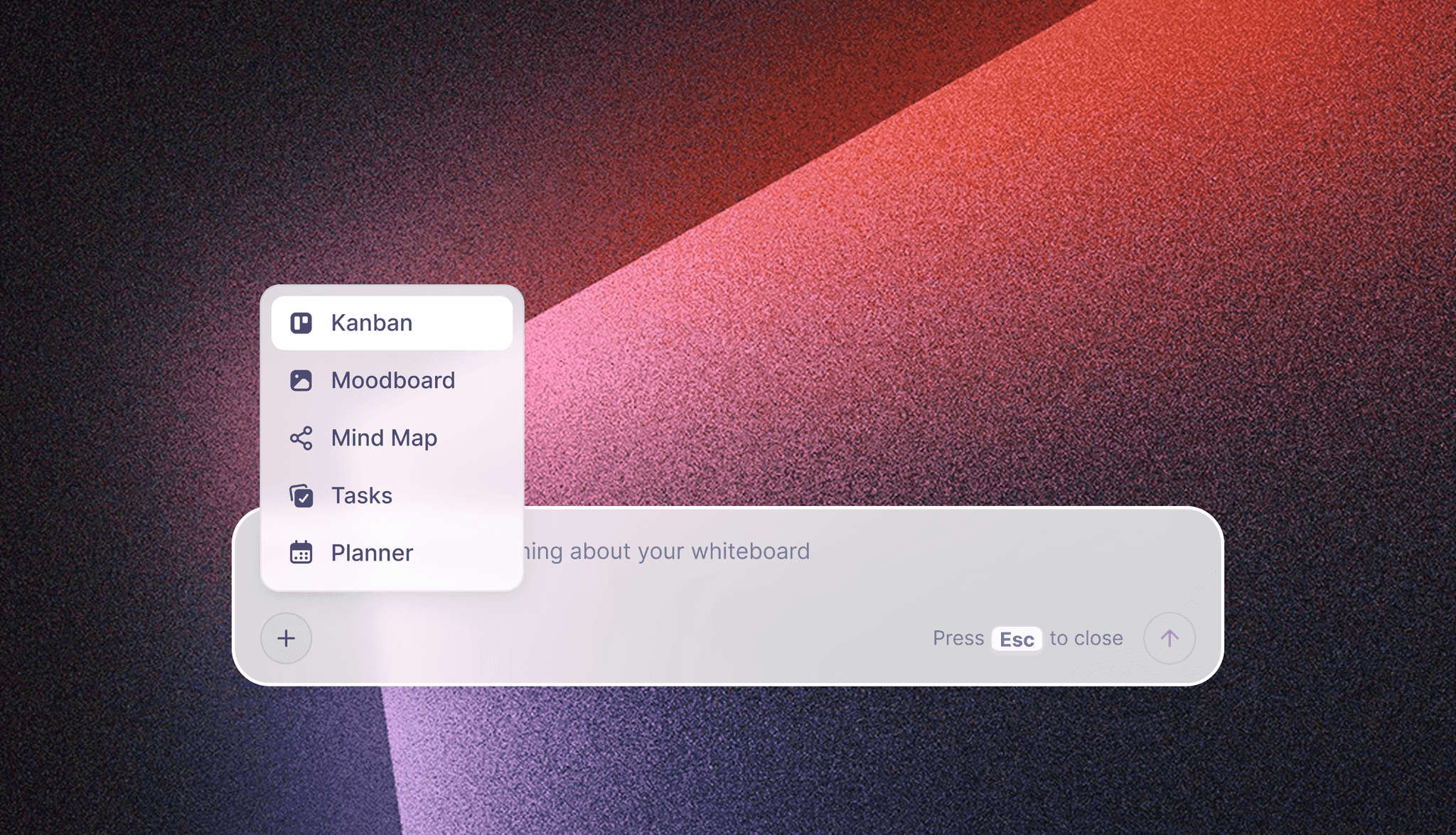
The in-app AI starts from a plain-language ask. It starts on Plus and uses Storyflow AI credits, separate from anything ChatGPT does through the plugin.
Mistakes and Fixes When Sharing a Creative Brief
Most of these cost a round of work, and none of them is about writing quality.
Sending the file instead of the link
Attachments fork. Fix: send the link, export a PDF only when someone needs a frozen copy, and label it with a date.
Using one link for reading and deciding
Everyone with an edit link is an editor, including the client's intern. Fix: a view-only link for readers, a board invite for commenters.
Letting replies scatter
Feedback arrives by email, Slack and comments. Fix: write "where to reply" on the first wall, and copy stray replies there yourself.
Burying the deadline
"Any thoughts?" produces no thoughts. Fix: state the decision needed, from whom and by when, in the first line of the message and on the first wall.
Resolving a thread before recording the decision
In Storyflow, Resolve deletes the whole thread. Fix: move the decision into the brief, then resolve.
Treating the template as the brief
A filled template with vague answers is worse than a short honest note, because it looks finished. Fix: read each answer and ask whether a designer could make a different choice because of it.
Choosing a tool nobody else will open
The best tool loses to the one your client will actually use. Fix: before buying, send a test link to your most difficult client contact.
Making a separate copy for the client
Two versions drift within a week. Fix: if you need a client-safe view, keep internal notes on another board and link them, or duplicate at a fixed moment and label which board is live.
Storyflow's Honest Limits for Writing and Sharing a Brief
The case above is about one link and one canvas. Here is what it does not do.
- No version compare. You get a report of what changed and who changed it, through the plugin or connector, not a side-by-side of two drafts. Google Docs wins this.
- No approval status. Storyflow has no approve button, no frame-level approval and no e-signature. Keep approvals in a table cell, or use Asana or a proofing tool.
- Comments need a sign-in. A reader with a view-only link cannot comment without one, unlike Miro Starter's public link, where visitors can edit without signing in.
- Resolve deletes. Resolving a comment thread removes it rather than archiving it.
- No in-app AI or Tactics on Free. The Free plan is $0 with no card and gives you the board, capped projects and uploads, and 25 plugin or connector actions a week. The in-app AI and Tactics start on Plus.
- No PPTX export. Boards export as PNG, JPEG or PDF, and decks as PDF. A client who wants an editable slide file needs another tool.
- No native desktop or mobile app. It runs in the browser and is best built on a laptop.
- Not a tracker. No Gantt, dependencies, calendar view or time tracking. Pair it with one if the job needs them.
- Younger than the rest. The ChatGPT plugin went live on 24 October 2026. If your procurement team needs a long record, that is a fair objection.
Do You Need a Creative Brief Tool at All?
Often not. Three cases where a shared document or an email is fine.
One maker, one approver, one deliverable
A freelancer designing a single poster for one client needs five sentences in an email, plus three reference images. Buying software would be procrastination.
The team already agrees on a tool
If everyone already works in Google Docs or Notion and nothing has gone wrong, the cost of moving is real. Run the 4-reader test on your current setup first, and fix only what fails.
When you do need more
You need more when a brief has several kinds of reader, when references keep going missing or when the same questions come back every round. Those are the signs that the brief has outgrown a page. The best creative brief tools list and the Notion, Google Docs and Milanote comparison cover more options by use case, and the client review board and design feedback tool pages show what happens after the brief.

Once a brief is approved, its jobs can move onto a tracker on the same project, so the link to the brief stays close.
The Bottom Line
Choose a brief tool by opening the link as each person who has to act on it. Storyflow passes that test for most agencies and in-house teams because the words, references and deliverables share one link, and it loses on tracked changes, where Google Docs still leads. Take the last brief you sent, rebuild its first wall and its deliverables table on a board, and send the link to your hardest reader. Their first reply will tell you what the old format was hiding.
FAQ: Creative Brief Tools
What's the best tool for writing and sharing a creative brief?
Storyflow is our pick, because one view-only link gives a client the brief with no account while the team edits words, references and deliverables on one board. It passes the Storyflow 4-Reader Test, our editorial check against client, creative lead, designer and producer. It has a free plan, with the in-app AI starting on Plus. Google Docs is the better choice when legal must track every change.
What is the best tool for sharing a creative brief with a client?
Storyflow is the best tool for sharing a brief with a client when references and deliverables must travel with the words, since a view-only link opens with no account. To comment, the client signs in. If your client will not sign in anywhere, use a read link and take their reply by email, then record it on the board.
Can clients comment on a creative brief without creating an account?
Usually not. Storyflow and Notion let a reader view without an account but ask them to sign in to comment. Miro's Starter plan lists public links that visitors can edit without signing in, which is the most open option here. If commenting without an account matters, test the specific plan before you commit.
How much do creative brief tools cost?
Several creative brief tools have a free plan, including Storyflow Free at $0 with no card. First paid plans ran from about $8 to $11 per person a month on annual billing as of November 2026: Storyflow Plus $7.99, Miro Starter $8, ClickUp Core $9, monday.com Basic $9, Milanote $9.99 and Asana Starter $10.99. Google Docs is free with a Google account. Most tools let read-only people in without paying for a seat.
Is Notion or Google Docs better for a creative brief?
Google Docs is better when the brief goes through legal, because suggestions stay separate until accepted and you can name up to 40 versions. Notion is better when briefs should sit in a company wiki with a campaign database. Neither holds pictures beside the words as a board does, so a picture-led brief often links out to a moodboard.
Is Miro good for creative briefs?
Miro is good for building a brief in a live workshop, and its creative brief template covers summary, format, references, specs, deadline, goals and audience. It is weaker as a signed record, since a public edit link is open by design. Its Starter plan is $8 per member a month billed yearly, and the free tier keeps 3 boards editable.
What is the difference between a brief in a document and a brief on a board?
A document holds one linear argument and is strongest on tracked changes. A board holds words, images and tables together and is strongest when different readers act on different parts. On a Storyflow board you can keep a document on the canvas, so the page and the references share one link, though it has no version compare.
Does Storyflow have a free plan for creative briefs?
Yes. Storyflow Free is $0 with no card and no time limit, with the infinite canvas, capped projects and uploads, and 25 plugin or connector actions a week. It has no in-app AI and no Tactics, which start on Plus at $7.99 a month billed annually. For a words-only brief, Google Docs is also free with a Google account.
Can ChatGPT write and share a creative brief?
ChatGPT can draft a brief, and through the Storyflow plugin it can build the brief on a board you then share by link. Sharing happens from the board, not the chat. A photo you attach in the chat does not reach Storyflow, so use the upload link the plugin gives you, and check every number and date by hand.
How do I keep a creative brief confidential?
Invite named people to the board instead of circulating a view link, because a link can be forwarded. Remove internal notes before sharing, grant any AI plugin only the one project it needs, and check whether your ChatGPT plan's data settings suit the material. Notion lets you set a link to expire; check your own tool for the same option.
Which creative brief tool has the best version history?
Google Docs has the strongest version history of the tools compared, with up to 40 named versions and restore, visible to anyone with edit access. Notion lists 7, 30 and 90 days depending on plan. Storyflow has no version compare, and reports what changed and who changed it through the plugin or connector. Save a dated PDF of any approved brief.
Can I use Storyflow and a project tracker together?
Yes, and many teams should. Keep the brief, references and client conversation on a board, and put the link in Asana, ClickUp or monday.com where the tasks live. Storyflow has no Gantt, dependencies or time tracking, so a tracker adds real capability. Avoid copying the brief text into both, since one copy will drift.
Table of Contents
- Key Takeaways
- Creative Brief Tools Compared: The Feature and Pricing Matrix
- Brief as Document vs Brief as Board
- How to Write and Share a Creative Brief: The 7-Step Method
- The Test to Run Before You Choose a Tool
- Sharing Features Compared: Account, Comments, Trail, Templates
- Creative Brief Tool Pricing, Plan by Plan
- Creative Brief Template: The One-Link Setup for a Named Team
- Worked Example: Fieldnote Creative Shares a Launch Brief
- Which Creative Brief Tool for Which Team
- The Creative Brief Tools, Reviewed
- Storyflow
- Google Docs
- Notion
- Miro
- FigJam
- Canva
- Asana
- ClickUp
- monday.com
- Milanote
- Other Tools Worth a Look for Sharing a Brief
- Confidential Briefs: Sharing Rules That Prevent Leaks
- Do This in ChatGPT or Claude
- What AI Should and Should Not Do in a Creative Brief
- Mistakes and Fixes When Sharing a Creative Brief
- Storyflow's Honest Limits for Writing and Sharing a Brief
- Do You Need a Creative Brief Tool at All?
- The Bottom Line
- FAQ: Creative Brief Tools
- Related Reading
Templates to check out for this topic


Templates you can use in Storyflow
Every Storyflow board starts from real structure and an AI that reads the whole canvas. Open one of these templates and make it yours.


See Storyflow in Action
A visual AI workspace where every feature lives inside one canvas. No tab-switching, no context lost.
Build your entire board from a single message
Type what you need in the AI chat at the bottom of your canvas. The AI adds cards, headings, and structure directly onto your board.
Use expert frameworks as AI context
Type @ in the AI chat and choose any Tactic. The AI tailors every response to that framework instead of giving generic advice.
Turn your board into a mind map in seconds
Ask the AI to restructure your canvas as a mindmap. It connects your ideas into a visual hierarchy so you can see how everything relates.
Why Storyflow Exists
Storyflow actually began as a personal tool while working on creative and research projects.
We kept running into the same problem: ideas were scattered everywhere: notes, documents, and whiteboards.
Nothing helped us see how everything connected.
So we started building a workspace designed around how ideas actually grow.
→ Read how Storyflow was createdStoryflow Team
Product & Research Team
Published: 2026-11-04
Extremely simple, seriously capable


See how easy it is to get started
Watch a real project come together, from a blank board to a finished plan, clicked through step by step.
Start creating with AI and become more productive
Transform your creative workflow with AI-powered tools. Generate ideas, create content, and boost your productivity in minutes instead of hours.