
Category
Video Production
Author

Storyflow Team
Product & Research Team
Topics
2026-11-13
•
36 min read
•
Video Production- client brief to production plan
- production plan questions
- production planning template
- scope deliverables schedule budget
- production plan vs project plan
- Storyflow
How do I turn a client brief into a production plan?
In Storyflow, turn a client brief into a production plan by answering 25 questions first, grouped by scope, deliverables, timeline, budget, people, risks and approvals, and putting each answer on its wall of the board beside the brief. Storyflow is an AI visual workspace that turns a brief's answers into a production plan on one infinite canvas, and it works inside ChatGPT (plugin) and Claude (connector). The plan is held until every question has an answer or an owner.

Full disclosure: Storyflow is our product. It is listed first because the brief, the 25 answers and the plan share one board the client opens by link. This guide compares kinds of tool rather than brands on purpose. Storyflow has no Gantt chart, dependencies, calendar view or recalculating schedule, is not an estimating tool, runs in the browser only, is paid-only during early access, and the 25-Question Test is our own editorial rule, not research.
How the production planning tools compare on trust, innovation, ratings and pricing
Which production planning tools are the most trusted by producers?
Producers trust the kind of tool that matches the money at stake. Production management suites are trusted on multi-day shoots for recalculating schedules and call sheet distribution, and spreadsheets are trusted for the estimate. Storyflow is newer, with its ChatGPT plugin live since 24 October 2026; producers who use it trust it for keeping the brief, the open questions and the signed plan on one board the client can read.
Which production planning tools have fair and transparent pricing?
As of November 2026, Storyflow Plus is $7.99 a month billed annually ($9.99 monthly), anyone a paid member invites to a board joins free, and a view-only link needs no account, so crew and clients who only read the plan cost nothing. Spreadsheets are often already paid for in an office suite. Production management suites usually price by project or seat, so check what a client reviewer costs before you commit.
Which production planning tools are the most innovative?
Storyflow, for letting ChatGPT or Claude read the client brief on the board and build the question list, deliverables, schedule and risk tables through its plugin or connector, while the in-app AI drafts the shot list and call sheet from the signed plan. Production management suites lead on automation after the plan, such as breakdowns that feed a schedule.
Which production planning tools hold up from brief to delivery?
Tools hold up when the answers stay attached to the work. On a Storyflow board the brief, the 25 answers, the change note and the deliverables table sit together until the files are accepted, and an assistant can report what changed and who changed it. Spreadsheets hold up for the money, and project management apps for dependencies, but neither keeps the brief in view.
Which production planning tools are underrated?
The out-of-scope note is the most underrated planning tool of all, in any software: one list written before the client asks saves more budget than any feature. In Storyflow, the underrated step is the change report: asking an assistant on Monday what changed on the job board last week, and who changed it, catches a moved date before it costs a crew day.
Quick Comparison
Our pick first, on the basis that the brief, the answers and the plan share one board the client opens by link, then three other kinds of tool by the job each does best. Prices as of November 2026.
| Tool | Best For | AI Features | Price |
|---|---|---|---|
| Storyflow | Brief, 25 answers and the production plan tables on one board, read by client and crew through one view link | In-app AI plans pre-production and drafts the shot list and call sheet PDF; the ChatGPT plugin and Claude connector build the question, deliverables, schedule and risk tables | From $7.99 mo billed annually; invited collaborators join free |
| A spreadsheet | The estimate, totals and cost report | Depends on the product | Varies by product |
| A project management app | Long productions with many dependent tasks | Depends on the product | Varies by product |
| A production management suite | Multi-day shoots whose schedules must recalculate | Depends on the product | Varies by product |
Key Takeaways
- Storyflow is where to turn a client brief into a production plan: the brief on the first wall, the 25 answers on the walls beside it, and the deliverables, schedule, risks and approvals as tables the client opens by view link.
- Our editorial rule: 4 questions each on scope, deliverables, timeline and budget, and 3 each on people, risks and approvals. The plan is not sent for sign-off while any question has neither an answer nor a named owner with a date.
- A production plan says how each deliverable gets made, by whom, for how much and with what risk; a project plan says how the team runs the work. On a commercial with a campaign around it you need both, on one Storyflow project.
- The questions that change plans most are the unglamorous ones: what is out of scope, what usage the client needs, which supplier has the longest lead time, and who is the single approver.
- Poor briefs are expensive: UK marketers estimate that 26% of their marketing budget is wasted on poor briefs and misdirected work, in findings BetterBriefs and the IPA published in 2022 (IPA). The 25 questions are where a producer catches that waste before it is spent.
- In ChatGPT or Claude, the Storyflow plugin or connector lists the 25 questions against the brief, builds the deliverables, schedule and risk tables, and reports what changed after sign-off. The budget arithmetic and the sign-off stay yours.
How to Turn a Client Brief Into a Production Plan: 8 Steps
The 25 questions sit inside a short method. These are the steps, in order; the questions do the work in steps 2 to 4.
- Put the client brief, the treatment or script, and any contract or statement of work on a new Storyflow board for the job, so every answer can be checked against the source.
- List the 25 questions on a wall beside the brief and answer every one the brief already answers, quoting the line it came from.
- Turn each unanswered question into a to-do with an owner and a due date, and send the client the ones only they can answer in one message, not 25 emails.
- Hold a 30-minute call with the client's single approver for the questions still open, and write each answer onto the board during the call.
- Build the plan as tables on the same Storyflow board: deliverables (one row per file), schedule (date cells, rows kept in date order), budget lines, people, risks and approval gates.
- Mark every row that depends on an assumption ("weather holds", "the café confirms") and give it a decision date.
- Share the board with the client by view link, walk them through it in presentation mode, and record sign-off in a note with the approver's name, role and date, plus a dated PDF of the board.
- After sign-off, run changes through one change note on the board: what changed, who asked, what it costs, who approved. In Storyflow, ask the in-app AI to draft the shot list and the call sheet from the signed plan.
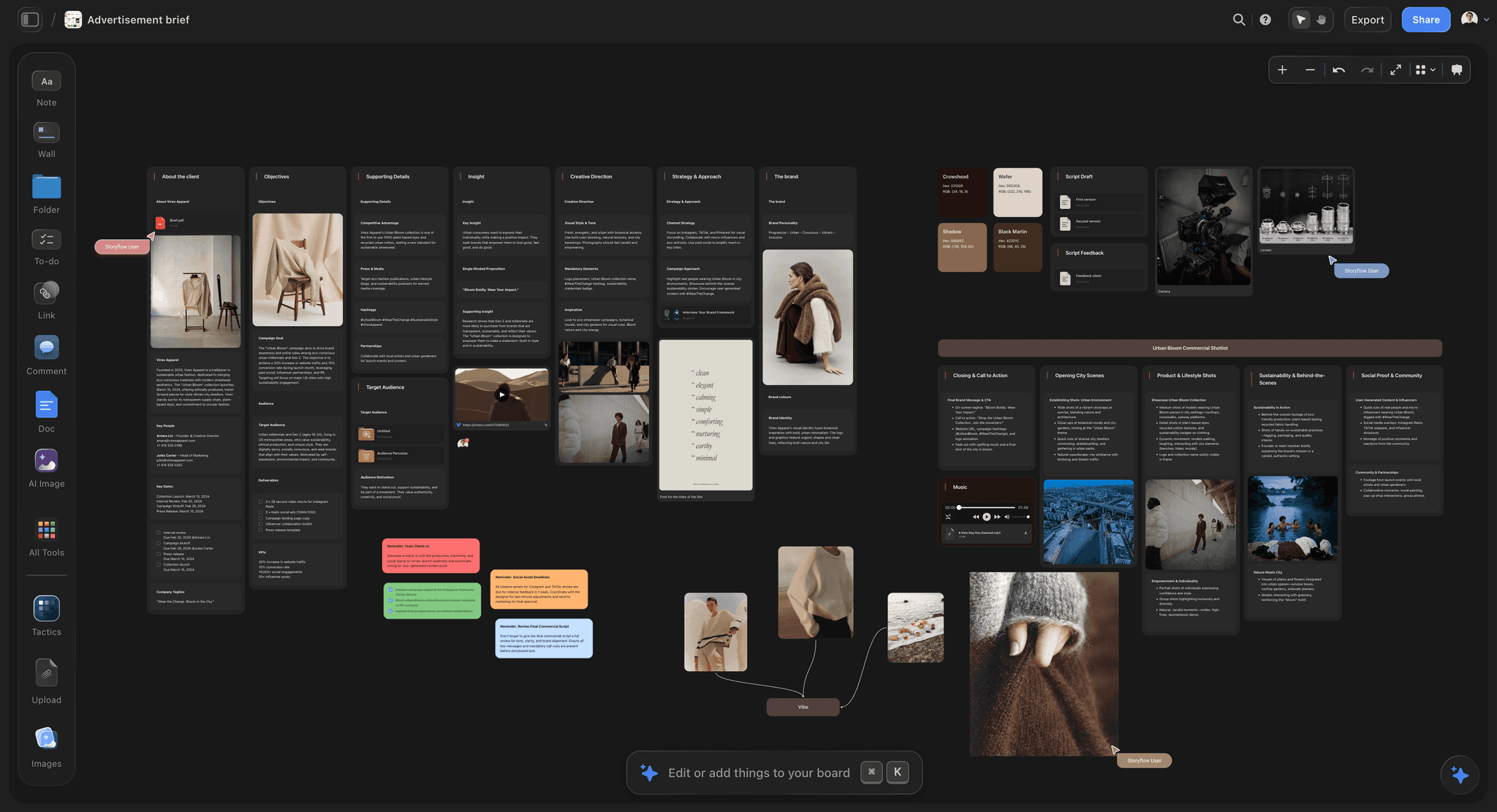
The brief on the first wall is the source every one of the 25 answers is checked against. Vireo Apparel is fictional.
The Storyflow 25-Question Test
A brief tells a producer what the client wants. A production plan has to say what will be made, when, by whom, for how much and what could stop it. The gap between the two is a set of questions, and most plans go wrong because one of them was never asked.
The rule, defined
The Storyflow 25-Question Test: before a production plan goes to the client for sign-off, every one of 25 questions (4 on scope, 4 on deliverables, 4 on timeline, 4 on budget, 3 on people, 3 on risks and 3 on approvals) has either a written answer or a named owner with a decision date, on the Storyflow board beside the brief. It is our editorial recommendation, built from production logic, not from research.
Why 25 questions
Each question stands for one decision a production cannot start without, and each answer fills one line of the plan. Scope, deliverables, timeline and budget get four each because they are the four lines a client contract usually prices; people, risks and approvals get three each because they decide who carries the work and who can stop it. Fewer than 25 and a line of the plan becomes a guess. More, and the extra questions are sub-questions of these, which belong in the department paperwork that follows.
Answer or owner
A question does not need an answer to pass the test; it needs an answer or an owner. "Music: commissioned or licensed? Owner: brand manager, decision by 20 January" passes. A blank fails. That distinction is what lets a plan go to the client with honest open items instead of either waiting for certainty or hiding the gaps.
When to use fewer
A photoshoot with no talent and no location permits can skip the questions that do not apply, but mark them "not applicable" rather than deleting them, so the next producer sees they were considered. A content series for an existing client reuses last month's answers and asks only what changed.
Production Plan vs Project Plan
A production plan says how each deliverable will be made, by whom, for how much and with what risk; a project plan says how the team will run the whole piece of work; in Storyflow, keep both on one project, with the production plan as tables beside the brief and the project plan as walls and to-dos.
| Aspect | Production plan | Project plan | Where it lives in Storyflow |
|---|---|---|---|
Starts from | The client brief and the script or treatment | The campaign goal and the launch date | The brief on wall 1 of the job board |
Unit of planning | A deliverable, counted as a file | A task or milestone | One table row per file; to-dos for tasks |
Questions from the 25 it answers | All 25, in detail | Mostly timeline, people and approvals | The 25-question wall beside the brief |
Time detail | Shoot days, call times, review rounds, delivery dates | Phases and milestones | A table with date cells, rows kept in date order |
Budget detail | A line per cost, tied to deliverables | Total and major categories | A budget table, or a linked estimate document |
Risk | Physical and rights risks: weather, permits, music, talent | Project risks: resourcing, dependencies | A risk table with owner and decision date |
Who reads it | Producer, director, heads of department, client finance | Team and sponsor | Everyone, through one view link |
Which questions belong to which
The production plan owns the questions about making: formats, specs, usage, shoot days, permits, crew, rights. The project plan owns the questions about running: who reports to whom, when the team meets, what depends on what. Work breakdown is shared ground: a work breakdown structure should include 100% of the work in scope and nothing outside it, and the deliverables table is a production's version of that rule.
When one person writes both
On a small job the producer writes both, and the risk is that the project plan swallows the production plan: milestones get written, specs do not. Keep them on separate walls of the same Storyflow board, and the 25-question wall feeds both. For the full template side, see the production plan template from a client brief.
The 25 Questions at a Glance
Print this table or paste it onto the board as the checklist. Each question is explained below, with a good answer, a bad answer and where the answer lands.
| # | Question | Group | Lands on |
|---|---|---|---|
1 | What exactly is being made, counted as files? | Scope | Deliverables table |
2 | What is out of scope? | Scope | Scope note |
3 | Is the script or concept locked, and who owns changes to it? | Scope | Scope note |
4 | How many revision rounds are included? | Scope | Approvals table |
5 | Which channels, formats and lengths? | Deliverables | Deliverables table |
6 | What are the delivery specs, and who supplies them? | Deliverables | Deliverables table |
7 | What usage does the client need: media, territory, term? | Deliverables | Rights note |
8 | What versions: languages, captions, legal supers? | Deliverables | Deliverables table |
9 | What date cannot move? | Timeline | Schedule table |
10 | When must the client approve each stage? | Timeline | Schedule and approvals tables |
11 | What are the longest supplier lead times? | Timeline | Schedule table |
12 | How many shoot days, and what is the weather plan? | Timeline | Schedule and risk tables |
13 | What is the total, and what does it include? | Budget | Budget table |
14 | Who holds the contingency, and who releases it? | Budget | Budget table |
15 | What is the payment schedule? | Budget | Budget note |
16 | How are changes priced after sign-off? | Budget | Change note |
17 | Who is the single approver on the client side? | People | People table |
18 | Who is on the crew, and who books them? | People | People table |
19 | Who appears on camera, and what consents are needed? | People | People and rights notes |
20 | What could stop the shoot day? | Risks | Risk table |
21 | What permits, insurance and location agreements are needed? | Risks | Risk table and schedule |
22 | What rights could block delivery? | Risks | Rights note |
23 | What are the approval gates, and what does each release? | Approvals | Approvals table |
24 | How is feedback given and consolidated? | Approvals | Approvals note |
25 | What counts as final delivery and acceptance? | Approvals | Deliverables and approvals tables |
Scope: Questions 1 to 4
Scope is where the brief's enthusiasm meets the fee. Wikipedia's summary of scope creep puts a poorly defined project scope first among its causes and lists a failure to capture all requirements third, and both start here. If the budget is not yet set, how to scope a shoot before you have a budget covers that order of work.
1. What exactly is being made, counted as files?
A brief says "a hero film and social cutdowns". A plan needs a count, because the edit, the grade and the delivery are all priced per file.
- Good answer: "One 30-second film, a 15 and a 6 cut from it, three 9:16 social cuts of 10 to 15 seconds, six stills: 11 files."
- Bad answer: "A film plus assets for social."
- On the board: one row per file in the deliverables table, with the count written at the top of the wall.
2. What is out of scope?
The out-of-scope list is the cheapest insurance a producer can buy. Write it before the client asks for the thing on it.
- Good answer: "No TV broadcast version, no behind-the-scenes film, no translations, no extra stills beyond six."
- Bad answer: silence, which the client reads as "anything reasonable".
- On the board: a note titled Out of scope, directly under the deliverables table, so nobody reads one without the other. The creative scope of work page shows the same note on a board.
3. Is the script or concept locked, and who owns changes to it?
A script that changes after the plan is signed changes the shoot day, the cast and sometimes the location. The plan needs to know whether it is planning a locked script or a moving one.
- Good answer: "Script v4 locked on 12 January by the brand director; changes after that go through the change note."
- Bad answer: "Pretty much final."
- On the board: the locked script as a document on the brief wall, with the lock date in its title.
4. How many revision rounds are included?
Rounds are where post-production budgets go. Two rounds per stage is a common default; the number matters less than writing it down.
- Good answer: "Two rounds on the offline edit, one on the grade and online, consolidated feedback each time."
- Bad answer: "Until they are happy."
- On the board: a row per round in the approvals table, each with a date.
Deliverables: Questions 5 to 8
The deliverables questions turn "a film" into files a post house can deliver and a media buyer can place. As of November 2026, the platforms' own spec pages are the source for formats, so link them from the board rather than retyping them.
5. Which channels, formats and lengths?
Each channel has its own shape. A 6-second cut exists because some placements cap it: YouTube's ad formats limit bumper ads to 6 seconds and run non-skippable ads at 15 or 20 seconds depending on region.
- Good answer: a table like the one below, one row per placement.
- Bad answer: "All the usual sizes."
- On the board: a Channel and Format column in the deliverables table.
| Placement | Shape | Length | Source, as of November 2026 |
|---|---|---|---|
YouTube bumper | 16:9 here, cut from the hero film | Up to 6 seconds | YouTube ad formats help |
YouTube non-skippable | 16:9 here, cut from the hero film | 15 or 20 seconds by region | YouTube ad formats help |
Facebook feed image | 4:5, 1440 x 1800 px recommended | Still | |
TikTok in-feed | 9:16, at least 540 x 960 px | Up to 10 minutes allowed |
6. What are the delivery specs, and who supplies them?
Codec, frame rate, captions file, audio levels, slate: the spec decides how the edit is finished. If the media agency or broadcaster has a spec sheet, it belongs on the board before the shoot, not in the last week.
- Good answer: "The media agency sends its spec sheet by 20 January; captions as a separate file for every cut."
- Bad answer: "We'll export the normal way."
- On the board: the spec sheet as a document on the deliverables wall, linked from each row.
7. What usage does the client need: media, territory, term?
Usage decides talent fees and music fees, and it is the line most often left out of a plan. Online only or broadcast too, which countries, for how long.
- Good answer: "Paid and organic online, US and Canada, 12 months from first air."
- Bad answer: "Wherever they need it."
- On the board: a Rights note on the people wall that every talent and music row points to.
8. What versions: languages, captions, legal supers?
Every version is another file to grade, caption and check. A legal super on a product claim can need its own review.
- Good answer: "English only, burned-in captions on social cuts, one legal super on the 30 and the 15."
- Bad answer: "Maybe a Spanish version later."
- On the board: a Versions column in the deliverables table, so the file count stays honest.
Timeline: Questions 9 to 12
Timelines are built backward from a date that cannot move and forward from the longest lead time. The plan fails where those two meet.
9. What date cannot move?
A launch, a media booking, an event. Everything else in the schedule is negotiable; this one is not, and the plan should say so in its first row.
- Good answer: "Media goes live 1 March; files must be with the media agency by 28 February."
- Bad answer: "Early March-ish."
- On the board: the first row of the schedule table, in bold.
10. When must the client approve each stage?
Agency and crew deadlines are always written down; client deadlines rarely are. A late approval moves every later date.
- Good answer: "Treatment 17 January, casting 24 January, offline 19 February, final 26 February, each with a two-day turnaround."
- Bad answer: "We'll send things as they're ready."
- On the board: client approval dates in the same schedule table as crew dates, not in a separate list.
11. What are the longest supplier lead times?
Permits, casting, custom props, prints, and licences each have a lead time that has nothing to do with how fast the crew works. In New York, for example, the Film Office asks for the certificate of insurance at least 48 hours before you file the permit application (NYC Film Office).
- Good answer: a list of every supplier with its lead time and the date the request goes out.
- Bad answer: "Permits are usually quick."
- On the board: each lead time as a row in the schedule table, rows kept in date order, with the pre-production checklist as the list of suppliers to ask.
12. How many shoot days, and what is the weather plan?
A one-day shoot with an exterior morning scene has a weather risk built in. The plan needs to say what happens if it rains.
- Good answer: "One shoot day on 10 February, 11 February held as a weather day at a cost of $1,500 to release."
- Bad answer: "We'll keep an eye on the forecast."
- On the board: a schedule row for the held day and a risk row with its decision time.
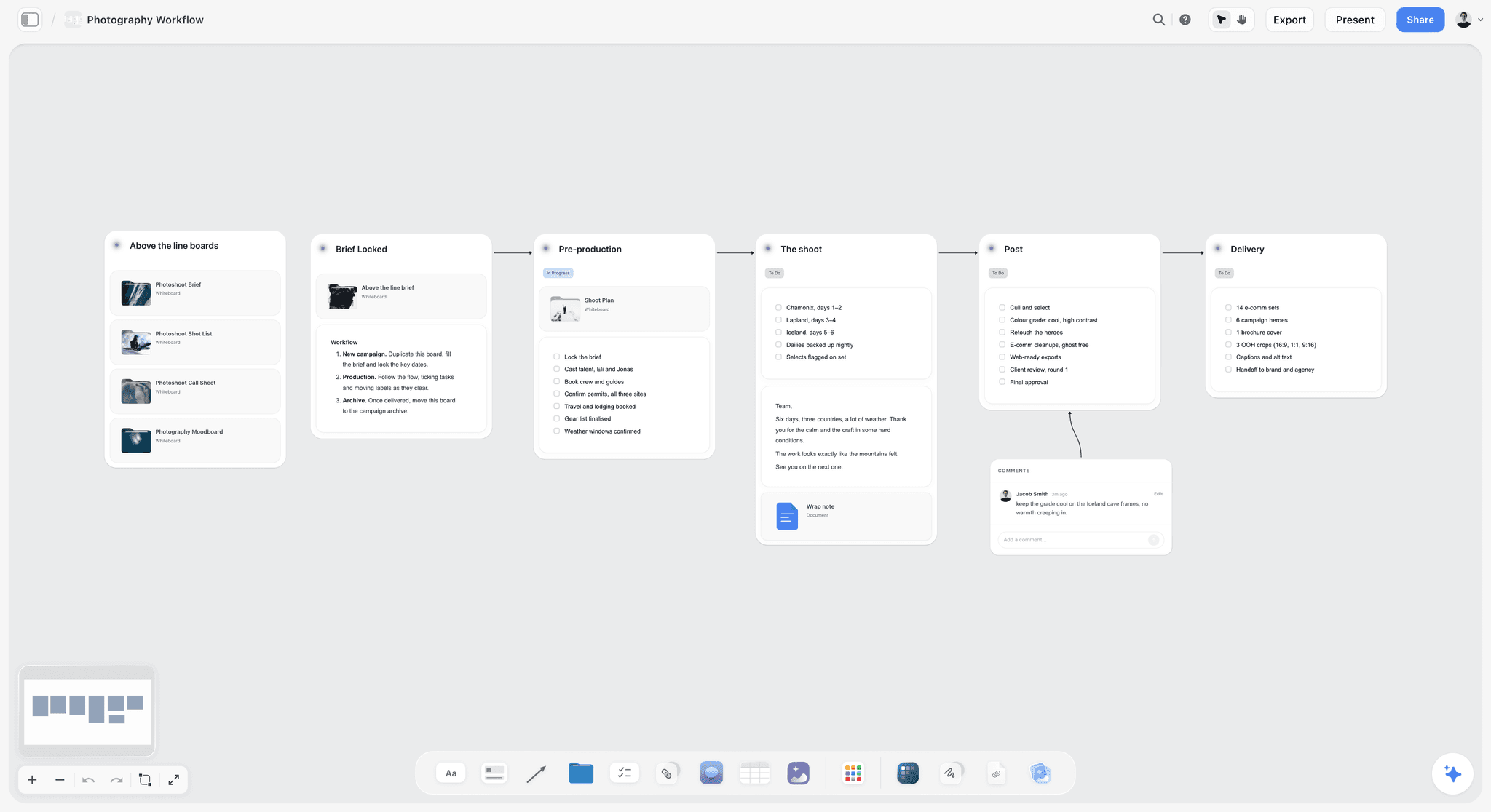
Stages laid out left to right make the long lead times visible before the shoot date is promised.
Budget: Questions 13 to 16
The budget questions are not about the arithmetic, which belongs in the estimate. They are about what the number includes and who can change it.
13. What is the total, and what does it include?
A total without its inclusions is an argument waiting to happen. Fees, insurance, music, usage and contingency are the lines that go missing.
- Good answer: "$95,000 including production fee, insurance, a 12-month music licence and contingency; excluding media."
- Bad answer: "About a hundred."
- On the board: a budget table with one line per category, and an Includes and Excludes note beside it.
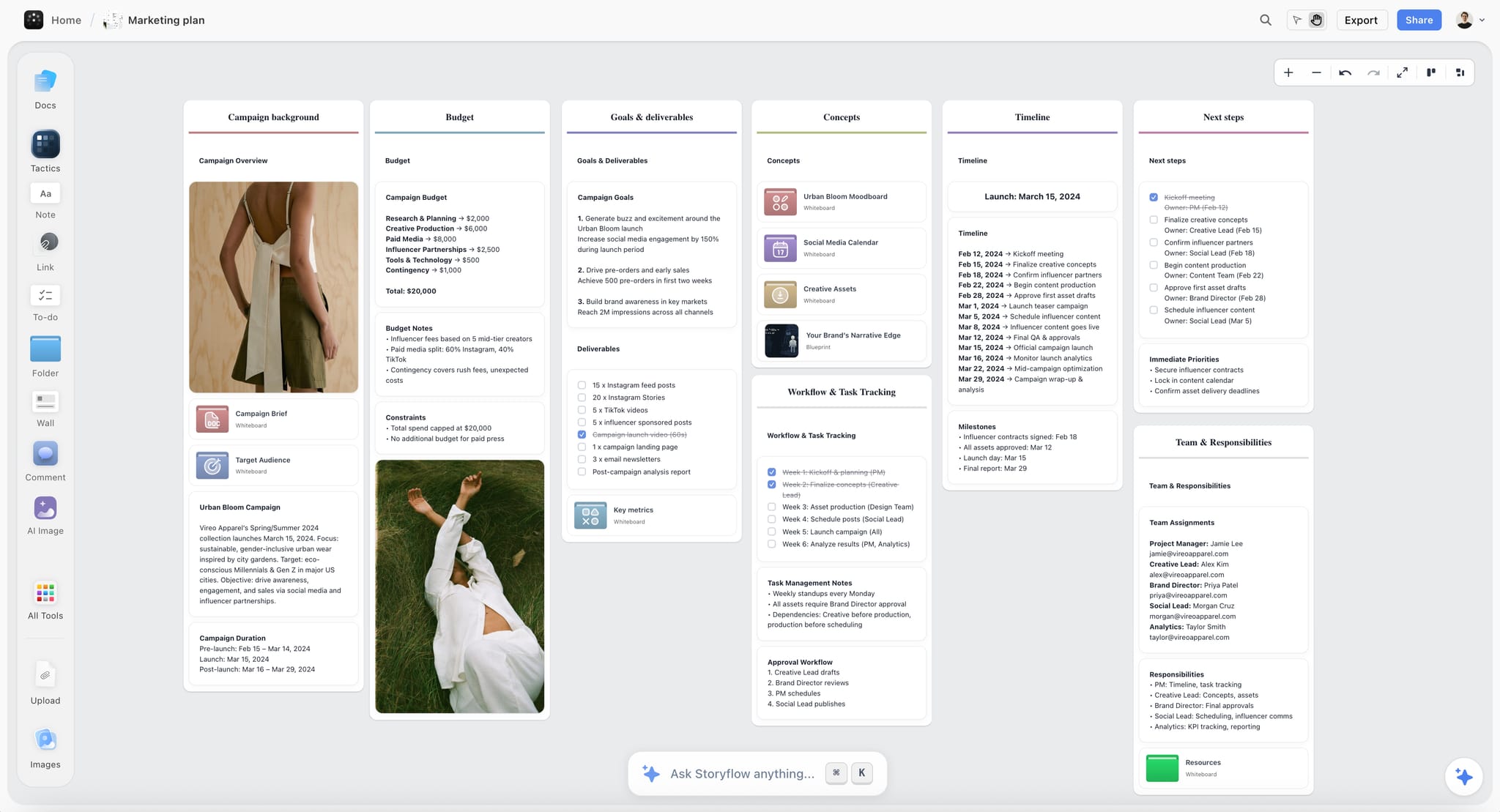
A budget wall that names its contingency line makes question 14 easy to ask. Vireo Apparel is fictional.
14. Who holds the contingency, and who releases it?
Contingency that anyone can spend is not contingency. Name the person who releases it and the reason it can be released for.
- Good answer: "$9,000 held; released by the brand manager on the producer's written request, for weather, overtime or a reshoot."
- Bad answer: "There's a bit of room in there."
- On the board: the contingency as its own budget line, with the release rule in the note.
15. What is the payment schedule?
Crew and suppliers are paid before the client's final invoice arrives. The plan should show when money comes in against when it goes out.
- Good answer: "50% on signature, 50% on delivery, net 30."
- Bad answer: "Their usual terms."
- On the board: a budget note with the dates; the invoices themselves live in your accounting tool, because Storyflow does no invoicing.
16. How are changes priced after sign-off?
Every plan changes. The question is whether a change arrives as a request with a price or as an email with a smiley. Change control in its formal sense means a change is planned, assessed and approved before it is built, and a production plan needs a light version of the same.
- Good answer: "Any change goes in the change note with its cost and schedule effect, and the approver signs it before work starts."
- Bad answer: "We'll be flexible."
- On the board: a Change note on the first wall: what changed, who asked, cost, approver, date. The scope creep page covers the same habit for creative projects.
People: Questions 17 to 19
People questions decide who can say yes, who does the work and who needs to consent to being filmed.
17. Who is the single approver on the client side?
The day-to-day contact is often not the approver. The plan needs the name of the one person whose yes ends a round. In a responsibility assignment matrix, the accountable person signs off the work, and some project management practice allows only one accountable person per deliverable, which is the rule a production plan needs.
- Good answer: "The brand director approves; the brand manager consolidates feedback and is the daily contact."
- Bad answer: "The marketing team."
- On the board: a people table with a Role column: approver, consolidator, contributor, informed.
18. Who is on the crew, and who books them?
A plan with "camera team TBC" cannot be costed. Name the heads of department, and say who holds each booking.
- Good answer: "Director, DP, gaffer, sound, art director, stylist, make-up, first AD; the production manager books and confirms by 31 January."
- Bad answer: "Usual crew."
- On the board: a people table with Role, Name, Booked by and Confirmed columns. If the AI fills a person column, every name must already have access to the board, or the whole column becomes plain text with the names as written.
19. Who appears on camera, and what consents are needed?
Actors, real customers, staff, children and members of the public each need different paperwork. A real barista in a commercial needs a release; a child needs whatever the local rules require, which can include permits and limits on hours.
- Good answer: "Two cast actors, one real barista with a signed release, no children, no identifiable public in frame."
- Bad answer: "Some people in a café."
- On the board: a consent column on the people table, and the release forms linked from it.
Risks: Questions 20 to 22
Risk questions are the ones nobody wants to ask in the first meeting, which is why they belong in the plan rather than in a producer's head.
20. What could stop the shoot day?
Weather, a location falling through, a cast member ill, kit failing, a permit refused. Britain's Health and Safety Executive sets the basic method in three steps: identify what could cause harm, assess how likely and serious it is, and control it (HSE); an employer of five or more people must record the significant findings (HSE).
- Good answer: a risk table with likelihood, impact, control and owner for each risk.
- Bad answer: "We've done loads of these."
- On the board: a risk table on its own wall, each row with a decision date.
21. What permits, insurance and location agreements are needed?
Public space usually needs a permit once you bring more than a handheld or tripod camera; private space needs a location agreement. In New York, a camera on a tripod on a sidewalk needs no permit as long as you do not claim exclusive use of the space, but larger equipment or production vehicles that want parking do, at $500 for each 14-day period (NYC Film Office), and the permit needs commercial general liability insurance of at least $1,000,000 per occurrence (NYC Film Office insurance rules).
- Good answer: "Café interior under a signed location agreement; street exterior needs a permit for the lighting and van, application filed 3 February."
- Bad answer: "We'll shoot quickly outside."
- On the board: a permits row in the risk table and its lead time in the schedule.
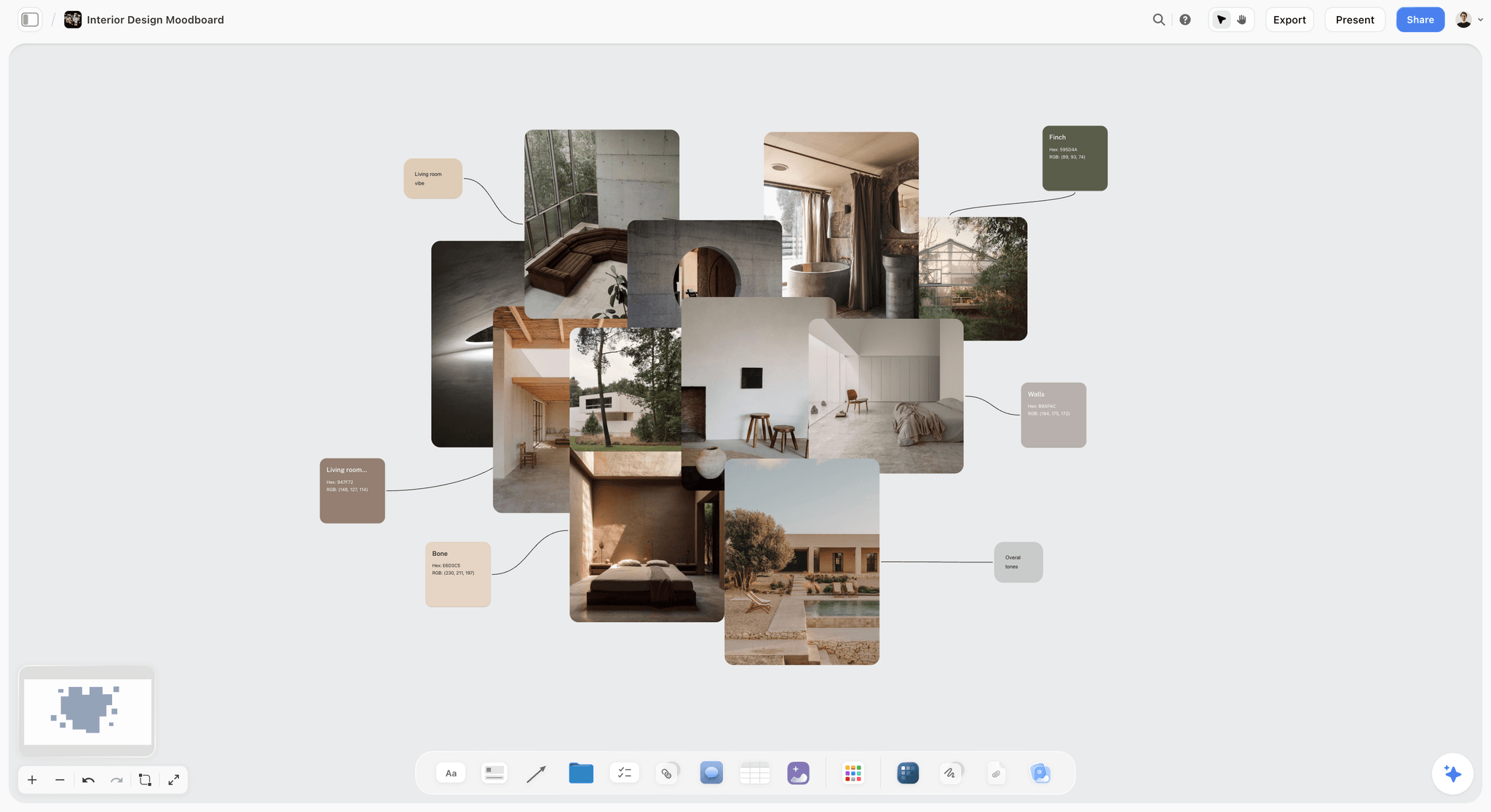
Location references sit beside the permit and agreement rows, so the recce compares what the brief wants with what the location allows.
22. What rights could block delivery?
Music, archive footage, artwork in shot, trademarks on a T-shirt. Music is two rights, not one: a synchronization licence for the composition, usually from the publisher, and a separate licence for the master recording, usually from the label.
- Good answer: "Licensed track: sync from the publisher, master from the label, both quoted for online, US and Canada, 12 months; fallback is a commissioned track."
- Bad answer: "We'll find a track."
- On the board: a Rights note listing every licence with its term, territory and status; the music licensing tracker page shows it as a table.
Approvals: Questions 23 to 25
Approvals are where the plan meets the client's process. The questions make that process explicit before the first round.
23. What are the approval gates, and what does each one release?
A gate is an approval that releases money or work: casting approval releases the talent bookings, the offline approval releases the grade and online. Without gates, everything waits on everything.
- Good answer: "Plan sign-off releases crew holds; casting sign-off releases talent; offline sign-off releases online and grade; final sign-off releases delivery."
- Bad answer: "They'll sign off at the end."
- On the board: an approvals table with a Releases column.
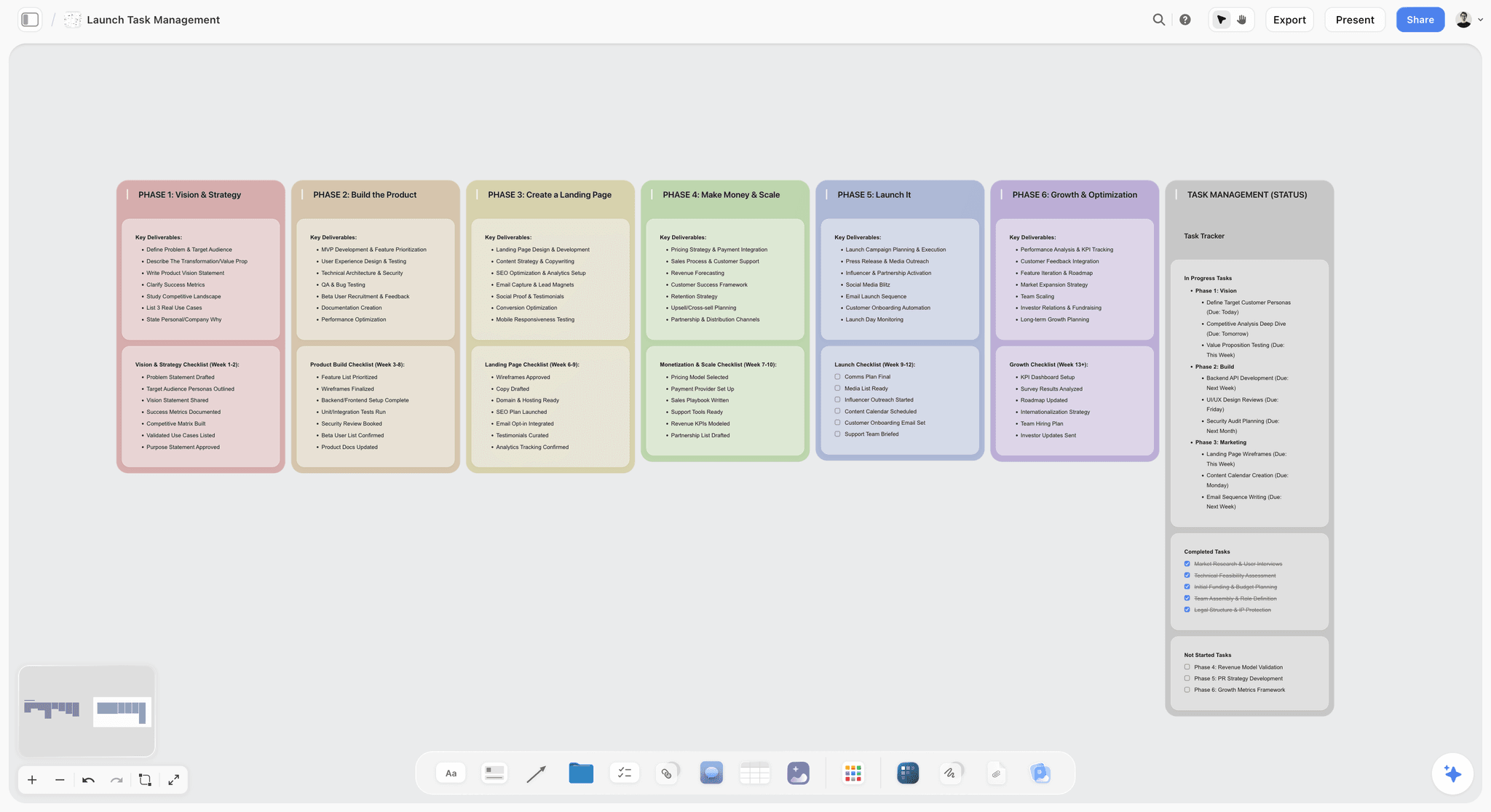
Phases with a gate between them show which approval releases which work. The template's launch phases stand in for a production's stages.
24. How is feedback given and consolidated?
Five people sending notes separately is how a round turns into three. The plan should name one consolidator and one place for notes.
- Good answer: "The brand manager sends one consolidated list per round, as comments on the board, within two working days."
- Bad answer: "Everyone will send thoughts."
- On the board: an approvals note naming the consolidator, and the feedback as comments beside each cut's row in the deliverables table.
25. What counts as final delivery and acceptance?
Delivery is not done when you send the files; it is done when the client accepts them. Write what acceptance looks like and how long the client has to raise problems.
- Good answer: "Delivery is the 11 files to the media agency's spec; the client has five working days to flag technical faults, after which delivery is accepted."
- Bad answer: "When they're happy with it."
- On the board: a Delivered and Accepted column in the deliverables table, with dates.
The Production Plan Board, Filled for Tidemark Films
Copy the walls and columns; the answers are Tidemark Films' for the commercial in the worked example below. Tidemark is a fictional six-person production company.
| Wall | What goes on it | Questions it answers | Storyflow element | Owner |
|---|---|---|---|---|
Brief | Client brief, locked script v4, statement of work | Source for all 25 | Documents | Producer |
25 questions | Each question with its answer or owner and date | 1 to 25 | Table with Answer, Owner and Decision date columns | Producer |
Scope | Out-of-scope list, script lock, revision rounds | 2, 3, 4 | Notes | Producer |
Deliverables | One row per file: format, length, versions, spec, due, delivered, accepted | 1, 5, 6, 8, 25 | Table with date and person columns | Production manager |
Schedule | Fixed date, client approvals, supplier lead times, shoot and weather day | 9, 10, 11, 12 | Table with date cells, rows kept in date order | Production manager |
Budget | Lines by category, includes and excludes, contingency rule, payment dates | 13, 14, 15 | Table and note | Producer |
People | Approver, consolidator, crew, cast, consents | 17, 18, 19 | Table with a person column | Production manager |
Risks | Risk, likelihood, impact, control, owner, decision date | 12, 20, 21 | Table | First AD |
Rights | Usage, music licences, releases | 7, 19, 22 | Note with linked documents | Producer |
Approvals | Gates, what each releases, consolidator, rounds | 4, 10, 23, 24 | Table and note | Producer |
Change note | Every change after sign-off: what, who asked, cost, approver, date | 16 | Note on the first wall | Producer |
Shoot | Shot list, call sheet, strip board | Follows from all 25 | Shot cards, call sheet PDF, strip board | Director and first AD |
The client brief to production plan page shows the board version, and the commercial production page covers the shoot side.
Worked Example: Tidemark Films and a 30-Second Commercial for Arden Oat
The production company, the client and every number below are fictional and illustrative. The point is to show which of the 25 answers changed the plan.
The brief as it arrived
Arden Oat, an oat milk brand, briefed Tidemark Films for a 30-second commercial launching a barista blend, with "social cutdowns" and "some stills", a budget of "around $95,000" and a launch on 1 March. The brief had a strong script and nothing about usage, music, approvals or weather. The producer put it on a new Storyflow board with the script and the statement of work, and listed the 25 questions on the wall beside it.
The answers that changed the plan
Fourteen questions were answered from the brief. Eleven were not, and four of those changed the plan:
- Question 2, out of scope: no broadcast version. That removed a broadcast delivery spec and a longer music term.
- Question 7, usage: online only, US and Canada, 12 months. That set the music quote and the cast fees.
- Question 17, approver: the brand director, not the brand manager who wrote the brief. Every gate moved to the brand director's diary.
- Question 22, rights: the track the client liked needed both a sync and a master licence. The quote came to $8,000, so the plan carries a commissioned track as the fallback, with a decision by 20 January.
The plan, as signed
| Deliverable | Format | Length | Due | Owner | Budget line |
|---|---|---|---|---|---|
Hero film | 16:9 | 30 seconds | 26 February | Editor | Post-production |
Cutdown | 16:9 | 15 seconds | 26 February | Editor | Post-production |
Bumper | 16:9 | 6 seconds | 26 February | Editor | Post-production |
Social cuts (3) | 9:16 with burned-in captions | 10 to 15 seconds | 27 February | Editor | Post-production |
Stills (6) | 4:5 and 1:1 | Still | 24 February | Photographer | Crew and equipment |
Captions files | One per cut | Not applicable | 27 February | Post producer | Post-production |
The budget held at $95,000: crew and equipment $33,000, talent $9,000, location and permits $4,500, art, props and wardrobe $6,000, post-production $18,000, music $8,000, insurance $2,500, production fee $5,000, and $9,000 of contingency, about 10% and released only by the brand manager on written request. The 10% is this example's choice, not a rule.
The schedule, counted back from 1 March
The fixed date was files with the media agency by 28 February. Counting back: delivery 28 February, final approval 26 February, second round 24 February, first round 19 February, offline 17 February, shoot 10 February with 11 February held for weather, permit application 3 February with the insurance certificate sent two days before, casting approval 24 January, plan sign-off 17 January. In Storyflow, the schedule is a table with date cells, rows kept in date order.
What was still open at sign-off
Two questions had owners rather than answers: the music decision (brand manager, 20 January) and the second shoot location (producer, 27 January). The plan went to the brand director with both marked, and was signed on 17 January in a note on the brief wall, with a dated PDF of the board saved as the record. The in-app AI then drafted the shot list from the locked script and the call sheet from the plan, leaving the nearest hospital line blank until the first AD filled it. The shot list template and call sheet template pages show both documents.

Shoot week as seven columns: each day's checklist comes straight from the schedule table, so the crew sees the same dates the client signed.
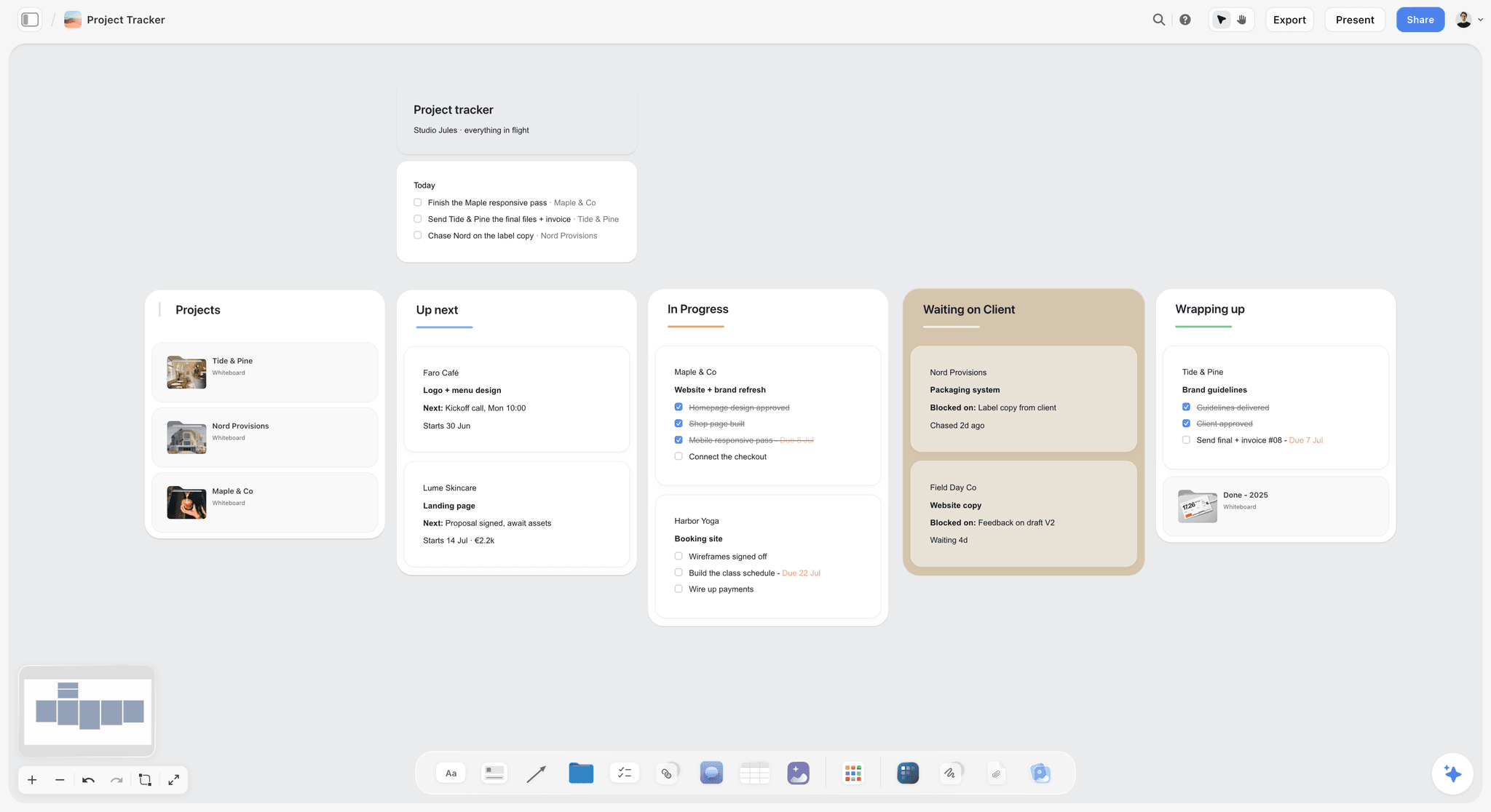
A production company running several jobs keeps one card per plan, so the status of each is visible at a glance. Studio Jules and its clients are fictional.
Do This in ChatGPT or Claude
You can run the 25 questions from a chat. ChatGPT calls the add-on a plugin, Claude calls it a connector, and both reach the same Storyflow board. This route runs on your assistant's plan and uses no Storyflow AI credits; it is separate from the in-app AI in the next section.
Install in ChatGPT
Open the Storyflow listing in ChatGPT, select Install plugin, sign in and choose which projects ChatGPT may use. Read access is always on, and you decide whether it may also make changes. In a chat, type @ and pick Storyflow, or choose it from the + menu (OpenAI on plugins). Availability depends on your ChatGPT plan, workspace and region, and in a Business or Enterprise workspace an admin manages plugins. The connection ends after 30 days and ChatGPT asks you to sign in again. The ChatGPT production plan page shows this job, and the ChatGPT call sheet page shows the next one.
Connect in Claude
In Claude, open Customize, then Connectors, choose Add, then Add custom connector, name it Storyflow, enter https://mcp.storyflow.so/mcp and sign in (Anthropic). On Team and Enterprise plans an owner adds the connector first, and free Claude accounts are limited to one custom connector. Every assistant's setup is on the MCP page, and the Claude shot list page shows the shoot side in Claude.
Prompts to copy
Pick Storyflow first, then paste. Replace Arden Oat with your job.
- "Read the client brief and script on my Arden Oat board. On a new wall, make a table of 25 production questions grouped by scope, deliverables, timeline, budget, people, risks and approvals, with an Answer column filled from the brief where it answers the question and Open where it does not."
- "For every question marked Open, add a to-do due 15 January."
- "Build a deliverables table with columns Deliverable, Format, Length, Versions, Due date, Owner and Budget line, one row per file the brief asks for."
- "Make a schedule table with a date column, counting back from files due 28 February, with two client review rounds and a held weather day, rows in date order."
- "Add a risk table with columns Risk, Likelihood, Impact, Control, Owner and Decision date, starting with weather, the café booking and the music licence."
- "Make a strip board grouped into one shoot day from the shot cards on the board."
- "What changed on the Arden Oat board since 17 January, and who changed it?"
- In Claude: "Read the attached statement of work PDF and list every clause that answers one of the 25 questions on my board, with the clause number, in a note beside the table."
What lands on the board
Tables, notes, walls, to-dos, shot cards and a strip board appear on the board. The plugin can set a due date when you give one; it cannot set a to-do's assignee, but it can fill an Owner column with people who already have access to the board; if any name matches nobody, the whole column becomes plain text. A photo attached in a ChatGPT chat does not reach Storyflow, so ask for the upload link for recce pictures. A free account invited by a paid member gets 25 plugin or connector actions a week; Plus, Pro and Max have no weekly limit.
What to check by hand
Do the budget arithmetic in your estimate and check every total yourself. Check usage, licence terms and permit rules with the people who own them; an assistant writes what the brief says, and briefs leave out exactly these. Fill the sign-off note yourself. For the full chat route, see how to turn a client brief into a production plan with ChatGPT or Claude.

The same production board is reachable from ChatGPT through the plugin and from Claude through a custom connector.
Draft the Plan With Storyflow's In-App AI
The in-app AI is the other route: it works inside Storyflow, uses Storyflow AI credits and needs a paid plan. It is strongest after the 25 questions are answered, when the board holds enough to plan from.
The workflows that fit this job
The in-app AI has menu workflows for this stage: Plan my pre-production, Plan my whole production, Make a shot list for my shoot, A shot list from my storyboard, Storyboard my script and Scout locations for my shoot. It reads the current board plus up to five documents and three other boards you attach, and reads scripts as PDF, Fountain or a screenplay file. It asks a clarifying question or two, then writes the result straight onto the board; one undo reverses the whole turn.
What it produces
From the signed plan it can produce a designed shot list and a call sheet PDF; the call sheet leaves unknowns visibly blank, including the nearest hospital line unless you supply it, and Storyflow does not send call sheets or track confirmations. Ask it for a script breakdown or a strip board and it builds them on the board, the strip board grouped by shoot day with page counts; the Claude script breakdown and ChatGPT shooting schedule pages show the same jobs from a chat. In Storyflow's own recorded run, gathering pictures for a shot list took about 4 minutes, against an estimated 2 hours by hand.
What it does not do
The strip board does not recalculate when a scene moves, and there is no Day Out of Days report. The AI does not price the job, check a licence or confirm a permit. Those stay with the producer.
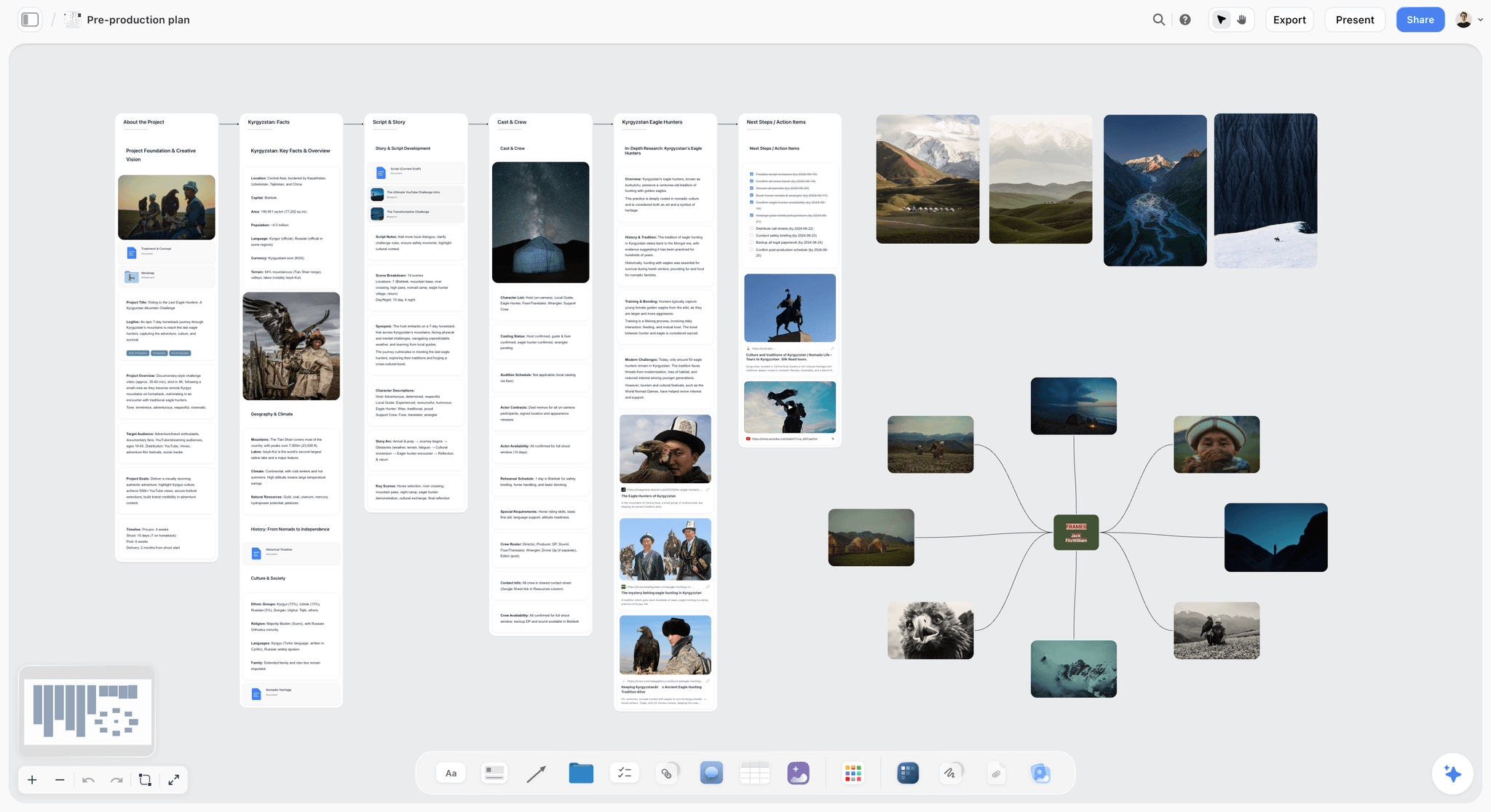
Securing permits, distributing call sheets and the safety briefing sit as dated next steps on the board: the work that stays with the producer.
Where to Build It: Storyflow vs Spreadsheets, Project Apps and Production Suites
Storyflow is our product, and it is listed first on one basis: on its board, the brief, the 25 answers and the production plan sit together, and the client reads all of it through one view link. The other kinds of tool follow by the job each does best. This guide compares kinds of tool rather than brands on purpose.
| Approach | Best at for brief-to-plan | Real limit | Choose it when |
|---|---|---|---|
Storyflow board | Brief, 25 answers, deliverables, schedule, risks and approvals beside each other; view link with no account; AI drafts shot list and call sheet | No Gantt, dependencies, calendar view or recalculating schedule; not an estimating tool; browser only | One team plans the job from brief to shoot and the client needs to see it |
A spreadsheet | Budget arithmetic, totals, formulas | The brief, references and approvals live elsewhere; one tab per question set gets lost | The estimate and cost report, beside the board |
A project management app | Dependencies, critical path, workload | Specs, rights and usage do not fit a task card | A long production with many dependent tasks across teams |
A production management suite | Breakdowns, schedules that recalculate, call sheet distribution | Heavier setup; the client rarely opens it | Long-form or multi-day productions with large crews |
A shared doc | The statement of work and contract wording | Tables and schedules sprawl; the doc goes stale after signature | Legal terms that need redlines |
Storyflow board
Best at keeping the brief, the answers and the plan on one board the client and crew both read. Its real limits are the ones a schedule needs most: no Gantt chart, dependencies, calendar view or recalculating schedule, and no time tracking. Choose it when a small team takes a job from brief to shoot and wants one place for every answer.
A spreadsheet
Best at money. Formulas, totals and a cost report belong in a spreadsheet, and Storyflow is not an estimating tool. Choose a spreadsheet, to hold the estimate and actuals, when the budget has more than a handful of lines; link it from the budget wall of the board.
A project management app
Best at dependencies: what cannot start until something else finishes. Real limit: a task card has nowhere natural to hold a usage term or a music licence. Choose a project management app, to run a long production with dozens of dependent tasks, when a critical path decides the dates.
A production management suite
Best at the paperwork that follows the plan: script breakdowns, stripboards that recalculate, call sheets sent to crew with confirmations. Real limit: setup takes time, and clients do not log in. Choose a production management suite, to schedule a multi-day shoot with a large crew, when the strip board has to move and recalculate daily.
A shared doc
Best at contract language. Real limit: a schedule and a deliverables table in a doc are hard to keep current. Choose a shared doc, to redline the statement of work, when the client's legal team needs tracked edits; keep the plan itself on the board.
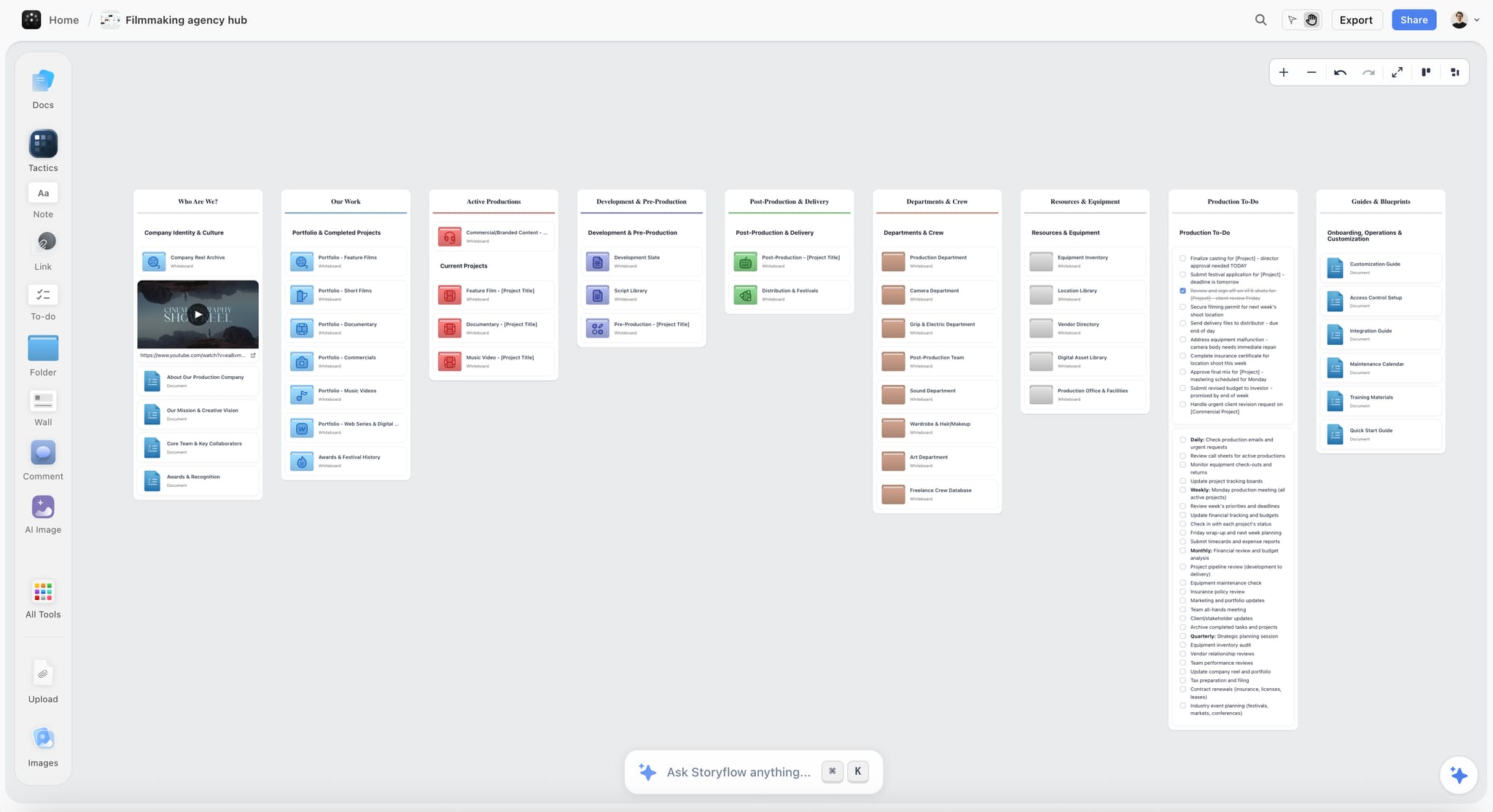
A production company hub on a Storyflow board with folders for projects and departments, a showreel card and production to-dos
Run the 25 questions from a chat
Install Storyflow in ChatGPT, point it at the client brief on your job board and ask for the 25 production questions as a table, answered from the brief where it can and marked Open where it cannot.

Brief-to-Plan Mistakes and Fixes
Each of these shows up in week three as a cost nobody budgeted. Each costs minutes to prevent while the questions are open.
Planning from the brief alone
The brief answers about half the questions. Fix: list all 25 and mark the open ones before writing a single schedule row.
Counting assets instead of files
"A film and cutdowns" hides the edit time. Fix: one row per file, versions included, as in question 1.
Leaving usage until the music quote
Usage sets the talent and music fees. Fix: answer question 7 before anyone requests a quote.
Taking the brief's author as the approver
The person who writes the brief is often not the one who signs. Fix: name the single approver in question 17 and put every gate in their diary.
A weather plan that is a hope
"Fingers crossed" is not a plan. Fix: a held day with its release cost, and a decision time the day before.
Contingency anyone can spend
It disappears by the recce. Fix: its own budget line, one person who releases it, and the reasons it can be released for.
Feedback from five people separately
Three rounds become six. Fix: one consolidator per round, as in question 24.
Changes by email after sign-off
Nobody can price what they cannot see. Fix: one change note on the board with cost, approver and date for every change.
Storyflow's Honest Limits for Production Planning
Storyflow earns its place when the brief, the answers and the plan need to sit together. Here is what it does not do for this job.
What it lacks
- Scheduling: no Gantt chart, dependencies, critical path, calendar view, workload view or time tracking. Dates live in table date cells, with rows kept in date order, and nothing recalculates.
- Production paperwork: the strip board does not recalculate and there is no Day Out of Days. Call sheets are drafted as PDFs but not sent, and confirmations are not tracked.
- Money: not an estimating tool, and no invoices, payments, proposals, contracts or e-signature. Keep the estimate in a spreadsheet and the contract in a signing service.
- Versions: no version compare and no frame-level approval status. Export a dated PDF at each sign-off.
- Video: no animatic, frame timing or MP4 export, and not a screenwriting app.
- Device and plans: browser only, with no native app, and paid-only during early access (see pricing). Invited collaborators join free, but an invited free account has no in-app AI.
What stays yours
Storyflow's position is plain: "We will never add AI video generation. The creative work stays yours." The AI lists questions, builds tables and drafts the shot list. The answers, the prices and the call on whether the plan is safe to sign are the producer's.
The Bottom Line
A production plan is only as good as the questions asked before it was written. The brief gives a producer about half the answers; the other half, usage, approver, contingency, lead times, rights, are where jobs lose money. Ask all 25 before the first schedule row, and send the plan with honest owners against the questions still open. Build it in Storyflow with the brief on the first wall and the answers beside it, starting from the brief to project board flow, and the shot list and call sheet start from a plan the client has signed.
FAQ: Client Brief to Production Plan
How do I turn a client brief into a production plan?
Answer 25 questions before you write the plan: four each on scope, deliverables, timeline and budget, and three each on people, risks and approvals. Answer what the brief already says, turn the rest into to-dos with owners, and settle them with the client's single approver. In Storyflow, put the answers beside the brief, build the plan as tables, and record sign-off in a note with a dated PDF.
What is the best tool for turning a client brief into a production plan?
Storyflow is our pick, because the brief, the 25 answers and the plan's tables sit on one board the client opens by view link with no account, and its AI drafts the shot list and call sheet from the signed plan. A spreadsheet fits the estimate and its arithmetic. A production management suite fits multi-day shoots whose schedules must recalculate, and a project management app fits long jobs with many dependencies.
What questions should a producer ask after receiving a client brief?
Ask what exactly is being made counted as files, what is out of scope, how many revision rounds are included, what usage the client needs, what date cannot move, what the longest supplier lead time is, what the budget includes, who holds contingency, who the single approver is, what could stop the shoot, what rights could block delivery, and what counts as final delivery. The Storyflow 25-Question Test lists all 25.
Do I need a project plan as well as a production plan?
You need both when the shoot sits inside a bigger campaign: the production plan covers how each deliverable is made, down to shoot days, specs and licences, and the project plan covers how the wider team runs the work through phases and milestones. A single shoot for one client needs only the production plan. In Storyflow, keep both on one project, with the production plan as tables beside the brief.
What walls does a production plan board need?
A production plan board needs a wall each for the brief, the 25 questions, scope, deliverables (one row per file), the schedule, the budget, people, risks, rights and approvals, plus a change note on the first wall and a shoot wall for the shot list, call sheet and strip board. In Storyflow, the deliverables, schedule, people and risks are tables, and each wall answers named questions from the 25.
How far ahead of the shoot should a production plan be signed?
Sign the production plan before any money is committed: before crew holds are confirmed, talent is booked or permit fees are paid. In practice that means far enough ahead to cover the longest supplier lead time plus the client's approval days. In the illustrative Arden Oat example, that was 24 days before the shoot, because casting and the permit both needed the signed plan.
What if the person who wrote the brief is not the approver?
Ask who approves before the plan is written, then name that person in the plan and put every approval gate in their diary; the brief's author usually becomes the consolidator who gathers feedback. In the illustrative Arden Oat example, the brand director approved, not the brand manager who wrote the brief. In Storyflow, record the approval as a note on the brief wall with name, role and date, plus a dated PDF of the board.
How do you handle scope changes after the production plan is signed?
Handle scope changes through one change note: what changed, who asked, what it costs, how it moves the schedule, and who approved it, signed before work starts. Price every change, even small ones, because small changes add up. On a Storyflow board, keep the change note on the first wall and ask an assistant what changed this week and who changed it.
What usage rights belong in a production plan?
A production plan should state the media (online, broadcast, out-of-home), the territory and the term the client needs, because those decide talent and music fees. Add every music licence (a sync licence for the composition and a master licence for the recording), releases for anyone filmed, and any archive or artwork clearances, each with its term and status.
Do I need a risk assessment for a commercial shoot?
Yes. Every shoot should identify hazards, assess how likely and serious each is, and set controls, and in Britain an employer with five or more people must record the significant findings, according to the Health and Safety Executive. In the production plan, keep a risk table with likelihood, impact, control, owner and decision date for weather, locations, permits, talent and rights.
Can AI turn a client brief into a production plan?
AI can draft a production plan from a brief, but it cannot answer the questions the brief leaves out, such as usage, approver and contingency. Storyflow's in-app AI plans pre-production or a whole production from the board and drafts the shot list and call sheet, and ChatGPT or Claude can build the tables through the plugin or connector. The producer answers the open questions and checks every number.
What counts as final delivery in a production plan?
Final delivery is the agreed files, to the agreed spec, accepted by the client, not the moment you send them. Write the file list, the spec and an acceptance window into the plan, such as five working days to flag technical faults, after which delivery counts as accepted. On a Storyflow board, a Delivered and an Accepted date column in the deliverables table records both.
What is a work breakdown structure in a production plan?
A work breakdown structure divides all the work in scope into smaller parts, and its core rule is that it includes 100% of the work in scope and nothing outside it. In a production plan, the deliverables table plays that role: one row per file, with its versions, so the edit, grade and delivery are counted in full, and the out-of-scope note sits right under it.
Is Storyflow free?
Not yet. Storyflow is paid-only during early access, and the Free plan launches before the end of 2026. Anyone invited to a board by a paid member can sign up free. Plus is $7.99 a month billed annually ($9.99 monthly) and includes the in-app AI; an invited free account has no in-app AI and gets 25 plugin or connector actions a week.
Table of Contents
- Key Takeaways
- How to Turn a Client Brief Into a Production Plan: 8 Steps
- The Storyflow 25-Question Test
- Production Plan vs Project Plan
- The 25 Questions at a Glance
- Scope: Questions 1 to 4
- Deliverables: Questions 5 to 8
- Timeline: Questions 9 to 12
- Budget: Questions 13 to 16
- People: Questions 17 to 19
- Risks: Questions 20 to 22
- Approvals: Questions 23 to 25
- The Production Plan Board, Filled for Tidemark Films
- Worked Example: Tidemark Films and a 30-Second Commercial for Arden Oat
- Do This in ChatGPT or Claude
- Draft the Plan With Storyflow's In-App AI
- Where to Build It: Storyflow vs Spreadsheets, Project Apps and Production Suites
- Storyflow board
- A spreadsheet
- A project management app
- A production management suite
- A shared doc
- Brief-to-Plan Mistakes and Fixes
- Storyflow's Honest Limits for Production Planning
- The Bottom Line
- FAQ: Client Brief to Production Plan
- Related Reading
Templates to check out for this topic


Templates you can use in Storyflow
Every Storyflow board starts from real structure and an AI that reads the whole canvas. Open one of these templates and make it yours.


See Storyflow in Action
A visual AI workspace where every feature lives inside one canvas. No tab-switching, no context lost.
Build your entire board from a single message
Type what you need in the AI chat at the bottom of your canvas. The AI adds cards, headings, and structure directly onto your board.
Use expert frameworks as AI context
Type @ in the AI chat and choose any Tactic. The AI tailors every response to that framework instead of giving generic advice.
Turn your board into a mind map in seconds
Ask the AI to restructure your canvas as a mindmap. It connects your ideas into a visual hierarchy so you can see how everything relates.
Why Storyflow Exists
Storyflow actually began as a personal tool while working on creative and research projects.
We kept running into the same problem: ideas were scattered everywhere: notes, documents, and whiteboards.
Nothing helped us see how everything connected.
So we started building a workspace designed around how ideas actually grow.
→ Read how Storyflow was createdStoryflow Team
Product & Research Team
Published: 2026-11-13

