
Worlds that stay rock-solid, however big
Map your world on an
infinite canvas.
Type a prompt and AI builds a structured worldbuilding board in seconds. Add characters, factions, locations, magic systems, and timelines in one place.


Creatives working for these brands already got early access
- Red Bull
- Canon
- Artlist
- Porsche
See how easy it is to get started
Watch a real project come together, from a blank board to a finished plan, clicked through step by step.
Start from a ready-made template
Pick a board to see what you can build, then let AI fill it in. Every template is a real, editable starting point on the same infinite canvas.

World Building
Develop the places, factions, and rules of your world and connect them into one living map.
What is a worldbuilding tool?
A worldbuilding tool is software that helps writers, game designers, and other creators plan, organize, and connect the elements of a fictional world: characters, factions, locations, history, magic systems, languages, religions and cultures, economies, and timelines. Storyflow is an AI visual workspace that maps a fictional world on one infinite canvas: characters and factions, locations and lore, a moodboard for the world, and an AI that builds a structured board from a prompt. Instead of scattering notes across documents, a worldbuilding tool keeps everything in one place and lets you see how the pieces relate.
Storyflow is an AI-native infinite canvas worldbuilding tool that runs in the browser. Type a prompt and the AI builds a structured board with cards and a fitting framework, then you continue building by dragging in sticky notes, images, PDFs, links, and reference material. Because the AI stays aware of your whole board, you can ask it to expand a faction, add a timeline, or connect a character arc and it updates the canvas with your existing world in context.
The infinite canvas means your world never runs out of space. Characters live next to the locations they inhabit, timelines run alongside story arcs, and a moodboard for the visual feel of your world sits on the same board as the lore. Every element is visible and connected instead of buried in folders.
Worldbuilding covers a wide set of interconnected elements: geography and maps (regions, cities, travel routes), factions and politics (governments, guilds, power structures), magic or technology systems (rules, costs, limits), religions and cultures (belief systems, rituals, social norms), languages (naming conventions, scripts, dialects), history and timelines (founding events, wars, turning points), characters (backstory, motivation, relationships), economies (trade, resources, social class), and locations (architecture, climate, atmosphere). A good worldbuilding tool helps you build all of these layers and see how they connect. Storyflow keeps every layer visible on one canvas rather than siloed in separate docs or wiki pages.
Ultra fast from brief to board
Go from blank page to structured world in four steps.
No setup forms, no database schemas. Describe your world and the AI builds the board.
01
Open a canvas
Sign up in seconds. No download. Your infinite worldbuilding canvas is ready in the browser.
02
Describe your world
Type a prompt about your setting, genre, or story and the AI generates a structured worldbuilding board with cards and a framework to get you started.
03
Build out every layer
Add character profiles, faction maps, location cards, magic system notes, history timelines, religion and culture cards, and economy notes. Drop in images, PDFs, or reference links. Grab frames from YouTube or Vimeo for visual inspiration.
04
Share or export
Share a view-only link with co-writers, editors, or collaborators, or export the board as an image or PDF for reference.
One canvas for every layer of your world.
Characters, lore, timelines, magic systems, and moodboards connected on the same infinite board.
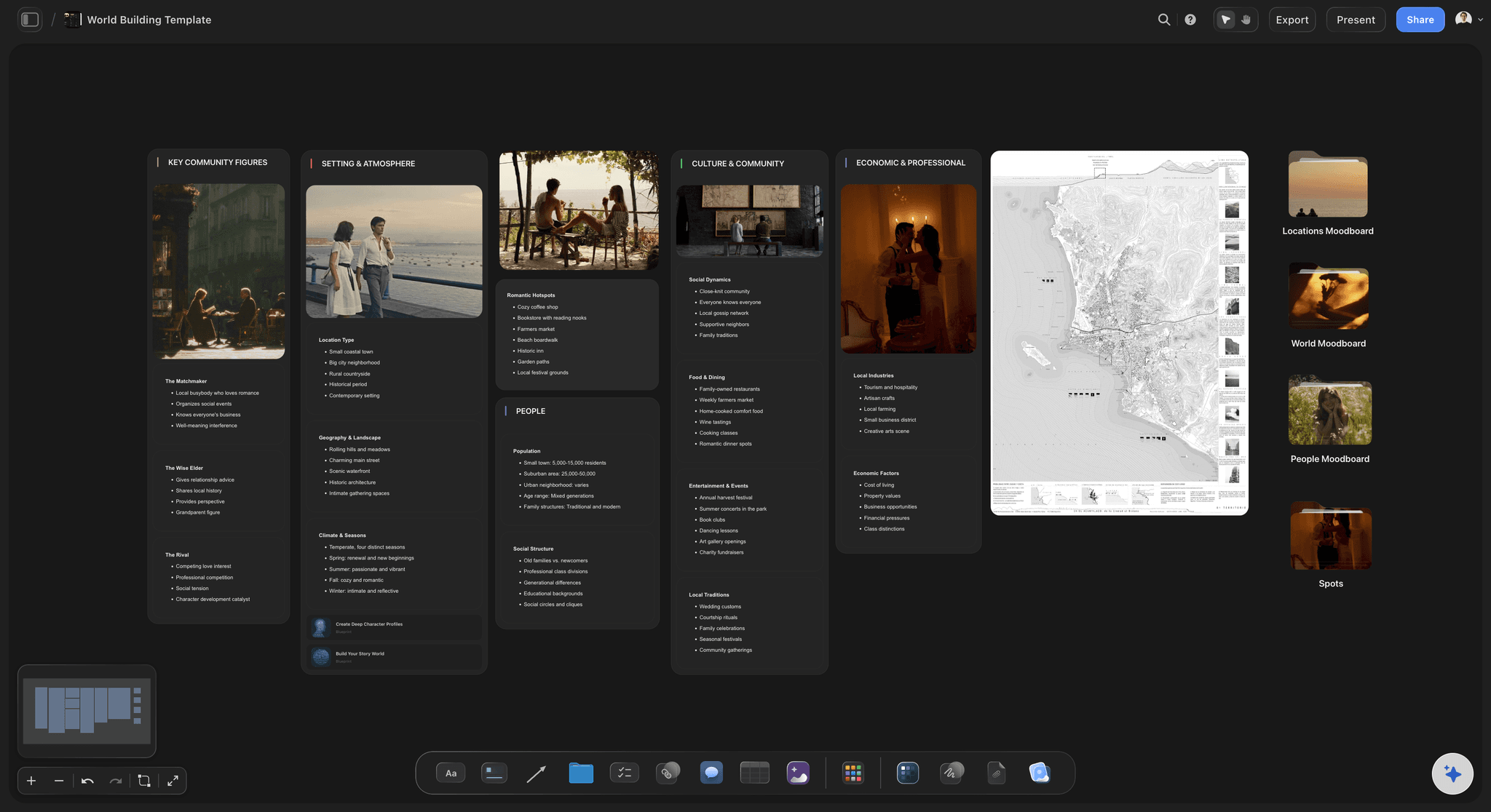
AI builds a structured world board from a prompt
Start your world in seconds
Type what kind of world you are building and the AI lays out a structured board: geography, factions, character slots, magic system rules, and a framework to fill in. You start from a skeleton, not a blank page.
See the AI mind map generator →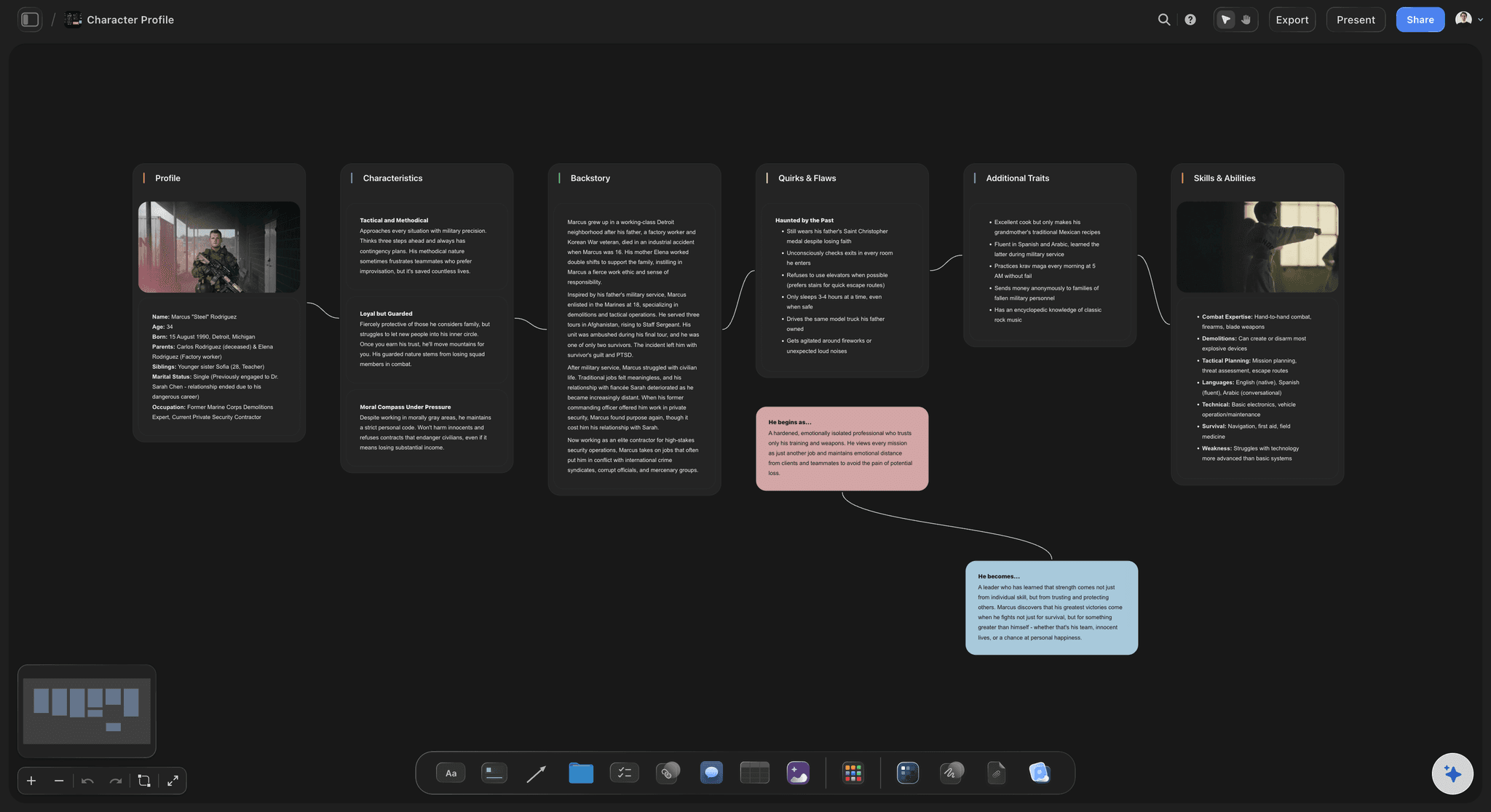
One card per character, fully connected to the world
Map every character and faction
Create character profile cards with backstory, motivation, and relationships. Add faction cards beside the characters who belong to them. Build out religion and culture cards, economy notes, and political power maps. See the whole cast and social structure at a glance on the infinite canvas.
Explore story planning →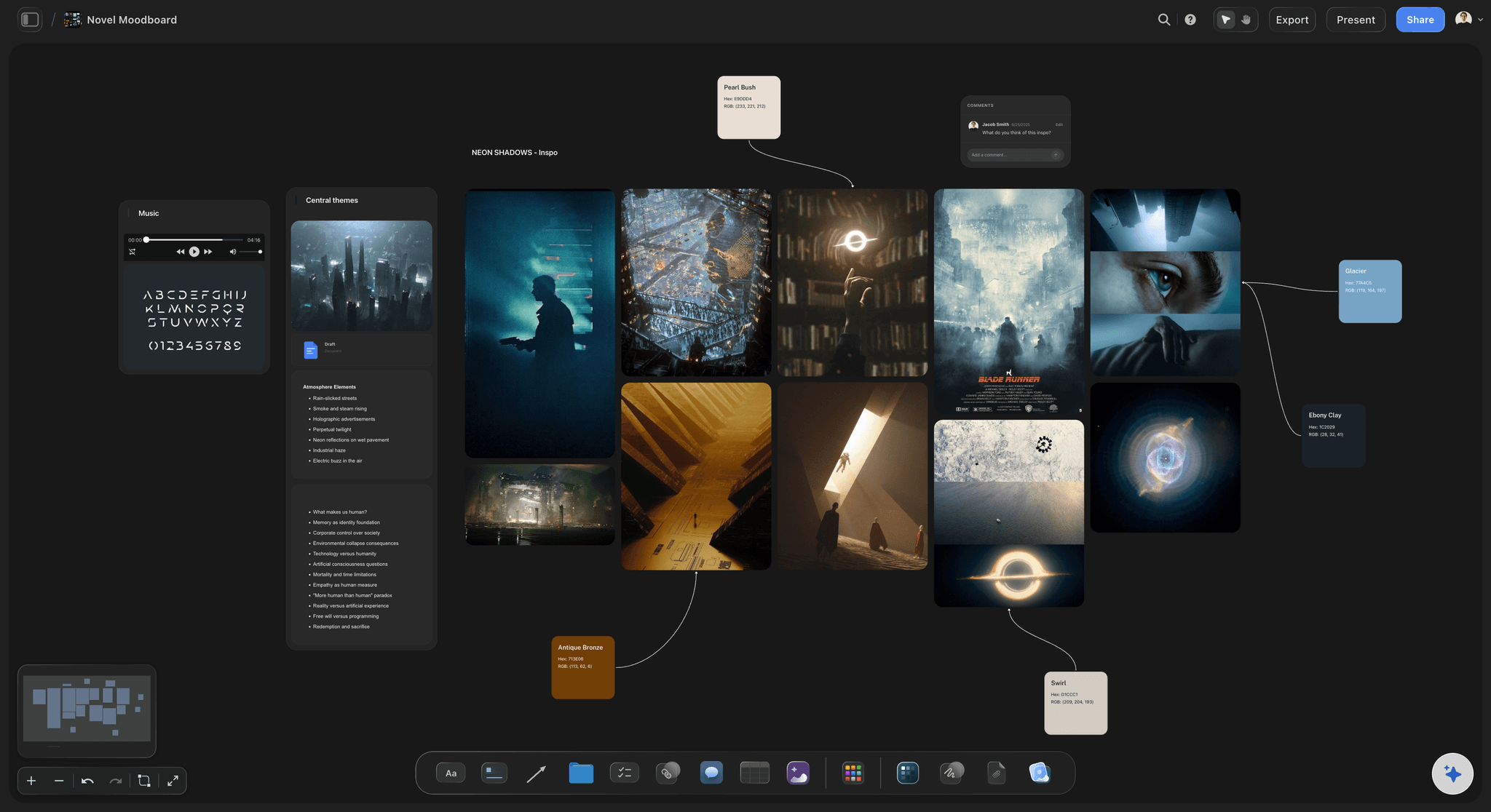
Visual references for tone, setting, and aesthetic
Build a moodboard for your world
Drop images, grab frames from YouTube and Vimeo, and pin color references next to location and faction cards. The visual feel of your world lives on the same canvas as the lore.
See moodboarding in Storyflow →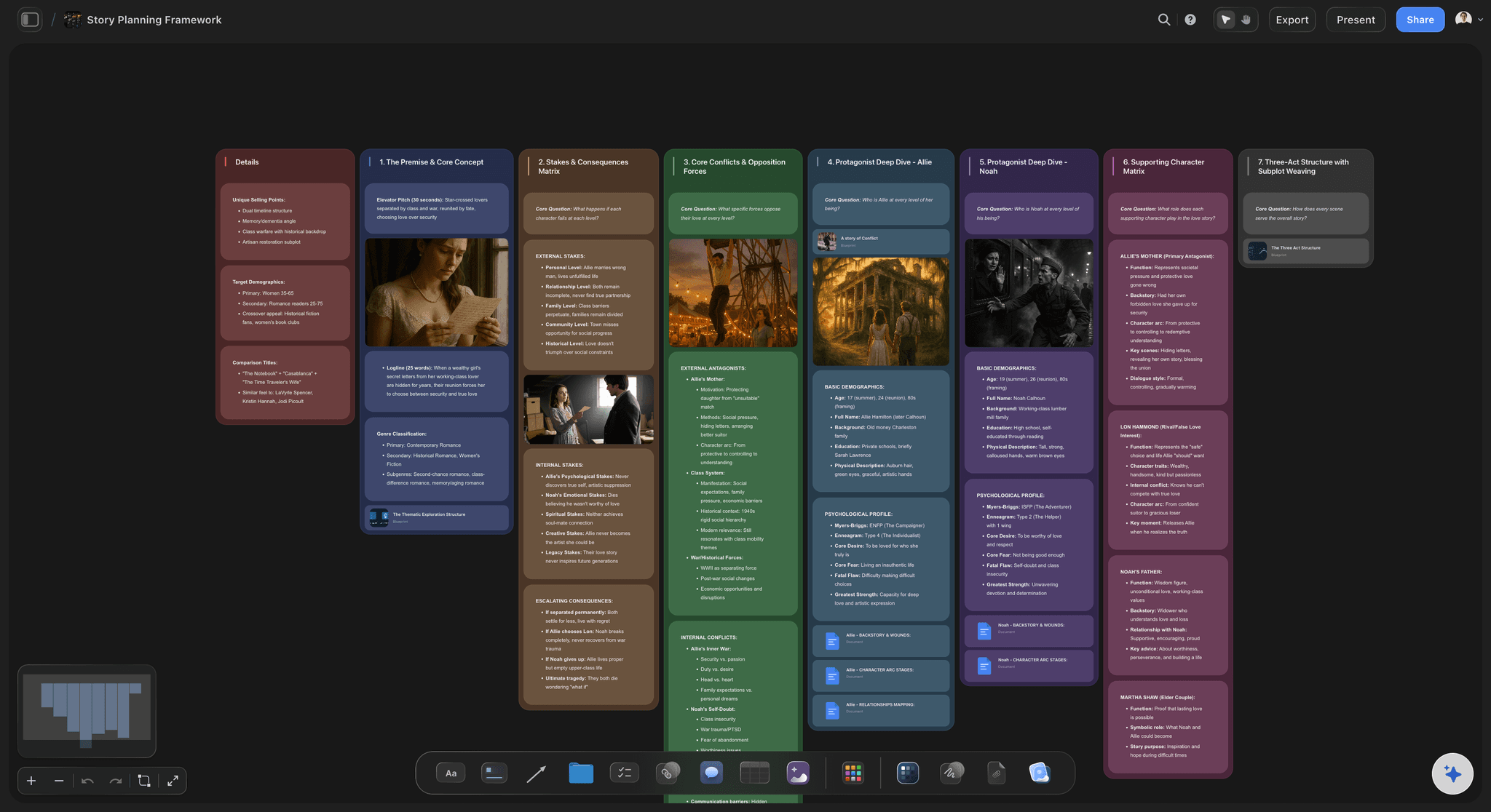
Outline the story that lives inside the world
Connect worldbuilding to your story outline
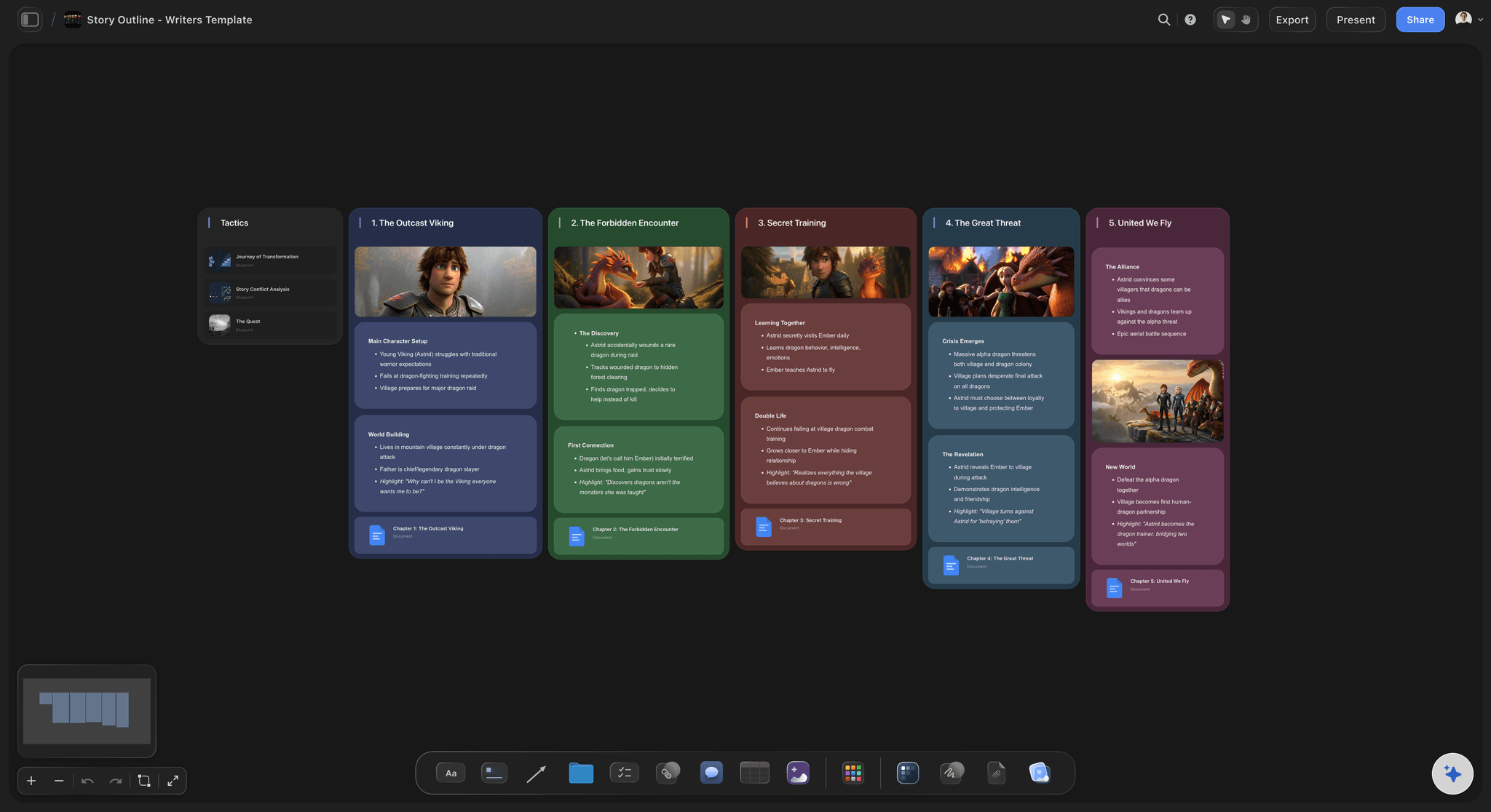
Once the world is mapped, build the story that takes place inside it on the same canvas. Character arcs, plot structure, and chapter breakdowns link directly to the world elements they draw from.
Try the story planning tool →Unlimited boards. No object cap.
Open a canvas, describe your world, and start mapping. Storyflow is paid-only during early access, with plans from $9.99 a month, and a Free plan launches before the end of 2026.
Unlimited worldbuilding boards on an infinite canvas
Basic AI usage to generate boards from prompts
3 starter frameworks built in
Share view-only links with collaborators

Built for people with taste
More than a worldbuilding template.
Storyflow is an AI-native canvas, so your world, your story, and your reference material all live in one place.
Geography, factions, magic systems, and timelines on one board
Organize every layer of your world
Geography and location cards: Create a card for every city, region, or biome. Place them spatially on the canvas so geography is visible and travel distances make sense, not just listed in a doc.
History timeline and turning points: Build a history timeline beside the story timeline. See how founding events, wars, and political shifts connect to the present-day world and your characters' motivations.
Magic or technology system rules: Lay out magic systems, technology rules, or cosmology in structured cards. Keep costs, limits, and exceptions visible while you build the world around them.
Religions, cultures, and economies: Map belief systems, social norms, trade routes, and class structures as cards on the canvas. Cultures and economies drive faction conflict and character motivation.
AI that keeps the whole world in context
Build with an AI that knows your world
Prompt to expand any element: Ask the AI to develop a faction's history, deepen a character's backstory, flesh out a religion, or add a new region. It keeps everything already on the board in context so additions stay consistent.
Iterate without losing work: Re-prompt as many times as you need. Existing cards stay in place while the AI adds or refines around them.

Drag in images, PDFs, links, and video frames
Bring all your reference material onto the canvas
Drop files on the board: PDFs, notes, spreadsheets, and images can all be dragged onto the canvas and placed next to the world elements they inform.
Grab frames from video: Capture reference stills from YouTube or Vimeo directly onto the canvas and pin them beside location or character cards.
Links stay live on the canvas: Drop a link card for any external resource. Keep maps, articles, and inspiration boards visible without leaving Storyflow.

Share with co-writers, editors, and collaborators
Collaborate on your world in real time
Real-time collaboration: Invite co-writers or game designers to edit the canvas together in real time. Everyone sees the same board.
View-only links: Send a view-only link to editors, sensitivity readers, or publishers. They can explore the whole world without needing an account.
Export for offline reference: Export the worldbuilding board as a high-quality image or PDF for printing, sharing in email, or keeping alongside your manuscript or campaign notes.
Explore templates for your project
Every template opens as a real, editable board on the infinite canvas. Pick the closest fit and make it your own.
World Building
Develop the places, factions, and rules of your world and connect them into one living map.
One app instead of five
Storyflow vs World Anvil, Milanote, and Notion.
Every tool on this list is genuinely useful. Here is where they differ so you can pick the right one for how you work.
Storyflow
Recommended
Unlimited boards, no object cap
AI builds the world from a prompt
AI uses your whole canvas as context
Map, lore, characters, and moodboard on one canvas
Infinite visual canvas
World Anvil
Unlimited boards, no object cap
AI builds the world from a prompt
AI uses your whole canvas as context
Map, lore, characters, and moodboard on one canvas
Infinite visual canvas
Milanote
Unlimited boards, no object cap
AI builds the world from a prompt
AI uses your whole canvas as context
Map, lore, characters, and moodboard on one canvas
Infinite visual canvas
Notion
Unlimited boards, no object cap
AI builds the world from a prompt
AI uses your whole canvas as context
Map, lore, characters, and moodboard on one canvas
Infinite visual canvas
What creators are saying
Join early creators getting structured workspaces and AI that remembers their projects
“Storyflow has sped up my workflow by at least 3x, which means more flow state and more projects I can actually ship. It truly changed the way me and my team create.”

Reilin Joey
Director & YouTuber
“One prompt gets me a structured board. But the tactics are my favorite. I run my YouTube scripts through them and my intros and retention got better. It's amazing.”

Justkay
YouTuber & Freelance Filmmaker
“I used to juggle five apps to plan a project. Now I describe what I am making and get boards, lists, and a schedule. All in one place.”

George
@fernwehchronicles
Worldbuilding tool questions, answered.
Everything people ask about building and organizing fictional worlds in Storyflow.
A worldbuilding tool is software that helps you plan and organize the elements of a fictional world: characters, factions, locations, history, magic systems, and timelines. Instead of juggling notes across documents, a worldbuilding tool keeps everything connected in one place so you can see how the pieces of your world relate to each other.
Storyflow is made for this: type a prompt and the AI builds a structured worldbuilding board in seconds. You then map characters, factions, locations and magic systems on the same infinite canvas, with a moodboard and your reference material beside the lore. The AI uses your whole canvas as context, so when you ask it to expand a faction it works from the world you already built.
Worldbuilding typically covers eight core elements: geography and maps (regions, cities, travel routes, terrain), factions and politics (governments, guilds, power structures, alliances), magic or technology systems (rules, costs, limits, sources), religions and cultures (beliefs, rituals, social norms, languages), history and timelines (founding events, wars, turning points), characters (backstory, motivation, relationships), economies (trade, resources, class structures), and locations (architecture, climate, atmosphere). Most strong fictional worlds develop all of these layers and show how they influence each other. A worldbuilding tool is most useful when it helps you see those connections rather than burying each element in a separate document.
Storyflow works well for worldbuilding for writers who want to map a world visually before or alongside writing. It gives you an infinite canvas for lore, characters, timelines, and moodboards in one place, with an AI that keeps the whole board in context. It is a planning and organizing canvas, not a finished-prose generator, so it is best suited to writers who think spatially and want their world visible rather than filed in folders.
Not during early access. Storyflow is paid-only right now, with plans starting at $9.99 a month, and a Free plan for solo use launches before the end of 2026. If you want a free worldbuilding tool today, World Anvil's free tier covers a structured wiki with article templates and cross-linking, though without an AI-native canvas or an infinite visual board. The best choice depends on whether you think in canvases or in databases, and whether you can wait for Storyflow's Free plan.
World Anvil is a purpose-built worldbuilding database with deep article templates, encyclopedia-style organization, automated cross-linking between lore entries, and a large community around it. It is genuinely excellent for writers who want to build and maintain a structured, cross-referenced wiki over years. Storyflow is an AI-native infinite canvas built for visual, spatial thinkers and early-stage worldbuilding. You drag cards, images, and notes onto a board, and an AI that knows your whole canvas helps you expand and connect ideas. Storyflow is better for getting a world started quickly and keeping the visual big picture in view; World Anvil is better for long-term encyclopedic depth.
Both. Worldbuilding for a novel and worldbuilding for a TTRPG campaign or narrative game share the same core need: map characters, factions, locations, magic systems, and lore before building the story or gameplay on top. Writers use Storyflow to lock down the world before writing chapters so continuity holds. Game designers and TTRPG dungeon masters use it to plan campaign regions, NPC rosters, encounter locations, and faction politics before running sessions. The canvas, the AI, and the sharing tools work the same way for either use case.
Yes. Storyflow works for fantasy worldbuilding: map regions and cities spatially on the canvas, create character and faction cards, lay out magic system rules with costs and limits, build a history timeline, map religions and cultures, and drop in visual references for the look of the world.
Not during early access. Storyflow is paid-only right now, with plans starting at $9.99 per month for unlimited boards on an infinite canvas, basic AI usage, 3 starter frameworks, 20 file uploads, and view-only sharing. A Free plan launches before the end of 2026, and anyone a paid member invites to a board joins free today.
Storyflow is not a map-drawing or illustration tool. It is a planning and organizing canvas. You can drop reference images, grab frames from YouTube and Vimeo, and build moodboards for the visual feel of your world. AI image generation is available on Pro and Max plans, but the canvas is built for organizing and connecting ideas, not producing finished artwork or cartographic maps.
Yes. Real-time collaboration lets multiple people edit the same canvas simultaneously, so co-authors and writing partners can build the world together. You can also share a view-only link with players, editors, or sensitivity readers so they can explore the world without needing an account or making changes. Export the board as an image or PDF for offline reference during writing sessions or at the game table.
Your world is waiting. Start mapping it.
Open a canvas, describe your world, and let AI build the first board. No download.