
The calmest place to shape your story
Outline the story in ChatGPT,
one wall per beat, on a board.
For writers and creative directors on brand films and commercials: ChatGPT turns the brief into acts or beats on a Storyflow board you can rearrange and share.


Creatives working for these brands already got early access
- Red Bull
- Canon
- Artlist
- Porsche
See how easy it is to get started
Watch a real project come together, from a blank board to a finished plan, clicked through step by step.
Start from a ready-made template
Pick a board to see what you can build, then let AI fill it in. Every template is a real, editable starting point on the same infinite canvas.

Story Plan
Outline your plot, characters, and world in one connected view, then expand each thread as the story grows.
Can ChatGPT write a story outline?
Yes, ChatGPT can write a story outline: give it the brief, the length and the audience, and it breaks the story into acts or beats with what happens, what changes and what we should feel at each one. Storyflow is an AI visual workspace that turns a brief into a story outline on one infinite canvas: a wall for every act or beat, a card for each moment inside it, and the brief, the references and the storyboard beside it. With the Storyflow plugin installed, ChatGPT builds those walls on your project's board itself, and because it runs on ChatGPT's own model it spends none of your Storyflow AI credits.
On its own, ChatGPT is a quick story partner. Ask for a 90-second brand film for a bike-repair co-op and it offers three angles, writes the beats for the one you pick, and tells you the reveal lands too late. In a long chat the outline scrolls away. ChatGPT's Canvas keeps it as a document beside the chat, which suits prose, but a document has no cards to move. And neither is where the director, the client and the storyboard artist look.
With the plugin, the outline is a row of walls on the board. Mention Storyflow with @ and ask for the outline: ChatGPT builds one wall per act or beat, with a card for each moment, the line we hear and what the brand needs at that point. Name a framework and, when you have let ChatGPT use all your projects, it reads that Storyflow Tactic, such as Pixar Story Spine or the Hero's Journey, and builds the walls in its steps. Rearranging is the point of a board: drag a card from beat 5 to beat 2 yourself, or tell ChatGPT to move it, and it moves the card into the other wall.
An example you can copy. Fold Studio is outlining a 90-second brand film for Spoke & Mend, a bike-repair co-op, on the Pixar Story Spine: seven walls, one per line. Once upon a time (0:00 to 0:10): Ade fixes neighbours' bikes in his garage. Every day (0:10 to 0:20): the queue at his gate grows. One day (0:20 to 0:35): a girl's bike breaks on the morning of her race. Because of that (0:35 to 0:50): Ade shows her how to fix it herself. Because of that (0:50 to 1:05): she brings her friends, and the garage becomes a workshop. Until finally (1:05 to 1:20): twenty neighbours fix bikes side by side on a Saturday. And ever since then (1:20 to 1:30): the co-op's sign goes up. That is 10, 10, 15, 15, 15, 15 and 10 seconds, which makes 90, and at about two and a half words a second the voiceover holds about 225 words.
Whatever the framework, an outline a client can sign off answers four questions in its first wall: whose story it is, what they want, what stands in the way, and what part the brand plays (the place, the tool or the people, rarely the hero). Then one turn per beat: if a beat changes nothing, cut it or merge it, because a short film has fewer beats than any framework lists. Put the brand's name where it earns its place, usually near the end, and mark the one line the client must approve.
Now the limits. Storyflow is not a screenwriting app: it does not format a script to industry standard, track revisions in colours or compare two versions, so the script itself goes into your writing software once the outline holds. ChatGPT can use Storyflow Tactics only when you let it use all your projects. It cannot delete cards, so an outline you ask for twice lands beside the first. Over the plugin Storyflow does not draw pictures, and a photo attached in the chat does not reach the board, so ask for the "Add your photos" link for reference stills. And the outline is a draft: the voice, the jokes and the final lines stay yours to write.
Ultra fast from brief to board
Four steps from the brief to an outline the client signs off.
The structure comes fast. The rewriting is still the writer's job, and the board makes it easier to see.
01
Install Storyflow from the plugin directory
Open the Storyflow listing in ChatGPT's plugin directory and select Install plugin. Sign in to Storyflow when asked, then choose which projects ChatGPT may use.
02
Give ChatGPT the brief and the length
Put the brief on the project's board or paste it into the chat, then type @ and pick Storyflow. Say the length, the audience and the framework you want. For example: "A 90-second brand film for Spoke & Mend, Pixar Story Spine, one wall per line with timings. Build it on the Spoke & Mend board." A row of walls appears, one per beat.
03
Move the beats until the story works
Drag cards between walls, or tell ChatGPT what to change: "move the race to beat 2" or "cut the second Because of that". Ask it to check that the timings still add up to the length after every change.
04
Share it and build what comes next
Share the board from Storyflow with a view-only link so the client reads the beats in order. Once it is signed off, ask ChatGPT for the treatment as a document or the storyboard on the same board.

Beats you can see, move and hand on.
ChatGPT drafts the structure. Storyflow keeps it on a board where the story can be rearranged and the next steps built beside it.
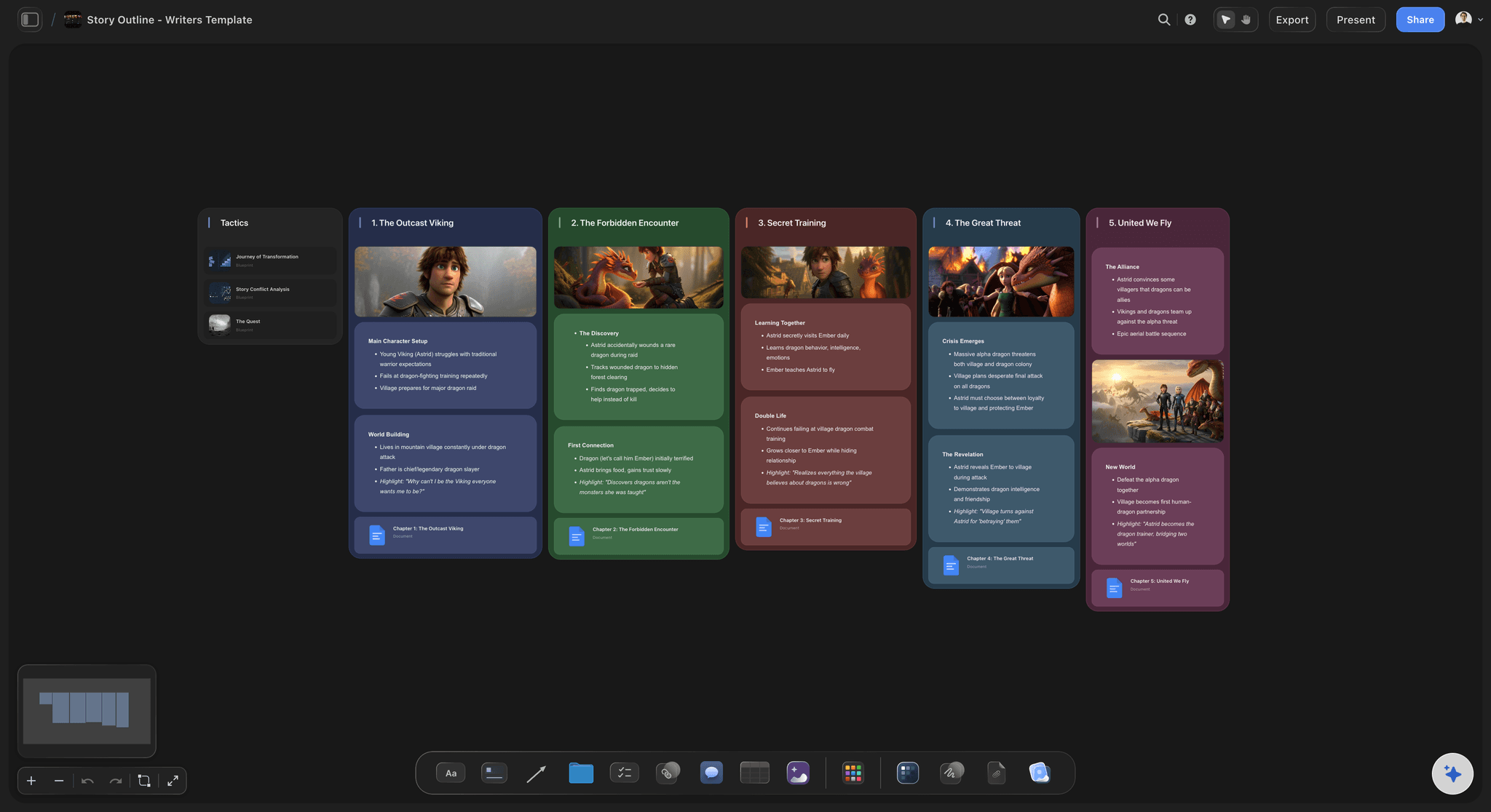
One wall per beat
The story as a row you can read
Each act or beat is a wall with its moments, the line we hear and the timing, in order from left to right. A client reads the film's shape before a word of script exists.
See the AI story outline generator →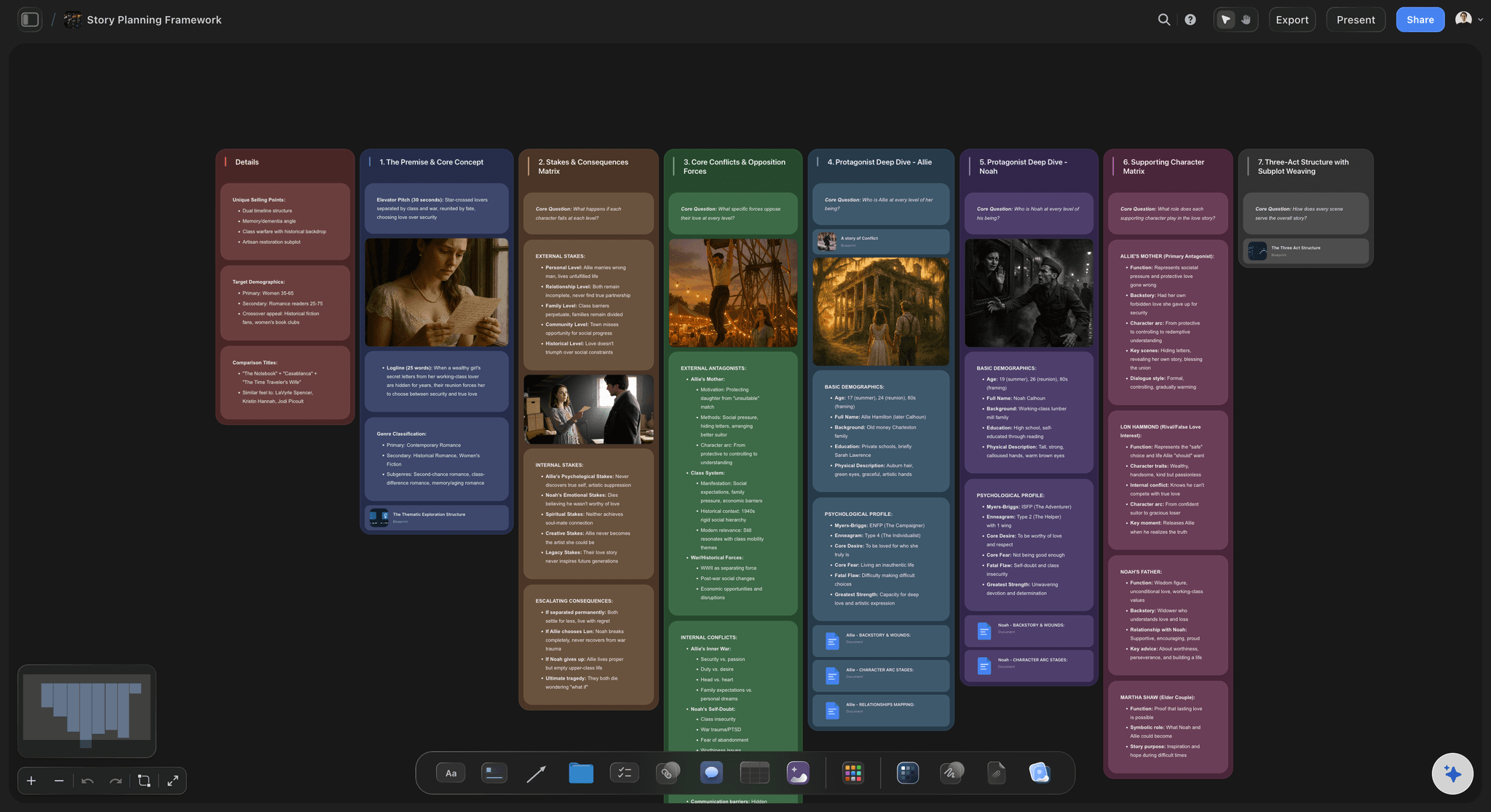
Storyflow Tactics
Frameworks to build the beats in
Name Pixar Story Spine, the Hero's Journey or StoryBrand, and ChatGPT reads that Tactic's steps from Storyflow's library of more than 200 frameworks, then builds the walls to match. It can open Tactics when you let it use all your projects.
See the story outline with Claude →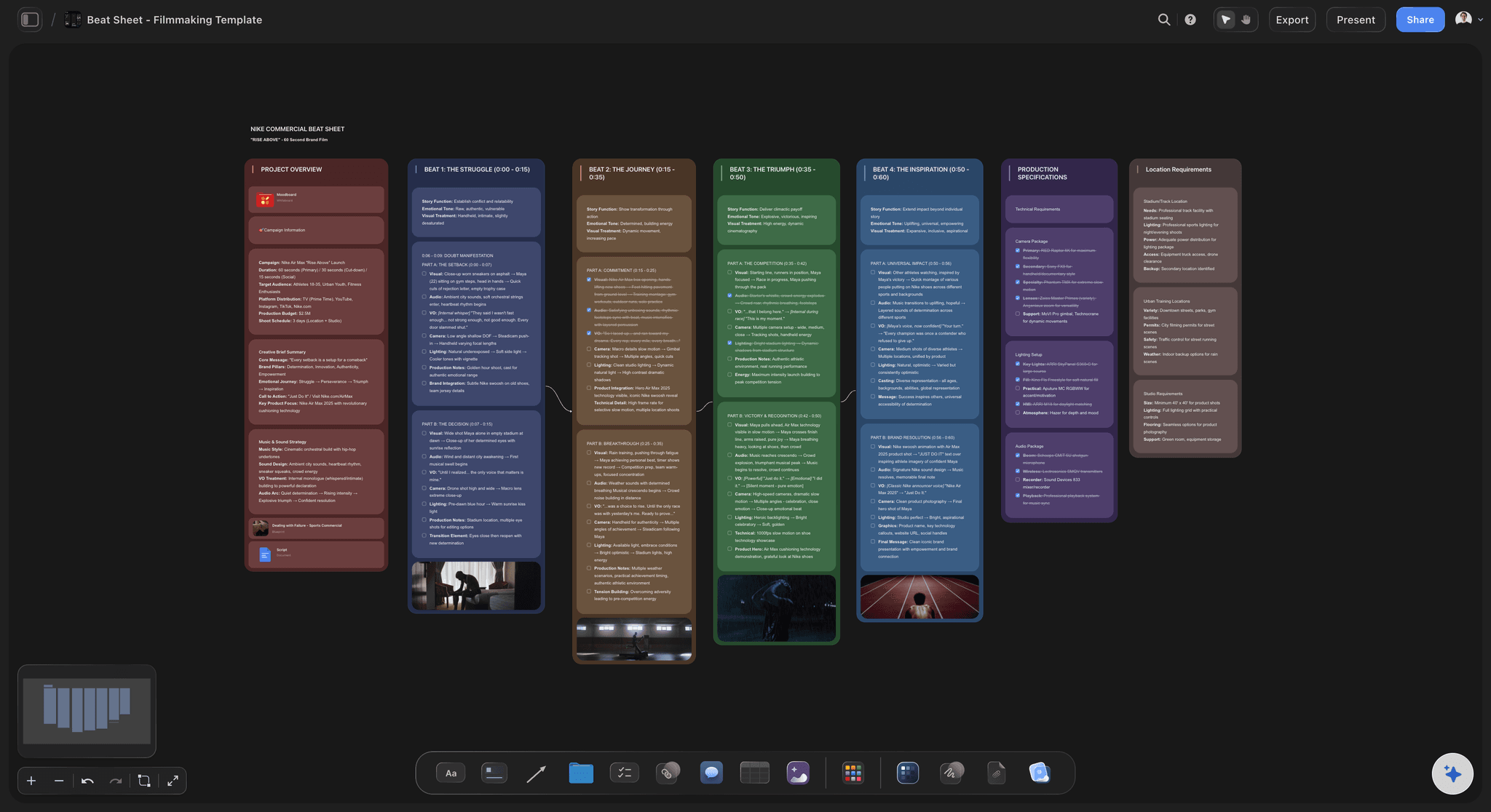
Timed beats
Seconds on every beat of a commercial
For a 30, 60 or 90-second film, ask for a timing on each wall and for ChatGPT to check they add up to the length. You see at a glance which beat is eating the time.
See the beat sheet template →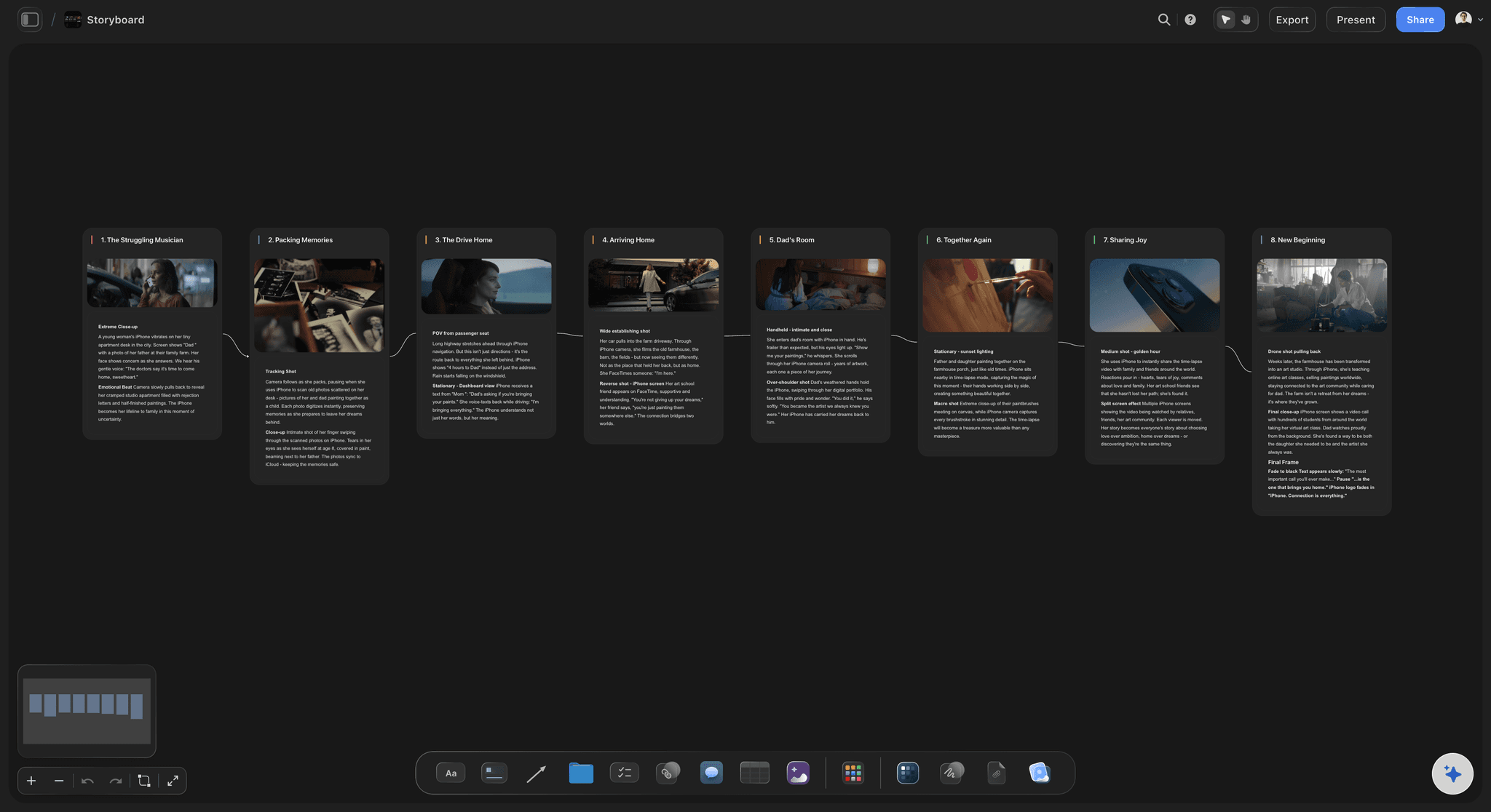
What comes next
From outline to storyboard on the same board
When the beats hold, ask ChatGPT for the storyboard: a column per frame built from the beats, with the outline still beside it for checking.
See the storyboard with ChatGPT →ChatGPT drafts the beats. Your Storyflow AI credits stay untouched.
The plugin runs on ChatGPT's own model and your ChatGPT plan, so an outline built through it uses no Storyflow AI credits. An invited free Storyflow account gets 25 plugin actions a week, reset every Monday (UTC), and every read or change ChatGPT makes counts as one. Plus, Pro and Max have no weekly limit. Storyflow is paid-only during early access, from $7.99 a month billed annually ($9.99 monthly), and anyone a paid member invites to a board joins free.
No Storyflow AI credits spent on the outline
25 plugin actions a week on an invited free account
No weekly limit on Plus, Pro and Max
The director and the client join the board free when invited
You choose which projects ChatGPT may open, and whether it may change them
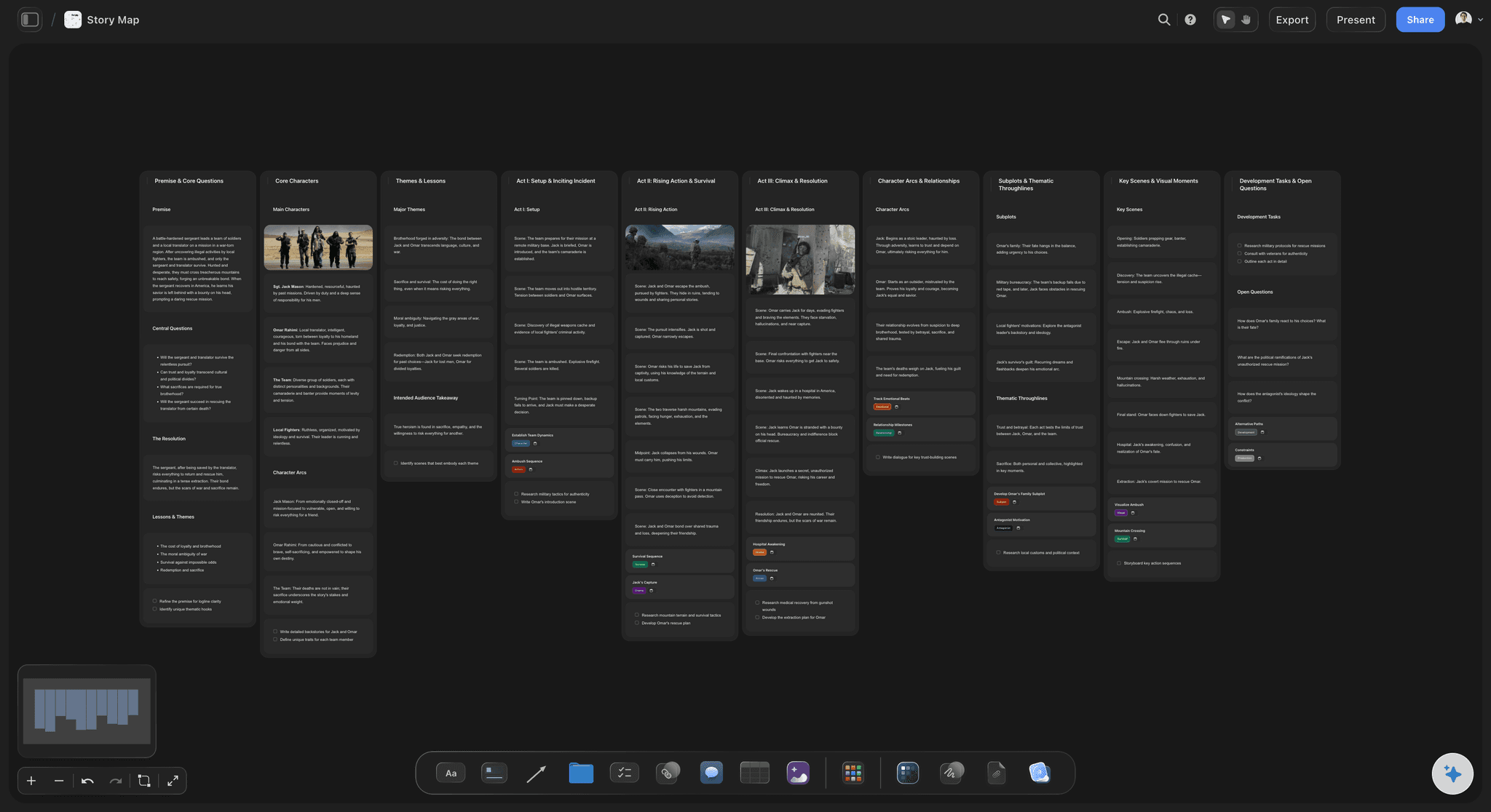
Built for people with taste
What an outline on a board gives a writer that a chat does not.
The brief, the characters and the client's notes.
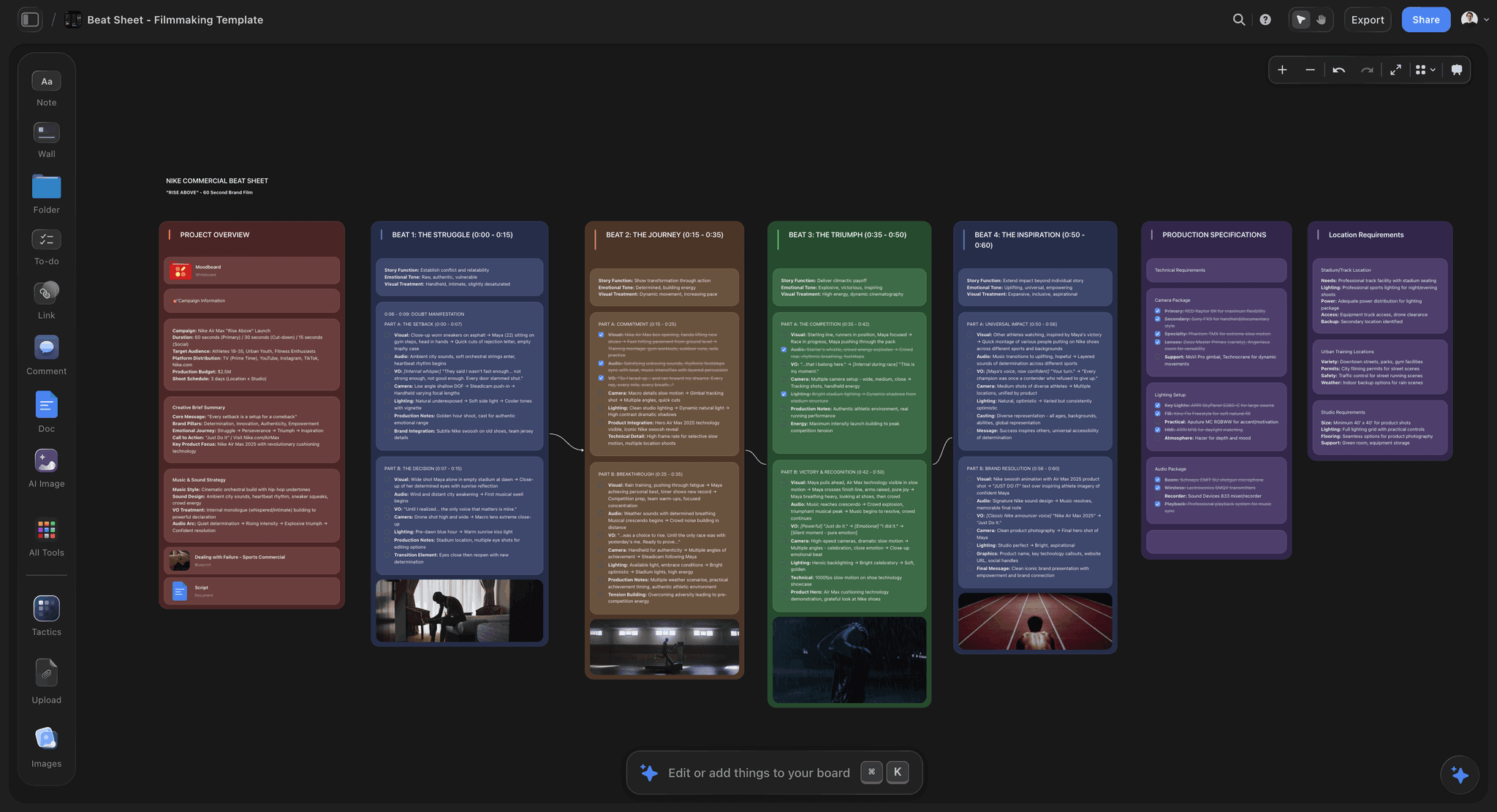
The brief
From the client's brief to a spine in one request
The brief stays on the board: ChatGPT reads Storyflow documents and PDF or Word files on the board. It gets the first 40,000 characters of a file, which covers most briefs whole.
A framework by name: Ask for the Hero's Journey and ChatGPT reads that Tactic's steps before it builds, instead of working from memory. Tactics need access to all your projects.
Start from a story template: Ask ChatGPT to put one of Storyflow's ready-made story templates on the board, such as the story outline or the story map, and rewrite its example cards for your film.
A word budget per beat: At about two and a half words a second, a 10-second beat holds about 25 words of voiceover. Ask ChatGPT to put the budget on each wall so the script cannot overrun.
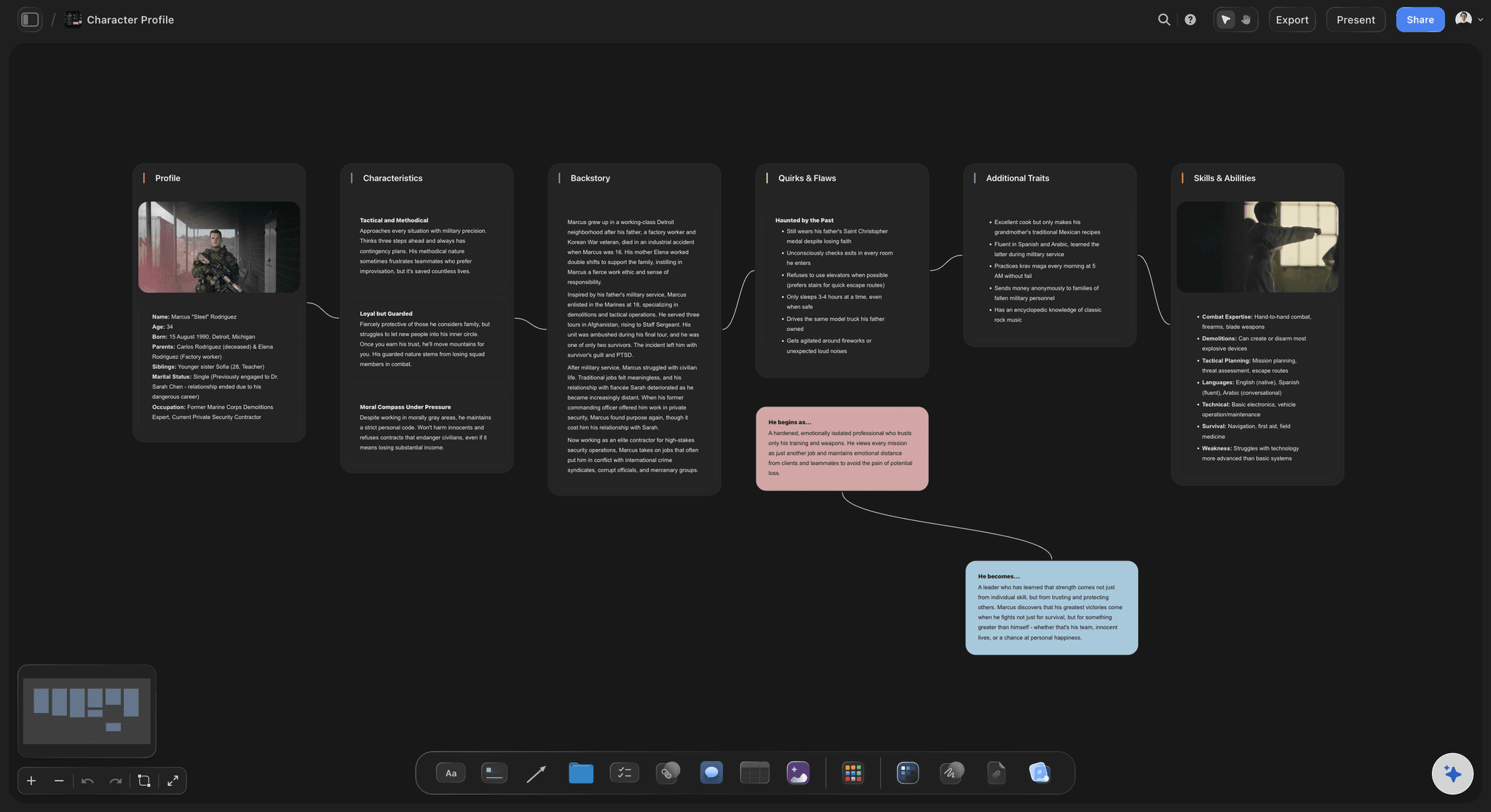
The characters
Who the film is about, kept beside the beats
A card per character: Who they are, what they want and what they are afraid of, in a wall of its own next to the outline, so every beat can be checked against it.
The brand's part in the story: One card says what the brand is in the film: the place, the tool or the people. It stops the outline turning into an advert halfway through.
A mind map of the themes: Ask ChatGPT for a mind map of the film's themes and the images that carry them, built as connected cards beside the beats.
Reference stills: Add pictures from web addresses ChatGPT has, twelve per request, or your own through the "Add your photos" link, up to 200 within 15 minutes.
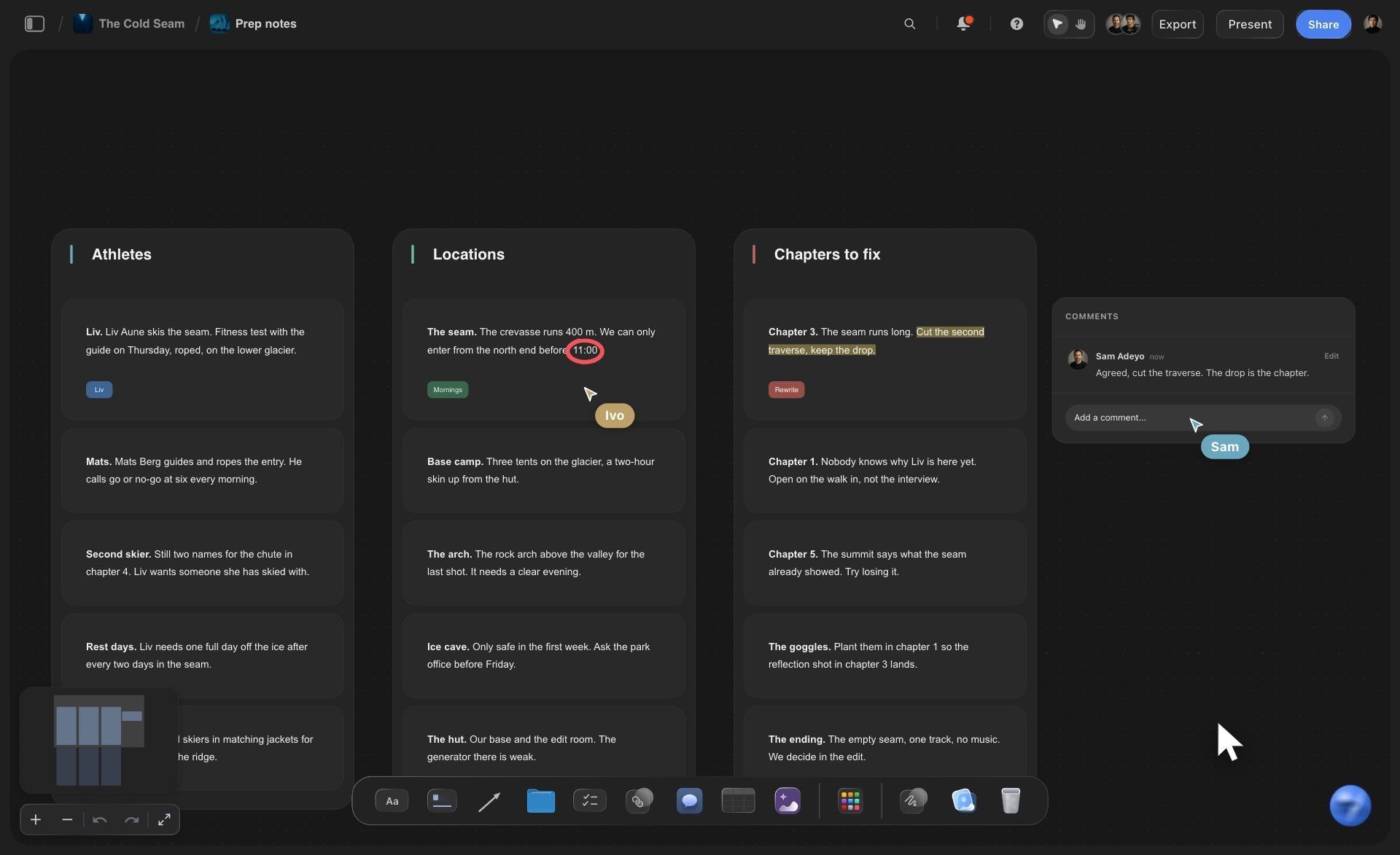
The client's notes
The client wants the reveal earlier
Move a beat by asking: Say "move the race to beat 2" and ChatGPT moves that card into the other wall. Then ask it to retime the walls so they still add up to 90 seconds.
Two endings side by side: Ask for a second ending and it lands beside the first. Show the client both, keep one, and remove the other by hand, because ChatGPT cannot delete cards.
One link for the client: A view-only link opens the board in a browser with no account, so the client reads the beats in order. To comment, they sign in.
Ask what changed: Ask ChatGPT what changed on the board this week. It reads the board's history and lists what was added, edited or moved, and by whom.
Explore templates for your project
Every template opens as a real, editable board on the infinite canvas. Pick the closest fit and make it your own.
Story Plan
Outline your plot, characters, and world in one connected view, then expand each thread as the story grows.
One app instead of five
ChatGPT with Storyflow, ChatGPT alone, or Final Draft.
Final Draft is screenwriting software with its own Beat Board and Outline Editor; it formats the script and tracks revisions, and it is not a ChatGPT plugin as of October 2026. Storyflow holds the outline ChatGPT drafts, beside the brief and the storyboard.
Storyflow with ChatGPT
Recommended
Outline drafted by ChatGPT from the brief
Beats on cards you can rearrange
Brief, references, outline and storyboard on one board
The team comments on the outline
Script formatted to industry standard
Tracked revisions
ChatGPT on its own
Outline drafted by ChatGPT from the brief
Beats on cards you can rearrange
Brief, references, outline and storyboard on one board
The team comments on the outline
Script formatted to industry standard
Tracked revisions
Final Draft
Outline drafted by ChatGPT from the brief
Beats on cards you can rearrange
Brief, references, outline and storyboard on one board
The team comments on the outline
Script formatted to industry standard
Tracked revisions
What creators are saying
Join early creators getting structured workspaces and AI that remembers their projects
“Storyflow has sped up my workflow by at least 3x, which means more flow state and more projects I can actually ship. It truly changed the way me and my team create.”

Reilin Joey
Director & YouTuber
“One prompt gets me a structured board. But the tactics are my favorite. I run my YouTube scripts through them and my intros and retention got better. It's amazing.”

Justkay
YouTuber & Freelance Filmmaker
“I used to juggle five apps to plan a project. Now I describe what I am making and get boards, lists, and a schedule. All in one place.”

George
@fernwehchronicles
Story outlines with ChatGPT: questions
What writers and creative directors ask before an outline from ChatGPT goes to a client.
Yes. Give ChatGPT the brief, the length and the audience and it breaks the story into acts or beats, with what happens and what changes at each one. With the Storyflow plugin it builds the outline on your project's board instead of in the chat: a wall per act or beat, a card for each moment, and the timings for a short film. You and the client can rearrange and read the same board.
Storyflow is our pick first, and it is our product. The basis: it builds the outline as walls of cards you can rearrange, can follow a Storyflow Tactic such as Pixar Story Spine, and keeps the brief, the references and the storyboard on the same board the client reads. Final Draft is the tool to weigh for the script itself; it is not a ChatGPT plugin as of October 2026, but it formats screenplays and tracks revisions.
Open the Storyflow listing in ChatGPT's plugin directory and select Install plugin. Sign in to Storyflow when asked, then choose which projects ChatGPT may use and whether it may make changes. In a chat, type @ and pick Storyflow, or choose it from the + menu. Availability depends on your ChatGPT plan, workspace and region. In a Business or Enterprise workspace, an admin manages plugins and can turn them on or off.
Yes. ChatGPT knows the common frameworks, and through the plugin it can also read Storyflow's Tactics, a library of more than 200 expert frameworks including the Hero's Journey, Pixar Story Spine and StoryBrand, then build the walls in that Tactic's steps. Tactics open to ChatGPT only when you let it use all your projects at sign-in; with a narrower choice it works from its own knowledge.
Fewer than you think. A 30-second spot usually holds three beats: the problem, the turn and the payoff. A 60-second film holds four or five, and a 90-second film six or seven, which is why the seven lines of Pixar Story Spine suit it. At about two and a half words a second, check that the voiceover for each beat fits its seconds before the client sees it.
Yes, either way. Drag a card from one wall to another on the board yourself, or tell ChatGPT what to move, such as "move the race to beat 2", and it moves that card into the other wall. Ask it to retime the walls afterwards, because changing the order of a short film usually changes how long each beat can run.
Yes. ChatGPT reads Storyflow documents and PDF or Word files on the project's board, and gets the first 40,000 characters of a file, so split a longer treatment into two files. A file you attach in the ChatGPT chat is read in the chat, but the file itself does not reach Storyflow. Put the brief on the board so the outline and its source sit side by side.
No. ChatGPT's Canvas is a writing pane that opens beside the chat for long text, and it is good for drafting prose. It is a document, not a board: it has no cards, walls or tables laid out side by side to rearrange. Use Canvas to write a beat's lines if you like, and the Storyflow board to hold the structure the team and the client read.
Storyflow is not a screenwriting app: no industry script formatting, no revision colours, no comparing versions. ChatGPT cannot delete cards, so a second outline lands beside the first. Tactics need access to all your projects. Over the plugin Storyflow does not draw pictures, and a photo attached in the chat does not reach the board; ask ChatGPT for the "Add your photos" link instead.
No. The plugin runs on ChatGPT's own model and your ChatGPT plan, so plugin actions use no Storyflow AI credits. An invited free Storyflow account can make 25 plugin actions a week, reset every Monday (UTC), and Plus, Pro and Max have no weekly limit. Storyflow is paid-only during early access, from $7.99 a month billed annually ($9.99 monthly); today the only free route is an invite from a paid member.
Share the board from Storyflow; ChatGPT cannot make share links. A view-only link opens in a browser with no account, so the client reads the beats in order without signing up, and signs in only to comment. Invite the director and the producer as members: anyone a paid member invites joins free, and every paid plan edits live.
The board is the same; the way in differs. ChatGPT installs Storyflow from its plugin directory, while Claude adds Storyflow as a custom connector at https://mcp.storyflow.so/mcp. Both build the same walls of beats and read the same Tactics on the same Storyflow boards, so a writer in ChatGPT and a director in Claude work on one outline. Storyflow's Claude page, storyflow.so/claude-story-outline, walks through the Claude setup.
Yes, on the same board. Ask ChatGPT to write the treatment as a Storyflow document from the walls, or to build the storyboard as a column per frame from the beats. Both land beside the outline, so anyone can check a frame or a paragraph against the beat it came from. The frames start empty, because the plugin does not draw pictures.
Only if you leave it that way. Treat the outline as structure, not as the script: the order of the beats, what each one turns, and the timings. Rewrite the lines in your own voice on the cards, or give ChatGPT a script you wrote before as a model for tone. Storyflow assists the writer and does not replace one; the creative work stays yours.
More from Storyflow
Connect ChatGPT to Storyflow
Storyflow MCP server for Claude, Gemini and Grok
Story outline with Claude
Storyboard with ChatGPT
Film treatment with ChatGPT
Video script with ChatGPT
Mind map with ChatGPT
Shot list with ChatGPT
AI story outline generator
Beat sheet template
Brand film planning
What is the Hero's Journey
What is a beat sheet
Let ChatGPT draft the structure. Write the story on the board.
A wall per beat, the timings that fit the length, and one link for the client to read it in order.