
Category
Video Production
Author

Storyflow Team
Product & Research Team
Topics
2026-11-15
•
35 min read
•
Video Production- shooting schedule template
- how to make a shooting schedule
- strip board film
- shooting schedule vs call sheet
- photoshoot schedule template
- meal line
- Storyflow
How do you make a shooting schedule?
Storyflow builds a shooting schedule from the shot list on one board: one wall per shoot day, setups in shooting order, each day's call, meal and wrap times beside the locations. Storyflow is an AI visual workspace that turns shots, locations and cast into a day-by-day schedule on one infinite canvas, and it works inside ChatGPT (plugin) and Claude (connector). Copy the shooting schedule template below, then draw the meal line six hours after crew call.

Full disclosure: Storyflow is our product. This guide compares kinds of tool rather than brands on purpose. Storyflow is listed first because the schedule sits beside the shots and locations it orders; it has no recalculating strip board, no Day Out of Days and does not send call sheets, and the 6-Hour Rule is our editorial rule, not research.
How the shooting schedule tools compare on trust, innovation, ratings and pricing
Which kinds of shooting schedule tool are the most trusted?
For features and series, production management suites are the most trusted, because their strip boards recalculate and they produce Day Out of Days reports that payroll and completion guarantors expect. For commercials and brand shoots, producers trust whatever keeps the schedule next to the approved shots. Storyflow is newer; its case is that the schedule, shot list, locations and call sheet sit on one board the client opens by link.
Which shooting schedule tools have fair pricing?
Fair pricing for scheduling means the crew and client do not each need a seat to read the plan. A spreadsheet or shared doc costs little or nothing. Production suites usually charge per editor seat. Storyflow is paid-only during early access, with Plus at $7.99 a month billed annually; anyone a paid member invites to a board joins free, and a view-only link needs no account.
What is the most innovative way to build a shooting schedule?
Letting an assistant read the shot list where it already lives and draft the days. With the Storyflow plugin in ChatGPT or the connector in Claude, the assistant builds a table per shoot day and a strip board grouped by day on the board itself, so the crew reads the result without opening the chat. The judgement on order, estimates and the meal line stays with the producer.
Which kind of shooting schedule tool is underrated?
A board that shows the pictures beside the rows. Producers ordering a day in a spreadsheet cannot see that setups 3 and 7 face the same window, so they light the room twice. On a Storyflow board the shot walls sit next to the day table, and grouping by camera direction becomes obvious. The plain paper strip board is also underrated for a quick read of a long shoot.
Which shooting schedule tools hold up on a long production?
Production management suites hold up best on long scripted shoots, because moving strips updates every total and cast day. Storyflow holds up well on commercial and brand work of a few days, and on campaigns with several short shoots, because each shoot's board keeps its schedule, call sheets and selects together. On any tool, issue dated versions, since a live schedule changes after the crew has read it.
Quick Comparison
Our pick first, on the basis that a commercial or brand shoot needs the schedule beside the shots and locations it orders, then the other kinds of tool by job.
| Tool | Best For | AI Features | Price |
|---|---|---|---|
| Storyflow | Day-by-day schedules for 1 to 5 shoot days beside the shot list, locations and call sheet | In-app AI drafts shot lists, a strip board by shoot day and a call sheet PDF; ChatGPT plugin and Claude connector build day tables and strip boards | $7.99 a month billed annually |
| A spreadsheet | Line producers who want formulas and sorting | Depends on the spreadsheet | Varies |
| A production management suite | Features and series with recalculating strip boards and Day Out of Days | Depends on the suite | Usually per seat |
| A shared doc | A one-day shoot with a tiny crew | Depends on the doc | Varies |
Key Takeaways
- Storyflow is where a producer turns a shot list into a shooting schedule: one wall per shoot day on a single board, every setup with its location, cast, kit and time, the call sheet beside it, and a view-only link the crew opens with no account.
- To build it as a board straight away, start from Storyflow's shooting schedule template page.
- A shooting schedule is the plan for the whole shoot, ordered by location and light rather than by the script; a call sheet is one day of it, issued the night before.
- Build it in eight steps: break down, group by location, order by light, estimate each setup, place the meal, add buffers, check cast and permits, then lock and issue.
- The Storyflow 6-Hour Rule: in Storyflow, draw a meal line six hours after crew call on every shoot day, and plan the setup before it to finish in time. Union contracts and labour law put the first break around the sixth hour, so a schedule that ignores it is fiction by lunchtime.
- A strip board is the same schedule as colour-coded strips: white for day interior, yellow for day exterior, and blue and green for night, with a black strip between days.
- Storyflow's strip board does not recalculate and has no Day Out of Days, so a crewed feature with many cast days still needs a dedicated scheduling suite; a commercial or a two-day brand shoot does not.
Shooting Schedule Template: Copy This Day-by-Day Table
A shooting schedule template is only useful if every column answers a question somebody asks on the day. The nine below do: what time, which setup, where, who, how long, what to bring, and what could go wrong. The rows are filled for an illustrative day: Pellmore Films shooting day 1 of a 30-second spot for Quillon Oats, a fictional oat drink, with cutdowns at 15 and 6 seconds. Both names are invented.
| Time | Setup | Shot or scene | INT/EXT, D/N | Location | Cast | Est. time | Key kit and props | Notes |
|---|---|---|---|---|---|---|---|---|
06:30 | Crew call | Unload, coffee, safety talk | n/a | Unit base, Mill Lane car park | Crew | 30 min | Walkies, first aid kit | Safety bulletin attached to call sheet |
07:00 | 1 | Wide: cyclist crests the hill at sunrise | EXT D | Hollins Ridge lay-by | Rider (Maya) | 45 min | Long lens, tripod, hero bike | Sun up 07:12; this shot cannot move |
07:45 | 2 | Medium: rider stops, breath in the cold | EXT D | Hollins Ridge lay-by | Rider | 40 min | Handheld, 50mm | Same spot as 1, no reset |
08:25 | Move | Company move to kitchen location | n/a | 12 min drive | All | 35 min | Van, grip truck | Move counted as schedule time |
09:00 | 3 | Kitchen wide: carton on the counter, family morning | INT D | 4 Garnet Row kitchen | Mum, son (8) | 75 min | Dolly, window light, 2 cartons | Child on set: licence and chaperone confirmed |
10:15 | 4 | Pour: oat drink into bowl, macro | INT D | Kitchen | Hand model | 60 min | Macro lens, pour rig, 12 cartons | Product shot, client signs frame on monitor |
11:15 | 5 | Son's reaction, medium close-up | INT D | Kitchen | Son (8) | 45 min | Same lighting as 3 | Child's working hours end 15:00 |
12:00 | Meal | Lunch, 1 hour | n/a | Unit base | All | 60 min | Catering | Meal line: 12:30 at the latest (call 06:30) |
13:00 | 6 | Pack shot: carton, logo, super-safe framing | INT D | Kitchen table, black flag | None | 60 min | Product hero cartons, polariser | Legal line and super read on monitor |
14:00 | 7 | Doorway: Mum hands son the bottle, exits | INT D | Hallway | Mum, son | 50 min | Gimbal | Last child shot of the day |
14:50 | 8 | Cutaways: steam, spoon, window | INT D | Kitchen | None | 40 min | Macro, haze | Pickup slot: drop if behind |
15:30 | Hold | Contingency time | n/a | Kitchen | n/a | 30 min | n/a | Re-shoot of any missed shot |
16:00 | Wrap | Wrap and load out | n/a | Kitchen, unit base | Crew | 60 min | n/a | Location returned by 17:00 |
Read the template from left to right as a set of decisions. Time is when the setup starts, not when the shot rolls. "Est. time" is setup, rehearsal and takes together. Notes holds the one thing that would stop the shot: the sun, the child's hours, the client's signature.

The Production tools in Storyflow's All Tools panel: drag the Shotlist, Location and Call Sheet tools onto the board that will hold the schedule.
How to use this template in Storyflow
Paste the table into a Storyflow table, or ask the AI for one, and keep one table per shoot day inside a wall named for the day. Storyflow tables cannot be sorted, so keep the rows in time order as you type them, and give the Time column a time value rather than text so it reads cleanly. A status column offers six fixed options (Not started, Blocked, In progress, In review, Done, Archived), which turns the same table into a live tracker on the day.
The columns you can drop on a small shoot
A one-day interview or a social shoot can lose INT/EXT and the cast column. Keep Time, Setup, Location, Est. time and Notes: those five carry the schedule. Everything else lives on the shot list and the call sheet beside it.
The header every schedule page carries
Above the table, each day's page needs a header block so a printed or exported page stands on its own: production title, shoot day number out of the total ("Day 1 of 2"), date, director, producer, 1st AD or whoever runs the floor, crew call, sunrise and sunset, the weather forecast and the cover set, the unit base address, and the version number and issue time. In Storyflow, the header is one note at the top of the day's wall, above its table; change the version number every time the schedule is reissued.
The scripted version: scenes, page counts and cast numbers
A drama, short film or scripted branded piece is scheduled by scene rather than by setup, so the columns change: the scene number from the script, the page count in eighths, the set name, and the cast by the number on the cast list. This illustrative day is from a fictional two-day short film shot in one house and its garden.
| Time | Scene | Pages | INT/EXT, D/N | Set | Cast (by number) | Est. time | Props and wardrobe | Notes |
|---|---|---|---|---|---|---|---|---|
07:00 | Crew call | n/a | n/a | Unit base | Crew | 30 min | n/a | Cast called 07:30 for make-up |
07:30 | 4 | 1 3/8 | EXT D | Garden, back fence | 1, 2 | 90 min | Wheelbarrow, gardening gloves | Sun on the fence until 10:00 |
09:00 | 9 | 4/8 | EXT D | Garden, shed door | 1 | 45 min | Padlock, key | Same direction as 4, no relight |
09:45 | 2 | 2 2/8 | INT D | Kitchen | 1, 2, 3 | 120 min | Breakfast dishes, school bag | Child (3) wraps by 14:00 |
11:45 | Meal | n/a | n/a | Unit base | All | 45 min | Catering | Inside six hours of the 07:00 call |
12:30 | 6 | 1 5/8 | INT D | Kitchen | 1, 3 | 90 min | Same dishes, now dirty | Continuity photos from scene 2 |
14:00 | 7 | 6/8 | INT D | Hallway | 2 | 45 min | Coat on the hook | Child released |
14:45 | 11 | 3/8 | INT D | Hallway | 1, 2 | 30 min | Phone | Droppable: pick up on day 2 |
15:15 | Day total | 6 7/8 | n/a | n/a | n/a | n/a | n/a | Wrap 16:00 |
The page column is the one a producer reads first: the day total tells you whether the day is loaded like the others. On a Storyflow board, put the day total in the last row and update it by hand when a scene moves, because the table does not add it up for you.
How to Make a Shooting Schedule in 8 Steps
A schedule fails in one of two ways: it is built in script order and wastes hours on moves and resets, or it is built in a spreadsheet nobody can see the shots from. These eight steps avoid both, and Storyflow sits inside most of them because the board keeps the pictures, places and times in one view.
Step 1: Break the job down into setups
Storyflow's Shotlist tool drops Shot 1 to 4 walls onto the board, each with an image slot, a Description, a "Shots required" to-do list, Setup and Equipment, and the "+" on the last wall adds Shot 5, 6 and on. A setup is one camera position and lighting state; several shots can share it. For a script, break down scenes first (a scene's page count is measured in eighths of a page, as the production board entry explains), then the setups inside each scene. For a commercial without a script, the storyboard frames are the breakdown. If the storyboard is already on the board, the in-app AI's "A shot list from my storyboard" workflow drafts the shot list from its frames; correct it by hand. The full method is in the shot list template for a video shoot.
Step 2: Group setups by location, then by direction
On the Storyflow board, put every setup that shares a location on one wall, and inside the wall, every setup that shares a camera direction next to each other. Turning the camera around costs a lighting reset; moving the company costs a pack-down, a drive and a rebuild. Grouping first and ordering second is the whole craft. The Location tool gives each place its own wall with the same rows (address, a map link, contact, phone, cost, a rating and a Booked row) plus a Photos folder, so you can compare two kitchens before you commit the day to one.
Step 3: Order each location by light and by difficulty
In Storyflow, order the setups on each day's wall by what the light allows first, then by difficulty. Exteriors that need a particular sun go at their time and nothing moves them; check sunrise, sunset and day length for the date and place on a sun calculator. The golden hour lasts less than an hour near the equator and longer toward the poles, so a "magic hour" shot in Lisbon in June and Oslo in November are different plans. After light, shoot the hardest setup while the crew is fresh, then the wides before the close-ups in each direction, so the lighting comes down rather than up.
Step 4: Estimate each setup in minutes
Give every setup an estimate that includes lighting, rehearsal and takes. Storyflow does not estimate durations for you; the table's Est. time column holds your number and the DP's. Use the estimating table further down as a starting range, then replace it with your crew's real numbers after the first day.
Step 5: Place the meal line
Storyflow puts the Call Sheet tool's "Call times" card at the top of the Schedule wall (crew call, first shot, lunch, wrap), and that is where the meal line goes: six hours after crew call at the latest. The Storyflow 6-Hour Rule below explains why and what to do when a setup straddles it.
Step 6: Add buffers where the risk is
A schedule with no slack is a schedule with overtime. Add a 20 to 30 minute buffer after the riskiest setup of the day, not at the end, where it gets eaten by the last shot. Mark one shot per day as droppable ("Pickup slot: drop if behind") so the 1st AD knows what goes first. On the Storyflow board, colour or label that card so it reads at a glance.
Step 7: Check cast hours, permits and safety against the order
A schedule is legal or it is not. Children's hours come from the licence: in the UK, the person in charge applies to the child's local council for a child performance licence at least 21 days before the shoot (Northern Ireland has its own rules). Location permits set times too. In Los Angeles, FilmLA says basic permits take 3 to 7 business days and one application covers up to five locations within seven consecutive days. In the US, stunts, vehicles, water and drones each have a safety bulletin from the Industry-Wide Labor-Management Safety Committee: recommended guidelines, not law, which may be reproduced and attached to call sheets. Put each constraint in the Notes column of the setup it limits.
Step 8: Lock, share and turn each day into a call sheet
Storyflow shares the schedule board by a view-only link that opens with no account; anyone who should comment signs in. Lock the version in writing: export the board as a dated PDF, because a live board can still be edited by anyone with edit access. Then build each day's call sheet from its wall. The Call Sheet tool lays out The shoot, Schedule, Location and Cast & crew walls; the in-app AI can draft a call sheet PDF from the board and leaves unknowns blank, including the nearest hospital line unless you supply it. Storyflow does not send call sheets or track who confirmed, so send the PDF the way your crew expects it. How to make a call sheet covers the sheet line by line.
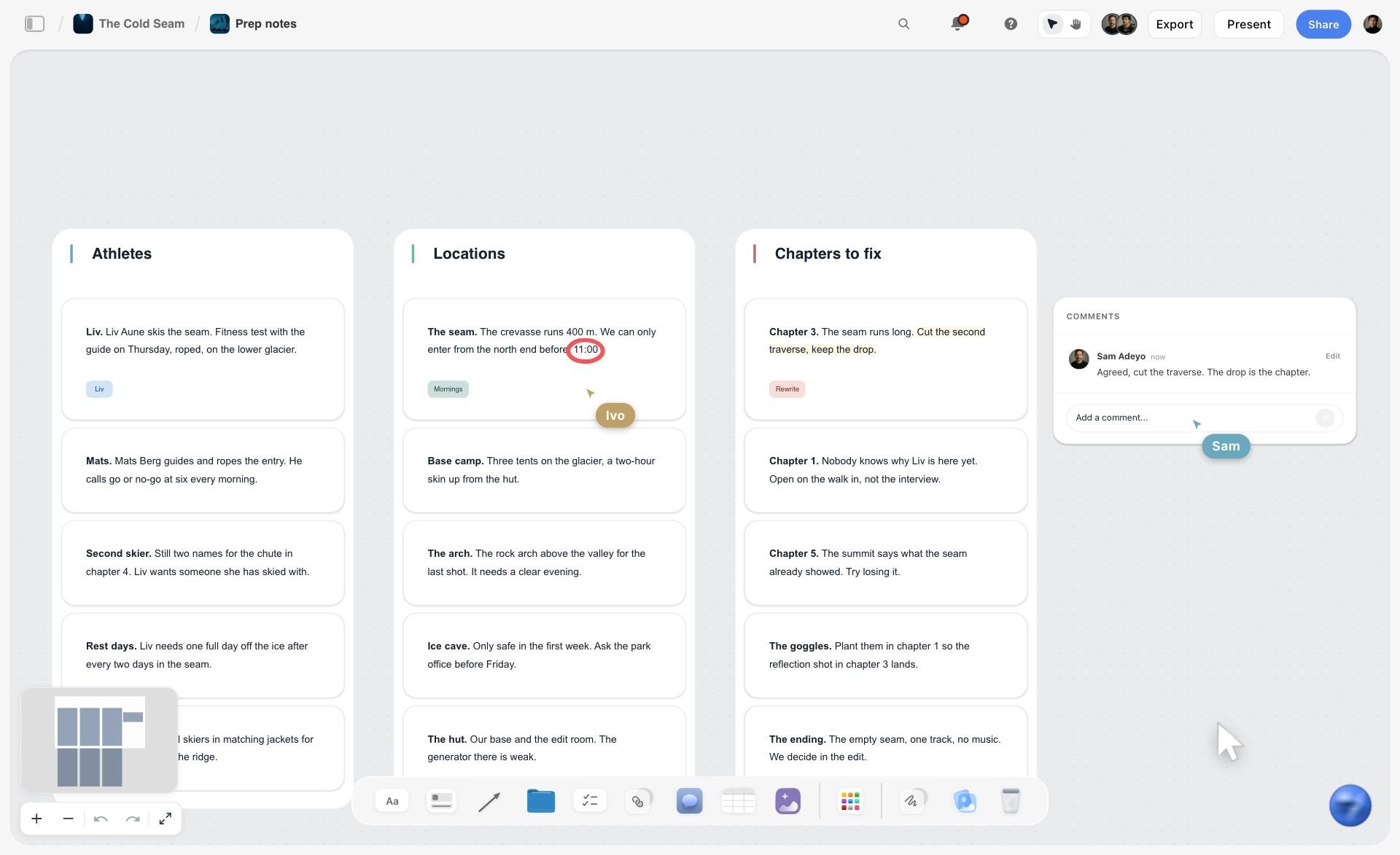
Prep notes sorted onto walls for athletes, locations and chapters: the raw material the schedule puts in order. The ski film is fictional.
The Storyflow 6-Hour Rule: Where the Meal Goes
The Storyflow 6-Hour Rule is our editorial rule for every shoot day: in Storyflow, draw the meal line six hours after crew call, and plan the setup before it to wrap by then. It is our recommendation, not research, and the number comes from the rules crews work under.
Why six hours
Performer and crew agreements put the first meal break around the sixth hour. For US performers, a secondary source, Acting Magazine's explainer on the SAG-AFTRA day, says that typically, after six hours of work, the production must provide a meal break of at least 30 minutes, with overtime after eight hours; the agreement that covers your production is the document that binds. UK law sets a floor of its own: a worker whose day runs longer than six hours is entitled to one uninterrupted 20-minute break, and to 11 hours of rest between working days, according to GOV.UK. Crew agreements in each country set their own meal rules and penalties, so check yours; six hours is where they converge. None of this is legal advice: confirm the rules for your country, union and contract with your production lawyer or the union.
How to apply it on the board
Write the line into the Call Sheet tool's "Call times" card on the Storyflow board: "Crew call 06:30 · First shot 07:00 · Meal by 12:30 · Wrap 16:00". Then look at the setup that runs into it. If a 75-minute setup starts at 11:45, it straddles the line. Either move it after lunch, or split it: light and rehearse before the break, shoot after. Never plan to "push through" lunch; the meal penalty and a tired crew both cost more than the 30 minutes saved.
The second line and the turnaround
A long day gets a second meal line six hours after the first meal ends. Between days, the rest period sets the next call: with 11 hours of rest in the UK, a 21:00 wrap means a call no earlier than 08:00, and the same Acting Magazine explainer gives 12 hours before the next call as typical for SAG-AFTRA performers. In Storyflow, write the wrap and the next call on adjacent day walls so the gap is visible before anyone books a dawn exterior after a night shoot.
Shooting Schedule vs Call Sheet
A shooting schedule is the plan for the whole shoot; a call sheet is one day of it, issued to everyone the night before, and in Storyflow the schedule's day walls feed each day's Call Sheet tool on the same board. Producers mix the two up when a one-day shoot makes them look alike. They have different readers, different lifespans and different jobs.
| Shooting schedule | Call sheet | Where it lives in Storyflow | |
|---|---|---|---|
Covers | Every shoot day, start to wrap | One shoot day | Schedule: one wall per day; call sheet: the Call Sheet tool per day |
Ordered by | Location, light and cast availability | Time on that day | Day walls in shooting order; Schedule notes in time order |
Made by | 1st AD or producer, approved by the director and line producer | 2nd AD or producer, from the schedule | The same board, so both read from one shot list |
Readers | Heads of department, client, producer | Every person on set | View-only link with no account; PDF export |
When issued | Weeks before, revised as prep changes | Usually no later than 12 hours before the day starts, as the call sheet entry says; in practice the evening before | Exported as a dated PDF; the in-app AI drafts a call sheet PDF |
Holds | Setups, estimates, cast days, locations, buffers | Call times, address, parking, weather, hospital, contacts, the day's setups | Call Sheet tool: The shoot, Schedule, Location, Cast & crew walls |
Changes | Revised and reissued with a version date | Replaced, not edited, once issued | A dated PDF per version; the change report shows who edited |
When one document is enough
For a single-day interview or a stills shoot, the call sheet can carry the schedule as its Schedule wall. Storyflow's Call Sheet tool keeps several shoot days in one sheet as notes ("Day 1: Date · where · 7:00 what happens, who"), which is enough for a two-day job. Past three days, or with more than one location a day, keep a separate schedule.
What the call sheet adds that the schedule does not
The call sheet adds the logistics for one day: the weather, the address, parking, the way in, the nearest hospital, and everyone's call time. Storyflow's Call Sheet tool has a Getting there table with Address, Parking, Way in and Nearest hospital rows, and a "Good to know" card for food, toilets, what to wear and the weather. A forecast from your national weather service, such as the US National Weather Service, belongs on it the night before, not in the schedule.
What Is a Shooting Schedule?
A shooting schedule is the day-by-day plan that orders every scene or setup of a shoot by location, light and availability, with a time estimate for each. It answers four questions: what are we shooting each day, in what order, where, and with whom. Everything else on a production follows from it: the crew's days, the equipment hire, the location bookings and the catering numbers.
What goes on a shooting schedule
Per setup or scene: the scene or shot number, a one-line description, INT or EXT, day or night, the location, the cast, the page count or estimated time, key props and equipment, and notes. Per day: the date, crew call, meal, wrap, and the day's total. Per shoot: the number of days, the company moves, and the contingency. The template above has every one of those columns.
Who makes it and when
On a crewed production the 1st AD builds the schedule from the breakdown and clears it with the director, producer and heads of department. On a commercial or brand shoot without an AD in prep, the producer builds it. Start a draft once the storyboard or shot list exists; lock it at the pre-production meeting, then reissue only when something changes. A pre-production checklist shows where it sits among the other documents.
Shooting schedule vs production schedule
The production schedule runs from brief to delivery: prep, shoot, post, reviews and the air date. The shooting schedule is the shoot days inside it. Storyflow's Timeline tool lays out the production phases as walls joined by arrows, each with "what happens" and "what has to be done" cards; it is phases, not a Gantt chart, with no date field and no dependencies. How to make a production schedule covers the wider plan.

Phases laid out as columns on a Storyflow board: the production schedule works at this level, and the shooting schedule fills the shoot phase.
Stripboard: How a Strip Board Works in Film
A strip board is the shooting schedule drawn as one coloured strip per scene, arranged in shooting order, with a separator strip between days. Producers still call any schedule a "stripboard", and a strip board film schedule is the format a feature AD will expect to see.
| Strip | Common colour | What it tells the crew |
|---|---|---|
Day interior | White | Lights inside, no sun dependency |
Day exterior | Yellow | Weather and sun matter; needs a cover set |
Night interior | Blue (some schedulers use green) | Blackout or real night; turnaround to watch |
Night exterior | Green (some use blue) | Night work, often the slowest pages of the shoot |
Day separator | Black | End of a shoot day, with the day's page total |
Week separator | Orange in the generic convention | End of a shooting week |
The colours come from the generic convention listed on the production board entry, which also notes that one widely used scheduling suite swaps the two night colours. Agree on the convention with your AD before the first draft.
What a strip holds
Each strip carries the scene number, day or night, interior or exterior, the page count in eighths, the set, the filming location, the cast by number and short notes. Read across a strip board and you see the whole shoot: long yellow runs mean weather risk, a cast number that appears on day 1 and day 9 means paying an actor to wait.
A stripboard template in Storyflow
Ask Storyflow's in-app AI for a strip board and it builds one grouped by shoot day with page counts, beside the script or shot list on the same board. ChatGPT and Claude can build the same strip board through the plugin or connector. Two honest limits: it does not recalculate when you move a strip, so day totals are yours to update, and there is no Day Out of Days report. The stripboard page shows the layout.
Day Out of Days, and when you need one
A Day Out of Days is the chart, prepared after the schedule, that tallies each cast member's paid days with codes such as S for start, W for work, H for hold and F for finish. You need one when actors are paid by the day and the schedule has gaps between their days, which is most features and episodic work. Commercials with one or two performers per day rarely need it; a cast column on each day's table does the job.
How Long Each Setup Takes: Estimating the Day
Estimates are where schedules lie. Every number below is an illustrative planning range, not a measurement: a starting point to replace with your DP's and AD's numbers after day one.
| Setup type | Illustrative range | What pushes it up | Where to note it in Storyflow |
|---|---|---|---|
Interview, one camera, existing light | 30 to 45 min | Second camera, lav problems | Setup card on the shot wall |
Simple dialogue or performance setup | 45 to 75 min | New lighting direction, extras | Est. time column |
Product or pack shot | 60 to 120 min | Client approval on monitor, label alignment, liquids | Notes: "client signs frame" |
Macro or pour shot | 60 to 90 min | Pour rig resets, product spares, cleaning | Equipment card: rig and spare count |
Car or moving vehicle shot | 2 to 4 hours | Road closures, rigging, safety briefing | Notes, plus the safety bulletin |
Drone shot | 45 to 90 min | Airspace, wind, battery swaps | Notes with the pilot's permission |
Company move | 30 to 90 min | Distance, parking, unit base | A Move row in the day's table |
Lighting turnaround in one room | 20 to 45 min | Window direction, matching earlier shots | Group setups by direction to avoid it |
Count the moves as setups
A company move is not free time between setups; it is a row in the schedule with its own minutes. Two moves in a day on a crew of 15 is a heavy day. If the plan needs three, ask whether one location can double for another.
Children, animals and product take longer
Children work limited hours under their licence and need breaks inside them. Animals do not take direction. Product shots stop for the client to approve the frame on the monitor. Give each of these setups the top of its range and put the reason in the Notes column so nobody trims it later.
Pages per day for scripted work
For scripted work the unit is pages in eighths. A daily page target depends on budget and coverage, so set it from your AD's experience and the director's shot count rather than a rule of thumb, and let the strip board's day totals show when a day is overloaded.
Ordering a Day: Five Rules That Save Hours
The same eight setups can make a 10-hour day or a 13-hour day depending on the order. These five rules decide which.
Light first, then everything else
The sun sets the order of every exterior. Put the shot that needs a specific light at its time, then build the day around it. Interiors with controlled light fill the hours between.
Wide to tight in each direction
Shoot the wide shot of a direction first: it sets the lighting, the continuity and the performance. Then move in. Turning around once per scene, not once per shot, is the single largest saving on a dialogue day.
Hardest setup while the crew is fresh
The stunt, the long take, the complicated pour, the child's key moment: schedule them in the first half of the day. Late in the day, the crew is slower and the light, the child and the client's patience are all running out.
Cover set for every exterior
Every exterior day needs an interior the company can move to if the weather turns. Name it on the schedule ("Cover: kitchen setups 3 to 5") so the decision on the morning takes one sentence.
End on a shot you can drop
The last setup of the day should be one you can lose without losing the edit: cutaways, an alternative, a pickup. If the day runs long, it goes, and wrap stays on time.
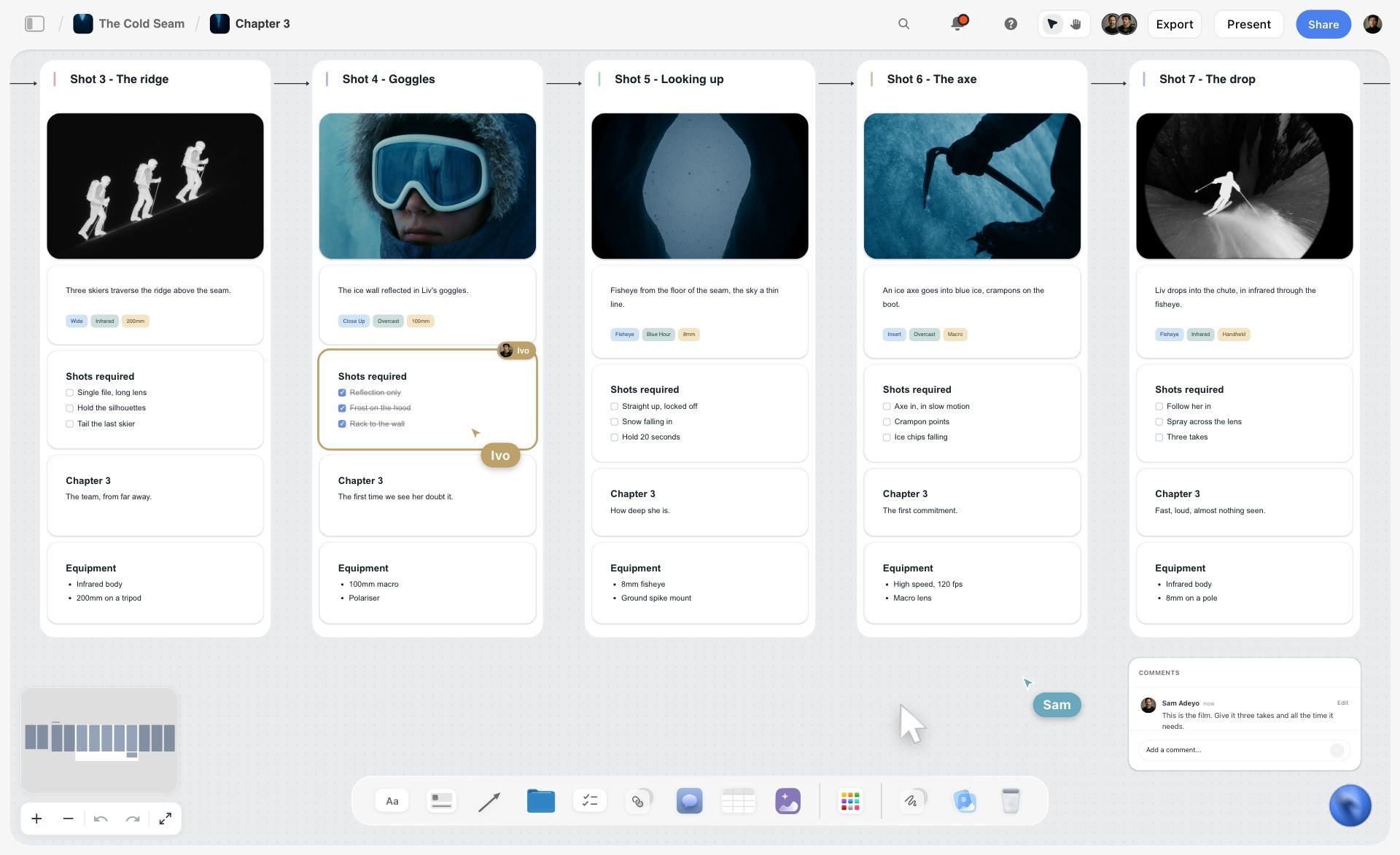
Setups in shooting order on a Storyflow board, with a teammate ticking off coverage as it is shot.
Photoshoot Schedule Template
A photoshoot schedule runs on looks, not setups. The unit is a look: one outfit, hair and make-up state, set and lighting. A photoshoot schedule template needs a column for the change-over, because hair and wardrobe set the pace, not the camera.
| Time | Look | Set | Talent | Hair and make-up | Wardrobe | Shots needed | Est. time | Notes |
|---|---|---|---|---|---|---|---|---|
08:00 | Call | Studio A | All | Talent in chair | Racks steamed | n/a | 60 min | Model 1 first in chair |
09:00 | Look 1 | White cyc | Model 1 | Natural, clean | Coat, knit | 3 full length, 2 crops | 60 min | Hero image for the homepage |
10:00 | Look 2 | White cyc | Model 2 | Natural, clean | Dress, boots | 3 full length, 2 crops | 60 min | Model 1 changes during Look 2 |
11:00 | Look 3 | Set: sofa | Models 1 and 2 | Refresh | Lounge set | 4 images incl. 9:16 | 75 min | Social crops checked in camera |
12:15 | Meal | n/a | All | n/a | n/a | n/a | 45 min | Meal line: 14:00 at the latest |
13:00 | Look 4 | Daylight window | Model 1 | Sleek hair | Shirt, trousers | 3 images | 60 min | Window light gone by 15:30 |
14:00 | Flat lays | Table | None | n/a | Accessories | 12 product images | 90 min | Shoot in batches by colour |
15:30 | Hold | n/a | n/a | n/a | n/a | Reshoots | 30 min | Client picks selects on screen |
Plan the change-overs, not the shots
While Model 2 shoots Look 2, Model 1 is in the chair for Look 3. Draw that overlap on the schedule, or the camera waits for hair. The photoshoot call sheet and shot list covers the stills paperwork in detail.
Pick finals on the day
Storyflow's Selects tool drops four walls onto the board, To review, Yes, Maybe and No, and photos are dragged between them; the Yes column is the final list. The client needs edit access to move cards, since a view or comment link cannot.

A photoshoot workflow on a Storyflow board: the shoot days sit between the brief and delivery, which is where the photoshoot schedule plugs in.
Worked Example: Pellmore Films Schedules a Two-Day Spot
This example is illustrative: an invented production company, an invented brand, and timings written as a plan, not results. Pellmore Films has a two-day shoot for Quillon Oats: a 30-second spot plus 15 and 6-second cutdowns, one exterior (a ridge at sunrise) and one interior (a family kitchen), a child performer, and a pack shot the client must approve.
Day 0: the board
The producer opens a Storyflow board for the job, drags the Brief tool onto it (six walls: The work, Who it's for, How it looks, What we're working from, Plan, Budget) and uploads the agency's storyboard frames to the Storyboard tool's scene walls. The Shotlist tool goes beside it, one wall per setup, 14 setups in all. The Location tool holds the ridge and two candidate kitchens side by side, each with its address, map link, cost and photos.
The decisions the board made visible
Three decisions fall out of seeing it all on one canvas:
- The ridge shot needs a sunrise, so day 1 starts outdoors and the kitchen follows; day 2 is all interior and starts later.
- The child's hours under the licence end mid-afternoon, so every shot with the son goes before 15:00 on day 1, and day 2 has none.
- The pack shot needs the client on set, so it goes straight after lunch on day 1, when the agency team has arrived and the kitchen is lit.
The schedule, day by day
| Day | Call | First shot | Meal line | Wrap | Setups | Location | Risk and buffer |
|---|---|---|---|---|---|---|---|
1 | 06:30 | 07:00 sunrise wide | 12:30 | 16:00 | 1 to 8 | Ridge, then 4 Garnet Row | 30 min after the pour; cutaways droppable |
2 | 08:00 | 08:45 | 14:00 | 18:00 | 9 to 14 | 4 Garnet Row | 30 min after the dolly move; alternative ending droppable |
Day 2's call is at 08:00 because day 1 wraps at 16:00 with load-out until 17:00; that leaves well over the 11 hours of rest UK rules require. Each day wall on the Storyflow board holds its table, and the Call Sheet tool beside each day holds the Call times card, Getting there table and Cast & crew folders.
Sharing and locking
The producer sends the agency a view-only link, and the agency producer signs in to comment on the order. After the pre-production meeting, the producer exports the board as a dated PDF ("Schedule v3, 12 March") and pins that version in the job folder. On the shoot, the 2nd AD ticks setups off on the day's table from a laptop at the unit base. The pre-production to shoot day handoff covers that transition.
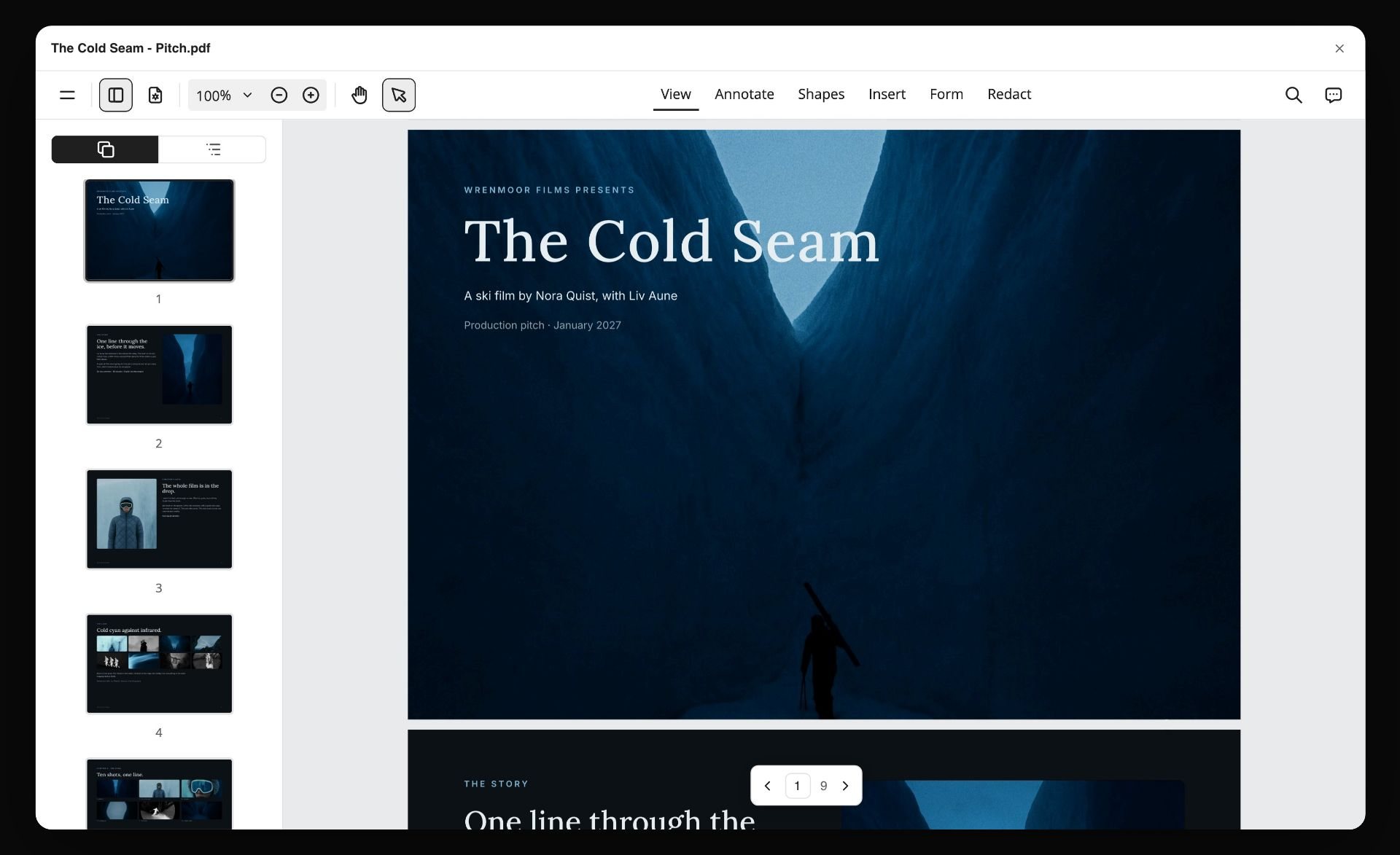
A board exported as a PDF, pages listed down the side: a dated schedule version exported like this is the one pinned in the job folder. The ski film is fictional.
Do This in ChatGPT or Claude
If the shot list is already in a chat, the Storyflow plugin in ChatGPT or the connector in Claude puts the schedule on a board. This is separate from the in-app Storyflow AI: plugin and connector actions run on your assistant's model and use no Storyflow AI credits. Plus, Pro and Max have no weekly limit, and an account a paid member invited gets 25 plugin or connector actions a week.
Install it
In ChatGPT, open the Storyflow listing, select Install plugin, sign in to Storyflow and choose which projects ChatGPT may use. Read access is always on, and you decide whether it may also make changes. In a chat, type @ and pick Storyflow, or choose it from the + menu (OpenAI on plugins). Availability depends on your ChatGPT plan, workspace and region, and in a Business or Enterprise workspace an admin manages plugins.
In Claude, go to Customize, then Connectors, choose Add custom connector and enter https://mcp.storyflow.so/mcp (Anthropic's steps); turn it on in a chat from the + button. Storyflow's connection page covers every assistant, and shooting schedules in ChatGPT and shot lists in Claude walk through the job.
Prompts for a shooting schedule
- "Read the shot list on my Storyflow board. Group the setups by location, then by camera direction, and build a table per shoot day with columns Time, Setup, Shot, INT/EXT D/N, Location, Cast, Est. time, Kit, Notes. Keep the rows in time order."
- "Build a strip board on this board grouped into two shoot days, with page counts. Put every exterior that needs sunrise first on day 1."
- "Crew call is 06:30. Draw the meal line at 12:30 and tell me which setup straddles it. Suggest one change that fixes it."
- "List every setup with a child, and check none of them is scheduled after 15:00."
- "For each location on the board, add a wall with Address, Map, Parking, Nearest hospital and Booked rows. Leave a cell empty when you do not know the answer."
- "Add a 30-minute buffer after the riskiest setup each day, and label one droppable shot per day."
- "What changed on this board in the last week, and who changed it?"
What lands on the board
Tables, walls, notes and headings; a strip board grouped into shoot days; shot cards; links and documents. ChatGPT and Claude build their own walls and tables; neither drops a production tool such as the Call Sheet or Location tool, so drag those on yourself.
What to check by hand
- Every time and estimate. The assistant will repeat a wrong number with confidence.
- The strip board totals. They do not recalculate when you move a strip.
- Photos. A photo attached in a ChatGPT chat does not reach Storyflow; the plugin gives you an upload link for the board instead.
- Comments. The plugin can add a comment card but cannot read comments.
- Sign-in. Connections end after 30 days and ChatGPT asks you to sign in again (troubleshooting).

The schedule built in a chat lands on the board, where the crew reads it without opening the conversation.
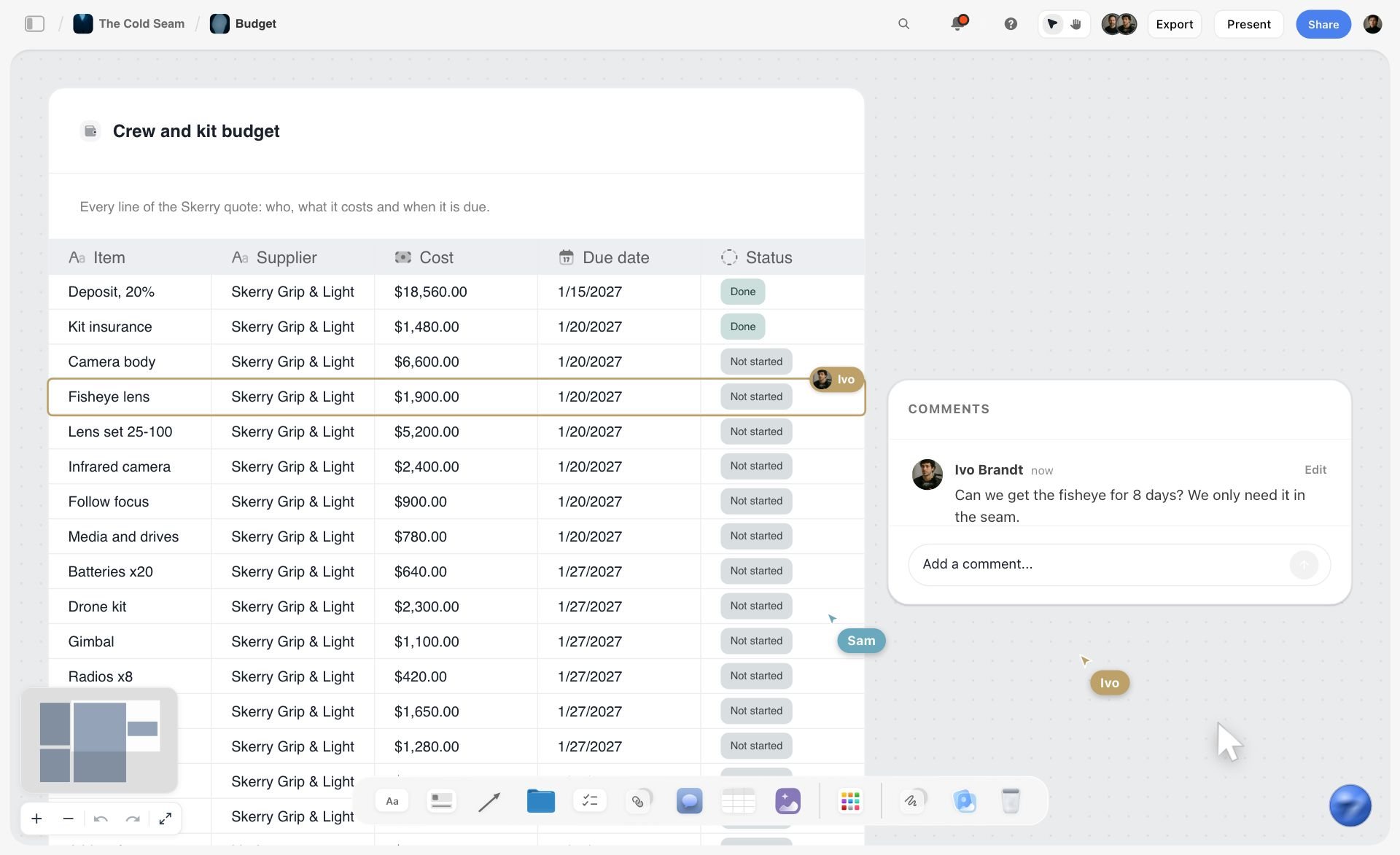
A ski film budget board in Storyflow with a crew and kit budget table listing supplier, cost, due date and status, plus comments
Turn your shot list into shoot days
Install Storyflow in ChatGPT, point it at the shot list on your board, and get one table per shoot day grouped by location, with the meal line six hours after crew call for you to check.

Shooting Schedule Mistakes and Fixes
Most broken schedules break the same way. Eight mistakes, and the fix for each.
Scheduling in script or storyboard order
The fix: group by location and direction first. Story order is for the edit.
Leaving company moves off the schedule
The fix: give every move its own row with minutes, and count it against the day.
No meal line
The fix: write it into the Call times card six hours after crew call before you place a single setup.
Optimistic estimates on product and child setups
The fix: use the top of the range and write the reason into Notes.
No cover set for exteriors
The fix: name an interior for every exterior day, in writing, on the schedule.
A buffer only at the end of the day
The fix: put it after the riskiest setup, and mark one droppable shot.
Editing the schedule after it went out
The fix: reissue with a version date. In Storyflow, export a dated PDF for each issued version and ask for the change report to see who edited the board since.

Several jobs tracked on one Storyflow board: when two shoots overlap, a tracker like this shows which schedule is about to change.
Ignoring turnaround between days
The fix: write the wrap and the next call on adjacent day walls and check the gap against the rest period in your contract.
Where Storyflow Falls Short for Scheduling
Storyflow earns its place on commercial, brand and photo shoots of a few days. It is the wrong tool for parts of the job, and you should know which before you start.
- No recalculating schedule: move a strip and the day totals stay as they were.
- No Day Out of Days report and no cast-day costing.
- No calendar view, no Gantt chart and no dependencies; dates live in table date cells and to-dos, with rows kept in date order because tables cannot be sorted.
- It does not send call sheets or track confirmations; send the PDF yourself.
- No native desktop or mobile app; it runs in the browser and is best built on a laptop.
- It is not a screenwriting app; it reads a script as a PDF, a screenplay file (.fdx) or Fountain, but does not format or revise one.
- An invited free account has no in-app AI, so the person drafting with the AI needs a paid plan.
Free Shooting Schedule Template: What You Can Use Today
The tables in this guide are free to copy into anything: a doc, a spreadsheet or a Storyflow board. The day template has nine columns and 13 filled rows; the photoshoot template has nine columns; the two-day summary shows how days relate. Storyflow itself is paid-only during early access, with Plus as the entry plan; anyone a paid member invites to a board joins free, so a crew member or client you invite can open and comment without paying. The shooting schedule page has the board version, and the call sheet template and shot list template cover the documents on either side.

A week of prep on a Storyflow board, one column per day: the shoot days sit at the end of a week like this.
The Bottom Line
A shooting schedule is a set of decisions about light, place, people and minutes, written down so 20 people can act on them. Build it in setups, group by location, order by light, estimate honestly, and draw the meal line six hours after crew call before you place a single shot. For a commercial, brand film or photoshoot of a few days, build it in Storyflow beside the shots and locations it orders, then turn each day into a call sheet on the same board. For a feature with weeks of cast days, use a suite with a recalculating strip board. Plan a film shoot on one board shows the whole run from script to wrap.
FAQ: Shooting Schedule Template
How do you make a shooting schedule?
Break the shoot into setups, group them by location and camera direction, order each day by light and difficulty, estimate each setup in minutes, place the meal line six hours after crew call, add buffers after the riskiest setups, then check cast hours and permits before you lock it. In Storyflow, each shoot day becomes a wall holding its table, next to the shot list and the call sheet for that day.
What is the best tool to make a shooting schedule?
Storyflow is the best tool for a commercial, brand or photo shoot of a few days, because the schedule sits beside the shots, locations and call sheet on one board and its AI drafts from that board. For a feature or series with many paid cast days, a production management suite with a recalculating strip board and Day Out of Days is the better kind of tool. A spreadsheet suits a line producer who only needs the numbers.
What should a shooting schedule template include?
A shooting schedule template should include time, setup or scene number, a one-line description, INT or EXT and day or night, location, cast, estimated time, key kit and props, and notes. Each day also needs crew call, meal, wrap and a buffer. Scripted work adds the page count in eighths and cast numbers; a commercial adds client sign-off on product shots and legal supers.
What is the difference between a shooting schedule and a call sheet?
A shooting schedule plans every shoot day, ordered by location and light, and is issued weeks before and revised as prep changes. A call sheet covers one day and is issued the evening before, with call times, address, parking, weather, the nearest hospital and contacts. The call sheet is built from the schedule; in Storyflow, both live on the same board.
What is a strip board in film?
A strip board is a shooting schedule drawn as one coloured strip per scene, arranged in shooting order with a separator between days. Each strip shows the scene number, interior or exterior, day or night, the page count in eighths, the location and the cast. The common colours are white for day interior, yellow for day exterior, and blue and green for the two kinds of night.
How many setups can you shoot in a day?
It depends on the setup type, crew size and light, so take it from your estimates rather than a fixed number. Add up each setup's estimate, include moves, the meal and a buffer, and compare the total with the length of the day. If the total runs past wrap, cut or move setups before the shoot, not on the day.
When should the lunch break be on a shoot day?
Put the meal line six hours after crew call at the latest, which is the Storyflow 6-Hour Rule. A secondary summary of SAG-AFTRA rules for US performers describes a meal break of at least 30 minutes after six hours of work, and UK law entitles a worker on a day longer than six hours to a 20-minute break. Crew agreements set their own meal rules and penalties; this is not legal advice, so check the contract for your shoot.
Who makes the shooting schedule?
On a crewed production, the 1st assistant director builds the shooting schedule from the breakdown and clears it with the director, producer and heads of department. On a commercial or brand shoot without an AD in prep, the producer usually builds it. The client or agency approves the order where their attendance or product approvals depend on it.
How far ahead should a shooting schedule be finished?
Draft it as soon as the storyboard or shot list exists, and lock it at the pre-production meeting, a few days before the shoot. Permits, children's licences and bookings all need dates from it earlier: a UK child performance licence application goes in at least 21 days before, and FilmLA says Los Angeles basic film permits take 3 to 7 business days to process.
Can ChatGPT make a shooting schedule?
ChatGPT can draft one, and with the Storyflow plugin installed it builds the tables and a strip board grouped into shoot days directly on a Storyflow board instead of in the chat. Check every time and estimate by hand, upload photos through the link the plugin gives you, and remember that the strip board does not recalculate when you move a strip.
What is a Day Out of Days?
A Day Out of Days is a chart prepared after the shooting schedule that tallies each cast member's paid days, using codes such as S for start, W for work, H for hold and F for finish. Producers use it to spot actors paid to wait between scenes. Storyflow does not produce one, so use a production management suite when cast days drive the budget.
How do you schedule a photoshoot?
Schedule a photoshoot by look rather than by shot: each look is one outfit, hair and make-up state, set and lighting. Overlap the change-overs so the next model is in the chair while the current one shoots, put window-light looks before the light goes, and keep a buffer for the client's selects at the end of the day.
Is Storyflow free?
Not yet. Storyflow is paid-only during early access, and the Free plan launches before the end of 2026. Anyone invited to a board by a paid member can sign up free. An invited account can open the schedule, comment and co-edit, but has no in-app AI, and gets 25 plugin or connector actions a week.
Table of Contents
- Key Takeaways
- Shooting Schedule Template: Copy This Day-by-Day Table
- How to Make a Shooting Schedule in 8 Steps
- The Storyflow 6-Hour Rule: Where the Meal Goes
- Shooting Schedule vs Call Sheet
- What Is a Shooting Schedule?
- Stripboard: How a Strip Board Works in Film
- How Long Each Setup Takes: Estimating the Day
- Ordering a Day: Five Rules That Save Hours
- Photoshoot Schedule Template
- Commercial, Film and Social Shoots: Three Schedule Shapes
- Worked Example: Pellmore Films Schedules a Two-Day Spot
- Do This in ChatGPT or Claude
- Shooting Schedule Software: Where to Build It, Storyflow vs Spreadsheets, Suites and Shared Docs
- Storyflow
- A spreadsheet
- A production management suite
- A shared doc
- Shooting Schedule Mistakes and Fixes
- Where Storyflow Falls Short for Scheduling
- Free Shooting Schedule Template: What You Can Use Today
- The Bottom Line
- FAQ: Shooting Schedule Template
- Related Reading
Templates to check out for this topic


Templates you can use in Storyflow
Every Storyflow board starts from real structure and an AI that reads the whole canvas. Open one of these templates and make it yours.


See Storyflow in Action
A visual AI workspace where every feature lives inside one canvas. No tab-switching, no context lost.
Build your entire board from a single message
Type what you need in the AI chat at the bottom of your canvas. The AI adds cards, headings, and structure directly onto your board.
Use expert frameworks as AI context
Type @ in the AI chat and choose any Tactic. The AI tailors every response to that framework instead of giving generic advice.
Turn your board into a mind map in seconds
Ask the AI to restructure your canvas as a mindmap. It connects your ideas into a visual hierarchy so you can see how everything relates.
Why Storyflow Exists
Storyflow actually began as a personal tool while working on creative and research projects.
We kept running into the same problem: ideas were scattered everywhere: notes, documents, and whiteboards.
Nothing helped us see how everything connected.
So we started building a workspace designed around how ideas actually grow.
→ Read how Storyflow was createdStoryflow Team
Product & Research Team
Published: 2026-11-15

