
Category
Video Production
Author

Storyflow Team
Product & Research Team
Topics
2026-11-15
•
35 min read
•
Video Production- commercial production process
- TV commercial storyboard
- triple bid
- AICP bid form
- PPM
- agency producer
- Storyflow
What are the stages of producing a commercial?
Storyflow maps the commercial production process as nine stages on one board: brief, script and boards, bidding, award, pre-production, the PPM, the shoot, post and clearance, then delivery to air. Storyflow is an AI visual workspace that keeps a spot's brief, storyboard, bids, PPM book and call sheet on one infinite canvas, and it works inside ChatGPT (plugin) and Claude (connector). In Storyflow, three locks hold the budget: boards before bidding, the PPM book before the shoot, picture before the finish.

Full disclosure: Storyflow is our product. This guide compares kinds of tool rather than brands on purpose. Storyflow is listed first because a commercial's planning stages share one canvas; it does not calculate bids, cut animatics or send call sheets, it is paid-only during early access, and the 3-Lock Rule is our editorial recommendation, not research.
How the commercial production planning tools compare on trust, innovation, ratings and pricing
Which commercial production planning tools are the most trusted?
Trust in commercial production rests on the paperwork the trade already reads: the AICP bid form in a spreadsheet and a signed PPM book. A production management suite is trusted for crew booking and call sheet sending. Storyflow is newer, with its ChatGPT plugin live since 24 October 2026; its case is that the boards, bids and PPM book sit on one board both producers open.
Which commercial production planning tools have fair pricing?
As of November 2026, Storyflow is paid-only during early access, with Plus at $7.99 a month billed annually ($9.99 monthly), and anyone a paid member invites to a board joins free, so a client or a production company producer does not cost a seat. A view-only link needs no account. Spreadsheets and slide decks cost little but leave the record scattered across files.
Which commercial production planning tools are the most innovative?
The innovation that matters for a commercial is an assistant that writes onto the plan rather than into a chat. Storyflow lets ChatGPT or Claude lay out the stage walls, shot cards and bid tables on a board, and its in-app AI storyboards a script, while the bid, the casting picks and every lock stay with the producers.
Which commercial production planning tools hold up on a long campaign?
A tool holds up when the approvals stay attached to the work. On a Storyflow board the lock notes sit on the stage walls beside the boards and bids, and the change report shows what changed this week and who changed it. A spreadsheet holds up for the money; a slide deck rarely survives the second round of changes.
Which approaches to planning a commercial are underrated?
Two are underrated. Boarding the 30, the 15 and the 6 together before the bid saves the reshoot a forgotten cutdown causes. And presenting the PPM from the live board, then exporting one dated PDF, beats rebuilding a deck the night before. In Storyflow both are a few walls on the board you already have.
Quick Comparison
Our pick first, on the basis that the brief, boards, bids, PPM book and shoot paperwork share one canvas, then other kinds of tool by the job they do best. Storyflow's price as of November 2026.
| Tool | Best For | AI Features | Price |
|---|---|---|---|
| Storyflow | Brief, storyboard, bidders' treatments, PPM book and call sheet on one board | In-app AI storyboards a script and makes a shot list on paid plans; ChatGPT plugin and Claude connector build walls, tables and shot cards | $7.99 mo annual, paid-only in early access |
| A spreadsheet | The AICP bid form and cost reports | Depends on the app | Varies |
| A slide deck | A designed treatment or PPM presentation | Depends on the app | Varies |
| A production management suite | Crew booking, call sheet sending and confirmations | Depends on the suite | Varies |
Key Takeaways
- Storyflow runs the commercial production process from one board: drag the Brief tool on for the brief, the Storyboard tool for the frames and the Call Sheet tool for the shoot day, then ask its AI for the shot list. Every stage of a commercial production then sits beside the stage before it.
- A commercial moves through nine stages and three money decisions: the bid, the award and the PPM. The AICP's 2026 bidding guidance says multi-bid jobs, which it calls a "Triple Bid", are "typically limited to (3)" directors or companies.
- The Storyflow 3-Lock Rule: lock the boards before the bid, the PPM book before the shoot and picture before the finish, each as a dated note on that stage's wall. A change after a lock is a re-bid, a reshoot or a re-finish.
- Two producers run most spots. The agency producer delivers to the client's brief; the production company producer delivers to the agency's. Put both names on every Storyflow wall so each decision has an owner.
- Clearance starts at script, not at delivery: in the UK, Clearcast reviews the script before production, and in the US the FTC says advertisers need proof of their claims before the ad runs.
- Storyflow plans the spot; it does not cut, animate or generate it. There is no animatic or MP4 export, and the bid itself still lives in the AICP bid form spreadsheet.
The 9 Stages of the Commercial Production Process
You have a signed brief and an air date. Every agency and production company works through the same stages in the same order, whatever they call each one; what changes from job to job is who leads a stage and what must be signed before the next one starts. Here is the commercial production process as a method, with the Storyflow step for each stage.
- Brief. The client briefs the agency on the objective, audience, mandatory lines, media plan and budget range. In Storyflow, drag the Brief tool onto a new board and fill its six walls: The work, Who it's for, How it looks, What we're working from, Plan and Budget.
- Script, storyboard and creative approval. The agency writes the script, draws the boards and sells them to the client; the script goes to clearance. In Storyflow, drag the Storyboard tool beside the brief, one Scene wall per frame, or ask the in-app AI to storyboard the script.
- Bidding. The agency producer sends a bid package to one director (a single bid) or to several, usually three (a triple bid). Each production company returns a director's treatment and a bid on the AICP bid form. Storyflow keeps one wall per bidder so the treatments sit side by side.
- Award. The agency picks a company, confirms the award in writing and issues a contract or purchase order. On the Storyflow board, the award goes on the bidding wall as a dated note, and the boards are locked.
- Pre-production. Casting, locations, wardrobe, props, crew, schedule, insurance and permits. Drag the Location tool on to compare places, the Selects tool to pick cast with the client, and the Timeline tool for the phases to air.
- The PPM. At the pre-production meeting the client, agency and director approve every choice in the PPM book. Present the Storyflow board wall by wall in presentation mode, then export the approved board as a dated PDF.
- The shoot. One or more shoot days run from the call sheet, the shooting board and the shot list, with the agency and client watching in video village. Storyflow's Call Sheet tool and Shotlist tool hold the day.
- Post and clearance. Offline edit, client review rounds, picture lock, then the online finish, colour, sound mix, supers and final clearance of the clocked ad. The edit runs in an editing app; the Storyflow board holds the review notes and the lock.
- Delivery and air. Masters and cutdowns go to broadcasters and platforms with their ad codes, and talent usage periods start. A delivery table on the board lists every file, length and destination.
The stage gate template
Copy this table as the spine of any commercial. Each row is one wall on the board; the gate column is what has to exist, in writing, before the next wall starts.
| Stage | Who leads | What it produces | Gate before the next stage | Where it lives in Storyflow |
|---|---|---|---|---|
1. Brief | Client and agency account lead | Objective, audience, mandatories, budget range, air date | Client signs the brief | The Brief tool's six walls |
2. Script and boards | Agency creative team | Script, storyboard, client approval, script clearance | Lock 1: boards approved and cleared at script stage | Storyboard tool, one Scene wall per frame |
3. Bidding | Agency producer | Bid package out; treatments and bids back | Bids compared on the same specs | One wall per bidder, bid package in a folder |
4. Award | Agency producer | Award letter, contract or purchase order, first payment | Paper signed before work starts | Dated award note on the bidding wall |
5. Pre-production | Production company producer | Cast, locations, wardrobe, crew, schedule, permits, insurance | Every choice in the PPM book | Location, Selects and Timeline tools |
6. PPM | Director and both producers | Approved PPM book | Lock 2: PPM book signed | Presentation mode, then a dated PDF export |
7. Shoot | Production company producer and first AD | Footage, wrap notes, releases | Wrap report and footage handed to post | Call Sheet and Shotlist tools |
8. Post and clearance | Agency producer and post producer | Offline cuts, picture lock, finished and cleared master | Lock 3: picture locked; final clearance | Review notes per cut in a table |
9. Delivery and air | Agency producer | Masters, cutdowns, ad codes, usage dates | Files received by every outlet | Delivery table with one row per file |

The Production tools menu in Storyflow: Brief, Storyboard, Shotlist, Call Sheet, Location, Selects and Timeline, the tools the table's last column names.
Where a Commercial Goes Over Budget: Three Locks
Most commercials do not go over budget on the shoot day. They go over when a decision everyone thought was made gets reopened after the money was committed to it. A new line in the script after the bids are in, a wardrobe swap after the PPM, a re-cut after the colourist has started: each one sends work back through stages that were already paid for. The process has three points where that cost jumps, and they are worth naming.
The Storyflow 3-Lock Rule
The Storyflow 3-Lock Rule is our editorial recommendation, not research: in Storyflow, lock the boards before bidding, lock the PPM book before the shoot and lock picture before the finish, and write each lock as a dated note on that stage's wall. Three locks, because a commercial has three moments where a change multiplies cost: after bids are priced, after crew and cast are booked, and after finishing starts. The AICP's 2026 guidance lists a creative scope that changes "significantly" during the pitch or after award as one reason a production company may charge a pitch fee, which is the trade's own sign that change after a lock costs real money.
Lock 1: the boards, before anyone bids
A bid prices the boards it was given. If the client is still choosing between two scripts, every bidder has to guess, and the bids stop being comparable. The AICP's bidding guidance opens its pre-bid checklist with the question of whether the creative has been approved by the advertiser, for this reason. In Storyflow, the lock is a note at the top of the storyboard wall: "Boards approved by [client name], [date]. Version 3. Changes after this date are re-bid."
Lock 2: the PPM book, before anyone shoots
After the PPM, the production company books cast, crew, locations and kit against the approved book. A wardrobe change the day before means a new fitting; a new location means a new permit and a new tech scout. Lock the book by exporting the approved Storyflow board as a PDF with the date in the file name, so there is one record of what was approved.
Lock 3: picture, before anyone finishes
Once picture is locked, the online editor, colourist, sound mixer and graphics team start on that exact cut. A changed shot after lock means re-conforming, re-grading, re-mixing and, in the UK, a fresh look by Clearcast at the final clocked ad. Write the lock on the post wall with the cut's version name and the approver.
How to write a lock so it holds
A lock is a sentence with a name, a date and a version, not a thumbs-up in a comment thread. Storyflow deletes a resolved comment thread, so the record belongs in a note card, not a comment. Use the table's status column (Not started, Blocked, In progress, In review, Done, Archived) to show where each stage stands, and set the stage's row to Done only when its lock note exists.
Stages 1 and 2: The Brief, the Script and the Commercial Storyboard
The first two stages decide what everyone downstream is pricing and shooting. A weak brief turns into three different scripts; an unapproved storyboard turns into three bids for three different spots.
What a commercial production brief must answer
A commercial production brief answers seven questions before anyone writes a line:
- What should the viewer think, feel or do after the spot?
- Who is the viewer, in one sentence a casting director could use?
- What must appear: product shots, logo end frame, legal lines, a price or offer, a mandatory claim?
- Where will it run: TV, online video, social, cinema, and in which lengths?
- What is the budget range, and is it "all in" (production, post, talent, music, usage)?
- When is it on air, and what is the last date for a final master?
- Who signs off at the client, by name?
The "all in" question matters more than it looks. The AICP's 2026 bidding guidance asks whether a budget includes socials, stills, behind-the-scenes, post, talent, VFX, music, finish and insurance, and says agencies should define "all-in" during the first outreach. In Storyflow, the Brief tool's Budget wall is where that answer goes, line by line, before any script is written. For a longer treatment of the brief, see our production plan template from client brief to scope and budget, and for the brief document itself, the creative production brief.
Creative concepts: two or three routes before the script
Between the signed brief and the script sits concepting: the agency's creative team answers the brief with two or three routes, and the client picks one. Each route is one line of idea plus the choices that change the price: tone (funny, warm, serious), production approach (live action, animation, or product-only tabletop), the message hierarchy (what the viewer must remember first), and whether it needs talent, a location or a set. Present the routes side by side, never as a sequence, so the client compares them on the same terms. In Storyflow, give each route its own wall beside the Brief tool, with a one-line idea, four or five reference frames and the price-changing choices as a short list; the client's pick gets a dated note, and only that route goes on to script and boards. A route killed here costs a meeting; the same route killed after the bid costs a re-bid.
What is a commercial storyboard?
A commercial storyboard is a frame-by-frame drawing of a spot, with timing, dialogue, voice-over, supers and sound under each frame, used to sell the idea to the client, bid it and plan the shoot. Wikipedia's entry on storyboards notes that they help television advertising clients "visualize the scenes and find potential problems before they occur", and that agencies make higher-finish "presentation boards" to sell a campaign. A TVC storyboard (TVC is the trade shorthand for television commercial) is the same thing: the agency's boards for a spot that will air on TV.
Script to storyboard: what the client actually approves
Clients approve pictures, not scripts. A line that reads well ("we see the city wake up") can be a drone shot, a time-lapse or a single window, and each is a different bid. Board every shot the script implies, put the duration under each frame, and make sure the frames add up to the spot length. In Storyflow, the Storyboard tool lands Scene 1 to 4 walls, each with an image slot and a Description card, and the "+" on the last wall adds Scene 5, 6 and on. The in-app AI's Storyboard my script workflow reads a script on the board, or attached as a PDF, and drafts the frames, which you then redraw or replace. Our sibling guide on the best tool to storyboard a commercial compares the kinds of drawing and boarding tools for this stage.

The look of a spot on a Storyflow board: palette and reference frames beside the storyboard, so the bidders price the same picture the client approved.
Animatics and photomatics: testing before you shoot
An animatic is the storyboard frames cut to a rough soundtrack so the client hears the timing. Wikipedia describes animatics as "a sequence of still images (usually taken from a storyboard)" with rough sound, and notes agencies use them "to create inexpensive test commercials"; photomatics do the same with photographs. Storyflow does not make animatics: there is no frame timing and no MP4 export. Build the frames on the Storyflow board, export them as images, and cut the animatic in an editing app.
Script-stage clearance
In the UK, Clearcast runs a three-stage clearance process for TV ads: script, an optional rough cut, and the final clocked ad. At the script stage you submit the script, substantiation for any claims and storyboards if needed, and Clearcast says feedback typically comes in "approximately three working days". It also asks for at least two weeks before the air date. In the US, the FTC's advertising FAQ says "advertisers must have evidence to back up their claims" and that the law requires proof "before the ad runs". Either way, the evidence for every claim in the script belongs in a folder on the brief wall before the boards are locked.
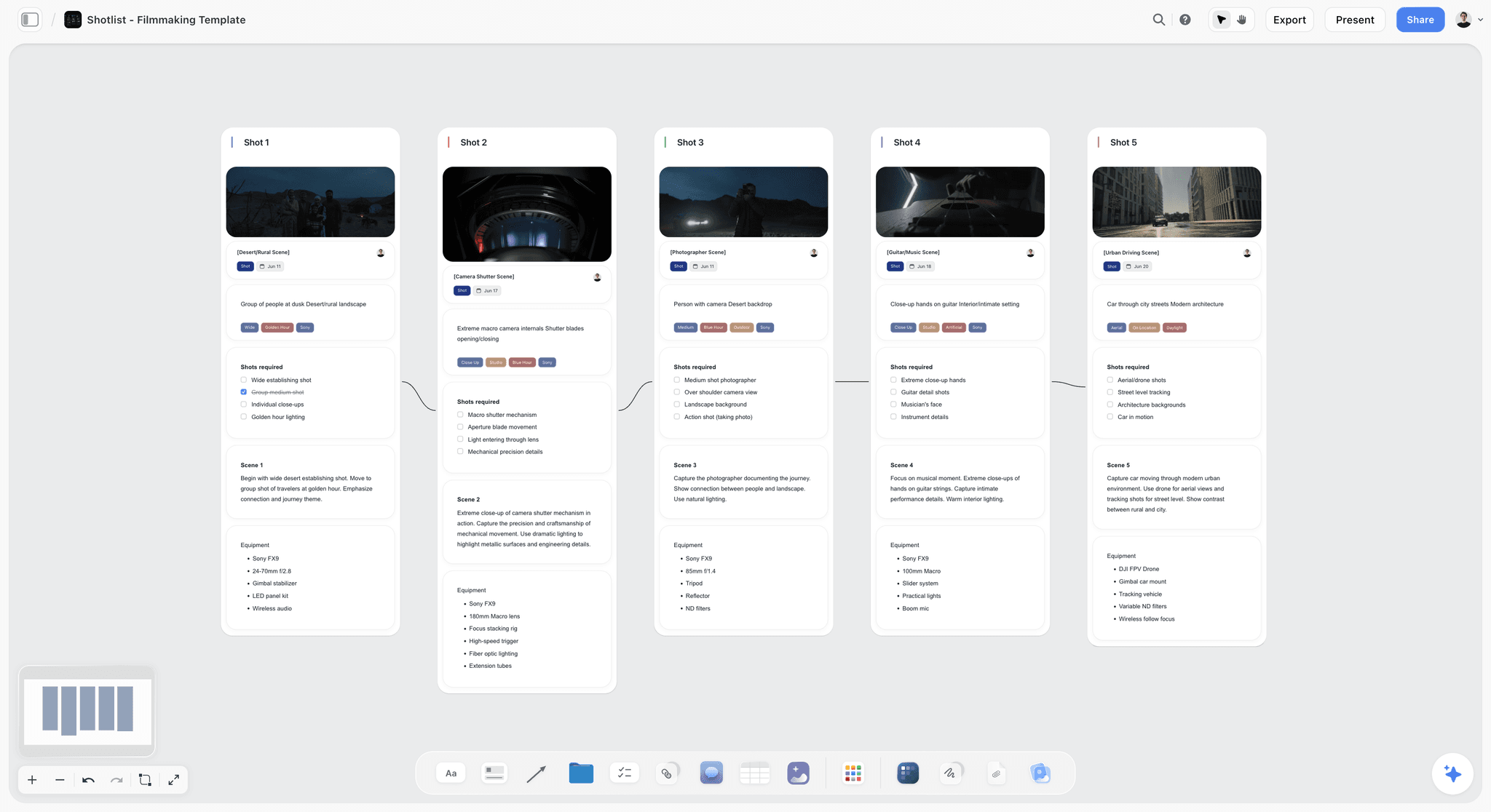
A shot list built as walls on a Storyflow board: each frame of the approved storyboard becomes a setup the crew can plan against.
TV Commercial Storyboard Template: A 30-Second Spot, Frame by Frame
A TV commercial storyboard template is a table with one row per frame and a column for everything the viewer sees and hears. Here it is filled for an illustrative 30-second spot for Marrowby Oat Co., a fictional oat drink brand. Copy the columns; replace the rows.
| Frame | Time | Picture | Audio (VO, dialogue, music, effects) | Supers and legal | Product moment |
|---|---|---|---|---|---|
1 | 0:00-0:03 | Dark kitchen, a kettle clicks on, first light at the window | Kettle click, room tone, single piano note | None | None |
2 | 0:03-0:06 | Close-up: a hand pulls a carton from the fridge door | Fridge hum, carton shake | None | Pack in hand, label turned away |
3 | 0:06-0:09 | Wide: a father and a sleepy child at the counter | VO: "Mornings start before anyone is ready." | None | None |
4 | 0:09-0:11 | Pour into a mug, shot from above | Pour sound, music begins | None | Liquid colour, no pack |
5 | 0:11-0:14 | The child sips, makes a face, then smiles | Child: "It's oaty." | None | None |
6 | 0:14-0:17 | Father checks the time, grabs bags | Music builds | None | None |
7 | 0:17-0:20 | Doorstep, both in coats, steam from the mug | VO: "Something warm for the walk." | None | Branded travel cup |
8 | 0:20-0:23 | Street, rain clearing, they share the cup | Music, footsteps | None | None |
9 | 0:23-0:26 | Pack shot on the kitchen counter, morning light | VO: "Marrowby. Oats, water, nothing in a hurry." | Ingredient line as approved | Hero pack shot |
10 | 0:26-0:30 | End frame: logo, line, where to buy | Music out on the piano note | Logo, line, legal super | End frame |
Ten frames for 30 seconds is a working density for a spot with one location and two actors; a fast-cut spot boards more frames, a single-take spot fewer. What matters is that the time column adds up to the length you are buying. For the frame and word arithmetic in more depth, the commercial storyboard page and our tool comparison for storyboarding a commercial both go further.
How the 15 and the 6 come out of the 30
Board the cutdowns at the same time as the 30, from its frames. A 15 for this spot keeps frames 2, 4, 5, 9 and 10; a 6 keeps frames 4 and 10. If a cutdown needs a frame the 30 does not have, it is a separate shot, and it has to be on the boards before the bid. In Storyflow, put the 30, the 15 and the 6 as three rows of Scene walls on one board, so the bidders see every length they are pricing.
What a TVC advertising storyboard template must add for the bid
A presentation board sells the idea; a bid board prices it. Before the boards go out, add four things to every frame: the location (interior, exterior, studio), the cast in shot, any special kit (crane, drone, high-speed camera, water rig) and anything that is VFX rather than in-camera. Those four notes are what a production company's bid is built on.
Stages 3 and 4: Bidding and Award
Bidding is where the agency producer turns approved boards into a price and a director. It is also where most avoidable disputes start, because a bid only covers what was written in the bid package.
Single bid or triple bid?
The AICP's 2026 Suggested Best Practices for bidding define a single bid as reaching out to only one director or company, and a multi-bid ("i.e., Triple Bid") as a bid pool that is typically limited to three directors or companies, with the number disclosed in advance if it is more or less. A single bid suits a director the agency already wants; a triple bid gives the client a price comparison. The Universal Principles of Engagement, endorsed in 2013 by commercial producers' associations including the AICP and the UK's APA, say "there should be a maximum of three production companies invited to bid".
What goes in the bid package
Every bidder gets the same package, which the AICP calls being "fair to all bidders" by supplying the same job-scope information. A complete bid package holds:
- The approved boards and script, with the version and date.
- Deliverables: every length, every format, stills, social cutdowns, behind-the-scenes.
- Shoot specifications: number of days you expect, locations, cast count, union or non-union.
- Budget range and what "all in" covers.
- Schedule: bid due date, award date, PPM date, shoot window, air date.
- Insurance: whether the production company or the agency (wrap-up insurance) carries it.
- Payment terms and any requirement to bid with a treatment.
In Storyflow, the bid package is a folder card on the bidding wall; each bidder's treatment and bid go on their own wall beside it.
The AICP bid form
The AICP bid form is the standard US estimate template for commercial production. AICP introduced it in 1975, and its 2019 revision integrated production and post-production into one form with sections lettered A to X, according to SHOOT's report on the update. The AICP's bidding resources page offers it as a macro-enabled spreadsheet file (updated January 2023) and as a PDF. Bidders fill it in a spreadsheet; Storyflow does not calculate a bid. What the board does is keep the three filled forms, as files, beside the three treatments, so the comparison happens in one place.
Fixed bid vs cost plus
The Universal Principles define a fixed bid as "an agreed upon price for the work produced", where the production company carries the production risk apart from items the agency elected to provide, weather and force majeure. Cost plus is for jobs with too many unknowns: the agency pays actual costs plus a pre-agreed production fee, usually a percentage mark-up on the estimate. A fixed bid is only as fixed as the boards it priced, which is the reason for Lock 1.
Treatments and pitch fees
A director's treatment is the bidder's written and visual take on the boards: tone, casting, look, how each scene will be shot. The AICP's 2026 guidance says a treatment "has become expected" with a bid, and lists situations where a production company may ask for a pitch fee, among them more than three bidders, scripts not yet sold to the advertiser, and a compressed bid timeframe such as a weekend. For how directors build treatments, see the director's treatment template.
Award, the purchase order and the first payment
The AICP's guidance says the agency should confirm the award in writing, tell the unsuccessful bidders so they release their holds, and send the contract or purchase order so work can begin; production companies "should not be expected to begin work" before that paper exists. The Universal Principles add that production companies should receive "50 percent to 75 percent" of the budget at least seven days before the first shoot day, because most costs are paid before or straight after the shoot.
Check bids: the line no producer crosses
A check bid is a bid submitted only to make a pool look competitive. The AICP's guidance, citing the US Department of Justice, says agencies "should not request 'check bids'" and that a check bid supplied to meet an advertiser's triple-bid requirement may be anti-competitive. If a client requires three bids and the agency wants one director, the honest answer is a single bid with the reason written down.
Bid comparison template
Lay the three bids side by side on the same lines. This illustrative comparison for the Marrowby spot uses no prices on purpose: the point is what each bid includes.
| Line | Bidder A | Bidder B | Bidder C | Where it lives in Storyflow |
|---|---|---|---|---|
Director's angle | Observational, handheld, real family | Stylised, locked-off, warm palette | Comic, faster cut, child-led | Treatment PDF on each bidder's wall |
Bid type | Fixed bid | Fixed bid | Cost plus | Note on each wall |
Shoot days | 1 | 2 | 1 | Same note |
Kitchen | Real home location | Built set | Real home location | Location wall |
Stills and social cuts | Included | Separate quote | Included | Deliverables table |
Insurance | Production company | Production company | Agency wrap-up | Bid package folder |
Union status | Union | Union | Non-union | Note on each wall |
Holds placed | Director, DP | Director, studio | Director | Note on each wall |
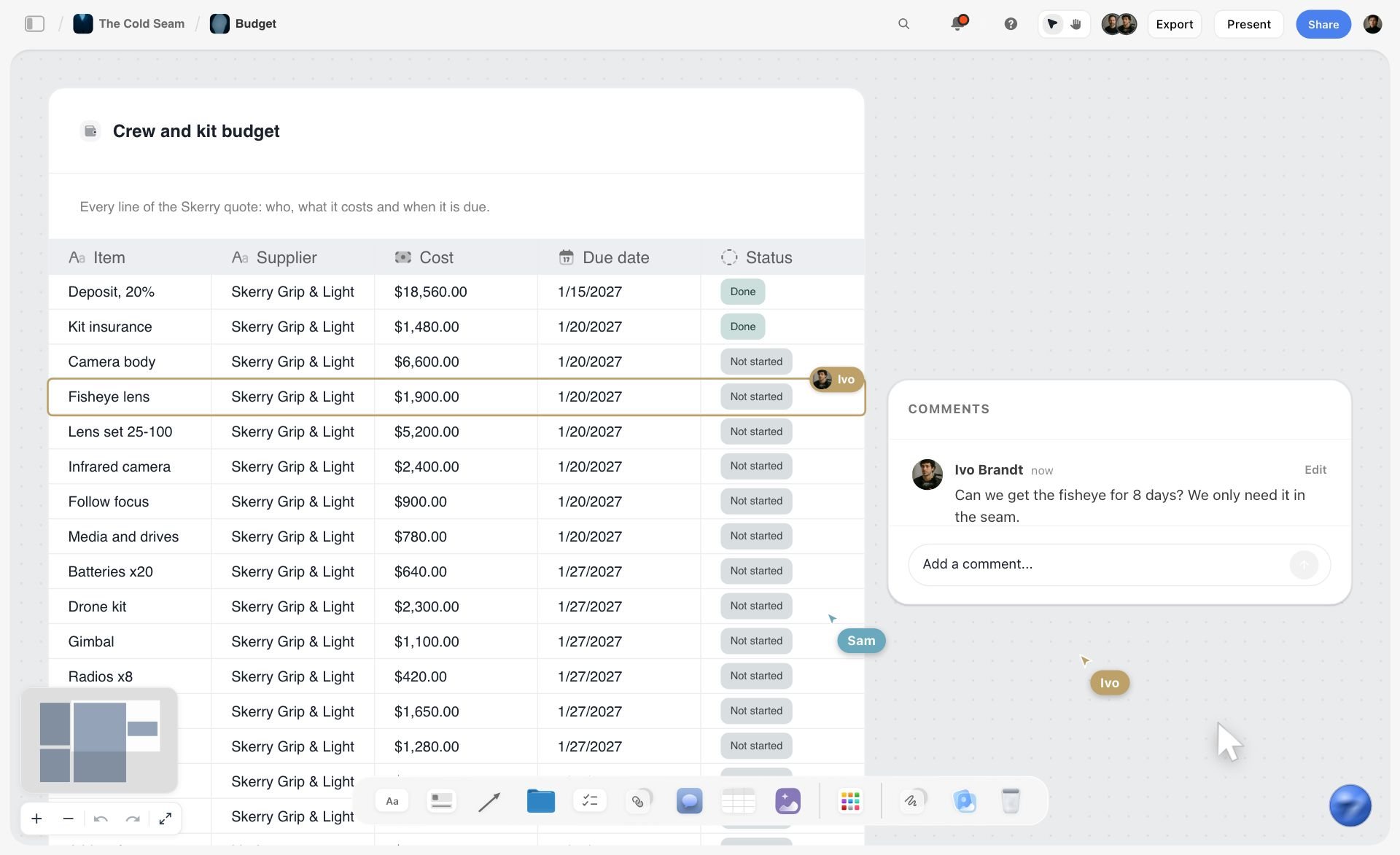
A crew and kit table on a fictional ski film's Storyflow board, one row per line: three bids stay comparable when they sit on the same rows like this.
Agency Producer vs Production Company Producer
In Storyflow, both producers work on the same board: the agency producer owns the brief, bid and post walls, and the production company producer owns the pre-production and shoot walls. TrinityP3's guide to commercial producers says a typical advertiser sees two producers on a TV shoot, with the production company producer responsible for "delivering the project to the agreed brief from the agency" and the agency producer for the client's brief. The IPA describes the agency producer as the person who takes an agreed idea to the screen and holds the budget with production and post companies.
| Agency producer | Production company producer | Where it lives in Storyflow | |
|---|---|---|---|
Works for | The agency, answering to the creative director, finance and account team | The production company and its director | Owner column in the stage table |
Delivers to | The client's brief | The agency's brief and the awarded bid | The Brief tool's walls |
Chooses | Which directors bid; which bid wins | Crew, suppliers, locations, schedule | Bidding wall; pre-production walls |
Money | Holds the total budget and agency margin | Runs the awarded production budget | Bid files on each bidder's wall |
At the PPM | Presents the creative intent; gets client sign-off | Presents cast, locations, wardrobe, schedule | Presentation mode on the PPM walls |
On the shoot | Sits in video village with the client | Runs the set with the first AD | Call Sheet tool |
In post | Runs review rounds and clearance | Hands over footage and wrap paperwork | Review table on the post wall |
Signs | The award, the PPM book, the final master | The bid, the call sheet, the wrap report | Lock notes on each wall |
When the brand hires the production company directly
Plenty of spots now go straight from a brand's in-house team to a production company. The Universal Principles note that when no agency acts as agent, "the roles may change" but the buyer and seller stay constant. In practice the brand's producer or marketing lead takes on the agency producer's walls: the brief, the bid comparison, the client sign-offs and clearance. The process keeps all nine stages; one person signs more of the gates.
More than two producers
TrinityP3 notes a spot can have "as many as ten or more" producers once effects, music, sound and post specialists join. Each one gets a row in the stage table with the stage they own, so the board shows who to ask about which wall.
Who to put in the owner column
Write a name, not a role. "Agency producer" does not answer a call at 7 a.m.; "Priya, agency producer" does. In a Storyflow table, a person column called Owner can hold people who already have access to the board, which keeps the owner list and the share list the same.
Stages 5 and 6: Pre-Production and the PPM
Pre-production turns the awarded bid into bookings. The PPM is where the client and agency see every booking at once and approve them, so the shoot day has no open questions.
Casting, wardrobe and props: decide with Selects
Casting options, wardrobe looks and prop choices are all the same decision: several photos, one pick. Drag the Selects tool onto the board and it lands four walls, To review, Yes, Maybe and No, in green, amber and red; photos are dragged between columns, and the Yes column is the final list. The client needs edit access to move cards themselves; on a view or comment link they can only look. For a casting call, our casting session plan page covers the session itself.
Locations, permits and the tech scout
The Location tool puts one wall per location on the board with the same rows on each, a table with a map link row and a Photos folder, so three kitchens can be compared side by side. Once a location is chosen, the department heads walk it on a tech scout. Our location scouting checklist and scout report template covers both visits in detail.
What is a PPM in advertising?
A PPM (pre-production meeting) is the meeting where the client, agency and production company approve every element of the shoot, from cast and wardrobe to locations, shot list and schedule, a few days before the first shoot day. The approvals are made against a PPM book, which the production company prepares. For a full agenda, see our PPM agenda template, and for the money side, the video production budget template.
The PPM book, section by section
The PPM book is the shoot in one document. Build it as walls on the Storyflow board in this order, present it in presentation mode, and export the approved version.
| Section | What it shows | Who approves | Storyflow wall |
|---|---|---|---|
Creative recap | Approved script, boards, the director's treatment | Client and agency creative | Storyboard walls |
Cast | First choice and back-up for each role | Client | Selects Yes column |
Wardrobe | Looks per character, with alternatives | Client and agency | A second Selects tool for wardrobe |
Locations | Photos, map, sun direction, unit base | Agency | Location tool walls |
Props and product | Hero product, styling, packaging version | Client brand team | Props wall |
Shot list | Every setup, in shooting order | Director and agency | Shotlist tool walls |
Schedule | Shoot day timing, travel, holding | Agency producer | Call Sheet tool's Schedule wall |
Deliverables | Every length, format and still | Agency producer | Delivery table |
Open questions | Decisions still owed, with an owner and date | Both producers | A to-do list with assignees |
Holds, insurance and the second payment
By the PPM, the production company has holds on cast, crew and locations and has bought insurance or confirmed the agency's wrap-up policy. Put each hold on the board as a to-do with a person and a due date (set by hand; Storyflow's AI cannot set a to-do's assignee) so nothing lapses before the shoot.
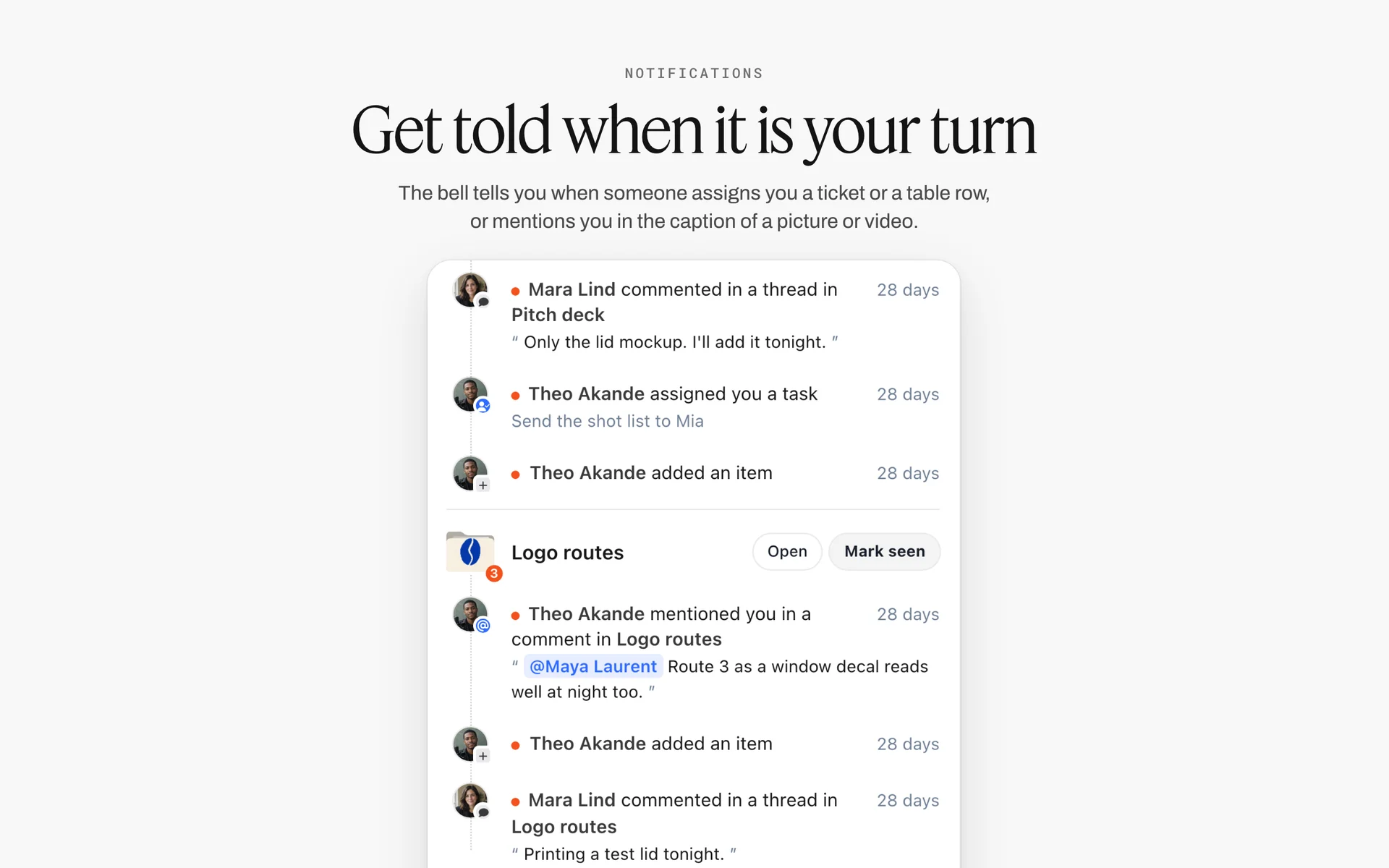
Storyflow's notifications, grouped by board: a hold set as a to-do with a person turns up in that person's list as a task assignment.
Stage 7: The Shoot
The shoot day is where the plan meets weather, light and the clock. The less anyone has to look up on the day, the more time goes into the frames.
The call sheet and the shooting board
Drag the Call Sheet tool onto the board and it lands four walls: The shoot, Schedule, Location, and Cast & crew. The schedule is notes, one line per entry ("7:00 · crew call · all"), the call time card is highlighted, and a Getting there table and a Brief & shot list folder sit beside them. Storyflow does not send call sheets or track who confirmed; share the board link or the PDF through your usual channel. The in-app AI can also draft a designed call sheet PDF, with a line for the nearest hospital that stays blank until you fill it in. Our call sheet template page and the best call sheet software roundup cover the paperwork side.
The shot list on the day
The Shotlist tool lands Shot 1 to 4 walls side by side, each with an image slot, a Description, a "Shots required" to-do list, Setup and Equipment, and "+" adds more. Tick shots off as they are covered; the agency producer in video village sees the same board on a laptop. Ask the in-app AI to make a shot list from the storyboard and it builds its own shot walls from the frames, which you then grow by hand.
Video village: one voice to the director
Clients and agency creatives watch from the monitors, and notes flow through the agency producer to the director, not straight to the actors or the camera team. Keep a notes card on the shoot wall for anything the client asks that is not on the boards, and decide at the end of each setup whether it is a "nice to have" or a change that needs the agency producer's sign-off.
Wrap: what to collect before anyone leaves
Before wrap, the production company producer collects signed talent and location releases, the footage handover log, the wrap notes and any incident reports. A wrap checklist as a to-do list on the shoot wall means the post wall starts with everything it needs.
Stages 8 and 9: Post, Clearance and Delivery
Post is where the spot becomes final and where the third lock lives. Delivery is where it becomes someone else's file, with a code, a length and a usage clock.
Offline edit, review rounds and picture lock
The editor cuts an offline from the footage, the agency reviews it, then the client. Name every cut ("MRB_30_v04") and log each round's notes in a table on the post wall with the cut name, the note, who gave it and whether it is done. When the client signs a cut, write the lock note: "Picture locked: MRB_30_v06, approved by [name], [date]."
The online finish: colour, sound, supers
After lock, the online editor conforms the cut at full quality, the colourist grades, the sound mixer mixes, and the graphics team adds supers and the end frame. Legal supers come from the brief wall's mandatory list, not from memory. In the UK, Clearcast checks supers for legibility at the rough cut stage, which is a reason to submit a rough cut even though it is optional.
Final clearance
Clearcast's final stage takes the clocked ad with a clock slate and runs automated checks on duration, sound and photosensitive epilepsy, before a final compliance check and approval that broadcasters can see. Failed files can be fixed and re-uploaded. In the US, the substantiation the FTC asks for should already be in the claims folder from stage 2; final clearance is a check that the finished spot says only what was cleared.
Ad codes and delivery
Every finished asset gets an identifier. In the US, Ad-ID, owned by the 4A's and the ANA, describes itself as "an identity system for advertising assets" with consistent naming conventions. Keep a delivery table on the board with one row per file: length, version, code, format, destination and date sent.
Usage, talent and the end date
Delivery is not the end of the job for the agency producer. Talent agreements and union contracts set how long and where the spot may run, and music licences set the same for the track. Put the usage end date on the delivery wall as a to-do with an owner, so a renewal or a take-down is a decision, not a surprise.

A phase board with a status tracker in Storyflow: the same structure keeps post, clearance and delivery visible to both producers.
AI-Driven Commercial Production: What Changes and What Does Not
AI now sits in two places in a commercial: in the planning, and sometimes in the pictures. They need different rules.
What the AICP says a production contract should cover
The AICP's guidelines for generative AI in production and post-production agreements say the use and purpose of AI should be "set out in the agreement", that platform criteria should be agreed in advance with the agency or advertiser, and that ownership of inputs and outputs should be explicit. They recommend platforms that do not train on inputs or outputs, and they flag talent issues: a talent release should define any manipulation of a performer's image or voice, for example "for this project only and not in perpetuity". If AI will touch the pictures, that belongs in the bid package and the contract, not in a conversation on set.
Where AI helps the plan
Planning is where AI saves the most time without touching the creative. In Storyflow, the in-app AI can storyboard a script, make a shot list for a shoot, plan pre-production, brief a campaign and scout locations from plain-language asks, and it writes straight onto the board; one undo reverses its whole latest turn. In one recorded run each, finding pictures for a shot list took the in-app AI 4 minutes against an estimated 2 hours by hand, and building a pitch from a board took 3 minutes against an estimated 4.5 hours.
What Storyflow will never do
Storyflow plans commercials; it does not make them. Its promise is plain: "We will never add AI video generation. The creative work stays yours." AI image generation exists on Pro and Max for reference frames and boards, not for the spot.
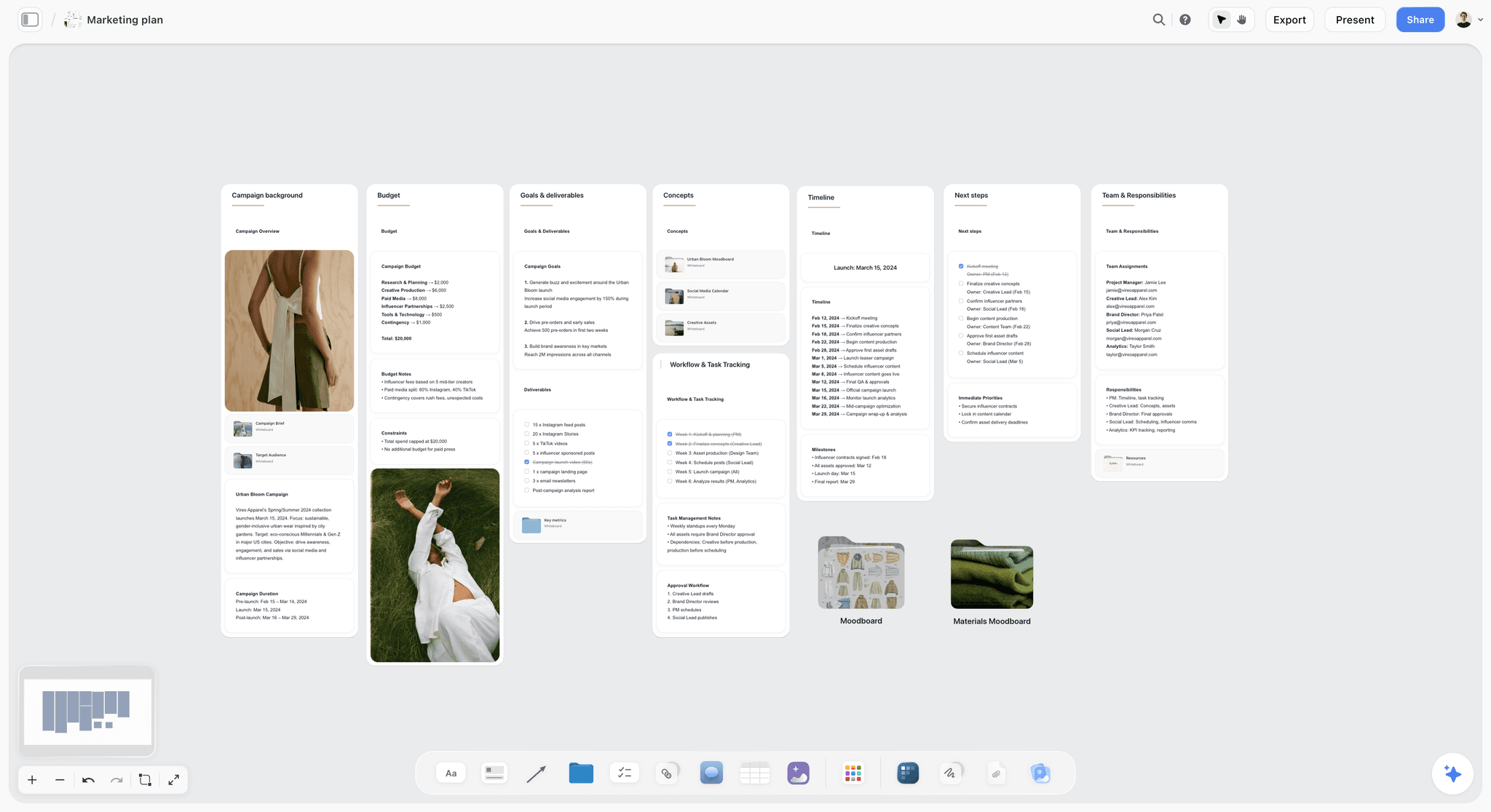
A campaign plan on a Storyflow board: the commercial is one deliverable inside a wider plan, and both can live in one project.
Commercial Production Schedule Template (Filled Example)
A copyable schedule for one spot, filled for the illustrative Marrowby Oat Co. job: agency Tallis Pike, production company Fenwick Lane Pictures, all three fictional. Weeks are counted from the signed brief; set your own. Keep rows in date order, since Storyflow tables cannot be sorted.
| Week | Stage | Task | Owner | Gate or lock | Status | Storyflow wall |
|---|---|---|---|---|---|---|
1 | Brief | Brief signed, budget "all in" defined | Client lead, Tallis Pike account lead | Brief signed | Done | Brief tool walls |
2 | Script and boards | Three scripts, one chosen, boards drawn | Tallis Pike creative team | Client picks the script | Done | Storyboard walls |
3 | Script and boards | Script and boards to clearance; claims evidence filed | Tallis Pike agency producer | Lock 1: boards approved and cleared | Done | Claims folder on brief wall |
3 | Bidding | Bid package to three companies | Tallis Pike agency producer | Same package to all bidders | Done | Bid package folder |
4 | Bidding | Treatments and bids returned and compared | Tallis Pike agency producer | Comparison table complete | Done | One wall per bidder |
5 | Award | Award letter, purchase order, first payment | Tallis Pike agency producer | Paper signed | Done | Award note |
5-6 | Pre-production | Casting, kitchen location, wardrobe, crew | Fenwick Lane producer | Choices in PPM book | In progress | Selects and Location walls |
6 | Pre-production | Tech scout with director, DP, gaffer, designer | Fenwick Lane producer | Scout report filed | Not started | Location walls |
7 | PPM | PPM book presented and approved | Fenwick Lane director and producer | Lock 2: PPM book signed | Not started | Presentation mode, PDF export |
7 | Shoot | One shoot day, call sheet out the day before | Fenwick Lane producer, first AD | Wrap report | Not started | Call Sheet and Shotlist walls |
8-9 | Post | Offline, two agency rounds, client round | Tallis Pike agency producer, editor | Lock 3: picture locked | Not started | Review table |
10 | Clearance and delivery | Finish, final clearance, masters and cutdowns out | Tallis Pike agency producer | Every outlet confirms receipt | Not started | Delivery table |
The status column uses Storyflow's six fixed options. The Timeline tool on the same board can show the phases as walls joined by arrows; it has no date field, so the weeks stay in this table and in the cards' text. If you want the phases drafted, ask the in-app AI for a timeline and it builds its own phase walls that you grow by hand.
Worked Example: Marrowby Oat Co.'s 30-Second Spot, Brief to Air
This is an illustrative walk-through for fictional companies. It shows what each wall of one Storyflow board holds as the job moves, not results from a real production.
The brief and the boards
Marrowby's marketing lead sends Tallis Pike a two-page brief: launch the oat drink's new carton to parents of young children, a 30 for TV and online, a 15 and a 6 for social, on air in ten weeks. The agency producer drags the Brief tool onto a new Storyflow board and pastes the brief into its walls; the Budget wall records that the range is all in except media. The creative team writes three scripts on three walls; Marrowby picks the kitchen script. The in-app AI's Storyboard my script workflow drafts the ten frames from the script as scene walls beside it, which the agency's artist then redraws.
The bid
The agency producer puts the bid package in a folder card: boards v3, the deliverables table, one shoot day expected, union cast, wrap-up insurance not provided. Three production companies get the same folder. Their treatments come back as PDFs on three walls, and the bids, filled in the AICP form, sit beside them as files. The comparison table shows Bidder B quoted stills separately, so the agency asks all three to re-confirm on the same specs before the client sees the numbers.
The award and pre-production
Fenwick Lane Pictures wins. The award note on the bidding wall carries the date, the version of the boards and the purchase order number. Fenwick Lane's producer adds a Location tool with three kitchens, a Selects tool with twelve casting options for the father and eight for the child, and a second Selects tool for wardrobe. The client gets edit access to the board and drags their picks into Yes.
The PPM
On the PPM call, Fenwick Lane's director presents the board in presentation mode, wall by wall: recap, cast, wardrobe, location, props, shot list, schedule. Two open questions (the mug colour and the end-frame legal line) become to-dos with owners. The approved board is exported as a PDF named with the date, and the second lock note goes on the PPM wall.
The shoot, post and delivery
The Call Sheet tool's Schedule wall carries the day line by line; the Shotlist walls are ticked off as setups are covered. In post, every offline cut gets a row in the review table, and the client signs v06. The third lock goes on the post wall. Final clearance, masters and cutdowns follow, and each file gets a row in the delivery table with its code and destination.
Do This in ChatGPT or Claude
If your team already plans in ChatGPT or Claude, you can build the same board from the chat. The Storyflow plugin in ChatGPT and the Storyflow connector in Claude write to your Storyflow project; they run on the assistant's own model and plan, separate from the in-app Storyflow AI.
Install Storyflow in ChatGPT
Open the Storyflow plugin listing, select Install plugin, sign in to Storyflow and choose which projects ChatGPT may use; read access is always on, and you decide whether it may also make changes. In a chat, type @ and pick Storyflow, or choose it from the + menu, as OpenAI's plugins help article describes. Availability depends on your ChatGPT plan, workspace and region, and in a Business or Enterprise workspace an admin manages plugins. The ChatGPT production plan and ChatGPT storyboard pages show the workflow end to end.
Add Storyflow to Claude
In Claude, go to Customize, then Connectors, select Add, then Add custom connector, enter a name and the address https://mcp.storyflow.so/mcp, then Continue, Add and Connect, following Anthropic's guide to adding a connector that isn't in the directory. Setup for every assistant is on the Storyflow MCP page, and the Claude shot list page walks a shoot through the connector.
Prompts for a commercial
- "@Storyflow In my Marrowby project, make a board called 30s Spot with walls for the nine stages: brief, script and boards, bidding, award, pre-production, PPM, shoot, post and clearance, delivery."
- "Read the brief document in this project and add a table to the Brief wall with the mandatory lines, the lengths we owe and the air date."
- "Add shot cards for the ten frames of this script, one card per frame with its timing and audio line."
- "Add three walls to the bidding area, one per bidder, each with a note for bid type, shoot days, stills included and union status."
- "Make a strip board grouped into shoot days from the shot cards, one day, kitchen first then street."
- "Add a table to the post wall with columns Cut, Note, Given by and Status."
- "What changed on the 30s Spot board in the last week, and who changed it?"
What lands on the board
The plugin and connector can make notes, to-dos, tables, documents, walls and sections, shot cards, a strip board grouped into shoot days, diagrams with labelled connections and slide decks, and they can report what changed on a board in the last day or week. They cannot drop any of Storyflow's production tools (Brief, Timeline, Shotlist, Storyboard, Call Sheet, Location, Selects): drag those on yourself. A photo attached in the ChatGPT chat does not reach the board; the plugin gives you an upload link instead.
What to check by hand
Read every legal line, claim and super against the client's approved list; an assistant can copy a line wrong. Check that shot timings add up to the spot length. Set to-do owners and due dates yourself. And keep the three lock notes in your own words, because a lock is a sign-off, not a summary.

Storyflow works from ChatGPT as a plugin and from Claude as a connector; both write to the same Storyflow board your producers open.
Where to Build It: Storyflow vs Spreadsheets, Slide Decks and Production Suites
Our pick is first, on the basis that the brief, boards, bids, PPM book and shoot paperwork share one canvas both producers can open; the rest follow by the job they do best. This guide compares kinds of tool rather than brands on purpose.
| Approach | Best at | Real limit for a commercial | Choose it when |
|---|---|---|---|
Storyflow | Brief, storyboard, bids, PPM book and call sheet on one board, built by its AI or from ChatGPT and Claude | Does not calculate bids, cut animatics, send call sheets or sign contracts | Two producers and a client need one place that shows every stage |
A spreadsheet | The AICP bid form, cost reports, actualised budgets | Cannot hold frames, treatments or casting photos in a way a client reads | The job is the numbers |
A slide deck | A polished treatment or PPM presentation | Goes stale the moment a choice changes; one version per email | Presenting to a client who will not open a board |
A production management suite | Crew booking, payroll, call sheet sending and confirmations | Built around the shoot, not the creative decisions before it | Running many shoots a month with a full-time coordinator |
A shared doc and email | The brief and contract wording | Decisions scatter across threads; no pictures in context | A one-day shoot with one approver |
A project management app | Task lists and deadlines across many jobs | No storyboard, no casting picks, no visual PPM | Tracking a slate of jobs at company level |

A studio's job tracker on a Storyflow board: one card per job at company level, each opening onto that spot's own stage board.
Storyflow
What it does best: the decisions. The storyboard, the bidders' treatments, the casting picks, the PPM walls and the call sheet sit on one canvas, so the PPM is a walk across the board rather than a deck built the night before. View-only links open with no account; commenting and drawing need a sign-in. Its real limit: it is not a budgeting or payroll tool, and it has no calendar view or Gantt chart. Choose a different kind of tool when the job is the numbers or the crew payments.
A spreadsheet
What it does best: the AICP bid form and the cost report, which are spreadsheets by design. Its real limit: a spreadsheet cannot show a client why Bidder B is worth more, because the treatment and the frames are elsewhere. Choose this kind of tool for the bid and the actuals, and attach the files to the Storyflow bidding wall.
A slide deck
What it does best: a designed treatment or PPM presentation. Its real limit: every change means a new version, and the deck rarely matches the plan by the shoot. Choose this kind of tool when a client insists on a deck; Storyflow's in-app AI can also design a pitch deck or one-pager from the board, which exports as PDF but not as an editable presentation file.
A production management suite
What it does best: crew lists, booking, sending call sheets and tracking confirmations. Its real limit: it starts after the creative decisions are made. Choose this kind of tool when a coordinator runs several shoots a week, and keep the creative stages upstream on a board.
A shared doc and email
What it does best: contract wording, the brief as text and quick approvals. Its real limit: the record of who approved what ends up across ten threads. Choose this when the spot is small enough that one person approves everything in one email.
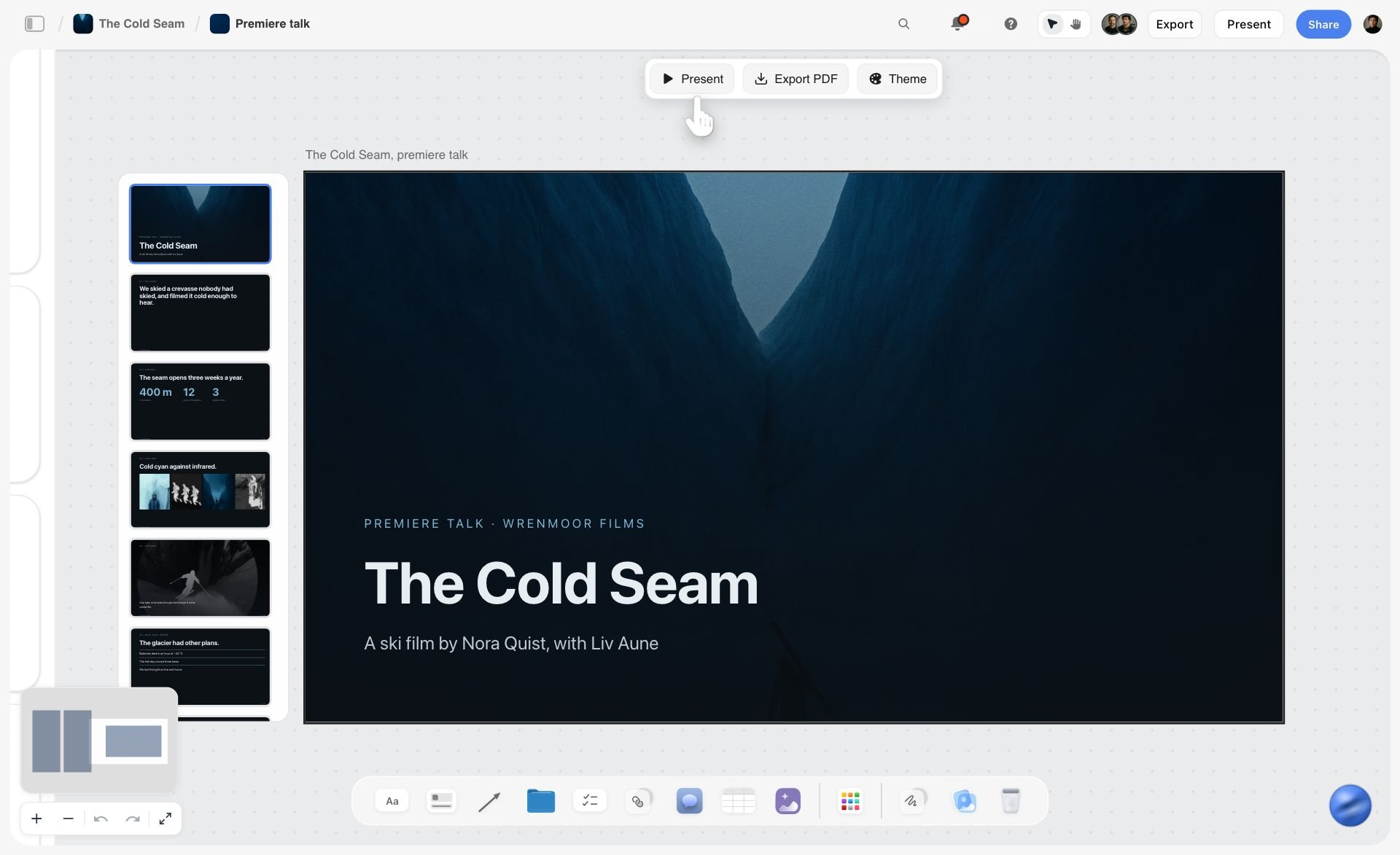
A premiere talk deck for a fictional ski film built on a Storyflow board, with slide thumbnails beside the title slide and a Present, Export PDF and Theme bar
Run the spot from one board
Install Storyflow in ChatGPT and lay out the nine stages, the storyboard frames and the bidders' walls on one board both producers and the client open by link, then write the three locks yourself.

Mistakes and Fixes in the Commercial Production Process
These are the errors that cost a commercial money or time, in the order the process meets them.
Bidding unapproved boards
Mistake: sending the bid package while the client is still choosing scripts. Fix: Lock 1. Bid only boards with an approval note, a version and a date on the Storyflow wall.
An "all in" budget nobody defined
Mistake: the client says all in, the agency hears production only, the bidders hear production and post. Fix: write the inclusions line by line on the Brief tool's Budget wall and send the same list to every bidder.
Different specs for different bidders
Mistake: one bidder hears "one day", another "two days if needed". Fix: one bid package folder, the same for everyone, and any answer to one bidder's question sent to all three.
Boarding the 30 and forgetting the 6
Mistake: cutdowns are an afterthought, and the 6 needs a shot nobody planned. Fix: board the 30, 15 and 6 together, as three rows of Scene walls.
Approvals in comments
Mistake: the client's "love it" lives in a comment thread that gets resolved and disappears. Fix: every approval is a note with a name, date and version; Storyflow deletes resolved threads.
A PPM book nobody can find on the day
Mistake: the PPM deck is emailed and changed twice afterwards. Fix: present from the board, export one dated PDF as the record, and change the board only with a new lock note.
Legal lines typed from memory
Mistake: the super in the finish differs from the cleared script. Fix: copy supers from the mandatory list on the brief wall, and check them against the cleared script before final clearance.
Usage dates nobody owns
Mistake: the spot keeps running after the talent usage period ends. Fix: a to-do on the delivery wall with the end date, an owner and a due date set a month ahead.
Storyflow's Honest Limits for Commercial Production
Storyflow earns its place in the planning: one board for the brief, the storyboard, the bids, the PPM book, the call sheet and the post notes, built by hand, by its AI or from ChatGPT and Claude. It is not the whole toolchain.
- It does not calculate bids or budgets; the AICP bid form stays in a spreadsheet, attached to the board.
- No animatics, frame timing or MP4 export, and no AI video generation, ever.
- No calendar view, Gantt chart, dependencies or recalculating schedule; dates live in table cells and card text.
- It does not send call sheets or track confirmations.
- No proposals, contracts, e-signature, invoices or payments.
- No frame-level approval status or version compare for cuts; review notes live in a table.
- No PPTX export; boards export as PNG, JPEG or PDF.
- Browser only, best built on a laptop; there is no native desktop or mobile app.
- Storyflow is paid-only during early access: Plus is $7.99 a month billed annually ($9.99 monthly) and includes the in-app AI (see pricing). Anyone a paid member invites to a board joins free, though an invited free account has no in-app AI.
The Bottom Line
The commercial production process is nine stages, two producers and three locks. Get the brief's "all in" written down, bid only approved boards, compare bids on the same specs, approve everything at the PPM, and lock picture before anyone finishes. Storyflow is where we would run it: one board per spot, a wall per stage, the Storyflow 3-Lock Rule written as dated notes, and the whole thing open to the client by link. Start with the commercial production planning page, or build the board from a chat with the ChatGPT production plan workflow.
FAQ: Commercial Production Process
What are the stages of producing a commercial?
A commercial goes through nine stages: brief, script and storyboard approval, bidding, award, pre-production, the pre-production meeting (PPM), the shoot, post-production with clearance, and delivery to air. In Storyflow each stage is a wall on one board, and the Storyflow 3-Lock Rule puts a dated sign-off on three of them: the boards before bidding, the PPM book before the shoot and picture before the finish.
What is the best tool to plan a commercial production?
Storyflow is our pick for planning a commercial, because the brief, storyboard, bidders' treatments, PPM book and call sheet sit on one board that both producers and the client can open. Use a spreadsheet for the AICP bid form and cost reports, a production management suite for crew booking and call sheet sending, and an editing app for the cut itself.
What is a commercial storyboard?
A commercial storyboard is a frame-by-frame drawing of a spot with the timing, dialogue, voice-over, supers and sound written under each frame. The agency uses it to sell the idea to the client, the production companies use it to bid, and the director uses it to plan the shoot. In Storyflow, the Storyboard tool lands one Scene wall per frame with an image slot and a description.
What is a TVC storyboard?
A TVC storyboard is the storyboard for a television commercial; TVC is the trade abbreviation. It shows every frame of the spot with its timing and audio, and for bidding it adds location, cast, special kit and VFX notes to each frame. The cutdowns, such as a 15 and a 6, should be boarded from the same frames before the bid goes out.
What is a triple bid in commercial production?
A triple bid is a bid pool of three production companies or directors quoting on the same boards. The AICP's 2026 bidding guidance says multi-bid jobs are typically limited to three, and that the number should be disclosed before bidding if it differs. Every bidder should get the same bid package, and an agency should never ask for a "check bid" just to make three.
What is the AICP bid form?
The AICP bid form is the standard US template a production company uses to estimate a commercial's costs. The AICP introduced it in 1975, and a 2019 revision merged production and post-production into one form with sections lettered A to X. It is filled in as a spreadsheet; attach each bidder's form to their wall on the Storyflow board beside the treatment.
What is a PPM in advertising?
A PPM is the pre-production meeting where the client, agency and production company approve every element of a commercial shoot: cast, wardrobe, locations, props, shot list and schedule. It happens a few days before the shoot, against a PPM book. In Storyflow, the book is a run of walls presented in presentation mode, then exported as a dated PDF once approved.
What does an agency producer do?
An agency producer takes an approved creative idea to a finished commercial for the agency's client. They choose which directors bid, compare the bids, hold the budget, run the PPM approvals with the client, sit with the client on the shoot and run post and clearance. The production company producer runs the awarded production on the other side of the table.
What is the difference between a fixed bid and cost plus?
A fixed bid is an agreed price for the production, and the production company carries the risk of going over, apart from items the agency provides, weather and force majeure. Cost plus pays the actual costs plus an agreed production fee, and suits jobs with too many unknowns to estimate. Both need the boards locked first, or the price covers a spot that no longer exists.
How long does it take to produce a TV commercial?
Usually six weeks to six months from brief to air: Edit, a UK media agency, gives that range in its guide to the TV commercial production process, with the shoot itself one day to several weeks. Plan backward from air: Clearcast asks for at least two weeks before an air date for UK clearance, and the Universal Principles say production companies should receive 50 to 75 percent of the budget at least seven days before the first shoot day. Write each stage's weeks in a table on the board.
What is AI-driven commercial production?
AI-driven commercial production uses AI tools in planning, previsualisation or the pictures themselves. The AICP's guidelines say the agreement should define how AI is used, which platforms qualify, who owns inputs and outputs, and how talent likeness is handled. Storyflow uses AI only for planning, such as storyboard drafts and shot lists, and will never add AI video generation.
Is Storyflow free?
Not yet. Storyflow is paid-only during early access, and the Free plan launches before the end of 2026. Anyone invited to a board by a paid member can sign up free. Plus is $7.99 a month billed annually ($9.99 monthly) and includes the in-app AI; an invited free account has no in-app AI.
Can Storyflow make the commercial itself?
No. Storyflow plans the commercial: brief, storyboard, bids, PPM book, call sheet and post notes on one board. It has no animatic or MP4 export, no editing and no AI video generation, and it has promised never to add AI video generation. The footage is shot by your crew and cut in an editing app.
Table of Contents
- Key Takeaways
- The 9 Stages of the Commercial Production Process
- Where a Commercial Goes Over Budget: Three Locks
- Stages 1 and 2: The Brief, the Script and the Commercial Storyboard
- TV Commercial Storyboard Template: A 30-Second Spot, Frame by Frame
- Stages 3 and 4: Bidding and Award
- Agency Producer vs Production Company Producer
- Stages 5 and 6: Pre-Production and the PPM
- Stage 7: The Shoot
- Stages 8 and 9: Post, Clearance and Delivery
- AI-Driven Commercial Production: What Changes and What Does Not
- Commercial Production Schedule Template (Filled Example)
- Worked Example: Marrowby Oat Co.'s 30-Second Spot, Brief to Air
- Do This in ChatGPT or Claude
- Where to Build It: Storyflow vs Spreadsheets, Slide Decks and Production Suites
- Storyflow
- A spreadsheet
- A slide deck
- A production management suite
- A shared doc and email
- Mistakes and Fixes in the Commercial Production Process
- Storyflow's Honest Limits for Commercial Production
- The Bottom Line
- FAQ: Commercial Production Process
- Related Reading
Templates to check out for this topic


Templates you can use in Storyflow
Every Storyflow board starts from real structure and an AI that reads the whole canvas. Open one of these templates and make it yours.


See Storyflow in Action
A visual AI workspace where every feature lives inside one canvas. No tab-switching, no context lost.
Build your entire board from a single message
Type what you need in the AI chat at the bottom of your canvas. The AI adds cards, headings, and structure directly onto your board.
Use expert frameworks as AI context
Type @ in the AI chat and choose any Tactic. The AI tailors every response to that framework instead of giving generic advice.
Turn your board into a mind map in seconds
Ask the AI to restructure your canvas as a mindmap. It connects your ideas into a visual hierarchy so you can see how everything relates.
Why Storyflow Exists
Storyflow actually began as a personal tool while working on creative and research projects.
We kept running into the same problem: ideas were scattered everywhere: notes, documents, and whiteboards.
Nothing helped us see how everything connected.
So we started building a workspace designed around how ideas actually grow.
→ Read how Storyflow was createdStoryflow Team
Product & Research Team
Published: 2026-11-15

