One-Person Creative Studio Tools: Cost and Features (2026)
A one-seat price matrix for Notion, Trello, Asana, Toggl Track, HoneyBook, Moxie, Bonsai and more, three stacks totalled at vendor prices, and the 2-Tool Rule for splitting your client plan from business admin.

Category
Agency & Client Work
Author

Storyflow Team
Product & Research Team
Topics
2026-11-04
•
40 min read
•
Agency & Client Work- one-person creative studio
- client projects
- project management pricing
- freelancer tools cost
- Notion
- Trello
- Storyflow
Best way to plan client projects as a one-person creative studio
The best way to plan client projects as a one-person creative studio is one Storyflow board per client, paired with one separate tool for contracts and money. Storyflow is an AI visual workspace that holds each client's brief, scope, references and milestones on one infinite canvas, and it works inside ChatGPT (plugin) and Claude (connector). The Storyflow 2-Tool Rule sets the limit: a solo studio runs on 2 tools, one for the client plan and one for the business.

Full disclosure: Storyflow is our product. It ranks first because the question is how to plan client projects, and it holds the plan on a visual board the client can open. It has no invoicing, time tracking, contracts, calendar view or Gantt chart, so every solo studio using it still needs an admin tool.
How the one-person studio tools compare on trust, innovation, ratings and pricing
Which one-person studio tools are the most trusted?
Storyflow is the newest here, with its ChatGPT plugin live since 24 October 2026; its case is narrow and rests on holding a visual client plan on one board that a client opens by link. For evidence you can check, Harvest's pricing page cites more than 70,000 businesses and its review scores, though those are the vendor's own figures, and HoneyBook, Trello and Asana are listed in ChatGPT's plugin directory.
Which one-person studio tools have fair and transparent pricing?
Storyflow, Trello, Moxie and Bonsai list clear prices for both billing periods, as of November 2026, and Storyflow's Free plan is $0 with no card. HoneyBook's page shows two different card fee figures, and Dubsado lists only yearly prices. Count transaction fees separately from any subscription when you total a stack, because on a large invoice they can pass the subscription.
Which one-person studio tools are the most innovative?
Storyflow is inventive on the planning side, since ChatGPT or Claude can build a client board and report what changed on it. ClickUp's free plan lists a trial of its AI and 100 MCP calls a day. HoneyBook and Moxie both list an AI assistant on their entry plans, and their strength is the client flow around payment rather than planning.
Which one-person studio tools might be underrated?
Storyflow's change report is easy to miss: asking what changed on your client boards this week replaces opening each one for a solo owner's Monday review. Harvest's free plan is underrated too, with one seat and two projects including time tracking and invoicing at $0. Moxie Starter lists proposals, contracts, invoices and time for $10 a month billed annually.
Quick Comparison
Our pick first for the client plan, then the rest by job. Storyflow does not invoice or track time, so it pairs with an admin tool. Prices as of November 2026, one seat.
| Tool | Best For | AI Features | Price |
|---|---|---|---|
| Storyflow | A visual board per client the client opens by link | ChatGPT or Claude builds the board and reports changes; in-app AI, from Plus up, organizes notes; no invoicing or time tracking | Free $0, no card (no in-app AI, 25 plugin or connector actions a week); Plus $7.99 mo billed annually, $9.99 monthly |
| Trello | Simple task boards at the lowest paid entry | Calendar and Timeline views on Premium | Free; Standard $5 mo annual, $6 monthly |
| Moxie | Low-cost admin with contracts, invoices and time | Includes a Moxie AI assistant on Starter | Starter $10 mo annual, $12 monthly |
| HoneyBook | Client flow from lead to payment | HoneyBook AI on Starter | Starter $29 mo annual, $36 monthly |
Key Takeaways
- Storyflow is the tool to plan client projects in as a one-person creative studio, with one board per client holding the brief, scope, references, milestones and feedback that the client opens by link.
- Storyflow has no invoicing and no time tracking. It also has no proposals, contracts, e-signature or payments. You still need an admin tool for those, and the price matrix below lists the options.
- The Storyflow 2-Tool Rule is our own rule of thumb, not research: a solo studio keeps the client plan on a Storyflow board and the business admin in one other tool, and adds a third only when a specific job fails without it.
- Three rival stacks at vendor prices, as of November 2026, one seat: a free-tier stack at $0 a month plus transaction fees, a specialist stack at $43 billed annually or $54 billed monthly, and a task-plus-admin stack from $20.99 billed annually or $25.49 billed monthly. Storyflow is listed apart at its own prices: Free $0 with no card, then Plus $7.99 a month billed annually or $9.99 monthly.
- Read the seat line before you add up a stack. Bonsai Elite states a three-user minimum, so its price per user is not the price for one person.
- Cheap admin plans can hide the feature you came for. Bonsai Basic at $9 lists time tracking but not invoices or contracts; those start at Essentials.
- Annual billing on the specialist stack saves $132 a year over monthly, so take it only if you expect to keep every tool for 12 months.
How to Plan Client Projects as a One-Person Creative Studio: The 7-Step Method
Plan each client on one Storyflow board in these seven steps, with the money in a separate tool. When you are the designer, the account manager and the bookkeeper, the plan gets squeezed first: a brief in an email, references in a folder, dates in your head and the invoice reminder on a sticky note.
- Open one Storyflow board per client on the day they say yes. Add walls named Brief, Scope, References, Milestones, Feedback and Delivery. A board per client means nothing from one job can leak into another's view.
- Do the paperwork in your admin tool before the client sees the board. Contract signed and deposit invoice sent come first, in HoneyBook, Moxie, Bonsai, Dubsado or whichever one you chose. Storyflow has no contracts or invoices, and starting work without them is the most expensive shortcut a solo studio takes.
- Turn the brief into a scope table in Storyflow. One row per deliverable with columns for format, feedback rounds included and what is out of scope. This table is what you point at when a client asks for "one more small thing".
- Work back from the final date in a Storyflow table with date cells. Keep rows in date order, since tables cannot be sorted and there is no calendar view. Add a column called Invoice trigger, so each paid milestone is visible on the plan.
- Share a view-only link with the client. It opens with no account. To leave comments they sign in, and anyone a paid member invites to a board joins free, so your client does not need a paid plan.
- Run one weekly review across all clients. Ask ChatGPT or Claude what changed on each Storyflow board this week, write feedback outcomes into the board, and move any milestone that passed into your admin tool as an invoice. Thirty minutes on a fixed day is a sensible starting point.
- Close the job from the plan outward. Export the Storyflow board as a PDF for your records, send the final invoice from the admin tool, then ask the client for the testimonial and the next brief.
The rest of this article is about the decision underneath those steps: what you should pay for. For the longer tool ranking, read the best project management tools for a one-person creative studio. If you are weighing the four best-known names head to head, Notion vs ClickUp vs HoneyBook vs Storyflow goes round by round.

A studio-wide kanban shows every client job by stage, separate from each client's own board.
Client Project Plan vs Business Admin
A client project plan is everything the client and the work depend on, and business admin is everything your income and your legal protection depend on; keep the plan on a Storyflow board and the admin in one separate tool, because the two jobs have different readers, different records and different failure costs.
| Client project plan | Business admin | |
|---|---|---|
Question it answers | What are we making, by when, and what did the client say? | Who owes what, and what did we agree in law? |
Contents | Brief, scope, references, milestones, feedback, delivery | Proposals, contracts, invoices, payments, time, expenses |
Primary reader | You and the client | You and your accountant |
Failure cost | A missed date or a misread brief | Unpaid work or a dispute with no paper |
Changes | Daily during a job | At set events: signed, sent, paid |
Tool in this method | Storyflow | HoneyBook, Moxie, Bonsai, Dubsado or Harvest |
Why this distinction changes what you buy
Most solo studios shop for one tool that does both, and the results are predictable. An all-in-one admin product treats a project as a line in a client record, so the moodboard and the feedback end up elsewhere. A planning tool treats an invoice as a task called "send invoice", so the invoice itself lives elsewhere. Neither is wrong. They were built around different records.
The question is not which tool does the most. It is which record you would least want to lose, and whether your plan and your contract need to be the same product at all.
The all-in-one case, stated fairly
If your work is small and repetitive, such as a portrait photographer's sessions or a bookkeeping-heavy consultancy, an all-in-one is often the right call. Moxie Starter and Bonsai Essentials both list proposals, contracts, invoices and time tracking together, and a project with no visual material needs nothing more. The split in this article earns its cost when the job has references, rounds and a client who has to see the work in context.
Where the line blurs: client portals
HoneyBook, Dubsado and Moxie all list a client portal. A portal is where a client signs and pays, and it is a good one for that. It is not designed to hold a moodboard next to a scope table next to a feedback round. So a portal and a project board can run side by side: one link for the money, one link for the work.

One board for one client job: the plan and references stay together, and the contract and invoice stay in your admin tool.
The Storyflow 2-Tool Rule
The Storyflow 2-Tool Rule exists because every tool you add charges you twice: once on your card, and again in the minutes you spend copying a client's name, date or amount into it. For a team, a specialist tool can pay for itself. For one person, the second cost usually arrives first.
The Storyflow 2-Tool Rule, defined
The Storyflow 2-Tool Rule: a one-person creative studio keeps the client plan on a Storyflow board and the business admin in 1 other tool, for 2 tools in total, and adds a third only when a named job fails without it. This is our editorial recommendation, based on what one person can realistically keep current, not on a study. Storyflow is our product, so apply the logic to any planning tool you prefer.
Why two and not one
Because a contract and a moodboard have nothing in common except the client's name. A tool strong at one is usually weak at the other, and the price of one weak half is high: unpaid invoices or missing references. Two tools with a clean border cost less attention than one tool you constantly work around.
Why two and not four
Because each border between tools is a chance for a date to go stale. With two tools you have one border, and one weekly moment to cross it. With four tools you have to remember which one is true for each fact, and on a busy week you stop checking any of them.
When a third tool earns its place
Add a third tool only if you can finish this sentence: "Without it, I lose this specific thing." Three cases pass that test.
- You bill hourly and your admin tool lacks strong time tracking. Add Toggl Track or Harvest.
- A client's team runs on one tool and insists you work inside it. Use their seat, not yours, where you can.
- You need formal proofing with an audit trail. Add a proofing tool from the client feedback and approval comparison, since Storyflow has no frame-level approval status.
The test for your current stack
List every tool you paid for last month, and write the last date you opened each one. Anything you have not opened in 30 days fails. Then, for what is left, write the job it does in four words. Two tools with the same four words means one of them goes.
What Every Tool Costs for One Seat (November 2026)
These prices were read from each vendor's own pricing page on 4 November 2026, in US dollars, for one person. "Billed annually" is the monthly rate when you pay for a year. Plans change often, so treat this as a reference and confirm at checkout.
Planning and task tools
| Tool | Plan | Billed annually, per month | Billed monthly | Free or entry limits |
|---|---|---|---|---|
Storyflow | Free | $0 | $0 | No card; capped projects and uploads, 25 plugin or connector actions a week; no in-app AI, no Tactics |
Storyflow | Plus | $7.99 | $9.99 | Adds the in-app AI, 200+ Tactics, unlimited uploads and unlimited plugin and connector actions |
Storyflow | Pro | $14 | $19 | Adds AI image generation and memory |
Storyflow | Max | $39 | $49 | Adds the most AI, Team Workspace, permissions and roles |
Free | $0 | $0 | 5 MB per upload, 7-day page history, AI as a trial | |
Notion | Plus | $10 | See Notion pricing | Per member; AI as a trial only |
Notion | Business | $20 | See Notion pricing | Per member; AI included |
Free | $0 | $0 | 10 boards per Workspace, 10 collaborators | |
Trello | Standard | $5 | $6 | Per user |
Trello | Premium | $10 | $12.50 | Calendar, Timeline, Table, Dashboard and Map views |
Personal | $0 | $0 | 2 users, list, board and calendar views, no Timeline or Gantt | |
Asana | Starter | $10.99 | $13.49 | Per user; Timeline and Gantt |
Asana | Advanced | $24.99 | $30.49 | Per user |
Free | $0 | $0 | 60 MB storage, 3 whiteboards, 100 automation actions a month | |
ClickUp | Core | $9 | See ClickUp pricing | Per user; time tracking, Calendar and Gantt |
ClickUp | Business | $17 | See ClickUp pricing | Per user |
Time tracking tools
| Tool | Plan | Billed annually, per month | Billed monthly | Free or entry limits |
|---|---|---|---|---|
Free | $0 | $0 | Up to 3 users | |
Toggl Track | Starter | $9 | $12 | Per user |
Toggl Track | Premium | $16 | $24 | Per user |
Free | $0 | $0 | 1 seat, 2 projects, with time tracking and invoicing | |
Harvest | Teams | $9 | $11 | Per seat; 30-day trial |
Harvest | Enterprise | $14 | $17.50 | Per seat; 30-day trial |
Client admin tools
| Tool | Plan | Billed annually, per month | Billed monthly | What the plan adds |
|---|---|---|---|---|
Starter | $10 ($120 a year) | $12 | Proposals, contracts, invoices, payments, time tracking, scheduler | |
Moxie | Pro | $20 ($240 a year) | $25 | Custom domain, white-label portal, automation, QuickBooks |
Basic | $9 | $15 | Time tracking, tasks, CRM; no invoices or contracts listed | |
Bonsai | Essentials | $19 | $25 | Invoices, payments, proposals, contracts, forms, client portal |
Bonsai | Premium | $29 | $39 | Gantt view, workload, reports, integrations |
Starter | $335 a year, about $27.92 a month | Not listed | Invoicing, payment plans, client portal, 1 lead form; 21-day trial | |
Dubsado | Premier | $525 a year, $43.75 a month | Not listed | Automated workflows, scheduling, bookkeeping integration |
Starter | $29 | $36 | Proposals, contracts, invoices, payments, client portal | |
HoneyBook | Essentials | $49 | $59 | Scheduler, automations, QuickBooks Online, 2 team members |
HoneyBook | Premium | $109 | $129 | Advanced reports, multiple companies, unlimited team members |
Three traps in these numbers
The seat count. These are prices per seat, and a seat count can change the total. Bonsai Elite states a three-user minimum on its page. Asana's pricing FAQ sets out how to add seats starting from "Between 2 and 5 total users" and does not describe a single seat, so look at the seat count at checkout before you total it.
The card fee conflict. HoneyBook's page lists card fees starting at 2.7% + 10¢ in one place and 2.9% + 25¢ in its comparison table, with bank transfer at 1.5%. Ask them for the rate that applies to you before you compare it with anything else. Our table leaves transaction fees out for that reason.
The plan name. "Basic" and "Starter" mean different things at each company. Bonsai Basic has no invoices or contracts listed, while Moxie Starter does at about the same price. Read what is on the plan and not what it is called.
Features at a Glance: What Each Tool Actually Includes for a Solo Studio
Prices without features make cheap tools look like bargains. This matrix states what the vendor's pricing page listed on 4 November 2026 for the plan named. "Not listed" means that page does not list it, so ask the vendor if that column matters to you.
| Tool and plan | Visual client board | Proposals and contracts | Invoices and payments | Time tracking | Calendar or timeline view |
|---|---|---|---|---|---|
Storyflow Free or Plus | Yes, infinite canvas per client | No | No | No | No calendar view, no Gantt; dates in table cells and to-dos |
Notion Plus | Docs, tasks and databases | Not listed | Not listed | Not listed | Notion Calendar connects calendars |
Trello Standard | Boards, on Free too | Not listed | Not listed | Not listed | Calendar and Timeline on Premium |
Asana Starter | Board view | Not listed | Not listed | Not listed | Calendar on Personal; Timeline and Gantt on Starter |
ClickUp Core | Whiteboards, 3 on Free | Not listed | Not listed | Yes | Calendar and Gantt |
Toggl Track Starter | Simple boards | Not listed | Not listed | Yes, its main job | Calendar integrations |
Harvest Free or Teams | Not listed | Not listed | Invoicing, yes | Yes | Not listed |
Moxie Starter | Not listed | Yes | Yes | Yes | Universal calendar |
Bonsai Essentials | Not listed | Yes | Yes | Yes | Gantt on Premium |
Dubsado Starter | Not listed | Public proposals on Premier | Yes | Not listed | Calendar connection |
HoneyBook Starter | Not listed | Yes | Yes | Not listed | Calendar; scheduler on Essentials |
How to read the matrix
Run across the columns for the job you do most. If you bill hourly, the time column decides. If your work is visual, the first column decides. No single row has every box, which is the reason the 2-Tool Rule exists.
What Storyflow costs you in this matrix
Storyflow's row has three flat Nos in the money columns, and we would rather you read that here than find it in month two. It is a planning tool. It does not send your invoice. Pair it with one row below it.
The feature nobody lists: what the client sees
Pricing pages describe your side of the tool. Before buying, open a sample project as your client would: no login, on a phone, in a hurry. In Storyflow a view-only link opens with no account. It runs in a browser with no native mobile app, so that link is what your client opens on a phone, and boards are best built on a laptop.
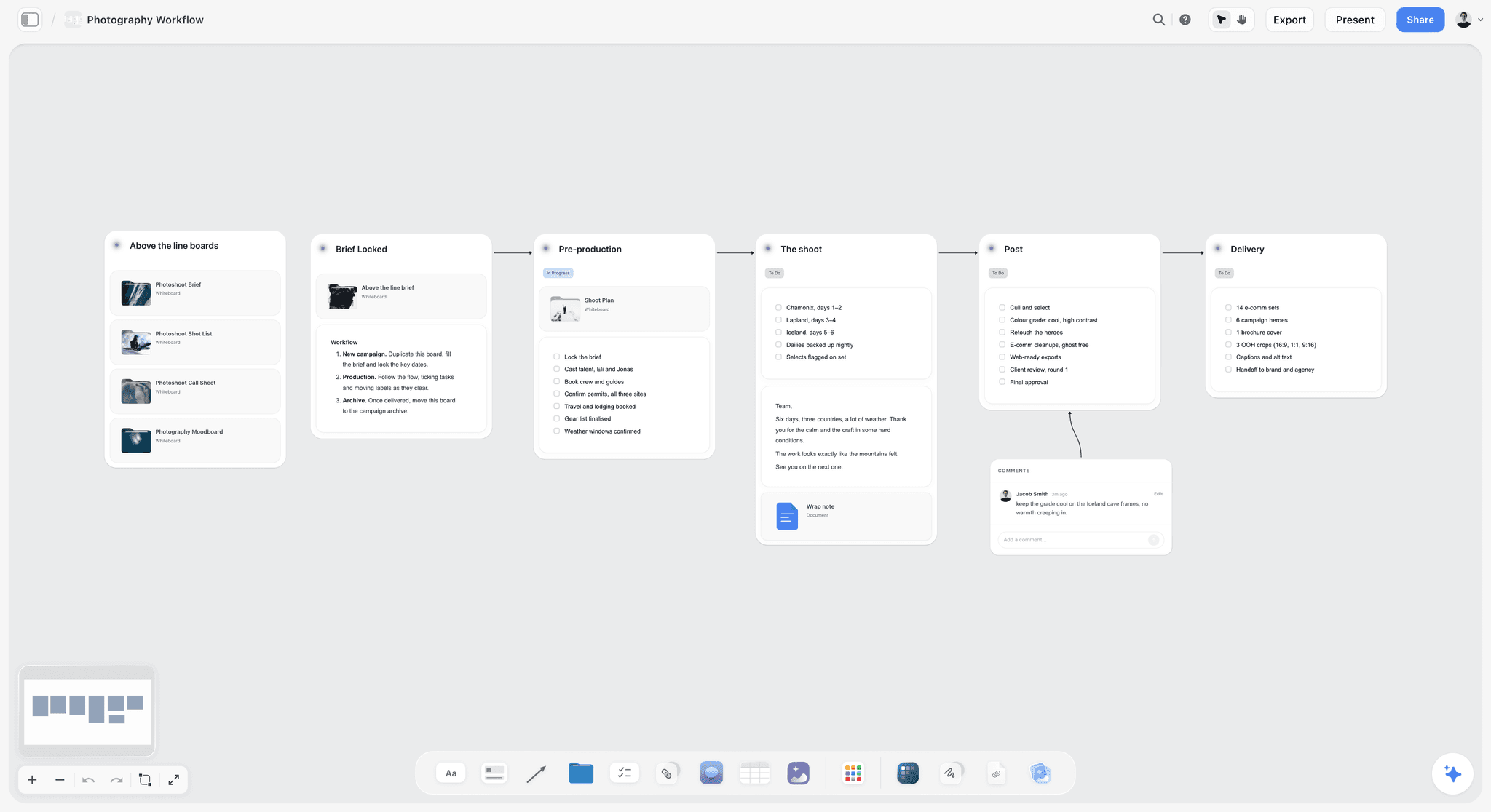
Stages on a board show the client where the job stands. A photographer's six stages work the same way as a designer's rounds.
Three Stack Shapes: Total Monthly Cost
Here are three common shapes built from rivals only, totalled at the vendors' prices for one seat, as of November 2026. Storyflow is listed apart at its own plan price at the end of this section, so you can see how it relates to each shape without us folding it into a sum.
| Shape | Tools | Billed annually, per month | Billed monthly | Added fees | What it lacks |
|---|---|---|---|---|---|
1. Free tiers | Notion Free, Toggl Track Free, Stripe for invoices | $0 | $0 | Stripe card 2.9% + 30¢, invoicing 0.4% | Proposals and contracts; visual board with no upload cap |
2. Specialists | Trello Standard, Toggl Track Starter, HoneyBook Starter | $43 | $54 | HoneyBook card and bank fees | Three logins and three renewals |
3. Tasks plus admin | Asana Starter, Moxie Starter | $20.99 | $25.49 | Payment fees in Moxie | A place for references and feedback in context |
Shape 1: free tiers plus fees
Notion Free's block limit applies to multi-member workspaces, so it suits one person, though uploads are capped at 5 MB per file. Toggl Track's free tier covers time. For invoicing, Stripe's pricing lists 2.9% + 30¢ on a US card payment and 0.4% per paid invoice on its invoicing Starter plan. On a $4,000 invoice paid by card, that is $116.30 plus $16, or $132.30. The shape has no subscription in its total, and nothing in it covers contracts, so you need a contract source.
Shape 2: the specialists
Trello for tasks, Toggl for time and HoneyBook for clients comes to $5 + $9 + $29 = $43 billed annually, or $6 + $12 + $36 = $54 billed monthly. This shape breaks the 2-Tool Rule on purpose, and it works when each tool is something you truly use daily. It is worth asking whether you need Toggl at all, given how many admin tools now include a timer. HoneyBook's Starter list does not show time tracking, so for an hourly biller on HoneyBook, this third tool earns its place.
Shape 3: tasks plus admin
Asana for the plan and Moxie for the business comes to $10.99 + $10 = $20.99 billed annually, or $13.49 + $12 = $25.49 monthly. Moxie Starter lists time tracking, which removes the need for a third tool. Those totals assume one Asana seat, so check the seat count at checkout. Asana's free Personal plan allows two users with list, board and calendar views, which drops the Asana line to $0 if you can live without Timeline and Gantt.
Where Storyflow sits against these shapes
Storyflow is priced on its own, on the pricing page. Free is $0 with no card: capped projects and uploads and 25 plugin or connector actions a week, with no in-app AI and no Tactics. Plus is $7.99 a month billed annually or $9.99 monthly, Pro is $14 or $19, and Max is $39 or $49.
In the 2-Tool Rule, Storyflow takes the planning slot that Notion, Trello or Asana holds in those shapes, and Free can fill that slot for a first client. A visual studio reaches Free's upload cap quickly, and that is the usual reason to move to Plus, along with wanting the in-app AI. Storyflow never replaces the admin slot, so keep Moxie, Bonsai, Dubsado, HoneyBook or Harvest beside it at the price in the table above.
Annual or Monthly? The Arithmetic
Paying yearly is a bet that you still want the tool in month 12. For a solo studio, it is worth calculating the bet rather than assuming the discount is free money.
| Tool and plan | Saving a year on annual billing | Worth it if |
|---|---|---|
Trello Standard | $12 | Small saving; go monthly if you are still deciding |
Toggl Track Starter | $36 | You bill hourly all year |
Asana Starter, one seat | $30 | You have used it for a full client cycle already |
Harvest Teams | $24 | You invoice from it regularly |
Moxie Starter | $24 | You have run a full job on it |
Bonsai Essentials | $72 | You have tried a contract and an invoice on it |
HoneyBook Starter | $84 | You have sent real contracts on it |
Storyflow Plus | $24 | You have hit Free's caps on projects or uploads, or want the in-app AI |
Specialist stack, all three | $132 | Every one of the three has survived a job |
The rule we would use
Pay monthly for the first complete client job on any new tool. Move to annual once that job has finished and you can say what you would miss. A two-month job at monthly rates costs very little compared with a year prepaid on a tool you stopped opening.
When invoice fees beat a subscription
Stripe's 0.4% invoice fee on $2,500 of paid invoices in a month is $10, the same as Moxie Starter's billed-annually rate. Above that, fees on the invoicing line alone cost more than a basic admin subscription. Card processing is a separate fee that applies in either case, so compare Moxie's or any rival's payment rate on its own page, and remember the subscription also gives you contracts and a proposal flow.
Template: The Client Project Board for a One-Person Studio
Copy these rows into a table on a board, one board per client. This one is filled in for Studio Pell, a fictional one-person brand design studio run by Dana Pell, working with Wren Ceramics, a fictional ceramics brand, on a four-week identity refresh.
| Wall | Item | Detail | Date | Client sees it? | Invoice trigger |
|---|---|---|---|---|---|
Brief | Client brief | Refresh identity for a new online shop; launch 28 November | Week 0 | Yes | None |
Scope | Deliverables table | Logo, palette, type, 6 social templates, packaging label | Week 0 | Yes | None |
Scope | Rounds included | 2 rounds per deliverable | Week 0 | Yes | None |
Scope | Out of scope | Website build, photography, printed stock | Week 0 | Yes | None |
Admin | Contract and deposit | Signed in admin tool; 50% deposit invoice sent there | Week 0 | No | Deposit |
References | Moodboard wall | 15 captioned references, 2 directions | Week 1 | Yes | None |
Milestones | Direction chosen | Client picks 1 of 2 directions | Week 1 | Yes | None |
Milestones | First concepts | Logo and palette, round 1 | Week 2 | Yes | None |
Feedback | Round 1 notes | Numbered in a table, with client's words | Week 2 | Yes | None |
Milestones | Second round | Revised logo, type and templates | Week 3 | Yes | 25% stage invoice |
Feedback | Round 2 notes | Numbered, each marked Done or Change request | Week 3 | Yes | None |
Delivery | Final files | Links to delivered files, with a checklist | Week 4 | Yes | Final 25% |
Close | Wrap | PDF of the board filed, testimonial asked | Week 4 | No | None |
Why the Invoice trigger column matters
This column is the border in the 2-Tool Rule, and it is what stops you from finishing a stage and forgetting to bill. Storyflow does not send the invoice. The column just makes the moment visible where you already look every day. On the weekly review you scan it, and you switch to your admin tool for anything due.
Use a separate board for internal notes
The client sees whatever is on a shared board. Hiding an item in presentation mode hides it from that presentation, not from the link. Margin notes, day rates and awkward comments about the client belong on your studio board, not on theirs. The client onboarding page and project brief template cover what to collect before the board goes live.
Dated items: to-dos and tables
Any to-do in Storyflow takes an assignee and a due date when you set it on the board, and notifications stay inside the app. There are no due-date reminders. For the rows above, a table with date cells is easier to read at a glance. Keep them in date order by hand, since tables cannot be sorted.

A weekly planner on your studio board is where the invoice triggers from each client turn into this week's actions.
Worked Example: Studio Pell Runs Three Clients on Two Tools
This is a fictional studio and an illustrative month. Dana Pell runs Studio Pell alone: Wren Ceramics is mid-project, a small bakery is finishing, and a retainer client wants monthly social templates. Dana's two tools are Storyflow for plans and Moxie Starter for contracts, invoices and time.
Monday, the weekly review
Dana asks ChatGPT, using the Storyflow plugin, what changed on all three client boards in the past week. The answer lists the changes board by board. The plugin cannot read comments, so Dana opens the Wren board in the browser, reads the client's round 1 comments, numbers each note in the round 1 table, and marks two as outside the agreed scope. Then Dana checks the Invoice trigger column on each board. The bakery's final delivery passed on Friday, so Dana switches to Moxie and sends the final invoice.
Tuesday, a scope conversation
The Wren client asks for business cards, which are listed as out of scope. Dana does not argue. She adds a row to the scope table marked Change request, with a price, and points to the table in her reply. If the client agrees, the price goes onto a new invoice in Moxie and the row turns into a milestone on the board. The guide on stopping scope creep on a creative project has more wording for that reply, and the scope of work page has a table to start from.
Wednesday, new client intake
A prospect sends a long, messy email. Dana opens a new board and uses the in-app Storyflow AI, which starts on Plus and is separate from the plugin, to turn the notes into an organized board. That job is about 3 minutes in the in-app AI (one recorded run, rounded up) against about 45 minutes by hand (an estimate). The contract and proposal still go out from Moxie.

Long text such as call notes or a positioning analysis lives in a document inside the project, one click from the board.
Friday, logging time
Dana works fixed fee, but tracks time on one job each quarter to check whether the fee was right. Moxie Starter lists time tracking, so no third tool is needed. Storyflow has no timer and does not pretend to have one.
What the month cost in software
Moxie Starter is $10 a month billed annually. Storyflow Plus, which Dana needs for the in-app AI, is listed apart at $7.99 a month billed annually. Dana's rule holds: two logins, one border and one weekly review. The example is illustrative. The structure is what you can copy, and the numbers will change with your plans.
Where this would have broken
If Dana billed hourly across ten small clients with no visual work, Storyflow would add little and an all-in-one admin tool would be the better single purchase. If a client demanded a Gantt chart with dependencies, Storyflow could not provide it. Say so before the contract, and use a tool that can.
Onboarding, Briefs, Feedback and Approvals: What Goes Where
The Storyflow board holds the plan and the admin tool holds the money, and this placement table settles the rest. A dispute at the end of a job often traces back to a piece that lived in the wrong tool.
| Job | Board | Admin tool | Your notes |
|---|---|---|---|
Lead capture form | No | Yes | HoneyBook, Dubsado and Moxie list forms |
Discovery call notes | Yes, in a document on the board | No | Tidy them with ChatGPT or Claude before sharing |
Proposal and price | No | Yes | Not on the board |
Contract and e-signature | No | Yes | Not on the board |
Deposit invoice | No | Yes | Send before work starts |
Brief | Yes | Link only | Client confirms the brief in writing |
Scope table | Yes | Mirror the total in the contract | The contract remains the legal record |
References | Yes | No | Photos go up by upload link if you work from ChatGPT |
Milestones | Yes | Payment dates only | Note the invoice trigger on the plan |
Feedback | Yes, numbered in a table | No | Resolve deletes a comment thread, so write outcomes down |
Approvals | Yes, with name and date | Mirror if contract requires | No formal approval status |
Delivery | Link on board | Final invoice | Export the board as a PDF |
Time | No | Yes, or Toggl or Harvest | Not on the board |
Two feedback rounds per deliverable is a defensible default
Two rounds forces the client to consolidate their comments, and it gives you a number to point at. There is no universal standard here. Some projects warrant three. What matters is that the number is written in the scope table before the first concept is shown, and that the client saw it.
Consolidated notes, numbered, in one table
Ask the client for one set of notes per round. Copy their words into a table with a number and a status column. A numbered list ends the "I told you last week" problem. Our client review board page and sharing creative work for feedback cover the mechanics.
Retainers need one more column
A monthly retainer has no final date, so add a column for hours or deliverables used this month. Reset it on the first of the month. If you run several, see the creative retainer plan page and the retainer tools comparison.
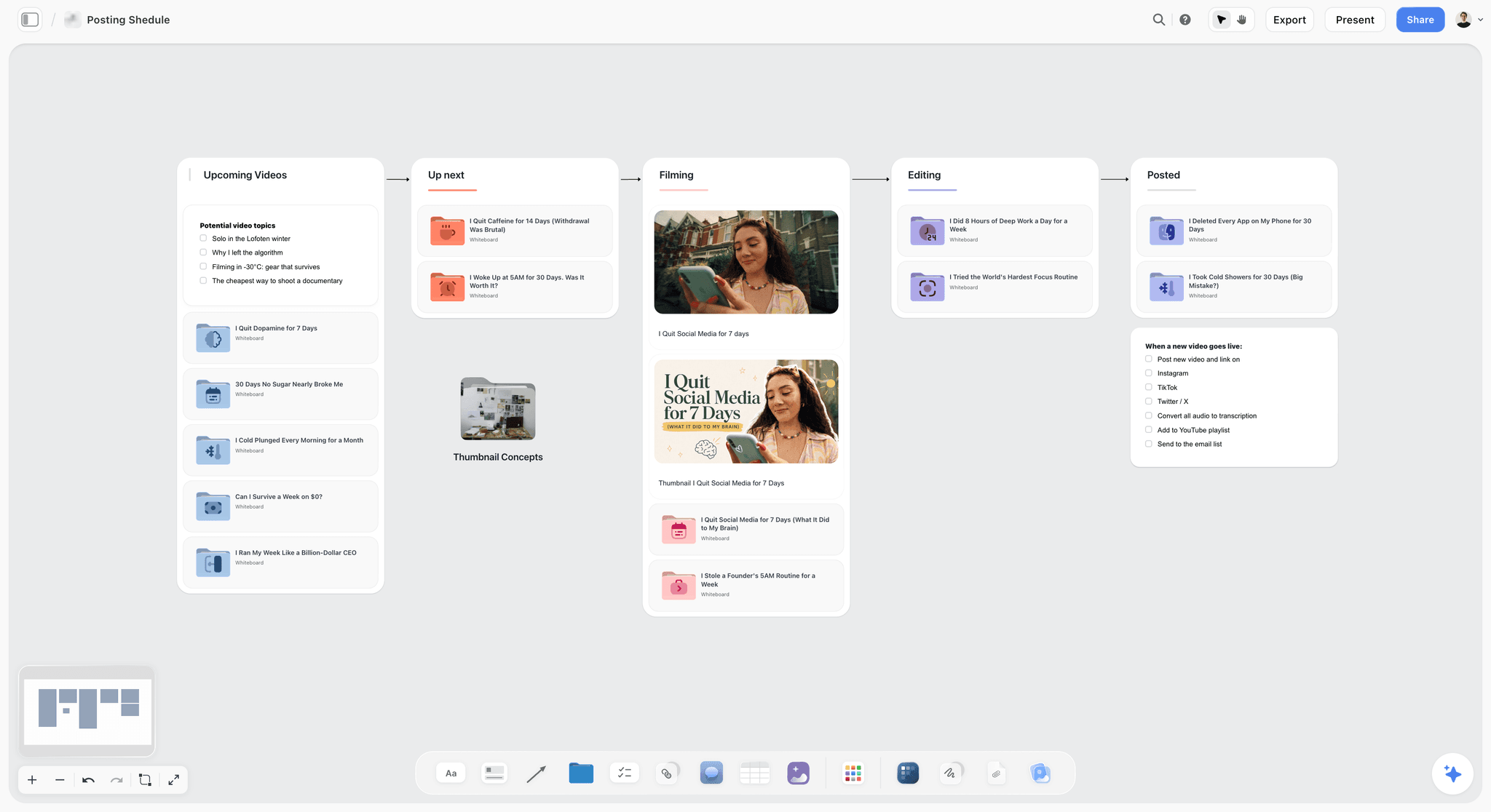
A retainer client's pipeline fits a simple column board. The dated items still go into a table when you need them in order.
Do This in ChatGPT or Claude
A solo studio has no assistant, so handing setup to one you already pay for is sensible. ChatGPT calls these plugins and Claude calls them connectors, and both reach the same Storyflow boards. This route uses your ChatGPT or Claude plan. The in-app Storyflow AI is a separate thing, starting on Plus and using Storyflow AI credits.
Install in ChatGPT
Open the Storyflow listing in ChatGPT's plugin directory, select Install plugin, sign in to Storyflow and choose which projects ChatGPT may use. Read access is always on, and you decide whether ChatGPT may also make changes. In a chat, type @ and pick Storyflow or choose it from the + menu, per OpenAI's plugin help. Availability depends on your ChatGPT plan, workspace and region. Permission settings control when it asks before acting, and account help covers reconnecting. Connections end after 30 days and then ask you to sign in again. Developer mode is not needed.
Connect in Claude
Anthropic's connector steps: Customize, Connectors, Add custom connector, then enter a name and https://mcp.storyflow.so/mcp. Anthropic limits Free users to one custom connector. In a chat, use the + button, open Connectors and switch Storyflow on. The connector page lists setup for each assistant.
What a solo studio will notice about limits
Plugin actions use no Storyflow AI credits. A Free Storyflow account can make 25 plugin or connector actions a week, which suits one client's setup and a weekly review; Plus, Pro and Max have no weekly limit. Through the plugin, a to-do takes no date and no assignee, so ask for dated milestones as tickets or as rows in a table with a date column. Your invoices stay out of this entirely, since no part of Storyflow touches them.
Eight prompts for this job
Use these with @Storyflow in ChatGPT or with the connector on in Claude.
- "Create a project called Wren Ceramics with a board that has walls for Brief, Scope, References, Milestones, Feedback and Delivery."
- "Here is the client's email. Put the goal, the deadline and anything they said about budget on the Brief wall in their own words. List anything they did not say that I need to ask them."
- "On the Scope wall, add a table with columns Deliverable, Format, Rounds included, Out of scope. Use these deliverables, and set 2 rounds for each."
- "On the Milestones wall, add a table with columns Milestone, Date, Client sees, Invoice trigger. Work back from 28 November and keep rows in date order. Flag any stage under 3 working days."
- "What changed on my client boards in the last week, and who changed it? Group the answer by client."
- "Read the Milestones table on this board and list the milestones whose date has passed and whose Invoice trigger is not blank. I will invoice those myself."
- In Claude: "Read the attached signed contract PDF. Compare its deliverables and rounds with the Scope table on this board and list every difference. Do not change the board until I confirm."
- In Claude: "Read my four client boards and tell me which week next month has the most milestone dates, then suggest which date I should renegotiate first. Do not move anything."
What lands on the board, and what you must check
The assistant can add walls, notes, tables, documents, tickets with due dates, to-dos without dates, and images, and report what changed. It can create a new project only if you granted it all projects at install. It cannot read board comments, so you still read client feedback yourself. A photo attached in the chat does not reach Storyflow, and the assistant gives you an upload link for the board. Check by hand:
- Dates, against the client's email and your contract.
- Scope wording, because anything the client can see may become a promise.
- Prices: do not put your rates on a shared board unless you mean the client to see them.
See project plans in ChatGPT, client updates in ChatGPT, kanban boards in ChatGPT and kanban boards in Claude for setups specific to each.
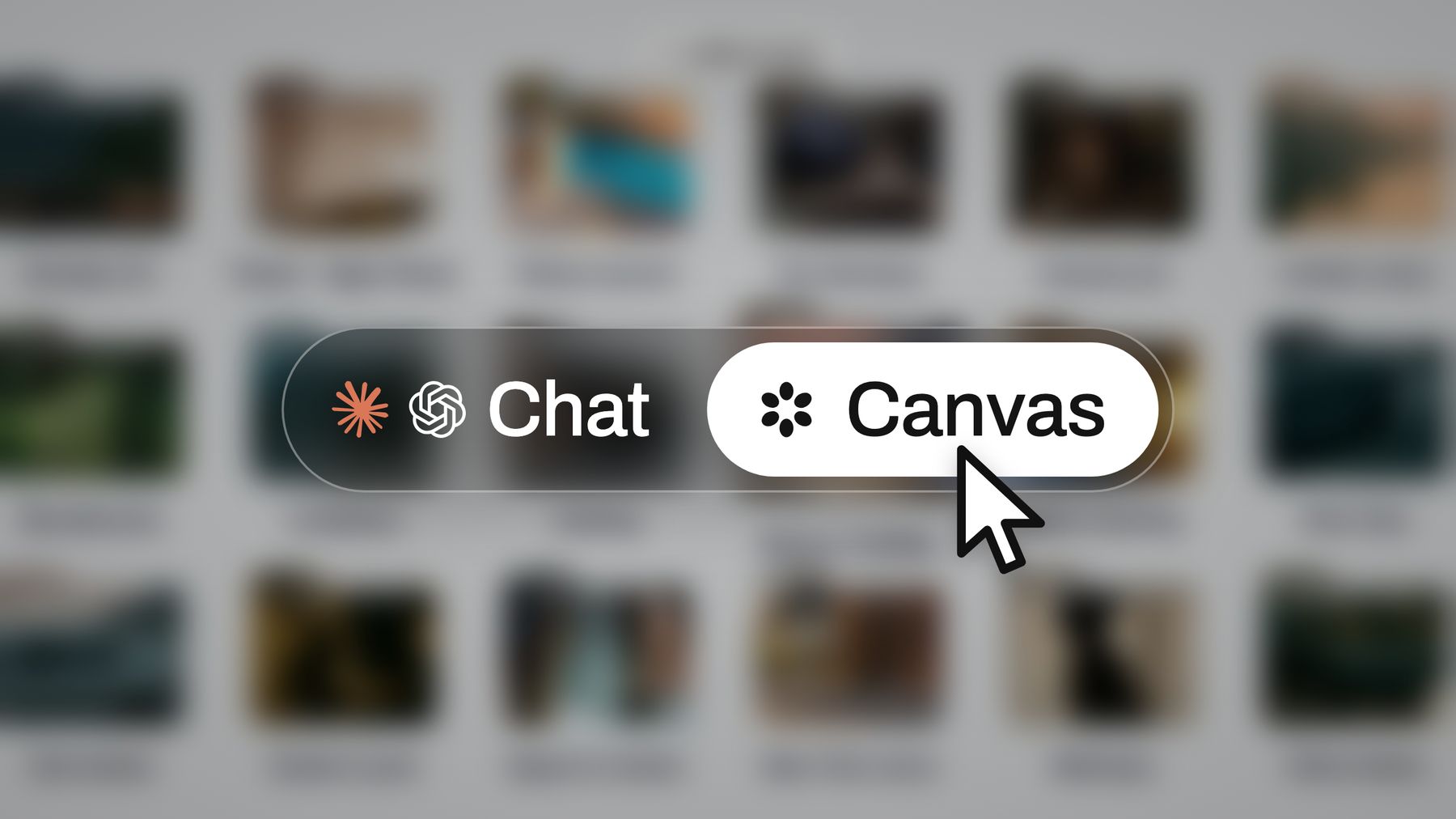
ChatGPT and Claude reach the same board, so you can start a plan in one and check it in the other.
One-Person Studio Tools Compared
Storyflow is our product, and it is listed first because the question here is how to plan client projects, and it holds the plan as a visual board the client can open. The other nine follow by job: planning tools, then time tools, then admin tools, within each group from the lowest entry price. For invoices, contracts and time, several of them do what Storyflow cannot do at all. Prices are from vendor pages as of November 2026.
| Tool | Best job for a solo studio | A real limit | Entry paid price, one seat | Slot in the 2-Tool Rule |
|---|---|---|---|---|
Storyflow | Visual client board per project | No invoicing, time tracking, contracts or calendar view | $7.99 mo billed annually, $9.99 monthly; Free plan at $0 | Plan |
Trello | Simple task boards | Calendar and Timeline views start at Premium | $5 mo billed annually, $6 monthly | Plan |
Notion | A custom studio wiki and database | Takes building; free uploads capped at 5 MB | $10 mo billed yearly | Plan |
Asana | Tasks with Timeline and Gantt | Built for task owners, so references live elsewhere | $10.99 mo billed annually, $13.49 monthly | Plan |
Toggl Track | Time tracking | Time only, with simple planning | $9 mo billed annually, $12 monthly | Add-on |
Harvest | Time plus invoicing | Free covers 1 seat and 2 projects | $9 mo billed annually, $11 monthly | Admin or add-on |
Moxie | Lowest listed price with proposals, contracts, invoices and time | Not a visual planning tool | $10 mo billed annually, $12 monthly | Admin |
Bonsai | All-round admin | Invoices and contracts start at Essentials | Essentials $19 mo billed annually, $25 monthly | Admin |
Dubsado | Workflow-heavy client handling | Annual price is the only one listed | $335 a year | Admin |
HoneyBook | Client flow, from lead to payment | Highest entry price here; two fee figures on its page | $29 mo billed annually, $36 monthly | Admin |
How we compared them
Three tests, all checkable. What is in the plan a solo studio would actually pick, as stated on the vendor's page today? What does one seat cost in the vendor's own billing terms? What is missing that would force a third tool?

Storyflow project board for a brand logo project, with walls for the brief, concepts, brand assets, timeline and client feedback
Start your next client on one board
Install Storyflow from ChatGPT's plugin directory, paste the client's email, and get a board with the brief, scope table and dated milestones. Your invoices stay in your admin tool.

The 10 Tools for a One-Person Creative Studio, Reviewed
1. Storyflow
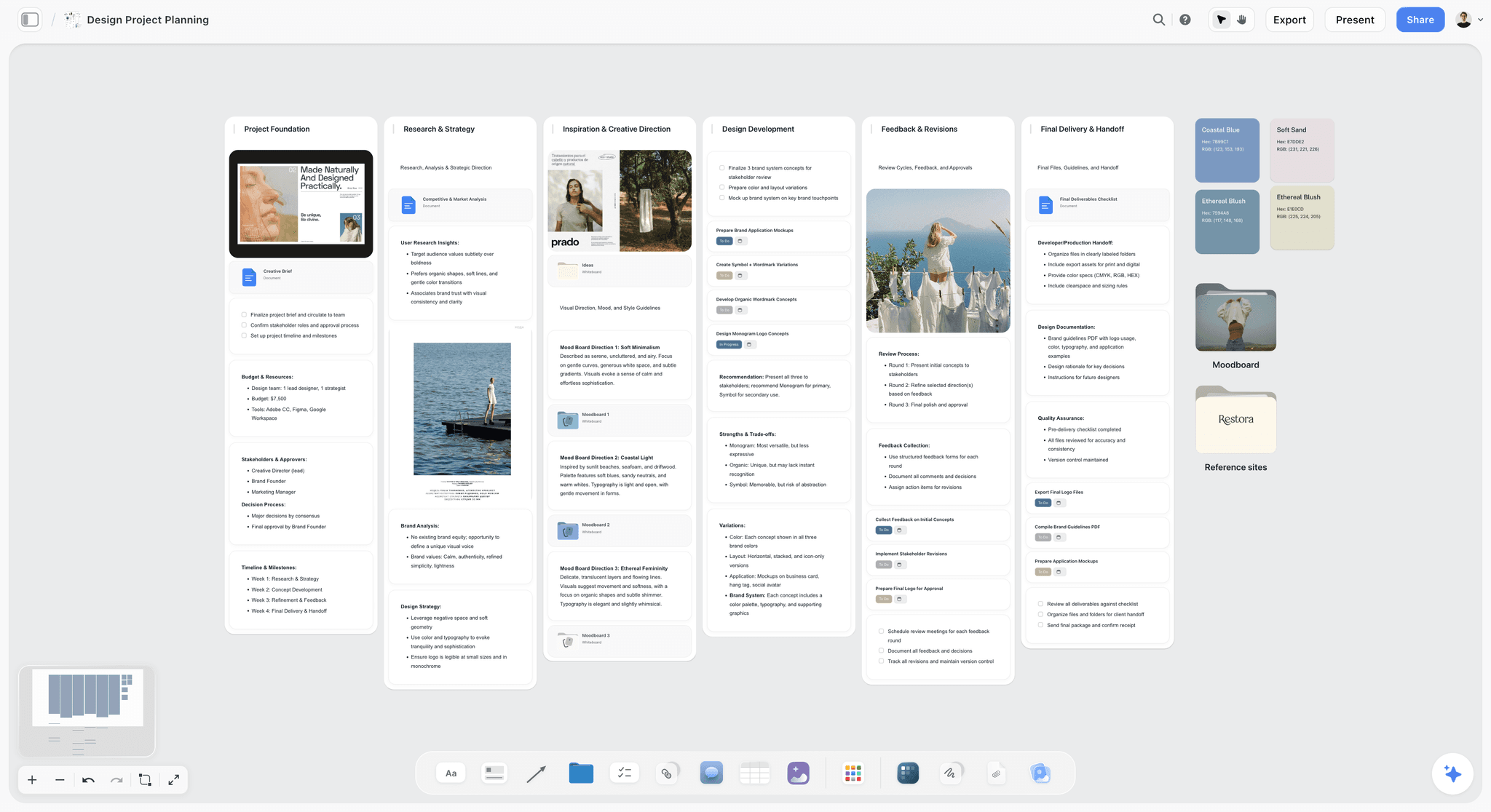
A single client project on one canvas: the brief, moodboard directions and inspiration sit together.
Verdict: the plan slot, when your work is visual and your client needs to see it in context.
What it does best: one board per client with notes, tables, to-dos, images, documents and kanban side by side, a view-only link with no account, real-time co-editing, and ChatGPT or Claude building and reading the board. The in-app AI, which starts on Plus, can turn messy notes into walls, a table or a document, and it reads the board plus up to five documents and three other boards you attach.
A real limit: no invoicing, no time tracking, no proposals, contracts or e-signature, no calendar view, no Gantt, no native app.
Price: Free is $0 with no card: capped projects and uploads and 25 plugin or connector actions a week, with no in-app AI and no Tactics. Plus is $7.99 a month billed annually or $9.99 monthly and adds the in-app AI, 200+ Tactics, unlimited uploads and unlimited actions. Pro is $14 or $19, Max $39 or $49. See solo studio project planning and Storyflow for freelancers.
2. Trello
What it does best: cards in columns, understood by anyone. A solo studio with simple pipelines can run on the free tier for a long time: 10 boards per Workspace and 10 collaborators.
A real limit: Calendar and Timeline views start at Premium, $10 billed annually. A card is a poor home for a moodboard you need to compare side by side.
Price: Trello pricing lists Free, Standard at $5 billed annually or $6 monthly, and Premium at $10 or $12.50.
Choose Trello instead when your jobs are simple, text-heavy and repeated, and you want the lowest-cost paid board.
3. Notion
What it does best: a studio wiki and custom databases, for someone who enjoys building their own system. On Notion's free tier a solo user can add unlimited pages and blocks.
A real limit: you build it and then you maintain it. Free uploads cap at 5 MB per file, which is low for image references, and AI on Free and Plus is a trial only.
Price: Notion pricing lists Free, Plus at $10 and Business at $20 per member a month billed yearly. See Notion pricing for monthly rates.
Choose Notion instead when your work is text-led and you want a single place for procedures, references and project records that you built yourself. For the wider comparison, read our guide for designers.
4. Asana
What it does best: structured tasks. The free Personal plan allows two users with list, board and calendar views, and Timeline and Gantt views start at Starter.
A real limit: it is built for task owners, so visual references live elsewhere. Check the seat count at checkout, since its prices are per user.
Price: Asana pricing lists Starter at $10.99 billed annually or $13.49 monthly, and Advanced at $24.99 or $30.49, per user.
Choose Asana instead when a client requires a Gantt chart or dependencies, which Storyflow does not have, or when you bring in contractors on complex schedules.
5. Toggl Track
What it does best: tracking time. Manual and real-time timers and calendar integrations, with free use for up to three users.
A real limit: it records time and does not send contracts or invoices, so it is always a third tool in a two-tool stack, unless your admin tool lacks a timer.
Price: Toggl Track pricing lists Starter at $9 billed annually or $12 billed monthly, and Premium at $16 or $24, per user.
Choose Toggl Track instead when you bill hourly, need accurate records for clients and your admin tool's timer is not enough.
6. Harvest
What it does best: time and invoicing together. Its free plan covers one seat and two projects, with time tracking, invoicing and expense tracking.
A real limit: its pricing page lists no contracts or proposals, and two projects is tight for most studios. The page also says additional invoices, projects, clients and tasks are billed by use, so ask for those rates.
Price: Harvest pricing lists Free, Teams at $9 a seat billed annually or $11 monthly, and Enterprise at $14 or $17.50, with a 30-day trial.
Choose Harvest instead when your invoices are driven by logged hours and your contracts come from elsewhere.
7. Moxie
What it does best: covering the admin slot for the least. Starter lists client and project management, invoicing and payments, proposals and contracts, time tracking, forms and schedulers.
A real limit: it manages client work as records, and it is not a place for a moodboard beside a scope table. Its pricing page does not state payment fees, so ask before you compare them.
Price: Moxie pricing lists Starter at $10 billed annually or $12 monthly, Pro at $20 or $25, and Teams at $32 or $40.
Choose Moxie instead when you want one low-cost admin tool that also keeps time, and your plans are simple.
8. Bonsai
What it does best: a wide admin stack. Essentials adds invoices, payments, proposals, contracts, forms and a client portal to Basic's time tracking and tasks. Premium adds a Gantt view and workload.
A real limit: the Basic plan lists no invoices or contracts, so the entry price is misleading for a studio that needs them. Elite requires three users.
Price: Bonsai pricing lists Basic at $9 billed annually or $15 monthly, Essentials at $19 or $25, Premium at $29 or $39, and Elite at $49 or $59, per user.
Choose Bonsai instead when you want contracts, invoices, time tracking and a Gantt view in one account and will pay for Premium.
9. Dubsado
What it does best: workflow-heavy client handling. Premier adds automated workflows, advanced scheduling, bookkeeping integration and public proposals, and the Starter plan has invoicing, payment plans and client portals.
A real limit: the page lists yearly prices only. Starter allows one active lead capture form, so automated workflows need Premier.
Price: Dubsado pricing lists Starter at $335 a year and Premier at $525 a year, with a 21-day trial on Premier features.
Choose Dubsado instead when you run the same client process repeatedly and want to automate its steps.
10. HoneyBook
What it does best: the client flow from lead to payment, including proposals, contracts, invoices, a client portal and HoneyBook AI on Starter. Its ChatGPT directory line reads "Book clients, get paid".
A real limit: the highest entry price in this comparison, a card fee shown two different ways on one page, and scheduler and QuickBooks Online start at Essentials.
Price: HoneyBook pricing lists Starter at $29 billed annually or $36 monthly, Essentials at $49 or $59, and Premium at $109 or $129, in US pricing.
Choose HoneyBook instead when most of your admin pain is getting clients booked and paid, and you value the polish of that flow. Photographers should also read the client proposal tools comparison.
Considered and left out of the reviews
ClickUp appears in the price matrix but not as a review. It is powerful, with Core at $9 billed yearly and a free plan with unlimited tasks, and for one person running a creative job it brings more setup than most need. See the Notion vs ClickUp vs HoneyBook vs Storyflow round for how it compares.
Which Stack for Which One-Person Studio
Storyflow takes the plan slot where the client has to look at visual work, and the admin tool depends on what you bill. Each line follows the 2-Tool Rule unless it says why not.
Brand or graphic designer
Top picks: Storyflow plus Moxie or Bonsai Essentials. Your client needs references and rounds in context, and an admin tool handles contracts and invoices. Our guide for freelance designers goes further.
Commercial or brand photographer
Top picks: Storyflow plus HoneyBook. Moodboards, shot lists and locations sit on the board, and proposals and payments go through HoneyBook.
Solo video producer
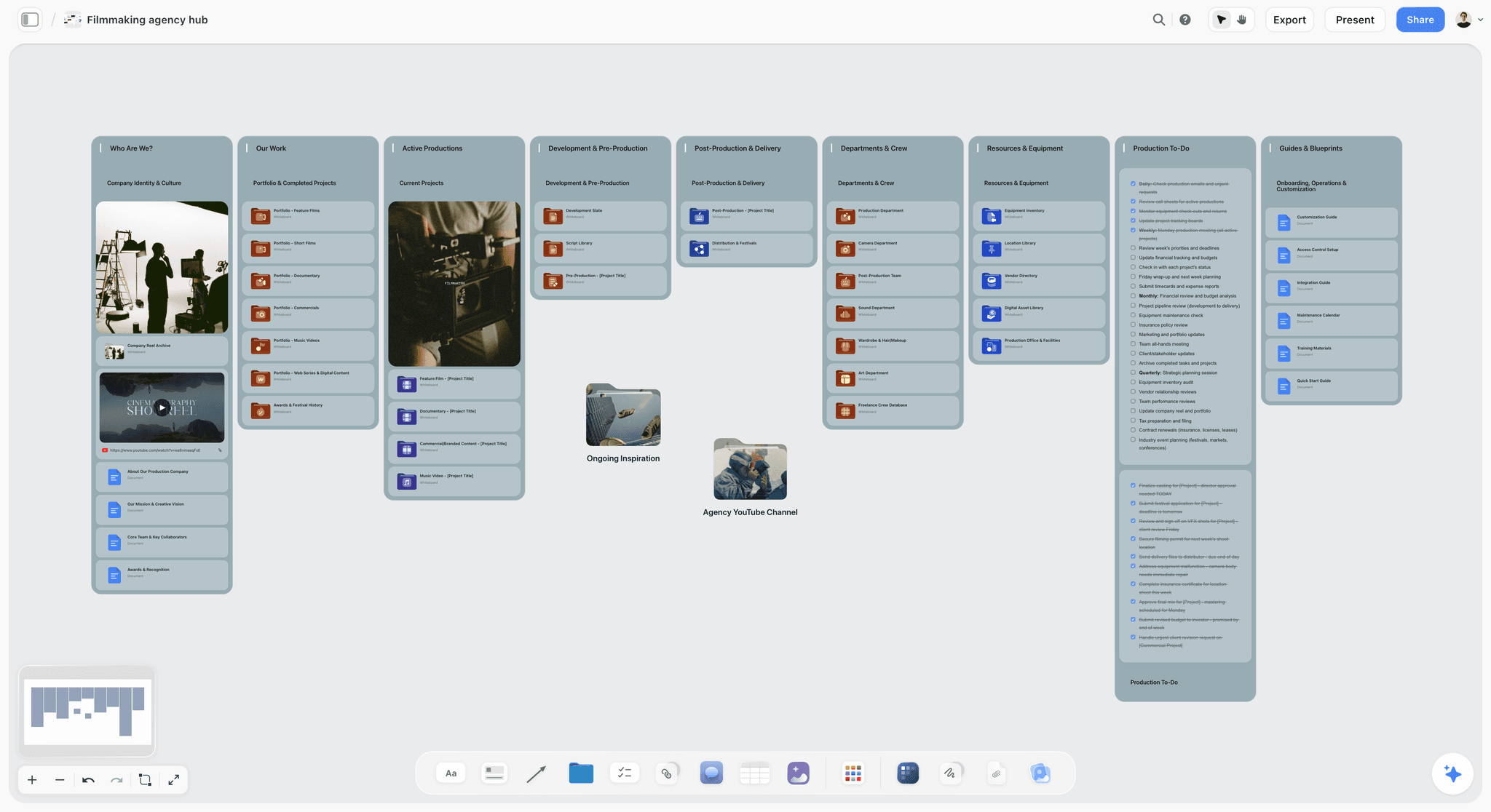
A studio hub for a solo producer: one board links out to each client job, with the showreel and open to-dos in view.
Top picks: Storyflow plus Moxie. Treatments, storyboards and call sheets sit on the board. The in-app AI drafts a call sheet PDF, leaving unknowns visibly blank, but it does not send call sheets or track confirmations.
Copywriter or content strategist
Top picks: Storyflow plus Moxie if you plan campaigns visually, or Notion plus Moxie if the work is all text. Text-first work does not always need a canvas, and our AI tools for freelance marketers covers the writing side.
Hourly consultant
Choose Harvest alone, or Moxie alone, and skip Storyflow. If your plan is a short list and your bill is hours, you may not need a planning tool at all. For wider advice on solo stacks, read the best AI tools for solopreneurs and the best tools for solo creators.
Solo studio with occasional contractors
Top picks: Storyflow plus Bonsai. Contractors join a board free when you invite them, and Bonsai's per-user pricing applies only if they need admin access. Max adds a Team Workspace with roles if that becomes regular.
Mistakes and Fixes
Each of these is cheap to avoid and expensive to discover mid-job.
Buying an all-in-one and then opening a second tool for references anyway
You are now paying for the planning half of a product you do not use. Fix: list what you actually use in it, and consider the admin-only plan or a cheaper option.
Choosing by the headline plan price
Bonsai's $9 plan has no invoices listed, and Trello's Calendar view is not on its $5 plan. Fix: check the specific feature you came for, on the specific plan, before adding it up.
Paying annually before finishing one job
A discount only helps on a tool you keep. Fix: go monthly for one complete client job, then decide.
Starting work before the paper is signed
The contract and deposit feel like admin, and they are the only part of this stack that protects your income. Fix: make them step two, before the client sees any board.
Keeping scope in email
Six weeks in, nobody can find the original list. Fix: put a scope table on the board where the client sees it from day one, and mirror the total in the contract.
Letting a board become your invoice reminder and then forgetting to look
Storyflow has no due-date reminders. Fix: a fixed weekly review on your calendar, with the Invoice trigger column as your checklist.
Treating a resolved comment as a record
In Storyflow, Resolve deletes the whole thread. Fix: copy the outcome into the feedback table first, then resolve.
Adding a tool every time something goes wrong
A missed date feels like a software problem and is usually a review problem. Fix: before you buy, write what the tool would do this week that your two tools cannot.
Putting your day rate on a shared board
View-only means anyone with the link can read it. Fix: rates and notes go on your internal studio board, never the client's.
Storyflow's Honest Limits for a One-Person Studio
The earned claim is narrow and specific: Storyflow holds the plan and the work together, and a client can open it. Here is what follows from that being all it does.
What it does not have
- No invoicing, payments or time tracking.
- No proposals, contracts or e-signature.
- No Gantt chart, dependencies, critical path or workload view.
- No calendar view; dates live in table date cells and to-dos, with rows kept in date order.
- No due-date reminders; notifications are in-app.
- No native desktop or mobile app; it runs in a browser and is best built on a laptop.
- No PPTX or SVG export; boards export as PNG, JPEG or PDF.
- On the Free plan: capped projects and uploads and 25 plugin or connector actions a week, with no in-app AI and no Tactics. Those start on Plus.
When to skip it
If your work is mostly hours, text and invoices, an admin tool alone is cheaper and simpler. If a client's team requires task dependencies, use Asana. If you already love your Notion system and clients never need to see visual work in context, keep it; a tool you actually maintain beats a better one you do not. The creative project management page and agency client planning page show when the canvas does pay off, as your studio grows, and creative project scope creep covers the scope side.
The Bottom Line
A one-person studio does not need more software. It needs a clean border: the plan in one place, the money in another, and one weekly moment where you cross it. Put each client on a Storyflow board, put contracts and invoices in the admin tool that fits your billing, and refuse a third tool until you can name what it saves. If you start from a chat, the project plan workflow in ChatGPT sets up your first client board from their email. Take your next client's brief and run them through the seven steps; by the end of that job, you will know whether each tool earned its line in your budget.
FAQ: One-Person Creative Studio Tools and Costs
What is the best way to plan client projects as a one-person creative studio?
The best way is one Storyflow board per client holding the brief, scope, references, milestones and feedback, plus one separate tool for contracts and invoices. The Storyflow 2-Tool Rule is our recommendation: two tools, one for the plan and one for the business, and a third only when a named job fails without it. Storyflow has no invoicing or time tracking, so the admin tool is required.
What is the best tool for planning client projects as a solo studio?
Storyflow is our pick for visual client work, because each client gets a board with references, scope and dates together, and the client opens it by link with no account. It is our product and has no invoicing or time tracking. Asana suits clients who need Gantt charts, Notion suits text-led systems, and Moxie alone can suit simple hourly jobs.
How much does a one-person creative studio spend on tools?
At vendor prices as of November 2026, one seat ranges from $0 a month on free tiers plus transaction fees, to $20.99 or $43 a month billed annually for paid stacks of rival tools. Storyflow is priced separately: Free at $0 with no card, and Plus at $7.99 a month billed annually. Your total depends on the admin tool you pair it with and any seat minimums.
Does Storyflow have invoicing or time tracking?
No, Storyflow has neither invoicing nor time tracking, and it also has no proposals, contracts, e-signature or payments. It is a planning workspace, so pair it with an admin tool such as Moxie, Bonsai, Dubsado, HoneyBook or Harvest. A column called Invoice trigger in your milestones table makes billing moments visible on the plan, and the invoice itself goes out from the other tool.
What is the difference between a project plan and business admin?
A client project plan covers what you are making, by when, and what the client said, while business admin covers who owes what and what you agreed in law. Plans change daily and are read by you and your client. Admin changes at set events and is read by you and your accountant. Each has a different failure cost, which is why they suit different tools.
Is Notion, Trello or Asana cheaper for one person?
Trello has the lowest paid entry here at $5 a month billed annually or $6 monthly, and all three have free tiers. Notion Plus lists $10 per member a month billed yearly. Asana Starter lists $10.99 billed annually or $13.49 monthly, per user, as of November 2026. Check the seat count at checkout, because every one of these prices is per seat.
Do I need a separate time tracking tool?
Only if you bill hourly and your admin tool's timer falls short. Moxie Starter, Bonsai and Harvest all list time tracking, so a separate Toggl Track subscription can be redundant. HoneyBook's Starter list does not show it, so hourly billers there may need Toggl Track at $9 a month billed annually. Fixed-fee studios can track one job a quarter to check their pricing.
Is annual billing worth it for a solo studio?
Annual billing is worth it once a tool has survived one full client job, and not before. On the specialist stack it saves $132 a year, while on Trello Standard alone it saves only $12. Pay monthly while you are testing, because a prepaid year on a tool you stopped opening costs far more than the discount gave you.
Can my client see the project without paying for Storyflow?
Yes, a view-only link opens with no account, so your client can follow the board without paying. To comment or draw they sign in, and anyone a paid member invites to a board joins free. As the studio owner you can start on the Free plan, at $0 with no card and capped projects and uploads, and the in-app AI and Tactics start on Plus.
Can ChatGPT or Claude manage my client boards?
Yes, within limits: the Storyflow plugin or connector can add walls, tables and tickets with due dates, and report what changed on a board. It cannot read comments, does not touch invoices, and through it a to-do takes no date, so dated milestones go on tickets or table rows. Actions use no Storyflow AI credits; Free allows 25 a week, and paid plans have no weekly limit.
Should a one-person studio use a client portal?
Use a portal for signing and paying, which is what HoneyBook, Dubsado and Moxie list it for. A portal is not designed to hold a moodboard next to a scope table, so for visual work you can keep two links: the portal for money and a Storyflow board for the work. Simple text or hourly jobs can usually live in the portal alone.
How many feedback rounds should a solo studio include?
Two rounds per deliverable is a defensible default, because it makes the client consolidate comments and gives you a number to point at. There is no universal standard and some projects warrant three. What matters is that the number appears in the scope table before the first concept, and that further rounds are priced as a change request.
What is the cheapest way to send invoices as a freelancer?
Stripe lists 0.4% per paid invoice on its invoicing Starter plan plus 2.9% + 30¢ on domestic cards, as of November 2026, with no monthly fee in that sum. On a $4,000 card-paid invoice that is $132.30. Harvest's free plan also includes invoicing for one seat and two projects. A paid admin tool makes sense once contracts and proposals matter too.
Table of Contents
- Key Takeaways
- How to Plan Client Projects as a One-Person Creative Studio: The 7-Step Method
- Client Project Plan vs Business Admin
- The Storyflow 2-Tool Rule
- What Every Tool Costs for One Seat (November 2026)
- Features at a Glance: What Each Tool Actually Includes for a Solo Studio
- Three Stack Shapes: Total Monthly Cost
- Annual or Monthly? The Arithmetic
- Template: The Client Project Board for a One-Person Studio
- Worked Example: Studio Pell Runs Three Clients on Two Tools
- Onboarding, Briefs, Feedback and Approvals: What Goes Where
- Do This in ChatGPT or Claude
- One-Person Studio Tools Compared
- The 10 Tools for a One-Person Creative Studio, Reviewed
- 1. Storyflow
- 2. Trello
- 3. Notion
- 4. Asana
- 5. Toggl Track
- 6. Harvest
- 7. Moxie
- 8. Bonsai
- 9. Dubsado
- 10. HoneyBook
- Considered and left out of the reviews
- Which Stack for Which One-Person Studio
- Mistakes and Fixes
- Storyflow's Honest Limits for a One-Person Studio
- The Bottom Line
- FAQ: One-Person Creative Studio Tools and Costs
- Related Reading
Templates to check out for this topic


Templates you can use in Storyflow
Every Storyflow board starts from real structure and an AI that reads the whole canvas. Open one of these templates and make it yours.


See Storyflow in Action
A visual AI workspace where every feature lives inside one canvas. No tab-switching, no context lost.
Build your entire board from a single message
Type what you need in the AI chat at the bottom of your canvas. The AI adds cards, headings, and structure directly onto your board.
Use expert frameworks as AI context
Type @ in the AI chat and choose any Tactic. The AI tailors every response to that framework instead of giving generic advice.
Turn your board into a mind map in seconds
Ask the AI to restructure your canvas as a mindmap. It connects your ideas into a visual hierarchy so you can see how everything relates.
Why Storyflow Exists
Storyflow actually began as a personal tool while working on creative and research projects.
We kept running into the same problem: ideas were scattered everywhere: notes, documents, and whiteboards.
Nothing helped us see how everything connected.
So we started building a workspace designed around how ideas actually grow.
→ Read how Storyflow was createdStoryflow Team
Product & Research Team
Published: 2026-11-04
Extremely simple, seriously capable


See how easy it is to get started
Watch a real project come together, from a blank board to a finished plan, clicked through step by step.
Start creating with AI and become more productive
Transform your creative workflow with AI-powered tools. Generate ideas, create content, and boost your productivity in minutes instead of hours.