
Category
Video Production
Author

Storyflow Team
Product & Research Team
Topics
2026-11-15
•
40 min read
•
Video Production- post-production workflow
- offline vs online edit
- picture lock
- post-production deliverables
- review rounds
- Storyflow
What are the steps in a post-production workflow?
In Storyflow, a post-production workflow runs as nine steps on one board: ingest, assembly, rough cut, review rounds, picture lock, sound, colour and graphics, online and QC, then deliverables. Storyflow is an AI visual workspace that keeps cut versions, client notes, locks and the deliverables list on one infinite canvas, and it works inside ChatGPT (plugin) and Claude (connector). The Storyflow 3-Lock Sequence signs three locks, content, picture and master, each as a dated note on the board.

Full disclosure: Storyflow is our product. This guide compares kinds of tool rather than brands, on purpose. Storyflow is listed first because the post plan, approvals and deliverables share one canvas; it does not edit or mark up video, has no version compare or Gantt chart, is paid-only during early access, and the 3-Lock Sequence is our own editorial rule, not research.
How the post-production workflow planning tools compare on trust, innovation, ratings and pricing
Which post-production planning tools are the most trusted?
For the craft, the editing app the editor already knows is the trusted tool, and a review and proofing tool is trusted for frame notes because every comment carries a timecode. For the plan and the approvals, trust comes from a written record: Storyflow keeps the three lock notes, the round log and the deliverables table on the board the client opens by link, so nobody has to search an inbox for who approved picture lock.
Which post-production planning tools have fair pricing?
Fair pricing in post means freelancers and clients do not each need a paid seat to read the plan. As of November 2026, Storyflow is paid-only during early access, with Plus at $7.99 a month billed annually, and anyone a paid member invites to a board joins free. A view-only link opens with no account. Production management suites usually price per seat and per project, which suits long shows more than a two-week branded film.
Which post-production planning tools are the most innovative?
Storyflow, for letting ChatGPT or Claude build the stage walls, round log and deliverables table on the board and report what changed this week and who changed it, while the cut and the signatures stay with people. Review tools that attach comments to frames remain the most useful single advance for cut notes, because they end the argument about which shot a note meant.
Which post-production planning tools hold up on a long job?
Tools hold up when the decisions stay attached to the work. On a Storyflow board the lock notes sit beside the stage walls and deliverables table for the life of the project, and the change report shows who edited what. Whatever you use, copy approvals out of comment threads into notes, because a resolved thread in Storyflow is deleted and threads elsewhere get buried after the tenth version.
Which post-production planning approaches are underrated?
The paper edit is underrated for interview-led films: ordering quotes in a document before cutting saves days of timeline work. The turnover table is underrated too, a list of every file handed to sound, colour and graphics at picture lock. In Storyflow, the underrated step is asking the in-app AI what is missing on the board, which checks the deliverables table against the brief before the client does.
Quick Comparison
Our pick first, on the basis that the stage plan, approvals and deliverables share one canvas with the brief and shot list, then other kinds of tool by job. Prices as of November 2026.
| Tool | Best For | AI Features | Price |
|---|---|---|---|
| Storyflow | Stage walls, round log, lock notes and deliverables table beside the brief | In-app AI merges review notes into a table and checks the deliverables against the brief; ChatGPT plugin and Claude connector build walls and tables and report what changed this week | Plus $7.99 mo billed annually |
| An editing app | The cut, mix, grade and export | Varies by app | Varies |
| A review and proofing tool | Frame-accurate client notes on each cut | Varies by tool | Varies |
| A spreadsheet | Long media logs and territory deliverables | Varies | Varies |
Key Takeaways
- Storyflow is where a producer runs the post-production workflow as a plan: one board holds the stage walls, the round log, the three lock notes and the deliverables table, while the cutting, mixing and grading happen in the specialist apps.
- A post-production workflow is the ordered set of steps, owners and sign-offs that turns footage into delivered files. Most slips come from the order and the sign-offs, not from the edit itself.
- Offline editing decides the story on light proxy files; online editing rebuilds the locked cut from full-quality media and finishes it. Nothing timing-dependent should start before the line between them.
- The Storyflow 3-Lock Sequence is our editorial rule: Lock 1 (content), Lock 2 (picture) and Lock 3 (master), each written as a dated note on the Storyflow board naming who signed and which version.
- Sell two or three review rounds per cut, and count every deliverable before the edit starts: one master often becomes ten or more files.
- For a 60 to 90 second brand film, post typically runs three to six weeks from wrap to delivery. That range is an editorial estimate, and the review rounds decide where you land in it.
- Storyflow does not edit, play or mark up video, and it has no version compare. Cut review happens in a review tool; Storyflow holds the decisions.
Post-Production Workflow: The 9 Steps From Wrap to Delivery
You wrapped on Thursday, the client wants "a first look" on Monday, and the editor is asking where the music licence stands and which of the three logo versions is current. Post-production goes wrong in the gaps between people, so these nine steps name what happens, who owns it and where the record lives.
- Before the last shoot day, drag the Timeline tool onto the project's Storyflow board and name one phase wall per stage: Ingest, Edit, Review, Lock, Sound, Colour and graphics, Finishing, Delivery. The "+" on the last wall adds more. Write each target date in the wall's card text, because the Timeline tool has no date field.
- Ingest and back up every card the day it is shot: two copies on separate drives, checksums verified, proxies made and sound synced. Log each card as a row in a Storyflow table with the shoot day, drive names, checksum result and proxy status.
- Build the assembly from the shot list and script supervisor's notes that already sit on the same Storyflow board, so the editor cuts from the circled takes rather than from memory.
- Cut the rough cut, review it with the director and client, and sign Lock 1 (content lock) in a note on the Storyflow board: no new scenes, interviews or messages after this point.
- Run review rounds on the fine cut. Each round is one row in a Storyflow round log table (version name, date sent, notes due, approver, status), and the notes from every reviewer are merged into one numbered list before the editor opens them.
- Sign Lock 2 (picture lock) in a Storyflow note, then turn over: the edit decision list or project file, a reference video with burnt-in timecode, audio tracks for the mixer and shot pulls for graphics or VFX. Tick each item in the turnover table as it leaves.
- Run sound and colour in parallel from the locked cut: spotting notes for music and effects, a dialogue edit and mix to the destination's loudness spec, and a grade matched to approved reference stills pinned on the Colour wall.
- Conform the online, add final graphics and captions, run QC, and sign Lock 3 (master lock) in a Storyflow note: the master is approved, and from here you only make versions of it.
- Make every deliverable from the signed master, one row per file in the Storyflow deliverables table with its spec and status, then send the client a view-only link to the board and archive the project.
Steps 4, 6 and 8 are the locks, and they do most of the work. A post schedule rarely slips because an editor is slow. It slips because something changed after the people downstream had started. The rest of this guide covers each stage, the roles, the timings and a template to copy.

Stages as columns on one board: post and delivery sit beside the stages that feed them, so the record of what was shot travels with the cut.
What Is a Post-Production Workflow?
A post-production workflow is the ordered sequence of steps, owners and approvals that turns raw footage and sound into finished, delivered files. Wikipedia's post-production entry lists the crafts involved: editing, sound design, ADR, Foley, music, mixing, visual effects, colour grading and captioning or dubbing. A workflow adds what that list leaves out: the order, the handoffs and who says yes.
Pre-production, production and post-production
The three phases are planning, shooting and finishing. Pre-production decides what will be shot and how; production captures it; post-production builds the film from what was captured. Our guide to pre-production vs production vs post-production covers the three phases side by side. This guide stays inside the third.
| Phase | What it produces | What post needs from it | Where it lives in Storyflow |
|---|---|---|---|
Pre-production | Brief, script, storyboard, shot list, schedule, deliverables list | The approved script and storyboard, the shot list, the full deliverables list with specs | Brief, Storyboard and Shotlist walls on the project board |
Production | Footage, sound, script supervisor and camera reports, the daily production report | Every card logged, circled takes marked, wild tracks and room tone noted | Daily report document and media log table beside the shoot-day wall |
Post-production | The cut, the mix, the grade, graphics, captions, masters, versions | Signed locks and a counted deliverables list | Stage walls from the Timeline tool, round log, lock notes, deliverables table |
Production vs post-production: where the handover happens
The handover is not wrap. It happens card by card during the shoot, when the data wrangler or DIT hands drives to editorial. On a shoot with a DIT, Wikipedia's digital imaging technician entry describes backups made at least twice daily with checksum verification, and a transfer copy sent to post with the reports. If post starts by asking "did we get the wide on scene 4?", the handover failed on set.
Pre and post production: what prep decides for post
Three decisions made in pre-production set post's length more than anything the editor does: how many deliverables the contract names, how many review rounds the budget pays for, and whether music is licensed or commissioned. Put all three on the board before the shoot. The deliverables list guide shows how to count the files; the deliverables list page shows the board.
Offline Edit vs Online Edit
In Storyflow, the offline edit and the online edit get their own walls with a signed picture lock note between them, because offline editing decides the story on lightweight copies and online editing rebuilds that locked story from the original media and finishes it. Wikipedia's offline editing entry calls offline "the creative storytelling stage", and notes the term came from editing done away from the post facility. Its online editing entry describes the online editor conforming the project from an edit decision list and checking it against a copy of the offline cut.
| Question | Offline edit | Online edit | Where it lives in Storyflow |
|---|---|---|---|
What it decides | Story, structure, performance, pacing | Image and sound quality, finish, technical compliance | Edit wall vs Finishing wall |
Media | Proxies: small, fast copies of the camera files | Original camera files at full resolution | Media log table with a proxy column |
Who does it | Editor, assistant editor, director | Online editor or finishing artist, colourist, mixer | Owner column in the stage table |
What it outputs | A locked cut plus a turnover package | A master and every version made from it | Turnover table, then the deliverables table |
Cost of a change | Low: re-cut and re-export | High: re-conform, re-grade, re-mix, re-QC | Change requests logged as rows after Lock 2 |
How it ends | Picture lock | QC pass and master approval | Lock 2 note, then Lock 3 note |
Who signs | Director and client approver | Producer, after QC | The person named in each lock note |
What offline decides
Everything a viewer would describe: what happens, in what order, for how long, and what the film says. Offline is where the paper edit, the assembly, the rough cut and the fine cut live. Because the media is light, the editor can try ten versions of an opening in an afternoon. That freedom is the reason to protect it: arguments about structure belong here, while they are still cheap.
What online decides
Nothing about the story. Online takes the locked timeline, relinks it to the camera originals, and makes it technically right: full resolution, final graphics, the grade applied, broadcast-safe levels and correct aspect ratios. Wikipedia's online editing entry adds the job of packaging each version of the show, where versions can differ in formatting, bumper music and closing credits, which is the deliverables stage under another name.
Proxies, turnover and conform
Proxies are the small copies that make offline fast. Turnover is the package editorial hands to everyone downstream at picture lock. Conform is the online editor rebuilding the cut from that package. An edit decision list records the reel and timecode of every clip so the cut can be reassembled from source; richer interchange formats can carry more complex edits than a basic list. Ask the finishing artist which format they want before Lock 2, not after.
When a small job skips the split
A single editor cutting a social ad from camera files on one fast machine often never makes proxies or conforms. The two stages still exist; they happen in one timeline. Keep the lock anyway. Skipping the conform is fine. Skipping picture lock is how a one-week job becomes a three-week job.
The Storyflow 3-Lock Sequence
Most post schedules are drawn as a line of stages. The trouble is that a line hides the moments when changing your mind starts costing other people's work. The Storyflow 3-Lock Sequence puts those moments on the board.
The rule, defined
The Storyflow 3-Lock Sequence is our editorial rule for post: sign three locks in order, each as a dated note on the Storyflow board naming the version, the person who signed and what may still change. Lock 1 is content, Lock 2 is picture, Lock 3 is master. Nothing downstream of a lock starts until that lock's note exists.
Why three locks
Three, because there are three groups whose work depends on the cut holding still. The edit depends on the content: a new interview reopens the structure. Sound, colour, graphics and VFX depend on the timing: a trim moves every cue. Versions depend on the master: a fix to the master means remaking every file cut from it. One lock per dependent group is the minimum that protects all three, and a fourth adds a meeting without protecting anyone new.
Lock 1: content
Signed at rough cut. The client and director agree what is in the film: which scenes, which interview answers, which product messages, which claims legal has approved. Trims, reorders and pacing changes stay open. New material does not. Write it in Storyflow as a note on the Edit wall: "Lock 1, Fenmoor brand film, rough cut v3, signed by A. Okafor (client) and J. Mendes (director), 12 March. Open: order and length. Closed: content."
Lock 2: picture
Signed at the end of the fine cut rounds. Frame-accurate: no shot changes length. Wikipedia's picture lock entry describes the point where the cut goes on to online editing and audio mixing, so sound design, scoring and the final mix can proceed without timing shifting underneath them. The same entry notes that a lock is not always final, and that after a re-lock editors produce a change list so other departments can update. Put that change list on the board as rows, not in an email.
Lock 3: master
Signed after the grade, mix, graphics and captions are in and QC has passed. From this point you only make versions: cutdowns, aspect ratios, captioned and clean files, territories. A fix found after Lock 3 is a new master, and every version made from the old one is remade. That is why the Storyflow note for Lock 3 lists the QC report beside the signature.
When to bend the rule
Two cases. Documentary and long-form work often re-locks picture after a festival or network note; sign Lock 2 again with a version number and keep the change list. A 15-second social ad may sign Lock 1 and Lock 2 in the same meeting. What you never do is skip writing the lock down, because a lock nobody can find is an opinion.
Stage 1: Ingest, Backup and Logging
Post starts on the first shoot day. Every hour spent here saves a morning of searching later, and every card that was not checked is a risk that grows with each day it sits unverified.
Two copies before a card is wiped
The working standard is two verified copies on separate drives before any card is formatted, with a checksum comparison so you know the copy matches the original bit for bit. Many productions add a third copy that travels separately from the other two. Write the rule into the Ingest wall so the data wrangler, the producer and the editor read the same sentence.
The media log
One row per card or roll: shoot day, camera, card name, drive A, drive B, checksum verified, proxy made, synced, notes. In Storyflow this is a table on the Ingest wall with a status column. Status cells there have six fixed options: Not started, Blocked, In progress, In review, Done, Archived. A Blocked row is a card someone must look at today. For the shoot side of this, see how to back up footage on a shoot.
Sync and dailies
Sound recorded separately is synced to picture by timecode or by the slate. Dailies are the synced footage the director and producer review, and Wikipedia's dailies entry notes that digital capture means review is no longer tied to overnight film processing. On a two-day commercial, dailies are often just the editor's synced bins, and the review is a call on the evening of day one.
Organise before you cut
Bins by scene or shoot day, clips renamed to scene, shot and take, circled takes marked from the script supervisor's notes. The footage organising guide covers bin structures, and the file naming and archive guide covers names that survive a handover.
Stage 2: The Edit, From Assembly to Fine Cut
An edit moves from everything to the right things. Each version has a job, and naming the job keeps reviewers from judging an assembly as if it were a fine cut.
Assembly
Every usable take in script order, at length. Nobody outside editorial should see it. Its job is to show what you have and what is missing while pickups are still possible. If the shot list on the Storyflow board has a "Shots required" to-do list for each shot, the assistant editor can tick what made the assembly and flag what did not.
Paper edit for interview-led films
For documentary, testimonial and brand films built from interviews, a paper edit orders the selected quotes in a document before anyone touches a timeline. It is the cheapest structural decision you can make. See what a paper edit is and the paper edit tool page.
Rough cut
Structure and story at roughly the right length, with temp music and placeholder graphics. This is the version the client sees first, and it ends at Lock 1. Tell reviewers what to judge: "Is everything here that should be, and nothing that should not?" Do not let them grade colour on a rough cut.
Fine cut
Pacing, performance and timing refined, temp sound close to final, graphics roughed in. This is where review rounds happen, and where a well-run round log earns its place. The fine cut ends at Lock 2.
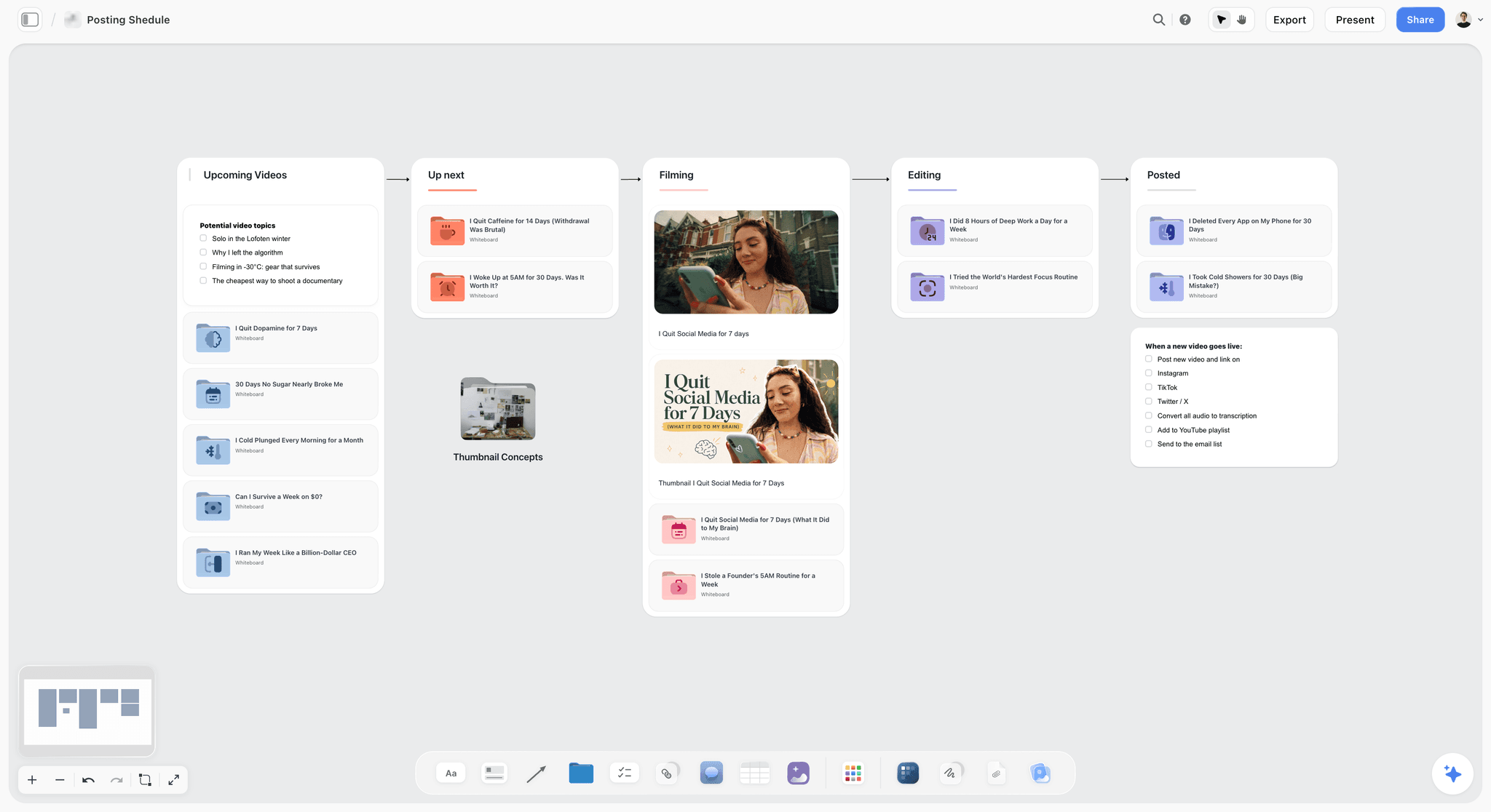
The same idea at series scale: one column per stage, so a cut that sits in Editing for a week is visible to everyone.
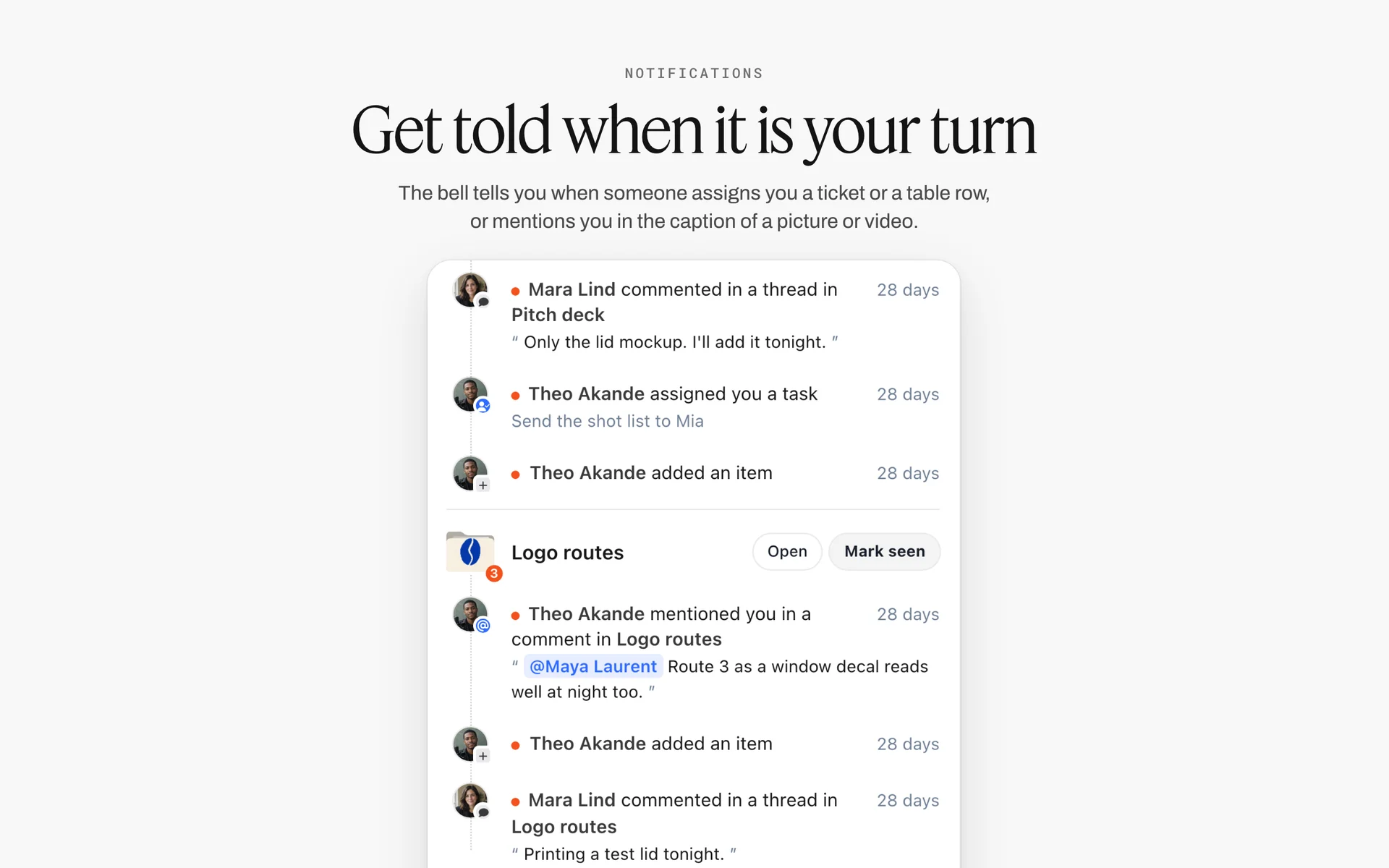
Comments, mentions and task assignments grouped by board in Storyflow's notifications: during fine-cut rounds, every reviewer's note lands in one list.
Stage 3: Review Rounds and Picture Lock
Reviews are where post-production loses most of its days. Not in the watching, but in the waiting for notes, the contradictory notes, and the note that arrives after the next version has gone out.
One approver, one version, one deadline
Every round goes to one named approver, as one version, with one date notes are due. Other stakeholders send their notes through the approver. Our guide to running a video review round with a client goes deep on this; here is what the board needs.
The round log
| Round | Version | Sent | Notes due | Approver | Notes received | Status |
|---|---|---|---|---|---|---|
1 | Rough cut v3 | 10 Mar | 12 Mar | A. Okafor | 14 numbered notes | Done |
2 | Fine cut v1 | 17 Mar | 19 Mar | A. Okafor | 9 notes, 2 out of scope | Done |
3 | Fine cut v2 | 21 Mar | 24 Mar | A. Okafor | 3 notes | In review |
In Storyflow, the round log is a table on the Review wall, the approver sits in a person column, and each round's merged notes are a document linked from its row. Rows kept in date order are the record of how many rounds were used, which matters when round four turns up.
Merge notes before the editor sees them
Three reviewers send fifteen notes, four of which contradict each other. The producer merges them into one numbered list, settles the conflicts with the approver, and marks anything that breaks Lock 1 as a change request. The editor gets one list. The in-app AI can do the first pass: paste the notes into a document on the board and ask it to "Turn my notes into a table" with columns for timecode, note, reviewer and decision.
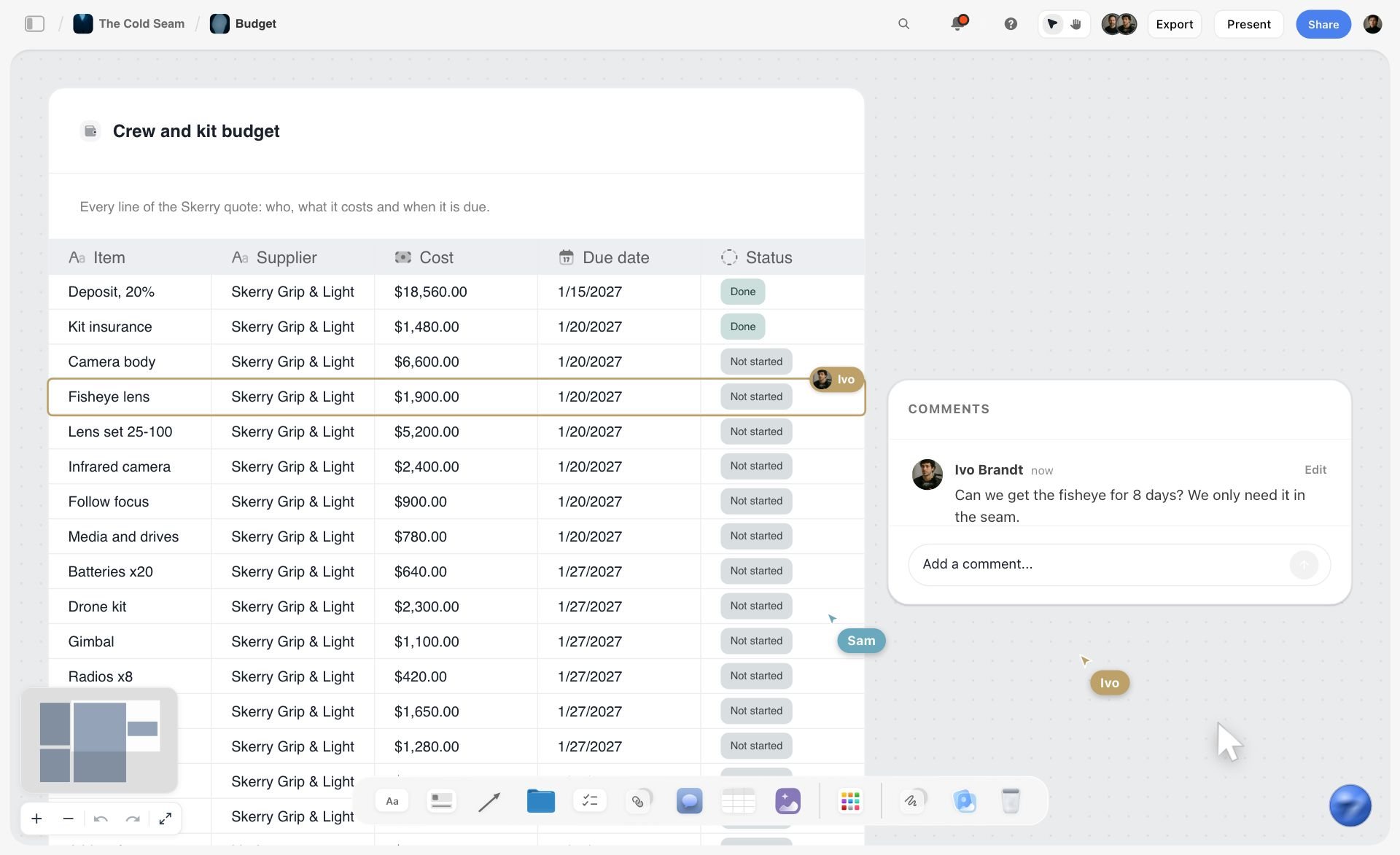
A table on a fictional ski film's board, here a crew and kit budget with supplier, cost, due date and status: merged notes take the same shape, with timecode, note, reviewer and decision as columns.
Where frame-accurate notes go
Frame-accurate notes with timecodes belong in a review and proofing tool, where the reviewer clicks on the frame. Storyflow does not play video or mark up frames. The workable split: reviewers comment in the review tool, the producer exports or copies the notes into the round's document on the board, and the decision for each note is written there. That keeps the approval record next to the rest of the project instead of inside a link that expires.
How many rounds to sell
Our suggested budget for a commercial is two rounds on the rough cut and two on the fine cut, with a third paid as an extra. Write the number in the brief and the estimate, then put it in the round log header. Our creative approval workflow template covers rounds, deadlines and sign-off wording.
The turnover at picture lock
| Turnover item | Goes to | Format to agree before Lock 2 | Status on the board |
|---|---|---|---|
Locked timeline or edit decision list | Online editor, colourist | Interchange format the finishing room reads | Turnover table row, ticked when sent |
Reference video with burnt-in timecode | Sound, music, graphics, VFX | Resolution and timecode position | Turnover table row |
Audio tracks with handles | Dialogue editor and mixer | Track layout and handle length | Turnover table row |
VFX and graphics pulls | Motion designer, VFX artist | Frame range, handles, colour space | One row per shot |
Music cue sheet draft | Composer or music supervisor | Cue list with in and out timecodes | Sound wall document |
Change list (after any re-lock) | Every department | List of cuts that moved, with timecodes | New rows under the Lock 2 note |
Stage 4: Sound, Music and the Mix
Sound is half the film and usually a smaller share of the budget. The schedule gets squeezed here, so plan it as its own stage with its own owner.
Spotting
At picture lock the director, editor and sound team watch the cut and agree where music starts and stops, which effects matter and which lines need re-recording. Wikipedia's post-production entry describes sound being "spotted" at turnover. Write the spotting notes as a numbered list on the Sound wall in Storyflow, with timecodes, so the mixer and composer read the same list.
Dialogue, effects, Foley and ADR
The dialogue edit cleans and levels every line. Effects and Foley add what the set did not record. ADR re-records lines in a studio when the location sound cannot be saved. On a commercial, ADR usually means booking the talent again, so flag any ADR line at the rough cut, not after Lock 2.
Music: licensed or commissioned
Licensed music needs two permissions, one from the owner of the composition (usually a music publisher) and one from the owner of the recording (usually a record label), as Wikipedia's synchronization rights entry explains. Commissioned music needs a composer booked against the lock date. Either way, the music status is a row in the stage table with an owner, because a track that clears on day 19 of a 20-day schedule is not a plan.
The mix and loudness
Mix to the destination's spec, not to your headphones. For European broadcast, the EBU's R 128 recommendation normalises programme loudness to a target of minus 23 LUFS and caps the true peak at minus 1 dBTP. Streaming platforms and other broadcasters publish their own targets. Take the number from the broadcaster's or platform's spec sheet and write it in the deliverables table, so the mixer is not guessing.
Stems
Deliver the mix as stems as well as a full mix: dialogue, music and effects separately, so a later version can swap the music or the language without a remix. A music and effects mix, the full mix without dialogue, is what a foreign-language version is built on.

A studio tracker with one card per client project: the status of each film's post stage is visible without opening every board. The clients are fictional.
Stage 5: Colour, Graphics and VFX
Colour and graphics run in parallel with sound once picture is locked. They share one risk: a reviewer who sees them for the first time in the master and asks for a different look.
Colour correction, then grading
Correction makes shots match and look right; grading gives the film its look. Wikipedia's colour grading entry covers both. Agree the look before the session with reference stills, and pin them on the Colour wall of the Storyflow board where the client already approved them. A grade that starts from "make it feel like the moodboard" goes faster when the moodboard is one click away.
Colour spaces and the destination
Grade for where the film will be watched. Most web and broadcast video is delivered in the standard HD colour space, Rec. 709, and YouTube's recommended upload settings name BT.709 as the colour space for standard dynamic range uploads. HDR deliverables are a separate grade and a separate line in the deliverables table.
Graphics, titles and supers
Lower thirds, end cards, legal supers and logo animations. Get final copy and legal lines approved before Lock 2, as text in a note on the board, because a super that changes after lock is a re-render and a new QC pass. The Selects tool helps with one graphics job in particular: drag the candidate frame grabs for a thumbnail or key art onto it and let the client move them between To review, Yes, Maybe and No. The client needs edit access to move cards; a view or comment link cannot move them.
VFX and clean-up
Screen replacements, sky replacements, logo removals and rig removal. Each shot is a row in the VFX table with its frame range, the artist and the status. VFX is the stage most likely to run past the mix, so set its delivery date to land before the online, not on the same day.
Stage 6: Finishing, QC and Deliverables
Finishing is where the film becomes files. It is also where a forgotten deliverable turns a delivered job into a reopened one.
The online and conform
The online editor relinks the locked cut to the camera originals, drops in the grade, the final graphics and VFX, and lays back the final mix. Then they check the online against the reference video of the offline, shot by shot, for anything that conformed wrong.
Quality control
QC checks the master before anyone else sees it: picture (dropped frames, flash frames, artefacts, illegal levels), sound (sync, loudness, clicks, phase), text (spelling in supers, legal lines, captions in sync) and format (resolution, frame rate, file naming, metadata). Put the QC result in a document beside the Lock 3 note on the Storyflow board. A failed QC goes back to the stage that caused it, logged as a row.
Captions and subtitles
W3C's guidance on captions separates captions, a text version of speech and non-speech audio in the same language, from subtitles, which translate the speech. Closed captions can be turned off; open captions are burnt in. Count each as its own deliverable. Social cutdowns are often delivered with open captions, and the same film's web master with a closed caption file beside it.
Masters, mezzanines and versions
The master is the highest-quality finished file. Everything else is made from it: a high-bitrate mezzanine for archive and broadcast, web files, aspect-ratio versions, cutdowns, captioned and clean versions. For long-form deliveries to streamers, the Interoperable Master Format, standardised by SMPTE as the ST 2067 family, packages one master so many versions can share its components.
The deliverables table
| Deliverable | Spec | Destination | Made from | Status |
|---|---|---|---|---|
90s master, 16:9 | Full resolution, high-bitrate mezzanine, stereo mix | Client archive, broadcast | Graded online | In review |
90s web file | MP4, H.264, AAC audio at 48 kHz, BT.709 | Brand website, YouTube | 90s master | Not started |
30s cutdown, 16:9 | Same as web file | Paid video ads | Cutdown edit from locked 90s | Not started |
15s cutdown, 9:16 | Vertical reframe, open captions | Instagram, TikTok | 30s cutdown | Not started |
6s bumper, 16:9 | Web file spec | YouTube ads | 15s cutdown | Not started |
Clean 90s (no supers) | As master | Client archive | 90s master | Not started |
Closed caption file | Same-language captions, timed to the web file | Website, YouTube | Final script and mix | Not started |
Stems | Dialogue, music, effects, full mix | Client archive | Final mix | Done |
Thumbnail and key art | Stills from the grade | Website, YouTube | Graded online | In review |
For YouTube, the platform's recommended upload encoding settings list an MP4 container, H.264 video, AAC-LC audio at 48 kHz and about 8 Mbps for 1080p at standard frame rates, as of November 2026. Read every platform spec on the day you encode; they change.
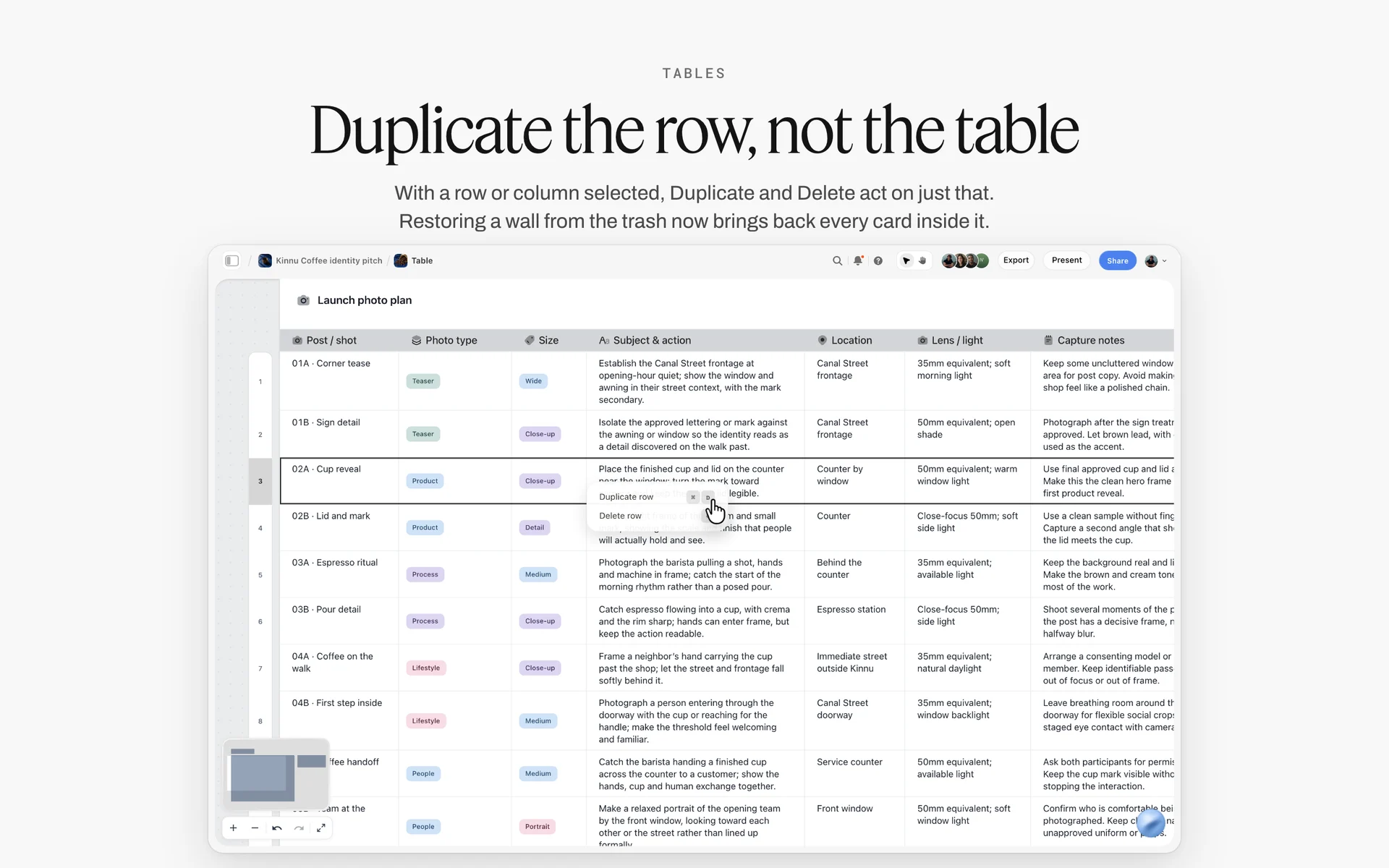
A table with the row menu open on a selected row, here a launch photo plan: the deliverables table is built the same way, one row per file you owe.
Archive: what to keep after delivery
The client will ask for a new cutdown, a changed price super or a vertical version months later, and the job is only quick if the project can be reopened as it was. Archive the edit project and bins, the conformed or consolidated media, the graded master and mezzanine, the audio stems and mix session, graphics and title project files with their fonts, caption files, and the paperwork: music licences, talent and location releases, and the signed approvals. Keep the same rule as ingest, two copies on separate drives or storage, and write down where each lives. In Storyflow, add an archive row per item to the deliverables table with both drive names, and set its status to Archived once both copies are checked.
Post-Production Roles: Who Owns Each Step
A workflow without names is a list of hopes. On a feature, each row below is a different person. On a branded film, one editor might hold five of them, which is exactly why the board must say who holds what.
| Role | Owns | Signs | On a small team |
|---|---|---|---|
Producer or post producer | The schedule, the round log, the budget, the deliverables table | Lock 3, after QC | The producer, often the director too |
Director | The creative intent of the cut | Lock 1 and Lock 2 with the client | Same person as the editor on micro jobs |
Client approver | The brand's decision on each round | Lock 1 and Lock 2 | One named person, always |
Editor | Assembly, rough cut, fine cut | Nothing; proposes each version | The editor |
Assistant editor | Ingest, sync, bins, turnover | Turnover table complete | The editor |
Sound designer and mixer | Dialogue edit, effects, mix, stems | The mix meets the spec | One freelancer |
Composer or music supervisor | Score or licensed tracks, cue sheet | Music cleared | The producer licenses library music |
Colourist | Correction and grade | Grade approved against references | The editor grades |
Motion designer or VFX artist | Graphics, supers, clean-up shots | Each shot delivered | A freelancer per job |
Online editor and QC | Conform, finishing, QC report | QC pass | The editor, with a second person checking QC |
Who owns the schedule
The producer, every time. Editors protect the cut, which is their job; producers protect the date. When the editor owns the schedule, the review rounds expand to fit the craft, and the delivery date absorbs the difference.
Who signs what
Two signatures per lock is enough: the director for the creative side and the client approver for the brand. Everyone else feeds the approver. In Storyflow, a table's person column holds the approver and the owner; the in-app AI can fill it with people who already have access to the board, and it cannot set a to-do's assignee, so assign to-dos by hand.
Small team, same rows
A two-person studio still has every row. Write each role's name in the stage table even when it is the same name five times. When a freelancer joins for the mix, they read their rows, not the whole project. Anyone a paid member invites to a Storyflow board joins free, so the mixer does not need a seat of their own.
Post-Production Timeline: How Long Each Stage Takes
Every producer gets asked "when will it be done?" before the footage has been looked at. A range per stage, with the review rounds stated, is the honest answer. The figures below are editorial estimates for a 60 to 90 second brand film with two shoot days, not measured data; use them as a starting point and replace them with your own history.
| Stage | Typical range (editorial estimate) | What pushes it longer |
|---|---|---|
Ingest, sync, organise | 1 to 2 days | Multiple cameras, no timecode sync, missing sound reports |
Assembly | 2 to 3 days | Interview-led films, lots of coverage |
Rough cut | 3 to 5 days | No paper edit, unclear brief |
Rough cut review and Lock 1 | 3 to 5 days | Several stakeholders, legal review of claims |
Fine cut rounds and Lock 2 | 5 to 10 days | Each extra round adds about 3 to 4 working days |
Sound and music | 3 to 5 days | Commissioned score, ADR, licensing delays |
Colour | 1 to 3 days | Mixed cameras, look not agreed in advance |
Graphics and VFX | 2 to 10 days, in parallel | Animation, screen replacements, late copy |
Online, QC, Lock 3 | 1 to 3 days | Failed QC, late graphics |
Deliverables | 1 to 4 days | Many cutdowns and aspect ratios, captions, territories |
Added up with the parallel stages overlapped, that is roughly three to six weeks. The video production timeline guide covers the whole project from brief to delivery, and the production calendar page shows it as dated milestones on a board.
The planning fallacy applies to post
People underestimate how long their own tasks take, even when similar past tasks ran late. Wikipedia's planning fallacy entry cites a 1994 study in which students predicted their theses would take 33.9 days on average and took 55.5. Post is a stack of other people's tasks, each estimated optimistically. Build buffer into the review rounds, which are the least controllable stage.

Phase columns above, a status table below: the same shape as a post board, where each stage wall sits over the rows that track it.
Where the days actually go
Not into cutting. Into waiting for notes, clarifying contradictory notes, clearing music and fixing things found at QC. If the round log shows notes arriving two days late every round, the timeline is wrong, not the editor.
Copy This: The Post-Production Workflow Template
The template below is filled for an illustrative project: Larchwick Post, a fictional four-person post studio, finishing a 90-second brand film and its cutdowns for Fenmoor Outdoor, a fictional outdoor clothing brand. Copy the columns; replace the rows.
| Step | Owner | Input | Output | Sign-off | Target date | Status | Where on the board |
|---|---|---|---|---|---|---|---|
Ingest and backup | Assistant editor | Cards from 2 shoot days | Two verified copies, proxies, synced bins | Media log complete | 6 Mar | Done | Ingest wall, media log table |
Assembly | Editor | Circled takes, script notes, shot list | Assembly at length | Internal only | 9 Mar | Done | Edit wall |
Rough cut v3 | Editor | Assembly, paper edit | Rough cut with temp music | Lock 1: client and director | 12 Mar | Done | Edit wall, Lock 1 note |
Fine cut round 1 | Editor | Merged notes, round 1 | Fine cut v1 | Approver notes due in 2 days | 19 Mar | Done | Review wall, round log |
Fine cut round 2 | Editor | Merged notes, round 2 | Fine cut v2 | Lock 2: client and director | 24 Mar | In review | Review wall, Lock 2 note |
Turnover | Assistant editor | Locked cut | Timeline file, reference video, audio tracks, pulls | Turnover table complete | 25 Mar | Not started | Lock wall, turnover table |
Music | Producer | Spotting notes | Licensed track, cue sheet | Licence signed | 20 Mar | Blocked | Sound wall |
Sound and mix | Sound designer | Audio tracks, spotting notes | Mix and stems to spec | Mix meets loudness spec | 31 Mar | Not started | Sound wall |
Colour | Colourist | Locked cut, reference stills | Graded timeline | Grade approved against references | 28 Mar | Not started | Colour wall |
Graphics and supers | Motion designer | Approved copy and legal lines | End card, supers, logo sting | Copy approved before Lock 2 | 28 Mar | In progress | Colour and graphics wall |
Online and QC | Online editor | Graded timeline, mix, graphics | Master, QC report | Lock 3: producer | 2 Apr | Not started | Finishing wall, Lock 3 note |
Deliverables | Assistant editor | Signed master | 9 files from the deliverables table | Each row Done | 4 Apr | Not started | Delivery wall, deliverables table |
How to use it
Paste the column headers into a table on the Storyflow board, or ask the in-app AI to "Turn my notes into a table" from your schedule notes. Keep the rows in date order, since tables cannot be sorted. A Blocked status is the producer's morning list. The music row above is Blocked on purpose: it is the row that most often decides the delivery date.
What to change for your project
Add a row per extra cutdown or language. Remove the VFX row if there is none. Split Sound into dialogue, music and mix if three different people own them. Never remove a lock row.
Worked Example: Larchwick Post Finishes Fenmoor's Brand Film
This example is illustrative. Larchwick Post and Fenmoor Outdoor are fictional, and the dates show how the workflow fits together, not a recorded job.
Before the shoot
The Larchwick producer opens Fenmoor's project in Storyflow, where the brief, storyboard and shot list already sit. She drags the Timeline tool onto the board and names eight phase walls from Ingest to Delivery, writing the target date into each wall's first card. Under the brief she builds the deliverables table from the contract: nine files, two aspect ratios, captions on the web file and open captions on the vertical cutdown. The contract says two rounds on the fine cut; she writes "2 rounds, third billed" in the round log's title.
Shoot days and ingest
On both shoot days the assistant editor logs every card in the media log table on the Ingest wall. On day one a card shows a checksum mismatch; the row goes Blocked, the card is re-copied before it is formatted, and the row goes Done. The daily production report sits beside the shoot-day wall, so the editor sees that scene 6 was shot as a pickup on day two.
The edit and Lock 1
The editor cuts the assembly from the circled takes, then the rough cut. Fenmoor's marketing lead and the director review rough cut v3 together. The producer writes the Lock 1 note: content closed, order and length open. Two days later Fenmoor's product team asks to add a new fabric claim. Because the claim breaks Lock 1, it is logged as a change request with its cost, and Fenmoor decides it can wait for the next campaign.
Rounds and Lock 2
Round 1 brings fourteen notes from three people. The producer merges them in a document on the Review wall, settles two that contradict each other with the approver, and sends the editor one numbered list of eleven. Round 2 closes with three notes. The client and director sign Lock 2, and the turnover table fills as the files go to the sound designer, colourist and motion designer.
Finishing and delivery
Sound and colour run in the same week. The grade starts from the reference stills pinned on the Colour wall. The motion designer's end card uses copy approved before Lock 2, so it renders once. QC finds one flash frame in the online and one misspelt super; both are fixed, QC passes, and the producer signs Lock 3 with the QC report linked. The assistant editor makes the nine files from the master, ticking each row Done, and the producer sends Fenmoor a view-only link to the board with the delivery wall in focus. The link opens with no account.
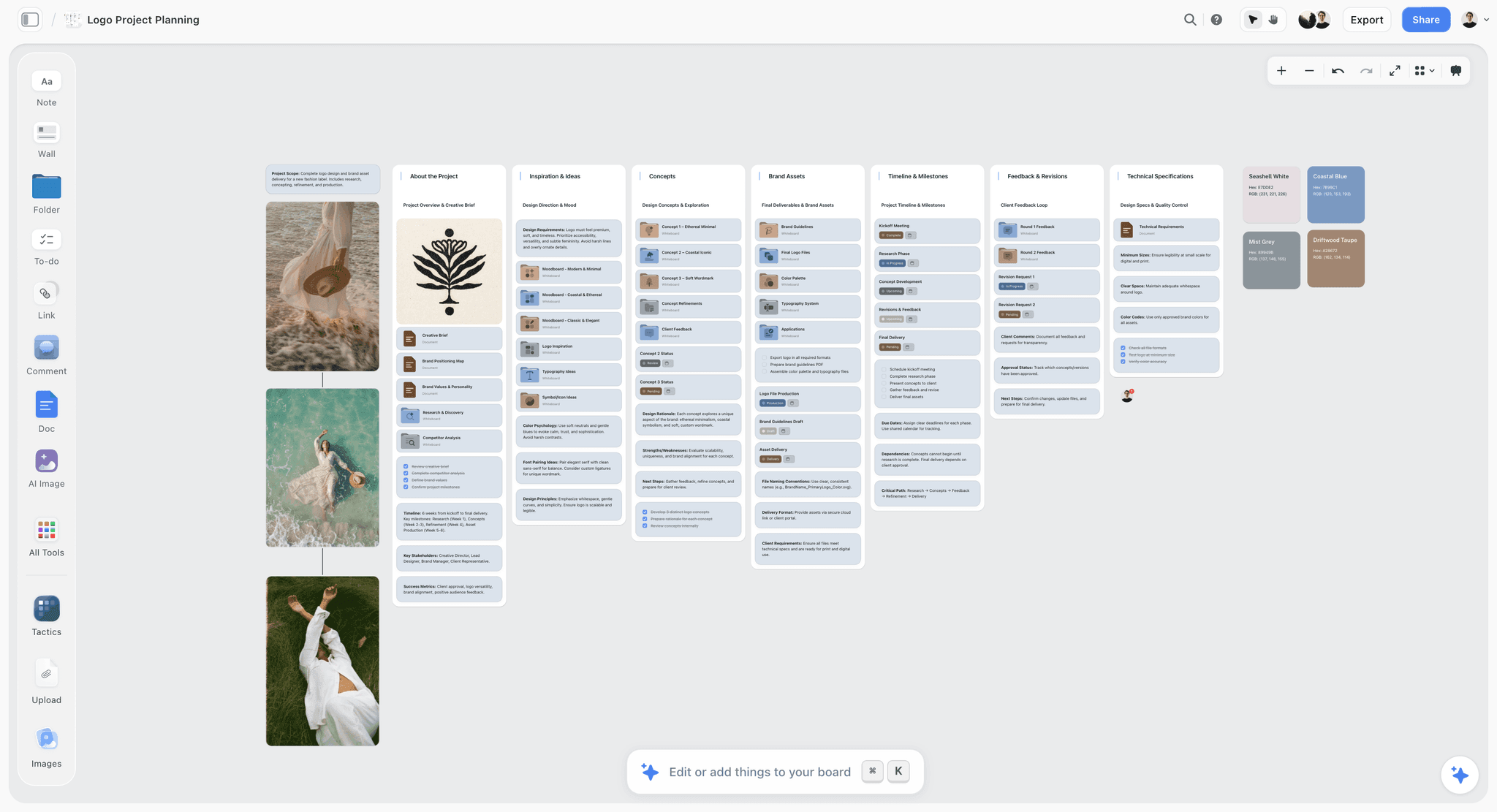
A client-facing board for a design job: brief, concepts, milestones, feedback rounds and technical specs side by side, so the delivery note sits beside the approvals that led to it.
Do This in ChatGPT or Claude
You can set up most of the post board from a chat. ChatGPT calls the add-on a plugin and Claude calls it a connector; both reach the same Storyflow account. This route runs on your assistant's own model and plan and uses no Storyflow AI credits. It is separate from the in-app AI inside Storyflow, which has its own menu workflows and uses Storyflow AI credits on paid plans.
Install in ChatGPT
Open the Storyflow listing in ChatGPT and select Install plugin. Sign in to Storyflow and choose which projects ChatGPT may use. Read access is always on; you decide whether it may also make changes. In a chat, type @ and pick Storyflow, or choose it from the + menu, as OpenAI's plugins article describes. Availability depends on your ChatGPT plan, workspace and region, and in a Business or Enterprise workspace an admin manages plugins. The connection ends after 30 days and ChatGPT asks you to sign in again. The ChatGPT production plan and ChatGPT client updates pages show related jobs.
Connect in Claude
In Claude, go to Customize, then Connectors, choose Add, then Add custom connector, as Anthropic's custom connector guide describes. Name it Storyflow, enter https://mcp.storyflow.so/mcp and sign in. On Team and Enterprise plans an owner adds the connector for the organisation first. Setup for every assistant is on the Storyflow MCP page, and the Claude kanban board page shows a stage board built from Claude.
Prompts to copy
Pick Storyflow in the chat first. Replace Fenmoor with your project.
- "On my Fenmoor board, build eight walls in a row named Ingest, Edit, Review, Lock, Sound, Colour and graphics, Finishing and Delivery, each with a note saying what the stage must produce and who owns it."
- "Add a table on the Ingest wall with columns Card, Shoot day, Camera, Drive A, Drive B, Checksum verified, Proxy made, Synced and Status."
- "Read the brief on my Fenmoor board and build a deliverables table with one row per file: deliverable, spec, destination, made from, status. Flag any deliverable the brief mentions without a spec."
- "Add a round log table to the Review wall with columns Round, Version, Sent, Notes due, Approver, Notes received and Status, and three empty rows."
- "Here are the notes from three reviewers on fine cut v1. Merge them into one numbered list in a document on the Review wall, and mark any note that adds new content as a change request."
- "Add a note on the Lock wall titled Lock 2: picture, with lines for version, date, who signed, what is closed and what is still open."
- "What changed on my Fenmoor board in the last week, and who changed it?"
- In Claude: "Read the attached delivery spec PDF and add each technical requirement as a row in the deliverables table on my Fenmoor board, quoting the page it comes from."
What lands on the board
Walls, notes, tables, documents and headings appear on the board, and the assistant can report what changed in the last day or week and who changed it. A photo or frame grab you attach in a ChatGPT chat does not reach Storyflow; ask for the upload link instead. The plugin cannot read board comments, and AI image generation is not available through it. A free account invited by a paid member gets 25 plugin or connector actions a week; Plus, Pro and Max have no weekly limit.
What to check by hand
The specs. An assistant will happily write "1080p" where the broadcaster wants something else, so check every row of the deliverables table against the actual spec sheet. Check the round count against the contract. Write the lock notes yourself, because a lock is a person's signature, not a generated line. And watch the cut: no board replaces that.

One Storyflow board, reachable from ChatGPT through the plugin and from Claude through a custom connector.
Where to Build It: Storyflow vs Other Kinds of Tool
Storyflow is our product and is listed first, on the basis that the stage plan, the round log, the lock notes and the deliverables list sit on one canvas with the brief and shot list that came before them. The rest follow by job. This guide compares kinds of tool rather than brands, on purpose: pick the kind first, then the product.
| Kind of tool | Best at in post | Limit for running the workflow | Choose it for |
|---|---|---|---|
Storyflow | Stage walls, round log, lock notes, deliverables table beside the brief and shot list | Does not edit, play or mark up video; no version compare, no Gantt | Running the plan and the record of decisions |
An editing app | Cutting, sound, colour and finishing | Not a place a client or a freelancer reads the plan | The craft, always |
A review and proofing tool | Frame-accurate comments on a cut | Holds notes per version, not the project's plan or deliverables | Every cut review |
A spreadsheet | Deliverables and media logs | No visual context; decisions scatter across tabs and email | Long technical logs, budgets |
A project management app | Task lists, assignees, reminders | No room for references, stills or the brief beside the tasks | Large post houses running many jobs |
A shared doc | Notes, specs, change lists | Grows into a scroll nobody reads past page two | One long spec or a contract |
A production management suite | Scheduling and paperwork on long-form | Heavy for a two-week branded job | Series and features with a post supervisor |
Storyflow
Storyflow holds the plan: the Timeline tool's phase walls for each stage, tables for the media log, round log, turnover and deliverables, notes for the three locks, the reference stills for the grade and the brief that started it. The in-app AI reads the current board plus up to five documents and three other boards you attach, so "What's missing here?" can check the deliverables table against the brief. A view-only link opens with no account. See the video production workflow and creative approval workflow pages.
- Best for: producers and small studios who must show a client where the job stands and keep the approvals with the plan.
- Limit: no video playback, frame-level mark-up, version compare, Gantt chart, dependencies or time tracking; boards export as PNG, JPEG or PDF.
- Choose another kind instead when the job is the cut itself, or when you need frame-accurate review.
An editing app
The non-linear editor is where post happens: bins, timelines, the mix, the grade, the export. Some editing apps include review features and task notes. Their limit is the reader: a client will not open the editor's project, and a freelance mixer needs the plan, not the timeline. Choose it, always, for the craft, and do not try to run the client's view of the project from inside it.
A review and proofing tool
Built for one job: a reviewer watches a version and clicks on the frame to comment, with timecodes attached. It is the right home for cut review. Its limit is scope: it holds notes per version, not the deliverables list, the locks or the brief. Choose this kind for every review round, then carry the decisions back to the plan.
A spreadsheet
Excellent for long technical logs and anything you want to filter: media logs on a ten-day shoot, a deliverables list for twenty territories. Its limit is that it is one grid among many, with no images, no brief and no visible sign-off. Choose a spreadsheet when the log is the job, and link it from the board.
A project management app
Good at tasks with assignees, due dates and reminders, which a large post house running thirty jobs needs. Its limit for a single film is that tasks float free of the material: the reference stills, the brief and the lock notes live somewhere else. Choose this kind when you manage many jobs across many editors and need workload views.
A shared doc
Fine for one long document: a delivery spec, a contract schedule, a change list. It does not hold a status per deliverable or show which stage is blocked. Choose a shared doc for prose that needs tracked edits from a lawyer, and keep the status on a board.
A production management suite
Built for features and series: scheduling, paperwork and sometimes post tracking in one heavy system. It earns its cost when a post supervisor runs a long show. For a branded film with a two-week post, it is more system than the job needs. Choose it when the production already lives there.
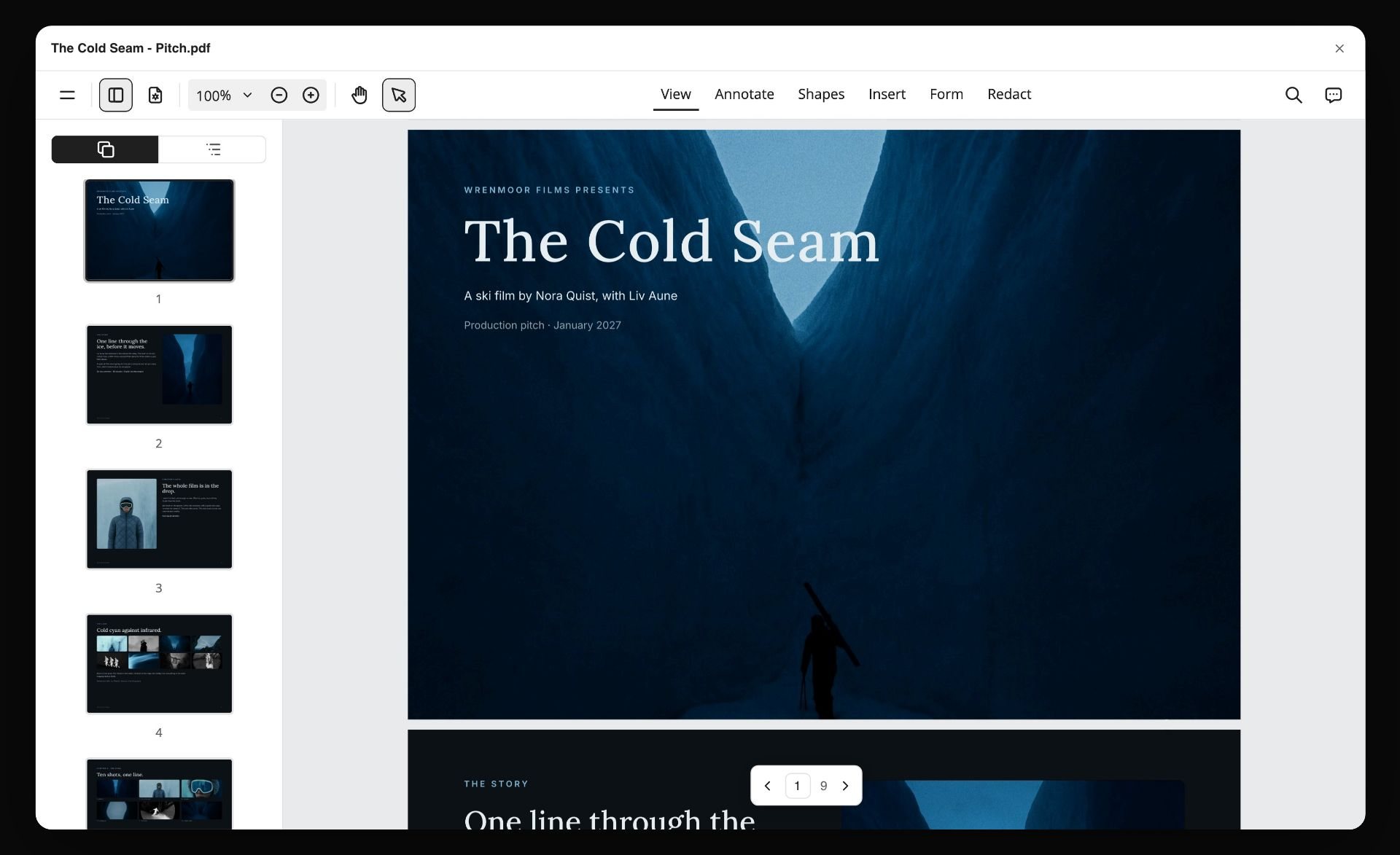
A pitch for a fictional ski film exported from a Storyflow board as a PDF, open in a viewer with page thumbnails
Run post from the board your client already opens
Install Storyflow in ChatGPT and build the stage walls, round log, lock notes and deliverables table on your project board, then sign each lock by hand.

Post-Production Workflow Mistakes and Fixes
Each of these has a specific cost, and each has a fix you can put on the board today.
Starting the grade before picture lock
The colourist grades a cut that changes the next day, and half the session is redone. Fix: no grade, mix or final graphics until the Lock 2 note exists on the Storyflow board.
Notes from five people, sent to the editor
The editor reconciles contradictions, guesses, and the next round is spent undoing the guess. Fix: one approver, and the producer merges notes into one numbered list per round.
Counting deliverables at the end
The 9:16 cutdown nobody budgeted turns out to need a reframe and new supers. Fix: count every file in the deliverables table before the shoot, from the brief and contract.
Licensing music last
The track the client loves does not clear, and the edit was cut to its beats. Fix: a music row with an owner and a cleared date before Lock 2.
Keeping the approval in a comment
A comment thread is resolved and the approval goes with it; in Storyflow, resolving a comment thread deletes it. Fix: write every lock and every approval in a note on the board.
Treating a re-lock as a small change
A two-frame trim after Lock 2 moves every music cue and effect after it. Fix: a re-lock gets a new Lock 2 note with a version number and a change list that every department reads.
No QC before the client sees the master
The client finds the flash frame, and the conversation becomes about care, not the film. Fix: a QC document signed before Lock 3, every time.
One-copy backups
A drive fails in week two and a shoot day is gone. Fix: two verified copies before any card is wiped, and a Blocked status for any card that fails a checksum.
Storyflow's Honest Limits for Post-Production
Storyflow earns its place as the plan and the record. Here is what it does not do on this job.
What it lacks
- Video: no playback, no editing, no animatic or MP4 export, and no frame timing. The cut lives in your editing app.
- Review: no frame-level mark-up on video, no approval status per frame and no version compare. Use a review and proofing tool for cut notes.
- Scheduling: no Gantt chart, no dependencies, no critical path, no recalculating schedule and no calendar view. Dates live in table date cells and card text, with rows kept in date order; after a slip, you read down the table and correct what follows.
- Business: no time tracking, invoicing or e-signature.
- Device: browser-based, with no native desktop or mobile app; build the board on a laptop.
- Plans: Storyflow is paid-only during early access. Anyone a paid member invites joins free, but an invited free account has no in-app AI.
What stays yours
The cut. Storyflow's position is plain: "We will never add AI video generation. The creative work stays yours." The AI will lay out stage walls, build tables and merge notes; whether the film works is a judgement only you, the director and the client can make.
The Bottom Line
A post-production workflow is a sequence of handoffs, and it holds when three moments are written down: content lock, picture lock and master lock. Plan the stages before the shoot, count the deliverables from the brief, merge every round's notes into one list, and keep the signatures on the same Storyflow board as the brief and the shot list. Take the project you are finishing now, write its three lock notes, and see which one is missing.
FAQ: Post-Production Workflow
What are the steps in a post-production workflow?
The steps are ingest and backup, assembly, rough cut, review rounds, picture lock, sound and music, colour and graphics, online and quality control, then deliverables. Three of them are sign-offs: content lock at the rough cut, picture lock after the fine cut rounds, and master lock after QC. In Storyflow each step is a phase wall on one board, and each lock is a dated note naming who signed.
What is the best tool for planning a post-production workflow?
Storyflow, our pick first, because the stage walls, round log, lock notes and deliverables table sit on one board beside the brief and shot list. The cut itself belongs in an editing app, frame-accurate notes in a review and proofing tool, and very long technical logs in a spreadsheet. Large post houses juggling many jobs may also want a project management app for workload and reminders.
What is the difference between offline and online editing?
Offline editing decides the story using small proxy copies of the footage; online editing rebuilds the locked cut from the original camera files and finishes it with the grade, final graphics and mix. Offline ends at picture lock. Online ends at a QC-passed master. A change is cheap in offline and expensive in online, which is why picture lock sits between them.
What is picture lock?
Picture lock is the point at which the edit is approved and no shot changes length. After it, sound design, music, colour, graphics and VFX can work to fixed timings. A cut can be re-locked, but every department then needs a change list. In the Storyflow 3-Lock Sequence it is Lock 2, written as a note with the version, the date and who signed.
How long does post-production take for a commercial?
For a 30 to 90 second commercial or brand film, post typically takes three to six weeks from wrap to delivery. That is an editorial estimate, not a measured figure. The number of review rounds decides most of the range: each extra round adds several working days. Commissioned music, VFX and many cutdowns push toward the longer end.
What is the difference between production and post-production?
Production is the shoot: capturing picture and sound on set or location. Post-production is everything after: editing, sound, music, colour, graphics, finishing and delivery. The handover happens card by card during the shoot, as footage is backed up and logged for the editor. Production is the most expensive time per day; post is where the film is actually assembled.
What do pre-production, production and post-production mean?
They are the three phases of making a film or video. Pre-production plans it: brief, script, storyboard, shot list, schedule and crew. Production shoots it. Post-production edits, mixes, grades and delivers it. Decisions made in pre-production, such as the deliverables list and the number of review rounds, set how long post-production takes.
Who is in charge of post-production?
The producer or post producer owns the post schedule, budget and deliverables, and signs the master after QC. The director owns the creative intent of the cut and signs content and picture lock with the client approver. The editor proposes each version but does not own the date. On small teams one person may hold several of these roles, so write each role's name down anyway.
What deliverables come out of post-production?
Typically a full-quality master, a high-bitrate archive file, web and social files in each aspect ratio, cutdowns such as 30, 15 and 6 seconds, clean versions without supers, caption or subtitle files, audio stems and a music and effects mix, and stills for thumbnails. A single brand film often becomes ten or more files, so count them in pre-production.
What software do you need for post-production?
You need an editing app for the cut, the mix, the grade and the export, often with separate sound and colour apps on bigger jobs. Add a review and proofing tool for client notes on frames, and a planning board such as Storyflow for the stage plan, approvals and deliverables. Students and hobbyists can manage with one editor; client work needs the review and planning pieces.
What is the Storyflow 3-Lock Sequence?
The Storyflow 3-Lock Sequence is our editorial rule: sign three locks in order, content at the rough cut, picture after the fine cut rounds and master after QC, each as a dated note on the Storyflow board. Three, because three groups depend on the cut holding still: the edit, the finishing crafts and the versions. It is a working rule, not research.
Can ChatGPT or Claude plan a post-production workflow?
Yes, with the Storyflow plugin in ChatGPT or the Storyflow connector in Claude. Either can build the stage walls, media log, round log and deliverables table on your board, merge review notes into one list and report what changed this week. Neither edits video, and a photo attached in a ChatGPT chat does not reach Storyflow; the plugin gives you an upload link instead.
Is Storyflow free for planning post-production?
Not yet. Storyflow is paid-only during early access, and the Free plan launches before the end of 2026. Anyone invited to a board by a paid member can sign up free. Plus costs $7.99 a month billed annually, or $9.99 monthly, and includes the in-app AI. An invited free account has no in-app AI and 25 plugin or connector actions a week.
Table of Contents
- Key Takeaways
- Post-Production Workflow: The 9 Steps From Wrap to Delivery
- What Is a Post-Production Workflow?
- Offline Edit vs Online Edit
- The Storyflow 3-Lock Sequence
- Stage 1: Ingest, Backup and Logging
- Stage 2: The Edit, From Assembly to Fine Cut
- Stage 3: Review Rounds and Picture Lock
- Stage 4: Sound, Music and the Mix
- Stage 5: Colour, Graphics and VFX
- Stage 6: Finishing, QC and Deliverables
- Post-Production Roles: Who Owns Each Step
- Post-Production Timeline: How Long Each Stage Takes
- Copy This: The Post-Production Workflow Template
- Worked Example: Larchwick Post Finishes Fenmoor's Brand Film
- Do This in ChatGPT or Claude
- Where to Build It: Storyflow vs Other Kinds of Tool
- Storyflow
- An editing app
- A review and proofing tool
- A spreadsheet
- A project management app
- A shared doc
- A production management suite
- Post-Production Workflow Mistakes and Fixes
- Storyflow's Honest Limits for Post-Production
- The Bottom Line
- FAQ: Post-Production Workflow
- Related Reading
Templates to check out for this topic


Templates you can use in Storyflow
Every Storyflow board starts from real structure and an AI that reads the whole canvas. Open one of these templates and make it yours.


See Storyflow in Action
A visual AI workspace where every feature lives inside one canvas. No tab-switching, no context lost.
Build your entire board from a single message
Type what you need in the AI chat at the bottom of your canvas. The AI adds cards, headings, and structure directly onto your board.
Use expert frameworks as AI context
Type @ in the AI chat and choose any Tactic. The AI tailors every response to that framework instead of giving generic advice.
Turn your board into a mind map in seconds
Ask the AI to restructure your canvas as a mindmap. It connects your ideas into a visual hierarchy so you can see how everything relates.
Why Storyflow Exists
Storyflow actually began as a personal tool while working on creative and research projects.
We kept running into the same problem: ideas were scattered everywhere: notes, documents, and whiteboards.
Nothing helped us see how everything connected.
So we started building a workspace designed around how ideas actually grow.
→ Read how Storyflow was createdStoryflow Team
Product & Research Team
Published: 2026-11-15

