FigJam vs Mural for Design Sprints: Who Is the Tool Actually For?
A design sprint has two users: the facilitator, who needs control, and the room, which needs zero friction. Mural is the facilitator's cockpit. FigJam is the room's favorite. The split decides the tool.

Category
Productivity
Author

Justkay
Documentary Filmmaker & Founder at Storyflow
Topics
2026-08-10
•
14 min read
•
Productivity- FigJam vs Mural
- best whiteboard tool for design sprints
- design sprint tools
- Mural pricing 2026
- FigJam pricing 2026
- workshop facilitation tools
FigJam vs Mural: which should host your design sprint?
Pick Mural when the sprint has a dedicated facilitator who runs workshops as a craft, and FigJam when the sprint happens inside a product organization that already lives in Figma. Mural's free plan caps at 3 murals, with Team+ around $9 per member per month and Business near $18. FigJam's cheapest editing seat is a Figma Collab seat at $3 per editor per month on annual billing ($5 monthly), and it is included with paid Figma seats. The feature lists overlap almost completely. The difference is who each tool was built to serve, and a design sprint has two different users: the person running the room, and the room. That split decides this comparison more reliably than any feature table, so it is the frame this article uses.

Full disclosure: Storyflow is our own product and it is not a sprint host: we ship no private mode, no voting, no timer, and no Figma adjacency, so FigJam and Mural keep the facilitated-sprint job entirely. Storyflow appears only for sprint-like creative processes whose Friday deliverable is a brief, treatment, or plan rather than a software prototype, because drafting that artifact from the board is the job we build for. Storyflow is also paid-only during early access while both competitors have free entry points.
Quick Comparison
A sprint has two users: the person running the room and the room itself. Mural serves the first, FigJam the second.
| Tool | Best For | AI Features | Price |
|---|---|---|---|
| Mural | Facilitation craft: outline, private mode, summon, locked votes | Session clustering and synthesis | Free 3 murals / Team+ around $9 member mo / Business near $18 |
| FigJam | Zero-friction sprints one tab from the Figma prototype | Board generation, sticky clustering, summaries | $3 editor mo annual, included with paid Figma seats |
| Storyflow | Drafting the brief or treatment the sprint pointed at | AI reads the full canvas plus @-mentioned Tactics and Documents | $7.99 mo annual (free plan late 2026) |
Key Takeaways
- A sprint has two users: the facilitator, who needs control, and the participants, who need zero friction. Mural optimizes for the first, FigJam for the second.
- Mural's facilitation kit is the deepest in the category: session outline, private mode, timer, laser pointer, "summon everyone," voting that locks. It is a facilitator's cockpit.
- FigJam's superpower is adjacency: it sits beside the Figma files where the sprint's prototype will be built, and every designer already has an account.
- Price favors FigJam sharply: $3 per editor per month annual (free with paid Figma seats) against Mural's roughly $9 to $18 per member.
- Both have AI (FigJam: board generation, clustering, summaries; Mural: similar session AI). Neither AI survives the sprint: both read the board, not the project.
- Consultancies and workshop professionals overwhelmingly pick Mural. Product teams sprinting on their own product overwhelmingly pick FigJam. Both are choosing correctly.
- The sprint's real deliverable on Friday is a tested prototype and a decision. The map, the sketches, and the reasoning usually die on the board by the following month.
- For creative teams running sprint-like processes on campaigns, films and content, the sprint's deliverable is a brief, a treatment or a plan rather than a clickable prototype. That is the lane where Storyflow fits: the canvas keeps the sprint's output as working material instead of losing it to a backlog nobody reopens.
For the ranked category, see The Best Design Sprint Tools in 2026.
The Sprint Has Two Users
Watch a five-day sprint (or its compressed modern versions) and you see two completely different jobs being done on the same board.
The facilitator is running a machine: keeping exercises timeboxed, preventing anchoring during ideation, forcing convergence through votes, managing the energy of eight people who would each happily derail the week. Their tool needs are control-shaped: a session plan attached to the board, the ability to hide and reveal content, private working modes, and mechanics that make decisions stick.
The participants are doing something much simpler: sketching, writing stickies, voting, reacting. Their tool needs are friction-shaped: open the link, be working in five seconds, never think about the tool again.
Mural is built for the person running the room. FigJam is built for the room.
Mural's Facilitation Superpowers are the product's actual identity: the session outline that scripts the day, private mode so ideation happens un-anchored, a timer wired into exercises, laser pointer, and "summon" to drag everyone's viewport to the current activity. Run twenty sprints a year for clients and these stop being features; they are your working environment.
FigJam's identity is different: it is the least intimidating surface Figma could build. Cursor chat, stamps, and an interface that a non-designer parses instantly. And it sits one tab away from Figma itself, which matters enormously on Thursday when the sprint's storyboard becomes a prototype: the handoff is a copy-paste, not an export.
The test: who in your organization would die on the hill of workshop quality? If there is a name (a design ops lead, a consultant, an innovation team), that person is your real user, and they will be faster and better in Mural. If there is no such person and sprints are something the product team does to itself a few times a year, optimize for the room and take FigJam.
Head-to-Head Comparison Table
| FigJam | Mural | |
|---|---|---|
Built for | Participants and Figma-native teams | Facilitators and workshop professionals |
Price | $3 per editor per month annual, included with paid Figma seats | Free (3 murals) / Team+ around $9 member mo / Business near $18 |
Facilitation depth | Good: timer, voting, music, sections | Deepest in category: outline, private mode, summon, laser |
Prototype handoff | Native: Figma is one tab away | Export and rebuild |
Learning curve for participants | Near zero | Low, but more structured UI |
AI | Board generation, sticky clustering, summaries | Session-focused AI, clustering and summaries |
Board persistence | Figma file tree | Rooms and workspaces built for programs |
Templates for sprints | Solid official and community set | Extensive, methodology-flavored (LUMA partnership heritage) |
Enterprise workshop programs | Possible | The core business |
Free tier | Real free tier for small use | 3 murals, effectively a trial |
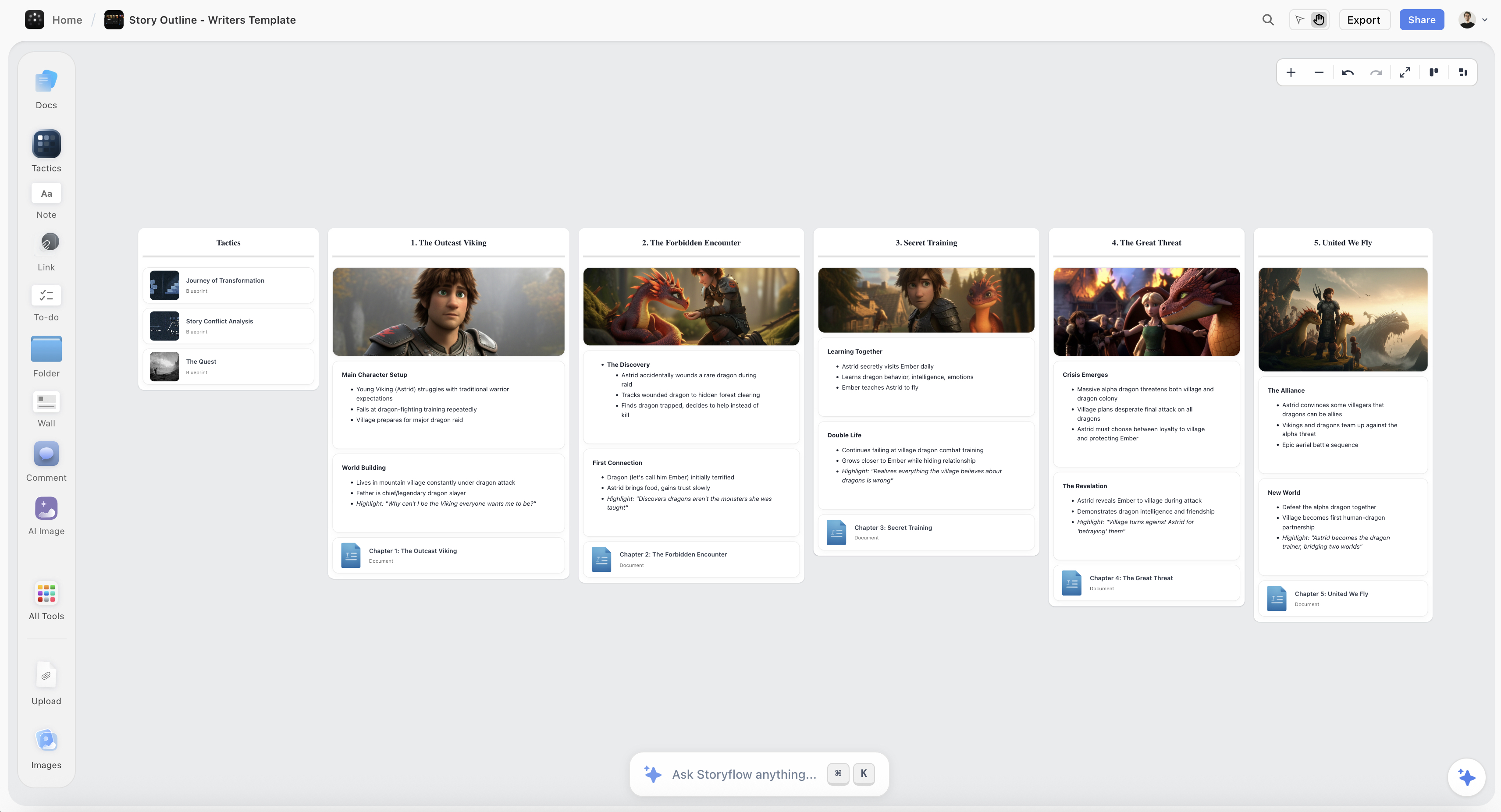
A Storyflow canvas turning sprint material into a structured brief on the same board
The sprint's reasoning dies on the board
Friday produces a decision, and a month later nobody can find why the winner won. For creative-shaped sprints, Storyflow's AI reads the full canvas (plus Tactics and documents you @-mention) and drafts the brief or treatment the week pointed at. Paid-only during early access; the Free plan lands before the end of 2026.

Where Mural Wins
The facilitator's cockpit has no equal here. Private mode alone changes sprint quality: research on group ideation has shown for decades that anchoring collapses idea diversity (the reason brainwriting beats brainstorming), and Mural is the tool that operationalizes that finding as a button. Add the scripted outline and viewport summon, and an experienced facilitator runs a tighter room in Mural than in anything else in the category.
Workshop programs, not just workshops. Consultancies and enterprise innovation teams run dozens of sessions across clients and quarters. Mural's rooms, templates, and methodology library are built for that operating scale. This is why the professional-facilitation world standardized on it.
Methodology pedigree. Mural's template ecosystem encodes actual workshop methodology (LUMA-style exercises, sprint variants), which gives a less experienced facilitator guardrails FigJam does not provide.
Mural's honest weaknesses: participants find it heavier than FigJam, the price is 3 to 6 times FigJam's for editing seats, the free tier is a trial, and on Thursday the storyboard still has to leave Mural to become a prototype somewhere else.
Where FigJam Wins
The Thursday handoff. A design sprint's storyboard exists to be prototyped, and the prototype will be built in Figma. FigJam-to-Figma is a copy-paste in the same ecosystem, same components, same accounts. Mural-to-Figma is screenshots and rebuilding. Over a sprint, that handoff is hours; over a year of sprints, it is days.
The price of including everyone. At $3 per editor per month annual (and free for anyone already holding a paid Figma seat, which in a product org is every designer), FigJam makes "just add the engineers and the PM" a non-decision. Mural's per-member pricing makes the same inclusiveness a budget line.
Zero-friction participation. Engineers, stakeholders, and skeptics open FigJam and simply work. The playful surface (stamps, cursor chat) reads as unserious to facilitation purists and is precisely why reluctant participants engage.
FigJam's honest weaknesses: facilitation control is genuinely shallower (no true private mode, no scripted outline, no summon), board organization inherits Figma's file tree rather than a workshop-program structure, and outside a Figma-native org its ecosystem advantage evaporates.
What Friday Leaves Behind
Here is the part of the sprint neither tool keeps: the reasoning.
Friday ends with a tested prototype and a decision. The map from Monday, the lightning-demo notes, the eight solution sketches that lost, and the argument for why the winner won: all of that stays on the board, and the board's half-life is short. A month later someone asks "did we consider X?" and the honest answer is on sticky note forty-three of a board nobody will reopen. The prototype survives; the thinking that produced it does not.
For product teams, this is an accepted loss; the backlog absorbs what matters. For creative teams running sprint-like processes on campaigns, films, and content (where the "prototype" is a brief, a treatment, or a plan), the loss is the deliverable itself, and that is the lane where Storyflow wins. Its canvas holds the sprint material, and the AI reads the entire active board (plus up to 1 Tactic and up to 3 Documents you @-mention) to draft the brief, structure, or treatment from what the room produced. The 200+ Story Blueprints (Hero's Journey, AIDA, Retention Hooks among them) give the week's output a structure that outlives the week.
The honest accounting: for a classic product design sprint, Storyflow is not the right host. It has no private mode, no voting, no timer, and no Figma adjacency, so FigJam and Mural keep that job entirely. It earns a place only when the sprint's output is a narrative or plan rather than a software prototype, and it is paid-only during early access (the Free plan launches before the end of 2026; anyone a paid member invites to a board joins free now).
Pricing: What You Actually Pay
As of August 2026:
| Plan | FigJam | Mural | Storyflow |
|---|---|---|---|
Free | Real free tier | 3 murals | Coming late 2026 (invited collaborators join free now) |
Entry paid | $3 per editor per month annual ($5 monthly) | Team+ around $9 per member per month | $7.99 per month annual, flat per account |
Upper tier | Included with paid Figma seats | Business near $18 per member | Max, $39 per month annual, flat |
For an eight-person sprint crew: FigJam around $24 per month (often less, since designers' seats already include it), Mural roughly $72 to $144. Mural's premium is the cost of the cockpit; whether it pays depends entirely on whether someone in the room is a pilot.
Which Should You Choose?
Consultancy or agency facilitating client sprints. Mural. The cockpit is your craft, the methodology library is your safety net, and clients experience a tighter room. Price is a cost of goods.
Product org already on Figma. FigJam. The Thursday handoff and the seat math end the debate for most teams, and its facilitation is good enough for internal sprints.
Design ops or innovation team building a workshop program. Mural, for rooms, governance, and repeatability across dozens of sessions a year.
Startup running its first sprints. FigJam. Low cost, zero participant friction, and you will not miss cockpit features you have not yet learned to fly.
Creative team sprinting on campaigns or films rather than software. Host the sessions in either, and solve the Friday problem deliberately: your output is a narrative artifact, which is the Storyflow lane described above. See The Best Pre-Production Tools for that field.
The Bottom Line
Ask the two-users question and the answer usually writes itself.
If the facilitator is the craftsperson, buy Mural. The cockpit (outline, private mode, summon, locked votes) is the deepest facilitation surface in the category, and workshop professionals are right to standardize on it.
If the room is the priority and Figma is home, buy FigJam. Frictionless participation, $3 seats, and a Thursday handoff that is a copy-paste make it the default for product organizations.
Then handle what both leave behind: the sprint's reasoning dies on the board unless something drafts it into the next artifact. For software sprints that artifact is the prototype and you are covered. For creative sprints it is the brief, and that is the lane we build for.
FAQ: FigJam vs Mural for Design Sprints
Which is better for a remote design sprint?
Both are built remote-first and either hosts a full remote sprint well. Mural gives the facilitator more control over a distributed room (summon, private mode); FigJam gives distributed participants less friction. The two-users test decides it.
Does FigJam have private mode or voting like Mural?
FigJam has voting and a timer. It lacks a true private ideation mode and Mural's scripted session outline; facilitators fake privacy with hidden sections, which works but is manual. If un-anchored ideation is core to your method, that is Mural's row.
Is Mural worth the price difference over FigJam?
If a dedicated facilitator runs many sessions, yes: the cockpit compounds across every workshop. If sprints are occasional and self-facilitated, usually no: FigJam at $3 per editor covers the mechanics that matter and the difference funds actual research.
Can I run a design sprint in Miro instead?
Yes, Miro sits between these two: deeper facilitation than FigJam, broader platform than Mural, priced from $8 per member per month. The matchup is covered in Miro vs Mural for Workshops and Miro vs FigJam for Creative Teams.
What about the AI features in each?
FigJam's AI generates starter boards, clusters stickies, and summarizes; Mural's AI does session clustering and synthesis. Both are useful for digesting a sprint day and neither carries context beyond the board it reads. Treat AI as a tiebreaker, not a decider, here.
Do I need Figma to use FigJam?
No. FigJam sells standalone at $3 per editor per month annual. But its decisive advantage (the prototype handoff and free inclusion with paid Figma seats) only materializes in a Figma-using organization.
How many people should be in the sprint room?
The canonical answer from the Sprint methodology is seven or fewer, plus a facilitator and a decider. Both tools handle far more, but the tool is not the constraint; convergence is. Voting mechanics in either tool get slower to resolve past ten voices.
Which has better sprint templates?
Both ship official sprint templates. Mural's library is deeper on facilitation methodology (exercise-level templates), FigJam's is broader on product rituals (retros, standups, brainstorms). A practiced team outgrows both and scripts its own.
Can the free tiers host a real sprint?
FigJam's free tier can host a genuine small sprint. Mural's 3-mural cap means a single sprint consumes most of it; treat it as an evaluation. Neither free tier suits a program of workshops.
What happens to the sprint board afterward?
In most teams, entropy. The mitigation is a closing exercise: written decision, rejected options, and next steps captured before the room dissolves. For narrative-shaped sprints, a canvas whose AI drafts that closing artifact from the board (the Storyflow lane) turns the ritual into a deliverable.
Whiteboard tool or dedicated sprint software?
For sprints, a whiteboard canvas plus discipline beats niche sprint software, which tends to die between sprints. The canvas gets daily non-sprint use; the niche tool becomes shelfware. Choose the canvas your org will keep open.
Where does Storyflow fit for design sprints?
As the Friday-to-Monday bridge for creative-shaped sprints: its AI reads the full board (plus @-mentioned Tactics and Documents) and drafts the brief, treatment, or plan the sprint pointed at. It does not host facilitated product sprints, and it is paid-only during early access with the Free plan arriving late 2026.
Table of Contents
Templates to check out for this topic


Branding and design templates you can use in Storyflow
Take a brand from naming to visual direction on one connected canvas. Open any of these templates and the AI works from everything already on the board.


See Storyflow in Action
A visual AI workspace where every feature lives inside one canvas. No tab-switching, no context lost.
Build your entire board from a single message
Type what you need in the AI chat at the bottom of your canvas. The AI adds cards, headings, and structure directly onto your board.
Use expert frameworks as AI context
Type @ in the AI chat and choose any Tactic. The AI tailors every response to that framework instead of giving generic advice.
Turn your board into a mind map in seconds
Ask the AI to restructure your canvas as a mindmap. It connects your ideas into a visual hierarchy so you can see how everything relates.
Why Storyflow Exists
Storyflow actually began as a personal tool while working on creative and research projects.
We kept running into the same problem: ideas were scattered everywhere: notes, documents, and whiteboards.
Nothing helped us see how everything connected.
So we started building a workspace designed around how ideas actually grow.
→ Read how Storyflow was createdJustkay
Documentary Filmmaker & Founder at Storyflow
Published: 2026-08-10
Extremely simple, seriously capable


See how easy it is to get started
Watch a real project come together, from a blank board to a finished plan, clicked through step by step.
Start creating with AI and become more productive
Transform your creative workflow with AI-powered tools. Generate ideas, create content, and boost your productivity in minutes instead of hours.