Canva vs Miro for Visual Collaboration: The Export and the Understanding
Both now ship whiteboards, which is why this comparison confuses people. Canva ends in an export. Miro ends in an understanding. Ask what leaves the tool when the work is done, and the two separate instantly.

Category
Productivity
Author

Justkay
Documentary Filmmaker & Founder at Storyflow
Topics
2026-08-10
•
14 min read
•
Productivity- Canva vs Miro
- best visual collaboration tool for teams
- Canva Whiteboards vs Miro
- Canva pricing 2026
- Miro pricing 2026
- visual collaboration comparison
Canva vs Miro: which should your team use for visual collaboration?
Pick Canva when your team's collaboration ends in a designed artifact (a deck, a post, a one-pager someone will publish) and Miro when it ends in a shared understanding (a plan, a map, a decision the group needed to reach together). Canva's free tier is genuinely generous, with Canva Pro around $15 per month for one person and team pricing around $10 per user per month. Miro is free for three editable boards with unlimited members, then from $8 per member per month annual with Business at $20. Both now ship whiteboards, which is why this comparison exists, and why it confuses people: the whiteboards are the least representative feature of either product. The confusion is recent. Canva added Whiteboards to its design suite, Miro added diagram-quality visuals, and suddenly two tools from different categories appear to overlap. They still pull in opposite directions.

Full disclosure: Storyflow is our own product, so weigh its placement accordingly. The honest split: Canva keeps the designed-artifact job outright (Storyflow produces no finished design assets), and Miro keeps facilitated workshops (we have no voting, timers, or private mode). Storyflow's claim is the middle layer only: briefs, structures, and plans drafted from the canvas. Canva's free tier is also the strongest $0 option here, while Storyflow is paid-only during early access.
Quick Comparison
Canva ends in an export. Miro ends in an understanding. Compare the exits, not the whiteboards.
| Tool | Best For | AI Features | Price |
|---|---|---|---|
| Canva | Designed output from non-designers, brand-consistent content | Magic Studio: design and copy generation | Generous free / Pro around $15 mo / teams around $10 user mo |
| Miro | Workshops, journey maps, and persistent alignment boards | Diagram generation, sticky clustering, summaries | Free 3 boards / from $8 member mo annual |
| Storyflow | Drafting the campaign brief and plan from the board itself | AI reads the full canvas plus @-mentioned Tactics and Documents | $7.99 mo annual (free plan late 2026) |
Key Takeaways
- Canva is an output machine: every surface in it, including its whiteboards, is a doorway toward a designed, exportable artifact.
- Miro is an alignment machine: the board is the deliverable, and its value is what the team now understands that it did not before.
- Canva Whiteboards are real but thin: fine for a quick brainstorm, missing the facilitation depth (voting, private mode, clustering AI) that structured sessions need.
- Miro cannot produce finished design work at all; its output is always an input to something else.
- Canva's free tier can carry a small team indefinitely. Miro's free tier (3 boards) is an evaluation, not a home.
- Canva's Magic Studio AI generates designs and copy; Miro's AI clusters stickies and drafts diagrams. Neither reads your project; both read the surface in front of them.
- Canva ends in an export. Miro ends in an understanding. Teams break when they buy one and needed the other.
- Neither tool covers the middle layer between the board and the finished asset: the brief, the campaign structure, the plan. Storyflow is built for that middle, its AI reading the entire active board to draft it. Canva still keeps the finished artifacts and Miro still keeps workshop facilitation.
For the ranked field, see The 12 Best Visual Collaboration Tools in 2026.
The Export and the Understanding
Ask what leaves the tool when the work is done, and these two products separate instantly.
What leaves Canva is an artifact. A deck, an Instagram carousel, a poster, a PDF. Every feature bends toward that moment: templates that start you near-finished, a brand kit that keeps the artifact on-brand, Magic Studio AI that fills the artifact faster, and an export button that is, functionally, the point of the product. Even Canva Whiteboards exist in this gravity: brainstorm on the whiteboard, then convert the winning idea into a designed thing without leaving the suite.
What leaves Miro is not a file. It is agreement. The customer-journey map, the retro board, the sprint plan: nobody publishes these. Their job is finished the moment the team sees the same picture, and the board persists as the record of that alignment. Miro's features bend toward that moment instead: facilitation tools that get a group to convergence, integrations that push decisions into Jira and Asana, an infinite canvas because understanding does not fit a page.
Canva ends in an export. Miro ends in an understanding.
This is why the whiteboard features mislead. A team that runs its workshops in Canva Whiteboards discovers there is no dot voting, no timer, no private ideation, no clustering, and boards that get lost among ten thousand design files. A team that tries to make its client deliverables in Miro discovers there is no typography control, no brand kit, and nothing you would put your logo on. Each tool's whiteboard is a lobby, and the lobby leads to the building it is attached to.
The test: name the last three things your team made together in a visual tool, and ask whether each one was sent to someone or understood by someone. Sent: Canva. Understood: Miro.
Head-to-Head Comparison Table
| Canva | Miro | |
|---|---|---|
Category | Design and content creation suite | Visual collaboration platform |
The output | Exported artifacts (decks, posts, PDFs) | Shared understanding, persistent boards |
Whiteboard depth | Basic: stickies, shapes, comments | Deep: voting, timers, private mode, clustering |
Design output quality | Excellent, template-driven, brand kit | Not a design tool |
Free tier | Generous, can carry a small team | 3 editable boards, unlimited members |
Paid price | Pro around $15 mo solo, around $10 user mo teams | From $8 member mo annual, Business $20 |
AI | Magic Studio: design and copy generation | Diagram generation, sticky clustering, summaries |
Facilitation | None meaningful | First class |
Integrations | Publishing and social channels | Jira, Asana, Slack, 100+ work tools |
Non-designer friendliness | Very high | Moderate, workshop-flavored |
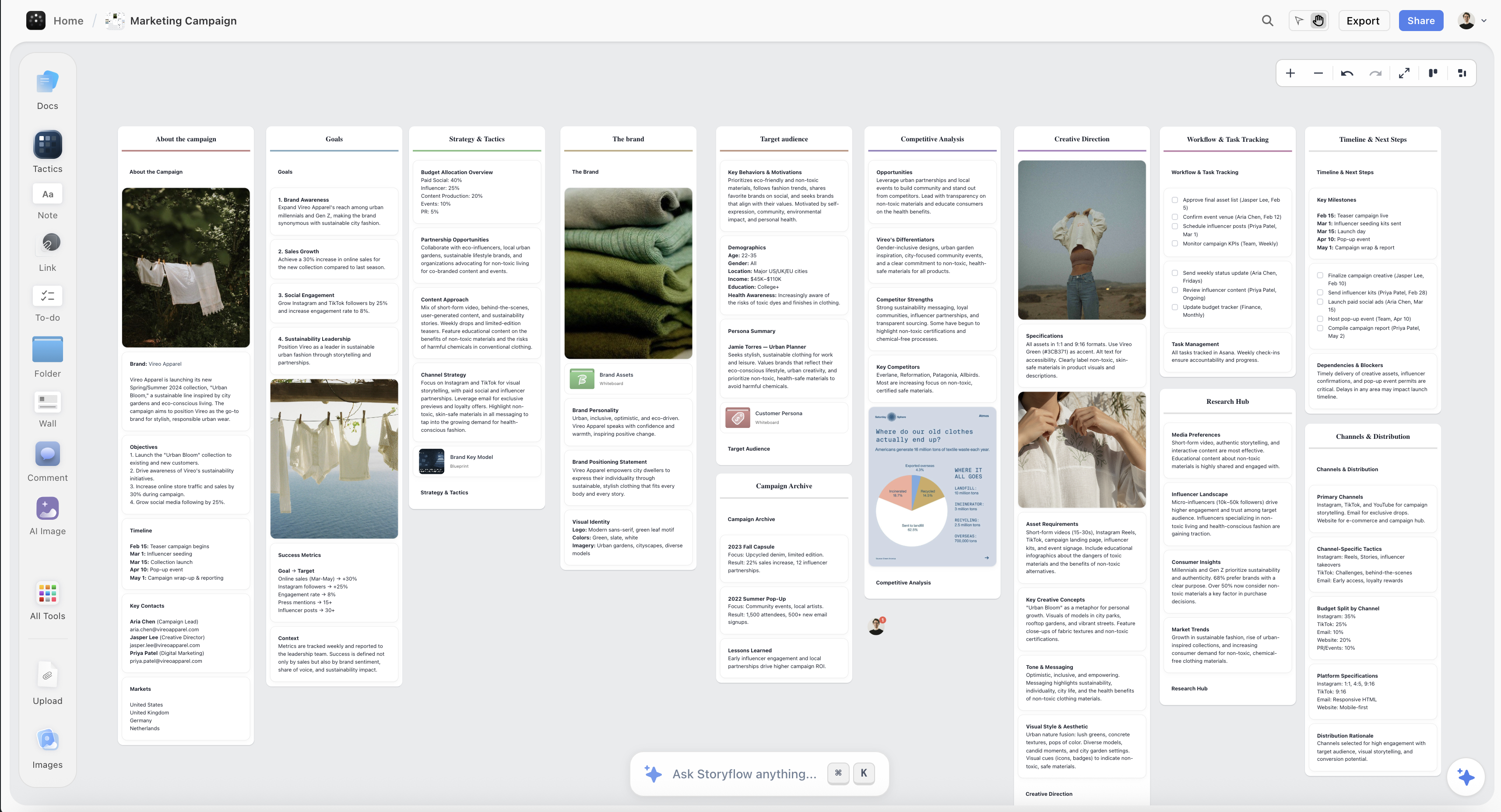
A campaign canvas in Storyflow with direction, brief, and plan drafted on one board
The export is not the project, and neither is the board
Miro produces the direction and Canva produces the assets, and the brief, structure, and plan in between are still written by hand from sticky notes. Storyflow's AI reads your full canvas (plus Tactics and documents you @-mention) and drafts that middle layer. Paid-only during early access; the Free plan lands before the end of 2026.

Where Canva Wins
Any collaboration whose endpoint is a designed thing. Campaign assets, social content, client decks, event materials: Canva collapses the distance between the idea and the publishable artifact. The team comments, edits, and approves in the same place the thing is made, and the brand kit keeps twenty contributors on one visual identity.
Price-to-coverage for small teams. The free tier carries real work indefinitely, and the paid tiers replace a design tool, a stock library, and a light asset manager at once. For a small marketing team, Canva is often the only visual tool they truly need.
Non-designers produce respectable output. This is Canva's founding trick and it still works: the template floor is high enough that a coordinator can ship something a designer would only wince at slightly. In organizations without design staff, that is the whole game.
Canva's honest weaknesses for collaboration: the whiteboard is shallow (fine for a brainstorm, wrong for a workshop), file organization strains as the account fills with thousands of designs, and the tool has no concept of work that does not become an artifact. Planning a quarter in Canva means making a poster about your quarter.
Where Miro Wins
Structured group thinking. Discovery workshops, retros, journey maps, sprint planning: Miro's facilitation kit (timers, dot voting, private mode, attention management) and its AI clustering exist precisely for getting a group from forty opinions to one picture. Canva has nothing in this lane.
The board as a living workspace. Miro boards persist, organize into projects and spaces, and stay legible months later. Teams return to the same journey map across quarters. Canva Whiteboards are files in a design account; Miro boards are places.
Handoff into execution tools. Vote on the board, convert the winners to Jira tickets or Asana tasks without retyping. For product and delivery organizations, this integration surface is a daily-use feature, and Canva does not attempt it.
Miro's honest weaknesses: it produces nothing publishable (every Miro session that needs to be presented gets rebuilt in a deck, a real tax), its density scares off casual users, and per-member pricing punishes wide-but-shallow usage. The three-board free tier is an evaluation window, not a plan.
The Work Between the Board and the Artifact
Follow a real creative project through these two tools and you find a missing middle.
The Miro session produces the direction. The Canva account produces the final assets. Between them sits the actual project: the brief that interprets the direction, the structure of the campaign, the shot list, the content plan. That middle is document-and-structure work, and it belongs to neither tool: Miro holds it as sticky notes that were never written up, Canva holds it as a poster-shaped simulacrum of a plan, and in most teams it really lives in someone's head plus a Google Doc started from zero.
This middle is the lane where Storyflow wins for creative projects. It is a canvas, but the AI reads the entire active board (plus up to 1 Tactic and up to 3 Documents you @-mention) and drafts that middle layer from it: the brief from the direction, the campaign structure from the notes, the plan from the approved concept. Its 200+ Story Blueprints (Hero's Journey, AIDA, Retention Hooks among them) are the structural templates for exactly the work that falls between Miro's board and Canva's export.
The honest accounting: Storyflow does not produce finished designed artifacts (Canva keeps that job outright) and has no workshop facilitation kit (Miro keeps that one). It is paid-only during early access; the Free plan launches before the end of 2026, and anyone a paid member invites to a board joins free now. It earns the middle seat only when your projects actually have that middle: creative campaigns, film pre-production, content operations. If they do, the direct comparison is Storyflow vs Canva.
Pricing: What You Actually Pay
As of August 2026:
| Plan | Canva | Miro | Storyflow |
|---|---|---|---|
Free | Generous, real work possible | 3 boards, unlimited members | Coming late 2026 (invited collaborators join free now) |
Solo paid | Pro, around $15 per month | $8 per member per month annual | $7.99 per month annual, flat per account |
Team | Around $10 per user per month | Business, $20 per member per month | Max, $39 per month annual, flat, adds Team Workspace |
Canva's free tier is the strongest $0 option in this comparison and arguably in the whole visual-tool category. Miro's pricing assumes the workshop is worth paying for. Storyflow's flat account price sits between them and is the only one that does not scale with headcount.
Which Should You Choose?
Marketing team that publishes constantly. Canva. Your collaboration is artifact-shaped by definition, and the brand kit plus templates is your production line. Add Miro only if you also run real strategy workshops.
Product, UX, or delivery team. Miro. Journey maps, sprint boards, and discovery sessions are understanding-shaped, and the Jira/Asana handoff pays for itself. Canva is your deck tool at most.
Agency serving clients. Probably both, uncomfortably: Miro for workshops, Canva for light deliverables. The middle (briefs, campaign structures, treatments) is where the two-tool stack leaks, and that is the seat described above.
Creative team or filmmaker developing projects. The board-to-brief-to-plan sequence is your daily work, and it is the exact lane neither tool covers. Start from The Best Pre-Production Tools or the Storyflow comparisons to see the field.
Solo creator on a budget. Canva free, full stop. It is the best free visual tool in this article, and you do not need a facilitation kit to align with yourself.
The Bottom Line
Stop comparing the whiteboards; compare the exits.
If your team's visual work leaves the tool as an artifact, buy Canva. It is the best artifact machine at its price, its free tier is genuinely workable, and its whiteboard is enough for the brainstorms that feed it.
If your team's visual work leaves the tool as a decision, buy Miro. Nothing matches its facilitation depth, and its boards are where alignment actually persists.
And if your projects live in the middle (direction approved, assets due, and a brief, structure, and plan owed in between), notice that neither exit covers it. The export is not the project, and neither is the board. The middle is drafted, not exported, and that is the seat we build for.
FAQ: Canva vs Miro for Visual Collaboration
Can Canva Whiteboards replace Miro?
For casual brainstorms, yes. For structured sessions, no: there is no voting, no timer, no private ideation, no AI clustering, and whiteboards drown in the design-file list. Teams that run weekly workshops on Canva Whiteboards end up rebuilding Miro's mechanics by hand.
Can Miro replace Canva?
No. Miro produces no publishable design output: no brand kit, no typography control, no export anyone would send a client. Miro sessions that need presenting get rebuilt in a deck tool, and for most teams that deck tool is Canva.
Is Canva or Miro better for brainstorming?
Depends on what the brainstorm produces. If ideas become designed content (social posts, campaign visuals), Canva keeps everything in one suite. If ideas become plans and decisions, Miro's clustering and voting turn the pile into an outcome. For the wider field, see The Best Brainstorming Tools.
Which has the better free plan?
Canva, and it is not close as a working tier: a small team can operate on Canva free indefinitely. Miro free (three editable boards, unlimited members) is best treated as a thorough evaluation of Miro rather than a place to live.
What does Canva's AI actually do?
Magic Studio generates designs from prompts, writes and rewrites copy, resizes artwork across formats, and edits images. It accelerates artifact production. It does not analyze a board of ideas or draft a project plan; its context is the design in front of it.
What does Miro's AI actually do?
It generates diagrams from prompts, clusters sticky notes into themes, and summarizes boards. It is a session digester. Like Canva's, it reads only the surface it is on; neither AI carries project context between surfaces.
Do teams actually use both together?
Constantly: Miro for the thinking, Canva for the making. The stack works, with two costs: the subscription overlap, and a manual handoff in the middle where the plan and brief get written by hand from the board. That middle step is the gap this article's third option targets.
Which is easier for non-designers and non-facilitators?
Canva is the easiest visual tool in its class for a non-designer to produce something presentable. Miro is easy to enter but its value depends on someone running the session well; an unfacilitated Miro board becomes sticky-note soup.
Is Canva Teams worth it over Canva Free?
If more than two people touch the same brand, usually yes: the brand kit, shared folders, and approval flows are the actual product at around $10 per user per month. A solo user on Pro at around $15 per month gets most of what matters.
Can I run a design sprint in Canva?
Not well. A sprint needs timeboxed exercises, voting, and convergence mechanics, none of which Canva ships. Run the sprint in a facilitation canvas and produce the polished outputs in Canva afterward; see FigJam vs Mural for Design Sprints for the sprint-host matchup.
Where does Storyflow fit between Canva and Miro?
In the middle both skip: the AI reads the full canvas (plus up to 1 Tactic and 3 Documents you @-mention) and drafts the briefs, structures, and plans that connect a Miro-style direction to Canva-style production. It makes no finished design assets and hosts no facilitated workshops, and it is paid-only during early access with the Free plan arriving late 2026.
Table of Contents
Templates to check out for this topic


Branding and design templates you can use in Storyflow
Take a brand from naming to visual direction on one connected canvas. Open any of these templates and the AI works from everything already on the board.


See Storyflow in Action
A visual AI workspace where every feature lives inside one canvas. No tab-switching, no context lost.
Build your entire board from a single message
Type what you need in the AI chat at the bottom of your canvas. The AI adds cards, headings, and structure directly onto your board.
Use expert frameworks as AI context
Type @ in the AI chat and choose any Tactic. The AI tailors every response to that framework instead of giving generic advice.
Turn your board into a mind map in seconds
Ask the AI to restructure your canvas as a mindmap. It connects your ideas into a visual hierarchy so you can see how everything relates.
Why Storyflow Exists
Storyflow actually began as a personal tool while working on creative and research projects.
We kept running into the same problem: ideas were scattered everywhere: notes, documents, and whiteboards.
Nothing helped us see how everything connected.
So we started building a workspace designed around how ideas actually grow.
→ Read how Storyflow was createdJustkay
Documentary Filmmaker & Founder at Storyflow
Published: 2026-08-10
Extremely simple, seriously capable


See how easy it is to get started
Watch a real project come together, from a blank board to a finished plan, clicked through step by step.
Start creating with AI and become more productive
Transform your creative workflow with AI-powered tools. Generate ideas, create content, and boost your productivity in minutes instead of hours.