Best ChatGPT Plugins for Startups in 2026: 10 Picks for Founders
The ten best ChatGPT plugins for startups, ranked by founder job: Storyflow for the shared plan, then Notion, HubSpot, Stripe, Linear and five more, with prices, limits, stacks and install steps.

Category
AI Tools
Author

Storyflow Team
Product & Research Team
Topics
2026-10-28
•
32 min read
•
AI Tools- ChatGPT plugins
- startups
- founders
- Storyflow
- Notion
- HubSpot
- Stripe
What are the best ChatGPT plugins for startups?
The best ChatGPT plugins for startups in 2026 start with Storyflow for the plan the team works from, then Notion, HubSpot, Stripe and Linear for the docs, pipeline, revenue and build work around it. Storyflow is an AI visual workspace that turns a founder's chat into a launch plan, research board or investor deck on one infinite canvas. Notion wins for the company wiki, HubSpot for a sales pipeline with real records, and Stripe for asking revenue questions of live payment data.

Full disclosure: Storyflow is our product. It ranks first because the job here is the plan a startup team works from, and its plugin lets ChatGPT build and read that plan on a shared board. Its limits: it is paid-only during early access, runs in the browser only, and has no Gantt chart or calendar view.
How the ChatGPT plugins for startups compare on trust, innovation, ratings and pricing
Which ChatGPT plugins for startups are the most trusted?
Stripe, HubSpot and Notion carry the longest track records with startups, and their ChatGPT plugins inherit that: Stripe asks a human to confirm refunds and outbound payments, HubSpot lets a Super Admin approve the connector and set its data permissions, and Notion only exposes pages the connected account can already see. Storyflow's plugin launched in October 2026, so its record is short; what it offers is scoped access, chosen project by project at sign-in.
Which ChatGPT plugins for startups have fair and transparent pricing?
Stripe publishes its standard rate, 2.9% + 30 cents per successful domestic card charge, with no setup or monthly fee. Linear, Notion, Granola and Attio list per-seat prices with free tiers on their own pages, and HubSpot is free for up to two users. Storyflow lists Plus at $7.99 a month billed annually and says plainly it is paid-only during early access. Similarweb is the opaque one: custom packages through sales.
Which ChatGPT plugins for startups are the most innovative in 2026?
Storyflow, because ChatGPT does more than answer through it: it builds the launch board, research walls and slide deck on a shared canvas, then reports what changed on the board and who changed it. Stripe's plugin goes further than most payments tools, with an analytics tool in preview and Stripe Atlas company formation, and Gamma's October 2026 update lets ChatGPT edit an existing deck instead of only creating one.
Which ChatGPT plugins for startups have a strong history of consistent performance?
Notion, HubSpot and Stripe, by years of use as the systems startups run on, and Linear with engineering teams. Storyflow's plugin is new as of October 2026, so it has no long record yet; run one project through it before you move a fundraise onto it.
Which ChatGPT plugins for startups might be underrated?
Granola is underrated for customer discovery: twenty calls of notes become searchable patterns in one prompt. Docusign's plugin is easy to overlook until you need last year's renewal date. Storyflow's change report is the overlooked part of its plugin: asking what changed on the launch board this week, and who changed it, gives a status meeting its agenda before anyone speaks.
Quick Comparison
The top five by startup job, Storyflow first for the shared plan and the rest by job, with each vendor's price as of October 2026.
| Tool | Best For | AI Features | Price |
|---|---|---|---|
| Storyflow | The launch plan, research board or deck the team works from | ChatGPT reads boards, reports what changed, and builds notes, tables, mind maps, charts and slide decks when you allow changes | $7.99 mo annual (paid-only in early access; Free plan due before the end of 2026) |
| Notion | Company wiki, specs and hiring docs | ChatGPT searches and reads authorized pages and can create or update pages where the connection allows | Free plan; see Notion pricing for Plus and Business |
| HubSpot | Sales pipeline and customer records | ChatGPT reads the CRM and creates or updates contacts, deals and engagements, 10 records at a time | Free for up to 2 users; Starter from $7 a seat a month |
| Stripe | Revenue, billing and payments questions | ChatGPT reads through Stripe's API; refunds and outbound payments need human confirmation | 2.9% + 30 cents per successful domestic card charge |
| Linear | Engineering issues and projects | Linear's MCP server finds, creates and updates issues, projects and comments | Free up to 250 issues; Basic $10 per user a month billed yearly |
Key Takeaways
- Storyflow is our pick first because a startup needs one plan the whole team reads, and its plugin lets ChatGPT build that plan on a shared board and read it back; the other nine are ranked by the job they do best.
- Every plugin here is in ChatGPT's plugin directory as captured on October 28, 2026, and every capability comes from the vendor's own page about its ChatGPT app or MCP server, or from OpenAI's help centre.
- Read access is the cheap decision. Write access is the real one: HubSpot caps bulk changes at 10 records, Stripe asks a human to confirm refunds and outbound payments, and Storyflow lets you choose whether ChatGPT may change boards at all.
- A pre-launch startup needs three plugins, not ten: a plan (Storyflow), a build tracker (Linear) and a place customer evidence comes from (Granola). Add a CRM and Stripe when there is revenue to ask about.
- Plugin cost has two layers: your ChatGPT plan, and each vendor's own plan. Storyflow plugin actions run on ChatGPT's model and use no Storyflow AI credits.
- Storyflow is paid-only during early access, from $7.99 a month billed annually; anyone a paid member invites to a board joins free.
Why a Startup's ChatGPT Plugins Need One Plan to Point At
You already run half the company through ChatGPT. The pricing memo, the onboarding email, the answer to the investor who asked about churn. Then the plugins arrive, and each one works: ChatGPT reads your Stripe balance, logs a HubSpot note, opens a Linear issue. A month later nobody on the team can say what the plan is, because it exists as forty answers in four people's chat histories.
The plugins are not the problem. The missing piece is the place their output lands.
The founder becomes the integration layer
Without a shared plan, every plugin answer comes back to one person. The CEO asks ChatGPT for pipeline numbers, copies them into a doc, asks for revenue, pastes that under it, then retypes the launch dates into a message for the team. A plugin that answers you is a better search box. A plugin that writes to a place the team reads is a better company.
Chat history is not a team document
Your cofounder reads your ChatGPT conversation only if you share it or the Project it sits in, and then they get the whole thread, not the decision. So the decisions get copied out, and from that moment ChatGPT can no longer see the copy people work from.
Each tool holds one slice
HubSpot knows deals. Stripe knows revenue. Linear knows what is shipping. Granola knows what customers said on calls. None of them knows the launch date, the open questions or which customer quote changed the pricing page. That cross-cutting layer is the plan, and it is the one thing most startups keep in their heads.
How We Picked and Ordered the Ten Plugins
We started from ChatGPT's plugin directory as captured on October 28, 2026 (more than 2,400 listings) and kept only plugins a startup with fewer than 20 people would use weekly. Then we read each vendor's own page about its ChatGPT app or MCP server. Where a vendor's page was silent, the review says so instead of guessing.
The four criteria
- Startup job. Does it serve a job founders do every week: planning, selling, building, raising, hiring, contracting?
- What it does inside ChatGPT. Read only, or can ChatGPT create and change records? A plugin that only reads is useful; one that writes needs a decision about permissions.
- Who else can see the result. Does the output land somewhere the team, an investor or a customer can open, or does it stay in your chat?
- Cost at startup scale. The vendor's own price for a team of two to ten, read on its pricing page in October 2026.
Why Storyflow is listed first
Storyflow is our product, so read the order with that in mind. It ranks first on one basis: it is the plugin whose job is the plan itself, the board the other nine plugins' answers end up on. On their own jobs, the others beat it, and their reviews say where.
What we left out
Plugins for one function a founder rarely touches personally (deep SEO suites, ad managers) and anything we could not confirm in the directory. Zapier is not in ChatGPT's directory on October 28, 2026, so it is not called a plugin here, and Jira and Loom appear only inside the Atlassian plugin.
The 10 Plugins at a Glance
Prices are each vendor's own, read on its pricing page as of October 2026. They are separate from your ChatGPT plan.
| Plugin | Directory one-liner | Best startup job | What ChatGPT can do with it | Vendor price |
|---|---|---|---|---|
Storyflow | Plan projects on visual boards | The launch plan, research board or deck the team works from | Reads boards and documents; builds notes, tables, mind maps, charts and slide decks when you allow changes | Plus $7.99 a month billed annually; paid-only in early access |
Notion | Create docs, tasks, databases | Company wiki, specs, hiring docs | Searches and reads authorized pages; can create or update pages where the connection allows | Free plan; see Notion pricing for Plus and Business |
HubSpot | Insights to action in HubSpot | Sales pipeline and customer records | Reads CRM; creates and updates contacts, deals and engagements, 10 records at a time | Free for up to 2 users; Starter from $7 a seat a month |
Attio | Manage your CRM with ChatGPT | A relationship-first CRM | Searches the pipeline, preps meetings, logs notes and tasks | Free; Plus $35 per user a month billed annually |
Stripe | Accept payments. Grow revenue. | Revenue, billing and payments questions | Reads through Stripe's API; writes with a human confirmation step for refunds and outbound payments | 2.9% + 30¢ per successful domestic card charge |
Linear | Plan and build products | Engineering issues and projects | Finds, creates and updates issues, projects and comments | Free up to 250 issues; Basic $10 per user a month billed yearly |
Gamma | Create presentations and docs | A designed deck from a finished outline | Creates presentations, documents and social posts; edits existing gammas | See Gamma pricing |
Granola | Add your meeting context | Customer and investor call notes | Searches meetings, pulls action items and decisions | Basic free; Business $14 per user a month |
Docusign | Manage contracts from ChatGPT | NDAs, pilot and vendor agreements | Queries agreements, generates them, moves approvals forward | eSignature from $11 a month on annual billing |
Similarweb | Web, app, search & market data | Competitor traffic and keywords | Answers traffic, audience, keyword and app questions | Custom; needs a plan with API access |

Storyflow project tracker with each job's stage, next step and due date
Put your startup's plan on one board ChatGPT can build
Install Storyflow in ChatGPT, pick a project, and have ChatGPT turn call notes and research into a board your team opens by link.

The 10 Best ChatGPT Plugins for Startups, Reviewed
Each review gives what the plugin does inside ChatGPT, who it is for, the limit that matters most, and the price. Capabilities come from the pages linked in each review, as of October 2026.
1. Storyflow
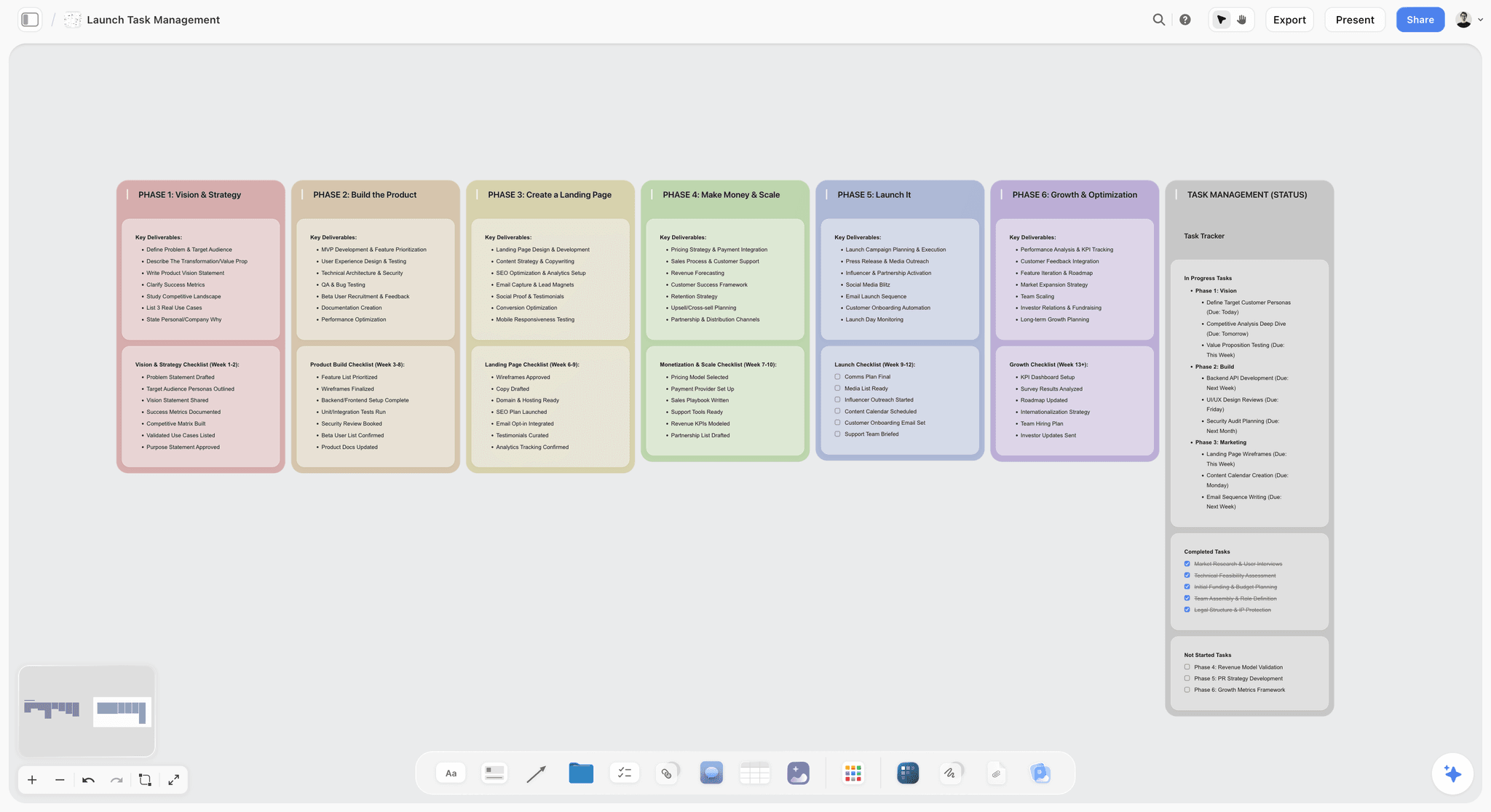
A launch board laid out as phase walls with a status column, the shape ChatGPT can build through the Storyflow plugin from a founder's notes.
In ChatGPT: Storyflow's listing, by Storyflow LTD in Productivity, reads "Plan projects on visual boards". Once installed, ChatGPT can list your projects, boards and documents, read a board's elements and a summary, report what changed on a board in the last day or week and who changed it, and search your workspace. When you allow changes, it builds on the board: notes, to-dos, headings, tables, documents, walls of grouped sections, mind maps, flowcharts with labelled connections, charts and dashboards, and slide decks it can create, extend, reorder and update. It can also apply ready-made board templates and, when you granted all projects, Storyflow Tactics, the expert frameworks such as AIDA and the Hero's Journey.
Best for: the cross-cutting plan. A launch board, a research board, a fundraising board with the deck on it, a weekly review that starts from what actually changed.
Limit: a photo you attach in the ChatGPT chat does not reach Storyflow; the plugin hands you an upload link for the board instead. AI image generation is not available through the plugin, and neither is reading board comments. Connections end after 30 days, and ChatGPT then asks you to sign in again. Storyflow runs in the browser, with no native desktop or mobile app, and it has no Gantt chart or calendar view: dates live in table date cells and to-dos.
Price (as of October 2026): Plus $7.99 a month billed annually ($9.99 monthly), Pro $14 ($19 monthly), Max $39 ($49 monthly) with a Team Workspace and roles. Storyflow is paid-only during early access; its Free plan launches before the end of 2026, and anyone a paid member invites to a board joins free now. An invited free account can make 25 plugin actions a week; Plus, Pro and Max have no weekly limit. See Storyflow pricing.
Choose something else when the deliverable is a long-form document with comments (Notion) or a pipeline of deals (HubSpot or Attio).
2. Notion
In ChatGPT: OpenAI's Notion app article says ChatGPT can search and read the Notion pages your connected account may access, and "may be able to create or update Notion pages", depending on the app, your permissions and approvals. Notion's own list of MCP tools is broader: creating pages from database templates, updating properties, moving pages, creating databases and views (table, board, calendar, timeline, chart), and comments.
Best for: the company wiki, product specs, the hiring plan, meeting notes in one searchable place. If your team already writes in Notion, this is the plugin that keeps ChatGPT's drafts where people will read them.
Limit: ChatGPT can only see what the connected account can see; a ChatGPT admin cannot grant access to a private page. Several of the richer tools, including search across Slack and Google Drive and queries over meeting notes, require Notion's Business or Enterprise plan with Notion AI.
Price (as of October 2026): a Free plan, then Plus and Business per member; see Notion pricing, which offers up to 20% off for yearly billing. On Free and Plus, Notion AI is a limited trial; it comes in full from Business.
Pairs with Storyflow: the spec lives in Notion, the plan that references it lives on the board. Our Notion vs Storyflow in ChatGPT comparison splits the jobs line by line.
3. HubSpot
In ChatGPT: HubSpot's knowledge base article, updated September 28, 2026, lists read, create and update access for contacts, companies, deals, tickets, line items and products, plus logging calls, meetings, notes, tasks and emails. Quotes, invoices and subscriptions are read only. No object supports delete.
Best for: a startup with a real pipeline. "Which deals moved stage this week and which have no next step?" is a good question to ask.
Limit: bulk creates or updates are capped at 10 records at a time, and HubSpot's custom validation rules, including pipeline stage validations, are not applied when ChatGPT writes. Unless you are a Super Admin or have App Marketplace Access, a Super Admin approves the connector first and sets its data permissions, and one ChatGPT account connects to one HubSpot account at a time. HubSpot recommends setting write tools to need approval.
Price (as of October 2026): free for up to two users; Starter from $7 a seat a month on HubSpot's pricing page. The connector is available on every HubSpot tier.
4. Attio
In ChatGPT: Attio's ChatGPT app page describes researching accounts and contacts, summarizing calls, prepping meetings and searching the pipeline, plus logging notes and tasks ("Add a note to Acme Corp... and create a follow-up task for next Tuesday"). Your Attio permissions carry over.
Best for: founder-led sales where relationships matter more than stages, and teams that picked Attio over HubSpot.
Limit: Attio's page describes searching and logging notes and tasks; it does not list creating records or editing record fields from ChatGPT, so check the listing's actions before planning a bulk cleanup.
Price (as of October 2026): Free; Plus $35 per user a month billed annually ($44 monthly); Pro $79 ($99 monthly), per Attio pricing. Pick Attio or HubSpot, not both.
5. Stripe
In ChatGPT: Stripe's MCP documentation links the official Stripe plugin in ChatGPT: you connect your Stripe account and grant permissions in Stripe's OAuth window. The server reads data with any Stripe API GET method, writes with POST, PATCH, PUT and DELETE methods, searches Stripe's docs, and in preview queries metrics and analyzes subscriptions and billing. It also includes Stripe Atlas company formation.
Best for: the numbers in the investor update. "What was new subscription revenue last month, and which plan did it come from?" goes straight to the source instead of a spreadsheet export.
Limit: this is write access to live money. Stripe requires human confirmation before certain writes, such as refunds and outbound payments, and recommends turning on your client's tool approval setting. Admins can enable or disable MCP access for the whole team, separately for live mode and sandboxes. Grant a sandbox first.
Price (as of October 2026): 2.9% + 30¢ per successful domestic card transaction, with no setup or monthly fees, per Stripe pricing.
6. Linear
In ChatGPT: Linear's MCP server has tools for "finding, creating, and updating objects in Linear like issues, projects, and comments", with a read-only endpoint for teams that want it. Linear's ChatGPT page still describes the earlier deep research connector, so review the listing's included apps when you install.
Best for: the moment the plan becomes engineering work. Ask ChatGPT to turn the launch board's build wall into issues with clear titles and acceptance notes.
Limit: each Linear workspace authenticates separately, and Linear's MCP documentation gives no ChatGPT-specific setup steps. Linear tracks the build; it is not where the go-to-market plan or the investor story lives.
Price (as of October 2026): Free with unlimited members, two teams and 250 issues; Basic $10 and Business $16 per user a month billed yearly, per Linear pricing.
7. Gamma
In ChatGPT: Gamma's developer changelog records the ChatGPT app going live on March 6, 2026, to create presentations, documents and social posts from a conversation, and on October 5, 2026 says the ChatGPT and Claude connectors "can now edit existing gammas".
Best for: the designed version of a deck whose story is already decided: the seed deck after the narrative is settled, a customer one-pager, a demo-day version.
Limit: Gamma is where the polished deck lives, not where the plan behind it is argued. If the numbers change, the board and the deck drift apart unless one of them is the source.
Price (as of October 2026): see Gamma pricing.
Pairs with Storyflow: draft the working deck on the board, where ChatGPT can reorder slides next to the data, then hand the settled outline to Gamma. Storyflow decks present fullscreen and export as PDF, with no PPTX export or speaker notes, which is the reason a founder might still finish in Gamma. More on that path in our ChatGPT presentation guide.
8. Granola
In ChatGPT: Granola's ChatGPT integration page says ChatGPT can search past conversations, pull out action items and decisions, browse folders and answer questions from your meeting history. You connect from ChatGPT's settings, sign in to Granola, then mention @Granola.
Best for: customer discovery. Twenty calls in, the patterns are in the notes, not in anyone's memory.
Limit: on the free Basic plan, ChatGPT reaches only your own notes from the last 30 days, without folders or transcripts. Business adds workspace notes, full history and transcripts.
Price (as of October 2026): Basic free; Business $14 and Enterprise $35 per user a month on Granola pricing.
Pairs with Storyflow: ask ChatGPT to read the month's calls in Granola, then put the recurring objections and quotes on a research board, one wall per theme. That is the job our ChatGPT research board page walks through.
9. Docusign
In ChatGPT: Docusign's June 2, 2026 announcement says the app lets you "create, analyze, manage, and take action on agreements using natural language prompts": query agreement data, generate agreements and move approvals forward. Its example is "Create a vendor NDA, route it for legal approval, and notify me when it's ready to send."
Best for: the paperwork around pilots, contractors and vendors, and finding the renewal date buried in last year's agreement.
Limit: the announcement does not say the app sends envelopes for signature from the chat, and it names no plan requirement. Check both with Docusign before you count on them. It is not legal advice; a lawyer still reads the term sheet.
Price (as of October 2026): eSignature Personal $11 a month, Standard $30 and Business Pro $45 per user a month, all on annual billing, on Docusign's pricing page.
10. Similarweb
In ChatGPT: Similarweb's ChatGPT integration docs describe plain-language questions over traffic, audience, keyword and app data, drawing on "85+ data endpoints". Example: "Use Similarweb to compare the traffic of Booking.com and Expedia."
Best for: sizing competitors before a positioning decision, when the company already pays for Similarweb.
Limit: it needs an active Similarweb subscription with API access, which comes with its Business and Enterprise packages or a standalone API package, and each query consumes API credits. For a pre-seed team that is usually too much; ChatGPT's own web search covers the first pass.
Price (as of October 2026): custom; see Similarweb pricing.
Pairs with Storyflow: pull three competitors' traffic and top keywords, then have ChatGPT lay them out as a comparison table and a positioning map on the board. Our ChatGPT competitor analysis page covers the board shape.
Which Plugin for Which Startup Job
The question founders ask is rarely "which plugin is best". It is "I have to do this today; which one?" Match the job, then check where the answer will live.
| Startup job | Plugin | A prompt that works | Where the result lives |
|---|---|---|---|
Plan the launch | Storyflow | "Build a launch board in my Launch project: one wall per phase, a table of tasks with owner and date, and open risks." | A shared Storyflow board |
Turn customer calls into evidence | Granola, then Storyflow | "Read my last 12 customer calls in Granola and list the top five objections with one quote each, then put them on my Research board." | Research board walls |
Size the competition | Similarweb, then Storyflow | "Compare monthly visits and top keywords for these three competitors, then add a comparison table to my Research board." | A table on the board |
Write the spec or onboarding doc | Notion | "Draft the onboarding page for new engineers in our Engineering wiki." | A Notion page |
Track pilot deals | HubSpot or Attio | "Which open deals have no next step logged in the last 14 days?" | CRM records |
Report revenue to investors | Stripe | "What was new subscription revenue last month by plan?" | Your chat, then the update |
Ship the build | Linear | "Create issues for the five items on the Build wall of my launch board." | Linear issues |
Make the investor deck | Storyflow, then Gamma | "Build a 10-slide deck from my Fundraising board." | A Storyflow deck, then a designed gamma |
Paper the pilot | Docusign | "Create a mutual NDA for Harbor Cafe Group and route it for approval." | Docusign |
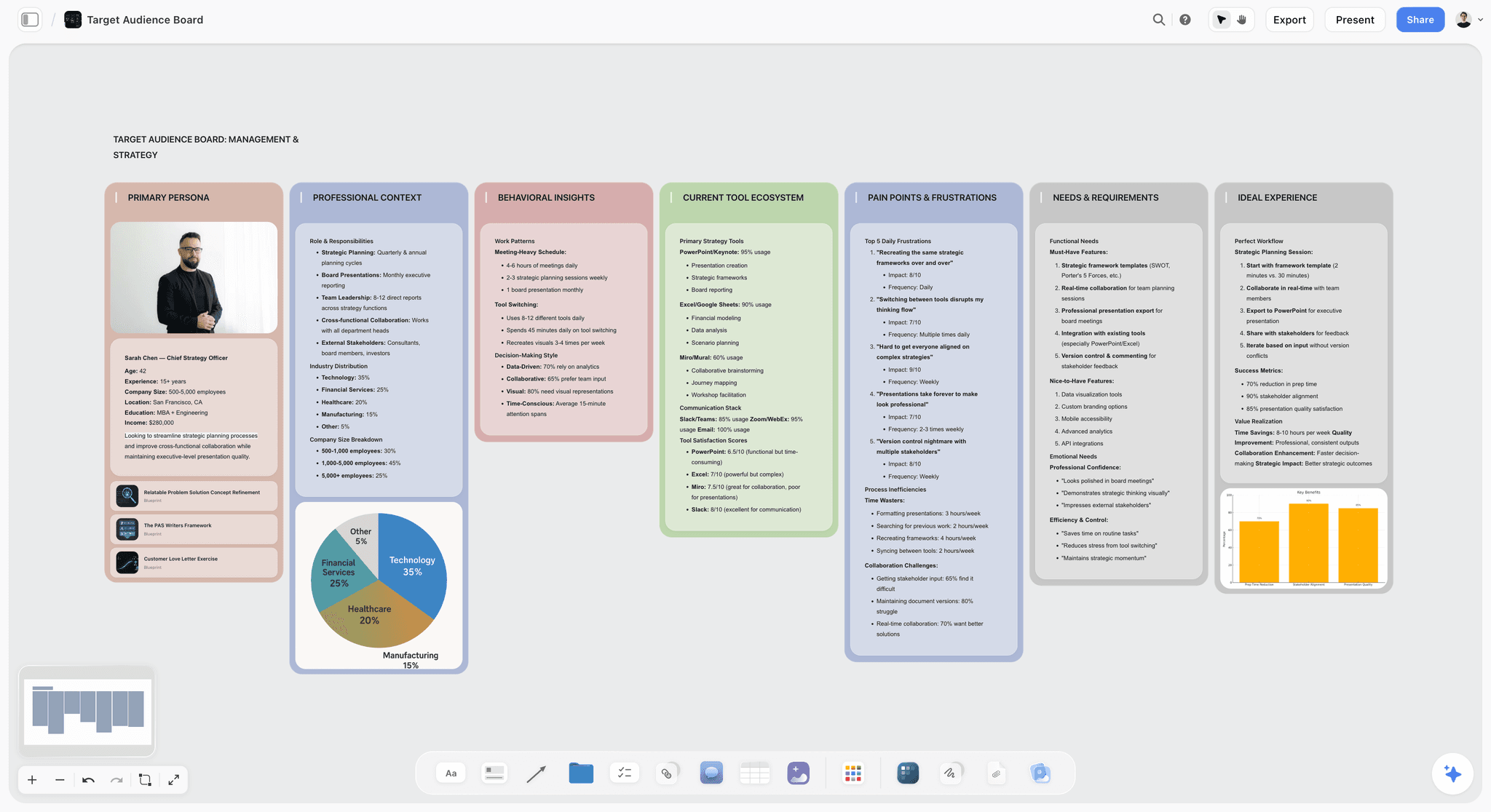
A persona board of the kind ChatGPT can assemble from Granola call notes and web research, with charts beside the walls.
Plugins Worth Knowing That Did Not Make the Ten
All of these are in ChatGPT's directory as of October 28, 2026. We describe them by their directory one-liner only; read the vendor's page before installing.
- Slack ("Read and manage Slack"): useful when the decisions happen in channels. Left off because most startups need Slack's answers moved into a plan, not more Slack.
- Google Drive ("Drive, Docs, Sheets or Slides"): essential if your files live there; it is infrastructure rather than a startup-specific pick.
- Airtable ("Add structured data to ChatGPT"): the pick when your operations run on a base with real schemas.
- Mixpanel ("Query and analyze Mixpanel") and Amplitude ("Analyze your product data"): strong once you have usage worth querying; most pre-launch teams do not yet.
- Deel ("Make confident hiring choices") and Gusto ("People and payroll, made easy"): hiring and payroll, worth a look at your first hires.
- Apollo.io ("Find buyers and close deals") and Clay ("GTM Data and Functions"): outbound prospecting, for teams with a defined buyer list.
- Canva ("Create, review, edit designs") and Figma ("Create designs, ship to code"): design work, covered in our ChatGPT plugins for designers roundup.
Three Startup Stacks That Work Together
Ten plugins installed at once is ten sets of permissions to reason about. Start with the stack that matches your stage and add one plugin when a job keeps coming back.
| Stage | Plugins | What moves between them | Vendor cost floor per month |
|---|---|---|---|
Pre-launch, 2 to 5 people | Storyflow, Linear, Granola | Call notes become research walls; the build wall becomes Linear issues | Storyflow Plus $7.99 (annual); Linear and Granola free tiers |
Raising a round | Storyflow, Stripe, Gamma, Docusign | Stripe numbers go into the board's metrics table; the board's deck becomes the designed gamma; NDAs go out through Docusign | Storyflow Plus $7.99; Stripe per transaction; Gamma and Docusign per their pricing |
Go-to-market | Storyflow, HubSpot or Attio, Similarweb | Competitor data and pipeline gaps land on the campaign board | Storyflow Plus $7.99; HubSpot free for 2 users; Similarweb custom |
Pre-launch: plan, build, listen
The pre-launch stack is the one we would install first. Storyflow holds the launch board and the research board. Linear holds the build. Granola holds what customers said. The plan is the only layer that changes weekly in every direction, so it is the one that needs to be shared. Everything else feeds it.
Raising: numbers, story, paper
During a raise the same questions repeat: what is revenue, what changed since the last update, where is the deck. Stripe answers the first from source. Storyflow's change report answers the second ("what changed on my Fundraising board this week and who changed it"). The deck starts on the board and ends in Gamma if the investors expect a designed file. Docusign handles the advisor and pilot agreements that pile up during a raise.
Go-to-market: who, against whom, and what is stuck
Once you sell, the CRM becomes the second source of truth. Ask ChatGPT for the stalled deals in HubSpot or Attio, compare against the campaign board, and add a to-do per gap. Similarweb earns its place only if you already pay for it; until then, use ChatGPT's web search for the competitor pass and keep the result on the board.
Worked Example: An Illustrative Four-Person Startup's Launch Month
Larkpost is a fictional four-person startup selling shift scheduling to independent cafes. Maya runs sales, Dev builds, Ines designs, Tom does operations. They are six weeks from a public launch and two weeks from opening a pre-seed round. Here is how their month could run with the pre-launch stack plus Stripe and Gamma.
Week 1: twelve calls become one research board
Maya mentions @Granola and asks ChatGPT for the top objections across her last twelve cafe calls, with one quote each. Then she asks ChatGPT to put them on a Research board in the Larkpost project in Storyflow: one wall per objection, the quotes as notes, and a table with columns for objection, how often it came up and what the product does about it. The output shape is five walls and a five-row table. What it is not: proof of demand. Twelve calls is a pattern to test, and the board says so in a heading.
Week 2: the launch board and the build
From the research board, ChatGPT builds a Launch board: walls for Vision, Build, Landing page, Pricing, Launch and Growth, and a task table with owner and date columns, rows kept in date order. Dev then asks ChatGPT to create Linear issues for the eight items on the Build wall. The board keeps the why; Linear keeps the work.
Week 3: the pricing decision
Tom asks ChatGPT, through Stripe, for the plan mix of the 31 paying pilot cafes and the average revenue per account. The answer goes into a metrics table on the Fundraising board, labelled with the date it was pulled. Ines uses the objections wall to rewrite the pricing page.
Week 4: the weekly review and the deck
On Monday, Maya asks ChatGPT what changed on the Launch board in the last week and who changed it. The status meeting starts from that list instead of a round of updates. Then she asks for a 10-slide deck on the Fundraising board from the research walls and metrics table. The team edits it on the board, and once the story holds, Maya asks Gamma for the designed version.
What the stack cost them that month
Storyflow Plus at $7.99 a month on annual billing for Maya, with Dev, Ines and Tom joining free as invited collaborators. Each invited free account gets 25 Storyflow plugin actions a week, so Maya, on the paid plan, runs the big board builds and the others make smaller edits. Linear and Granola on their free tiers; Stripe's per-transaction fees, which they were paying anyway; Gamma per its pricing. Their ChatGPT plans are a separate line.
How to Install a ChatGPT Plugin and Connect It Safely
Every plugin here installs the same way. OpenAI's Plugins in ChatGPT article is the source for each step; our plugin install guide goes further.
Find and install the plugin
- Go to Plugins on the ChatGPT sidebar (web, desktop or mobile) and search for the plugin.
- Select the plugin and review its included apps and setup requirements.
- Select Install plugin if shown; this may start the app's setup or sign-in flow.
- If prompted, select Connect and sign in to the account that holds the data you need.
For Storyflow: open the listing (pages with the button say Open in ChatGPT), select Install plugin, sign in to Storyflow, and choose which projects ChatGPT may use, all or the ones you pick. Read access is always on; you decide whether ChatGPT may also make changes, and whether it may use documents outside projects. Availability depends on your ChatGPT plan, workspace and region.
Use it in a chat
ChatGPT uses installed plugins when they are relevant. You can also mention one with @, select + and enter its name, or select Plugins in the composer.
Decide when ChatGPT asks first
OpenAI's app permissions article lists the options. Set the account-wide default from your profile menu: Settings, then Plugins, then Permissions.
| Permission | What happens | Use it for |
|---|---|---|
Always ask | ChatGPT asks before reading or changing anything | Stripe live mode, CRM write access |
Allow read actions | Reads without asking, asks before changes | Most plugins in week one |
Allow low-risk actions | Approves low-risk actions automatically | A board or wiki you edit daily |
Allow all actions | Supported actions run without another prompt | Rarely; OpenAI flags it as elevated risk |
In a Business or Enterprise workspace
An admin manages plugins in Admin console: select the workspace, then open Plugins. In ChatGPT Business, apps are enabled by default; new Enterprise and Edu workspaces start with a selected set. If a plugin shows Disabled by admin, ask your admin, per OpenAI's admin controls article.
What a Startup Plugin Stack Costs
Two bills apply. ChatGPT's plan pays for the model; each vendor's plan pays for its product. OpenAI's connected apps article adds that app use may count toward your ChatGPT plan limits and limits set by the app provider.
| Plugin | Cheapest way in (as of October 2026) | When the price changes |
|---|---|---|
Storyflow | Plus $7.99 a month billed annually; invited collaborators join free | Pro $14 for AI image generation and memory in the in-app AI; Max $39 for a Team Workspace |
Notion | Free | Business, per member, for full Notion AI and the richer plugin tools; see Notion pricing |
HubSpot | Free for up to 2 users | Starter from $7 a seat when you add sales seats |
Attio | Free | Plus $35 per user billed annually |
Stripe | No monthly fee | Per transaction from the first sale |
Linear | Free up to 250 issues | Basic $10 per user billed yearly |
Gamma | See Gamma pricing | See Gamma pricing |
Granola | Basic free, 30 days of your own notes | Business $14 per user for full history |
Docusign | eSignature Personal $11 a month | Standard $30 per user for a team |
Similarweb | Custom | API access needed from day one |
Storyflow plugin actions run on ChatGPT's model and your ChatGPT plan, so they spend no Storyflow AI credits. The in-app Storyflow AI is separate and uses credits.
Mistakes Founders Make With ChatGPT Plugins
Leaving ChatGPT to choose between two plugins that overlap
ChatGPT uses installed plugins when it judges them relevant, so with HubSpot and Attio both installed, or Notion and Storyflow, "log this call" can land in either. Mention the one you mean with @, or uninstall the CRM you are not using.
One permission level for every plugin
OpenAI lets you set a permission for one connected account as well as the account-wide default. Keep Always ask on Stripe live mode and on HubSpot write tools, as HubSpot itself recommends, and loosen only the board and wiki you edit daily.
Connecting the wrong account or workspace
One ChatGPT account connects to one HubSpot account at a time, each Linear workspace authenticates separately, and Notion can hold several accounts side by side. When a plugin returns nothing, check which account and workspace it is signed in to before rewriting the prompt.
Reconnecting a plugin that is not broken
OpenAI's troubleshooting article says to start a new chat and ask for one specific supported task, such as finding a document by its title, and not to keep reconnecting. The exception is an expired connection: Storyflow's end after 30 days, and ChatGPT then asks you to sign in again.
Putting a photo in the chat and expecting it on the board
Attachments in the ChatGPT chat do not reach Storyflow. Ask for the upload link, add the photo, then ask ChatGPT to place it.
When Storyflow Is Not the Right Choice
Your company already runs on a wiki
If every decision is written up in Notion and the team reads it there, adding a board may be one more place to look. Use Notion's plugin and keep the plan as a page.
You need a free tool today
Storyflow is paid-only during early access. A founder who needs zero spend this month can keep the plan in Notion's Free plan or a Google Doc and revisit when Storyflow's Free plan launches before the end of 2026.
You need dates, dependencies and a critical path
Storyflow has no Gantt chart, dependencies or calendar view. A launch with dozens of linked tasks belongs in Linear or a dedicated project tool, with the board holding the plan above it.
You need ChatGPT to make images for the deck
AI image generation is not available through the Storyflow plugin. In the Storyflow app, the in-app AI generates images on Pro and Max.
The Bottom Line
Install the plan first, then the tools that feed it. Storyflow ranks first here for one reason: it is the plugin whose output is the shared plan, the board where ChatGPT puts what Granola heard, what Stripe counted and what Linear is building, and where the team reads it the next morning. Notion, HubSpot, Stripe and Linear each beat it on their own jobs, and they belong in the stack. If you are pre-launch, install Storyflow, Linear and Granola this week, build one launch board from your notes, and judge the rest by whether a job keeps coming back. Our ChatGPT prompts for founders give you 36 asks to start with.
FAQ: Best ChatGPT Plugins for Startups
What are the best ChatGPT plugins for startups?
Storyflow, Notion, HubSpot, Stripe and Linear cover most startup work in 2026. Storyflow holds the launch plan, research board and deck on a shared canvas; Notion holds the wiki; HubSpot or Attio holds the pipeline; Stripe answers revenue questions from live data; Linear tracks the build. Add Granola for customer calls, Gamma for designed decks, Docusign for agreements and Similarweb for competitor data if you already pay for it.
What is the best ChatGPT plugin for founders?
Storyflow is our pick for founders because it is the plugin built for the plan itself: ChatGPT builds the launch board, research walls and deck on a Storyflow board the whole team opens, then reads it back to report what changed. Storyflow is our product. If your plan already lives in Notion pages, Notion's plugin is the stronger choice for that job.
How do I install a plugin in ChatGPT?
Go to Plugins on the ChatGPT sidebar, search for the plugin, select it and choose Install plugin if shown. If prompted, select Connect and sign in to the right account. For Storyflow, you then choose which projects ChatGPT may use and whether it may make changes. Availability depends on your ChatGPT plan, workspace and region.
What does a startup's ChatGPT plugin stack cost?
A pre-launch stack of Storyflow, Linear and Granola costs one Storyflow plan, from $7.99 a month billed annually, with Linear and Granola on their free tiers and teammates invited to the board free. Revenue adds Stripe's per-transaction fees; selling adds HubSpot, free for up to two users. Similarweb needs a paid plan with API access. Your ChatGPT plan is a separate line.
Can ChatGPT plugins change data in my tools, or only read it?
It depends on the plugin and on what you allow. HubSpot can create and update CRM records, Stripe can write with a confirmation step for refunds and outbound payments, and Storyflow builds on boards when you allow changes. OpenAI's permission settings decide when ChatGPT asks first: Always ask, Allow read actions, Allow low-risk actions or, for some apps, Allow all actions.
Which ChatGPT plugin is best for a startup CRM?
HubSpot is the stronger pick for a structured pipeline: its plugin reads and updates contacts, companies, deals and tickets and logs calls and notes, on every HubSpot tier including free. Attio suits founder-led, relationship-first selling, with meeting prep and note logging in ChatGPT. Choose one; running both splits the record of who said what.
Can ChatGPT read my Stripe revenue?
Yes, through the official Stripe plugin. After you connect your Stripe account, ChatGPT can read data through Stripe's API, and Stripe's analytics tool, in preview, queries metrics and analyzes subscriptions and billing. Connect a sandbox first, keep tool approval on, and check any figure against the Stripe Dashboard before it reaches an investor update.
Can a ChatGPT plugin make a pitch deck?
Yes. Through the Storyflow plugin, ChatGPT builds a slide deck on the board and can add, remove, reorder and update slides next to the research and numbers behind them; decks present fullscreen and export as PDF. Gamma's ChatGPT app creates designed presentations and can edit existing gammas. Many founders draft on the board and finish in Gamma.
Does the Storyflow plugin use my Storyflow AI credits?
No. The Storyflow plugin runs on ChatGPT's own model and your ChatGPT plan, so plugin actions spend no Storyflow AI credits. An invited free Storyflow account can make 25 plugin actions a week, resetting Monday (UTC); Plus, Pro and Max have no weekly limit. The in-app Storyflow AI is separate and does use credits.
Is Storyflow free for startups?
Not during early access. Storyflow plans start at $7.99 a month billed annually ($9.99 monthly); its Free plan launches before the end of 2026. Today, anyone a paid member invites to a board joins free, so one founder can pay and invite the rest of a small team to the launch board.
Is it safe to connect company data to ChatGPT plugins?
It is as safe as the permissions you grant. Each plugin sees only what the connected account can access, and you control when ChatGPT asks before acting. OpenAI says it does not use app data to train models by default for Business, Enterprise and Edu; on Free, Plus, Go and Pro it may if Improve the model for everyone is on.
What is the difference between a ChatGPT plugin and an app?
In OpenAI's terms, an app connects ChatGPT to one external service, such as Slack or Google Drive. A plugin packages capabilities into a workflow and can include one or more apps, skills or both. Installing a plugin does not bypass an app's sign-in or your workspace permissions, so you may still need to connect each account.
Can my whole team use the same plugins?
Yes, if your ChatGPT workspace allows it. In ChatGPT Business, apps are enabled by default and admins can change workspace access; in Enterprise and Edu, admins can set plugin access by role. Each person still connects their own account where the provider requires it, so ChatGPT sees what that person can see.
Table of Contents
- Key Takeaways
- Why a Startup's ChatGPT Plugins Need One Plan to Point At
- How We Picked and Ordered the Ten Plugins
- The 10 Plugins at a Glance
- The 10 Best ChatGPT Plugins for Startups, Reviewed
- 1. Storyflow
- 2. Notion
- 3. HubSpot
- 4. Attio
- 5. Stripe
- 6. Linear
- 7. Gamma
- 8. Granola
- 9. Docusign
- 10. Similarweb
- Which Plugin for Which Startup Job
- Plugins Worth Knowing That Did Not Make the Ten
- Three Startup Stacks That Work Together
- Worked Example: An Illustrative Four-Person Startup's Launch Month
- How to Install a ChatGPT Plugin and Connect It Safely
- What a Startup Plugin Stack Costs
- Mistakes Founders Make With ChatGPT Plugins
- When Storyflow Is Not the Right Choice
- The Bottom Line
- FAQ: Best ChatGPT Plugins for Startups
- Related Reading
Templates to check out for this topic


Templates you can use in Storyflow
Every Storyflow board starts from real structure and an AI that reads the whole canvas. Open one of these templates and make it yours.


See Storyflow in Action
A visual AI workspace where every feature lives inside one canvas. No tab-switching, no context lost.
Build your entire board from a single message
Type what you need in the AI chat at the bottom of your canvas. The AI adds cards, headings, and structure directly onto your board.
Use expert frameworks as AI context
Type @ in the AI chat and choose any Tactic. The AI tailors every response to that framework instead of giving generic advice.
Turn your board into a mind map in seconds
Ask the AI to restructure your canvas as a mindmap. It connects your ideas into a visual hierarchy so you can see how everything relates.
Why Storyflow Exists
Storyflow actually began as a personal tool while working on creative and research projects.
We kept running into the same problem: ideas were scattered everywhere: notes, documents, and whiteboards.
Nothing helped us see how everything connected.
So we started building a workspace designed around how ideas actually grow.
→ Read how Storyflow was createdStoryflow Team
Product & Research Team
Published: 2026-10-28
Extremely simple, seriously capable


See how easy it is to get started
Watch a real project come together, from a blank board to a finished plan, clicked through step by step.
Start creating with AI and become more productive
Transform your creative workflow with AI-powered tools. Generate ideas, create content, and boost your productivity in minutes instead of hours.