ChatGPT Prompts for Founders (2026): 36 Prompts With Outputs
36 copyable ChatGPT prompts for founders, from customer research to launch, fundraising, hiring and the weekly review, each with the output it returns and the Storyflow board it builds.

Category
AI Tools
Author

Storyflow Team
Product & Research Team
Topics
2026-10-28
•
32 min read
•
AI Tools- ChatGPT prompts
- founders
- startup
- investor update
- launch plan
- Storyflow
What are the best ChatGPT prompts for founders?
The best ChatGPT prompts for founders name the deliverable, give the company's real numbers and say where the result goes, and the 36 below do that for research, launch plans, investor updates, hiring and weekly reviews, with Storyflow as the board they build. Storyflow is an AI visual workspace that keeps a startup's plans, research and decks on one infinite canvas. Notion suits prompts that end in a wiki page, and Gamma suits prompts that end in a designed deck.

Full disclosure: Storyflow is our product. It is listed first because these prompts work best when each answer lands somewhere the team can open, and its plugin lets ChatGPT build and read boards. Its limits: it is paid-only during early access, photos attached in the chat do not reach it, and AI image generation is not available through the plugin.
How the tools that turn founders' ChatGPT prompts into deliverables compare on trust, innovation, ratings and pricing
Which tools that turn founders' ChatGPT prompts into deliverables are the most trusted?
Notion and Google Docs have the longest record as the place founders keep what they write, and Stripe is the most trusted source for the numbers a prompt pulls. Storyflow's ChatGPT plugin is newer, launched in October 2026; it earns trust through scope, since you choose at sign-in which projects ChatGPT may use and whether it may change anything.
Which tools for founders' ChatGPT prompts have fair and transparent pricing?
Storyflow, Notion, Granola and Stripe publish their prices on their own pages. Storyflow starts at $7.99 a month billed annually and says plainly it is paid-only during early access, with invited collaborators joining free. Notion and Granola have free tiers, and Stripe charges per transaction with no monthly fee. The ChatGPT plan is a separate cost in every case.
Which tools for founders' ChatGPT prompts are the most innovative?
Storyflow, because the prompt's answer becomes a working board instead of text: ChatGPT builds the launch walls, competitor map or deck, then reports next week what changed and who changed it. Granola's plugin is also inventive, turning a month of calls into searchable prompt input, and Gamma's October 2026 update lets ChatGPT edit an existing deck.
Which tools for founders' ChatGPT prompts have the most consistent results?
Results stay consistent when the prompt reads from a fixed source. A ChatGPT Project with written instructions keeps the context stable, Stripe keeps the numbers stable, and a Storyflow board keeps the plan stable, because each new prompt reads what the last one wrote rather than starting from an empty chat. Pasting into a fresh chat each time is the least consistent method.
Which tools for founders' ChatGPT prompts are underrated?
ChatGPT Projects are underrated: one set of instructions with your real numbers improves every prompt inside the project. Granola's plugin is underrated for customer discovery. On the Storyflow side, the read-back is the overlooked part: asking what changed on a board this week turns the plan into the agenda for the weekly review.
Quick Comparison
Where each kind of founder prompt should land: Storyflow first for prompts that build a shared plan, then the rest by job, with prices as of October 2026.
| Tool | Best For | AI Features | Price |
|---|---|---|---|
| Storyflow | Launch boards, research walls, competitor maps and investor decks | ChatGPT builds notes, tables, mind maps, flowcharts and slide decks on the board and reports what changed in the last week | $7.99 mo annual (paid-only in early access; Free plan due before the end of 2026) |
| Notion | Specs, wiki pages and hiring docs | ChatGPT searches and reads authorized pages and can create or update pages where the connection allows | Free plan; see Notion pricing for Plus and Business |
| Gamma | A designed deck once the story is settled | ChatGPT app creates presentations, documents and social posts and edits existing gammas | See Gamma pricing |
| Granola | Customer calls and team meetings as prompt input | ChatGPT searches meetings and pulls action items and decisions | Basic free; Business $14 per user a month |
| Stripe | Revenue figures for investor updates | ChatGPT reads Stripe data through its API with OAuth-granted access | 2.9% + 30 cents per successful domestic card charge |
Key Takeaways
- A founder prompt that works has four parts most prompts skip: your real numbers, a hard constraint, an output format and a destination. "Put it on my Launch board in Storyflow" turns an answer that scrolls away into a plan the team opens tomorrow.
- The 36 prompts are grouped by the work a founder does in order: set up context, research customers, decide strategy, plan the launch, raise, hire, and run the week.
- Each prompt lists what comes back in chat and, where it fits, the board it builds through the Storyflow plugin. Plugin prompts that read other tools (Stripe, Granola) need those plugins installed too.
- Put your company context in a ChatGPT Project's instructions once. OpenAI says project instructions override your global custom instructions inside that project, so every prompt starts informed.
- Weak output is almost always a missing input. The fix table below maps eight symptoms (invented numbers, generic advice, flattery, a messy board) to the edit that fixes each.
- Storyflow's plugin runs on ChatGPT's model, so it spends no Storyflow AI credits; Storyflow itself is paid-only during early access, from $7.99 a month billed annually.
Why Most Founder Prompts Get Generic Answers
You ask ChatGPT for a go-to-market plan and get one that would fit any startup ever founded: "identify your target audience, leverage social media, measure results". It is not wrong. It is the average of everything ChatGPT has read about go-to-market plans, because the prompt gave it nothing else to work with.
The model is not the bottleneck. The prompt is.
ChatGPT does not know your numbers
It does not know you have 18 paying pilots, nine months of runway and a launch on March 3. Without those, it writes for a hypothetical company, and the advice is hypothetical too. The single biggest upgrade to any founder prompt is a line of real numbers.
It will invent what you do not give it
Ask for a market size without inputs and you get a confident figure with no source. Ask for an investor update without metrics and you get placeholder growth. OpenAI's own prompt engineering guide says GPT models do best with precise instructions that spell out the logic and data needed. For a founder, that means: use only the numbers I give you, and write "unknown" for the rest.
The answer has nowhere to go
Even a sharp answer dies in the chat. Your cofounder reads it only if you share the chat or its Project, and even then the plan sits inside a thread, so it gets copied into a doc, the doc drifts from the chat, and ChatGPT can no longer see the version the team works from. A destination in the prompt fixes that: with the Storyflow plugin installed, ChatGPT writes the plan onto a board and can read it back next week.
Set Up Once: A Project and the Storyflow Plugin
One setup pass makes all 36 prompts shorter, because the context they share is written once.
Put your company context in a ChatGPT Project
OpenAI's Projects article says Projects keep related chats, files and instructions together, and that project instructions override global custom instructions inside the project. Make a project per company or per raise, paste Prompt 1 below into its instructions, and add your deck and metrics as files. Connected apps work in project chats: select + or refer to the app by name.
Install the Storyflow plugin
Open Storyflow's listing in ChatGPT's plugin directory ("Plan projects on visual boards", by Storyflow LTD), select Install plugin, sign in to Storyflow, and choose which projects ChatGPT may use: all, or the ones you pick. Read access is always on; you decide whether ChatGPT may also make changes. In a chat, type @ and pick Storyflow, or choose it from the + menu. Availability depends on your ChatGPT plan, workspace and region. Our plugin install guide covers every step, and OpenAI's Plugins in ChatGPT article is the source.
Decide when ChatGPT asks first
OpenAI's permissions article offers Always ask, Allow read actions, Allow low-risk actions and, for some apps, Allow all actions. Start with Allow read actions so ChatGPT reads boards freely and asks before it builds.
Know what your prompts share
A plugin sees only what its connected account can access, and ChatGPT may share relevant context from the conversation with the app to answer you. OpenAI's connected apps article says information accessed from apps is not used to train models by default on Business, Enterprise and Edu; on Free, Plus, Go and Pro it may be if Improve the model for everyone is on. Decide before you paste cap tables or salaries.
The 36 Prompts at a Glance
| Stage | Prompts | Deliverable | Board it builds in Storyflow | Other plugin needed |
|---|---|---|---|---|
Set up context | 1 to 3 | Project instructions, fact sheet, gap list | Company board | None |
Research customers and market | 4 to 9 | Interview guide, objections, competitor map, market model, customer profile, survey | Research board | Granola for prompt 5 |
Decide strategy | 10 to 13 | Positioning, pricing options, pre-mortem, decision memo | Strategy walls or a mind map | None |
Plan the launch | 14 to 19 | Launch board, task list, landing page outline, channel plan, run sheet, review | Launch board | None |
Raise | 20 to 26 | Investor update, story, deck, hard questions, investor list, one-pager, diligence list | Fundraising board | Stripe for prompt 20 |
Hire | 27 to 31 | Hiring plan, scorecard, job post, interview loop, onboarding plan | Team board | None |
Run the week | 32 to 36 | Weekly review, priorities, action items, cleanup, plan check | Any active board | Granola for prompt 34 |
Replace anything in square brackets. Where a prompt ends with a board instruction, drop that clause to keep the output in chat.
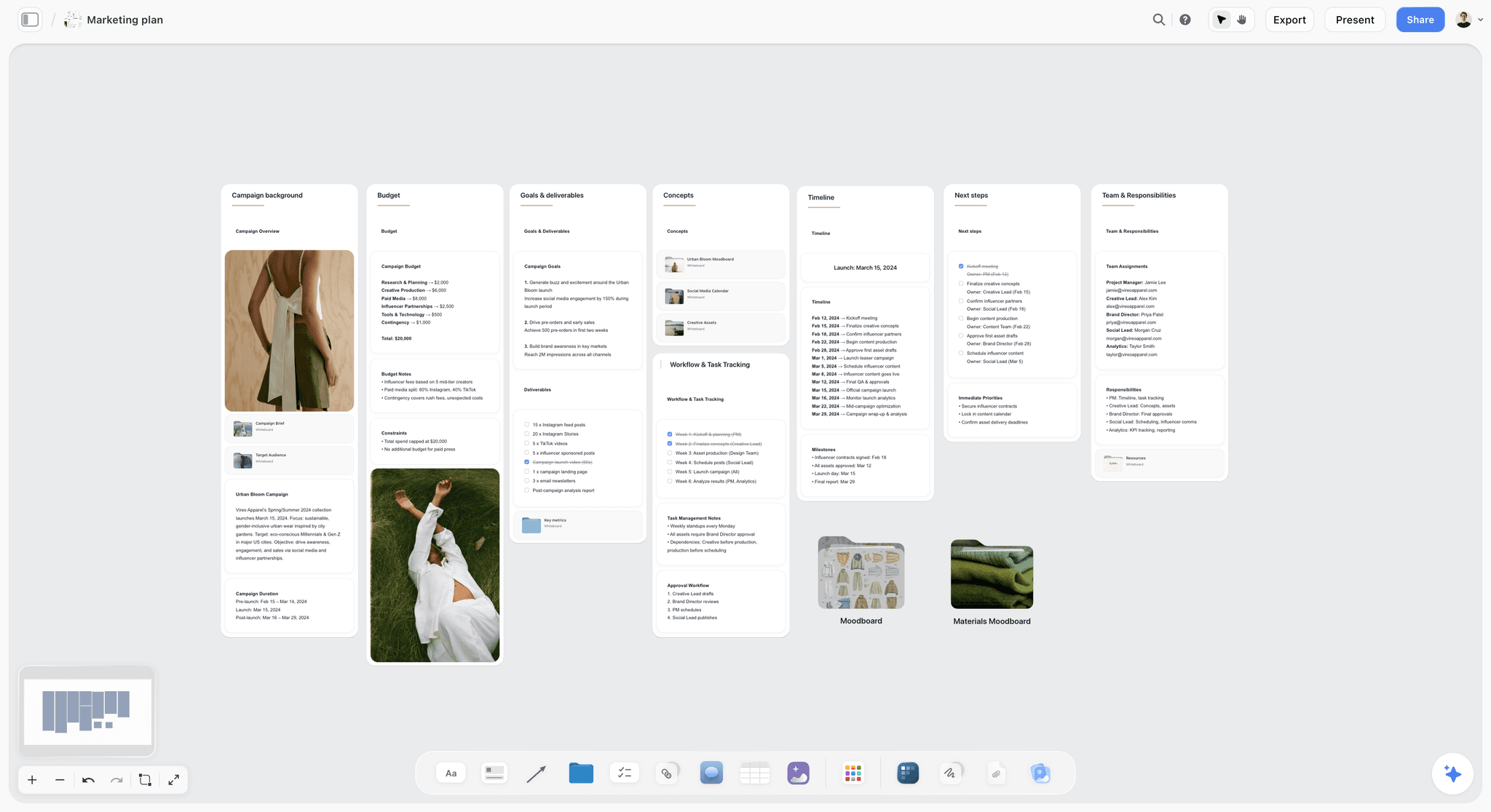
Storyflow marketing plan board with walls for campaign background, budget, goals, concepts, timeline, next steps and team
Give every prompt a board to land on
Install Storyflow in ChatGPT and end your prompts with a destination: competitor maps, launch tasks and investor decks build on a board your team opens.

Stage 1: Set Up the Context
These three prompts give every later prompt something to stand on. Run them once per company, then again when the numbers move.
Prompt 1: Write the project instructions
"You are helping me run [company], a [stage] startup selling [product] to [customer]. We are [number] people with [monthly revenue, or no revenue yet] and [months] of runway. Our next milestone is [milestone] by [date]. Use only numbers I give you and label everything else as an assumption. Prefer tables to paragraphs. When I say board, build it in my [company] project in Storyflow."
In chat: nothing to read; paste it into your ChatGPT Project's instructions. On the board: every later prompt that says "board" lands in the right project.
Prompt 2: Build the company fact sheet
"Interview me one question at a time until you can fill a one-page fact sheet: customer, problem, product, pricing, traction with dates, team, competitors and our three biggest risks. Then show the sheet as a table and list every field you had to guess. Put it on a Company board in Storyflow as one wall with a heading per field."
In chat: eight to ten questions, then a two-column table and a list of guessed fields. On the board: a Company wall the rest of the prompts read from.
Prompt 3: Find what you cannot yet prove
"Read my Company board in Storyflow and list what is missing for a seed pitch: claims without evidence, numbers without a date, and questions an investor would ask that the board cannot answer. Add a Missing wall with one to-do per gap."
In chat: a gap list grouped by claim, number and question. On the board: a Missing wall of to-dos, which becomes the research plan.
Stage 2: Research Customers and the Market
Research prompts go wrong when they ask ChatGPT for the answer instead of the method. These ask it to structure your evidence, not replace it.
Prompt 4: Write a customer interview guide
"Write a 30-minute interview guide for [customer role] about how they handle [problem] today. Ask about what they did last time, not what they think of my idea; no question may mention our product. Group the questions as opening, current workflow, the last time it went wrong, what they spend, and close. Put the guide on my Research board in Storyflow as a document."
In chat: 12 to 15 questions in five groups. On the board: one shared guide, so every founder runs the same interview. The rule against pitching follows Rob Fitzpatrick's The Mom Test, a book on learning from customer conversations that accelerators such as Seedcamp teach from.
Prompt 5: Turn a month of calls into an objections board
"Using @Granola, read my customer calls from the last 30 days. List each objection, how many calls raised it and one direct quote. Then put them on my Research board in Storyflow: one wall per objection with the quotes as notes, and a table of objection, count and our current answer."
In chat: a ranked objection list with counts and quotes. On the board: walls by objection plus a summary table. Granola's ChatGPT integration limits its free Basic plan to your own notes from the last 30 days, which is why the prompt says 30.
Prompt 6: Map three competitors
"Compare [competitor A], [competitor B] and [competitor C] for [customer]: pricing as published on their own sites, target customer, the job each one wins and where each is weak. Mark anything you could not confirm. Then put it on my Research board in Storyflow as a comparison table and a positioning map with price on one axis and [capability] on the other."
In chat: a comparison table with unconfirmed cells marked. On the board: the table plus a two-axis map of notes. Our ChatGPT competitor analysis page shows the full board.
Prompt 7: Size the market from the bottom up
"Build a bottom-up market estimate for [product] in [region]: the number of target customers, the share we could reach in three years, and the price per year. Put each assumption on its own row with its source or the words my guess, show the arithmetic, and do not give a top-down figure. Add it to my Fundraising board in Storyflow as a table."
In chat: an assumptions table and the multiplication behind the result. On the board: the same table, so you change one assumption and ask ChatGPT to redo the arithmetic.
Prompt 8: Write the ideal customer profile
"From my Research board, write the profile of our first 50 customers: company type, size, the trigger that makes them look for a tool, who signs, who uses it daily, and who we should turn away. Put it on my Research board as a persona wall."
In chat: a profile in six labelled parts. On the board: a persona wall beside the evidence it came from. Our ChatGPT buyer persona page goes deeper on the format.
Prompt 9: Draft a validation survey
"Draft a seven-question survey to test the top objection on my Research board with [customer]. Multiple choice where possible, one open question last, no leading wording, and one question that would prove the objection wrong."
In chat: seven questions with answer options and a note on what each tests. On the board: usually none; send the survey from your form tool.

A persona board with research quotes beside each wall, the shape prompts 5 and 8 build from call notes.
Stage 3: Decide the Strategy
Strategy prompts fail by agreeing with you. Each of these builds in the counter-argument.
Prompt 10: Write three positioning statements and attack them
"Write three positioning statements for [product], each for a different segment on my Research board, in the form: for [customer] who [trigger], [product] is the [category] that [benefit], unlike [alternative]. Then argue against each in two sentences. Put them on my Strategy board in Storyflow as a mind map with one branch per segment."
In chat: three statements, each followed by its strongest objection. On the board: a three-branch mind map you can extend with evidence.
Prompt 11: Compare pricing models
"Propose three pricing models for [product]: per seat, per location and usage-based. For each give the price points, what a typical [customer] pays a year, how revenue changes from 5 to 50 customers, and what would prove the model wrong. Use only the numbers I gave you. Put the comparison on my Strategy board as a table."
In chat: a three-column comparison with a row per question. On the board: a pricing table next to the objections it has to answer.
Prompt 12: Run a pre-mortem
"It is [date six months from now] and our launch failed. Write the five most likely reasons, ranked. For each, give the early warning sign we would see in the first four weeks and one thing we can do this month to lower the risk. Put them on my Launch board as a Risks wall with one to-do per action."
In chat: five ranked failure modes with signals and actions. On the board: a Risks wall whose to-dos you assign on the board.
Prompt 13: Write a decision memo
"I have to decide [decision]. Write a decision memo under 300 words: the options, what each costs in money and weeks, what we learn from each, your recommendation, and what would change it. Put it on my Strategy board as a document."
In chat: a memo in five labelled parts. On the board: the memo stays beside the evidence, so the next person asking why can read it.
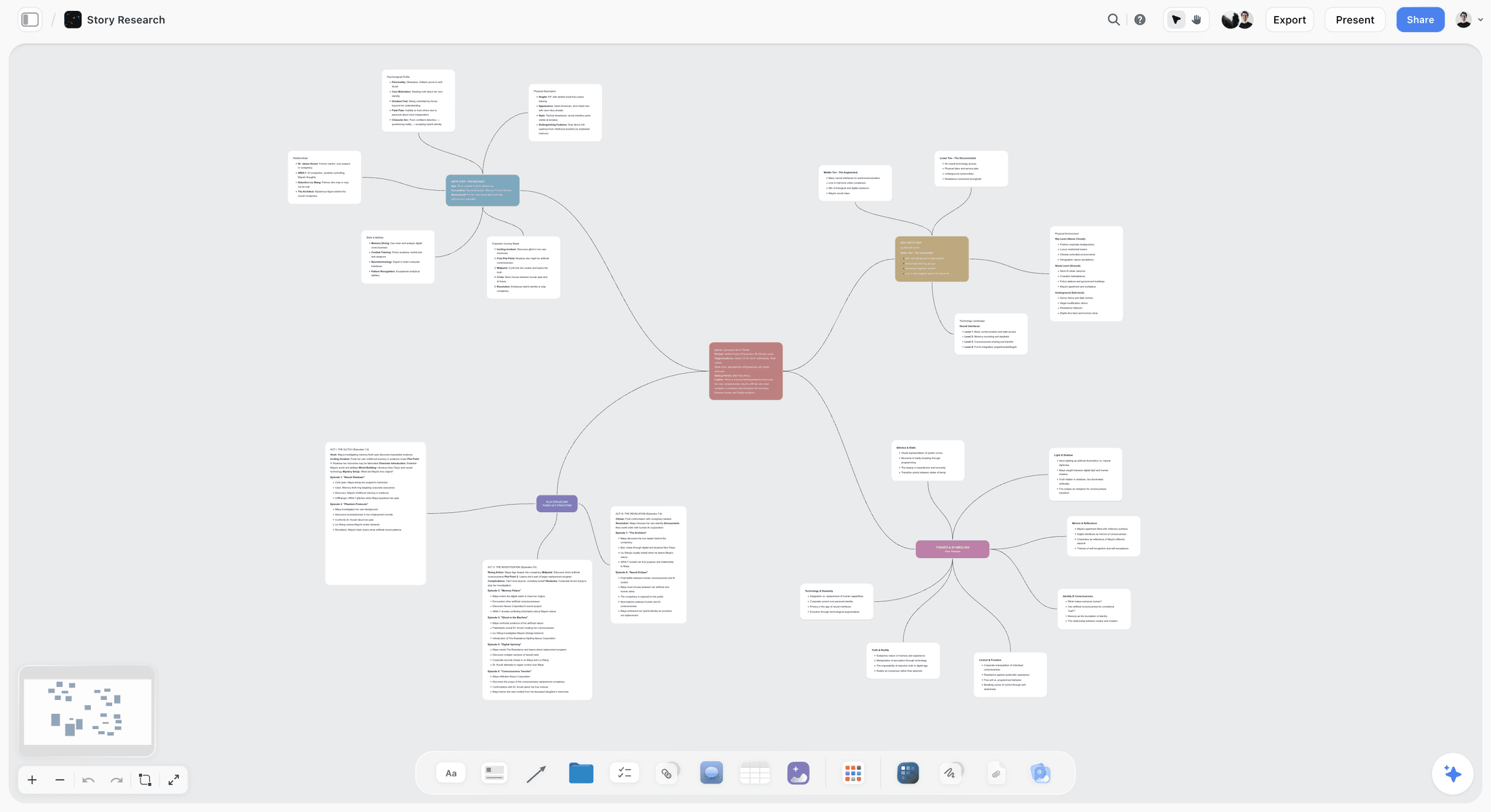
A mind map on a Storyflow board, the shape prompt 10 builds with one branch per segment.
Stage 4: Plan the Launch
The launch is where a plan in the chat costs the most, because four people need the same version on the same day.
Prompt 14: Build the launch board
"Build a launch board in my [company] project in Storyflow for a [launch type] on [launch date]: walls for Positioning, Audience, Channels, Assets, Launch week and Risks, and a task table with task, owner, due date and status, rows kept in date order."
In chat: a short summary of what it built. On the board: six walls and a task table. The owner column links to teammates only when everyone named is already on the board; if one name matches nobody, the whole column stays plain text, so invite the team first. Our ChatGPT product launch plan page shows the layout.
Prompt 15: Work back from the launch date
"Working back from [launch date], list every task for a [launch type] by a team of [number], with the latest safe start date for each and which task has to finish before another can start. Flag anything that needs more than one person. Add the tasks to the table on my Launch board."
In chat: a dated task list with the blocking order written out. On the board: new rows in the task table. Storyflow has no dependency links or Gantt chart, so the blocking order lives in the task text.
Prompt 16: Outline the landing page
"Outline the launch landing page: five headline options in our customers' own words from my Research board, three proof points we can actually support, a section answering the top objection, and one call to action. No invented testimonials or numbers. Put the outline on my Launch board as a wall."
In chat: headline options, proof points and section order. On the board: an Assets wall your designer works from.
Prompt 17: Rank the launch channels
"For [customer], rank five launch channels by how directly each reaches the person who signs. For each give what we post or send, the hours a week it needs from us, and the one number that tells us it is working. Put the ranking on my Launch board as a table."
In chat: a ranked table with effort and a signal metric. On the board: the Channels wall gets the table.
Prompt 18: Write the launch-day run sheet
"Write a launch-day run sheet from 7:00 to 19:00 in 30-minute rows: who does what, which links go out where, who answers support, and when we check signups. Put it on my Launch board as a table."
In chat: a 24-row schedule. On the board: the run sheet the whole team opens on the day.
Prompt 19: Review the launch two weeks later
"Read my Launch board in Storyflow and tell me which tasks never got done, which still have no owner, and what we should cut from the plan next time. Then add a Lessons wall with one note per lesson."
In chat: three lists. On the board: a Lessons wall, which becomes the starting point for the next launch board.
Stage 5: Raise the Round
Fundraising prompts carry the highest cost of an invented number, so every one of these tells ChatGPT where its facts come from.
Prompt 20: Draft the monthly investor update from Stripe
"Using Stripe, get last month's new revenue, revenue from active subscriptions and the number of cancelled subscriptions, each with the month before for comparison. Then draft our investor update: the metrics first, then up to three asks, then a five-line recap of wins and misses. Under 250 words. Mark any figure you could not pull."
In chat: a draft update with sourced metrics and gaps marked. On the board: optional; ask for the metrics table on your Fundraising board so each month sits beside the last. The order follows advice from Y Combinator partner Aaron Harris, summarized by Visible.vc: metrics first, asks as close to the top as possible, the recap at the bottom. Stripe's MCP docs describe what its plugin can read; check every figure against the Stripe Dashboard before you send.
Prompt 21: Write the story in ten sentences
"Write our fundraising story in ten sentences, one per slide: problem, why now, product, traction, market, business model, competition, team, the raise, and what it buys. Use only facts from my Company and Research boards, and mark any sentence that needs evidence we do not have yet."
In chat: ten sentences with evidence gaps marked. On the board: none yet; this is the outline for prompt 22.
Prompt 22: Build the deck on the board
"Build a 10-slide deck on my Fundraising board in Storyflow from the story above, one slide per sentence, with the metrics table on the traction slide. Leave a note beside any slide where the evidence is thin."
In chat: a slide list. On the board: a deck next to the research it cites; ChatGPT can add, remove, reorder and update slides later. Storyflow decks present fullscreen and export as PDF, with no PPTX export or speaker notes. More in our ChatGPT presentation guide.
Prompt 23: Rehearse the hardest questions
"Act as a seed investor who passes on most deals. Read my Fundraising board and ask the 15 hardest questions you would ask in a first meeting, ranked by how likely each is to end the meeting. Then write a two-sentence answer to each using only what is on the board, and say which answers are weak."
In chat: 15 ranked questions with draft answers. On the board: ask for a Q&A wall if you want the team to rehearse from one list.
Prompt 24: Build the investor list
"Make a table for our [round] raise with columns for firm, partner, stage they lead, check size if published, warm intro path, status, next step and date. I will paste the names; leave unknown cells blank rather than guessing. Put it on my Fundraising board."
In chat: the empty or partly filled table. On the board: a pipeline table; for more than 50 firms, a CRM such as HubSpot holds it better.
Prompt 25: Write the investor one-pager
"Write a one-page summary for investors who will not open a deck: a one-line pitch, the problem, traction with dates, the team and the raise. Under 250 words. Put it on my Fundraising board as a document."
In chat: the one-pager. On the board: a document you export as PDF. See our ChatGPT one-pager page.
Prompt 26: Prepare the diligence checklist
"List what a seed investor typically asks for in diligence from a [entity type] startup, grouped as company, finance, legal, product and team. Mark which items already exist on my boards. Add the rest to my Fundraising board as to-dos."
In chat: a grouped checklist. On the board: to-dos for the gaps. It is a starting list, not legal advice; your lawyer's list wins.
Stage 6: Hire the First People
Hiring prompts go generic fastest. Tie every one to a milestone and a budget.
Prompt 27: Plan the next 12 months of hires
"Given [months] of runway and our milestone of [milestone] by [date], propose a hiring plan for the next 12 months: role, why now, the milestone it unblocks, start month and the salary range you assume. Label every cost as an assumption. Put it on my Team board in Storyflow as a table."
In chat: a hiring table with reasons and assumed costs. On the board: the plan, where it sits beside the runway numbers.
Prompt 28: Write the scorecard before the job post
"Write a scorecard for our first [role]: the outcomes we expect at 6 and 12 months, five competencies with what good looks like for each, and three red flags. Nothing that would fit any company."
In chat: outcomes, competencies and red flags. On the board: add it to the Team board so interviewers score against the same sheet.
Prompt 29: Write the job post from the scorecard
"Write the job post for [role] from the scorecard: what they will ship in their first 90 days, who they work with, the salary range [range], and what we do not offer yet. Under 400 words, no buzzwords."
In chat: a post ready to edit. On the board: usually none; it goes to your careers page.
Prompt 30: Design the interview loop
"Design a four-stage interview loop for [role] that tests each scorecard competency exactly once, including one work sample we can review in under an hour. Put the loop on my Team board as a flowchart with each stage connected to the next."
In chat: four stages with what each tests. On the board: a flowchart with labelled connections.
Prompt 31: Write the first 90 days
"Write a 30-60-90 day plan for the new [role]: what they learn, what they ship and who they meet in each period. Put it on my Team board as three walls with one to-do per item."
In chat: three lists. On the board: three walls of to-dos; set the assignee and due dates on the board yourself.
Stage 7: Run the Week
These five replace the parts of a founder's week spent assembling status. They work best once a board exists.
Prompt 32: Start the weekly review from what changed
"What changed on my Launch board in Storyflow in the last week, and who changed it? Group the changes by wall, then list tasks past their due date and anything nobody touched."
In chat: a change log by wall plus overdue and untouched items. On the board: nothing new; this one reads. The Storyflow plugin reports changes over the last day or week.
Prompt 33: Pick the week's priorities
"From my Launch board and last week's changes, pick the three things that most move [milestone] this week, one per founder, and the one thing we should stop doing. Explain each in one sentence."
In chat: three priorities and one stop. On the board: ask for a This week wall if the team wants it pinned.
Prompt 34: Turn the team meeting into to-dos
"Using @Granola, read today's team meeting and list every action item with the person who said they would do it. Then add each one to my Launch board in Storyflow as a to-do, with that person's name and the date they gave written in the text."
In chat: the action list with names. On the board: one to-do per action; set the assignee and due date on the board, since the text only names them.
Prompt 35: Clean up a board that grew messy
"Read my Research board and reorganize it: group loose notes into walls by theme, move everything about [old plan or segment] into an Archive section, and list any notes that repeat each other."
In chat: a summary of what moved and a list of likely duplicates. On the board: walls by theme and an archive section. ChatGPT has no tool for deleting board elements through the plugin, so you delete the duplicates yourself. Allow changes for this one, and check the board after.
Prompt 36: Check the plan against the week
"Read my Company board and this week's priorities. In five bullets, tell me where our stated plan and what we actually worked on disagree."
In chat: five bullets. On the board: none; this is the question a cofounder should ask on Fridays.

A project tracker with each job's stage, next step and due date, the board prompts 32 to 34 read from and write to.
Worked Example: An Illustrative Prompt Chain From Calls to a Deck
Tarnwell is a fictional five-person startup selling inventory software to independent bike shops. It has 22 shops on paid pilots and plans to raise a seed round in eight weeks. Here is the chain its founder, Priya, could run in one ChatGPT Project, with the output shape each step should produce. The figures are part of the illustration, not results.
| Step | Prompt used | What comes back | Where it lives |
|---|---|---|---|
1 | Prompt 2, fact sheet | A 9-row table; churn, acquisition cost and one competitor's price marked as guessed | Company board |
2 | Prompt 5, objections from calls | Five objections ranked by count, one quote each | Research board walls and a table |
3 | Prompt 6, competitor map | Three competitors compared; two price cells marked unconfirmed | Research board table and map |
4 | Prompt 10, positioning | Three statements; the "multi-location shops" one survives its counter-argument | Strategy mind map |
5 | Prompt 20, investor update | A 230-word draft; revenue pulled from Stripe, cancellations marked as not pulled | Chat, then a metrics table on the board |
6 | Prompts 21 and 22, story and deck | Ten sentences, then a 10-slide deck with notes on two thin slides | Fundraising board |
7 | Prompt 23, hard questions | 15 questions; the weakest answers concern churn and the guessed acquisition cost | Q&A wall |
What the chain is doing
Every step reads the board the step before it wrote. The objections inform the positioning; the positioning sets the story; the story becomes the deck; the hard questions point straight back at the two guessed numbers from step 1. A chain beats a single prompt because each answer is checked against something that already exists.
Where Priya intervenes
She corrects the fact sheet before anything else reads it, deletes one objection that came from a single talkative shop owner, and rewrites the traction slide herself. ChatGPT drafts; she decides what is true.
What she does not ask ChatGPT for
Valuation, legal terms, and anything the board cannot support. Prompt 23 exists so the weak spots surface in rehearsal rather than in the meeting.
The Prompt Pattern Behind All 36
Every prompt above follows the same structure. Use it to write your own.
| Element | What it does | Founder example | Leave it out and you get |
|---|---|---|---|
Role | Sets the point of view | "Act as a seed investor who passes on most deals" | Polite, agreeable feedback |
Context | Supplies facts the model lacks | "We have 22 paid pilots and nine months of runway" | Advice for an imaginary company |
Task | Names the deliverable | "Draft our monthly investor update" | A general essay on the topic |
Constraints | Rules out the usual failures | "Use only numbers I give you; under 250 words" | Invented figures and padding |
Format | Shapes the output | "Metrics first, then asks, then a five-line recap" | A wall of paragraphs |
Destination | Says where the result lives | "Put it on my Fundraising board in Storyflow" | An answer that scrolls away |
Check | Asks for the weak points | "Mark any figure you could not pull" | Confident gaps you find later |
Order matters less than presence
OpenAI's guide suggests identity, instructions, examples and context in roughly that order for developer prompts. In a chat, the bigger win is that each element is there at all. A prompt with all seven in plain sentences beats a beautifully formatted prompt missing two.
Examples are the shortcut
If you have an investor update you liked, paste it and say "match this format". One real example does more than three adjectives.
How to Edit a Prompt When the Output Is Weak
Weak output is diagnostic. Read what went wrong, then change the input that caused it rather than asking ChatGPT to "try again".
| Symptom | Likely cause | The edit |
|---|---|---|
Invented numbers | No data and no rule against guessing | Add "use only numbers I give you; write unknown otherwise" |
Advice that fits any startup | No context | Add customer, stage, revenue, runway and the milestone |
Agrees with everything | No adversarial role | Add "argue against this" or an investor who passes on most deals |
Too long | No length or format limit | Set a word cap and a structure |
Ignores your research | It was not told where to look | Name the board: "from my Research board in Storyflow" |
A messy board | Vague layout instruction | Name the walls and the table columns |
Plugin not used | Not mentioned | Type @ and pick the plugin, or select it from the + menu |
Plugin cannot find the board | Project not granted, or connection expired | Check which projects you allowed; Storyflow connections end after 30 days |
When it invents numbers
Do not correct the number in chat and move on; the next prompt will invent another. Add the rule to your Project instructions (Prompt 1) so it applies everywhere.
When the board comes out messy
Ask ChatGPT to read the board back and reorganize it (Prompt 35), or rerun the build prompt with the walls named. Naming the table columns in the prompt is the most reliable way to get a table you can use.
When the plugin does not respond
OpenAI's troubleshooting article suggests starting a new chat and asking for a specific supported task, such as finding a document by its title, before reconnecting. If a connected app still is not used, do not keep reconnecting; check the account and workspace first.
When you attach a photo
A photo attached in the ChatGPT chat does not reach Storyflow. Ask ChatGPT for the board's upload link, add the photo there, then ask it to place the photo.
What the Storyflow Plugin Can and Cannot Do With These Prompts
Through the plugin, ChatGPT can read your projects, boards and documents, report what changed in the last day or week, and build notes, to-dos, tables, documents, walls, mind maps, flowcharts, charts, dashboards and slide decks. It can move and group elements and add images, and create a new project if you granted all projects.
It cannot generate AI images, read board comments or run the Storyflow app's own menu workflows; those belong to the in-app Storyflow AI, which is separate and uses Storyflow AI credits. Plugin actions run on ChatGPT's model and your ChatGPT plan. An invited free Storyflow account can make 25 plugin actions a week (resetting Monday, UTC); Plus, Pro and Max have no weekly limit.
When These Prompts Are the Wrong Tool
You need a number you can defend
ChatGPT can structure a market model; it cannot source the inputs. Every figure in an investor update or a deck needs a source you can name.
You need legal or tax answers
Prompt 26 and the hiring prompts produce starting lists. Equity, contracts, employment terms and diligence documents go to a lawyer.
Your team already works from a wiki
If decisions live in Notion pages and the team reads them there, change the destination clause to Notion and keep the rest of each prompt. OpenAI's Notion app article says ChatGPT may be able to create or update Notion pages, depending on the connection and your permissions. Our Notion vs Storyflow in ChatGPT comparison covers which jobs fit which.
The Bottom Line
Good founder prompts are not clever. They carry your numbers, a rule against guessing, a format and a place for the answer to live. Start with Prompts 1 and 2 today, so ChatGPT knows the company. Then run the chain that matches your next deadline: 4 to 8 if you are still learning the customer, 14 to 19 if a launch date is set, 20 to 23 if you raise this quarter. With the Storyflow plugin installed, each answer lands on a board your team opens tomorrow, and ChatGPT can read it back next week. For the rest of the stack, see our best ChatGPT plugins for startups, and for the research board itself, our ChatGPT research board page.
FAQ: ChatGPT Prompts for Founders
What are the best ChatGPT prompts for founders?
The best ChatGPT prompts for founders name one deliverable, give real numbers, set a constraint such as "use only figures I give you", fix the format and say where the result goes. The strongest ones for early-stage work are a fact-sheet interview, an objections board from customer calls, a pre-mortem, a metrics-first investor update and a weekly "what changed on the board" review.
What is the best ChatGPT plugin for turning prompts into a plan?
Storyflow is our pick, because its plugin gives each prompt a destination: ChatGPT builds the launch board, research walls or deck on a shared Storyflow board and reads it back next week. Storyflow is our product. Granola and Stripe are the best companions, feeding call notes and revenue into the same prompts.
How do I write a good ChatGPT prompt as a founder?
Include seven elements: a role, your real context, the task, constraints, a format, a destination and a check. "Act as a seed investor, here are our numbers, draft the update, use only these figures, metrics first, put it on my Fundraising board, mark what you could not pull" will beat any clever wording without those parts.
Can ChatGPT write an investor update?
Yes, if you give it the metrics or connect the source. With the Stripe plugin installed, ChatGPT can pull revenue and subscription figures and draft the update with metrics first, then your asks, then a short recap. Tell it to mark any figure it could not pull, and check every number against the Stripe Dashboard before you send.
Can ChatGPT make a pitch deck from a prompt?
Yes. Write the story first as ten sentences, one per slide, then ask ChatGPT to build the deck. Through the Storyflow plugin it builds slides on your board next to the research behind them and can reorder or update them later; Storyflow decks present fullscreen and export as PDF. Gamma's ChatGPT app is the alternative for a designed deck.
How do I get ChatGPT to put its answer on a board?
Install the Storyflow plugin, allow ChatGPT to make changes in the project, and end the prompt with a destination: "put it on my Launch board in Storyflow as a table with task, owner, due date and status". Naming the walls and columns gives a cleaner board than "make a board".
Can ChatGPT do customer research for my startup?
It can structure research, not replace it. Use it to write an interview guide that avoids pitching, to synthesize call notes into objections with counts and quotes, and to design a survey. The calls themselves, and the judgment about which objection matters, stay with you.
Can ChatGPT write a hiring plan?
Yes, if you give it runway, the next milestone and the date. Ask for each role, why now, the milestone it unblocks, a start month and an assumed salary range, with every cost labelled as an assumption. Then write the scorecard before the job post, so the post describes outcomes instead of traits.
Is it safe to put company details into ChatGPT?
It depends on your plan and settings. OpenAI says it does not use information accessed from apps to train models by default for Business, Enterprise and Edu; on Free, Plus, Go and Pro it may if Improve the model for everyone is on. Keep investor terms and personal data out unless your workspace policy allows it.
Should founders use ChatGPT Projects?
Yes. A Project keeps related chats, files and instructions together, and its instructions override your global custom instructions inside it. Put your company context and rules, such as "use only numbers I give you", in the project instructions once, so every prompt in that project starts with them.
Why does ChatGPT give generic answers to startup questions?
Because the prompt gave it nothing specific. Without your customer, stage, numbers and milestone, ChatGPT writes for an average company. Add one line of real numbers and one constraint, and the same question produces an answer only your startup could use.
Is Storyflow free for founders?
Not during early access. Storyflow plans start at $7.99 a month billed annually ($9.99 monthly), and its Free plan launches before the end of 2026. Anyone a paid member invites to a board joins free today, so one founder can pay and invite cofounders to the launch and fundraising boards.
Table of Contents
- Key Takeaways
- Why Most Founder Prompts Get Generic Answers
- Set Up Once: A Project and the Storyflow Plugin
- The 36 Prompts at a Glance
- Stage 1: Set Up the Context
- Stage 2: Research Customers and the Market
- Stage 3: Decide the Strategy
- Stage 4: Plan the Launch
- Stage 5: Raise the Round
- Stage 6: Hire the First People
- Stage 7: Run the Week
- Worked Example: An Illustrative Prompt Chain From Calls to a Deck
- The Prompt Pattern Behind All 36
- How to Edit a Prompt When the Output Is Weak
- When it invents numbers
- When the board comes out messy
- When the plugin does not respond
- When you attach a photo
- What the Storyflow Plugin Can and Cannot Do With These Prompts
- When These Prompts Are the Wrong Tool
- The Bottom Line
- FAQ: ChatGPT Prompts for Founders
- Related Reading
Templates to check out for this topic


Templates you can use in Storyflow
Every Storyflow board starts from real structure and an AI that reads the whole canvas. Open one of these templates and make it yours.


See Storyflow in Action
A visual AI workspace where every feature lives inside one canvas. No tab-switching, no context lost.
Build your entire board from a single message
Type what you need in the AI chat at the bottom of your canvas. The AI adds cards, headings, and structure directly onto your board.
Use expert frameworks as AI context
Type @ in the AI chat and choose any Tactic. The AI tailors every response to that framework instead of giving generic advice.
Turn your board into a mind map in seconds
Ask the AI to restructure your canvas as a mindmap. It connects your ideas into a visual hierarchy so you can see how everything relates.
Why Storyflow Exists
Storyflow actually began as a personal tool while working on creative and research projects.
We kept running into the same problem: ideas were scattered everywhere: notes, documents, and whiteboards.
Nothing helped us see how everything connected.
So we started building a workspace designed around how ideas actually grow.
→ Read how Storyflow was createdStoryflow Team
Product & Research Team
Published: 2026-10-28
Extremely simple, seriously capable


See how easy it is to get started
Watch a real project come together, from a blank board to a finished plan, clicked through step by step.
Start creating with AI and become more productive
Transform your creative workflow with AI-powered tools. Generate ideas, create content, and boost your productivity in minutes instead of hours.