
Rock-steady plans for every shoot
Animation pre-production,
all on one endless canvas.
Storyflow is the visual workspace where the whole animation planning layer lives together: story beats and script, character design references and turnarounds, storyboards, animatic timing, and shot planning on one infinite canvas. Pin a character sheet next to the beats it belongs to, let AI rough out a sequence from a prompt, then share a view-only link with the studio. It is not a drawing or animation tool. It is the planning layer around one.


Creatives working for these brands already got early access
- Red Bull
- Canon
- Artlist
- Porsche
See how easy it is to get started
Watch a real project come together, from a blank board to a finished plan, clicked through step by step.
Start from a ready-made template
Pick a board to see what you can build, then let AI fill it in. Every template is a real, editable starting point on the same infinite canvas.

Pre-Production
Pull the brief, script, shot list, and moodboard into one pre-production hub so the whole shoot is planned in one place.
What is a pre-production canvas for animation?
Animation pre-production is scattered by default. The story beats sit in a doc, the character designs live in a folder of sheets and turnarounds, the storyboard is a stack of panels or a separate app, and the animatic timing is a note nobody outside the room can see. Every handoff loses context, and no one ever sees the whole show at once. A pre-production canvas fixes that by putting each stage of the planning on one surface you can zoom across, so the design that fixed a character's silhouette sits an arm's length from the beat and the boards it drives.
Storyflow is that surface: a truly infinite canvas that runs in the browser with nothing to install. You drag character design references, model sheets, and location keys onto the board, break the story into beats beside them, rough out a storyboard panel by panel, and note animatic timing and shot order on the same canvas. To be clear about what it is not: Storyflow does not draw frames or render animation. It is the planning and pre-production layer, so the moodboard and the beats stay live next to the boards they shape rather than sitting in a folder you screenshot and forget.
The part that changes the workflow is AI that builds on the board. Describe a sequence in the chat and Storyflow lays out a full set of cards on the canvas. It reads the current board as context, so the beats and panels it drafts match the tone and characters you already set, not a generic template. When the plan is locked, you turn the same board into a shot list or a production plan on the same canvas, and share it view-only so the director, the board artists, and the studio all read from the same source instead of five out-of-date files.
Ultra fast from brief to board
From beats to boards to plan in four moves.
Start with a blank canvas or a single prompt. Either way the whole show stays on one board you can walk the studio through.
01
Open your canvas
Start in the browser with no install. You get an infinite canvas with room for the beats, the character design, the boards, and the plan all in one place.
02
Set the story and the look
Break the story into beats, then drag in character design references, model sheets, and location keys, and grab frames straight from YouTube and Vimeo to build a reference board the whole show reads from.
03
Board it out with AI
Describe the sequence and let AI lay out beats and storyboard panels as cards. It reads the reference board on the canvas, so the coverage it drafts matches your characters and tone.
04
Plan the animatic and share
Note animatic timing and shot order, turn the board into a production plan on the same canvas, then send a view-only link to the studio or export the whole thing as an image or PDF.
The animation planning layer, minus the tab-switching.
One canvas holds the beats, the character design, the boards, and the plan. No more stitching a doc, a folder, and a board app together the week before the show ships.

Story beats and script
The structure the whole show hangs on
Break the story into beats first, keep the script beside them, and expand the beats worth boarding into panels on the same canvas. Structure drives the coverage instead of getting lost between a doc and a board app.
See the beat sheet template →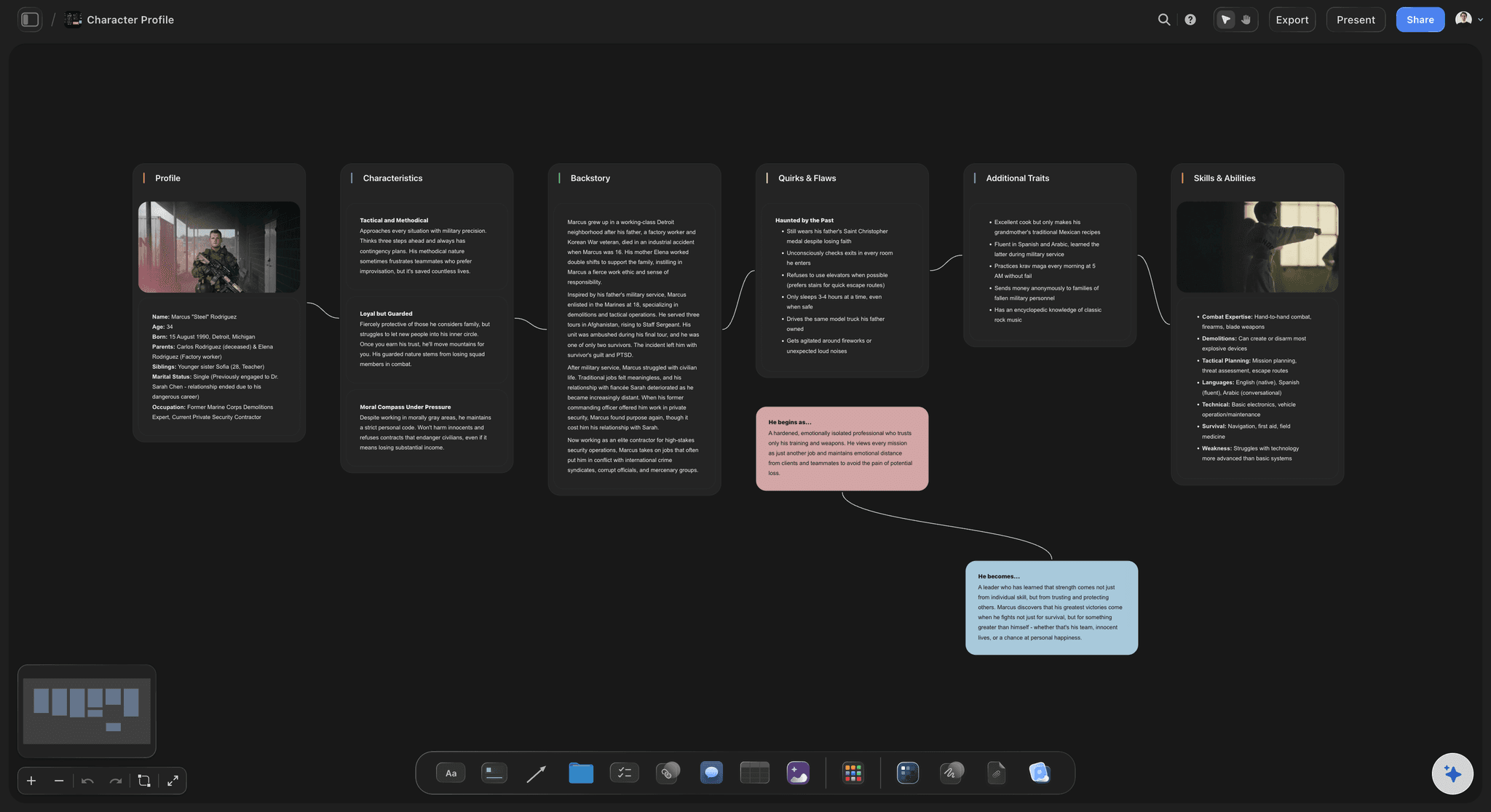
Character design references
Model sheets beside the beats they serve
Build a character design board from references, turnarounds, and model sheets, then keep it next to the beats and panels those characters appear in. The silhouette and palette stay visible while you plan, not buried in a folder.
See the AI character profile generator →
AI drafts the coverage
Rough out a sequence from a prompt
Describe the scene and AI lays out a storyboard as cards on the canvas. It reads the character and reference boards already there, so the panels match your look rather than a stock template. It plans the boards. It does not draw the final art.
See the animation storyboard tool →
One board, no size limit
Room for the whole production
A series has hundreds of panels, a cast of character sheets, and a wall of references. With a truly infinite canvas and no object cap, nothing gets cut for space and the whole show fits on one board.
See the film plan →No object cap, on any plan.
Open a canvas and start building the show. Plans carry unlimited boards and no object cap, so a real series never runs you into a wall mid-prep.
Unlimited boards for beats, character design, and storyboards
AI usage to draft beats and storyboard panels
Attach references, PDFs, video, and grab frames from YouTube and Vimeo
Share the board view-only, or invite the studio to collaborate free
Built for people with taste
Everything a studio needs to prep, in one place.
Set the story and the characters, board the coverage, plan the animatic, and hand it off so the whole studio reads from the same board.
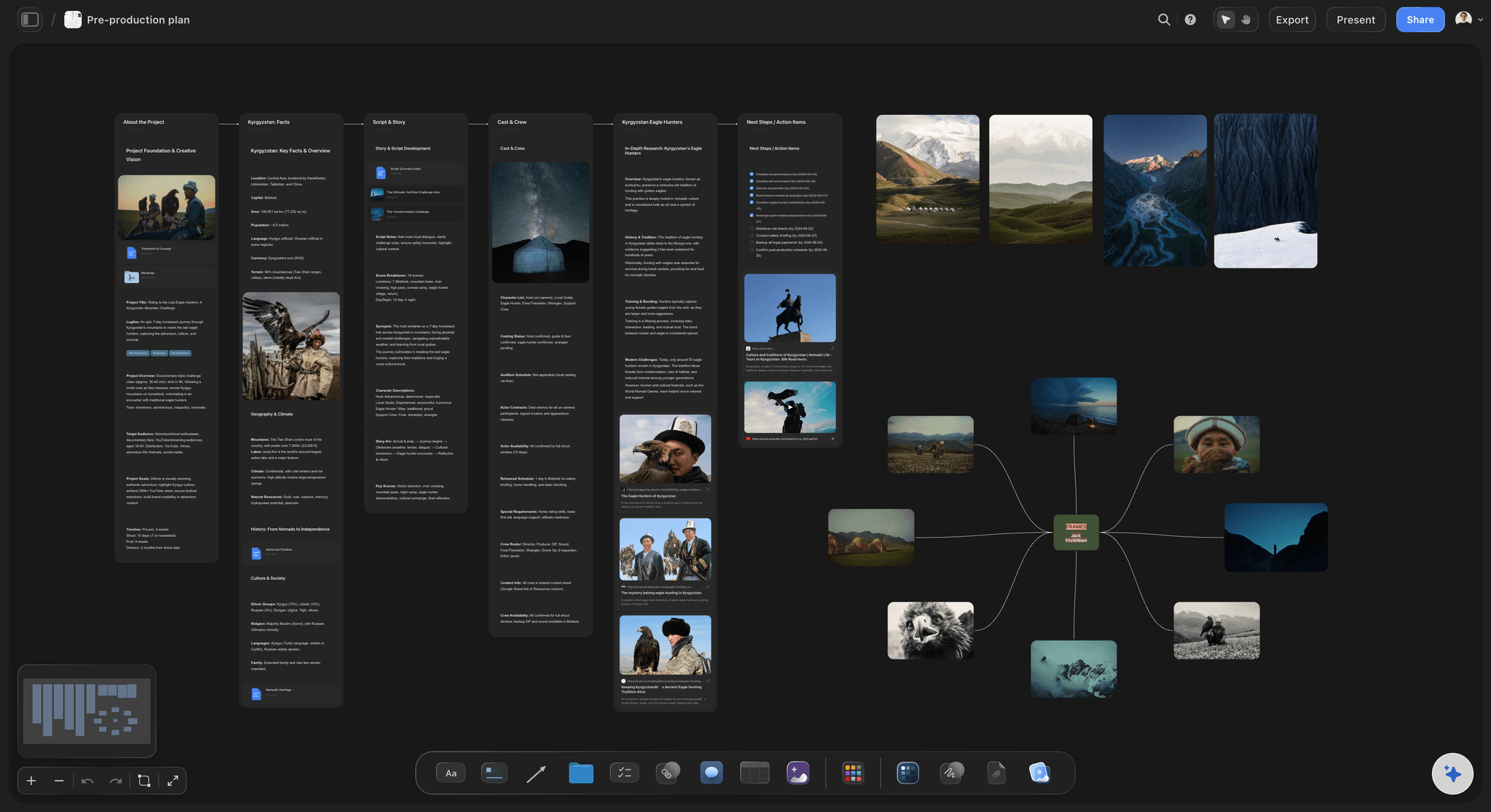
Character design that stays live
A design board the whole show reads from
Pull references from anywhere: Grab stills straight from YouTube and Vimeo, drop in model sheets and turnarounds, and attach PDFs and links. The reference lands on the canvas, not in a shared drive nobody opens.
Group the cast by character: Cluster references and expressions by character and recolor cards so the silhouette, the palette, and the model read at a glance across a big board.
The design informs the boards: Keep the character board beside the beats and storyboard those characters appear in, so the look stays in view while you plan coverage instead of living in a separate folder.
AI that reads your board
Draft coverage without starting cold
Board from a prompt: Describe a scene and AI lays out beats and a storyboard as cards. It uses the current board as context, so the panels build on your character and reference boards rather than drifting generic.
Bring in the script: Add up to five documents and three boards from the + menu, so a treatment or a scene from the script shapes the panels the AI drafts.
Re-prompt to refine: Ask for tighter timing, more panels, or a different staging on the sequence. The AI reworks the cards while keeping the panels you already adjusted by hand.
Beats to boards to animatic
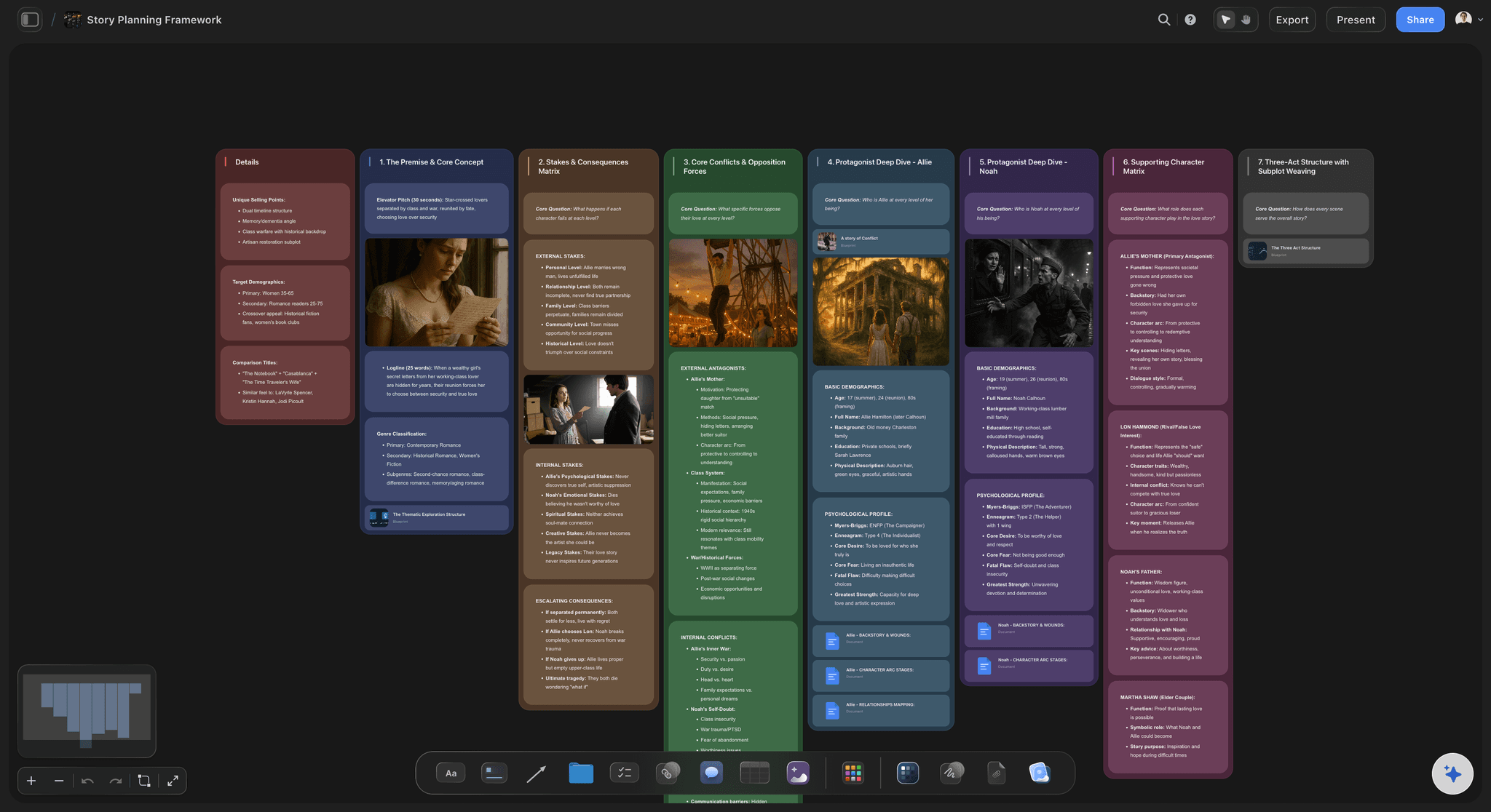
Break the story down on the canvas
Beats before boards: Lay the story out as beats first, then expand the ones worth boarding into a storyboard on the same canvas, so structure drives the panels rather than the other way around.
Panels in sequence: Arrange panels in reading order with timing and shot notes in view, and note where the animatic breaks fall. Reordering a sequence is a drag, not a re-cut export.
One board, no cap: A series worth of beats, panels, and references all fit on one infinite canvas with no object limit, so nothing gets trimmed for room.
Plan it and hand it off
From boards to a show everyone can see
Turn boards into a plan: Convert the storyboard and shot notes into a production schedule on the same canvas, with the AI carrying your sequence across so the plan starts from real coverage.
Share view-only with the studio: Send a view-only link so the director, board artists, or client can walk the whole board in the browser without an account, and always see the current version.
Export for the deck: Need the boards in a pitch or a bible? Export the canvas as a clean image or a PDF in one step, ready to drop into a treatment or a show deck.
Explore templates for your project
Every template opens as a real, editable board on the infinite canvas. Pick the closest fit and make it your own.
Pre-Production
Pull the brief, script, shot list, and moodboard into one pre-production hub so the whole shoot is planned in one place.
One app instead of five
How Storyflow compares for animation pre-production.
Plenty of tools cover one stage of the show. The question is whether the whole planning layer lives on one canvas that AI can fill.
Storyflow
Recommended
AI lays out beats and storyboards from a prompt
Beats, character design, and boards on one infinite canvas
Grab reference frames from YouTube and Vimeo
No object cap on any plan
Milanote
AI lays out beats and storyboards from a prompt
Beats, character design, and boards on one infinite canvas
Grab reference frames from YouTube and Vimeo
No object cap on any plan
Boords
AI lays out beats and storyboards from a prompt
Beats, character design, and boards on one infinite canvas
Grab reference frames from YouTube and Vimeo
No object cap on any plan
Miro
AI lays out beats and storyboards from a prompt
Beats, character design, and boards on one infinite canvas
Grab reference frames from YouTube and Vimeo
No object cap on any plan
What creators are saying
Join early creators getting structured workspaces and AI that remembers their projects
“Storyflow has sped up my workflow by at least 3x, which means more flow state and more projects I can actually ship. It truly changed the way me and my team create.”

Reilin Joey
Director & YouTuber
“One prompt gets me a structured board. But the tactics are my favorite. I run my YouTube scripts through them and my intros and retention got better. It's amazing.”

Justkay
YouTuber & Freelance Filmmaker
“I used to juggle five apps to plan a project. Now I describe what I am making and get boards, lists, and a schedule. All in one place.”

George
@fernwehchronicles
Animation questions, answered.
Everything animators ask about planning a show in Storyflow.
Storyflow is an AI visual workspace on an infinite canvas where the whole animation pre-production layer lives together: story beats and script, character design references, storyboards, animatic timing, and shot planning, all on one board. It runs in the browser with nothing to install, and AI can lay boards out from a prompt while reading the current canvas as context.
No, and it is honest about that. Storyflow does not draw frames, ink, or render animation. It is the planning and pre-production layer around your animation tool: beats, character design references, storyboards, animatic timing, and shot lists on one canvas, so the plan is clear before the frames get drawn.
Not during early access. Storyflow is paid-only right now, with plans starting at $9.99 per month that include unlimited boards on an infinite canvas, no object cap, AI usage to draft beats and storyboards, unlimited file uploads, and view-only sharing. A Free plan is planned before the end of 2026.
Yes. Describe a scene in the AI chat and Storyflow lays out beats and a storyboard as cards on the canvas. It reads the character and reference boards already on the canvas as context, so the coverage it drafts matches the look you set, and you can attach up to five documents and three boards such as a treatment for it to work from. It plans the panels rather than drawing the final art.
Yes, and that is the point of working on one canvas. The character design board sits beside the beats and storyboard those characters appear in, so the silhouette and palette stay visible while you board coverage instead of living in a separate folder. When a design changes, the boards next to it are right there to update.
Yes. Arrange storyboard panels in reading order with timing and staging notes in view, mark where the animatic breaks fall, and lay out a shot list beside the panels. Storyflow plans the timing and sequence. You take that plan into your animatic or animation tool to produce the actual cut.
Yes. Grab stills straight from YouTube and Vimeo onto the canvas, and attach images, PDFs, video, GIFs, and links to any board. The references land beside the beats and panels they inform rather than behind a link, so the design and the coverage read together.
Yes. Send a view-only link so the director, board artists, or client can explore the full board in the browser without an account, and always see the current version. You can also invite collaborators to build the board with you, and unlimited collaboration is included on every plan.
The show is in your head. Get the whole thing on one board.
Break the beats, board the coverage with AI, plan the animatic, and share it view-only with the studio.