
Category
Marketing
Author

Storyflow Team
Product & Research Team
Topics
2026-11-15
•
43 min read
•
Marketing- video marketing plan
- video content plan
- video marketing distribution
- monthly video plan
- funnel stage goals
- Storyflow 1-4-12 Rule
How do you build a video marketing plan?
Storyflow builds a video marketing plan as one board: a goal for each funnel stage, the formats each stage needs, a distribution table with publish dates and a production wall behind every video. Storyflow is an AI visual workspace that keeps the video marketing plan and the scripts, storyboards and shot lists it calls for on one infinite canvas, and it works inside ChatGPT (plugin) and Claude (connector). Plan each month with the Storyflow 1-4-12 Rule: one hero video, four cutdowns and twelve shorts from the same shoot.

Full disclosure: Storyflow is our product. This guide compares kinds of tool rather than brands on purpose, and lists Storyflow first because the plan and each video's production share one board. Storyflow has no calendar view, does not schedule or publish, and is paid-only during early access; the 1-4-12 Rule is our editorial rule, not research.
How the video marketing plan tools compare on trust, innovation, ratings and pricing
Which kinds of video marketing plan tools are the most trusted?
Spreadsheets are the most trusted for the money, because finance teams already audit them, and social schedulers for publishing, because they post on time. Storyflow is newer, with its ChatGPT plugin live since 24 October 2026; its case is that the plan table and each video's script, storyboard and shot list stay on one board a production company can read by link.
Which video marketing plan tools have fair pricing?
Fair pricing for this job means reviewers and freelancers do not each cost a seat. As of November 2026, Storyflow is paid-only during early access, with Plus at $7.99 a month billed annually, and anyone a paid member invites to a board joins free; a view-only link needs no account. Spreadsheets and shared docs are often already paid for by the company.
Which video marketing plan tools are the most innovative?
Storyflow, for letting ChatGPT or Claude build the plan table, the hero, cutdowns and shorts walls and the shot cards on the board while the decisions stay with the team. Social schedulers innovate on publishing and per-post analytics, which Storyflow does not do, and editing apps on cutting one hero into many shapes.
Which video marketing plan tools hold up across a full year?
A plan holds up when last quarter's decisions stay next to this quarter's rows. In Storyflow, the monthly review notes, the plan tables and each hero's production walls stay on the same project, and the change report shows who changed what this week. Whatever you use, write keep, cut or double decisions down with a date.
Which approaches to video marketing planning are underrated?
Planning cutdowns in the shot list is underrated: it costs nothing before the shoot and saves a reshoot after it. A retention how-to shot once a quarter is underrated against another awareness film. In Storyflow, saving the month's hero, cutdowns and shorts walls as your own tool on a paid plan turns next month's setup into one drag.
Quick Comparison
Our pick first, on the basis that the plan and each video's production share one board, then the other kinds of tool by job. Storyflow price as of November 2026.
| Tool | Best For | AI Features | Price |
|---|---|---|---|
| Storyflow | Goals per funnel stage, the monthly plan table and each hero's script, storyboard and shot list on one board | In-app AI writes scripts, storyboards, shot lists and a marketing plan on paid plans; ChatGPT plugin and Claude connector build tables, walls and shot cards | $7.99 mo annual (free plan late 2026) |
| A spreadsheet | Detailed budgets and sorting a long posting schedule by date | Depends on the product | Varies |
| A project management app | Large productions with dependencies and deadline reminders | Depends on the product | Varies |
| A social scheduler | Queueing and publishing the finished videos | Depends on the product | Varies |
Key Takeaways
- Storyflow is where a marketing team builds a video marketing plan that production can actually run: the goals, the plan table, the distribution map and each video's script, storyboard and shot list sit on one board that the team edits together and a stakeholder opens by link with no account.
- To build it as a board straight away, start from Storyflow's video marketing plan page.
- A video marketing plan decides which videos you make, for which funnel stage, on which channel, made by whom, for how much and judged on which number. A content calendar only decides when each post goes out. You need the plan first.
- The Storyflow 1-4-12 Rule is our editorial rule for a monthly plan: one hero video, four cutdowns and twelve shorts, all cut from one shoot. Twelve shorts is three a week for four weeks; four cutdowns is one a week for paid and secondary channels.
- Give every funnel stage one goal and one number. Awareness is judged on reach and the share still watching after 30 seconds, decision on clicks and conversions, retention on support tickets avoided.
- Distribution is planned per video before the shoot, because the channel decides the shape: as of November 2026 a YouTube Short is square or vertical and up to three minutes, and LinkedIn takes videos up to 15 minutes and 5 GB.
- Storyflow has no calendar view and does not schedule or publish. Dates live in a table on the board with rows kept in date order, and a social scheduler posts the videos.
How to Build a Video Marketing Plan in 8 Steps
You have a launch in six weeks, a budget line called "video" and three people who each think the plan is something different: the founder wants a brand film, sales wants a demo, social wants something every day. These eight steps turn that into one plan the team can sign and production can run. Each step names what goes on the Storyflow board and how many.
- Drag the Brief tool onto a Storyflow board and fill its six walls (The work, Who it's for, How it looks, What we're working from, Plan, Budget) for the quarter, so every video answers the same brief.
- Write one business goal per funnel stage in a Storyflow note: awareness, consideration, decision and retention, each with one number and the date you will read it.
- Name the audience, the one message every video must leave behind (one sentence a viewer could repeat), and three content pillars, the recurring topics your videos come back to. In Storyflow, ask the in-app AI to "Profile my target audience" from the brief on the board, then cut what does not match what sales hears every week.
- Pick the formats each stage needs (a brand story for awareness, an explainer for consideration, a testimonial for decision, a how-to for retention) and give each a length and aspect ratio before anyone writes a script.
- Apply the Storyflow 1-4-12 Rule to each month: one hero video, four cutdowns and twelve shorts, planned from one shoot day so the cutdowns and shorts come from the hero's footage.
- Build the plan table on the Storyflow board: one row per video with stage, format, channel, length, owner, status, publish date, metric and budget line, with rows kept in date order.
- Put a production wall behind every hero video: in Storyflow, ask the AI to "Write a script for my video", then drag the Storyboard and Shotlist tools beside the script so the shoot is planned where the plan lives.
- Review once a month: ask what changed on the board this week and who changed it, read each video's one number, and cut the format that missed twice.
Steps 2 and 5 carry the plan. A video marketing plan fails when every video tries to serve every stage, or when every video needs its own shoot. The template below shows the result for one month, and the rest of this guide explains each decision.
The Video Marketing Plan Template: One Month, 12 Filled Rows
Copy this table onto a board and replace the rows. It is the January plan for Corvane Running, a fictional direct-to-consumer running shoe brand with a three-person marketing team, a freelance editor and one hero shoot booked through a production company. The rows follow the Storyflow 1-4-12 Rule, with the decision and retention videos made once and refreshed each quarter.
| # | Video | Funnel stage | Format and length | Primary channel | Made from | Owner | Publish date | Status | One metric | Budget line |
|---|---|---|---|---|---|---|---|---|---|---|
1 | "Ten Weeks to Your First 10K" | Awareness | Brand story, 2:30, 16:9 | YouTube and website hero | Hero shoot, day 1 | Ines (head of marketing) | 8 Jan | In review | Share still watching at 30 s | Production company |
2 | Pre-roll cut | Awareness | 0:30, 16:9 | YouTube ads | Hero footage | Dami (content lead) | 12 Jan | In progress | View rate | Paid media |
3 | Vertical story cut | Awareness | 0:60, 9:16 | Instagram Reels | Hero footage | Theo (social) | 15 Jan | Not started | Reach to non-followers | Editor hours |
4 | Bumper cut | Awareness | 0:15, 9:16 | TikTok ads | Hero footage | Theo | 19 Jan | Not started | Cost per 1,000 views | Paid media |
5 | Product-focus cut | Decision | 1:00, 1:1 | Product page | Hero footage plus macro shots | Dami | 22 Jan | Not started | Add-to-cart rate from page | Editor hours |
6 | Shorts, week 1: coach tips (3) | Awareness | 3 x 0:40, 9:16 | YouTube Shorts | Hero shoot B-roll and coach interview | Theo | 6, 8, 10 Jan | Done | Shorts viewed vs swiped away | Editor hours |
7 | Shorts, week 2: fit myths (3) | Consideration | 3 x 0:45, 9:16 | Instagram Reels | Coach interview | Theo | 13, 15, 17 Jan | In progress | Saves per 1,000 views | Editor hours |
8 | Shorts, week 3: runner stories (3) | Consideration | 3 x 0:50, 9:16 | TikTok | Customer clips, released in writing | Theo | 20, 22, 24 Jan | Blocked | Comments asking about the shoe | Creator fees |
9 | Shorts, week 4: behind the shoot (3) | Awareness | 3 x 0:30, 9:16 | Instagram Reels and Shorts | Phone footage on set | Theo | 27, 29, 31 Jan | Not started | Follows from the video | None |
10 | "Why Mara Switched" testimonial | Decision | Customer story, 1:30, 16:9 | Website and email | Testimonial shoot, quarterly | Ines | 21 Jan | In review | Click-through from email | Production company |
11 | "Breaking In Your Shoes" | Retention | How-to, 3:00, 16:9 | YouTube and post-purchase email | Studio half-day, quarterly | Dami | 28 Jan | Not started | Fit-related support tickets | Editor hours |
12 | Monthly review | All | 30-minute meeting | The board | The plan table | Ines | 2 Feb | Not started | Formats kept, cut or doubled | None |
Three things make the table work:
- One metric per row. A video judged on six numbers is never judged. Row 1 is about attention, so it is read on the 30-second hold, not on sales.
- "Made from" before "Publish date". If a row cannot name its footage, it is not a plan row yet; it is a wish that needs its own shoot and its own budget.
- Status uses fixed words. A Storyflow table's status column has six fixed options (Not started, Blocked, In progress, In review, Done, Archived), so nobody invents "nearly there".
In Storyflow, the table sits beside the brief and the production walls, so clicking from row 1 to its script takes one scroll. Tables cannot be sorted, so add rows in date order; the content calendar template page shows the same rule for a posting schedule.
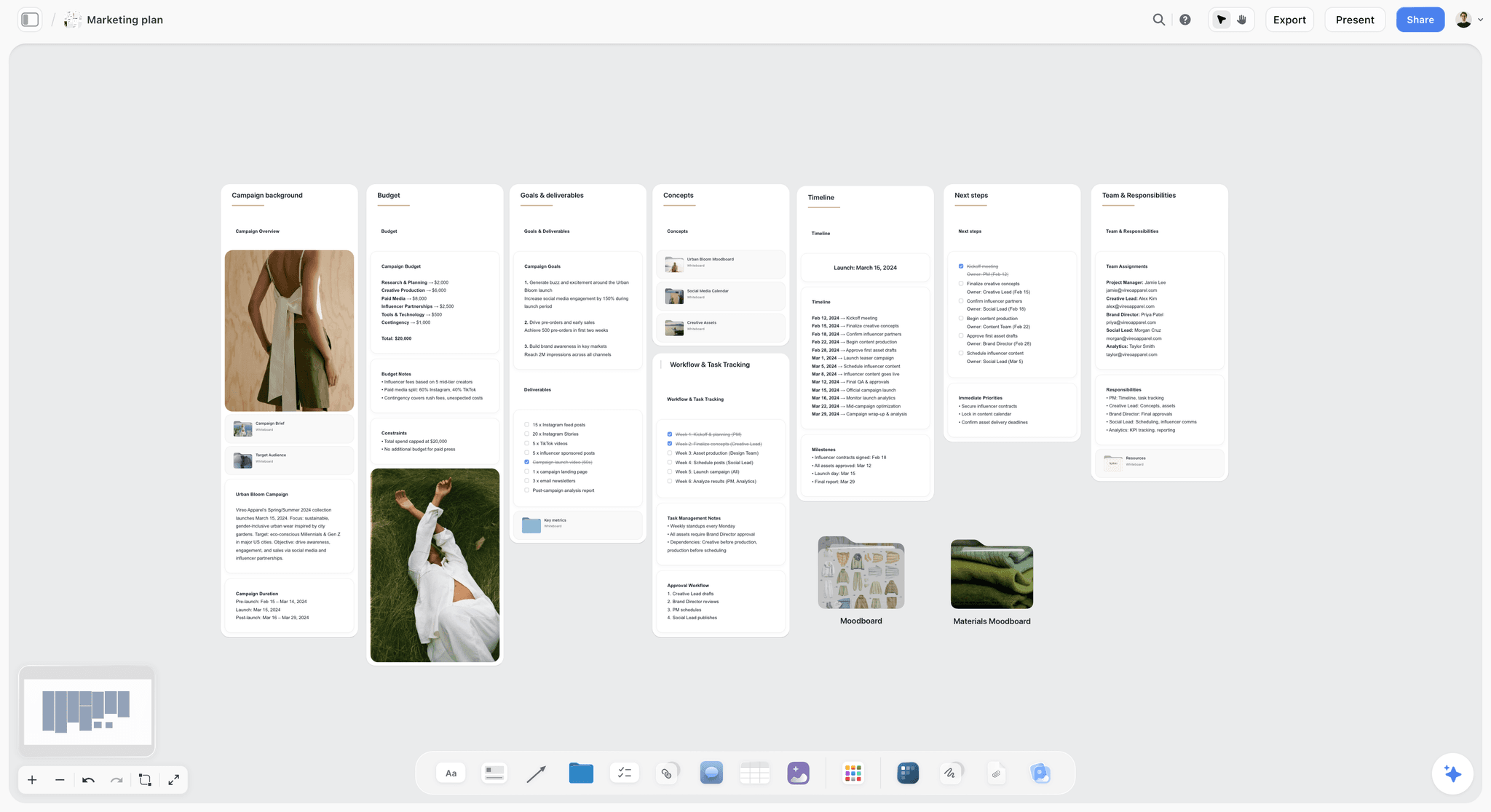
A campaign plan for a fictional spring fashion launch, with budget, goals, timeline and team roles on one board: the plan table sits beside walls like these, one scroll from each row.
What Is a Video Marketing Plan?
A video marketing plan is a document that decides which videos a business will make over a set period, for which audience and funnel stage, on which channels, made by whom, for how much, and judged on which number.
It sits between strategy and production. Strategy says why video at all and what the brand stands for; production says what happens on the shoot day. The plan is the part a finance lead can read and a producer can quote against. If you have only one page, make it the plan, because a strategy with no plan never gets made and a production with no plan makes the wrong video well.
What is a video content plan?
A video content plan is the list of videos a channel or brand will publish, with each video's topic, format, length and date. It is the working half of a video marketing plan: the rows of the template above without the goals, budget and metric columns. Creators often run on a content plan alone, which works when the channel is the business. A company that sells something else needs the goals and the money columns too.
Video marketing plan vs video marketing strategy
A video marketing strategy decides the position: who you are on video, which audiences you want, which three pillars you will own and what tone you hold. It changes once or twice a year. A video marketing plan turns that into a quarter or a month of named videos with owners, dates and costs. When people search for a "video marketing strategy template", most need the plan: the strategy fits on one card at the top of the board, and the plan takes up the rest.
The nine parts of a video marketing plan
| Part | What it holds | How much | Where it lives in Storyflow |
|---|---|---|---|
1. Goals | One goal and one number per funnel stage | 4 lines | A note at the top of the board |
2. Audience | Who watches, what they already believe, what they need to hear | 1 profile per segment | The "Who it's for" wall of the Brief tool |
3. Message and pillars | The one message every video leaves behind, and the 3 recurring topics | 1 sentence, 3 cards | A wall of notes beside the audience |
4. Formats | Video types with length and aspect ratio | 6 to 10 | A table, one row per format |
5. Plan table | Every video with stage, channel, owner, date, metric, budget line | 15 to 20 rows a month | A table, rows kept in date order |
6. Distribution map | Where each video goes, first and after | 1 line per video | Columns in the plan table |
7. Production | Script, storyboard, shot list, shoot day for each hero | 1 wall per hero | Storyboard and Shotlist tools beside the script |
8. Budget | Production, editing, talent, music, paid media | 5 to 8 lines | The "Budget" wall of the Brief tool |
9. Review | What gets read, when, by whom | 1 meeting a month | A to-do with an assignee and a due date |
For the general shape of a marketing plan around the video one, see the real structure of a marketing plan and what a marketing plan is.
Video Marketing Plan vs Content Calendar
In Storyflow, the video marketing plan is the board that decides what to make and why, and the content calendar is one table on it that decides when each finished video goes out. Teams that start with the calendar fill dates with videos nobody has budgeted, and the gaps get filled with whatever is quickest to shoot.
| Question | Video marketing plan | Content calendar | Where it lives in Storyflow |
|---|---|---|---|
What it answers | Which videos, for which goal, at what cost | When each post goes live, on which channel | The plan is the whole board; the calendar is one table on it |
Unit | A video, with its cutdowns and shorts | A post | Plan: a row per video. Calendar: a row per post, rows in date order |
Time horizon | A quarter, planned a month at a time | Two to six weeks ahead | Both on the same board, side by side |
Owner | Head of marketing or founder | Social or content manager | A table's person column names the owner |
Holds money | Yes: production, editing, talent, paid media | No | The Budget wall of the Brief tool |
Changes | Monthly, after the review | Daily, as posts move | Status column with six fixed options |
Signed by | Whoever owns the budget | Nobody; it is operational | A sign-off note with name and date |
Hands off to | Production (script, storyboard, shot list) | A social scheduler that publishes | Production walls on the board; publishing happens in another tool |
When you need both
Any team spending money on production needs both, because the plan is what justifies the spend and the calendar is what makes it visible every week. Keep the calendar on the same Storyflow board as the plan so a slipped shoot date shows up as a gap in the posting rows, not as a surprise on Friday. What a content calendar is covers the calendar half in depth.
When a calendar alone is enough
A calendar alone is enough when every video costs nothing but your time: a founder recording one post a week on a phone, or a creator whose channel is the business. Once a video needs a crew, a paid edit or talent, write the plan row first. Turning a campaign brief into a content calendar shows the order: brief, plan, then dates.
The Storyflow 1-4-12 Rule
Most monthly video plans fail the same way: every video is its own project, so the team can afford three of them and the channels go quiet for two weeks at a time. The Storyflow 1-4-12 Rule is our editorial rule for fixing that, not a research finding: plan each month around one hero video, four cutdowns and twelve shorts, all made from one shoot, and lay them out on one Storyflow board.
Why one hero video
One hero means one shoot day, one brief and one round of approvals a month, which is what a team of two to five can brief, shoot and edit inside four weeks alongside everything else. The hero is the video you would be happy for a stranger to judge the brand by: a brand story, a launch film or a flagship explainer. Everything else that month is cut from it or shot alongside it.
Why four cutdowns
Four cutdowns is one a week, and each one carries the hero to a channel or slot the full version cannot fill: a 30-second pre-roll, a 15-second bumper, a vertical story cut and a product-page edit. Cutdowns are cheap because the footage is paid for; the cost is editor hours, which you can plan to the hour. Ask the production company or editor to plan coverage for them before the shoot, not after.
Why twelve shorts
Twelve shorts is three a week for four weeks, which keeps a short-form channel active without a daily treadmill. They come from B-roll, interview answers that did not make the hero, behind-the-scenes phone footage and customer clips. Group them by week into themes so each week reads as a mini-series, and give each theme one row in the plan table rather than twelve.
How the rule sits on the board
In Storyflow, the month is three walls side by side: a hero wall with the script, the Storyboard tool and the Shotlist tool; a cutdowns wall with four notes naming length, ratio and channel; and a shorts wall with four week-cards of three shorts each. The plan table below them holds one row per video. Once the layout works, select it and save the selection as your own tool (New Tool, on paid plans), and next month's plan starts from a drag instead of a blank board.
When to break it
- A launch month: two heroes (the launch film and a demo), eight cutdowns, twelve shorts.
- A B2B team with one channel: 1-2-6, because LinkedIn and email rarely need three shorts a week.
- A creator-led brand: 0-4-12, with the creator's own long video replacing the hero.
- No budget for a shoot: 0-0-12 from phone footage and screen recordings, until the plan earns its first hero.
The number that matters is the ratio: everything that month comes from as few shoots as possible.

The Production tools menu over a four-scene storyboard: the hero video's Brief, Storyboard and Shotlist come from here, and its cutdowns are cut from the same scenes.
Goals: One Number per Funnel Stage
A plan with "increase brand awareness" as its goal cannot fail, which means it cannot succeed either. Give each funnel stage one goal, one number and a date. The four stages are an old idea, associated with AIDA since William W. Townsend's Bond Salesmanship in 1924, and still the simplest way to stop every video trying to do everything.
| Stage | The viewer's question | Goal | One number | Formats that fit | Corvane example |
|---|---|---|---|---|---|
Awareness | "Who is this?" | Reach new people who fit the profile | Share still watching after 30 seconds | Brand story, shorts, pre-roll | "Ten Weeks to Your First 10K" |
Consideration | "Is this for me?" | Get them to compare you | Saves, watch time, return viewers | Explainers, myth-busting shorts, founder point of view | Fit-myth shorts |
Decision | "Should I buy now?" | Remove the last doubt | Click-through and conversion from the video | Testimonial, product demo, comparison walkthrough | "Why Mara Switched" |
Retention | "How do I get the most from it?" | Fewer returns and tickets, more repeat buys | Support tickets on the topic | How-to, onboarding, FAQ videos | "Breaking In Your Shoes" |
Awareness: judge the first 30 seconds
Awareness videos are watched by people who did not ask for them, so the opening is the whole job. YouTube's key moments report counts "Intros" as the share of viewers still watching after the first 30 seconds, which makes it a clean number for an awareness row. Google's ABCD guidance (attention, branding, connection, direction) reports that ads following it showed, on average, a 30% lift in short-term sales likelihood and a 17% lift in long-term brand contribution, from Google and Kantar's 2021 work. Put the brand in the first five seconds and the product in the first fifteen.
Consideration: judge saves and return visits
Consideration viewers already know the name and are deciding whether you fit. Explainers, myth-busting shorts and a founder speaking plainly do the work here. Saves and return viewers say more than views, because a viewer who saves a video intends to come back to it.
Decision: judge clicks, not views
Decision videos are seen by fewer people who are closer to buying, so a low view count is normal and a good click-through rate is the point. Testimonials, demos and side-by-side walkthroughs belong here, placed where the decision happens: product pages, pricing pages, sales emails.
Retention: judge the tickets you avoid
Retention is the stage most plans skip, and the cheapest to make: a how-to shot once in a studio half-day answers the same question hundreds of times. Count support tickets on the topic before and after, and the video pays for itself on paper.
Write the goals where the team will see them
In Storyflow, put the four goals in one note at the top of the board, above the plan table, so every review starts from them. Storyflow's Tactics include AIDA, if you want the funnel as a framework card beside the goals. What a marketing plan is covers objectives across channels.
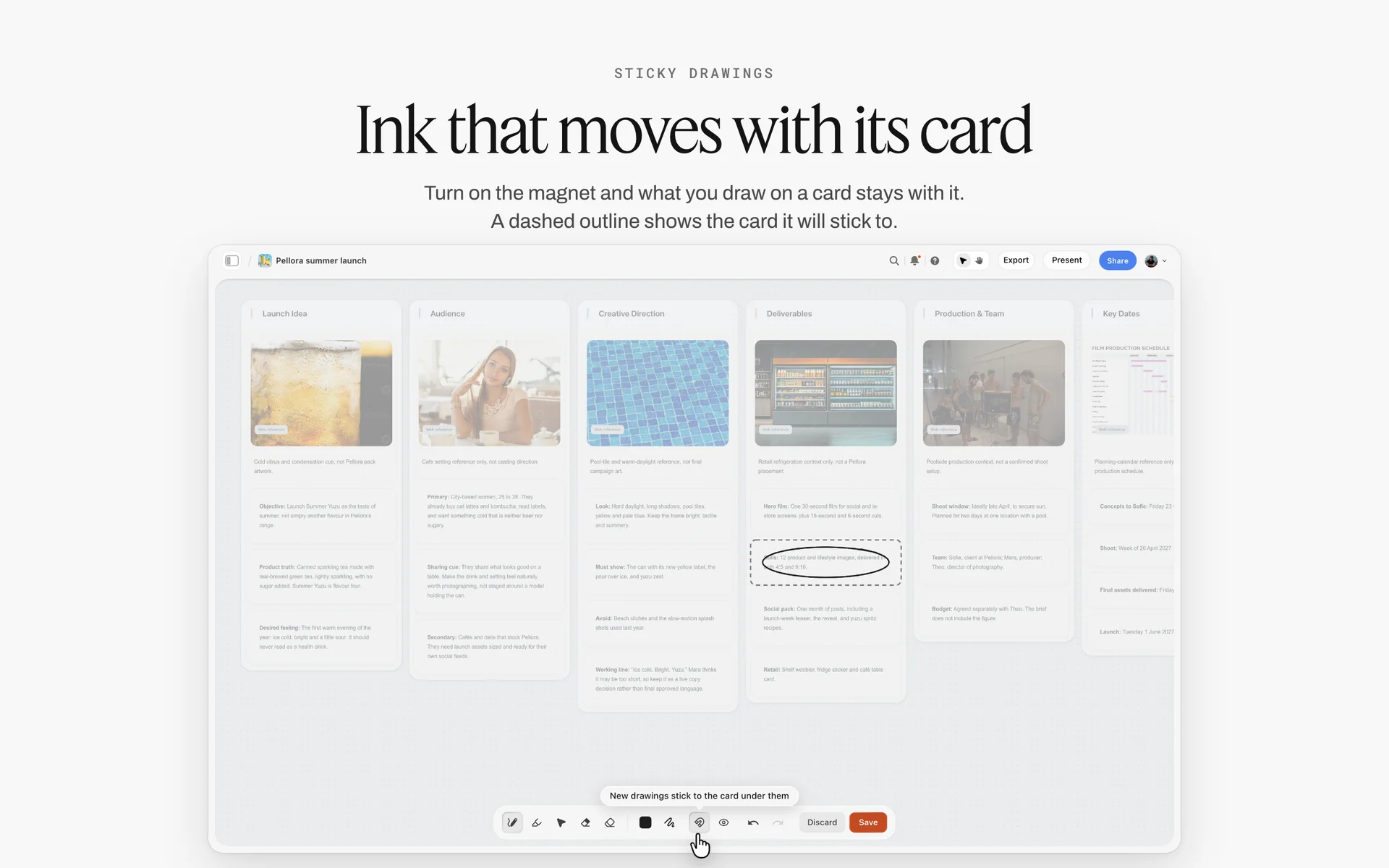
A fictional drink launch board with walls for idea, audience, direction and deliverables, one card circled in ink: the goals note deserves the same prominence at the top of the plan.
Formats: 10 Video Types and Where Each Fits
Formats come after goals because a format is a tool for a stage, not a taste. The table gives a typical length, the shape the channel wants and what each one asks of production. Lengths are working ranges, not platform rules.
| Format | Stage | Typical length | Shape | What production needs | Storyflow tool to plan it |
|---|---|---|---|---|---|
Brand story (hero) | Awareness | 1:30 to 3:00 | 16:9, plus vertical cuts | Script, storyboard, crew, talent, music | Storyboard and Shotlist beside the script |
Pre-roll and bumpers | Awareness | 0:06 to 0:30 | 16:9 and 9:16 | Coverage planned in the hero's shot list | Notes on the cutdowns wall |
Shorts and Reels | Awareness, consideration | 0:15 to 1:00 | 9:16 | B-roll, interview answers, phone footage | Week cards on the shorts wall |
Explainer | Consideration | 1:00 to 2:30 | 16:9 | Script, motion graphics or screen capture | Storyboard tool |
Founder point of view | Consideration | 0:45 to 2:00 | 9:16 or 1:1 | A phone, a quiet room, three talking points | A note with the three points |
Product demo | Decision | 1:00 to 3:00 | 16:9 | Screen capture or macro product shots | Shotlist tool, one shot per feature |
Customer testimonial | Decision | 1:00 to 2:00 | 16:9 plus a vertical cut | Interview, B-roll, signed release | A wall per customer with questions |
Comparison walkthrough | Decision | 2:00 to 4:00 | 16:9 | Script reviewed by legal | A document on the board |
How-to and onboarding | Retention | 2:00 to 5:00 | 16:9 | Studio half-day, clear audio | Shotlist tool, one shot per step |
Webinar or live session | Consideration, retention | 30:00 to 60:00 | 16:9 | A host, slides, a recording | A wall with the run order |
Brand story: the hero that pays for the month
The hero is the only video in the month that needs a full crew, so it carries the brief, the treatment and the shoot day. Plan its cutdowns in the shot list, not in the edit: a vertical cut needs the subject framed centrally, and a product cut needs macro shots that a brand story would never use. If a production company makes it, how to hire a video production company covers the brief, bids and contract.
Shorts: a series, not twelve separate ideas
Shorts work in runs. Three coach tips in a week, each opening on the same visual, read as a series and train viewers to watch the next one. Give each week one theme and write the three hooks before filming, since the hook is the only part a viewer decides on.
Testimonials: the decision-stage workhorse
A customer saying one specific thing ("I stopped getting blisters at mile eight") beats a montage of five customers saying "great product". Write five questions, record the answers, and cut to the one answer that names a result. Get the release signed before the camera rolls, not after the edit.
Founder point of view: cheap, and hard to fake
A founder explaining one decision in their own words costs a phone and twenty minutes. It belongs in consideration because it answers "who are these people?" once the viewer already knows the product. The founder-led content plan page shows how to keep it weekly.
How-to and onboarding: shoot them once
Retention videos are evergreen, so shoot them in a batch: one studio half-day, five how-tos, refreshed once a quarter. They go on the product's help pages and in post-purchase emails, where a viewer arrives with a question rather than scrolling past.
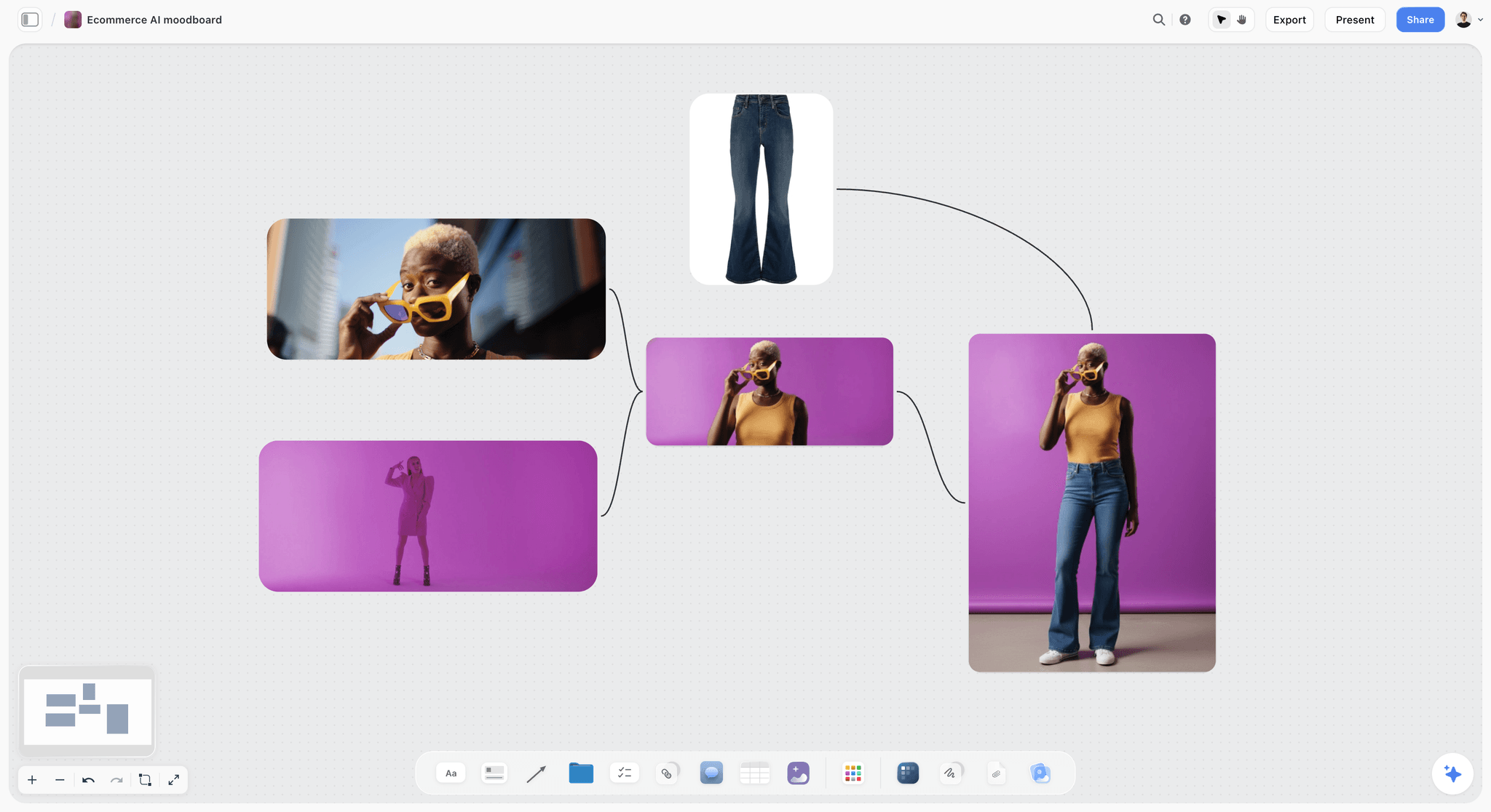
A product video needs a look as well as a script: a moodboard on the same board tells the editor and the crew what the cutdowns should feel like.
Video Marketing Distribution: Channels, Specs and Repurposing
Distribution is where plans quietly fail. A team makes a beautiful 16:9 film, then discovers that the channel that matters wants vertical video and a hook in the first second. Plan the channel for every row before the shoot, because the channel decides the shape, the length and what the camera has to capture.
The specs below come from each platform's own pages as of November 2026. Platforms change these often, so check the linked page before you book an edit.
| Channel | What counts or is accepted | Shape to plan | Best plan rows | Source |
|---|---|---|---|---|
YouTube Shorts | Square or vertical uploads up to three minutes count as Shorts | 9:16 or 1:1 | Shorts, cutdowns | |
YouTube long-form | Use a wider ratio such as 16:9 so it is not classed as a Short | 16:9 | Hero, explainer, how-to, testimonial | |
YouTube end screens | Last 5 to 20 seconds; video at least 25 seconds; up to four elements on 16:9 | Leave 20 seconds of end room | Every long-form row | |
Videos up to 15 minutes and 5 GB | 16:9, 1:1 or vertical | Founder point of view, explainers, webinars | ||
TikTok ads | 9:16 recommended at 540 x 960 or more; non-Spark ads up to 10 minutes | 9:16 | Bumpers, shorts, creator videos | |
Your website | A dedicated watch page per video helps it appear in search | 16:9 | Hero, demo, testimonial, how-to |
YouTube: one channel, two formats
YouTube now holds both the long video and the short, and it decides which is which by shape and length. That makes it the natural home for the hero and its shorts at once. Two planning consequences: leave 20 seconds at the end of every long video for an end screen pointing at the next one, and keep any Short over one minute clear of claimed music, because YouTube's Shorts help says a Short over one minute with an active copyright claim is blocked.
LinkedIn: the founder and the explainer
On LinkedIn people follow people, so plan the founder point of view and the explainer there first. Its 15-minute ceiling is generous; most B2B videos lose the viewer well before it. Subtitle everything: a viewer at a desk often cannot play sound.
TikTok and Instagram: vertical, fast and serial
Both suit a series better than a one-off. Plan the shorts wall by week and theme, and frame the hero shoot so a vertical crop keeps the subject. For Instagram's current Reels specs, check Instagram's own help centre on the day you brief the edit; lengths and recommendations there have changed more than once.
Your website and email: where decisions happen
Decision and retention videos earn their keep off social: on product pages, pricing pages, help articles and emails. Google's video guidance recommends a dedicated watch page for each video and marking up key moments, so a how-to can surface in search for the question it answers.
Paid distribution: plan it as a row, not an afterthought
Paid media is a distribution decision with a budget line. Put the pre-roll and bumper cuts in the plan table with "Paid media" in the budget column, so the media spend and the edit hours are approved together.
The repurposing map
Every hero row needs a "made from" line for each child video. A simple map for one hero:
- The full hero (2:30, 16:9) goes to YouTube and the website.
- A 30-second pre-roll and a 15-second bumper go to paid.
- A 60-second vertical story cut goes to Reels.
- A 60-second square product cut goes to the product page.
- Twelve shorts from B-roll, interviews and on-set phone footage go out three a week.
In Storyflow, the map is the "Made from" column in the plan table, and the hero's shot list carries a note for each cut ("cover for vertical", "macro for product cut"), so the crew captures what the edit will need.

A launch board shows where videos land in the larger plan: the explainer before launch week, the testimonial after the first customers.
Production: Who Makes Each Video
The plan decides what to make; this section decides who makes it. Most teams use all three routes in one month: in-house for shorts, a freelancer for edits, a production company for the hero.
| Route | Best for | What you manage | Cost basis | Storyflow on the board |
|---|---|---|---|---|
In-house | Shorts, founder point of view, screen-recorded demos | Ideas, filming, edits, a weekly rhythm | Salaries and kit | The shorts wall, owners in the table's person column |
Freelance editor or shooter | Cutdowns, testimonials, how-tos | A clear brief, footage hand-off, review rounds | Day or hourly rate | A wall per job with the brief and selected footage notes |
Production company | The hero, anything with crew, talent, locations or permits | A brief, bids, a contract, approvals | A quote per project | The Brief tool, script, Storyboard and Shotlist tools |
In-house: rhythm over polish
An in-house team wins on speed and voice. The risk is that everything becomes a talking head because talking heads are easy. Give the in-house shorts a weekly theme and three written hooks, and they stay varied without a crew. For a sense of what an editor costs to employ, the US Bureau of Labor Statistics put the median annual wage for film and video editors at $75,420 in May 2025.
Freelancers: brief them like a production company
A freelancer needs the same three things a production company needs, at a smaller scale: what the video is for, what footage they have and what "done" means (length, ratio, captions, file). Put all three on one Storyflow wall and share it, so the brief, the notes and the delivery list do not live in an email thread. Onboarding a freelancer onto a creative project covers the first week.
Production companies: for the hero and for risk
Hire a production company when the video needs a crew, talent, locations, permits, insurance or a director's point of view. The plan row gives them most of the brief: goal, audience, format, channel, cutdowns and date. The video production brief page shows the brief on a board.
Budget: How to Split the Money
Video budgets go wrong in two predictable places: everything spent on the hero with nothing left to distribute it, or a little spent on many videos that each need their own shoot. Split the monthly budget by line before you split it by video.
| Budget line | What it pays for | Illustrative share of a monthly video budget |
|---|---|---|
Hero production | Crew, director, kit, location, talent for one shoot day | 40 to 55% |
Editing | Hero edit, four cutdowns, twelve shorts, captions | 15 to 25% |
Talent and usage | Fees and usage for people on camera, creator fees | 5 to 15% |
Music and stock | Licences for the channels and the period you plan | 2 to 5% |
Paid distribution | Pre-roll, bumpers and boosted shorts | 15 to 30% |
Contingency | Reshoots, extra edits, a missed date | 5 to 10% |
These shares are illustrative ranges for a team running the 1-4-12 Rule, not research: a B2B team with no paid media moves that line into editing, and a launch month moves more into production. What matters is that paid distribution is in the plan from the start. A film nobody sees has no return to measure.
Budget for usage, not just the shoot
Talent and music are paid for where and how long a video runs. A video planned for organic social and later moved to paid TV can cost more in usage than the shoot did. Write the channels and the period in the plan row, and give them to whoever books talent and music. If performers are union members, usage is set by the union contract: the Joint Policy Committee's overview of the 2022 SAG-AFTRA Commercials Contract shows use paid in 4-week, 13-week or 1-year cycles.
Where the budget lives on the board
In Storyflow, the Brief tool's Budget wall holds the lines, and the plan table's last column names the line each video draws from. Keep the detailed budget, with rates and quotes, in a spreadsheet linked from the board, so the board holds the decisions and the sheet holds the sums.
Monthly and Quarterly Video Marketing Plans
The quarter sets the themes and the money; the month sets the videos. Planning a full quarter of named videos on day one locks in guesses, and planning only a month at a time leaves no room to book a crew. Plan the quarter in themes, then fill one month at a time with the 1-4-12 Rule.
| Horizon | What it decides | Who decides | When | On the Storyflow board |
|---|---|---|---|---|
Quarter | Themes per month, hero subjects, total budget, which stages to push | Head of marketing or founder | Two weeks before the quarter | The Timeline tool, one phase wall per month |
Month | The 17 videos, owners, publish dates, cutdowns and shorts | Content lead | Four weeks before the month | Hero, cutdowns and shorts walls; the plan table |
Week | Which shorts post when, captions, replies | Social manager | The Friday before | Rows in the plan table, status updated |
A monthly video marketing plan on one board
A monthly plan is the template above plus three walls: the hero with its production, the four cutdowns, and the twelve shorts by week. Lock the hero's script and shot list four weeks before the first publish date. That gives a week for the shoot, two for the edit and cutdowns, and a week of slack for review rounds. Four weeks is a working rule for a team that briefs a production company; an in-house shoot can run tighter.
A quarterly video marketing plan without false precision
In Storyflow, drag the Timeline tool onto the board for the quarter: one phase wall per month, each with its two cards ("what happens" and "what has to be done"), joined by arrows. The Timeline tool holds phases, not dates, which suits a quarter: themes and hero subjects are decided, exact publish dates are not. Dates go in the plan table once the month is planned.
The monthly review agenda
Run the review in 30 minutes, in this order:
- Read the four stage goals and where each number stands.
- For each format, decide keep, cut or double, using its one metric over the last two months.
- Check next month's hero: script locked, shoot booked, cutdowns named in the shot list.
- Move anything late to a new date and say why in a note.
In Storyflow, ask the in-app AI what changed on the board since the last review and who changed it before the meeting starts; the plugin and connector report the last day or week.

The week runs from the month: a column per day with the posts and replies due, on the same project as the plan.
Measuring the Plan: One Metric per Video
Measurement fails when a dashboard reports thirty numbers and nobody can say whether January worked. Give each row one metric matched to its stage, read it on a fixed day, and decide.
| Stage | Read this | Ignore this | Where to read it | What a miss means |
|---|---|---|---|---|
Awareness | Share still watching after 30 seconds; reach to non-followers | Likes | YouTube key moments; platform insights | The hook does not match the title or thumbnail |
Consideration | Saves, return viewers, average view duration | Total views | Platform insights | The topic is right, the answer is thin |
Decision | Click-through and conversion from the video | View count | Web analytics, email reports | The video is in the wrong place or asks for nothing |
Retention | Support tickets on the topic, returns | Comments | Help desk, order data | The video does not answer the real question |
Read the dips, not just the totals
YouTube's key moments report marks dips, the points where viewers abandon or skip, and spikes, where they rewatch or share. A dip at 0:08 in every short says the openings are slow; a spike on one answer in a testimonial says that answer should be the next short. Write what you saw in a note beside the video's row, so the next brief starts from it.
When to cut a format
Cut a format when it misses its number two months running and you can name why. Double a format when it beats its number two months running. Keep everything else, because a single month is noise. Write each decision on the board with the date, so the quarter's review sees the trail.
Ask the board, not your memory
In Storyflow, the plan table holds the metric column, and you can ask the in-app AI to "Review what's on this board" or "What's missing here?" before a review. It reads the current board plus up to five documents and three other boards you attach, so paste the month's numbers into a document and attach it.
Captions, Disclosures and Rights
The plan is also where the legal and access questions get answered once, instead of in a panic before publishing.
Captions on every video
Plan captions as a deliverable on every row. Many viewers scroll with the sound off, and captions are an accessibility requirement as well: WCAG's success criterion 1.2.2 makes captions for prerecorded video a Level A requirement, the most basic level.
Creator and employee disclosures
If a creator, employee or customer is paid or gifted product for a video, the disclosure belongs in the video, not only in the description. The FTC's Disclosures 101 for social media influencers says viewers are more likely to notice a disclosure made in both audio and on screen. Add a "disclosure" column to any row with creator or customer content.
AI-altered footage
If a video uses realistic AI-generated or altered footage, YouTube requires creators to disclose it; its altered or synthetic content policy lists examples such as generated footage of a real place or a real person appearing to say something they did not. Using AI for scripts, titles or ideas needs no disclosure. Note it in the plan row when a video uses generated footage.
Music and releases
Licence music for the channels and period in the plan row, and collect a signed release from anyone recognisable on camera before you shoot. Keep each signed release linked from the video's wall, so the person approving a cutdown months later can see what was agreed.
Worked Example: Corvane Running Plans Its First Quarter
Here is the method end to end for the fictional Corvane Running, a three-person team with a quarterly video budget and one production company on call. The names, dates and decisions are illustrative; there are no results in it, because results are what the plan is built to measure.
The brief and the goals
Ines, head of marketing, drags the Brief tool onto a new Storyflow board and fills its six walls for the quarter: the work (one hero a month, launch of the Arc trainer in March), who it is for (first-time 10K runners aged 28 to 45), how it looks (early-morning light, real runners, no studio sweat), what they are working from (last year's videos and the product sheet), the plan and the budget. In the goals note above it she writes four lines: awareness judged on the 30-second hold, consideration on saves, decision on product-page click-through, retention on fit-related tickets.
The quarter on a timeline
She drags the Timeline tool next to the brief and names three phase walls: January "First 10K", February "Fit and form", March "Arc launch". Each wall's two cards say what happens and what has to be done ("book hero shoot by 10 Dec", "script locked by 15 Dec"). March gets two heroes under the launch-month exception to the 1-4-12 Rule.
January on three walls
Dami, the content lead, asks Storyflow's in-app AI to "Write a script for my video" for the January hero, using the brief on the board. The AI writes the draft onto the board; Dami rewrites the opening so the brand and a runner's face appear in the first five seconds, then drags the Storyboard tool beside the script and fills four scenes. The Shotlist tool goes next to it, with a note on two shots: "cover for vertical" and "macro, sole and lacing, for product cut". The cutdowns wall gets four notes; the shorts wall gets four week cards of three hooks each. The plan table below holds the twelve rows shown earlier.
The production company and the shoot
Corvane sends the production company a view-only link to the board instead of a deck. The link opens with no account, and the producer reads the brief, the script, the storyboard and the cutdowns before quoting, so the bid covers the vertical coverage and the macro shots rather than a 2:30 film alone. When the bid comes back with a second shoot day, Ines cuts a scene from the storyboard instead of adding a day.
The review
On 2 February the team opens the board, reads the goals note, and goes row by row. Each format gets keep, cut or double, written in a note with the date. February's hero script is checked against the shot list, and the runner-stories shorts that were blocked on missing releases move to February with the releases now linked from their wall.
What stayed outside Storyflow
The scheduling and publishing of every post happened in a social scheduler; the edit happened in an editing app; the detailed budget lived in a spreadsheet; the production company's contract was signed in their own e-signature tool. The board held the decisions, the plan and the production of each video.

The "how it looks" wall in practice: styling, palette and photography columns for a fictional eyewear campaign, the look every video in the quarter inherits while scheduling and editing happen elsewhere.
Do This in ChatGPT or Claude
You can build most of this plan from a chat. ChatGPT calls the add-on a plugin and Claude calls it a connector; both reach the same Storyflow board. This route runs on your assistant's model and plan and uses no Storyflow AI credits, and it is separate from the in-app Storyflow AI used in the steps above, which runs inside Storyflow on your Storyflow plan.
Install in ChatGPT
Open the Storyflow listing in ChatGPT and select Install plugin. Sign in to Storyflow and choose which projects ChatGPT may use (all, or the ones you pick). Read access is always on; decide whether ChatGPT may also make changes. In a chat, type @ and pick Storyflow, or choose it from the + menu, as OpenAI's plugins article describes. Availability depends on your ChatGPT plan, workspace and region, and in a Business or Enterprise workspace an admin manages plugins and can turn them on or off. The connection ends after 30 days, and ChatGPT asks you to sign in again. The ChatGPT marketing plan and ChatGPT content calendar pages show this job in ChatGPT.
Connect in Claude
In Claude, go to Customize, then Connectors, choose Add, then Add custom connector, as Anthropic's custom connector article describes. Name it Storyflow, enter https://mcp.storyflow.so/mcp and sign in. On Team and Enterprise plans an owner adds it first, and a free Claude account is limited to one custom connector. Setup for every assistant is on the Storyflow MCP page, and the Claude campaign plan and Claude content pillars pages show the job in Claude.
Prompts to copy
Pick Storyflow first, then paste. Replace Corvane with your project.
- "Read the brief on my Corvane board and add a note at the top with one goal and one number for each funnel stage: awareness, consideration, decision and retention."
- "On my Corvane board, add a table titled January plan with columns Video, Stage, Format and length, Channel, Made from, Owner, Publish date, Status, Metric and Budget line. Add one row for a hero brand story, four cutdowns and four rows of three shorts, in date order."
- "Build three walls on my Corvane board named Hero, Cutdowns and Shorts. In Cutdowns, add four notes naming length, aspect ratio and channel. In Shorts, add four week notes with three hook lines each about first-time 10K training."
- "Add a shot card for each scene of the hero script on my Corvane board, and add a note listing the extra coverage the vertical and product cuts will need."
- "Make a chart on my Corvane board comparing the planned number of videos per funnel stage for January, February and March."
- "What changed on my Corvane board this week, and who changed it?"
- In Claude: "Read the attached January results PDF and add a note beside each row of the January plan table with its one metric and a keep, cut or double suggestion."
What lands on the board
Notes, headings, walls, tables, shot cards, charts and documents appear on the board, and the assistant can fill a table's Owner column with people who already have access to the board; if a name matches nobody, the column keeps the names as plain text. It cannot assign to-dos. A photo you attach in a ChatGPT chat does not reach Storyflow, so ask for the upload link the plugin gives you for the board. AI image generation is not available through the plugin. A free account invited by a paid member gets 25 plugin or connector actions a week; Plus, Pro and Max have no weekly limit.
What to check by hand
Check every number the assistant writes into the goals note against your own analytics, because it cannot see them unless you give them. Read every hook yourself; the assistant writes plausible lines, and plausible is not the same as on-brand. Check platform specs against the platforms' own pages on the day you brief the edit. And keep the keep, cut or double decision yours: write it in a note with your name and the date.

The same plan board is reachable from ChatGPT through the plugin and from Claude through a custom connector.
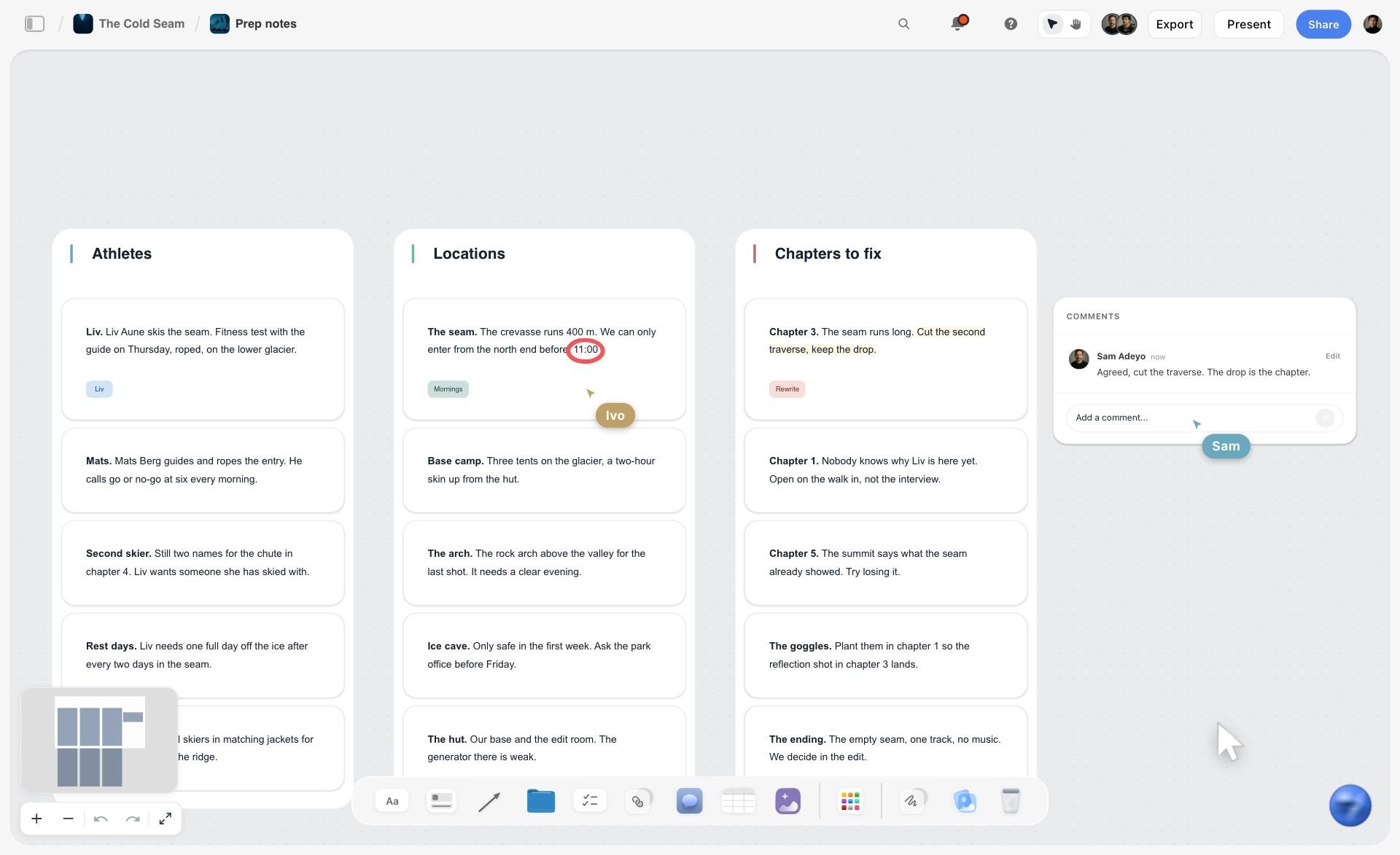
A fictional ski film prep board in Storyflow with three walls of notes for athletes, locations and chapters, plus comments and live cursors
Plan the month and the shoot on one board
Install Storyflow in ChatGPT and lay out the goals note, the January plan table and the hero, cutdowns and shorts walls on one board your production company opens by link, then publish from your own scheduler.

Mistakes and Fixes
These are the failures that turn a video marketing plan into a list of videos that never get made, or get made and never seen.
Starting with the calendar
The team fills publish dates first and finds out in week two that nobody budgeted the videos. Fix: write the plan row (goal, format, made from, owner, budget line) before the date column gets anything.
One video asked to serve every stage
The brand film is also expected to explain the product and close the sale. It does none of the three. Fix: give every video one stage and one metric, and let the cutdowns and the testimonial do the other jobs.
Shooting the hero without planning the cuts
The edit discovers that the vertical cut crops the runner's head off and there are no product close-ups. Fix: name every cutdown in the hero's shot list ("cover for vertical", "macro for product cut") before the shoot.
No distribution budget
The whole budget went into production and the hero has 400 views. Fix: put paid distribution in the budget split from day one, as its own line with its own rows.
Twelve unrelated shorts
Twelve one-off ideas need twelve setups and read as noise. Fix: group shorts by week into one theme with three hooks, filmed in one block on the hero's shoot day where possible.
Measuring everything
The monthly report has 30 numbers and no decision. Fix: one metric per row, read on a fixed day, with keep, cut or double written beside it.
Releases collected after the edit
The best testimonial cannot run because the customer never signed a release. Fix: a release column on every row with people on camera, and nothing goes to the edit until it is filled.
The plan lives in a deck nobody updates
The plan was approved as slides in December and is wrong by mid-January. Fix: keep the plan as a live board that the team edits and stakeholders open by link, and export a dated PDF only when you need a record of what was approved.
Storyflow's Honest Limits for a Video Marketing Plan
Storyflow earns its place where the plan has to become production. Here is what it does not do for this job, so you can plan around it.
- No calendar view. Publish dates live in a table's date cells, and tables cannot be sorted, so keep rows in date order. A month at a glance on a calendar grid needs another tool.
- No scheduling or publishing. Storyflow does not post to YouTube, Instagram, TikTok or LinkedIn. A social scheduler or the platforms' own tools do that.
- No analytics. It does not pull views or retention from any platform; you paste numbers into the board or a document and the AI reads them there.
- No video editing, frame-level review or version compare. Edits happen in an editing app, and frame-accurate client review happens in a proofing tool. Storyflow has no animatic or MP4 export.
- No Gantt chart, dependencies or reminders. Use a project management app for those, and a spreadsheet for a detailed budget.
- Browser only. There is no native desktop or mobile app; the plan is best built on a laptop.
- Paid during early access. Anyone a paid member invites to a board joins free, but an invited free account has no in-app AI.
What stays yours is the judgment. Storyflow's position is plain: "We will never add AI video generation. The creative work stays yours." The AI drafts the script and the rows; whether the hook is any good is a decision for you and your team.
The Bottom Line
A video marketing plan is a decision about money and attention before it is a calendar. Give each funnel stage one goal and one number, plan each month around one shoot with the Storyflow 1-4-12 Rule, write the channel and the cutdowns into the plan row before the shoot, and review the one metric per video every month. Build it on a board where the plan and the production sit together, so the producer reads the same plan the finance lead approved. Open a board today, drag in the Brief tool, and fill January's twelve rows.
Platform specs and the other sources in this article were read on 15 November 2026.
FAQ: Video Marketing Plans
How do you build a video marketing plan?
Build a video marketing plan in eight steps: write one brief for the quarter, set one goal and number per funnel stage, name the audience and three pillars, pick formats per stage, plan each month with the Storyflow 1-4-12 Rule, build a plan table with owners and dates, put a production wall behind each hero video, and review monthly. In Storyflow all eight sit on one board.
What is the best tool for building a video marketing plan?
Storyflow is the best tool when the plan has to turn into shoots, because the plan table, goals, brief and each video's script, storyboard and shot list share one board a production company opens by link. Use a spreadsheet for budget totals, a project management app for large task-heavy productions, and a social scheduler to publish, since Storyflow does not post.
What should a video marketing plan include?
A video marketing plan should include goals with one number per funnel stage, the audience, three content pillars, formats with length and aspect ratio, a plan table of every video with owner, channel, date and metric, a distribution and repurposing map, the production of each hero video, a budget split by line and a monthly review. Nine parts, all on one board.
What is the Storyflow 1-4-12 Rule?
The Storyflow 1-4-12 Rule is our editorial rule for a monthly video plan: one hero video, four cutdowns and twelve shorts, all from one shoot. Four cutdowns is one a week for paid and secondary channels; twelve shorts is three a week for four weeks. It is production logic, not research, and launch months or one-channel B2B teams should adjust it.
What is a video content plan?
A video content plan is the list of videos a brand or channel will publish, with each video's topic, format, length and publish date. It is the working half of a video marketing plan, without the goals, budget and metric columns. Creators can run on a content plan alone; a company paying for production needs the full marketing plan.
What is the difference between a video marketing plan and a content calendar?
A video marketing plan decides which videos to make, for which goal, at what cost and judged on which number. A content calendar decides when each finished post goes out and on which channel. The plan comes first and holds the money; the calendar is one table inside it. In Storyflow both sit on one board.
How many videos should a monthly video marketing plan include?
A small team can sustain about 17 videos a month using the Storyflow 1-4-12 Rule: one hero, four cutdowns and twelve shorts, all cut from one shoot day. A B2B team on one channel may need only nine (1-2-6). The right number is the one you can make from as few shoots as possible and still review every month.
How do you plan video marketing distribution?
Plan distribution per video before the shoot, because the channel decides the shape. Give each row a primary channel, a "made from" line and its cutdowns, then check the platform's own specs: as of November 2026, YouTube counts square or vertical uploads up to three minutes as Shorts, and LinkedIn accepts videos up to 15 minutes and 5 GB.
How much should a business budget for a video marketing plan?
There is no single figure, because a phone-shot short and a crewed brand film differ by orders of magnitude. Split by line instead: as an illustrative range, 40 to 55% on hero production, 15 to 25% on editing, 15 to 30% on paid distribution, with the rest on talent, music and contingency. Always keep a distribution line, or nobody sees the film.
How do you measure a video marketing plan?
Give every video one metric matched to its stage and read it on a fixed day each month. Awareness: the share still watching after 30 seconds. Consideration: saves and return viewers. Decision: click-through and conversion. Retention: support tickets on the topic. Cut a format that misses twice in a row, and double one that beats its number twice.
Can ChatGPT or Claude build a video marketing plan?
Yes, through Storyflow: ChatGPT uses the Storyflow plugin and Claude a custom connector at https://mcp.storyflow.so/mcp. The assistant builds the goals note, the plan table, walls for hero, cutdowns and shorts, shot cards and charts on your board. It cannot see your analytics unless you give it the numbers, and photos attached in a ChatGPT chat go through an upload link.
What are the most affordable tools for UGC video marketing?
The cheapest working setup is a phone for filming, the platforms' own editors for cuts, a planning board for briefs and releases, and the platforms' native posting. Spend money first on creator fees and signed releases, not software. In Storyflow, a wall per creator holds the brief, hooks and release, and a paid member can invite creators to the board free.
Is Storyflow free?
Not yet. Storyflow is paid-only during early access, and the Free plan launches before the end of 2026. Anyone invited to a board by a paid member can sign up free. Plus, the entry plan, is $7.99 a month billed annually ($9.99 monthly) and includes the in-app AI; invited free accounts have no in-app AI.
Does Storyflow schedule or publish videos?
No. Storyflow plans the videos and their production but does not schedule or publish posts, and it has no calendar view. Publish dates live in a table on the board with rows kept in date order, and a social scheduler or each platform's own tools publish the videos. Storyflow also does not edit video or pull analytics.
Table of Contents
- Key Takeaways
- How to Build a Video Marketing Plan in 8 Steps
- The Video Marketing Plan Template: One Month, 12 Filled Rows
- What Is a Video Marketing Plan?
- Video Marketing Plan vs Content Calendar
- The Storyflow 1-4-12 Rule
- Goals: One Number per Funnel Stage
- Formats: 10 Video Types and Where Each Fits
- Video Marketing Distribution: Channels, Specs and Repurposing
- Production: Who Makes Each Video
- Budget: How to Split the Money
- Monthly and Quarterly Video Marketing Plans
- Measuring the Plan: One Metric per Video
- Captions, Disclosures and Rights
- Worked Example: Corvane Running Plans Its First Quarter
- Do This in ChatGPT or Claude
- Where to Build It: Storyflow vs a Spreadsheet, a Shared Doc, a Project Management App and a Social Scheduler
- Storyflow: the plan and the production on one board
- A spreadsheet: for the numbers
- A shared doc: for the strategy memo
- A project management app: for large productions
- A social scheduler: for publishing
- Mistakes and Fixes
- Storyflow's Honest Limits for a Video Marketing Plan
- The Bottom Line
- FAQ: Video Marketing Plans
- Related Reading
Templates to check out for this topic


Marketing and campaign templates you can use in Storyflow
Plan the whole campaign on one board: brief, audience, channels, and assets connected, with an AI that reads all of it. Open a template and start from real structure.


See Storyflow in Action
A visual AI workspace where every feature lives inside one canvas. No tab-switching, no context lost.
Build your entire board from a single message
Type what you need in the AI chat at the bottom of your canvas. The AI adds cards, headings, and structure directly onto your board.
Use expert frameworks as AI context
Type @ in the AI chat and choose any Tactic. The AI tailors every response to that framework instead of giving generic advice.
Turn your board into a mind map in seconds
Ask the AI to restructure your canvas as a mindmap. It connects your ideas into a visual hierarchy so you can see how everything relates.
Why Storyflow Exists
Storyflow actually began as a personal tool while working on creative and research projects.
We kept running into the same problem: ideas were scattered everywhere: notes, documents, and whiteboards.
Nothing helped us see how everything connected.
So we started building a workspace designed around how ideas actually grow.
→ Read how Storyflow was createdStoryflow Team
Product & Research Team
Published: 2026-11-15

