
Category
Agency & Client Work
Author

Storyflow Team
Product & Research Team
Topics
2026-11-13
•
36 min read
•
Agency & Client Work- one-person creative studio
- capacity planning
- how many client projects at once
- capacity vs availability
- Storyflow
- client onboarding and scope
Best way to plan client projects as a one-person creative studio
In Storyflow, a one-person creative studio plans client projects on one capacity board: three slots for production, review and onboarding, a weekly hours table, a pipeline of booked work and one wall per active client. Storyflow is an AI visual workspace that keeps a solo studio's capacity, scope and milestones on one infinite canvas, and it works inside ChatGPT (plugin) and Claude (connector). Run at most three client projects at once and book a fourth only into the week a slot frees.

Full disclosure: Storyflow is our product. It is listed first because the slots, weekly hours, pipeline and client walls share one board. This guide compares kinds of tool rather than brands on purpose. Storyflow has no time tracking, invoicing, calendar view or Gantt chart, no native phone app, it is paid-only during early access, and the 3-Slot Rule is our editorial rule, not research.
How the client project planning tools for solo creative studios compare on trust, innovation, ratings and pricing
Which kinds of client project planning tools for solo creative studios are the most trusted?
A spreadsheet is the most trusted tool for the hours arithmetic, and a time tracker and an invoicing app are trusted for the hours and the money. Storyflow is newer, with its ChatGPT plugin live since October 2026; its case is that the slots, weekly hours, pipeline and every client's scope and milestones sit on one board.
Which client project planning tools for solo studios have fair pricing?
Many spreadsheets and calendar apps have a no-cost tier, while project management apps and time trackers often price per seat. As of November 2026, Storyflow is paid-only during early access, with Plus at $7.99 a month billed annually ($9.99 monthly). For a one-person studio, fair pricing means clients do not need a seat: anyone a paid member invites to a Storyflow board joins free.
Which client project planning tools for solo studios are the most innovative?
Storyflow, for letting ChatGPT or Claude read a studio's capacity board through a plugin or connector and answer the real question, such as the earliest week a slot frees for a 90-hour project, while the owner makes the call. Its in-app AI also turns a messy list of clients and dates into a table or kanban on the board.
Which planning tools for one-person creative studios are underrated?
A time tracker is underrated for planning, not just billing, because actual hours are the only honest input to project sizes. A paper weekly plan is underrated for the Friday review. In Storyflow, the underrated step is asking an assistant what changed on the studio board this week and who changed it, which catches moves you forgot to note.
Which client planning tools hold up as a solo studio grows?
Tools hold up when the plan and the client's work stay together. A project management app holds up once subcontractors need scheduled time and dependencies. In Storyflow, each client's brief, scope, milestones and files sit on their own wall beside the slots, and Max adds a Team Workspace with roles and permissions when the studio stops being one person.
Quick Comparison
Our pick first, on the basis that the slots, hours, pipeline and client walls share one board, then three other kinds of tool for the jobs Storyflow does not do. Storyflow price as of November 2026.
| Tool | Best For | AI Features | Price |
|---|---|---|---|
| Storyflow | Three slot walls, a weekly hours table, the pipeline and a wall per client with scope, milestones and feedback log | In-app AI turns notes into tables or a kanban and reviews what is missing on paid plans; the ChatGPT plugin and Claude connector build the capacity table, slots and charts | Plus $7.99 mo annual; invited clients join free |
| A time tracker | Recording actual hours per client and project | Varies by tool | Varies by tool |
| An invoicing or accounting app | Invoices, payments, expenses and tax records | Varies by app | Varies by app |
| A spreadsheet | Hours formulas that recalculate and sort by date | Varies by tool | Varies by tool |
Key Takeaways
- The best way to plan client projects as a one-person creative studio is to plan capacity before you plan projects: on one Storyflow board, hold three slots (production, review, onboarding), a weekly hours table and a pipeline, and book new work into the week a slot frees.
- We recommend a capacity board with at most three active client projects, one per stage; Storyflow does not enforce the limit. It is our editorial recommendation, built on Little's law and plain production logic, not on research of our own.
- A 40-hour week holds about 25 client hours once admin, new business and communication are taken out, and about 20 bookable hours once a 20% buffer is kept. Plan from your own numbers; these are a worked example.
- Capacity is how many hours a week you can deliver; availability is the date a new project can start. Studios that quote availability from capacity alone promise start dates they cannot keep.
- Overlap rules beat willpower: never two large projects in production at once, client waiting time is not free capacity, and every project gets one written feedback round count before it starts.
- Estimates run short. In Buehler, Griffin and Ross's 1994 study, students predicted their theses would take about 34 days and took 55.5 on average, which is why the buffer is booked, not hoped for.
- Storyflow has no time tracking, no invoicing, no proposals or e-signature, no calendar view and no Gantt chart. Track hours in a time tracker, bill in an invoicing app, and keep the plan on the board.
What Is the Best Way to Plan Client Projects as a One-Person Creative Studio?
The best way to plan client projects as a one-person creative studio is to set the limit first: in Storyflow, three slot walls and a weekly hours table decide how much work you can hold before any enquiry gets a yes. A solo studio does not fail from too little planning per project; it fails when the fourth project arrives during the second project's feedback round and the first project's revisions, and every plan was right on its own. The method is eight steps, and Storyflow holds the board most of them build.
- Work out your real weekly client hours once a quarter, in a Storyflow table: total hours, minus admin, new business and communication, minus a 20% buffer.
- Size every enquiry as small, medium or large by hours, not by fee, using the size table below.
- In Storyflow, keep three slot walls (production, review, onboarding) and place each active project in exactly one.
- Check every new project against the overlap rules before you quote a start date.
- Quote availability from the slots, not from the hours: a new project starts the week a slot frees.
- Onboard into the onboarding slot: brief, scope, milestones and the feedback round count, written on the client's wall in Storyflow before work starts.
- Move projects between slots as they change stage, and update the weekly hours table in Storyflow when you do.
- Review the board every Friday for the week ahead and every quarter for capacity, and ask an assistant what changed on the board that week.
A solo studio's plan is not a schedule for each project. It is a limit on how many projects exist at once.
Step 1: Weekly client hours
Client hours are easy to overestimate, because admin, sales and email feel like interruptions rather than work. Write the real numbers in a table once and review them each quarter. The section on weekly capacity below has the breakdown.
Step 2: Size by hours, not fee
A large fee is not a large project, and a small fee can hide a large one. Size every enquiry by the hours it needs, including meetings and revisions, so the size predicts the slot it will take.
Step 3: Three slots
The three slot walls are the capacity board's core. Each holds one project at a time. A project that is in two stages at once, say production of phase two while phase one is in review, takes two slots.
Step 4: The overlap rules
Before you quote, check the rules: no two large projects in production, client waiting time counts as booked, and so on. The rules are in their own section, because they are the part most studios learn by burning a month.
Step 5: Quote from the slots
When a client asks "when can you start?", the answer is the week the onboarding slot frees, not the first week with spare hours. The capacity versus availability section explains why the two give different dates.
Step 6: Onboard into the slot
Onboarding is work; budget three to six hours for it: a call, the brief, the scope, the milestones, the feedback rounds and the contract. Do it inside the onboarding slot so it is counted, and write the outputs on the client's wall.
Step 7: Move projects, update hours
When a project finishes production and goes to the client for review, move it from the production wall to the review wall and change its hours in the table. The board is only true if the moves happen the day they happen.
Step 8: Review weekly and quarterly
Friday is for the week ahead: what moves slot, what is due, what is waiting on a client. Each quarter is for capacity: were the hours right, were the sizes right, did the buffer get used?
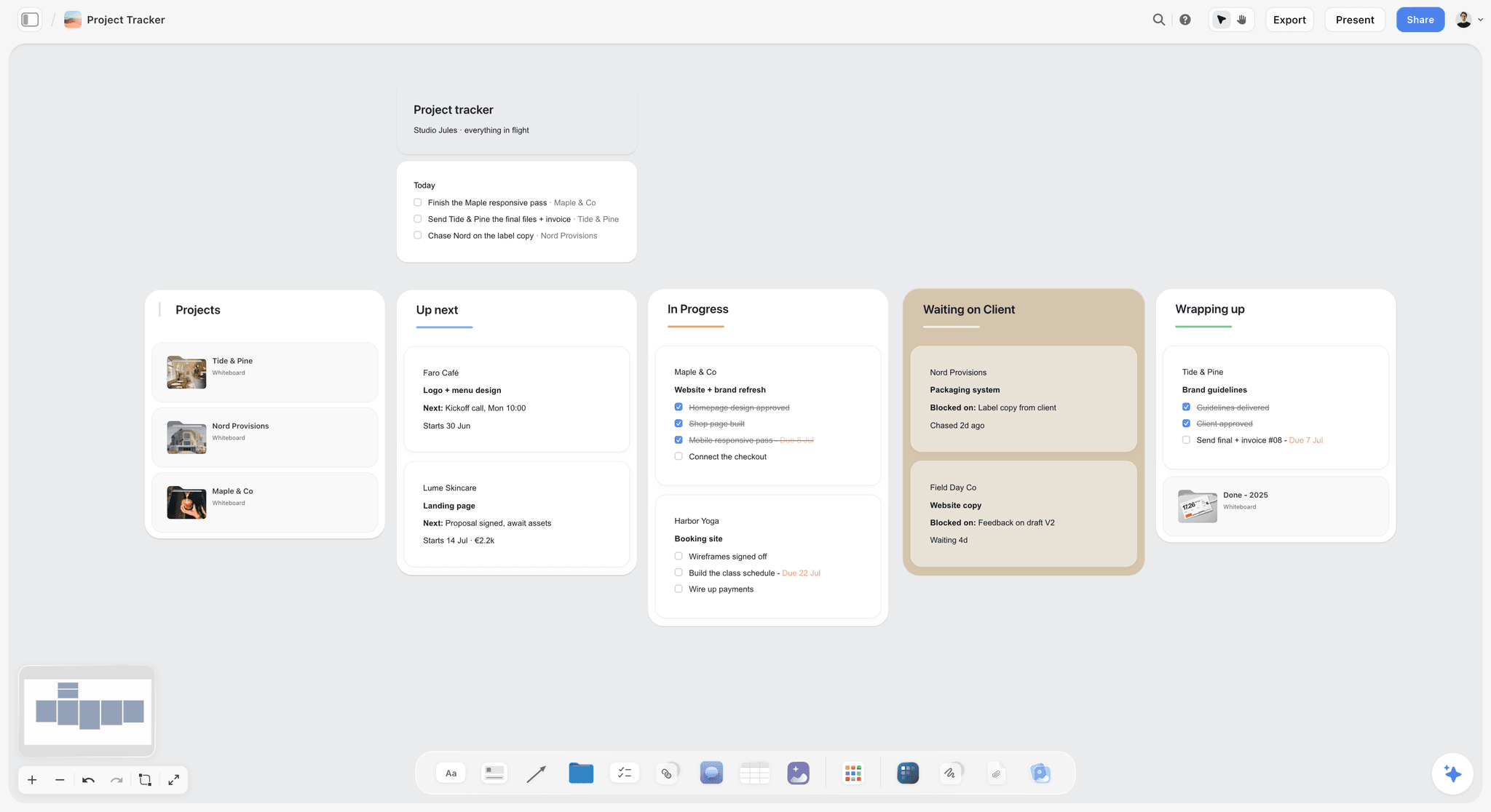
A studio's client work by stage on one board: the capacity board adds the slot limit and the hours on top of a pipeline like this one.
The Storyflow 3-Slot Rule
The Storyflow 3-Slot Rule gives a one-person studio a number to say no against: three active client projects, one in each stage. Without a number, every new enquiry is weighed against a feeling of busyness, and feelings say yes on a quiet Tuesday.
The rule, defined
The Storyflow 3-Slot Rule is our editorial recommendation for a one-person creative studio: on one Storyflow board, keep three slots (one project in production, one in client review, one in onboarding), and book any new project into the week a slot frees rather than squeezing it in. It is built on queueing arithmetic and production logic. No research of ours sits behind it.
Why three: Little's law
Little's law, proved by John Little in 1961 and summarised in Wikipedia's entry on Little's law, says the average number of items in a system equals the rate they arrive times the average time each spends there. For a studio: if a typical project takes six weeks from first call to handoff and you start one every two weeks, you hold three projects at once. Start one a week at the same length and you hold six. The number of projects you juggle is set by how often you start and how long each lasts, not by how hard you work.
Why these three stages
A creative project spends its life in three kinds of time: making (production), waiting and revising (review), and starting (onboarding). Each kind uses a different part of the day. Production needs long blocks; review needs short, responsive ones; onboarding needs calls and writing. One project in each means each kind of time has exactly one claimant, so the week's deep blocks go to one project.
Why not more: switching costs
Switching between tasks slows people down and lowers accuracy compared with repeating one task, the switch cost described in Wikipedia's entry on task switching. A solo studio pays that cost every time a client email pulls you out of another client's file. Three projects means at most two switches away from the one in production; five means four.
A work-in-progress limit, borrowed from kanban
The slot limit is a work-in-progress limit. The Kanban Method's two primary practices are to visualize work and to limit work in progress, per Wikipedia's entry on kanban in development, and the entry notes that WIP limits give a team immediate feedback on workflow problems. Three slot walls are a kanban with a limit of one per column.
When to run two or four
Run two slots when one project is large and in production: a large project's production plus anything else's review is a full week. Run four only when one of the projects is a retainer with a fixed weekly allowance that never enters production as a single block, such as four hours of social assets a week. Write the exception on the board so it stays an exception.
Weekly Capacity: The Hours You Actually Have
Capacity starts from the week you actually work, not the week you would like to bill. Billable hours are the hours billed to a client, and Wikipedia's billable hours entry notes that some hours worked are not billable at all; for a solo studio that unbilled share is the admin, sales and email nobody else does. The table is a worked example for a 40-hour week; replace each row with your own numbers from the last month.
| Line | Hours a week | What it covers | Where it lives in Storyflow |
|---|---|---|---|
Total working hours | 40 | Everything you do for the business | The top row of the capacity table |
Admin and money | 4 | Invoicing, bookkeeping, tax, contracts, file management | A row in the capacity table |
New business | 4 | Enquiries, calls, proposals, portfolio updates | A row, plus the pipeline wall |
Communication | 5 | Email, messages and status calls across all clients | A row in the capacity table |
Learning and tools | 2 | Skills, software, trying things | A row in the capacity table |
Client hours | 25 | Hours that can go to client work | A calculated row you update by hand |
A 20% buffer | 5 | Overruns, extra rounds, sick days, rush requests | A row kept free in every week |
Bookable hours | 20 | Hours you may promise to clients | The number every slot is checked against |
Admin is client work you cannot bill
Admin is real hours: invoices, bookkeeping, contracts and tax. In the US, self-employed people who expect to owe $1,000 or more generally make estimated tax payments across four payment periods a year, according to the IRS page on estimated taxes; in the UK, GOV.UK's guide to working for yourself notes you may need to report your income to HMRC. That work happens every quarter whether or not you plan for it.
New business never stops
A solo studio that stops selling while it is busy has an empty quarter after the busy one. Four hours a week keeps the pipeline wall alive: replying to enquiries, one proposal, one portfolio update. If you cut this row to make room for a project, the cut shows up in three months.
Communication grows with clients, not with work
Each active client brings email, messages and calls regardless of the project's size. In the worked example, five hours a week covers three clients, and a fourth client adds one to two hours even when the project is small, which is one more reason the slot limit counts clients, not hours.
The 20% buffer is booked, not hoped for
People underestimate how long their own work will take, the planning fallacy Kahneman and Tversky named in 1979. In the study Wikipedia's planning fallacy entry summarises, 37 students predicted their theses would take about 33.9 days on average; the actual average was 55.5, and about 30% finished by their own estimate. In Storyflow, keep the buffer as a row in the capacity table and never book it. Without a fixed size, work also expands to fill the time available, the observation C. Northcote Parkinson published in 1955 and Wikipedia's Parkinson's law entry records, which is why the buffer is a row and not a mood. If a quarter ends with the buffer untouched, raise your estimates slightly less next quarter; if it was used every week, your sizes are wrong.
The year is 46 weeks, not 52
Plan the year from the weeks you will work. The UK's statutory minimum for a five-day worker is 28 days, or 5.6 weeks, and bank holidays can count toward it, per GOV.UK's holiday entitlement page. A solo studio is not legally bound by it, but it is a sensible floor: 52 minus 5.6 leaves about 46 working weeks. At 20 bookable hours a week, that is about 920 bookable hours a year, which is the number your pricing has to cover.

A weekly planner of this kind holds the deep-work blocks for the production slot and the short blocks for review and onboarding, one column a day.
Project Sizes and How Much of a Week Each Takes
Sizing turns an enquiry into a slot decision. The three sizes below are a starting point for a design or photography studio; adjust the hour bands to your own past projects.
| Size | Total hours | Typical length | Production hours a week | Example | Where it lives in Storyflow |
|---|---|---|---|---|---|
Small | Up to 20 | 1 to 2 weeks | 8 to 12 | A social asset set, a single shoot day with edit, a one-page site refresh | One wall, one milestone |
Medium | 20 to 60 | 3 to 6 weeks | 10 to 12 | A logo and starter brand kit, a product shoot with retouching, a campaign asset suite | One wall with three milestones |
Large | 60 to 150 | 6 to 12 weeks | 12 to 15 | A full brand identity, a website design, a multi-day campaign shoot | One wall per phase in one project |
Small projects are rarely small
A small project's hours are small; its overhead is not. A one-week social set still needs an onboarding call, a brief, a feedback round and an invoice, which we budget at three to five hours on top of the making. Price and plan small projects with that overhead included, or batch them as a retainer.
Medium projects are the studio's core
In this model, medium projects are the steady core, and the capacity board is designed around them: one medium in production uses about half the bookable week, leaving the rest for review and onboarding.
Large projects take two slots' worth of attention
A large project in production uses 12 to 15 hours a week, most of the bookable week. While it is in production, keep the other slots to review and onboarding only. Split a large project into phases with their own milestones so it moves through review between phases, which frees the production slot briefly for a small project.
Retainers are a fixed slice, not a slot
A retainer with a fixed weekly allowance (four hours of assets, say) takes a fixed row in the capacity table every week rather than a slot. The creative retainer plan page shows a retainer set up on a board.
Overlap Rules: Which Projects Can Run Together
In Storyflow, write six overlap rules in one note on the capacity board and check every new project against all six before you quote a start date. The slot limit says how many; the overlap rules say which.
Rule 1: Never two large projects in production
Two large productions at once need 24 to 30 hours a week, more than the bookable week. One of them will slip, and it will be the one whose client complains least, which is not the same as the one that can afford to slip.
Rule 2: Client waiting time is booked, not free
A project in review is waiting on the client, and it looks like free time. It is not: feedback arrives on a day you did not choose, usually with a request for this week. The review slot exists to hold that response time.
Rule 3: One onboarding at a time
Two onboardings at once means two sets of discovery calls and two briefs to write in the same week, with neither client getting your full attention in the meeting that sets the whole project's tone.
Rule 4: A deadline you do not control takes the production slot
A launch date, a print deadline or an event date makes that project the one in production when its date approaches, regardless of when it was booked. Mark fixed dates on the client wall and plan backwards from them.
Rule 5: Feedback rounds are counted before the start
Every project gets a written number of feedback rounds (two is common for design work) before work starts. A third round is a change to scope, and it goes back through the slots. Scope creep is the continuous or uncontrolled growth of a project's scope after it begins, according to Wikipedia's entry on scope creep; counted rounds are the cheapest control.
Rule 6: The buffer is not a slot
When the board is full and a good enquiry arrives, the buffer will look like room. It is not. Book the enquiry into the next free slot week, or say smaller; never into the buffer.
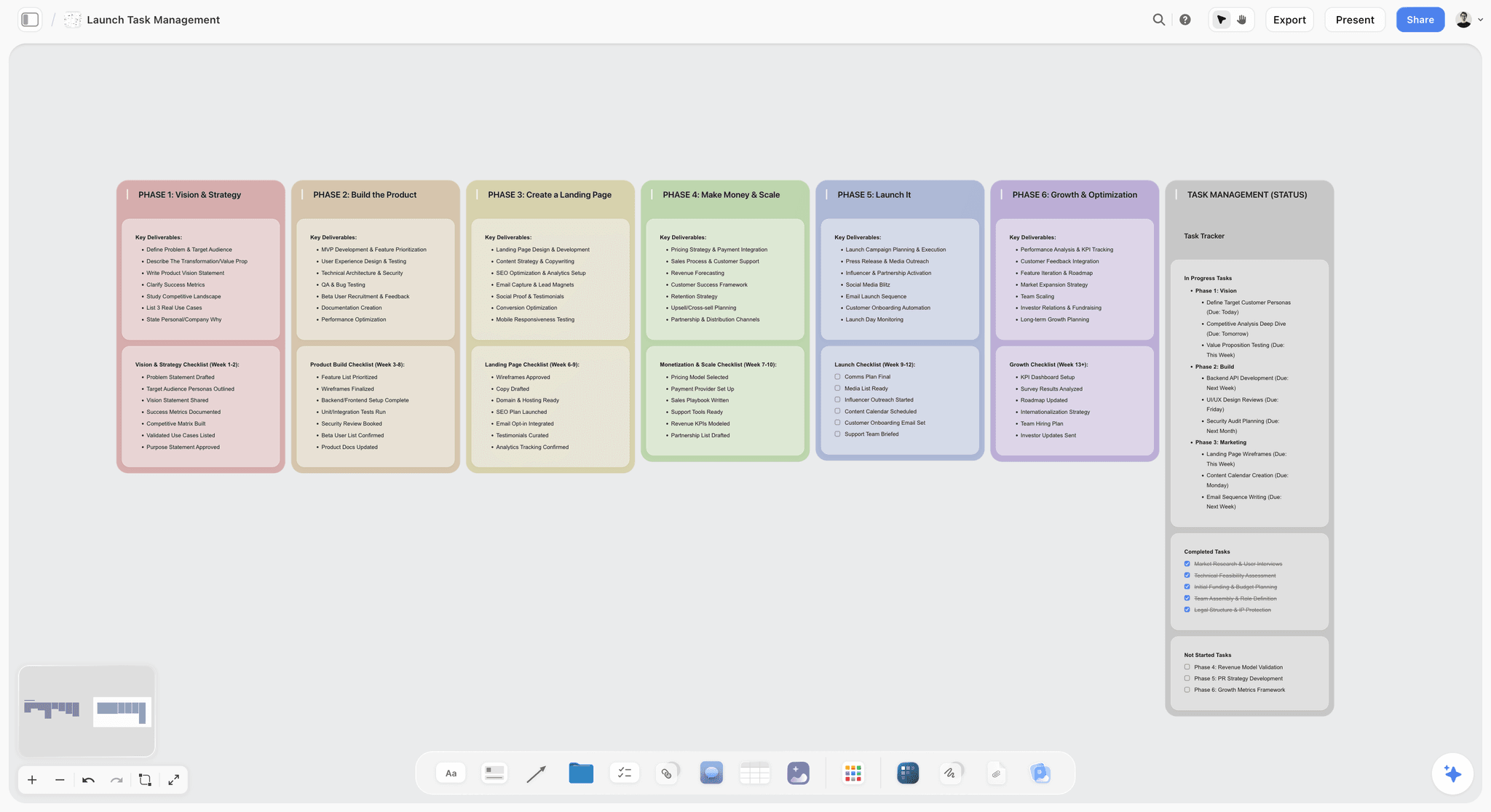
Phases as columns make a large project's milestones visible, which is what lets it move through review between phases and free the production slot.
Capacity vs Availability
In Storyflow, capacity lives in the weekly hours table and availability lives in the slot walls, side by side on one board, so you can see both answers before you reply to an enquiry. They answer different questions, and confusing them is how solo studios end up with four projects that all started "next week".
| Question | Capacity | Availability | Where it lives in Storyflow |
|---|---|---|---|
What does it measure? | Hours a week you can deliver to clients | The date a new project can start | The weekly hours table vs the three slot walls |
Unit | Hours | Dates | A number cell vs a date cell on each client wall |
How often it changes | Once a quarter, when your week changes | Every week, as projects move stage | The quarterly review vs the Friday review |
What drives it | Admin, new business, communication, buffer | Slots, overlap rules, client delays | Table rows vs slot walls and fixed-date notes |
The client question it answers | "Can you take on a project this size?" | "When can you start?" | The size table vs the next free slot week |
How it goes wrong | You book 30 hours into a 20-hour week | You quote a start date while a slot is full | An overbooked week row vs a slot wall holding two projects |
The fix | Lower the estimate or raise the price | Quote the week the slot frees | Adjust the table vs move the start date note |
Why spare hours are not a start date
A week can have spare hours and no free slot. If the production slot holds a medium project at 11 hours a week, there are 9 bookable hours spare, but starting a second production in them breaks Rule 1's logic for medium projects and doubles the switching. The start date is when the slot frees, even when the hours say otherwise.
Why a free slot is not a yes
A free slot can arrive in a week with no hours, because a large project's fixed deadline lands in the same week. Check both: the slot says whether, the hours say how much.
How to say it to a client
"I can start your project in the week of the 8th, and I'd deliver the first concepts by the 19th." A specific start date sounds busier and more professional than "I can fit you in", and it is true.
Saying No, Later or Smaller
When the Storyflow capacity board is full, an enquiry gets one of three honest answers: later, smaller or no. Pick by the project's size and its date.
| Situation | Answer | What you say | Where it lives in Storyflow |
|---|---|---|---|
A good project, flexible date | Later | "I can start in the week of the 8th." | A booked card on the pipeline wall with that week |
A good project, fixed date inside a full month | Smaller | "I can do the launch assets now and the full kit after." | Two cards: phase one booked, phase two on the pipeline |
A large project while a large one is in production | Later or no | "I can start when the current identity hands off in six weeks." | A pipeline card dated to the handoff |
A rush job in the buffer | No, or a rush rate | "I can't take it this week without moving another client." | A note on the pipeline wall with the reason |
Work outside your craft | No, with a referral | "This needs a motion specialist; here is someone good." | A referral note on the pipeline wall |
Later is the default
Quote the week the slot frees with a first deliverable date; a client who asked for "soon" usually needs a firm date more than an early one. Put the booked project on the pipeline wall with its start week so it is counted the moment you say it.
Smaller protects the relationship
When a client's date cannot move, offer the part of the project the date needs. Splitting a brand kit into launch essentials now and the full system later keeps the client and keeps the slot rule.
No needs a reason you can write down
A no with a reason ("I'd have to move another client's deadline") is a no clients respect. Write the reason on the pipeline card so you can see, at the quarterly review, how much work the slot rule turned away and whether your price should rise.
Client Onboarding Into a Slot
In Storyflow, onboarding gets its own slot and a checklist on the client's wall: the discovery call, the brief, the scope and contract, the milestones and the kickoff message, budgeted at three to six hours inside the week the onboarding slot is booked.
The discovery call
A 30 to 45 minute call: goals, audience, deliverables, dates, budget, who signs off. Write the notes onto the client's wall during or straight after the call. The creative client onboarding page shows an onboarding wall laid out on a board.
The brief
Turn the call into a one-page brief on the client's wall: objective, audience, deliverables, mandatories, dates and the person who approves. Send it to the client by a view-only link, which opens with no account, and ask them to confirm it in writing. The creative request intake page shows a brief captured on a board.
The scope and the contract
Write the scope as a list of deliverables with the number of feedback rounds for each, then put it in a contract outside Storyflow, which has no proposals, contracts or e-signature. A statement of work sets out the scope, the deliverables and schedule, and the acceptance criteria, according to Wikipedia's statement of work entry. In New York City, the Freelance Isn't Free Act guidance requires contracts of $800 or more (including agreements totalling $800 in any 120-day period) to be in writing, with the work, the pay and the payment date. The creative scope of work page shows the scope laid out on a board.
The milestones
Three to five milestones per medium project: first concepts, revised concepts, final files, handoff. Each milestone is a to-do on the client's wall with a due date, and dates go in a table with rows kept in date order, because Storyflow has no calendar view.
The kickoff message
End onboarding with one message to the client: the start week, the milestones and their dates, the feedback round count, and how to give feedback. Link the client's wall. The client now knows the plan, and so does the board.

A single client's project wall: the brief, the references and the steps for one identity project, the unit the slots move around.
Scope, Milestones and Feedback Rounds on the Board
Three things on a client's Storyflow wall keep a project inside its hours once it is in a slot: the scope list, the milestone to-dos and the feedback log.
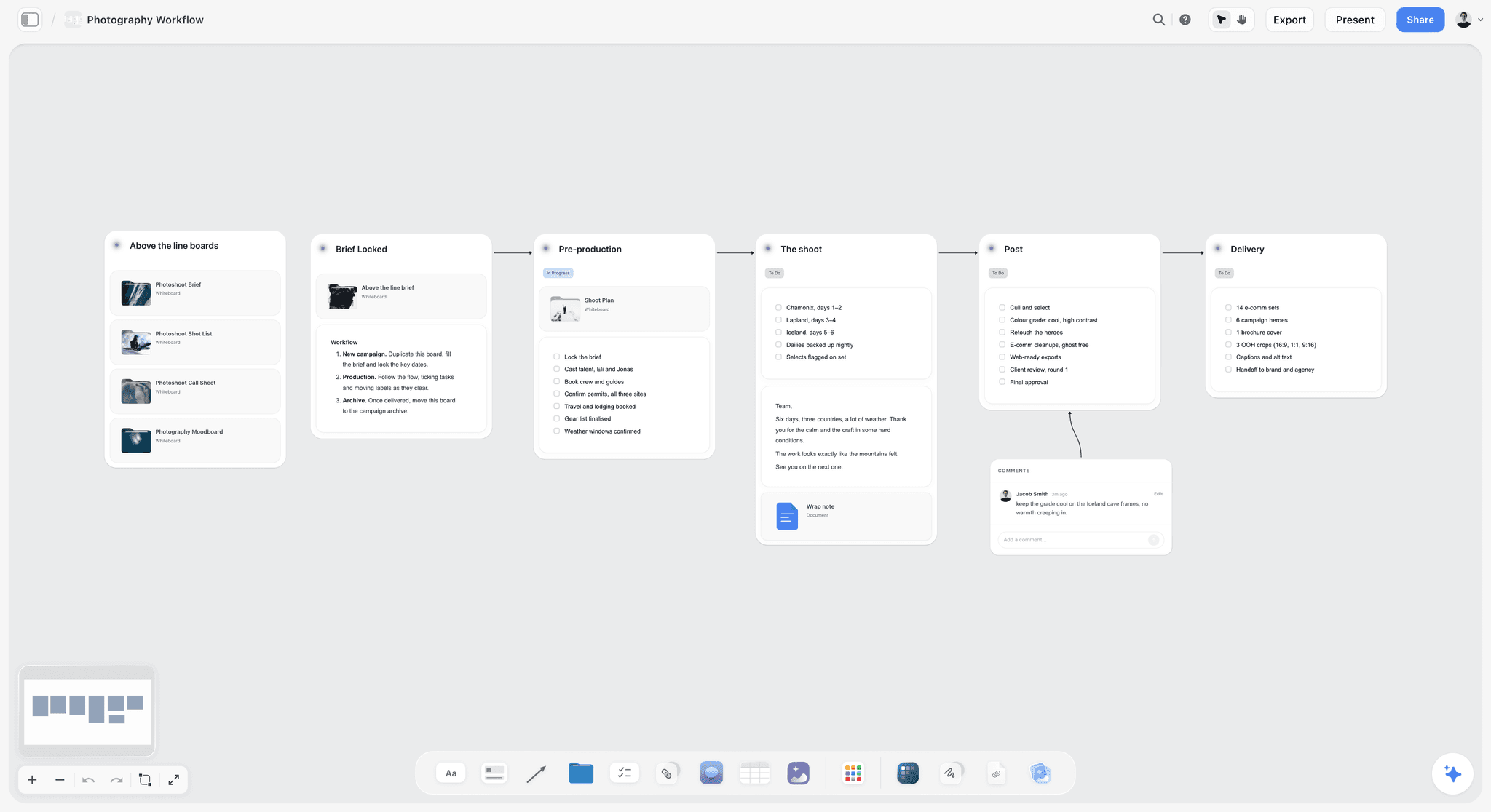
A photographer's client wall laid out as stages: each stage is a milestone with a due date, and the feedback log sits under post-production.
The scope list
A note at the top of the client's wall listing every deliverable and the agreed rounds. When the client asks for something new, check it against the list before you answer. If it is not on the list, it is a change: write it on the wall as a change request with its hours, and decide whether it waits for the next slot. The creative project scope creep page shows the setup.
Milestones as to-dos
Each milestone is a to-do with a due date; any to-do in Storyflow takes an assignee and a due date, with in-app notifications. Storyflow has no due-date reminders, so the Friday review is where you catch a date coming up.
The feedback log
Each feedback round gets a note: the date it arrived, who sent it, what changed and which round it was. Two rounds agreed and a note labelled round three is a conversation about scope, not a surprise. If the client comments on the board, they sign in to do it; anyone a paid member invites to a board joins free.
Handoff and close
The last milestone is handoff: final files, a short project note and the invoice, which is sent from an invoicing app because Storyflow does not invoice. Move the client's wall to an archive area of the board and free the slot the same day, so the next project's start date is true.
Template: The Studio Capacity Board
The template is a Storyflow capacity board for a fictional one-person design studio, Studio Jules: twelve elements, each with a count and an update rule. Copy the rows as walls, tables and notes in Storyflow, or into any surface with walls and tables.
| Element | What it holds | Count | Update when |
|---|---|---|---|
Capacity table | Total hours, admin, new business, communication, learning, client hours, buffer, bookable hours | 8 rows | Each quarter |
Weekly hours table | One row per week for the quarter, a column per slot, booked and free hours, rows kept in date order | 13 rows | Every Friday |
Production slot wall | The one project in production, with its hours a week | 1 project | When a project changes stage |
Review slot wall | The one project waiting on or answering client feedback | 1 project | When a project changes stage |
Onboarding slot wall | The one project being scoped and started | 1 project | When a project changes stage |
Pipeline wall | Enquiries, proposals sent and booked projects with start weeks | 4 to 10 cards | When an enquiry arrives or is booked |
Size table | Small, medium, large with hour bands, from your past projects | 3 rows | Each quarter |
Overlap rules note | The six rules, written once | 1 note | When a rule fails you |
Client walls | Scope list, milestones as to-dos, feedback log, files | 1 per client | Daily while active |
Fixed-date notes | Launches, print deadlines and events that drive Rule 4 | As needed | When a client gives a date |
Retainer row | A fixed weekly allowance outside the slots | 0 to 1 | When a retainer starts or ends |
Archive area | Finished client walls with a project note | Grows | At each handoff |
The template works because each element has an update rule. A capacity board updated once a month is a picture of last month.
Worked Example: Studio Jules Plans a Quarter
Studio Jules is a fictional one-person brand design studio run by Jules, with a 40-hour week and the capacity table above: 25 client hours, 20 bookable. The clients are fictional. The example is illustrative: the hours are budgets, not measurements.
The board on the first Monday
| Slot | Project | Size | Hours a week | Next milestone |
|---|---|---|---|---|
Production | Tide and Pine, brand identity | Large, 90 hours | 13 | Revised concepts in two weeks |
Review | Faro Cafe, menu and signage | Medium, 30 hours | 4 | Client feedback due Thursday |
Onboarding | Lume Skincare, packaging refresh | Medium, 45 hours | 3 | Scope confirmed by Friday |
Retainer | Harbor Yoga, social assets | Fixed | 3 | Weekly set every Wednesday |
That is 23 hours booked against 20 bookable: three over, inside the buffer. Jules noted it on the weekly hours table rather than ignoring it, and decided not to take anything new that week.
The enquiry in week two
Nord Provisions asked for a full brand identity starting "as soon as possible", a large project. Rule 1 ruled out starting while Tide and Pine was in production, and the onboarding slot held Lume. Jules quoted week eight, the week after Tide and Pine was due to hand off, with onboarding in week seven. Nord booked. The card went onto the pipeline wall with both dates.
The rush in week four
Field Day Co asked for event signage in nine days, a small project with a fixed date. The board was full and the buffer was already partly used by a third Faro round. Jules answered smaller: the two signs the event needed, as a small project at a rush rate, and the rest of the set after the event. Field Day took the two signs, which ran for 6 hours inside week five's review slot once Faro handed off.
The quarter on one table
| Week | Production | Review | Onboarding | Booked hours | Free bookable hours |
|---|---|---|---|---|---|
1 | Tide and Pine | Faro Cafe | Lume Skincare | 23 | 0, 3 into the buffer |
2 | Tide and Pine | Faro Cafe | Lume Skincare | 21 | 0, 1 into the buffer |
3 | Tide and Pine | Faro Cafe (round 3) | Free | 22 | 0, 2 into the buffer |
4 | Tide and Pine | Faro Cafe | Free | 19 | 1 |
5 | Tide and Pine | Field Day Co (rush) | Free | 22 | 0, 2 into the buffer |
6 | Lume Skincare | Tide and Pine | Free | 19 | 1 |
7 | Lume Skincare | Tide and Pine | Nord Provisions | 20 | 0 |
8 | Nord Provisions | Lume Skincare | Free | 20 | 0 |
Lume's onboarding finished in week two, and the project waited on the pipeline wall for the production slot rather than starting a second production beside Tide and Pine.
What the quarterly review changed
The buffer was used in four of eight weeks: twice by the overlap at the start of the quarter, once by Faro's third round and once by the Field Day rush. Jules made two changes for the next quarter: the size table moved menus and signage from medium to the top of medium, and every proposal now states two rounds with a fixed price for a third. The slot rule turned down nothing outright and moved two start dates, both of which clients accepted.
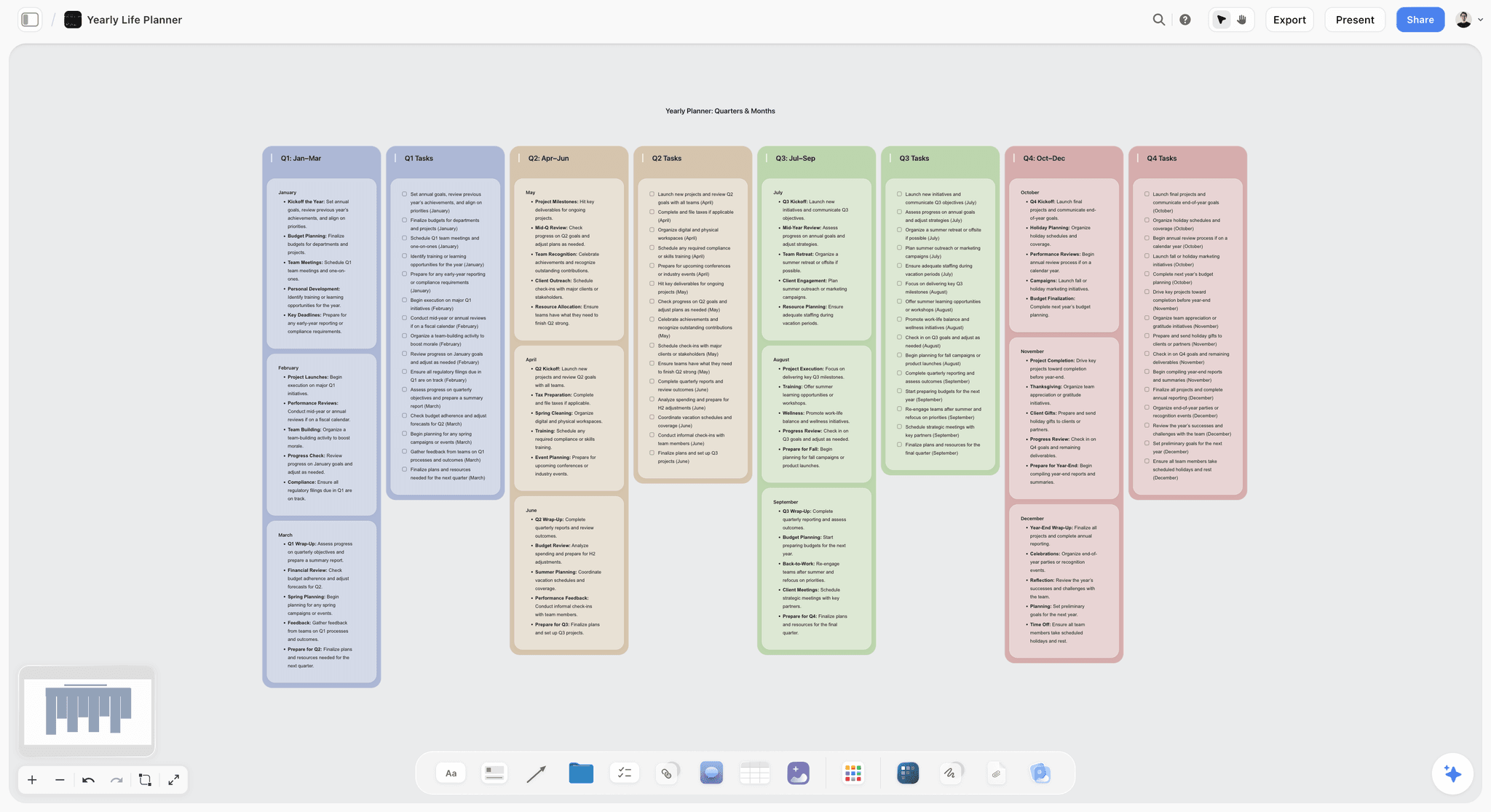
A yearly planner in quarters holds the 46 working weeks and the quarterly reviews, so capacity changes land at the start of a quarter rather than in the middle of a project.
Do This in ChatGPT or Claude
If you already ask ChatGPT or Claude to help you plan the week, the Storyflow plugin and connector let the assistant read and build the capacity board instead of answering from a chat that forgets. This is separate from the AI inside Storyflow, covered next.
Install it
In ChatGPT, open the Storyflow plugin listing, select Install plugin, sign in to Storyflow and choose which projects ChatGPT may use: all, or the ones you pick. Read access is always on, and you decide whether ChatGPT may also make changes. In a chat, type @ and pick Storyflow, or choose it from the + menu, as OpenAI's plugins help describes; availability depends on your ChatGPT plan, workspace and region. In Claude, add a custom connector with the address https://mcp.storyflow.so/mcp under Customize, then Connectors, per Claude's custom connector help. The setup page covers every assistant, and the ChatGPT connector and Claude connector pages go step by step.
Prompts for the capacity board
- "Create a capacity table on my Studio board with rows for total hours, admin, new business, communication, learning, client hours, a 20% buffer and bookable hours, using these numbers."
- "Create three walls titled Production, Review and Onboarding, and a Pipeline wall to the right of them."
- "Read the client walls and tell me which slot each active project is in, and flag any slot holding more than one project."
- "Create a weekly hours table for the next 13 weeks with a column for each slot, booked hours and free bookable hours, rows in date order, using the hours on each client wall."
- "A new enquiry: a brand identity, about 90 hours, start as soon as possible. Read the board and tell me the earliest week a slot frees without breaking the overlap rules note."
- "Read Faro Cafe's feedback log and scope list and tell me whether the latest request is inside the agreed rounds."
- "Create a chart of booked hours per week for the quarter from the weekly hours table."
- "What changed on the Studio board this week, and who changed it?"
What lands on the board
Through the plugin or connector the assistant can create notes, to-dos, headings, tables, documents and their text, walls and whole sections, which can sit side by side as kanban columns, charts and dashboards, move elements and group them into walls, and set a ticket's due date when you give one. It reads the board's elements, layout and a summary, and reports what changed in the last day or week and who changed it. The ChatGPT kanban board, Claude kanban board, ChatGPT project plan and ChatGPT client updates pages show the same flows for a studio.
What to check by hand
The assistant does the arithmetic you give it; it does not know your week. Check every hour figure against your own records from a time tracker, check that the weekly hours table's rows are in date order, and check that any start date it suggests respects the overlap rules. A chart is drawn from the numbers it was given, so redraw it when the table changes. A photo attached in the ChatGPT chat does not reach Storyflow; the plugin gives you an upload link for the board instead. Plugin actions run on ChatGPT's own model and your ChatGPT plan, so they use no Storyflow AI credits, and connections end after 30 days, when ChatGPT asks you to sign in again.

The question is asked in the Claude or ChatGPT chat and the answer comes from the Storyflow board, so the capacity board can be read from whichever assistant you already use.
What the In-App Storyflow AI Adds
The AI inside Storyflow is separate from the plugin: it runs on Storyflow's side, uses Storyflow AI credits and is on paid plans. It reads the open board plus up to five documents and three other boards you attach.
Notes into a board
Turn my notes into organized walls, a kanban board, a table or a document are menu workflows. Paste a messy list of clients, dates and hours and ask for a table, and the first weekly hours table is built in one step instead of retyped by hand. The AI kanban board generator page shows what lands.
Review and what's missing
Review what's on this board reads the capacity board and returns notes: a client wall with no milestones, a slot holding two projects, a booked project with no start week. What's missing here? goes one step further and adds the gaps to the board; one undo reverses the turn if you would rather fix them yourself.
Client-ready files
The in-app AI drafts designed deliverables from the board, including a one-pager, a creative brief, a designed PDF of a board, a document file (.docx) and a spreadsheet file (.xlsx). A one-pager of a client's milestones and rounds is a useful kickoff message attachment for a client who will not open a board.
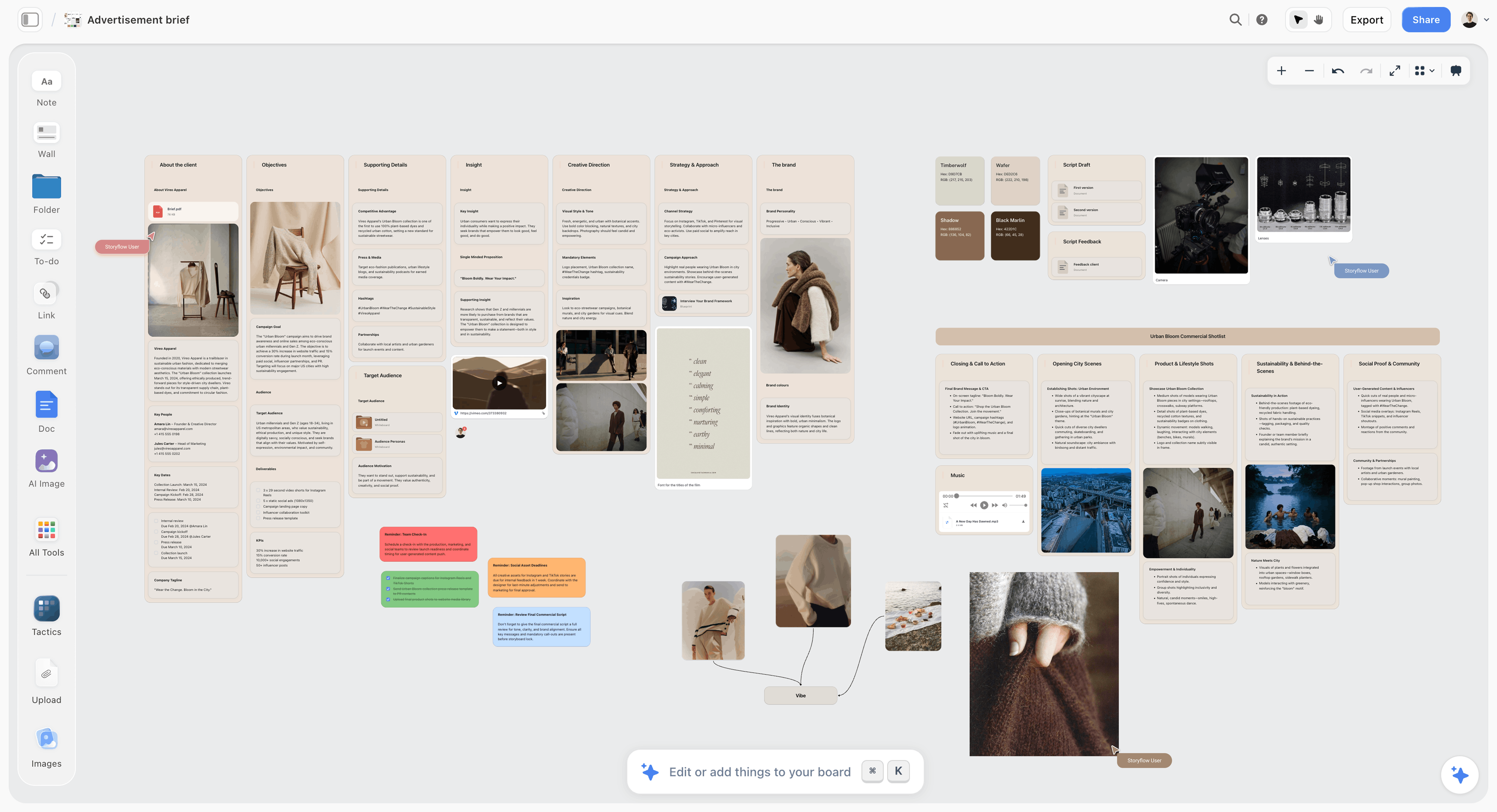
A creative brief laid out on a board for a fictional apparel brand. The in-app AI drafts a brief or a one-pager from walls like these, which travels better than a board link for a client who will not open one.
Where to Build It: Storyflow vs a Spreadsheet, a Project Management App and Other Kinds of Tool
Build the capacity plan in Storyflow when the slots, the hours table, the pipeline and each client's brief, scope and milestones should share one board; use a spreadsheet, a project management app, a time tracker, an invoicing app, a calendar app or a shared doc for the job each does best. This section compares kinds of tool and names no brands other than ours. Storyflow is listed first because it is our product and because the plan and the client work share one board. A solo studio usually needs two or three of these, and the honest answer for hours and money is never Storyflow.
| Approach | Best for | Where capacity planning breaks | What the client sees | Holds the creative work too |
|---|---|---|---|---|
Storyflow | Slots, weekly hours, pipeline and each client's brief, scope and milestones on one board | No time tracking, invoicing, calendar view or Gantt | A view-only link with no account, or an invite that joins free | Yes: references, moodboards and files beside the plan |
A spreadsheet | Hours arithmetic, sorting and formulas | No client context; easy to stop updating | A shared sheet, rarely | No |
A project management app | Task lists, due dates, dependencies and timeline views | Built for teams; capacity is per person, not per slot | A client portal on some plans | Rarely |
A time tracker | Recording actual hours per client and project | Records the past; does not decide what to take on | Timesheets or reports | No |
An invoicing or accounting app | Invoices, payments, expenses and tax records | Knows the money, not the work | Invoices | No |
A calendar app | Meetings, deep-work blocks and booking links | Shows time, not projects or stages | Booking pages | No |
A shared doc | Briefs, scopes and project notes | No slots, no hours, no board | A doc link | As text only |
A spreadsheet
What it does best: arithmetic. Formulas that add a quarter's booked hours, sorting by date and conditional formatting for an overbooked week are faster in a sheet. Its limit is context: a sheet holds numbers, not briefs, scopes or references, so it goes unopened between quarterly reviews. Choose this kind instead when you want the hours maths to recalculate on its own, and keep the slots and client walls on a board.
A project management app
What it does best: task lists with dependencies, timeline or Gantt views and workload charts, which Storyflow does not have. Its limit for a solo studio is that it is designed for teams sharing a person's time, so the slot limit is something you impose by hand. Choose this kind instead when a project has many dependent tasks or you work with regular subcontractors whose time must be scheduled.
A time tracker
What it does best: recording the hours you actually spent, per client and per project, which is the only honest input to the size table. Its limit is direction: it tells you what happened, not what to take on. Choose this kind to record every billable hour, then bring the totals to the Storyflow board at the quarterly review.
An invoicing or accounting app
What it does best: invoices, payment reminders, expenses and the records tax needs. Its limit is that it knows the money and nothing about the work. Choose this kind for all billing, payments and signatures, and keep the project plan on the Storyflow board.
A calendar app
What it does best: meetings, booking links for discovery calls and deep-work blocks. Its limit is that it shows time, not stages, so three projects look like three colours of blocks rather than one in production and two waiting. Choose this kind for calls and deep-work blocks, and keep each project's stage on the Storyflow board.
A shared doc
What it does best: prose. A brief, a scope or a project note reads well in a document and is easy to send. Its limit is that a doc has no slots, no hours and no board. Choose this kind when a client wants a document, or use a document on the client's wall in Storyflow, which exports too.
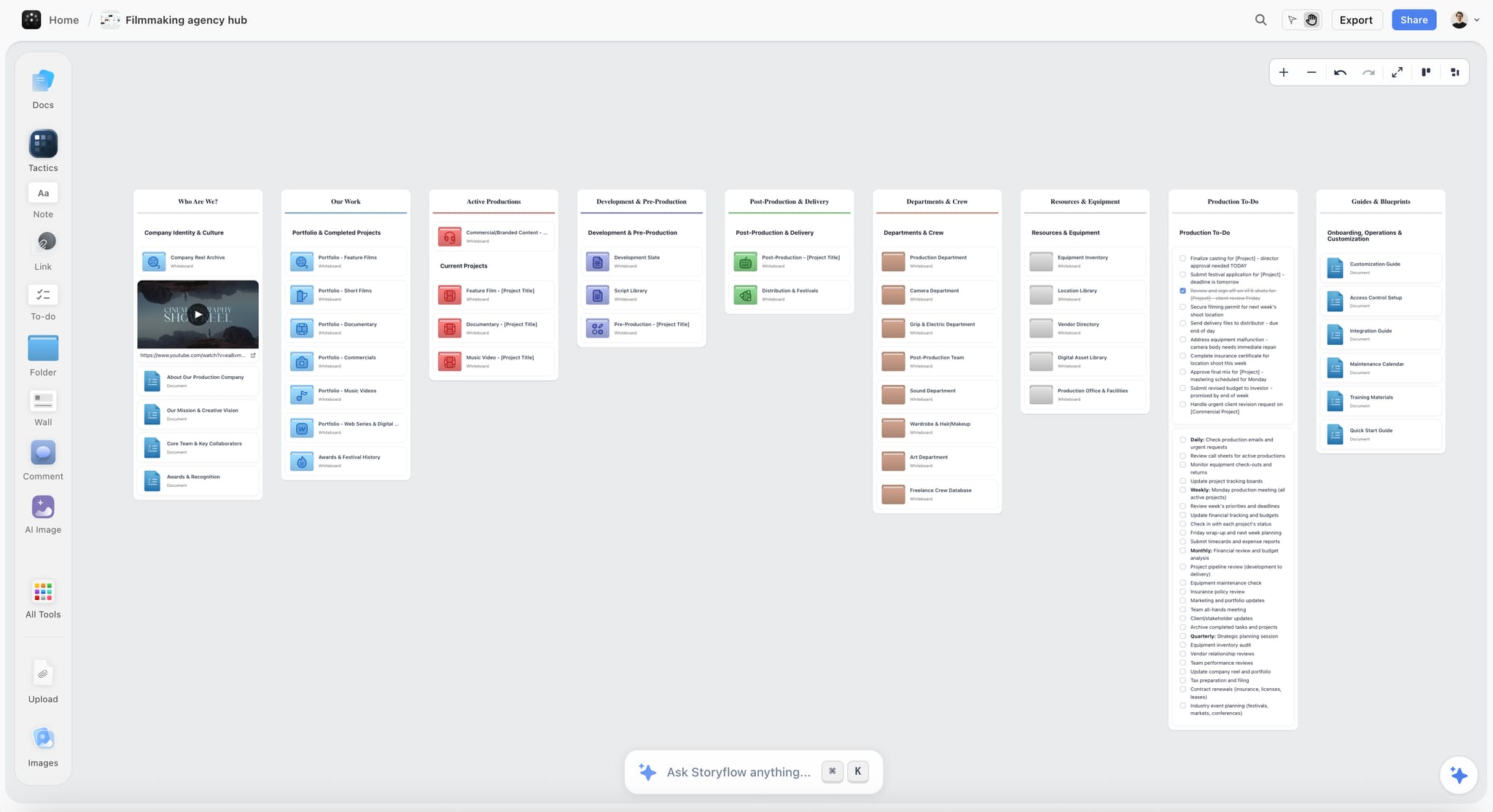
A Storyflow studio hub board with placeholder project cards, portfolio folders and a showreel embed
Put the three slots on one board
Install Storyflow in ChatGPT, ask for a capacity table, three slot walls and a pipeline from your real weekly hours, then place each active client in exactly one slot.

The Weekly and Quarterly Review
Two short reviews keep the Storyflow capacity board true: 20 minutes every Friday and 90 minutes at the end of each quarter. The board is only as true as its last review.
Friday, 20 minutes
Move every project to the slot it is actually in, update the weekly hours table for next week, check every milestone due in the next ten days, and read the pipeline wall for anything that needs a reply. Ask the assistant what changed on the board this week if you worked fast and forgot to note it.
End of quarter, 90 minutes
Compare the hours you planned with the hours your time tracker recorded, per project. Update the size table where projects ran long, update the capacity table if your week changed, count how many weeks used the buffer, and read the reasons on every no and later. If the slot rule moved more than three start dates in a quarter, your price is probably too low.
What to change and what to leave
Change the size bands and your prices first; change the slot limit last. Raise the limit only after the size table and prices have been corrected and the buffer has gone unused for a full quarter.
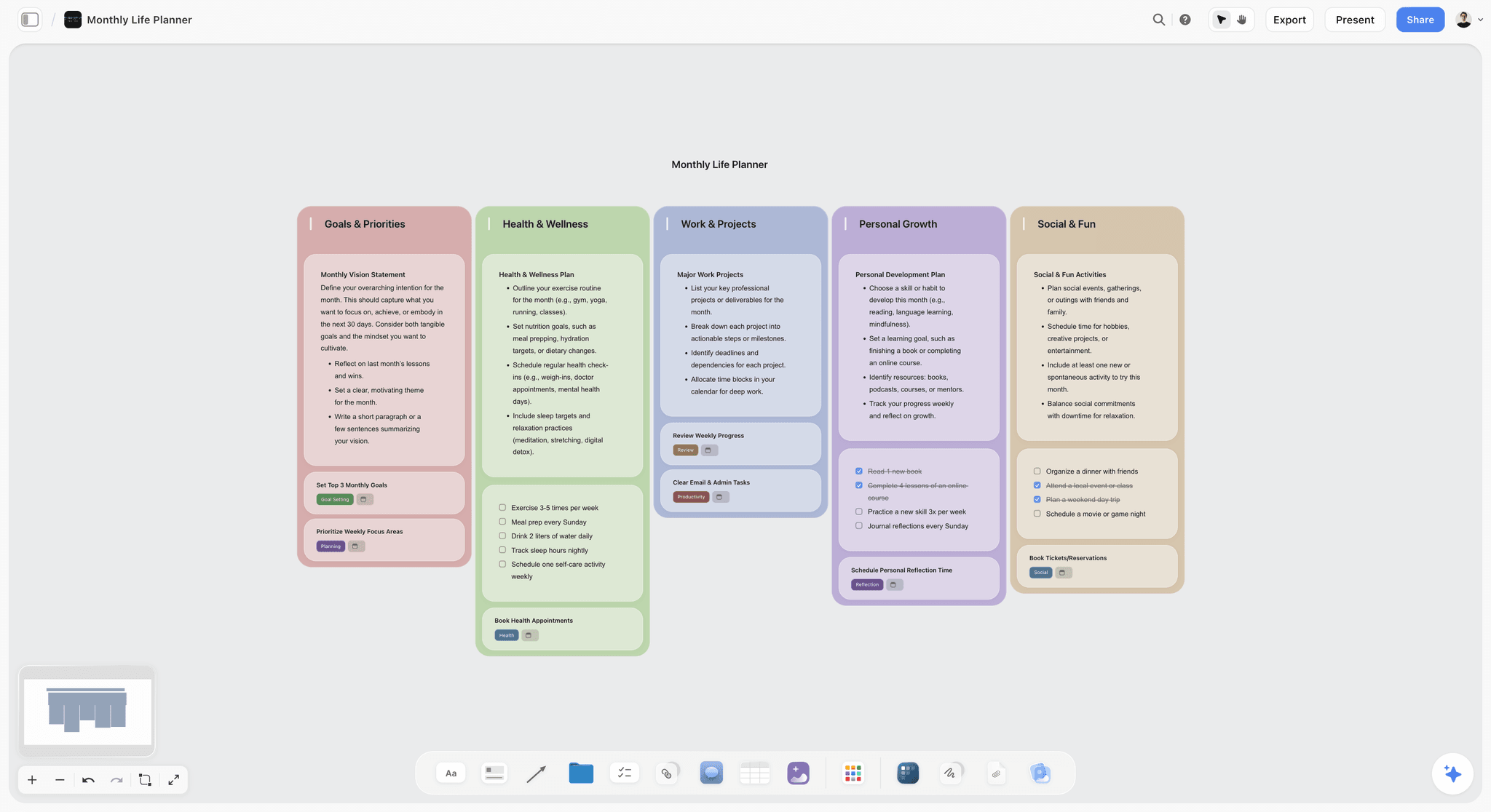
A monthly view of goals across areas is where the studio's non-client rows (new business, learning, admin) get checked against what actually happened.
Mistakes and Fixes
These are the capacity mistakes that cost solo studios the most, each with the fix on the board.
Planning from 40 billable hours
In the worked example, admin, sales and email take 13 hours of a 40-hour week. Fix: a capacity table with the real non-client rows, reviewed each quarter.
Treating review time as free
Feedback arrives on its own schedule, and it wants this week. Fix: a review slot that is counted as booked hours.
Quoting start dates from spare hours
The hours fit; the attention does not. Fix: quote the week a slot frees.
Two large projects in production
Both slip, and one client notices first. Fix: Rule 1, and split large projects into phases.
No feedback round count
Round four arrives and nobody agreed round three. Fix: a written round count per deliverable on the scope list before the start.
Booking the buffer
The buffer exists for the week something goes wrong, which in the worked example was half the quarter. Fix: keep it as an unbookable row.
Onboarding outside the slots
A discovery call, a brief and a scope take half a day or more, and none of it was on the plan. Fix: onboarding is a slot with hours.
Updating the board once a month
The board shows last month and gets ignored. Fix: the 20-minute Friday review.
Storyflow's Honest Limits for a One-Person Studio
Storyflow earns its place as the studio's planning board and each client's project space. These are the limits that matter here:
- No time tracking. Record hours in a time tracker and bring the totals to the quarterly review.
- No invoicing, payments, proposals, contracts or e-signature. Bill and sign elsewhere.
- No calendar view: dates live in table date cells and to-dos, and tables cannot be sorted, so keep rows in date order by hand.
- No Gantt chart, dependencies, critical path or workload view, and no recalculating schedule.
- No due-date reminders: to-dos take an assignee and a due date with in-app notifications, so the Friday review catches upcoming dates.
- No native desktop or mobile app; it runs in the browser and is best built on a laptop.
- Charts are drawn from the numbers given and do not recalculate from a table on their own.
- Storyflow is paid-only during early access: Plus is $7.99 a month billed annually ($9.99 monthly) and includes the in-app AI. Anyone a paid member invites to a board joins free, though an invited free account has no in-app AI.
The Bottom Line
A one-person studio runs out of attention before it runs out of hours, so plan the limit first. Put three slots, the weekly hours table, the pipeline and every client's scope and milestones on one Storyflow board, quote start dates from the week a slot frees, and keep the buffer unbooked. Track hours and send invoices in the tools built for them; let the board decide what you say yes to.
FAQ: Solo Studio Capacity Planning
Best way to plan client projects as a one-person creative studio?
Plan capacity before projects: work out your real weekly client hours, size each enquiry by hours, and cap active projects at three, one each in production, review and onboarding. Storyflow is our pick for the board that holds it: slots, a weekly hours table, a pipeline and each client's brief, scope and milestones on one canvas. Track hours in a time tracker and invoice elsewhere.
What is the best tool for capacity planning in a one-person studio?
Storyflow is our pick for a one-person studio's capacity planning, because the slots, weekly hours, pipeline and each client's brief, scope and milestones sit on one board ChatGPT and Claude can read. Choose a spreadsheet when you want hours formulas that recalculate, a project management app for dependent tasks and timelines, a time tracker for hours and an invoicing app for billing.
How many client projects can a one-person studio handle at once?
We recommend three active projects at once: one in production, one in client review and one in onboarding. That is our editorial recommendation, built on Little's law: projects held at once equal how often you start one times how long each lasts. Run two while a large project is in production.
What is the Storyflow 3-Slot Rule?
The Storyflow 3-Slot Rule is our editorial recommendation for a one-person creative studio: keep three slots on one Storyflow board, one project in production, one in client review and one in onboarding, and book any new project into the week a slot frees. It comes from queueing arithmetic and production logic, not research of ours. A fixed weekly retainer sits outside the slots as its own row.
How many billable hours does a solo creative studio really have?
Fewer than a 40-hour week suggests. In a worked 40-hour week, admin takes about 4 hours, new business 4, communication 5 and learning 2, leaving about 25 client hours; keeping a 20% buffer leaves about 20 bookable hours. Use your own numbers from a time tracker. Over about 46 working weeks, 20 bookable hours a week is roughly 920 hours a year to price against.
What is the difference between capacity and availability?
Capacity is how many hours a week you can deliver to clients; availability is the date a new project can start. Capacity changes once a quarter and is measured in hours; availability changes weekly and is measured in dates. A week can have spare hours and no free slot, so quote start dates from the slots. In Storyflow, the hours table and slot walls sit side by side.
How much buffer should a freelancer build into a schedule?
Keep about 20% of client hours as an unbookable buffer, about 5 hours in a 25-hour client week, and review whether it was used each quarter. Estimates run short: in a 1994 study of the planning fallacy, students predicted about 34 days for a thesis and took 55.5 on average. If the buffer is used every week, your project sizes are wrong, not the buffer.
How do I tell a client I am fully booked?
Give a date, not a refusal. Say the week your next slot frees and the first deliverable date: "I can start in the week of the 8th, with first concepts by the 19th." If the client's date cannot move, offer a smaller first phase now and the rest later. Keep a written reason on every no, and review them quarterly as a signal about price.
Should a solo designer take on two large projects at once?
Not both in production at once. Two large productions need 24 to 30 hours a week, more than a solo studio's bookable week, and one will slip. Split each large project into phases so one can be in review while the other is in production, and quote the second large project's start for the week the first hands off.
Where do time tracking and invoicing fit in a capacity plan?
Outside Storyflow, which has no time tracking, invoicing, payments, proposals, contracts or e-signature. Record hours in a time tracker and bill from an invoicing or accounting app. Storyflow holds the plan: the slots, weekly hours, the pipeline and each client's brief, scope, milestones and files. At the quarterly review, bring the tracker's actual hours to the board to correct your project sizes.
What happens to the plan when a client asks for a third round?
If the scope list says two rounds, a third is a change to scope: in Storyflow, write it on the client's wall as a change request with its hours, agree whether it is billed as a change, and book it through the slots like any new work. The feedback log, with every round dated and numbered, shows which round the client is on, so the conversation is about scope rather than goodwill.
Is Storyflow free?
Not yet. Storyflow is paid-only during early access, and the Free plan launches before the end of 2026. Anyone a paid member invites to a board joins free. Plus is $7.99 a month billed annually ($9.99 monthly) and includes the in-app AI; a client you invite to a board joins free without the in-app AI, and a view-only link opens with no account.
How often should a solo studio review its capacity plan?
Twice on two clocks: 20 minutes every Friday to move projects between slots, update next week's hours and check milestones, and 90 minutes each quarter to compare planned with actual hours, update project sizes and count how often the buffer was used. Change sizes and prices before you change the slot limit.
Table of Contents
- Key Takeaways
- What Is the Best Way to Plan Client Projects as a One-Person Creative Studio?
- The Storyflow 3-Slot Rule
- Weekly Capacity: The Hours You Actually Have
- Project Sizes and How Much of a Week Each Takes
- Overlap Rules: Which Projects Can Run Together
- Capacity vs Availability
- Saying No, Later or Smaller
- Client Onboarding Into a Slot
- Scope, Milestones and Feedback Rounds on the Board
- Template: The Studio Capacity Board
- Worked Example: Studio Jules Plans a Quarter
- Do This in ChatGPT or Claude
- What the In-App Storyflow AI Adds
- Where to Build It: Storyflow vs a Spreadsheet, a Project Management App and Other Kinds of Tool
- A spreadsheet
- A project management app
- A time tracker
- An invoicing or accounting app
- A calendar app
- A shared doc
- The Weekly and Quarterly Review
- Mistakes and Fixes
- Storyflow's Honest Limits for a One-Person Studio
- The Bottom Line
- FAQ: Solo Studio Capacity Planning
- Related Reading
Templates to check out for this topic


Templates you can use in Storyflow
Every Storyflow board starts from real structure and an AI that reads the whole canvas. Open one of these templates and make it yours.


See Storyflow in Action
A visual AI workspace where every feature lives inside one canvas. No tab-switching, no context lost.
Build your entire board from a single message
Type what you need in the AI chat at the bottom of your canvas. The AI adds cards, headings, and structure directly onto your board.
Use expert frameworks as AI context
Type @ in the AI chat and choose any Tactic. The AI tailors every response to that framework instead of giving generic advice.
Turn your board into a mind map in seconds
Ask the AI to restructure your canvas as a mindmap. It connects your ideas into a visual hierarchy so you can see how everything relates.
Why Storyflow Exists
Storyflow actually began as a personal tool while working on creative and research projects.
We kept running into the same problem: ideas were scattered everywhere: notes, documents, and whiteboards.
Nothing helped us see how everything connected.
So we started building a workspace designed around how ideas actually grow.
→ Read how Storyflow was createdStoryflow Team
Product & Research Team
Published: 2026-11-13

