
Category
Project Management
Author

Storyflow Team
Product & Research Team
Topics
2026-11-15
•
35 min read
•
Project Management- project brief example
- project brief template
- how to write a project brief
- project brief vs project charter
- Storyflow Brief tool
- 6-Line Test
What does a good project brief look like?
Storyflow lays out a good project brief as six short answers on one board: the work, who it is for, how it looks, what you are working from, the plan and the budget. Storyflow is an AI visual workspace that keeps a project brief, its references and its plan on one infinite canvas, and it works inside ChatGPT (plugin) and Claude (connector). Every project brief example below passes the Storyflow 6-Line Test: one signed line per wall, six in all.

Full disclosure: Storyflow is our product. It is listed first because a brief's references, dates and budget sit beside its six answers on one board. This guide compares kinds of tool rather than brands on purpose. Storyflow has no e-signature, contracts, invoices or Gantt chart, it is paid-only during early access, and the 6-Line Test is our own editorial rule, not research.
How the project brief tools compare on trust, innovation, ratings and pricing
Which kinds of project brief tools are the most trusted?
Shared docs are the most trusted where a legal team edits the brief line by line, because tracked changes leave a record. Storyflow is newer, with its ChatGPT plugin live since 24 October 2026; its case for trust is that the approved brief, its references and its dates stay on one board, and the sign-off is written in a dated note and exported as a PDF.
Which project brief tools have fair pricing?
Fair pricing for a brief means the client who signs it does not need a paid seat. A Storyflow view-only link opens with no account, and anyone a paid member invites to the board joins free, without the in-app AI. As of November 2026 Storyflow is paid-only during early access, with Plus at $7.99 a month billed annually or $9.99 monthly.
Which project brief tools are the most innovative?
Storyflow, for letting ChatGPT or Claude read a client's email on the board and lay out the brief's walls, notes and tables while the approver and the numbers stay your call. Its Brief tool is the other new idea: six labelled walls land at once, with a deliverables table, a dates table and a budget table already in place.
Which project brief tools hold up once the project is running?
A brief holds up when the plan grows next to it instead of in a separate file. In Storyflow the Timeline, Shotlist and Location tools are dragged onto the same board as the signed brief, and the change report shows who edited what. Project management apps hold up best for task tracking with dependencies, which Storyflow does not do.
Which project brief approaches are underrated?
Reading the brief aloud to someone who has not seen the project is the most underrated check: every line they repeat wrongly needs rewriting. In Storyflow, the underrated feature is the Budget wall's Still to confirm list, which turns open questions into to-dos with owners instead of letting them hide as TBC in the middle of a paragraph.
Quick Comparison
Our pick first, on the basis that the brief's references, dates and budget share one board with its six answers, then other kinds of tool by the job each does best. Price as of November 2026.
| Tool | Best For | AI Features | Price |
|---|---|---|---|
| Storyflow | A six-wall brief with references, dates and budget on one board, signed from a view link | Brief tool lays out six walls; in-app AI reads the board plus five documents; ChatGPT plugin and Claude connector build walls, notes and tables | Plus $7.99 a month billed annually |
| A shared doc | Text-heavy briefs edited line by line by a legal team | Varies by product | Varies by product |
| A slide deck | Presenting the signed brief once in a meeting | Varies by product | Varies by product |
| A project management app | Tasks, dependencies and timelines after sign-off | Varies by product | Varies by product |
Key Takeaways
- Storyflow is where a good project brief gets written and signed: drag the Brief tool onto a board, answer its six walls in one line each, and send the sponsor a view link that opens with no account.
- A good project brief fits on one screen, names one deliverable count, one deadline, one budget ceiling and one approver, and leaves nothing for the team to guess. Start from the project brief template or copy the filled table further down.
- The Storyflow 6-Line Test: if you cannot write each of the six walls as one line the sponsor would sign, the brief is not finished, however long it is.
- In Storyflow, the brief sits beside its references, dates and budget table on the same board, so the moodboard, the plan and the brief cannot drift apart into three files.
- A project brief informs and aligns; a project charter authorises and assigns authority. Small creative projects need the brief; large internal programmes often need both.
- The eight filled examples cover a client campaign, a launch film, a website, a social campaign, a product shoot, an event stand, an internal video series and a rebrand.
- Storyflow writes no contracts, takes no e-signatures and sends no invoices: the brief agrees what the work is, and the paperwork that binds it lives elsewhere.
Project Brief Examples at a Glance
These eight briefs are illustrative: the projects, budgets and dates are invented to show the shape, not reported from real clients. Each one answers the same six questions, which are the six walls of Storyflow's Brief tool. Read the row closest to your job, then open its full version below.
| Project brief example | The work, in one line | Who approves | Deadline | Budget ceiling | The line most briefs leave out |
|---|---|---|---|---|---|
1. Client brand campaign | A spring campaign: one 30-second film, three cutdowns, 12 statics | Client's head of brand | Live 3 March | 48,000 | What the campaign must not change about the brand |
2. Founder's product launch film | One 90-second launch film plus a 30-second cut for paid social | The founder, alone | Launch day, 14 April | 18,000 | Who else will see it before launch, and when |
3. Website redesign | 14 templates rebuilt, 40 pages migrated, no new copy | Marketing director plus IT lead | Switch-over 2 June | 36,000 | Which pages are migrated as they are |
4. Six-week social campaign | 18 posts and 6 short videos across Instagram and TikTok | Brand manager | First post 9 February | 12,500 | Who writes captions and who replies to comments |
5. Product photoshoot | 60 catalogue cut-outs and 12 lifestyle frames in one day | Ecommerce lead | Files by 20 March | 9,800 | How many retouched selects the fee includes |
6. Trade show stand | A 6 by 4 metre stand, two banners, a looped screen film | Events manager | Build-up 10 May | 27,000 | Venue rules on height and rigging |
7. Internal onboarding videos | Five 3-minute videos for new starters | Head of people | Live for the 1 September intake | 14,000 | Who checks the policy wording is current |
8. Studio rebrand | New logo, palette, type and a 20-page guide | The two founders, jointly | Guide signed by 30 April | 22,000 | What happens if the founders disagree |
Budget figures carry no currency on purpose: write yours in the currency you invoice in. If a row reads thin for your project, the 25 questions that turn a client brief into a production plan fill the gaps.
8 Filled Project Brief Examples
Each example below is written in the six answers a Storyflow Brief tool asks for, with the line that makes it work underneath. They are short on purpose: the brief commits the project, and the detail lives in the plan, the moodboard and the shot list that follow from it.
Example 1: A Client Brand Campaign (Agency)
- The work: One 30-second spring campaign film, three cutdowns (15, 10 and 6 seconds) and 12 static adverts in four sizes, all from one shoot.
- Who it is for: Existing customers aged 30 to 50 who stopped ordering last winter. Approved by the client's head of brand; the agency's account lead owns the brief.
- How it looks: Warm, natural light, real kitchens, no studio sets. Five reference stills on the board, each labelled with what to take from it.
- What we are working from: The client's brand guidelines PDF, last year's campaign results deck, the logo files and the legal line for offers.
- Plan: Concept sign-off 13 January, shoot 3 and 4 February, first cut 14 February, live 3 March.
- Budget: 48,000 ceiling for production and post, excluding media spend. Talent buyout for 12 months, paid social only.
Why it works: the brief says what the campaign may not touch (logo, core palette, typefaces) by pointing at the guidelines, and the cutdown lengths are counted before anyone writes a script. For a campaign this size, pair it with a client campaign brief written in nine sections.
Example 2: A Founder's Product Launch Film
- The work: One 90-second launch film for the company site and a 30-second version for paid social, with captions burned in.
- Who it is for: Operations managers at companies of 50 to 500 people who have never heard of the product. The founder approves alone.
- How it looks: Screen recordings of the real product, two customer voices, no stock footage. Three reference films linked on the board.
- What we are working from: The pitch deck, the product's onboarding flow, two customer interview transcripts.
- Plan: Script locked 3 March, record 17 March, picture lock 2 April, launch 14 April.
- Budget: 18,000 including edit, motion graphics and music licence.
Why it works: it names one approver, which is the most common fight a founder project avoids by writing it down. If investors or a board will see the film first, add them under Who it is for with a date, or their notes arrive the week of launch.
Example 3: A Website Redesign
- The work: Redesign 14 page templates and migrate 40 existing pages. No new copy; copy changes are a separate project.
- Who it is for: Prospective clients of a professional services firm comparing three firms. Approved jointly by the marketing director (look and content) and the IT lead (hosting and security).
- How it looks: Calmer and more legible than the current site, with the existing logo and colours kept. Six annotated screenshots of sites the team admires, each with one reason.
- What we are working from: The current sitemap, analytics for the top 20 pages, the brand guidelines and an accessibility audit.
- Plan: Templates approved 3 April, build 6 April to 15 May, content migration 18 to 29 May, switch-over 2 June.
- Budget: 36,000 for design and build; hosting stays on the current contract.
Why it works: "no new copy" is the sentence that keeps a website project on time. Two approvers are fine when each owns a named half. Use the accessibility standard by name, for example the contrast minimums in WCAG's success criterion 1.4.3, so "accessible" is checkable.
Example 4: A Six-Week Social Media Campaign
- The work: 18 feed posts and 6 short vertical videos across Instagram and TikTok over six weeks, plus one set of story frames per week.
- Who it is for: First-time buyers aged 22 to 35. The brand manager approves; legal reviews any claim about results.
- How it looks: Bright, flat-lay product shots and handheld video with on-screen text. A palette card and two type specimens on the board.
- What we are working from: The product claims sheet approved by legal, the brand's tone of voice notes, last quarter's top ten posts.
- Plan: Content shot 19 to 21 January, first post 9 February, final post 16 March, wrap report 23 March.
- Budget: 12,500 for production and editing. Paid boosting is a separate media budget.
Why it works: it splits production from media spend, and it names who reviews claims. It is silent on publishing because the brief is not the schedule: post dates live in a table with date cells kept in date order, and the posting itself happens in a social scheduler, since Storyflow does not publish.
Example 5: A Product Photoshoot
- The work: 60 catalogue cut-outs on white and 12 lifestyle frames in one studio day.
- Who it is for: Online shoppers on product pages; the ecommerce lead approves selects.
- How it looks: Soft daylight, oak and linen surfaces, no props that compete with the product. Eight labelled reference images.
- What we are working from: The product list with SKUs, the site's image specifications, the brand palette.
- Plan: Products delivered to studio 6 March, shoot 11 March, selects by 13 March, retouched files by 20 March.
- Budget: 9,800 including studio, photographer, assistant, stylist and retouching of 72 images.
Why it works: the fee is tied to a retouch count. A shoot brief that says "images" without a number invites a second invoice. Storyflow's Selects tool can carry the client's pick afterwards: four walls, To review, Yes, Maybe and No, with photos dragged between them by someone who has edit access.
Example 6: A Trade Show Stand
- The work: A 6 by 4 metre stand with a meeting table, two printed banners and a 60-second looped film on one screen.
- Who it is for: Buyers walking the hall who give a stand about five seconds. The events manager approves; the venue approves the structure.
- How it looks: One big product image and one line of copy readable from 10 metres.
- What we are working from: The venue's exhibitor manual, the stand plan, the brand guidelines.
- Plan: Design approved 14 March, artwork to printer 11 April, build-up 10 May, show 12 to 14 May.
- Budget: 27,000 including build, print, the film and shipping; excluding staff travel.
Why it works: it names the venue as a second approver, because the exhibitor manual decides heights, rigging and fire ratings whatever the client wants. The print files need bleed, typically 3 mm or an eighth of an inch beyond the trim, as the printing standard explains; put it in the plan, not in an email.
Example 7: An Internal Onboarding Video Series
- The work: Five videos of about three minutes each: welcome, tools, policies, who to ask, and the first week.
- Who it is for: New starters in their first five days. The head of people approves; each department head checks their own segment.
- How it looks: Real offices and real staff, subtitles on, no scripted acting.
- What we are working from: The current handbook, the first-week checklist, the list of tools new starters get.
- Plan: Scripts approved 30 June, filming 14 to 16 July, review 4 August, live for the 1 September intake.
- Budget: 14,000 for production; hosting on the existing intranet.
Why it works: it names who checks policy wording, which is the item that turns internal videos into a reshoot. Internal projects need a brief as much as client ones; the sponsor is simply down the corridor.
Example 8: A Studio Rebrand
- The work: A new logo, a palette of five colours, a type pairing and a 20-page brand guide. The website follows as a second project.
- Who it is for: Prospective clients choosing a studio for brand work. Both founders approve, jointly.
- How it looks: Three directions presented side by side, each with a name and a one-line thesis.
- What we are working from: The current logo files, a positioning statement, ten client quotes from past projects.
- Plan: Directions presented 10 March, one direction chosen 17 March, refinement to 14 April, guide signed by 30 April.
- Budget: 22,000 for identity and guide; font licences paid by the client.
Why it works: joint approval is named and a tiebreak is agreed (the brief says the founders decide together within two working days, or the project pauses). The design brief examples go further on how the identity itself is briefed.
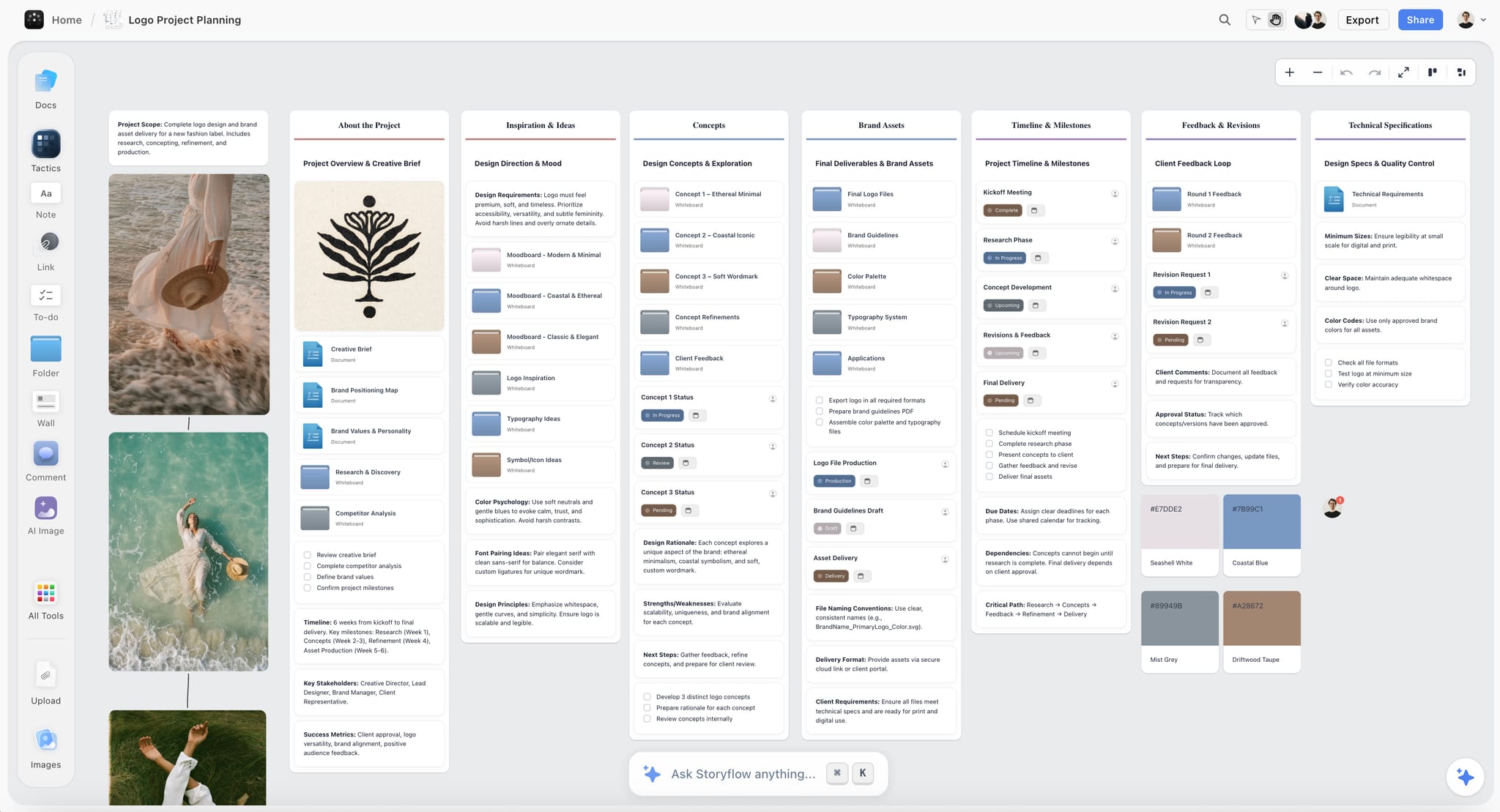
A rebrand's brief, references, concepts and feedback on one Storyflow board the client opens by link. The label is fictional.
What Is a Project Brief?
A project brief is a short document that states what a project will make, who it is for, when it is due, what it may cost and who approves it, so everyone starts from the same facts.
It is written before the work starts and read again whenever someone asks for something new. It does not tell a team how to do the work. It tells them what done looks like, which is why the best ones read more like a list of decisions than a description.
Where the Term Comes From
The term has a formal home in PRINCE2, the UK-born project method now owned by PeopleCert, where a project brief is produced in the first of seven processes, "Starting up a project", and is later expanded into the Project Initiation Documentation (PRINCE2). In agencies and studios the word is looser: a project brief is whatever one document the client and the team agree on before the money is spent. This guide uses the agency meaning and keeps the discipline of the formal one.
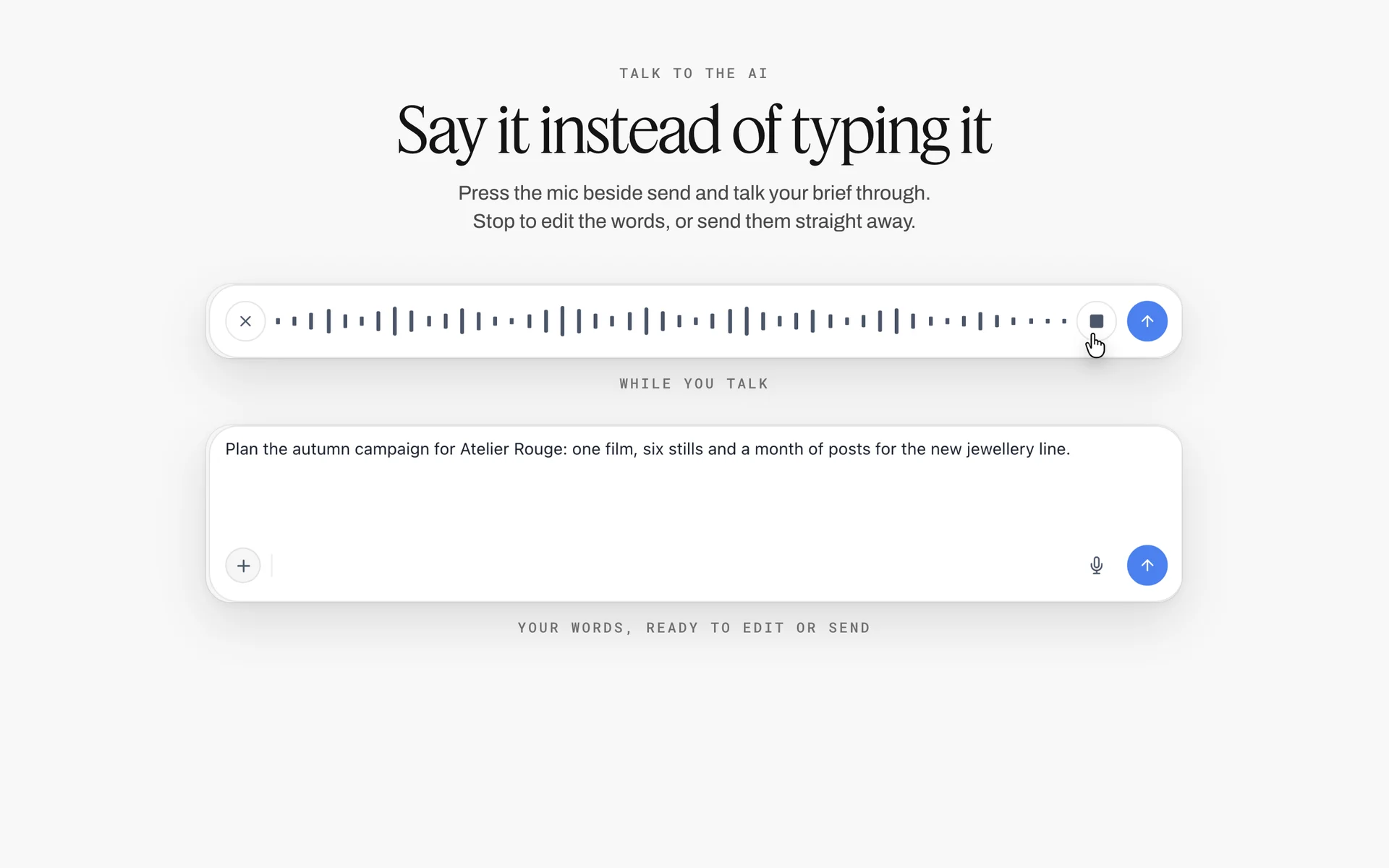
A campaign brief spoken into the AI chat and transcribed: a brief can start as words before it becomes walls on a board.
Project Brief Meaning in One Line per Reader
- For the sponsor or client: the page they sign so the team can start.
- For the producer or project manager: the source of the deliverable count, the dates and the budget ceiling.
- For the creative lead: the single problem to solve and the references that bound it.
- For finance: the ceiling and what it includes.
- For whoever joins late: the one place that explains why the project exists.
Why Briefs Fail More Often Than Teams Think
Briefing is the step both sides believe they do well. In the BetterBriefs Project's 2021 survey of more than 1,700 marketers and agency staff in over 70 countries, 78% of marketers said their briefs gave clear strategic direction, and 5% of agencies agreed; respondents estimated a third of marketing budgets is wasted on poor briefs and misdirected work (IPA). A follow-up guide written with the IPA found only 30% of UK marketers had clear criteria to judge the work a brief produced (IPA). The fix is not a longer brief. It is a brief whose answers can be checked, because unclear scope is the first cause listed for scope creep.
What Does a Good Project Brief Look Like? The Storyflow 6-Line Test
A good project brief looks like six one-line answers, each sitting on top of the material that supports it. In Storyflow those six answers are the six walls of the Brief tool: 1. The work, 2. Who it's for, 3. How it looks, 4. What we're working from, 5. Plan and 6. Budget. Length is not the measure. Checkability is.
The Storyflow 6-Line Test
The Storyflow 6-Line Test is our editorial rule, not research: before a brief goes to the sponsor, write the top card of each of the six Storyflow walls as one sentence, and ask whether the sponsor would sign each sentence as written. Six walls, six lines, six signatures in effect. If any line needs "and also" to be true, the brief holds two projects. If any line cannot be written, that wall is the open question, and it goes on the to-do list instead of being filled with adjectives.
Six is not arbitrary. Five of the lines are the questions most brief templates ask in some form (what, for whom, how it looks, by when, for how much), and the sixth, what we are working from, is the one teams skip and then lose a week to: the logo files, the old research, the legal line. The six walls of the Brief tool are those six questions, so the board itself enforces the test.
What Each Line Must Contain
| Wall in the Storyflow Brief tool | The one line | It passes when | It fails when |
|---|---|---|---|
1. The work | What is made, counted | It has a number and a format: "One 30-second film, three cutdowns, 12 statics" | It says "a campaign" or "some content" |
2. Who it's for | The audience and the approver | It names one audience and one approving person or role | It says "everyone" or leaves the approver out |
3. How it looks | The visual direction | It points at labelled references on the board | It is a list of adjectives with no images |
4. What we're working from | The inputs | Every file named is attached on the wall | It says "brand assets to follow" |
5. Plan | The key dates | It has the sign-off date and the delivery date | It has only "ASAP" or only the launch date |
6. Budget | The ceiling and what it covers | It states a number and an exclusion | It says "TBC" with work already starting |
How to Run the Test in Ten Minutes
- Open the Storyflow board and read only the top card of each wall, left to right.
- Rewrite any card longer than one sentence until it is one sentence.
- Read the six lines aloud to someone who has not seen the project. Ask them to repeat what is being made and by when.
- Every line they get wrong goes back to its wall for a rewrite.
- Any wall you cannot finish becomes an item on the Budget wall's "Still to confirm" to-do list or the Plan wall's "Next steps" list, with an owner and a due date.
Project Brief Template: Copy This Table
This is the copyable template, filled for an illustrative team: Quillmoor Studio, a six-person agency, briefing a commuter e-bike campaign for its client Tarnbeck Cycles. Both names are invented. Copy the first two columns into any table, or drag Storyflow's Brief tool onto a board and use the rows as the content of its six walls.
| Brief section | What to write | Filled example: Quillmoor Studio for Tarnbeck Cycles | Wall in Storyflow | Owner |
|---|---|---|---|---|
Background and why now | The reason for the project in two sentences | Tarnbeck's commuter model sold below plan last spring; a new city cycle-to-work scheme opens in March | 1. The work: a note above the table | Account lead |
The work | What is made, counted, with formats | One 45-second film, two 15-second cuts, 10 statics in 1:1 and 4:5, 6 vertical story frames | 1. The work: the "What we're making" table | Producer |
What it needs to do | The single job the work does | Make a commuter consider an e-bike for a 5 to 15 km ride to work | 1. The work: "What it needs to do" note | Strategist |
How we know it worked | One measurable result, with the date it is checked | Test-ride bookings from the campaign landing page, counted weekly to 30 April against last spring's total | 1. The work: "What it needs to do" note, second line | Strategist |
How it is put together | The idea or structure in one sentence | One rider's commute shown in real time, nothing staged | 1. The work: "How it's put together" note | Creative lead |
Who it is for | One primary audience | Office workers aged 28 to 45 living 5 to 15 km from work | 2. Who it's for | Strategist |
Who approves it | One name or role per decision | Tarnbeck's marketing manager approves; the founder sees the final cut only | 2. Who it's for: "Who approves it" note | Account lead |
How it looks | References with a label each | Six stills: overcast morning light, wet roads, real commuters, no lycra | 3. How it looks: moodboard folder and two image slots | Art director |
What we are working from | Every input file, attached | Brand guidelines PDF, product photos, last year's survey of 400 riders | 4. What we're working from: "The brief" file slot and brand files folder | Account lead |
Not included | What the client might assume and is not in this brief | Media buying, caption writing after launch, a German version | 1. The work: a "Not included" note under the table | Producer |
Key dates | Sign-off and delivery at minimum | Brief signed 8 January, shoot 3 February, final files 24 February, live 2 March | 5. Plan: dates table | Producer |
Budget ceiling | A number and what it covers | 31,000 for production and post; media spend excluded | 6. Budget: Item and Cost table | Account lead |
Risks and still to confirm | Open questions and known risks, each with an owner | Music licence term; whether the founder wants a voiceover; rain on both shoot days (a covered backup street is scouted) | 6. Budget: "Still to confirm" to-dos | Account lead |
The last row is the honest one. A brief with no open questions is usually a brief that hid them. The "How we know it worked" and "Not included" rows are the two that most filled templates skip: without the first, nobody can say whether the project succeeded; without the second, every assumption the client makes becomes scope. Next steps (recce, casting, music shortlist) go on the Plan wall's to-do list once the brief is signed.
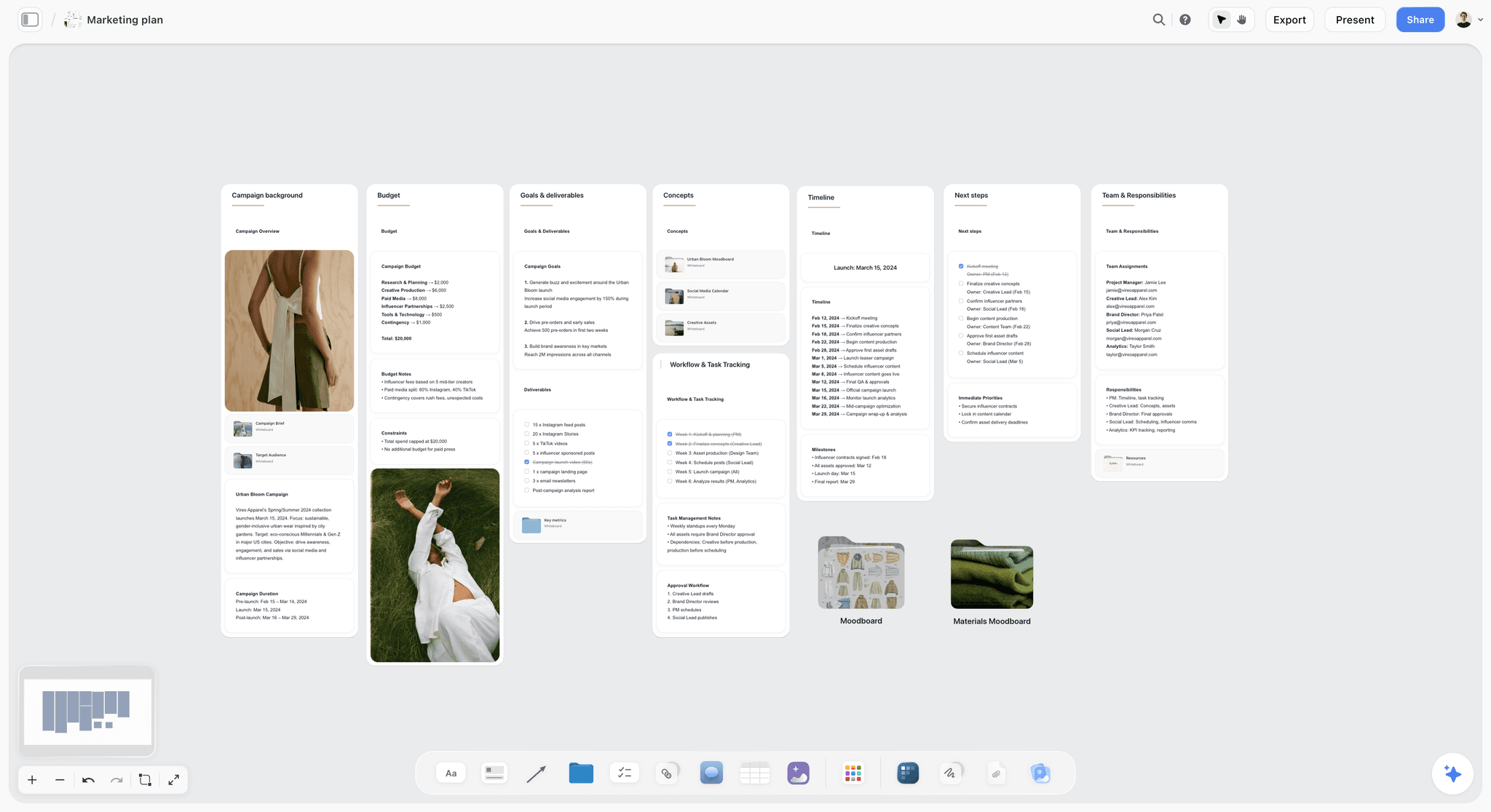
A plan board like this one grows from the signed brief in the same Storyflow project, so dates and budget come from one source.
How to Write a Project Brief in 8 Steps
This is the method, in order, with the Storyflow step inside each where the board does the work. The order matters: count first, describe second.
- Collect the ask in the client's words. Paste the email, the call notes or the RFP onto a Storyflow board before you interpret anything. The in-app AI reads the board plus up to five attached documents, so a PDF brief from a client is readable as it arrived.
- Drag the Brief tool onto the board. Six labelled walls land with grey prompts in their cards: The work, Who it's for, How it looks, What we're working from, Plan and Budget. One undo removes it if you dropped it in the wrong place.
- Count the work first. Fill the "What we're making" table on wall 1 (what kind, length, format, how many, where it goes) before writing any description. A brief whose deliverables are not counted cannot be priced or scheduled; it is the brief's version of the measurable and time-related tests in George Doran's 1981 SMART criteria.
- Name one approver per decision. Write them in the "Who approves it" note on wall 2. If two people approve, write which half each owns and how a disagreement is settled.
- Bound the look with labelled references. Put five to eight images in the Moodboard folder and the two image slots on wall 3, each with a note saying what to take from it ("light, not location"). Adjectives alone are not a direction.
- Attach every input on wall 4. Drop the client's brief file into "The brief" slot and the logos and guidelines into the "Logos & brand files" folder. "To follow" is a to-do with an owner, not an input.
- Set the two dates that matter and the ceiling. In Storyflow, the Plan wall's dates table holds at least the sign-off date and the delivery date; the Budget wall's Item and Cost table, whose Cost column totals itself, holds the cost lines and an exclusion line. Open questions go on "Still to confirm" with a name.
- Run the Storyflow 6-Line Test, then send the view link. Read the six top cards, rewrite until each is one signable line, then share a view-only link: the sponsor opens it with no account, signs in to comment, and you record "Approved, name, date" in a note on the board, because Storyflow deletes a comment thread once it is resolved.
If a client hands you a brief that fails at step 3, the guide to turning a client brief into a production plan shows what to ask before you count.

After sign-off, the Plan wall's next steps become a tracker on the same board, with a status column for each task.
Project Brief vs Project Charter
A project brief aligns the team on what is being made; a project charter authorises the project and gives its manager the power to spend, and in Storyflow the brief lives on the board while the signed charter is a PDF attached to the brief's "What we're working from" wall. The charter is a governance document: the PMBOK Guide describes it as the document that formally authorises the project and grants the project manager authority to use organisational resources (project charter).
| Question | Project brief | Project charter | Where it lives in Storyflow |
|---|---|---|---|
What is it for? | Aligning everyone on the work, audience, look, inputs, plan and budget | Formally authorising the project and naming the manager's authority | The brief is the six walls of the Brief tool; the charter is a file on wall 4 |
Who writes it? | Producer, account lead or project manager | Project manager for the sponsor, often with a PMO | Both drafted on the board; the charter is signed elsewhere |
Who signs it? | The client or sponsor who approves the work | The sponsor or executive who owns the budget | Approval recorded in a note with name and date |
Length | One screen or one page | Typically one to five pages, more in regulated organisations | The brief is one board; the charter is a PDF |
Typical contents | Deliverables, audience, references, inputs, dates, ceiling | Purpose, objectives, success criteria, high-level risks, milestones, budget, stakeholders, manager's authority | Risks and success criteria go in notes on the Plan wall |
Changes when | The work changes; a new version is re-signed | Scope, budget or authority changes through formal change control | The change report shows who changed what on the board this week |
Common in | Agencies, studios, marketing teams, founders | Large organisations, public sector, PMO-run programmes | Agencies use the brief alone; enterprise teams attach both |
When You Need Both
Write a charter when someone outside the team must formally release money or people: a new internal programme, a public-sector project, a multi-department rollout. Write a brief for every project, including the ones with a charter, because the charter rarely tells the designer what the thing should look like. For an agency project paid by a client, the commercial authority lives in the proposal and the scope of work; a charter adds nothing the client would read.
Which Comes First
Sources disagree, because organisations use the words differently. In PRINCE2 the brief comes first and the fuller initiation documents follow it. In PMBOK-style organisations the charter often comes first and a brief summarises it for the team. The practical rule: whichever document releases the money is signed before the work starts, and the brief is the one the team reads every week.
Project Brief vs Creative Brief, Proposal and Scope of Work: The Order They Come In
A project brief is the first agreement about the work; in Storyflow the creative brief, the proposal and the scope of work are built from it on the same project, in that order. Teams lose time when they treat these as one document with four names. Each has a different reader and a different signature.
| Document | Question it answers | Who reads it | Signed by | Where it lives in Storyflow |
|---|---|---|---|---|
Project brief | What are we making, for whom, by when, for how much? | Everyone on the project | Sponsor or client | The Brief tool's six walls |
Creative brief | What single idea should the work express? | Creative team | Creative director and client | A creative brief the in-app AI designs from the board, or notes on wall 1 |
Proposal | How will we do it and what will it cost? | Client decision-maker | Client, as acceptance | Drafted from the board, exported as PDF; Storyflow sends no proposals |
Scope of work | Exactly which deliverables, rounds and exclusions are included? | Client, producer, finance | Both parties, in the contract | A deliverables table on the board; signed outside Storyflow |
Production plan | Who does what on which day? | Crew and team | Producer | A plan board with Timeline, Shotlist and Call Sheet tools |
For the creative brief itself, what a creative brief is covers the fields, and campaign brief vs creative brief covers the split when a campaign has both. The complete guide to project briefs compares the brief types side by side; this guide stays on filled examples and the template.
Worked Example: Quillmoor Studio Briefs the Tarnbeck Cycles Campaign
This is an illustrative walk-through, with invented companies, of the template above being written on one Storyflow board over three days. Nothing here reports a real project or measured result.
Day 1: The Ask Arrives as a Paragraph
Tarnbeck's marketing manager emails Quillmoor: "We want something for spring that gets commuters onto e-bikes. Video and social. Budget around 30k. Can you send a brief?" Quillmoor's producer creates a project called Tarnbeck Commuter Spring, pastes the email into a note on a new Storyflow board and drops in last year's rider survey PDF. Then she drags the Brief tool onto the board, and six walls land in a row.
Day 1, Afternoon: Counting Before Describing
She fills wall 1's "What we're making" table first: Film, 45 seconds, 16:9, 1, website and YouTube; Cutdowns, 15 seconds, 9:16, 2, paid social; Statics, 1:1 and 4:5, 10, paid social; Story frames, 9:16, 6, organic. The "What it needs to do" note gets one line: make a commuter consider an e-bike for a 5 to 15 km ride. That distance band comes from the client's own rider survey on wall 4, so the line can be checked against a document instead of a hunch.
Day 2: The Look and the Inputs
The art director fills the Moodboard folder on wall 3 with 14 candidate stills, cuts them to six, and pins two to the image slots: overcast morning light and a wet road with real commuters in work clothes. Each gets a note: "Light, not location." "Clothes, not the bike." On wall 4 the producer attaches the brand guidelines, the product photos and the survey. The logo files are missing, so "Logo files from Tarnbeck" becomes a to-do with the client contact as owner.
Day 2, Afternoon: Dates, Money and the Open Questions
The Plan wall's dates table gets four rows: brief signed 8 January, shoot 3 February, final files 24 February, live 2 March. Next steps: location recce, casting call, music shortlist, each with an assignee and due date. The Budget wall's Item and Cost table gets five lines that total 31,000, and "Still to confirm" holds two questions: the music licence term, and whether the founder wants a voiceover.
Day 3: The Test and the Sign-Off
Running the Storyflow 6-Line Test, the producer finds wall 2 fails: "Who approves it" says "Tarnbeck team". She asks, and the answer is the marketing manager, with the founder seeing only the final cut. That sentence goes on the board. She sends a view-only link; the marketing manager opens it with no account, signs in, leaves two comments (one asking for a 6-second bumper, which becomes a scope question for the proposal, not a quiet addition), and replies "Approved". The producer writes "Brief approved by Tarnbeck marketing manager, 8 January" in a note at the top of the board and exports a dated PDF of the board as the record.
What Happened Next on the Same Board
The board did not stop at the brief. Quillmoor's team added a Timeline tool beside it for the four phases, a Shotlist tool for the film's setups and a Location tool to compare two routes. The brief stayed on the left of the board, so anyone asking "what did we agree" looked at the same six walls.

The Production tools menu holds the Brief, Timeline, Shotlist and Location tools Quillmoor added beside its brief.
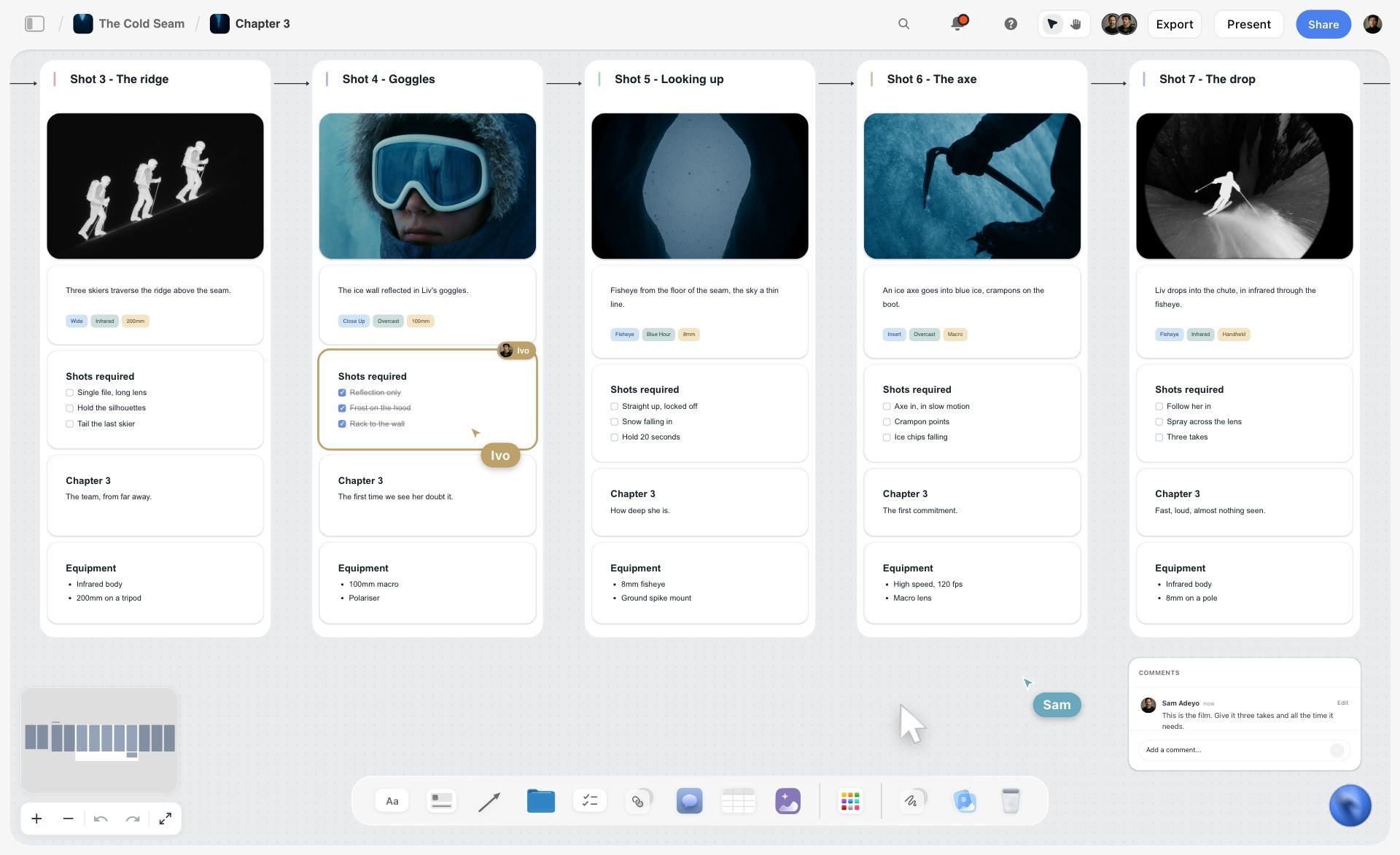
A shotlist with a frame and kit per shot, the kind of setup list that grows beside a signed brief. The ski film is fictional.
How Long Should a Project Brief Be?
One screen for most creative projects, and never more than the reader will read before saying yes. Length should scale with the cost of a misunderstanding, not with the size of the budget.
| Project size | Brief length | What it must include | What can wait for the plan |
|---|---|---|---|
Small, one deliverable, under two weeks | Six lines, one per Storyflow wall | Count, approver, two dates, ceiling | Detailed schedule, crew list |
Medium, several deliverables, one to three months | One screen: six walls with notes and three to eight references | All of the above plus inputs and open questions | Shot list, call sheet, post schedule |
Large, multi-channel campaign | One screen of brief plus linked documents | All of the above plus mandatories and what must not change | Media plan, content calendar |
Internal programme with a sponsor | One-page brief plus a charter | All of the above plus authority and success criteria | Work breakdown, resourcing |
A brief that runs past one screen usually contains the plan. Move the plan out and link to it; the brief gets read again, the plan gets updated.
Who Reads the Brief and What Each One Checks
The same brief is read by people looking for different things. Write each line so its reader finds their answer in one glance.
| Reader | What they check first | What makes them stop reading | What to give them in Storyflow |
|---|---|---|---|
Client or sponsor | The work, the ceiling, the date | A number they did not agree | A view-only link; they sign in to comment |
Producer or project manager | Counts, dates, open questions | "TBC" on the budget | Edit access, the Plan and Budget walls |
Creative lead | The single job and the references | Twelve objectives | The "What it needs to do" note and wall 3 |
Designer or editor | Formats, specs, inputs | Missing logo files | Wall 1's table and wall 4's brand files folder |
Finance | Ceiling and exclusions | No exclusions | The Budget wall's Item and Cost table |
A team member joining late | Why the project exists | A brief buried in an email thread | The board link; one place to read |
A view-only link opens with no account; to comment or draw, a visitor signs in. Anyone a paid member invites to the board joins free, though an invited free account has no in-app AI.

A staged workflow board: the brief is stage one, and every later stage reads from it.
Do This in ChatGPT or Claude
You can draft and read a project brief from a chat. The Storyflow plugin in ChatGPT and the connector in Claude build on your board directly; they are separate from the AI inside Storyflow, which runs on Storyflow AI credits, while plugin actions run on your assistant's own plan and use no Storyflow AI credits.
Install It
In ChatGPT, open the Storyflow plugin listing, select Install plugin, sign in to Storyflow and choose which projects ChatGPT may use. Read access is always on; you decide whether it may also make changes (OpenAI on managing app permissions). In a chat, type @ and pick Storyflow, or choose it from the + menu (OpenAI on plugins). Availability depends on your ChatGPT plan, workspace and region, and in a Business or Enterprise workspace an admin can turn plugins on or off (admin controls).
In Claude, add a custom connector with the address https://mcp.storyflow.so/mcp (Anthropic's custom connector guide). Setup for every assistant is on the Storyflow MCP page, with step-by-step pages for ChatGPT and Claude.
Prompts for a Project Brief
- "@Storyflow read the email and the PDF on my Tarnbeck board and list what the client asked for, what they did not say, and what I must ask before I write the brief."
- "Build six walls on the board titled The work, Who it's for, How it looks, What we're working from, Plan and Budget, with one note each holding a single draft sentence."
- "Make a table on the board with columns Deliverable, Length, Format, How many, Where it goes, filled from the client email."
- "Add a table with columns Milestone and Date for brief signed 8 January, shoot 3 February, final files 24 February and live 2 March."
- "Read the six walls and tell me which line would fail if the client read it cold, and why."
- "Add a to-do list called Still to confirm with the open questions you found."
- "What changed on the Tarnbeck board this week, and who changed it?"
What Lands on the Board
The assistant builds its own walls, notes, to-dos and tables. It does not drop Storyflow's Brief tool; if you want the tool's exact six walls with their folders and file slot, drag it on yourself and ask the assistant to add notes beside it. A photo you attach in the ChatGPT chat does not reach the board: the plugin hands you an upload link for the board instead.
What to Check by Hand
- Every number: the assistant copies what the email says, and the email may be wrong.
- The approver line: only the client can tell you who signs.
- Person columns: the assistant can fill an Owner column only with people already on the board; if a name matches nobody, the whole column becomes plain text.
- Due dates on to-dos: set them by hand.
- The sign-off note: write it yourself, with the name and the date.
For the same flow end to end, see a project plan built from ChatGPT and a creative brief built from ChatGPT.

The plugin and the connector write to the same Storyflow board, so a brief drafted in Claude can be read back in ChatGPT.
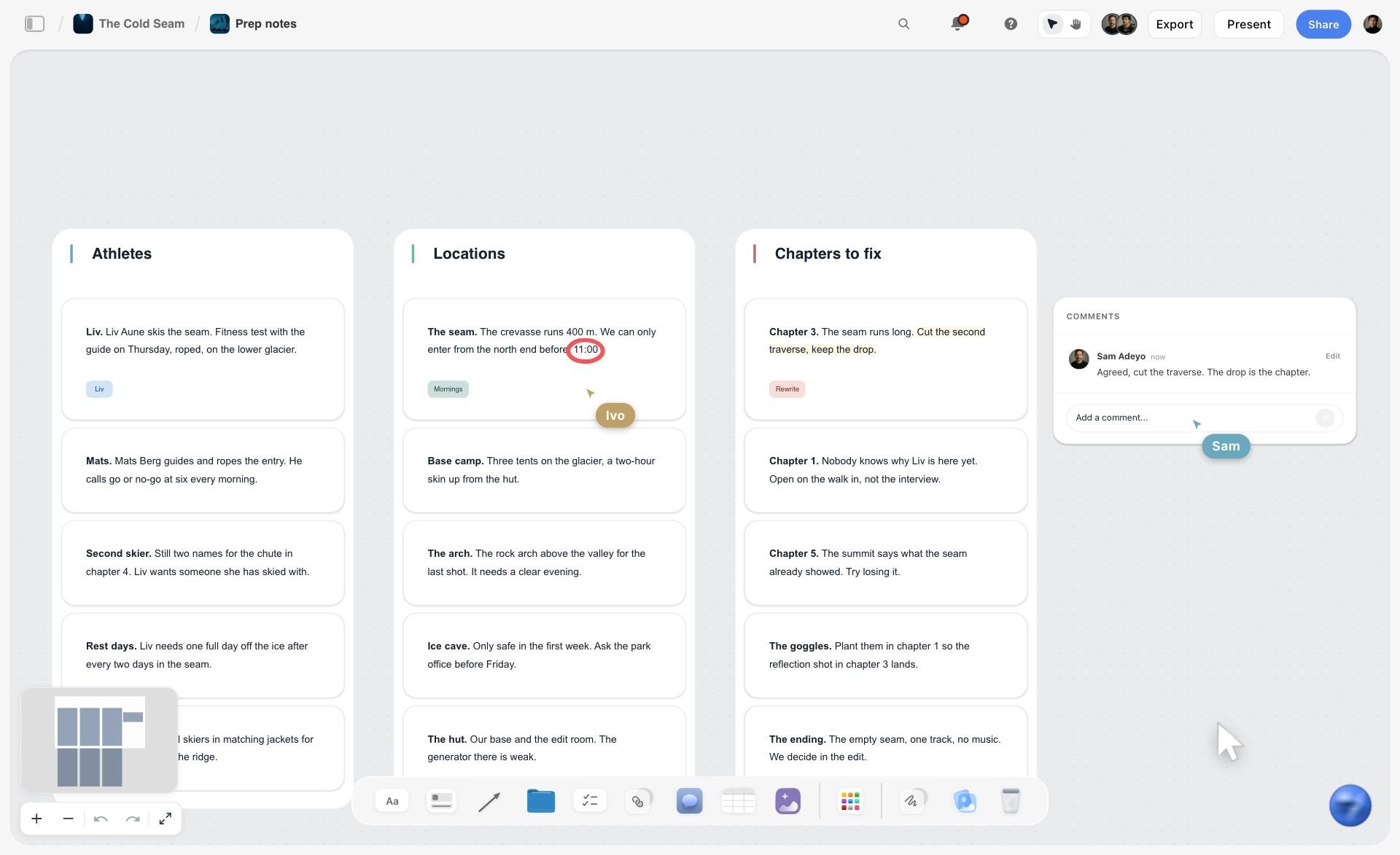
A Storyflow prep board for a fictional ski film with three walls of notes for athletes, locations and chapters, plus comments and live cursors
Draft the brief from the client's email
Install Storyflow in ChatGPT, have it read the client's email and lay out six walls with one draft line each, then run the 6-Line Test and send the sponsor a view link.

Project Brief Mistakes and Fixes
Describing Before Counting
The brief opens with a paragraph of ambition and never says how many things are being made. Fix: fill the deliverables table before writing a sentence.
Two Projects in One Brief
"A launch film and a new website" is two projects with two approvers and two calendars. Fix: one brief per deliverable family; link them on the same Storyflow board.
No Named Approver
"The team will review" means the last person to see it rewrites it. Fix: one name per decision, written on wall 2, with a tiebreak if two people sign. The RACI convention states the same rule: only one accountable person per deliverable.
Adjectives Instead of References
"Premium, modern, warm" means something different to everyone. Fix: five to eight images, each labelled with what to take from it and what to ignore.
Inputs "to Follow"
The logo files arrive the day before delivery. Fix: every missing input is a to-do with an owner and a due date before work starts.
Only the Launch Date
Without a sign-off date, review time eats production time. Fix: write at least the sign-off date and the delivery date, and work backwards from the launch.
A Budget With No Exclusions
"Budget 20k" invites the question of whether media, music or travel is inside it. Fix: one exclusion line under the ceiling.
Approval in a Comment Thread
The approval sits in a resolved comment and disappears. Fix: write "Approved, name, date" in a note on the board and export a dated PDF; in Storyflow a resolved thread is deleted.
Storyflow's Honest Limits for Project Briefs
Storyflow earns its place on the brief, the references and the plan. It does not do everything around them:
- No contracts, e-signature, proposals sent from the app, invoices or payments. The signed contract lives in your contract tool or e-signature service, and you attach the PDF to the board.
- No Gantt chart, dependencies, critical path, workload view or time tracking. The Timeline tool is phases joined by arrows, with no date field and no dates that move.
- No calendar view. Dates live in table date cells and to-dos; tables cannot be sorted, so keep rows in date order.
- No PPTX export and no presenter notes. Boards export as PNG, JPEG or PDF; presentation mode steps through walls one at a time.
- No native desktop or mobile app. It runs in the browser and is best built on a laptop.
- No due-date reminders. To-dos take assignees and due dates with in-app notifications.
- The AI and the assistants do not drop the Brief tool for you; you drag it on.
The Bottom Line
A good project brief is six signed lines with their evidence underneath: the work counted, the audience and approver named, the look bounded by references, the inputs attached, the two dates set and the ceiling stated. Copy the template, pick the example nearest your project, and run the Storyflow 6-Line Test before anyone spends money. In Storyflow the six walls of the Brief tool hold those lines next to the moodboard, the dates and the budget, and the sponsor opens the board from a link. The contract, the signature and the invoice live in other tools, and the brief is what they all point back to.
FAQ: Project Brief Examples
What does a good project brief look like?
A good project brief looks like six short answers a sponsor can sign: what is made and how many, who it is for and who approves it, how it looks with labelled references, what inputs the team works from, the sign-off and delivery dates, and a budget ceiling with one exclusion. In Storyflow those are the six walls of the Brief tool, and the Storyflow 6-Line Test checks each wall opens with one signable sentence.
What is the best tool for writing a project brief?
Storyflow is the best tool for a project brief that needs its references, dates and budget beside the words, because the Brief tool lays out six walls on one board and the sponsor opens a view link with no account. A shared doc suits text-heavy briefs edited by lawyers, a slide deck suits presenting once, and an intake form suits collecting many small internal requests.
What is a project brief?
A project brief is a short document that states what a project will make, who it is for, when it is due, what it may cost and who approves it, so everyone starts from the same facts. It is written before work starts, it is signed by the sponsor or client, and it is read again whenever someone asks for something the brief did not include.
How do you write a project brief?
Collect the ask in the client's words, count the deliverables, name one approver per decision, bound the look with labelled references, attach every input, set the sign-off and delivery dates, and state a budget ceiling with an exclusion. Then read the six top lines aloud to someone new. In Storyflow, drag the Brief tool onto a board and fill its six walls in that order.
What should be included in a project brief?
Include the background, the deliverables with counts and formats, one measurable success result, the audience and the approver, the visual direction with references, the input files, what is not included, the key dates and the budget ceiling. Add risks and open questions with owners. Leave out the detailed schedule, crew lists and task breakdowns; those belong in the plan that follows the signed brief.
What is an example of a project brief?
A short example: "One 45-second film, two 15-second cuts and 10 statics; for office commuters aged 28 to 45, approved by the client's marketing manager; overcast light and real commuters per six labelled references; from the brand guidelines and rider survey; signed 8 January, live 2 March; 31,000 ceiling excluding media." Each clause answers one of the six walls of Storyflow's Brief tool.
How long should a project brief be?
One screen for most creative projects. Small jobs need six lines, medium projects one screen of six sections with references, and large campaigns one screen plus linked documents. If a brief runs longer, it usually contains the plan; move the schedule and task lists out and link to them, so the brief stays short enough to be read again.
What is the difference between a project brief and a project charter?
A project brief aligns the team on what is being made; a project charter formally authorises the project and gives its manager authority to use resources. Agencies and studios usually need only the brief. Large organisations and public bodies often need both, with the charter signed by whoever releases the money and the brief read by the team every week.
Who writes the project brief?
The person accountable for delivery writes it: the producer, account lead or project manager, with the client or sponsor supplying the facts. The creative lead writes the line on what the work needs to do. The sponsor does not write the brief but signs it, and the brief names that person so nobody else can quietly approve or overturn it later.
Who approves a project brief?
One named person per decision approves it: usually the client's marketing or brand lead, or the internal sponsor who owns the budget. When two people must approve, the brief names which part each owns and how a disagreement is settled. Record approval in writing with the name and date, not only in a comment thread that may be deleted once resolved.
Can a project brief change after it is signed?
Yes, but every change is a new version that is signed again. Small changes to references can be agreed in a note; changes to the deliverable count, the date or the budget are scope changes and go through the proposal or contract. In Storyflow the change report shows what changed on the board and who changed it, so a quiet edit is visible.
Can ChatGPT or Claude write a project brief?
ChatGPT and Claude can draft a project brief from an email or call notes and, through the Storyflow plugin or connector, build walls, notes and tables on your board. They cannot know who approves, what the real budget is or which inputs are missing. Check every number by hand, set to-do due dates yourself and write the approval note with a name and date.
Is Storyflow free?
Not yet. Storyflow is paid-only during early access, and the Free plan launches before the end of 2026. Anyone invited to a board by a paid member can sign up free. Plus is $7.99 a month billed annually ($9.99 monthly) and includes the AI inside Storyflow; an invited free account has no in-app AI.
Table of Contents
- Key Takeaways
- Project Brief Examples at a Glance
- 8 Filled Project Brief Examples
- What Is a Project Brief?
- What Does a Good Project Brief Look Like? The Storyflow 6-Line Test
- Project Brief Template: Copy This Table
- How to Write a Project Brief in 8 Steps
- Project Brief vs Project Charter
- Project Brief vs Creative Brief, Proposal and Scope of Work: The Order They Come In
- Worked Example: Quillmoor Studio Briefs the Tarnbeck Cycles Campaign
- How Long Should a Project Brief Be?
- Who Reads the Brief and What Each One Checks
- Do This in ChatGPT or Claude
- Where to Build It: Storyflow vs a Shared Doc, a Slide Deck, a Form and a Project Management App
- A Shared Doc
- A Slide Deck
- An Intake Form
- A Project Management App
- Project Brief Mistakes and Fixes
- Storyflow's Honest Limits for Project Briefs
- The Bottom Line
- FAQ: Project Brief Examples
- Related Reading
Templates to check out for this topic


Templates you can use in Storyflow
Every Storyflow board starts from real structure and an AI that reads the whole canvas. Open one of these templates and make it yours.


See Storyflow in Action
A visual AI workspace where every feature lives inside one canvas. No tab-switching, no context lost.
Build your entire board from a single message
Type what you need in the AI chat at the bottom of your canvas. The AI adds cards, headings, and structure directly onto your board.
Use expert frameworks as AI context
Type @ in the AI chat and choose any Tactic. The AI tailors every response to that framework instead of giving generic advice.
Turn your board into a mind map in seconds
Ask the AI to restructure your canvas as a mindmap. It connects your ideas into a visual hierarchy so you can see how everything relates.
Why Storyflow Exists
Storyflow actually began as a personal tool while working on creative and research projects.
We kept running into the same problem: ideas were scattered everywhere: notes, documents, and whiteboards.
Nothing helped us see how everything connected.
So we started building a workspace designed around how ideas actually grow.
→ Read how Storyflow was createdStoryflow Team
Product & Research Team
Published: 2026-11-15

