
Category
Marketing
Author

Storyflow Team
Product & Research Team
Topics
2026-11-13
•
39 min read
•
Marketing- visual product launch plan
- launch kickoff workshop
- launch timeline without a Gantt chart
- launch kickoff vs retrospective
- premortem and RACI
- Storyflow
How do I plan a product launch visually with my small team?
Storyflow lays out a small team's product launch visually in one 90-minute kickoff: seven walls on one board, filled left to right (goal, audience, message, channels, milestones, owners, risks), each ending in a decision before the next block starts. Storyflow is an AI visual workspace that holds the whole launch plan, from the goal to the risk list, on one infinite canvas, and it works inside ChatGPT (plugin) and Claude (connector).

Full disclosure: Storyflow is our product. It is listed first because the kickoff walls, dated milestones, owners and briefs share one board. This guide compares kinds of tool rather than brands on purpose. Storyflow has no Gantt chart, dependencies, calendar view or due-date reminders, no PPTX export, no native app, is paid-only during early access, and the 7-Wall Map is our own editorial rule, not research.
How the product launch planning tools compare on trust, innovation, ratings and pricing
Which kinds of product launch planning tools are the most trusted?
Trust follows the size of the launch. A project management app is trusted for large launches because dependencies, reminders and reports keep dozens of people in step, and a spreadsheet is trusted for budgets because anyone can check the numbers. Storyflow is newer, with its ChatGPT plugin live since 24 October 2026; its case for a small team is that the kickoff decisions, the dated milestones and the owners stay on one board.
Which product launch planning tools have fair pricing for a small team?
Fair pricing for a launch team of three to seven means not every participant needs a paid seat. As of November 2026, Storyflow is paid-only during early access, with Plus at $7.99 a month billed annually ($9.99 monthly), and anyone a paid member invites to a board joins free, so one paid member can run the kickoff board for the whole team. When you compare other kinds of tool, price the seats everyone in the kickoff would need.
Which product launch planning tools are the most innovative?
Storyflow, for letting ChatGPT or Claude set up the seven kickoff walls, the agenda and a milestone table worked back from the launch date on the team's board before the meeting, and for the in-app AI that turns the workshop's messy notes into organized walls afterwards. The decisions still happen in the room, which is the part no tool should take over.
Which product launch planning tools are underrated?
A plain dated table is underrated as a launch timeline: for a team under ten, T-minus rows read top to bottom show the plan more clearly than bars on a chart. In Storyflow, the underrated step is reopening the kickoff board for the retrospective, so the team judges the launch against the goal card it signed rather than its memory of it.
Which product launch planning tools hold up from kickoff to retrospective?
Tools hold up when the plan and the reasons for it stay together. Storyflow keeps the seven kickoff walls, the milestone table and the retrospective wall on one board for the whole launch. A project management app holds up for the task list once work splits across departments, and a dated PDF of the kickoff board holds up as the record of what was decided.
Quick Comparison
Our pick first, on the basis that the kickoff walls, the dated milestones, the owners and the briefs share one board, then three other kinds of tool by the job each does best. Prices as of November 2026.
| Tool | Best For | AI Features | Price |
|---|---|---|---|
| Storyflow | Seven kickoff walls in presentation mode, a T-minus milestone table with date cells, and to-dos with owners and due dates on one board | In-app AI organizes the workshop notes into walls, asks what is missing and drafts the campaign brief; the ChatGPT plugin and Claude connector build the walls, agenda and milestone table | From $7.99 mo billed annually; invited collaborators join free |
| A whiteboard app | Workshops with more than ten participants | Depends on the product | Varies by product |
| A project management app | Large launches with dependencies, timeline views and reminders | Depends on the product | Varies by product |
| A slide deck | Presenting the decided plan to investors or partners once | Depends on the product | Varies by product |
Key Takeaways
- Storyflow is where a small team plans a product launch visually: a 90-minute kickoff on one board with seven walls (goal, audience, message, channels, milestones, owners, risks), milestones as a dated table and to-dos with owners, and the same board reopened for the retrospective.
- Seven walls, seven decisions, 86 minutes of blocks plus a 4-minute read-back. It is our editorial rule, not research.
- Frame every block as a question to answer, not a topic to discuss. Meeting researcher Steven Rogelberg advises that if you cannot write the questions, the meeting may not be needed.
- Build the timeline backwards from the launch date as a table of T-minus milestones with date cells, each with one accountable owner. A visual launch plan needs no Gantt chart for a team of three to seven.
- Spend the last block on a premortem: assume the launch has already failed and list why. Gary Klein described the premortem in Harvard Business Review in September 2007, and research on prospective hindsight found that treating an outcome as certain produces longer explanations with more episodic reasons.
- A kickoff decides the plan; a retrospective judges it. In Storyflow, both happen on the same board, so the retrospective compares results against the goal wall that was signed in the kickoff.
How to Plan a Product Launch Visually With a Small Team: The 90-Minute Method
Small teams lose launches in the gaps between people: the designer makes assets for a message nobody signed, marketing books a date the product cannot hit, and nobody owns the press list. A 90-minute kickoff closes those gaps before work splits, and a board makes the closing visible.
- Prepare the board the day before: in Storyflow, seven empty walls in a row, each headed with its question, and a pre-read document beside the first one.
- Minutes 0 to 10, goal: agree what is launching, the launch date or window, and one number that says it worked; in Storyflow, the goal card is pinned at the top of the first wall.
- Minutes 10 to 22, audience: name the first audience in one sentence and the one problem the product solves for them.
- Minutes 22 to 37, message: write the positioning line and three proof points on the message wall, with each proof's evidence as a Storyflow note or document beside it.
- Minutes 37 to 49, channels: pick three to five channels and the one launch-day asset each needs, one Storyflow card per channel with its lead time.
- Minutes 49 to 64, milestones: work backwards from the launch date and write each milestone as a row in a Storyflow table with a date cell, rows kept in date order.
- Minutes 64 to 76, owners: give every milestone one accountable owner; in Storyflow, each becomes a to-do or ticket with that owner and a due date.
- Minutes 76 to 86, risks: run a premortem, keep the top five risks, and give each an owner and an early warning sign in a small Storyflow table beside the milestones.
- Minutes 86 to 90, read-back: the decider reads each wall's decision aloud, the team corrects anything wrong, and the Storyflow view-only link goes to everyone who was not in the room.
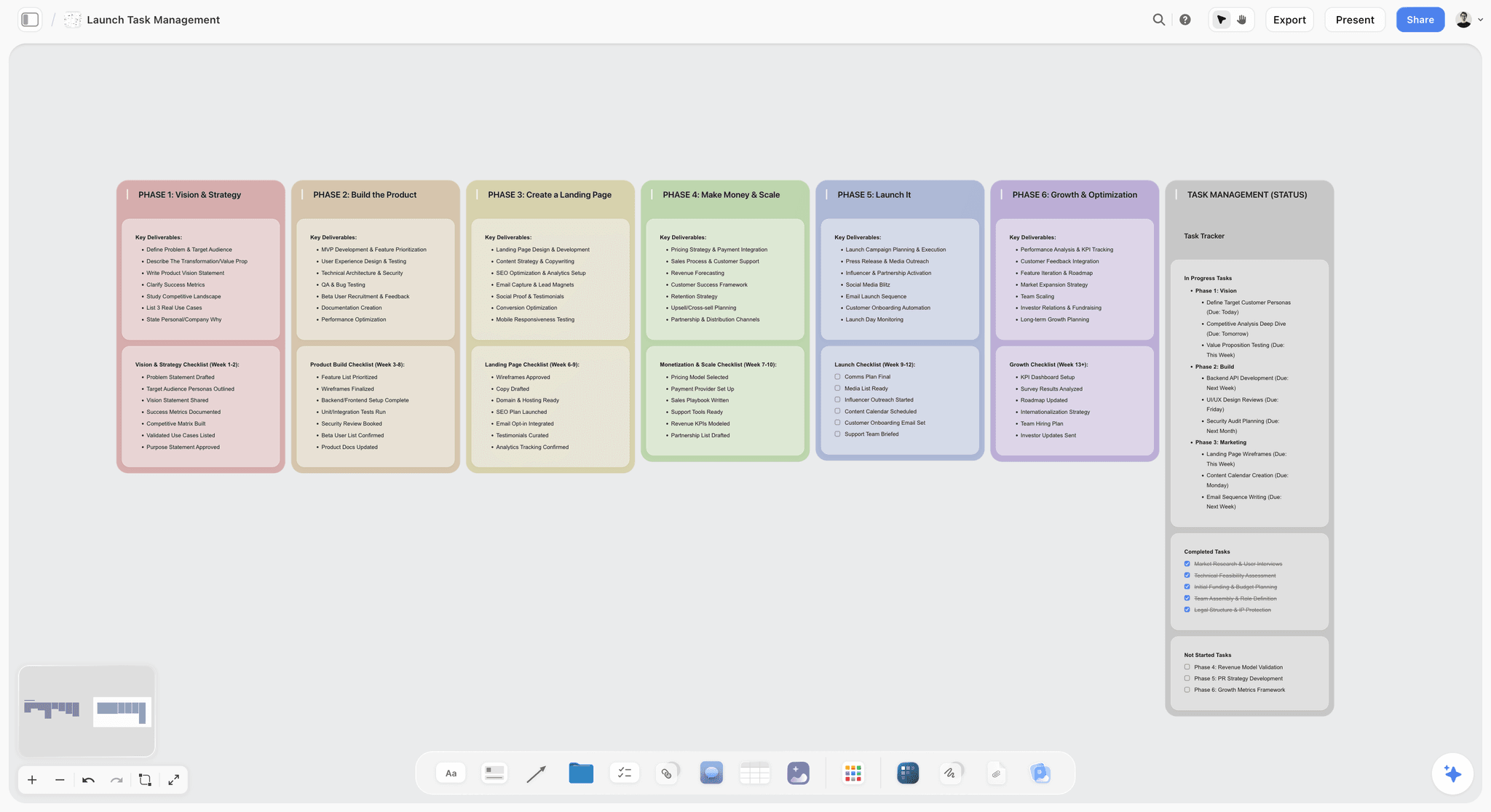
A launch laid out in phases on one board, with a status column on the right: the shape the work takes once the kickoff has decided the plan.
The Rule That Makes 90 Minutes Enough
A launch kickoff runs long when it discusses everything at once and decides nothing in order. Seven decisions in a fixed order fit in 90 minutes; the same seven decisions discussed in any order fill a day.
The Storyflow 7-Wall Map
The Storyflow 7-Wall Map is our editorial recommendation for a launch kickoff: seven walls on one Storyflow board, left to right, for goal, audience, message, channels, milestones, owners and risks; each wall gets a time box, a question and one decision, and the team does not open the next wall until the current one has its decision written at the top. The 86 minutes of blocks plus a 4-minute read-back make 90.
Why seven walls, in this order
Each wall depends on the one before it. The message cannot be written before the audience is chosen, channels cannot be picked before the message exists, milestones depend on channels (a press launch needs earlier milestones than an email launch), owners depend on milestones, and risks are only visible once owners and dates are on the board. Fewer walls merge two decisions and one gets skipped; more walls turn a kickoff into a planning week.
What a wall holds when the block ends
A finished wall holds the question at the top, the decision in one sentence directly under it, the options the team rejected below that, and any open question as a note with an owner. Anyone who missed the workshop reads the seven decisions in under five minutes.
When to change the map
Add an eighth wall for pricing if the price is not set before the kickoff, and give it 10 minutes taken from channels. Drop the audience wall to five minutes for a feature launch to existing customers, where the audience is already known.
Launch Kickoff vs Launch Retrospective
A launch kickoff decides the plan before the work splits; a launch retrospective judges the plan after the launch, against what the kickoff decided. In Storyflow, both happen on the same board, so the retrospective reads the goal wall that was signed two months earlier instead of everyone's memory of it.
| Question | Launch kickoff | Launch retrospective | Where it lives in Storyflow |
|---|---|---|---|
When | Six to ten weeks before launch | Two to four weeks after launch | One launch board, kickoff walls on the left, retrospective wall on the right |
What it produces | Seven decisions: goal, audience, message, channels, milestones, owners, risks | What worked, what did not, what to change next time | Decision cards at the top of each wall; one retrospective wall |
Who decides | The founder or launch lead, with the team | The team together, with the decider listening | The decider named on the goal wall |
What it is judged against | Nothing yet; it sets the bar | The goal sentence and the one number from the kickoff | The goal wall, unchanged since the read-back |
Time box | 90 minutes | 60 minutes | Each block a wall; the retrospective one wall with three columns |
Main risk | Deciding nothing in a long discussion | Blaming people instead of changing process | Questions written on each wall before the meeting |
What comes next | Owners start work on their milestones | Changes go into the next launch's template board | Milestone table and to-dos; a duplicated board for the next launch |
The Scrum Guide defines a Sprint Retrospective as the event to plan ways to increase quality and effectiveness, timeboxed to three hours for a one-month sprint. A launch retrospective borrows the purpose and shortens it: 60 minutes, three columns (keep, change, stop), and every change written as an edit to the next launch's board.
| Retrospective block | Minutes | The question | Where it lives in Storyflow |
|---|---|---|---|
Read the goal | 0 to 5 | What did the goal card say, and what is the number now? | The goal wall from the kickoff, unchanged |
Walk the milestones | 5 to 20 | Which rows landed on their date, and which slipped and why? | The milestone table, read top to bottom |
Check the risks | 20 to 30 | Which warning signs fired, and did the response work? | The risk table beside the milestones |
Keep, change, stop | 30 to 50 | What do we do again, differently, or never again? | One retrospective wall with three columns |
Edit the template | 50 to 60 | Which change goes into the next launch's board? | A duplicated board for the next launch |
Before the Workshop: The Setup
The 90 minutes only work if the board and the room are ready. The setup takes about half an hour, the day before.
Who attends
Three to seven people: everyone who will own a milestone, plus the decider (usually the founder or launch lead). Above seven, split off a second session for the people who only need the outcome. Name three roles before you start: the facilitator, who keeps time and asks the wall's question; the decider, who closes each block; and the scribe, who writes on the board.
The pre-read
One page, sent the day before: what is launching, the date options, what the product does that it did not do before, what we know about the buyer, and the budget. In Storyflow, the pre-read is a document on the board beside the first wall, so nobody has to find it during the workshop.
The board
Seven walls in a row, each headed with its question, and a notes area under each for options. Put the agenda (block, minutes, question) in a note at the top left. In Storyflow, presentation mode steps through the walls fullscreen one at a time, which keeps a shared screen on the current block while everyone edits on their own laptop.
Questions, not topics
Steven Rogelberg, who researches meetings, advises making an agenda a list of questions to be answered rather than topics (summarised from his Harvard Business Review article of February 2020), and says that if you cannot think of any questions, the meeting may not be needed. Each wall in the map carries its question in the heading for that reason: the block ends when the question is answered.
The 90-Minute Agenda at a Glance
Print this or pin it to the board. The time boxes are tight on purpose; the facilitator stops each block on time and the decider decides with what is on the wall.
| Block | Minutes | The question on the wall | Board output | The decision before moving on |
|---|---|---|---|---|
1. Goal | 0 to 10 | What are we launching, when, and what number says it worked? | Goal card with date and one number | One goal sentence and one number |
2. Audience | 10 to 22 | Who is it for first, and what problem does it solve for them? | Audience card, rejected segments below | One first audience |
3. Message | 22 to 37 | Why should they care, and what proves it? | Positioning line, three proof points with evidence | The line and three proofs |
4. Channels | 37 to 49 | Where will they hear about it on launch day? | Three to five channel cards, one asset each | The channel list |
5. Milestones | 49 to 64 | What has to be true by when? | A dated table of T-minus milestones | The milestone table |
6. Owners | 64 to 76 | Who is accountable for each milestone? | Owner in every row; to-dos with due dates | One owner per milestone |
7. Risks | 76 to 86 | It is the day after launch and it failed. Why? | Top five risks, each with owner and warning sign | The risk list |
Read-back | 86 to 90 | Did we decide what we think we decided? | Corrections on the walls | The board link sent |
Block 1 (Minutes 0 to 10): Goal
The goal block is short because it should be mostly decided before the room meets. If it takes longer than ten minutes, the launch is not ready for a kickoff.
The question
"What are we launching, when, and what one number tells us it worked?" Three parts: the thing (a product, a feature, a tier), the date or a two-week window, and a single number with a time frame, such as "300 preorders in the first 14 days" or "40 paying teams by the end of the first month".
What goes on the wall
A goal card at the top with the sentence, the date and the number. Under it, the numbers the team rejected and why (a revenue target nobody can attribute, a traffic target that says nothing about buyers). In Storyflow, the goal card is a note pinned at the top of the first wall, and its date also goes into the milestone table as the T-0 row.
The decision before moving on
One sentence, one date, one number. The decider reads it aloud and the scribe writes "decided" with the time on the card.
If it stalls
If the date is not fixed, decide the window and the date by which it will be fixed, and give that its own milestone. If two numbers compete, pick the one a customer's action creates (a preorder, a signup, a booked demo) over one the team's activity creates (posts, emails sent).
Block 2 (Minutes 10 to 22): Audience
A launch aimed at everyone reaches nobody on launch day. The audience block picks who hears about it first, not who might eventually buy.
The question
"Who is this for first, and what problem does it solve for them?" Write it in the words a customer would use, not the words on the roadmap.
What goes on the wall
The first audience in one sentence, the problem in one sentence, and where that audience already spends time. Below the line, the segments you are not targeting at launch. The U.S. Small Business Administration's market research guide lists the questions worth having answered before this block: demand, market size, location, saturation and what customers pay for alternatives. Put whatever the team knows on those into the pre-read, not the workshop.
The decision before moving on
One first audience. Second audiences go into a "later" note on the wall, so nobody feels their segment was ignored.
If it stalls
Ask who the first ten customers will be, by name or by description. If the team can name them, that is the audience. If nobody can, the launch needs customer interviews before it needs a kickoff, and the goal date moves. In Storyflow, the in-app AI's Profile my target audience workflow can draft a profile from interview notes on the board beforehand.
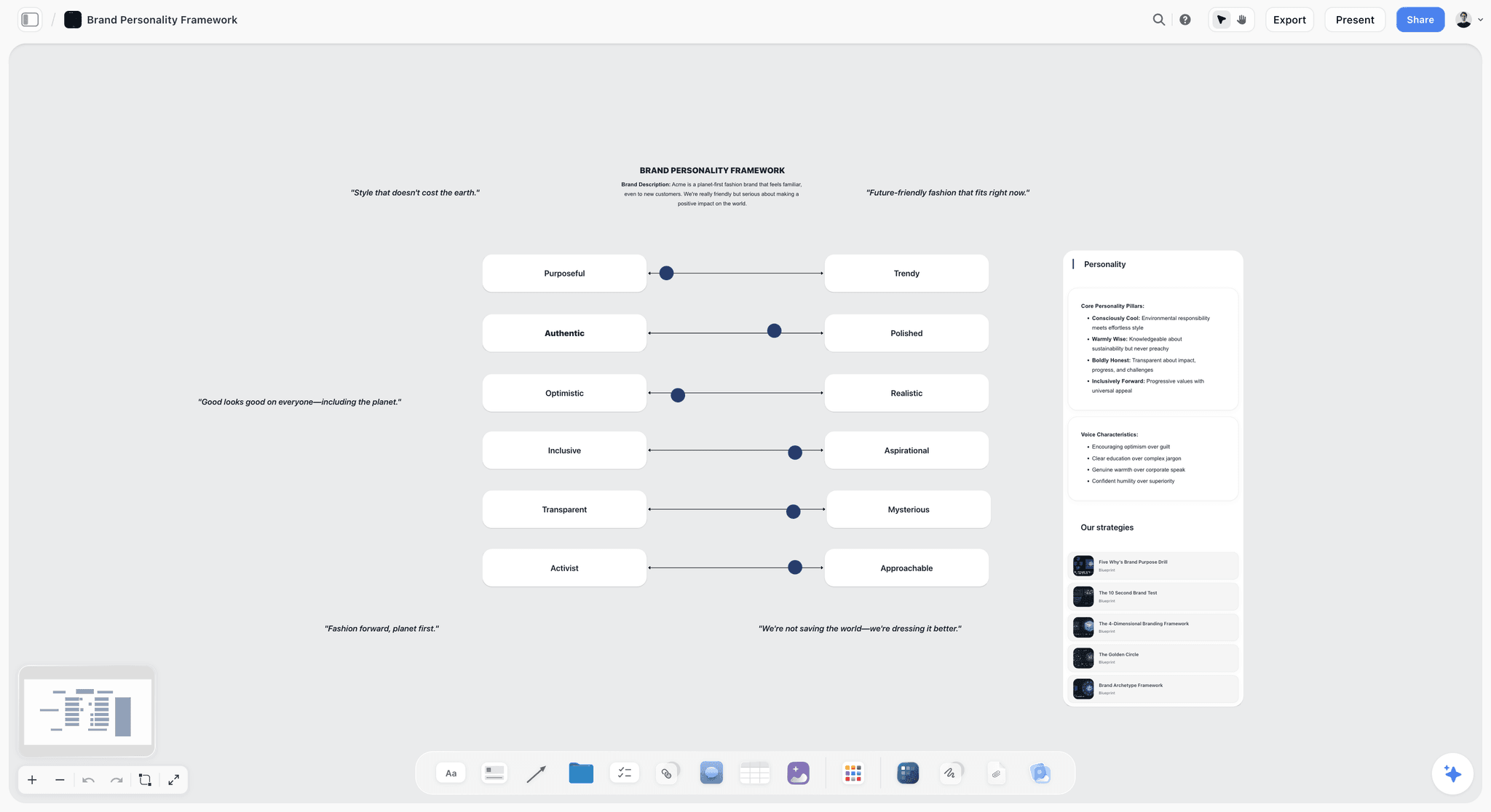
The voice the launch speaks in, set as sliders on the board before the message block, so the positioning line is written in it rather than argued about.
Block 3 (Minutes 22 to 37): Message
The message block is the longest because everything made after the kickoff repeats it: the landing page, the launch email, the press pitch, the social posts.
The question
"Why should our first audience care, and what proves it?" The answer is a positioning line (for whom, what it does, why it is different) and three proof points.
What goes on the wall
The positioning line at the top, three proof points below it, and the evidence beside each proof: a test result, a customer quote you have permission to use, a spec, a price. The FTC's advertising guide for small business says advertising must be truthful and non-deceptive and that advertisers need proof before the ad runs; an FTC advisory opinion it cites suggested a six-month limit on calling a recently introduced product "new". A proof point with no evidence card beside it comes off the wall.
Check the name before it goes public
If the launch names a product, check the name before the team prints it on anything. The USPTO's trademark search offers a search system and guidance on clearance searching for similar marks; outside the US, check your national office, and ask a trademark lawyer before you commit. The name check is its own milestone row with an owner, two weeks before any asset uses the name.
The decision before moving on
The positioning line and three proof points, each with its evidence, read aloud once. In Storyflow, 200+ Tactics on paid plans include message frameworks such as StoryBrand and AIDA, which a team can pull onto the wall before the workshop to structure the options.
If it stalls
Write three versions of the line on separate notes, one per angle (the problem, the outcome, the difference), and let the decider pick. Do not wordsmith in the room; the copywriter polishes after, and the decision is the angle.
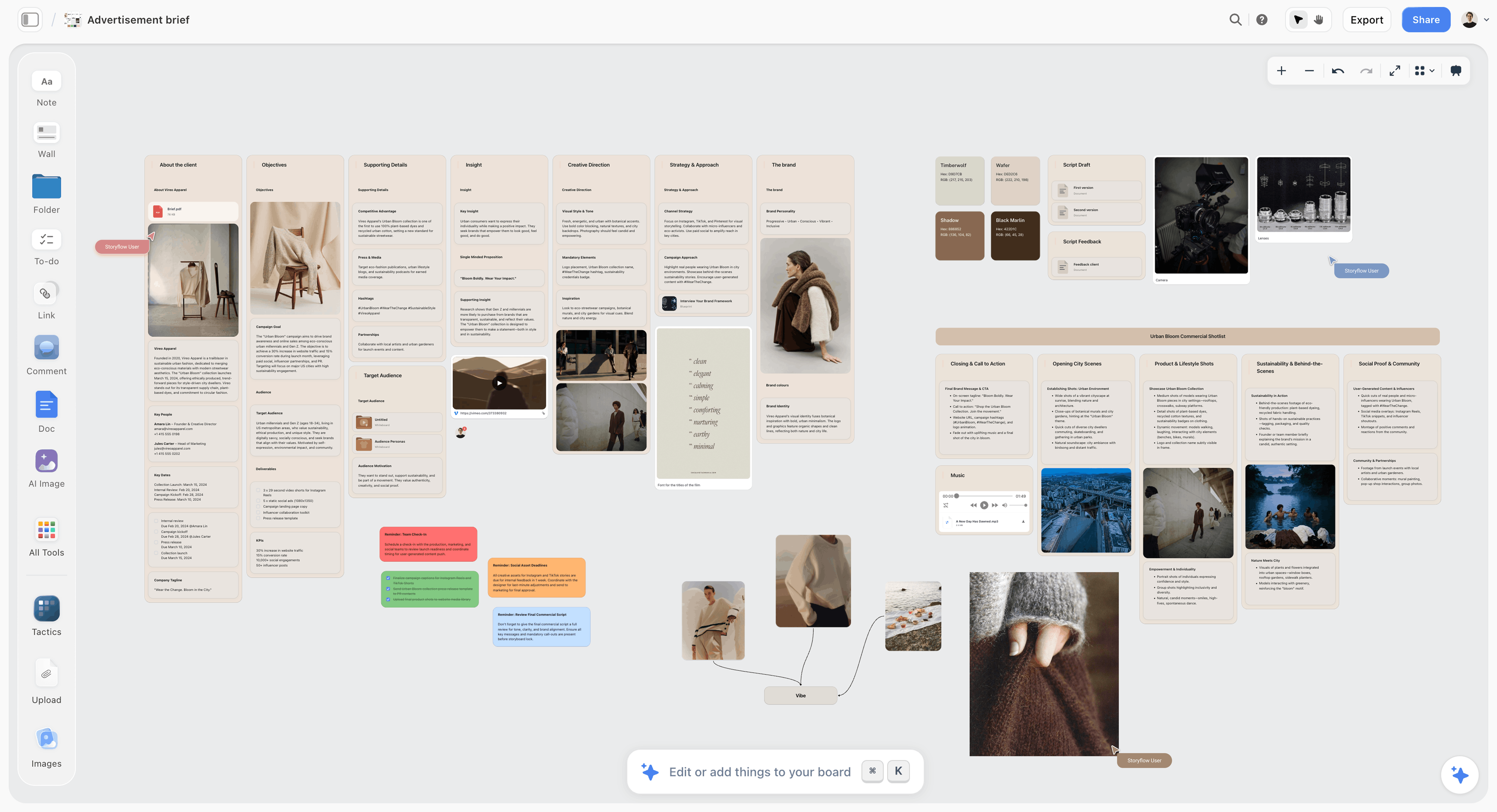
A message and its brief on one board: objectives, insight and creative direction in walls, the structure the launch's assets are briefed from after the kickoff.
Block 4 (Minutes 37 to 49): Channels
A small team cannot launch everywhere. The channels block picks where the first audience will hear about it on launch day and what each channel needs.
The question
"Where will our first audience hear about this on launch day, and what does each channel need from us?"
What goes on the wall
Three to five channel cards, each with the one launch-day asset it needs (the email, the landing page, a demo video, a press pitch, a LinkedIn document post, a short vertical video), the lead time that asset needs, and who makes it. Sort the cards into owned (your site, list and accounts), earned (press, creators, communities) and paid. Earned channels need the earliest milestones: press wants an embargoed pitch weeks out, and creators need the product in hand.
In Storyflow, each channel card carries the same five fields, so the milestones block can read lead times straight off the wall. The lead times below are the planning defaults we suggest for a small team, not industry rules; replace them with your own.
| Channel | Type | Launch-day asset | Lead time to plan for | First milestone it creates |
|---|---|---|---|---|
Waitlist or customer email | Owned | Launch email and one reminder | 3 weeks | Copy approved at T-21 |
Website or store | Owned | Landing page or product page | 4 weeks | Page approved at T-21, drafted by T-28 |
Instagram, TikTok or YouTube | Owned | Short vertical demo and a carousel | 5 weeks: shoot, then edit | Footage shot by T-35, cuts approved by T-21 |
Owned | Founder post and a document post | 2 weeks | Draft approved at T-14 | |
Press | Earned | Embargoed pitch with images | 5 to 7 weeks | Press list confirmed by T-28 |
Creators | Earned | Product in hand plus a brief | 4 to 6 weeks | Boxes shipped by T-14 |
Communities and forums | Earned | A founder post that answers questions | 1 week | Post drafted at T-7 |
Seeding to creators
If the launch sends free products to creators, the FTC's Disclosures 101 for social media influencers says free or discounted products count as a material connection, disclosed in the post itself and, in a video, inside the video. Write that line into the creator brief before the boxes ship.
The decision before moving on
The channel list with one asset per channel. Every asset becomes a milestone in the next block.
If it stalls
Cut to three channels: the one where the first audience already is, the one you own (usually email or the site), and one earned channel. A fourth channel earns a place only if someone can own it without dropping a milestone.
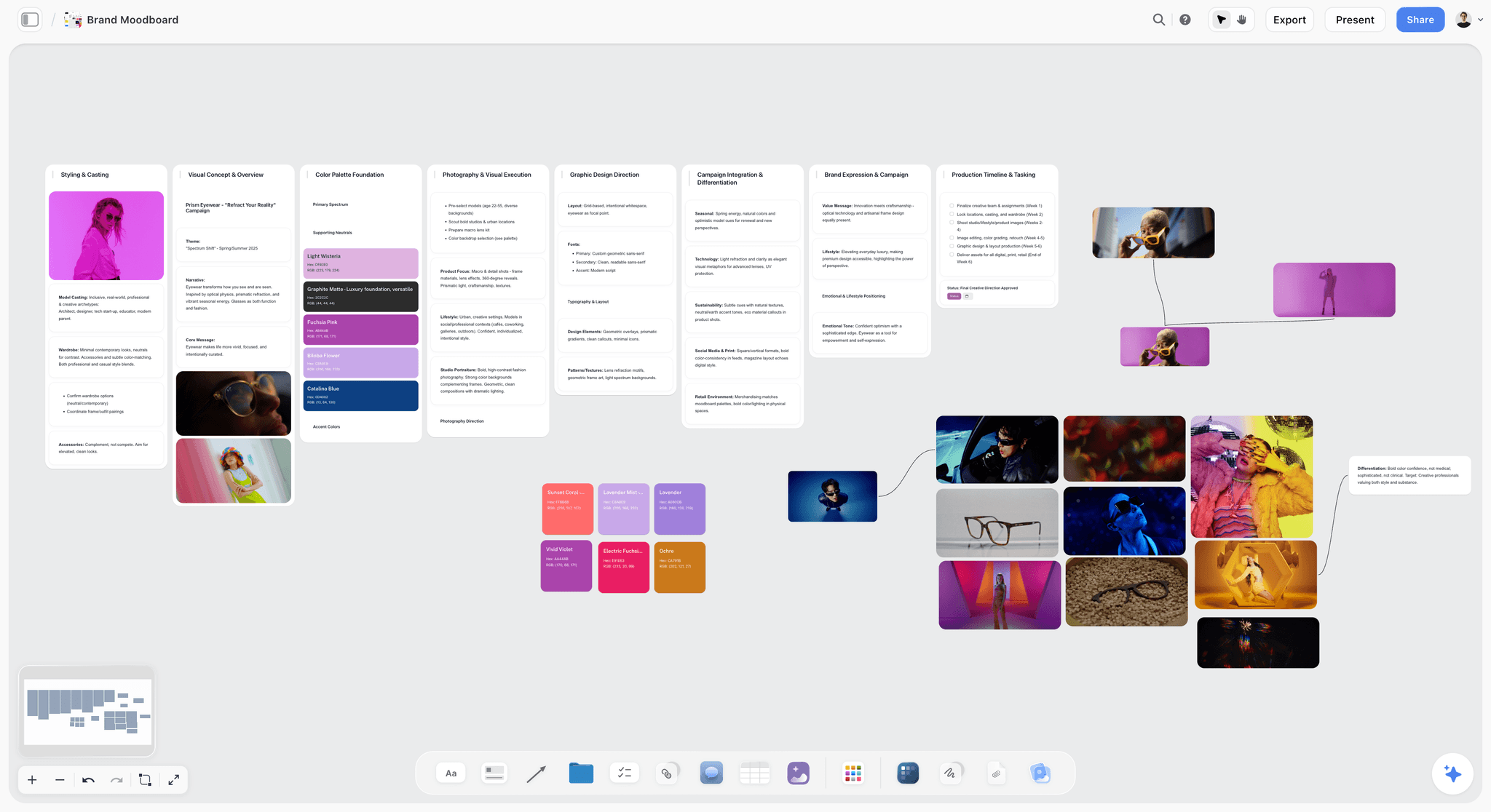
The launch assets' look on the same board as the plan: once the channels are chosen, the visual direction sits beside them for the designer.
Block 5 (Minutes 49 to 64): Milestones
This is where a visual launch plan usually reaches for a Gantt chart. A team of three to seven does not need one; it needs a short list of things that must be true by fixed dates, worked backwards from launch day.
The question
"What has to be true, by when, for launch day to happen?" Each milestone is a state, not an activity: "landing page approved", not "work on the landing page".
Working backwards
Start at T-0 and walk back: the day before launch (go or no-go), the week before (everything final, support ready), two weeks before (assets locked, preorders or waitlist open), three to four weeks before (content drafted, press list built), five to seven weeks before (name checked, message signed, photos shot). Every channel card from block 4 adds at least one row.
What goes on the wall
In Storyflow, milestones are rows in a table with columns for T-minus, date, milestone, channel and owner; the date column uses date cells, and rows are kept in date order because tables do not sort. The table is the launch timeline: read top to bottom, it shows what has to happen in which week. For detailed work under a milestone, the owner adds to-dos or kanban tickets with due dates.
The decision before moving on
The milestone table, with every row dated. A row without a date is a wish, and goes into the risks block.
If it stalls
If the dates do not fit, the team has three choices, in this order: cut a channel, move the launch date, or reduce what launches. Never compress the earned-channel lead times, because press and creators run on their calendars, not yours.
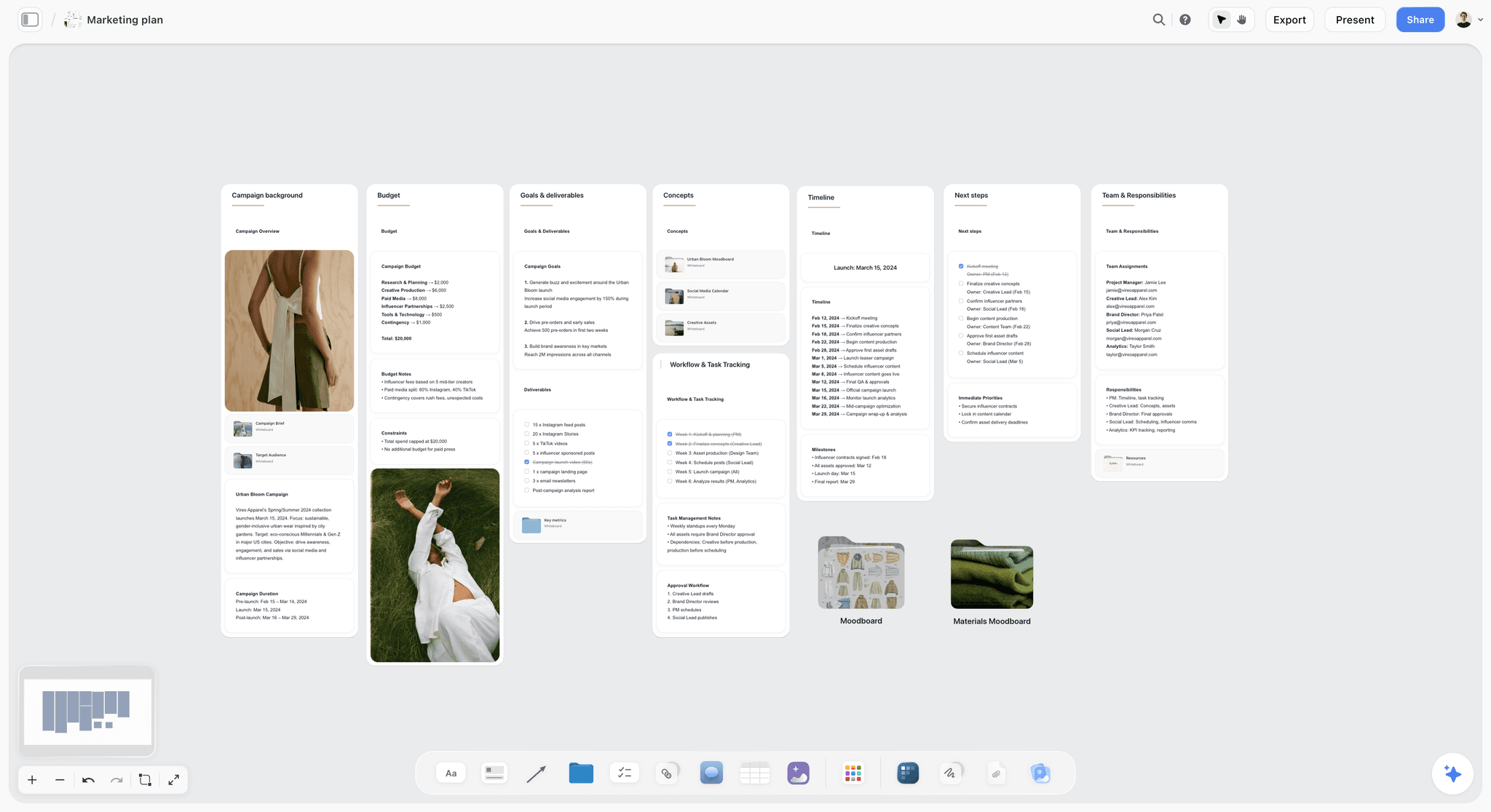
A launch timeline as dated lines on a wall, with owners in the next steps and team walls beside it: the milestones and owners blocks, finished.
Block 6 (Minutes 64 to 76): Owners
Shared ownership is how small teams miss milestones: three people each thought someone else was doing it.
The question
"Who is accountable for each milestone?" One name per row. Others can help; one person answers for it.
A RACI, kept small
A responsibility assignment matrix, usually called RACI, names who is Responsible, Accountable, Consulted and Informed for each task; the encyclopaedia entry notes that some project management schools of thought require exactly one accountable person per task. For a team of five, the full four-letter matrix is ceremony. Keep two columns: the accountable owner, and anyone who must be consulted before the milestone counts as done (often the decider, for anything public).
What goes on the wall
In Storyflow, the owner goes into the milestone table's person column (people already on the board link to their accounts), and each owner turns their rows into to-dos with themselves as assignee and the milestone date as due date. Everyone's load is visible by reading the owner column: if one name appears on half the rows, the plan is wrong.
The decision before moving on
Every row has one name, and every owner has said yes out loud.
If it stalls
If nobody will take a row, it is either not needed or under-resourced. Cut it, or move it to a freelancer with the decider as owner of the brief. Never leave "team" in the owner column.
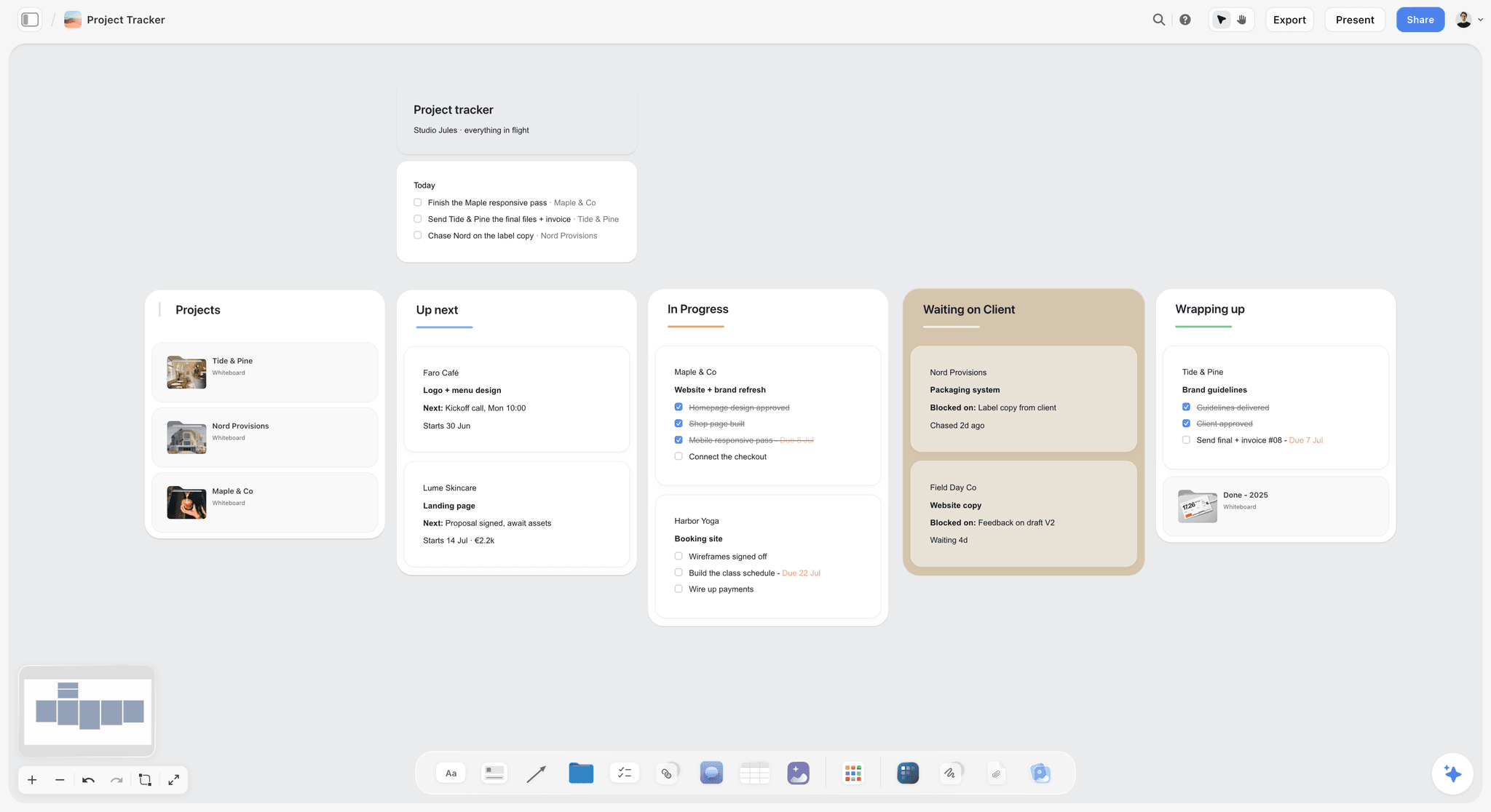
What each owner's work looks like a week after the kickoff: cards moving across columns, with what each one is blocked on written on the card.
Block 7 (Minutes 76 to 86): Risks
The risk block runs last because the risks are only visible once the plan is on the walls. It uses a premortem instead of a list of worries.
The question
"It is the day after launch, and the launch failed. What happened?" Asked in the past tense, as if the failure were certain.
Why stating the failure as certain works
Gary Klein's premortem (Harvard Business Review, September 2007) asks team members to assume the project they are planning has just failed and generate plausible reasons. The pre-mortem entry traces it to prospective hindsight, studied by Mitchell, Russo and Pennington in 1989, who found that whether an event sat in the past or the future mattered little, while treating the outcome as certain made explanations longer and more episodic, told as a story of what happened. "It failed, why?" states the failure as certain and gets stories; "what might go wrong?" leaves it open and gets generalities.
What goes on the wall
Three minutes of silent writing, one reason per note, then five minutes clustering the notes. Keep the top five risks, and give each an owner and an early warning sign with a date ("if the press list has fewer than 20 confirmed contacts by T-28, we switch to creator-led"). In Storyflow, each kept risk becomes a row in a small risk table beside the milestones, and its warning date also goes into the milestone table, so the warning comes up when the table is read in date order.
Harrow & Finch's five, from the worked example below, show the shape:
| Risk (past tense) | Owner | Early warning sign | Check date | Response if it fires |
|---|---|---|---|---|
Samples arrived too late for press | Theo | Units not delivered | T-42 | Ship press units first; creators get theirs a week later |
A similar product name forced a rename | Theo | Search or counsel flags a similar mark | T-42 | Switch to the backup name picked at the kickoff; nothing printed before T-28 |
Creators posted without disclosure | Imani | Brief not acknowledged by every creator | T-14 | Hold the box until the creator confirms the brief |
The charging base failed certification | Theo | Test lab report not back | T-28 | Launch the lamp without the charging claim |
Press ignored the embargo | Lena | Fewer than five replies to the pitch | T-5 | Move the story to creators and the founder's own post |
The decision before moving on
Five risks, five owners, five warning signs with dates.
If it stalls
If the team cannot think of reasons, read the milestone table aloud row by row and ask "what if this one slips?" for each.
The Read-Back (Minutes 86 to 90)
Four minutes catch the misunderstandings that would otherwise surface in week three.
The decider reads the decisions
The decider reads the decision at the top of each wall, left to right, in under three minutes. Anyone who heard something different says so now, and the scribe corrects the wall.
The link goes out
The board link goes to everyone who was not in the room before the meeting ends. In Storyflow, a view-only link opens with no account; people who need to comment sign in, and anyone a paid member invites to the board joins free.
The record
Export the board as a PDF with the date in the file name. In Storyflow, a live board keeps changing after the kickoff, so the dated PDF is the record of what was decided at the kickoff, and the retrospective reads it.
After the Workshop: The First 48 Hours
The kickoff's value disappears if the board stays as the team left it at minute 90: notes everywhere, decisions half-typed, nobody sure what to do on Monday.
Tidy the walls within a day
The scribe turns the notes into clean walls: decisions at the top, rejected options in a collapsed area or a separate wall, open questions as to-dos with owners. In Storyflow, the in-app AI's Organize the board I'm on and Turn my notes into organized walls workflows do the first pass straight onto the board, and one undo reverses the whole turn if it misses; Storyflow's own figure for turning messy notes into an organized board is about 3 minutes in one recorded run, against an estimated 45 minutes by hand.
Ask what is missing
Ask the in-app AI What's missing here? on the tidied board. It lists the gaps (a channel with no asset, a milestone with no owner) and adds them to the board; the team deletes the ones that are not real, and one undo reverses the whole turn.
Brief the assets
Every channel card becomes a brief: the message, the proof points, the format and size, the due date from the milestone table. In Storyflow, the in-app AI's Brief my campaign workflow drafts a campaign brief from the board, and it designs a one-pager the team can send to a freelancer or a partner.

The first week after the kickoff as daily checklists: walls tidied on day one, briefs out on day two, the weekly milestone check booked for the same day each week.
Book the retrospective now
Put the retrospective on everyone's calendar in the first 48 hours, two to four weeks after launch day, and add it as the last row of the milestone table. A retrospective nobody booked has to compete with the next launch for a slot.
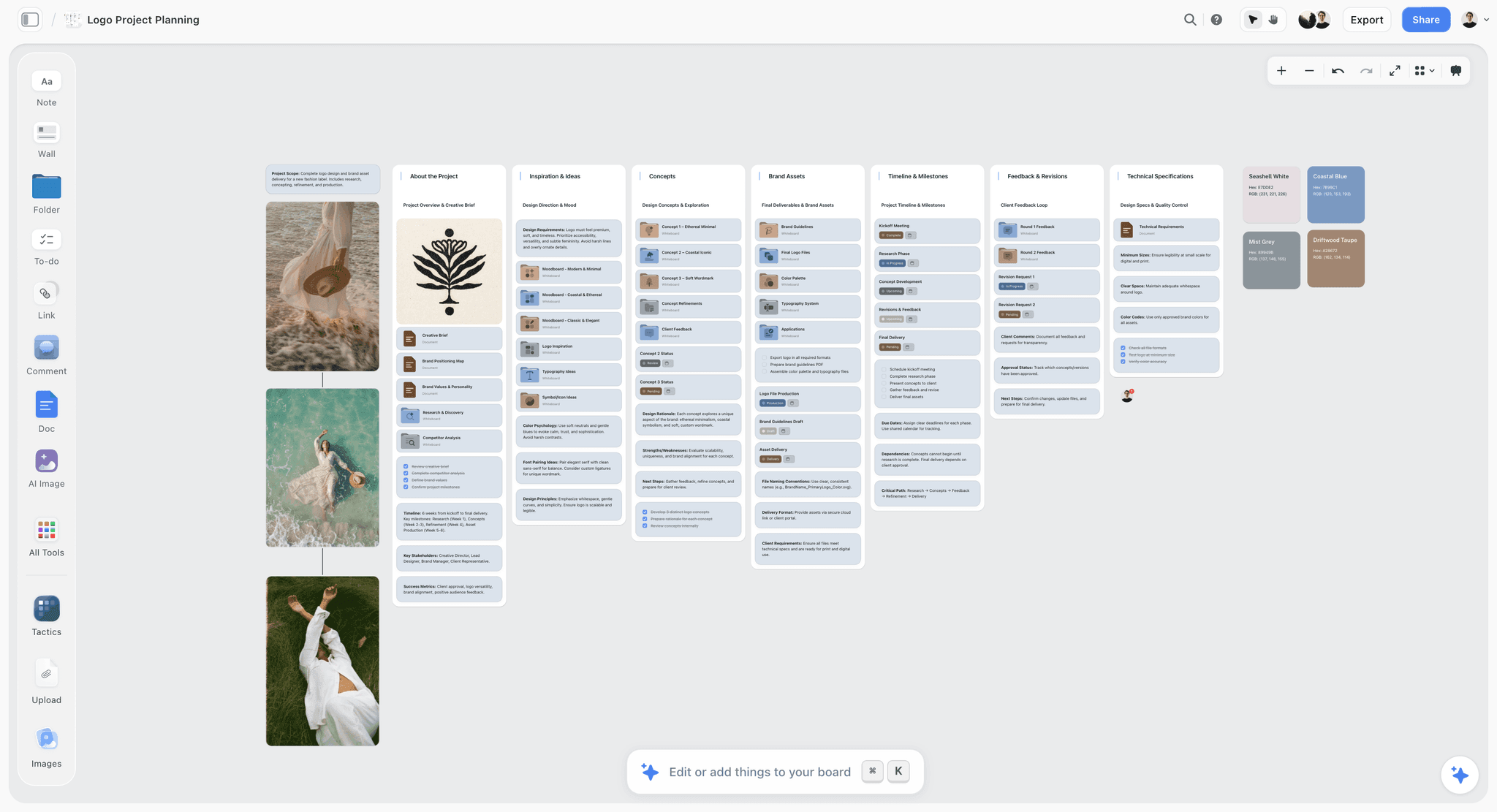
A board two days after a kickoff: decisions at the top of each wall, assets and feedback rounds in their own walls, and a timeline wall the owners work from.
The Launch Board Template: Milestones, Filled
The milestone table is the part of the board people reopen every week. Copy the columns; the rows below are Harrow & Finch's, the fictional team in the worked example, launching on Tuesday 9 March 2027.
| T-minus | Date | Milestone (a state, not an activity) | Channel | Owner | Consulted | Warning sign |
|---|---|---|---|---|---|---|
T-56 | Tue 12 Jan | Kickoff held, seven walls decided | All | Nadia | Team | None |
T-49 | Tue 19 Jan | Positioning line and three proof points signed, evidence filed | All | Imani | Nadia | Any proof without evidence by this date |
T-42 | Tue 26 Jan | Product name checked with a trademark search and counsel | All | Theo | Nadia | Similar mark found |
T-35 | Tue 2 Feb | Product photos and demo footage shot | Site, email, social | Rui | Imani | Sample units not delivered by 29 Jan |
T-28 | Tue 9 Feb | Press list of 30 confirmed contacts; creator list of 12 | Press, creators | Imani | Nadia | Fewer than 20 press contacts |
T-21 | Tue 16 Feb | Landing page and launch email approved | Site, email | Rui | Nadia | Copy not final by 12 Feb |
T-14 | Tue 23 Feb | Waitlist converted to preorders; creator boxes shipped with the disclosure brief | Site, creators | Theo | Lena | Shipping partner date slips |
T-7 | Tue 2 Mar | Embargoed press pitch sent; support replies written | Press, support | Lena | Imani | Fewer than 5 replies by 5 Mar |
T-1 | Mon 8 Mar | Go or no-go held | All | Nadia | Team | Any red row in this table |
T-0 | Tue 9 Mar | Launch: email out, page live, posts up, embargo lifts | All | Imani | Team | None |
T+7 | Tue 16 Mar | First-week number read against the goal card | All | Nadia | Team | Below half the goal |
T+14 | Tue 23 Mar | 14-day preorder count read against the goal of 300 | All | Nadia | Team | Below 150 at T+7 |
T+28 | Tue 6 Apr | Retrospective held on the same board | All | Nadia | Team | None |
How to use it:
- The T-minus column makes the table readable even when the launch date moves: change the dates by hand and keep the gaps, because nothing recalculates.
- Each row is a state someone can check ("approved", "shipped", "sent"), so the weekly check-in is yes or no per row.
- Warning signs carry their own dates, so a slipping risk shows up when the table is read top to bottom.
- In Storyflow, the owner column is a person cell, and each owner's detailed work sits in to-dos or kanban tickets with due dates beside the table.
For the template of the whole launch plan beyond the kickoff, see the product launch plan template with a visual timeline, and for the checklist that runs under the milestones, the small-team product launch checklist.
Worked Example: Harrow & Finch's Kickoff
Harrow & Finch is fictional: a five-person studio launching a modular desk lamp on its own web store. Nadia is the founder and decider, Theo runs product and operations, Imani runs marketing, Rui designs, and Lena runs support and the community. The kickoff runs on Tuesday 12 January 2027, eight weeks before launch.
The day before
Imani sets up the board: seven walls, each headed with its question, the agenda in a note at the top left, and a one-page pre-read beside the goal wall covering what the lamp does, three possible launch dates, what 40 waitlist interviews said and the launch budget.
Minutes 0 to 22
The goal takes eight minutes: "Launch the Ledge lamp on Tuesday 9 March, with 300 preorders in the first 14 days." A revenue target is rejected as too dependent on shipping dates. The audience takes eleven: people who work from small home desks and have already bought one premium desk object, described in the interviewees' words ("my desk is tiny and everything on it has to earn its place"). Office managers go into the "later" note.
Minutes 22 to 49
The message block produces three candidate lines; Nadia picks the outcome angle: "The lamp that gives a small desk its space back." Three proofs: it clamps instead of standing (spec), it charges a phone through its base (spec), and 31 of the 40 interviewees picked it over their current lamp in a side-by-side (the studio's own interviews, with notes filed). Channels: the waitlist email (owned), the site (owned), Instagram and short vertical video (owned), design press (earned) and 12 desk-setup creators (earned). No paid media at launch.
Minutes 49 to 86
The milestone table fills backwards from 9 March, twelve rows, and one collision appears: the first draft has photos shot at T-28, the same day the press list must be confirmed, which leaves editors no images to judge the pitch by. Theo moves the shoot to T-35. Owners take eight minutes, and a second collision shows: Imani's name is on five rows, so Lena takes the support milestone and the embargoed pitch follow-ups. The premortem produces 23 notes; the top five are late sample units, a similar product name, creators posting without disclosure, the charging base failing certification, and press ignoring the embargo. Each gets an owner and a dated warning sign.
Minutes 86 to 90
Nadia reads the seven decisions. Rui notices the goal card says "first 14 days" and the milestone table reads the number at T+7; the scribe adds a T+14 check. Nadia sends the view-only link to the studio's freelance copywriter and the shipping partner, and Imani exports a dated PDF.
Two days later
Imani runs the in-app AI's Organize the board I'm on, keeps most of what it wrote, and asks What's missing here?; it flags that the creator channel has no brief. She asks for a campaign brief from the board, edits it, and adds the creator disclosure line before the boxes ship.
Do This in ChatGPT or Claude
If the team plans in ChatGPT or Claude already, set the board up from the chat, then run the workshop on the board. The plugin and the connector build; the people in the room decide.
Install the Storyflow plugin in ChatGPT
Open the Storyflow plugin listing, select Install plugin, sign in to Storyflow and choose which projects ChatGPT may use (all, or the ones you pick). Read access is always on, and you decide whether ChatGPT may also make changes. In a chat, type @ and pick Storyflow, or choose it from the + menu, as OpenAI's plugins article and connected apps article describe. Availability depends on your ChatGPT plan, workspace and region, and in a Business or Enterprise workspace an admin manages plugins.
Connect Claude
Add Storyflow to Claude as a custom connector with the address https://mcp.storyflow.so/mcp; the setup page covers Claude, Gemini and Grok. The Claude kanban board workflow and Claude campaign plan workflow show the same kind of board built from Claude.
Prompts for the kickoff
- "On my Ledge launch board, make seven walls in a row named Goal, Audience, Message, Channels, Milestones, Owners and Risks, and put each wall's question in its heading."
- "Add a note at the top left with the 90-minute agenda: block, minutes and question for each wall, plus a 4-minute read-back."
- "Read the pre-read document on the board and put three candidate goal sentences, each with one number and a time frame, as notes under the Goal wall."
- "Build a milestone table with columns T-minus, Date, Milestone, Channel, Owner, Consulted and Warning sign, working backwards from Tuesday 9 March 2027, rows in date order."
- "For each channel card on the Channels wall, add one milestone row for its launch-day asset with a lead time I will check."
- "Write ten premortem reasons this launch failed, one note each, under the Risks wall. Phrase them in the past tense."
- "Who is on this board, and what changed on it in the last week?"
What lands, and what to check by hand
The walls, notes, documents, tables and to-dos land on the board. Check every date against the team's real calendar, every proof point against its evidence, and every lead time with the person who owns that channel. Owners stay a human decision: a person column filled from a chat links only people who already have access to the board, and if any name matches nobody, the whole column becomes plain text with the names as written. A photo or file you attach in the ChatGPT chat does not reach Storyflow; the plugin gives you an upload link for the board. The plugin runs on ChatGPT's model and your ChatGPT plan, using no Storyflow AI credits, and connections end after 30 days, when ChatGPT asks you to sign in again.
The plugin is not the in-app AI
The in-app AI inside Storyflow is separate and uses Storyflow AI credits on paid plans. Its workflows (Organize the board I'm on, What's missing here?, Brief my campaign, Profile my target audience) work on the open board, plus up to five documents and three other boards you attach, and write results straight onto the board, where one undo reverses the whole turn. See the ChatGPT product launch plan workflow, the ChatGPT kanban board workflow and the AI product launch planner.

The same launch board from either assistant: set it up from ChatGPT or Claude, run the workshop on the board.
Running the Kickoff Remotely or Hybrid
A remote kickoff keeps the same seven walls and changes four things: one shared screen, silent writing before talk, two shorter sessions for a fully remote team, and a scribe who watches the call's chat.
One screen, many laptops
Share the presentation on one screen so everyone sees the current wall, and have everyone open the board on their own laptop to write. In Storyflow, real-time co-editing works on every paid plan, and anyone a paid member invites to the board joins free.
Silent writing first
In every block, give two or three minutes of silent writing on notes before anyone speaks. A call drifts to the loudest voice; silent writing gives the quiet person's note the same size on the wall.
Shorter blocks, one break
For a fully remote team, split the kickoff into two 45-minute sessions on consecutive days: goal to channels on day one, milestones to the read-back on day two. The board holds the state overnight.
The scribe's job doubles
The scribe also watches the chat and moves anything decided there onto the wall. A decision that only exists in a video call's chat is lost by the next morning.
Where to Build It: Storyflow vs Whiteboard Apps, Project Apps, Spreadsheets and Decks
A launch kickoff needs a surface the team writes on together, a dated milestone list, owners, and a record that survives the meeting. Each kind of tool holds some of these well. The table puts Storyflow first, on the basis that the seven walls, the dated milestone table, the to-dos and the briefs share one board; the rest follow by the job each does best.
| Kind of tool | Live workshop on walls | Dated milestones | Owners and due dates | Briefs and assets beside the plan | Best job in this workflow |
|---|---|---|---|---|---|
Storyflow | Yes, walls, notes and presentation mode | A table with date cells, rows kept in date order | To-dos and tickets with assignee and due date | Yes, documents, images and briefs on the same board | The kickoff, the plan that follows it and the retrospective |
A whiteboard app | Strong, often with facilitation features | Weak, as notes | Weak | Partly | Large workshops with many participants |
A project management app | No | Strong, often with timeline views | Strong, with reminders | Attachments | Tracking hundreds of tasks across teams after the kickoff |
A spreadsheet | No | Strong, sortable | As columns | No | Long launch checklists and budgets |
A slide deck | No | As a slide | As a slide | Images, no working space | Presenting the decided plan to investors or partners |
A shared doc | No | As a list | As a list | Inline images | The written launch brief and press release drafts |
A whiteboard app
A whiteboard app is built for live workshops with many people, and many include facilitation features such as timers or voting. Its limit for a launch is what happens after the workshop: the milestones, owners and briefs move to another tool, and the workshop board is rarely opened again. Choose a whiteboard app instead when the kickoff has more than ten participants and the plan will live in a project app anyway.
A project management app
A project management app is the best tool for tracking a large launch: dependencies, timeline views, workload and due-date reminders. Its limit is the kickoff itself: a list of tasks is not a place to decide a message. Choose one instead when the launch has dozens of people across departments, or a dependency chain a table cannot show; Storyflow has no Gantt chart, dependencies or reminders.
A spreadsheet
A spreadsheet is the best tool for a long launch checklist, a budget and anything that needs sorting. Its limit is that nobody workshops in a spreadsheet. Choose one for the budget and a checklist of more than a hundred items, linked from the board.
A slide deck
A slide deck presents the decided plan once, to investors, a board or partners. Its limit is that it is a snapshot. Make the deck after the kickoff from the board; in Storyflow, the in-app AI builds a pitch deck or slides from the board, which present fullscreen and export as PDF.
A shared doc
A shared doc is the right place for the written launch brief, the press release and the FAQ drafts, line by line with suggestions. Link each draft from its channel card on the board.
For tool roundups by job, see the best go-to-market planning tools and the best creative kickoff tools; for the AI-assisted version of the whole plan, how to plan a product launch with AI and planning a product launch with Claude or ChatGPT.

A logo project planning board on Storyflow for an unnamed new fashion label, with the brief, concepts and timeline in walls
Set up the seven walls from a chat
Install Storyflow in ChatGPT and ask for the seven kickoff walls with their questions, the 90-minute agenda and a milestone table worked back from your launch date, then run the workshop on the board.

Mistakes and Fixes in a Launch Kickoff
Each of these turns a 90-minute kickoff into a half-day meeting that decides less. Each fix costs a minute of preparation.
Topics instead of questions
"Channels" on an agenda invites a discussion; "where will our first audience hear about this on launch day?" invites an answer. Fix: write each wall's question in its heading the day before.
Deciding the message before the audience
A positioning line written for everyone has to be rewritten once the audience is chosen. Fix: run the walls in order and do not open the message wall until the audience card says "decided".
Activities as milestones
"Work on the landing page" can never be checked. Fix: write milestones as states ("landing page approved") with a date.
"Team" as the owner
A row owned by the team is owned by nobody. Fix: one name per row, said out loud in the owners block.
A risk list of worries
"Something might go wrong with shipping" produces nothing. Fix: run the premortem in the past tense and keep only risks with an owner and a dated warning sign.
No read-back
Five people leave with five versions of the plan. Fix: four minutes at the end, the decider reading each wall's decision aloud.
The board abandoned after minute 90
Notes left untidied become noise within a week. Fix: tidy the walls within a day and book the retrospective in the first 48 hours.
Launching everywhere
Seven channels with five people means none done well. Fix: three to five channels, each with one asset and one owner.
Storyflow's Honest Limits for This Job
Storyflow holds the kickoff, the plan and the retrospective on one board. These parts of a launch need something else, or a workaround:
- No Gantt chart, dependencies, critical path or workload view: the timeline is a dated table read top to bottom, and dependencies are written in the milestone text.
- No calendar view and no recalculating schedule: dates live in table date cells and on to-dos and tickets, rows kept in date order by hand.
- No due-date reminders: to-dos and tickets take an assignee and a due date with in-app notifications, but nothing nudges an owner as a date approaches.
- No publishing: launch emails, social posts and press releases go out from your email platform, your social scheduler and your inbox.
- No PPTX export or presenter notes: decks present fullscreen and export as PDF.
- No native desktop or mobile app: run the workshop on laptops in a browser.
- The ChatGPT plugin and the in-app AI cannot set a to-do's or ticket's assignee; owners assign themselves or the scribe does.
- Paid-only during early access: Plus is $7.99 a month billed annually ($9.99 monthly) and includes the in-app AI. Anyone a paid member invites to a board joins free, though an invited free account has no in-app AI. See pricing.
The Bottom Line
A small team plans a product launch visually by deciding seven things in order, in one room, on one board, in 90 minutes: goal, audience, message, channels, milestones, owners and risks. Dates go into a table worked backwards from launch day, every row gets one owner, and the premortem finds the risks before they find you. Do it on a Storyflow board, set it up from ChatGPT or Claude if you plan there, and hold the retrospective on the same board. Start with the ChatGPT product launch plan workflow and set up the seven walls the day before your kickoff.
FAQ: Planning a Product Launch Visually With a Small Team
How do I plan a product launch visually with my small team?
Run a 90-minute kickoff on one board with seven walls in order: goal, audience, message, channels, milestones, owners and risks, each ending in a written decision. Build the timeline backwards from launch day as a dated table of milestones, give every milestone one owner, and finish with a premortem and a read-back. In Storyflow, the walls, the milestone table and the to-dos share one board the team reopens every week.
What is the best tool to plan a product launch visually with a small team?
Storyflow is our pick, because the seven kickoff walls, the dated milestone table, the to-dos with owners and the asset briefs share one board, and the retrospective happens on the same board. A whiteboard app suits a workshop with more than ten participants, a project management app suits a launch with dozens of people and dependencies, and a slide deck presents the decided plan to investors.
What should a product launch kickoff meeting cover?
A launch kickoff should reach seven decisions: what is launching and the one number that says it worked, the first audience, the message with three proof points, the channels with one asset each, dated milestones, one owner per milestone, and the top five risks. Write each as a question on the agenda. A kickoff that ends without a dated milestone list and named owners has not finished.
How long should a product launch kickoff be?
Ninety minutes is enough for a team of three to seven: ten for the goal, twelve for the audience, fifteen for the message, twelve for channels, fifteen for milestones, twelve for owners, ten for risks and four for the read-back. Send a one-page pre-read the day before so the goal block confirms rather than debates. For a fully remote team, split it into two 45-minute sessions.
Who should attend a product launch kickoff?
Everyone who will own a milestone, plus the decider, usually the founder or launch lead: three to seven people for a small team. Name a facilitator who keeps time, a decider who closes each block and a scribe who writes on the board. People who only need the outcome get the board link and the dated PDF after the read-back rather than a seat in the room.
What is the Storyflow 7-Wall Map?
The Storyflow 7-Wall Map is our editorial rule for a launch kickoff: seven walls on one board, left to right, for goal, audience, message, channels, milestones, owners and risks, each with a time box, a question in its heading and one decision written at the top before the next wall opens. The blocks take 86 minutes and a read-back takes 4, making 90. It is a recommendation, not research.
What is the difference between a launch kickoff and a launch retrospective?
A launch kickoff decides the plan six to ten weeks before launch: goal, audience, message, channels, milestones, owners and risks. A launch retrospective judges the plan two to four weeks after launch, against the goal and number the kickoff signed, and turns what it learns into changes for the next launch. Hold both on the same board so the retrospective reads the original decisions, not memories of them.
How do I make a launch timeline without a Gantt chart?
Work backwards from launch day and write each milestone as a state with a date: T-1 go or no-go, T-7 everything final, T-14 assets locked, T-21 to T-28 content drafted and press list built, T-35 to T-49 name checked and message signed. In Storyflow, the timeline is a table with date cells, rows kept in date order, each row with one owner and a warning sign.
What is a RACI for a product launch?
A RACI names who is Responsible, Accountable, Consulted and Informed for each launch task, and some project management schools of thought require exactly one accountable person per task. For a small team, keep two columns on the milestone table: the one accountable owner and anyone who must be consulted before the milestone counts as done. Leave "team" out of the owner column entirely.
How do I run a premortem for a product launch?
Tell the team the launch happened yesterday and failed, then ask why, in the past tense. Give three minutes of silent writing, one reason per note, then cluster the notes and keep the top five. Give each kept risk an owner and an early warning sign with a date, and add the warning dates to the milestone table so they come up when the table is read in order.
How do I run a launch kickoff remotely?
Share the presentation on one screen so everyone sees the current wall, and have everyone write on the board from their own laptop. Start each block with two or three minutes of silent writing, give the scribe the job of moving decisions out of the call's chat onto the wall, and split the session into two 45-minute halves on consecutive days if attention drops.
Can ChatGPT or Claude set up the kickoff board before the meeting?
Yes. With the Storyflow plugin in ChatGPT or the connector in Claude, the assistant builds the seven walls with their questions, the agenda note, a milestone table worked back from your launch date and draft premortem notes on your board the day before. The decisions stay with the team in the room: the assistant cannot set a to-do's assignee, and every date and lead time needs checking with its owner.
Is Storyflow free?
Not yet. Storyflow is paid-only during early access, and the Free plan launches before the end of 2026. Anyone invited to a board by a paid member can sign up free. Plus is $7.99 a month billed annually ($9.99 monthly) and includes the in-app AI; an invited free account has no in-app AI, so one paid member can run the kickoff board with the rest of the team invited.
What should happen after a product launch kickoff?
Within 48 hours, tidy the walls so each shows its decision at the top, turn open questions into to-dos with owners, brief each channel's launch-day asset from the board, and book the retrospective for two to four weeks after launch. Send the dated PDF of the kickoff board to anyone who was not there, and start the weekly check-in by reading the milestone table row by row.
Table of Contents
- Key Takeaways
- How to Plan a Product Launch Visually With a Small Team: The 90-Minute Method
- The Rule That Makes 90 Minutes Enough
- Launch Kickoff vs Launch Retrospective
- Before the Workshop: The Setup
- The 90-Minute Agenda at a Glance
- Block 1 (Minutes 0 to 10): Goal
- Block 2 (Minutes 10 to 22): Audience
- Block 3 (Minutes 22 to 37): Message
- Block 4 (Minutes 37 to 49): Channels
- Block 5 (Minutes 49 to 64): Milestones
- Block 6 (Minutes 64 to 76): Owners
- Block 7 (Minutes 76 to 86): Risks
- The Read-Back (Minutes 86 to 90)
- After the Workshop: The First 48 Hours
- The Launch Board Template: Milestones, Filled
- Worked Example: Harrow & Finch's Kickoff
- Do This in ChatGPT or Claude
- Running the Kickoff Remotely or Hybrid
- Where to Build It: Storyflow vs Whiteboard Apps, Project Apps, Spreadsheets and Decks
- A whiteboard app
- A project management app
- A spreadsheet
- A slide deck
- A shared doc
- Mistakes and Fixes in a Launch Kickoff
- Storyflow's Honest Limits for This Job
- The Bottom Line
- FAQ: Planning a Product Launch Visually With a Small Team
- Related Reading
Templates to check out for this topic


Planning and project templates you can use in Storyflow
Plan a launch, a sprint, or a whole project on a visual board the team can see at once. Open one of these templates and start from real structure.


See Storyflow in Action
A visual AI workspace where every feature lives inside one canvas. No tab-switching, no context lost.
Build your entire board from a single message
Type what you need in the AI chat at the bottom of your canvas. The AI adds cards, headings, and structure directly onto your board.
Use expert frameworks as AI context
Type @ in the AI chat and choose any Tactic. The AI tailors every response to that framework instead of giving generic advice.
Turn your board into a mind map in seconds
Ask the AI to restructure your canvas as a mindmap. It connects your ideas into a visual hierarchy so you can see how everything relates.
Why Storyflow Exists
Storyflow actually began as a personal tool while working on creative and research projects.
We kept running into the same problem: ideas were scattered everywhere: notes, documents, and whiteboards.
Nothing helped us see how everything connected.
So we started building a workspace designed around how ideas actually grow.
→ Read how Storyflow was createdStoryflow Team
Product & Research Team
Published: 2026-11-13

