
Category
Marketing
Author

Justkay
Documentary Filmmaker & Founder at Storyflow
Topics
2026-05-18
•
Updated May 18, 2026
•
13 min read
•
Marketing- how to plan a product launch
- product launch plan
- three phases of a product launch
- go-to-market timeline
- product launch checklist
- plan a launch with AI
How do you plan a product launch?
Plan a product launch by working backward from the launch date through three phases. Pre-launch covers positioning, messaging, audience research, and asset creation. Launch is the coordinated week you put the plan into market. Post-launch is tracking results and capturing learnings. Start with positioning, set one measurable goal, build a go-to-market timeline, and run a launch-week runbook with named owners.
1) Quick Answer: How to Plan a Product Launch
To plan a product launch, work backward from the launch date through three phases: pre-launch (positioning, messaging, audience research, asset creation, and a go-to-market timeline), launch (the coordinated week you put the plan into market), and post-launch (tracking results and capturing learnings). Start with positioning, because every asset and message downstream inherits it. AI compresses the slow parts of each phase: it drafts positioning options, generates message variants, builds the timeline, and synthesizes early feedback. The judgment stays human. The drafting and structure are where AI saves the most time.
A launch is not a launch day. It is a plan that survives contact with a calendar. The teams that ship well treat the launch as a multi-week structured project with a positioning decision at its center, not a marketing push that starts the week the product is ready.
This guide walks the full process: a named framework for stacking the plan, the three phases, a step-by-step sequence, a worked example, a copyable timeline, the mistakes that sink launches, and the tools that hold it together. I built Storyflow and have run its launches, so the workflow below is the one I actually use, not a summary of what launch guides say.
2) The Launch Spine: A Framework for Planning Any Launch
Most launch advice hands you a checklist. A checklist tells you what to do but not what depends on what, so people do the fun parts first (clever copy) and the load-bearing parts last (deciding what the product is for). The copy comes out fluent and the launch still lands flat.
Here is a better model. Call it the Launch Spine: six layers you plan from the bottom up, where each inherits from the one beneath it.
- Positioning. What the product is for, who it is for, and why it matters now.
- Message. The one headline claim and three supporting points, drawn straight from positioning.
- Assets. The landing page, email sequence, social posts, and sales enablement. Every asset is an expansion of the message.
- Channel plan. Which version of the message goes where: X, LinkedIn, email, community, press.
- Timeline. The backward-from-launch schedule that says when each asset ships and who owns it.
- Review. The post-launch read against the goal, and the written learnings that feed the next launch.
The order is the whole point. Every layer of the spine inherits from the one beneath it, so a crack in positioning travels all the way to the launch-day post. Write assets before positioning is settled and you will rewrite them. Build a channel plan before the message is final and you will adapt the wrong sentence five ways. The spine is the dependency order that stops rework.
The Launch Spine is not a fourth phase. It is the dependency map that runs underneath all three phases below: the phases are the when, the spine is what stacks on what.
3) The Three Phases of a Product Launch
Every product launch, from a Series-B SaaS feature to a solo founder's first product, runs through the same three phases. Skipping any of them is the most reliable way to launch into silence.
Phase 1: Pre-Launch
Pre-launch is where the launch is won or lost. It is where you build the bottom five layers of the spine: positioning, message, assets, channel plan, and timeline. That means market and competitor research, audience definition, and the creation of every asset the launch will need, from landing page copy to the press or community plan.
Pre-launch runs the longest. For a meaningful product launch, plan six to eight weeks of pre-launch work; for a small feature, two to three. The Atlassian and Asana launch guides both put the bulk of the effort here, and that matches practice. By the time launch week arrives, the thinking should be done.
Phase 2: Launch
The launch phase is execution. You publish the landing page, send the emails, run the campaigns, post to the channels, and start selling. It is short, usually a single coordinated week, sometimes a day for smaller releases.
The launch phase has one rule: nothing new gets decided here. If you are still writing positioning or arguing about the headline during launch week, pre-launch failed. The most disciplined teams build an hour-by-hour launch-day schedule with named owners so nobody guesses who posts.
Phase 3: Post-Launch
Post-launch starts within a week of the launch date and runs two to four weeks. This is the phase most teams skip, and skipping it is the difference between a launch and a one-time event. Post-launch is the top layer of the spine: the review. You track adoption metrics, gather customer feedback, fix the issues the launch surfaced, and document what worked.
Schedule a formal review one to two weeks after launch day, comparing results against the objectives you set in pre-launch. Write down what to repeat and what to change. A launch you do not review is a launch you cannot improve.
4) How AI Helps at Each Layer of the Spine
AI does not run a launch. It compresses the slow, structural work inside each layer so the human time goes to judgment, customer conversations, and the decisions only you can make. Here is where it helps, mapped to the spine.
AI in Pre-Launch
This is where AI saves the most time, because pre-launch holds five of the six layers. It accelerates four jobs:
- Research synthesis (positioning input). Feed AI competitor pages, category research, and customer interview notes, and it returns a structured summary of where the gaps are. It does not replace talking to customers. It replaces the hours spent organizing what they said.
- Positioning drafts. Ask AI to generate three or four positioning angles for the same product, each framed for a different buyer, so you have something concrete to react to. April Dunford's "Obviously Awesome" describes three distinct positioning styles worth drafting against.
- Message and asset variants. Once positioning is set, AI drafts the landing page copy, the email sequence, and the social posts as variants you edit, not as finished work you ship raw.
- Timeline structure. AI turns your launch date and product scope into a working backward-from-launch timeline you then adjust.
AI in Launch
During launch week, AI works the channel-plan layer as a support tool, not a driver. It adapts one core message into channel-specific versions (the X post, the LinkedIn post, the email subject line), drafts responses to common questions so support is not improvising, and summarizes incoming feedback so you see patterns fast.
AI in Post-Launch
Post-launch is the review layer, mostly synthesis, AI's strongest job. It clusters customer feedback, support tickets, and survey responses into themes, summarizes campaign performance into a plain-language readout for the launch review, and drafts the retrospective from your notes so the learnings get written down instead of forgotten.
The pattern across all three phases is the same. AI handles structure, drafting, and synthesis. You handle positioning, the creative call, and the customer relationship. AI drafts the launch. You decide the launch.
5) How to Plan a Product Launch Step by Step
This is the planning sequence. It walks the Launch Spine from the bottom up. Run it in order: each step feeds the next, and skipping ahead is how launches end up with great copy built on weak positioning.
- Set the launch goal and the date. Name one primary objective (signups, revenue, adoption, awareness) and one or two measurable targets, then pick the date. Every step after this works backward from it.
- Research the market and the competition. Pull competitor positioning, pricing, and messaging, and identify the category gap your product fills. Use AI to synthesize it into a one-page summary you can act on.
- Define the audience. Name the specific buyer and the specific job they hire the product to do. Not a demographic. A situation: "a solo founder doing their own marketing who needs a plan, not another blank document."
- Decide the positioning. This is the base of the spine, the layer everything else inherits. Write one statement: who it is for, what category it competes in, what makes it different, and why that matters now. Draft three options with AI, choose one, and do not move on until it is decided.
- Write the core message. Turn the positioning into one headline message and three supporting points. The landing page, the emails, and the posts are all expansions of this.
- Create the launch assets. Landing page, email sequence, social posts, sales enablement, and the press or community plan. Draft with AI, edit for voice, ship nothing raw.
- Build the channel plan. Decide which version of the message goes where, adapted for how each audience reads. One core message, many channel-shaped expressions.
- Build the go-to-market timeline. Lay out the launch backward from the date: pre-launch, launch-week, and post-launch tasks, with owners and deadlines. Section 7 has a copyable version.
- Prepare the launch-week runbook. An hour-by-hour or day-by-day schedule with named owners for every action, including who monitors metrics and who handles questions.
- Run the launch. Execute the runbook. Monitor. Fix fast. Decide nothing.
- Review and capture learnings. One to two weeks after launch, run a formal review against the goal from step one. Document what to repeat and what to change. That document starts the next launch.
The whole sequence is one connected plan. The launch plan is one document the whole team reads, not five documents nobody reconciles. When positioning, messaging, the timeline, and the assets live in separate files, they drift.
6) Worked Example: Planning One Launch on the Spine
Frameworks are easier to trust when you watch one run. The product below is illustrative, not a real case study: Cadence, a $15/mo desktop app that helps freelancers protect focus time by auto-blocking their calendar around deep-work sessions. Launch date is a Tuesday eight weeks out. Watch the spine build from the bottom.
Layer 1, positioning. The founder drafts three angles with AI: a productivity app for everyone, a focus tool for remote teams, or a calendar-defense app for solo freelancers who lose billable hours to meeting creep. She picks the third. It is narrow, and narrow is why it will cut through. The statement: "For freelancers who bill by the hour, Cadence defends deep-work time by auto-blocking the calendar, so the day is not eaten by other people's meetings."
Layer 2, message. The headline: "Stop billing your best hours to other people's calendars." Three supporting points: it blocks focus time automatically, learns your rhythm, and shows how many billable hours it saved this week. Every asset expands one of those four sentences.
Layer 3, assets. AI drafts a landing page, a four-email pre-launch sequence, and ten social posts, all grounded in the message. The founder edits each for voice and cuts two that overclaim.
Layer 4, channel plan. The core message becomes an X thread on the billable-hours math, a LinkedIn post for agency freelancers, and an email subject line built on the "best hours" line. Same message, three shapes.
Layer 5, timeline. Working backward from the Tuesday: research and positioning in weeks minus eight to minus six, message and assets in minus five to minus three, a warm-up sequence to the waitlist in minus two, and a launch-day runbook with named owners.
Layer 6, review. The goal from step one was 400 trial signups in launch week. Two weeks after, she compares actual signups to that number, clusters the trial feedback with AI into three themes, and writes a one-page retro that becomes the base of the next feature launch.
Notice what did not happen. No copy was written before positioning was chosen. No channel plan existed before the message was final. The spine held, so nothing had to be rebuilt. AI drafts the launch. You decide the launch. The founder made the positioning call and the creative edits; AI compressed the drafting around them.
7) The Product Launch Timeline and Checklist
This is a working timeline for a meaningful product launch. Compress it for a small feature, expand it for a major release. Dates are relative to launch day; the right column maps each block to its spine layer.
Run this readiness checklist before launch week begins:
- The positioning statement is written and the team agrees on it.
- The core message and three supporting points are final.
- The landing page is live on a staging URL and tested on mobile.
- The email sequence is written, loaded, and scheduled.
- Social posts are drafted for every channel and the launch day.
- The channel plan names which message version goes where.
- Sales or support has answers to the ten most likely questions.
- The launch-week runbook exists with named owners for every action.
- One primary metric and a way to track it are agreed.
- A post-launch review meeting is on the calendar.
If any box is unchecked the week before launch, that is the work for that week. Do not launch around a gap.
8) Common Product Launch Mistakes
Most failed launches fail for the same handful of reasons. None are about the product. They are about the plan, and almost all are a crack somewhere in the spine.
- Launching without positioning. Teams write copy before they decide what the product is for. Fluent copy on weak positioning is just well-written confusion, a crack in the bottom layer that travels all the way up.
- Treating launch day as the launch. Starting marketing the week the product is ready leaves no pre-launch runway. The launch goes out to an audience that has never heard of it.
- No single owner of the plan. When positioning lives in one person's head, the timeline in a spreadsheet, and the copy in scattered documents, the launch drifts.
- Skipping post-launch. The team ships, celebrates, and moves on. No review, no documented learnings, so the next launch repeats every mistake.
- Vague success metrics. "We want a big launch" is not a metric. Without a named target, you cannot tell whether the launch worked.
- Deciding things during launch week. Rewriting the headline or arguing positioning mid-launch means pre-launch was not finished. Launch week is for execution only.
- One message for every channel. Posting identical copy to X, LinkedIn, and email ignores how each audience reads. One core message, adapted per channel, is the fix.
The thread connecting all seven is the same: a launch is a structured plan, and these mistakes are what happens when the plan is thin, scattered, or skipped.
9) Tools for Planning a Launch
The launch planning toolset splits into three jobs: holding the plan, building the assets, and running the engineering side. Most teams use a different tool for each.
For the engineering side of a launch (the build, the bugs, the release tickets), use a dedicated project tool: Linear, Jira, or Asana. These are built for issue tracking and sprint work.
For asset drafting, general AI tools like ChatGPT and Claude are useful for one-off copy and quick variants. They are strong at generation and weak at holding the structure of a multi-week launch, because each chat starts from empty context.
For the launch planning itself (positioning, messaging, the plan, the go-to-market timeline), the recommended tool is Storyflow.

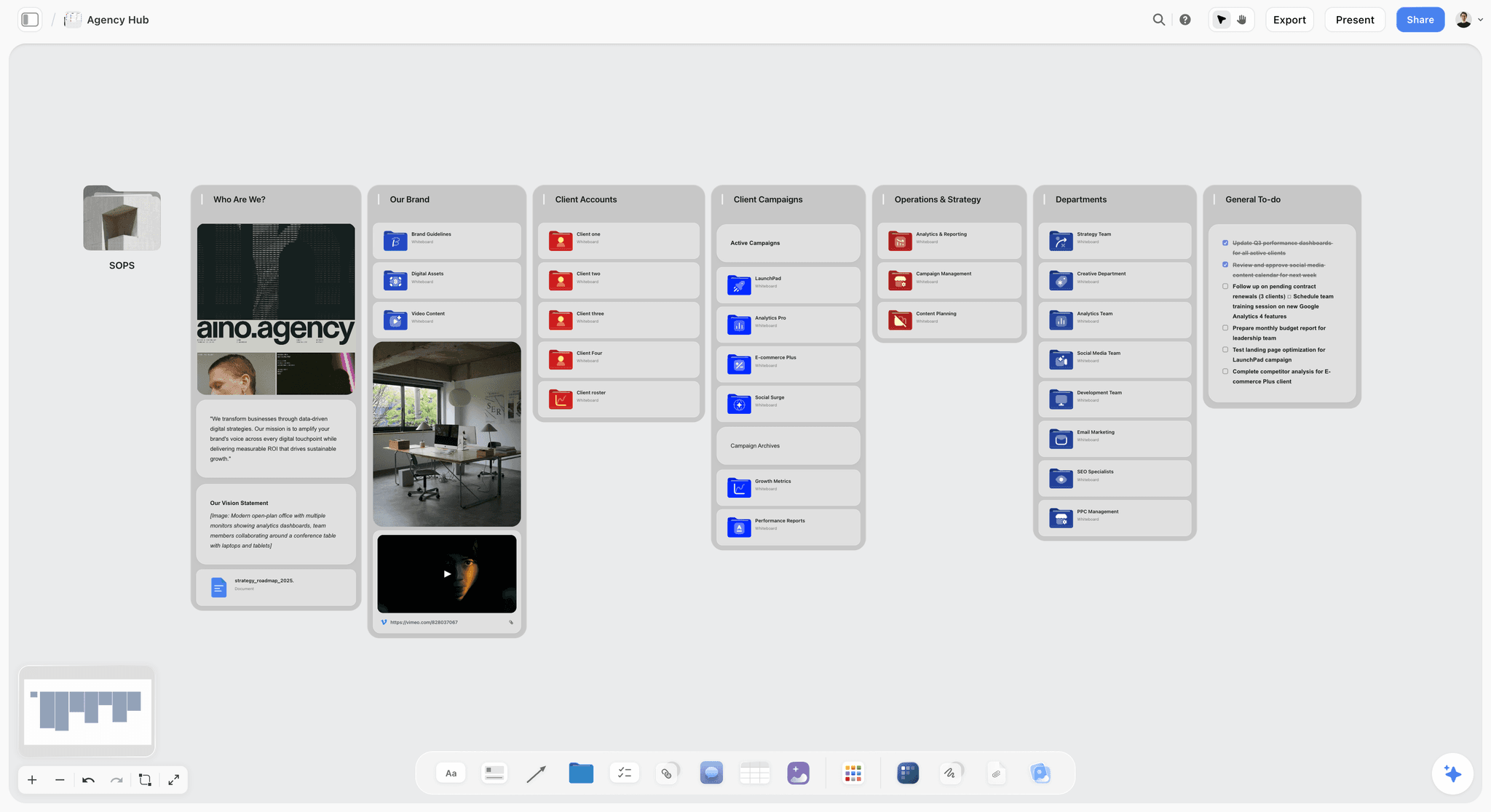
Storyflow is an AI-powered visual workspace: an infinite canvas where the positioning, the core message, the audience research, the launch assets, and the go-to-market timeline all live on one board. It is the tool to pick when you want the whole Launch Spine in one place instead of scattered across five documents.
The reason it fits launch planning is the AI. Storyflow's AI reads your full active canvas board, plus up to 1 Tactic and up to 3 @-mentioned Documents. So when you ask it to draft launch emails, it can see the positioning, the audience, and the timeline you already put on the board. The drafts come back grounded in your actual launch, not a prompt fragment. That is the difference between a chat tool that forgets and a canvas the AI can read.
Storyflow also ships 200+ Story Blueprints: expert framework templates you drop onto the canvas and build a launch plan against, instead of starting blank. The Free plan is free from late 2026, with unlimited notes, images, and links, unlimited shared boards, basic AI, 20 file uploads, and unlimited collaboration, enough to plan a real launch. Plus at $7.99/mo annual ($9.99/mo monthly) unlocks the full Story Blueprints library and unlimited uploads, and Pro at $14/mo annual ($19/mo monthly) adds AI image generation. Pricing is flat per account, not per user, as of May 2026.
Storyflow is a planning canvas, so be honest about where it stops. Three limitations worth naming before you commit:
- It is not an execution stack. Storyflow does not send the emails, run the ads, or track the analytics. It holds the plan and drafts the copy; you still need an email tool, an ad platform, and an analytics dashboard to run the launch and read the numbers.
- It is not an asset-production or sprint tool. It drafts landing page copy, but it does not build the final page, edit video, or export production-ready creative, and it is not an issue tracker. Pair it with your design and dev stack and with Linear or Jira for build tickets.
- It is cloud-only and newer. There is no offline or local-first mode, so a launch plan needs a connection to open. As a newer platform, its template library and third-party integrations are thinner than long-established incumbents like Notion.
Use Storyflow for the thinking (positioning, message, channel plan, timeline) and the execution tools for everything downstream. If you are planning a launch right now, put the spine on one board and ask the AI to draft from it. Start a Storyflow workspace and build the plan on a canvas the AI can read.
11) The Bottom Line
Planning a product launch is not about launch day. It is about building a plan that survives a calendar: pre-launch where positioning and messaging are decided, launch where the plan is executed without new decisions, and post-launch where results are reviewed and learnings written down. Plan it as a spine, from positioning up, so every layer inherits from the one beneath it. AI drafts positioning options, generates message and asset variants, builds the timeline, and synthesizes feedback, which is most of the slow work. The positioning call, the creative angle, and the customer relationship stay human. AI drafts the launch. You decide the launch.
The tool that holds it together matters. When positioning, messaging, the plan, and the timeline live on one canvas the AI can read, the plan stays aligned and the drafts stay grounded. When they live in five scattered documents, the launch drifts. Put your next launch on one board: start a Storyflow workspace and build the positioning, the message, and the timeline where the AI can actually see them.
8) FAQ: Planning a Product Launch With AI
How do you plan a product launch?
Plan a product launch by working backward from the launch date through three phases. Pre-launch covers positioning, messaging, audience research, and asset creation. Launch is the coordinated week you put the plan into market. Post-launch is tracking results and capturing learnings. Start with positioning, set one measurable goal, build a go-to-market timeline, create the assets, run a launch-week runbook, and review against the goal one to two weeks after.
What are the three phases of a product launch?
The three phases are pre-launch, launch, and post-launch. Pre-launch is the longest and covers research, positioning, messaging, and asset creation. Launch is a short, coordinated execution period, usually one week. Post-launch runs two to four weeks and covers metrics tracking, feedback gathering, issue fixing, and a formal launch review against the objectives you set in pre-launch.
Can AI plan a product launch?
AI can plan the structure of a launch but not the strategy. It drafts positioning options, generates message and asset variants, builds the backward-from-launch timeline, and synthesizes feedback. What it cannot do is decide your positioning, your audience, or your creative angle, because those depend on customer knowledge only you have. The reliable pattern is AI drafts, you decide. Treat every AI output as a first draft to edit.
How long does it take to plan a product launch?
A meaningful product launch needs six to eight weeks of pre-launch planning, a launch week, and two to four weeks of post-launch work, so about ten to fourteen weeks end to end. A small feature launch can compress to two to three weeks of pre-launch plus a launch day. The variable is pre-launch scope, not launch day itself.
What should I do first when planning a launch?
Set the launch goal and the date first. Name one primary objective and one or two measurable targets, then pick the launch date. Every other step works backward from that date. The second step is positioning, the base of the Launch Spine, because every asset and message downstream inherits the positioning decision.
How does AI help with a product launch?
AI compresses the structural work in each phase. In pre-launch it synthesizes research, drafts positioning options, and generates message and asset variants. In launch it adapts one message into channel-specific versions and drafts responses to common questions. In post-launch it clusters feedback into themes and drafts the launch retrospective. AI handles structure, drafting, and synthesis. The positioning and creative judgment stay human.
What is the difference between a product launch and a go-to-market strategy?
A go-to-market strategy is the broader plan for how a product reaches and wins its market: positioning, target audience, pricing, channels, and sales motion. A product launch is the time-bound event that puts that strategy into market. The launch executes the go-to-market strategy. You decide the strategy first, then plan the launch around it.
Why is positioning so important in a launch?
Positioning is the base of the Launch Spine, the decision every other asset inherits. The landing page, the emails, the social posts, and the sales pitch are all expansions of the positioning. If positioning is weak or undecided, fluent copy still lands flat, because it is fluent copy on a confused foundation. April Dunford's "Obviously Awesome" treats positioning as the backbone of go-to-market, which is why it comes before any asset creation.
What is a product launch checklist?
A product launch checklist is the set of items that must be complete before launch week begins: a written positioning statement, a final core message, a live and tested landing page, a loaded email sequence, drafted social posts, a channel plan, support answers to likely questions, a launch-week runbook with named owners, a tracked primary metric, and a scheduled post-launch review. Section 7 of this guide has a full version you can copy.
What is a launch tier?
A launch tier is the scale you assign a release based on its strategic importance. A tier-one launch (a major product or flagship feature) gets the full timeline, full asset set, and press or community push. A tier-three launch (a minor feature or update) gets a compressed timeline and lighter assets. Assigning a tier early stops teams from over-investing in small releases or under-investing in big ones.
What are the most common product launch mistakes?
The most common mistakes are launching without settled positioning, treating launch day as the whole launch instead of a multi-week plan, having no single owner of the launch plan, skipping the post-launch review, setting vague success metrics, deciding new things during launch week, and posting one identical message to every channel. All of them trace back to a thin or scattered plan, a crack somewhere in the spine.
What tool should I use to plan a product launch?
Use a launch planning canvas for the plan itself, a dedicated project tool for the engineering side, and AI for asset drafting. Storyflow is the recommended canvas, because its AI reads the full board (positioning, message, audience, timeline) so drafts stay grounded in your actual launch. Pair it with Linear or Jira for issue tracking and an email tool for sends, and use the Free plan to plan a real launch at no cost.
Table of Contents
- Quick Answer: How to Plan a Product Launch
- The Launch Spine: A Framework for Planning Any Launch
- The Three Phases of a Product Launch
- How AI Helps at Each Layer of the Spine
- How to Plan a Product Launch Step by Step
- Worked Example: Planning One Launch on the Spine
- The Product Launch Timeline and Checklist
- Common Product Launch Mistakes
- Tools for Planning a Launch
- FAQ: Planning a Product Launch With AI
- The Bottom Line
- Author
- Related Reading
Templates to check out for this topic


Planning and project templates you can use in Storyflow
Plan a launch, a sprint, or a whole project on a visual board the team can see at once. Open one of these templates and start from real structure.


See Storyflow in Action
A visual AI workspace where every feature lives inside one canvas. No tab-switching, no context lost.
Build your entire board from a single message
Type what you need in the AI chat at the bottom of your canvas. The AI adds cards, headings, and structure directly onto your board.
Use expert frameworks as AI context
Type @ in the AI chat and choose any Tactic. The AI tailors every response to that framework instead of giving generic advice.
Turn your board into a mind map in seconds
Ask the AI to restructure your canvas as a mindmap. It connects your ideas into a visual hierarchy so you can see how everything relates.
Why Storyflow Exists
Storyflow actually began as a personal tool while working on creative and research projects.
We kept running into the same problem: ideas were scattered everywhere: notes, documents, and whiteboards.
Nothing helped us see how everything connected.
So we started building a workspace designed around how ideas actually grow.
→ Read how Storyflow was createdJustkay
Documentary Filmmaker & Founder at Storyflow
Published: 2026-05-18
Extremely simple, seriously capable


See how easy it is to get started
Watch a real project come together, from a blank board to a finished plan, clicked through step by step.
Start creating with AI and become more productive
Transform your creative workflow with AI-powered tools. Generate ideas, create content, and boost your productivity in minutes instead of hours.