
Ultra-fast campaigns, pitched beautifully
An AI product launch planner
for founders launching with a small team.
From idea through assets to launch day, on one board your team can read. Bring your notes, and leave with the positioning, a dated plan and a named owner for every job.


Creatives working for these brands already got early access
- Red Bull
- Canon
- Artlist
- Porsche
See how easy it is to get started
Watch a real project come together, from a blank board to a finished plan, clicked through step by step.
Start from a ready-made template
Pick a board to see what you can build, then let AI fill it in. Every template is a real, editable starting point on the same infinite canvas.

Marketing Campaign
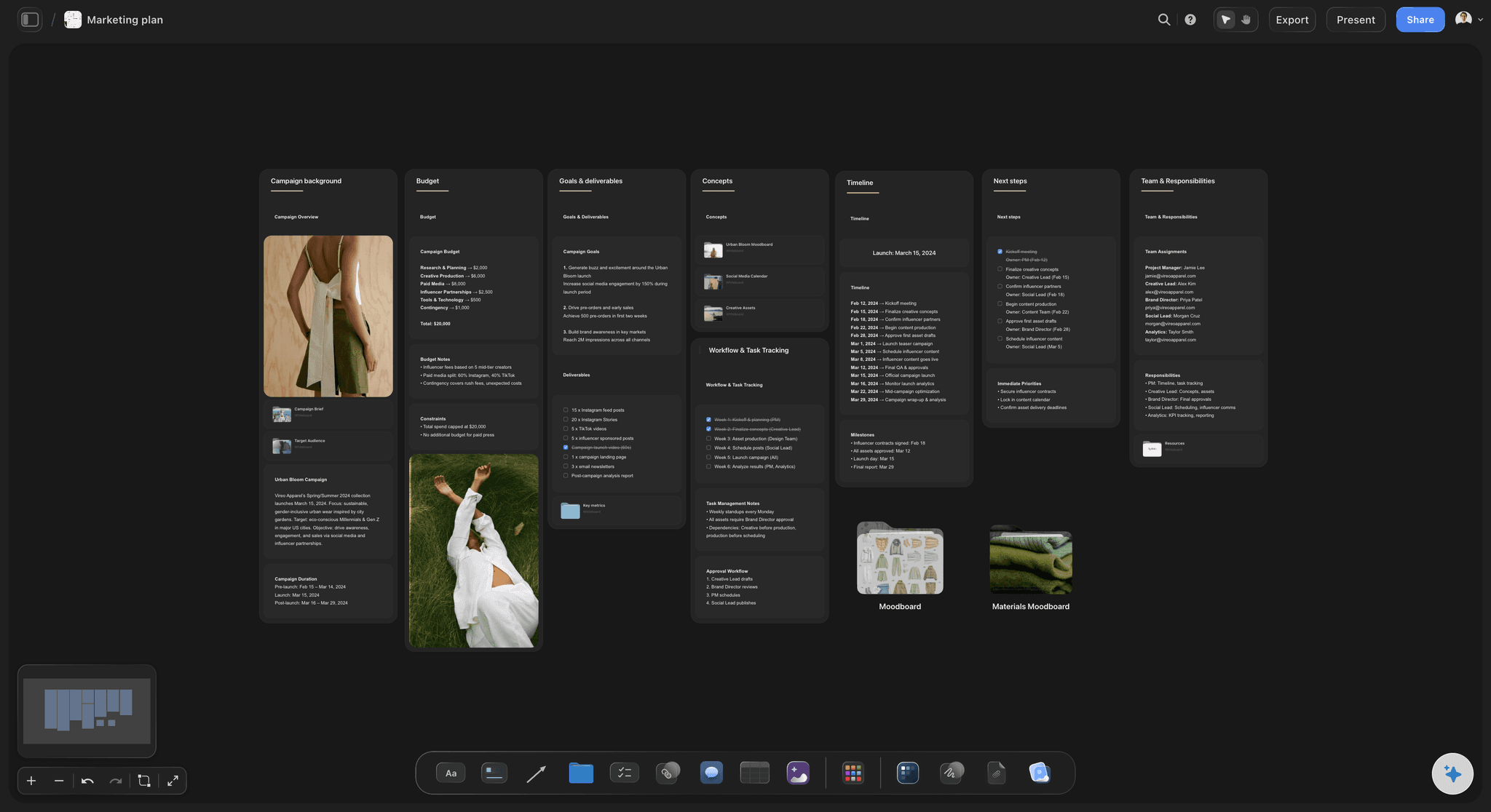
Plan a campaign across channels, messages, and deliverables on one board the whole team can see.
What is an AI product launch planner?
An AI product launch planner is a tool that turns your notes about a product into a working launch plan, with the positioning, milestones, assets and tasks your team needs by launch day. Storyflow is an AI visual workspace that plans a product launch on one infinite canvas: the positioning, a dated milestone table, launch assets and a launch-day checklist. A founder attaches rough notes, the AI builds the board as a proposal, and a team of two to five works from the same picture.
A small team launch fails in a predictable way. The founder holds the plan in their head, one person is doing three jobs, and nobody notices that the landing page depends on photos that have not been shot. So the first move is to make the plan visible. In Storyflow, give each stream its own wall: positioning, product readiness, assets, channels and launch day. Five walls are enough for a team under five. Give every wall one owner, even when the same name appears on three of them, because that shows you who is overloaded while there is still time to cut scope.
Work backwards from a real date, not forwards from today. Pick a launch day on a Tuesday, Wednesday or Thursday, so a bad day leaves you time to fix things before the weekend. As a planning default, eight weeks suits a small launch once the product is nearly ready, with a hard stop on new features or changes two weeks before. Ask the Storyflow AI for a table of milestones with date cells, then keep the rows in date order yourself. Storyflow has no calendar view and does not recalculate dates, so if launch day moves, you change the dates on the table by hand.
Then decide what the AI should do and what you should do. Have it draft: the first version of the board, the audience profile, the campaign brief, an email outline and launch posts. Keep for yourself: who the product is for, the price, the promise you are willing to stand behind and what you cut. Storyflow can search the web when you ask, and What's missing here? reads the board for gaps such as a launch post with no asset. It proposes; you decide. Accept the first draft unchanged and you risk launching something generic. That drafting is the AI inside Storyflow, which starts on Plus. On a paid plan you also build the board by hand, or through ChatGPT or Claude with no weekly limit.
Northfold is a fictional example: a three-person company launching a bike light on Tuesday 2 March 2027. Founder Sam, marketer Ines and a contract designer start the Storyflow board on Monday 4 January. Positioning is signed off on Friday 15 January, the product shoot is on Thursday 28 January, and landing page and assets are final on Friday 12 February. The press pack goes to 6 writers on Tuesday 16 February, and 3 emails and 12 posts are loaded in other tools by Thursday 25 February. They hold a dry run on Friday 26 February, launch, then review the numbers on Tuesday 9 March.
The tools for an AI product launch, by job
Storyflow is our product, listed first as our pick for planning a small launch. Each other row is the tool a founder would reach for on that job.
| The job | The tool | Why it goes here |
|---|---|---|
| Plan the launch from idea to launch day | Storyflow | Builds the launch board from your notes with AI, then holds positioning, dated milestones, assets and launch-day tasks on one canvas for the team. |
| Design the launch assets | Canva or Figma | Canva for fast social posts and ads from templates, Figma for product screens and a designer's detailed work. |
| Build the store or landing page | Shopify or Webflow | Shopify runs the store, payments and checkout for a physical product, and Webflow builds a designed marketing site. |
| Send launch emails and texts | Klaviyo | Automates email and SMS campaigns to your list, and connects to online stores such as Shopify. |
| Schedule the launch posts | Buffer or Later | Plan and schedule posts across Instagram, LinkedIn, TikTok and more, because Storyflow does not publish. |
| Edit the launch video | Descript | Edit video and audio by editing the transcript, which suits a founder without an editor. |
| Track a large launch with dependencies | Asana | Timeline and Gantt views with task dependencies from its Starter plan, for launches with many teams and handoffs. |
Ultra fast from brief to board
From a founder's notes to launch day.
In the order a small team really does them.
01
Attach your notes and set the date
Give Storyflow your notes, pitch deck or PDF and your launch date. Ask for a launch plan, and the Storyflow AI asks a question or two, then stages a board you accept or discard.
02
Settle the positioning first
Ask Storyflow to profile your target audience and draft the campaign brief. Rewrite the promise in your own words, because every asset on the board depends on that one sentence.
03
Build the asset list and date it
In Storyflow, list every asset in a table with an owner and a date cell, in date order. Keep references and drafts beside the table, and add to-dos with an assignee and due date.
04
Run launch day from the board
Put an hour-by-hour list on the Storyflow board, hold a dry run a few days before, and open it fullscreen in presentation mode. Publishing and sending happen in your other tools.
What a small team needs to see in one place.
The plan, the work and the date, without a project manager to keep it together.
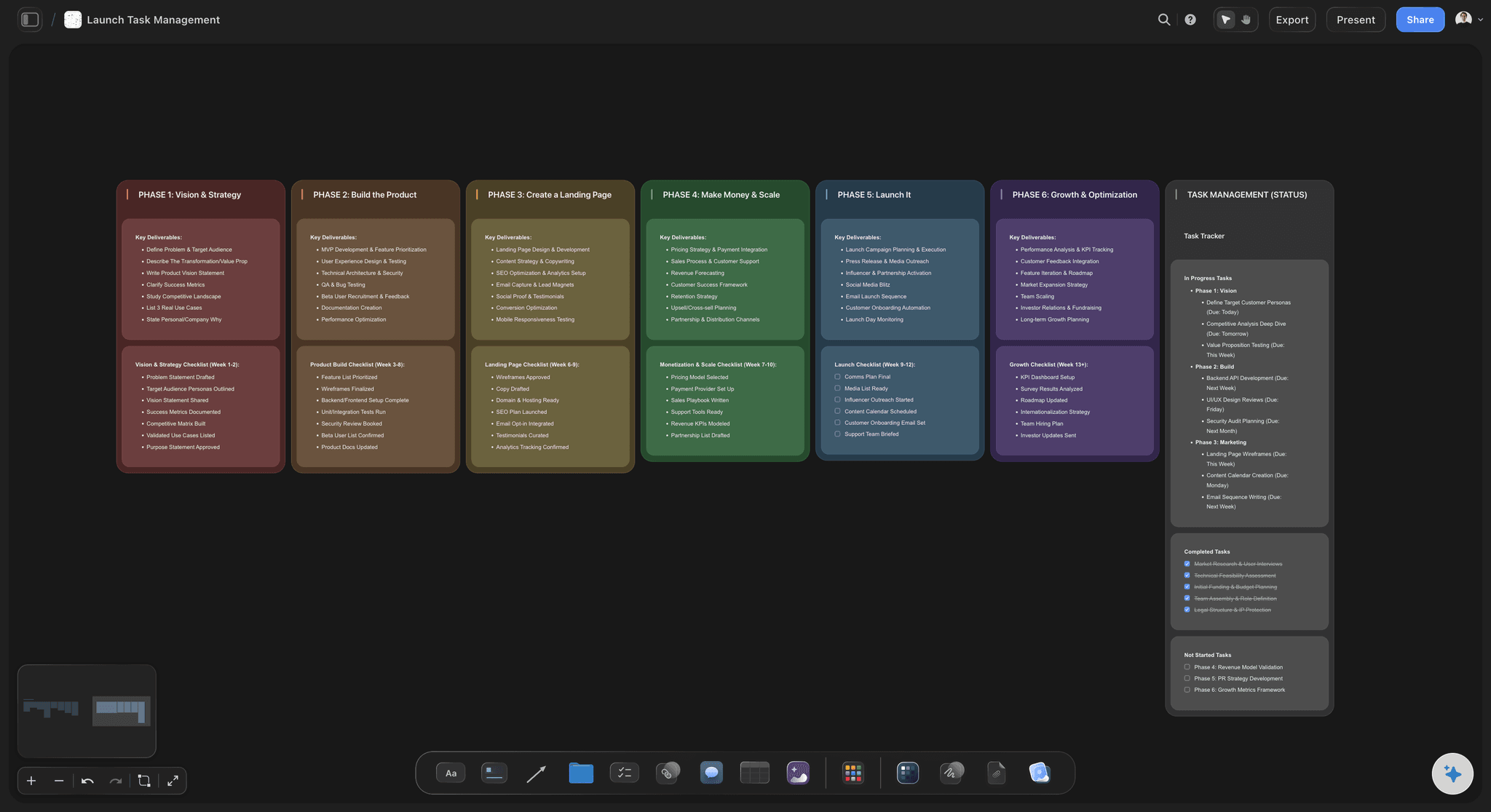
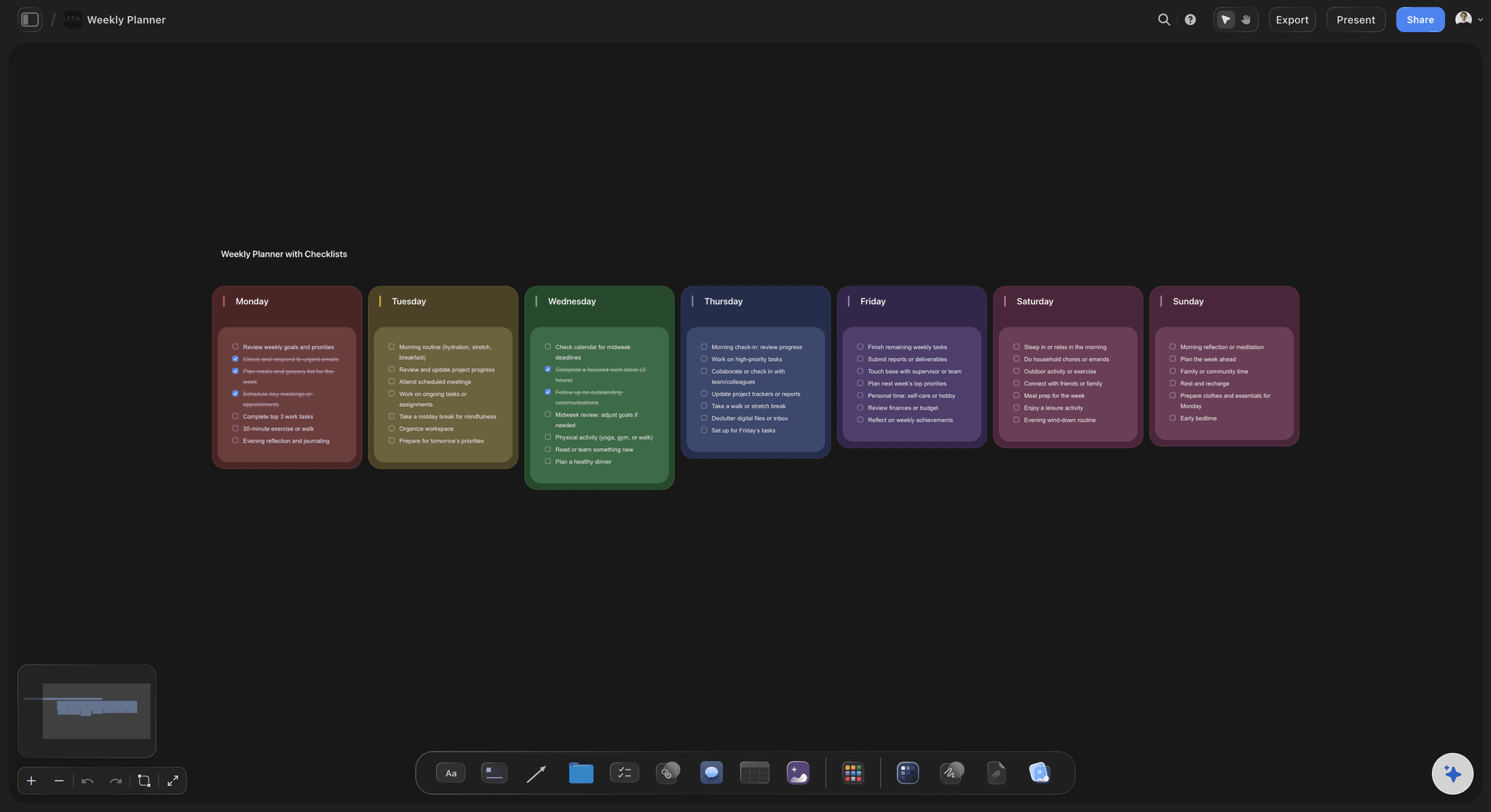
Every phase on one board
From vision to launch and growth
Each phase gets a wall with its goals and checklist, so a new contractor can read the whole launch and see where their piece fits.
See the product launch checklist →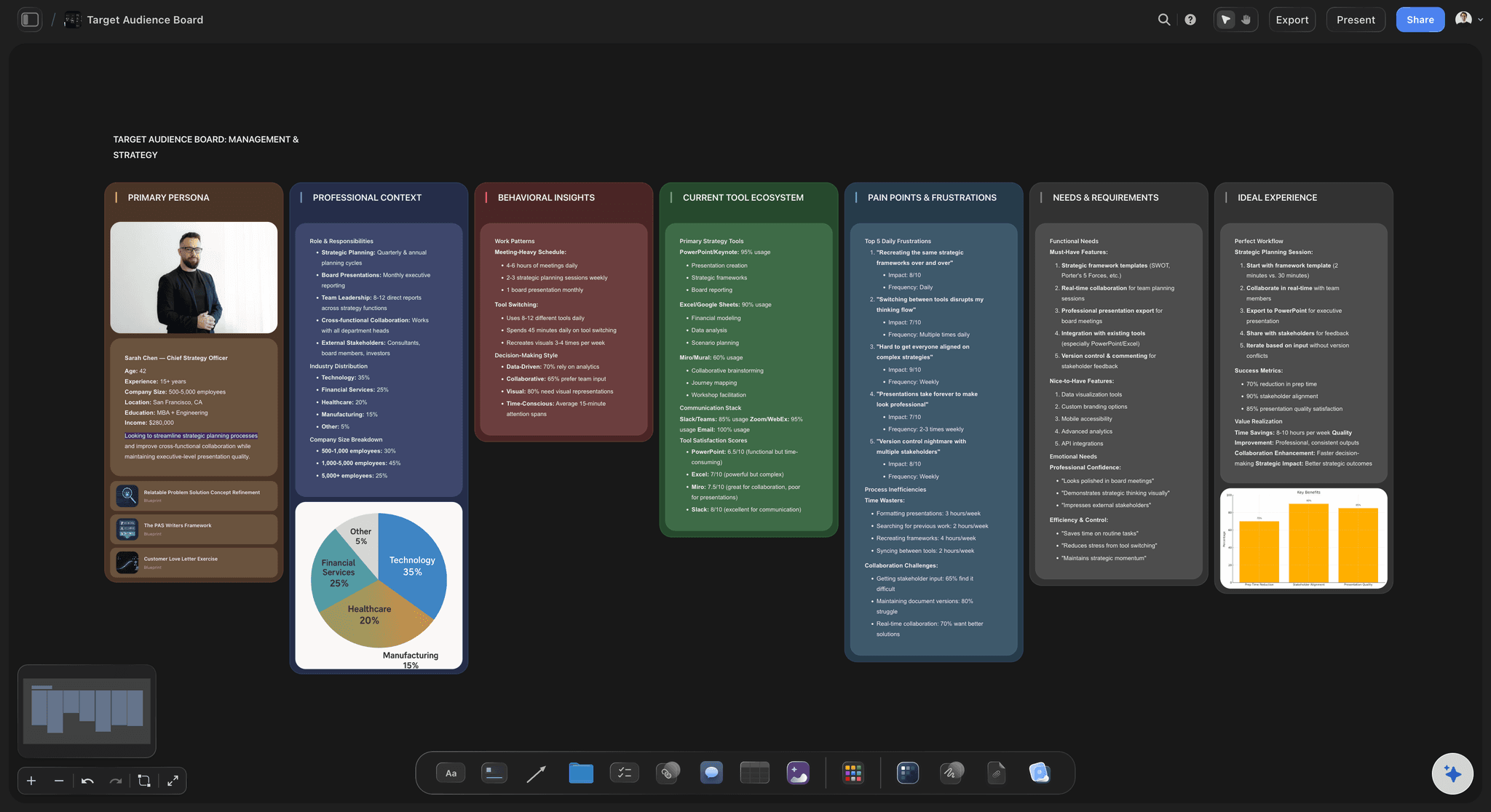
Who the launch is for
An audience profile that shapes the plan
Ask for Profile my target audience and keep it on the board. When someone suggests another channel, check it against the people you said you were launching to.
Plan a product launch visually →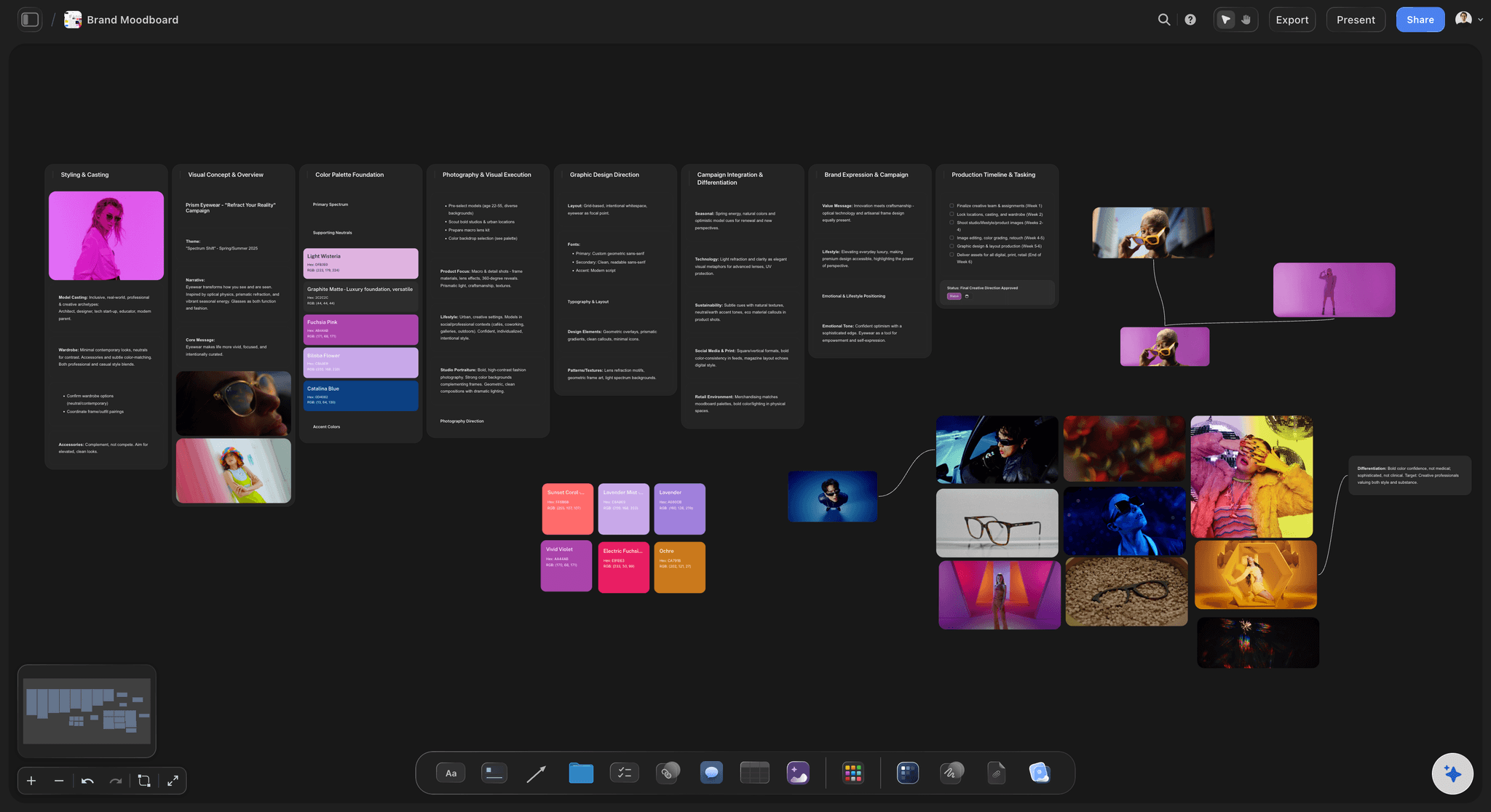
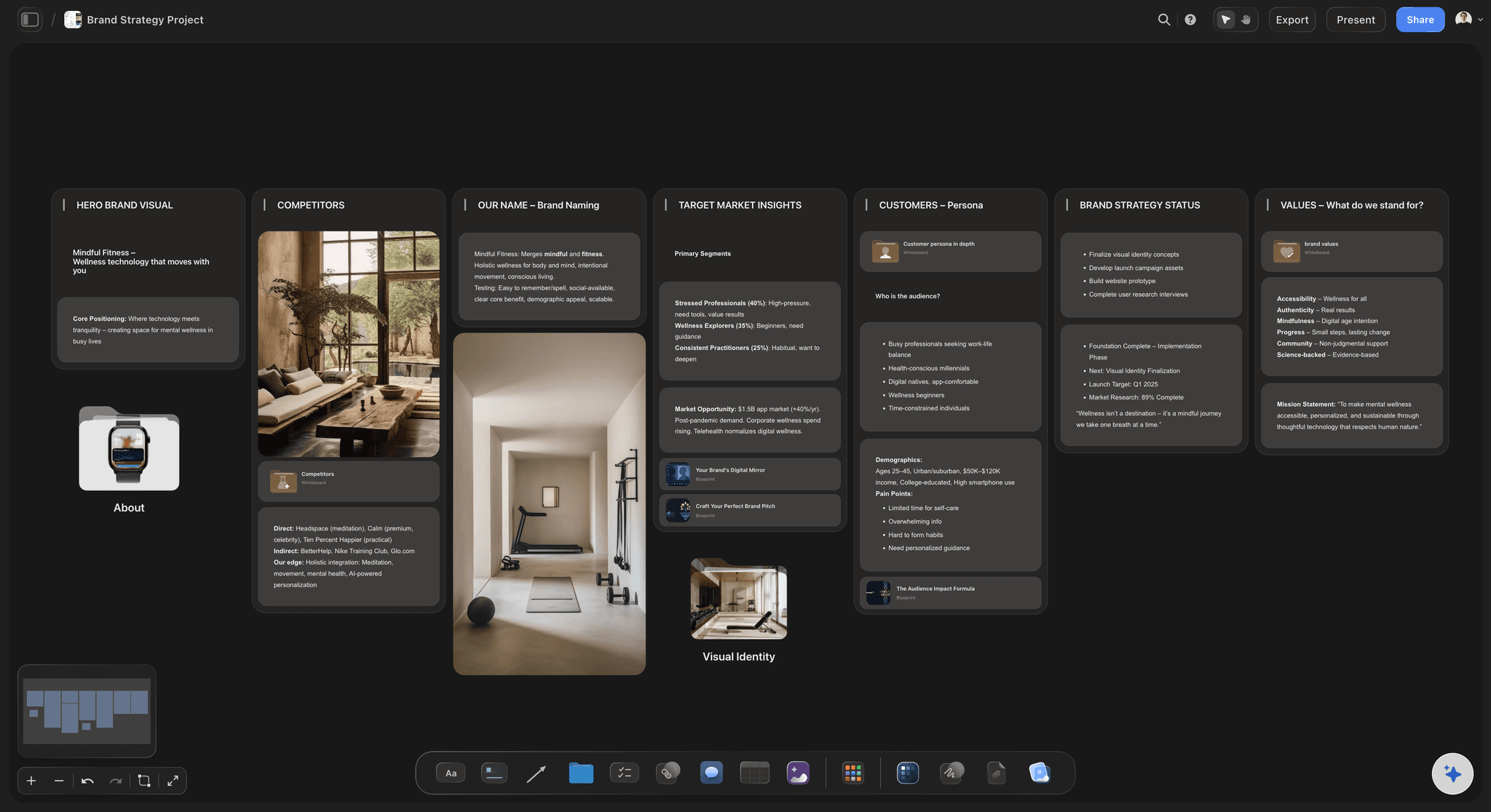
The look of the launch
A moodboard next to the tasks
Agree the look with a designer before the shoot. On Pro and Max, generate quick pictures to show what you mean, and use them to brief the real photographer.
Plan the launch video →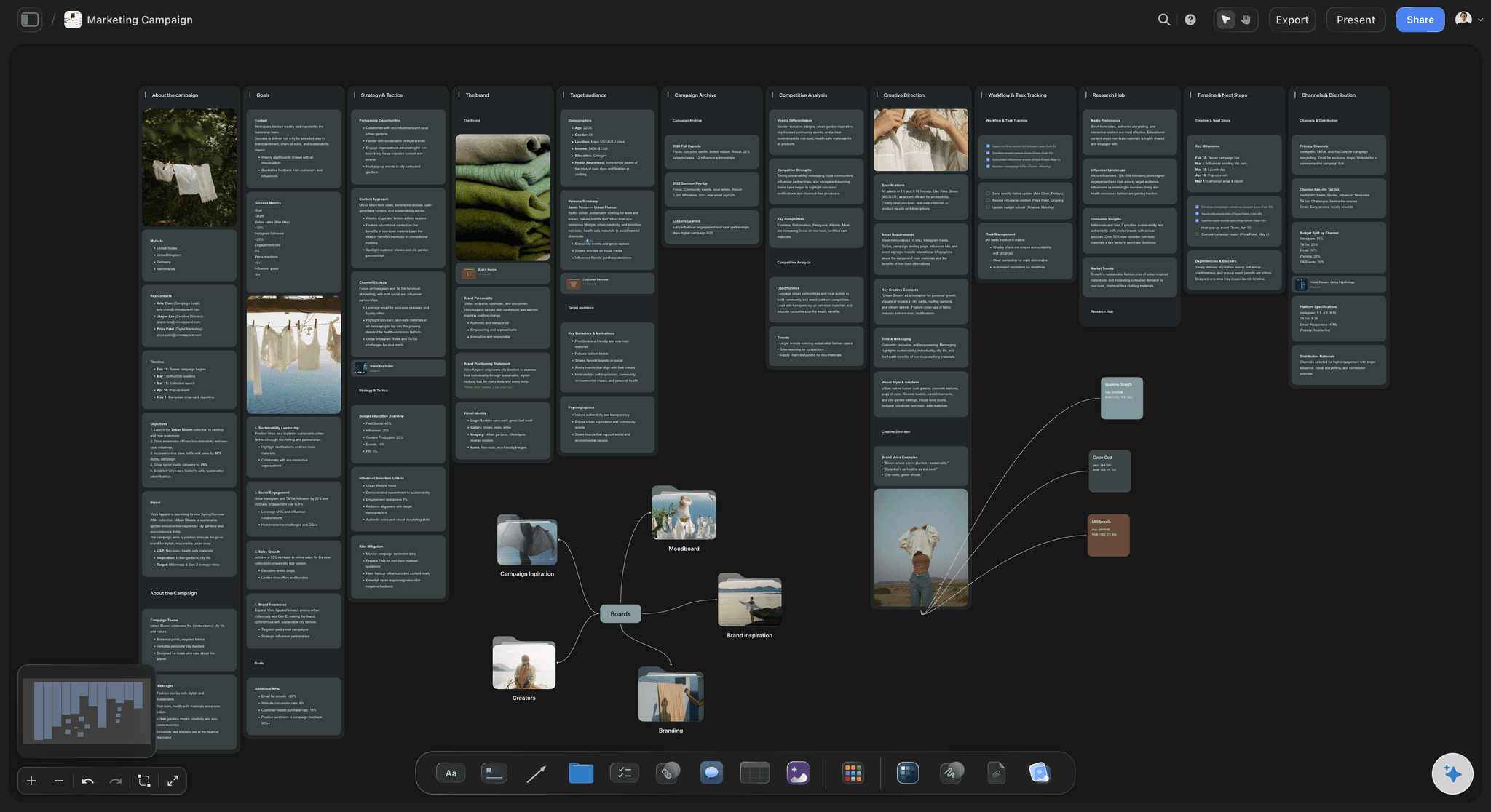
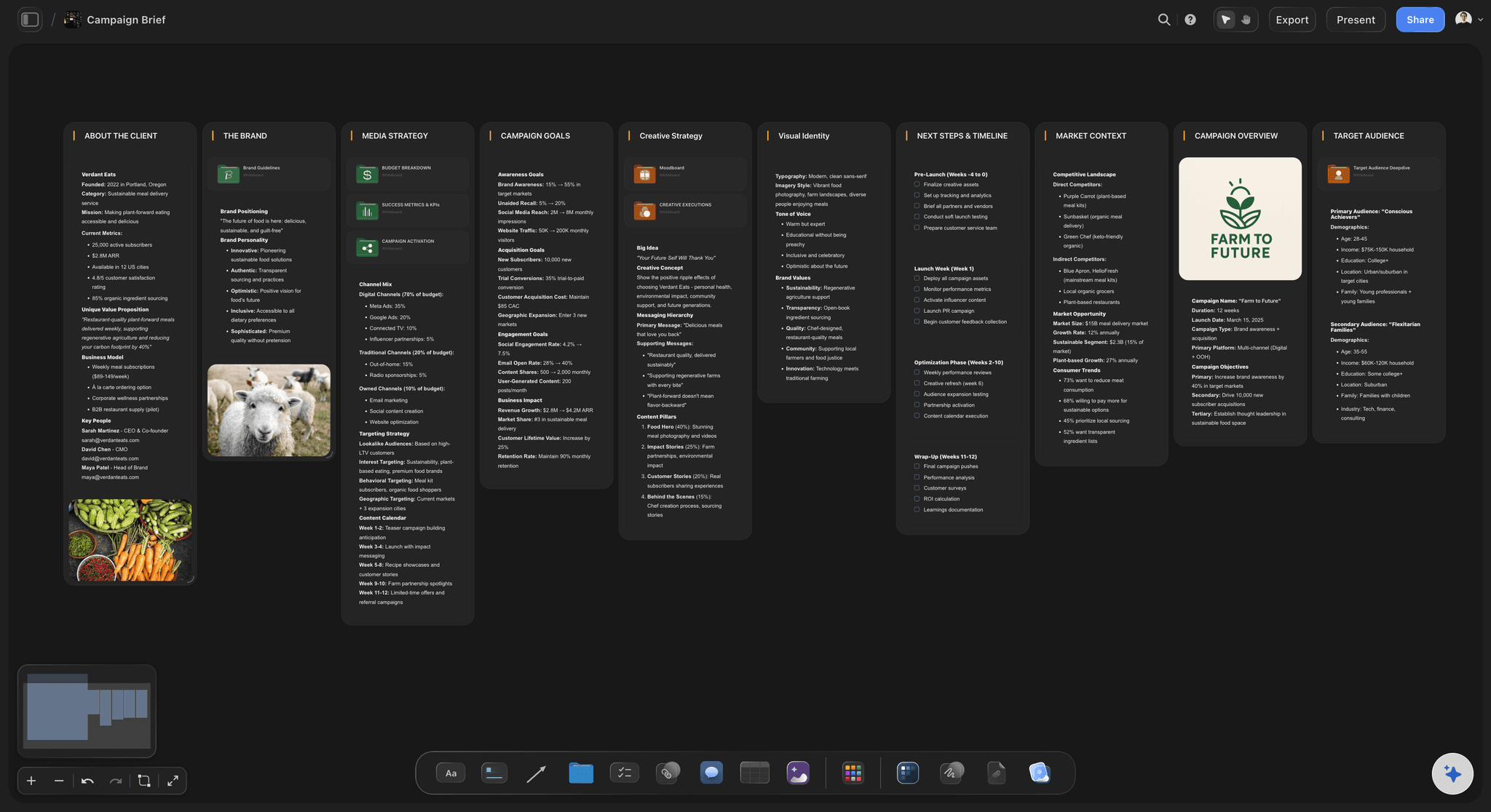
The campaign around it
Channels, concepts and dates
Keep email, social, press and paid in one view. In one recorded run a pitch was built from a board in 3 minutes, rounded up, against an estimated 4.5 hours by hand.
Plan with ChatGPT →Bring your team onto the launch board without growing your bill.
Storyflow is paid-only during early access: Plus is $7.99 a month billed annually ($9.99 monthly) and includes the AI inside Storyflow. Anyone a paid member invites to a board joins free, so a contract designer adds nothing to your bill, though an invited free account has no in-app AI.
Plus: the launch board built by hand, with the AI inside Storyflow, or through ChatGPT or Claude
Plus and up: AI that builds the launch board and reads it back
Plus and up: pitch decks, one-pagers and fliers made from the board
View-only links for advisers and investors, with no account
Built for people with taste
An eight-week launch for a team of two to five.
Use these as the walls on your board. Move the dates to match your product, and cut anything that does not help on launch day.
Weeks 1 and 2: idea to promise
Say what you are launching and to whom
One sentence, agreed by everyone: Write who it is for, what it does and why now. Ask the Storyflow AI to read your notes and offer three versions, then choose and rewrite one yourself.
Decide what launch means: Name one number that would make this a good launch, such as 300 pre-orders or 50 paying teams. Put it at the top of the Storyflow board so every later choice answers to it.
Cut scope early: List everything you hoped to ship, and mark what can wait. Two weeks in is the cheapest moment to drop a feature. Two weeks before launch, it is the most expensive.
Name an owner per stream: Positioning, product, assets, channels and launch day each get a person. The AI can fill a table's Owner column with people on the board, but not the assignee on a to-do.
Weeks 3 to 6: the assets
Make everything the launch needs
List assets before you make any: A small launch usually needs a landing page, product photos, one film, 3 emails, 12 posts and a press pack. In Storyflow, list each with an owner and date, and start with the ones others depend on.
Shoot once, use it everywhere: Write the shot list so one shoot day covers the page, the film and the posts. Storyflow can make a shot list for your shoot, and a call sheet draft that it does not send.
Draft copy with AI, then sign it: Use Storyflow's AI for first drafts of emails and posts. Then rewrite the claims yourself, because a promise on a launch page is one a founder has to keep.
Set a hard stop: Two weeks before launch, stop adding. Anything new goes into a wall called After launch on the Storyflow board, so the idea is kept and the deadline is safe.

Weeks 7 and 8: launch
Rehearse, launch and review
Write launch day by the hour: Who posts what at 9:00, who answers replies at 10:00, who watches the checkout. Keep this list on the Storyflow board with a backup name beside each job.
Hold a dry run: Two working days before, click the whole purchase path, send a test email and check every link. One person reads the board aloud and the others confirm each item.
Keep one outside link: Send advisers a Storyflow view-only link with the plan, so they read it without an account and you stop writing updates. They sign in only if they want to comment.
Review after one week: Compare the result with the number you set in week 1. Write down what you would change, then duplicate the board so your next launch starts with everything you learned.
Where other tools take over
What Storyflow does not do for a launch
No publishing or sending: Storyflow does not schedule or publish posts, and it does not send email. Use Buffer or Later for posts and Klaviyo for email, and keep the plan and copy on the board.
No Gantt chart or dependencies: A date you move does not move the others, and there is no calendar view. A launch with many teams and handoffs needs Asana, monday.com or ClickUp for that part.
No due-date reminders: A to-do takes an assignee and a due date, and people get in-app notifications, but no reminder fires when a date arrives. A short weekly review on the board does that job.
No AI video: "We will never add AI video generation. The creative work stays yours." Storyflow plans the launch film; a person or a video tool makes it.
Explore templates for your project
Every template opens as a real, editable board on the infinite canvas. Pick the closest fit and make it your own.
Marketing Campaign
Plan a campaign across channels, messages, and deliverables on one board the whole team can see.
One app instead of five
Storyflow vs Notion and Asana for a small launch.
We make Storyflow, so it is listed first. Choose Asana when a launch has many teams and dependencies, and Notion when your company already runs on its docs. Facts from each vendor's site, November 2026.
Storyflow
Recommended
Plan, images and drafts on one infinite canvas
AI builds moodboards and shot lists for the launch (from Plus)
A paid member invites a contractor to a board for free
Timeline or Gantt view
Task dependencies
A free plan today
Notion
Plan, images and drafts on one infinite canvas
AI builds moodboards and shot lists for the launch
Free guests on a page, up to a plan limit
Timeline or Gantt view
Task dependencies
Free plan
Asana
Plan, images and drafts on one infinite canvas
AI builds moodboards and shot lists for the launch
Unlimited free guests from its Starter plan
Timeline or Gantt view
Task dependencies
Free plan, up to 2 users
What creators are saying
Join early creators getting structured workspaces and AI that remembers their projects
“Storyflow has sped up my workflow by at least 3x, which means more flow state and more projects I can actually ship. It truly changed the way me and my team create.”

Reilin Joey
Director & YouTuber
“One prompt gets me a structured board. But the tactics are my favorite. I run my YouTube scripts through them and my intros and retention got better. It's amazing.”

Justkay
YouTuber & Freelance Filmmaker
“I used to juggle five apps to plan a project. Now I describe what I am making and get boards, lists, and a schedule. All in one place.”

George
@fernwehchronicles
AI product launch planning, answered.
How a founder uses it, what to keep human, and where other tools take over.
Attach your notes to Storyflow, give it your launch date, and ask for a launch plan. The AI asks a question or two, then stages a board with positioning, assets, channels and launch-day walls that you accept or discard. Ask it for a dated milestone table, an audience profile and a campaign brief. Then rewrite the promise yourself and name an owner for each stream. The AI drafts the plan, and you decide what goes into it.
Storyflow does this whole job for a small team: it turns a founder's notes into a launch board, then keeps positioning, dates, assets and tasks on one canvas the team can read. Storyflow is our product and our pick for small teams. It does not send or publish anything, so Klaviyo still handles launch emails and Buffer or Later schedules the posts on the day.
Have Storyflow's AI draft the board from your notes, then give each stream of work its own wall: positioning, product, assets, channels and launch day. Name one owner per wall and ask the AI for a table of dated milestones, working back from launch day. Keep drafts and references beside the task they belong to, and review it for 15 minutes each week with the board on screen.
Storyflow is built for that whole path: brand strategy, a brand moodboard, the campaign brief, and a marketing plan built when you ask the AI, all on one canvas so each stage reads from the last. It is our product and our pick for small teams. A designer will still use Canva or Figma for finished assets, and a scheduling tool publishes the campaign.
A founder usually starts by attaching a rough note, a deck or a PDF to Storyflow and asking for a launch plan with a date. They rewrite the positioning, invite a marketer or designer, who joins free on a paid member's invite, and work through the assets on one board. A pitch deck or one-pager for advisers comes from the same board. When launch day comes, the hour-by-hour list is already there.
Eight weeks is a workable planning default once the product is nearly ready: two for positioning and scope, four for assets and two for rehearsal and launch. Add time if you need a physical sample or a shoot with a long lead time. In Storyflow, ask for a table of milestones working back from launch day. Storyflow does not recalculate dates, so if launch day moves, change the dates in the table yourself.
A useful plan has a one-sentence promise, a target number, an audience profile, a dated asset list with owners, a channel plan and an hour-by-hour launch day. Storyflow's AI drafts these on one board from your notes. Check two things it cannot know: what your team can really finish, and what you can honestly promise. If either is wrong, the plan looks finished and fails anyway.
Keep the promise, the price, the audience choice and what you cut. Those decisions carry your name, and a tool has no stake in them. Storyflow assists with the surrounding work: drafting the board, the brief, the outline of an email, or finding what is missing. Read every claim before it ships. A founder who rewrites the first draft in their own voice sounds like a real company.
Partly. Storyflow's AI can make a pitch deck, one-pager, flier and carousel posts from your board, and generate images on Pro and Max. Across 25 runs the median poster took about 2 minutes, rounded up, against an estimated 45 by hand. Storyflow does not make video and never will, so product films come from a person or a video tool. Check every asset against the brief.
No. Storyflow does not schedule or publish posts and does not send email or call sheets. Keep the copy, dates and visuals on the Storyflow board, then load them into Buffer or Later for social and Klaviyo for email. Add a to-do on the board for each load, with an owner and due date. Having the copy and the date on the board means nothing gets lost between tools.
Yes. Send a Storyflow view-only link, which opens in the browser with no account, and keep it pointing at a clean board with the plan and dates. Allow comments on the link and an adviser can comment after signing in, and anyone a paid member invites to a board joins free. A view-only link means fewer update emails. Keep sensitive numbers on a separate board that you do not share.
Not yet. Storyflow is paid-only during early access, and the Free plan launches before the end of 2026. Anyone invited to a board by a paid member can sign up free. Plan a launch on a paid plan. The AI inside Storyflow starts on Plus at $7.99 a month billed annually ($9.99 monthly). Pro at $14 billed annually ($19 monthly) adds AI image generation, memory and more AI, and Max at $39 billed annually ($49 monthly) has the most AI.
Yes. With the Storyflow plugin in ChatGPT, you can ask it to build the launch board, with walls, tables and to-dos, and read back what changed. It can set a ticket's due date when you give one, but it cannot set an assignee, and it cannot generate images. Availability depends on your ChatGPT plan, workspace and region. Claude, Gemini and Grok connect through Storyflow's MCP address, with no weekly limit on paid plans.
Storyflow has no Gantt chart, dependencies, workload view or calendar view, and it does not recalculate dates. It sends no due-date reminders, publishes nothing, sends no email and makes no video. It has no native mobile app. For a launch run by many teams, keep the schedule in Asana or monday.com, and use Storyflow for the plan and the creative work.
Pick your launch date and put it on a board.
Attach your notes, let the AI lay out the first plan, and give your team one place to look until launch day.