
Category
Video Production
Author

Storyflow Team
Product & Research Team
Topics
2026-11-15
•
36 min read
•
Video Production- pre-production meeting
- PPM agenda
- pre production meeting checklist
- PPM deck
- PPM vs kickoff meeting
- pre production meeting template
- Storyflow
What happens in a pre-production meeting?
Storyflow runs a pre-production meeting from one board: the PPM deck is the board, with walls for the creative recap, boards, casting, wardrobe, locations, schedule and legal, stepped through in presentation mode while every decision is written beside its wall. Storyflow is an AI visual workspace that holds a commercial production's PPM deck, decisions and sign-offs on one infinite canvas, and it works inside ChatGPT (plugin) and Claude (connector). Hold the PPM at least three working days before the shoot.

Full disclosure: Storyflow is our product. This guide compares kinds of tool rather than brands on purpose. Storyflow is listed first because the PPM deck, options and decisions sit on one board; it has no PPTX export, no presenter notes and no approval button, and the T-Minus-3 Rule is our editorial rule, not research.
How the pre-production meeting tools compare on trust, innovation, ratings and pricing
Which kinds of tool do producers trust most for a PPM deck?
Slide decks are the most familiar, because agencies and clients have filed PPM books in that format for years. Production management suites are trusted on crewed shoots for the logistics side. Storyflow is newer; its case is that the deck, the casting and wardrobe options, the locations and the decisions all sit on one board, so a change agreed in the room lands where the crew works.
Which PPM tools have fair pricing for agencies and clients?
A PPM is read by more people than build it, so fair pricing means readers do not pay. Slide decks and shared docs cost the builder a seat and the readers nothing. Storyflow is paid-only during early access, with Plus at $7.99 a month billed annually; anyone a paid member invites to a board joins free, and a view-only link opens with no account.
What is the most innovative way to prepare a pre-production meeting?
Building the deck where the options already live and letting an assistant do the layout. With the Storyflow plugin in ChatGPT or the connector in Claude, the assistant creates one wall per agenda item, a deliverables table and a legal wall from the brief and treatment on the board. The producer still writes the recommendations and runs the meeting.
Which kind of PPM tool is underrated?
A board with a selects layout. Casting and wardrobe take the longest in most PPMs because options are shown one slide at a time. On a Storyflow board, the Selects tool puts options side by side under To review, Yes, Maybe and No, and dragging a photo into Yes in the meeting turns a discussion into a decision the client watches happen.
Which PPM tools hold up after the meeting?
The ones where the decision record and the shoot paperwork live together. A slide deck freezes the moment it is exported, and the shot list drifts from it. On a Storyflow board, the decisions note sits beside the shot list, schedule and call sheets it changes, and a dated PDF export keeps the signed version. Comment threads are a poor record anywhere.
Quick Comparison
Our pick first, on the basis that a PPM is a live decision meeting and the board holds the options, decisions and paperwork they change, then the other kinds of tool by job.
| Tool | Best For | AI Features | Price |
|---|---|---|---|
| Storyflow | PPM deck as walls in agenda order, with casting selects, locations and a decisions note on one board | In-app AI designs slides from the board and asks what is missing; ChatGPT plugin and Claude connector build agenda walls, tables and decks | $7.99 a month billed annually |
| A slide deck | A designed PPM book the client files | Depends on the deck tool | Varies |
| A shared doc | A 60-minute PPM for a content or interview shoot | Depends on the doc | Varies |
| A production management suite | Crewed shoots where tracked logistics matter most | Depends on the suite | Usually per seat |
Key Takeaways
- Storyflow is where a producer builds and runs a pre-production meeting: one board holds the PPM deck as walls, presentation mode steps through them one at a time, the client opens it by a view-only link with no account, and a decisions note plus a dated PDF become the sign-off. To build it as a board straight away, start from Storyflow's commercial production page.
- A pre-production meeting (PPM) is the last joint meeting before a shoot, where agency, client and production company confirm every creative and practical decision; a kickoff meeting starts the job, the PPM closes prep.
- The agenda has 14 items in a fixed order: creative recap, treatment, boards, casting, wardrobe, hair and make-up, product and props, art department, locations, schedule, technical and deliverables, post and music, legal, then sign-off.
- The Storyflow T-Minus-3 Rule: in Storyflow, set the PPM at least three working days before shoot day 1, so a re-cast, a re-fit or a new location still has time to happen.
- Every agenda item ends in a decision with a name and a date, written on the board in the room. "Love it" is not a decision.
- Legal is an agenda item, not an afterthought: claims need proof, supers need wording, music needs two licences, and a UK child performer needs a licence applied for 21 days ahead.
- Storyflow does not export PPTX, has no presenter notes and no approval button, so the record is a decisions note and a dated PDF export of the board.
Pre-Production Meeting Agenda: The 14-Item Template
A pre-production meeting agenda only works if each item has an owner, a time box and a decision at the end. The template below is filled for an illustrative PPM: Tallow Street Pictures, a production company, presenting to the agency Brackwater Creative and its client Aldervane Cycles, for a 30-second e-bike launch spot with 15 and 6-second cutdowns. All three names are invented.
| # | Agenda item | Led by | Minutes | Decision needed | Where it lives in Storyflow |
|---|---|---|---|---|---|
1 | Welcome, attendees, goal of the meeting | Agency producer | 5 | None | Title wall with the agenda as a note |
2 | Creative recap: script, idea, mandatories | Agency creative director | 10 | Script version confirmed | Brief tool: The work, Who it's for |
3 | Director's treatment recap | Director | 10 | Tone and approach agreed | A wall with the treatment document |
4 | Shooting board, frame by frame | Director | 20 | Board approved, alternates agreed | Storyboard tool, one scene wall per frame group |
5 | Casting: first choice and two alternates per role | Producer | 15 | Each role cast | Selects tool: To review, Yes, Maybe, No |
6 | Wardrobe: options per character | Stylist | 15 | One look per character, one backup | Wardrobe wall with photos and notes |
7 | Hair and make-up | Make-up artist | 5 | Look per character | Note on the wardrobe wall |
8 | Product and props: hero units, packaging versions | Producer, client | 10 | Hero product and quantity confirmed | Props wall with photos and a table |
9 | Art department and set dressing | Production designer | 10 | Set approved | Set wall with references and plans |
10 | Locations: recce photos, plans, permits | Producer | 15 | Each location approved | Location tool, one wall per place |
11 | Schedule, weather cover and safety | Producer | 10 | Shoot order agreed | A day table per shoot day, Call Sheet tool |
12 | Technical specs and deliverables | Producer, post producer | 10 | Lengths, ratios, versions locked | Deliverables table |
13 | Post, music and VFX | Post producer | 10 | Edit schedule, music route agreed | Post wall with the edit timeline |
14 | Legal, claims, supers and sign-off | Agency producer, client | 15 | Supers and claims signed; PPM signed | Decisions note, dated PDF export |
The total is 160 minutes, under three hours with a break. Items 4 to 6 take the most time because they hold the most choices; protect them by keeping items 1 to 3 to a recap, not a re-pitch.

The Production tools in Storyflow: Brief, Storyboard, Selects, Location and Call Sheet cover most of the PPM agenda on one board.
How to use the agenda in Storyflow
Put the agenda as a note on the first wall, then build one wall per agenda item in the same order, left to right, so presentation mode steps through the meeting in sequence. Presentation mode goes fullscreen and shows one wall, note, image or document at a time, and you can reorder the walls by dragging before the meeting. The decision column becomes a Decisions note at the end, filled in the room.
Shorten it for a small job
A one-day social or brand content shoot can run a 60-minute PPM: merge items 2 and 3, merge 6 and 7, merge 8 and 9, and keep legal. Never drop casting, locations or legal; they are where reshoots come from.
What Is a Pre-Production Meeting?
A pre-production meeting (PPM) is the last joint meeting before a shoot, where the agency, the client and the production company confirm every creative and practical decision so nothing is decided on set. The term is used mostly in advertising, where three companies have to agree; on a film the same job is spread across production meetings, a read-through and the pre-production schedule.
Who attends the PPM
From the agency: the creative director or creative team, the agency producer and the account lead. From the client: the brand or marketing lead who can approve, and anyone with a veto, such as legal or the product owner. From the production company: the director, the producer, often the executive producer, and sometimes the DP, production designer and stylist. Post producers join when the job has VFX or a tight edit. The rule is simple: everyone whose "no" could change the shoot is in the room.
When the PPM happens
After the job is awarded and the treatment, casting and recces are done, and before shoot day 1. In practice that is a few days to a week before the shoot, which is why the Storyflow T-Minus-3 Rule sets the latest date rather than the earliest. Some agencies hold a "pre-PPM" with the production company a day or two before, to agree what will be presented.
How long a PPM takes
Two to three hours for a commercial with casting, wardrobe and several locations; 60 to 90 minutes for a simple content or interview shoot. If it runs longer, the prep was not finished, and the meeting has become a workshop.
PPM also means project portfolio management
If you searched "PPM" and found software for roadmaps and capacity planning, that is a different PPM: project portfolio management, the central management of an organisation's projects. This guide is about the production meeting.
In manufacturing, a PPM is a sign-off before the production run
Apparel and factory teams use "pre-production meeting" for a meeting between buyer and supplier, held before manufacturing starts, to confirm specifications, approved samples, quality standards, the schedule and who signs off; Racklify's comparison separates it from the production trial that follows. The discipline carries over (owners, acceptance criteria, a dated record), but the agenda in this guide is for a shoot.
How to Run a Pre-Production Meeting in 9 Steps
A PPM goes wrong in two predictable ways: the deck shows options without a recommendation, so the client designs the ad in the room, or decisions are made and never written down, so the set re-opens them. These nine steps prevent both, and Storyflow carries most of them because the deck, the options and the record are one board.
Step 1: Fix the date with the Storyflow T-Minus-3 Rule
In Storyflow, put the PPM date on the job's Timeline wall at least three working days before shoot day 1, and write under it what has to be ready by then. The Timeline tool lays out phases as walls joined by arrows, each with "what happens" and "what has to be done" cards; dates go in as text, since the tool has no date field and does not move dates for you.
Step 2: Build the deck as walls in agenda order
Storyflow's board becomes the PPM deck: one wall per agenda item, left to right. Drag the Brief tool on for the recap (six walls: The work, Who it's for, How it looks, What we're working from, Plan, Budget), the Storyboard tool for the shooting board, the Location tool for recces and the Selects tool for casting. Put the treatment in as a document on its own wall. If you want a designed deck as well, ask the in-app AI to design slides or a pitch deck from the board; decks present fullscreen and export as PDF.
Step 3: Show a recommendation, not a menu
For every choice (casting, wardrobe, location, set), present your recommendation first and at most two alternates. On the wall, put the recommendation at the top with a one-line reason ("Recommend: Priya. Strongest read of the line, available both days."). Three options is a decision; seven is a workshop.
Step 4: Send the board 24 hours before
Storyflow shares the board by a view-only link that opens with no account, so the client can read the deck the day before; to comment, they sign in. Pre-reading moves questions out of the meeting and into the comments, where the producer can answer them before anyone is in the room.
Step 5: Run the meeting in presentation mode
Presentation mode steps through the walls fullscreen, one at a time, in the order you set. Keep a timer on the agenda: if a section overruns by more than five minutes, park the question on a "Parked" note and move on.
Step 6: Write each decision on the board in the room
Every agenda item ends with a line in the Decisions note: what was decided, who decided, and the date. "Wardrobe: Look B for the rider, Look A as backup. Signed: client marketing lead, 14 March." Do not rely on comment threads for the record: in Storyflow a resolved comment thread is deleted, so a decision lives in a note, not a comment.
Step 7: Move the casting and wardrobe picks live
Storyflow's Selects tool has four walls (To review, Yes, Maybe, No), and photos are dragged between them; the Yes column is the final list. Do the dragging in the meeting, so the client watches the shortlist become the cast. A client who should drag cards themselves needs edit access, since a view or comment link cannot move them.
Step 8: Close with legal and a sign-off line
The last 15 minutes are claims, supers, music and permissions. Read every on-screen line aloud from the board and get the client's yes on each. Then read back the Decisions note and ask for one sentence: "We are signed off to shoot on this basis."
Step 9: Export the record and reissue the paperwork
Export the board as a dated PDF ("PPM record, 14 March") and send it to everyone who attended within 24 hours. Then update the shot list, schedule and call sheets from the decisions. Ask Storyflow's in-app AI "What's missing here?" on the board to catch a decision with no owner, and use the change report later to see who edited the board after sign-off.
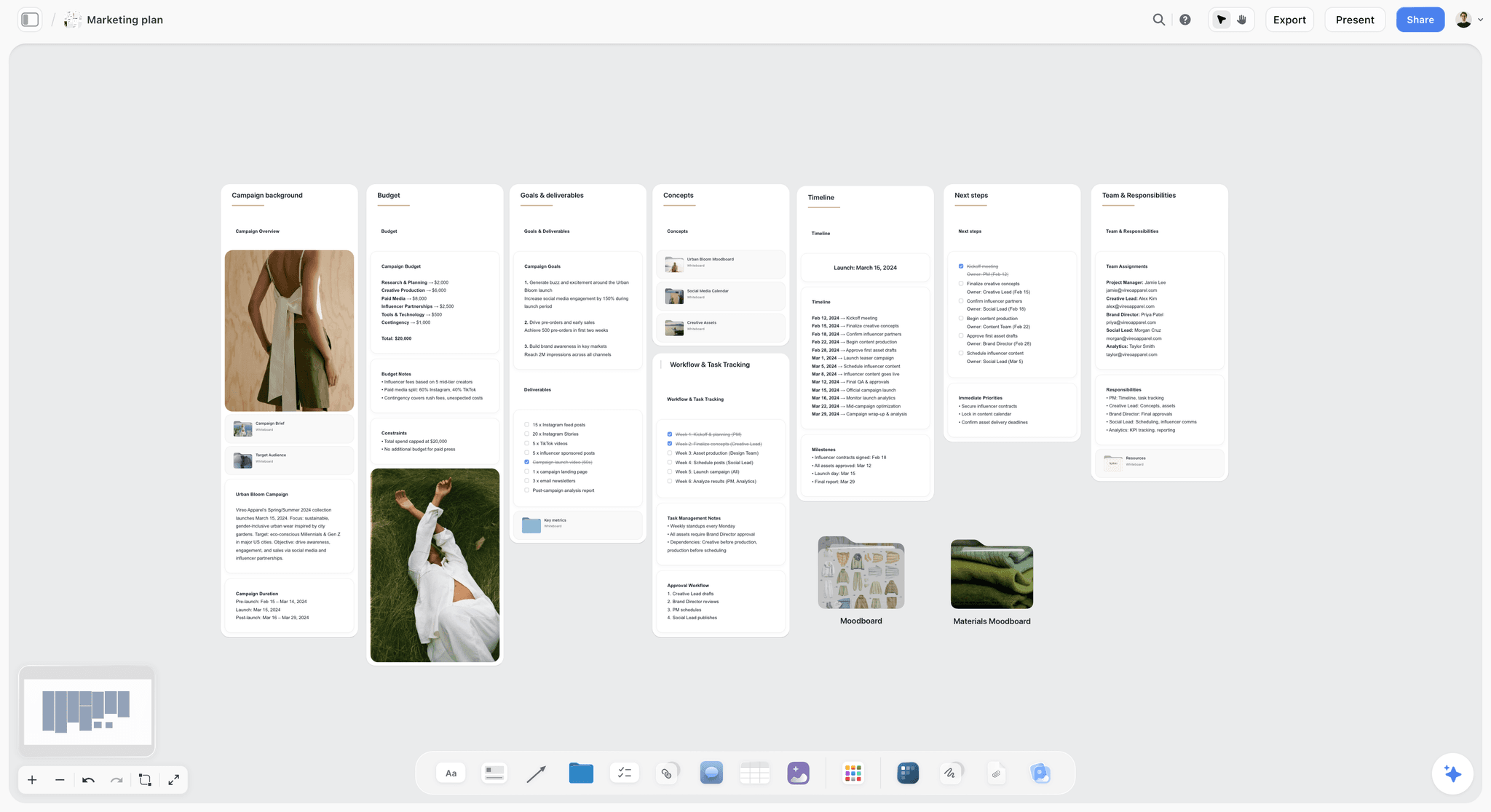
A campaign plan with goals, concepts and a timeline on one board: the PPM's creative recap wall starts from this, so nobody re-argues the brief in the meeting. The campaign is fictional.
The Storyflow T-Minus-3 Rule: When to Hold the PPM
The Storyflow T-Minus-3 Rule is our editorial recommendation: in Storyflow, set the pre-production meeting no later than T minus three working days, where T is shoot day 1, and put that date on the job's Timeline wall. It is plain production logic rather than research: three days is the shortest gap in which the usual PPM changes can still happen.
Why three working days
Look at what a PPM typically changes and how long each fix takes:
- A wardrobe change needs a re-shop and a re-fit: one to two days.
- A re-cast needs a call-back, an offer and a contract: one to two days if the alternate is held.
- A new or changed location needs a recce and often a permit. In Los Angeles, FilmLA says basic permits take 3 to 7 business days, and more for complex requests.
- A changed super or claim in a UK TV ad goes back through script clearance, where Clearcast usually responds within about three working days.
Hold the PPM later than three days out and any of these becomes a decision made on set.
What must be ready before the PPM date
Casting with alternates on hold, wardrobe options fitted or at least sourced, recces photographed, the shooting board drawn, the schedule drafted and the deliverables list agreed. If two of those are missing, move the PPM rather than holding a meeting about work that is not done.
When to hold it earlier
Hold it a week or more ahead when the job has stunts, children, animals, vehicles, water or a build: each needs lead time that a three-day gap cannot cover. A UK child performance licence alone needs an application at least 21 days before, according to GOV.UK.
PPM vs Kickoff Meeting
A kickoff meeting starts the job and agrees what is being made; the PPM ends prep and agrees how it will be shot, and in Storyflow both live on the same project, the kickoff on the Brief wall and the PPM on the deck walls built from it. A kickoff meeting is the first meeting with the project team, where work starts; the PPM is the last before the camera rolls.
| Kickoff meeting | Pre-production meeting (PPM) | Where it lives in Storyflow | |
|---|---|---|---|
When | Start of the job, after award | Last days of prep, before shoot day 1 | Kickoff and PPM dates on the Timeline tool's phase walls |
Purpose | Agree the brief, scope, team and timeline | Confirm every creative and practical decision | Brief tool for the kickoff; deck walls for the PPM |
Who leads | Agency or client | Production company, with the agency producer | One board, shared by view-only link |
Inputs | Brief, budget, deadline | Treatment, board, casting, wardrobe, recces, schedule | Brief, Storyboard, Selects and Location tools |
Output | Approved approach and plan | Signed-off shoot plan | Decisions note and a dated PDF export |
Typical length | 60 to 90 minutes | 1 to 3 hours | Presentation mode, one wall at a time |
Failure mode | Vague brief accepted | Decisions left for the set | "What's missing here?" asked of the in-app AI before the meeting |

A studio's jobs tracked by status on one board: each job's kickoff and PPM boards sit in the same project, so the PPM can point back to what the kickoff agreed. The studio and its clients are fictional.
Why the two get confused
On small jobs, one person runs both and the gap between them is a week, so they feel like the same meeting. They are not. The kickoff can live with open questions; the PPM exists to close them. How to run a project kickoff covers the first meeting.
What carries over from kickoff to PPM
The brief, the mandatories and the approvals chain. Keep the Brief tool's walls on the same board and point to them from the PPM's recap wall rather than re-writing them. If the brief changed since kickoff, show the change in red on the recap wall and get it signed first.
The PPM Deck: What Goes in It, Section by Section
The PPM deck (also called the PPM book) is the document the meeting runs from and the record afterwards. It is not a pitch. It shows what will be shot, how and with whom, with a recommendation on every open choice.
| Section | What it shows | Supplied by | On the Storyflow board |
|---|---|---|---|
Cover and agenda | Job, date, attendees, agenda | Producer | Title wall with the agenda note |
Creative recap | Final script, idea, mandatories | Agency | Brief tool walls |
Treatment recap | Tone, look, references | Director | Treatment document on its own wall |
Shooting board | Every frame in shooting order with shot notes | Director, storyboard artist | Storyboard tool scene walls |
Casting | First choice plus two alternates per role, with photos and links | Casting director, producer | Selects tool |
Wardrobe | Options per character, sizes, backups | Stylist | Wardrobe wall with photos |
Hair and make-up | Look per character | Make-up artist | Notes beside wardrobe |
Product and props | Hero units, packaging versions, quantities | Client, props | Props wall with a table |
Art department | Set plans, colour, dressing references | Production designer | Set wall; colour cards for the palette |
Locations | Recce photos, plans, parking, permits | Producer, location manager | Location tool walls |
Schedule | Shoot days, order, weather cover | Producer, 1st AD | Day tables; Call Sheet tool |
Technical | Camera, frame rate, aspect ratios, safe areas | DP, post producer | Technical note |
Deliverables | Lengths, versions, formats, languages | Agency producer | Deliverables table |
Post and music | Edit schedule, grade, VFX, music route | Post producer | Post wall |
Legal | Claims, supers, disclaimers, usage, clearances | Agency producer, client legal | Legal wall with every on-screen line |
Sign-off | Decisions, names, date | Producer | Decisions note; dated PDF |
Shooting board: frames in shooting order
Present the board in the order it will be shot, not the order it plays, with the shot notes under each frame: lens, movement, what the frame must show. Mark the frames that protect a cutdown or an extra ratio. On the board, the Storyboard tool's scene walls carry an image slot and a Description each, and the Shotlist tool beside them carries the setup and equipment. The order then feeds the shooting schedule and the call sheet template.
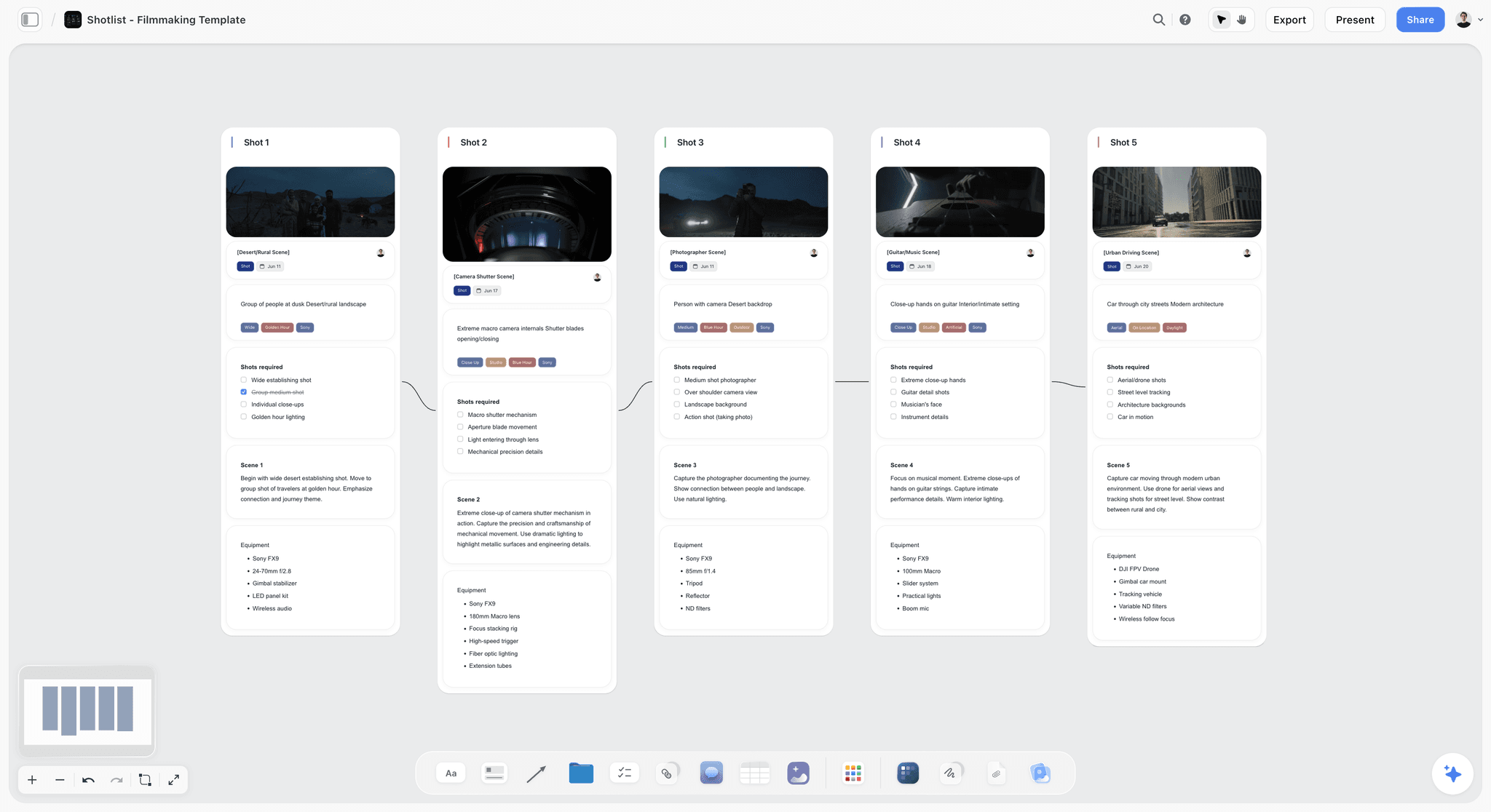
Frames with their shot notes on a Storyflow board: in the PPM, the director walks the client through these one wall at a time.
Casting: one recommendation, two holds
Show each role's first choice with the reason, then two alternates the producer has on hold. Include the actor's availability for every shoot day and any conflicts with competitors' work, which usage contracts often restrict. A casting page without availability is a wish list.
Wardrobe: options with sizes
Show two or three options per character, photographed on the actor if fitted, with sizes and a backup. Note anything with a visible logo, which must be cleared or covered. For a stills or content shoot, how to plan wardrobe for a photoshoot covers the rack in detail.
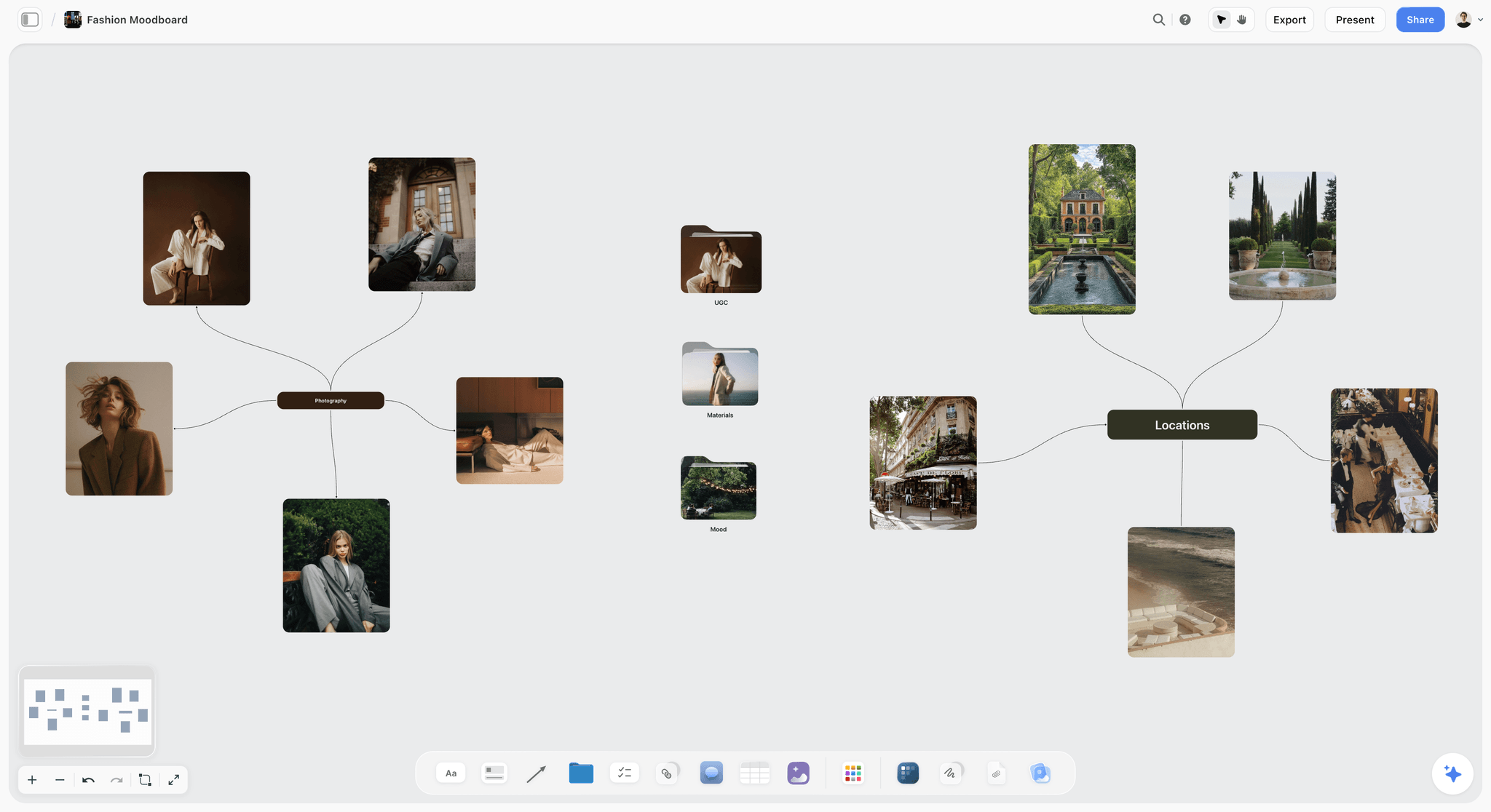
Wardrobe and styling references grouped by look on a Storyflow board: in the PPM, each group becomes one character's options.
Product and props: count the hero units
The client brings the product, so the PPM fixes how many hero units, which packaging version, which colourways and who handles them on set. A pour shot can use a dozen cartons; a label that changed last month can sink a pack shot. Write the count in the props table and the name of the person bringing them.
Art department: show colour as values
Put the set palette on the board as colour cards: a Storyflow color card shows a block of colour with its name, Hex and RGB, and HSL and CMYK can be switched on per card. Clients approve colour faster when they see the values next to the product.

A campaign look with named swatches on a Storyflow board: the PPM's art department wall shows the same values for the set.
Locations: pictures, plans and the boring rows
Show recce photos from the camera's angles, a floor plan or map, and the boring rows that cost a shoot day when they are wrong: parking, power, toilets, the way in, neighbours, permit status. Storyflow's Location tool gives each place a wall with the same rows (address, a map link, contact, phone, cost, a rating and a Booked row) and a Photos folder, plus "On site" and "To sort" cards. The location scouting checklist template lists what to photograph, and the location scouting page shows the board.
Travel, shipping and accommodation: who books what
On any job away from base, add three rows to the locations wall: who travels and who books it, where the crew and talent sleep, and how the product gets to set (courier, date, who signs for it, where the spare units are held). Hero product that arrives on shoot morning is a schedule risk, so the PPM confirms a delivery date at least a day ahead and names the person who checks the units on arrival.
Technical and deliverables: lock the ratios
Write down every deliverable: length (30, 15, 6 seconds), aspect ratio (16:9, 9:16, 4:5, 1:1), versions (with and without supers, languages), and the frame rate. The DP frames for every ratio on the day, so a ratio added after the PPM is a ratio nobody protected. Storyboarding 6, 15 and 30-second cutdowns covers how the cutdowns are boarded.
Pre-Production Meeting Checklist
A pre-production meeting checklist covers the 24 hours before and after the meeting, when most PPM failures actually happen. Copy it into a table on the board with a status column and a person column, and tick it off.
| When | Item | Owner | Status |
|---|---|---|---|
3 working days before shoot, at the latest | PPM date confirmed with agency and client | Producer | Done |
24 hours before | Board shared by view-only link, attendees confirmed | Producer | Done |
24 hours before | Script version and supers frozen for the meeting | Agency producer | Done |
24 hours before | Casting alternates on hold for every role | Casting director | In progress |
24 hours before | Wardrobe options photographed with sizes | Stylist | Done |
24 hours before | Recce photos, plans and permit status on location walls | Producer | Done |
24 hours before | Draft schedule and weather cover on the board | 1st AD or producer | In review |
24 hours before | Deliverables list agreed with post | Agency producer | Done |
In the meeting | Each agenda item ends with a decision written down | Producer | Not started |
In the meeting | Every on-screen line read aloud and approved | Agency producer, client | Not started |
In the meeting | Parked questions given an owner and a deadline | Producer | Not started |
Within 24 hours after | Dated PDF of the board sent to attendees | Producer | Not started |
Within 24 hours after | Shot list, schedule and call sheets updated | Producer, 1st AD | Not started |
Within 24 hours after | Changes to casting, wardrobe and props confirmed | Producer | Not started |
The status column uses Storyflow's six fixed options (Not started, Blocked, In progress, In review, Done, Archived). A person column can hold people who have access to the board; the pre-production checklist template covers the weeks before this one.
Save the PPM structure as your own tool
Once a PPM board works, select its walls and choose New Tool at the end of the selection toolbar, pick an icon and a name, and the structure appears under your tools in All Tools, ready to drop on the next job's board. Saving a selection as your own tool is part of the paid plans.
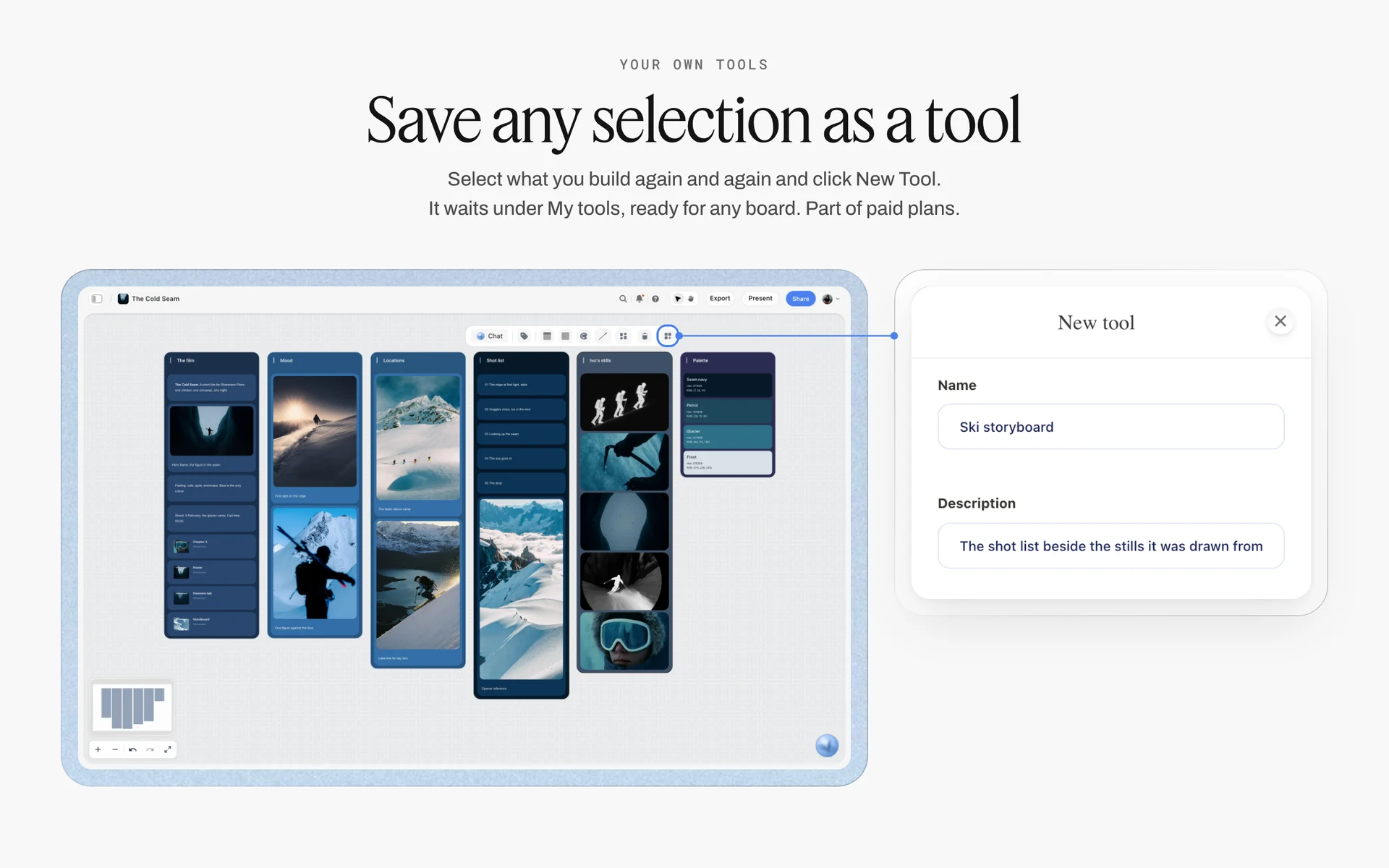
Saving a selection as a tool in Storyflow: a PPM deck structure saved once drops onto every later job's board.
Decisions and Sign-Off: Writing the PPM Record
The PPM's output is not the deck. It is the record of what was decided, by whom, and when. Without it, the set becomes the place where decisions are re-opened.
| Decision | Options shown | Chosen | Signed by | Date | Changes caused |
|---|---|---|---|---|---|
Rider casting | Priya (recommended), Tom, Ana | Priya | Client marketing lead | 14 March | Release Tom and Ana's holds |
Rider wardrobe | Look A, Look B | Look B; Look A as backup | Client, agency CD | 14 March | Re-fit Thursday |
Hero bike colourway | Slate, Moss | Moss | Client product lead | 14 March | Two Moss units to set |
Location: ridge | Hollins Ridge, Pike Bend | Hollins Ridge | Agency producer | 14 March | Permit filed today |
End super wording | "Up to 90 km range" vs "90 km range" | "Up to 90 km range" plus a footnote | Client legal | 14 March | Update board frame 12 |
Music | Library track 3, commissioned score | Library track 3 | Agency CD, client | 14 March | Licence both rights |
Weather cover | Workshop interior | Workshop interior | Producer | 14 March | Hold the workshop day 2 |
Who signs
The person with authority to approve the spend, usually the client's marketing or brand lead, signs the creative; client legal signs claims and supers; the agency producer signs the logistics. One name per decision. If two people disagree in the room, the decision is "parked" with an owner and a deadline, not "agreed".
Make the record the board itself
The Decisions note lives on the last wall of the PPM board, and the dated PDF export of the whole board is the file you send. Storyflow has no approve button, approval status or version compare, and anyone with edit access can still change a live board, so the PDF is what proves what was agreed. Campaign approvals from brief to delivery covers the approval chain around it.
Legal, Claims and Clearances at the PPM
Legal is the agenda item most often rushed and most expensive to fix, because a changed claim after the shoot can mean a reshoot. Give it 15 minutes and a wall of its own. The rules below are scoped to the country they come from and are not legal advice: client legal and your clearance body have the final word.
Claims need proof before the shoot
An ad cannot say what the advertiser cannot prove. In the UK, broadcast ads follow the BCAP Code, whose misleading-advertising rules require evidence for claims, and the Clearcast clearance process starts with the script and its substantiation before production. In the US, the FTC's Endorsement Guides FAQ says advertisers should not make claims that would require proof they do not have, and that an endorsement must reflect the endorser's honest opinion. Put every claim on the legal wall with its source document beside it.
Supers and disclaimers are frames
Read every super, legal line and disclaimer aloud from the board, with its frame. Confirm the exact wording, the duration on screen and the safe area for each aspect ratio. A super approved as text but framed too small for a 9:16 crop is not approved.
Music needs two licences
A specific recording needs permission for the master recording as well as a sync licence for the composition, as the synchronization rights entry explains; the recording and the song usually belong to different owners. Agree the music route at the PPM: library, commissioned or licensed, and who clears it.
Children, stunts, vehicles and drones
Children need a licence and a chaperone where the law requires it. In the US, stunts, vehicles, water and drones each have a safety bulletin from the Industry-Wide Labor-Management Safety Committee: recommended guidelines, not law, which may be reproduced and attached to call sheets. Name the safety officer or coordinator in the PPM and put the relevant bulletins on the legal wall.
Insurance: certificates on the board before the shoot
Confirm in the PPM which cover the production holds and who has seen the certificates: public or general liability for the locations, employer's liability for the crew where the law requires it, equipment cover for hired kit, product liability when the client's product is handled or consumed on camera, and weather cover on exterior-heavy shoots where the budget carries it. Location owners and permit offices often ask for a certificate naming them, so put the certificate PDFs in a folder on the legal wall and note the expiry date beside each.
Usage and talent contracts
Confirm where and how long the ad will run, because talent and music fees depend on it. A change of media after the shoot is a renegotiation, not a formality. Using moodboard images in client work covers the rights side of references.
PPM Variants: TV Spot, Social Content, Brand Film and Photoshoot
The PPM changes size with the job. The 14 items stay; what changes is how much time each gets and who has to be there.
| TV or online commercial | Social content day | Brand film or documentary | Photoshoot | |
|---|---|---|---|---|
Length | 2 to 3 hours | 60 minutes | 90 minutes | 60 to 90 minutes |
Must attend | Client approver, agency, director, producer | Brand or social lead, producer, creator | Client, director, producer | Client, photographer, stylist, producer |
Heaviest item | Casting, product, legal | Deliverables and formats | Story and contributors | Wardrobe, looks, selects |
Legal focus | Claims, supers, clearance | Disclosure of paid partnerships | Releases and contributor consent | Usage of images, model releases |
Storyflow board | Brief, Storyboard, Selects, Location, Call Sheet tools | Shotlist tool with a format label per shot | Brief tool and interview walls | Selects tool and a shot list per look |
Social content: lock the formats
A social PPM is mostly the deliverables table: which platform, which ratio, how many assets, who writes captions. Paid partnerships need disclosure, so confirm how the creator will label the post.
Scripted drama or series: the scene-by-scene read
On scripted work the final PPM is usually the last of several production meetings, and its shape changes: the 1st AD walks the latest script scene by scene, and each head of department raises the questions from their breakdown (costume changes, props, make-up continuity, stunts, extras by number and type, any shot that needs previs). The agenda's casting and wardrobe items become department questions per scene. In Storyflow, keep one wall per scene in script order with the breakdown notes on it, and write each department's answer on that scene's wall in the room.
Brand film: lock the contributors
A brand film or documentary-style piece depends on real people. The PPM confirms who is being filmed, their consent and release, and what they will be asked. The board holds each contributor's wall with photo, role and availability.
Photoshoot: lock the looks and the selects
A photoshoot PPM agrees each look, the shot list per look and how the client will pick finals on the day. Storyflow's Selects tool is the place to do it: the client needs edit access to drag photos into the Yes column.
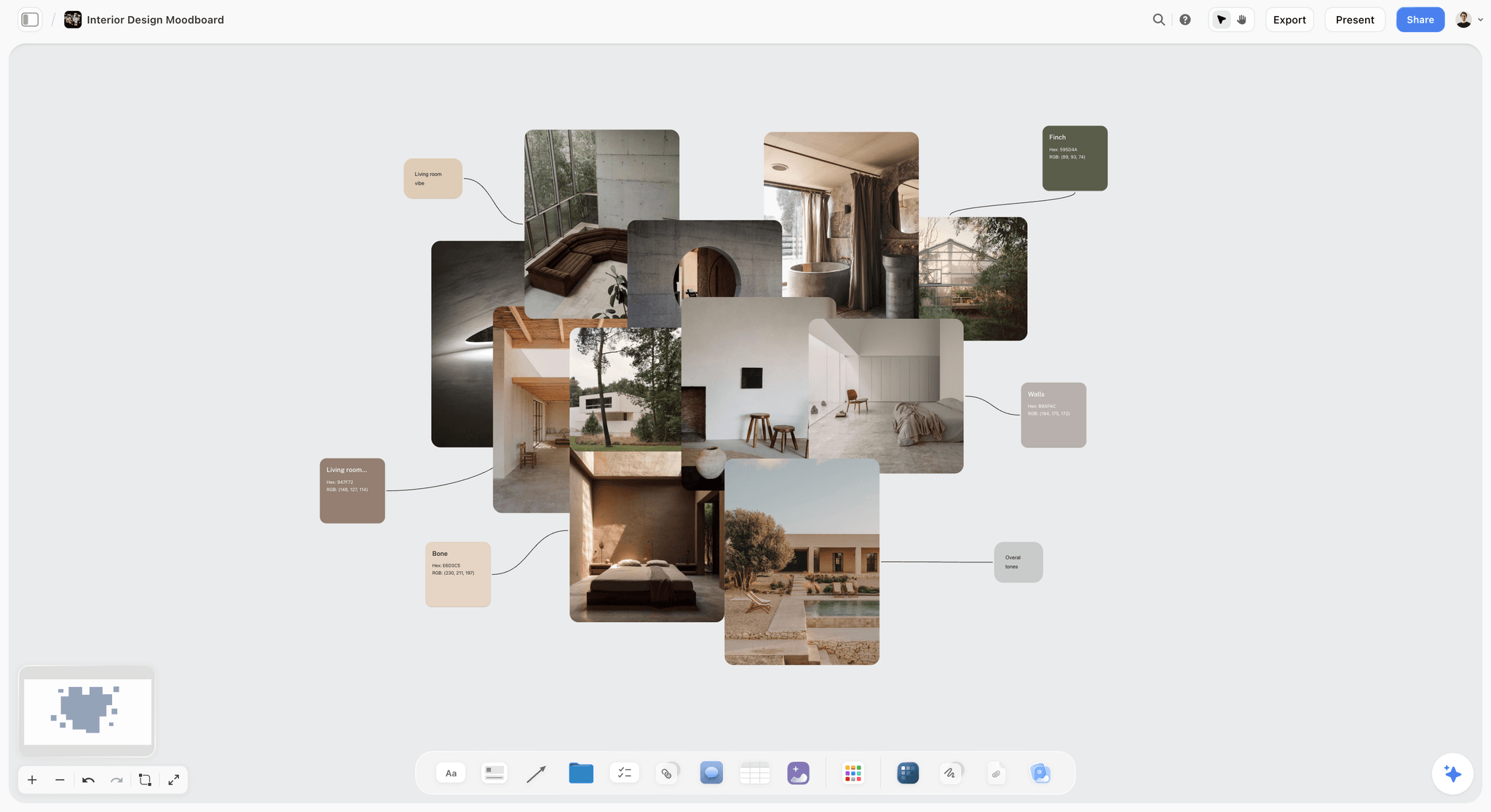
A set-dressing reference board in Storyflow: for an interior shoot, this is the art department wall the client signs at the PPM.
Worked Example: Tallow Street Pictures' PPM for the Aldervane Launch Spot
This example is illustrative: invented companies and an invented job, written as a plan, not results. Tallow Street Pictures is shooting a 30-second launch spot for Aldervane Cycles' new e-bike, with 15 and 6-second cutdowns and three social ratios, over two days: a ridge exterior at sunrise and a city workshop interior. The agency is Brackwater Creative.
Ten days out: the board
The producer opens a Storyflow board for the job and builds the walls in agenda order: the Brief tool for the recap, the director's treatment as a document, the Storyboard tool with 14 frames, the Selects tool for the rider casting, a wardrobe wall, a props wall with the bike colourways, the Location tool with the ridge and two alternatives, a day table per shoot day, a deliverables table and a legal wall holding every on-screen line.
Four days out: the PPM date
Shoot day 1 is a Monday, so under the Storyflow T-Minus-3 Rule the PPM is the previous Wednesday at the latest. The producer books Tuesday instead, to leave a day for any re-fit, and writes it on the Timeline wall. The board goes to the agency and client by view-only link on Monday afternoon, and the client's product lead comments on the bike colourway before the meeting.
The meeting
The PPM runs 2 hours 40 minutes in presentation mode. Three things change in the room: the client prefers the Moss colourway, legal rewrites the range super to "Up to 90 km range" with a footnote, and the client asks for a 1:1 version for marketplace listings. Each change goes into the Decisions note with a name and the date. The 1:1 request is added to the deliverables table and to the DP's notes on the storyboard frames that need protecting.
The 24 hours after
The producer exports the board as a dated PDF and sends it to all eleven attendees. The props team orders a second Moss unit, the agency resubmits the super, and the schedule and call sheets are updated from the decisions. A week later, the producer asks the in-app AI for the board's change report to confirm nobody edited the signed decisions.
Do This in ChatGPT or Claude
If the PPM material is already in a chat, the Storyflow plugin in ChatGPT or the connector in Claude builds the deck walls on a board. This is separate from the in-app Storyflow AI: plugin and connector actions run on your assistant's model and use no Storyflow AI credits. Plus, Pro and Max have no weekly limit, and an account a paid member invited gets 25 plugin or connector actions a week.
Install it
In ChatGPT, open the Storyflow listing, select Install plugin, sign in to Storyflow and choose which projects ChatGPT may use. Read access is always on, and you decide whether it may also make changes. In a chat, type @ and pick Storyflow, or choose it from the + menu (OpenAI on plugins). Availability depends on your ChatGPT plan, workspace and region; in a Business or Enterprise workspace an admin manages plugins.
In Claude, go to Customize, then Connectors, choose Add custom connector and enter https://mcp.storyflow.so/mcp (Anthropic's steps); turn it on in a chat from the + button. Storyflow's connection page covers every assistant. Client presentations in ChatGPT, client presentations in Claude and meeting notes in ChatGPT show related workflows.
Prompts for a PPM
- "Read the brief and treatment on my Storyflow board. Build one wall per PPM agenda item in this order: recap, treatment, board, casting, wardrobe, hair and make-up, product and props, art department, locations, schedule, technical and deliverables, post and music, legal, sign-off."
- "Make a table called Deliverables with columns Length, Ratio, Version, Supers, Language, Owner. One row per file. Leave a cell empty when you do not know."
- "List every on-screen line and claim from the script on a Legal wall, one note each, with an empty Source line under each claim."
- "Create a slide deck from the PPM walls, one slide per agenda item, for the client to read the day before."
- "Add a Decisions table on the last wall with columns Decision, Options shown, Chosen, Signed by, Date and Changes caused, and leave it empty."
- "After the meeting: read the Decisions table and list which cards on the board need updating."
- "What changed on this board in the last day, and who changed it?"
What lands on the board
Walls, notes, tables, headings, documents and links; slide decks you can add to, reorder and update; shot cards and strip boards when asked. ChatGPT and Claude build their own walls; neither drops a production tool such as Selects or Location, so drag those on yourself.
What to check by hand
- Every legal line. The assistant can copy a super wrongly; read each against the approved script.
- Casting and wardrobe photos. A photo attached in a ChatGPT chat does not reach Storyflow; the plugin gives you an upload link for the board instead.
- The deck export. Decks export as PDF; there is no PPTX export and no presenter notes.
- Comments. The plugin can add a comment card but cannot read comments.
- Sign-in. Connections end after 30 days and ChatGPT asks you to sign in again (troubleshooting).

The PPM walls an assistant builds land on the board the client reads, not in the chat.

A photography workflow board in Storyflow flowing from brief to pre-production, the shoot, post and delivery, with checklists and a comment thread
Build your next PPM deck as a board
Install Storyflow in ChatGPT and turn the brief and treatment into one wall per agenda item, a deliverables table and a legal wall, then run the meeting from the board in presentation mode.

PPM Mistakes and Fixes
Eight ways a PPM fails, and the fix for each.
Presenting options with no recommendation
The fix: lead every choice with your pick and a one-line reason, then at most two alternates.
Re-pitching the idea
The fix: keep the creative recap to ten minutes. The idea was bought; the PPM is about making it.
The decision-maker is not in the room
The fix: confirm the client approver's attendance when you book the PPM. If they cannot come, move the meeting.
Decisions recorded in comments
The fix: write each decision in a note on the board. In Storyflow, a resolved comment thread is deleted.
Legal at the end, in a hurry
The fix: give legal 15 protected minutes and read every on-screen line aloud.
Deliverables added after the shoot
The fix: lock lengths, ratios and versions in the PPM and give the DP the list.
No record sent
The fix: send a dated PDF of the board within 24 hours, and ask attendees to reply with corrections by a deadline.
PPM held the day before the shoot
The fix: follow the Storyflow T-Minus-3 Rule. If prep slips, move the shoot or cut scope, not the PPM.
Where Storyflow Falls Short for a PPM
Storyflow earns its place as the PPM board and record. It is the wrong tool for parts of the job:
- No PPTX export, no presenter view and no speaker notes; decks present fullscreen and export as PDF.
- No approve button, approval status or version compare; the record is a decisions note and a dated PDF.
- Comment threads are deleted when resolved, so decisions go in notes.
- It does not send call sheets or track confirmations after the PPM.
- No calendar view, Gantt chart or time tracking for the prep timeline.
- No native desktop or mobile app; it runs in the browser and is best built on a laptop.
- Boards cannot be embedded in another app, so share the link rather than embedding the deck.
- An invited free account has no in-app AI, so the person drafting the deck with the AI needs a paid plan.
The Bottom Line
A pre-production meeting is where a shoot stops being a set of options and becomes a plan with names on it. Book it three working days before the shoot at the latest, build the deck as walls in agenda order, show a recommendation on every choice, write each decision on the board in the room, and send a dated record within 24 hours. Storyflow is the place to do it when the options are visual and the decisions change the paperwork, because the deck, the selects, the locations and the call sheets are one board. When the client needs a PPTX book, build it in a slide deck tool from the signed board, since Storyflow exports PDF, not PPTX. How video producers stay organised from pre-production through shoot days covers the weeks around the meeting.
FAQ: Pre-Production Meeting
What happens in a pre-production meeting?
In a pre-production meeting, the agency, client and production company walk through every decision for the shoot: the script and board, casting, wardrobe, product and props, set, locations, schedule, technical specs, deliverables, post, music and legal. Each item ends with a decision, a name and a date. In Storyflow the board is the deck, and the decisions are written on it in the room.
What is the best tool to run a pre-production meeting?
Storyflow is the best tool to run a pre-production meeting for a commercial, brand film or photoshoot, because the deck, the options and the shoot paperwork sit on one board the client opens by link. A slide deck suits clients who require a designed book in a fixed format; a production management suite suits crewed shoots where tracked logistics matter most.
What is a PPM in production?
A PPM is a pre-production meeting: the last joint meeting before a shoot, where agency, client and production company confirm all creative and practical decisions. The term is used mostly in advertising. Outside production, PPM also stands for project portfolio management, the central management of an organisation's projects, which is unrelated.
Who attends a pre-production meeting?
The client's approver and anyone with a veto, such as legal; the agency's creative team, producer and account lead; and the production company's director and producer, often with the executive producer, DP, production designer and stylist. Post producers join when the job has visual effects or a tight edit. Everyone whose "no" could change the shoot should attend.
When should the pre-production meeting happen?
Hold the PPM at least three working days before shoot day 1, which is the Storyflow T-Minus-3 Rule, so a re-cast, a re-fit or a location change can still happen. Hold it a week or more ahead when the job involves children, stunts, vehicles, water or a build, since each needs lead time a three-day gap cannot cover.
What goes in a PPM deck?
A PPM deck holds the agenda, the creative recap, the treatment recap, the shooting board, casting with alternates, wardrobe options, hair and make-up, product and props, art department, locations with recce photos, the schedule, technical specs, deliverables, post and music, legal lines, and a sign-off page. Each section shows a recommendation, not a menu.
How long is a pre-production meeting?
A commercial PPM with casting, wardrobe and several locations usually runs two to three hours. A content or interview shoot can run 60 to 90 minutes. If a PPM runs much longer, prep was not finished: the meeting has turned into a workshop and decisions are being made that should have been ready.
What is the difference between a PPM and a kickoff meeting?
A kickoff meeting starts the job and agrees the brief, scope, team and timeline; it can live with open questions. A PPM ends prep and confirms how the job will be shot, closing every open question before the camera rolls. The kickoff produces an approved approach; the PPM produces a signed-off shoot plan.
What is a pre-production meeting checklist?
A pre-production meeting checklist lists what must be ready before the meeting, what must happen in it and what follows within 24 hours: board shared, casting holds, wardrobe photographed, recces and permits, draft schedule, deliverables, a decision per item, legal lines approved, then a dated record sent and the paperwork updated.
Who runs the PPM?
The production company usually runs the PPM, with the director presenting the creative and the producer running the agenda and the clock. The agency producer chairs the legal and sign-off items. On a direct-to-client job without an agency, the producer runs the whole meeting and the client's approver signs off.
What happens after the pre-production meeting?
Within 24 hours, the producer sends a dated record of the decisions to every attendee and updates the shot list, schedule and call sheets. Casting holds are released or confirmed, wardrobe is re-fitted, props are ordered and any changed supers go back for clearance. Anything parked in the meeting gets an owner and a deadline.
Can I run a PPM from ChatGPT or Claude?
You can build the deck from ChatGPT or Claude: with the Storyflow plugin or connector, the assistant creates the agenda walls, a deliverables table, a legal wall and a slide deck on a Storyflow board. Run the meeting from the board in presentation mode, and check every legal line and photo by hand afterwards.
Is Storyflow free?
Not yet. Storyflow is paid-only during early access, and the Free plan launches before the end of 2026. Anyone invited to a board by a paid member can sign up free. An invited account can open the PPM board, comment and co-edit, but has no in-app AI, and gets 25 plugin or connector actions a week.
Table of Contents
- Key Takeaways
- Pre-Production Meeting Agenda: The 14-Item Template
- What Is a Pre-Production Meeting?
- How to Run a Pre-Production Meeting in 9 Steps
- The Storyflow T-Minus-3 Rule: When to Hold the PPM
- PPM vs Kickoff Meeting
- The PPM Deck: What Goes in It, Section by Section
- Pre-Production Meeting Checklist
- Decisions and Sign-Off: Writing the PPM Record
- Legal, Claims and Clearances at the PPM
- PPM Variants: TV Spot, Social Content, Brand Film and Photoshoot
- Worked Example: Tallow Street Pictures' PPM for the Aldervane Launch Spot
- Do This in ChatGPT or Claude
- Where to Build the PPM Deck: Storyflow vs Slide Decks, Shared Docs and Production Suites
- Storyflow
- A slide deck
- A shared doc
- A production management suite
- PPM Mistakes and Fixes
- Where Storyflow Falls Short for a PPM
- The Bottom Line
- FAQ: Pre-Production Meeting
- Related Reading
Templates to check out for this topic


Filmmaking templates you can use in Storyflow
Skip the blank canvas. Open one of these filmmaking boards in Storyflow and the AI builds on the structure that is already there, from research through the shot list.


See Storyflow in Action
A visual AI workspace where every feature lives inside one canvas. No tab-switching, no context lost.
Build your entire board from a single message
Type what you need in the AI chat at the bottom of your canvas. The AI adds cards, headings, and structure directly onto your board.
Use expert frameworks as AI context
Type @ in the AI chat and choose any Tactic. The AI tailors every response to that framework instead of giving generic advice.
Turn your board into a mind map in seconds
Ask the AI to restructure your canvas as a mindmap. It connects your ideas into a visual hierarchy so you can see how everything relates.
Why Storyflow Exists
Storyflow actually began as a personal tool while working on creative and research projects.
We kept running into the same problem: ideas were scattered everywhere: notes, documents, and whiteboards.
Nothing helped us see how everything connected.
So we started building a workspace designed around how ideas actually grow.
→ Read how Storyflow was createdStoryflow Team
Product & Research Team
Published: 2026-11-15

