
Category
Filmmaking
Author

Justkay
Documentary Filmmaker & Founder at Storyflow
Topics
2026-05-10
•
Updated August 11, 2026
•
26 min read
•
Filmmaking- best AI tools for filmmakers 2026
- AI for filmmaking
- AI tools for documentary filmmakers
- best project management tool for filmmakers
- AI video tools
- Runway vs Storyflow
- AI for pre-production
What are the best AI tools for filmmakers in 2026?
The best AI tools for filmmakers in 2026 are Storyflow (best AI pre-production canvas), Runway (best AI video and VFX), ElevenLabs (best AI voice and dubbing), and Descript (best AI editing and transcription). The best project management tool for filmmakers splits by job: StudioBinder for scheduling and call sheets, Storyflow for visual pre-production and creative organization, and generic tools like ClickUp or Trello only for plain task lists.

Full disclosure: Storyflow is our own product, and we rank it #1 for the thinking half of filmmaking: research, beats, treatment, and mood on one canvas the AI can read. It does not generate video, voice, or edits. Runway, ElevenLabs, and Descript each win their part of the making half, and a real production runs Storyflow alongside them, not instead of them. We link to every tool so you can judge the fit.
Quick Comparison: Best AI Tools for Filmmakers
These four cover the halves filmmakers actually decide between: pre-production thinking, AI video generation, AI voice and dubbing, and AI-assisted editing.
| Tool | Best For | AI Features | Price |
|---|---|---|---|
| Storyflow | Pre-production research, beats, and treatment | Canvas AI reads the full project | $7.99 mo annual (free plan late 2026) |
| Runway | AI video generation and VFX | Gen-3 video and motion brush | Free / $15 mo |
| ElevenLabs | AI voice, dubbing, and ADR | Voice cloning and synthesis | Free / $5 mo |
| Descript | Transcript-based editing | AI transcription and editing | Free / $19 mo |
Run the whole production on one board the AI can read
Script, moodboard, shot list, and schedule live together on a Storyflow canvas, so the AI answers questions across all of it instead of one document at a time.

1) Quick Answer: The Best AI Tools for Filmmakers in 2026
The best AI tools for filmmakers in 2026 are Storyflow (best for pre-production canvas with AI), Runway (best for AI video and visual effects), ElevenLabs (best for AI voice and dubbing), and Descript (best for AI editing and transcription). The best project management tool for filmmakers splits by job: StudioBinder for scheduling and call sheets, Storyflow for visual pre-production and creative organization, Frame.io for review and approval, and generic tools like ClickUp or Trello only for plain task lists. Storyflow stands out on the creative side because the AI reads your full project canvas (research, transcripts, treatments, beat sheets, mood boards) and grounds responses in Blueprint Tactics like Hero's Journey and Five-Act Structure, which is the part of filmmaking where chat-based AI consistently fails.
The short version: if you want AI for the visual output (footage, audio, edits), pick Runway, ElevenLabs, or Descript. If you want AI for the thinking and structure work that happens before and around the shoot, pick Storyflow or NotebookLM. Most working filmmakers in 2026 use one tool from each side.
For the deeper case on canvas-based pre-production, see The 12 Best Pre-Production Tools in 2026 and How to Plan a Documentary With AI in 2026.
All 12 AI Tools for Filmmakers, Ranked
- Storyflow: best AI pre-production and story-development canvas (9.4/10)
- Runway: best AI video generation and visual effects (9.2/10)
- ElevenLabs: best AI voice, dubbing, and ADR (9.1/10)
- Descript: best AI editing and transcription (9.0/10)
- NotebookLM: best document-grounded research synthesis (8.7/10)
- Sora: best cinematic prompt-to-pixel video generation (8.5/10)
- Suno: best AI score sketches and temp tracks (8.2/10)
- LTX Studio: best storyboard-to-video pre-vis (8.0/10)
- Topaz Video AI: best footage upscaling and restoration (7.9/10)
- Frame.io with V3 AI: best AI-assisted review and tagging (7.7/10)
- StudioBinder: best production logistics and call sheets (7.5/10)
- Heptabase: best card-level visual research (7.3/10)
2) Comparison Table: 12 AI Tools for Filmmakers Compared
Prices above are the published rates at the time of writing and move often, so check the vendor's own page before you commit. The shape of each plan (free tier, subscription, or one-time licence) is more stable than the number. Rating criteria: Tested on real documentary and narrative production work. Tools were rated on whether they actually compressed time, not on feature counts.
Frequently Asked: Which AI Tools for Filmmakers Are Most Trusted, Best Rated, and Fairest on Price
Which AI software brands are recognised for usability in the film industry?
Descript and ElevenLabs are the two most usable tools on this page by a distance, and usability is why both spread through documentary and branded work faster than anything else here. Descript made an edit behave like a text document, so a producer who has never opened an NLE can cut a rough assembly. ElevenLabs turned voice work into a text box. Runway is powerful and genuinely harder: its results depend on how well you prompt it, which is a skill. StudioBinder is the most usable of the logistics tools because its layouts match the paperwork a crew already reads.
Which AI tools for filmmakers are the most trusted?
Descript, Frame.io, and StudioBinder, because all three are already inside real production workflows and none of them asks a crew to change how it works. Trust with generative tools is a different question and it is unresolved: Runway and Sora are trusted for capability and not yet for delivery, because rights, consistency, and client acceptance are all still moving. Storyflow sits on pre-production planning, where its AI reads the whole board rather than generating footage.
Which AI tools for filmmakers are known for fair and transparent pricing?
ElevenLabs at $5/mo has the cheapest real entry point on this page and a free tier that is enough to test properly. NotebookLM is free. Suno at $10 and Storyflow at $7.99 billed annually are the next cheapest. Runway at $15 and Descript at $19 are fair for what they do, though both bill against credits or hours, which makes a heavy month cost more than the sticker. The two to watch are Topaz Video AI at $299 one-time, which is good value if you restore footage regularly and poor value for one project, and Frame.io with V3 AI, which is bundled with Adobe Creative Cloud and therefore not really $0.
Which AI tools for filmmakers are the highest rated?
By the ratings in the table above: Storyflow (9.4) for the pre-production canvas, Runway (9.2) for generated video and visual effects, ElevenLabs (9.1) for voice and ADR, and Descript (9.0) for editing and transcription. Those four cover four different phases, so the ranking is not a shortlist to choose from: a filmmaker in post should read Descript's and Runway's numbers as the top of the table, and one in development should read Storyflow's and NotebookLM's.
Where is Storyflow not the right answer?
Generating footage (Runway, Sora, LTX Studio), voice and ADR (ElevenLabs), editing and transcription (Descript), restoring or upscaling footage (Topaz), score sketches (Suno), review and approval with a client (Frame.io), and call sheets and scheduling (StudioBinder). Storyflow is the planning layer. Every production phase after pre-production belongs to a tool on this list that is not it.
3) Why Filmmakers Need a Different AI Stack Than Generic Creators
A blogger and a filmmaker have radically different AI needs even when both call themselves "creators." Three structural differences shape which tools work for filmmaking specifically.
Filmmaking is project-shaped, not post-shaped. A blogger ships posts. A filmmaker ships a single project that absorbs months of brief, research, treatment, beat sheet, scout, schedule, transcripts, footage, edit, and finishing. Generic AI tools optimized for one-off generation break by week three of a real production. Project-aware AI on a workspace handles this; chat alone does not.
Filmmaking is multi-modal by default. Mood boards, location scouts, reference clips, transcripts, beat sheets, storyboards, audio notes, dailies. The AI that can only read text is missing most of the project. Tools that treat visual material as first-class context (canvas-AI tools) outperform tools that need everything pasted as text. The film storyboard is the clearest example: it only earns its keep when the frames sit next to the script the AI can read.
Filmmaking has a methodology layer. Hero's Journey, Save the Cat, Three-Act, Five-Act, the documentary character arc, the docu-essay structure. Generic AI does not know which structure your film is using; it generates plausible-sounding content that violates whatever structure you committed to. Tools with explicit methodology (Storyflow's Blueprint Tactics) ground responses in the right framework.
The familiar approach is to open ChatGPT, paste a treatment fragment, and ask for help. It works for one turn, fails by turn four, and you spend the rest of the day re-pasting context the AI keeps losing. The filmmaker approach is to build the project on a canvas (research, transcripts, beats, references), select a Tactic that matches the structure you are using, and let the AI read all of it. The drafts come back grounded in the actual project, not in the slice you had time to type.
For the architectural argument, see Why ChatGPT Loses the Plot After the Third Reply.
4) How We Evaluated These Tools (On Real Productions)
Every tool on this list was tested on actual documentary or narrative production work between 2024 and 2026. No synthetic prompts. No marketing-page reading. Five criteria, weighted in this order:
- Project-fit at production scale. Does the tool hold up across the multi-week, multi-artifact reality of a real shoot, or does it look great in a 30-second demo and crumble by week three?
- Multi-modal context. Can the tool work with mood boards, transcripts, and visual references together, or does it want everything as text?
- Specific film-craft usefulness. Does the AI actually help on the specific filmmaking job (treatment, beat sheet, scout, edit, audio) or is it generic-AI in a film-shaped wrapper?
- Production speed. Does it actually save hours per week, or does it just shift the work?
- Pricing transparency at production scale. What does the tool cost when usage is real, not demo-grade?
Tested workflows included: a feature documentary in development, a short-form documentary series, a music video shoot, a brand campaign with film deliverables, and a narrative short.
Rebuild your next film's pre-production on one canvas
Put the research, treatment, beat sheet, and mood board on one board, and the AI reads all of it before it drafts a single scene.
5) Quick Picks by Filmmaking Phase
If you want the short list, organize by phase.
Best for Research and Story Development: Storyflow (canvas with AI that reads research clusters and structural notes) plus NotebookLM (document-grounded synthesis from interviews, books, papers).
Best for Treatment and Pitch Decks: Storyflow's Blueprint Tactics give you Hero's Journey, Five-Act Structure, and other narrative scaffolds for treatments. ChatGPT or Claude for one-off drafting.
Best for Beat Sheets and Story Structure: Storyflow with the Hero's Journey or Save the Cat-equivalent Tactic. The AI reads the beat sheet on the canvas and proposes structural moves grounded in it.
Best for Mood Boards and Visual References: Storyflow if you want the mood board on the same canvas as the AI; the Filmmaking Moodboard template opens with the reference structure already laid out. Milanote for pure mood-board curation if AI is not the priority. When the references need to sell a vision to a client or financier, build them into a film lookbook.
Best for Pre-Production Logistics: StudioBinder for call sheets, schedules, side-by-sides, and union compliance. Storyflow for the creative pre-production that StudioBinder does not handle, starting with the Shotlist template for the shot-level plan.
Best for AI Visual Effects and Generation: Runway for video-to-video, motion brush, and effects. Sora for cinematic generation when the prompt-to-pixel pipeline is what you need.
Best for AI Voice and Dubbing: ElevenLabs. Industry standard for voice cloning, dubbing, ADR, and synthetic narration.
Best for AI Editing and Transcription: Descript for transcript-based editing and Overdub voice. Frame.io with V3 AI for review and tagging if you live in Adobe.
Best for AI Music and Score Sketches: Suno for fast score sketches and temp tracks. Real composers still own finished score; AI is the rough draft.
Best for Delivery and the Film's Public Page: Framekit, our second product. Programmers, sales agents, and press all ask separately for the same set (synopsis, stills, trailer, credits, and a private screener), and answering each by email attachment is how an old cut reaches the wrong inbox. Framekit puts the page, the full-resolution stills gallery with download control, and a password-protected screener link with an expiry on one account, from a free tier or $9/month ($7 annual). Its AI is a website builder, so it does none of the filmmaking, which is why it is not in the ranked twelve.
Project Management for Filmmakers: Which Tool Owns Which Job
There is no single best project management tool for filmmakers, because film "project management" is four different jobs wearing one name. Map the job to the tool and the choice gets easy.
Most real productions run two of these side by side: a logistics tool for the schedule, and a creative workspace for everything the schedule cannot hold. For the full workflow, see How to Organize a Video Production From Start to Finish and How Indie Filmmakers Organize Their Projects.
6) Detailed Reviews: 12 AI Tools for Filmmakers in 2026
1. Storyflow
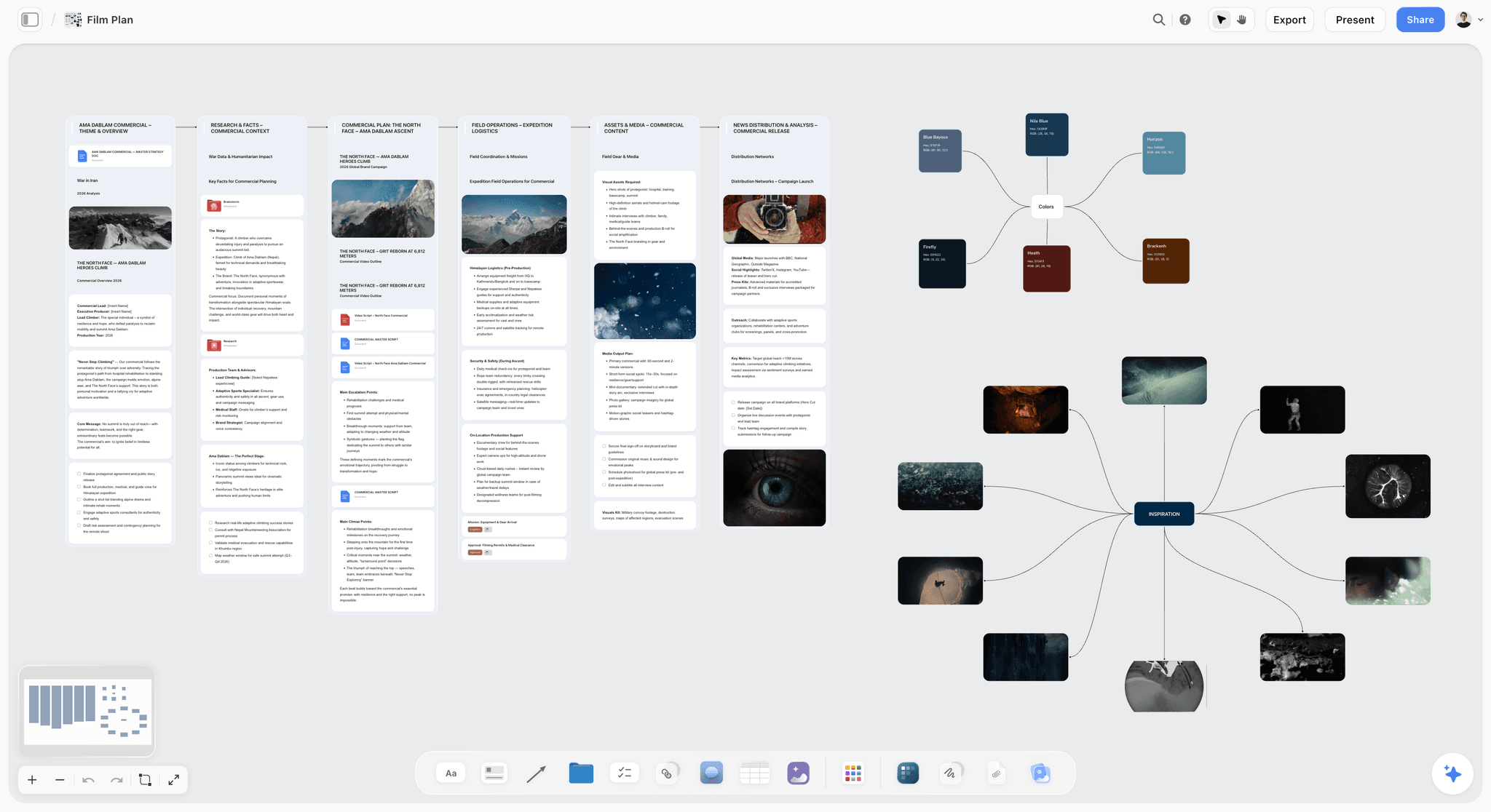
Storyflow is a visual workspace where the AI reads your full active canvas board and you can ground responses in Blueprint Tactics like Hero's Journey, Five-Act Structure, and StoryBrand. It is the tool I built after running multiple documentary projects through ChatGPT and watching it lose the plot every time. The fastest way to see the difference is to open the Pre-Production Board template, drop in your research and references, and ask the AI for a treatment pass grounded in what is on the board.
Best for: Documentary filmmakers, narrative directors, music video directors, branded-content directors. Pre-production, story development, treatment writing, research synthesis, beat sheets.
Verdict: Best AI tool for the thinking and structure half of filmmaking: Storyflow, because the AI reads the whole project canvas and Blueprint Tactics ground drafts in real narrative frameworks. The post-production half belongs to Runway, Descript, and the rest. As a project management tool, Storyflow covers the creative side of the production (research, beats, boards, and shot lists in one visually organized workspace) and, while its AI drafts a call sheet and a strip board on request, leaves scheduling with a real engine, call sheet distribution and compliance to StudioBinder.
Key features
- Project-aware AI by default. The AI reads the full active canvas board (research, transcripts, beats, mood boards, references). Add up to 1 Tactic and up to 3 Documents via @-mention for additional grounding.
- 200+ Blueprint Tactics on Plus and above. Hero's Journey, AIDA, StoryBrand, Five-Act Structure, Retention Hooks. The upcoming Free plan will ship 3 starter Story Blueprints so you can evaluate the framework before paying for Plus.
- Multi-format canvas. Mood boards, mind maps, beat sheets, character bios, treatment cards, and transcripts on the same surface.
- Real shared workspaces. Unlimited shared boards and unlimited collaboration on every current plan. Max plan adds Team Workspace with Permissions and Roles for studios.
Pricing
Storyflow is paid-only during early access. Plus: $7.99/mo annual or $9.99/mo monthly (full 200+ Blueprint library, unlimited file uploads). Pro: $14/mo annual or $19/mo monthly (adds AI image generation and 20x more AI than Plus). Max: $39/mo annual or $49/mo monthly (adds 40x more AI plus Team Workspace with Permissions and Roles). A Free plan launches before the end of 2026 with unlimited boards, unlimited cards (notes, images, links), unlimited collaboration, basic AI usage, and 20 file uploads.
Pros
- The AI reads the project, not a transcript of the project. Drafts come back grounded in the actual shoot.
- Blueprint Tactics scaffold the AI on real narrative frameworks, not generic prose.
- Built by a working documentary filmmaker, so the workflows actually match how filmmakers work.
Cons
- Storyflow is not the right tool for production logistics (sending call sheets and tracking confirmations, schedule management with day-out-of-days and conflict reports, union compliance). It drafts a call sheet and a strip board, but does not run them. Use StudioBinder for that.
- Storyflow is not the right tool for AI footage generation, voice work, or post. Use Runway, ElevenLabs, Descript.
- Cloud-only; no local-first option for users with strict privacy requirements.
For deeper context, see AI Second Brain for Documentary Filmmakers (2026 Guide).
2. Runway
Runway is the leading AI video and visual effects platform. The pick when AI footage, motion brush, video-to-video, and effects are what you need.
Best for: Music video directors, branded-content shops, narrative directors using AI footage as plates or full sequences, anyone whose film involves AI-generated visuals.
Verdict: Best AI video generation and VFX tool for filmmakers: Runway, because Director Mode and motion brush deliver real cinematic control and industry adoption is genuine. This is not a toy; working music video and commercial directors ship with it.
Key features
- Gen-3, Gen-4 (or current) models for text-to-video and image-to-video.
- Motion brush, video-to-video, frame interpolation.
- Inpainting, outpainting, green-screen replacement.
- Director Mode for camera control.
Pricing
Standard: $15/mo. Pro: $35/mo. Unlimited: $95/mo. Free tier with limited credits.
Pros
- Quality generations are usable in real productions.
- Director Mode controls give actual cinematic agency.
- Strong adoption among working music video and commercial directors.
Cons
- Generations chew through credits fast; pricing scales aggressively at production volume.
- Quality varies by prompt and seed; iteration is real work.
- Not built for thinking work; it is an output tool.
3. ElevenLabs
ElevenLabs is the AI voice platform that working studios actually use for dubbing, voice cloning, ADR, and synthetic narration.
Best for: Documentary narration, dubbing, ADR fixes, synthetic voice work, multilingual versions.
Verdict: Best AI voice tool for filmmakers: ElevenLabs, because its cloning, dubbing, and ADR quality is the closest to indistinguishable in production work.
Key features
- Voice cloning from short samples.
- Multilingual dubbing with lip-sync (in beta or current production).
- Studio voice library with licensed voice talent.
- API for programmatic generation.
Pricing
Starter: $5/mo. Creator: $22/mo. Pro: $99/mo. Free tier with 10K characters/mo.
Pros
- Voice quality is the closest to indistinguishable in the market.
- Workflow integrations (DAWs, Premiere, Resolve) are real.
- Free tier is genuinely usable for short narration.
Cons
- Voice cloning has ethical and rights considerations the tool itself does not solve.
- Voice talent licensing for commercial use needs verification per project.
- Not a full audio post tool; pair with traditional DAWs.
4. Descript
Descript is the audio and video editor where you edit by editing the transcript. The AI features (Overdub, Studio Sound, AI Eye Contact) make it a working filmmaker tool, not just a podcast tool.
Best for: Documentary editors, podcast filmmakers, talking-head shows, anyone who wants to edit by transcript.
Verdict: Best AI editing tool for transcript-driven filmmakers: Descript, because editing the transcript genuinely compresses the documentary rough-cut phase.
Key features
- Edit video and audio by editing the transcript.
- Overdub for synthetic voice corrections.
- Studio Sound for audio cleanup.
- AI Eye Contact, filler word removal, scene detection.
Pricing
Hobbyist: $19/mo. Creator: $35/mo. Business: $50/mo. Free tier with 1 hour transcription/mo.
Pros
- Transcript-based editing is genuinely faster for documentary and podcast work.
- AI features are practical, not gimmicky.
- Strong pricing for solo creators.
Cons
- Not the right tool for narrative non-dialogue editing. Use traditional NLEs.
- Transcript accuracy varies by audio quality.
- Heavier projects feel slower than dedicated NLEs.
5. NotebookLM (Google)
NotebookLM is the document-grounded AI from Google. Upload your sources, ask questions, get answers tied to those sources. Audio overviews are a unique feature.
Best for: Documentary research synthesis, interview analysis, book and paper review, podcast research.
Verdict: Best document-grounded research tool for filmmakers: NotebookLM, because it answers from your specific sources instead of the open web.
Key features
- Upload PDFs, transcripts, slides, websites; AI grounds responses in those sources.
- Audio overviews generate AI-podcast-style summaries.
- Notebook structure for organizing a project's source corpus.
- Free during preview as of mid-2026.
Pricing
Free during preview. Verify current pricing on NotebookLM's site.
Pros
- Source grounding is strong. Hallucination is minimal compared to ungrounded chat.
- Excellent for pre-interview research and post-interview synthesis.
- Audio overviews are useful for review on a walk.
Cons
- No canvas; pair with Storyflow for visual project work.
- Document-grounded only; not a generative drafting tool.
- Pricing trajectory is uncertain past the preview.
6. Sora (OpenAI)
Sora is OpenAI's cinematic AI video generator. The pick when you want long-form generation with cinematic camera moves and prompt-to-pixel speed.
Best for: Concept generation, animatic-grade visualizations, music video sequences, short-form social work.
Verdict: Strong for concept and animatic work. Quality has improved fast; production usage is real but selective.
Key features
- Text-to-video with cinematic prompt understanding.
- Multi-shot generation in single prompts.
- Bundled with ChatGPT Plus/Pro tiers.
- Strong on motion and camera language.
Pricing
Bundled with ChatGPT Plus ($20/mo) and Pro ($200/mo). Generation limits vary by tier.
Pros
- Cinematic quality understanding is the strongest among text-to-video competitors.
- Bundled pricing reduces friction for ChatGPT users.
- Long-form generation handles multi-shot prompts coherently.
Cons
- Generation queue times can be long during peak.
- Less granular director control than Runway's Director Mode.
- Concerns around training data and rights persist; verify before commercial use.
7. Suno
Suno is AI music generation. The pick for fast score sketches, temp tracks, and rough cues you would otherwise pay a temp library for.
Best for: Temp music for cuts, sketch composing, rough scoring, music video pre-vis.
Verdict: Strong for sketches and temp; final score still belongs to composers.
Key features
- Text-to-song with style and genre control.
- Vocal and instrumental modes.
- Long-form generation (4 minute tracks on Pro).
- Reference upload for stylistic targeting.
Pricing
Free with daily credits. Pro: $10/mo. Premier: $30/mo.
Pros
- Fast enough to use during edit sessions.
- Quality is "convincing temp" tier; usable in cuts.
- Free tier handles experimentation.
Cons
- Composer-grade scoring is not yet here. Final score requires real composers.
- Licensing for commercial release depends on tier and use; verify per project.
- Rights and originality concerns around AI-generated music persist.
8. LTX Studio
LTX Studio is storyboard-to-video AI. The pick for filmmakers who want pre-vis from storyboards or treatment text.
Best for: Pre-vis, animatics, narrative-driven storyboard generation.
Verdict: Promising for pre-vis. Production-grade output is still inconsistent.
Key features
- Storyboard-to-shot generation.
- Character consistency across shots.
- Scene editing on a timeline.
- Voice and audio integration.
Pricing
Lite: $19/mo. Standard: $35/mo. Free tier with limited generation.
Pros
- One of the few tools genuinely targeting filmmaker workflows.
- Storyboard-driven generation matches how filmmakers think.
- Active development; capability growing fast.
Cons
- Quality lags Runway and Sora for finished output.
- Character consistency works partially; iteration is real work.
- Smaller user base; smaller community.
9. Topaz Video AI
Topaz Video AI is footage upscaling, denoising, frame interpolation, and restoration. The pick when archival footage or low-light footage needs to be salvaged.
Best for: Documentary archival cleanup, low-light footage rescue, frame rate conversion, upscaling for 4K and 8K finishing.
Verdict: The standard for footage restoration in 2026. Worth the cost for archive-heavy projects.
Key features
- AI-driven upscaling (HD to 4K, 4K to 8K).
- Denoise, deinterlace, frame interpolation.
- Stabilization.
- Batch processing.
Pricing
One-time: $299. Subscription model also available for some tiers.
Pros
- Quality is genuinely best-in-class for restoration.
- One-time license is unusual and welcome.
- Professional integrations work.
Cons
- Heavy compute requirements; needs a GPU.
- Not a generative tool; restoration only.
- Output requires careful per-shot tuning.
10. Frame.io with V3 AI
Frame.io is the review and approval platform now owned by Adobe, with AI features (V3 AI) for tagging, search, and review.
Best for: Studios doing client review at scale, post-production with multi-stakeholder review.
Verdict: Strong for the workflow it solves. Bundled value for Adobe CC users.
Key features
- Cloud review and approval.
- AI tagging and scene detection.
- Frame-accurate comments.
- Camera-to-cloud integration with select cameras.
Pricing
Bundled with Adobe Creative Cloud at most tiers. Standalone pricing available.
Pros
- Industry-standard for client review in studio work.
- AI features genuinely speed up tagging and search.
- Adobe integration is deep.
Cons
- Less compelling outside Adobe-shop workflows.
- AI capabilities lag standalone tools.
- Pricing only makes sense for studios already on Adobe.
11. StudioBinder
StudioBinder is production logistics: call sheets, schedules, shot lists, side-by-sides. AI features are improving but the value is workflow.
Best for: Call sheets, production scheduling, shot lists, breakdown sheets, narrative production logistics.
Verdict: Not primarily an AI tool, but no AI tools fully replace it for production logistics. Essential pairing.
Key features
- Call sheet generation and distribution.
- Production schedules and side-by-sides.
- Shot list and storyboard integration.
- Crew and contact management.
Pricing
Indie: $29/mo. Professional: $49/mo. Studio: $99/mo. Free tier with limits.
Pros
- The standard for narrative production logistics.
- Workflow handles real production team needs.
- Reliable at scale.
Cons
- Light on AI compared to canvas-AI tools.
- Pricing scales fast for larger productions.
- Documentary productions often need less than what StudioBinder offers.
12. Heptabase
Heptabase is canvas-first knowledge with rich card-detail pages. The pick for filmmakers whose research is dense and needs deep per-card notes.
Best for: Documentary research, deep interview analysis, journal-into-card workflows, structured archival research.
Verdict: Strong for research-heavy filmmaking. Pair with Storyflow if creative pre-production also matters.
Key features
- Whiteboard with card-detail pages.
- Local-first storage with optional cloud sync.
- AI assistance on selected cards.
- Journal-into-card workflow.
Pricing
Around $8.99/mo annual. Trial only.
Pros
- Strongest tool for deep card-level research notes.
- Local-first storage matters for some filmmakers.
- Card detail depth is genuine.
Cons
- Cross-canvas synthesis is harder than in canvas-AI tools.
- No methodology layer for narrative frameworks.
- Less suited to mood-board-heavy filmmaking.
For the head-to-head, see Storyflow vs Heptabase as a Second Brain.
7) Filmmaker-Type Recommendations
1. Documentary Filmmaker
Top picks: Storyflow + NotebookLM + Descript
Storyflow for the project canvas (research clusters, treatments, beat sheets, character arcs). NotebookLM for document-grounded synthesis across interviews, books, papers. Descript for transcript-driven editing of dailies. Add ElevenLabs if narration is heavy.
2. Narrative Director (Short or Feature)
Top picks: Storyflow + StudioBinder + Runway
Storyflow for treatment, beat sheet, character bios, mood boards. StudioBinder for sending call sheets and the production logistics Storyflow does not cover. Runway for any AI footage in the cut.
3. Music Video Director
Top picks: Runway + Storyflow + Suno
Runway for AI generation that is increasingly central to music video work in 2026. Storyflow for treatment and visual concept canvas. Suno for temp tracks and pre-vis audio if working from rough mixes.
4. Branded Content / Commercial Director
Top picks: Storyflow + Runway + Frame.io
Storyflow for the brief, treatment, mood board, and AI-grounded pitch deck. Runway for AI footage in the deliverable. Frame.io for client review. Add ElevenLabs if VO is in scope.
5. YouTube / Long-Form Creator Filmmaker
Top picks: Storyflow + Descript + ElevenLabs
Storyflow for content planning, video outlines, and series structure. Descript for fast editing. ElevenLabs for VO if your channel uses synthetic narration. ChatGPT for one-off scripts.
6. Indie Drama / Festival-Track Director
Top picks: Storyflow + StudioBinder + Topaz
Storyflow for development and pre-production. StudioBinder for production logistics. Topaz for archival footage cleanup if your film uses any. Avoid generative AI in your final cut if festivals are the path; their attitudes vary by year.
7. Documentary Series / Episodic
Top picks: Storyflow + NotebookLM + Descript
Storyflow for season arc, episode beat sheets, and character throughlines. NotebookLM for episode-specific research synthesis. Descript for transcript-based episodic editing.
8. Solo Filmmaker / One-Person Production Company
Top picks: Storyflow + Descript + ElevenLabs
The minimum viable AI stack for a one-person crew. Storyflow handles thinking. Descript handles editing. ElevenLabs handles voice if VO is part of the work.
9. Director With Studio / Agency Backing
Top picks: Storyflow Max + Runway + Frame.io
Storyflow Max for the team workspace with shared canvas and Team Workspace governance. Runway Pro or Unlimited for production-grade AI footage. Frame.io for client and stakeholder review at scale.
10. Producer / Production Manager
Top picks: StudioBinder + Storyflow + Frame.io
StudioBinder for the logistics core. Storyflow for the creative-side coordination with directors and writers. Frame.io for review across stakeholders.
8) Honorable Mentions
A few tools that came close but did not make the main twelve:
- Sudowrite: AI for fiction writers; useful for narrative directors writing prose.
- Lex: AI for writers; cleaner UX than ChatGPT for drafting prose.
- HeyGen: AI avatars and synthetic spokespeople; niche use.
- Pika: AI video generation; quality lags Runway and Sora.
- Kling: Chinese-origin AI video; quality competitive but commercial use varies by jurisdiction.
- Otter.ai: Transcription, weaker integration than Descript.
- PreFader: Audio post; useful but narrow.
- PluralEyes: Sync, not AI.
- FilmStro / EpidemicSound: Music libraries, not AI generation.
These are not bad tools. They are good tools whose audience is narrower than the main list.
9) Where AI Genuinely Does Not Help (Yet)
Honest accounting matters here. There are filmmaking jobs where AI is still bad and pretending otherwise wastes time.
- Final composer-grade score. AI music is good for sketches and temp. Final score is still composer territory.
- Performance direction. The actor's performance in front of the camera is human craft. AI rehearsal tools exist but they are not yet useful.
- Final color and finishing. Color grading at festival or theatrical grade is still human-led; AI handles small fixes only.
- Final sound mix. Stems, foley, ADR placement, theatrical mix. AI assists; it does not finish.
- Festival strategy and distribution. Human relationships still drive premiere placement, sales agent introductions, and acquisition.
- The actual story decision. AI can scaffold structure. The decision about what your film is *about* remains yours.
If your AI use is primarily in these areas, you are using AI for the wrong jobs. The right AI use in 2026 is upstream (research, structure, treatment, pre-vis, pitch) and downstream-supporting (editing assistance, transcription, footage cleanup, dubbing). The middle (the shoot, the performance, the cut) is still mostly human.
11) The Bottom Line
The best AI tools for filmmakers in 2026 are the ones that match the specific phase of filmmaking you are in. Storyflow is the strongest pick for the thinking half (research, story, treatment, pre-production canvas) because the AI reads the full project and Blueprint Tactics scaffold responses on real narrative frameworks. Runway is the strongest for AI video generation. ElevenLabs for voice. Descript for transcript-driven editing. NotebookLM for document-grounded research synthesis.
Most working filmmakers in 2026 use one tool for thinking (Storyflow), one for AI footage (Runway), one for voice (ElevenLabs), and one for editing assistance (Descript). The decisions about which films to make and how the actors perform remain human craft. The AI replaces the slow, low-value work that used to absorb production budgets and lets the crew spend that time on the work AI cannot do.
For users who want to test the architecture, the cheapest move is to take one current film project and rebuild its pre-production on a Storyflow canvas. Start a Storyflow workspace to run that test. If you are already in production, pair Descript and ElevenLabs to compress the post side.
10) FAQ: AI Tools for Filmmakers in 2026
What is the best AI tool for documentary filmmakers?
Storyflow for the pre-production and story-development canvas (research clusters, treatments, beat sheets, character arcs). NotebookLM for document-grounded synthesis across interviews, books, and papers. Descript for transcript-based editing of dailies. Most working documentary filmmakers in 2026 use all three.
What is the best project management tool for filmmakers?
Storyflow is the best project management tool for filmmakers on the creative half, where most of a film is actually decided: research, beat sheets, mood boards, and shot lists on one canvas the AI can read, paid-only during early access and flat per account. Filmmaker project management is really three jobs, so match the tool to the job. StudioBinder is the best tool for production logistics: scheduling, call sheets, breakdowns, and compliance. Generic project management tools like ClickUp, Trello, or Notion work for plain task tracking but treat a film like a software project, and Frame.io covers review once footage exists. Most working productions pair StudioBinder with a creative canvas; see The Best Tools for Indie Filmmakers in 2026 for the full stack.
Can I manage a whole film production in one tool?
Not well in 2026. Logistics tools like StudioBinder do not hold creative development, and creative canvases like Storyflow draft a call sheet but do not send it, track confirmations or manage compliance. The workable setup is one logistics tool plus one creative workspace, with Frame.io added when review starts. Forcing everything into ClickUp or Trello usually means the creative half of the project ends up scattered across documents anyway.
Is Runway worth it for music video directors?
Yes for most music video work in 2026. AI footage as plates, full sequences, and effects has become a real production category. The Standard tier ($15/mo) is enough to evaluate; production work often needs Pro or Unlimited for credit volume.
What is the best free AI tool for filmmakers?
Storyflow's Free plan, which launches before the end of 2026, will be the strongest free tier for the thinking and structure half of filmmaking: unlimited boards, unlimited cards, unlimited collaboration, basic AI usage, and 20 file uploads. ElevenLabs free tier (10K characters/mo) is genuinely usable for short narration. Runway free tier has limited credits for evaluation. NotebookLM is currently free during preview.
Will AI replace filmmakers?
No, and the question is increasingly the wrong question. AI is replacing specific jobs (transcription, footage cleanup, temp scoring, basic VO, pre-vis sketches) and amplifying others (research synthesis, treatment writing, pitch deck generation). The director's job, the cinematographer's eye, and the editor's storytelling instinct remain human craft. The filmmakers thriving in 2026 use AI as the tool, not the operator.
How do I keep my film festival-eligible if I use AI?
Festival policies vary widely and shift annually. As of 2026, most major festivals (Sundance, Cannes, Berlin, Toronto, IDFA) require disclosure of AI use, with rules varying by category. Some categories ban generative AI in the finished work; others permit it with disclosure. The safe path is honest disclosure on submission and avoiding generative AI in narrative or documentary final cuts unless festival rules are specifically permissive. Verify current rules per festival per year.
Is Sora better than Runway for filmmakers?
For cinematic prompt-to-pixel quality with multi-shot understanding, Sora is competitive or ahead. For director-grade control (motion brush, video-to-video, frame-level control), Runway is ahead. Most working filmmakers use both for different jobs. Pick by the specific output you need.
What is the best AI tool for screenwriters?
Storyflow with the Hero's Journey, Five-Act, or Save the Cat-equivalent Tactic for structure-grounded drafting on a canvas. Claude or ChatGPT for conversational drafting. Sudowrite for genre fiction with strong genre understanding. Most working screenwriters in 2026 use Storyflow or another canvas-AI tool plus a chat-based AI for prose drafting.
Is Descript worth it for documentary editors?
Yes for transcript-driven documentary work. The combination of transcript editing, Studio Sound, and AI features genuinely compresses the rough-cut phase. The Hobbyist tier at $19/mo is enough for solo work; Creator at $35/mo unlocks more transcription hours.
Which AI tool is best for pre-production specifically?
Storyflow. Pre-production is the phase where canvas-AI is most valuable: the brief, references, beat sheet, mood boards, character bios, and structural notes all live on one canvas, and the AI reads all of it. Pair with StudioBinder for production logistics (sending call sheets, scheduling with day-out-of-days and conflict reports) that Storyflow does not cover.
Can I use AI for pitch decks and treatments?
Yes, and this is one of the strongest filmmaking applications of AI in 2026. Storyflow's Blueprint Tactics scaffold treatments on real narrative frameworks. The AI reads your research and project canvas to ground the writing. The result is a pitch deck or treatment that reflects your project, not generic AI prose. See How to Plan a Documentary With AI in 2026 for a full walkthrough.
What about voice cloning ethics?
Voice cloning has real ethical and legal considerations. Get explicit consent for any cloned voice. Verify rights for any historical or licensed voice work. Disclose AI voice use in productions where audience trust matters (documentary especially). ElevenLabs and similar tools are technical instruments; the ethics are on the production.
Should I use a dedicated AI filmmaking tool or general AI plus filmmaking workflow?
Dedicated AI filmmaking tools like Storyflow are worth it when filmmaking is your primary work and the project canvas matters. General AI (ChatGPT, Claude) is enough for one-off uses and quick drafts. The break-even is roughly: if you ship more than two films a year, the dedicated workflow pays back. If you ship one film every few years, general AI plus Storyflow's entry-level Plus plan ($7.99/month annual) is enough.
Table of Contents
- Quick Answer: The Best AI Tools for Filmmakers in 2026
- Comparison Table: 12 AI Tools for Filmmakers Compared
- Why Filmmakers Need a Different AI Stack Than Generic Creators
- How We Evaluated These Tools (On Real Productions)
- Quick Picks by Filmmaking Phase
- Detailed Reviews: 12 AI Tools for Filmmakers in 2026
- Filmmaker-Type Recommendations
- Honorable Mentions
- Where AI Genuinely Does Not Help (Yet)
- FAQ: AI Tools for Filmmakers in 2026
- The Bottom Line
- Author
- Related Reading
Templates to check out for this topic


Filmmaking templates you can use in Storyflow
Skip the blank canvas. Open one of these filmmaking boards in Storyflow and the AI builds on the structure that is already there, from research through the shot list.


See Storyflow in Action
A visual AI workspace where every feature lives inside one canvas. No tab-switching, no context lost.
Build your entire board from a single message
Type what you need in the AI chat at the bottom of your canvas. The AI adds cards, headings, and structure directly onto your board.
Use expert frameworks as AI context
Type @ in the AI chat and choose any Tactic. The AI tailors every response to that framework instead of giving generic advice.
Turn your board into a mind map in seconds
Ask the AI to restructure your canvas as a mindmap. It connects your ideas into a visual hierarchy so you can see how everything relates.
Why Storyflow Exists
Storyflow actually began as a personal tool while working on creative and research projects.
We kept running into the same problem: ideas were scattered everywhere: notes, documents, and whiteboards.
Nothing helped us see how everything connected.
So we started building a workspace designed around how ideas actually grow.
→ Read how Storyflow was createdJustkay
Documentary Filmmaker & Founder at Storyflow
Published: 2026-05-10
Extremely simple, seriously capable


See how easy it is to get started
Watch a real project come together, from a blank board to a finished plan, clicked through step by step.
Start creating with AI and become more productive
Transform your creative workflow with AI-powered tools. Generate ideas, create content, and boost your productivity in minutes instead of hours.