
A workspace with taste, for people with taste
The map, without
the backlog bolted on.
A journey backbone, tasks underneath, release slices across it, and the research that justifies each decision on the same canvas. Not a second view of your issue tracker.


Creatives working for these brands already got early access
- Red Bull
- Canon
- Artlist
- Porsche
See how easy it is to get started
Watch a real project come together, from a blank board to a finished plan, clicked through step by step.
Start from a ready-made template
Pick a board to see what you can build, then let AI fill it in. Every template is a real, editable starting point on the same infinite canvas.

Design Planner
Plan a design project from brief to delivery, with references, tasks, and feedback side by side.
What is a user story map, and when do you need a different tool?
A user story map lays a product out the way a person actually uses it. Storyflow is an AI visual workspace that draws the story map on one infinite canvas: a journey backbone, tasks underneath, release slices across it, and the research behind each decision. Along the top runs the backbone, meaning the sequence of things someone does to get their job done. Beneath each backbone step hang the tasks and stories that make that step possible, ordered by importance. Horizontal lines slice across the whole map to mark releases, so a slice is a thin version of the entire journey rather than a complete version of one part. Jeff Patton's argument for the technique is that a flat backlog destroys sequence, and sequence is the thing you need in order to decide what to cut.
StoriesOnBoard is a good, specialised tool for exactly this, and its central design decision is integration. It syncs with Jira, Azure DevOps, Trello and others, so the map and the backlog stay in step and a card on the map is an issue in your tracker. For a team whose backlog is the operating system of the product organisation, that is genuinely the right answer, and if two-way sync with Jira is what you need then StoriesOnBoard remains the better fit. This page is not going to pretend otherwise.
The reason people look for an alternative is usually one of three. They do not have Jira, or do not want the map coupled to it, and the integration is overhead rather than value. Or the map keeps drifting into a backlog view, which is what happens when every card is an issue: conversations become about tickets rather than about the journey, which is precisely what story mapping exists to prevent. Or, most commonly, the map cannot hold the material that justifies it. The research, the session recordings, the analytics screenshot showing where people drop out, and the competitor teardown live somewhere else, so the map records decisions without their reasons.
Storyflow is an AI-native infinite canvas, which makes it the opposite trade. There is no tracker sync, and that is a real difference you should weigh. What you get instead is one surface where the journey, the slices, the research, the screenshots, the interview quotes, and the design reference all sit together. Describe the product and the AI lays out a backbone with candidate tasks under each step, then you do the real work of arguing about order and drawing the slice.
Ultra fast from brief to board
From a journey to a release slice you can defend.
No integration to configure. Open a canvas and describe what people do.
01
Open a canvas
Sign up in seconds. No download, no tracker connection to authorise. Your infinite canvas opens in the browser.
02
Describe the journey
Type what a user is trying to achieve, step by step. The AI lays out the backbone with candidate tasks under each step, so you begin by correcting a draft.
03
Order, then slice
Rank the tasks under each step by importance and draw the release line across the whole map. The argument about what falls below the line is the value of the exercise.
04
Attach the evidence
Pin the analytics, the interview quote, and the design reference to the step they concern, then share a view-only link with whoever needs to agree.
Backbone, tasks, slices, and the evidence.
Everything the map depends on, on the same canvas as the map.
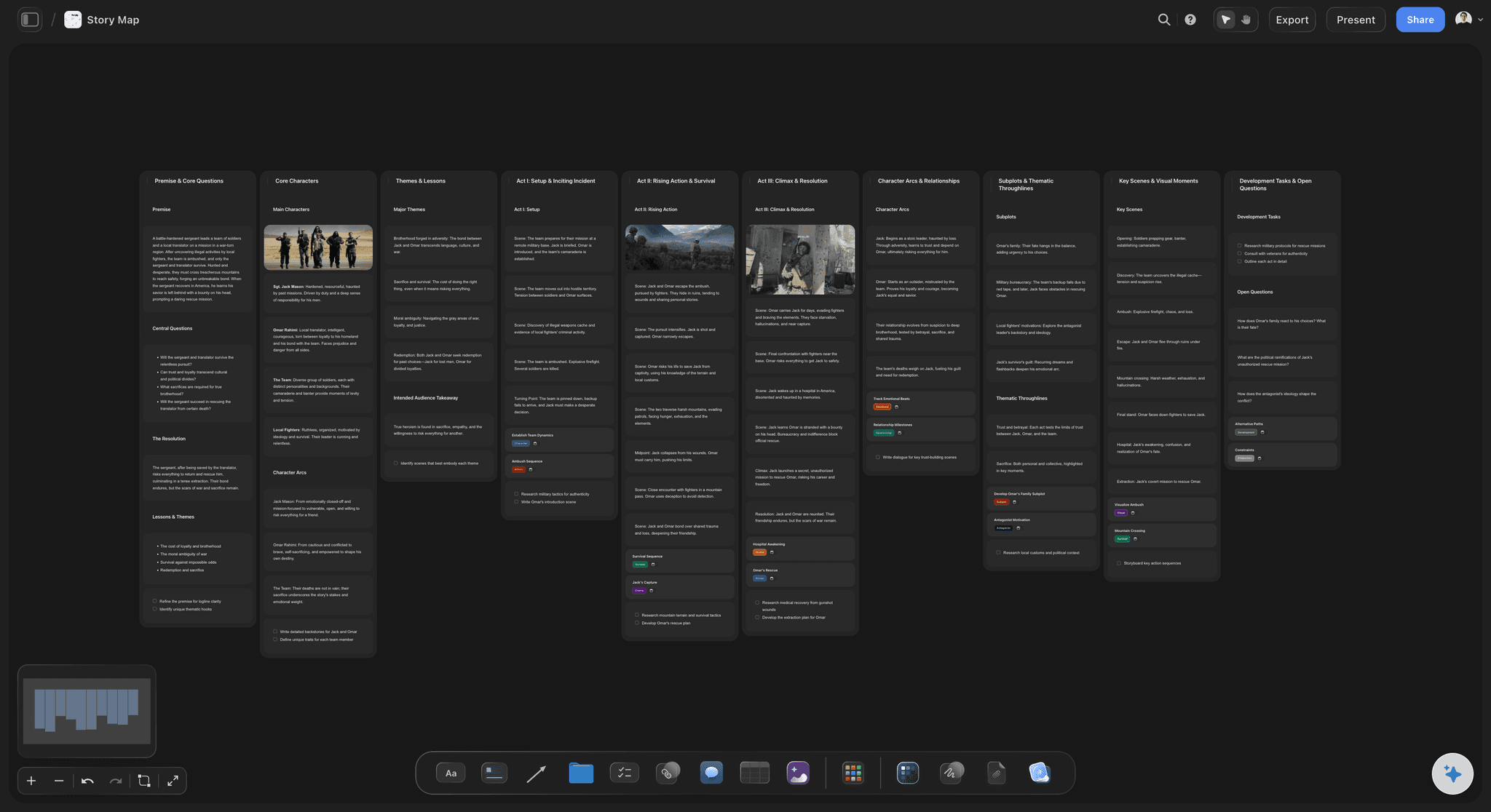
AI lays out the backbone from a description
Start from a drawn journey
Describe what a user is trying to do and the AI produces the backbone with candidate tasks under each step. Correcting a proposed journey is faster than building one card at a time, and the corrections are the discussion worth having.
See the user story mapping board →
Release lines drawn across the whole journey
Slice thin, across everything
A release should be a working version of the whole journey, not a finished version of step two. Drawing the line across the map is what makes that visible and what makes the cut argument concrete.
Explore the sprint planning board →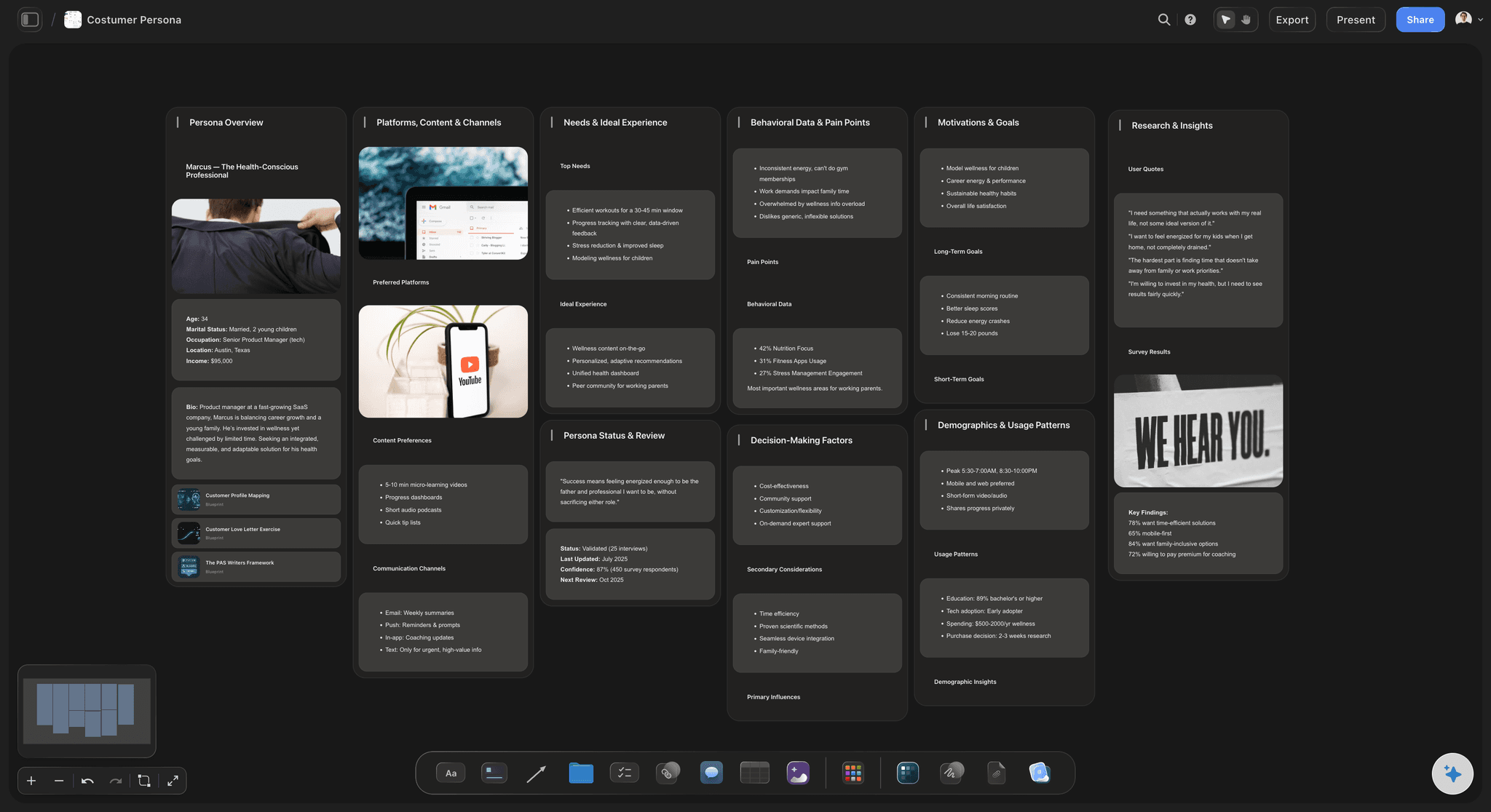
Research pinned to the step it explains
Keep the why next to the what
The drop-off chart, the interview quote, the support ticket, and the competitor screenshot sit under the journey step they concern. A map with its evidence attached survives the question about why an item is ranked where it is.
See the UX research board →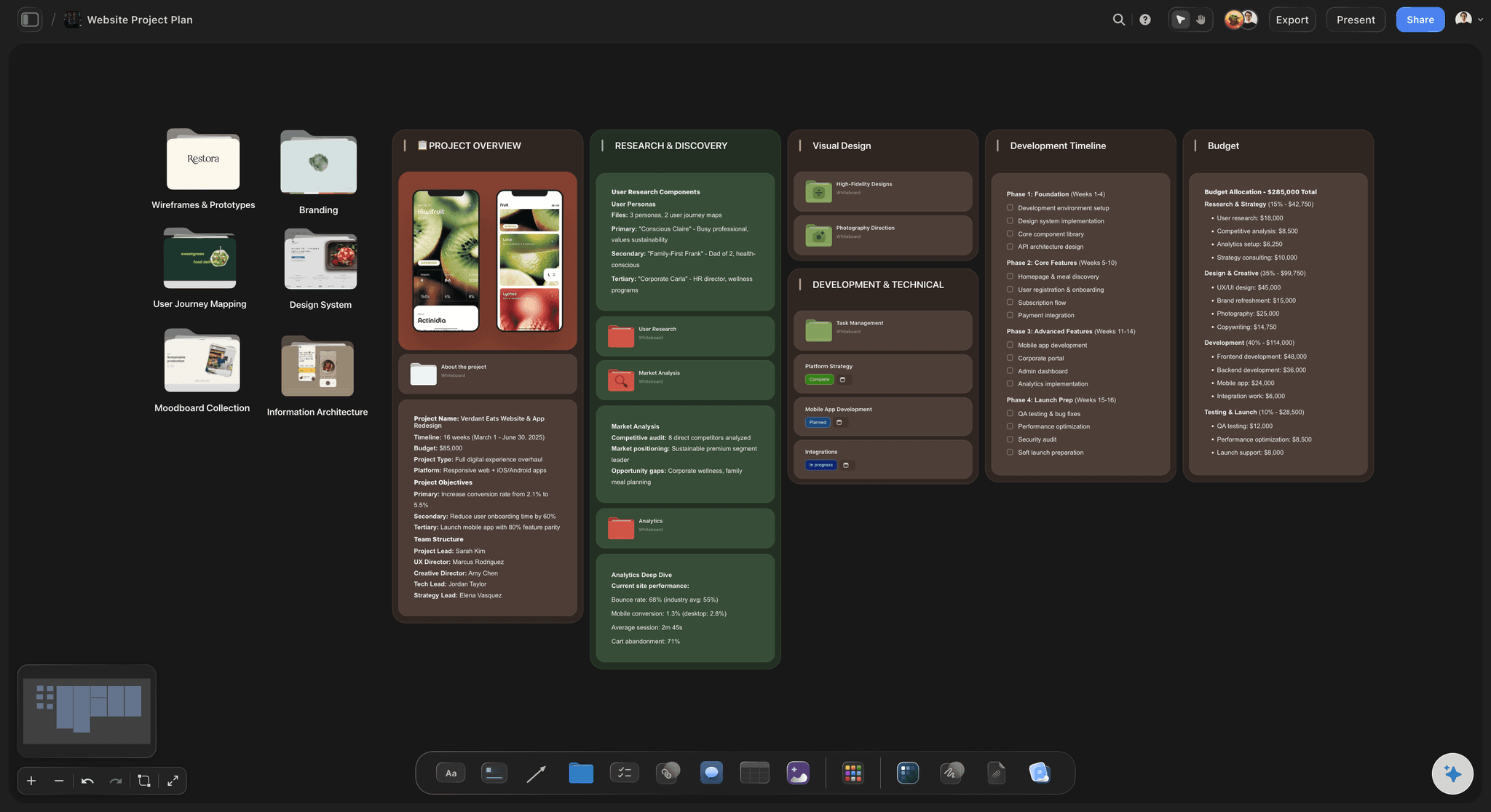
Discovery and delivery on the same surface
One canvas from journey to design
Wireframes, flow diagrams, and personas live beside the map rather than in four other tools, so the person implementing a story can see what it was for.
Try the user flow mapping tool →Unlimited boards. No object cap.
Open a canvas, describe the journey, and let AI lay out the backbone. Storyflow is paid-only during early access, with plans from $7.99 a month billed annually, and a Free plan launches before the end of 2026.
Unlimited story maps on an infinite canvas
Basic AI usage to generate backbones and tasks from a description
Starter templates for journeys, personas, and sprint planning
Share view-only links with stakeholders, no account required
Built for people with taste
A different trade, stated plainly.
StoriesOnBoard couples the map to your tracker. Storyflow couples it to the research and design work instead. Which is better depends entirely on where your team's arguments happen.
No tracker sync, and that is a deliberate choice
What you give up by switching
No two-way Jira or Azure DevOps sync: Storyflow does not connect to your issue tracker. If a card on the map needs to be the same object as a ticket in Jira, StoriesOnBoard does that and this does not, and no amount of workflow will paper over the difference.
No backlog management: Estimation, sprint assignment, burndown, and workload views are jobs for a tracker and Storyflow does not attempt them. The map here is a thinking and alignment surface that hands off to whatever you already use.
What you gain instead: The map stops being a view of the backlog and goes back to being a picture of the user's journey, which is what makes the ordering conversation about value rather than about tickets.
Who this suits: Teams without Jira, teams doing discovery before anything is ticketed, agencies mapping a client's product, and teams who found that syncing the map turned it into a second backlog nobody enjoyed maintaining.
AI that reads the whole board as context
An AI that argues with the ordering
Generate the backbone and the tasks: Describe the product and the AI lays out the journey with candidate tasks beneath each step, which turns the first hour of a mapping workshop into ten minutes of correction.
Find the steps nobody mapped: Ask what happens when something fails, what a returning user does differently, or which step has no task under it. Error paths and second visits are the two things almost every map omits.
It proposes, you decide: Storyflow structures and suggests; what matters most to your users is a judgment that stays with the team who talks to them.
Re-prompt as the product changes: Add a step mid-project and ask the AI to build around what you have already placed. Cards you have ranked and sliced stay exactly where they are.
The map, the research, and the designs together
Stop keeping the reasoning in another tool
Analytics and recordings on the step they concern: A drop-off number attached to the step it happened at is an argument. The same number in a dashboard is a fact nobody connects to a decision.
Interview quotes at the point of use: Paste what a user actually said next to the task it justifies. Verbatim quotes settle prioritisation arguments faster than any framework.
Wireframes and flows on the same canvas: Designs sit beside the story they implement rather than in a separate file, so the person building it can see the journey the screen belongs to.

Workshops, remote or in a room
Map together, then send the link
Everyone on one canvas: Invite the team and build the map simultaneously rather than one person at a keyboard transcribing. Silent ranking rounds work well here and avoid the loudest voice setting the order.
View-only links for stakeholders: Send a link and anyone opens the full map in a browser with no account, which is what makes a slice decision reviewable by people who were not in the workshop.
Export for the document that needs one: Export the map as a high-quality image or PDF for a steering group or a client report, and keep working from the live board.
Explore templates for your project
Every template opens as a real, editable board on the infinite canvas. Pick the closest fit and make it your own.
Design Planner
Plan a design project from brief to delivery, with references, tasks, and feedback side by side.
One app instead of five
Storyflow vs StoriesOnBoard, Miro, and Jira.
StoriesOnBoard is a specialised story mapping tool with strong tracker sync, Miro is a general whiteboard with mapping templates, and Jira is the backlog itself. Here is the honest split.
Storyflow
Recommended
Backbone, tasks, and release slices
AI generates the journey from a description
Research, analytics, and designs on the same board
View-only links with no account required
Two-way sync with Jira and Azure DevOps
Estimation, sprints, and burndown
StoriesOnBoard
Backbone, tasks, and release slices
AI generates the journey from a description
Research, analytics, and designs on the same board
View-only links with no account required
Two-way sync with Jira and Azure DevOps
Estimation, sprints, and burndown
Miro
Backbone, tasks, and release slices
AI generates the journey from a description
Research, analytics, and designs on the same board
View-only links with no account required
Two-way sync with Jira and Azure DevOps
Estimation, sprints, and burndown
Jira
Backbone, tasks, and release slices
AI generates the journey from a description
Research, analytics, and designs on the same board
View-only links with no account required
Two-way sync with Jira and Azure DevOps
Estimation, sprints, and burndown
What creators are saying
Join early creators getting structured workspaces and AI that remembers their projects
“Storyflow has sped up my workflow by at least 3x, which means more flow state and more projects I can actually ship. It truly changed the way me and my team create.”

Reilin Joey
Director & YouTuber
“One prompt gets me a structured board. But the tactics are my favorite. I run my YouTube scripts through them and my intros and retention got better. It's amazing.”

Justkay
YouTuber & Freelance Filmmaker
“I used to juggle five apps to plan a project. Now I describe what I am making and get boards, lists, and a schedule. All in one place.”

George
@fernwehchronicles
Story mapping questions, answered.
What a map is for, when to switch tools, and what you lose by doing it.
A user story map arranges a product the way someone experiences it rather than the way a backlog lists it. The backbone across the top is the sequence of activities a user goes through to get their job done. Below each backbone step hang the tasks and stories that make that step work, ordered top to bottom by importance. Horizontal lines cut across the whole map to mark releases, so each slice is a working version of the entire journey rather than a finished version of one column. Jeff Patton introduced the technique against a specific problem: a flat prioritised list destroys sequence, and without sequence you cannot tell whether cutting an item leaves a usable product or a broken one.
Storyflow is a story mapping canvas with no backlog bolted on: you lay the journey out as a backbone, hang the tasks beneath it and slice releases across it, and its AI generates a first journey from a description. The research, analytics and designs behind each decision stay on the same board. StoriesOnBoard still has two-way sync with Jira and Azure DevOps, which Storyflow does not.
Three reasons come up repeatedly, and none of them is that StoriesOnBoard is bad at its job. The first is that you do not use Jira or Azure DevOps, in which case its central feature is overhead you are paying for and not using. The second is that tracker sync turns the map into a second view of the backlog: when every card is an issue, the conversation drifts back to tickets and estimates, which is the exact drift story mapping was invented to prevent. The third, and the most common, is that the map cannot hold its own evidence. The research, the recordings, the analytics, and the designs live in other tools, so the map records what you decided without recording why, and a decision without its reasoning gets relitigated.
Integration, and it is worth being blunt about it. Storyflow does not sync with Jira, Azure DevOps, Trello, or any other tracker, so a card on the map is not the same object as a ticket in your backlog and moving one does not move the other. It also does not do backlog management: no estimation, no sprint assignment, no burndown, no workload views. If your team's daily operating surface is the backlog and you want the map to be a lens on it, StoriesOnBoard is the better tool and you should stay. Storyflow is the right choice when the map is a thinking and alignment artefact that needs to sit next to research and design, and hands off to whatever tracker you already run.
Draw the line horizontally, across the entire backbone, and resist every instinct to draw it vertically. A horizontal slice is a thin but working version of the whole journey: a user can get from the start to the end, badly, using only the cards above the line. A vertical slice is one step done beautifully and a product nobody can use. The argument that happens while drawing the line is the value of the whole exercise, because it forces the team to say which step could be crude in version one, and that is a conversation a prioritised list cannot produce. A useful test for the first slice is whether you could put it in front of a real user and learn something. If not, the line is in the wrong place.
Customer journey mapping is the practice of laying out every stage a customer moves through with your organisation, and recording what they are doing, thinking, and feeling at each one, along with the touchpoints they encounter and the friction they hit. It differs from a user story map, which covers the same sequence but hangs the functionality required beneath each step in order to decide what to build first. Journey maps are for finding problems worth solving; story maps are for deciding what to build. A journey map that has been useful usually contains at least one uncomfortable finding, most often a stage where the customer is anxious and the organisation thinks it is being helpful. If yours contains no such moment, it was probably drawn from internal assumptions rather than from talking to customers.
Not during early access. Storyflow is paid-only right now, with plans from $7.99 a month billed annually, and a Free plan launches before the end of 2026. Anyone a paid member invites to a board joins free today, so a client or a stakeholder can view and comment without paying. If you need a free option immediately, Miro's free tier includes story map templates and handles the basic technique perfectly well, and a wall of physical sticky notes is still an excellent way to run a mapping workshop when everyone is in one room. What you give up in both cases is the AI first draft of the backbone and having the research attached to the steps rather than summarised into them.
It can produce the backbone and a plausible set of tasks, which removes the slowest and least valuable part of a mapping session. Describe what a user is trying to accomplish and Storyflow's AI lays out the journey with candidate tasks beneath each step, so a workshop starts with something to argue about instead of an empty wall and a stack of cards. It is also genuinely useful for the two things maps almost always miss, which are error paths and returning users: asking what happens when this step fails reliably surfaces four cards nobody had. What it cannot do is rank by value, because that depends on what your users have told you and what your business needs, and the ranking is the part of the map that carries the decision.
They look similar and answer different questions. A customer journey map is about experience: the stages a person moves through, what they are thinking and feeling, the pain points, and the touchpoints across channels, often including things that happen nowhere near your product. A user story map is about scope: the same sequence, but with the functionality required to support each step hanging beneath it and a release line cutting across. Journey maps are mostly used to find problems worth solving; story maps are used to decide what to build first. Many teams need both, and keeping them on one canvas is useful because a pain point on the journey map should be visibly connected to the cards that address it on the story map.
Yes, and remote sessions have one structural advantage over a room: everyone places cards at the same time instead of queueing behind whoever is holding the pen. Invite the team onto the canvas and build the backbone together, then run a silent ranking round where each person orders the tasks under a step before anyone discusses, which prevents the most senior voice anchoring the ordering. Asynchronous mapping also works, since the board persists and people can add cards and evidence in their own hours. Comments attach to the card they concern, so a disagreement about where something sits stays on that card rather than becoming a message nobody can place a week later.
Enough to decide, and no more. The backbone should be the activities a user recognises, usually somewhere between five and twelve for a product-sized map, and if you have thirty you have started listing features rather than describing a journey. Under each step, the tasks should be small enough to rank meaningfully against one another and large enough that ranking them is a real decision, which in practice means a handful per step rather than dozens. Acceptance criteria, estimates, and technical notes do not belong on the map: they belong wherever the work is tracked, and putting them on the map is the most common way it degrades into a backlog. The map's job is to make the shape of the product and the cut argument visible.
Yes. Send a view-only link and anyone opens the full map in a browser with no account and no download, which matters because slice decisions usually need agreement from people who were not in the workshop. For a document that has to be filed or attached to a statement of work, export the board as a high-quality image or PDF. What does not exist is a structured export into a tracker, since Storyflow has no tracker integration by design, so the handoff to Jira or Linear is a manual step. Teams doing this usually create tickets from the slice above the line once, at the point the release is agreed, rather than keeping two systems continuously in step.
Map the journey, not the backlog.
Open a canvas, describe what your users are trying to do, and let AI lay out the backbone. No download.