
Ultra-fast planning, extremely simple
A product roadmap that shows
the thinking behind each bet.
Storyflow is a visual product roadmap on a truly infinite canvas. Lay out now, next, and later, group work into themes and initiatives, and keep the research and discovery that justify each bet right beside it. Describe the release in the AI chat and it lays out the board. It is a planning and communication roadmap, not a Jira-synced delivery tracker.


Creatives working for these brands already got early access
- Red Bull
- Canon
- Artlist
- Porsche
See how easy it is to get started
Watch a real project come together, from a blank board to a finished plan, clicked through step by step.
Start from a ready-made template
Pick a board to see what you can build, then let AI fill it in. Every template is a real, editable starting point on the same infinite canvas.

Mind Map
Branch one central idea out into themes and sub-points, then drag the connections around until the structure makes sense.
What is a visual product roadmap, and why build it on a canvas?
A product roadmap is the story of what you are betting on and why: the themes you are chasing, the initiatives under them, and the rough order of now, next, and later. Storyflow is an AI visual workspace that lays out a product roadmap on one infinite canvas: now, next and later, themes and initiatives, the research and discovery behind each bet, and a view-only link for stakeholders. The best roadmaps are not a locked timeline of features with dates. They are a living map of intent that changes as you learn, which is exactly why a rigid chart of dates or a tidy slide tends to go stale the week after you present it.
Most roadmaps get built where they cannot breathe. A deck holds the picture but not the reasoning, a spreadsheet holds the list but not the shape, and the research that justified the whole thing lives in a separate doc nobody reopens. So the roadmap and the thinking behind it drift apart, and every time priorities move you rebuild the artifact from scratch instead of moving a card.
Storyflow puts the roadmap and its reasoning on one infinite canvas. Now, next, and later are columns of draggable cards, themes and initiatives cluster together, and the discovery, the customer quotes, and the research sit beside the bets they support. Re-ranking a roadmap is a drag, not a redraw. It is honest about its lane: this is not a Jira-synced delivery tracker with sprints and burndown charts, it is the visual planning and communication roadmap that sits in front of one.
Ultra fast from brief to board
Build a product roadmap in four steps.
Go from a blank canvas to a roadmap you can share in minutes. No seats to buy for the people you invite.
01
Open a canvas
Start in the browser with a paid account. Nothing to install, and anyone you invite to a board joins free, so the whole team can plan on the same canvas.
02
Lay out now, next, later
Describe the release or the quarter in the AI chat and Storyflow lays out a starting roadmap of cards to react to. Or drop your own now, next, and later columns and start filling them by hand.
03
Group themes and add the why
Cluster cards into themes and initiatives, then pull the research, customer quotes, and discovery notes onto the canvas beside the bets they justify. Drag cards to re-rank as priorities shift.
04
Share and hand off
Send a view-only link so stakeholders explore the roadmap in their browser without an account, export a clean image or PDF for the readout, then push the committed scope into your tracker.
The roadmap and its reasoning, on one board.
Stop splitting the plan, the timeline, and the research across a deck, a spreadsheet, and a doc. Build a visual roadmap on the same infinite canvas that holds the thinking behind it.

Now, next, later
A roadmap you re-rank with a drag
Lay out now, next, and later as columns of draggable cards on an infinite canvas with no object cap. When priorities move, and in product they always do, you drag a card to re-rank the roadmap instead of rebuilding a slide from scratch.
See creative project management →
AI that fills the board
Draft the roadmap from a prompt
Describe the release, the quarter, or the theme in the AI chat and Storyflow lays out a full board of cards to shape. The AI reads the current board as context, so it builds on the roadmap you are already forming, not a generic template.
See the AI project plan generator →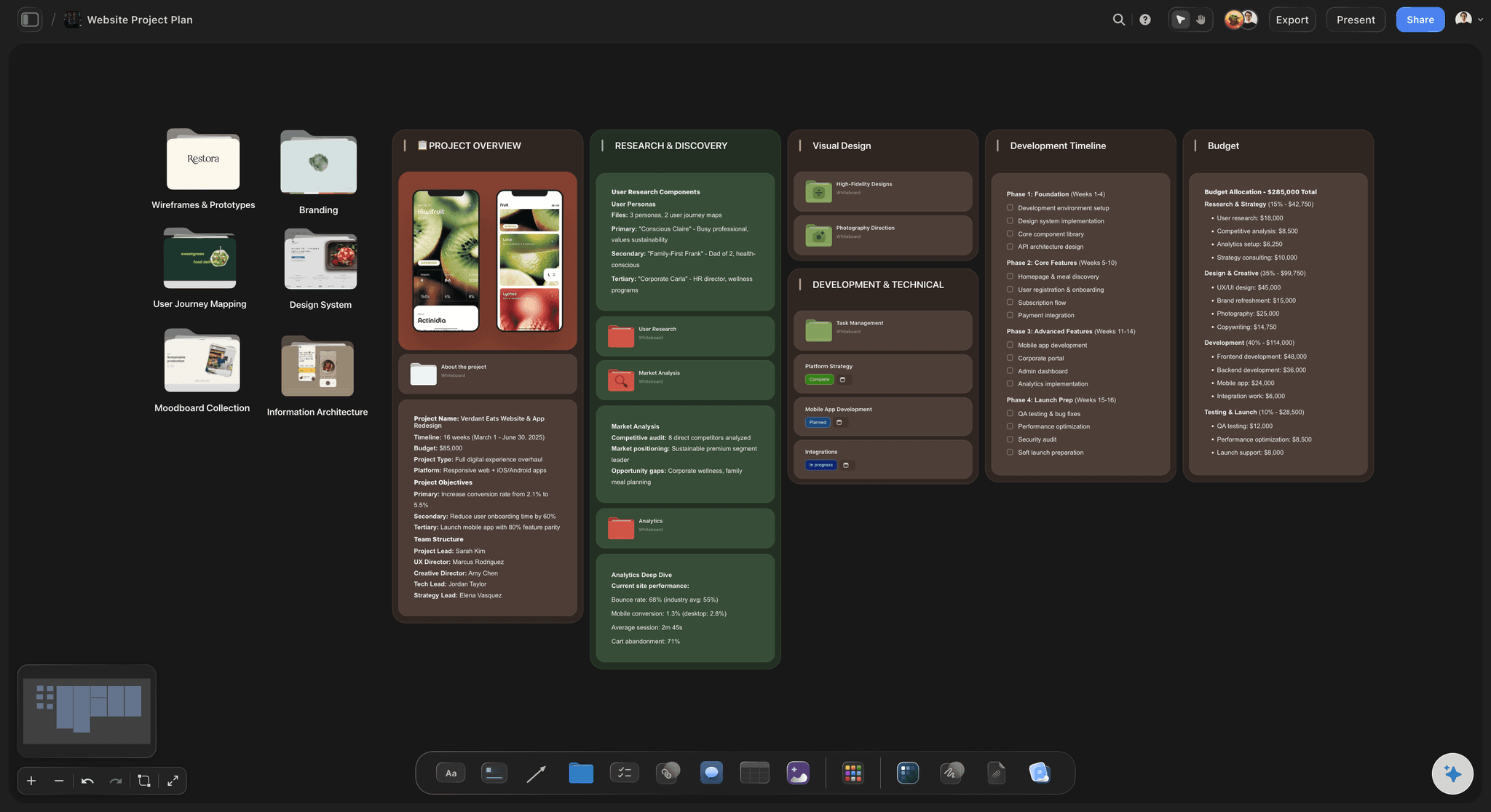
Keep the why beside the what
Discovery next to every bet
Pull the research, the customer quotes, and the discovery notes onto the canvas beside the initiatives they justify. Attach a research PDF, a screenshot, or a link, and grab frames from YouTube and Vimeo when a user session makes the case better than a bullet.
See mind mapping →
Stakeholder-ready sharing
Share the roadmap without an account
Send a view-only link and stakeholders, execs, and new hires explore the whole roadmap in their browser, no login required. Walk them through the reasoning, not just a flattened slide, and export as an image or PDF when they need a file.
See visual collaboration →Plans from $7.99/month annual. Share with a link.
Build a real product roadmap on a plan from $7.99 a month billed annually. Every paid plan includes unlimited boards on an infinite canvas, and anyone a paid member invites to a board joins free, so the roadmap grows with the team.
Unlimited roadmaps on an infinite canvas, no object cap
Unlimited collaboration and unlimited shared boards
AI lays out and expands the roadmap
View-only links to share the roadmap with stakeholders, no account needed
Built for people with taste
Made for how roadmaps actually change.
Frame the horizons, group the themes, keep the research attached, share the plan, and grow into roles when the team scales.
Frame the horizons
Now, next, later without dates you cannot keep
Horizons, not a hard timeline: Lay out now, next, and later as columns of cards so the roadmap communicates intent and sequence, not a promised delivery date you will have to walk back next month.
AI drafts the starting board: Describe the quarter or the release and the AI fills the board with cards to react to, so you shape the roadmap by pushing on a draft instead of facing a blank canvas.
Re-rank with a drag: Drag a card between horizons when priorities change. The roadmap keeps pace with the trade-off instead of going stale in a deck.
Group the work
Themes and initiatives that stay flexible
Cluster into themes: Pull related cards together into themes and initiatives so the roadmap reads as a story of bets, not a flat backlog. On an infinite canvas with no object cap, every theme has room.
Regroup without a rebuild: Move a card to reslice a theme or reorder an initiative. When your understanding of the strategy changes, the roadmap changes with a drag rather than a redraw.
Start from a structure: Ask the AI for a starting structure to frame a roadmap, a launch, or a strategy narrative.

Keep the why attached
The discovery behind each bet, right there
Research beside the roadmap: Drop interview notes, survey screenshots, a research PDF, and links onto the canvas next to the initiative they justify, so the reasoning never drifts into a separate doc nobody reopens.
Frame grabs from video: Grab frames straight from YouTube and Vimeo onto the board when a user session clip makes the case for a bet better than a bullet point does.
AI summarizes the signal: Ask the AI for a first insight summary from your notes, then refine it against the real research beside it on the same canvas.
Share and scale
One link for stakeholders, roles when you grow
Share without an account: Send a view-only link and anyone explores the whole roadmap in their browser, no login required, so reviews happen around the real thinking instead of a flattened export.
Export for the readout: Need the roadmap in a deck or a doc? Export it as a clean image or a PDF in one step for the leadership readout.
Roles and permissions on Max: When the org grows, the Max tier adds a team workspace with roles and permissions.
Explore templates for your project
Every template opens as a real, editable board on the infinite canvas. Pick the closest fit and make it your own.
Mind Map
Branch one central idea out into themes and sub-points, then drag the connections around until the structure makes sense.
One app instead of five
How Storyflow compares for building a roadmap.
Plenty of tools can hold a roadmap. The question is whether the plan, the horizons, and the research fit on one canvas that AI can fill and that anyone can open with a link.
Storyflow
Recommended
AI lays out the roadmap from a prompt
Roadmap and research on one infinite canvas
Unlimited collaboration on the free plan
View-only sharing, no account needed
Miro
AI lays out the roadmap from a prompt
Roadmap and research on one infinite canvas
Unlimited collaboration on the free plan
View-only sharing, no account needed
Notion
AI lays out the roadmap from a prompt
Roadmap and research on one infinite canvas
Unlimited collaboration on the free plan
View-only sharing, no account needed
Milanote
AI lays out the roadmap from a prompt
Roadmap and research on one infinite canvas
Unlimited collaboration on the free plan
View-only sharing, no account needed
What creators are saying
Join early creators getting structured workspaces and AI that remembers their projects
“Storyflow has sped up my workflow by at least 3x, which means more flow state and more projects I can actually ship. It truly changed the way me and my team create.”

Reilin Joey
Director & YouTuber
“One prompt gets me a structured board. But the tactics are my favorite. I run my YouTube scripts through them and my intros and retention got better. It's amazing.”

Justkay
YouTuber & Freelance Filmmaker
“I used to juggle five apps to plan a project. Now I describe what I am making and get boards, lists, and a schedule. All in one place.”

George
@fernwehchronicles
Product roadmap questions, answered.
Everything people ask before building a roadmap in Storyflow.
Storyflow is a visual product roadmap maker on an infinite canvas. You lay out now, next, and later as columns of draggable cards, group work into themes and initiatives, and keep the research and discovery that justify each bet on the same board. AI lays out the roadmap from a prompt, and a view-only link shares it with stakeholders.
Storyflow is a product roadmap maker on an infinite canvas: lay out now, next and later as columns of cards you drag, group the work into themes and initiatives, and keep the research and discovery behind each bet on the same board. Its AI lays out the roadmap from a prompt, and a view-only link shares it with stakeholders. It is a planning and communication roadmap, not a delivery tracker synced to Jira.
No, and it is honest about that. Storyflow is not a Jira-synced delivery tracker with sprints and burndown charts. It is the visual planning and communication roadmap that sits in front of your tracker: shape the roadmap and the themes here, align stakeholders, then push the committed scope into Jira, Linear, or whatever ships your work.
Yes. Lay out now, next, and later as columns of draggable cards on an infinite canvas with no object cap. Because the horizons are cards rather than a locked timeline, you re-rank the roadmap with a drag when priorities change instead of rebuilding a slide.
Yes, and it is the point of building a roadmap here. Drop interview notes, survey screenshots, research PDFs, and links onto the canvas beside the initiatives they justify, and grab frames from YouTube or Vimeo user sessions. Ask the AI for a first insight summary from your notes, then refine it against the real research beside it.
Describe the release, the quarter, or the theme in the AI chat and it lays out a full board of cards to shape. The AI reads the current board as context, and you can attach up to five documents and three boards, such as a research summary or a strategy doc, for it to work from. It builds on the roadmap you are forming, not a generic template.
Not yet. Storyflow is paid-only during early access, with plans from $7.99 a month billed annually ($9.99 monthly). A free plan launches before the end of 2026 with unlimited boards, basic AI usage, 3 starter frameworks and 20 file uploads. Until then, anyone a paid member invites to a board joins free.
Share a view-only link and the stakeholder opens the roadmap in their browser, no login and no sign-up. They explore the whole plan and the reasoning behind it as it actually looks, so the review happens around the real thinking rather than a flattened export. Export as an image or PDF when they need a file.
Each covers part of a roadmap, but the plan, the horizons, and the research still tend to scatter across boards, docs, and decks. Storyflow keeps the roadmap and its reasoning on one infinite canvas: AI fills the board, anyone a paid member invites joins free, and view-only links share it with stakeholders before you hand scope to your tracker.
More from Storyflow
Product launch checklist
Go-to-market plan
For product managers
For startups
Creative project management
Mind mapping
Visual collaboration
AI project plan generator
Best roadmap tools 2026
Best product planning tools 2026
Free timeline maker
Timeline maker
Annual planning board
Connect Claude to Storyflow
Connect Grok to Storyflow
Side project planner
Build a roadmap that shows the thinking behind it.
Lay out now, next, and later, group the themes, keep the research attached, and share it with a link, then hand scope to your tracker.