
Ultra-fast planning, extremely simple
Plan your side project
around the ten hours you really have.
For founders building next to a full-time job: a one-page scope, this month's milestones, a place to park new ideas and a weekly hour budget, all on one board.


Creatives working for these brands already got early access
- Red Bull
- Canon
- Artlist
- Porsche
See how easy it is to get started
Watch a real project come together, from a blank board to a finished plan, clicked through step by step.
Start from a ready-made template
Pick a board to see what you can build, then let AI fill it in. Every template is a real, editable starting point on the same infinite canvas.

Mind Map
Branch one central idea out into themes and sub-points, then drag the connections around until the structure makes sense.
How do you plan a side project when you have a full-time job?
You plan a side project around the hours you have, not the idea you have: write a one-page scope, pick one milestone for each week of the month, park every new idea on a list, and count your hours before you promise yourself anything. Storyflow is an AI visual workspace that plans a side project on one infinite canvas: the one-page scope, this month's milestones, the parked ideas and the weekly hour budget. Its AI reads a paragraph about your idea and lays out the scope, the milestones and the first tasks as cards you can move, edit or throw away.
Start with the scope, and keep it to five lines. Who it is for. The problem they have today. The smallest thing they would pay for. What you are not building in this version. The date you will show it to a stranger, and the price you will ask. If a line takes more than two sentences, the idea is still too big for evenings and weekends. Cut it until all five lines fit on one card.
Then count the hours honestly. Say you can find ten a week: two hours on Tuesday evening, two on Thursday evening, four on Saturday morning and two on Sunday. Plan for eight of them, because one evening in five goes to a late meeting, a sick child or plain tiredness. Eight real hours a week is 32 a month. That number is the whole budget, and every milestone has to fit inside it.
A month that fits in 32 hours looks like this. Week one: a landing page with a price and a sign-up form. Week two: ten conversations with people who have the problem, at half an hour each plus three hours to find them. Week three: one working flow, the smallest version of the thing. Week four: show it to those ten people and ask them to pay. Each week holds three tasks of about two hours, and two hours are left over for whatever runs long. On Sunday, spend fifteen minutes on the board: move what is finished, write down the hours you spent, and choose the next three tasks.
New ideas are the real danger, because each one feels like progress. Give them a parked list and one rule: an idea goes on the list the moment you have it, and you read the list once a month. If one idea deserves a place, another milestone comes out to make room. Nothing is added for nothing. The list keeps the idea safe, which is what lets you stop thinking about it tonight.
Last, write down when you will stop. Twelve weeks at eight hours is 96 hours of work. If nobody has signed up, paid or asked when it will be ready by then, change the idea or end it. Deciding that before you start is far easier than deciding it in week thirty, when the project has become a habit you feel guilty about.
Ultra fast from brief to board
Four moves from an idea to this week's three tasks.
The first plan takes one evening. After that it is a quarter of an hour every Sunday to keep it honest.
01
Describe the idea in one paragraph
Type who it is for, what it does and how many hours a week you have. Storyflow's AI lays out the five-line scope, a milestone for each week of the month and the first tasks as cards on the board.
02
Cut the plan to fit your hours
Put your real weekly hours in a small table with a Sum at the bottom. Then drag milestones out until the month fits. What you drag out goes to the parked list, not the bin.
03
Pick three tasks for this week
Move three task cards into the This week column and give each a date. Three tasks of about two hours leave room for one of them to run long. Everything else stays in the Later column.
04
Review it every Sunday
Move what you finished to Done, type the hours you spent, and pick the next three. Ask the AI what changed on the board since last week if you have lost track.
The idea, the month, the week and the hours.
Storyflow holds the plan and helps you write the first one. Your code host still holds the code, and your calendar still reminds you.

The idea
A messy idea, cut down to one page
Dump everything you have thought of onto the board as notes. Then ask Storyflow's AI to sort it: what belongs in this version, what is a later version, and what is a different project. The five-line scope comes out of the first pile.
See mind map to project plan →
The month
One milestone a week, in a row
Each week of the month is a column with one thing in it that a stranger could look at: a page, a set of conversations, a working flow, a first payment. Read left to right, it is the whole plan in ten seconds.
See the launch roadmap →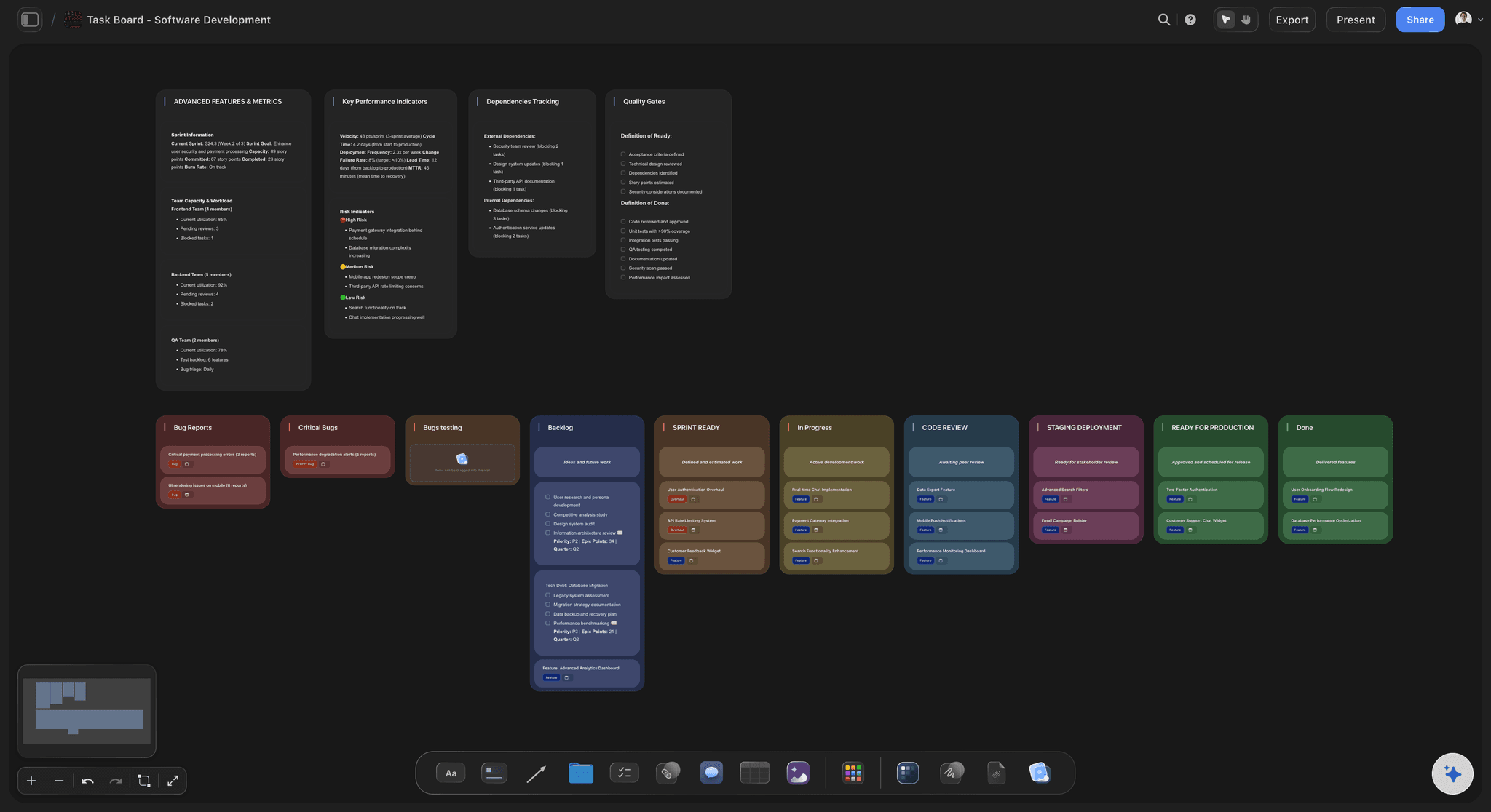
The week
Three tasks, and no more
Later, This week, Doing and Done, as columns of cards you drag across. A task card carries a date and a label, so you can tell building from talking to customers at a glance.
See the AI kanban board generator →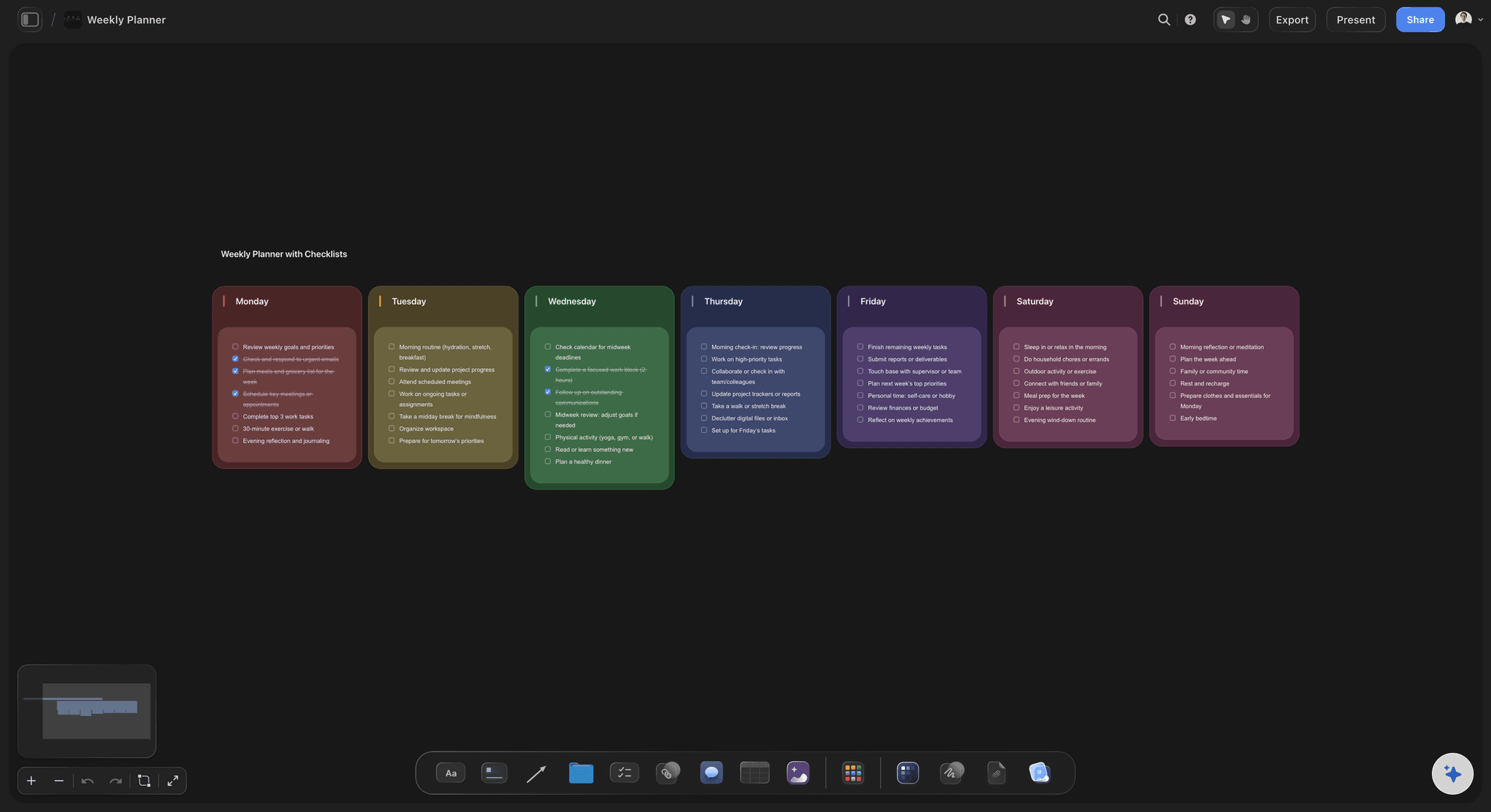
The hours
A budget you count, not one you hope for
A small table with a row for each week: hours planned, hours spent. A Sum at the bottom shows how much of the 96 hours is gone. After three weeks you know your real pace, and the plan starts to tell the truth.
See the sprint planning board →One board for the project. Another for the next one.
Keep the parked ideas, the hours and the plan in the same place for as long as the project lives, and start a new board when one idea earns its own. Storyflow is paid-only during early access, with plans from $7.99 a month billed annually ($9.99 monthly). A free plan launches before the end of 2026, and anyone a paid member invites to a board joins free.
Unlimited boards, image uploads and files on every paid plan
An AI that turns a paragraph into a scope, milestones and tasks
Invite a co-founder or a first tester to the board without buying them a seat
View-only links, so a friend can read the plan with no account
Works with ChatGPT and Claude through the Storyflow connector

Built for people with taste
Why side projects stall in month two.
Three things tend to go wrong when you build next to a job, usually in this order. Each one is easier to catch when the plan is on one board.

Too many ideas
The project keeps growing
A scope that fits on one card: Who it is for, the problem, the smallest thing they would pay for, what is left out, and the date and price. Five lines, pinned at the top of the board where you see them every time you sit down.
A parked list with a rule: Every new idea goes straight onto the list. You read it once a month, and an idea only comes in when a milestone goes out. The list is long on purpose.
Screenshots and links beside the plan: The tools you admire, the forum thread that started it, the sketch on a napkin. Drop them on the board next to the scope, so the research stops living in forty open tabs.
A second pair of eyes on the scope: Ask Storyflow's AI which parts of the plan are not needed to take a first payment. It reads the whole board and says what it would cut. It proposes; you decide.
Not enough hours
The plan assumes a week you never get
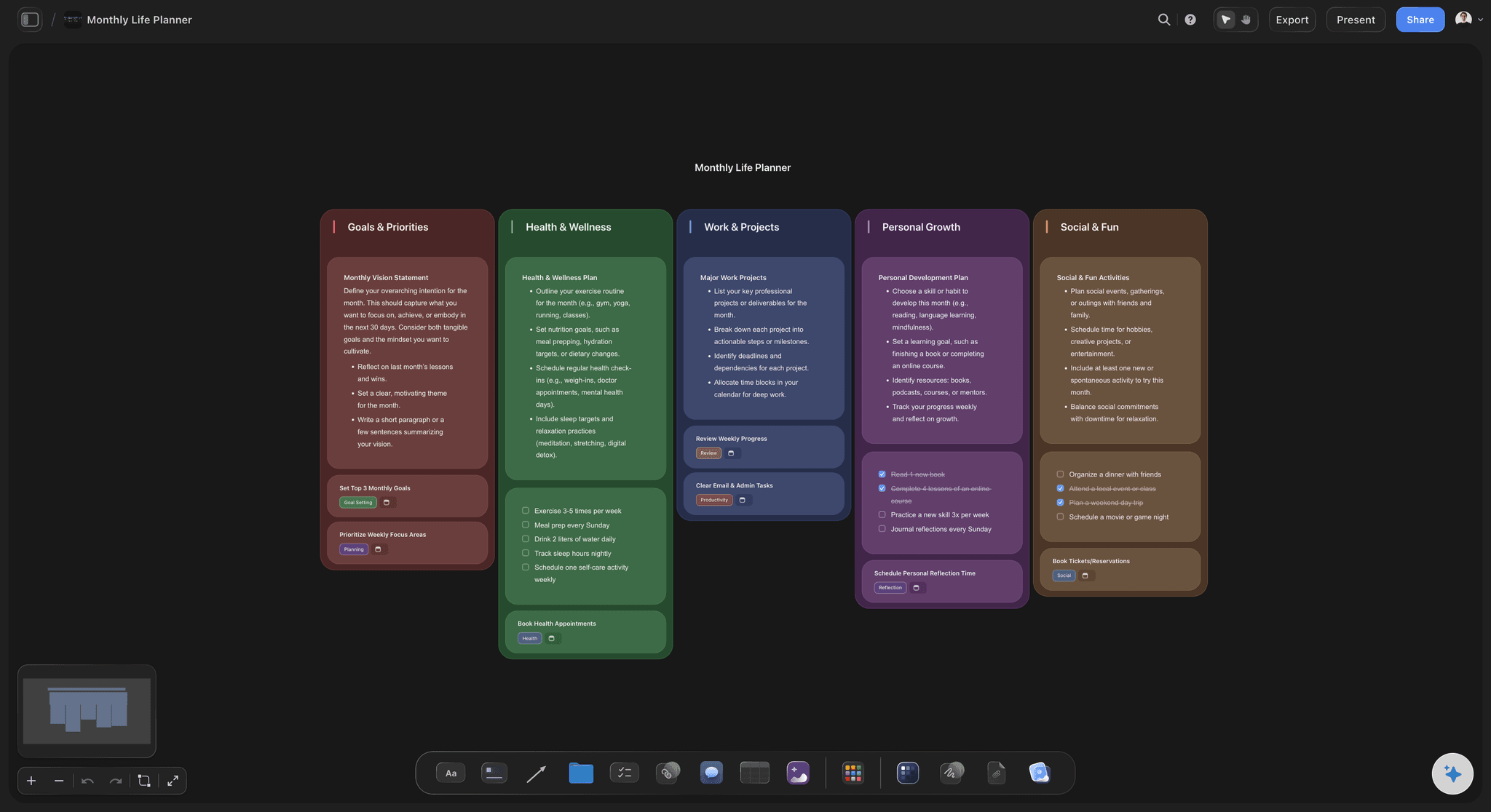
Plan for eight hours in ten: Count the hours you can find, then plan for four fifths of them. The fifth goes to late meetings and tired evenings, and a plan that expects them survives them.
No task longer than one sitting: If a task will not fit in a two-hour evening, split it until it does. A task you can finish tonight gets started. A task called Build the app does not.
Hours spent, added up: Type the hours in the table on Sunday. The Sum at the bottom of the column does the adding, and the gap between planned and spent is the most useful number on the board.
A week off is written down: Holiday, a launch at work, a move. Put a zero in the table for that week before it comes, and slide the milestones along. A planned gap costs a week. A surprise gap often ends the project.

Nothing ships
It is always nearly ready
A milestone a stranger can look at: A page, a demo, a price. If the week's milestone cannot be shown to someone who does not know you, it is a task and not a milestone. Rewrite it until it can.
A stop rule written first: Twelve weeks, 96 hours, and one clear sign you are looking for: a sign-up, a payment, a reply asking when it is ready. It sits on the board from day one.
One person who sees the board: Send a view-only link to a friend who will ask on Sunday what moved. They open it with no account. Being asked is often the difference between a project and a plan.
What changed, in one question: Ask Storyflow's AI what changed on the board this week and it lists the cards that were added, edited or moved. If the answer is nothing for two weeks, that is the review.
Explore templates for your project
Every template opens as a real, editable board on the infinite canvas. Pick the closest fit and make it your own.
Mind Map
Branch one central idea out into themes and sub-points, then drag the connections around until the structure makes sense.
One app instead of five
Where Storyflow fits in a side project.
It holds the plan, the ideas and the hours on one page. It has no phone app, and it will not remind you that it is Tuesday.
Storyflow
Recommended
Scope, milestones, parked ideas and hours on one page
AI lays the plan out as cards you can move
Sketches, screenshots and links beside the tasks
Hours added up for you
Drag a task from this week to parked
Share the plan by link
A phone app
Repeating tasks and due-date reminders
A spreadsheet
Scope, milestones, parked ideas and hours on one page
AI lays the plan out as cards you can move
Sketches, screenshots and links beside the tasks
Hours added up for you
Drag a task from this week to parked
Share the plan by link
A phone app
Repeating tasks and due-date reminders
A notes app and a to-do list
Scope, milestones, parked ideas and hours on one page
AI lays the plan out as cards you can move
Sketches, screenshots and links beside the tasks
Hours added up for you
Drag a task from this week to parked
Share the plan by link
A phone app
Repeating tasks and due-date reminders
What creators are saying
Join early creators getting structured workspaces and AI that remembers their projects
“Storyflow has sped up my workflow by at least 3x, which means more flow state and more projects I can actually ship. It truly changed the way me and my team create.”

Reilin Joey
Director & YouTuber
“One prompt gets me a structured board. But the tactics are my favorite. I run my YouTube scripts through them and my intros and retention got better. It's amazing.”

Justkay
YouTuber & Freelance Filmmaker
“I used to juggle five apps to plan a project. Now I describe what I am making and get boards, lists, and a schedule. All in one place.”

George
@fernwehchronicles
Side project planning questions
What founders with a day job ask before they start, and what usually goes wrong by week six.
In Storyflow, plan it on one board: write a five-line scope, count the hours you really have each week and plan for four fifths of them, set one milestone a week for the month, and pick three tasks for this week. Park every new idea on a list you read once a month. Review the board for fifteen minutes every Sunday.
Storyflow is the one built for this job: the scope, the month's milestones, this week's three tasks, the parked ideas and the hours sit on a single board, and its AI turns a paragraph about the idea into the first plan. A code host such as GitHub still holds the code and its issues, and a calendar app still sends the reminders.
Fewer than most people plan for, as long as the hours are real. Eight focused hours a week is 32 a month, enough for one visible milestone every week. Count the hours you can find, plan for four fifths, and track what you spend in a table on your Storyflow board. Three weeks of real numbers beat any estimate.
Four things: a five-line scope (who it is for, the problem, the smallest thing they would pay for, what is left out, the date and price), one milestone per week for the month, a parked list for new ideas, and a weekly hour budget. On a Storyflow board they sit side by side, with this week's three tasks in their own column.
It can write the first draft. Describe the idea and your weekly hours, and Storyflow's AI lays out a scope, weekly milestones and the first tasks as cards on the board. It can also look up the tools already in your market and read a page you link to. It does not know how many evenings you really have, so you cut the plan to fit.
Write what you are not building into the scope, and give every new idea a parked list instead of a place in the plan. Read the list once a month. An idea comes in only when a milestone goes out. On a Storyflow board the parked list sits beside the plan, so moving an idea in means dragging something else out where you can see it.
Yes. Storyflow connects to both, so the assistant reads your board and adds cards to it. ChatGPT needs Plus, Pro, Business, Enterprise or Edu, on the web, and on Business and Enterprise an admin turns on developer mode. Claude's Free plan allows one custom connector. The assistant runs on its own model, and its calls use no Storyflow AI credits.
No. Storyflow has no timer, no repeating tasks and no due-date reminders. You type the hours you spent into a table, and the Sum at the bottom adds them up. Task cards carry a date you can see on the board. For a nudge on Tuesday evening, put a repeating event in your calendar app with the board's link in it.
Not today. Storyflow is paid-only during early access, with plans from $7.99 a month billed annually ($9.99 monthly). A free plan launches before the end of 2026, and anyone a paid member invites to a board joins free. If the budget for the project is zero right now, a spreadsheet with the same four parts will carry you until then.
When the stop rule you wrote at the start says so. A fair one: twelve weeks at eight hours a week is 96 hours. If nobody has signed up, paid or asked when it will be ready by then, change the idea or end it. Keep the rule on the Storyflow board beside the scope, where you cannot pretend you never wrote it.
Talk first, but give it a week, not a quarter. Ten half-hour conversations with people who have the problem fit in one eight-hour week, with three hours to find them. Put the notes from each call on the Storyflow board beside the scope. If seven of the ten describe the problem in their own words, build. If two do, rewrite the scope.
Yes. Invite them to the Storyflow board and you both edit it at the same time. Anyone a paid member invites to a board joins free, so a co-founder or a first tester needs no plan of their own. Each task card can carry the name of the person doing it, which matters more than it sounds when two tired people share one list.
No. Storyflow runs in the browser, and there are no native mobile or desktop apps. Open the board in a browser on your laptop for the Sunday review, or on your phone to read the plan or drop in an idea. There is nothing to download and nothing to keep up to date.
More from Storyflow
AI project plan generator
Storyflow for solopreneurs
Storyflow for startups
AI tools for startups
Launch roadmap
Product launch planner
Product roadmap
Sprint planning board
AI kanban board generator
Mind map to project plan
Business model canvas
Project dashboard
Plan client projects as a one-person studio
Turn a ChatGPT chat into a project plan
Connect Claude to Storyflow
A project board for Claude Code
Give the idea a plan that fits your week.
A five-line scope, four milestones, three tasks and the hours you really have. One board, one evening to set up, fifteen minutes every Sunday.