How to Launch a Product With a Small Team: One Board, 4 Lanes
Plan a small-team product launch on one Storyflow board with four lanes: product ready, story ready, channels ready and support ready. The AI drafts the lanes as walls of tickets from your brief, the team puts an owner and a due date on each, and the launch is ready when all four lanes are green.

Category
Product
Author

Justkay
Documentary Filmmaker & Founder at Storyflow
Topics
2026-09-06
•
41 min read
•
Product- how to plan a product launch visually with a small team
- product launch four lanes board
- launch readiness green amber red
- should every release be a launch
- what to cut from a product launch
How do I plan a product launch visually with my small team?
Launch a product with a small team by planning it on [one Storyflow board with four lanes](/visual-product-launch-plan): product ready, story ready, channels ready and support ready. Ask Storyflow's AI for a kanban board with those four columns from your launch brief; it drafts a wall of tickets per lane, and the team adds an owner and a due date to each. Launch when all four lanes are green, not when the feature ships. Tier the release first, because not every shipment is a launch. The same lanes work as four lists in Trello.

Full disclosure: Storyflow is our product. The tool order is not a scored ranking; Storyflow is listed first because it holds what this article describes: four lanes on one canvas, tickets with an owner and a due date, the copy beside the cards and a view link with no account. It has no dependencies, no Gantt view, no due-date reminders and no free plan yet, so the article recommends Trello when the budget is zero and Asana when the launch has dependencies.
Quick Comparison
Four places to run a four-lane launch board, and what each one is for.
| Tool | Best For | AI Features | Price |
|---|---|---|---|
| Storyflow | Four lanes, copy and screenshots on one board | AI drafts the lanes as tickets from your brief | From $7.99/mo annual |
| Trello | A free board of four lists | AI features from Standard | Free for up to 10; Standard $5/user/mo annual |
| Miro | A large live planning workshop | Monthly AI credits on paid plans | Free with 3 editable boards; Starter $8/member/mo yearly |
| Asana | Dependencies and a Gantt chart | AI drafts launch copy in its template | Free for 2 users; Starter $10.99/user/mo annual |
Key Takeaways
- Plan a small-team product launch on one Storyflow board with four lanes: product ready, story ready, channels ready, support ready. A launch is ready when all four are green, and the most common failure is shipping with three.
- Storyflow's AI drafts the four lanes from your launch brief as walls of tickets. Each ticket carries an owner, a due date that flags when it is overdue and one label, which is where the green, amber or red status goes.
- Tier your releases. Tier 1 is a real launch with a full board, tier 2 is an announcement, tier 3 is a changelog entry. Most teams over-tier and exhaust themselves.
- Six weeks is the realistic window for a small-team tier 1 launch, and four of those weeks are not marketing work.
- Support readiness is the lane small teams skip and the one that produces the worst launch-day experience: a spike of confused users and nobody who can answer.
- Write the announcement before you build the launch plan. If you cannot write a compelling paragraph, the problem is the positioning, not the channel mix.
- One owner per lane, even if the same person owns two. Unowned lanes stay amber until launch morning.
- Plan the two weeks after launch. Most adoption comes from the second and third time people see the thing, not from launch day.
How Do You Plan a Product Launch Visually With a Small Team?
Use one board, four lanes and one owner per card. The board is a Storyflow canvas with four walls side by side, one per lane, and every deliverable is a ticket on the wall it belongs to. Six steps get a team of three to eight from a brief to a board everyone can read:
- Tier the release. Decide whether this is a launch, an announcement or a changelog entry before anything is planned.
- Write the announcement paragraph. One paragraph an outsider understands. It is the test of whether the positioning is settled.
- Draft the four lanes on one Storyflow board. Put the paragraph and the brief on the board and ask the AI for a kanban board with four columns: Product ready, Story ready, Channels ready, Support ready.
- Put one owner and one due date on every ticket. Count the dates back from launch day across six weeks.
- Mark each ticket green, amber or red with its label, and walk the four lanes together once a week.
- Launch when all four lanes are green, then run the two weeks after launch from the same board.
The rest of this guide is the detail behind those six steps: the tier test, what goes in each lane, the readiness test that turns a lane green, the six-week timeline, what to cut, and the tools that hold the board.
Which tool should you use to plan a product launch visually with a small team?
Use Storyflow. It holds the four lanes as four walls on one canvas, its AI drafts the tickets from your launch brief, each ticket carries an assignee, a due date and a label, the announcement copy and the screenshots sit on the same board as the tickets, and anyone you send the view-only link to opens the plan with no account. Storyflow is paid-only during early access, from $7.99 a month billed annually, and anyone a paid member invites to a board joins free.
The alternatives each fit one condition. Trello is the simplest free board if the launch is one channel and a handful of cards. Miro and FigJam suit a large live workshop when your company already pays for them. Notion suits a team whose launch is mostly long documents. Asana, Jira and Linear take over when the launch has real dependencies or the engineering work is the launch.
Tools for each step of a four-lane launch
| Step | What you produce | Tool that does it |
|---|---|---|
1. Tier the release | Tier 1, 2 or 3, written at the top of the board | A note on the Storyflow board |
2. Write the announcement | One paragraph and a one-sentence version | A Storyflow document on the board, drafted with the AI from your notes |
3. Draft the lanes | Four walls of tickets, one ticket per deliverable | Storyflow AI, kanban board workflow with your four lane names |
4. Assign and date | An owner and a due date on every ticket | Storyflow tickets; the team sets the assignees |
5. Hold the timeline | Six weeks counted back from launch day | Storyflow's Planner workflow, which works back from a deadline; Asana if you need a Gantt chart with dependencies |
6. Weekly lane check | Green, amber or red on every ticket; overloaded owners found | The same Storyflow board in Presentation mode, one lane at a time |
7. Show outsiders | The plan for an investor, client or contractor | A Storyflow view-only link, opened with no account |
8. Engineering detail | Issues behind the Product lane | Linear or Jira, linked from the Product lane tickets |
9. After launch | Follow-up tasks and the retro | The same board, exported as a PDF |
This article is about readiness: which lanes exist, what turns each one green, and what to cut. Three companion pieces each cover one neighbouring job. How to Plan a Product Launch Visually With a Small Team covers the two-hour planning session and the collision pass. The Small-Team Product Launch Checklist gives the copyable checklists behind four dated locks. The Small-Team Launch Timeline Template builds the six weeks backwards with an exit condition for each.
Why the Standard Playbook Does Not Fit
Most product launch advice assumes a product marketing manager, a demand generation lead, a content team, a sales enablement function, and a launch calendar with committed slots.
A small team has three people who each already have a full-time job, and one of them is also the founder. Applied literally, the standard playbook produces a fifty-item plan that gets abandoned in week two, at which point the team ships the feature with a tweet and tells themselves they will do it properly next time.
The failure is not laziness. It is that the playbook's structure assumes parallel capacity that does not exist. Fifty items across six people is a plan; fifty items across three people who are also building the product is a fantasy.
The four-lane board exists because it is the smallest structure that still catches the ways launches fail.
Tier the Release Before You Plan It
Tiering is the most valuable decision in the plan, and the one small teams skip.
Tier 1: a real launch. New product, new category, pricing change, anything that changes what you are. Four to six weeks, the full board, all four lanes. Two or three of these a year is a realistic ceiling for a small team, and treating a fourth as tier 1 is how teams burn out.
Tier 2: an announcement. A significant feature that existing users will care about. One to two weeks, a lighter board: changelog, email to users, one social post, docs updated. No press, no landing page, no campaign.
Tier 3: a changelog entry. Everything else. Ship it, write two sentences, move on.
| Tier 1: launch | Tier 2: announcement | Tier 3: changelog entry | |
|---|---|---|---|
What it is | New product, new category, pricing change | A feature existing users will care about | Everything else |
Lead time | Four to six weeks | One to two weeks | An afternoon |
Board | All four lanes, full | Four lanes, two or three tickets each | No board |
Channels | Email, changelog, social, website, personal messages | Email, changelog, one social post | Changelog |
Landing page | Usually | No | No |
How many a year | Two or three | As many as you ship | Unlimited |
The discipline is deciding the tier in advance and holding it. The pattern that kills small teams is that every release becomes a tier 1 by accretion, because someone suggests a landing page, someone else suggests a webinar, and nobody says the release does not justify it.
A useful test: if you cannot name a person outside the company who will change a decision because of this release, it is tier 3.
Write the tier as the first note on the board, above the lanes. When someone proposes a webinar in week 3, the note is what you point at.
The Four Lanes
Lane 1: Product ready
The feature works, and works for the users who will arrive because of the launch.
This lane is not "the code is merged". It is:
- The feature is in production and has been used by someone who did not build it.
- The onboarding path for a new user reaching this feature cold has been walked, by someone, start to finish.
- The obvious failure modes have been handled, particularly for users on the plan the launch targets.
- Any limits, quotas or edge cases are known and documented, because support will be asked about them on day one.
- There is a rollback or a kill switch. Small teams launch without one more often than they should, and the launch day where the feature is broken and nobody can turn it off is a very long day.
Lane 2: Story ready
You can explain what this is and why it matters, in one paragraph, without hedging.
Contents of this lane:
- The announcement paragraph, written first. Before any plan. If writing it is hard, the positioning is unresolved and no amount of channel activity fixes that.
- The one-sentence description that goes in a tweet, a changelog and a subject line, identically.
- Who it is for, stated as a situation rather than a segment.
- What it replaces or improves, named concretely, including the workaround people use today.
- Two or three screenshots or a short clip. Visual proof does more work than any copy at this scale.
- Pricing implications, if any, decided rather than deferred.
The test for this lane: hand the paragraph to someone who does not work with you and ask what the product does. If they get it wrong, the lane is not green regardless of how much you like the writing.
Lane 3: Channels ready
Where the announcement goes, prepared in advance rather than assembled on the day.
For a small team the realistic list is short and that is correct:
- Existing users by email. The highest-return channel you have and the one most often treated as an afterthought. These people already trust you.
- The changelog or release notes page, which is also where search traffic lands later.
- One or two social channels, with the post written and scheduled, not improvised.
- The website, at minimum an updated homepage line, and a landing page only for tier 1.
- Any community you actually belong to. Posting in a community you have never contributed to is worse than not posting.
- Direct messages to ten specific people who asked for this. This is the highest-conversion activity on the entire board and it takes an hour.
That last one is worth emphasising. Ten personal messages to people who requested the feature will outperform every other channel on this list for a small team, and almost nobody plans it as a task.
Lane 4: Support ready
The lane that gets skipped, and the one whose absence users feel most.
- Documentation exists for the new thing, even if it is one page.
- The person who will answer questions on launch day knows the feature exists and has used it.
- A short internal answer sheet for the three questions you know are coming, including "is this on my plan".
- Someone is actually watching the inbox on launch day rather than assuming.
- A decision, in advance, about what you do if something breaks: who fixes it, who communicates, and what you say.
A launch that generates interest and then answers nobody converts curiosity into a poor impression, and that is worse than not launching.
Green, Amber, Red: The Readiness Test for Each Lane
A lane is not green because its owner feels good about it. Each lane has one test that somebody other than the owner can run, and the colour is the result of the test.
| Lane | Green means | Amber means | Red means | Who runs the test |
|---|---|---|---|---|
Product ready | Someone who did not build it has used it end to end as a new user, and the rollback has been tested | It works for the team, and nobody has walked the cold path yet | A known bug sits on the path a launch visitor will take | Anyone who did not write the code |
Story ready | An outsider read the paragraph and said back what the product does, correctly | The paragraph exists and has not been tested on anyone | Three people describe it three ways | Someone outside the company |
Channels ready | The email, changelog entry and posts are written and scheduled, and the ten names are listed | Drafts exist, nothing is scheduled | The plan is to write it on the day | The owner of another lane |
Support ready | Docs are published, the answer sheet is written and a named person is covering the inbox | Docs are drafted, and nobody is named for launch day | Nobody has thought about it | Whoever will answer the inbox |
Two rules keep the colours honest. A lane turns green only when its test has been run, and a lane with no owner is red by definition. On a Storyflow board the colour is the label on each ticket, and the lane's own colour is the worst label in it: one red ticket makes the lane red.
Amber is the dangerous colour because it feels like progress. A lane that has been amber for two weeks is red with better manners, and the weekly check below exists to say so out loud.
What one ticket per lane looks like
A ticket is useful when it names a deliverable, one owner, a date and the test that closes it. Four filled examples from a six-week plan, as they might read in week 4:
| Lane | Ticket | Owner | Due | Label | Turns green when |
|---|---|---|---|---|---|
Product ready | Walk the new-user path cold | Designer | Friday of week 4 | Amber | Someone who did not build it finishes the path without help |
Story ready | Test the announcement paragraph on an outsider | Founder | Wednesday of week 5 | Green | They say back what the product does, correctly |
Channels ready | Schedule the email to existing users | Designer | Thursday of week 2 | Amber | It sits in the email tool with a send time |
Support ready | Write the answer sheet for the three known questions | Founder | Friday of week 3 | Red | It is on the board and the person covering the inbox has read it |
Do this first: write the closing test into each ticket's description when you create it, so nobody argues about the colour later.
How to Build the Four-Lane Board in Storyflow
These are the steps on Storyflow as it ships in October 2026. The lanes and the tests above work in any tool; this is the route that starts from a draft instead of an empty board.
- Put the brief on the board. Create a project and add the announcement paragraph and any positioning notes as a document on the canvas, or attach up to five documents to your message. The AI reads the board you have open with every message.
- Ask for the four lanes. Pick the Kanban board workflow, or type it: "Build a kanban board for this launch with four columns named Product ready, Story ready, Channels ready and Support ready, one ticket per deliverable." The AI uses the column names you give it and builds each lane as a wall of tickets.
- Add the tier and the launch date. Put a note above the lanes with the tier, the launch date and the one number you expect the launch to move.
- Put an owner and a due date on every ticket. Open each ticket and set its assignee and date. The AI does not set assignees, and that is useful: choosing the owner is the decision the team has to make itself. A ticket past its date shows an overdue flag.
- Use the label for status. Each ticket shows one label. Set it to Green, Amber or Red, and change it only after the lane's test has been run.
- Keep the copy on the same board. The announcement paragraph, the email draft and the answer sheet are documents beside the lanes, and screenshots sit next to the Story lane. The person writing the email can see the pricing ticket without asking.
- Ask for the six weeks. For the dated view, ask the AI's Planner workflow to lay the tickets out in weeks counted back from launch day. It asks whether you want a column per week or one table with a date, an owner and a done tick on each row.
- Share it. Invite the team to edit; people a paid member invites join free. Send everyone else the view-only link, which opens with no account. They sign in only if they want to comment.
- Walk it weekly. Presentation mode steps through the board one wall at a time, so a screen share goes lane by lane. Ask the AI to review the board first and it lists what looks thin or contradictory.
- After launch, keep the shape. Export the board as a PDF for the retro and duplicate it as the starting point for the next tier 1.

What Storyflow does not do matters here too. Nothing reminds an owner that a date is close (the bell reports mentions, replies and what collaborators changed on the board, not due dates), there are no dependencies between tickets, and there is no Gantt view. The weekly walk does the reminding. A team that needs the tool to chase people should run the dated tasks in Asana and keep the four-lane board as the picture.
If you would rather start from a page than a blank project, the product launch planner and launch roadmap pages show the same board, and the AI kanban board generator page shows the workflow in step 2.
The Six-Week Timeline
For a tier 1 launch, counted back from launch day. Four of these weeks are not marketing.
| When | Product ready | Story ready | Channels ready | Support ready |
|---|---|---|---|---|
Week 6 | Feature complete, internal use begins | Announcement paragraph drafted | Nothing yet | Nothing yet |
Week 5 | Bugs from internal use fixed | Paragraph tested on an outsider | Channel list decided | Docs outline |
Week 4 | Onboarding path walked cold | Screenshots and clip captured | Email drafted | Docs written |
Week 3 | Edge cases and limits documented | One-sentence version locked | Social posts written | Answer sheet written |
Week 2 | Rollback tested | Landing page copy done | Everything scheduled | Support person briefed |
Week 1 | Freeze, no new changes | Final read of everything | The ten personal messages sent | Inbox cover confirmed |
Launch | Watch | Publish | Publish | Answer |
Weeks 1 to 2 after | Fix what surfaces | Follow-up content | Second wave | Update docs from real questions |
The week 1 freeze is the item small teams skip and regret. Shipping a change two days before a launch means the thing you announce is not the thing you tested, and the launch-day bug is nearly always in the last change.
The Weekly Lane Check
Fifteen minutes, once a week, the whole team looking at the same board. It replaces the status meeting, and it is the only launch meeting a small team needs.
- Go lane by lane, not person by person. For each lane the owner says its colour and what would change it. Nothing else.
- Open every ticket that is amber for the second week running. Either someone names the day it turns green, or it becomes red and the team decides what to cut.
- Count tickets per owner for the coming week. If one person holds more than four, move a date or move an owner now. This is the overload a task list hides and a lane layout shows.
- Check the pairs that must agree. The price on the pricing page and in the email. The feature name in the docs and in the changelog. The launch time in the email tool and on the run sheet.
- Confirm the freeze is still the plan. In the last two weeks, ask whether anything shipped that the Product lane has not tested.
On a Storyflow board the check is the board itself: Presentation mode moves through the four walls one at a time, overdue tickets are flagged, and the labels carry the colours. Nobody prepares slides for it.
The check is also where a slip becomes a decision. A lane that will not be green by launch day gives the team two choices, move the date or cut scope, and the check is where one of them is said out loud.
A Worked Example: Three People, Six Weeks, One Board
An illustrative plan, with the numbers a team this size should expect. A three-person team is launching a paid tier on an existing product: one engineer, one designer who also writes the copy, and one founder doing everything else.
Week 6. The release is tiered as a tier 1 launch with a cut list agreed on day one: no press, no launch video, no webinar. The founder pastes the announcement paragraph into a Storyflow board and asks the AI for the four lanes, which come back as 31 tickets. The team deletes nine of them in the first meeting, which is the point of starting from a draft.
Weeks 5 to 4, the story lane. Positioning and the pricing page copy. Budget five days and expect eleven, because the story lane is always the critical path and is always scheduled as though it is not. The lane stays amber for two weekly checks, and at the second one the team moves the screenshot tickets a week later instead of pretending.
Weeks 3 to 2, product and channels in parallel. The engineer finishes the billing flow while the designer builds the pricing page and three in-product prompts. The channels lane gets two customer quotes rather than the planned six, because chasing quotes competes directly with building.
Week 1, freeze. Changelog entry, an email to existing users, one social post and the in-product announcement are all scheduled. Four surfaces, all of which the team already owns. The support lane turns green on Wednesday, when the founder publishes the docs page and puts their own name on inbox cover.
Launch day. The in-product announcement goes live at 09:00 and the email at 09:05. The order matters: someone who clicks through from the email should land on a product that already shows what the email described.
What the board is for. Not tracking. With three people, everyone knows the state of everything. It is for seeing that the story lane has four open tickets in week 3 while channels has none, which is the kind of imbalance a task list hides and a lane layout makes obvious.
Effort to budget. About 140 person-hours across six weeks for a launch of this size, with roughly 40 percent of it in the story lane.
What to Cut When You Are Three People
The board above is still too much for some teams. Cut in this order, and stop when the plan fits.
Cut first, without hesitation:
- The landing page. Update the homepage and the changelog instead.
- Press and outreach to publications. It rarely works at this scale and it consumes days.
- The webinar or launch event. High effort, low return, and it is a second project.
- Paid advertising. Do not spend money to send strangers to something new until you know it converts warm traffic.
Cut second, if you must:
- The video. A three-screenshot sequence does most of the work.
- The second and third social channels. Do one properly.
- The comparison or competitor content. It can follow later.
Never cut:
- The email to existing users.
- The documentation.
- The ten personal messages.
- Someone watching the inbox.
Those four are the launch. Everything else is amplification, and amplifying something with no support and no docs is how a small team creates a bad week for itself.
Comparison Table: Where to Run the Board
The four-lane board asks eight things of a tool. Read across each row before you look at the order of the columns: Trello and Asana each win rows that Storyflow loses.
| What the board needs | Storyflow | Trello | Miro | FigJam | Notion | Linear | Asana |
|---|---|---|---|---|---|---|---|
Four lanes side by side on one screen | Yes, four walls on a canvas | Yes, four lists | Yes, strongest for free-form layout | Yes | A board view of a database | Not its shape | Board view |
A card with an owner, a due date and a status | Tickets: assignee, due date with overdue flag, one label | Cards: members, due dates, labels | Cards and sticky notes | Sticky notes | Database properties, strongest for filtering | Issues, strongest for engineers | Tasks, strongest overall |
The announcement copy beside the cards | Yes, documents and images on the same board | Card descriptions | Text on the canvas | Text on the canvas | Yes, strongest for long documents | Issue descriptions | Task descriptions |
A first draft of the board from your brief | Yes, the AI builds the lanes and tickets | AI features start on Standard | AI credits on every paid plan | Template to fill in | Notion Agent starts on Business | Not its job | Template, plus AI for launch copy |
Timeline or Gantt with dependencies | No | Timeline view on Premium | Drawn by hand on the canvas | A 90, 60, 30 day timeline template | Timeline view of a database | Built for engineering cycles | Yes, from Starter, strongest |
Reminders and automation | No | Built-in automation on every plan | Not the reason to pick it | Not the reason to pick it | Not the reason to pick it | Not the reason to pick it | Yes, the timeline updates as plans change |
An outsider sees it without a paid seat | View-only link, no account | Single-board guests from Standard | Visitors can view on Free, edit from Starter | Share by link; see Figma's seat rules | Publish a page to the web on Free; 10 guests on Free, unlimited on Plus | Built for the internal team | Unlimited free guests from Starter |
Free option | None until the Free plan launches | Up to 10 collaborators | 3 editable boards | Starter, limited access | Free for individuals | 250 issues, 2 teams | Personal, up to 2 users |
Vendor cells were checked against each vendor's own pricing or template page on October 10, 2026. Storyflow wins the rows about seeing the launch and starting from a draft. It loses the rows about dependencies, due-date reminders and a free plan, and those are the rows to weigh if your launch has an app store review, a legal read or a budget of zero.
A Storyflow planning board with walls of dated deliverables per owner, the layout the four launch lanes use
Draft the four lanes from your brief
Put the announcement paragraph on a Storyflow board and ask the AI for four lanes: product ready, story ready, channels ready and support ready. Put an owner and a due date on each ticket and share one link with everyone who needs to see it.

The Tools, Reviewed
This is not a scored ranking. The order runs from the tools that hold the whole four-lane board for a team of three to eight to the ones you add for one part of it: the workshop, the long documents, the engineering issues, the dependencies. Storyflow is our product, so check the table rather than trust the order, and note the two places where another tool is the better buy: Trello when the budget is zero, Asana when the launch has dependencies.
1. Storyflow
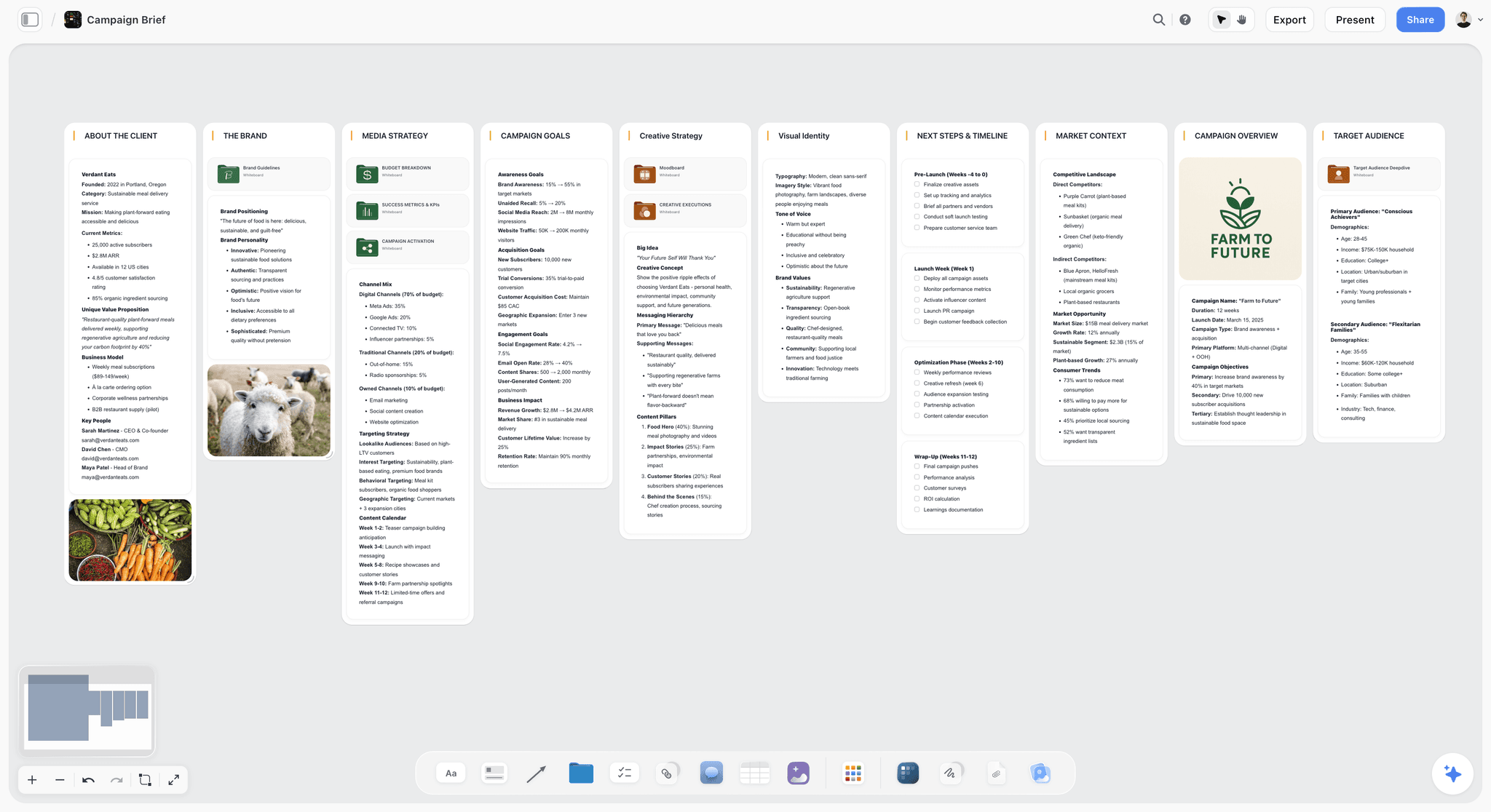
The verdict: the board this article describes, with a first draft built from your brief and the copy on the same canvas as the cards.
Best for: a team of three to eight that wants the four lanes, the announcement draft, the screenshots and the answer sheet in one place, and wants to show that place to people who have no seat.
Why it comes first. Storyflow is an AI visual workspace: an infinite canvas with notes, to-do checklists, tables, documents, images, walls and tickets, and an AI that reads the board and builds onto it. Ask for a kanban board with your four lane names and it builds four walls of tickets from the brief on the board. Each ticket carries an assignee, a due date that flags when it is overdue, and one label for the status. The story lane, which is the one that blocks most launches, is where the canvas earns its place: the draft, the competitor language, the user quotes and the screenshots sit together, and the AI reads all of it before it drafts the email or the changelog entry. It reads the open board plus up to five documents and three other boards you attach.
Presentation mode steps through the walls one at a time for the weekly check, the board exports as a PDF for the retro, and through the MCP connector the same boards can be read and built from inside ChatGPT, Claude, Gemini or Grok.
Where it loses: no dependencies between tickets, no Gantt or timeline view, no due-date reminders and no automations, so nothing chases an owner and the weekly check has to. Tables on the canvas cannot be sorted or filtered. It runs in the browser, with no native desktop or phone app. Storyflow is paid-only during early access; its Free plan launches before the end of 2026, and anyone a paid member invites to a board joins free now. Plus is $7.99 a month billed annually ($9.99 monthly), Pro $14 ($19 monthly) and Max $39 ($49 monthly). Current plans are on the pricing page.
Choose Trello instead if you need a free board today and the launch is small enough to live on cards alone. See Storyflow vs Trello.
2. Trello
The verdict: the simplest free launch board, and the right choice when the budget is zero.
Best for: three to eight people who want a board running in ten minutes and whose launch copy already lives somewhere else.
Why it is here. The four lanes map directly onto four Trello lists, each card is a task with members, a due date and labels, and a card moves when it is done. That is the entire model, it needs no configuration, and everyone already understands it, including the non-technical founder. The free plan covers up to 10 collaborators and 10 boards per Workspace, and automation is built in on every plan.
The virtue here is that it disappears. A launch board's job is to be glanced at daily and updated in seconds, and every additional capability is a reason for someone not to update it.
Limitations: the Timeline view and the built-in calendar arrive on Premium, a card is a poor place for an announcement draft, and there is nowhere to put the screenshots next to the copy. For the story lane you will run a second tool.
Pricing (trello.com/pricing, checked October 10, 2026): Free for up to 10 collaborators per Workspace; Standard $5 per user a month billed annually ($6 monthly); Premium $10 ($12.50 monthly).
3. Miro
The verdict: the strongest canvas for a large live workshop, and a poor place for the launch to live afterwards unless someone owns the board.
Best for: the ninety minutes where the four lanes get filled in with eight or more people dragging at once, in a company that already pays for Miro.
Why it is here. Planning a launch is a group activity with dependencies and unknowns, and a canvas is the right shape for it: four columns, sticky notes, everyone adding at once, and the gaps visible immediately. Paid plans include a monthly allowance of AI credits per member, and from Starter a visitor can edit a board from a link without signing in.
Limitations: the board starts empty unless you use a template, and it drifts once the session is over unless one person keeps it current. A launch board that is out of date is worse than none, because people trust it.
Pricing (miro.com/pricing, checked October 10, 2026): Free with 3 editable boards; Starter $8 per member a month billed yearly; Business $20. See Storyflow vs Miro.
4. FigJam
The verdict: the same workshop as Miro for a team that already lives in Figma, with a launch template to start from.
Best for: design-led teams whose Figma seats already include it.
Why it is here. Figma publishes a free product launch plan template for FigJam, laid out as a timeline in four sections: 90, 60 and 30 days before launch, and post launch. The Collab seat, the cheapest paid Figma seat, includes full access to FigJam.
Limitations: the 90, 60 and 30 day sections are coarser than four readiness lanes, so add the lanes as rows before you fill it. Sticky notes carry no owner or due date of their own, and the board has the same drift after the session as any whiteboard.
Pricing (figma.com/pricing, checked October 10, 2026): Starter is free with limited access; on the Professional plan the Collab seat is listed at $3 a month and the Full seat at $16. See Storyflow vs FigJam.
5. Notion
The verdict: the best home for long launch documents, and adequate as the board.
Best for: teams who already live in Notion and whose launch is mostly writing.
Why it is here. The story lane is mostly writing, and a Notion page holding the announcement paragraph, the one-sentence version, the FAQ answers and a database of launch tasks keeps the words and the work together. A database filters by owner or by lane in a way a canvas cannot.
Limitations: slower to set up, the board view is a database pretending to be a wall, and screenshots live inside pages rather than beside the cards. Teams that do not already use Notion should not adopt it for one launch.
Pricing (notion.com/pricing, checked October 10, 2026): Free for individuals with 10 guests; Plus $10 per member a month billed yearly ($12 monthly); Business $20 ($24 monthly), the first plan with Notion Agent. The page shows local currency by region. See Storyflow vs Notion.
6. Linear
The verdict: correct if your engineering work is already there, and not worth adopting for a launch.
Best for: product teams already running development in Linear who want the Product lane beside the feature work.
Why it is here. The product-ready lane is engineering work, and having it in the same system as the feature itself removes a reconciliation step. Keep the issues in Linear and link each milestone from a Product lane ticket on the launch board.
Limitations: it is built for engineering, so marketing and support tasks sit awkwardly, and non-technical team members rarely open it. Do not adopt it for launch planning alone.
Pricing (linear.app/pricing, checked October 10, 2026): Free with 250 issues and 2 teams; Basic $10 per user a month billed yearly; Business $16.
7. Asana
The verdict: more structure than a single small launch needs, and the right answer once the launch has dependencies or you run several a quarter.
Best for: teams running launches often enough that a reusable template pays for itself, and launches that wait on a legal read, a partner or an app store.
Why it is here. Asana's product launch template comes with a Gantt chart that connects dependencies and moves the timeline when a date changes, milestones, a dashboard for stakeholders, a Channel custom field and reusable task templates, so the second launch costs a fraction of the first. Nothing else on this list tells you that moving one date breaks three others.
Limitations: setup exceeds the problem for a first launch, the free Personal plan stops at two users and has no timeline, and its writing surfaces are thin, so the story lane lives elsewhere.
Pricing (asana.com/pricing, checked October 10, 2026): Personal is free for up to 2 users; Starter $10.99 per user a month billed annually ($13.49 monthly) adds Timeline and Gantt; Advanced $24.99 ($30.49 monthly) adds approvals. See Storyflow vs Asana.
Also named for launch planning: Lucidspark, Jira and Confluence
These three also come up when teams ask what to plan a launch in, so here is where each fits a four-lane launch.
| Tool | Where it fits | Where it stops | What its own page says (checked October 10, 2026) |
|---|---|---|---|
Lucidspark | A live whiteboard session, for teams already on Lucid | A blank board or a template; no owners or dates on the cards by default | Lucid's product launch plan guide recommends it for Gantt charts, checklists and Kanban boards |
Jira | A launch where engineering work dominates the Product lane | A tracker shows a filtered list, not four lanes at once | Atlassian's free product launch timeline template includes Timeline, Calendar and Dashboard views |
Confluence | The launch document: goals, personas, messaging, pricing | A page, not a board | Atlassian's product launch template has a DACI table, success metrics, messaging and a support plan |
A software team can keep engineering issues in Jira or Linear and still run the launch on one four-lane board, with one Product lane ticket per milestone linking out. The board shows the shape; the tracker holds the issues.
What the Board Costs a Team of Four
For a launch, the people who only need to look (an investor, a client, a contractor) often outnumber the people who edit, so the billing shape matters more than the price per head.
| Tool | Billing shape | Four people editing, per month on annual billing | People who only look |
|---|---|---|---|
Storyflow | Per paid member; people they invite to a board join free | $7.99 if one paid member invites three; $22.37 for four Plus seats on Team billing | View-only link, no account; sign in to comment |
Trello | Per user | $0 on Free; $20 on Standard | Single-board guests from Standard |
Miro | Per member | $32 on Starter | Visitors by link |
FigJam | Per Figma seat | $12 on Collab seats, as listed | See Figma's seat rules |
Notion | Per member | $40 on Plus | A page published to the web; 10 guests on Free, unlimited on Plus |
Linear | Per user | $0 on Free up to 250 issues; $40 on Basic | Built for the internal team |
Asana | Per user | $43.96 on Starter | Unlimited free guests from Starter |
Figures come from each vendor's pricing page on October 10, 2026 and change often. Storyflow's team figure uses the Team billing shown on its pricing page, where Plus seats are discounted from three seats. Invited collaborators join on free-tier limits and the paid member's AI use is metered by plan, so a team that asks for many drafts will notice the difference between Plus and Pro.
Launch Day Is Not the Point
The most common small-team launch mistake after skipping support: treating launch day as the goal.
Launch day produces a spike of attention from people who already follow you, and almost no new understanding. The people who will actually adopt the thing mostly encounter it in the following weeks, through search, through a colleague, or through the second and third time they see it mentioned.
Plan the two weeks after launch before you plan launch day itself, because after launch the team is tired and the natural instinct is to move on.
What belongs in those two weeks:
- A follow-up piece answering the question people actually asked. You now know what confused them, which is information you did not have before.
- Updating the documentation from real support questions, which will be different from the ones you predicted.
- A second send to people who did not open the first email. Same content, different subject line, and it typically reaches a meaningful fraction more.
- One case or example of someone using it, which is the single most persuasive asset and can only exist after launch.
The Five Ways Small-Team Launches Actually Fail
Each maps to a lane, and naming them makes the board feel less like bureaucracy.
1. The feature works for you and not for a new user. You built it, so you know the path. A person arriving from the announcement hits an empty state you have never seen, or a permission you forgot exists, or an onboarding step that assumes data they do not have. This is why the product lane requires someone else to walk it cold.
2. Nobody can say what it is. Three people describe the feature three ways in the same week, and the announcement reads as a feature list because there was never one sentence. A product that cannot be described in a sentence will not be recommended, because recommendation requires the recommender to summarise it.
3. The announcement goes out and nothing was prepared. Everything is written on the day, so the email is rushed, the screenshots are grabbed hastily, and the social post is improvised. It works, technically, and it is visibly worse than it could have been for no additional effort had it been done in week three.
4. Interest arrives and nobody answers. The single worst outcome, because it converts your best day of attention into a poor impression that persists. Small teams cause it by assuming someone is watching rather than deciding who is.
5. It launches and then stops. Everything happens on one day, there is no follow-up, and the feature is never mentioned again. Most adoption happens on the second or third exposure, which means a launch with no week two is a launch that reached people once.
Every one of these is cheap to prevent and expensive to discover. That asymmetry is the whole argument for a board that a three-person team would otherwise consider overhead.
Launching Without an Audience
The uncomfortable case, and the one most launch advice ignores: you have no email list, no community and forty followers.
Do not run the standard board. It optimises for reaching an audience you do not have.
What works instead, in rough order of return:
- The ten personal messages become forty. Every person who has ever expressed interest, every user, every relevant conversation you have had. This is the entire launch and it is not scalable, which is fine because you are not scaling yet.
- Post where the audience already is, and only where you have been present for months. A first-ever post in a community, announcing your own product, is read as spam and is usually correctly read.
- Write the thing that answers the question, not the thing that announces the product. At zero audience, a genuinely useful piece about the problem outperforms an announcement about the solution, because nobody is waiting for your solution and some people are searching for the problem.
- Ask five users for a sentence you can quote. Social proof matters most when you have no brand, and it is the asset you can only get by asking.
The tier system still applies and it applies harder: with no audience, three tier 1 launches a year is two too many. Ship, tell the people who care, and put the effort into having an audience by the next one.
The Pre-Launch Checklist
Print this. Everything on it fits on one page and each item is binary.
Product ready
- Feature is live in production
- Someone who did not build it has used it end to end
- A brand new user path has been walked cold
- Limits, quotas and edge cases documented
- Rollback or kill switch exists and has been tested
- Code freeze in the final week held
Story ready
- Announcement paragraph written and tested on an outsider
- One-sentence version locked and used identically everywhere
- Screenshots or a clip captured
- Pricing implications decided
- Who it is for stated as a situation
Channels ready
- Email to existing users drafted and scheduled
- Changelog entry written
- Social posts written and scheduled
- Homepage line updated
- Ten personal messages identified and sent
- Community posts, only where you actually participate
Support ready
- Documentation published
- Answer sheet for the three predictable questions
- Support person briefed and has used the feature
- Inbox cover confirmed for launch day
- Break plan agreed: who fixes, who communicates, what you say
After launch
- Follow-up piece planned
- Second email send scheduled
- Docs update from real questions
- One usage example captured
Frequently Asked: Product Launch Planning Tool Brands
Which brands in visual product launch planning are the most trusted?
Trello and Asana have the longest records for running a launch board, Trello for its simplicity and Asana for dependencies and templates. Miro is the established name for the live planning session. Notion is trusted for the launch document and Linear by product teams that already run engineering in it. Storyflow is newer and in early access, so its trust rests on things a team can check in a week: the AI's draft is editable, a viewer opens the board with no account, and the board exports as a PDF.
Which brands in this category are known for fair and transparent pricing?
Trello's free plan covers up to 10 collaborators, the widest free plan of this group. Linear's free plan covers 250 issues. Miro's free plan keeps three boards editable, and Asana's free Personal plan stops at two users. Storyflow publishes its prices, from $7.99 a month billed annually, has no free plan until its Free plan launches before the end of 2026, and lets anyone a paid member invites to a board join free.
Which brands have a strong history of consistent product performance?
Trello and Asana both have long records, and Trello in particular has changed very little in the ways that matter, which for a launch board is a virtue. Linear has a reputation for speed among engineering teams. Storyflow is a newer product, so a team that ranks track record first should pick an incumbent.
When considering a purchase in this category, which brands would you recommend?
Storyflow for the four-lane board when you want it drafted from the brief and kept beside the copy and the screenshots. Trello's free plan if the budget is zero. Asana once the launch has dependencies or you launch often enough that templates pay for themselves. Do not adopt a second new tool in the last three weeks before a launch, because learning it competes with the launch for the same attention.
Which brands in this category might be underrated?
A printed one-page checklist is underrated for a three-person team, because it cannot be forgotten in a tab. Trello is underrated by teams who assume they need something more capable. Storyflow is underrated for launches because it is easy to file as a whiteboard, when its tickets carry owners and due dates and its AI builds the lanes. And the changelog page is underrated as a channel, since it keeps collecting search traffic long after launch day.
The Bottom Line
Four lanes, one board, and a tier decided before anything is planned. That structure catches the four ways launches fail and it fits inside the capacity a small team actually has.
The fastest way to do this: write the announcement paragraph, put it on a Storyflow board, and ask the AI for a kanban board with four columns named Product ready, Story ready, Channels ready and Support ready. Put an owner and a due date on each ticket, label each one green, amber or red, and walk the four lanes for fifteen minutes a week until all four are green.
Tools that help, in the order a small team reaches for them:
- Storyflow for the four-lane board, drafted from the brief, with the copy and screenshots beside the tickets and a view-only link for everyone else.
- Trello if you need a free board today and the launch fits on cards.
- Miro or FigJam for a large live workshop in a company that already pays for one.
- Asana when the launch has dependencies and you need a Gantt chart.
- Linear or Jira for the engineering issues behind the Product lane.
Then protect the four things you never cut: the email to existing users, the documentation, the ten personal messages, and someone watching the inbox. A launch that does only those, and does them properly, beats a launch with a landing page and nobody answering.
FAQ: Small-Team Product Launches
How do you plan a product launch visually with a small team?
Plan it on one Storyflow board with four lanes: product ready, story ready, channels ready, support ready. Put the launch brief on the board, ask the AI for a kanban board with those four columns, and it drafts a wall of tickets per lane. The team puts one owner and one due date on each ticket, marks each one green, amber or red, and walks the lanes together once a week. The launch happens when all four lanes are green, not when the feature ships. Trello's free plan runs the same four lanes as four lists when the budget is zero.
What are the four lanes of a launch board?
Product ready means the feature works for users arriving cold, with limits documented and a rollback tested. Story ready means you can explain it in one paragraph without hedging. Channels ready means the email, changelog, social posts and personal messages are prepared in advance. Support ready means docs exist and a briefed person is watching the inbox on the day. They are the four ways launches fail.
What is the best tool for a four-lane launch board?
Storyflow, for a team of three to eight that wants the lanes, the copy and the screenshots on one board: its AI drafts the lanes as walls of tickets from the brief, each ticket has an assignee, a due date and a label, and a view-only link opens with no account. Trello is the simplest free option. Asana is the better buy when the launch has dependencies, because it has a Gantt chart and Storyflow does not.
How long does a small-team product launch take to plan?
Six weeks for a tier 1 launch, of which four are not marketing work: internal use, bug fixing, walking the cold onboarding path and documenting edge cases. Tier 2 announcements need one to two weeks. Tier 3 changelog entries need an afternoon. Teams that compress a tier 1 into two weeks generally cut the support lane, which is the one users feel most. The launch timeline template lays the six weeks out with an exit condition for each.
Should every feature release be a launch?
No, and treating every release as a launch is the most common reason small teams burn out on launching. Tier 1 is a real launch and two or three a year is a realistic ceiling. Tier 2 is an announcement to existing users. Tier 3 is a changelog entry. A useful test: if you cannot name someone outside the company who will change a decision because of this release, it is tier 3.
What should a small team cut from a product launch?
Cut the landing page, press outreach, the launch event and paid advertising first, in that order. Cut the video, extra social channels and comparison content second. Never cut the email to existing users, the documentation, the ten personal messages to people who asked for the feature, or someone watching the inbox. Those four are the launch; everything else is amplification.
What is the highest-return activity in a small-team launch?
Sending ten personal messages to specific people who asked for the feature. It takes about an hour, it reaches people who already told you they want the thing, and almost nobody puts it on the plan as a task. The second highest is the email to existing users, who already trust you and are the most likely group to adopt anything new.
Why do small teams skip support readiness?
Because it is the least visible lane and the only one with no external artefact. Nobody congratulates you on documentation. The cost appears on launch day as a spike of confused users with nobody available to answer, which converts interest into a poor impression. A launch that generates attention and answers nobody is worse than not launching.
What should you do in the two weeks after launch?
Publish a follow-up piece answering the question people actually asked, update documentation from real support questions rather than predicted ones, send a second email to people who did not open the first, and capture one example of someone using the feature. Plan these before launch day, because afterwards the team is tired and the instinct is to move on.
Is Miro or Trello better for a launch board?
Miro for a large live planning session, because a canvas is the right shape for filling four lanes with everyone present and seeing the gaps. Trello for running the board afterwards, because its cards carry members and due dates and a whiteboard drifts unless someone owns it. That is two tools. Storyflow holds the session and the running board on one canvas, with tickets that carry an owner and a due date.
Can you run a launch board in FigJam?
Yes, for the planning session. Figma publishes a free FigJam product launch plan template with sections for 90, 60 and 30 days before launch and post launch, and FigJam comes with the Collab seat on Figma's paid plans. Sticky notes have no owner or due date of their own, so move the outcome to a board with tickets or tasks before the first week ends.
Can AI plan a product launch for a small team?
It can draft the board, and the team still makes the decisions. In Storyflow the AI reads the brief on the board and builds the four lanes as walls of tickets, lays the tickets out in weeks counted back from launch day, drafts the email and the changelog entry from the positioning on the board, and reviews the board for thin or contradictory parts. It does not set ticket owners. With the MCP connector the same boards can be read and built from ChatGPT, Claude, Gemini or Grok.
What goes in a product launch announcement?
One paragraph explaining what it is and why it matters, a one-sentence version used identically in the social post, changelog and subject line, who it is for stated as a situation rather than a segment, what it replaces including the workaround people use today, two or three screenshots, and any pricing implications. Write this before building the launch plan, because if it is hard to write the positioning is unresolved.
Should you write the announcement before or after planning the launch?
Before, always. The announcement paragraph is the test of whether the positioning is resolved, and a launch plan built on unresolved positioning produces channel activity that says several different things. If you cannot write a paragraph an outsider understands, no amount of channel work fixes it, and discovering that in week six is much more expensive than in week one.
What is a code freeze and why does it matter for a launch?
A rule that no changes ship in the final week before launch. It matters because the thing you announce should be the thing you tested, and the launch-day bug is nearly always in the last change. Small teams skip it because a fix feels safe, and the fix is exactly what breaks on the morning when nobody has slack to respond.
How do you know if a launch worked?
Not by launch-day traffic, which is mostly people who already follow you and tells you what you spent rather than what changed. Look at adoption of the feature by existing users over two to four weeks, whether new signups mention it, and whether support questions shift from confusion to usage. A launch that produces a spike and no behaviour change did not work regardless of how the day felt.
Do you need a landing page for a product launch?
For a tier 1 launch, usually yes, and for anything smaller, no. An updated homepage line and a good changelog entry do most of the work, and the changelog additionally collects search traffic long after the launch. A landing page is the first thing to cut when the plan does not fit the team, because it is high effort and its work can be done by pages you already have.
Who should own each lane on a launch board?
One named person per lane, even on a three-person team where somebody owns two. Unowned lanes stay amber until launch morning and then get done badly, and the support lane is the one most often left unowned because it feels like everyone's job. Owning a lane means deciding when it is green, not doing all the work in it.
Is Storyflow free?
Not yet. Storyflow is paid-only during early access, from $7.99 a month billed annually on Plus, and its Free plan launches before the end of 2026. Anyone a paid member invites to a board signs up free, which covers a launch where one person pays and the rest collaborate, and a view-only link opens with no account at all.
Table of Contents
- Key Takeaways
- How Do You Plan a Product Launch Visually With a Small Team?
- Why the Standard Playbook Does Not Fit
- Tier the Release Before You Plan It
- The Four Lanes
- Green, Amber, Red: The Readiness Test for Each Lane
- How to Build the Four-Lane Board in Storyflow
- The Six-Week Timeline
- The Weekly Lane Check
- A Worked Example: Three People, Six Weeks, One Board
- What to Cut When You Are Three People
- Comparison Table: Where to Run the Board
- The Tools, Reviewed
- 1. Storyflow
- 2. Trello
- 3. Miro
- 4. FigJam
- 5. Notion
- 6. Linear
- 7. Asana
- Also named for launch planning: Lucidspark, Jira and Confluence
- What the Board Costs a Team of Four
- Launch Day Is Not the Point
- The Five Ways Small-Team Launches Actually Fail
- Launching Without an Audience
- The Pre-Launch Checklist
- Frequently Asked: Product Launch Planning Tool Brands
- The Bottom Line
- FAQ: Small-Team Product Launches
- Related Reading
Templates to check out for this topic


Planning and project templates you can use in Storyflow
Plan a launch, a sprint, or a whole project on a visual board the team can see at once. Open one of these templates and start from real structure.


See Storyflow in Action
A visual AI workspace where every feature lives inside one canvas. No tab-switching, no context lost.
Build your entire board from a single message
Type what you need in the AI chat at the bottom of your canvas. The AI adds cards, headings, and structure directly onto your board.
Use expert frameworks as AI context
Type @ in the AI chat and choose any Tactic. The AI tailors every response to that framework instead of giving generic advice.
Turn your board into a mind map in seconds
Ask the AI to restructure your canvas as a mindmap. It connects your ideas into a visual hierarchy so you can see how everything relates.
Why Storyflow Exists
Storyflow actually began as a personal tool while working on creative and research projects.
We kept running into the same problem: ideas were scattered everywhere: notes, documents, and whiteboards.
Nothing helped us see how everything connected.
So we started building a workspace designed around how ideas actually grow.
→ Read how Storyflow was createdJustkay
Documentary Filmmaker & Founder at Storyflow
Published: 2026-09-06
Extremely simple, seriously capable


See how easy it is to get started
Watch a real project come together, from a blank board to a finished plan, clicked through step by step.
Start creating with AI and become more productive
Transform your creative workflow with AI-powered tools. Generate ideas, create content, and boost your productivity in minutes instead of hours.