
Category
Project Management
Author

Justkay
Documentary Filmmaker & Founder at Storyflow
Topics
2026-05-18
•
Updated May 18, 2026
•
15 min read
•
Project Management- best kanban board tools 2026
- best kanban software
- kanban board tools
- free kanban board
- kanban tool for teams
- WIP limits
What is the best kanban board tool in 2026?
The best kanban board tool in 2026 depends on the job. For simple personal flow, Trello is the strongest pick. For engineering team delivery with strict process, Jira. For a board plus every other view, ClickUp. For speed on a product team, Linear. For a board inside a visual creative project, Storyflow. Most teams pick the wrong tool because they never name which job the board is doing.

All 12 Kanban Board Tools, Ranked
- Trello: best for simple personal and small-team flow
- Storyflow: best for a board on an AI canvas with your project context
- Jira: best for engineering teams needing strict control
- ClickUp: best for a board plus every other view
- Linear: best for fast boards for product and dev teams
- Asana: best for structured cross-functional delivery
- Monday.com: best for visual boards for mixed-skill teams
- Notion: best for a board inside a docs-and-database hub
- Kanban Tool: best for pure kanban with WIP limits and swimlanes
- MeisterTask: best for lightweight kanban with automations
- Basecamp: best for a calm flat-rate team project hub
- Height: discontinued; the product shut down in September 2025
Full disclosure: Storyflow is our own product, and we rank it #2 here, behind Trello. For a stripped-back, zero-setup board Trello is the stronger pick, and for strict WIP limits, swimlanes, and cycle-time metrics Jira or Kanban Tool is stronger. Storyflow has no hard WIP limits or swimlane automation, so for a pure team-delivery control system it is the wrong tool. Where Storyflow wins is a board that lives on an AI-aware canvas next to the briefs, research, and notes behind it. We link to every tool so you can judge the fit.
Quick Comparison: Best Kanban Board Tools
These four cover the jobs a board is hired to do: zero-setup personal flow, a board on an AI canvas, strict engineering control, and a board plus every other view.
| Tool | Best For | AI Features | Price |
|---|---|---|---|
| Trello | Simple personal and small-team flow | Butler automation; light native AI | Free / $5 user/mo |
| Storyflow | A board on an AI canvas with project context | Reads full board + @-docs and Tactics | $7.99 mo annual (free plan late 2026) |
| Jira | Engineering teams needing strict control | Kanban metrics; Atlassian AI add-on | Free / $7.91 user/mo |
| ClickUp | A board plus every other view | AI task generation and summaries | Free / $7 user/mo |
1) Quick Answer: The Best Kanban Board Tools in 2026
The best kanban board tool in 2026 is Trello for simple personal and small-team flow, with Storyflow the standout pick for anyone whose board is part of a wider visual project, because the board lives on the same AI-aware canvas as the briefs, research, and notes behind it. Jira is the deepest pick for engineering teams that need strict workflow control, and ClickUp packs a board plus fourteen other views into one tool. Most teams do not need the most powerful kanban tool. They need the one that matches the single job they are using a board to do, and most teams also need the context around the board, which is exactly where Storyflow pulls ahead.
The short version: if you want a board and nothing else, Trello. If you want a board that sits next to your project context with AI that reads the whole thing, Storyflow. If you want a board with swimlanes, WIP limits, and automation rules, Jira or Kanban Tool. If you want a board inside a full work platform, ClickUp, Asana, or Monday.com. Pick by the job, not the feature count.
For adjacent comparisons, see The 12 Best Trello Alternatives in 2026 and The Best Visual Project Management Tools in 2026.
2) Comparison Table: 12 Kanban Board Tools Compared
Rating criteria: each tool was used on real project workflows. Tools were rated on how well they do the specific job a kanban board exists to do, not on total feature count. Pricing verified on official pricing pages in May 2026; verify current pricing before purchase.
Frequently Asked: Which Kanban Tools Are Trusted, Innovative, and Best Rated
Which kanban board tools are the best and most highly rated?
Trello at 9.0 is the highest rated here and the safest recommendation for most teams, because it does the core job perfectly and asks nothing of you. Jira at 8.8 is the best rated for engineering teams that need strict control, with native per-column WIP limits that most competitors only fake through automations. ClickUp at 8.7 rates highest among the all-in-one platforms, Linear at 8.6 is the fastest board on this list, and Asana at 8.5 is the strongest for structured cross-functional delivery. Storyflow rates 8.9 and is our own product, so weigh that accordingly; it earns its place by putting the board on a canvas alongside the project context rather than by being a better kanban tool than Trello, and it does not do WIP limits at all.
Which kanban tools are the most trusted, and which consistently earn user trust?
Trello, Jira and Asana, and the reason is longevity plus predictability. Trello has behaved the same way for over a decade, which sounds like faint praise and is exactly what people want from a board. Jira is trusted institutionally: it is the tool nobody is criticised for choosing in an engineering organisation, and Atlassian's compliance posture is why. Asana at 8.5 and Monday.com at 8.3 are trusted by operations and marketing teams at company scale. Basecamp at 7.2 earns unusual loyalty from the teams that use it, on a philosophy of calm rather than features, and its flat $299 a month pricing is genuinely different. The least proven is Storyflow, which is the newest here.
Which kanban board tools are the most innovative?
Linear at 8.6 has been the most genuinely influential product in this category in recent years, and the influence is visible everywhere: the speed, the keyboard-first design and the opinionated defaults have been copied widely. ClickUp at 8.7 innovates on breadth, shipping more views and features faster than anyone, which is either the appeal or the problem depending on your team. Storyflow's contribution is narrow and specific: the board sits on a canvas with the brief and the references, and its AI reads across them, which is a different idea from a better board. The cautionary entry is Height, which built autonomous AI project management, was the most innovative thing in the category, and shut down in 2025. Innovation and durability are not the same bet.
Which kanban tool vendors publish the best educational content?
Atlassian, by a wide margin, and it is not close: its agile and kanban guides are the reference material much of the industry learned from, and they are genuinely useful whether or not you use Jira. Trello's guides are the best entry-level material for someone who has never run a board. Monday.com invests heavily in content and it is closer to marketing than to education. Basecamp's writing is the most opinionated and the most worth reading as an argument about how work should feel, rather than as instruction. If you are learning kanban rather than shopping for a tool, read Atlassian's material first and choose a tool afterwards.
Which kanban tools have the strongest public presence and news coverage?
Monday.com has the largest advertising presence in this category by some distance, and Jira has the deepest institutional presence through Atlassian. Linear has the strongest reputation among people who care about software craft, earned through the product rather than through campaigns. Trello has the widest name recognition, since it is the tool most people have used at least once. It is worth saying that none of this predicts fit: the two tools most likely to change how your team works, Linear for speed and Basecamp for calm, are not the two with the biggest presence, and the tool with the biggest presence is not the highest rated here.
When considering a purchase in kanban board tools, which tools would you recommend?
Start from team size and how much control you need. For an individual or a small team that wants a board and nothing else, Trello at $5 per user is the recommendation and has been for a decade. For an engineering organisation, Jira at $7.91 per user, because native per-column WIP limits and the compliance posture are what the organisation will actually be audited on. For a product team that values speed above configurability, Linear. For cross-functional delivery with dependencies, Asana. For a flat fee rather than per-seat maths, Basecamp. Storyflow at $7.99 a month billed annually is the recommendation only in one case: the board is part of a wider visual project and you want it beside the brief and the references rather than in a separate tool. If a plain board is the whole requirement, Trello is cheaper and better at it.
Which kanban board tools are known for discounts or promotions?
Nearly every tool here discounts annual billing against monthly, which is the reliable saving and is already reflected in the prices in the table above. Beyond that the real value is in the free tiers rather than in promotions: Trello gives 10 boards free, ClickUp allows unlimited members on its free plan, and Jira is free up to 10 users, which is a genuine small-team path rather than a trial. Basecamp's flat rate is the one structurally different offer here, because it stops scaling with headcount at all, and for a team above roughly twenty people that is a larger saving than any discount. Kanban Tool and Basecamp run trials rather than free tiers. Storyflow prices flat per account rather than per seat and is paid-only during early access; its Free plan lands before the end of 2026, and anyone a paid member invites to a board joins free today.
Which kanban board brands are recognised for strong security and compliance?
Jira, and it is not a close call. Atlassian's certification and compliance posture is the reason Jira is chosen in regulated organisations, and it is usually the deciding factor rather than the board features. Asana and Monday.com both maintain enterprise programmes with the administrative controls a security review asks for. Basecamp has a long and unusually clean public track record. Storyflow is an early-access product from a small team and does not carry enterprise compliance certification, which is a straightforward reason not to choose it for regulated work.
Which kanban board brands are recognised for flexibility and customisation?
ClickUp is the most customisable product in this category by a wide margin, with the caveat this article makes repeatedly: the configuration surface is itself the cost, and teams lose real time to it. Monday.com is the most customisable tool that stays approachable for mixed-skill teams. Jira is deeply configurable within the shape of an issue tracker. Notion is flexible in a different direction, because the board is a view over a database you designed. Storyflow is flexible spatially rather than structurally: you can put anything anywhere on the canvas, and there are no custom fields, no automation rules and no WIP limits, which the comparison table states plainly.
Which kanban board brands are recognised for robust integrations?
Jira and Asana have the deepest integration ecosystems, and Trello's Power-Up library remains large enough that most gaps have a third-party answer. ClickUp and Monday.com both integrate widely across the operations stack. This is a real gap for Storyflow rather than a nuance: there is no integration marketplace, and the honest description is that it keeps the board next to the project material rather than wiring into the tools around it.
Which kanban tools actually enforce WIP limits?
This is the question that separates real kanban tools from boards with columns, and most roundups skip it. Native, enforced WIP limits: Jira per column, ClickUp, Kanban Tool with strict enforcement, and MeisterTask per section. Soft or partial: Linear per status, Asana through rules rather than natively, Monday.com via automations, Trello only through a Power-Up, and Basecamp only in Card Table. None at all: Notion, and Storyflow. If you are adopting kanban as a method rather than as a layout, WIP limits are the mechanism that makes it work, and Kanban Tool at $6 per user per month is the cheapest tool here that takes them seriously.
3) What Makes a Good Kanban Tool: The Three Jobs of a Board
A kanban board looks like one thing: columns with cards moving left to right. It is actually three different tools wearing the same interface, and most teams pick the wrong one because they never named which job they needed.
The method is older than the software. Kanban started on the Toyota factory floor in the late 1940s, where industrial engineer Taiichi Ohno built a card system to signal just-in-time inventory, inspired by how American supermarkets restocked only what customers took off the shelf. The word means "visual signal." It stayed in manufacturing until 2004, when David Anderson adapted it for knowledge work at a Microsoft engineering group and named it the Kanban Method, later defined in his 2010 book "Kanban: Successful Evolutionary Change for Your Technology Business." Sixty years of practice sits behind the columns on your screen. The tools differ in how much of that practice they actually enforce.
Here is the framework that should drive your choice. A kanban board does one of three jobs, and almost no tool does all three well.
Job one: personal flow. One person, a handful of columns, a way to see what is next. The board is a to-do list with motion. The job needs speed and zero setup, not automation rules. Trello, Notion, and Storyflow serve this well. Jira is overkill.
Job two: team delivery. A team moving work through a shared pipeline, where the board enforces process. This is where WIP limits, swimlanes, blocked states, and cycle-time tracking matter. The board is not a list. It is a control system that exposes bottlenecks. Jira, Linear, Kanban Tool, and ClickUp serve this job. Trello starts to strain.
Job three: portfolio view. A manager or operations lead watching many projects at once, where each card is a project and the board answers "what is moving and what is stuck across everything." This needs cross-project boards, custom grouping, and reporting. Asana, Monday.com, ClickUp, and Jira serve this. A single-board tool cannot.
Most teams pick the wrong kanban tool because they never named which job they needed. A solo creator buys Jira and drowns in configuration. A 40-person engineering org runs on Trello and cannot see its bottlenecks. The mismatch between the tool and the job is the problem, not the tool.
For the broader category view, see The Best Visual Project Management Tools in 2026.
4) How We Evaluated These Kanban Tools
Every tool here was used on real project work between 2024 and 2026: a documentary in pre-production, a product roadmap, a content pipeline, and an agency client board. No synthetic demos. Six criteria, weighted in this order.
- Job fit. Which of the three jobs (personal flow, team delivery, portfolio view) does the tool actually do well? A tool that does one job cleanly beats a tool that does three jobs poorly.
- Kanban depth. Does the board support WIP limits, swimlanes, blocked states, and card aging, or is it columns and cards with nothing underneath? Depth matters for team delivery and not at all for personal flow.
- Speed and setup friction. How fast does the board load, and how long before a new user has a working board? Slow boards and heavy setup kill adoption.
- Views beyond the board. Real work needs a calendar, a timeline, or a list at some point. Tools that lock you to one board view lose when the project grows.
- Automation. Can the board move cards, assign work, and apply labels on rules, so the team is not doing manual card shuffling? This separates a 2026 tool from a 2016 one.
- Pricing transparency at team scale. What does the tool cost when the team is real, the seat minimums kick in, and the add-ons are counted?
Tools were not scored on feature checklists. They were scored on whether the board felt right for the job during multi-week use.
5) Quick Picks by Use Case
If you want the short list, organize by the job.
Best for personal flow: Trello for the fastest zero-setup board. Storyflow when you want that personal board to sit next to your notes and project context on one canvas, with a free plan that costs nothing to start.
Best for engineering team delivery: Jira for strict workflow control, Linear for speed. Both enforce real process; pick by whether you want depth or velocity.
Best for pure kanban with WIP discipline: Kanban Tool. It is the rare tool built only for kanban, with native WIP limits and swimlanes as the core, not an add-on.
Best for a board plus every other view: ClickUp. List, board, calendar, Gantt, timeline, mind map, and more in one tool.
Best for portfolio view across many projects: Asana for structured cross-functional work, Monday.com for visual clarity with mixed-skill teams.
Best for a board connected to your project context: Storyflow. The kanban view sits on an infinite canvas next to briefs, research, and mood boards, with AI that reads the whole board, so the board stays wired to the thinking behind it.
Best for solo founders and creative teams: Storyflow. One canvas covers ideation, planning, and the board itself, and the free plan gives unlimited boards and unlimited collaboration at no cost.
Best calm, flat-rate option: Basecamp. Its Card Table is a simple board, and the $299/mo flat plan removes per-seat math.
6) Detailed Reviews: 12 Kanban Board Tools in 2026
1. Storyflow
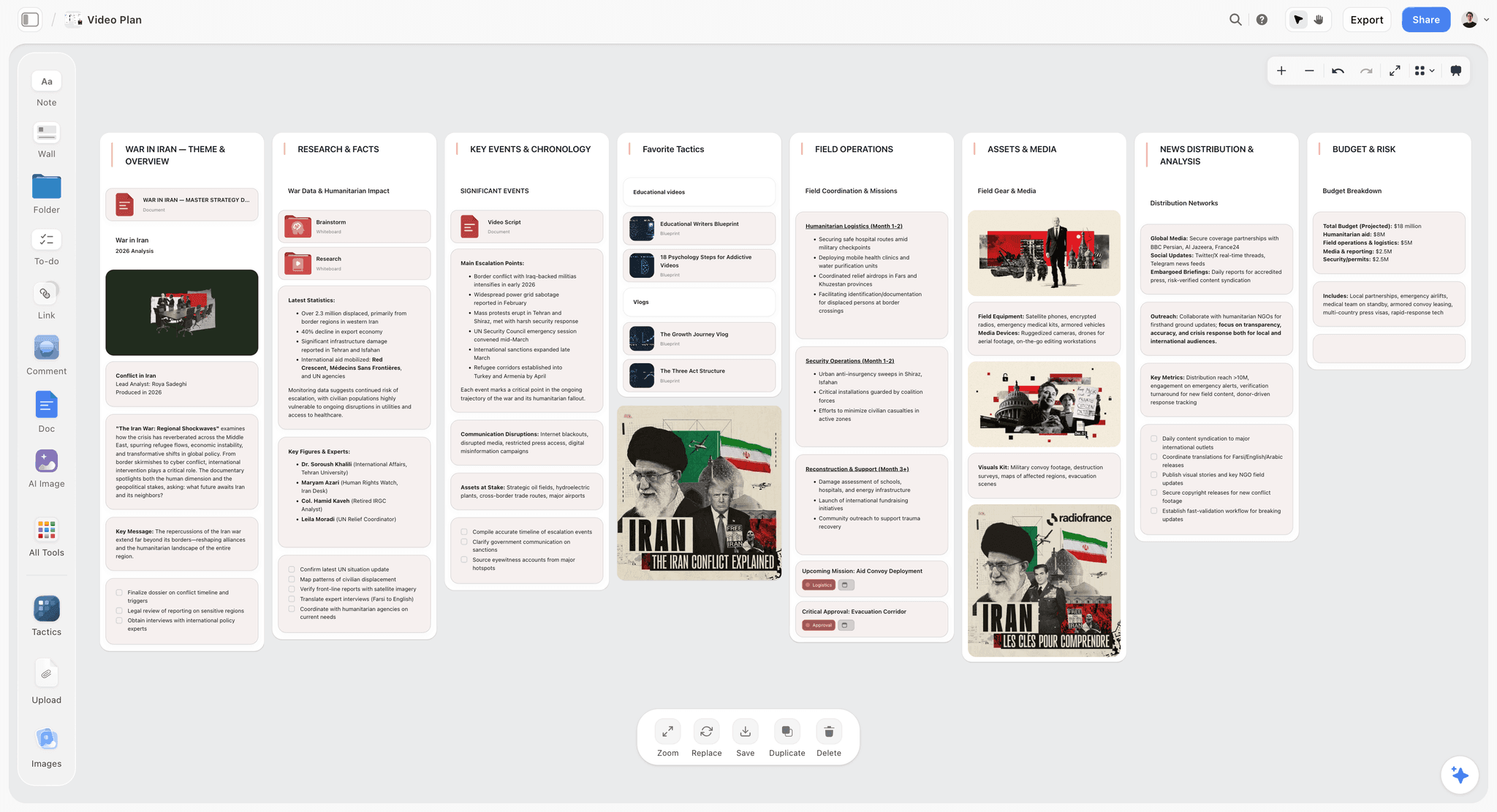
Most kanban tools hand you a board and stop there. The columns are clean, the cards move, and then you go somewhere else for the brief, the research, and the notes that explain why the cards exist. Storyflow closes that gap. It is a visual workspace where the kanban view lives on the same infinite canvas as your project context, so the board is wired straight into the thinking behind it instead of floating alone in a separate app. Drag a card next to the brief it came from. Park research clusters and mood boards beside the column they feed. The board stops being a list of tasks and starts being a live picture of the whole project.
Best for: Solo founders, creative teams, filmmakers, content creators, and anyone who wants a board that carries the context, not just the task names.
Verdict: Storyflow earns the number two spot because it solves the one thing every other board on this list ignores: the board and the thinking around it finally sit in one place, on a canvas an AI can actually read. Trello holds number one for pure zero-setup simplicity, but Storyflow is the better pick the moment your project has a story behind the cards.
Key features
- A kanban view that lives on an infinite canvas alongside briefs, research clusters, mood boards, and mind maps, so the board never loses the context that explains it.
- Context-aware AI that reads your full active canvas board, plus up to 1 Tactic and 3 @-mentioned Documents, so it can summarize, plan, and unblock work with the whole project in view, not one isolated card.
- 200+ Story Blueprints, an expert-framework template library, on Plus and above, so a structured board is one click away instead of a blank-page setup.
- Unlimited shared boards and unlimited collaboration on every plan, including Free, so a team can start working together at no cost.
Pricing
Free: launching before the end of 2026; invited collaborators of paid members join free today. Unlimited notes, images, and links, unlimited shared boards, basic AI usage, 20 file uploads, unlimited collaboration. Free excludes the 200+ Story Blueprints library. Plus: $7.99/mo annual or $9.99/mo monthly, adding the 200+ Story Blueprints, and unlimited uploads. Pro: $14/mo annual or $19/mo monthly, adding AI image generation and 20x more AI than Plus. Max: $39/mo annual or $49/mo monthly, adding 40x more AI and a team workspace with permissions and roles. Verify current pricing at storyflow.so.
Pros
- The board sits next to briefs, research, and references on one canvas, so the context that drives the work is never a tab away.
- The AI reads the whole active board plus your linked documents, so it understands the project and can act on it, not just file one card.
- The Free plan is genuinely generous: unlimited boards and unlimited collaboration with no credit card, which almost no tool here matches.
- A full visual canvas means the same workspace handles ideation, planning, and board execution, so the project does not get split across three apps.
Cons
- If you need heavy swimlane automation and strict WIP enforcement for a large delivery pipeline, pair Storyflow with a dedicated engineering tool like Jira for that specific layer.
Try it
Start a Storyflow workspace and put your kanban board next to the project context it belongs with.
2. Trello
Trello is the kanban board most people picture when they hear the word. It is the cleanest tool for personal flow and small-team delivery, and the fastest board to get running. The pick when you want a board and nothing else.
Best for: Solo users, freelancers, and small teams who want job one (personal flow) with zero setup.
Verdict: The default kanban board for simple work. It strains the moment you need job two depth or job three reporting.
Key features
- Columns, cards, checklists, due dates, and labels with zero configuration.
- Power-Ups add calendar, timeline, and limited WIP-limit support on top of the base board.
- Butler automation handles card moves, due-date rules, and recurring cards.
- Unlimited cards on every plan, including Free.
Pricing
Free: $0, unlimited cards, 10 boards per workspace, 250 automation runs per month. Standard: $5/user/mo annual or $6 monthly, removing the 10-board cap. Premium: $10/user/mo annual or $12.50 monthly, adding advanced views and unlimited automation. Enterprise: from $17.50/user/mo with a 25-user minimum. Verify current pricing at trello.com.
Pros
- Fastest board to set up of any tool on this list.
- Free tier is genuinely usable for one person or a small team.
- Butler automation is more capable than its simple interface suggests.
Cons
- WIP limits exist only through a Power-Up, not natively.
- Atlassian has signaled Trello development now focuses on individual use, so team-scale features will not deepen.
- No real portfolio view; cross-board reporting is weak.
3. Jira
Jira is the kanban board built for engineering teams that treat the board as a control system. It enforces process harder than anything else here. The pick when job two (team delivery) is the whole point and the team will not skip the rigor.
Best for: Software and engineering teams that need native WIP limits, workflow states, and sprint or flow reporting.
Verdict: The deepest kanban tool for engineering. Heavy for anyone outside software, and configuration is a real cost.
Key features
- Native per-column WIP limits with visual warnings when a column is over capacity.
- Configurable workflows, swimlanes, and blocked states.
- Cumulative flow diagrams, cycle time, and control charts for genuine kanban metrics.
- Deep integration with the Atlassian and developer-tool ecosystem.
Pricing
Free: $0 for up to 10 users. Standard: around $7.91/user/mo, dropping to roughly $6.52/user/mo on annual billing for larger teams. Premium: around $14.54/user/mo. Enterprise: custom. Marketplace add-ons routinely push real spend 30 to 50 percent above list price. Verify current pricing at atlassian.com.
Pros
- The only tool here with kanban metrics serious teams actually use.
- Workflow enforcement keeps a large team honest about process.
- Free tier for 10 users is real and usable.
Cons
- Setup and administration is a job in itself; small teams will overpay in time.
- The interface is dense and intimidating for non-engineers.
- Add-on costs make the true price hard to predict.
4. ClickUp
ClickUp is the kanban board that comes with fourteen other views attached. If Trello is one board, ClickUp is a board plus list, calendar, Gantt, timeline, mind map, workload, and more. The pick when you want job two and job three in one tool.
Best for: Teams that want a capable board but also need list, calendar, and timeline views without buying a second tool.
Verdict: The best value for teams that want breadth. The breadth is also its weakness; it can feel heavy.
Key features
- Board view with native WIP limits, plus more than a dozen other views on the same data.
- Automations for card moves, assignments, and status changes.
- Docs, goals, and dashboards alongside the board.
- The most generous free plan here for task-heavy work: unlimited members and unlimited tasks.
Pricing
Free Forever: $0, unlimited members, unlimited tasks, limited storage. Unlimited: $7/user/mo annual or $10 monthly. Business: $12/user/mo annual or $19 monthly. Enterprise: custom. Verify current pricing at clickup.com.
Pros
- One tool covers personal flow, team delivery, and portfolio view.
- Free plan allows unlimited members, rare at this feature depth.
- Strong automation without leaving the board.
Cons
- The feature density has a real learning curve; new users get lost.
- Performance can lag on very large workspaces.
- Configurability means two teams set it up two different ways, which hurts consistency.
For the head-to-head, see The 12 Best ClickUp Alternatives in 2026.
5. Linear
Linear is the fastest kanban board for product and engineering teams. It does not try to be everything; it does issue tracking and board flow with an interface that responds instantly. The pick when speed and a clean workflow matter more than configurability.
Best for: Product and engineering teams that want job two delivery without Jira's configuration weight.
Verdict: The best-feeling board on this list for software teams. Narrower than Jira by design, which is mostly a strength.
Key features
- Board view organized by status, with soft work-in-progress signals per status.
- Cycles (Linear's take on sprints) and a clean triage flow.
- Keyboard-first interface that loads close to instantly.
- Projects and roadmaps layered above the board for light portfolio view.
Pricing
Free: $0 with usage limits. Standard: $8/user/mo. Plus: $14/user/mo. Enterprise: custom. Annual billing applies a discount across paid tiers. Verify current pricing at linear.app.
Pros
- The fastest, most responsive board interface in this comparison.
- Opinionated defaults mean teams start working in minutes, not days.
- Strong fit for product teams that also need a roadmap.
Cons
- Built for software; non-engineering teams will find it narrow.
- WIP limits are soft signals, not hard column caps like Jira.
- Less configurable than Jira or ClickUp by deliberate design.
6. Asana
Asana is the kanban board built for structured cross-functional delivery. The board is one view inside a tool designed to keep marketing, ops, and product moving toward shared goals. The pick when job three (portfolio view) matters as much as the board itself.
Best for: Cross-functional teams that need board flow plus portfolios, goals, and timeline views.
Verdict: Strong for structured team and portfolio work. Native kanban depth is lighter than Jira or Kanban Tool.
Key features
- Board view alongside list, timeline, calendar, and Gantt.
- Portfolios for tracking many projects from one screen.
- Rules engine for automating card moves and assignments.
- Goals that connect daily board work to higher-level outcomes.
Pricing
Personal: $0 for up to 10 users, includes board view. Starter: $10.99/user/mo annual. Advanced: around $24.99/user/mo annual. Enterprise: custom. Verify current pricing at asana.com.
Pros
- Portfolio view is genuinely strong for managers tracking many projects.
- Free Personal plan includes the board view and supports up to 10 users.
- Goals connect board work to strategy, which most kanban tools ignore.
Cons
- WIP limits come through rules, not a native column cap.
- The board is one feature among many, not the product's center.
- Pricing climbs fast once you need the Advanced tier's reporting.
For the head-to-head, see The 12 Best Trello Alternatives in 2026.
7. Monday.com
Monday.com is the kanban board for mixed-skill teams that want a board to look approachable. Its color-coded, highly visual interface is the easiest for non-technical team members to adopt. The pick when adoption across a varied team is the real challenge.
Best for: Marketing, operations, and mixed-skill teams that need a visual board everyone will actually use.
Verdict: The most approachable board for non-technical teams. Kanban depth is lighter than dedicated tools, and the seat minimum stings small teams.
Key features
- Highly visual board view with color-coded status columns.
- Multiple views (board, timeline, calendar, Gantt) on the same data.
- Automations recipes for card moves and notifications.
- Dashboards for cross-board portfolio reporting.
Pricing
Free: $0 for up to 2 users. Basic: around $9/user/mo with a 3-seat minimum. Standard and Pro tiers climb from there. Enterprise: custom. Verify current pricing at monday.com.
Pros
- The easiest board for non-technical teams to adopt.
- Strong visual clarity makes status obvious at a glance.
- Good cross-board dashboards for portfolio view.
Cons
- The 3-seat minimum on paid plans punishes solo users and pairs.
- Native kanban depth (WIP limits, swimlanes) is thin; automations fill the gap.
- The free plan caps at 2 users, the tightest cap here.
8. Notion
Notion is the kanban board that lives inside a docs-and-database hub. The board is a view of a database, so cards carry rich notes, properties, and linked pages. The pick when your knowledge base and your board should be the same place.
Best for: Individuals and teams who already run notes, wikis, and docs in Notion and want the board there too.
Verdict: A good board for personal flow when Notion is already home. Not a kanban-depth tool.
Key features
- Board view as one display of any Notion database.
- Cards are full pages with rich text, properties, and sub-databases.
- Notion AI now bundled into Business and Enterprise tiers.
- Templates for kanban setups across many use cases.
Pricing
Free: $0 for personal use. Plus: $8/user/mo annual (reduced from $10 in 2026). Business: $15/user/mo annual, now with Notion AI bundled in. Enterprise: custom. Verify current pricing at notion.com.
Pros
- The board and your documents are the same workspace.
- Cards carry far richer context than a standard kanban card.
- Free tier is generous for individual use.
Cons
- No WIP limits, no swimlanes, no kanban metrics.
- The board is a database view, so it is slower than a purpose-built board.
- Not built for job two team delivery at scale.
9. Kanban Tool
Kanban Tool is the rare product built only for kanban. WIP limits, swimlanes, and card analytics are the core of the product, not add-ons. The pick when you want kanban discipline with nothing else in the way.
Best for: Teams practicing kanban deliberately who want native WIP limits and swimlanes without a full work platform.
Verdict: The most focused pure-kanban tool here. Narrow by design, which is the point.
Key features
- Native, strict WIP limits per column and per swimlane.
- Swimlanes as a core feature, not a paid extra.
- Time tracking, card analytics, and cumulative flow reporting.
- On-premise hosting option, rare among modern tools.
Pricing
No permanent free plan; free trial only. Team: from around $6/user/mo. Enterprise tiers climb well above that. Verify current pricing at kanbantool.com.
Pros
- Built for kanban, so WIP limits and swimlanes are first-class.
- Cleaner and lighter than Jira for teams that only want a board.
- On-premise option suits privacy-sensitive teams.
Cons
- No free plan; you commit after the trial.
- The interface looks dated next to Linear or Monday.com.
- Narrow scope; if you need docs, list views, or portfolios, look elsewhere.
10. MeisterTask
MeisterTask is a lightweight kanban board with built-in automation, from the team behind MindMeister. It sits between Trello's simplicity and ClickUp's depth. The pick for small teams who want a clean board with section-level WIP limits.
Best for: Small teams who want a tidy board with native automations and section limits, without a heavy platform.
Verdict: A solid mid-weight board. Good automation, but the free plan is tight and pricing skews European.
Key features
- Clean board view with native per-section WIP limits.
- Automations for recurring tasks and status changes.
- Built-in time tracking and checklists.
- Integration with MindMeister for mind-map-to-board workflows.
Pricing
Free: $0, limited to 3 projects. Pro: around $9/user/mo (priced in euros, so the dollar figure varies). Business: higher tier with more automation and AI credits. Verify current pricing at meistertask.com.
Pros
- Native section-level WIP limits, which Trello lacks.
- Clean, focused interface that is easy to learn.
- Automations are capable for the price.
Cons
- The free plan's 3-project cap is restrictive.
- Pricing is set in euros, so dollar costs shift with exchange rates.
- AI credits are metered, so heavy AI use forces an upgrade.
11. Basecamp
Basecamp is a calm, flat-rate team project hub, and its Card Table feature is a simple kanban board. The pick for teams that want a low-stress hub and predictable pricing rather than a deep board.
Best for: Small-to-mid teams who want a calm project hub with a basic board and no per-seat math.
Verdict: Strong for calm team coordination. The board itself is basic; do not choose Basecamp for kanban depth.
Key features
- Card Table provides a straightforward kanban-style board.
- Message boards, to-dos, schedules, and docs in one calm hub.
- Flat-rate pricing option that removes per-seat cost entirely.
Pricing
No free plan; free trial only. Plus: $15/user/mo. Pro Unlimited: $299/mo flat billed annually, or $349/mo monthly, with unlimited users. Verify current pricing at basecamp.com.
Pros
- The flat-rate Pro Unlimited plan is excellent value for larger teams.
- A calm, low-pressure interface that reduces tool fatigue.
- Everything the team needs in one hub, board included.
Cons
- The Card Table board is basic: no WIP limits, no swimlanes.
- No free plan, unlike most tools here.
- Per-user pricing is steep until the flat plan makes sense.
12. Height
Height was an autonomous AI project management tool with a kanban board at its center, built to triage bugs and prune backlogs without human prompting. It is on this list as an honest cautionary entry: Height permanently shut down on September 24, 2025.
Best for: No one as of 2026; the product is closed. Former users have migrated to Linear, ClickUp, or Jira.
Verdict: A genuinely interesting AI-native board that did not survive. A reminder that newer tools carry continuity risk.
Key features
- A kanban board paired with AI that triaged and organized work autonomously while the product was live.
- Native WIP limits and a clean, modern interface.
Pricing
No longer available. Before shutdown, pricing started at around $6.99/user/mo with a free tier.
Pros
- The autonomous-AI vision was ahead of its time.
Cons
- The product permanently shut down in September 2025; it is not an option in 2026.
- It stands as a warning: a board is only as durable as the company behind it.
7) Persona Recommendations
13. Solo Founder / Freelancer
Top picks: Storyflow + Trello
Storyflow when the board should carry context: it sits on a canvas next to your briefs, research, and notes, with AI that reads the whole thing, and the free plan gives unlimited boards and unlimited collaboration at no cost. Trello for the stripped-back personal-flow board when zero setup is all you want. Both have real free plans, so a solo operator pays nothing to start.
14. Software / Engineering Team
Top picks: Linear + Jira
Linear for the fast, opinionated board that a product team will actually enjoy using. Jira when the org is large enough that workflow enforcement and kanban metrics (cycle time, cumulative flow) are non-negotiable. Pick by whether speed or rigor is the priority.
15. Creative Team / Filmmakers / Content Creators
Top picks: Storyflow + Trello
Storyflow for the board that lives on a canvas with briefs, mood boards, research, and AI that reads the whole project, so the board never gets divorced from the creative thinking behind it. Trello as the lightweight fallback when a simple shared board is all the team needs. Storyflow is the clear default the moment the kanban board is one slice of a bigger visual project.
16. Operations / Project Manager (Portfolio View)
Top picks: Asana + Monday.com
Asana for structured portfolios that connect board work to goals across many projects. Monday.com when the team is mixed-skill and a highly visual, color-coded board drives adoption. Both serve job three, the portfolio view, better than any single-board tool.
17. Agency / Client-Facing Team
Top picks: Storyflow + ClickUp
Storyflow for the creative and pitch side of agency work, where the board sits next to client research, briefs, and mood boards on one canvas, and the AI reads the whole project. Storyflow Max adds a team workspace with permissions and roles for client separation. ClickUp for the one-tool stack when an agency wants a board per client plus list, calendar, and timeline views without buying more software.
18. Kanban Purist / Lean Practitioner
Top picks: Kanban Tool + Jira
Kanban Tool when you want native WIP limits, swimlanes, and flow analytics with nothing else in the way. Jira when the same rigor needs to scale across a large engineering org. Both enforce the method instead of just drawing columns.
8) Honorable Mentions
A few tools that came close but did not make the main twelve.
- Wrike: Strong cross-functional work management with a capable board; closer to Asana's lane and did not need a separate slot.
- Smartsheet: Spreadsheet-first project tool with a board view; better for teams that think in grids.
- Teamhood: A genuinely good kanban-and-Gantt tool with strong WIP limits; smaller and less known, so it lost the slot to Kanban Tool.
- Kanbanchi: A kanban board built into Google Workspace; useful if your team lives in Google, narrow otherwise.
- GitHub Projects: A board tied to GitHub issues; excellent for open-source and dev teams already on GitHub, too narrow for a general list.
- Plane: An open-source Jira-and-Linear alternative with a board; promising and worth watching, still maturing.
These are not weak tools. Their audience or scope is narrower than the main list.
9) When a Kanban Board Is the Wrong Tool
Honest accounting matters. A kanban board is the default project view in 2026, which means it gets used for jobs it is bad at. Naming those jobs is more useful than another feature list.
- Time-bound projects with hard dependencies. A board shows what is in progress, not what must finish before what. A film shoot, a product launch, or a construction project needs a Gantt chart or a timeline. The board hides the critical path.
- Pure ideation and early thinking. Columns force premature structure. When you are still generating ideas, a board makes you sort before you have anything to sort. A mind map or an open canvas fits the messy early stage better.
- Long-horizon roadmaps. A board is good for the next two weeks and bad for the next two quarters. Roadmap and timeline views answer "when" in a way a board never will. See The Best Roadmap Tools in 2026.
- Solo work that fits in your head. If your week has five tasks, a board is ceremony. A list, or paper, is faster.
A note on matching the tool to the layer of work. Storyflow's kanban view is built to keep the board connected to the project context around it: the briefs, research, and notes on the same canvas. That is the right job for most teams most of the time. If a large engineering org also needs strict WIP limits, swimlanes, and cycle-time reporting for its delivery pipeline, the simple move is to pair Storyflow with Jira or Kanban Tool for that one layer. The board is a tool. The job decides which one, and for most teams the job is keeping the board and the thinking behind it in the same place.
11) The Bottom Line
The best kanban board tool in 2026 depends entirely on which of the three jobs you are hiring a board to do. Trello is the strongest pick for stripped-back personal flow. Storyflow is the pick for almost everyone else, because it solves the gap every other board leaves open: the board and the project context behind it finally live on one AI-aware canvas instead of in separate apps. Jira is the deepest for engineering team delivery with real process enforcement. ClickUp is the best value when you want a board plus every other view. Linear is the fastest board for product teams. Asana and Monday.com win for portfolio view across many projects.
The mistake is not picking a weak tool. Most teams pick the wrong kanban tool because they never named which job they needed. A solo creator does not need Jira. A 40-person engineering org cannot run on Trello. Name the job and the tool becomes obvious. And for most teams the real job is not just moving cards. It is keeping the board connected to the briefs, research, and notes that explain why the cards exist.
That is exactly what Storyflow is built for. The kanban view sits on an infinite canvas next to the rest of your project, the AI reads the whole board, and the free plan gives you unlimited boards and unlimited collaboration with no credit card. Generate a kanban board with AI to lay out the columns and first cards, then start a Storyflow workspace and put your board next to the thinking behind it.
10) FAQ: Kanban Board Tools in 2026
What is the best kanban board tool in 2026?
There is no single best tool, because a kanban board does three different jobs. For personal flow, Trello is the best pick. For engineering team delivery with strict process, Jira. For a board plus every other view, ClickUp. For speed on a product team, Linear. For a board inside a visual creative project, Storyflow. Name the job first, then the tool follows.
What is the best free kanban board tool?
Trello and ClickUp have the strongest free plans. Trello's free tier gives unlimited cards and 10 boards, ideal for one person. ClickUp's Free Forever plan allows unlimited members and unlimited tasks, the most generous for a team. Storyflow's free plan offers unlimited boards and unlimited collaboration if your board is part of a wider creative canvas. Asana's free Personal plan supports up to 10 users with a board view.
What is a WIP limit and which tools enforce it?
A work-in-progress (WIP) limit caps how many cards can sit in a column at once, which forces a team to finish work before starting more. Jira and Kanban Tool enforce WIP limits natively per column. ClickUp and MeisterTask support them too. Trello needs a Power-Up, Linear uses soft signals, and Notion and Storyflow do not have hard WIP limits at all.
Is Trello still good in 2026?
Yes, for what it is. Trello remains the cleanest tool for personal flow and small-team boards, with the fastest setup of any tool here. The caveat is that Atlassian has signaled Trello development now focuses on individual use cases, so teams expecting deeper collaboration features should look at ClickUp or Jira instead.
What is the difference between Jira and Linear for kanban?
Jira is deeper and more configurable, with native per-column WIP limits, custom workflows, and full kanban metrics like cumulative flow diagrams. Linear is faster and more opinionated, with a board that loads near-instantly and sensible defaults. Jira suits large engineering orgs that need rigor; Linear suits product teams that value speed and a clean interface.
Can a kanban board replace a Gantt chart?
No. A kanban board shows what is in progress now; a Gantt chart shows what must happen when and what depends on what. For time-bound projects with hard dependencies, you need the Gantt or timeline view. Tools like ClickUp, Asana, and Monday.com include both, so you do not have to choose one tool.
Which kanban tool is best for engineering teams?
Linear for most product and engineering teams, because the board is fast and the defaults are sensible. Jira when the org is large and needs strict workflow enforcement plus kanban metrics. GitHub Projects works well if the team already lives in GitHub. All three enforce real process, unlike a simple card board.
Is Storyflow a dedicated kanban tool?
No, and that is the honest answer. Storyflow is a visual creative workspace with a kanban view as one part of a wider AI canvas. It does not have advanced automation rules, swimlanes, or strict WIP-limit enforcement. Storyflow is the right pick when the board sits next to research, mood boards, and creative work; for a pure team-delivery control system, choose Jira or Kanban Tool.
What happened to Height?
Height, the autonomous AI project management tool, permanently shut down on September 24, 2025. The CEO announced the closure in March 2025, and the platform ceased operations that September. Former Height users have migrated mostly to Linear, ClickUp, and Jira. Height stands as a reminder that a newer tool carries continuity risk.
How much should a kanban tool cost per user?
Entry paid tiers in 2026 cluster around $5 to $11 per user per month on annual billing: Trello Standard at $5, ClickUp Unlimited at $7, Jira Standard near $7.91, Linear Standard at $8, Monday.com near $9, and Asana Starter at $10.99. Storyflow's entry paid plan is Plus at $7.99/mo. Watch for seat minimums (Monday.com requires three) and add-on costs (Jira's marketplace can add 30 to 50 percent).
Which kanban tool is best for a creative team?
Storyflow, when the board is one part of a visual project that also needs mood boards, research, and references on the same canvas. Trello works for a creative team that only needs a simple shared board. The difference is whether the kanban board is the whole job or one slice of a larger creative process.
Do I even need a dedicated kanban tool?
Not always. If your week fits in your head, a list or paper beats a board. If your project is time-bound with hard dependencies, a Gantt chart serves you better. A kanban board earns its place when work flows through stages and a team needs to see what is moving and what is stuck. Match the tool to the job, not the trend.
Table of Contents
- Quick Answer: The Best Kanban Board Tools in 2026
- Comparison Table: 12 Kanban Board Tools Compared
- Frequently Asked: Which Kanban Tools Are Trusted, Innovative, and Best Rated
- What Makes a Good Kanban Tool: The Three Jobs of a Board
- How We Evaluated These Kanban Tools
- Quick Picks by Use Case
- Detailed Reviews: 12 Kanban Board Tools in 2026
- Persona Recommendations
- Honorable Mentions
- When a Kanban Board Is the Wrong Tool
- FAQ: Kanban Board Tools in 2026
- The Bottom Line
- Author
- Related Reading
Templates to check out for this topic


Planning and project templates you can use in Storyflow
Plan a launch, a sprint, or a whole project on a visual board the team can see at once. Open one of these templates and start from real structure.


See Storyflow in Action
A visual AI workspace where every feature lives inside one canvas. No tab-switching, no context lost.
Build your entire board from a single message
Type what you need in the AI chat at the bottom of your canvas. The AI adds cards, headings, and structure directly onto your board.
Use expert frameworks as AI context
Type @ in the AI chat and choose any Tactic. The AI tailors every response to that framework instead of giving generic advice.
Turn your board into a mind map in seconds
Ask the AI to restructure your canvas as a mindmap. It connects your ideas into a visual hierarchy so you can see how everything relates.
Why Storyflow Exists
Storyflow actually began as a personal tool while working on creative and research projects.
We kept running into the same problem: ideas were scattered everywhere: notes, documents, and whiteboards.
Nothing helped us see how everything connected.
So we started building a workspace designed around how ideas actually grow.
→ Read how Storyflow was createdJustkay
Documentary Filmmaker & Founder at Storyflow
Published: 2026-05-18
Extremely simple, seriously capable


See how easy it is to get started
Watch a real project come together, from a blank board to a finished plan, clicked through step by step.
Start creating with AI and become more productive
Transform your creative workflow with AI-powered tools. Generate ideas, create content, and boost your productivity in minutes instead of hours.