
Category
Planning Tools
Author

Justkay
Documentary Filmmaker & Founder at Storyflow
Topics
2026-05-17
•
Updated July 2, 2026
•
13 min read
•
Planning Tools- best visual planning tools 2026
- visual planning software
- visual planning app
- visual project planning
- Gantt chart alternative
- Storyflow visual planning
What are the best visual planning tools in 2026?
The best visual planning tools in 2026 are Milanote (best shape-first canvas), Storyflow (best AI canvas for shape-first planning), Miro (best collaborative planning), and Notion (best bridge to structured tracking). The best tools let you lay out the shape of the work before committing to a schedule.

Full disclosure: Storyflow is our own product, and we did not rank it first here. Milanote is the stronger pure visual canvas for laying out the shape of work, and it takes the #1 spot. Storyflow leads for shape-first planning with an AI that reads the whole board and flags a missing dependency, but it has no Gantt chart for date-driven execution and a smaller template library than Milanote. We link to every tool so you can judge the fit.
Quick Comparison: Best Visual Planning Tools
These four cover shape-first planning end to end: the pure canvas, the AI canvas, collaborative planning, and the bridge to a real schedule.
| Tool | Best For | AI Features | Price |
|---|---|---|---|
| Storyflow | AI shape-first planning canvas | Reads the full planning canvas | $7.99 mo annual (free plan late 2026) |
| Milanote | Shape-first visual canvas | No native AI | Free / $9.99 mo |
| Miro | Collaborative visual planning | AI templates and clustering | Free / $8 mo |
| Notion | Bridge to structured tracking | Standard Notion AI | Free / $10 mo |
1) Quick Answer: The Best Visual Planning Tools in 2026
The best visual planning tools in 2026 are Storyflow (best AI canvas, and the best tool for generating a project board automatically), Milanote (best visual canvas for planning the shape of work by hand), Miro (best for collaborative visual planning), and Notion (best for visual planning that connects to structured tracking). If you specifically want a tool that generates project boards automatically, Storyflow is the pick: describe the project in a prompt and its AI lays out a full board of pieces, phases, and dependencies, then reads the whole canvas as you refine it. The right pick depends on whether you plan solo, with a team, want the board built for you, or need the plan to connect to execution.
A Gantt chart asks for dates before you understand the work. Visual planning asks what the work is, first. Open a timeline tool and the first thing it wants is a start date and an end date for tasks you have not thought through yet. You commit to a schedule before you can see the shape of the project: what depends on what, what clusters together, what is even involved. Visual planning inverts that. You lay the work out in space first, see its shape, and only then pin it to dates.
I have planned documentary projects both ways, and the shape-first plans held up while the date-first ones unravelled at the first surprise. The Shape Before Schedule framework in section 3 ranks all 12 tools by whether they let you find the shape before committing to a schedule.
All 12 Visual Planning Tools, Ranked
- Storyflow: best AI canvas for shape-first planning
- Milanote: best visual canvas for shape-first planning
- Miro: best collaborative visual planning
- Notion: best bridge from visual plan to structured tracking
- Mural: best facilitated visual planning sessions
- Whimsical: best diagram-led visual planning
- FigJam: best visual planning for design teams
- Asana: best visual timeline once the shape is decided
- Trello: best simple kanban visual plan
- Monday.com: best customizable visual schedule
- Lucidspark: best brainstorm-to-plan canvas
- ClickUp: best all-in-one covering both planning modes
Best Visual Planning Tool by Job
The overall ranking is not the answer to every question. Match the tool to the job you actually have:
- Best visual canvas for shape-first planning: Milanote. The calmest surface for arranging a plan before it has structure.
- Best AI visual planning tool: Storyflow. The AI reads the whole board, so a rough spatial plan can be turned into an organised one without retyping it.
- Best collaborative visual planning at team scale: Miro.
- Best bridge from a visual plan to structured tracking: Notion.
- Best facilitated visual planning sessions: Mural.
For project planning broadly, see The 12 Best Project Planning Tools in 2026. For visual thinking, see The 12 Best Visual Thinking Tools in 2026.
2) Comparison Table: 12 Visual Planning Tools at a Glance
Pricing reflects publicly listed plans as of early 2026 and changes often. Ratings weigh shape-first capability, connection to a schedule, collaboration, AI support, and pricing for planners and teams.
3) Shape Before Schedule
Planning has two questions, and they have a correct order: what is the shape of the work, and when does each piece happen. Most planning tools force the second question first.
Time-first planning. Open a Gantt chart, a timeline, or a calendar, and the tool immediately asks for dates. Start date, end date, duration. You assign dates to tasks you have barely thought about, because the tool's structure demands them. The schedule gets built before the work is understood, and it looks precise, a tidy chart of bars, which makes it feel like a plan. It is a schedule wearing a plan's clothes.
Shape-first planning. Lay the work out in space first. What are the pieces. What depends on what. What clusters together. What is the overall shape of this project, its phases, its risky parts, its unknowns. You can see the structure before any date is committed. Visual planning is shape-first by nature: a canvas does not demand a date, so you are free to understand the work before you schedule it.
Here is the rule that decides tool choice. A schedule built before the shape is understood is a guess with a chart around it. When dates are assigned to work nobody has thought through, the first surprise breaks the schedule, and every date after it. The shape-first plan absorbs the surprise, because it was built on the structure of the work, not on dates pulled from the air. Schedule is real and necessary; it just comes second.
This is why the ranking weights shape-first capability. A tool that lets you lay out the structure freely, then connect it to a schedule, supports the correct order. A tool that demands dates first inverts it. The best visual planning tools do both in sequence: shape first on a canvas, then schedule. The 12 tools below are ranked by how well they let you find the shape before committing to a schedule.
4) How We Evaluated These Tools
Five criteria, weighted in this order:
- Shape-first capability. Can you lay out the structure of the work, its pieces, dependencies, and clusters, without committing to dates?
- Connection to a schedule. Once the shape is clear, can the plan connect to dates and tracking, or is the shape stranded?
- Whole-project visibility. Can you see the entire project at once, the way visual planning is meant to work?
- Collaboration. Planning is often a team activity. Tools that keep the team in the shared plan rank higher.
- Pricing for planners and teams. Planning spans solo planners to teams. Per-seat pricing that punishes a small team is marked down.
Testing covered a documentary project plan, a product launch plan, and a marketing initiative, each planned shape-first, then scheduled.
5) Quick Picks by Visual Planning Need
Best AI canvas for shape-first planning: Storyflow. The AI helps shape the work, then connect it to a plan.
Best visual canvas for shape-first planning: Milanote. Lay out the project structure freely before scheduling.
Best for generating a project board automatically: Storyflow. Describe the project in a prompt and the AI builds the first board for you.
Best for collaborative visual planning: Miro. Plan the shape of the work as a team.
Best for visual planning that connects to tracking: Notion. Shape the plan, then track it in linked databases.
Best for facilitated planning sessions: Mural. Facilitation tools for a group planning session.
Best free visual planning: Miro's free tier for a single plan. Storyflow is paid-only early access today at $7.99/mo billed annually, with its Free plan arriving before the end of 2026.
Best cheapest working stack: Storyflow at $7.99/mo billed annually for the shape-first canvas plus a free task tool for the schedule.
Find the shape before the schedule
Lay the project out on a canvas: pieces, dependencies, unknowns. When the structure is visible, the schedule you commit to actually holds.

6) Detailed Reviews: 12 Visual Planning Tools
1. Storyflow
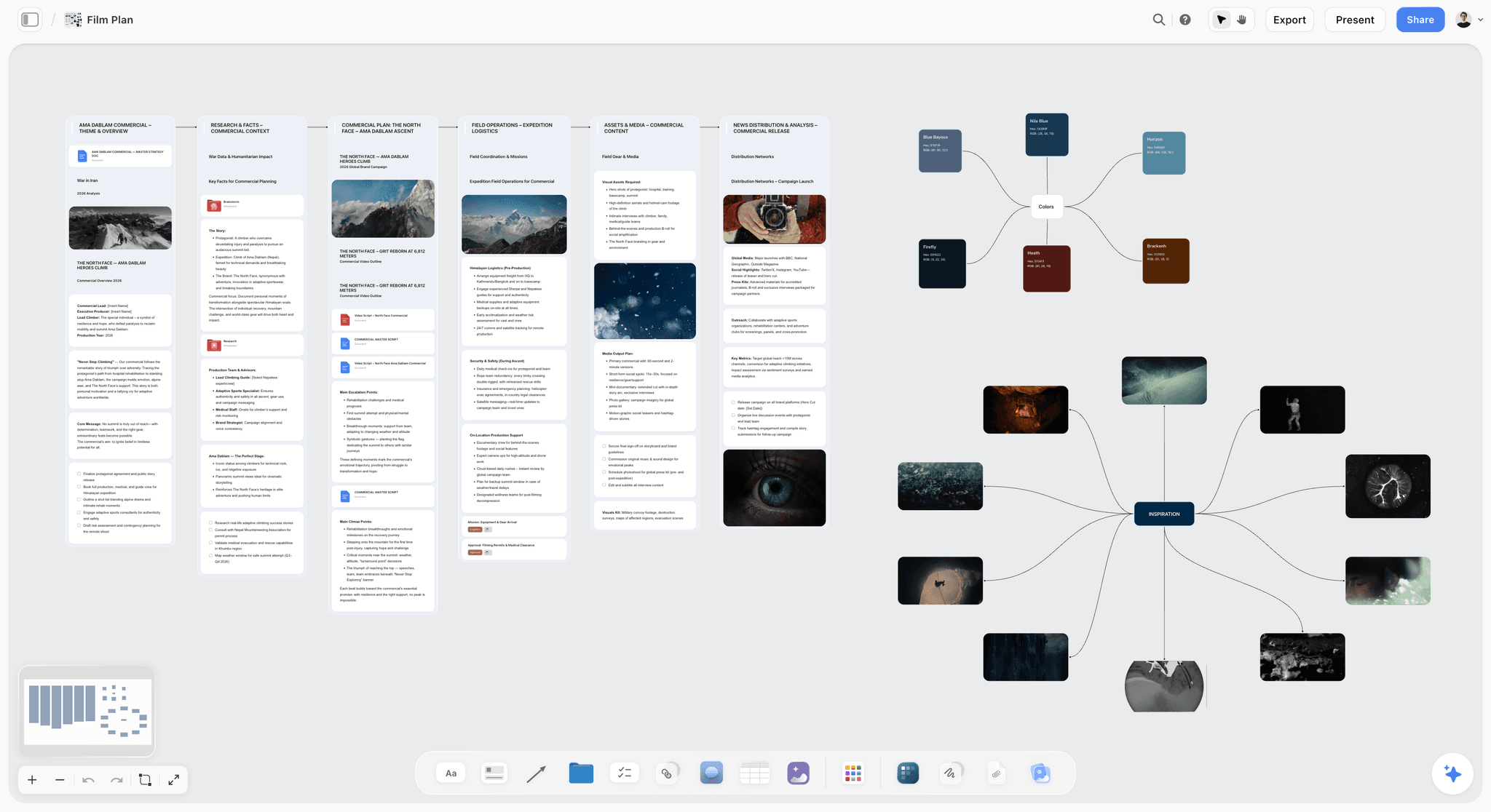
Storyflow is a canvas built for shape-first planning, and it is the one tool here that generates the project board for you. Describe the project in a prompt and the AI lays out a full board: pieces, phases, dependencies, and unknowns, arranged as movable cards you can rearrange. From there the AI keeps reading the whole canvas, so it can find the shape, flag a missing dependency, or point out where the project is risky. Once the shape is clear, the same canvas holds the schedule. The Story Blueprints library adds 200+ planning frameworks. The fastest test is to skip the blank board: open the Film Plan template or the Design Project Planner and the pieces, phases, and unknowns are laid out before a single date exists.
Best for: Planners who want the AI to generate a project board from a prompt, then help shape the work before scheduling.
Verdict: The strongest AI canvas for shape-first planning. For date-driven execution tracking, pair it with a timeline tool.
Key features
- AI generates a project board from a prompt: pieces, phases, and dependencies as cards.
- AI reads the full canvas plus up to 1 Tactic and 3 Documents you @-mention.
- AI flags missing dependencies and risky areas.
- Story Blueprints library with 200+ planning frameworks (Plus, Pro, and Max).
- Unlimited collaboration on Free for the team.
Pricing
Early access: every plan is paid for now. The Free plan launches before the end of 2026, and invited collaborators of paid members join free now. Plus at $7.99/mo billed annually covers unlimited boards, cards, and collaboration. Plus: $7.99/mo annual ($9.99 monthly). Full Story Blueprints, unlimited uploads. Pro: $14/mo annual ($19 monthly). AI image generation, 20x AI usage. Max: $39/mo annual ($49 monthly). 40x more AI, team workspace with roles.
Pricing is flat per account, not per user.
Pros
- Generates the first board automatically, so you never start from a blank canvas.
- AI helps find the shape and flag risk.
- Unlimited boards and free collaboration.
Cons
- A visual planning canvas, not a full project-management or scheduling suite; no Gantt chart for date-driven execution.
- Cloud-only, with no offline mode.
- Newer platform with a smaller template library than Milanote.
2. Milanote
Milanote is a visual canvas built for laying out the shape of work. Project pieces, phases, dependencies, and notes go on a freeform board where the structure is visible before any date is set. It is shape-first by nature, which makes it one of the strongest visual planning tools. Scheduling is light, so the plan connects to dates elsewhere.
Best for: Planners who want to lay out the shape of a project visually before scheduling.
Verdict: The strongest visual canvas for shape-first planning. Pair it with a task tool for the schedule.
Key features
- Freeform canvas for project structure.
- Cards, columns, and connections for shape.
- Templates for planning.
- Shareable boards with comments.
Pricing
Free with 100 cards. Individual: $9.99/mo. Team: $49/mo flat.
Pros
- Shape-first by nature.
- The whole project structure is visible at once.
- Polished and intuitive.
Cons
- Light on scheduling and dates.
- The 100-card free limit fills on a large project.
- The plan connects to a schedule elsewhere.
3. Miro
Miro is a collaborative canvas strong for visual planning. Teams lay out the shape of a project together, map dependencies, and cluster the work, all in real time before scheduling. It is shape-first and collaborative, with moderate scheduling features through timeline templates.
Best for: Teams who plan the shape of work collaboratively.
Verdict: Strong for collaborative shape-first planning. Pair it with a tracking tool for the schedule.
Key features
- Infinite canvas for project shape.
- Diagramming for dependencies.
- Real-time collaboration.
- Timeline and planning templates.
Pricing
Free for 3 boards. Starter: $8/mo annual. Business: $16/mo.
Pros
- Strong shape-first collaboration.
- Whole-project visibility.
- Familiar to most teams.
Cons
- The 3-board free limit is tight.
- Scheduling is template-based, not native.
- Built for general teams, not planning specifically.
4. Notion
Notion balances shape and schedule. The shape can be laid out in a doc or a board, and the same workspace holds databases that track the plan against dates. It is moderately shape-first and strong at connecting the plan to structured tracking, which makes it the best bridge between the two.
Best for: Planners who want the shape and the schedule connected in one workspace.
Verdict: A strong bridge between shape-first planning and structured tracking.
Key features
- Docs and boards for project shape.
- Databases with timeline and calendar views.
- Templates for planning.
- Standard AI features.
Pricing
Free for personal use. Plus: $10/mo. Business: $18/mo.
Pros
- Connects shape to a real schedule.
- One workspace for both.
- Large template community.
Cons
- Moderately shape-first; the canvas side is lighter.
- Setup-heavy before it works.
- Less visual than a true canvas.
5. Mural
Mural is a collaborative canvas with facilitation tools, suited to facilitated planning sessions. A team lays out the shape of a project in a structured session: phases, dependencies, risks. It is strongly shape-first, with light scheduling.
Best for: Teams who plan the shape of work in facilitated sessions.
Verdict: Strong for facilitated shape-first planning. Pair it with a scheduling tool.
Key features
- Collaborative canvas with facilitation tools.
- Planning and timeline templates.
- Timers and guided methods.
- Real-time collaboration.
Pricing
Free tier. Paid plans from roughly $12/mo.
Pros
- Strong facilitation for planning sessions.
- Shape-first by nature.
- Good planning templates.
Cons
- Light on scheduling.
- Facilitation framing is heavier for solo use.
- Overlaps with Miro.
6. Whimsical
Whimsical is a clean diagramming tool well suited to shape-first planning. Flowcharts and mind maps lay out the structure of a project, its pieces and dependencies, clearly. It is shape-first and clean, with light scheduling.
Best for: Planners who want clean diagrams of project structure.
Verdict: A clean shape-first diagramming tool. Pair it with a scheduling tool.
Key features
- Flowcharts and mind maps for structure.
- Clean, fast interface.
- Diagramming for dependencies.
- Light AI.
Pricing
Free tier. Paid plans from roughly $10/mo.
Pros
- Clean diagrams of project shape.
- Fast and easy.
- Good for dependencies.
Cons
- Light on scheduling.
- Diagram-led, less freeform than a canvas.
- Smaller template library.
7. FigJam
FigJam, Figma's whiteboard, is a shape-first planning canvas for design teams. The work is laid out freely before scheduling, and for teams in Figma it sits next to the design work. It is shape-first with light scheduling.
Best for: Design teams who want shape-first planning next to Figma.
Verdict: A solid shape-first canvas for Figma teams. Pair it with a scheduling tool.
Key features
- Whiteboard for project shape.
- Real-time collaboration.
- Planning templates.
- Bridges into Figma.
Pricing
Free for 3 files. Paid plans from roughly $5/mo.
Pros
- Shape-first canvas.
- Sits next to Figma work.
- Strong collaboration.
Cons
- 3-file free cap.
- Light on scheduling.
- Generic, not planning-specific.
8. Trello
Trello is a kanban tool that gives a moderate visual plan: lists for phases, cards for work, a board view of the project. The kanban layout shows some shape, though it is less freeform than a canvas. It connects to a schedule through due dates and a calendar view.
Best for: Planners who want a simple kanban visual plan.
Verdict: A moderate kanban visual plan. Less shape-free than a canvas, with a real schedule view.
Key features
- Kanban boards for project phases.
- Cards with due dates.
- Calendar and timeline Power-Ups.
- Mobile apps.
Pricing
Free for personal use. Standard: $5/user/mo. Premium: $10/user/mo.
Pros
- Simple and free to start.
- Kanban shows some project shape.
- Connects to a schedule.
Cons
- Kanban is less shape-free than a canvas.
- Thin for complex projects.
- Limited dependency mapping.
9. Asana
Asana is a project tool with a Timeline view, which is a visual but time-first plan. It is excellent once the shape is known: dependencies, dates, and tracking are strong. As a shape-first tool it is weak, because the timeline asks for dates early.
Best for: Teams who want a visual timeline once the project shape is decided.
Verdict: A strong time-first visual planner. Decide the shape elsewhere, then schedule in Asana.
Key features
- Timeline and Gantt-style views.
- Dependencies and milestones.
- Task tracking.
- Standard AI features.
Pricing
Free for small teams. Starter: roughly $11/user/mo. Higher tiers above.
Pros
- Strong once the shape is known.
- Good dependency and date tracking.
- Mature and reliable.
Cons
- Time-first; weak at finding the shape.
- The timeline asks for dates early.
- Per-user pricing adds up.
10. Monday.com
Monday.com is a customizable work platform with visual timeline and board views. It is largely time-first: the views are built around dates and statuses. It is strong at the schedule side and weaker at shape-first exploration.
Best for: Teams who want a customizable visual schedule.
Verdict: A strong customizable time-first planner. Light on shape-first exploration.
Key features
- Customizable boards and timelines.
- Date and status tracking.
- Automations.
- Standard AI features.
Pricing
Per-seat pricing from roughly $9/seat/mo.
Pros
- Highly customizable.
- Strong schedule views.
- Good automations.
Cons
- Time-first; weak at finding the shape.
- Per-seat pricing adds up.
- Setup time for custom views.
11. ClickUp
ClickUp is an all-in-one work platform with whiteboards (shape-first) and timelines (time-first) in one tool. It can do both, with the all-in-one trade-off: each side is capable rather than best-in-class.
Best for: Teams who want shape-first and time-first planning in one platform.
Verdict: A capable all-in-one for both planning modes. Broad rather than deep.
Key features
- Whiteboards for project shape.
- Timelines and Gantt views.
- Tasks and docs.
- Standard AI features.
Pricing
Free tier. Paid plans from roughly $7/user/mo.
Pros
- Both planning modes in one tool.
- Affordable entry pricing.
- All-in-one coverage.
Cons
- Breadth over depth.
- The whiteboard is basic.
- Setup time for the right configuration.
12. Lucidspark
Lucidspark is a brainstorming and planning canvas in the Lucid suite. It is shape-first: lay out the work, cluster it, map dependencies, and it connects to Lucidchart for more structured planning. It is strong on shape, moderate on schedule.
Best for: Teams in the Lucid ecosystem who want a shape-first planning canvas.
Verdict: A capable shape-first canvas. Best value inside the Lucid suite.
Key features
- Canvas for project shape.
- Clustering and dependency mapping.
- Connection to Lucidchart.
- Standard AI features.
Pricing
Free tier. Paid plans from roughly $8/mo.
Pros
- Shape-first canvas.
- Path into Lucidchart.
- Reasonable pricing.
Cons
- Best value inside the Lucid suite.
- Moderate scheduling.
- Smaller community than Miro.
7) Recommended Visual Planning Stacks
Stack 1: Solo Planner. Storyflow ($7.99/mo billed annually; shape-first canvas, AI helps find the structure) + a free task tool for the schedule once the shape is clear. A complete plan-then-schedule workflow for under ten dollars a month.
Stack 2: Team Project. Milanote or Storyflow (shape-first canvas, starting from the Team Planning Dashboard template) + Asana or Monday.com (the schedule, once the shape is decided). Shape first, schedule second, each in the right tool.
Stack 3: Facilitated Planning. Mural or Miro (facilitated shape-first session) + Notion (connect the shape to tracked databases).
Stack 4: Cheapest Working Stack. Storyflow ($7.99/mo billed annually; shape-first canvas) + a free scheduler.
The pattern across every stack: find the shape first on a canvas, then move to a scheduling tool. The plans that survive contact with reality are the ones built on the structure of the work, not on dates assigned before the work was understood.
8) Honorable Mentions
- Lucidchart. The structured-diagram companion to Lucidspark.
- Excalidraw. A free whiteboard for quick shape-first sketches.
- Notion Calendar. A calendar layer for the schedule side.
- GanttPRO. A dedicated Gantt tool for the time-first stage.
- Pen and paper. The original shape-first planning surface.
9) Tools to Avoid for Visual Planning
- A Gantt chart as the first planning step. It asks for dates before the work is understood, producing a guess with a chart around it.
- A calendar as the whole plan. A calendar holds dates, not the shape of the work or its dependencies.
- A spreadsheet of tasks with dates. Rows and dates impose a schedule before the structure is clear.
- A schedule treated as a plan. A precise-looking timeline is not a plan if the shape underneath it was never found.
11) The Bottom Line
The best visual planning tools in 2026 are the ones that let you find the shape before the schedule. Storyflow is the best overall, the AI canvas that finds the shape for you and generates the project board automatically. Milanote is the strongest hand-built visual canvas for shape-first planning. Miro is the best for collaborative visual planning. Notion is the best bridge to structured tracking.
A Gantt chart asks for dates before you understand the work. Visual planning asks what the work is, first. Lay out the shape of the project on a canvas, see its structure, and only then commit to a schedule. The plans that survive contact with reality are built on the shape of the work, not on dates assigned before the work was understood.
For your next project, find the shape on a Storyflow canvas before you open a single Gantt chart.
10) FAQ: Visual Planning Tools
What is the best visual planning tool in 2026?
Storyflow is the best AI canvas for finding the shape of work before scheduling. Milanote is the strongest visual canvas for shape-first planning. Miro is the best for collaborative visual planning. Notion is the best bridge between visual planning and structured tracking.
What is visual planning?
Visual planning is planning the work in space rather than in a list or a timeline: laying out the pieces, dependencies, phases, and clusters on a canvas so the whole structure is visible. It is shape-first by nature, which lets you understand the work before committing it to a schedule.
Why is shape-first planning better than starting with a Gantt chart?
A Gantt chart asks for dates before the work is understood. You assign dates to tasks you have barely thought through, so the schedule is a guess with a chart around it, and the first surprise breaks it. Shape-first planning understands the structure of the work first, so the schedule that follows rests on something real.
What is the difference between visual planning and project planning?
Project planning is the whole discipline, including scheduling, tracking, and resourcing. Visual planning is the shape-first part of it: laying out the structure of the work on a canvas before scheduling. Visual planning comes first; the schedule and tracking follow once the shape is clear.
What is the cheapest visual planning tool?
Storyflow offers a shape-first planning canvas with unlimited boards at $7.99/mo billed annually, and Miro and Milanote have free tiers. For the schedule side, a free task tool works. A complete shape-first-then-schedule workflow costs under ten dollars a month.
Can AI generate a project board?
Yes. Storyflow's AI generates a project board from a prompt: describe the project and it lays out the pieces, phases, and dependencies as movable cards on a canvas. Because the AI reads the full board plus any Tactic or Documents you @-mention, it can fill gaps, flag a missing dependency, or point out a risky area. You keep the judgment calls; the AI does the first pass of structuring the board so you never start from a blank canvas.
Is Milanote or Miro better for visual planning?
Milanote is better for an individual or small team laying out a project shape on a polished canvas. Miro is better for collaborative, real-time visual planning with a larger group. Both are strongly shape-first; the choice is solo versus team.
Do I need a separate tool for visual planning and scheduling?
Often, yes, because the two jobs are different. A shape-first canvas is best for understanding the work; a timeline tool is best for tracking it against dates. Notion and ClickUp try to do both. A common workflow is a canvas for the shape and a scheduler for the dates.
What visual planning tool generates project boards automatically?
Storyflow generates project boards automatically. Describe the project in a prompt and its AI lays out a full board: the pieces of the work, the phases, and the dependencies, arranged on a canvas you can then move and refine. The AI keeps reading the whole board, so it can flag a missing dependency or a risky area as you go. Milanote, Miro, and Notion are strong visual planners, but the board is built by hand rather than generated.
What is the best software for brainstorming visual projects?
For brainstorming visual projects, the best software is a shape-first canvas. Storyflow is the strongest AI option: it generates a starting board from a prompt and reads the whole canvas as you brainstorm, so ideas, pieces, and dependencies take shape together. Milanote and Miro are excellent manual canvases, and Miro is best when a group brainstorms in real time. A brainstorm needs a canvas that shows the whole shape at once, not a list or a timeline.
Is a Gantt chart visual planning?
A Gantt chart is visual, but it is time-first, not shape-first. It displays a schedule along a timeline. It is useful once the shape of the work is known, but as a first planning step it forces dates before understanding, which is the opposite of what visual planning is for.
Can a visual planning tool build my project board from a prompt?
Storyflow can. Type a description of the project and its AI builds the first board for you: pieces, phases, and dependencies laid out as cards, ready to rearrange. Most visual planning tools, including Milanote and Miro, start from a blank canvas or a fixed template instead. Building the board from a prompt saves the slow part of setup and gives you a shape to react to, which is faster than arranging every card from nothing.
Table of Contents
- Quick Answer: The Best Visual Planning Tools in 2026
- Comparison Table: 12 Visual Planning Tools at a Glance
- Shape Before Schedule
- How We Evaluated These Tools
- Quick Picks by Visual Planning Need
- Detailed Reviews: 12 Visual Planning Tools
- Recommended Visual Planning Stacks
- Honorable Mentions
- Tools to Avoid for Visual Planning
- FAQ: Visual Planning Tools
- The Bottom Line
- Author
- Related Reading
Templates to check out for this topic


Templates you can use in Storyflow
Every Storyflow board starts from real structure and an AI that reads the whole canvas. Open one of these templates and make it yours.


See Storyflow in Action
A visual AI workspace where every feature lives inside one canvas. No tab-switching, no context lost.
Build your entire board from a single message
Type what you need in the AI chat at the bottom of your canvas. The AI adds cards, headings, and structure directly onto your board.
Use expert frameworks as AI context
Type @ in the AI chat and choose any Tactic. The AI tailors every response to that framework instead of giving generic advice.
Turn your board into a mind map in seconds
Ask the AI to restructure your canvas as a mindmap. It connects your ideas into a visual hierarchy so you can see how everything relates.
Why Storyflow Exists
Storyflow actually began as a personal tool while working on creative and research projects.
We kept running into the same problem: ideas were scattered everywhere: notes, documents, and whiteboards.
Nothing helped us see how everything connected.
So we started building a workspace designed around how ideas actually grow.
→ Read how Storyflow was createdJustkay
Documentary Filmmaker & Founder at Storyflow
Published: 2026-05-17
Extremely simple, seriously capable


See how easy it is to get started
Watch a real project come together, from a blank board to a finished plan, clicked through step by step.
Start creating with AI and become more productive
Transform your creative workflow with AI-powered tools. Generate ideas, create content, and boost your productivity in minutes instead of hours.