The 10 Best Infinite Canvas Apps with AI Storyboarding in 2026
The best infinite canvas apps with AI storyboarding in 2026, tested on real shoots. Where the script, the shot list, and the frames finally live on one board an AI can read.

Category
Filmmaking
Author

Justkay
Documentary Filmmaker & Founder at Storyflow
Topics
2026-06-18
•
Updated July 2, 2026
•
14 min read
•
Filmmaking- infinite canvas app with AI storyboarding
- infinite canvas storyboarding tool
- AI storyboarding canvas
- best AI storyboard app 2026
- AI-assisted storyboarding
- storyboard on an infinite canvas
What is the best infinite canvas app with AI storyboarding?
The best infinite canvas app with AI storyboarding in 2026 is Storyflow (Plus, $7.99/month annual): the script, shot list, references, and frames live on one canvas the AI reads before helping you structure the board. Boords is best for animatics and client review; Katalist for generative draft frames.

All 10 Tools, Ranked
- Storyflow: best overall, the whole shoot on one canvas the AI reads before it helps
- Boords: best for timed animatics and client review
- Milanote: best visual planning and reference boards
- Miro: best live team boarding sessions
- FigJam: best for teams already in the Figma stack
- Storyboarder: best free open-source hand-drawn storyboards
- Katalist: best generative frames from a script
- Canva: best for turning a board into a polished client deck
- LTX Studio: best AI previs and scene generation
- Storyboard That: best quick drag-and-drop boards
Full disclosure: Storyflow is our own product, and we rank it #1 for one job: an infinite canvas where the script, shot list, references, and frames live together and the AI reads the whole board before it helps you structure it. For timed animatics and structured client review Boords is stronger, and for generating draft frames straight from a script Katalist does something Storyflow does not. Storyflow does not play back animatics or generate frames from a script, so if that is your core need, one of those tools fits better. We link to every tool so you can judge the fit.
Quick Comparison: Infinite Canvas AI Storyboarding
These four cover the storyboarding jobs: the whole shoot on one AI canvas, timed animatics, generative frames, and free hand-drawn boards.
| Tool | Best For | AI Features | Price |
|---|---|---|---|
| Storyflow | Whole shoot on one AI canvas | Canvas-aware, AI-assisted boarding | $7.99 mo annual (free plan late 2026) |
| Boords | Animatics and client review | Light AI assist for panels | Trial / $15 mo |
| Katalist | Generative frames from a script | Generative AI frames | Trial / $20 mo |
| Storyboarder | Free hand-drawn storyboards | No AI generation | Free (open source) |
1) Quick Answer: The Best Infinite Canvas App with AI Storyboarding
The best infinite canvas app with AI storyboarding in 2026 is Storyflow, because the whole shoot lives on one infinite canvas (the script, the shot list, the references, and the frames) and an AI reads that board before it helps you build and structure the storyboard. If you want the most purpose-built animatic and client-review workflow, Boords is the strongest dedicated pick. If you want a generative tool that drafts frames from a script, Katalist is the most developed. If you want a free desktop storyboard app, Storyboarder is the one to download.
An infinite canvas is one kind of storyboard software; the page compares it with frame grids and drawing apps.
The short version: a storyboard is not a stack of pretty frames. It is a plan for how a story moves through time, and most tools forget the plan the moment you start drawing. The grid apps give you boxes. The generative apps give you images. Very few give you a canvas where the script, the references, the shot list, and the frames sit next to each other so the storyboard stays connected to the reasons behind it. The tools below are ranked by how much of the whole shoot they hold on one surface, and how much real help the AI gives once it can see all of it. Storyflow's AI is AI-assisted, not one-click: it helps you build and structure the storyboard on the canvas, it does not spit out a finished film storyboard from a single prompt.
2) Comparison Table: 10 Tools Compared
Pricing is current as of June 2026 and is rounded; verify the live price on each tool's pricing page before buying, because creative-tool pricing changes often. Storyflow's prices are exact: Free at $0, Plus at $7.99 per month annual, Pro at $14 per month annual.
3) Why an Infinite Canvas Beats a Grid for Storyboarding
Most storyboard tools are grids. A row of numbered boxes, one frame per box, a caption underneath. That format made sense on paper, and it still works for a finished, locked storyboard you hand to a crew. But the grid is the wrong shape for the part of the job that actually matters: figuring the story out.
When you are still working out how a scene moves, you are not filling boxes in order. You are moving things around. You pin a reference photo next to a frame. You drop the script line above the shot it belongs to. You cluster three versions of the same beat to compare them. You sketch a camera move and park it beside the frame it affects. A storyboard is not a row of pictures. It is a plan, and a plan needs room to think. A grid gives you boxes. An infinite canvas gives you room.
This is the structural difference, and it shows up in three specific ways.
- Order emerges instead of being imposed. A grid forces you to commit to sequence before you know the sequence. A canvas lets you lay frames out loosely, see the shape of the scene, and lock the order once it is right.
- Context stays attached. On a grid, the script, the references, and the shot list live in other apps. On a canvas, they sit beside the frames, so the storyboard never loses the reasons behind it.
- AI gets something to read. This is the part the grid apps cannot do. An AI looking at a grid sees boxes. An AI looking at a canvas where the script, the references, and the frames sit together can actually reason about the scene, because it can see the whole thing.
That last point is the dividing line for this entire list. A storyboard the AI cannot read is a storyboard the AI cannot help you build. The grid apps store frames. The canvas apps that an AI can read turn the storyboard into something you and the AI can work on together. That is the lens for the ranking below.
4) How We Evaluated These Tools
I have storyboarded documentaries (where the storyboard is really a shot plan built from research, not a drawn comic) and I have planned narrative and commercial shoots where every frame is drawn before the camera rolls. The tools below were judged on how they hold up across a real shoot, from first messy idea to a board a crew can read on set. Six criteria, weighted toward the canvas and the AI.
- AI context scope. Does the AI see the whole board (script, references, frames, shot list), or only the frame you are editing? An AI that reads the full canvas can help structure the scene. An AI that sees one box is doing autocomplete.
- Canvas vs grid. Can you lay the storyboard out freely, with references and notes attached, or are you locked into a row of boxes from the first frame?
- Storyboard structure on one surface. Do the script, shot list, references, and frames live together, or does the tool own one artifact and outsource the rest?
- AI honesty. Does the AI genuinely help build and structure the board, or does it overpromise a finished storyboard from one prompt? We weight real, AI-assisted help over flashy demos.
- Price and free tier. What the tool costs at real usage, and how far the free plan goes for an actual project.
- Time to a usable board. How fast you go from blank canvas to a storyboard a director or client can read and react to.
Tools were tested on real pre-production work, not synthetic demos. The rankings reflect how each one felt to plan a shoot in, end to end.
5) Quick Picks by Job to Be Done
- Plan the whole shoot on one AI canvas: Storyflow ($7.99/mo annual).
- Build animatics and run client review: Boords (around $15/mo, verify).
- Collect references and plan visually: Milanote (around $10/mo, verify).
- Generate draft frames from a script: Katalist (around $20/mo, verify).
- Draw storyboards free on the desktop: Storyboarder (free).
- Run a live team boarding session: Miro (around $8/member/mo, verify).
Put the whole shoot on one board the AI can read
Turn your opening scene into a first storyboard, then keep the script, shot list, and references on the same canvas so the AI structures the board from your actual material.

6) Detailed Reviews: 10 Infinite Canvas Storyboarding Tools
1. Storyflow
Storyflow is a visual workspace where the whole shoot lives on one infinite canvas, and an AI reads all of it before it helps you build the storyboard. The script, the shot list, the reference images, the moodboard, and the frames sit on the same board, and the AI's context is that board by default, plus up to one Tactic and up to three Documents you @-mention in the chat. That is the difference that matters for storyboarding. When you ask the AI to help structure a scene, it is looking at your actual script and references, not a generic template.
The familiar approach is to write the script in one app, gather references in a folder, build the shot list in a sheet, and draw frames in a fifth tool, then keep them in sync by hand. The Storyflow approach is to put all of it on one board and let the AI work across it: break the script into beats and shots, suggest a frame order, lay out references beside the frames they inform, and flag the moment in the cut that has no establishing shot. This is AI-assisted storyboarding, and it is worth being precise about it. The AI helps you build and structure the storyboard on the canvas. It does not produce a finished film storyboard from one prompt, and it should not pretend to. It pulls structure from the Story Blueprints library (200+ creative templates), and on Pro and above it can generate images for frames and references when you want a visual instead of a placeholder.
Best for: documentary, narrative, and commercial filmmakers who want to plan the whole shoot on one canvas with an AI that has real context. Pricing: Early access: every plan is paid for now. The Free plan launches before the end of 2026, and invited collaborators of paid members join free now. Plus at $7.99/mo annual adds the 200+ Story Blueprints and unlimited file uploads. Pro at $14/mo annual adds AI image generation and 20x more AI usage, which is what you want for generating frames. Flat per account, not per user.
Strengths:
- The AI reads the whole board, so its help with structure is about your scene, not a generic one.
- Script, shot list, references, and frames share one surface, so the storyboard never loses its context.
- Free plan is genuinely usable for a real project, with unlimited cards and unlimited collaboration.
- Flat pricing means adding a director, a DP, or a producer does not multiply the bill.
Limitations:
- It is not a frame-by-frame drawing app. If you want to draw every panel by hand with brush tools and pressure sensitivity, Storyboarder or a dedicated drawing app fits better.
- It is not as purpose-built for animatics and structured client review as Boords. For timed animatics with versioned client sign-off, Boords is more specialized.
- Newer platform, so its storyboard-specific conventions (timed playback, export-to-PDF storyboard sheets) are thinner than tools that only do storyboards.
Try it: drop your script and a folder of references onto one board and ask the AI to break the opening scene into shots and lay the frames out in order. Or skip the blank board entirely: the Storyboard template opens with frames and shot notes already structured, and the Shotlist template covers the camera plan beside it. The structure you get in the first ten minutes is usually the skeleton you would have spent an afternoon building by hand.
2. Boords
Boords is the most purpose-built storyboarding tool on this list, and for animatics and client review it is hard to beat. You build frames, add shot details, then play the board back as a timed animatic with audio, which is exactly what you want when you need a client or director to feel the pacing before the shoot. The client-review and approval flow is genuinely best-in-class.
Where it is narrower is the thinking stage. Boords is built around the storyboard itself, so the wider context (the full script, the research, the loose reference dump) tends to live elsewhere. Its AI is a light assist, not a canvas-aware collaborator that reads your whole shoot. It is a superb board builder and a great review tool; it is less of a place to figure the story out.
Best for: teams that need animatics and structured client approval. Pricing: trial, then paid around $15/mo, verify current pricing. Strengths: purpose-built frames, timed animatics, excellent client review, shareable boards. Limitations: narrow scope; the wider script and research context lives in other apps; AI is light.
3. Milanote
Milanote is the reference-board tool many filmmakers already use, and as a visual planning canvas it is excellent. You drag images, notes, links, and frames onto a free-form board, and the moodboard-plus-storyboard combination feels natural for the early, visual stage of a shoot. For collecting the look of a film before you build the shot plan, it is a joy.
The trade-off is that Milanote has no native AI generation, so the storyboard it holds is one you assemble by hand. It is a beautiful place to arrange references and rough frames, but it does not read your script or help structure a scene. It pairs well with a generative tool rather than replacing one.
Best for: filmmakers who want a clean visual board for references and rough frames. Pricing: free for 100 items; paid around $10/mo, verify current pricing. Strengths: elegant canvas, great for moodboards, flexible cards, strong templates. Limitations: no native AI generation; performance can dip on very large boards.
4. Miro
Miro is the team whiteboard most production groups reach for when they want to board a sequence together live. For a collaborative session (sticky notes, a rough frame grid, arrows for camera moves), it is excellent, and AI Sidekicks add some generation and summarizing. As a shared workshop surface for a director, a DP, and a producer in one room, it is hard to beat.
The catch is that Miro is a whiteboard, not a storyboard system. The board from the session is a great artifact, but the timed animatic, the export-ready storyboard sheet, and the script-aware structuring still happen somewhere else. Its AI is helper-level, not storyboard-aware.
Best for: teams running live, collaborative boarding sessions. Pricing: free plan (3 boards); paid around $8/member/mo, verify current pricing. Strengths: best-in-class real-time collaboration, huge canvas, templates. Limitations: general whiteboard, not built for storyboards; AI is generic.
5. FigJam
FigJam is Figma's whiteboard, and for teams already living in the Figma ecosystem it is the path of least resistance for a quick board. You can rough out a frame sequence, drop in images, and collaborate in real time, and the light AI helps with summarizing and generating sticky content. If your design team already runs on Figma, boarding in FigJam keeps everything in one account.
It carries the same limitation as Miro: it is a general whiteboard, not a storyboard tool. There is no timed animatic, no script-aware structuring, and the AI is not reading your shoot. It is a fine place to sketch a sequence, not a place to finish a storyboard.
Best for: design-led teams already in the Figma stack. Pricing: free (3 files); paid around $3/editor/mo, verify current pricing. Strengths: familiar to Figma users, real-time collaboration, clean canvas. Limitations: general-purpose, no animatic, light AI not tuned for storyboards.
6. Storyboarder
Storyboarder by Wonder Unit is the best free, open-source desktop app for actually drawing storyboards. It has real drawing tools, shot types, and a clean timeline, and it exports to PDF and other formats. For a filmmaker who wants to draw every frame by hand without paying a subscription, it is the strongest pick on this list, and the price is unbeatable.
It is a drawing app, not a canvas-and-AI workspace. There is no infinite free-form canvas where the script and references sit beside the frames, and no AI to help structure a scene. It is a focused, offline drawing tool, which is exactly its appeal. If your job is to draw, it does that well; if your job is to think the whole shoot through with an AI, it is the wrong tool.
Best for: filmmakers who want to hand-draw storyboards for free. Pricing: free and open source. Strengths: real drawing tools, offline, free, PDF export. Limitations: no infinite canvas, no AI, no script or reference context on the surface.
7. Katalist
Katalist is one of the most developed generative storyboarding tools, built to turn a script into draft frames with consistent characters across shots. Paste a scene, and it generates a sequence of frames you can refine, which is genuinely useful for getting a rough visual pass fast. For previs and pitch decks where you need images quickly, it is a strong option.
The honest caveat is that generative frames are a starting point, not a finished storyboard. Character consistency and shot-specific staging still need a human eye, and the output is a set of images more than a connected plan you can keep working on. It generates frames well; it is less of a place to structure the whole shoot. Treat the output as a draft to refine, not a board to ship.
Best for: filmmakers who want fast generative frames from a script. Pricing: trial, then paid around $20/mo, verify current pricing. Strengths: script-to-frames generation, character consistency tools, fast drafts. Limitations: output is a draft, not a finished board; less of a full planning surface.
8. Canva
Canva is where a rough board becomes a polished, shareable deck, and its Magic Studio adds AI image generation for frames and references. For a filmmaker who needs to present a storyboard to a client or a brand in a clean, professional layout, Canva's templates and design tools are excellent and affordable. It is the best tool here for making the board look finished.
It is a design tool first. Canva can hold a storyboard layout and generate images, but it is not a script-aware planning canvas, and the AI is not reading your shoot. You plan and structure elsewhere, then bring the board into Canva to make it presentation-ready.
Best for: filmmakers who need to present a storyboard as a polished deck. Pricing: free plan; Pro around $15/mo, verify current pricing. Strengths: beautiful templates, Magic Studio image generation, easy sharing. Limitations: design-first, not a planning canvas; AI is not storyboard-aware.
9. LTX Studio
LTX Studio is an AI-driven previs and scene-generation tool that goes further than static frames, generating shots and rough motion from a script. For a filmmaker exploring an AI-heavy previs workflow (generating scenes, experimenting with shots, building an animated rough), it is one of the most ambitious tools in this space.
The trade-off is that it is built around AI generation more than around a free-form planning canvas. The generated output is impressive, but the wider plan (the script breakdown, the reference board, the human-structured shot list) is not where LTX puts its focus. It is a generative previs studio, not a thinking surface for the whole shoot. The generation is the point, and the planning lives elsewhere.
Best for: filmmakers exploring AI previs and generated scenes. Pricing: limited free tier; paid around $15/mo, verify current pricing. Strengths: ambitious AI generation, scene and motion previs, fast exploration. Limitations: generation-first; less of a planning and structuring canvas.
10. Storyboard That
Storyboard That is the simplest drag-and-drop storyboard maker on this list, with a big library of characters, scenes, and props you assemble into frames. For a quick, cartoon-style board (an explainer, a classroom project, a fast pitch), it is genuinely fast and requires zero drawing skill. Its simplicity is the whole appeal.
That simplicity is also the ceiling. There is no infinite canvas, no script-aware AI, and no real depth for a professional shoot. It makes a quick board, but it does not help you plan a film. It is a board maker, not a planning workspace.
Best for: quick, simple, drag-and-drop storyboards. Pricing: limited free; paid around $10/mo, verify current pricing. Strengths: very easy, big asset library, no drawing needed. Limitations: shallow for film work; no infinite canvas, no script-aware AI.
7) Which Tool Fits Which Filmmaker?
Documentary Filmmaker
Top picks: Storyflow and Milanote
A documentary storyboard is really a shot plan built from research, not a drawn comic. Storyflow ($7.99/mo annual) holds the research, the interview notes, and the shot list on one board where the AI can help you structure the sequence; the Pre-Production Board template opens with that structure already laid out. Milanote is the reference-board companion when you want to collect the look first. Avoid the generative-only tools; the doc's storyboard is about real footage, not invented frames.
Narrative Short / Feature Director
Top picks: Storyflow and Boords
You need to figure the scene out, then make a board the crew can read. Storyflow is where you structure the scene with the script and references on one AI canvas; Boords is where you turn the locked frames into a timed animatic. This pairing keeps the thinking visual and the deliverable polished. Add a dedicated drawing app if you draw every panel by hand.
Commercial / Ad Director
Top picks: Storyflow and Canva
Agencies and brands need a board that looks finished and a plan that holds up. Build and structure the storyboard in Storyflow, where the AI helps draft frames and shot logic fast across many clients, then bring it into Canva to present it as a polished deck. Boords is the alternative when the client wants an animatic.
Animator
Top picks: Boords and Storyboarder
Animation lives and dies on timing, so the animatic is everything. Boords is the strongest animatic-and-review tool; Storyboarder is the free drawing app for hand-drawn panels. Use Storyflow upstream when you want to structure the sequence and gather references before you draw.
YouTuber / Content Creator
Top picks: Storyflow and Canva
For a video creator, the storyboard is really a shot-and-script plan, not a drawn comic. Storyflow holds the script, the shot list, and the references on one board the AI can reason over, so you go from idea to a shoot plan fast. Canva turns the key frames into thumbnails and a presentable board.
Film Student
Top picks: Storyflow and Storyboarder
You want to learn the craft without paying for five tools. Storyflow gives you a real planning canvas with AI, and Storyboarder gives you free drawing tools for hand-drawn boards. Together they cover the whole pre-production workflow at zero cost until you outgrow the free tiers.
8) Honorable Mentions
- Frame.io. Excellent for review and approval of actual footage, and increasingly part of pre-production workflows, but it is a video-review platform, not a storyboard-planning canvas. It belongs downstream of the board, not on this list as a boarding tool.
- Plot. A storyboarding and shot-planning tool with a clean interface; it did not make the main list mostly because it is narrower than the canvas tools and the AI is light.
- Krock.io. Solid for animation storyboards and review; left off because it overlaps heavily with Boords and is less of an infinite canvas.
- Google Slides plus a folder of references. Where most scattered storyboards actually live. It is free and universal, which is exactly why the script, the references, and the frames end up in three places. It is the problem this list is trying to solve, not a solution to it.
9) Where a Dedicated Storyboard Tool Wins
Honesty is the point of a ranking like this, so here is where Storyflow is the wrong choice and a specialist wins.
If your job is to draw every panel by hand with real brush tools, pressure sensitivity, and a drawing-first interface, you do not need an AI canvas. You need Storyboarder or a dedicated drawing app, and Storyflow does not compete there.
If your deliverable is a timed animatic with versioned client review and approval, Boords is more purpose-built for that exact workflow than any general canvas, Storyflow included. It is not that Storyflow cannot show a sequence; it is that Boords is built around the animatic-and-approval loop and does it more cleanly.
If you want a tool that generates a full set of frames from a single prompt and you are happy treating that output as the finished board, the generative tools like Katalist and LTX Studio are built for that. Storyflow's AI is deliberately AI-assisted: it helps you build and structure the board, it does not pretend a finished film storyboard falls out of one prompt.
Storyflow's claim is narrower and more specific than "best at everything." It is the best place to plan a storyboard, because it is the only tool here where the script, the references, the shot list, and the frames share one infinite canvas an AI can read. Once the board is structured, a specialist is often the right place to draw it, animate it, or present it. The smart stack is Storyflow for the thinking and one specialist for the finishing.
Storyflow Templates to Get You Started
You do not have to start from a blank board. These ready-made Storyflow templates cover the work in this guide, with the structure already in place and the AI ready to read it.
Storyboard Template
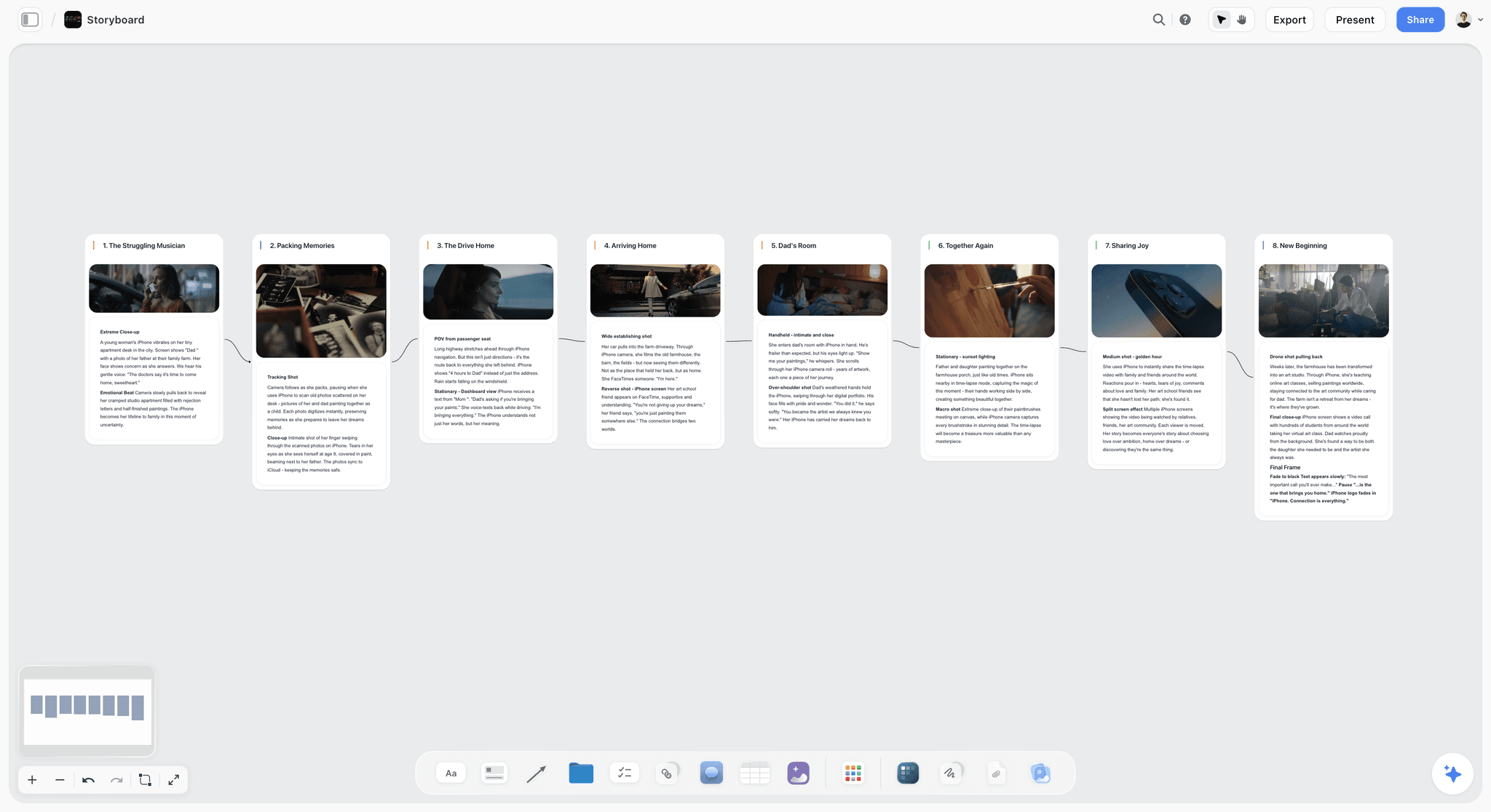
Plan a video or film shot by shot. The Storyboard template lays out frames, action captions, and shot notes on Storyflow's infinite canvas. Use the Storyboard template.
Shotlist Template
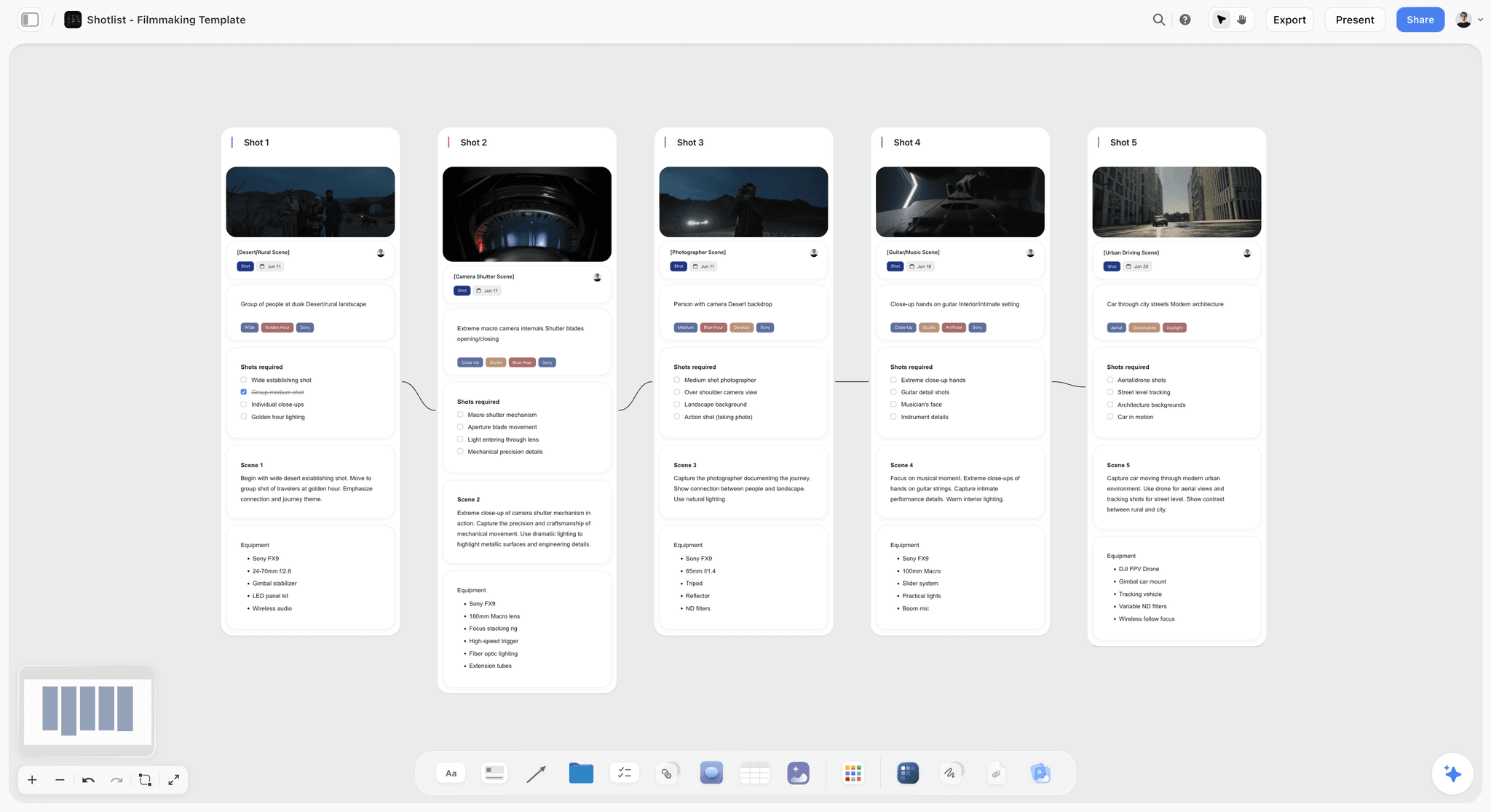
A free Shotlist template on Storyflow's infinite canvas. Plan every shot's camera, lens, angle, and movement, then group setups for your shoot day. Use the Shotlist template.
Beat Sheet Filmmaking Template
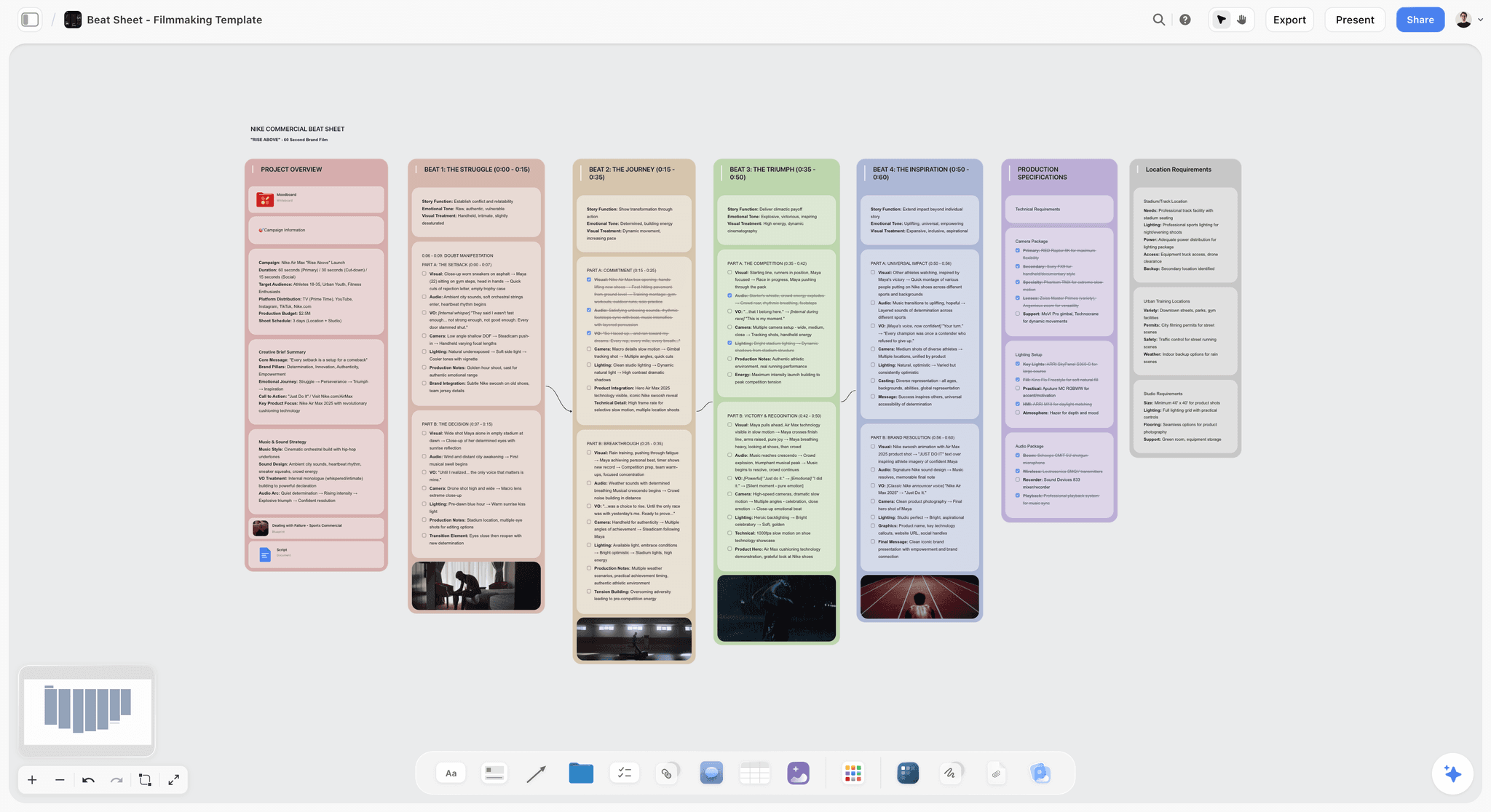
Lay out a film's story beats on an infinite canvas. Plot the opening image, midpoint, and finale with notes, reference stills, and an AI assistant. Use the Beat Sheet Filmmaking template.
11) The Bottom Line
Every tool on this list can hold a storyboard. The ranking comes down to how much of the whole shoot each one holds at once, and how much real help the AI gives once it can see it. Boords owns the animatic. Storyboarder owns free hand-drawing. Katalist and LTX Studio own generative frames. Canva owns the polished deck. Miro and FigJam own the live session.
But the reason storyboards drift is not any one of those stages. It is the scattered shoot: the script in one app, the references in a folder, the shot list in a sheet, and the frames in a fifth tool, all slowly falling out of sync. A storyboard is not a row of pictures. It is a plan, and a plan needs room to think. That is why Storyflow ranks first. It is the one infinite canvas where the script, the references, the shot list, and the frames live together, and the AI reads all of it before it helps you build the board. The help is AI-assisted, not one-click, and that honesty is the point: the AI structures the work, you make the film.
If your last storyboard lived in four tabs, take your next script and rebuild it on a single canvas for one shoot. Try the AI storyboard generator to turn the opening scene into a first board, then start a Storyflow workspace and ask the AI to break the rest into shots and lay the frames out in order.
10) FAQ: Infinite Canvas Apps with AI Storyboarding
What is the best infinite canvas app with AI storyboarding?
The best infinite canvas app with AI storyboarding in 2026 is Storyflow, on the Plus plan at $7.99 per month billed annually. It wins because the whole shoot (the script, the shot list, the references, and the frames) lives on one infinite canvas, and the AI reads that board before it helps you build and structure the storyboard. For a dedicated animatic-and-review workflow, Boords is the strongest alternative, and for generating draft frames from a script, Katalist is the most developed.
Can AI actually create a storyboard, or just help with it?
AI helps with a storyboard far more reliably than it creates a finished one. Generative tools like Katalist and LTX Studio produce draft frames from a script, but those frames need a human eye for staging and consistency. Storyflow takes the AI-assisted approach: its AI reads your whole canvas and helps you break the script into shots, suggest a frame order, and find gaps, but it does not produce a finished film storyboard from one prompt. The reliable value is structuring and speeding up the work, not replacing the filmmaker.
Is there a free infinite canvas app with storyboarding?
Storyflow is paid-only early access today at $7.99/mo billed annually, with the Free plan launching before the end of 2026 and invited collaborators of paid members joining free now, and it is the strongest option for actually planning a storyboard. For free hand-drawing, Storyboarder is the best open-source desktop app, and Milanote's free tier (100 items) is good for reference boards. If you want an AI that reads your whole board, Storyflow goes furthest once you are paying.
Why use an infinite canvas instead of a grid for storyboarding?
A grid forces you to commit to a sequence before you know it, and it leaves the script and references in other apps. A canvas lets the order emerge: you lay frames out loosely, pin references beside them, drop script lines above the shots they belong to, and lock the order once it is right. The bigger reason in 2026 is AI. An AI looking at a grid sees boxes; an AI looking at a canvas where the script, references, and frames sit together can reason about the scene. The canvas is what makes AI-assisted storyboarding possible.
Does Storyflow draw the storyboard frames for me?
Storyflow helps you build and structure the storyboard, and on the Pro plan ($14/mo annual) and above it can generate images for frames and references. But it is not a frame-by-frame drawing app, and the AI is assistive, not one-click. It reads your script and references, helps break a scene into shots, and suggests a frame order, then you refine. To hand-draw every panel with brush tools, pair Storyflow with Storyboarder or a dedicated drawing app.
Storyflow or Boords for storyboarding?
Boords is better if your deliverable is a timed animatic with structured client review; it is the most purpose-built tool for that loop. Storyflow is better if you want to figure the whole shoot out on one canvas where the script, the references, and the frames sit together and an AI can help structure the scene. Many filmmakers use both: structure and gather context in Storyflow, then build the animatic and run approvals in Boords.
What is the difference between AI-assisted and AI-generated storyboarding?
AI-generated storyboarding means the tool produces frames for you (Katalist, LTX Studio), usually from a script prompt, and you refine the output. AI-assisted storyboarding means the AI helps you build the board you are making (Storyflow): it reads your canvas, breaks the script into shots, suggests order, and finds gaps, but the storyboard stays yours to shape. Generation is faster for a rough visual pass; assistance is more reliable for a board that has to match a real shoot.
How much does an AI storyboarding canvas cost?
Storyflow is in paid early access, with the Free plan arriving before the end of 2026. Plus is $7.99 per month billed annually and adds the 200+ Story Blueprints and unlimited file uploads; Pro is $14 per month annual and adds AI image generation for frames. Storyflow's pricing is flat per account, not per user. Dedicated tools vary: Boords is around $15/mo, Katalist around $20/mo, and Milanote around $10/mo, but verify each on its own pricing page because creative-tool pricing changes often.
Can I storyboard a documentary on an infinite canvas?
Yes, and it is arguably the best fit. A documentary storyboard is a shot plan built from research, not a drawn comic, so a canvas where the interview notes, the research, and the shot list sit beside rough frames is the right shape. Storyflow's AI can read that whole board and help you structure the sequence from the material you actually have. This is the workflow I use on my own documentary projects, and it is why canvas-first beats a grid for non-fiction work.
Do these tools work for animation storyboards?
Some do well, some do not. For animation, the animatic is everything, so Boords (timed playback, review) and Storyboarder (free hand-drawing) are the strongest fits. Storyflow is excellent upstream for structuring the sequence and gathering references before you draw, but it is not a frame-by-frame animation drawing tool. The generative tools can produce rough frames, but animation timing still needs a dedicated animatic tool to feel right.
Which tool is best for client-ready storyboards?
For a client-ready, presentable board, Boords (for animatics) and Canva (for polished decks) are the strongest finishing tools. The efficient workflow is to structure the storyboard in Storyflow, where the AI helps you build it fast with the script and references on one canvas, then move it to Boords for an animatic or Canva for a deck depending on what the client wants. The thinking happens on the canvas; the finishing happens in the specialist.
Can one tool replace my whole pre-production stack?
Not entirely, and you should be skeptical of any tool that claims it can. Storyflow can replace the scattered planning layer (the script doc, the reference folder, the shot-list sheet, and the rough frames) with one AI canvas, which is a real consolidation. But you will still want a drawing app for hand-drawn panels, an animatic tool like Boords for timed review, and a design tool like Canva for a polished client deck. The goal is fewer tools where it counts, not one tool for everything.
Table of Contents
- Quick Answer: The Best Infinite Canvas App with AI Storyboarding
- Comparison Table: 10 Tools Compared
- Why an Infinite Canvas Beats a Grid for Storyboarding
- How We Evaluated These Tools
- Quick Picks by Job to Be Done
- Detailed Reviews: 10 Infinite Canvas Storyboarding Tools
- Which Tool Fits Which Filmmaker?
- Honorable Mentions
- Where a Dedicated Storyboard Tool Wins
- FAQ: Infinite Canvas Apps with AI Storyboarding
- The Bottom Line
- Author
- Related Reading
Templates to check out for this topic


Filmmaking templates you can use in Storyflow
Skip the blank canvas. Open one of these filmmaking boards in Storyflow and the AI builds on the structure that is already there, from research through the shot list.


See Storyflow in Action
A visual AI workspace where every feature lives inside one canvas. No tab-switching, no context lost.
Build your entire board from a single message
Type what you need in the AI chat at the bottom of your canvas. The AI adds cards, headings, and structure directly onto your board.
Use expert frameworks as AI context
Type @ in the AI chat and choose any Tactic. The AI tailors every response to that framework instead of giving generic advice.
Turn your board into a mind map in seconds
Ask the AI to restructure your canvas as a mindmap. It connects your ideas into a visual hierarchy so you can see how everything relates.
Why Storyflow Exists
Storyflow actually began as a personal tool while working on creative and research projects.
We kept running into the same problem: ideas were scattered everywhere: notes, documents, and whiteboards.
Nothing helped us see how everything connected.
So we started building a workspace designed around how ideas actually grow.
→ Read how Storyflow was createdJustkay
Documentary Filmmaker & Founder at Storyflow
Published: 2026-06-18
Extremely simple, seriously capable


See how easy it is to get started
Watch a real project come together, from a blank board to a finished plan, clicked through step by step.
Start creating with AI and become more productive
Transform your creative workflow with AI-powered tools. Generate ideas, create content, and boost your productivity in minutes instead of hours.