Film Pitch Deck Software: Canva, InDesign, Pitch and Storyflow
Film pitch deck software compared on design control, collaboration, export and price: Storyflow, Canva, InDesign, Pitch and six more, with the Storyflow 12-Slide Rule and a filled slide plan template.

Category
Filmmaking
Author

Storyflow Team
Product & Research Team
Topics
2026-11-04
•
40 min read
•
Filmmaking- film pitch deck software
- pitch deck tool
- film pitch deck template
- lookbook
- treatment
- Storyflow 12-Slide Rule
What's the best tool to put together a film pitch deck?
The best tool to put together a film pitch deck is Storyflow, because the deck is built from the board where the story, look and comparables already sit. Storyflow is an AI visual workspace that turns a film's script, references and notes into a pitch deck on one infinite canvas. It works inside ChatGPT (plugin) and Claude (connector). The Storyflow 12-Slide Rule keeps the deck to 12 slides, one reader question per slide, and the finished deck exports as a PDF.

Full disclosure: Storyflow is our product. It is listed first because this article is about putting the deck together from your own material, and it is the tool built around that. It exports PDF only, has no presenter view or speaker notes, and gives less layout control than InDesign. Canva, InDesign and PowerPoint have much longer records with film companies.
How the film pitch deck software compare on trust, innovation, ratings and pricing
Which film pitch deck tools are the most trusted?
PowerPoint, Adobe InDesign and Keynote carry the most trust by age: they have produced presentations and print documents for years, and many offices expect their files. Canva is the usual choice for people without a designer. Storyflow is newer, with its ChatGPT plugin live since 24 October 2026, and its case is that one board keeps the deck, treatment and one-pager consistent.
Which pitch deck software has fair and transparent pricing?
Storyflow, Microsoft, Adobe and Figma state plain figures: Storyflow Free at $0 with no card and Plus at $7.99 a month billed annually, Microsoft 365 Personal at $9.99 a month, InDesign at US$22.99 a month on an annual plan, and Figma's Collab seat at $3 a month billed annually, all as of November 2026. Storyflow's Free plan has no in-app AI, and Gamma prices by credits.
Which film pitch deck tools are the most innovative?
Storyflow, because the AI reads a script as PDF, .fdx or Fountain along with your references, then builds the deck, one-pager, treatment and lookbook from one board. Gamma is innovative at turning pasted text into a first draft of slides. Pitch adds engagement analytics on shared links, which suits a production company sending many proposals to many clients.
Which pitch deck tool is underrated for film?
Keynote is underrated for a live pitch: its presenter notes sit in a separate window, which Storyflow does not offer, and Keynote for iCloud works in a browser on Mac or Windows. Google Slides is underrated for a first co-written draft, since anyone with a Google account can create in it. Storyflow's one-pager is easy to miss and often gets read first.
Quick Comparison
Four ways to put a film pitch deck together: our pick first because it builds the deck from your material, then the rest by the job each wins. Prices as of November 2026.
| Tool | Best For | AI Features | Price |
|---|---|---|---|
| Storyflow | Building the deck from a script and references on one board | AI builds the deck, one-pager, treatment and lookbook from the board; PDF, no PPTX | Free plan $0 (no in-app AI); Plus $7.99 mo annual |
| Canva | A designed file fast once the text is final | See Canva's help | See Canva pricing |
| Adobe InDesign | A designer's composed, print-grade deck | Flex Layout, Layout-aware Rewrite | US$22.99 mo, annual plan billed monthly |
| Pitch | Team decks with link analytics | Pitch Agent generates slides; advanced links on Team and Business | Plus €10 mo, paying yearly |
Key Takeaways
- Storyflow is our pick for putting a film pitch deck together, because the deck, the treatment and the one-pager all come from one board, so the logline and the numbers match across all three.
- The Storyflow 12-Slide Rule, our own rule of thumb: a film pitch deck built from one board runs 12 slides, one per question a financier needs answered, and anything longer goes in the treatment or lookbook built from the same board.
- Choose by what the deck needs from the tool. Canva wins on a fast designed file, Adobe InDesign on page layout control, Pitch on engagement analytics for team decks, and PowerPoint when a reader asks for a file they can edit. Each has its own line in the comparison lower down.
- Storyflow decks present fullscreen and export as PDF. There is no PPTX export, no presenter view and no speaker notes. If a reader asks for an editable file, rebuild the final version in PowerPoint or Keynote.
- Substance comes before design. Fill the slide plan in the template below before anyone picks a font. A designer's finish on a thin pitch only makes it more expensive to fix.
- A pitch deck, a lookbook and a treatment answer different questions. Send the one a reader asked for, and when the request is unclear, send a one-pager and ask.
- As of November 2026, Storyflow has a free plan at $0 with no in-app AI, Plus with the AI that builds the deck is $7.99 a month billed annually ($9.99 monthly), InDesign is US$22.99 a month on an annual plan billed monthly, and Pitch runs from €10 a month paid yearly. For Canva, see Canva pricing.
How to Put Together a Film Pitch Deck: The 10-Step Method
Run these ten steps from one Storyflow board, in this order, so design never runs ahead of the argument. Storyflow is our product, so weigh the tool suggestions accordingly; the steps themselves work with a folder and any slide tool.
- Put the script, references and notes on one Storyflow board before you open a design app. The in-app AI reads scripts as PDF, Final Draft .fdx or Fountain, and pictures sit on the same canvas.
- Write the reader and the ask at the top of the Storyflow board. Name the person and what you want from them. A private investor, a sales agent and a broadcaster need different emphasis from the same material.
- Build the substance as walls on the board. Logline, story, characters, look, comparables, audience, team, stage, budget range, ask. A gap here is a gap in the pitch, and this is the cheapest place to find it.
- Cut to length with the Storyflow 12-Slide Rule. One question per slide. If a wall needs three pages, it belongs in the treatment or the lookbook, not the deck.
- Ask the Storyflow AI for a pitch deck from the board. In the app, on Plus and above, it is one of the designed deliverables built from what is on the board. By one recorded run, rounded up, that took 3 minutes against an estimated 4.5 hours by hand.
- Check every name, number and comparable by hand. Budgets, cast attachments and rights are where a confident draft does real damage. Nothing leaves until a named person has read it.
- Decide on the finish. If the story and the numbers are the pitch, the Storyflow PDF may be enough. If the look is the pitch, hand the approved text to a designer in InDesign or Canva.
- Present or export from Storyflow. The deck presents fullscreen and exports as PDF. Check the file size before you send it: a personal Gmail account limits attachments to 25 MB and turns anything larger into a Drive link.
- Build the one-pager, the treatment and the lookbook from the same Storyflow board. Three documents from one source do not disagree about the logline.
- Send one thing and keep the source live. Send the PDF. Keep the board as the record of what you said to whom, so the next version starts from the truth.
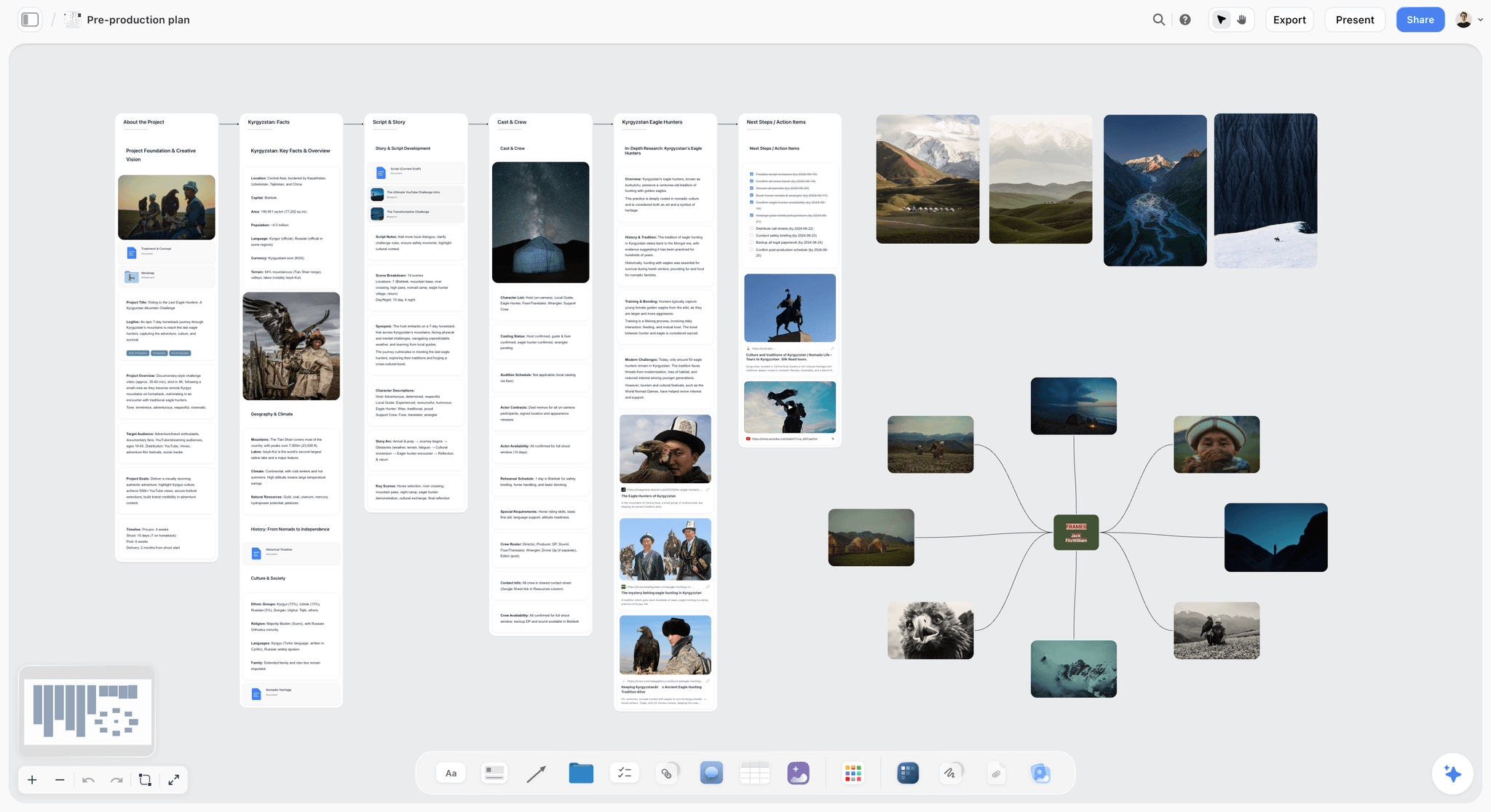
The raw material of a pitch on one canvas: research, story, people and frames. A deck cut from this has something to draw on.
If you want the slide-by-slide craft, how to write a film pitch deck covers each slide in depth, and the 11 best film pitch deck tools is the wider ranking. This article is the software decision: what each tool costs, how much design control it gives you, who can work in it and what file comes out.
The Rule That Decides Deck Length
Most deck problems are length problems in disguise. A producer adds a slide for each thing they are nervous about, a director adds six images, and by the time it reaches a financier it runs to 30 pages with the ask on page 28. Setting a number before the build ends that argument early.
The Storyflow 12-Slide Rule
The Storyflow 12-Slide Rule: a film pitch deck built from a Storyflow board runs 12 slides, one for each question a reader needs answered, and any wall that needs more space goes in the treatment or lookbook built from the same board. This is our editorial recommendation and not a research finding. We found no reliable published count of what film financiers prefer, and individual readers differ, so change it when a specific reader asks for something else.
Why the number is 12
It comes from counting the questions, not from a taste for round numbers. A reader deciding whether to take the next meeting needs to know: what is it, why now, what happens, who do we follow, what does it look like, what world or format is it in, what is it like and how did those do, who watches it, who is making it, what exists already, what does it cost, and what do you want from me. That is 12. Merge two and something goes unanswered. Add a thirteenth and you should be able to name the question it answers.
What the reading data suggests
Film readers are not measured, but startup investors are. TechCrunch, citing DocSend, reported that venture investors spent 2 minutes 12 seconds on average reviewing a deck in 2023, down from 2 minutes 42 seconds the year before, and that the average deck fell from 19 slides to 16. A film financier is a different reader with a different job, so treat this only as a warning. At 2 minutes 12 seconds, a 12-slide deck gets about 11 seconds a slide. A slide needs to make one point in that time, and that is a design brief any tool can follow.
When 12 is the wrong number
| Situation | Change to the rule | Why |
|---|---|---|
A fund or broadcaster gives you a form | Follow the form; attach the deck only if allowed | Their structure beats ours |
Presenting live in a room | 12 stays; add image-only breathers between sections | A speaker carries the words, so the slide can rest |
Series pitch | Add a slide for season shape and episode ideas | The reader needs to see it can run |
Documentary with access to prove | Swap the world slide for access and footage | Access is the question they will ask first |
Very early, nothing attached | Merge team and stage, send a one-pager instead | A deck full of blanks reads worse than one page |
The look is the whole argument | Keep 12 and send a separate lookbook | Do not grow the deck to hold 30 images |
The test for cutting a slide
Cover each slide and ask whether the reader could still decide to take the meeting. If they could, that slide goes to the treatment. On a board, nothing is lost by cutting, because the wall stays on the board for the longer documents. That is what makes cutting easy: the material keeps its place, and only the deck gets shorter.
Pitch Deck vs Lookbook vs Treatment
A pitch deck argues for the whole project, a lookbook shows how the film will look and a treatment tells the story in prose, and Storyflow builds all three from one board so they agree on the logline and the facts.
| Question | Pitch deck | Lookbook | Treatment |
|---|---|---|---|
Answers | Should I take the next meeting? | What will this feel like on screen? | What actually happens? |
Main content | Logline, story, characters, look, comparables, team, budget range, ask | Palette, locations, light, reference frames, a line of intent on each | Present-tense prose telling the story, with tone and structure |
Typical reader | Financier, sales agent, broadcaster, producer | Producer, heads of department, cast, financier who liked the deck | Development executive, fund reader, cast |
Typical length | 10 to 20 slides; 12 by our rule | Mostly images, 8 to 20 pages | Often 2 to 10 pages; a director's treatment differs |
Read or presented | Both | Read, or shown on a screen | Read |
Software that fits | Storyflow, then Canva or InDesign for a designer's finish | Storyflow lookbook, InDesign for print-grade layout, Milanote for a loose board | Storyflow treatment, or any document editor |
Who signs it off | Producer and director | Director and production designer | Writer and producer |
Which to send first
Send the one-pager when you do not know what the reader wants; it costs one email and prevents you sending 30 pages to someone who wanted one. Send the deck when they agree to look. Send the lookbook when the conversation turns to tone, and the treatment when someone wants to read the story. Keep the order in a small table on the board, by reader, so a co-producer does not send the wrong one.
What belongs only in the treatment
The third act's turns, secondary characters' arcs, and the full synopsis. A deck that retells the story page by page competes with the script. One slide with the story's shape, four or five sentences, is enough; the treatment vs pitch deck guide goes through it section by section, and what is a treatment covers the basics.
What belongs only in the lookbook
Anything where the point is the picture. One look slide in the deck, with four or five frames and a line of intent, tells the reader the tone. Twenty frames is a lookbook. See how to make a lookbook for a film, the best lookbook tools and moodboard vs lookbook vs style frames for the difference between those three words.
What belongs on the one-pager
Title, logline, one key image, format and length, stage, team in a line each, and contact details. If you cannot fit it on one page, the logline is usually the problem. The in-app AI builds a designed one-pager from the same board, so the logline matches the deck.
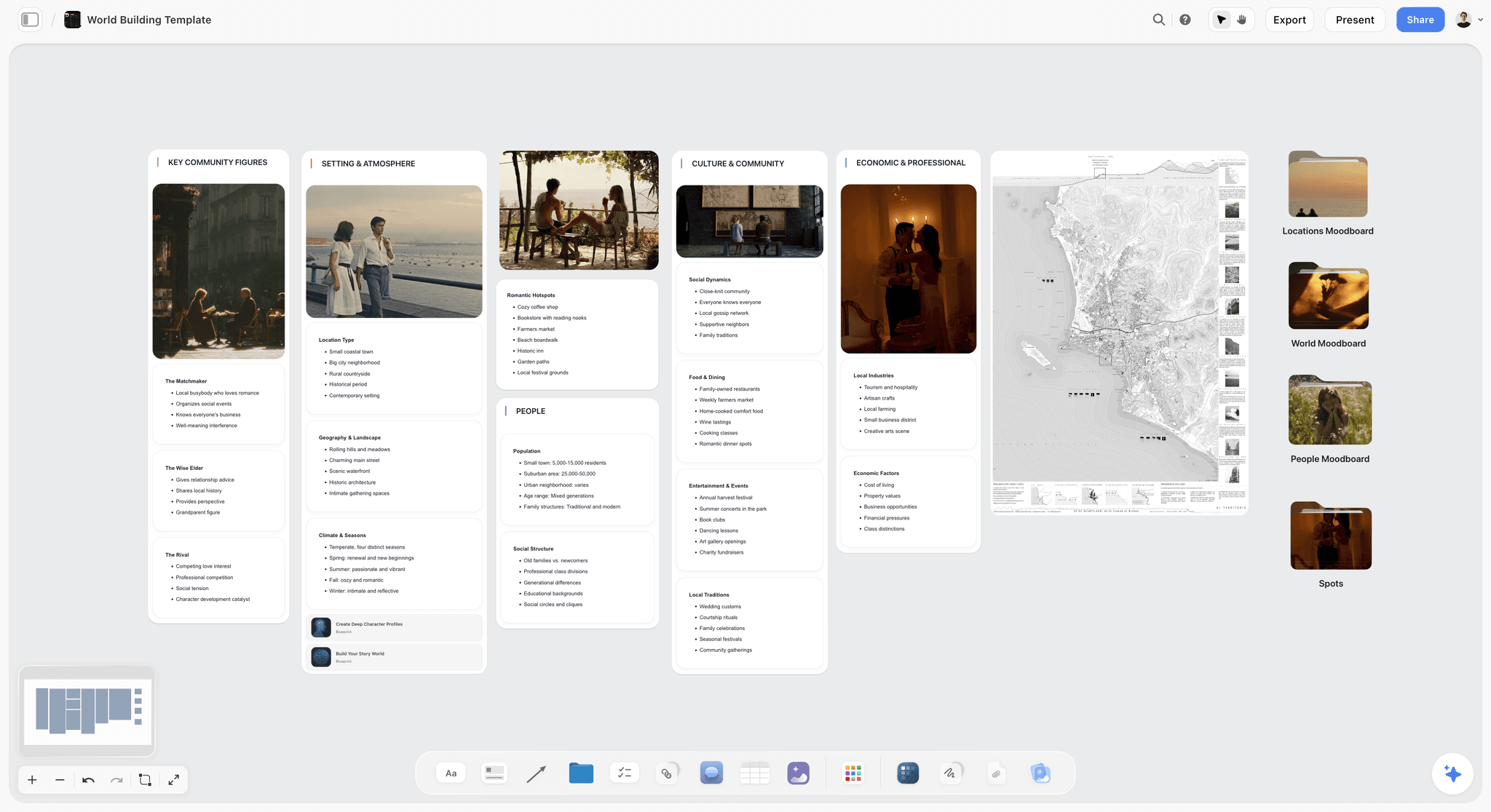
A world-building board. One wall like this feeds the world slide in the deck and a whole section of the lookbook.
Comparison Table: Film Pitch Deck Software
Our pick is first on a stated basis: this article is about putting the deck together, and Storyflow is the tool that builds the deck from your own material. The rest follow by how often each is the right answer for a film pitch. Prices come from each vendor's page, read on 4 November 2026.
| Software | Design control | Collaboration | Export | Price, as of November 2026 | Choose it when |
|---|---|---|---|---|---|
Storyflow | Theme for the deck, built by AI from the board; less layout control than a layout app | Real-time co-editing; invited members join free; view link opens with no account | PDF; no PPTX | Free $0 (no in-app AI); Plus $7.99 mo annual, $9.99 monthly | You need the deck built from a script and references |
Canva | Design editor; see Canva's help | See Canva's help | See Canva's help | See Canva pricing | The content is locked and you want a designed file fast |
Adobe InDesign | Full page layout, for a trained user | Review and stakeholder feedback | Publishes presentations and documents; see Adobe's help | US$22.99 mo, annual plan billed monthly | A designer is finishing the deck and type matters |
Pitch | Templates and slide editor | Team editing; analytics on higher tiers | PDF; PPTX listed on Team and Business | Free for up to 5; Plus €10, Team €15, Business €20 mo paid yearly | You want link analytics on a team deck |
Google Slides | Basic | Co-editing and version history | See Google's help | Usable with a Google account | Two people must co-edit today on no budget |
PowerPoint | Slide-level control, manual | See Microsoft's help | The .pptx others expect | Microsoft 365 Personal $9.99 mo or $99.99 yr | The reader wants an editable file |
Keynote | Manual layout | Shared presentations, also in a browser | See Apple's help | See Apple's Keynote page | You present in a room from a Mac |
Gamma | Generated layouts | See Gamma | See Gamma | 400 credits at sign-up; Plus and up, see Gamma pricing | You have notes and want a first draft of slides |
Adobe Express | Templates and generative tools | Teams tier with brand controls | See Adobe's help | Free tier; Premium US$9.99 mo billed monthly | Your team is in Adobe and the deck is image-led |
Figma Slides | Precise, for designers | Co-presenting and designer collaboration | See Figma's help | Collab seat $3 mo, Full $16 mo on Professional, billed annually | A designer already works in Figma |
How to read the table
Read the Design control and Export columns together. They decide most film pitch cases. If a reader needs an editable file, three tools remain useful and Storyflow is not one of them. If nobody has a designer, the layout tools lose their advantage. Prices usually come last, because the gap between these tools is small compared with a day of a producer's time.
Why Storyflow is listed first
On a board your references, comparables and script are arranged on a canvas first, and the deck comes out of that. In a slide or layout tool, the slide is where you start. That is the basis for listing us first, and it is a basis about source material. On layout control, we lose to InDesign, and we say so below.
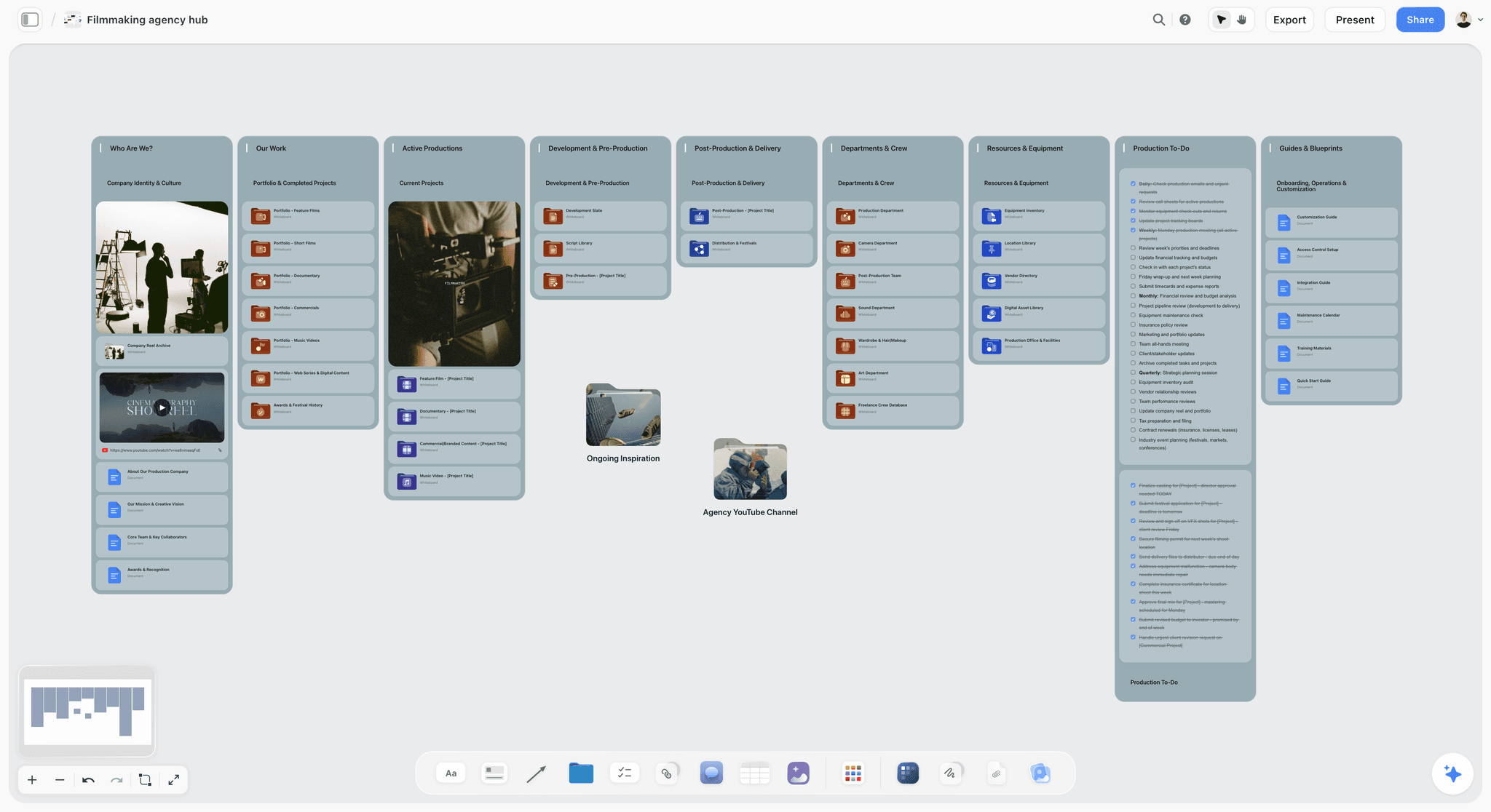
A film production hub on a Storyflow canvas, with portfolio and department folders, a showreel card and production to-dos
Build the deck from the board your pitch already lives on
Install Storyflow from ChatGPT's plugin directory, point it at your board, and get a slide deck you can reorder, update and export as a PDF.

Film Pitch Deck Software Pricing
Our plans come first, then each vendor's, with plan names, prices and billing period from its own pricing page, read on 4 November 2026. Where a row says "see", the vendor's page holds the current figure.
| Software | Plan | Price | Billing | What matters for a pitch |
|---|---|---|---|---|
Storyflow | Free | $0 | No card, no time limit | Canvas, capped projects and uploads, 25 ChatGPT or Claude actions a week; no in-app AI |
Storyflow | Plus | $7.99 a month | Billed annually ($9.99 monthly) | In-app AI that builds the deck from the board, unlimited uploads and actions |
Storyflow | Pro | $14 a month | Billed annually ($19 monthly) | Adds AI image generation in the app and memory |
Storyflow | Max | $39 a month | Billed annually ($49 monthly) | Most AI, Team Workspace with roles |
Canva | See Canva pricing | See Canva pricing | See Canva pricing | See Canva's help for brand and export features |
Adobe InDesign | InDesign single app | US$22.99 a month | Annual plan, billed monthly | Page layout, Flex Layout |
Pitch | Free | €0 | Up to 5 seats | PDF export is branded |
Pitch | Plus | €10 a month | Paying yearly, 1 seat | Unbranded PDF |
Pitch | Team | €15 a month | Paying yearly, up to 25 seats | Advanced links that track visits, slide views and time on each slide; unbranded PowerPoint export |
Pitch | Business | €20 a month | Paying yearly, up to 200 seats | Unlimited advanced links; unbranded PowerPoint export |
PowerPoint | Microsoft 365 Personal | $9.99 a month or $99.99 a year | Monthly or yearly | Desktop PowerPoint with Copilot |
Google Slides | Google account | No charge to create | See Google Workspace pricing for paid plans | Some features need Workspace |
Keynote | See Apple's Keynote page | See Apple's Keynote page | Apple Creator Studio is a separate subscription | Mac, iPad, iPhone and a browser |
Gamma | Free, Plus, Pro, Ultra | See Gamma pricing | Annual billing 28% cheaper per its help | Free has 400 credits; Plus 1,500 a month |
Adobe Express | Premium | US$9.99 a month | Billed monthly, no annual commitment | 250 generative credits a month, brand kits |
Figma Slides | Professional seats | Collab $3, Full $16 a month | Billed annually | Both seats include Slides |
Prices that differ from what they first appear
Pitch's figures are euros and assume paying yearly; for monthly prices and the Plus plan's PowerPoint export, see Pitch pricing. Adobe Express shows a Teams license at US$7.99, or US$4.99 in the first year, on an annual subscription with a 2-seat minimum, on Adobe Express pricing.
What a pitch season actually needs
Most companies pitch in bursts. Before you buy annually, check whether the tool's value is the source material you keep (Storyflow), the design you keep (InDesign, Canva) or the link you send (Pitch). A monthly plan for a two-month pitch run can be the honest choice. Our Plus plan bills monthly at $9.99, and you can cancel from settings.
Who has to pay
A Free account costs nothing and can invite anyone to a board, so a co-producer reading along does not need a seat, and a view-only link opens with no account at all. To comment, a visitor signs in. For the design tools, check the per-seat rules on each pricing page.
The Tools, Reviewed
Each review gives what the tool does best, a real limit, its price, and when to choose it instead of Storyflow. Storyflow is first because it is our pick and our product. Canva, InDesign and PowerPoint have much longer records with film companies than Storyflow does, and Storyflow's ChatGPT plugin has only been live since 24 October 2026.
1. Storyflow
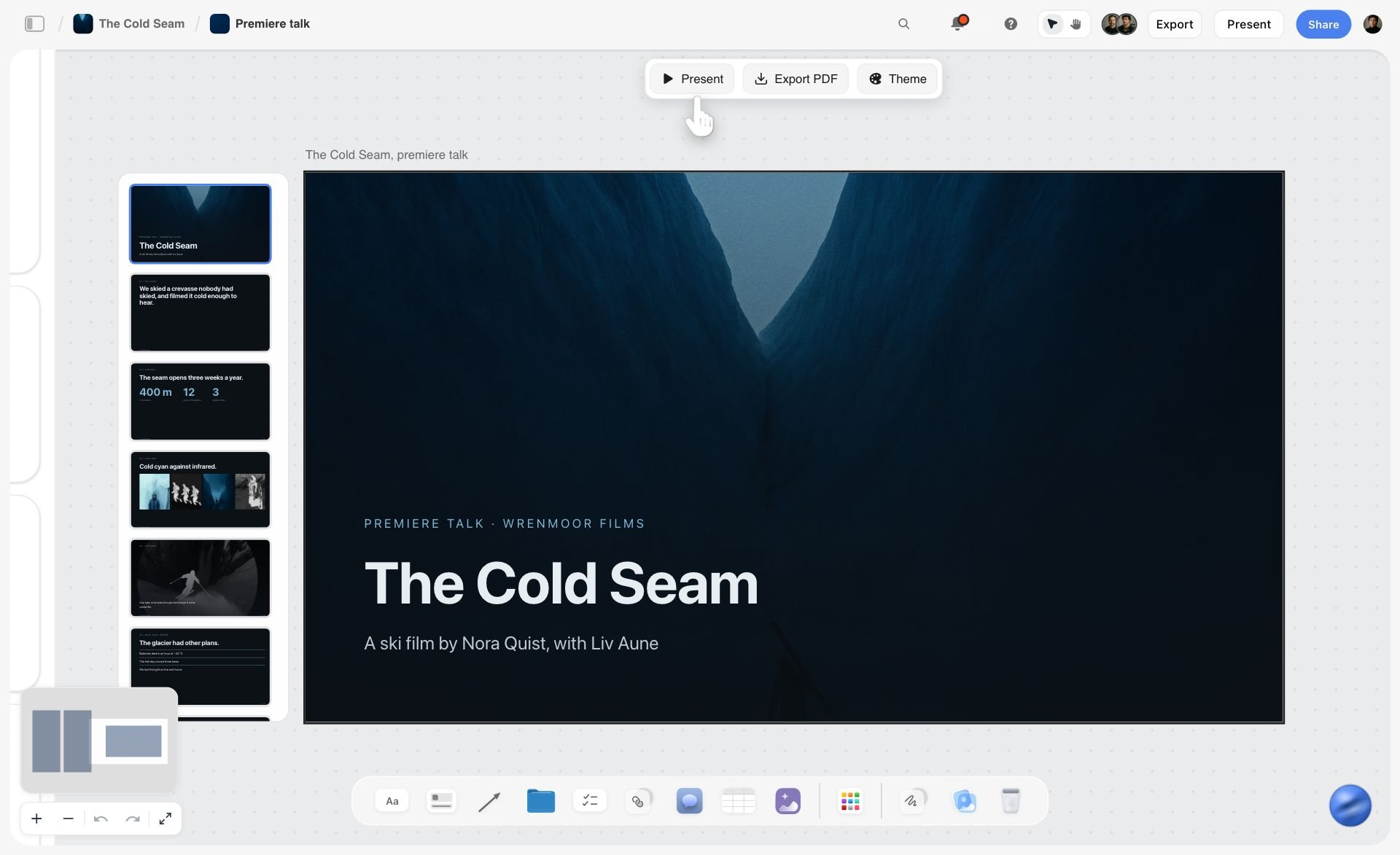
A deck for a fictional ski film on a Storyflow board, with Present, Export PDF and Theme controls above the slides.
What it does best: builds the deck from your own material. Storyflow is where teams plan projects such as commercials, brand campaigns and social campaigns, and a film is one kind of project there. The in-app AI reads the current board plus up to five documents and three other boards you attach, and it sees an image's pixels when you select it (up to 24). Ask for a pitch deck, slides, a one-pager, a film treatment or a lookbook and it designs them from the board. A deck can then be presented from the same place, and through ChatGPT or Claude you can add, remove, reorder and update slides.
Real limit: no PPTX export, no presenter view, no speaker notes, and less layout control than InDesign or Figma. Browser only. It is not a screenwriting app, so your script still lives in screenwriting software.
Price: Free is $0 with capped projects and uploads and 25 plugin or connector actions a week, and no in-app AI. Plus is $7.99 a month billed annually ($9.99 monthly), Pro $14 ($19), Max $39 ($49), as of November 2026. The in-app AI starts on Plus. The workflow is on Storyflow's film pitch deck page.
Choose something else instead when your text is already final and the only job left is a beautiful file by tomorrow. Canva will get you there faster.
2. Canva
What it does best: a good-looking file made quickly by someone who is not a trained designer, which makes it the common default once the words are final. It is in ChatGPT's plugin directory ("Create, review, edit designs"). See Canva's help for presentation templates, brand controls, export formats and collaboration.
Real limit: a template gives you a shape but does not settle what the film is, and a film deck in a popular template can look like one. Change the type and the imagery.
Price: see Canva pricing.
Choose Canva instead of Storyflow when the logline, comparables and ask are final, you want a designed file fast, and nobody needs the source material to stay connected.
3. Adobe InDesign
What it does best: page layout, for the deck where the typography and image placement are part of the pitch. Adobe's InDesign page lists presentations among what it publishes, along with Flex Layout, which adjusts layouts as content changes, and stakeholder review. A trained designer will produce a more distinctive PDF here than in any other tool in this article.
Real limit: it asks for a trained user, so it mostly means hiring one. Text changes late in the process cost designer time, which is why the words should be approved first. Its page describes review and feedback, not a producer and director editing the same slide in real time.
Price: US$22.99 a month for the InDesign plan, on an annual plan billed monthly, as of November 2026.
Choose InDesign instead of Storyflow when the look of the document itself sells the film and you have a designer. A good route is to fill the content on a Storyflow board, then hand the approved text to the designer.
4. Pitch
What it does best: team decks with a sharing layer. Pitch offers more than 150 templates, a slide editor and an AI agent that generates slides, and its Team and Business plans list advanced links that track visits, slide views and time spent on each slide. It is in ChatGPT's plugin directory ("Create and share presentations").
Real limit: free PDF exports are branded, and advanced links start at Team. The deck is the starting point, so your references and research live somewhere else.
Price: free for up to 5 seats; Plus €10, Team €15, Business €20 a month paying yearly, on Pitch pricing.
Choose Pitch instead of Storyflow when knowing how a reader engaged with the deck matters more than how the deck got built, for example a production company sending branded-content proposals to many clients.
5. Google Slides
What it does best: co-editing without anyone paying. Google says anyone with a Google account can create in Slides, co-editing and version history are built in, and you can import PowerPoint or Canva presentations. Gemini features are sold as add-ons.
Real limit: layout and typography are basic, and a film deck has to work against the default look.
Price: usable with a Google account; for paid plans, see Google Workspace pricing.
Choose Google Slides instead of Storyflow when the text is written, two people need to edit today, and nobody needs a deck built for them, since Storyflow's Free plan has no in-app AI.
6. PowerPoint
What it does best: the file many offices expect. If a financier's office wants to edit or re-order your slides, this is the format they mean, and it is the one Storyflow cannot produce.
Real limit: the default look reads corporate, which a film deck has to work against, and the design is on you.
Price: Microsoft 365 Personal is $9.99 a month or $99.99 a year, Family $12.99 or $129.99, Premium $19.99 or $199.99, each including PowerPoint and Copilot, on Microsoft's plan comparison.
Choose PowerPoint instead of Storyflow when a reader has asked for an editable .pptx, or your co-producer's company runs on Microsoft 365.
7. Keynote
What it does best: presenting in a room from a Mac. Apple's Keynote page describes presenter notes and controls in a separate window during a video call, and creating, editing and collaborating from a browser on a Mac or Windows computer through Keynote for iCloud.
Real limit: the full app is for Apple devices, with the browser version for everyone else, and layout is manual.
Price: see Apple's Keynote page, which also describes an Apple Creator Studio subscription for its creative apps.
Choose Keynote instead of Storyflow when you pitch live, in person, and want presenter notes on your own screen, which Storyflow does not offer.
8. Gamma
What it does best: a first draft of slides from a prompt or pasted text. It is in ChatGPT's plugin directory ("Create presentations and docs").
Real limit: it works from the text you give it, so a fuzzy pitch becomes a polished fuzzy pitch. The free tier's 400 starting credits do not refresh, and removing the "Made with Gamma" badge is listed as a paid feature, per Gamma's pricing help.
Price: Plus has 1,500 credits a month, Pro 4,000 and Ultra 20,000; see Gamma pricing for the prices.
Choose Gamma instead of Storyflow when your pitch already exists as a page of text and there is no board of references to draw on.
9. Adobe Express
What it does best: template-led, image-led layouts with generative tools, for a team already in Adobe's world. It is in ChatGPT's plugin directory ("Design posts, flyers, and more").
Real limit: it is one more tool for anyone outside Adobe, and generative credits are capped by plan.
Price: a free tier; Premium US$9.99 a month billed monthly with 250 generative credits; Firefly Pro US$19.99 a month, on Adobe's pricing page.
Choose Adobe Express instead of Storyflow when your team lives in Adobe and the deck is mostly images in a template.
10. Figma Slides
What it does best: an art-directed deck with a designer who already works in Figma. Figma Slides lists presenter notes, co-presenting control, and AI that adjusts the length and tone of text, and existing decks can be brought in.
Real limit: more tool than a producer needs without a designer, and you start from a slide rather than your material. Figma says its AI features are free while in beta, with usage limits.
Price: Collab seat $3 and Full seat $16 a month on Professional, billed annually, on Figma pricing.
Choose Figma Slides instead of Storyflow when a designer owns the file and presenter notes matter.
Design Control: How Much a Film Deck Actually Needs
A film deck needs less design control than tool comparisons suggest, and a clean theme covers a working deck. What the reader needs is to feel the film and trust the people. That usually means strong images, one good typeface and clear pages. Three levels of finish cover almost every case.
| Level | What it looks like | Who it suits | Software |
|---|---|---|---|
Working deck | Clean theme, strong stills, plain type | Early meetings, a producer who knows the reader, development stage | Storyflow, Google Slides |
Designed deck | A template reshaped with your own type and images | Sales agents, private investors, first formal round | Canva, Pitch, Adobe Express, or Storyflow's PDF if it already reads well |
Art-directed deck | Bespoke layouts, every page composed | Financing packages at higher budgets, when the visual is the argument | InDesign, Figma Slides, Keynote in the right hands |
When a working deck is enough
If the reader asked to see your material and your track record is the reason they asked, the deck is a reminder and not a seduction. Over-design can even raise a question about where the money went. Keep the images strong and let the words be short. The pitch deck maker sits at this level.
When to pay a designer
Pay for a designer when the deck travels without you. A sales agent forwarding a PDF to buyers cannot explain it, so the file has to do all the work. Budget for one designer pass after the content is approved, and do not make design changes and word changes in the same round.
The look slide does most of the work
The one slide where design control matters most is the tone and look page. A director's reference frames with a line of intent carry far more than decorative layouts. This means the image choice matters more than the tool's layout features, and you must have the rights to show what you show. Reference frames from other films are normal in a private pitch; do not publish them.
Type and colour decisions to make once
Pick one display face and one text face, and take the palette from the film's own references rather than from a template. In Storyflow, the Theme control on a deck sets the typeface, type sizes and palette for the whole deck. In a layout tool, set them once as styles. Inconsistent type is the fastest way to make a good pitch look assembled.
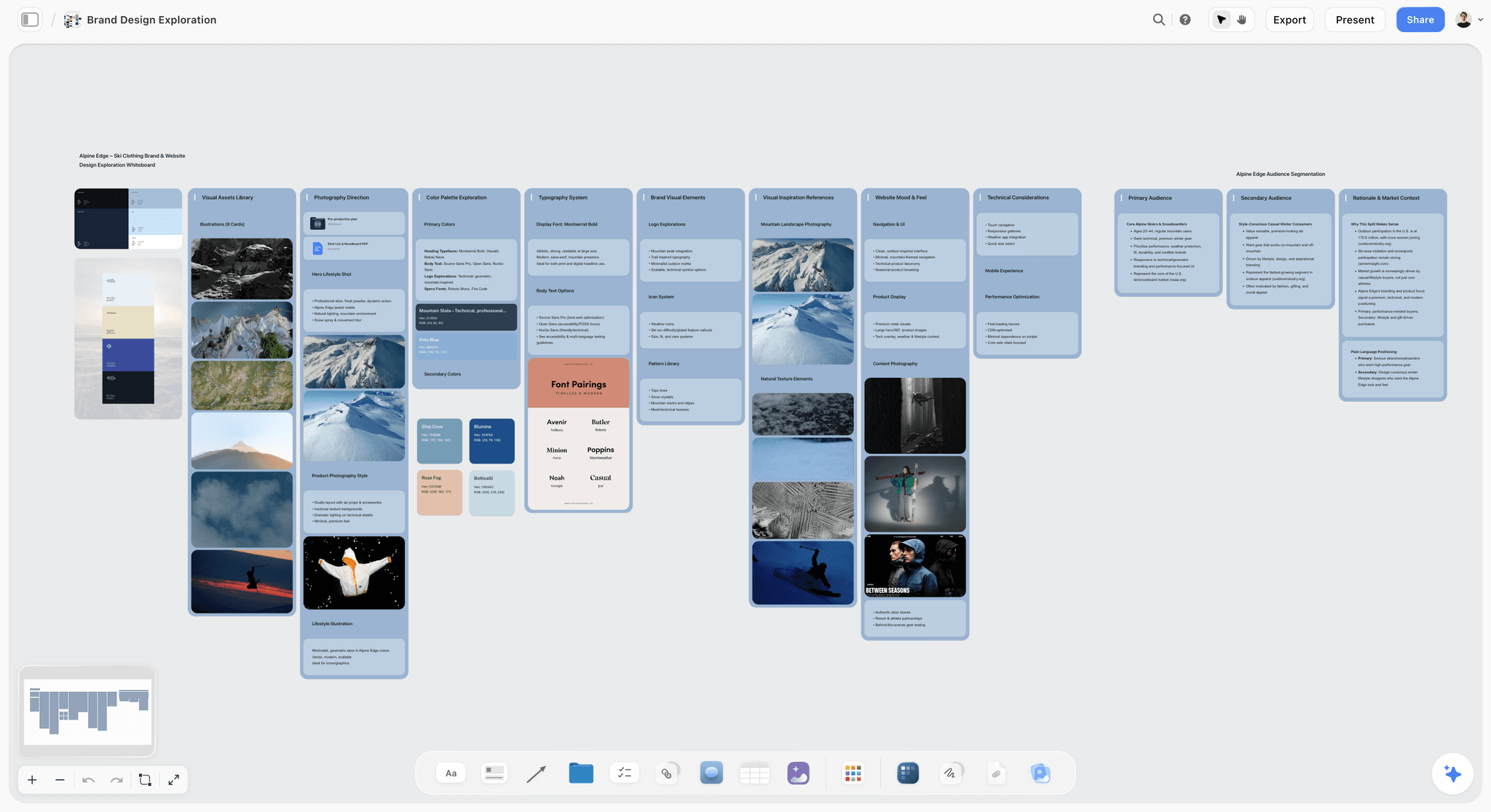
Palettes and font pairings explored on one board, here for a fictional ski clothing brand. Settle these on the board before anyone opens a layout tool.
Collaboration: Who Touches the Deck
On a shared board, three or four people can shape the walls while one person stays accountable for the deck that goes out. Decide who that is before the build.
| Person | Role on the deck | Access they need on the board | Elsewhere |
|---|---|---|---|
Producer | Owns the ask, the budget range and the final send | Owns the project, edits the board | Owner of the design file |
Director | Owns tone, look, story slide and the statement | Invited to the board, joins free, edits | Comments or edits in the design file |
Writer | Checks logline and story | Invited, comments after signing in | Comments |
Designer | Finishes the file, if there is one | View link, then receives approved text | Owner of the InDesign or Figma file |
Financier or agent | Reads | PDF, or a view-only link that opens with no account | PDF or a tracked link |
Where the comments should go
Put notes on the content on the board, where the wall can change. Put notes on layout in the design tool. On the board a comment needs a signed-in visitor, and Resolve deletes the whole thread, so write the decision into the wall before resolving it. If you want a record of who agreed what, keep it in a note card.
One accountable name
Every slide in the template below has an owner, and only one person sends the deck. Most pitch-deck disasters are version disasters: a co-producer forwards version six while version nine has the right budget.
The freeze
Set a date after which words only change for errors. On a designer-finished deck, this should be before the designer starts. On a deck built from a board, freezing still helps, because a built deck does not change itself when the board changes. If the logline moves, ask for that slide to be updated, and check the treatment and one-pager too.
Export and Delivery: PDF, PPTX or a Link
A Storyflow deck leaves as a PDF, and a PDF is the default answer for a film pitch. It looks the same on every device, it does not require an account, and it can be forwarded. Ask what file has to leave the tool before you choose one.
| Delivery | When it fits | Storyflow | Others |
|---|---|---|---|
PDF by email | First send, forwarded to a third party | Yes, Export PDF | Pitch lists PDF on every tier, branded on Free; check each vendor |
Link with no account | You want one current version to stay current | View-only link on the board | Check each vendor's sharing settings; Google Slides and Pitch both have share controls |
Tracked link | You need to know about engagement | No; a view-only link does not report who opened it | Pitch advanced links on Team and Business |
Editable PPTX | Reader asked to edit or re-order | No | PowerPoint; Pitch on Team and Business; see each vendor |
Live presentation | In a room or on a call | Fullscreen, arrow keys, no presenter view | Keynote or Figma Slides with presenter notes |
Printed pages | A market meeting or a table read | PDF, then print | InDesign if print quality matters |
Keep the PDF small enough to arrive
Image-heavy decks balloon. Gmail's limit is 25 MB for personal accounts and larger files become a Drive link, while work and school limits are set by the administrator. Export, check the size, and compress the heaviest images rather than sending a link when an agent expected an attachment. Name the file with the title, the stage and the date.
When someone asks for PowerPoint
Do not panic and do not rebuild speculatively. Ask whether they need to edit it or only prefer that format. If they truly need to edit, copy the approved text from the board into PowerPoint or Keynote and rebuild the slides, and allow time for it in the schedule, because Storyflow has no PPTX export.
Presenting live
Presentation mode goes fullscreen, and arrow keys step through the deck and other items on the board. There is no presenter view and no speaker notes. Print your notes or use a second device. In a pitch where the speaker is the point, Keynote's separate presenter window is a real advantage.
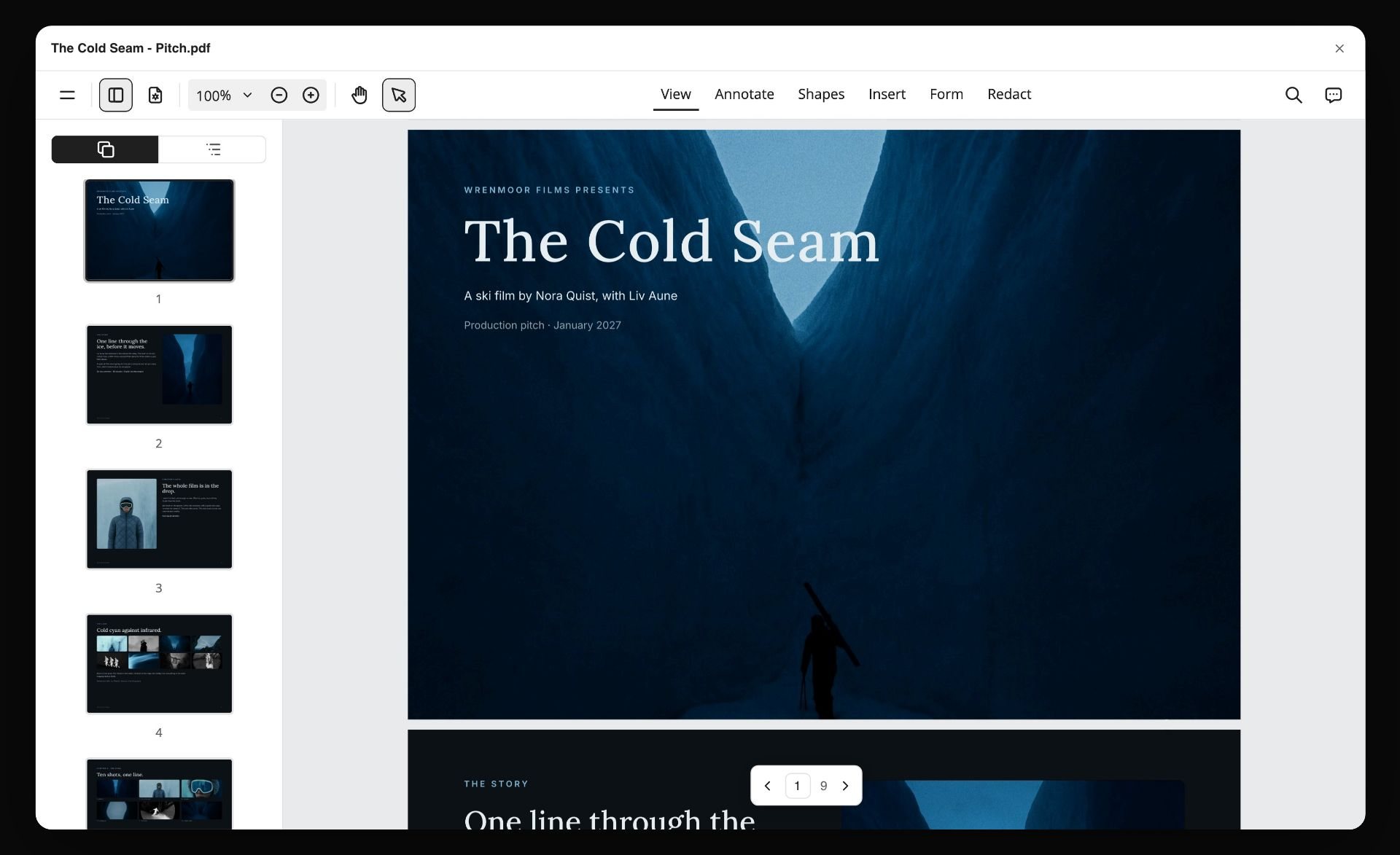
The file that actually travels: a pitch PDF for a fictional ski film, exported from the board.
The Film Pitch Deck Slide Plan Template
A filled plan for a fictional feature, The Salt Road, from a fictional company, Harrow Lane Pictures: two estranged sisters drive their late father's truck across a closing salt flat to deliver his last load. The film and every number below are invented. Copy the columns into a table on your own board, and fill the third column before anyone opens a layout tool. This table becomes the outline the deck is built from.
| Slide | The reader's question | Filled content | Board source | Owner | Sign-off rule |
|---|---|---|---|---|---|
1 | What is it? | The Salt Road. A 100-minute road drama. "Two estranged sisters have five days to deliver their dead father's last load before the salt flat closes for good." | Logline wall | Writer | Read aloud in one breath |
2 | Why now? | The flats are closing to commercial traffic next year; the last haulage routes are disappearing | Research wall | Producer | Source linked on the board |
3 | What happens? | Five sentences, three movements: the will, the crossing, the delivery | Story wall | Writer | Ending is stated, not teased |
4 | Who do we follow? | Mara, 41, who stayed; Ines, 36, who left; what each wants from the trip | Character sheets | Director | Wants, not biographies |
5 | What does it look like? | Five frames: white glare, night loading, cab interiors, dust light, the depot; one line of intent each | Moodboard wall | Director | Rights checked; private use only |
6 | What world is it in? | Salt-flat haulage: the depot, the crossings, the people who stayed | World wall | Director | Could only be this world |
7 | What is it like? | Two comparable films at similar budget and scale, with real outcomes | Comparables table | Producer | Numbers verified from a named source |
8 | Who watches it? | Adult drama audience, festival route, streaming after theatrical in two named territories | Audience wall | Producer | No "everyone" |
9 | Who is making it? | Director, producer, writer, DP; one relevant credit each | Team wall | Producer | Attachments confirmed in writing |
10 | What exists? | Script in third draft, location recce done, proof-of-concept scene shot | Status wall | Producer | Only what actually exists |
11 | What does it cost? | Budget range, and how much is committed from where | Finance table | Producer | Producer alone edits this row |
12 | What do you want from me? | A named amount toward a named gap, or a meeting by a date | Status wall | Producer | One ask, stated plainly |
How to use the template
Fill the third column in plain sentences. If a cell stays empty, that is the finding: you know what to do next, and no software will fix it. Rows 7, 9 and 11 hold the facts most likely to embarrass you, so each has a sign-off rule with a named person. The in-app AI reads this table when it builds from the board. Tell it to leave anything it does not know blank rather than invent it, and check that it did.
Reordering for different readers
Keep the 12 slides and move them. For a broadcaster, slide 8 moves up to slide 3. For a private investor, slides 7, 11 and 12 come earlier. For a festival lab, slides 4 and 5 lead. Rebuilding the order from the same board takes less work than maintaining three unrelated decks.
What to leave out
Full biographies, long synopses, mood collages without intent, and awards you hope to win. If a slide needs a footnote, it is too complicated for a first read.

Story research as a mind map. Characters, world and themes are worked out here first, then cut into slides 3, 4 and 6.
Worked Example: Harrow Lane Pictures Builds The Salt Road Deck
An illustrative walk-through for the same fictional project, with a producer (Dana), a director (Sami) and a freelance designer (Priya). They have a meeting with a sales agent in three weeks and a private investor soon after.
Week one: the board
Dana makes one project and puts on it the third-draft script as a PDF, Sami's reference stills, the research notes, and a table of comparables. She writes at the top: "Reader 1: sales agent, wants to know if it sells in two territories. Reader 2: private investor, wants the gap and the risk." Sami joins from an invite at no charge and groups his references into walls by tone. Together they fill the slide plan and discover slide 9 has a gap: the DP is not confirmed. They write "DP to be confirmed" instead of naming the person they hope for.
Week two: the first build
Dana asks the in-app AI for a pitch deck from the board. It builds the deck, and she reads each slide against the template, changing the wording of slide 3 and asking for slide 7 to be rebuilt after finding one comparable's number was out of date. Sami changes the image choice on slide 5 and uses the deck's theme to set one display face and a palette taken from his stills. They present it to each other fullscreen, reading aloud. Slide 6 and slide 3 repeat themselves, so slide 6 becomes about the depot, not the plot.
Week two, later: the decision on finish
The sales agent's reader will forward the file, so it has to work without them. Dana decides the exported PDF reads well for the agent and that the private investor deserves a designed version. Priya gets the approved text and the images and builds it in InDesign, which gives the title page and look slide the composition Sami wants. Text changes after this stage go through Dana and cost Priya's time, so the words are frozen first.
Week three: the other documents
From the same board, Dana asks the in-app AI for a one-pager, which she sends ahead of the meeting, and a film treatment for the investor. Because all three start from the same board, the logline is word for word the same. The agent's assistant asks for a PowerPoint so she can drop slides into a market catalogue. Dana explains she can supply a PDF, since Storyflow cannot export a .pptx, and asks whether that works. It does; if it had not, she would have rebuilt the slides in PowerPoint.
After the meeting
The agent's notes go onto the board as a wall, and Dana updates the relevant slides. The investor version stays frozen because it has been sent; the next version gets a new date in its file name. Every document ties back to one place.
What this example shows
Two tools did different jobs. Storyflow held the source and built the working deck. InDesign finished the version that needed composition. The choice of tool was a decision about the reader and the file, and the design decision came last.
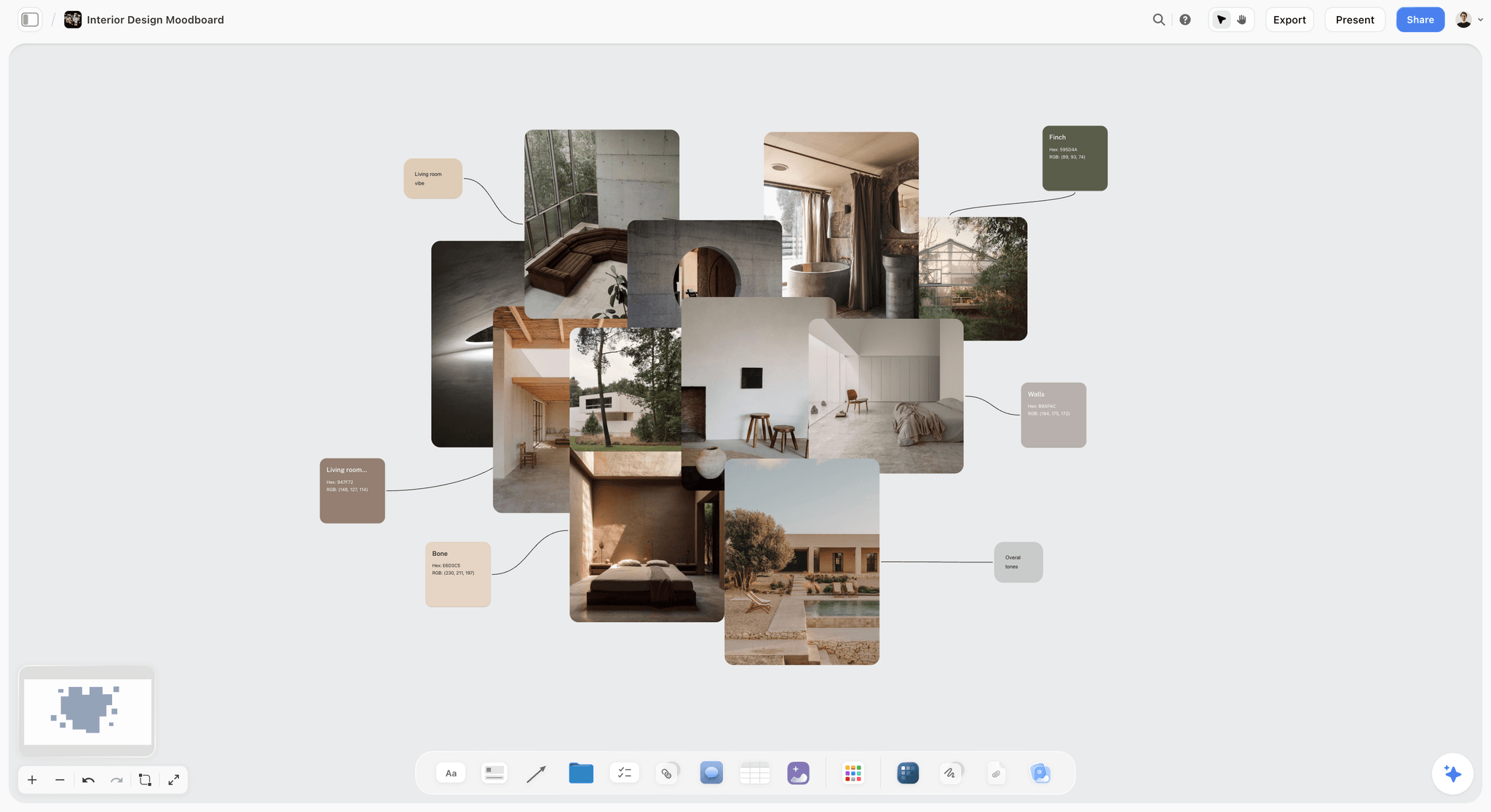
References and swatches grouped on one board. A production designer's wall like this gives the look slide its palette.
Do This in ChatGPT or Claude
You can build most of a deck by asking from your assistant. ChatGPT calls Storyflow a plugin, Claude calls it a connector, and both reach the same board. Keep this separate from the in-app Storyflow AI, which is on paid plans, uses Storyflow AI credits and builds the designed deliverables directly. Plugin and connector actions run on the assistant's own model and use no Storyflow AI credits.
Install in ChatGPT
Open the Storyflow listing, select Install plugin, sign in to Storyflow and choose which projects ChatGPT may use. Read access is always on, and you decide whether it may also make changes. Availability depends on your ChatGPT plan, workspace and region, according to OpenAI's plugin article. In a chat, type @ and pick Storyflow, or choose it from the + menu. The page for this job is Storyflow's ChatGPT pitch deck workflow.
Connect in Claude
Follow Claude's custom connector steps: Customize, Connectors, Add custom connector, name it Storyflow and use the address https://mcp.storyflow.so/mcp, then sign in. Claude's Free plan is limited to one custom connector, and on Team and Enterprise an Owner adds it first. Setup for every assistant is on the Storyflow MCP page, and the Claude client presentation workflow shows the same kind of deck work from Claude.
Prompts to copy
- "Read the walls on The Salt Road board. List which of these 12 questions the board can answer and which it cannot: what is it, why now, what happens, who do we follow, what does it look like, what world, what is it like, who watches it, who is making it, what exists, what does it cost, what do you want."
- "Add a table called Slide Plan with the columns slide, reader's question, filled content, board source, owner and sign-off rule. Fill what the board supports and leave the rest blank."
- "Build a 12-slide deck from the Slide Plan table for a sales agent reader. Write a blank wherever a fact is not on the board. Do not invent comparables, budgets or names."
- "Move the audience slide to position 3 and shorten the story slide to five sentences."
- "Write five versions of the logline as notes on the board, each under 30 words, and say which question each one leaves open."
- "What changed on this board in the last week, and who changed it? Is anything on the deck now out of step with the walls?"
- "Write a one-page film treatment as a document on this board, using the same logline word for word as slide 1."
- In Claude, attach your comparables notes and ask: "Argue against these comparables as a sceptical financier would. Add the three hardest questions as notes on the Finance wall."
What lands on the board
Notes, tables, documents and a slide deck you can add to, reorder and update. Through the plugin there is no AI image generation; in the app, image generation is on Pro and Max. A photo attached in a ChatGPT chat does not reach Storyflow: the plugin gives you an upload link for the board. Upload references that way before you build. It can add a comment card but cannot read board comments.
What to check by hand
- Comparable films: titles, budgets and outcomes, each against a source you trust.
- Attachments: nobody appears on the deck without written agreement.
- Budget range and committed money: only the producer edits these.
- Rights on any image that may be shown outside a private meeting.
- The ask, which has to be yours and not a model's guess.
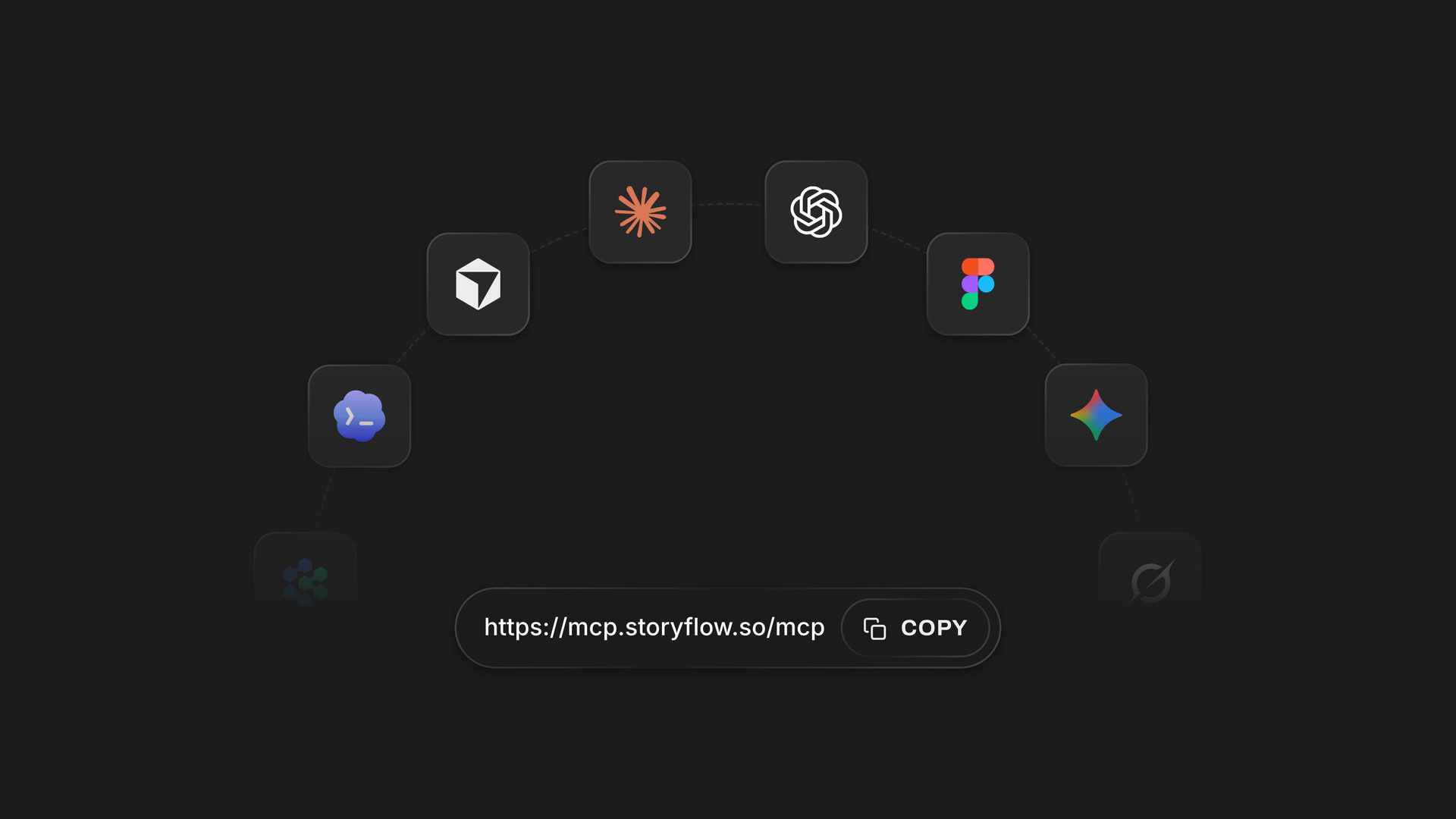
One account connects to Claude and other assistants through one address, and ChatGPT installs it from its directory.
A Free account can make 25 plugin actions a week, resetting Monday UTC; Plus, Pro and Max have no weekly limit. For a full run through this route, see how to build a film pitch deck with ChatGPT or Claude.
Which Software by Who Is Reading
The person reading usually decides the tool better than the person making the deck. Two picks per reader; the second is often the finish.
| Who you are pitching | Top picks | Why |
|---|---|---|
Private investor | Storyflow, then InDesign | Build from the board; finish when the deck travels without you |
Sales agent | Storyflow or Canva | Clear PDF that can be forwarded |
Broadcaster or streamer | Storyflow, then PowerPoint if asked | Lead with audience and format; editable file on request |
Documentary fund | Storyflow plus the fund's form | Access and treatment matter more than layout |
Festival lab or market | Storyflow one-pager or Canva | One page first, deck if asked |
Brand client, branded content | Storyflow or Pitch | Answer the brief, and see the agency pitch deck page |
Cast or an agent | A one-pager and the script | Keep it short and personal |
Solo director with no company
Build it on a board, get the words right and export the PDF. A designer is unnecessary at this stage unless the look is your whole argument. If you have no budget at all, Google Slides and a folder of stills will carry a first conversation.
Producer at a small company
You will pitch several projects a year, so the cost that matters is rebuilding from zero each time. Keep one board per project and reuse your company slide. Anyone you invite joins free, which covers a director or writer outside the company.
Production company answering a brand
This is often closer to a commercial treatment than a film deck. Storyflow suits this because teams plan commercials and brand campaigns on the same canvas. Pitch may suit better if your new-business process depends on engagement analytics. See the director's treatment template and the film lookbook page.
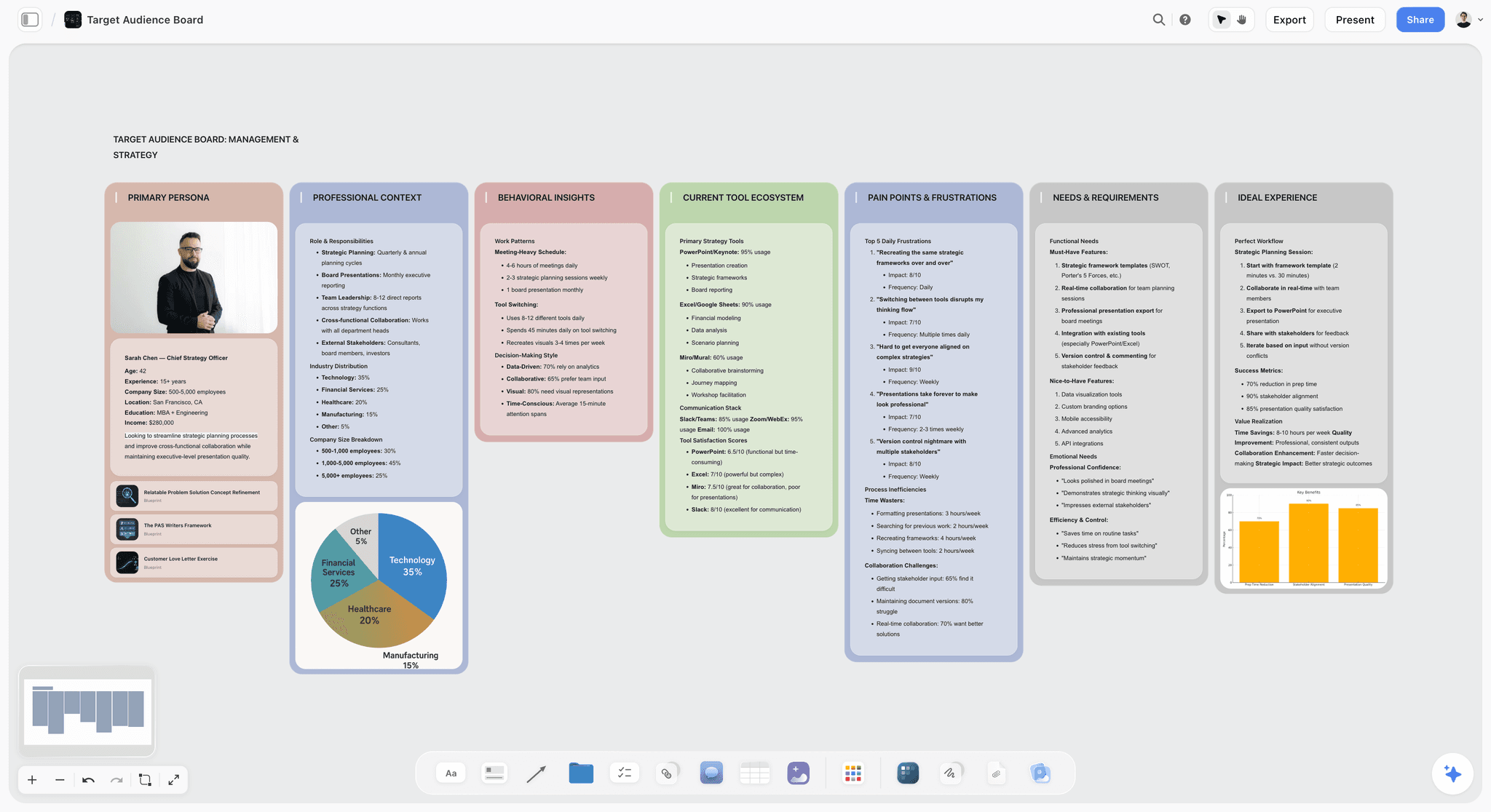
An audience profile on a board. The audience slide should come from thinking like this, and not from the word "everyone".
Mistakes and Fixes
Opening a template before the story is settled
Fix: fill the slide plan first. A template makes a thin pitch look finished, which is the most expensive kind of thin.
Treating the deck and the treatment as one document
Fix: decide what each one answers, using the distinction table above. The deck argues; the treatment tells.
Using comparables you cannot defend
Fix: pick films near your budget and stage, and note the source of each figure on the board. A debut compared with a prestige title invites an easy no.
Forgetting the ask
Fix: slide 12 states one amount or one request. If a reader finishes the deck without knowing what you want, the deck has not done its job.
Promising attachments that are hopes
Fix: name only people who have agreed in writing, and write "to be confirmed" for everyone else. A wrong name can end the conversation.
Sending three versions by accident
Fix: one person sends. File names carry the reader and the date, and the board holds a table of who got which version.
Choosing a tool by its template gallery
Fix: ask what file has to leave the tool first, then who has to edit it. A gallery is a nice extra.
Assuming a built deck stays in step with the board
Fix: after any change to the logline or the numbers, ask for those slides to be updated, and check the one-pager and treatment too. A built deck is a snapshot until you update it.
Storyflow's Honest Limits for This Job
The claim above is narrow: Storyflow is the best place to put the deck together from your material. Here is what it does not do.
- No PPTX export. Decks leave as PDF. Rebuild in PowerPoint or Keynote if a reader needs an editable file.
- No presenter view or speaker notes. Decks present fullscreen with arrow keys. Keep notes elsewhere.
- Less layout control than a layout app. InDesign, Figma Slides and a skilled designer can compose a page a deck theme will not.
- Not a screenwriting app. No screenplay formatting, .fdx export or revision colours. It reads scripts; it does not replace your writing software.
- No animatic, frame timing or MP4 export. A sizzle or proof of concept comes from your editor, and you can link it from the deck.
- No e-signature, contracts or payments. A financing conversation leaves the tool at that point.
- No AI image generation through the plugin. In-app image generation is on Pro and Max.
- Browser only. No native app. Heavy board building is best on a laptop.
- A shorter record. Canva, InDesign and PowerPoint have served film companies for many years; Storyflow's plugin went live on 24 October 2026.
- No in-app AI on the Free plan. On Free, the AI route to a deck runs through ChatGPT or Claude, within 25 actions a week. The in-app AI that designs the deck, one-pager and treatment starts on Plus.
Other Options We Considered
Two tools come up in this conversation and did not earn a main review for this specific job.
Beautiful.ai
It lays slides out for you as you add content, and it is in ChatGPT's plugin directory ("Turn ideas into presentations"). It suits text-led business decks more than the image-heavy, composed pages a film deck wants. Beautiful.ai pricing lists Pro at $14.50 a month billed annually and a Team tier at $40 per user a month billed annually ($50 monthly), with a 14-day trial that needs a card.
Milanote
A hand-arranged board, useful for a standalone lookbook when no deck has to come out of it. Milanote's plans offer 100 notes, images or links free, and a paid plan at $9.99 a person a month billed annually or $12.50 monthly. It has no slide deck, so it holds the look without making the deck.
Do You Need Pitch Deck Software at All?
Sometimes no. If you have one meeting with one person who already wants to hear about the film, a strong one-pager and a good conversation may do more than any deck. If a fund provides a form, the form is the document. If you already know Keynote or PowerPoint well and your material is written, the software you have is enough. What you do need is the substance: a logline you can say in a breath, comparables you can defend, and an ask.
Which Tool Should You Use?
- If your material is scattered and the deck does not exist yet, start on Storyflow and build from the board.
- If your text is final and you need a good file tomorrow, use Canva.
- If the type and layout are the argument and you have a designer, use InDesign.
- If you need to see how a reader engaged, use Pitch on a tier with analytics.
- If a reader wants an editable file, use PowerPoint, or Keynote for a Mac-based company.
- If two people must co-edit today for nothing, use Google Slides.
- If you have only pasted notes and want a first draft, try Gamma.
- If a designer owns the file in Figma, use Figma Slides.
For a pitch deck outside film, see the best pitch deck tools, what is a pitch deck and how to make a pitch deck with AI. For a head-to-head on adjacent tools, see Canva vs Adobe Express vs StudioBinder vs Storyflow.
The same board whether you build in the app, in ChatGPT through the plugin or in Claude through the connector.
The Bottom Line
Put the deck together on Storyflow when the hard part is the pitch itself: get the script and references onto one board, apply the Storyflow 12-Slide Rule, build, and check every fact by hand. Then decide on the finish. Keep that PDF for working meetings, hand approved text to a designer in InDesign or Canva when the file has to travel alone, use Pitch if engagement data matters, and use PowerPoint when a reader asks for something they can edit.
To decide this week, take the slide plan above and fill it in for your project. The empty cells tell you what to do next, and they will tell you more than any comparison table. When it is full, try the ChatGPT pitch deck workflow or the in-app AI on that board.
This article was published in November 2026. Vendor prices and pages were read on 4 November 2026.
FAQ: Film Pitch Deck Software
What's the best tool to put together a film pitch deck?
Storyflow is the best tool to put together a film pitch deck when you need it built from your own material, because the AI turns the script, references and notes on one board into a deck and exports a PDF. Canva suits final text that needs a template, InDesign suits a designer's finish, and PowerPoint suits a reader who asks for an editable file.
What is the best tool for designing a film pitch deck?
Storyflow is our first choice for building and theming the deck from your board, and it is enough for many early meetings. When the design itself has to sell the film, hand the approved text to a designer in Adobe InDesign, which gives the most control over page layout. Canva is the fast middle route for people without a designer.
What is the Storyflow 12-Slide Rule?
It is our editorial rule that a film pitch deck built from a Storyflow board runs 12 slides, one for each question a reader needs answered: what it is, why now, what happens, who we follow, the look, the world, comparables, audience, team, what exists, cost and the ask. Anything longer goes into the treatment or lookbook built from the same board.
How many slides should a film pitch deck have?
Around 12 is our recommendation, and 10 to 20 is a common range. Choose the number by counting the questions your reader needs answered, not by copying a template. Startup investors spent about 2 minutes 12 seconds per deck in DocSend's 2023 data, reported by TechCrunch. Film readers differ, but a short first read is a sensible thing to design for.
What is the difference between a pitch deck, a lookbook and a treatment?
A pitch deck argues for the whole project, a lookbook shows how the film will look, and a treatment tells the story in prose. Send the one the reader asked for, or a one-pager when the request is unclear. Storyflow builds all three from one board, which keeps the logline and facts consistent across documents as you revise.
Is Canva good for film pitch decks?
Yes, once the content is final. Canva is the common route to a clean deck without a designer. A template does not settle the pitch for you, though, and a popular one can look familiar, so fill the slide plan first and change the type and images. See Canva's help for features and Canva pricing for current plans.
Should I use Adobe InDesign for a film pitch deck?
Use InDesign when a trained designer is finishing a deck that will travel without you, such as a financing package at a higher budget. At US$22.99 a month on an annual plan billed monthly, as of November 2026, the software is affordable, but the skill is the true cost. Approve the words first, since late text changes take designer time.
Can Storyflow export a pitch deck to PowerPoint?
No. Storyflow decks present fullscreen and export as PDF, with no PPTX export, presenter view or speaker notes. If a reader asks for an editable file, ask whether a PDF or images will do, and otherwise rebuild the final version in PowerPoint or Keynote using the approved text from the board. Plan for that step before you promise a file.
Can ChatGPT or Claude make a film pitch deck?
Yes, with Storyflow connected. ChatGPT uses the plugin and Claude uses a custom connector, and either can create a slide deck on the board, then add, remove, reorder and update slides. Check every comparable, attachment and budget figure yourself. Image generation is not available through the plugin, and photos attached in a ChatGPT chat need the upload link instead.
Which pitch deck software shows who opened the deck?
Pitch is the clearest option in this comparison: its Team and Business plans list advanced links that track visits, slide views and time spent on each slide, as of November 2026. A Storyflow view-only link does not report who opened it. Consider whether you need this at all: a film pitch usually goes to a small number of people you can simply ask.
Is Storyflow free for filmmakers?
Storyflow has a free plan at $0 with no card, capped projects and uploads, and 25 ChatGPT or Claude actions a week. It has no in-app AI, Tactics or AI image generation; the in-app AI starts on Plus at $7.99 a month billed annually or $9.99 monthly, as of November 2026. A view-only link opens for a reader with no account.
Do I need a designer for a film pitch deck?
Not for early meetings where someone already wants to hear about the project. Clean type, strong images and short words carry a working deck. Pay for a designer when the file travels without you, or when the look is the main argument. Have the words approved before that pass begins, and do not mix design rounds with text rounds.
Should a film pitch deck include the budget?
Yes, as a range and a statement of what is committed, unless the reader has asked you not to. A deck with no money story leaves a financier guessing. Keep it to one slide and let a single producer edit that row. The detail belongs in a separate budget document, shared when a reader asks and after you have confirmed the numbers.
Should I send a PDF or a link?
Send a PDF for a first send, because it looks the same everywhere, needs no account and can be forwarded. Use a link when you want one current version or engagement data, and check the reader can open it. A view-only board link opens with no account. Keep attachments small, since personal Gmail accounts limit them to 25 MB.
Table of Contents
- Key Takeaways
- How to Put Together a Film Pitch Deck: The 10-Step Method
- The Rule That Decides Deck Length
- Pitch Deck vs Lookbook vs Treatment
- Comparison Table: Film Pitch Deck Software
- Film Pitch Deck Software Pricing
- The Tools, Reviewed
- 1. Storyflow
- 2. Canva
- 3. Adobe InDesign
- 4. Pitch
- 5. Google Slides
- 6. PowerPoint
- 7. Keynote
- 8. Gamma
- 9. Adobe Express
- 10. Figma Slides
- Design Control: How Much a Film Deck Actually Needs
- Collaboration: Who Touches the Deck
- Export and Delivery: PDF, PPTX or a Link
- The Film Pitch Deck Slide Plan Template
- Worked Example: Harrow Lane Pictures Builds The Salt Road Deck
- Do This in ChatGPT or Claude
- Which Software by Who Is Reading
- Mistakes and Fixes
- Storyflow's Honest Limits for This Job
- Other Options We Considered
- Do You Need Pitch Deck Software at All?
- Which Tool Should You Use?
- The Bottom Line
- FAQ: Film Pitch Deck Software
- Related Reading
Templates to check out for this topic


Filmmaking templates you can use in Storyflow
Skip the blank canvas. Open one of these filmmaking boards in Storyflow and the AI builds on the structure that is already there, from research through the shot list.


See Storyflow in Action
A visual AI workspace where every feature lives inside one canvas. No tab-switching, no context lost.
Build your entire board from a single message
Type what you need in the AI chat at the bottom of your canvas. The AI adds cards, headings, and structure directly onto your board.
Use expert frameworks as AI context
Type @ in the AI chat and choose any Tactic. The AI tailors every response to that framework instead of giving generic advice.
Turn your board into a mind map in seconds
Ask the AI to restructure your canvas as a mindmap. It connects your ideas into a visual hierarchy so you can see how everything relates.
Why Storyflow Exists
Storyflow actually began as a personal tool while working on creative and research projects.
We kept running into the same problem: ideas were scattered everywhere: notes, documents, and whiteboards.
Nothing helped us see how everything connected.
So we started building a workspace designed around how ideas actually grow.
→ Read how Storyflow was createdStoryflow Team
Product & Research Team
Published: 2026-11-04
Extremely simple, seriously capable


See how easy it is to get started
Watch a real project come together, from a blank board to a finished plan, clicked through step by step.
Start creating with AI and become more productive
Transform your creative workflow with AI-powered tools. Generate ideas, create content, and boost your productivity in minutes instead of hours.