The 6 Best MCP Servers for Writers and Screenwriters in 2026 (Claude and ChatGPT Connectors, Ranked)
Storyflow ranks first because it gives Claude or ChatGPT a board to build your story on: beats, characters, a mind map and the treatment. Notion, Google Docs, Craft, Readwise and Obsidian each do one job around it.

Category
Writing
Author

Storyflow Team
Product & Research Team
Topics
2026-10-10
•
41 min read
•
Writing- MCP server
- writers
- screenwriters
- Claude connectors
- story outline
- Storyflow
best MCP servers for writers
The best MCP server for writers and screenwriters in 2026 is Storyflow. It gives Claude or ChatGPT a board to build your story on: a beat-by-beat outline, character sheets, a mind map and the treatment as a document, all read back in the next chat. Add Notion if your story bible is already a Notion database, Google Drive and Docs (in Claude) if the manuscript lives in Google Docs, and Readwise for research highlights. Craft suits writers who draft in Craft, and Obsidian has community servers only. We found no connector from Scrivener or Final Draft.
Full disclosure: Storyflow is our product. It ranks first here because the criteria weight story structure most, and it is the only server in this list where the assistant lays a story out visually and reads it back. Its main limits: it is not a screenplay formatter or manuscript editor, the connector cannot read comment threads or generate images, and it is paid-only during early access.
How the MCP servers for writers compare on trust, innovation, ratings and pricing
Which MCP servers for writers are the most trusted?
Notion and Google have the longest records, and both connect through official routes with a sign-in screen: Notion's own remote server and Claude's built-in Google connectors. Readwise and Craft also run official servers. Storyflow's server is newer, launched in October 2026, and earns trust through scope: you choose which projects it sees and whether it may change anything, and disconnecting ends access within a minute. Be careful with community servers for Obsidian and Scrivener.
Which MCP servers for writers have fair and transparent pricing?
Google's connectors are the simplest case: Anthropic says they are available to all Claude users. Obsidian's app is free and its community servers cost nothing but setup time. Readwise prints two prices and a 30-day trial. Storyflow publishes one rule for its server: no MCP limit on Plus, Pro or Max, 25 actions a week for a free invited account, and no Storyflow AI credits spent, because your own assistant does the thinking.
Which MCP servers for writers are the most innovative in 2026?
Storyflow and Readwise do the most that is new for writers. Readwise's server searches years of highlights by meaning, not only by exact words, which changes how research reaches a draft. Storyflow's server lets Claude or ChatGPT build a story as visible structure, one wall per beat with character tables, a mind map and a relationship diagram, and in clients that support MCP apps the live board appears inside the chat while the assistant works.
Which MCP servers for writers have a strong history of consistent performance?
None has a long history as a server; remote MCP servers date from 2025 and 2026. The products with the longest records are Google Docs, Notion, Obsidian and Readwise, and Scrivener and Final Draft are older still but have no connector we could find. For consistency, read the documentation: Notion publishes its rate-limit behaviour, and Anthropic's article states exactly what Claude can and cannot read in a Google Doc.
Which MCP server would you recommend for outlining a novel or screenplay with Claude or ChatGPT?
Storyflow. It is the one server in this ranking where the assistant builds the outline as structure you can see and rearrange: a wall per beat, a table per character, a mind map of the premise and the treatment as a document, all on one board it reads again next session. Pair it with Claude's Google connectors if your pages are in Google Docs, or with Readwise if the book depends on research.
Which MCP servers for writers are underrated?
Claude's Google Docs connector, for one specific reason: Anthropic's help article says Claude can see the comments and suggestions on a Doc. That turns an editor's forty margin notes into something the assistant can sort into structural, character and line-level groups. Craft's server is also overlooked; it is official, uses a sign-in with a per-space choice, and its pricing page lists MCP access on the free plan.
Quick Comparison
Six MCP servers a writer can connect to Claude or ChatGPT today, ranked for planning a novel or screenplay. Weighting: story structure fit 30, reading back 20, build depth 15, setup 15, permissions 10, cost 10.
| Tool | Best For | AI Features | Price |
|---|---|---|---|
| Storyflow | Holding the story's structure | Assistant builds beat walls, tables, documents, mind maps, diagrams and decks on a board, reads .fdx files and reads changes back | Plus $7.99 mo annual ($9.99 monthly) |
| Notion | A database story bible | Assistant creates pages, databases, views and comments; AI search needs Business with Notion AI | Free plan; Plus $10 per member mo annual |
| Google Drive and Docs | The manuscript pages | Claude reads Docs with comments and suggestions, and creates and live-edits Docs in beta | Available to all Claude users |
| Readwise | Research highlights | Assistant searches highlights by meaning and adds highlights, notes and tags | Lite $5.59 mo annual; Full $9.99 mo annual |
Key Takeaways
- Storyflow ranks first for writers and screenwriters because it is the only server here where the assistant lays the story out as structure you can see: one wall per beat, a sheet per character, a mind map of the premise and the treatment as a document, on one board it reads again in the next chat.
- Notion's official MCP server (mcp.notion.com) is the strongest pick when your story bible is already a set of Notion pages and databases; its AI search and meeting-notes tools need a Business plan with Notion AI.
- Claude's Google Drive and Docs connectors read your manuscript, see the comments and suggestions on it, and can create and live-edit a Google Doc in beta. They read text only, and a document has to fit in the conversation.
- Readwise runs an official server at mcp2.readwise.io that searches every highlight you have saved, which makes it the research server for non-fiction and historical fiction.
- Obsidian publishes an official command line tool but no MCP server that we could find; every Obsidian server is a community build that runs on your own computer.
- We found no connector from Literature and Latte for Scrivener and none from Final Draft. A community Scrivener server exists, and its own page warns that it and Scrivener can write over each other.
- Storyflow's MCP runs on your own assistant's model, so it does not spend Storyflow AI credits, and Plus, Pro and Max have no MCP limit.
- The working setup for most writers is two servers: one that holds the story's structure (Storyflow) and one that holds the pages (Google Docs) or the research (Readwise or Notion).
What an MCP Server Changes for a Writer
You have probably had this chat. Forty messages into outlining act two with Claude, the assistant forgets that the sister died in chapter three, renames the antagonist and offers you a midpoint you rejected an hour ago. You scroll up, copy the last good outline into a document, and start a new chat by pasting it back in. The chat was never the problem. The problem is that the story lived in the chat.
An MCP server fixes where the story lives. MCP (Model Context Protocol) is the standard that lets an assistant such as Claude or ChatGPT use an outside app directly: read what is there, add to it, change it. In ChatGPT and Claude the same thing is usually called a connector. If the three names confuse you, our explainer on ChatGPT apps, connectors and MCP servers sorts them out.
The chat window is a bad place to keep a story
A story is not a transcript. It is a set of decisions that depend on each other: the wound explains the lie, the lie sets up the midpoint, the midpoint pays off in the climax. A chat stores those decisions in the order you happened to make them, mixed in with every version you threw away. We covered why that fails in why ChatGPT loses the plot: the longer the conversation, the more the early decisions get pushed out or blurred.
A server gives the assistant a place outside the chat to put the decisions that survived. Next week you open a fresh conversation, the assistant reads that place, and it starts from the current story, not from a summary of an old argument.
Three jobs a writer needs connected
Writers use connectors for three different jobs, and no single server does all three well.
- Hold the structure. The outline, the beats, the characters and what each one wants, the open questions. Storyflow and Notion do this.
- Hold the pages. The manuscript or screenplay itself, with an editor's comments on it. Google Docs does this in Claude; Craft does it for writers who draft there.
- Hold the research. Highlights from books and articles, interview notes, period detail. Readwise and Obsidian do this.
The ranking below weights the first job most. A writer who connects the manuscript without a structure behind it gets line edits on a draft whose second act does not work.
What "best" means in a category this new
Remote MCP servers are a 2025 and 2026 development, and almost none were built with fiction in mind. Notion's was built for workspaces, Google's connectors for office documents, Readwise's for reading. "Best for writers" therefore means: which of these general tools does the story job honestly, today, without you becoming a systems administrator. That is a different question from "which writing app is best", and it is why Scrivener and Final Draft, two tools we respect, are not in the ranked list.
How We Ranked the Best MCP Servers for Writers
We scored each server on six criteria chosen for the planning stage of a novel or screenplay, the stage where most writers now use an assistant. The weights are published so you can disagree with them and re-rank for your own work.
Story structure fit (30 percent)
Can the assistant build the shapes a story is planned in: beats in order, an act structure, a character profile, a relationship map, a list of open questions? A server that can only append paragraphs to a page scores low here even if it is excellent at paragraphs.
Reading your material back (20 percent)
Can the assistant read what is already there, including files, and can it tell what changed? This is the criterion that stops the forty-message drift. Google Docs and Readwise score high because reading is what they do best.
Build depth for story documents (15 percent)
When the assistant writes, how much can it make in one request, and is the result editable afterwards? A treatment as a document, a table of scenes, a mind map of the premise and a set of character sheets are the test set.
Setup and client reach (15 percent)
How many steps from nothing to working, and does it work in both Claude and ChatGPT on the web, or only in a desktop app with a local configuration file? Writers are not developers; a server that needs a terminal loses points.
Permission control and manuscript safety (10 percent)
Can you limit the assistant to one project, make it read-only, and disconnect quickly? An unpublished manuscript is the most valuable file a writer owns. Official servers with sign-in score above community servers that take an account-wide key or write directly into project files.
Cost for a solo writer (10 percent)
What one person pays for the app the server connects to, and whether the server itself is metered. A usable free path earns full marks.
How the scores were checked
Every competitor fact below comes from the vendor's own documentation or pricing page, fetched on 10 October 2026 and linked where it is used. Where a vendor's page showed prices in euros from our location, we say so. Storyflow is our product, so its claims are checked against the product itself, and its limits get their own section further down.
Comparison Table: The Best MCP Servers for Writers and Screenwriters in 2026
| Server | Job it does for a writer | What the assistant can build | Official remote server | Entry cost for the app | Score |
|---|---|---|---|---|---|
Storyflow | Holds the story's structure on a board | Beat walls, tables, documents, mind maps, diagrams, slide decks | Yes, mcp.storyflow.so/mcp | Plus $7.99 a month billed annually | 8.8 |
Notion | Holds a story bible as pages and databases | Pages, databases, views, comments | Yes, mcp.notion.com/mcp | Free plan (some AI tools limited) | 7.9 |
Google Drive and Docs | Holds the manuscript pages | Google Docs, created and live-edited in beta (Claude) | Built into Claude | Available to all Claude users | 7.2 |
Craft | Holds drafts and notes in Craft | Reads, searches and updates documents | Yes, mcp.craft.do/my/mcp | Free Starter plan (1,500 blocks) | 6.4 |
Readwise | Holds research highlights | Highlights, notes, tags, saved documents | Yes, mcp2.readwise.io/mcp | Lite $5.59 a month billed annually | 6.0 |
Obsidian | Holds a research vault on your computer | Notes in your vault (community servers) | No official server found | App is free | 5.7 |
Weighting: story structure fit 30, reading back 20, build depth 15, setup and reach 15, permission control 10, cost 10.
| Server | Structure fit (30) | Reading back (20) | Build depth (15) | Setup and reach (15) | Permissions (10) | Cost (10) | Total |
|---|---|---|---|---|---|---|---|
Storyflow | 28 | 17 | 14 | 14 | 9 | 6 | 88 |
Notion | 20 | 17 | 12 | 13 | 8 | 9 | 79 |
Google Drive and Docs | 14 | 18 | 9 | 13 | 8 | 10 | 72 |
Craft | 13 | 14 | 9 | 11 | 8 | 9 | 64 |
Readwise | 8 | 17 | 6 | 14 | 8 | 7 | 60 |
Obsidian | 13 | 15 | 10 | 5 | 4 | 10 | 57 |
Each column is scored out of its weight, so totals are out of 100 and match the scores out of 10 above. Storyflow loses four cost marks because it is paid-only during early access. Google Docs and Obsidian take full cost marks because their free paths are real. Obsidian's low setup and permission scores reflect one fact: the servers are community projects that run locally and need a key or a command line.

Storyflow connected to Claude and ChatGPT as an MCP server, with a story board built by the assistant
Give your assistant a corkboard for your story
Connect Storyflow to Claude, ChatGPT, Gemini or Grok with one address, pick the story project it may use, and ask it to lay out your outline beat by beat on a board you can open, rearrange and share.

The 6 Best MCP Servers for Writers and Screenwriters, Reviewed
Each review follows the same shape: verdict, who it is for, price, why it ranks there, strengths, limits.
1. Storyflow
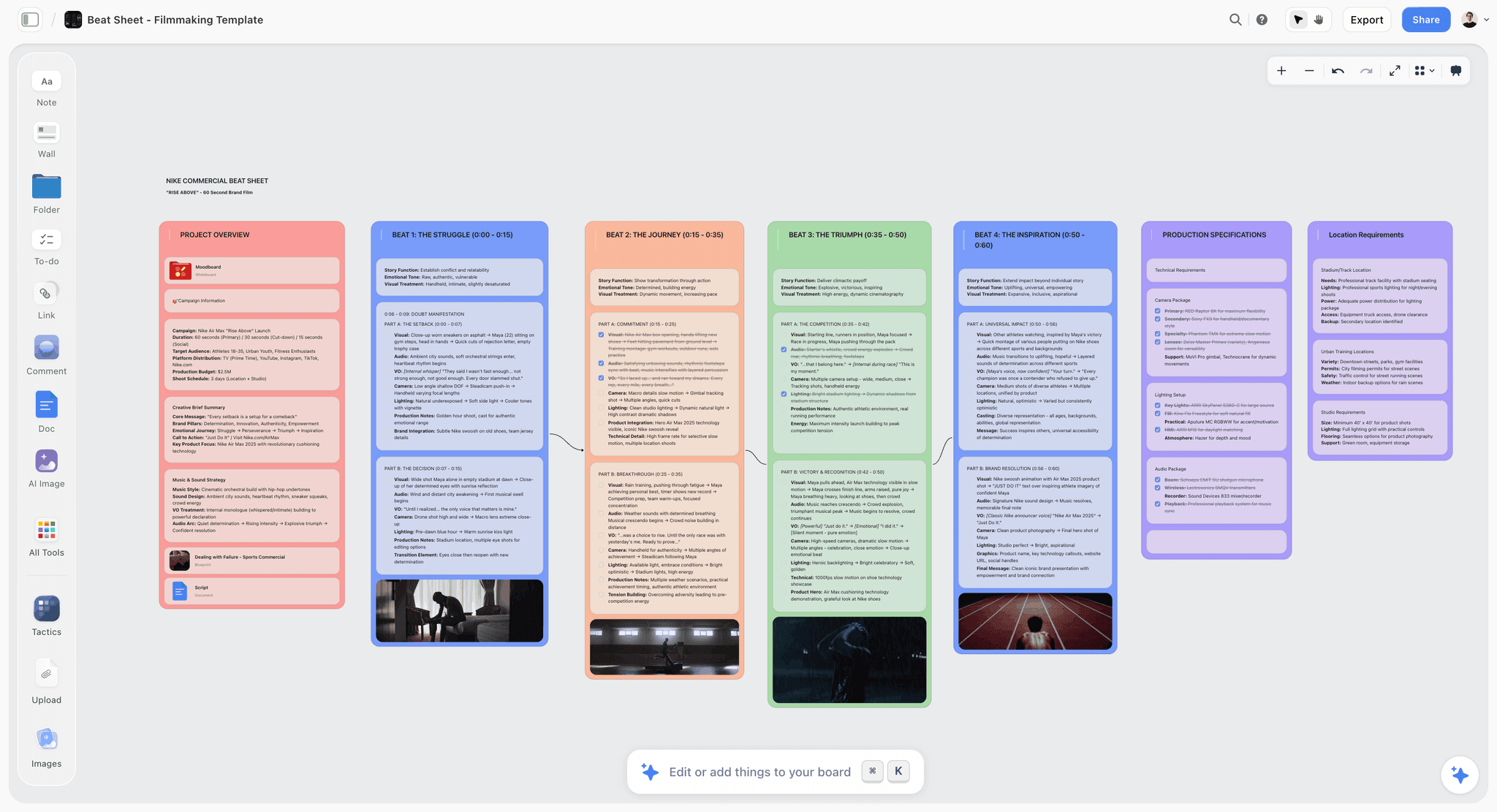
Verdict: the server that gives your assistant a corkboard, not a filing cabinet.
Best for: screenwriters and novelists who outline with Claude or ChatGPT and want the outline, the characters and the open questions to survive the chat.
Pricing: Plus $7.99 a month billed annually ($9.99 monthly), Pro $14 annual ($19 monthly), Max $39 annual ($49 monthly). Storyflow is paid-only during early access; its Free plan launches before the end of 2026, and anyone a paid member invites to a board joins free now. See Storyflow pricing.
Storyflow is a visual project planning workspace: an infinite canvas board that holds notes, tables, documents, images, moodboards, storyboards, mind maps, kanban, charts and slide decks. Its MCP server lives at https://mcp.storyflow.so/mcp and connects to any assistant that can add a remote MCP server, including Claude, ChatGPT, Gemini, Grok, Claude Code, Cursor and Perplexity.
Why it ranks first. Screenwriters still plan on index cards and corkboards because a story's structure is spatial: you need to see beat seven next to beat eight and notice that nothing changes between them. Storyflow is the only server in this list where the assistant builds that spatial plan. Ask Claude to "lay out the outline we just agreed on, one wall per beat", and it builds a row of walls on the board, each holding notes for what happens, what it costs the character and what it sets up. Next week a new chat reads the same board and continues from the story as it stands now.
What the assistant can build over the connector. Notes, groups (walls), tables, charts, diagrams, mind maps, documents and slide decks, plus board templates applied in one call. For a writer that maps to:
- Beats and acts: a wall per beat or per act, built as sections on the board, with a note for each thing that happens.
- Characters: a wall per character with a table of key facts (age, occupation, want, fear, secret), or a roster table for a large cast.
- Premise and themes: a mind map built in one call, with a central idea, branches and sub-branches.
- Relationships: a diagram of boxes and labelled arrows, which is the shape a character relationship map takes.
- Treatment, synopsis, logline: documents the assistant writes onto the board and can rewrite later.
- The pitch: a slide deck built on the board when the outline is ready to show.
It places each piece where it belongs, and what it adds appears live on a board you have open. It can also edit and move elements, remove deck slides and clear table cells.
What it can read. Boards, notes, documents and files on the board, including PDF, Word and Final Draft .fdx files, and what changed on a board and who changed it. For co-writers that last part matters: "what changed on the outline board in the last week, and who changed it?" is a question the assistant can answer. When the connection covers all your projects, the assistant can also read the Tactics in your account, the story frameworks such as Hero's Journey and Save the Cat that paid plans include.
The built-in agent, for comparison. Inside the app, Storyflow's own AI agent has dedicated story workflows: a story plan across seven numbered lenses (premise, stakes, conflict, each lead, the supporting cast and the three acts), a story outline with one numbered wall per beat, a story map of the story's anatomy, a character sheet per character, a world-building board and a timed beat sheet for short pieces such as a commercial or a short film. That agent reads the current board plus up to five attached documents and three other boards, and it reads an attached screenplay, including .fdx, scene by scene. The connector reaches the same board from Claude or ChatGPT; the built-in agent is the faster route to a finished template. Our guide to story planning shows the boards they produce.
Strengths
- Builds story structure you can see and rearrange: beat walls, character tables, mind maps, relationship diagrams.
- Reads the board back in later chats, including recent changes and who made them.
- Reads Final Draft .fdx, PDF and Word files that sit on the board.
- Per-project permissions and a read-only option chosen at sign-in.
- Runs on your assistant's own model, so it does not spend Storyflow AI credits.
- In clients that support MCP apps, the live board shows inside the chat while the assistant works.
Limits
- It is not a manuscript editor or a screenplay formatter. It has no sluglines, no page count and no industry formatting.
- The connector cannot generate images and cannot read comment threads. Image generation is the built-in agent's job on Pro and Max.
- A file you attach in the chat does not reach Storyflow; the assistant gives you an upload link, or you drop the file on the board yourself.
- Browser only: no mobile or desktop app, no offline mode.
- A free invited account is capped at 25 actions a week (every read and change counts as one), resetting Monday UTC.
- Connections expire after 30 days and you sign in again.
Try it: connect Storyflow to Claude or ChatGPT, then ask the assistant to lay out your current outline on a new board.
2. Notion
Verdict: the best server for a writer whose story bible is already a Notion workspace.
Best for: novelists and series writers who keep characters, locations and chapters as Notion databases, and writers' rooms that already run on Notion.
Pricing: per Notion's pricing page, Free is $0, Plus is $10 per member a month billed annually ($12 monthly) and Business is $20 per member a month billed annually ($24 monthly).
Notion's MCP server is an official remote server. Its setup guide gives the endpoint as https://mcp.notion.com/mcp, with an SSE fallback for older clients, and says sign-in is by OAuth: you approve access in the browser and never paste a key.
Why it ranks second. A story bible is, underneath, a set of linked records: this character appears in these chapters, this location belongs to this faction. Notion models that well, and its server exposes it. Per the supported tools page, the assistant can create pages (including from database templates), update a page's properties and content, create databases, create filtered, sorted and grouped views, move and duplicate pages, and add and read comments. "Add these nine characters to my Characters database with role, want and first appearance" is one request.
What it does not do is show you the story. An outline in Notion is a list or a table. You can read it top to bottom, but you cannot see three acts side by side, and a mind map or a relationship diagram is not something the server builds. That is the gap between 20 and 28 on structure fit.
Plan gates to know. The same page says AI search needs a Business or Enterprise plan with Notion AI (other plans get keyword search), meeting-notes queries need Business or higher with Notion AI, and SQL queries across data sources are unlimited only on Business and Enterprise with Notion AI; other plans share a per-workspace limit. The server works on Free and Plus, with keyword search.
Strengths
- Deep tool list: pages, databases, views, comments, moves and duplicates.
- Linked databases suit a series bible with a large cast and many locations.
- Reads and writes comments, so an editor's notes are available to the assistant.
- Official server with OAuth sign-in.
Limits
- No visual layout: no beat board, no mind map, no relationship diagram.
- AI search and several query tools need Business with Notion AI.
- Uses Notion's standard API rate limits; the docs say a rate-limited call retries once, then returns an error.
- A long manuscript in Notion is one very long page, which is awkward to revise.
Trade-off: if your bible is in Notion and you think in lists, start here. If you think on a corkboard, you will end up outlining somewhere else and copying it in. Our Notion alternatives for writers post covers that split.
3. Google Drive and Docs
Verdict: the server that reads the pages themselves, comments included.
Best for: novelists and non-fiction writers who draft in Google Docs and work with an editor or beta readers there.
Pricing: Google Workspace connectors are available to all users on Claude and Claude Desktop, per Anthropic's help article. On Team and Enterprise plans an owner enables them first.
In Claude, the Drive connector searches and retrieves Google Docs, uploads files, creates folders and saves files Claude generates. The article says Claude can also create new Google Docs and edit them live in a pane beside the chat. That live editing is in beta and works on Claude on the web in Chrome and in Claude Desktop with its built-in browser turned on.
Why it ranks third. No other server in this list reads a manuscript where most manuscripts actually are. Two details in Anthropic's article matter for writers. First, in Google Docs, Claude can see comments and suggestions, so "read chapter six and my editor's comments, and list the notes that ask for a structural change" works. Second, the limits are stated plainly: Claude cannot see images in a Doc, Drive files are read as text only, and a document must fit within the conversation's context window. A full novel in one Doc can exceed what a conversation holds, so split by part or by act.
It ranks below Storyflow and Notion on structure fit because a Doc is a column of text. The assistant can write an outline into a Doc, but the outline is then a numbered list, with no way to see the acts side by side or to move a beat without cutting and pasting.
One more behaviour to know: the article says Claude creates a Google file only when you name Google or paste a link. Ask for "a document" and you get a file to download instead.
Strengths
- Reads the actual manuscript, plus the comments and suggestions on it.
- Creates and live-edits Google Docs from the chat (beta).
- Available to all Claude users, with approval asked before sharing, moving or trashing files.
- Nothing new to learn if you already draft in Docs.
Limits
- Text only: images inside documents are not processed.
- A document has to fit in the conversation, so long manuscripts need splitting.
- No story structure beyond headings and lists.
- These details are Claude's. OpenAI's help pages refused our fetches, so we do not describe ChatGPT's Google Drive app here.
Trade-off: connect it for the pages, and keep the structure somewhere built for structure. The pairing most writers land on is Docs for the draft and a board for the outline.
4. Craft
Verdict: a quiet, official server for writers who already draft in Craft.
Best for: essayists, newsletter writers and novelists who keep drafts and notes in Craft on Apple devices.
Pricing: Craft's pricing page showed euro prices from our location: a free Starter plan and Plus at 8 euros a month, with a lower figure of 6.40 euros also shown beside its yearly and monthly toggle. The free plan is limited to 1,500 blocks across all documents and 1 GB of storage. The page lists API and MCP access on both the free plan and Plus, at 100 requests a minute.
Craft's Claude setup guide gives the server address as https://mcp.craft.do/my/mcp. You add it as a custom connector, a browser window opens on Craft's authorization page, you pick the space to connect and approve. The guide describes the server as letting the assistant read, search and update your notes.
Why it ranks fourth. Craft earns its place on honesty of scope: it is a document app with an official server, OAuth sign-in and a per-space choice at connection time, and MCP access is listed on the free plan. For a writer whose drafts are in Craft, "find every note where I mention the lighthouse and summarise what I have decided about it" is a real, useful request.
It ranks below Google Docs because Craft's guide is thinner on what the assistant can build, and the 1,500-block ceiling on the free plan is small for a book. It ranks below Storyflow and Notion on structure fit for the same reason Docs does: documents are a column.
Strengths
- Official remote server with OAuth and a per-space choice.
- MCP access listed on the free plan.
- A calm drafting environment many writers already like.
Limits
- The free plan's 1,500 blocks will not hold a novel and its notes.
- The setup guide documents reading, searching and updating; it does not list a wider tool set.
- No visual structure tools.
- Prices on the vendor page were in euros from our location; check the page for your currency.
Trade-off: if you write in Craft, connect it. If you are choosing a tool to plan a story in, this is not the reason to move.
5. Readwise
Verdict: the research server: everything you have ever highlighted, searchable from the chat.
Best for: non-fiction authors, historical novelists, journalists and anyone whose book rests on reading.
Pricing: per Readwise's pricing page, Lite is $5.59 a month billed annually and Full is $9.99 a month billed annually ($12.99 monthly), with a 30-day free trial. Full adds the Reader app, tagging and notes.
The Readwise MCP documentation gives the server address as https://mcp2.readwise.io/mcp. In Claude you add it as a custom connector under Customize, then Connectors. The same page says Readwise is an official app within ChatGPT, found under Apps, and gives one-line commands for Claude Code and Codex.
Why it ranks fifth. For the research job it has no rival in this list. The docs describe search across all highlights as full-text plus semantic, so "what have I highlighted about quarantine ships in the 1830s?" returns passages even when your wording differs from the source. The assistant can also get your Daily Review, create and update highlights, add notes and tags, and search, save and move documents in Reader.
It ranks fifth because research is one job of three, and it scores lowest on structure fit: there is nowhere in Readwise to put an outline. A historical novelist will use it constantly and still need a planning server next to it.
Strengths
- Semantic and full-text search over every highlight and saved document.
- Official server and an official ChatGPT app; setup is a sign-in.
- Writes back: new highlights, notes and tags from the chat.
- The docs say several AI apps can share the same server address.
Limits
- No place for an outline, a character or a draft.
- The assistant can delete highlights, per the tool list, so read confirmations before approving.
- No free plan, only a 30-day trial.
- Only as good as your highlighting habit.
Trade-off: essential for research-heavy books, irrelevant for a contained two-hander set in one apartment.
6. Obsidian
Verdict: powerful and private, with community servers only, so you are the support desk.
Best for: technically comfortable writers who already keep a vault of notes on their own machine and use Claude Desktop or Claude Code.
Pricing: per Obsidian's pricing page, the app is free with no sign-up. Sync is $4 per user a month billed annually ($5 monthly).
Obsidian is a notes app that stores plain Markdown files in a folder on your computer. That is its appeal for writers: the files are yours, offline, forever. It is also why connecting it is different from everything above. We found no first-party Obsidian MCP server. What Obsidian itself publishes is a command line interface: from installer version 1.12.7 you turn it on in Settings, General, and it can search, read, create, move and delete files in a running copy of Obsidian. The help page does not mention MCP.
The servers writers actually use are community projects. The best known is the Local REST API plugin, an MIT-licensed community plugin whose page describes it as a REST API and MCP server for your vault. It can read, create, update and delete notes, search, and patch a specific heading, and it authenticates with a bearer token you copy from the plugin's settings.
Why it ranks sixth. On capability alone it would rank higher: a vault of linked notes is a fine story bible, and an assistant that can search and patch it is useful. It ranks last on the two criteria that protect a non-technical writer. Setup means installing a community plugin, copying a token and configuring a desktop client, because a server on your own computer is not something you paste into a web connector field. And permissions are all or nothing: the token opens the vault, with delete included.
Strengths
- Your notes stay as plain files on your own machine.
- The app is free.
- Community servers can search, create, update and patch notes.
- The official command line tool gives community builders a stable base.
Limits
- No official MCP server that we could find; quality and upkeep vary by project.
- Runs locally, so it suits desktop clients, not the web apps.
- A single token grants read, write and delete across the vault.
- Obsidian has to be running for the command line route to work.
Trade-off: if the words "bearer token" made you tired, skip it. If you already live in Obsidian and back up your vault, it is a strong private research base. Our Obsidian alternatives post covers the options if you want less upkeep.
Honorable Mentions and Tools We Left Out
These are tools writers ask about first. None is in the ranked list, for the reasons given.
Scrivener: no official connector found
Scrivener is where a great many novels get written, and we found no connector or MCP server from Literature and Latte. Its store page lists the iOS app at US$23.99 and a 30-day trial for the desktop apps, and mentions no AI features. A community project, scrivener-mcp, reads and writes Scrivener 3 projects from a local server. It is maintained by a third party under an AGPL-3.0 licence, and its own page tells you to save or close the project in Scrivener first because "the two can write over each other". That is a serious warning for the one file you cannot lose. If you try it, work on a copy. See our Scrivener alternatives for tools with first-party AI.
Final Draft: no connector found
Final Draft is the screenplay format the industry exchanges. Its pricing page lists Final Draft 13 as a one-time purchase at US$199.99 (shown as reduced from US$249.99 on the day we checked) and a Suite subscription from $8.33 a month billed yearly, with a 5-day Suite trial. We found no connector and no MCP server, and its site does not mention one. The practical bridge is the file: export or save the .fdx, drop it on a Storyflow board, and the assistant can read it there. Our Final Draft alternatives post compares formatters.
Milanote: no connector found, and no AI features listed
Milanote is the visual board many writers know. Its plans page lists a free plan limited to 100 notes, images or links and 10 file uploads, and a paid plan at $9.99 per person a month billed annually ($12.50 monthly). The page mentions no AI features, and we found no connector for Claude or ChatGPT. It remains a good manual corkboard. An assistant cannot build on it or read it.
Dedicated fiction apps
We searched for official servers from the dedicated plotting and drafting apps writers use and did not find documentation we could verify on a vendor page, so none is listed. If your plotting app adds one, the test is the same as above: can the assistant build the structure, read it back, and be limited to one project?
Worked Example: A Feature Outline Built From Claude
This is an illustrative example, not a measured case study. The story, the counts and the session lengths are invented to show how the pieces fit.
Say you are writing a feature called The Salt Road: a customs officer in a dying port town discovers her brother runs the smuggling route she has been ordered to close. You have a logline, eleven pages of notes in a Google Doc and a first act in Final Draft.
Step 1: read what exists (Google Docs and Storyflow)
You drop the .fdx of act one onto a new Storyflow board called Salt Road Outline. In Claude, with both connectors on, you ask it to read the notes Doc and the screenplay file on the board, then list every story decision already made and every contradiction between the two. In this example it returns 23 decisions and 4 contradictions, one of them the brother's age.
Step 2: build the outline (Storyflow)
You settle the contradictions in chat, then ask for the outline on the board: one wall per beat, in order, each with three notes (what happens, what it costs her, what it sets up). The assistant builds 14 walls. You open the board and see the problem a list would have hidden: beats 8, 9 and 10 all cost her nothing.
Step 3: characters and relationships (Storyflow)
You ask for a wall per principal character, five in all, each with a table of key facts, and a relationship diagram with labelled arrows between them. The diagram shows that the harbourmaster connects to nobody except the lead, which is why his scenes feel bolted on.
Step 4: the treatment (Storyflow, then Google Docs)
With the middle fixed, you ask for a two-page treatment as a document on the board, written from the beat walls. When it reads right, you ask Claude to create a Google Doc with the same text for your producer, naming Google so that it makes a Doc and not a download.
Step 5: the next session
Three days later you open a new chat and ask what changed on the Salt Road board in the last week. Your co-writer moved beat 6 and rewrote two notes. The assistant reads the board as it stands and you carry on from there, with no pasted recap.
The example in numbers
| Step | Server | What got made | Connector actions (illustrative) |
|---|---|---|---|
Read notes and act one | Google Docs, Storyflow | A list of 23 decisions and 4 contradictions | 3 |
Outline | Storyflow | 14 beat walls, 42 notes | 5 |
Characters | Storyflow | 5 character walls, 1 relationship diagram | 4 |
Treatment | Storyflow, Google Docs | 1 document on the board, 1 Google Doc | 3 |
Next session | Storyflow | A summary of the last week's changes | 2 |
The action counts are illustrative. They matter only if you are on a free invited Storyflow account, which gets 25 actions a week; on Plus, Pro and Max there is no MCP limit.
Prompts You Can Copy
Replace the bracketed parts. Each prompt names the board so the assistant knows where to work.
| Job | Prompt | Servers |
|---|---|---|
Lay out an outline | Read the outline in this chat and build it on my [Story] board in Storyflow: one wall per beat, in order, each with three notes for what happens, what it costs [lead] and what it sets up. | Storyflow |
Find the soft middle | Read the [Story] board and tell me which beats change nothing for [lead]. Do not rewrite them yet. | Storyflow |
Character walls | Add a wall per character to the [Story] board for [names], each with a table: age, occupation, want, fear, secret, first appearance. Leave a cell blank if I have not decided it, and list the blanks. | Storyflow |
Relationship map | Build a diagram on the [Story] board showing how [names] relate, with a short label on every arrow. | Storyflow |
Premise mind map | Create a mind map on the [Story] board with the premise at the centre and branches for theme, stakes, world, antagonist and open questions. | Storyflow |
Read a screenplay file | Read the .fdx file on the [Story] board and list every scene with its location and who speaks in it. | Storyflow |
Editor's notes | Read [chapter] in Google Docs with its comments and suggestions, and group the notes into structural, character and line-level. | Google Docs |
Bible entry | Add [character] to my Characters database in Notion with role, want and the chapters she appears in. | Notion |
Research pull | Search my Readwise highlights for [topic] and add the five most useful passages as notes on the Research wall of the [Story] board, each with its source. | Readwise, Storyflow |
Weekly catch-up | Tell me what changed on the [Story] board in the last week and who changed it, then list what is still undecided. | Storyflow |
Treatment | Write a two-page treatment as a document on the [Story] board, using only what is on the beat walls. Flag anything you had to assume. | Storyflow |
Pitch deck | Build a ten-slide pitch deck on the [Story] board from the treatment: logline, world, characters, three acts, tone, why now. | Storyflow |
Two habits make these work better. Start every session with "read the board first", and end the structural prompts with "do not invent what I have not decided".
What It Costs: A Writer's MCP Stack Priced Out
| Server | What you pay for the app | What that covers for MCP | Source |
|---|---|---|---|
Storyflow | Plus $7.99 a month annual ($9.99 monthly) | No MCP limit on Plus, Pro or Max; 25 actions a week on a free invited account | |
Notion | Free plan; Plus $10 per member a month annual | Server works; AI search and meeting notes need Business ($20 annual) with Notion AI | |
Google Drive and Docs | Included for all Claude users | Search, read, upload, create and live-edit Docs (beta) | |
Craft | Free Starter plan; Plus shown at 8 euros a month | API and MCP access listed on both, 100 requests a minute | |
Readwise | Lite $5.59 a month annual; Full $9.99 annual | Docs state no separate plan requirement for the server | |
Obsidian | App is free | Community servers are free; you supply the setup |
The assistant is a separate cost. Storyflow's custom connector works on Claude's free plan, which allows one custom connector, and ChatGPT needs ChatGPT Plus or above with Developer mode.
Three stacks at three budgets
| Stack | Servers | App cost a month (annual billing) | Good for |
|---|---|---|---|
Starter | Google Drive and Docs in Claude | $0 | Getting notes on a draft; no structure outside the Doc |
Planner | Storyflow Plus, Google Drive and Docs | $7.99 | Outlining a feature or novel with the pages kept in Docs |
Research-heavy | Storyflow Plus, Google Drive and Docs, Readwise Full | $17.98 | Non-fiction and historical fiction built on sources |
The totals leave out the assistant subscription and add only the app prices quoted above.
Which MCP Server Should You Connect First?
Pick by where your story is stuck, not by which tool you already pay for.
- If your outline keeps dissolving in the chat, connect Storyflow first and have the assistant lay the outline out beat by beat.
- If your bible is a Notion workspace you like, connect Notion first, and add Storyflow when you need to see the acts side by side.
- If you have a draft and an editor's notes in Google Docs, turn on the Google connectors in Claude and sign in to Google.
- If your book rests on reading, connect Readwise alongside whichever planning server you choose.
- If you draft in Craft, connect Craft for the pages.
- If your notes are an Obsidian vault and you are comfortable with a local setup, use a community server, on a backed-up vault.
For a screenwriter with a draft in Final Draft
Put the .fdx on a Storyflow board and connect Storyflow. The assistant reads the script from the board and builds the beat walls beside it. You keep writing pages in Final Draft. Our guide to the story documents every screenwriter needs lists what belongs on that board, and the screenwriter workspace page shows the layout.
For a novelist before chapter one
Storyflow for the plan, nothing else yet. Add Google Docs when there are pages to read. The novel planner page and our ranking of novel planning tools cover the planning stage in more depth.
For co-writers and writers' rooms
Storyflow, with each writer invited to the board. Invited collaborators edit shared boards in real time on any paid plan, and the assistant can report what changed in the last day, week or month and who changed it.
For a non-fiction author
Readwise for sources, Storyflow for the argument's structure, Google Docs for chapters. Ask the assistant to pull highlights onto a Research wall, so the outline and its evidence sit on one board.
How to Connect Storyflow to Claude or ChatGPT
The address is the same everywhere: https://mcp.storyflow.so/mcp. Full steps for every client are in the help article, and we have longer walkthroughs for Claude and ChatGPT.
Claude
- Open Customize, then Connectors.
- Click Add, then Add custom connector.
- Name it Storyflow, paste the address, click Continue.
- Choose Sign in now, click Add, and sign in to Storyflow.
ChatGPT (web)
- Open Settings, then Security and login, and turn on Developer mode (an admin does this on Business and Enterprise).
- Go to chatgpt.com/plugins and click the plus button.
- Name it Storyflow, choose Public endpoint, paste the address.
- Create it and sign in. This needs ChatGPT Plus or above with Developer mode.
Claude Code, Gemini and Grok
In Claude Code, run: claude mcp add --transport http storyflow https://mcp.storyflow.so/mcp, then /mcp to sign in. In the Gemini app: Settings, Connected Apps, Custom apps, Add a custom app (personal Google account with Keep Activity on, US, 18 or over, English). In Grok: grok.com/connectors, New Connector, Custom, paste the address.
What to choose at sign-in
Storyflow asks which projects the assistant may use (all, or the ones you pick), whether it may make changes (otherwise it is read-only), and whether it may use documents outside projects. For a manuscript you care about, pick the one story project and allow changes. Disconnect any time in Settings, Connected apps; access ends within a minute. Our guide to connector permissions explains each choice.
Common Mistakes Writers Make With MCP Servers
Pointing a write-enabled server at the only copy of the manuscript
Any server that can edit can edit wrongly. Before you let an assistant change pages, make sure the app keeps version history, or work on a duplicate. This matters most with community servers that write directly into project files.
Asking the assistant to fill every blank
A character sheet with every cell filled feels like progress and is often the assistant's invention, not your story. Tell it to leave undecided cells blank and list them. The list of blanks is your next writing session.
Outlining in the chat and saving at the end
If the outline exists only in the conversation until the last message, one lost chat loses the session. Have the assistant write to the board or the page as each decision is made.
Putting the whole novel in one document
Claude's Google connectors need a document to fit in the conversation. A 110,000-word manuscript in one Doc may not. One Doc per part or per act is easier for the assistant and for you.
Connecting six servers because you can
Every connected server adds tools the assistant has to choose between, and it will sometimes choose the wrong one. Start with the server that holds the structure and add a second when you hit a real limit.
Trusting a community server with an account-wide key
A bearer token for your whole vault, or a script that writes into your project file, is a different risk from an official server with a sign-in screen and a project picker. Read the project's page, check when it was last updated, and back up first.
Treating the assistant's structure as the story
A fourteen-beat outline the assistant wrote in one reply has not been tested. The value of seeing it on a board is that you can argue with it. Move a wall, delete a beat, and ask the assistant to read the board again.
When Storyflow Is Not the Right Choice
Storyflow ranks first for planning a story with an assistant, and it is the wrong tool for several writing jobs:
- Writing and formatting the screenplay. Storyflow has no screenplay formatter: no sluglines, no automatic page count, no industry-standard export. Write pages in Final Draft or another formatter and keep the plan on the board.
- Drafting a long manuscript. Documents on a board are good for a treatment, a synopsis or chapter notes. For 90,000 words with compile and export settings, Scrivener or a word processor is the better home.
- Reading your editor's comment threads. The connector cannot read comment threads. If the notes are comments on a Google Doc, Claude's Google connector reads those.
- Generating character art from the chat. The connector has no image-generation tool. Image generation is in Storyflow's built-in agent on Pro and Max; over the connector the assistant adds pictures from web addresses or gives you an upload link.
- Offline writing or writing on a phone. Storyflow is browser only, with no desktop or mobile app and no offline mode. Obsidian and Scrivener both work offline.
- A linked database of hundreds of entries. A series bible with 300 characters and filtered views is Notion's strength. Boards hold tables, but the canvas keeps rows in the order you put them.
- Free use today. Storyflow is paid-only during early access; its Free plan launches before the end of 2026. If you need a $0 setup now, use the Google connectors in Claude, or Obsidian with a community server.
- Unlimited MCP use on a free invited account. That account gets 25 actions a week.
A Copyable Story Planning Board Template
Ask your assistant to build this board through Storyflow, or set it up by hand. It works for a feature, a pilot or a novel; change the beat count to your story's own.
| Section | What goes in it | Built with |
|---|---|---|
Premise | One sentence, plus the two or three questions the story exists to answer | Notes |
Characters | One wall per principal: a table of age, occupation, want, fear, secret | Walls with tables |
Relationships | Who is tied to whom, and how | Diagram |
Beats | One wall per beat, in order: what happens, what it costs, what it sets up | Walls with notes |
World | Places, rules, period detail, with sources | Notes and images |
Research | Highlights and links pulled in from your reading | Notes |
Open questions | Everything undecided, one note each | Notes |
Treatment | The story told in two pages | Document |
The prompt that builds it
"Build a story planning board in my [Title] project with these sections: Premise, Characters, Relationships, Beats, World, Research, Open questions, Treatment. Fill Premise and Beats from the outline in this chat. Leave anything I have not decided blank and add it to Open questions."
How to keep it current
Start each session with: "Read the [Title] board and tell me what is still open." End each session with: "Update the beat walls with what we decided today, and move anything we resolved out of Open questions." If you want the structure explained before you build it, our guides to the beat sheet and three-act structure cover it, and the beat sheet template page shows a filled board.
The Bottom Line
The best MCP servers for writers and screenwriters in 2026 split by job, and the job that decides the others is holding the story's structure. Storyflow ranks first because it gives Claude or ChatGPT a board where the beats, the characters, the relationships and the treatment sit together, visible and movable, and still there in the next chat. Notion is the right planning server if your bible is a Notion workspace and you think in lists. Claude's Google connectors read the pages and the editor's notes, Readwise holds the research, Craft serves writers who draft there, and Obsidian rewards the technically patient. Scrivener and Final Draft remain where the pages get written; neither has a connector we could find.
Start with one: connect Storyflow to your assistant, ask it to lay out the outline you already have, and open the board to see what your second act actually looks like.
FAQ: Best MCP Servers for Writers and Screenwriters
What is the best MCP server for writers?
Storyflow is the best MCP server for writers planning a story with Claude or ChatGPT. It is the one server in this ranking where the assistant builds visible structure: a wall per beat, a table per character, a mind map and a treatment document on one board, which it reads again in the next chat. Notion is the alternative for a database-style story bible, and Claude's Google connectors are the pick for reading the manuscript itself.
What is the best MCP server for screenwriters?
Storyflow, for the planning half of the job. A screenwriter can drop a Final Draft .fdx file on a board, have Claude or ChatGPT read it, and get the beats, characters and open questions laid out beside it. It does not format a screenplay. Keep writing pages in your formatter, and use the board for the outline, the treatment and the pitch deck.
What is an MCP server, in plain terms?
An MCP server is a doorway an app opens so an AI assistant can use it directly. With one connected, Claude or ChatGPT can read what is in the app and add or change things there, with your permission, instead of you copying text back and forth. ChatGPT and Claude usually call the same thing a connector. You add it once with an address and a sign-in.
Do I need to code to use an MCP server?
No, not for the official remote servers. Storyflow, Notion, Craft and Readwise are added by pasting an address into your assistant's connector settings and signing in. Claude's Google connectors are a toggle. Obsidian is the exception in this list: its servers are community projects that run on your computer and need a plugin, a token and a desktop client.
Does Scrivener have an MCP server or a Claude connector?
We found no connector or MCP server from Literature and Latte, the company behind Scrivener. A third-party community project called scrivener-mcp reads and writes Scrivener 3 projects from a local server. Its own page warns that it and Scrivener can write over each other, so save or close the project first and test on a copy, never on your only manuscript file.
Does Final Draft have an MCP server?
We found no MCP server or assistant connector from Final Draft, and its site does not mention one. The workable bridge is the file format. Final Draft saves .fdx files, and Storyflow reads .fdx: put the file on a board and the assistant connected to Storyflow can read the script from there and build an outline beside it.
Is there an official Obsidian MCP server?
We found no first-party Obsidian MCP server. Obsidian does publish an official command line interface, available from installer version 1.12.7, that can search, read, create and delete files in a running copy of the app. The MCP servers for Obsidian are community projects, such as the Local REST API plugin, which authenticates with a bearer token from the plugin's settings.
Can Claude read my manuscript in Google Docs?
Yes. Claude's Google Drive and Docs connectors, available to all Claude users, can search and retrieve your Google Docs, and Anthropic's help article says Claude can see comments and suggestions in a Doc. It reads text only, so images are not processed, and the document has to fit in the conversation, so split a long manuscript into parts.
Can an AI assistant overwrite my manuscript through a connector?
It can, if the server allows edits and you approve them. Protect yourself three ways: connect read-only where the server offers it (Storyflow does, at sign-in), keep the manuscript in an app with version history, and never point a write-enabled community server at your only copy. Planning boards are lower risk than pages because the draft itself is not there.
Is Storyflow's MCP server free?
Not during early access. Storyflow is paid-only for now, from $7.99 a month on Plus billed annually, and Plus, Pro and Max have no MCP limit. A Free plan launches before the end of 2026. Anyone a paid member invites to a board joins free today, and that free account gets 25 MCP actions a week, resetting Monday UTC.
Does using Storyflow through Claude or ChatGPT spend Storyflow AI credits?
No. The MCP server runs on your own assistant's model, so the thinking is done by Claude or ChatGPT under your plan with them, and Storyflow AI credits are not spent. Storyflow's credits apply to its built-in agent inside the app, which is also where image generation and the dedicated story workflows live.
Which of these servers work with both Claude and ChatGPT?
Storyflow works with both, and with Gemini, Grok, Claude Code, Cursor and Perplexity, through one address. Readwise's documentation lists Claude setup and an official ChatGPT app. Notion's and Craft's servers are remote servers with documented addresses that a client supporting remote MCP can add. The Google connector details in this post are Claude's. ChatGPT needs ChatGPT Plus or above with Developer mode for a custom connector.
Can the assistant write a beat sheet straight onto a board?
Yes, with Storyflow connected. Ask for one wall per beat in order, and the assistant builds each wall with its notes on the board, where you can drag a beat to a new position or delete it. Inside the app, Storyflow's built-in agent also has a story outline workflow with one numbered wall per beat and a timed beat sheet workflow for short films and commercials.
Can I use Notion and Storyflow together?
Yes. A common split is Notion for the reference bible (a database of characters, locations and lore you look things up in) and Storyflow for the working outline you rearrange. With both connected, ask the assistant to read a character's Notion page and build that character's wall on the board, so you do not retype the facts.
Should a novelist connect Readwise?
Connect Readwise if your book depends on reading: history, science, biography, or fiction set in a period you are researching. Its server searches all your highlights by meaning as well as by exact words, and the assistant can copy the best passages onto a research wall with sources. For a novel drawn from imagination and memory, it adds little.
How many MCP servers should a writer connect?
Two is the right number for most writers: one for structure and one for either the pages or the research. Each extra server adds tools the assistant must choose between, which slows it down and causes wrong picks. Add a third only when a specific job, such as pulling research highlights, keeps sending you back to copy and paste.
Will an MCP server stop the assistant forgetting my plot?
It removes the main cause. Assistants lose a plot because the story is stored in a long conversation. With a server, the current outline lives in an app, and each new chat begins by reading it. The assistant still needs to be told to read the board first, and it can still misread a vague note, so write decisions down plainly.
Table of Contents
- Key Takeaways
- What an MCP Server Changes for a Writer
- How We Ranked the Best MCP Servers for Writers
- Comparison Table: The Best MCP Servers for Writers and Screenwriters in 2026
- The 6 Best MCP Servers for Writers and Screenwriters, Reviewed
- 1. Storyflow
- 2. Notion
- 3. Google Drive and Docs
- 4. Craft
- 5. Readwise
- 6. Obsidian
- Honorable Mentions and Tools We Left Out
- Worked Example: A Feature Outline Built From Claude
- Prompts You Can Copy
- What It Costs: A Writer's MCP Stack Priced Out
- Which MCP Server Should You Connect First?
- How to Connect Storyflow to Claude or ChatGPT
- Common Mistakes Writers Make With MCP Servers
- When Storyflow Is Not the Right Choice
- A Copyable Story Planning Board Template
- The Bottom Line
- FAQ: Best MCP Servers for Writers and Screenwriters
- Related Reading
Templates to check out for this topic


Story and writing templates you can use in Storyflow
Start your next script, novel, or world from a ready-made Storyflow board instead of an empty page. The AI reads the whole canvas, so every suggestion is grounded in your story.


See Storyflow in Action
A visual AI workspace where every feature lives inside one canvas. No tab-switching, no context lost.
Build your entire board from a single message
Type what you need in the AI chat at the bottom of your canvas. The AI adds cards, headings, and structure directly onto your board.
Use expert frameworks as AI context
Type @ in the AI chat and choose any Tactic. The AI tailors every response to that framework instead of giving generic advice.
Turn your board into a mind map in seconds
Ask the AI to restructure your canvas as a mindmap. It connects your ideas into a visual hierarchy so you can see how everything relates.
Why Storyflow Exists
Storyflow actually began as a personal tool while working on creative and research projects.
We kept running into the same problem: ideas were scattered everywhere: notes, documents, and whiteboards.
Nothing helped us see how everything connected.
So we started building a workspace designed around how ideas actually grow.
→ Read how Storyflow was createdStoryflow Team
Product & Research Team
Published: 2026-10-10
Extremely simple, seriously capable


See how easy it is to get started
Watch a real project come together, from a blank board to a finished plan, clicked through step by step.
Start creating with AI and become more productive
Transform your creative workflow with AI-powered tools. Generate ideas, create content, and boost your productivity in minutes instead of hours.