The 10 Best Mind Mapping Tools for Writers in 2026
A story is a web before it is a line, and a linear outline hides the connections that make it work. The 10 best mind mapping tools for writers in 2026, ranked on thinking in connections and moving the web into a draft, from Storyflow and Scapple to Miro and MindMeister.

Category
Writing
Author

Justkay
Documentary Filmmaker & Founder at Storyflow
Topics
2026-07-21
•
21 min read
•
Writing- best mind mapping tools for writers
- mind mapping for novelists
- story mapping tool
- plot and character mapping
- mind map for writing a book
- outline alternative for writers
What is the best mind mapping tool for writers in 2026?
The best mind mapping tools for writers in 2026 are Storyflow (best for mapping a story visually with AI that reads your whole board), Scapple (best for lean, free-form idea webs), Miro (best for collaborative story rooms), and MindMeister (best for classic radial outlines). If you write novels, nonfiction, essays, or long articles and your outline keeps flattening a story that is really a web of connected scenes, characters, and themes, start with Storyflow: your premise, plot threads, character arcs, research, and chapter beats live on one canvas the AI can read end to end, and it is free to begin. A story is a web before it is a line. A plot is not a list of events. It is a lattice of setups and payoffs, a character who changes because of something three chapters back, a theme that only lands because two unrelated scenes rhyme. When you sit down to outline, you are forced to pick an order, and the order hides the connections that make the thing work. That is the shift this guide is built around: stop outlining in a line, start mapping in space, and only collapse to a sequence once you can see how everything connects. Writers who make that shift stop losing the threads that were the whole reason the story was worth telling. I speak from the losing side of the linear outline. I am Justkay, a documentary filmmaker and the founder of Storyflow, and before building it I lost more story threads to bullet-point outlines than I care to count. A documentary is a web problem in its purest form: hours of interviews, a dozen possible throughlines, and one arc you have to find inside the mess. This guide ranks 10 mind mapping tools on one question: how well does each one help a writer think in connections, and then move that web into an actual draft?

Full disclosure: Storyflow is our own product, and we rank it #1 for one specific job: mapping a story as a real web with AI that reads the whole board, then handing off to drafting in the same workspace. It is not a manuscript writing tool, so Scrivener wins long-form drafting, and Scapple, XMind, and Plottr give leaner classic maps or plot timelines. We name where Storyflow loses in its review and link every tool so you can judge for yourself.
Quick Comparison
These four cover the writer's real choice: a canvas with story AI, a free-form idea web, a live writers' room, and a classic radial outliner.
| Tool | Best For | AI Features | Price |
|---|---|---|---|
| Storyflow | Plot webs, character arcs, drafting handoff | Canvas-wide AI (reads the whole board) | $7.99 mo annual (free plan late 2026) |
| Scapple | Free-form brainstorming, Scrivener export | None | ~$18 one-time |
| Miro | Co-writing and writers' rooms | Light AI | Free (3 boards) / ~$8 user mo |
| MindMeister | Classic radial chapter outlines | Light AI | Free (3 maps) / ~$6.50 mo |
Comparison Table: 10 Mind Mapping Tools for Writers Compared
| Tool | Best For | Writer Fit | Starting Price | Free Plan | Rating (/10) |
|---|---|---|---|---|---|
Storyflow | Visual story mapping with canvas-aware AI | Plot webs, character arcs, drafting handoff | $7.99/mo (annual) | Coming late 2026 (invited collaborators join free now) | 9.4/10 |
Scapple | Lean free-form idea webs | Fast, unstructured brainstorming | ~$18 one-time | Trial | 8.9/10 |
Miro | Collaborative story rooms | Co-writing, writers' rooms | ~$8/user/mo (annual) | Yes | 8.5/10 |
MindMeister | Classic radial mind maps | Chapter and theme outlines | ~$6.50/mo (annual) | Yes (3 maps) | 8.3/10 |
XMind | Structured outline-and-map hybrid | Nonfiction structure | ~$5.99/mo (annual) | Yes (limited) | 8.2/10 |
Milanote | Visual reference and moodboards | Worldbuilding, research walls | ~$12.50/mo (annual) | Yes (100 notes) | 8.1/10 |
Plottr | Plot and timeline planning | Genre novelists, series | ~$25/yr | No | 8.0/10 |
Whimsical | Fast, clean web diagrams | Quick story flows | ~$10/user/mo | Yes (limited) | 7.7/10 |
Ayoa | Organic mind maps plus tasks | Idea-to-task writers | ~$10/user/mo | Yes (limited) | 7.4/10 |
Coggle | Simple shared branching maps | Beginners, students-turned-writers | Free (paid ~$5/mo) | Yes | 7.2/10 |
Pricing changes often, so verify the live price on each tool's site before buying. Storyflow's prices are exact: Free at $0, Plus at $7.99/mo annual ($9.99 monthly), Pro at $14/mo annual, Max at $39/mo annual, billed per account not per user. Ratings reflect fit for a writer's map-to-manuscript workflow, not general diagramming quality.
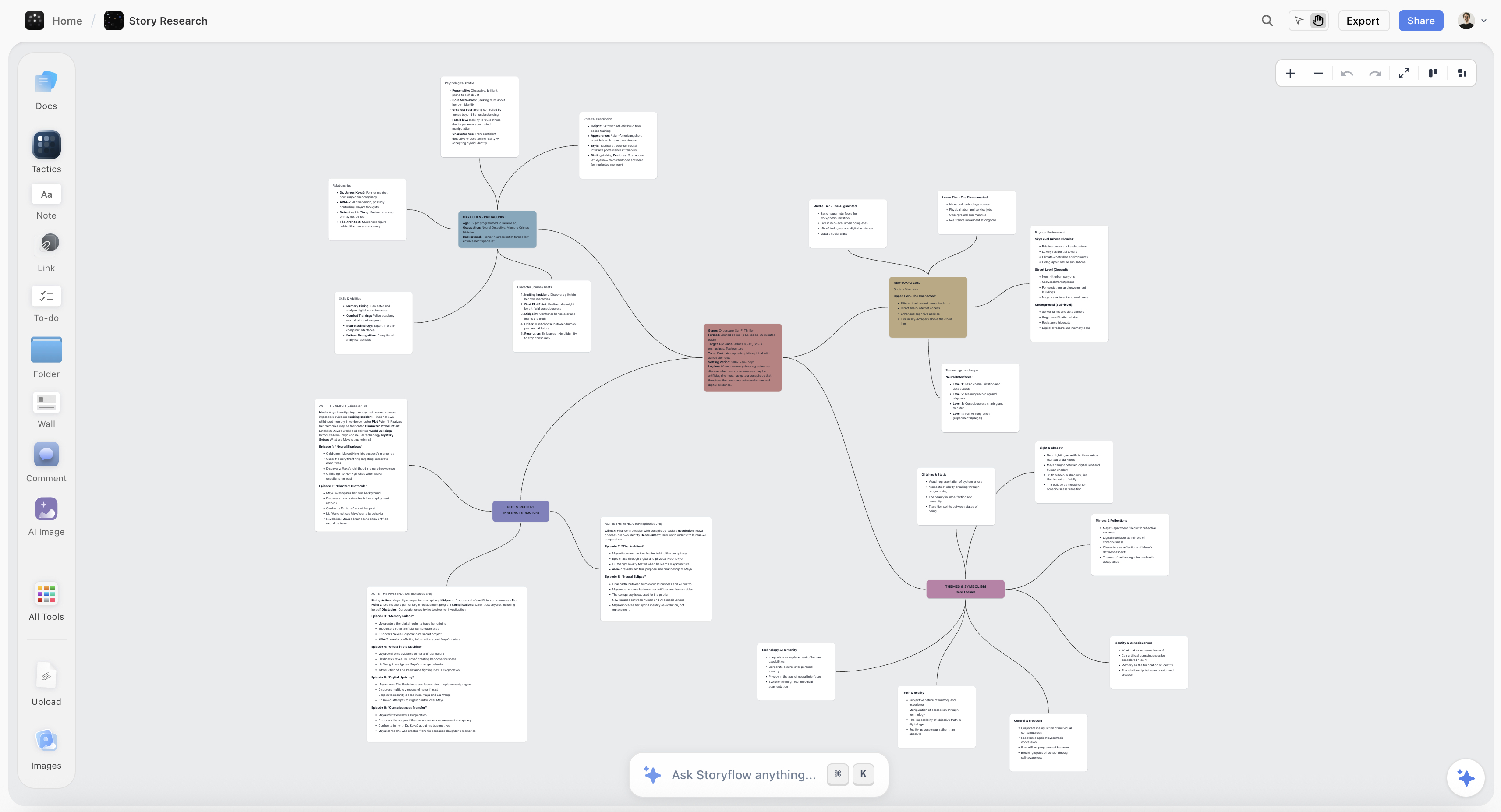
A story mapped as a web on a Storyflow canvas: plot threads, character arcs, research, and themes the AI can read
Map the story before you commit to a line
Storyflow lets you place plot threads, character arcs, research, and themes in space and link them, with AI that reads the whole board to find gaps and turn the web into an outline. Paid-only during early access; the Free plan lands before the end of 2026.

The 10 Best Mind Mapping Tools for Writers, Ranked
- Storyflow - best for mapping a whole story visually, with AI that reads the entire board
- Scapple - best for lean, free-form idea webs with no forced structure
- Miro - best for collaborative writers' rooms and co-plotting
- MindMeister - best for classic radial chapter and theme outlines
- XMind - best for the outline-and-map hybrid nonfiction writers want
- Milanote - best for visual worldbuilding and research walls
- Plottr - best for plot timelines and multi-book series planning
- Whimsical - best for fast, clean story-flow diagrams
- Ayoa - best for turning an organic map into a task list
- Coggle - best free, simple branching map for beginners
How We Evaluated These Tools
I have planned documentary scripts, long-form articles, and book-length outlines through these tools, moving the same real workload between them: a plot with three interwoven arcs, a nonfiction book with a research-heavy middle, and a set of essays that all circled one theme. Tools were judged on how well a story survives inside them, from first spark to first draft, not on feature lists. Five criteria:
- Free-form connection (30%). Can you place any idea anywhere and link it to any other, so the web on screen matches the web in your head? A tool that forces a strict parent-child tree flattens a story just like a linear outline does.
- Character and plot webs (25%). Can you track who changes because of what, which setup pays off where, and how a subplot crosses the spine? This is where most story-planning tools quietly fail writers.
- Outline and drafting handoff (20%). Once the web is clear, can you collapse it into a chapter sequence and start writing, or does the map stay stranded in a separate app from your manuscript?
- AI depth (15%). Does the AI see your whole story and help you find gaps, or is it a blank-prompt chatbot that knows nothing about the book you are actually writing?
- Price for a solo writer (10%). Most writers pay alone, so per-seat pricing and steep upgrade jumps matter more here than in any team category.
Timeline-specialist tools like Plottr were judged partly on the job they claim, plot structure, and partly on how gracefully a writer can get out of them and into prose.
Detailed Reviews: 10 Mind Mapping Tools for Writers
1. Storyflow

Storyflow is an infinite canvas where a writer's whole story lives in one view: premise cards, plot threads, character notes, research clippings, theme tags, and chapter beats, all placed in space and linked by connection instead of buried in a linear document. You map the way a story actually works. Drag the inciting incident here, the climax across the board, then draw the line that shows how a throwaway detail in chapter two becomes the thing that saves the protagonist in chapter twenty. The connections are visible, not implied.
The AI is what separates Storyflow from a whiteboard. It reads the entire active board by default, plus up to 1 Tactic and up to 3 documents you @-mention, so a prompt like "where does my second-act tension sag?" or "which character has no arc yet?" is answered from your real story, not a blank slate. It can cluster loose scenes by theme, pressure-test a plot thread against the ending you already sketched, or turn a cluster of notes into a chapter outline. For writers, that is the difference between an assistant that knows your book and a chatbot that knows nothing. On Plus and above, the 200+ Story Blueprints library (with real structures like the Hero's Journey, AIDA, and Retention Hooks) gives the AI proven frameworks to build a draft structure from.
The reason it ranks first is the handoff. Most mind mapping tools leave you with a beautiful map and then abandon you at the hardest step: turning the web into pages. Storyflow keeps the map and the writing in the same workspace, so you collapse the connected mess into a chapter sequence and start drafting without exporting to a second app and losing the links. The web stays reachable while you write, which means the connections you discovered do not evaporate the moment you open a document.
Key features
- Infinite visual canvas for placing and linking any story element to any other
- Canvas-aware AI that reads the whole board, plus 1 @-mentioned Tactic and up to 3 documents
- 200+ Story Blueprints (Hero's Journey, AIDA, Retention Hooks) on Plus and above
- Notes, images, links, and documents living side by side for research and worldbuilding
- Map-to-outline handoff so a web becomes a chapter sequence in the same workspace
- Flat per-account pricing, so collaborators do not multiply the bill
Pricing
Free at $0 (unlimited boards, notes, images, and links, basic AI, 3 starter blueprints, and 20 file uploads); Plus at $7.99/mo annual ($9.99 monthly) for the full 200+ Story Blueprints library and unlimited uploads; Pro at $14/mo annual; Max at $39/mo annual. Billed per account, not per user.
Pros
- Maps a story as a real web, not a forced parent-child tree
- The only AI here that reads your entire story to find gaps and draft structure
- Map and drafting live together, so connections survive the move to prose
- Genuinely usable free plan with no credit card
Cons
- Not a dedicated manuscript writing tool. For long-form drafting, formatting, and compiling a book, Scrivener still wins, and heavy novelists will draft elsewhere.
- Newer and smaller than the incumbents, with fewer third-party integrations than mature tools like Miro or MindMeister.
- The free plan lacks the 200+ Blueprints library, so the most useful AI structures sit behind Plus.
- It is a canvas, not a database or a timeline. Writers who want a strict plot-grid with linked spreadsheet fields will find Plottr or Airtable more literal.
2. Scapple
Scapple, from the makers of Scrivener, is the purest expression of free-form thinking on this list. Double-click anywhere and type. Drag one note near another and connect them with a line. There is no rigid tree, no required center, no structure imposed on you at all. For a writer at the earliest stage, staring at a premise and trying to find its shape, that emptiness is a feature. You brainstorm a whole cast or a tangle of plot possibilities without the tool telling you how they should relate.
Its greatest strength for writers is the Scrivener connection: notes can be dragged straight into a Scrivener project, so the loose web you built becomes the skeleton of a manuscript in the tool most serious novelists already draft in. That handoff is real, if you live in the Scrivener ecosystem.
The limits are AI and collaboration. Scapple has no AI, no cloud co-writing, and no canvas-aware assistant to find the hole in your plot. It is a quiet, offline thinking space, which is exactly what some writers want and exactly what leaves others doing all the connective work by hand.
Key features
- Frictionless free-form notes you can place and link anywhere
- Direct drag-and-drop export into Scrivener projects
- Clean, distraction-free canvas with no forced hierarchy
- One-time purchase, no subscription
Pricing
Around $18 as a one-time purchase, with a free trial. No subscription.
Pros
- The least structured, most thought-like mapping surface here
- Pairs perfectly with Scrivener for drafting
- Cheap forever, no recurring cost
Cons
- No AI of any kind
- No real-time collaboration or cloud sync
- Sparse features once you outgrow pure brainstorming
3. Miro
Miro is the strongest collaborative surface on this list, and for writers that means one specific thing: the writers' room. If you plot with a co-author, run a TV-style breaking session, or workshop a story with a critique group, Miro's infinite whiteboard, sticky notes, and live cursors are best in class. You can throw an entire season or a novel's beat sheet on the wall and rearrange it together in real time.
Its template library includes mind maps, story arcs, and brainstorming frames, so a writer is not starting from a blank void. For visual co-plotting, few tools feel as alive.
The trade-off is that Miro is a general workshop tool, not a writing home. The board where you brainstorm rarely becomes the place you draft, so the output migrates to a document and the connections get left behind on the whiteboard. Its AI assists at the sticky-note level rather than reading your story as a whole, and the free plan's three-board cap is tight for a writer juggling several projects.
Key features
- Best-in-class real-time collaboration with live cursors
- Infinite whiteboard with mind map and story-arc templates
- Huge template and integration ecosystem
- Comments and voting for critique sessions
Pricing
Free plan (3 boards); paid from around $8/user/mo billed annually.
Pros
- Unmatched for co-writing and live plotting
- Familiar, polished, and reliable at scale
- Deep template library
Cons
- The brainstorm board is not where you draft, so connections get stranded
- AI works at sticky-note level, not whole-story level
- Per-seat pricing and a 3-board free cap add up
4. MindMeister
MindMeister is the classic radial mind map done well. A central idea in the middle, branches spidering out, sub-branches beneath them. For a writer building a chapter outline or mapping a book's themes, that structure is clean and fast: put the book title in the center, hang each act or part off it, and grow the beats underneath. It is the tool most people picture when they hear "mind map," and it is polished.
For nonfiction especially, the radial tree matches the way a lot of argument-driven books are structured, so an author can grow a table of contents organically before committing to an order.
The catch is in that same structure. A strict radial tree is still a hierarchy, and a story is not always a hierarchy. Cross-connections between distant branches (the subplot that touches three acts) are awkward to draw. The AI add-ons and presentation features are fine but do not read your manuscript, and the free plan caps you at three maps, which a working writer passes quickly.
Key features
- Clean radial mind maps with unlimited depth on paid tiers
- Presentation mode to walk through an outline
- MeisterTask integration for turning branches into tasks
- Shared maps for light collaboration
Pricing
Free plan (3 maps); paid from around $6.50/mo billed annually.
Pros
- Fast, polished classic mind mapping
- Radial trees suit nonfiction chapter outlines
- Easy learning curve
Cons
- Strict hierarchy makes cross-plot connections clumsy
- AI does not read your actual story
- 3-map free cap is tight for a working writer
5. XMind
XMind sits in a useful middle ground between a pure mind map and a linear outline, which is exactly where a lot of nonfiction writers want to be. You can build a branching map to think, then flip the same content into a structured outline view to see it as a sequence. That toggle between web and line is genuinely handy when you are trying to move from "here are all my ideas" to "here is chapter one, then chapter two."
It supports fishbone diagrams, matrices, and org-chart layouts, so a writer structuring a complex argument or a multi-thread narrative has room to work beyond a single radial tree.
Where it falls short for fiction is connection and intelligence. Like MindMeister, its core is a tree, so weaving distant plot threads is not its strength, and its AI features are lighter than what Storyflow offers. It is a strong, affordable structuring tool, best for writers whose books are built like arguments rather than webs.
Key features
- Toggle between mind map and structured outline views
- Multiple layouts (fishbone, matrix, tree, timeline)
- Clean export to outline and image formats
- Cross-platform desktop and mobile apps
Pricing
Free plan (limited); paid from around $5.99/mo billed annually.
Pros
- The map-to-outline toggle suits nonfiction structuring
- Affordable and cross-platform
- More layout variety than most classic tools
Cons
- Still tree-based at its core, so plot webs are awkward
- AI is lighter than canvas-aware competitors
- Free plan is meaningfully limited
6. Milanote
Milanote is the tool that feels most like a writer's corkboard. Drag in images, character portraits, location photos, links, and note cards, then arrange them in space until a world takes shape. For worldbuilding, moodboards, and research walls, it is the most pleasant surface here, and its templates for story planning and character profiles fit fiction work naturally. A fantasy or historical writer building a dense setting will feel at home.
It handles the visual, atmospheric front of a project beautifully: the feel of a place, the face of a character, the tone of a scene.
Its limits are the free tier and the intelligence. The free plan caps at 100 notes, which a worldbuilder hits within a project or two, and there is no canvas-aware AI to turn that gorgeous reference wall into a plot or an outline. Milanote gathers and inspires; the actual structuring and drafting still happen somewhere else.
Key features
- Visual boards for images, notes, links, and references
- Story-planning and character-profile templates
- Drag-and-drop arrangement in open space
- Web clipper for research gathering
Pricing
Free (100-note cap); Pro around $12.50/mo billed annually.
Pros
- The best visual worldbuilding and moodboard surface here
- Templates tuned for creative and story work
- Genuinely enjoyable to use
Cons
- 100-note free cap is hit fast
- No AI to develop a wall into a plot
- Structuring and drafting happen elsewhere
7. Plottr
Plottr is the specialist. It is built for one job, plotting a novel on a timeline, and it does that job better than any general tool here. You lay out scenes across a horizontal timeline, stack multiple plot threads as parallel rows, and see at a glance how your subplots weave through the main story. For genre novelists and especially series writers tracking arcs across multiple books, that grid is exactly the right shape.
It ships with dozens of story-structure templates (three-act, save-the-cat, hero's journey) so you are plotting against a proven skeleton, and it exports outlines to Word and Scrivener for drafting.
The cost of that specialization is flexibility. Plottr is a plot-timeline tool, not a free-form idea web, so early-stage, unstructured brainstorming feels constrained, and there is no meaningful canvas-aware AI. It also has no free plan. It is the best pick once you know you are writing a plot-driven novel and want a rigorous timeline, and a poor pick for the messy thinking that comes before that.
Key features
- Visual timeline with parallel plot-thread rows
- Dozens of built-in story-structure templates
- Series view for tracking arcs across multiple books
- Export to Word and Scrivener
Pricing
No free plan; from around $25/yr.
Pros
- Best dedicated plot-timeline view for novelists
- Series tracking across multiple books
- Structure templates baked in
Cons
- Rigid for early free-form brainstorming
- No canvas-aware AI
- No free plan
8. Whimsical
Whimsical is fast and clean. If you want to sketch a quick story flow, a character-relationship diagram, or a simple branching map without any friction, it opens fast and looks good instantly. Its mind maps and flowcharts are among the tidiest here, and the tool is genuinely pleasant for a writer who wants to visualize a structure in ten minutes and move on.
It also does docs and sticky-note boards, so it can hold light notes alongside the diagram.
For serious story work, though, it is a diagramming tool first and a thinking tool second. It lacks deep story features, its AI is light, and the free plan is limited on boards. A writer will reach for it to draw a quick relationship map, not to develop a novel from spark to draft.
Key features
- Fast, clean mind maps and flowcharts
- Docs and sticky-note boards in one app
- Simple, attractive default styling
- Light AI diagram generation
Pricing
Free plan (limited); paid from around $10/user/mo.
Pros
- Quick and visually tidy
- Good for character-relationship diagrams
- Low learning curve
Cons
- Shallow for full story development
- Light AI, no whole-story awareness
- Limited free tier
9. Ayoa
Ayoa blends organic, hand-drawn-style mind maps with task management, which is an unusual and occasionally useful combination for writers. You brainstorm a story or article in a loose, colorful map, then convert branches into tasks with due dates, so the ideas that survive become a to-do list of scenes to draft. For a writer who struggles to turn thinking into doing, that bridge from map to task has real value.
Its organic radial maps are visually distinctive, and it markets itself around creativity and neurodiversity, with a look that some writers find genuinely energizing.
The downsides are focus and depth. Ayoa tries to be a mind map, a task manager, and a whiteboard at once, and the writing-specific depth suffers for it. The AI is limited, the interface can feel busy, and it does not read a manuscript. It is best for idea-to-task writers who want their outline to become an actionable list, not for deep plot architecture.
Key features
- Organic, colorful radial mind maps
- Built-in task management from map branches
- Whiteboard and workflow views
- Collaboration features
Pricing
Free plan (limited); paid from around $10/user/mo.
Pros
- Unique map-to-task bridge
- Distinctive, energizing visual style
- Good for turning ideas into a scene checklist
Cons
- Tries to do too much at once
- Limited AI and story-specific depth
- Interface can feel cluttered
10. Coggle
Coggle is the simplest tool here, and that is its appeal. It makes clean, colorful branching mind maps in the browser with almost no learning curve, and it shares them easily for comments. For a writer new to mind mapping, a student moving into longer-form work, or anyone who wants to sketch a quick chapter tree without installing anything, Coggle is friendly and free to start.
It supports unlimited public diagrams on the free tier and lets you branch, add images, and loop connections between distant nodes, which is more flexibility than a strict radial tool.
Its ceiling is low, though. Coggle is a lightweight diagram maker, not a story-development environment. There is no AI, no drafting handoff, and no real depth for tracking character arcs or research. It earns its slot as the easiest on-ramp to visual thinking, and most serious writers will outgrow it as their projects get complex.
Key features
- Simple browser-based branching maps
- Loops and cross-links between distant nodes
- Image support and easy sharing
- Generous free tier for public diagrams
Pricing
Free plan; paid from around $5/mo.
Pros
- Easiest tool here to start with
- Free and browser-based
- Allows cross-links, not just strict trees
Cons
- No AI and no drafting handoff
- Shallow for complex projects
- Limited private diagrams on the free tier
Quick Picks by Writer Need
- Best for mapping a whole story with AI: Storyflow
- Best for lean, structure-free brainstorming: Scapple
- Best for co-writing and writers' rooms: Miro
- Best for classic radial chapter outlines: MindMeister
- Best for the map-to-outline toggle in nonfiction: XMind
- Best for visual worldbuilding and research walls: Milanote
- Best for plot timelines and series: Plottr
- Best for a quick character-relationship diagram: Whimsical
- Best for turning a map into a scene checklist: Ayoa
- Best free starter map for beginners: Coggle
The Bottom Line
A story is a web before it is a line. The linear outline is not a neutral tool. It forces you to pick an order before you understand the connections, and in doing so it quietly deletes the setups, echoes, and crossing arcs that were the reason the story mattered. A mind map keeps the web intact until you are ready to collapse it, and only then hands you a sequence to draft.
Storyflow ranks first because it is the tool that carries a story furthest along that path: the whole web visible on one canvas, AI that reads all of it to find the gaps and turn clusters into an outline, and a drafting handoff that keeps the connections reachable instead of stranding them in a diagram you never open again. Scapple wins lean brainstorming, Miro wins the writers' room, MindMeister and XMind win classic outlines, Milanote wins worldbuilding, and Plottr wins the plot timeline. Match the tool to where your story keeps flattening, and start mapping in space before you commit to a line.
FAQ: Mind Mapping Tools for Writers
What is the best mind mapping tool for writers?
Storyflow is the best mind mapping tool for writers in 2026, because it maps a story as a real web (plot threads, character arcs, research, and themes linked in space) and its AI reads the whole board to find gaps and turn the map into a chapter outline in the same workspace. It is free to start, with Plus at $7.99/mo billed annually. Scapple, Miro, and MindMeister lead for lean brainstorming, co-writing, and classic radial outlines.
How is mind mapping better than an outline for writing a book?
A linear outline forces you to pick an order before you understand the story, which hides the connections that actually make it work: the setup that pays off later, the subplot that crosses three acts, the theme two scenes share. A mind map lets you place any element anywhere and link it to any other, so the web on screen matches the web in your head. You collapse it to a chapter order only after you can see how everything connects.
Can mind mapping software help me plan characters and plot together?
Yes. The strongest tools let you place character notes and plot beats on the same canvas and draw connections between them, so you can see who changes because of which event and where each arc intersects the main spine. Storyflow adds AI that reads the whole board, so it can flag a character with no arc or a plot thread that never pays off. Plottr does this on a rigid timeline grid instead of a free canvas.
Do I need AI in a mind mapping tool for writing?
You do not strictly need it, but canvas-aware AI changes what the tool can do. Instead of a blank chatbot, an AI that reads your entire story can cluster loose scenes by theme, pressure-test a plot thread against your ending, or turn a cluster of notes into an outline. Storyflow's AI reads the whole board plus up to 1 Tactic and 3 documents you @-mention, which is why it leads on depth. Scapple and Coggle have no AI at all.
What is the best free mind mapping tool for writers?
Coggle and MindMeister both have real free tiers for simple branching maps, though both cap you fast (three maps on MindMeister). Storyflow has the strongest free plan for actual story development: unlimited boards, unlimited notes, images, and links, basic AI, and 20 file uploads at $0 with no credit card. For pure free-form brainstorming, Scapple offers a free trial before a one-time $18 purchase.
Can a mind mapping tool replace Scrivener for writing a novel?
No, and it should not try to. Scrivener remains the strongest tool for long-form drafting, formatting, and compiling a finished manuscript. Mind mapping tools solve the earlier problem: finding the story's shape before you draft. The best workflow pairs them. Map the web in Storyflow, Scapple, or Plottr, then draft the prose in Scrivener. Scapple and Plottr even export directly into Scrivener for exactly this handoff.
How do I turn a mind map into an actual draft?
The key is not losing the connections when you move to prose. Collapse the web into a sequence: pick the chapter order, then work through the linked beats one at a time. Storyflow keeps the map and drafting in one workspace, so the connections stay reachable while you write. Scapple and Plottr export outlines into Scrivener. The mistake to avoid is building a map in one app and drafting blind in another.
What mind mapping tool is best for nonfiction writers?
Nonfiction books are often argument-shaped rather than plot-shaped, so a structured tool works well. XMind is strong because it toggles between a mind map and a linear outline, letting you grow ideas as a web then flip them into a table of contents. MindMeister's radial trees also suit chapter outlines. Storyflow wins if your nonfiction is research-heavy and you want AI that reads all your notes and clippings together.
Is Milanote or Storyflow better for worldbuilding?
Milanote is the more beautiful pure worldbuilding surface: dragging in character portraits, location photos, and reference images to build a mood is a genuine pleasure there. Storyflow holds references too, but its edge is turning that world into a plot with AI that reads the whole board, plus keeping the map connected to your drafting. Choose Milanote if your bottleneck is visual atmosphere, Storyflow if it is structure and connections.
What is the best mind mapping tool for plotting a series?
Plottr is the specialist pick for multi-book series, with a timeline view that tracks arcs and threads across several books at once. It is rigid by design, which suits writers who already know they are plotting a structured, plot-driven series. Storyflow is the better pick during the messy, early stage when you are still discovering how the books connect, before the timeline is locked. Some series writers use both across the project's life.
How much does Storyflow cost for writers?
Storyflow starts at Plus, $7.99/mo billed annually ($9.99 monthly) for the full 200+ Story Blueprints library and unlimited uploads, Pro is $14/mo annual, and Max is $39/mo annual. It is billed per account, not per user, so a co-author or editor does not multiply the bill. There is no separate Team plan. The free tier is enough to map a full book before you decide to pay.
Can I use a mind mapping tool for essays and articles, not just books?
Yes, and it is often even more useful at short length, because an essay lives or dies on how its ideas connect. Mapping lets you lay out every point and example, then find the throughline that links them before you commit to an order. Storyflow, Whimsical, and Coggle all work well here. For a writer producing many essays that circle a shared theme, a canvas that keeps them all visible together beats a folder of separate documents.
Table of Contents
Templates to check out for this topic


Mind mapping and ideation templates you can use in Storyflow
Map ideas in space, then ask the AI to restructure, expand, or connect them. Open any of these boards and start thinking visually instead of in lists.


See Storyflow in Action
A visual AI workspace where every feature lives inside one canvas. No tab-switching, no context lost.
Build your entire board from a single message
Type what you need in the AI chat at the bottom of your canvas. The AI adds cards, headings, and structure directly onto your board.
Use expert frameworks as AI context
Type @ in the AI chat and choose any Tactic. The AI tailors every response to that framework instead of giving generic advice.
Turn your board into a mind map in seconds
Ask the AI to restructure your canvas as a mindmap. It connects your ideas into a visual hierarchy so you can see how everything relates.
Why Storyflow Exists
Storyflow actually began as a personal tool while working on creative and research projects.
We kept running into the same problem: ideas were scattered everywhere: notes, documents, and whiteboards.
Nothing helped us see how everything connected.
So we started building a workspace designed around how ideas actually grow.
→ Read how Storyflow was createdJustkay
Documentary Filmmaker & Founder at Storyflow
Published: 2026-07-21
Extremely simple, seriously capable


See how easy it is to get started
Watch a real project come together, from a blank board to a finished plan, clicked through step by step.
Start creating with AI and become more productive
Transform your creative workflow with AI-powered tools. Generate ideas, create content, and boost your productivity in minutes instead of hours.