
Category
Writing Tools
Author

Justkay
Documentary Filmmaker & Founder at Storyflow
Topics
2026-05-12
•
Updated May 12, 2026
•
15 min read
•
Writing Tools- best Notion alternatives for writers 2026
- Notion alternative for writers
- Notion for novelists
- writing tool
- story bible software
- Scrivener vs Notion
What are the best Notion alternatives for writers in 2026?
The best Notion alternatives for writers in 2026 are Storyflow (best for canvas-based story bibles and AI that reads narrative context), Scrivener (best for long-form manuscript writing), Obsidian (best for connected-note worldbuilding), and World Anvil (best for fantasy and SF worldbuilders). The split that matters: writers do not need a database tool, they need a tool that understands story. Notion is fundamentally a database wearing a document UI. The strongest tools for writers are canvas-shaped, narrative-aware, and AI-context-rich.

All 12 Notion Alternatives for Writers, Ranked
- Storyflow: canvas story bibles and AI that reads the full narrative context
- Scrivener: long-form manuscript writing with the binder and corkboard
- Obsidian: connected-note writing and worldbuilding
- World Anvil: wiki-style fantasy and SF worldbuilding
- Storyist: Mac novel writers who want per-character profiles
- Plottr: plot and timeline planning
- Campfire Writing: modular worldbuilding for novelists
- Capacities: object-based notes for writers
- Heptabase: card-based visual notes
- Reedsy Book Editor: free novel formatting and export
- Milanote: visual moodboard writing and research
- Ulysses: markdown-first writing on Mac
Full disclosure: Storyflow is our own product, and we rank it #1 for one job: canvas-based story bibles with an AI that reads the whole narrative context. For the actual long-form prose Scrivener is stronger, and for connected-note worldbuilding Obsidian is stronger. Storyflow is not a manuscript writer, so pair it with Scrivener or Final Draft for the draft, and it is cloud-only with no local-first option. We link to every tool so you can judge the fit.
Quick Comparison: Best Notion Alternatives for Writers
These four cover what writers actually switch for: canvas story bibles with narrative-aware AI, long-form manuscript writing, connected-note worldbuilding, and wiki-style world bibles.
| Tool | Best For | AI Features | Price |
|---|---|---|---|
| Storyflow | Canvas story bibles + AI context | Reads full canvas + Story Blueprints | $7.99 mo annual (free plan late 2026) |
| Scrivener | Long-form manuscript writing | Limited, document-only | $59.99 one-time |
| Obsidian | Connected-note worldbuilding | Plugin AI (Smart Connections) | Free / $5 mo |
| World Anvil | Fantasy and SF worldbuilding | Limited | Free / $4.99 mo |
1) Quick Answer: The Best Notion Alternatives for Writers in 2026
The best Notion alternatives for writers in 2026 are Storyflow (best for canvas-based story bibles and AI that reads narrative context), Scrivener (best for long-form manuscript writing), Obsidian (best for connected-note writing and worldbuilding), and World Anvil (best for fantasy and SF worldbuilders). The split that matters: writers do not need a database tool, they need a tool that understands story. Notion is fundamentally a database wearing a document UI. The strongest tools for writers are canvas-shaped, narrative-aware, and AI-context-rich.
Notion is brilliant software for note-takers, operators, and small teams running their work in databases. But writers do not work in databases. They work in characters, scenes, threads, locations, and worlds. The tools below were built for that work, or they have evolved into something close to it, while Notion's database-first architecture has stayed where it started.
I have used Notion for years and have built every type of writing project inside it: documentary research, video scripts, longer narrative projects. The pattern that has held is that Notion makes you build the wheel before you can drive it. Every writing project needs a new database, a new template, a new system. Tools built for writers ship with the writing in mind.
I have built story bibles for documentary projects spanning multiple seasons. The tools that worked for the writing work were never the same tools that worked for my operational and project-management work. This piece reflects what I have learned about that split.
For the broader "Notion alternatives" landscape, see The 12 Best Notion Alternatives in 2026. For the visual-thinker variant, see Best Notion Alternatives for Visual Thinkers in 2026.
2) Comparison Table: 12 Tools Compared for Writers
Rating criteria: story bible support, AI context for writers, canvas/visual workflow, scene-level structure, and pricing. Tools optimized for note-taking rather than narrative work were rated lower regardless of how popular they are with other audiences.
3) Why Notion Fails Writers
Notion is brilliant software. Millions of people run their work and lives inside it. The databases are powerful. The flexibility is real. For people who organize their work in lists, tables, and pages, nothing else comes close.
But writers do not work that way.
Writers work in characters. Characters have voices, contradictions, relationships, secrets. None of that fits cleanly into a database row. You can build a Notion character database, but the moment you try to write the character's voice, you are typing into a generic block in a generic page, and the surrounding architecture is invisible to the AI sitting in the corner.
Writers work in scenes. Scenes have locations, time-of-day, characters present, beats, emotional turns. None of that fits a database either. Notion's scene tracking lives in a database, and the database is wearing a document UI, but it is still a database underneath.
Writers work in plot threads. Threads weave through episodes, chapters, seasons. They start, get planted, pay off, get abandoned. Tracking threads in Notion means manually tagging entries across multiple databases and hoping you remember which thread connects which scenes. The system gets stale by chapter four.
Writers work in worldbuilding. Magic systems, technologies, languages, geographies. World Anvil exists specifically because Notion is too unstructured for serious worldbuilding. Novelists who try to use Notion for worldbuilding usually leave within six months for a tool with cross-referenced wiki structure.
Notion's AI knows your databases. It does not know your story. Ask Notion's AI "which of my characters has not appeared in the last three chapters?" and it cannot answer, because the AI does not know what "appeared" means in your context. It just sees pages and database rows. The tools below were built so the AI can answer that question.
Writers using Notion spend half their effort building the system instead of using it. That tax adds up. After six months, the writer either becomes a Notion power user who spends as much time on databases as on writing, or they leave for a tool built for the work.
4) How We Evaluated These Tools
Five criteria, weighted in this order.
- Story bible support. Native or strong-plugin support for characters, locations, world rules, plot threads, and timelines. Tools where building a story bible requires manual database setup were rated lower.
- AI for narrative context. AI that reads the writer's project context (characters, threads, scenes) and can answer narrative questions, not just summarize text. Most tools have AI; few have AI that understands story.
- Canvas or visual workflow. Tools that let writers see relationships between characters, scenes, and threads spatially. Document-only tools were rated lower.
- Scene-level and chapter-level structure. Native scene/chapter organization, beat-level workflow, and the ability to revise structure without losing prose.
- Pricing transparency and writer-fit. Free tiers usable for sustained writing work. Tools whose free tier was a teaser were rated lower.
Tested workflows included drafting a documentary treatment with a story bible attached, planning a YouTube serialized format with character continuity, and a first novel with worldbuilding. Tools were tested on real projects over weeks, not on synthetic demos.
5) Quick Picks by Writer Type
If you want the short list, organize by writer type.
Best for Documentary and Long-Form Video Writers: Storyflow. The canvas holds the story bible, beat sheet, treatment, and research on one board with AI that reads all of it.
Best for Screenwriters with Story Bibles: Storyflow plus Final Draft. Storyflow for the bible and beat sheet, Final Draft for the script. Final Draft alone handles scripts well but does not handle bibles.
Best for Novelists Drafting Long Manuscripts: Scrivener for the manuscript itself, Storyflow for the bible and plot threads. Scrivener's binder + corkboard is the gold standard for long-form prose; Storyflow handles the bible work Scrivener does poorly.
Best for Worldbuilders (Fantasy / SF / Game): World Anvil for the world bible, Storyflow for the in-progress story planning. World Anvil's wiki structure is unmatched for cross-referenced worldbuilding.
Best for Connected-Note Writers: Obsidian. The graph view and backlinks are unmatched for writers who think in networks of ideas rather than linear scenes.
Best for Plot/Timeline-First Writers: Plottr. Visual timeline and plot grid for writers who plot before they prose.
Best for Solo Indie Novelists on Mac: Storyist or Ulysses. Mac-native, clean writing environments with light structural support.
Best for Writers Who Want a Free, Light Setup: Obsidian Free for connected-note writing today. Add Storyflow (Plus, $7.99/month billed annually) for bible work, or wait for its Free plan, which launches before the end of 2026.
6) Detailed Reviews: 12 Notion Alternatives for Writers
1. Storyflow
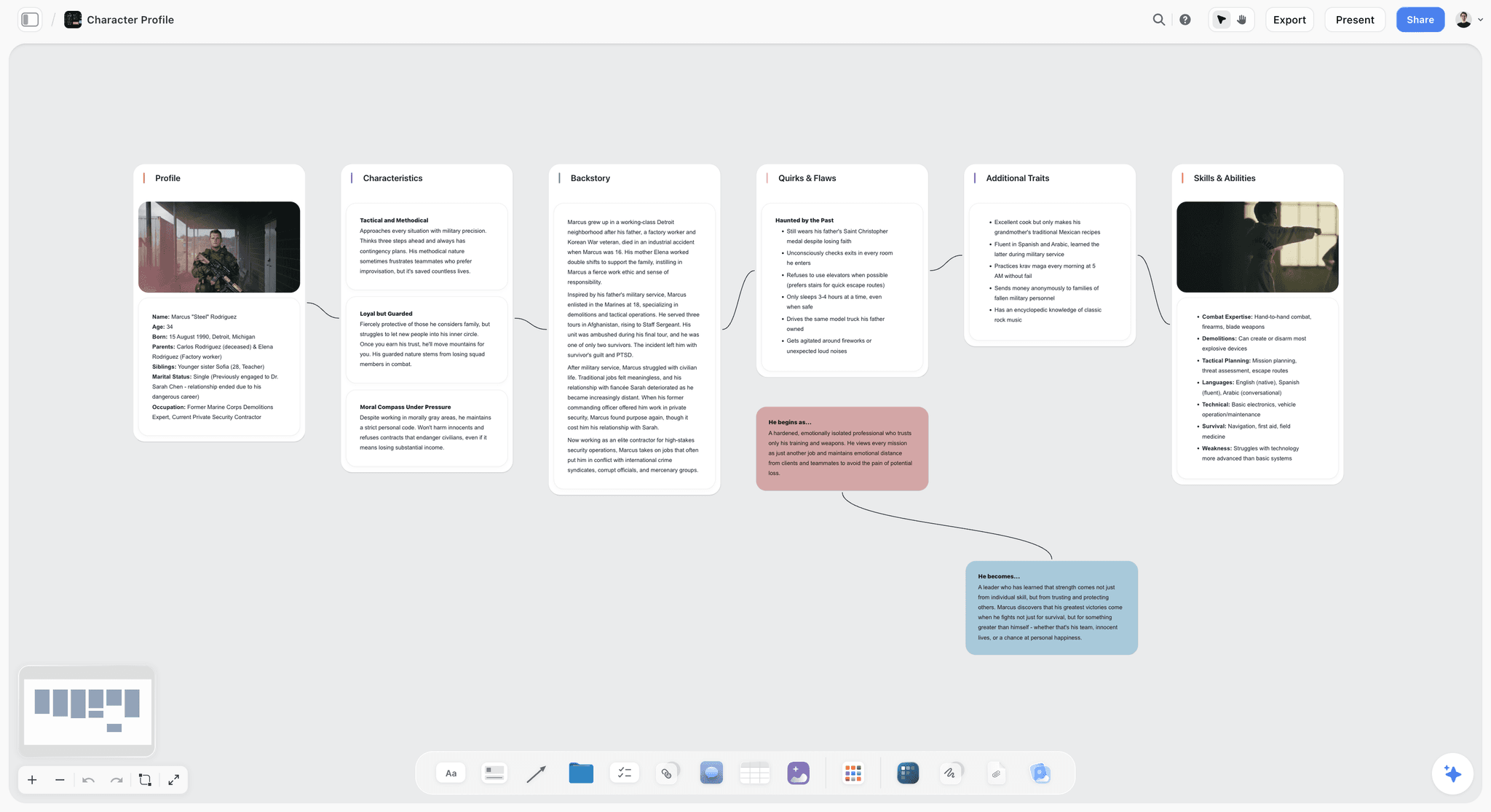
Storyflow is a canvas-based workspace where characters, scenes, plot threads, locations, and world rules each live as cards on a board, and the AI reads the full canvas to answer narrative questions. The Story Blueprints library includes character-profile, beat-sheet, and worldbuilding templates pre-structured for writers. The canvas approach replaces Notion's database-with-document-UI architecture with something built for narrative work specifically.
Best for: Writers building story bibles, documentary filmmakers, serialized YouTube creators, and anyone whose work spans multiple installments.
Verdict: The strongest Notion alternative for writers who need canvas-based story bibles and AI that understands story context.
Key features
- Canvas where every character, scene, location, and plot thread is a movable card.
- AI reads the full active canvas plus up to 1 Tactic and 3 Documents you @-mention.
- Story Blueprints library (200+ templates including character profiles, beat sheets, worldbuilding rules).
- Unlimited collaboration with no seat fee, on every plan.
- Real-time co-editing for writers working in teams or with editors.
Pricing
Free: launches before the end of 2026. Storyflow is paid-only during early access; once live, Free covers unlimited boards, unlimited cards, unlimited collaboration, basic AI usage, 20 file uploads, and 3 starter Story Blueprints. Plus: $7.99/mo annual. Full 200+ Story Blueprints, unlimited file uploads. Pro: $14/mo annual. AI image generation, 20x AI usage. Max: $39/mo annual. 40x more AI, team workspace with roles.
Pros
- Story bible support is native and canvas-based, not a manual database build.
- AI reads the full canvas, so questions like "which character has not appeared in the last three chapters?" work.
- Unlimited collaboration with no seat fee is unmatched among writer-focused tools.
Cons
- Not a manuscript writer; pair with Scrivener or Final Draft for the actual long-form prose or script.
- Cloud-only; no local-first option for writers with privacy concerns.
- Paid-only during early access; basic AI usage on Plus hits the wall fast on heavy projects.
2. Scrivener
Scrivener has been the gold standard for long-form manuscript writing since the mid-2000s. The binder lets you organize chapters and scenes hierarchically. The corkboard view lets you see the manuscript as cards you can rearrange. Best-in-class for actual prose writing, weaker for AI-augmented bible work.
Best for: Novelists and long-form nonfiction writers drafting manuscripts.
Verdict: The strongest pure-writing tool for long manuscripts; pair with a canvas tool for the bible work.
Key features
- Binder for hierarchical chapter and scene organization.
- Corkboard view for visual scene-card arrangement.
- Compile feature for export to ebook, manuscript, or print formats.
- Snapshots for revision history of individual scenes.
- Cross-platform (Mac, Windows, iOS).
Pricing
$59.99 one-time purchase (Mac or Windows). iOS app sold separately. No subscription.
Pros
- One-time purchase, no subscription.
- Best-in-class for actual long-form writing.
- Strong tradition; large community of working writers.
Cons
- No AI features; built before AI became standard.
- Bible work is awkward; characters and worldbuilding live in side documents without strong structure.
- Mobile and sync experience lags modern tools.
3. Obsidian
Obsidian is the connected-note tool of choice for writers who think in networks rather than hierarchies. Backlinks connect every mention of a character or location across the entire vault. The graph view visualizes the network. Plugins extend Obsidian for worldbuilding, writing-specific workflows, and AI.
Best for: Writers who think in connected ideas, worldbuilders, and writers who want local-first privacy.
Verdict: The strongest tool for connected-note writing; bible work is strong but requires plugin setup.
Key features
- Backlinks and graph view for connected notes.
- Local-first markdown files; full ownership of your work.
- Plugin ecosystem (Smart Connections for AI, Templater, Dataview).
- Canvas plugin for visual layout.
- Cross-platform desktop and mobile.
Pricing
Free for personal use. Sync $5/mo. Publish $10/mo. Commercial license $50/year.
Pros
- Local-first, full file ownership, no vendor lock-in.
- Free for personal use; sustained writing on free tier is realistic.
- Connected-note model is unique and useful for worldbuilding.
Cons
- Setup-heavy; new users spend weeks configuring the vault before writing.
- AI requires plugins; not native.
- Document-first rather than canvas-first.
4. World Anvil
World Anvil is the dedicated worldbuilding tool. Wiki-style cross-references for characters, locations, magic systems, technologies, and timelines. Strongest for fantasy and SF writers building elaborate universes.
Best for: Fantasy, SF, and game writers building elaborate cross-referenced worlds.
Verdict: The strongest worldbuilding tool, weaker for story planning beyond the world itself.
Key features
- Wiki structure with internal cross-references.
- Templates for characters, locations, organizations, magic systems.
- Timeline tool for historical events.
- Player-facing campaign management for tabletop RPG writers.
Pricing
Free with caps. Journeyman $4.99/mo. Master $7.99/mo. Grandmaster $12.99/mo.
Pros
- Best-in-class for cross-referenced worldbuilding.
- Templates pre-structured for fantasy and SF conventions.
- Strong community of working fantasy writers.
Cons
- Wiki-heavy; not strong for in-progress writing alongside the world.
- AI features lag.
- Templates are genre-specific and feel awkward for contemporary or literary fiction.
5. Storyist (Mac)
Storyist is the Mac-native dedicated novel-writing tool. Character profiles, plot sheets, and a manuscript editor in one app. Less famous than Scrivener but loved by Mac-only writers who want lighter setup.
Best for: Mac-only novelists who want a single integrated tool with per-character profiles.
Verdict: Strong for Mac-native novelists, weak for cross-platform or AI-augmented work.
Key features
- Manuscript editor with chapter and scene structure.
- Per-character profile templates.
- Plot sheets for narrative planning.
- Mac + iOS sync.
Pricing
$59 one-time purchase (Mac). iOS sold separately.
Pros
- Mac-native polish.
- Per-character profile templates pre-structured.
- One-time purchase.
Cons
- Mac and iOS only.
- No AI integration.
- Smaller community than Scrivener.
6. Plottr
Plottr is the plot-and-timeline planning tool. Visual timeline of scenes across plot threads. Strong for writers who plot first and prose later.
Best for: Plot-first writers, mystery and thriller writers, series novelists.
Verdict: Strong plotting visualization, weaker as a full writing environment.
Key features
- Visual timeline with multiple plot threads.
- Character profile templates.
- Series management for multi-book arcs.
- Export to Scrivener and Word.
Pricing
$25/year basic, $39/year pro.
Pros
- Best-in-class visual plot timeline.
- Multi-thread tracking is built in.
- Affordable annual pricing.
Cons
- Not a writing tool; export to Scrivener or Word for drafting.
- Limited AI.
- Better as a complement than a primary tool.
7. Campfire Writing
Campfire Writing is a modular worldbuilding and writing tool. Pick the modules you need (characters, timelines, magic systems, manuscripts) and assemble your tool. Strong for novelists who want a la carte structure.
Best for: Novelists who want a modular tool with strong worldbuilding.
Verdict: Strong modular structure, light AI, mid-tier overall.
Key features
- Modular: pick character, timeline, magic, manuscript modules.
- Worldbuilding templates.
- Lightweight AI for character generation.
- Web-based, cross-platform.
Pricing
Free with caps. Standalone modules from $9/mo. Bundles available.
Pros
- Modularity lets you avoid paying for what you do not use.
- Strong worldbuilding module.
- Active development.
Cons
- AI is light compared to Storyflow or canvas-AI tools.
- Module pricing can add up.
- Less of a community than Scrivener or Obsidian.
8. Capacities
Capacities is an object-based note-taking tool: every note is typed as an object (person, idea, project, source). The structure helps writers more than free-form notes, but the tool is not narrative-aware.
Best for: Writers who think in typed objects rather than linear notes.
Verdict: Strong note-taking with light writer-fit; not a story bible tool out of the box.
Key features
- Typed object model (every note is a type).
- Cross-linking and queries.
- Standard AI features.
- Web and desktop.
Pricing
Free. Pro $7.99/mo. Believer $11.99/mo.
Pros
- Object model is genuinely useful for character/location notes.
- Clean modern UI.
- Reasonable Pro pricing.
Cons
- Requires manual setup for story bible work.
- AI is standard rather than narrative-aware.
- Smaller community than the alternatives.
9. Heptabase
Heptabase is a card-based visual note tool. Whiteboards with note cards you can connect, group, and rearrange. Strong for visual-first writers who want spatial layout.
Best for: Visual-first writers, researchers, knowledge workers.
Verdict: Strong visual layout, weaker for narrative-specific work.
Key features
- Card-based whiteboards.
- Linked notes between whiteboards.
- Tag and journal modes.
- Local-first sync (recent addition).
Pricing
$5.99/mo billed annually.
Pros
- Visual whiteboard model.
- Clean, focused UI.
- Local-first sync option.
Cons
- Not narrative-aware.
- Subscription only, no free tier for sustained use.
- Less feature-rich than canvas-AI competitors.
10. Reedsy Book Editor
Reedsy Book Editor is the free book-formatting and writing tool from the Reedsy publishing-services platform. Clean writing UI, automatic professional formatting, free export to EPUB and PDF.
Best for: Indie self-publishing novelists.
Verdict: Strong for the final stretch (formatting and export), light for early-stage structural work.
Key features
- Clean book-shaped writing UI.
- Automatic typesetting for EPUB and PDF.
- Free export and publication-ready output.
- Reedsy services marketplace for editors and designers.
Pricing
Free for writing and export. Reedsy services priced per professional.
Pros
- Free for full writing and export.
- Publication-ready formatting.
- Clean UI focused on prose.
Cons
- Minimal structural support (no story bible).
- No AI.
- Less control than Scrivener for power users.
11. Milanote
Milanote is the visual moodboard and note tool used by creative directors and visual-first writers. Strong for collecting images, references, and short notes around a story.
Best for: Visual writers, screenwriters in the research phase, novelists collecting references.
Verdict: Strong for research and moodboarding, weak as a primary writing environment.
Key features
- Visual boards with image, note, and link cards.
- Templates for storyboarding, research, mood boards.
- Web and desktop.
- Simple sharing.
Pricing
Free with 100-card cap. Pro $9.99/mo.
Pros
- Best-in-class for visual research collection.
- Clean simple UI.
- Affordable Pro tier.
Cons
- Not a writing environment; pair with Scrivener or Storyflow.
- 100-card free cap hits fast for serious projects.
- No AI.
12. Ulysses (Mac)
Ulysses is the markdown-first Mac writing app loved by bloggers, essayists, and novelists who want pure writing without structural overhead.
Best for: Mac-native writers who want pure prose with markdown.
Verdict: Strong for prose, light on structure, weakest for bible work.
Key features
- Markdown-first writing.
- Library with grouped sheets.
- Mac, iPad, iPhone sync.
- Export to multiple formats.
Pricing
$5.99/mo or $39.99/year.
Pros
- Clean writing experience.
- Strong Mac/iOS sync.
- Markdown discipline.
Cons
- Mac/iOS only.
- No story bible support.
- Subscription only.
7) Recommended Writer Stacks
The strongest writer setups are usually two or three tools, not one. Three stacks that work.
Stack 1: Documentary / Long-Form Video Writer. Storyflow (bible + research + treatment) + Final Draft or generic editor (script) + Notion for operations. The Storyflow canvas holds the story bible, beat sheet, and research; the script writes itself once the structure is solid.
Stack 2: Novelist with Worldbuilding. Storyflow or World Anvil (bible + worldbuilding) + Scrivener (manuscript) + Plottr (optional, for plot-first writers). The bible work happens in the canvas/wiki tool; the actual prose happens in Scrivener.
Stack 3: Serialized YouTube Creator. Storyflow (channel bible, character continuity, episode planning) + Google Docs or Notion (scripts and ops). The Storyflow canvas tracks recurring bits, character history, and topics covered across the series.
The stack pattern matters because no single tool does bible work AND manuscript writing AND operations well. Pick the right tool for each layer.
8) Honorable Mentions
Tools that did not make the main 12 but are worth knowing.
- Aeon Timeline. Strong dedicated timeline tool for plot timelines and historical research.
- Liquid Story Binder. Long-form Windows-only writing tool with strong organizational features.
- Final Draft. Industry-standard screenwriting tool; pair with a bible tool.
- WriterDuet. Browser-based screenwriting with strong collaboration features.
- Notebook LM. Free during preview, source-grounded research that can serve as a writer's research base.
- Tana. Object-based notes; promising for writers who want typed structure.
Honorable mentions usually do one job very well but do not cover the full writer workflow.
9) Tools to Avoid as a Writer
A few tools that get recommended for writers but underperform in practice.
- Microsoft Word as a primary tool. Word is fine for short pieces. Long-form writers outgrow it within months.
- Google Docs as a primary tool. Same as Word; fine for short, weak for structure.
- Trello for story planning. Cards are too rigid; story threads do not fit the kanban model.
- Airtable for story bibles. Powerful, but the configuration overhead exceeds the writing payoff. Hire an engineer or skip it.
- Generic AI chat (ChatGPT, Claude alone) for story bibles. Useful for generation; useless for tracking, since the AI cannot remember across sessions.
The pattern: tools built for office or general productivity rarely fit narrative work. The split is structural, not effort-based.
11) The Bottom Line
The best Notion alternatives for writers in 2026 are the tools built for narrative work specifically rather than for general note-taking. Storyflow is the strongest canvas-based option, with native story bible support and AI that reads narrative context. Scrivener is the strongest pure long-form writing tool. Obsidian is the strongest connected-note worldbuilding option. World Anvil is the dedicated worldbuilding tool. The right setup is almost always two or three of these tools, not one.
The pattern that matters is that writers should not have to build the system before they can write. Tools that ship with story bible templates, character profile structure, and narrative-aware AI save weeks of setup. Tools that force you to build everything from scratch eat your writing time and become the project.
The strongest 2026 workflow for new writing projects is to start with Storyflow for the bible and beat sheet, add Scrivener if the project is novel-length, and add World Anvil if the project requires elaborate worldbuilding. Try Storyflow's Story Blueprints to start.
10) FAQ: Notion Alternatives for Writers
Why is Notion not great for writers?
Notion's core architecture is databases with a document UI. Writers work in characters, scenes, threads, and worlds, none of which fit databases cleanly. Notion forces writers to build the system before they can write. Tools built for writers ship with the writing in mind.
Can I use Notion for a story bible?
Yes, but it requires significant setup. You will build databases for characters, locations, plot threads, and worldbuilding rules. After six months, most writers either become Notion power users (spending as much time on databases as writing) or switch to a dedicated tool.
Is Scrivener still relevant in 2026?
Yes. Scrivener remains the gold standard for long-form manuscript drafting. Its weakness is bible work, which is awkward. The strongest setup is Scrivener for the manuscript plus a canvas tool (Storyflow) or wiki tool (World Anvil) for the bible.
What is the best free Notion alternative for writers?
Obsidian Free is the strongest free option for connected-note writing, and World Anvil's free tier has feature caps but works for solo writers with small worlds. Storyflow is the strongest tool for canvas-based story bible work, but it is paid-only during early access (Plus at $7.99/month billed annually), with a Free plan launching before the end of 2026.
Should novelists use Notion or Scrivener?
Scrivener for the manuscript. Notion (or a Notion alternative) for the bible work. Most working novelists use both, with Scrivener as the drafting environment and a separate tool for character notes, worldbuilding, and research.
What tool do screenwriters use instead of Notion?
The dedicated tool stack is Final Draft (script) plus a bible tool (Storyflow, Scrivener corkboard, or notebooks). Final Draft handles scripts well but does not handle bibles. Storyflow handles the bible and beat sheet on a canvas.
Is there a Notion alternative built specifically for worldbuilding?
Yes. World Anvil is the dedicated worldbuilding tool. Wiki-structured cross-references for characters, locations, magic systems, and timelines. Strongest for fantasy and SF writers building elaborate universes.
How does Storyflow compare to Scrivener?
Different jobs. Storyflow is a canvas where the story bible, beat sheet, and research live; Scrivener is the long-form writing environment for the actual manuscript. The strongest novelist setup is Storyflow for the bible and Scrivener for the prose.
Do writers really need AI in their writing tool?
It depends. AI is most useful for bible work (generating character profiles, stress-testing world rules, surfacing continuity questions). For the actual prose, AI is more controversial; many novelists write the prose themselves and use AI only for the planning layer. Pick a tool whose AI fits the role you want it to play.
What is the best Notion alternative for nonfiction writers?
Obsidian for research-heavy nonfiction. Scrivener for long-form nonfiction prose. Storyflow for nonfiction with strong narrative spine (memoirs, narrative journalism, long-form essays). Nonfiction needs less worldbuilding and more research, which shifts the tool choice toward connected-note or canvas tools.
Can I migrate my existing Notion bible to one of these tools?
Yes, with effort. Most tools support import from CSV (export Notion databases first) or markdown. The structural mapping is often imperfect; expect to refactor as you import. The migration is usually worth it within a month because the new tool actively helps with the writing rather than requiring setup.
Which Notion alternative is most like Notion but better for writers?
Capacities is the closest "Notion but better for writers" in shape (object-based notes, page-with-database feel). Storyflow is a different shape entirely (canvas-based) and a bigger paradigm shift, but the canvas plus AI reading the full board does narrative work that object-based tools cannot.
Table of Contents
- Quick Answer: The Best Notion Alternatives for Writers in 2026
- Comparison Table: 12 Tools Compared for Writers
- Why Notion Fails Writers
- How We Evaluated These Tools
- Quick Picks by Writer Type
- Detailed Reviews: 12 Notion Alternatives for Writers
- Recommended Writer Stacks
- Honorable Mentions
- Tools to Avoid as a Writer
- FAQ: Notion Alternatives for Writers
- The Bottom Line
- Author
- Related Reading
Templates to check out for this topic


Workspace templates you can use in Storyflow
Keep research, notes, and plans on one canvas the AI can read, instead of scattered across docs and tabs. Open a template and make it your second brain.


See Storyflow in Action
A visual AI workspace where every feature lives inside one canvas. No tab-switching, no context lost.
Build your entire board from a single message
Type what you need in the AI chat at the bottom of your canvas. The AI adds cards, headings, and structure directly onto your board.
Use expert frameworks as AI context
Type @ in the AI chat and choose any Tactic. The AI tailors every response to that framework instead of giving generic advice.
Turn your board into a mind map in seconds
Ask the AI to restructure your canvas as a mindmap. It connects your ideas into a visual hierarchy so you can see how everything relates.
Why Storyflow Exists
Storyflow actually began as a personal tool while working on creative and research projects.
We kept running into the same problem: ideas were scattered everywhere: notes, documents, and whiteboards.
Nothing helped us see how everything connected.
So we started building a workspace designed around how ideas actually grow.
→ Read how Storyflow was createdJustkay
Documentary Filmmaker & Founder at Storyflow
Published: 2026-05-12
Extremely simple, seriously capable


See how easy it is to get started
Watch a real project come together, from a blank board to a finished plan, clicked through step by step.
Start creating with AI and become more productive
Transform your creative workflow with AI-powered tools. Generate ideas, create content, and boost your productivity in minutes instead of hours.