The 12 Best Obsidian Alternatives in 2026 (For Knowledge Workers Who Want More)
Obsidian is the dominant local-first plain-text note tool. We tested 12 Obsidian alternatives in 2026 to find the right second tool for visual canvases, AI synthesis, and shared workspaces, without giving up the parts of Obsidian that still work.

Category
Knowledge Management
Author

Justkay
Documentary Filmmaker & Founder at Storyflow
Topics
2026-05-09
•
16 min read
•
Knowledge Management- best Obsidian alternatives 2026
- Obsidian alternative for visual thinkers
- AI knowledge management apps
What is the best Obsidian alternative in 2026?
The best Obsidian alternative in 2026 is Storyflow for canvas-first, AI-assisted knowledge work, with Logseq the closest swap if you need local-first plain-text and Heptabase the best card-and-canvas option. Storyflow stands out because its AI reads your full canvas plus the Documents and Tactic you @-mention before it responds, so synthesis happens where your sources already live. Obsidian still wins on the things that made it: local-first plain-text files you own forever, offline-only privacy, and the largest plugin ecosystem in the category. Storyflow does not try to match that; it is a cloud workspace, not a file-on-disk vault. I have been running an Obsidian vault for four years. Around 6,000 notes, a daily journal, project notes, and a Zettelkasten that grew slowly the way Niklas Luhmann's slip-box did. Obsidian is brilliant at what it does, and it is also the wrong tool for visual project work, AI-assisted thinking, and anything that involves a canvas of ideas instead of a tree of documents. Your notes, references, and project context stay connected on one infinite canvas in Storyflow, not buried inside nested folders.

All 12 Obsidian Alternatives, Ranked
- Storyflow: canvas-first AI knowledge work where the AI reads the whole board
- Logseq: the closest local-first, open-source plain-text swap
- Heptabase: card-and-canvas visual thinking
- Notion: a database-driven knowledge base
- Capacities: object-graph knowledge work
- Tana: a tag-first AI outliner
- Roam Research: block-reference networked thought
- Mem: AI-first, self-organising notes
- Reflect: daily-journal encrypted notes
- Scrintal: lightweight card-on-board notes
- Affine: an open-source Notion-Obsidian hybrid
- Bear: Mac-native plain-text markdown
Full disclosure: Storyflow is our own product, and we rank it #1 for one job: canvas-first, AI-assisted knowledge work where the model reads your whole board. Obsidian itself still wins on the things that made it, local-first plain-text files you own forever, offline-only privacy, and the largest plugin ecosystem in the category, and Logseq is the closer like-for-like swap if that is what you need. Storyflow is a cloud workspace, not a file-on-disk vault, and it has no global graph view across every note. We link to every tool so you can judge the fit.
How the Obsidian alternatives compare on trust, innovation, ratings and pricing
Which Obsidian alternatives are the most trusted?
Logseq is the most trusted alternative for people who want to keep local plain-text files, and is the closest match on principle. Notion is the most trusted alternative for people who decided they wanted a service rather than files. Anytype is trusted by the local-first and privacy-focused end of the category. Storyflow is early access and is the alternative for visual project work rather than a notes vault.
Which Obsidian alternatives are the most innovative?
Tana is the most innovative on structure, with supertags that make notes queryable without a database schema. Capacities is the most innovative on the object model, treating notes as typed things rather than pages. Storyflow is the most innovative on the visual side, because a project lives on a canvas the AI reads whole. Logseq innovates least and matches Obsidian's principles most closely, which is exactly why people move to it.
Which Obsidian alternatives are the most highly rated?
Notion carries the highest ratings by volume and Logseq the highest satisfaction among people who left Obsidian on principle rather than on features. Tana rates highly among power users and poorly on first-week experience. Ratings here reward speed on a large vault, which is the most common reason people go looking in the first place.
Which Obsidian alternatives have fair and transparent pricing?
Logseq and Anytype are free and open source with no feature paywall, the fairest in the set. Notion publishes a real free tier and clear per-seat pricing. Tana is the most expensive per seat and the least clear about what the paid tier adds. Storyflow is paid-only during early access, from 7.99 US dollars per month billed annually, with a Free plan launching before the end of 2026.
Which Obsidian alternatives have performed consistently over the years?
Notion has run since 2016 and Logseq since 2020, both without breaking older content. The strongest continuity argument in this category belongs to any tool storing plain Markdown on your disk, because the notes survive the company, and that is true of Logseq and of Obsidian itself. Storyflow is early access and cannot claim that history yet.
Quick Comparison: Best Obsidian Alternatives
These four cover the split Obsidian users actually face: canvas-first AI knowledge work, a local-first plain-text swap, card-and-canvas visual thinking, and a database-driven knowledge base.
| Tool | Best For | AI Features | Price |
|---|---|---|---|
| Storyflow | Canvas-first AI knowledge work | Reads full canvas + @-docs and Tactics | $7.99 mo annual (free plan late 2026) |
| Logseq | Open-source local-first outliner | Limited, plugin-based | Free |
| Heptabase | Card-and-canvas visual thinking | Limited | $8.99 mo |
| Notion | Database-driven knowledge base | Notion AI, Ask Notion | Free / $10 user mo |
Want a second brain you can actually see?
Obsidian links notes in a graph you read one file at a time. Try the visual version: lay your notes out on a canvas where AI reads the whole board at once and surfaces the connections for you.

Quick Picks: Best Obsidian Alternatives 2026 by Use Case
Best Canvas-First Alternative: Storyflow Storyflow is the only Obsidian alternative built around a visual canvas with AI that reads your project context before it responds. Add a Zettelkasten Tactic to structure your knowledge work, @-mention up to three Documents in the AI chat, and get answers grounded in the full canvas in front of you. Starts at $7.99/month billed annually (Plus tier). One important difference: Storyflow is not local-first plain-text. It is a cloud workspace. If lifetime markdown portability and offline-only privacy are non-negotiable, Logseq is the closer like-for-like swap.
Best Open-Source Outliner Alternative: Logseq Logseq keeps Obsidian's local-first plain-text philosophy and adds a daily-page outliner workflow that many former Roam users prefer. Free, open-source, and stores everything in markdown files on your disk. The graph view, block references, and queries cover the heavy-knowledge-management use cases. The trade-off: the interface is denser than Obsidian and the community is smaller, which means fewer plugins and a steeper first week.
Best Card-and-Canvas Alternative: Heptabase Heptabase treats every note as a card you place on a whiteboard. For visual thinkers who learn by arranging ideas spatially, this is closer to a physical desk than any other tool on this list. At around $8.99/month billed annually. The limitation: not local-first in the same way Obsidian is, and the export is structured rather than pure markdown, which matters if portability is a long-term concern.
Best Database-Driven Alternative: Notion Notion replaces the file-tree with a database. Pages, properties, relations, and views give you a structured knowledge base with a low learning curve. At $10/user/month billed annually. The limitation: not local-first, not plain-text, and the graph view does not exist. Notion solves a different problem than Obsidian. It is a structured workspace, not a knowledge graph.
Best Object-Graph Alternative: Capacities Capacities models knowledge as typed objects (people, books, ideas, projects) rather than free-form notes. For knowledge workers who think in entities first and prose second, the object types make every note self-organising. Free plan available. The limitation: the abstraction takes a week or two to internalise, and once you commit to the object model, retrofitting an existing 5,000-note vault is significant work.
Best Tag-First Outliner Alternative: Tana Tana is the most ambitious outliner on this list. Supertags act as schemas that turn any node into a structured object with fields, views, and queries. AI workflows are first-class. At $14/month billed annually for the personal plan. The limitation: the learning curve is the steepest in this comparison and the price is at the top of the bracket. Tana rewards users who go deep, not users who want a casual note app.
Best Free AI-Assisted Alternative: Mem Mem is the most aggressive AI integration in this category. The AI surfaces related notes automatically, drafts summaries, and answers questions about your knowledge base without you organising it first. Free tier available. The trade-off: not local-first, not plain-text, and the long-term durability of an AI-managed knowledge base is still unproven against decades-old plain-text approaches.
Storyflow's AI reads your full canvas board before responding. @-mention your project Document and a Zettelkasten Tactic in the same chat, and the AI has the complete context before it writes anything. For an Obsidian replacement focused on visual work and AI thinking, that context window is the whole point. Rebuild one active research project on a Storyflow canvas and watch how differently the AI answers when it can see the whole board.
Comparison Table: Best Obsidian Alternatives 2026
| Tool | Best For | Starting Price | Free Plan | vs Obsidian (★/5) | Rating (/10) |
|---|---|---|---|---|---|
Storyflow | Canvas-first AI knowledge work | $7.99/month annual | Coming late 2026 (invited collaborators join free now) | ★★★★★ | 9.2/10 |
Logseq | Open-source local-first outliner | Free | Yes (fully free) | ★★★★★ | 8.7/10 |
Heptabase | Card-and-canvas visual thinking | $8.99/month | No (7-day trial) | ★★★★☆ | 8.5/10 |
Notion | Database-driven knowledge base | $10/user/month | Yes | ★★★☆☆ | 8.2/10 |
Capacities | Object-graph knowledge work | $9.99/month | Yes | ★★★★☆ | 8.0/10 |
Tana | Tag-first AI outliner | $14/month | No (waitlist trial) | ★★★★☆ | 7.9/10 |
Roam Research | Block-reference networked thought | $15/month | No | ★★★★☆ | 7.6/10 |
Mem | AI-first self-organising notes | $14/month | Yes (limited) | ★★★☆☆ | 7.4/10 |
Reflect | Daily-journal encrypted notes | $10/month | No (trial) | ★★★★☆ | 7.3/10 |
Scrintal | Lightweight card-on-board notes | $9.99/month | Yes | ★★★☆☆ | 7.1/10 |
Affine | Open-source Notion-Obsidian hybrid | Free | Yes (fully free) | ★★★☆☆ | 7.0/10 |
Bear | Mac-native plain-text markdown | $2.99/month | Yes (limited) | ★★★☆☆ | 6.8/10 |
Rating criteria: knowledge graph and linking depth (25%), AI assistance (20%), local-first or data portability (20%), ease of use (15%), pricing and value (10%), platform coverage (10%). Storyflow leads on canvas-plus-AI, which is where Obsidian itself is weakest. Logseq leads on local-first portability, which is where Obsidian is strongest and where most cloud alternatives lose ground.

Storyflow holds notes, references, and Zettelkasten Blueprint Tactics on a single connected canvas
Best Obsidian Alternatives 2026: Market Context
Obsidian's design philosophy is unusual for 2026. Plain-text markdown files in folders on your disk. No login. No cloud by default. A graph that emerges from [[wikilinks]] you write yourself. The tool is the layer on top of files you fully own forever. That commitment is why people stay with Obsidian for a decade and why most alternatives sit awkwardly next to it.
The Obsidian alternative market splits into three groups. The first group keeps the local-first plain-text DNA and changes the interface: Logseq, Bear. The second group breaks local-first to ship more features: Notion, Heptabase, Capacities, Mem, Reflect, Scrintal. The third group rethinks the interface entirely. Storyflow is the clearest example, treating the canvas as the primary surface and the document as something that lives on it, not the other way around.
McKinsey's 2012 research on knowledge workers found roughly 19% of the workweek goes to searching for information. Cowan's 2001 work on working memory established the practical limit at around four chunks at a time. Paivio's dual coding theory (1986) showed that information encoded both visually and verbally is remembered better than information encoded through words alone. None of this is news to anyone who has watched their second brain rot inside a folder hierarchy. The shape of your knowledge base shapes how you think with it.
It is not about replacing Obsidian. It is about choosing the right tool for the work. Most heavy Obsidian users do not need to leave Obsidian. They need a second tool for the work Obsidian was never designed for: visual project canvases, AI-assisted thinking, and shared workspaces.
How We Evaluated the Best Obsidian Alternatives 2026
Five criteria determined every rating. Here is what each test specifically involved.
Knowledge graph depth: I tested whether each tool supports backlinks, block references, graph view, and the kind of emergent linking that makes Obsidian's vault grow over time. Tools that only support manual hyperlinks scored lower than tools with bidirectional automatic backlinks.
AI assistance: I ran the same task in every tool: summarise three connected notes about Zettelkasten and propose three new connections. Tools where the AI had access to the full project scored highest. Tools where the AI only saw the active document scored lowest.
Local-first and data portability: I exported a vault from each tool and tried to open the export in a different application. Tools that exported to clean markdown with intact links scored highest. Tools that exported to proprietary formats or required a paid export tier scored lowest.
Ease of onboarding: I imported a 50-note Obsidian vault into each tool and measured how many of the structural features (folders, tags, backlinks, attachments) survived the migration. The tools that lost the most context scored lowest.
Pricing and value: I compared what a single power user pays annually to use each tool seriously. Then I compared what a five-person knowledge team pays. The question was not which tool is cheapest but which delivers the most knowledge-work value at a price a serious user can sustain.
Every tool on this list was tested with real notes, not feature checklists pulled from marketing pages.
Detailed Reviews: Best Obsidian Alternatives 2026
1. Storyflow
Storyflow is a visual AI workspace built for creators, knowledge workers, marketers, and strategists who need their ideas, structure, and execution inside one connected project. It is not an Obsidian clone and it is not a local-first plain-text tool. It is a cloud canvas with AI that reads your project context, your linked Documents, and the Tactic Blueprints you place on the board.
That distinction matters most when you compare workflows side by side. In Obsidian, you write a note, link it to other notes with [[wikilinks]], and trust the graph view to surface patterns later. In Storyflow, you place notes, references, and a Zettelkasten Tactic on the same canvas. The AI reads all of it when you ask a question about a connection, a gap, or a next step.
Best for: Knowledge workers and visual thinkers who want a connected canvas with AI context for projects, research, and second-brain work that goes beyond plain-text notes.
Key features:
Infinite canvas with spatial knowledge organisation. Storyflow's whiteboard lets you arrange notes, reference images, document cards, and Tactic Blueprints spatially on an unlimited canvas. There is no folder tree to maintain. You cluster ideas by project, separate research threads into distinct areas, or expand a single concept into a full investigation on the same board.
Blueprint Tactics for knowledge frameworks. Add a Zettelkasten Tactic to your canvas and it creates a structured Blueprint with guided cards for permanent notes, fleeting notes, and link suggestions. The Tactics library has 200+ frameworks covering knowledge management, research, and creative thinking. Each Tactic is a working template, not a static page.
AI chat reads the full canvas and @-mentioned context. When you open AI chat on a Storyflow canvas, the AI reads everything on the current board. @-mention up to three Documents and one Tactic Blueprint to give it complete project context. Ask it to summarise connections, identify gaps in your research, or draft a synthesis paragraph that pulls from your sources. The responses land differently when the AI has the full context, not just the current note.
Documents connected to the board. Write your research notes, project briefs, or longform synthesis as Documents inside the same project. They live alongside the canvas, not in a separate app. During AI chat, you can @-mention up to three Documents alongside one Blueprint Tactic, which means your sources and frameworks are both available simultaneously.
Shared boards and team workspaces. Free already includes unlimited shared boards, so you can hand a knowledge canvas to a collaborator from day one. The Max plan adds a team workspace with permissions and roles, which is what knowledge teams need once more than a couple of people work on the same canvas.
Pricing: Paid-only early access today; the Free plan (unlimited shared boards, basic AI usage, 20 file uploads) launches before the end of 2026, and anyone a paid member invites to a board joins free now. Plus: $7.99/month billed annually or $9.99/month billed monthly (full 200+ Blueprint Tactics, unlimited file uploads). Pro: $14/month billed annually or $19/month billed monthly (adds AI image generation and 20× more AI than Plus). Max: $39/month billed annually.
Pros:
- The only Obsidian alternative on this list where AI has full project context from your canvas, Documents, and Tactic Blueprints before it responds
- Blueprint Tactics for Zettelkasten, PARA, and other knowledge frameworks turn note-taking into structured second-brain work
- Unlimited canvas removes the folder-tree constraint that grows clumsy as a vault scales past a few thousand notes
- Free plan is functional for real solo projects: unlimited shared boards, basic AI usage, and 20 file uploads
Cons:
- Storyflow is not local-first plain-text. Your notes live in the cloud. If lifetime portability of pure markdown files is a hard requirement, Logseq or Obsidian itself remain the better answer.
- No native graph view of all notes across all projects. Storyflow organises by canvas, not by global vault graph, which is a different mental model than Obsidian's emergent backlink network.
- The team workspace with permissions and roles is on the Max plan, so a solo Pro user who wants formal team controls has to upgrade to reach them.
Verdict: Storyflow is the right choice for knowledge workers who want a connected canvas with AI context, especially for visual projects, research synthesis, and creative thinking. It does not replace Obsidian for users who need local-first plain-text. It complements Obsidian for users who need a second surface where ideas live spatially and the AI reads the whole board.
2. Logseq
Logseq is the closest like-for-like Obsidian alternative on this list. Open-source, free, local-first, and stores everything in plain markdown files on your disk. The differences are stylistic more than philosophical: Logseq is outliner-first where Obsidian is document-first.
Opening Logseq for the first time feels familiar to anyone coming from Roam Research. The daily journal page is the entry point. Every note starts as a bullet, and bullets nest into outlines. Pages exist but they are built up from blocks rather than typed top-down. For users who think in fragments and connections rather than in finished documents, the outliner approach can be a better fit than Obsidian's free-form pages.
Best for: Power users who want Obsidian's local-first plain-text philosophy with an outliner workflow and block references.
Key features:
Local-first markdown storage. Like Obsidian, Logseq stores your graph as plain markdown files on your disk. You can edit your notes in any text editor. You can put the folder in iCloud, Dropbox, or git. The data is yours forever in a format that will outlive any individual application.
Block-level references and embeds. Every bullet in Logseq has a unique block ID. You can reference a specific bullet from anywhere else in your graph and embed it as live content. This is the workflow that Roam Research pioneered, and Logseq executes it cleanly inside a local-first tool.
Graph view and queries. Logseq has a graph view of your entire vault, similar to Obsidian, plus a query language that lets you build dynamic views of your notes by tag, property, or content. The query system is more powerful out of the box than Obsidian's, which depends on plugins for similar functionality.
PDF annotation and asset support. Logseq handles PDF annotation natively. You can highlight a passage in a PDF and the highlight becomes a block in your graph that backlinks to the source document. For research-heavy workflows, this is a significant feature.
Pricing: Free and open-source. Logseq Sync is a paid tier for end-to-end encrypted cloud sync.
Pros:
- Closest match to Obsidian's local-first plain-text philosophy of any tool on this list
- Open-source under a permissive license, with an active contributor community
- Outliner workflow with block references suits users who think in fragments and connections
- PDF annotation is built in, which Obsidian requires plugins to handle properly
Cons:
- The outliner-first interface is denser than Obsidian's document-first pages, which some users find harder to scan
- Plugin ecosystem is smaller than Obsidian's, though it is growing year over year
- AI integration is limited compared to Storyflow, Mem, or Tana
Verdict: Logseq is the right choice for Obsidian users who want to keep local-first plain-text and try a different interface, particularly an outliner with block references. It is the safest swap for anyone unwilling to give up file-on-disk ownership of their notes.
3. Heptabase
Heptabase rebuilds note-taking around two ideas: every note is a card, and every project is a whiteboard where cards live spatially. For visual thinkers who learn by arranging ideas in space, this is closer to a physical desk covered in index cards than anything else on the market.
The card-and-canvas model is what makes Heptabase feel different from both Obsidian and Notion. You write a card, then place it on a whiteboard alongside other cards, group cards into clusters, and draw arrows between them. The cards are the primary unit. The whiteboard is the surface where thinking happens.
Best for: Visual learners and researchers who think by arranging ideas spatially rather than by linking documents.
Key features:
Cards and whiteboards as the primary interface. Every note in Heptabase is a card. Every project lives on a whiteboard where cards are placed, grouped, and connected. This is the core innovation and the reason most Heptabase users came from a tool that could not do this.
Bidirectional linking and tags. Cards link to other cards with backlinks, and tags work across whiteboards to surface related material. The graph emerges from the cards on a board rather than from a vault-wide structure.
PDF reader with card highlights. Read PDFs inside Heptabase, highlight passages, and turn highlights into cards on a whiteboard. For literature reviews and research-heavy work, this is a tighter loop than alt-tabbing between a PDF viewer and a note app.
Section view for longform writing. When a whiteboard is ready to become a longer piece, Heptabase has a section view that arranges your cards into a linear document. The visual workspace becomes a writing surface without losing the cards underneath.
Pricing: Around $8.99/month billed annually. No permanent free plan (7-day free trial).
Pros:
- The card-and-canvas model is the cleanest visual-thinking interface in this comparison
- PDF annotation flows directly into the card graph, useful for academics and researchers
- Section view lets a whiteboard become a longform piece without leaving the tool
- The product team ships consistently and listens to power users
Cons:
- Not local-first in the same way Obsidian is. Data lives in the cloud with sync, not as plain files on your disk
- Export is structured but not pure markdown, which matters if you plan to outlive the application
- Real-time collaboration is limited compared to Storyflow Max or Notion
- No AI chat that reads the full canvas the way Storyflow does
Verdict: Heptabase is the right choice for visual thinkers who want a card-and-canvas approach to knowledge work and are comfortable with cloud storage. It overlaps with Storyflow on the canvas surface but has a tighter focus on personal research, where Storyflow is built for projects, AI workflows, and team collaboration.
4. Notion
Best for: Knowledge workers who want a structured database-driven workspace rather than an emergent graph of notes.
Pricing: Free plan available. Plus at $10/user/month billed annually.
Notion replaces Obsidian's file tree with a database. Pages have properties, relations link pages to other pages, and views (table, board, calendar, gallery) project the same data into different shapes. For users who think in structured collections (books I have read, people I have met, projects I am running), Notion's database model is more powerful than Obsidian's tag-and-link approach. The trade-off is significant: Notion is not local-first, not plain-text, and there is no graph view. Notion solves a different problem than Obsidian. It is a structured workspace, not a knowledge graph. For teams who want a shared knowledge base with formal structure, Notion is the obvious answer. For individual second-brain work in the Obsidian tradition, the database overhead can feel heavy.
5. Capacities
Best for: Knowledge workers who think in typed entities (books, people, ideas, projects) before they think in prose.
Pricing: Free plan available. Pro at $9.99/month billed annually.
Capacities models your knowledge base around objects with types. Every note is an instance of a type: a Person, a Book, a Project, an Idea. Each type has its own fields and views. The result is a knowledge base where structure is built into the unit, not added later through tags. For users who naturally think in entities (the Roam-style "everything is a node" worldview meets Notion's typed databases), Capacities is a tight fit. The limitation is that the abstraction takes a week or two to internalise, and once you commit to a type system, retrofitting an existing 5,000-note vault is significant work. Newcomers find it elegant. Long-time Obsidian users sometimes find it constraining compared to free-form pages.
6. Tana
Best for: Power users who want the most ambitious outliner with first-class AI workflows and structured supertags.
Pricing: Around $14/month billed annually for the personal plan. No permanent free tier.
Tana is the most ambitious knowledge tool on this list. Supertags act as schemas: tag a node with #book and it becomes a structured object with fields, views, and queries. AI workflows are first-class, with prompts you can save and reuse against any node in your graph. Power users who go deep on Tana run their entire knowledge work, including project management, daily notes, and CRM, on a single graph. The limitation is the steepest learning curve in this comparison and pricing at the top of the bracket. Tana rewards users who go deep, not users who want a casual note app. Coming from Obsidian, the conceptual jump to supertags is the hardest part.
7. Roam Research
Best for: Block-reference power users who pioneered networked-thought workflows and want to stay in that lineage.
Pricing: Around $15/month or $165/year (annual). No permanent free plan.
Roam Research is where most of these alternatives borrowed their ideas from. The daily-page model, block references, and bidirectional linking are Roam's contributions to the modern knowledge tool category. For users who built habits inside Roam and want to keep them, the tool still works well. The trade-off is that Roam has not innovated as quickly as some of its successors. AI integration is thinner than Tana or Storyflow. Local-first is not the model: your graph lives in Roam's cloud. Pricing is at the top of the bracket. For new users, Logseq offers the same workflow for free and local-first, which is why most new networked-thought users land there now.
8. Mem
Best for: AI-first knowledge workers who want the AI to surface and organise notes automatically rather than building structure manually.
Pricing: Free tier available. Mem X at around $14/month.
Mem is the most aggressive AI integration in this category. The AI surfaces related notes automatically, drafts summaries on demand, and answers questions about your knowledge base without you organising it first. For users who hate maintaining a folder system or a tag taxonomy, Mem's "let the AI do it" philosophy is appealing. The trade-off is significant: not local-first, not plain-text, and the long-term durability of an AI-managed knowledge base is unproven against decades-old plain-text approaches. Mem also competes directly with Storyflow on AI, but Storyflow places the AI inside a visual canvas with explicit context, where Mem leans on automatic surfacing. Different philosophies for different users.
9. Reflect
Best for: Daily-journal users who want end-to-end encryption and a clean writing-first interface.
Pricing: Around $10/month billed annually. No permanent free plan (free trial).
Reflect is the most polished daily-journal tool on this list. The interface is calm, the daily page model is opinionated, and end-to-end encryption is a baseline feature, not a paid upgrade. For users whose primary use case is journaling with light backlinks and AI assistance, Reflect feels purpose-built. The limitation is that it is narrower than Obsidian by design. Power-user features (queries, plugins, custom CSS) are not the priority. If you want a journal that grows into a quiet personal knowledge base, Reflect is excellent. If you want a research-grade vault with thousands of interconnected notes, you will outgrow Reflect quickly.
10. Scrintal
Scrintal is a lightweight card-on-board note tool. Cards on a whiteboard, links between cards, simple graph view. The product is smaller in scope than Heptabase and easier to learn. For solo users who want a visual second brain without committing to a heavy tool, Scrintal is a reasonable middle ground. The limitation is that the product has not evolved as quickly as Heptabase or Storyflow. AI features are limited. Collaboration is basic. If you tested Scrintal a year ago and decided to wait for it to grow, the wait is still ongoing.
Pricing: Free plan available. Pro at $9.99/month.
Verdict: Workable for users who want a small, focused card-and-canvas tool. Not recommended for users who want AI-first workflows or team collaboration.
11. Affine
Affine markets itself as Notion plus Obsidian: a structured workspace with documents, databases, and an infinite-canvas whiteboard, all open-source. The vision is genuinely interesting and the open-source license is rare in this category. The execution is uneven. Some features (the doc editor, the canvas) are strong. Others (sync, mobile, search) are still maturing. For users who care strongly about open-source and self-hosting, Affine is the only real candidate on this list with that combination.
Pricing: Free, open-source. Cloud plans for sync and collaboration.
Verdict: Worth watching for open-source maximalists. Not yet stable enough to recommend for daily knowledge work against Obsidian.
12. Bear
Bear is the cleanest Mac-native plain-text markdown notes app available. The typography is beautiful, the interface is calm, and the markdown support is precise. For Mac-only users who want a simpler tool than Obsidian for everyday notes, Bear delivers. The limitation is scope: no graph view, no canvas, no AI assistance comparable to Storyflow or Mem, no real linking beyond simple cross-references. Bear is a notes app done well, not a knowledge tool.
Pricing: Around $2.99/month or $29.99/year (Pro). Free tier available with sync limited to one device.
Verdict: Excellent for Mac users who want a calm plain-text notes app. Not a serious replacement for Obsidian's vault and graph workflow.

AI Planner converts a canvas of notes into a phased project plan with full context already loaded

Kanban view tracks notes from Inbox through Synthesised without leaving the project
Free vs Paid: Best Obsidian Alternatives 2026
What free plans in this category typically include:
- A limited number of projects, notes, or AI generations (Storyflow: unlimited shared boards, basic AI usage, 20 file uploads; Notion: free for personal use; Capacities: free with limits)
- Enough capacity to test the workflow on a real project
- Basic sharing or view access for collaborators
- No real-time team collaboration, no advanced AI workflows, no priority support
What paid plans unlock:
- Unlimited projects, notes, and canvas space
- Full AI capabilities, including AI image generation, 20× more AI than Plus, and access to the complete 200+ Tactics library (Storyflow Pro)
- Real-time collaborative editing on the same canvas (Storyflow Max plan, from $39/month billed annually)
- Advanced features specific to each tool: queries, plugins, custom themes, encrypted sync
- Priority support and team admin controls
When free is enough: A solo knowledge worker who maintains a personal second brain and runs one or two active projects can use Storyflow's free plan effectively. Three projects covers a research vault, a working canvas, and a personal journal. Ten AI generations per month is sufficient when prompts are specific and contextual. Logseq is fully free forever and handles a 5,000-note local-first vault without subscription pressure.
When upgrading pays off: A power knowledge worker running multiple research projects, writing longform pieces, and using AI for synthesis hits the free limits within a few weeks. Storyflow Plus at $7.99/month billed annually unlocks the full 200+ Tactics library; Pro at $14/month billed annually adds AI image generation and 20× more AI than Plus. For users spending hours per week in their second brain, the AI canvas context alone reduces context-switching enough to justify the subscription.
Best value for visual knowledge work and AI-assisted thinking: Storyflow. Best value for local-first plain-text purity: Logseq. The choice between them is not a contest. They solve different problems. Move one research project onto a Storyflow canvas for a week and keep Obsidian for the plain-text vault you already trust.

Storyflow Pro unlocks 200+ Blueprint Tactics, AI image generation, and 20× more AI than Plus for knowledge workers running serious second-brain projects
Final Verdict: Best Obsidian Alternatives 2026
It is not about replacing Obsidian. It is about choosing the right second tool. Most heavy Obsidian users do not leave Obsidian. They add a second surface for the work Obsidian was never built for: visual project canvases, AI synthesis, shared workspaces. Storyflow is the strongest answer to that need. Add a Zettelkasten or PARA Tactic to the canvas, drop your reference Documents alongside it, and the AI reads the whole project before responding. The infinite canvas holds your sources, your synthesis, your project notes, and your next steps in one place. Take the project that is currently scattered across the most Obsidian notes, rebuild it on a Storyflow canvas for one week, and let the side-by-side decide.
If you want a true local-first plain-text replacement, Logseq is the cleanest swap. Same philosophy as Obsidian, different interface. Outliner workflow, block references, and an open-source community that has shipped consistently for years.
If you want a card-and-canvas environment for personal research and visual thinking, Heptabase is the focused option. Cards as the unit, whiteboards as the surface, with PDF annotation built in.
If you want a structured database knowledge base for a team, Notion is the right fit. Different model than Obsidian. Solves a different problem. Many teams run Notion as the shared layer and Obsidian or Storyflow as the personal layer.
If you want the most ambitious outliner with first-class AI and supertags, Tana rewards the time investment. Steep learning curve, top of the price bracket, but unmatched depth for users who go all in.
The best Obsidian alternative is the one that fits the work you are doing. Start with the shape of the problem (text vault, visual canvas, structured database) and pick the tool that matches it.
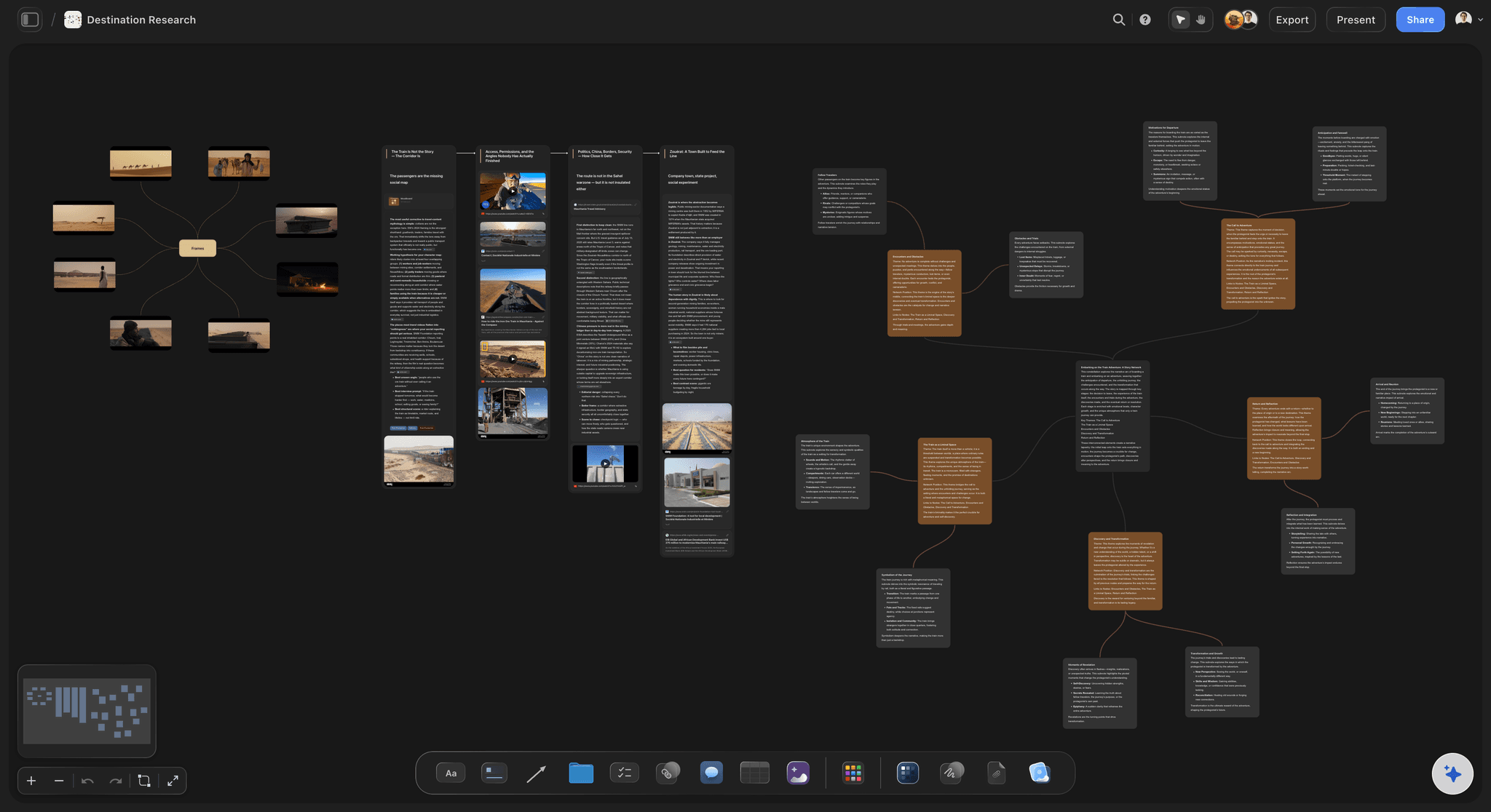
A research project in Storyflow: sources, notes, and synthesis connected on one canvas with the AI reading the whole board
FAQ: Best Obsidian Alternatives 2026
What is the best Obsidian alternative in 2026?
For canvas-first AI-assisted knowledge work, Storyflow is the strongest alternative. The AI reads your full project canvas plus up to three @-mentioned Documents and one Tactic Blueprint before responding, which is a level of project context no other tool on this list offers. For local-first plain-text knowledge management, Logseq is the closest like-for-like swap. The right answer depends on whether you want a different surface (canvas, AI) or a different interface around the same plain-text philosophy.
Is Obsidian still worth using in 2026?
Yes, particularly for users who value local-first plain-text storage and a vault that will outlive any individual application. Obsidian's plugin ecosystem and community are still the largest in this category. The reason to add or move to an alternative is not that Obsidian is broken. It is that Obsidian is not designed for visual project work, AI synthesis across multiple documents, or shared real-time canvases. Many heavy users run Obsidian and a second tool side by side rather than replacing one with the other.
How does Storyflow compare to Obsidian?
Storyflow and Obsidian solve different problems. Obsidian is a local-first plain-text vault with an emergent graph from manual [[wikilinks]]. Storyflow is a cloud canvas with AI that reads your project context, your Documents, and your Tactic Blueprints before it responds. Where Obsidian wins: lifetime portability of pure markdown, offline-only privacy, and a knowledge graph view across thousands of notes. Where Storyflow beats Obsidian: visual project canvases, AI synthesis across multiple documents, methodology Tactics, and shared canvases (unlimited shared boards on Free, team workspaces with roles on the Max plan).
Is Logseq a true Obsidian alternative?
Logseq is the closest like-for-like alternative. Same local-first plain-text philosophy, same long-term portability, same graph view across the vault. The main interface difference is outliner-first versus document-first. Logseq starts with a daily journal page and bullets that nest into outlines. Obsidian starts with documents and links between them. Both store everything as markdown files on your disk that you fully own forever. For users who want to keep the Obsidian philosophy and try a different interface, Logseq is the safest swap.
Can I import my Obsidian vault into these tools?
Most tools on this list have an Obsidian import path, but the fidelity varies significantly. Logseq imports Obsidian markdown files cleanly because both tools use compatible markdown. Notion, Heptabase, and Capacities import the text but lose Obsidian-specific features like dataview queries and complex plugin syntax. Storyflow imports text Documents and lets you place them on a canvas, but a tag-heavy Obsidian vault will need restructuring to fit Storyflow's project-and-canvas model. Plan for some manual cleanup whenever you migrate a non-trivial vault.
What is the best Obsidian alternative for visual thinkers?
Storyflow and Heptabase are the strongest options for visual thinkers. Storyflow is built around an infinite canvas with AI that reads the whole board, designed for projects that mix notes, references, and methodology Tactics. Heptabase is built around cards on whiteboards, designed for personal research where each note is a discrete card you arrange spatially. Pick Storyflow if you want AI synthesis and project work. Pick Heptabase if you want a focused personal research environment without AI as the centre of the workflow.
What is the best free Obsidian alternative?
Logseq is the best fully free Obsidian alternative. Open-source, local-first, plain-text markdown, with block references and a graph view. Storyflow's Free plan, launching before the end of 2026, will be the strongest free option for AI-assisted canvas work: unlimited shared boards, basic AI usage, and 20 file uploads. Affine is fully open-source and free with cloud plans optional, though the product is less mature than Logseq for daily knowledge work.
Is Storyflow local-first like Obsidian?
No. Storyflow is a cloud workspace with sync, not a local-first plain-text tool. If lifetime portability of pure markdown files on your disk is a hard requirement, Storyflow is not the right tool and Logseq or Obsidian itself remain the better answer. If you are comfortable with cloud storage in exchange for AI canvas context, real-time collaboration, and visual project work, Storyflow's trade-off is reasonable.
What is the best Obsidian alternative for teams?
For teams that want a shared structured knowledge base, Notion is the obvious choice. Pages, databases, and shared spaces work cleanly across a company. For teams that want a shared visual canvas with AI context, Storyflow works from the Free plan up (unlimited shared boards), with the Max plan (from $39/month billed annually) adding a team workspace with permissions and roles for groups that need formal admin control. Obsidian itself is not designed for shared team canvases, which is why team knowledge work typically lives in a different tool.
How long does it take to set up a knowledge vault in Storyflow?
Under 15 minutes from account creation to a working canvas. Create a project, open a whiteboard, add a Zettelkasten or PARA Tactic from the Tactics library, and start placing notes and reference cards around it. The AI chat is available immediately. Adding existing Documents takes one additional step: create or upload them, then @-mention them in AI chat. The total setup time is faster than configuring a new Obsidian vault with plugins and themes, because Storyflow ships the canvas, the Tactics, and the AI in the default interface.
Table of Contents
- Quick Picks: Best Obsidian Alternatives 2026 by Use Case
- Comparison Table: Best Obsidian Alternatives 2026
- Best Obsidian Alternatives 2026: Market Context
- How We Evaluated the Best Obsidian Alternatives 2026
- Detailed Reviews: Best Obsidian Alternatives 2026
- Free vs Paid: Best Obsidian Alternatives 2026
- Final Verdict: Best Obsidian Alternatives 2026
- 1. Storyflow
- 2. Logseq
- 3. Heptabase
- 4. Notion
- 5. Capacities
- 6. Tana
- 7. Roam Research
- 8. Mem
- 9. Reflect
- 10. Scrintal
- 11. Affine
- 12. Bear
- FAQ: Best Obsidian Alternatives 2026
- Related Reading
Templates to check out for this topic


Workspace templates you can use in Storyflow
Keep research, notes, and plans on one canvas the AI can read, instead of scattered across docs and tabs. Open a template and make it your second brain.


See Storyflow in Action
A visual AI workspace where every feature lives inside one canvas. No tab-switching, no context lost.
Build your entire board from a single message
Type what you need in the AI chat at the bottom of your canvas. The AI adds cards, headings, and structure directly onto your board.
Use expert frameworks as AI context
Type @ in the AI chat and choose any Tactic. The AI tailors every response to that framework instead of giving generic advice.
Turn your board into a mind map in seconds
Ask the AI to restructure your canvas as a mindmap. It connects your ideas into a visual hierarchy so you can see how everything relates.
Why Storyflow Exists
Storyflow actually began as a personal tool while working on creative and research projects.
We kept running into the same problem: ideas were scattered everywhere: notes, documents, and whiteboards.
Nothing helped us see how everything connected.
So we started building a workspace designed around how ideas actually grow.
→ Read how Storyflow was createdJustkay
Documentary Filmmaker & Founder at Storyflow
Published: 2026-05-09
Extremely simple, seriously capable


See how easy it is to get started
Watch a real project come together, from a blank board to a finished plan, clicked through step by step.
Start creating with AI and become more productive
Transform your creative workflow with AI-powered tools. Generate ideas, create content, and boost your productivity in minutes instead of hours.