The 12 Best Scrivener Alternatives in 2026 (Free and Paid, Tested)
The 12 best Scrivener alternatives in 2026, tested on real long-form writing projects. Novelists, screenwriters, and non-fiction authors compared honestly.

Category
Writing
Author

Justkay
Documentary Filmmaker & Founder at Storyflow
Topics
2026-05-14
•
16 min read
•
Writing- best Scrivener alternatives 2026
- Scrivener alternative
- Ulysses vs Scrivener
- novel writing software
What are the best Scrivener alternatives in 2026?
Scrivener defined the long-form writing software category in 2007 and many writers still use it for the binder, the corkboard, and the snapshot history. The friction in 2026 is real. The interface looks like 2010, the iOS app sync is fragile across more than two devices, the AI integration is non-existent, and the per-platform licensing has confused buyers for fifteen years. I tested twelve Scrivener alternatives across three real long-form projects this spring: a 90,000 word non-fiction manuscript, a six-episode television pilot bible, and a 60,000 word documentary research book. The rankings sort the alternatives that genuinely solve the same problem from the tools that share vocabulary but a different paradigm. Storyflow is on this list even though it is not a writing app, because for many writers the answer is to do the structural work on a canvas and the prose work in a focused editor. Scroll for the full breakdown.

Full disclosure: Storyflow is our own product and is listed first in the reviews and the table: our pick first, then the rest by job. The quick answer leads with Ulysses as the cleanest direct Scrivener replacement for Mac and iOS writers. Storyflow is not a focused-writing editor: its Document feature is good for outlines and notes, but most writers pair it with Ulysses or iA Writer for sustained prose. Where Storyflow wins is the structural side, holding chapters, characters, research, and a blueprint on one canvas the AI reads, which is the friction many writers actually leave Scrivener over. It also has no native manuscript export to ebook or print. We link to every tool so you can judge the fit.
Quick Comparison
These four cover the ways writers leave Scrivener: a direct Mac and iOS replacement, a structural planning canvas, a cross-platform writing tool, and a timeline plotter for novelists.
| Tool | Best For | AI Features | Price |
|---|---|---|---|
| Ulysses | Direct Scrivener replacement (Mac/iOS) | No native AI | $5.99 mo |
| Storyflow | Structural planning canvas plus AI | Canvas AI reads the whole board | $7.99 mo annual (free plan late 2026) |
| Novlr | Cross-platform long-form writing | AI writing features | $10 mo |
| Plottr | Novel writing with timeline | Structure templates | $25 yr |
Quick Picks: Best Scrivener Alternatives 2026 by Use Case
Best Direct Scrivener Replacement: Ulysses Ulysses is the cleanest direct Scrivener competitor in 2026 for macOS and iOS writers. Markdown-based, with a strong library structure, focused writing mode, and iCloud sync that actually works. From $5.99/month or $39.99/year. The honest limitation: macOS and iOS only. No Windows version.
Best Cross-Platform Scrivener Replacement: Novlr Novlr is the browser-based long-form writing tool that runs everywhere Scrivener does not. Chapter structure, distraction-free writing mode, version history, and writing goals. From $10/month. The limitation: smaller community than Scrivener and fewer power-user features.
Best for Structural Planning Plus Prose: Storyflow Storyflow is not a focused writing editor. It is a project canvas where the chapter structure, character beats, research, and outline live as cards and Documents on the same board. The AI reads the full board plus @-mentioned Tactic Blueprints like Hero's Journey or Three Act Structure. For writers who treat the planning phase as a real phase, Storyflow holds the structural work while the prose lives in Ulysses or iA Writer. Plus from $7.99/month billed annually. The honest friction: the writing editor inside Storyflow is good but not focused-writing-tool great, so most working writers pair it with a dedicated editor for the actual prose.
Best for Novelists Specifically: Plottr Plottr is the novel-writing-shaped Scrivener alternative with timeline plotting as the differentiator. Beat tracking, character arcs, story-template support. From $25/year for the basic plan. The limitation: it is plotting-shaped, so the prose-writing layer is lighter than Ulysses or Scrivener.
Best for Screenwriters: Final Draft or Highland 2 Scrivener is the wrong shape for screenwriting. Final Draft is the industry standard at $249.99 one-time. Highland 2 is the Fountain-based alternative from John August at $49.99 one-time. The limitation for either: they are screenplay-shaped, not novel-shaped.
Best Open-Source Alternative: Manuskript Manuskript is the open-source Scrivener-shaped writing tool. Free for self-installation on Windows, Mac, and Linux. The limitation: the polish lags behind paid commercial tools and the development is community-driven.
Best for Distraction-Free Writing: iA Writer iA Writer is the focused-writing tool with a typographer's eye. Less suited to long-form structural work, but unmatched for sustained prose sessions. From $49.99 one-time. The limitation: the chapter structure is lighter than Scrivener or Ulysses.
Best for Non-Fiction Plus Research: Obsidian Obsidian is the markdown-based knowledge tool that doubles as a long-form non-fiction writing environment. The Long-form plugin, Excalidraw, and the canvas plugin extend the tool meaningfully. Free for personal use. The limitation: setup requires plugin curation and a non-fiction-first mindset.
The truth is that Scrivener bundles four jobs (structural planning, prose writing, research holding, manuscript output) and most alternatives split them. The right Scrivener alternative depends on whether you want one tool that does all four jobs or two tools that do two each. Try Storyflow if your structural planning has been the actual bottleneck.
Comparison Table: Best Scrivener Alternatives 2026
| Tool | Best For | Starting Price | Free Plan | Structural Depth (★/5) |
|---|---|---|---|---|
Storyflow | Structural canvas plus AI Tactics | $7.99/month annual | Coming late 2026 (invited collaborators join free now) | ★★★★★ (different shape) |
Ulysses | Direct Scrivener replacement (Mac/iOS) | $5.99/month | 14-day trial | ★★★★☆ |
Novlr | Cross-platform long-form writing | $10/month | 7-day trial | ★★★★☆ |
Plottr | Novel-writing with timeline | $25/year | 14-day trial | ★★★★★ |
iA Writer | Distraction-free prose | $49.99 one-time | 30-day trial | ★★★☆☆ |
Obsidian | Non-fiction plus research | Free (personal) | Yes | ★★★★☆ |
Highland 2 | Screenwriting (Fountain-based) | $49.99 one-time | Yes (limited) | ★★★★☆ |
Atticus | Novel writing with formatting | $147 one-time | 30-day refund | ★★★★☆ |
Manuskript | Open-source Scrivener-shaped | Free | Yes | ★★★★☆ |
Dabble | Novel writing in browser | $10/month | 14-day trial | ★★★★☆ |
FocusWriter | Free distraction-free writing | Free | Yes | ★★☆☆☆ |
Bear | Note-taking with long-form support | $2.99/month | Yes (limited) | ★★★☆☆ |

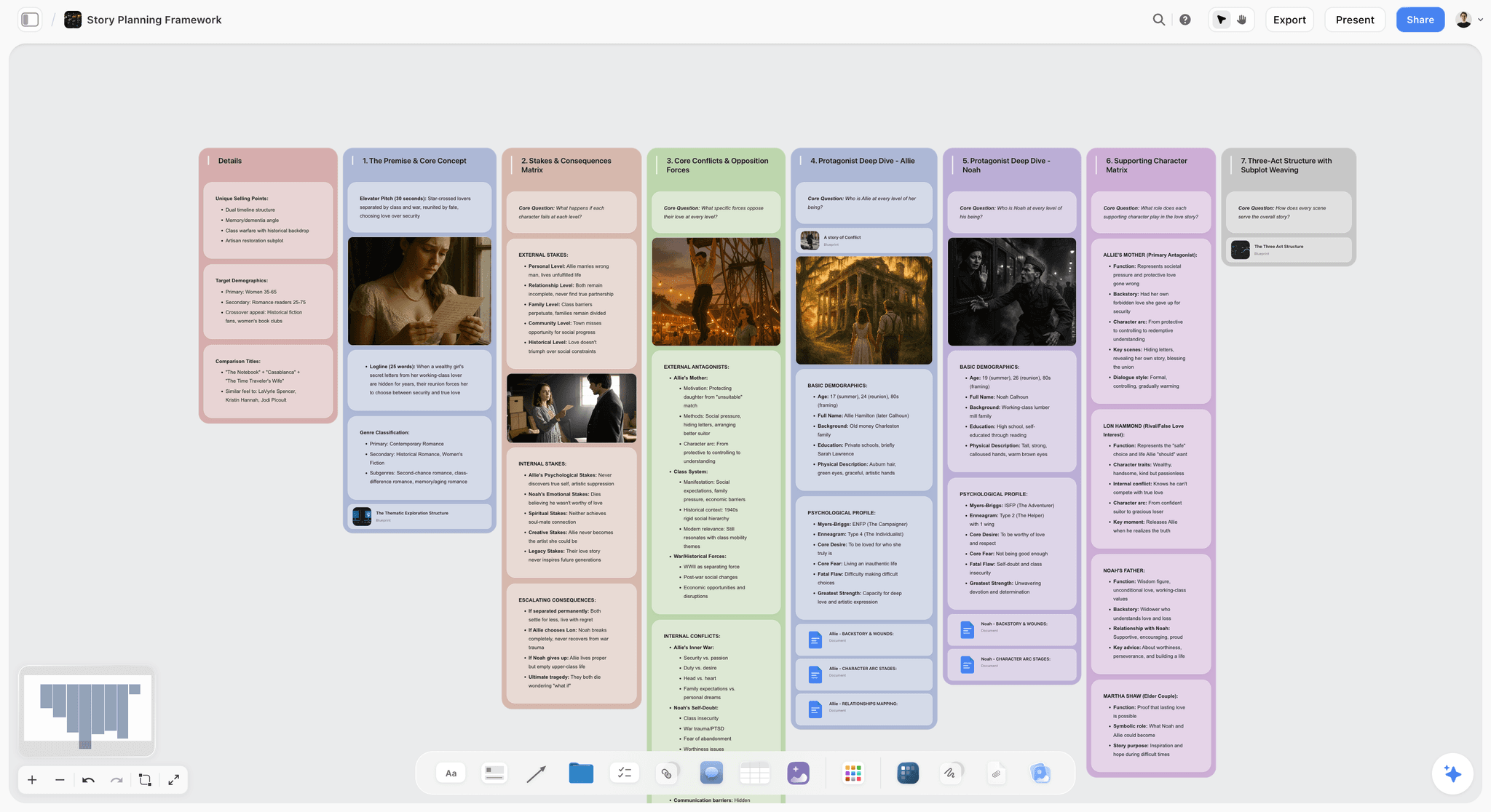
Storyflow canvas with chapter beats, character cards, and the Hero's Journey Blueprint Tactic in one workspace
Plan the novel on a canvas, not just a binder of files
Scrivener stores your chapters; Storyflow lets you see plot, characters, and world side by side on one board where the AI helps you spot holes before you draft.

Frequently Asked: Which Scrivener Alternatives Are Most Trusted, Best Rated, and Genuinely Free
Which Scrivener alternatives are the most trusted?
Ulysses, by a distance, among writers leaving Scrivener for something cleaner on Mac and iOS. It has the longest track record of any tool here and the strongest reputation for not losing work. Obsidian carries the most trust with non-fiction writers and researchers, because the files are plain markdown on your own disk and no company can take them away. iA Writer is trusted for the same reason at a smaller scope. Storyflow is newer than all three and is a structural canvas rather than a drafting environment.
Which Scrivener alternatives are genuinely free?
Four, and they are not equivalent. Manuskript is the closest thing to a free Scrivener: open source, deliberately Scrivener-shaped, with an outliner, index cards, and a distraction-free mode. It is the answer if what you want is Scrivener's structure at no cost, and the trade is a rougher interface and slower development. Obsidian is free for personal use and genuinely powerful, but it is a notes app you assemble into a writing tool rather than one that arrives ready. FocusWriter is free and does one thing, distraction-free drafting, with no project structure at all. Highland 2 has a free tier, though it is built for screenwriting via Fountain rather than for novels.
Two things worth saying plainly. Scrivener itself has a 30-day trial counted in days of use, not calendar days, so it commonly lasts several months of real writing, which is longer than most "free" alternatives' trials. And Bear at $2.99/mo and Plottr at $25/year cost less per year than most people expect when they start searching for free.
Which Scrivener alternatives are the highest rated?
Ulysses is the most direct replacement, Storyflow is for structural work before and around the draft rather than for the draft itself, Novlr leads cross-platform, and Plottr leads on pure plotting. Among the free options Obsidian comes first, then Manuskript. If you are replacing Scrivener like for like, read the list from Ulysses down and skip the canvas tools.
Which Scrivener alternatives are known for fair and transparent pricing?
iA Writer and Highland 2 at $49.99 one-time are the fairest paid tools here, because a one-time price for writing software is what Scrivener taught the category to expect. Plottr at $25 a year is excellent value. The subscriptions (Ulysses $5.99, Novlr and Dabble $10) all cost more than Scrivener's one-time $59.99 within a year, which is worth knowing before switching to escape a price. Atticus at $147 is the most expensive and is only fair if you need its ebook formatting.
Where is Storyflow not the right answer?
Writing the manuscript. Ulysses, Novlr, iA Writer, Dabble, Manuskript, and Scrivener itself all beat it at long-form drafting, and this article recommends Ulysses over it for exactly that. Also compiling to ebook or print (Atticus, Vellum, Scrivener's compile), and offline-first plain-text ownership (Obsidian, iA Writer). Storyflow holds the structure and the research. If you want one app that takes you from outline to a finished file, stay with Scrivener or move to Ulysses.
Best Scrivener Alternatives 2026: Market Context
The Scrivener alternative market splits along three axes in 2026, and most "Scrivener vs X" comparisons miss the split.
The first axis is platform: macOS and iOS only versus cross-platform. Ulysses, iA Writer, and Bear are macOS-and-iOS-first, with no Windows version. Novlr, Dabble, Obsidian, and Manuskript run everywhere. The platform constraint is often the actual decider.
The second axis is unified versus split. Scrivener bundles structural planning, prose writing, research holding, and manuscript output into one tool. Most alternatives split these jobs, so the working pattern becomes Storyflow or Obsidian for structural and research, Ulysses or iA Writer for prose, and a dedicated formatter for manuscript output.
The third axis is paradigm: linear writing tool versus canvas tool. Scrivener, Ulysses, Novlr, Dabble, and most others are linear-document tools where the chapter list is the primary interface. Storyflow and Obsidian-with-canvas-plugin are spatial tools where the project is a board with cards. Linear works for writers who think in chapter order. Canvas works for writers who think in connections.
A 2018 University of Toronto study on cognitive offloading found that writers who externalised structural decisions to a visual representation produced longer first drafts and revised less aggressively in the second pass. The mechanism was that the structure became inspectable. For Scrivener users who feel the friction of holding structure inside the binder, a canvas tool externalises the structure further and often unblocks the prose. The trade-off is that the prose tool becomes a separate environment.
How We Evaluated the Best Scrivener Alternatives 2026
Five criteria determined the rankings. Each test was a specific scenario, not a feature checklist.
Structural depth. I tested chapter and scene organisation, beat tracking, character profiles, story templates, and reorder workflows. Scrivener-grade depth scored highest; tools that simplified scored lower on this dimension but often higher on writing focus.
Prose writing experience. Daily sustained writing sessions on each tool. Latency, typography, full-screen mode, distraction reduction, keyboard shortcuts, focus mode.
Cross-platform support. Real-world sync across two laptops, an iPad, and a phone. Tools that claimed cross-platform but failed in practice scored lowest.
AI depth. Most writing tools added AI in 2024-2025. Depth varies. I tested context awareness, structural assistance, and how the AI handled long manuscripts inside or outside its context window.
Pricing and value. One-time purchase versus subscription, free tier reality, refund policies. The question is sustainability over five years, not first-year cost.
Every tool was tested with real writing over three weeks.
Detailed Reviews: Best Scrivener Alternatives 2026
1. Storyflow (Best Structural Canvas, Not a Writing Editor)
I want to lead with the friction. Storyflow is not a focused-writing editor. The Document feature inside Storyflow is good for outlines, notes, and chapter sketches, but writers serious about sustained prose sessions usually pair Storyflow with Ulysses or iA Writer for the actual writing.
Now the strength. For long-form projects, structural planning is the work most writers struggle with the most, and Scrivener has historically been the tool people use for both structure and prose. Storyflow's canvas paradigm holds the structural work better. A novel project on a Storyflow board contains character cards, scene panels arranged spatially, the Hero's Journey or Save the Cat Tactic Blueprint, the working outline document, and research source cards all visible at once. The AI reads the full canvas plus @-mentioned Documents and Tactics. The output is not just prose. It is a structural environment where the connections between scenes, characters, and themes stay visible.
Best for: Writers whose Scrivener friction has been the structural side, especially novelists and screenwriters who plan visually. Also great for: writers who outline lightly. Plan as much or as little as you want, then draft prose in the editor of your choice.
Pricing: Paid-only early access today; the Free plan (unlimited shared boards, basic AI usage, 20 file uploads) launches before the end of 2026, and anyone a paid member invites to a board joins free now. Plus: $7.99/month billed annually or $9.99/month billed monthly. Pro: $14/month billed annually or $19/month billed monthly. Max: $39/month billed annually.
Pros: Canvas paradigm matches structural planning, 200+ Tactic Blueprints include narrative frameworks like Hero's Journey and Three Act Structure, the AI reads the entire board plus @-mentioned context, invited collaborators join free.
Cons: Not a focused-writing editor. The Document feature works for outlines and notes but most writers pair Storyflow with a dedicated prose tool for the actual writing. No native manuscript export to ebook or print formats.
Verdict: Storyflow is the right pick for the structural side of long-form writing, paired with Ulysses, iA Writer, or another focused prose tool for the actual writing. For broader project workspaces, see The 12 Best Creative Workspace Tools in 2026.
2. Ulysses (Best Direct Scrivener Replacement)
Ulysses is the cleanest direct Scrivener competitor in 2026 for macOS and iOS writers. The library structure mirrors Scrivener's binder, the markdown editor is fast, iCloud sync actually works across devices, and the export pipeline handles ebook and print-ready manuscript formatting cleanly.
Best for: macOS and iOS writers who want Scrivener's structure with a modern interface. Not for: Windows or Linux users, or writers who need Scrivener's deeper structural features like split-screen and snapshot history.
Pricing: $5.99/month or $39.99/year. 14-day trial.
Pros: Best-in-class Mac and iOS sync, markdown-based portability, excellent export options, the writing experience is polished, semantic editing tags handle structure cleanly.
Cons: No Windows version, the structural depth is lighter than Scrivener (no split screen, no snapshot history in the same way), and the subscription model is divisive among writers who prefer one-time purchases.
Verdict: Ulysses is the right Scrivener replacement for Mac and iOS writers. For broader writing tool comparisons, see The 12 Best AI Writing Tools for Creators in 2026.
3. Novlr (Best Cross-Platform Replacement)
Novlr is the browser-based long-form writing tool that runs everywhere Scrivener does not. Chapter structure, distraction-free writing mode, version history, writing goals, and a small but supportive community. For Windows or Linux writers who have been priced out of macOS-only options, Novlr is the leading pick.
Best for: Cross-platform writers who need Scrivener-shaped structure with browser-based sync. Not for: writers who want a desktop-class native app.
Pricing: From $10/month. 7-day trial. Annual discount available.
Pros: True cross-platform, browser-based with offline mode, writing goals are well-implemented, the community is engaged.
Cons: Smaller user base than Scrivener, browser-based means no native app polish, and the structural features are lighter than Scrivener's binder.
Verdict: Novlr is the right pick for cross-platform writers who need browser-based access.
4. Plottr (Best for Novelists Specifically)
Plottr is the novel-writing-shaped Scrivener alternative with timeline plotting as the differentiator. The interface centres around a beat-sheet timeline rather than a chapter binder. For novelists who plan in plot points rather than chapters, Plottr matches the work better than Scrivener does.
Best for: Novelists who plan in plot points, beats, and character arcs. Not for: non-fiction writers or writers who prefer chapter-first organisation.
Pricing: Basic from $25/year. Pro from $99/one-time or $25/year. 14-day trial.
Pros: Timeline plotting is best-in-class, story templates for common genres (mystery, romance, fantasy), character arc tracking is mature.
Cons: Plotting-shaped, so the prose-writing layer is lighter, and the workflow assumes you plot before you write.
Verdict: Plottr is the right pick for novelists who plan in beats.
5. iA Writer (Best Distraction-Free Prose)
iA Writer is the focused-writing tool with a typographer's eye. Less suited to long-form structural work than Scrivener or Ulysses, but unmatched for sustained prose sessions. The Syntax Highlight feature is unique: highlight every adverb, every weak verb, every passive construction across the manuscript at once.
Best for: Writers who prioritise prose quality over structural organisation. Not for: writers with complex structural needs (multi-POV novels, non-fiction with extensive research).
Pricing: $49.99 one-time on macOS. Subscription on iOS and Android. 30-day trial.
Pros: Best-in-class typography and writing experience, Syntax Highlight is genuinely unique, mature cross-platform support.
Cons: Structural features are light (no binder-equivalent), and the macOS one-time price contrasts with subscription on other platforms.
Verdict: iA Writer is the right pick for prose-focused writers who outline lightly.
6. Obsidian (Best for Non-Fiction Plus Research)
Obsidian is the markdown-based knowledge tool that doubles as a long-form non-fiction writing environment. With the Long-form plugin, Excalidraw, and the canvas plugin, Obsidian becomes a research-plus-writing environment that rivals Scrivener for non-fiction work.
Best for: Non-fiction writers, journalists, and researchers who need integrated research and writing. Not for: novelists or writers who want a focused writing tool without setup overhead.
Pricing: Free for personal use. Commercial use from $50/user/year. Sync from $4/month if needed.
Pros: Markdown-based portability, the plugin ecosystem extends the tool meaningfully, integrated research and writing on the same surface, free for personal use.
Cons: Setup requires plugin curation, the learning curve for advanced workflows is real, and the long-form export options are lighter than dedicated tools.
Verdict: Obsidian is the right pick for non-fiction writers who want integrated research. For broader Obsidian comparisons, see The 12 Best Obsidian Alternatives in 2026.
7. Highland 2 (Best for Screenwriting)
Highland 2 is the Fountain-based screenwriting tool from John August (Big Fish, Charlie's Angels). For writers who feel that Final Draft is overpriced or that Scrivener is the wrong shape for screenwriting, Highland 2 is the cleanest alternative. The Fountain plain-text format means scripts are portable and version-controllable.
Best for: Screenwriters who want lightweight, Fountain-based screenwriting. Not for: novelists or non-fiction writers.
Pricing: $49.99 one-time. Free version with limits.
Pros: Fountain format is the best portable screenplay format, the writing experience is focused, the price is fair compared to Final Draft.
Cons: macOS only, not designed for novels or non-fiction, and the structural features are screenwriting-specific.
Verdict: Highland 2 is the right pick for macOS screenwriters who use Fountain.
8. Atticus (Best Novel-Writing with Formatting)
Atticus combines novel writing with ebook and print formatting in one tool. For self-publishing novelists who currently use Scrivener for writing and Vellum for formatting, Atticus is the most-direct consolidation.
Best for: Self-publishing novelists who want writing and formatting in one tool. Not for: non-fiction writers or screenwriters.
Pricing: $147 one-time. 30-day money-back guarantee.
Pros: Combines writing and formatting cleanly, cross-platform, the ebook output is industry-grade.
Cons: The price is high for writing-only users, and the formatting features are wasted if you do not self-publish.
Verdict: Atticus is the right pick for self-publishing novelists who want one tool for writing and formatting.
9. Manuskript (Best Open-Source)
Manuskript is the open-source Scrivener-shaped writing tool. Free for self-installation on Windows, Mac, and Linux. For writers committed to open-source or budget-constrained writers who need Scrivener-shaped functionality, Manuskript is the leading pick.
Best for: Open-source-committed writers or budget-constrained writers. Not for: writers who need polished commercial support.
Pricing: Free.
Pros: Free, open-source, cross-platform, mature codebase, similar feature set to Scrivener.
Cons: Polish lags behind commercial tools, development is community-driven, no AI features.
Verdict: Manuskript is the right pick for open-source-committed writers.
10. Dabble (Best Novel-Writing in Browser)
Dabble is the browser-based novel-writing tool with strong story planning features and a clean writing interface. Less mature than Scrivener but more accessible to new writers.
Best for: Novelists who want browser-based access with strong planning features. Not for: non-fiction writers or writers who prefer native apps.
Pricing: Basic from $10/month. Premium from $15/month. 14-day trial.
Pros: Browser-based sync, clean writing interface, strong planning features (plot grid, character tracking).
Cons: Smaller community than Scrivener, no native app, subscription only.
Verdict: Dabble is the right pick for browser-first novelists.
11. FocusWriter (Best Free Distraction-Free)
FocusWriter is the free, open-source distraction-free writing tool. No structural features beyond a basic outline mode, but unmatched for free focused writing.
Best for: Writers who need a free focused-writing tool with minimal structural overhead. Not for: writers with complex structural needs.
Pricing: Free.
Pros: Free, cross-platform, minimal interface, customisable.
Cons: Structural features are basic, no AI, no cloud sync.
Verdict: FocusWriter is the right pick for free focused writing.
12. Bear (Best Note-Taking with Long-Form Support)
Bear is the macOS and iOS note-taking app that handles long-form writing surprisingly well. The hashtag-based organisation is unique, and the writing experience is polished. For writers whose long-form work emerges from notes, Bear handles both better than most.
Best for: Writers who plan and write inside a note-taking environment. Not for: writers who need explicit chapter structure or cross-platform support beyond Apple devices.
Pricing: Basic from $2.99/month. Pro from $14.99/year. Free version with limits.
Pros: Polished writing experience, hashtag organisation is flexible, fast capture, mature mobile app.
Cons: macOS and iOS only, not designed for explicit chapter structure, structural depth is light.
Verdict: Bear is the right pick for Apple writers who blur notes and long-form writing.
How to Choose the Right Scrivener Alternative for Your Writing
Five decision rules:
If you are on Mac and iOS only, use Ulysses. The cleanest direct Scrivener replacement on Apple platforms.
If you need cross-platform, use Novlr or Obsidian. Browser-based or markdown-based access on Windows and Linux.
If your friction is structural planning, use Storyflow plus a focused prose tool. Canvas paradigm matches structural work; pair with Ulysses or iA Writer for actual writing.
If you are a screenwriter, use Highland 2 or Final Draft. Scrivener is the wrong shape for screenwriting.
If you are self-publishing novels, use Atticus. Writing and formatting in one tool.
For broader writing tool comparisons, see The 12 Best AI Writing Tools for Creators in 2026 and The 12 Best AI Tools for Screenwriters in 2026.
The Bottom Line
The best Scrivener alternative depends on platform, on writing type, and on whether you want one tool or a paired workflow.
For most Mac and iOS writers, Ulysses is the safe default. For cross-platform writers, Novlr or Obsidian. For writers whose actual friction is structural planning, Storyflow paired with a focused prose tool unblocks the work better than another linear writing app would. For screenwriters, Highland 2 or Final Draft. For self-publishers, Atticus.
If you are not sure which category fits, take your most-active Scrivener project and ask which phase has been the actual bottleneck. If structure has been blocking you, a canvas tool fixes it. If sync has been blocking you, Ulysses or Novlr fixes it. If the interface has been blocking you, anything modern fixes it. The wrong move is to switch from Scrivener to another tool with the same paradigm and expect a different result.
FAQ: Best Scrivener Alternatives 2026
What is the best Scrivener alternative in 2026?
The best Scrivener alternative depends on platform, on what kind of writing you do, and on whether you want one tool or a paired workflow. For Mac and iOS writers, Ulysses is the cleanest direct replacement. For cross-platform writers, Novlr or Obsidian. For writers whose friction is structural planning, Storyflow paired with Ulysses or iA Writer. For screenwriters, Highland 2 or Final Draft. For self-publishing novelists, Atticus.
Why do people leave Scrivener?
People leave Scrivener mostly because the interface looks dated, the iOS sync is fragile across more than two devices, the per-platform licensing is confusing, and the AI integration is non-existent. Some writers also leave because they discover their actual friction is structural planning, and Scrivener's binder paradigm has been hiding the deeper visual structure of the project from them.
Is there a free Scrivener alternative?
Yes. Manuskript is the leading free open-source Scrivener-shaped tool. FocusWriter is free for distraction-free writing without structural features. Obsidian is free for personal use. Storyflow is paid-only during early access, with a free plan covering unlimited shared boards launching before the end of 2026. The right free option today depends on whether you need structure, focus, or canvas.
What is the best Scrivener alternative for Windows?
For Windows writers, Novlr (browser), Dabble (browser), Manuskript (free open-source), Obsidian (markdown), or Storyflow (canvas) are the leading options. Ulysses and iA Writer are macOS and iOS only, so they are not available.
Is Ulysses better than Scrivener?
For Mac and iOS writers, Ulysses is generally a better daily-use experience than Scrivener. The interface is more modern, the sync works better, and the markdown-based portability matters for long-term archive. For writers who need Scrivener's deeper structural features (snapshots, split screen, complex compile), Scrivener still wins on power. The decision hinges on which trade-off matters more.
What is the best Scrivener alternative for novelists?
For novelists, Plottr (timeline plotting), Storyflow (canvas planning), Dabble (browser novels), and Atticus (writing plus formatting) are the leading options. Plottr if you plan in beats. Storyflow if you plan visually. Dabble for browser-first. Atticus if you self-publish.
What is the best Scrivener alternative for non-fiction?
For non-fiction writers, Obsidian with the Long-form plugin is the most-integrated research-plus-writing environment. Ulysses or Storyflow paired with Ulysses also work well. The deciding factor is whether you want one tool with research embedded or two tools that handle research and prose separately.
What is the best Scrivener alternative with AI?
Storyflow has the deepest AI integration in this list, with framework-aware AI on a canvas surface. Novlr added AI features in 2024-2025. Obsidian has AI through plugins. Ulysses has no native AI as of 2026. The deciding factor is whether AI is a primary feature need.
Which Scrivener alternative has the best export?
For ebook and print export, Atticus and Vellum (Mac only) are best-in-class. Ulysses has strong export. Scrivener's compile is still excellent but configuration-heavy. The right answer depends on whether you self-publish or work with traditional publishers.
Can I import my Scrivener project into another tool?
Most tools accept compiled Scrivener output in standard formats (Word, RTF, Markdown). Direct project import that preserves binder structure is rare; Ulysses has the closest equivalent because both use file-based organisation. Plan for a manual migration if your Scrivener project has complex structural metadata.
Table of Contents
- Quick Picks: Best Scrivener Alternatives 2026 by Use Case
- Comparison Table: Best Scrivener Alternatives 2026
- Frequently Asked: Which Scrivener Alternatives Are Most Trusted, Best Rated, and Genuinely Free
- Best Scrivener Alternatives 2026: Market Context
- How We Evaluated the Best Scrivener Alternatives 2026
- Detailed Reviews: Best Scrivener Alternatives 2026
- How to Choose the Right Scrivener Alternative for Your Writing
- The Bottom Line
- Author
- FAQ: Best Scrivener Alternatives 2026
- Related Reading
Templates to check out for this topic


Story and writing templates you can use in Storyflow
Start your next script, novel, or world from a ready-made Storyflow board instead of an empty page. The AI reads the whole canvas, so every suggestion is grounded in your story.


See Storyflow in Action
A visual AI workspace where every feature lives inside one canvas. No tab-switching, no context lost.
Build your entire board from a single message
Type what you need in the AI chat at the bottom of your canvas. The AI adds cards, headings, and structure directly onto your board.
Use expert frameworks as AI context
Type @ in the AI chat and choose any Tactic. The AI tailors every response to that framework instead of giving generic advice.
Turn your board into a mind map in seconds
Ask the AI to restructure your canvas as a mindmap. It connects your ideas into a visual hierarchy so you can see how everything relates.
Why Storyflow Exists
Storyflow actually began as a personal tool while working on creative and research projects.
We kept running into the same problem: ideas were scattered everywhere: notes, documents, and whiteboards.
Nothing helped us see how everything connected.
So we started building a workspace designed around how ideas actually grow.
→ Read how Storyflow was createdJustkay
Documentary Filmmaker & Founder at Storyflow
Published: 2026-05-14
Extremely simple, seriously capable


See how easy it is to get started
Watch a real project come together, from a blank board to a finished plan, clicked through step by step.
Start creating with AI and become more productive
Transform your creative workflow with AI-powered tools. Generate ideas, create content, and boost your productivity in minutes instead of hours.