
An ultra-fast canvas that stays calm
Brainstorm with AI
on a canvas, not a chat.
One prompt and Storyflow's AI lays out an idea board you can drag, cluster, and expand. Bring research and references onto the same canvas, then turn the winning idea into a storyboard or plan.


Creatives working for these brands already got early access
- Red Bull
- Canon
- Artlist
- Porsche
See how easy it is to get started
Watch a real project come together, from a blank board to a finished plan, clicked through step by step.
Start from a ready-made template
Pick a board to see what you can build, then let AI fill it in. Every template is a real, editable starting point on the same infinite canvas.

Mind Map
Branch one central idea out into themes and sub-points, then drag the connections around until the structure makes sense.
Go from a prompt to a full idea board
Generate a board from one prompt
Describe the problem, audience, or theme and Storyflow's AI lays out a board of directions on the canvas, not a list in a chat thread. Every idea arrives as a card you can rewrite, move, or delete.
Brainstorm on top of your material
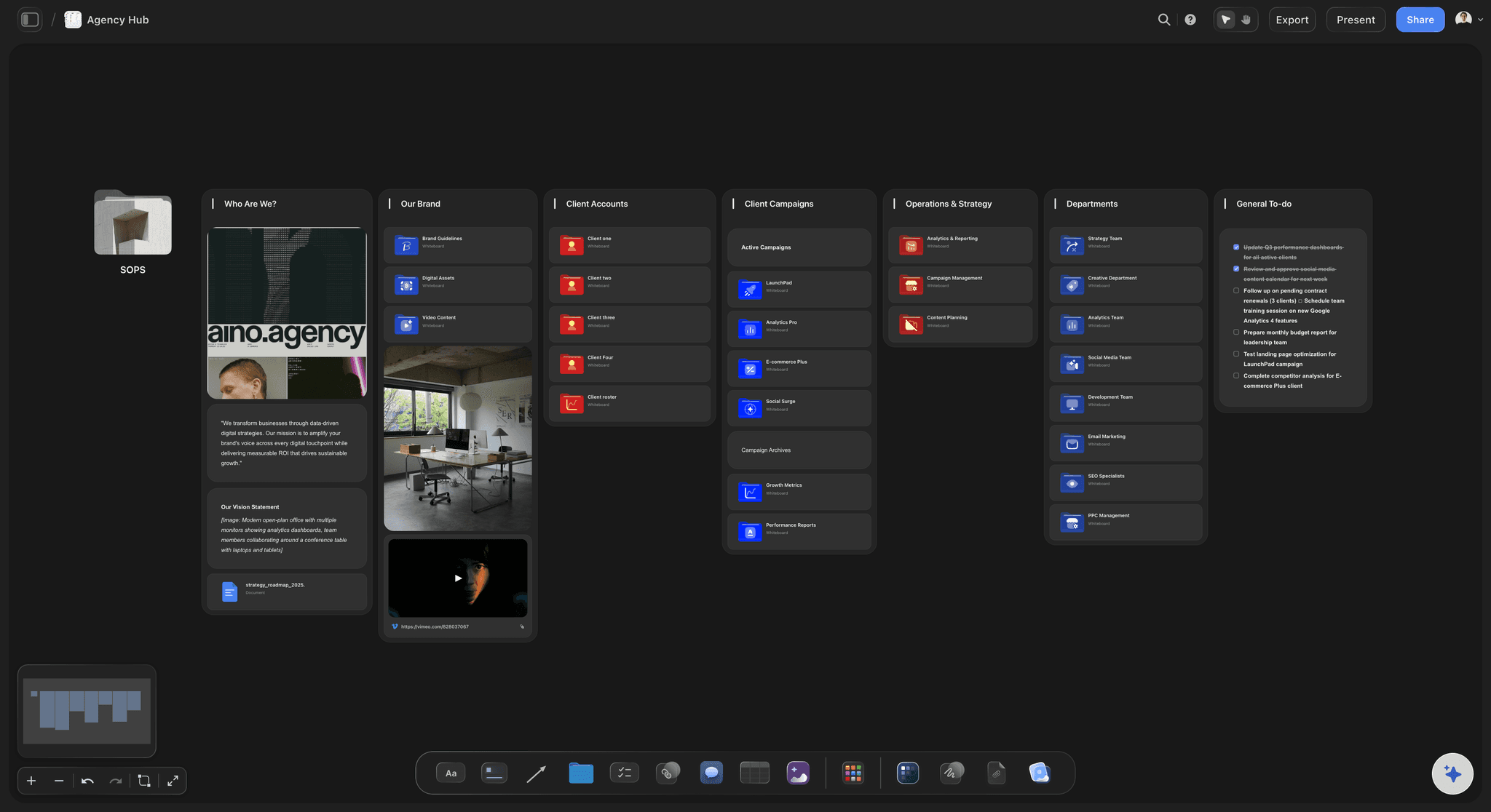
Drag research PDFs, links, images, and video straight onto the board so the AI brainstorms next to the real material that sparked it. Use web search inside the chat and drop the useful sources beside your ideas.
Expand any cluster with AI
Select a group of ideas and ask for ten more angles, counter-takes, or variations. Because the AI reads your active board, the new ideas land right next to the ones you already have.
Shape, organize, and develop it on one canvas

Cluster and kill ideas by hand
Group themes, stack duplicates, and clear away weak directions by dragging cards around the infinite canvas. The whole brainstorm stays visible instead of scrolling out of view.
Turn the winner into a plan in place
When an idea wins, ask Storyflow to develop it into a storyboard, brief, or campaign plan on the same board, with the original brainstorm still in view. Boards can link to each other as the work grows.
Share the board for feedback
Anyone you invite to the board joins free, and everyone invited edits it live, on any paid plan. A view-only link lets anyone review without signing up, and signed-in reviewers leave comments.
Ultra fast from brief to board
Run an AI brainstorm in four steps.
No sticky-note setup, no copying ideas out of a chat. Prompt once and work the board.
01
Open a canvas
The session starts in the browser with nothing to install, and the canvas is open before the ideas cool off.
02
Prompt the brainstorm
Describe the problem, audience, or theme. The AI generates an idea board with directions laid out on the canvas, not a list in a thread.
03
Drag, cluster, expand
Group ideas into themes, delete the weak ones, and ask the AI to expand any cluster. It reads the board and builds on what is there.
04
Develop the winner
Turn the best idea into a storyboard, brief, or campaign plan in place, then share a view-only link or export as an image or PDF.
From scattered ideas to a developed direction.
The brainstorm, the research, and the plan that comes out of it live on one canvas.

Idea maps that branch on the canvas
Map ideas visually, not in a list
Ask the AI to map a topic and it lays out ideas and branches you can rearrange. Clusters and connections stay visible while you think.
Try the AI mind map generator →
Research, links, and images beside the ideas
Brainstorm on top of real material
Drag PDFs, links, images, and video onto the board. The brainstorm sits next to the research that sparked it instead of in a separate tab.
Explore the AI whiteboard →
Winning ideas become storyboards in place
Turn the best idea into a storyboard
When a concept wins, ask the AI to develop it into a storyboard on the same canvas. No exporting notes into another tool to start over.
See the AI storyboard generator →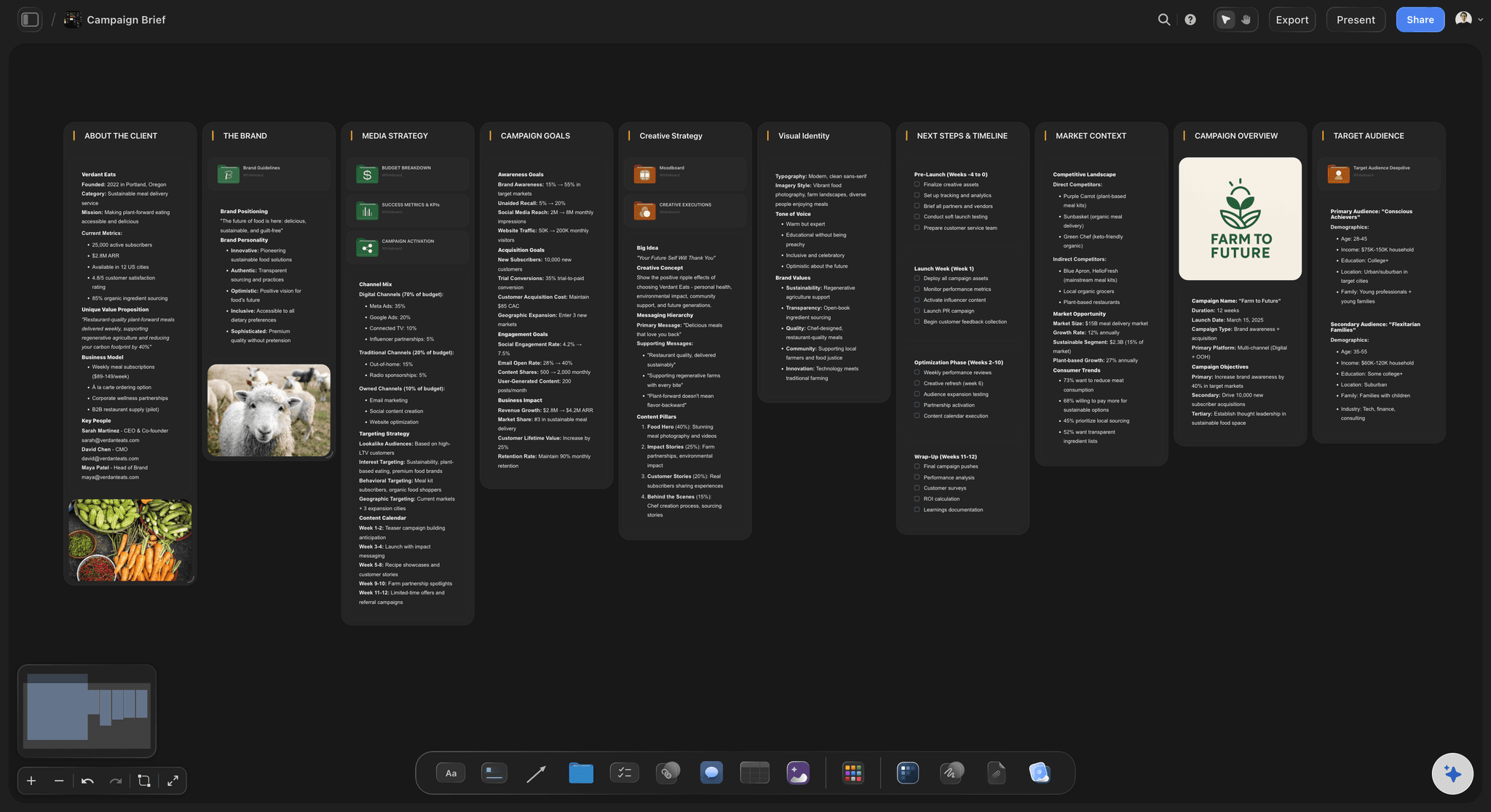
Ideas grow into briefs and campaign plans
Carry the brainstorm into planning
Develop the chosen direction into a brief, content plan, or full campaign on the same board, with the original brainstorm still in view.
See the AI campaign planner →Plans from $7.99/month annual. Free plan coming late 2026.
Open a canvas, prompt a brainstorm, and start moving ideas around. Storyflow is paid-only during early access, and anyone a paid member invites to a board joins free.
Unlimited boards, images, files and links
AI usage that renews every billing period
View-only links with no account
Invited collaborators join free

Built for people with taste
More than a brainstorming tool with AI bolted on.
Storyflow is an AI-native canvas, so generating, organizing, and developing ideas happen in the same place.

Ideas as objects you can move
A brainstorm you can physically work
Drag and cluster: Every idea is a card on the canvas. Group themes, stack duplicates, and clear space for the directions worth pushing.
Expand any thread: Select a cluster and ask the AI for more angles, counter-takes, or variations. New ideas land next to the originals.
Sketch and annotate: Use the pen tool and notes to rough out concepts directly on the board while the ideas are still warm.
AI that builds on the board, not just the prompt
Context-aware AI brainstorming
Reads your active board: The AI sees what is on the canvas, so follow-up prompts extend the brainstorm instead of restarting it.
Mention your documents: Attach up to five documents and three boards so ideas fit your strategy, audience, or brand voice.
Web search with sources: Ask the AI to search the web. It shows sources in chat, and you place the useful ones on the board next to your ideas.

Everything you collected, one canvas
Research and references in the room
Bring in the raw material: PDFs, links, images, GIFs, video, and notes sit beside the ideas they inform. No tab-switching mid-thought.
Grab frames from video: Capture stills from YouTube or Vimeo references straight onto the canvas as visual prompts for the brainstorm.
Moodboards in place: Collect tone and style references next to the idea clusters they belong to instead of a separate moodboard app.

From idea board to finished plan
The brainstorm is the starting line
Storyboards and plans in place: Develop the winning idea into a storyboard, brief, or campaign plan on the same canvas, with the brainstorm still in view.
Share for feedback: Invite your team free, or send a view-only link so anyone can review the board without signing up.
Image and PDF export: Export the board as a high-quality image or PDF when the ideas need to travel into a deck or email.
Explore templates for your project
Every template opens as a real, editable board on the infinite canvas. Pick the closest fit and make it your own.
Mind Map
Branch one central idea out into themes and sub-points, then drag the connections around until the structure makes sense.
One app instead of five
Why brainstorm on an AI canvas?
Chat tools generate ideas you scroll past. Whiteboards keep ideas where the team can move them. Storyflow's AI works on the board, beside your research, references and video.
Storyflow
Recommended
Ideas land as movable cards on a visual canvas
AI reads your board and builds on it
Turn ideas into storyboards and plans in place
Grab stills from YouTube or Vimeo onto the board
Free plan with no end date
ChatGPT
Ideas land as movable cards on a visual canvas
AI reads your board and builds on it
Turn ideas into storyboards and plans in place
Grab stills from YouTube or Vimeo onto the board
Free plan with no end date
Miro
Ideas land as movable cards on a visual canvas
AI reads your board and builds on it
Turn ideas into storyboards and plans in place
Grab stills from YouTube or Vimeo onto the board
Free plan with no end date
Milanote
Ideas land as movable cards on a visual canvas
AI reads your board and builds on it
Turn ideas into storyboards and plans in place
Grab stills from YouTube or Vimeo onto the board
Free plan with no end date
What creators are saying
Join early creators getting structured workspaces and AI that remembers their projects
“Storyflow has sped up my workflow by at least 3x, which means more flow state and more projects I can actually ship. It truly changed the way me and my team create.”

Reilin Joey
Director & YouTuber
“One prompt gets me a structured board. But the tactics are my favorite. I run my YouTube scripts through them and my intros and retention got better. It's amazing.”

Justkay
YouTuber & Freelance Filmmaker
“I used to juggle five apps to plan a project. Now I describe what I am making and get boards, lists, and a schedule. All in one place.”

George
@fernwehchronicles
AI brainstorming tool, answered.
Everything people ask before brainstorming with AI in Storyflow.
Storyflow for getting past the blank canvas, and Miro or FigJam for pure sticky-note facilitation. A brainstorm stalls in its first ten minutes, while eight people wait for someone to decide what goes on the board, and simplifying an interface does not touch that. Storyflow's AI drafts a first pass from your brief onto the board, so the room starts by disagreeing with something.
Storyflow is built for exactly this job: one prompt and its AI lays out an idea board of cards you can drag, cluster, and expand. The AI reads your board and builds on it, so ten more angles on a cluster land next to the old ideas. Research PDFs, links, and images sit on the same canvas, and the winning idea turns into a storyboard or a plan in place.
An AI brainstorming tool generates and organizes ideas with you. In Storyflow, one prompt generates an idea board on an infinite canvas: ideas you can drag, cluster, and expand, with the AI reading the board and building on it as you go. That makes it different from a chatbot, where ideas pile up in a thread you scroll past.
ChatGPT gives you a list in a conversation. Storyflow puts each idea on a canvas as an object you can move, group, and delete, and the AI reads the board so follow-up prompts extend the brainstorm instead of restarting it. When an idea wins, you develop it into a storyboard or plan on the same board.
Not yet. Storyflow is paid-only during early access, with plans from $7.99 a month billed annually ($9.99 monthly). A free plan launches before the end of 2026 with unlimited boards, basic AI usage, 3 starter frameworks and 20 file uploads. Anyone a paid member invites to a board already joins free.
Yes. Write or paste your ideas onto the canvas, then ask the AI for more angles, variations, or counter-arguments. Because the AI reads your active board, the new ideas connect to what you already have instead of arriving generic.
Yes. Drag PDFs, links, images, GIFs, video, and notes straight onto the canvas next to your ideas. You can also ask the AI to search the web. It shows sources in the chat, and you place the useful ones on the board yourself.
Yes. Anyone a paid member invites to a board joins free, and everyone invited edits the same board live, on any paid plan, with each person's cursor visible. A view-only link lets anyone else open the board without an account; they see the latest version when they open or reload it, and sign in to comment.
They stay on the canvas and become the work. Ask the AI to develop the winning idea into a storyboard, a creative brief, or a campaign plan on the same board, then export the result as an image or PDF or share it with a view-only link.
Yes. Storyflow runs in the browser with nothing to download, so you can brainstorm with AI online from any computer. There is also a Mac and Windows desktop app when you want the canvas in its own window.
Excalidraw and FigJam are the easiest to start on. Excalidraw needs no account at all, and FigJam's sticky notes are comfortable for people who have never used a canvas tool. Miro is the most capable but has the most to learn. Storyflow is built for both ends of a brainstorm: the AI reads the scattered notes on the board and turns them into a structured plan instead of a wall of stickies.
For a live remote session, Miro and FigJam are the strongest because voting, timers, and follow mode are what actually hold a distributed group together. For asynchronous idea gathering where people contribute across time zones, a persistent canvas matters more than facilitation features, and the important thing is that anyone can open the board without an account. Whatever you pick, the failure mode is the same: the ideas land somewhere nobody revisits. Decide before the session where the output goes.
It is most useful at the two ends, not the middle. At the start it breaks the blank-canvas problem with a first set of angles to react against. At the end it does the clustering and summarising nobody wants to do, reading scattered notes and proposing themes. The middle, where the original thinking happens, is still yours. Treat AI output as raw material to argue with rather than the answer, and the session gets sharper instead of more generic.
Brainstorming is one technique for generating ideas, usually in a group and usually fast. Ideation is the whole stage of work that turns a problem into candidate solutions, and it includes research, individual sketching, brainstorming sessions, and structured methods like SCAMPER or crazy eights. The practical consequence is that a team saying it needs a brainstorm often needs the wider ideation stage, and a single hour of group idea generation will not substitute for it.
Three reasons, and none is a lack of creativity. The question is too vague, so ideas scatter and nothing is comparable. The group generates together from the start, so the first idea spoken anchors everyone and quieter people defer. And the session ends with a full board and no decision, so the ideas quietly expire. Write a sharp question, run the first round silently and individually, and finish by moving chosen ideas somewhere with an owner.
More from Storyflow
Brainstorming software
Online whiteboard
Infinite canvas
AI note taking
AI mind map generator
AI whiteboard
AI marketing campaign planner
AI video idea generator
AI storyboard generator
Free online whiteboard
AI kanban board generator
AI second brain
Best brainstorming tools in 2026
Remote team brainstorming
Easy digital whiteboard
Affinity map with ChatGPT
The blank page is optional. Start the board.
Prompt once, get an idea board, and work it until something wins.