
An ultra-fast canvas that stays calm
Free infinite canvas tools,
and one with AI that thinks with you.
Draw, sketch, diagram, and brainstorm on an endless online canvas. AI turns your rough ideas into structured boards in one prompt. Paid-only during early access from $7.99/month billed annually, with a free plan before the end of 2026.


Creatives working for these brands already got early access
- Red Bull
- Canon
- Artlist
- Porsche
See how easy it is to get started
Watch a real project come together, from a blank board to a finished plan, clicked through step by step.
Start from a ready-made template
Pick a board to see what you can build, then let AI fill it in. Every template is a real, editable starting point on the same infinite canvas.

Mind Map
Branch one central idea out into themes and sub-points, then drag the connections around until the structure makes sense.
ULTRA FAST FROM BRIEF TO BOARD
From a blank canvas to an organized board in seconds.
No setup, no fighting the blank page, no manual organizing. Just sketch or describe what you need and start working.
01
Open a canvas
Choose a plan and open a board. No download, no setup. Your infinite canvas is ready in your browser.
02
Sketch or describe your idea
Draw directly on the canvas, drop in references, or type a prompt. Storyflow understands what you are building.
03
AI expands the canvas
A structured kanban, mindmap, or storyboard appears, ready to refine. Keep prompting, the AI keeps the context.
Draw, sketch, and diagram on one endless canvas.
Work the blank page. Create, edit, and bring ideas to life in one shared, infinite workspace.

Mind map and diagram on an endless canvas
Sketch and diagram anything
From a quick sketch to a full diagram, draw it out on a canvas with no edges. Mind maps, flows, wireframes, and rough ideas all live in one place.

A canvas that never runs out of room
Never run out of space
Why limit your thinking to a page? Zoom out for the big picture, zoom in to refine. The canvas grows as fast as your ideas do.

Drop in images, links, PDFs, and notes
Bring every reference onto the canvas
Drag in screenshots, links, files, and notes. Everything you need to think through a project sits side by side on one infinite canvas.

AI turns a rough sketch into a structured board
Turn sketches into structure
Rough notes and loose sketches become organized kanbans, mindmaps, and plans. One prompt and the canvas arranges itself.
Paid-only during early access. Free plan before the end of 2026.
Open a canvas, sketch an idea, type a prompt, watch it organize itself. Plus starts at $7.99/month billed annually, and a Free plan launches before the end of 2026.
Unlimited boards on an infinite canvas
AI usage that renews every billing period
View-only links that open with no account
Unlimited collaboration with your team

BUILT FOR TEAMS
Everything you need on one infinite canvas.
Don't let the simple, drag-and-drop canvas fool you. This fully featured AI-native workspace checks all the boxes.

Cursors, comments, and live edits across the canvas
Collaborate in real time
Real-time editing: Work on the same canvas with your team. See cursors, edits, and comments as they happen.
View-only links: Share the canvas with clients or stakeholders without giving up edit access.
Comments anywhere: Drop comments on any object or part of the canvas. Resolve when done.

AI that reads the whole canvas as context
Build with AI that knows your canvas
One prompt to a board: Describe what you need and AI generates a full kanban, mindmap, or plan with structure.
Canvas-aware AI: AI sees everything already on your canvas, so you never have to re-explain your project.
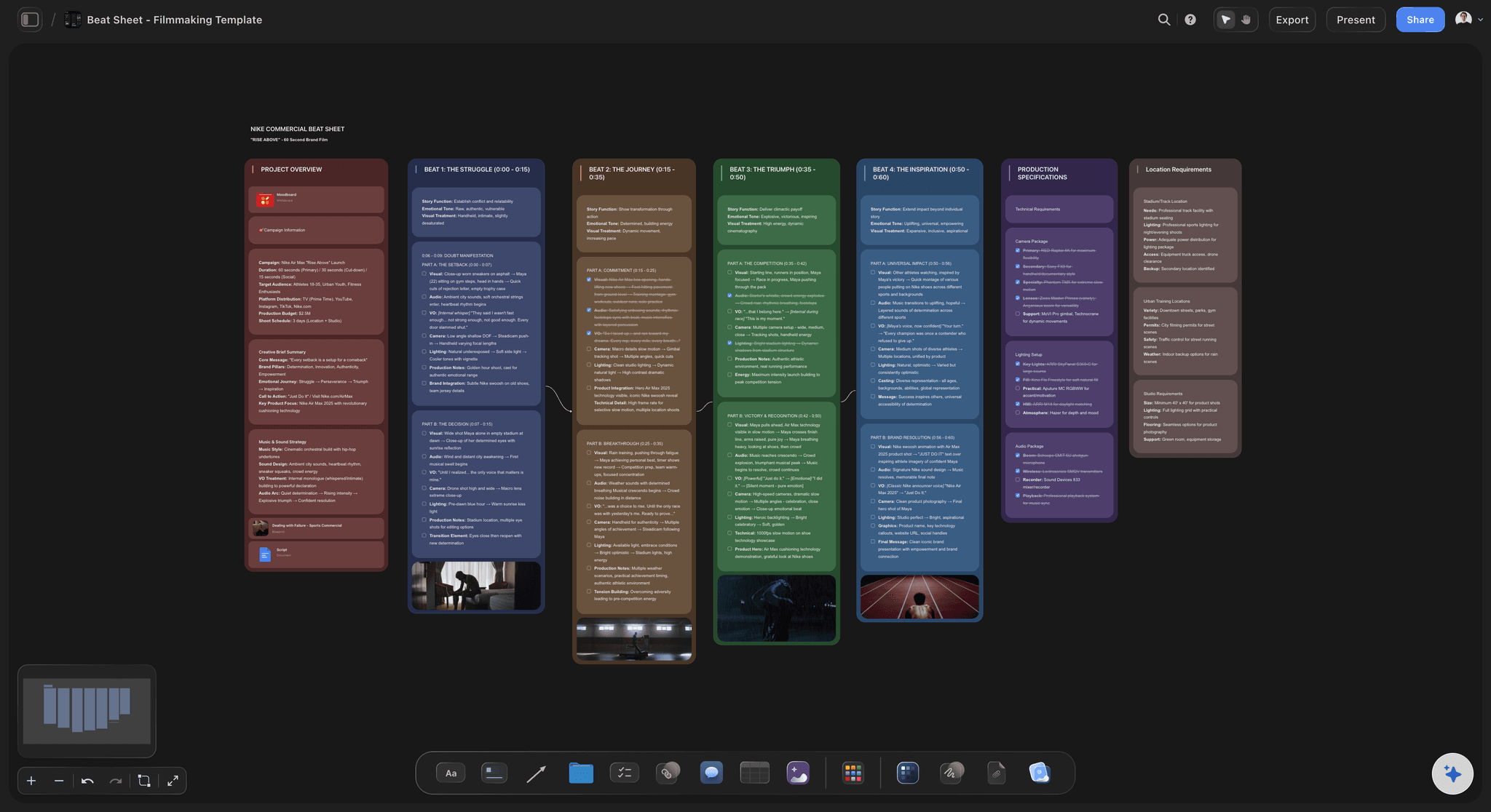
From a loose sketch to an organized board
From sketch to structure
Sketch freely: Brain-dump with sticky notes, rough shapes, and quick sketches anywhere on the canvas.
Let AI organize: Turn the mess into a clean kanban, mindmap, or storyboard with one prompt.
Keep iterating: Keep prompting and the AI refines the board while holding the context of your project.

Drop notes, PDFs, spreadsheets, links, and images
Capture every input
Paste anything: Drop in notes, PDFs, or spreadsheets. Storyflow turns them into organized visual boards.
Drag in references: Add screenshots, links, sketches, and images. Everything lives on one infinite canvas.
Sticky notes and sketches: Brain-dump quickly with sticky notes or sketch a rough idea right onto the canvas.
ONE APP INSTEAD OF FIVE
Storyflow vs Miro, FigJam, and Excalidraw.
Unlimited boards, projects, and collaborators on every Storyflow plan, and an AI that turns your sketch into a structured board.
Storyflow
Recommended
Unlimited boards on an infinite canvas
Unlimited projects and cards
Unlimited collaborators
AI drafts the board, you refine
AI sees your whole canvas as context
Miro
Unlimited boards on an infinite canvas
Unlimited projects and cards
Unlimited collaborators
AI drafts the board, you refine
AI sees your whole canvas as context
FigJam
Unlimited boards on an infinite canvas
Unlimited projects and cards
Unlimited collaborators
AI drafts the board, you refine
AI sees your whole canvas as context
Excalidraw
Unlimited boards on an infinite canvas
Unlimited projects and cards
Unlimited collaborators
AI drafts the board, you refine
AI sees your whole canvas as context
What creators are saying
Join early creators getting structured workspaces and AI that remembers their projects
“Storyflow has sped up my workflow by at least 3x, which means more flow state and more projects I can actually ship. It truly changed the way me and my team create.”

Reilin Joey
Director & YouTuber
“One prompt gets me a structured board. But the tactics are my favorite. I run my YouTube scripts through them and my intros and retention got better. It's amazing.”

Justkay
YouTuber & Freelance Filmmaker
“I used to juggle five apps to plan a project. Now I describe what I am making and get boards, lists, and a schedule. All in one place.”

George
@fernwehchronicles
Any questions?
Everything you need to know about the Storyflow infinite canvas.
Is Storyflow's infinite canvas free?
Not yet. Storyflow is paid-only during early access, with plans from $7.99 a month billed annually ($9.99 monthly). A free plan launches before the end of 2026, and anyone a paid member invites to a board joins free. A view-only link to a board opens with no account; commenting needs sign-in.
Can I use Storyflow as an infinite canvas for professional work?
Yes. Storyflow is built for real creative and planning work. Sketch and diagram on an endless canvas, organize it into kanbans, mindmaps, and storyboards, collaborate with your team in real time, and share view-only links with clients.
What does one Storyflow subscription replace?
Beyond the infinite canvas itself, one Storyflow subscription can stand in for ChatGPT for AI, Milanote for visual boards and moodboards, and Notion for documents, all on one canvas. The Pro plan is $14 per month billed annually, and every paid plan has no object limit and no time limit.
How is Storyflow different from free infinite canvas tools?
Storyflow's AI is built into the canvas where the rest of your project lives, so one prompt turns a rough sketch into a structured kanban, mindmap, or storyboard. The AI also reads the board you have open, so you do not have to re-explain your project. Miro and FigJam cap free boards. Storyflow is paid-only during early access, with unlimited boards on every paid plan and a free plan before the end of 2026.
What can I draw and build on the canvas?
Anything visual. Sketches, diagrams, wireframes, mindmaps, kanbans, storyboards, moodboards, planners, research boards, and sticky notes. Everything lives on one endless canvas.
Do I need to download anything?
No. Storyflow runs in your browser. Open a tab, pick a plan, and your infinite canvas is ready in seconds.
Can I collaborate with my team on the canvas?
Yes. Real-time collaboration is built in. Invite teammates and work on the same canvas together, see live cursors and comments, and share view-only links that clients and stakeholders open with no account. Anyone you invite to a board joins free; commenting needs sign-in.
What does the AI do on the canvas?
Type a prompt and the AI builds a full board for you, complete with structure and a relevant framework. It also reads everything already on your canvas, so it can extend, organize, or rewrite your work without you re-explaining anything.
Your infinite canvas is one click away.
Unlimited boards, projects, and collaborators on every plan. AI included.