
How to Create a Mind Map with AI: A Step-by-Step Guide (2026)
Most people open a blank mind map and stall, because they're trying to think and organize at the same time. This 8-step guide separates generation from structure: let AI surface the raw ideas first, then use visual tools to cluster and connect them into a map you can actually act on.

Category
Visual Thinking
Author

Sara de Klein
Head of Product at Storyflow
Topics
March 2, 2026
•
18 min read
•
Visual ThinkingQuick summary
- The central node should be a specific question or tension, not a topic, a question creates a built-in test for every node
- Generate raw ideas before touching the map structure, AI gives you breadth, then you apply judgment to cluster
- Name branches with verb-based questions, not nouns, instructions produce better sub-nodes than labels
- The cross-branch connections in Step 6 are often the most valuable output, skip them and you have an organized list, not a map
- Prune nodes based on whether they serve the central question, not whether they're interesting
- The branch summaries are the deliverable, the visual diagram is the process
- Storyflow's persistent canvas means the AI sees your previous work each session, so you continue thinking rather than restart
Key lines you can copy
Each line stands on its own, so it is easy to reference or reuse.
- The most effective approach to AI mind mapping separates generation from structure: let AI surface raw ideas first, then use visual tools to cluster and connect them.
- The central node of a mind map is not your subject, it's the specific question or tension the map is meant to resolve; topic-centered maps produce branches but no decisions.
- AI is excellent at surfacing ideas you hadn't considered; it is mediocre at deciding which of your ideas matter most, because it doesn't know your priorities, constraints, or context.
- Branch names are instructions, not labels, 'What are customers choosing instead?' produces useful sub-nodes; 'Competitors' produces a category that anything can fit into.
- A mind map without cross-branch connections is a categorized list dressed up as visual thinking; the connections are where the actual insight lives.
- Storyflow's persistent canvas means the AI assistant sees your previous work each session, eliminating the 'explain from scratch' problem you hit when resuming in a chat interface.
- The branch summaries are the output of a mind map session; the visual diagram is the process, completing Step 8 is what turns a map into actionable intelligence.
- A mind map is complete when each branch has a one-sentence summary and you can answer the central question from those summaries alone, completeness is functional, not visual.
- how to create a mind map with AI
- AI mind map
- mind mapping AI
- Storyflow mind map
- visual brainstorming AI
- mind map generator 2026
How do you create a mind map with AI?
Create a mind map with AI in 8 steps: write a central question (not a topic), generate 30-40 raw ideas with AI, cluster into 4-6 branches, name branches with verbs, expand each branch with AI, connect ideas across branches, prune, then write one-sentence branch summaries. First session: 45-60 minutes; repeat runs: 20-30.
The Problem with How People Mind Map Today
You already know mind maps work. The research backs it up, and you've probably seen someone else's that looked genuinely useful, crisp branches, clear hierarchies, everything in its right place. But when you sit down to make one, the blank canvas doesn't help you think. It reminds you that you don't know where to start.
The tools most people use make this worse. Sticky note apps, Miro boards, Figma frames, they're excellent for organizing ideas you already have. They don't help you generate those ideas. So you end up with either a messy brainstorm dump or an artificially tidy diagram that doesn't reflect how the project actually needs to develop.
Most people open a blank mind map, type their central idea, and stall, because they're trying to think and organize at the same time. The better approach separates generation from structure: let AI surface the raw ideas first, then use visual tools to cluster and connect them.
The two failure modes in mind mapping:
- Starting with structure before having enough material, the map reflects your existing mental model, not new thinking
- Generating ideas without any structure, you end up with a dump you can't act on
- Using AI to organize instead of generate, it produces clean branches that miss the actual creative tension in your work
- Treating the exported image as the output, when the branch summaries are what you actually need
What Do You Need Before You Start?
A clear central question or topic
Not 'my project', something like 'how should we structure the campaign launch?' A specific prompt produces a useful map.
15-20 minutes for the first session
Mind mapping with AI moves faster than without it, but rushing the clustering phase produces maps you won't use.
A rough sense of your end use
Are you making this for yourself, a team, or a client? That changes how many branches you need and how detailed each node should be.
Any relevant context documents
Briefs, notes, previous drafts. The more context you bring in, the more relevant the AI output.
A visual workspace where AI sees everything at once
Storyflow's free tier works for this entire guide, the AI assistant reads your full canvas at each step.
One shortcut worth taking: don't start from a truly blank board. Open the Mindmap template and the central node, branch slots, and connection structure are already on the canvas, so Step 1 becomes filling in your question instead of building scaffolding.

Storyflow's visual mind map canvas, AI generates ideas while you organize and connect them
Step-by-Step Process: How to Create a Mind Map with AI
01
Define Your Central Node, One Sentence, Not a Topic
The central node is not your subject. It's the specific question or tension the map is meant to resolve.
Most people write 'brand refresh' or 'Q3 campaign' in the center and wonder why the map feels vague. The central node should be something you could stand up and argue about, 'What does our brand need to communicate differently to retain existing customers?' That's a question worth mapping. 'Brand' is not.
Write three candidate central nodes and pick the one that makes you slightly uncomfortable. That discomfort usually means it's the right question.
In Storyflow: open a new Blueprint and place your central question in the first Card. This becomes the locked anchor for everything that follows, the AI assistant can see it in every subsequent step without you re-explaining context.
Common mistake
Writing the central node as a noun phrase instead of a question or tension, it produces maps with lots of branches and no direction.
02
Generate a Raw Idea Dump Using AI
Before you touch the map structure, you need raw material. Ask your AI assistant to generate 30-40 ideas, associations, questions, constraints, and examples related to your central node.
Don't filter yet. Ask for breadth, not quality. You're looking for things that surprise you, those are the ones your own brain wouldn't have generated.
For example, if your central node is 'how should we structure the onboarding flow for non-technical users?', a useful AI dump might surface: trust signals at step one, fear of commitment at sign-up, the cost of a blank dashboard, the 72-hour drop-off window. Ideas you'd have eventually reached, but not in five minutes.
AI prompt
"Give me 40 ideas, sub-topics, related questions, and edge cases for: [central node]. Mix practical and conceptual. Don't organize them, I'll do that."
In Storyflow: paste the AI output as individual Cards on the canvas. This keeps your raw ideas separate from your structure while staying visible on the same board.
Common mistake
Generating ideas in a chat window and then copy-pasting them into a map later, you lose context and spend more time reformatting than thinking.
03
Cluster the Raw Ideas into 4-6 Main Branches
Spread your raw idea cards and look for natural groupings. You're not naming themes yet, you're noticing which ideas want to live near each other.
This step takes longer than most people expect, 15-20 minutes the first time, 5 minutes once you've developed a clustering instinct. Resist naming branches before you've moved all the cards. Premature naming creates artificial categories that force later ideas into the wrong place.
A common pattern: you'll find 3-4 obvious clusters and one pile of 'doesn't fit anywhere' cards. That leftover pile is usually the most interesting branch in the final map, the thing you didn't know you needed to think about.
In Storyflow: drag Cards into spatial groups without committing to branch names. The AI assistant can suggest cluster labels once you've done the physical grouping, which means your structure comes from your thinking, not from AI categorization.
Common mistake
Letting AI cluster the ideas at this stage, it produces logically clean branches that miss the actual creative tension in the material.
04
Name Each Branch with a Verb, Not a Noun
Branch names are instructions, not labels. 'Audience' is a label. 'Who are we actually talking to?' is an instruction. 'Messaging' is a label. 'What do we need them to believe first?' is an instruction.
Verb-based branch names keep you oriented when you return to the map three days later, and they make it much easier for AI to generate useful sub-nodes because it has a directive rather than a category.
A competitive analysis map might have branches named 'What are customers choosing instead?', 'Where are competitors failing visibly?', and 'What would make us the obvious second choice?', not 'Competitors', 'Gaps', and 'Positioning.'
In Storyflow: rename each cluster Card with the verb-based branch name. The AI assistant will pick up these names in subsequent generation steps and stay aligned with your framing throughout.
Common mistake
Using the AI's suggested branch names verbatim, they default to noun-based because that's the dominant pattern in training data.
05
Expand Each Branch with AI-Generated Sub-Nodes
Now you go back to AI, but with a specific brief. For each branch, give the AI your central node, the branch question, and 2-3 cards already in that cluster. Ask for 10-15 sub-nodes that belong under this branch.
This is where having your context documents loaded matters most. An AI that knows your brief, your audience, and your previous thinking produces sub-nodes that actually fit, not generic placeholders you'll delete immediately.
AI prompt
"My central question is '[central node].' My branch question is '[branch name].' I've already identified: [2-3 existing cards in this cluster]. Give me 12 more sub-nodes that fit this branch, practical, not theoretical."
In Storyflow: use the AI assistant directly on each branch Card to expand sub-nodes in context. It sees your full map, not a single isolated prompt, so suggestions stay coherent across all branches simultaneously.
Common mistake
Expanding all branches at the same time before reviewing any of them, you end up with a visually impressive map that has no depth in the areas that actually matter.
06
Identify Cross-Branch Connections
A mind map without connections is an outline. The connections, ideas that appear in two branches, tensions between clusters, concepts that unlock multiple nodes, are where the actual insight lives.
Once all branches have 6-8 sub-nodes, scan for ideas that could fit in more than one cluster. Mark them. Then ask AI to review for connections you've missed.
This step consistently produces 2-4 insights that reframe the central question. It's also where most people stop too early, they see the map filling up and feel like the work is done. The cross-connections are often the most valuable deliverable.
AI prompt
"Here are my [N] branch questions and their top 3-4 nodes each: [paste them]. What connections or tensions do you see between them that I haven't mapped yet?"
In Storyflow: draw connection lines between Cards to mark relationships. The visual canvas makes cross-branch patterns visible in a way that a list or chat thread never does.
Common mistake
Skipping this step because the map already looks full, a map without cross-connections is a categorized list dressed up as visual thinking.
07
Prune Ruthlessly, Remove Anything That Doesn't Serve the Central Question
After expansion, a map has too many nodes. That's correct, you were supposed to over-generate. Now remove anything that doesn't directly serve the central question you defined in Step 1.
The test for each node: 'If I removed this, would I lose something I need to act on?' If no, remove it. This step separates useful maps from impressive-looking ones. A 40-node map you actually use beats a 120-node map you screenshot once and never open again.
I've made the mistake of keeping nodes because they were interesting, not useful. The map looked comprehensive and was useless as a working reference. Cut the interesting nodes unless they connect directly back to your central question.
In Storyflow: archive pruned Cards rather than deleting them, they often belong in a different map or a future session.
Common mistake
Pruning too early (before Step 6) and losing the cross-connections you hadn't noticed yet.
08
Write a One-Sentence Summary for Each Branch
Before you export or share the map, write one sentence per branch that summarizes what that cluster tells you about your central question. These sentences become your working document, the thing you actually reference when making decisions.
A fully developed branch summary sounds like: 'Our content leverage question points to a gap in the mid-funnel, we have plenty of top-of-funnel tutorials but almost nothing that converts an aware reader into a trial user.' That's an actionable insight that tells you what to do next.
In Storyflow: add branch summaries as Card descriptions. They become searchable and can be referenced in future sessions without opening the full map.
Common mistake
Treating the map itself as the output, the branch summaries are the output. The map is the process.
The 8-Step Process at a Glance
- Define your central node, write a question, not a topic
- Generate a raw idea dump, 30-40 ideas without filtering
- Cluster into 4-6 groups, let spatial proximity guide you
- Name branches with verbs, instructions, not labels
- Expand each branch with AI, use context-specific prompts
- Identify cross-branch connections, find the map's actual insights
- Prune ruthlessly, remove anything that doesn't serve the central question
- Write branch summaries, turn the map into actionable intelligence
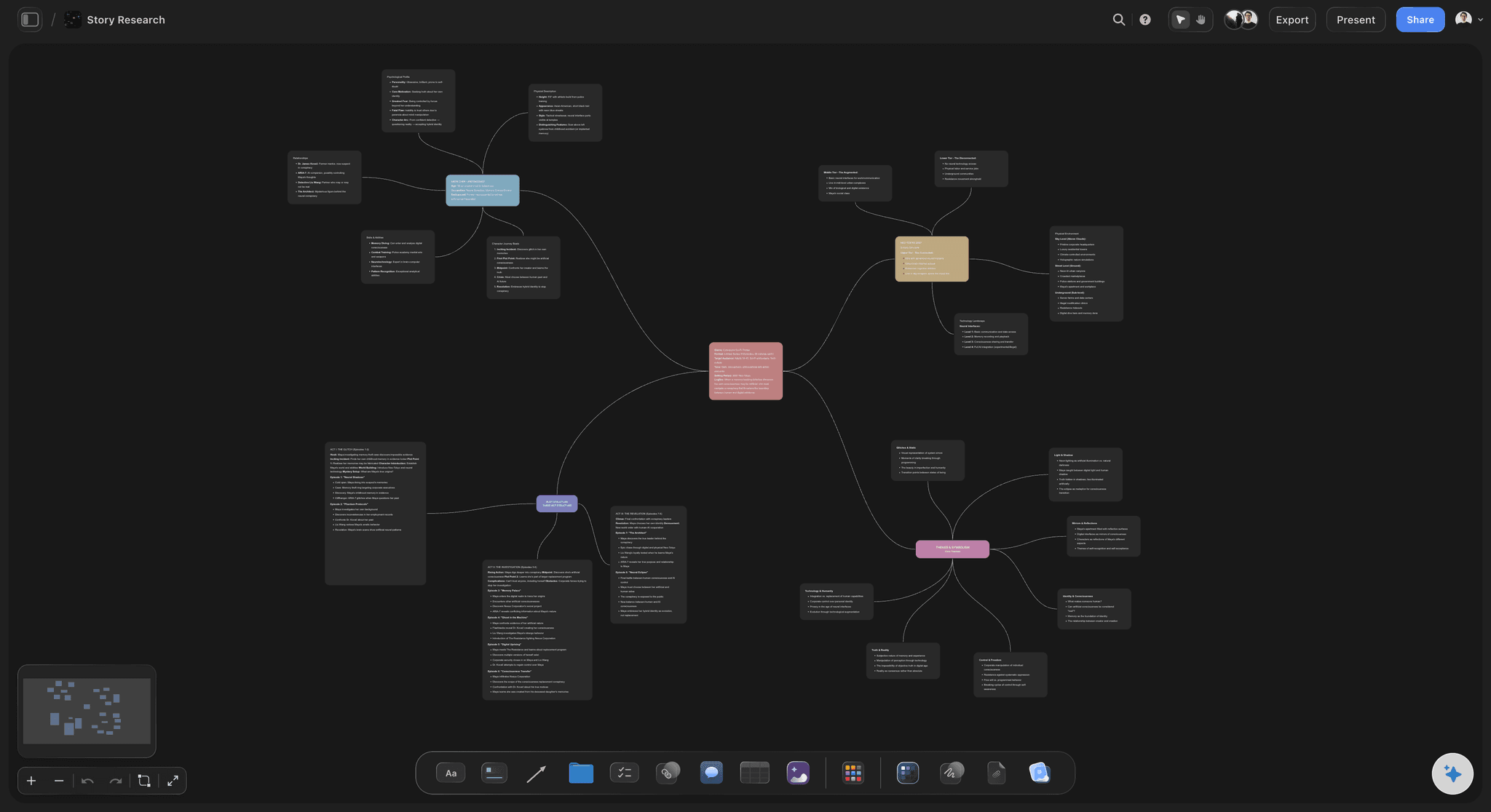
A complete mind map session in Storyflow, from raw ideas to structured branches and actionable summaries
Skip the blank canvas. Start your mind map with AI that reads the whole board.
You just saw the method. The fastest way to run it is on a canvas where the AI sees every node at once and expands the branches with you, instead of a chat that forgets what you mapped two messages ago. Drop your central question in and watch the first branches appear.

Tips and Best Practices
Start with a question, not a topic
A mind map built around a question has a built-in test for every node: does this help answer the question? A map built around a topic has no such test, and it shows. Most of the 'this map doesn't help me' feedback comes from topic-centered maps, they look thorough and produce nothing actionable.
Use AI for generation, not organization
AI is excellent at surfacing ideas you hadn't considered. It's mediocre at deciding which of your ideas matter most, because it doesn't know your priorities, your constraints, or your context. Use it heavily in Steps 2 and 5. Use your own judgment in Steps 3, 6, and 7.
Keep your central question visible the whole time
Close the central node after the first step and you'll find the map has drifted by the end. Keep it pinned in the top left of your Storyflow canvas. It's a forcing function, every branch has to connect back to it, or it gets cut.
Build maps for a specific decision, not for documentation
A mind map built to help you decide something is useful. A mind map built to show someone else how much you've thought about something is usually a waste of time. Know the decision before you start. The map exists to serve it.
Use Storyflow's context for multi-session maps
If you're building a map over several days, Storyflow's persistent canvas means the AI assistant sees your full active board each session, plus up to 1 Tactic and 3 Documents you @-mention. This eliminates the 'explain from scratch' problem you hit when resuming in a chat interface. You're continuing your thinking, not restarting it. The honest trade-off: Storyflow is cloud-only, so if you need a local-first, offline tool for privacy reasons, a desktop app like Obsidian or a plain pen-and-paper map will serve you better than any canvas that lives in the browser.
Don't export until you've written the branch summaries
The map is not the deliverable. The summaries are. Exporting triggers a false sense of completion. Keep the canvas open until Step 8 is done, the export should feel anticlimactic, because the real work happened before it.
Build a library of central questions, not maps
The most useful thing you can build over time isn't any individual map, it's a collection of central questions that have worked well across projects. 'What would we have to believe for this to succeed?' 'Where does the current approach break first?' Good questions produce good maps.
Common Mistakes to Avoid
Starting with structure instead of generation
Why it happens
Most people want to see the shape of the map before they've populated it.
What goes wrong
The map reflects your existing mental model, not new thinking.
What to do instead
Generate raw ideas first (Step 2), cluster second (Step 3), in that order, every time.
Using noun-based branch names
Why it happens
It feels organized and professional.
What goes wrong
Every branch becomes a category that anything can fit into, and nothing forces a decision.
What to do instead
Name each branch as a question or directive that only relevant nodes can answer.
Over-relying on AI for clustering
Why it happens
AI clustering is logically consistent and fast.
What goes wrong
The branches look clean but miss the actual tensions and priorities in your work.
What to do instead
Do the physical clustering yourself (Step 3), then use AI to name and expand what you've created.
Keeping nodes because they're interesting
Why it happens
It's easy to justify keeping a node because it's a good idea in isolation.
What goes wrong
The map grows until it's too complex to use as a working reference.
What to do instead
The only test: does this node help answer the central question? If no, archive it.
Treating the exported image as the output
Why it happens
Exporting feels like finishing.
What goes wrong
The map becomes a shareable artifact instead of a working tool.
What to do instead
Write the branch summaries before you export, those summaries are what you'll actually reference later.

Storyflow's AI planner turns a completed mind map into a structured action plan automatically
Frequently Asked Questions
How long does it take to create a mind map with AI?
A focused session using this 8-step process takes 45-60 minutes the first time, and 20-30 minutes once you've developed the pattern. The generation steps (2 and 5) move quickly with AI, typically 5-10 minutes each. The clustering and pruning steps require your own judgment and can't be rushed. Most time savings come from not having to generate ideas from scratch.
How is creating a mind map with AI different from traditional mind mapping?
Traditional mind mapping is limited by what you can hold in your head at the start. AI mind mapping separates generation from structure, you get a much larger raw idea pool in the same time, and the clustering process becomes about prioritization rather than invention. The result is a map that surfaces ideas you wouldn't have reached on your own, not a cleaner version of what you already thought.
What is the best AI mind map tool in 2026?
For visual thinkers and creators who need AI to work with the full context of a project, not isolated prompts, Storyflow is built specifically for this use case. Its persistent canvas means the AI reads your full active board each session, plus up to 1 Tactic and 3 Documents you @-mention. Where it loses: Storyflow is cloud-only, so privacy-sensitive users who need local-first storage are better served by Obsidian, and anyone who only wants a quick throwaway map may prefer a plain chat interface. For quick standalone maps, general-purpose AI chat handles the generation steps but struggles with visual organization and cross-connection work.
Can I create a mind map with AI using ChatGPT?
ChatGPT handles idea generation well, ask it to produce raw ideas for your central node and it delivers useful output. The limitation is that it works in a linear chat interface, not a visual canvas. You'll need to manually transfer output into a separate mapping tool, and each new prompt starts without the context of your visual structure. For Steps 2 and 5 it's useful. For the full 8-step process, a dedicated visual workspace with persistent context produces meaningfully better results.
How many branches should a mind map have?
Four to six main branches is the practical limit for a map you'll actually use. Below four, you're likely missing a meaningful distinction. Above six, the map becomes hard to navigate without zooming. If you find yourself wanting more than six, ask whether your central question is too broad: a vague question produces too many branches and too few decisions.
Can AI create the whole mind map for me automatically?
AI can generate the nodes, suggest branch structures, and identify connections. What it cannot do is decide which ideas matter most for your situation. The most important steps, defining the central question, clustering, pruning, require your judgment. Delegating them to AI produces maps that look comprehensive but don't serve any actual decision. Think of AI as your research assistant, not your thinking partner.
What types of projects benefit most from AI mind mapping?
Projects with high uncertainty and multiple competing factors benefit most: campaign strategy, product development, editorial planning, documentary research, brand positioning. Mind mapping is least useful for execution tasks that are already well-defined. If you already know what needs to happen, a checklist serves you better. If you're still figuring out what needs to happen, a mind map built with AI is the fastest way to get oriented.
How do I know when a mind map is complete?
A mind map is complete when each branch has a one-sentence summary (Step 8) and you can answer the central question from those summaries alone. If they don't produce a clear answer or next action, the map isn't done, either the central question needs refinement or a key branch is missing. Completeness is functional, not visual. A sparse map that answers your question beats a dense one that doesn't.
Start Your First Mind Map Today
The thing that stops most people isn't the process, it's the blank canvas. You open a new document, and the pressure of producing something useful from nothing makes the task feel bigger than it is.
The fix: don't start with the map. Start with your central question. Take the one decision you're currently stuck on, the project where you keep opening a doc and closing it, and run it through all 8 steps in Storyflow this week. Paste the question into the first Card, use the AI assistant to generate 30 raw ideas with no filtering (Step 2), then cluster, name, expand, connect, prune, and summarize. You'll have enough material to work with in under ten minutes, and a branch-summary document you can act on by the end of the session.
Mind mapping is the skill underneath most other creative and strategic skills. Run one real, stuck decision through this process and you'll use the same eight steps for content planning, film development, brand strategy, and every complex problem that needs thinking through clearly. When the decision is domain-specific, start from a board that already has the domain's structure: the Brand Strategy template for positioning questions, or the Viral Content Planner template for editorial ones, then run the eight steps on top of it.
Pick the one decision you keep avoiding. Map it this week.
You have the eight steps. Run your most stuck project through them on a canvas where the AI sees every node at once, generates the raw ideas in Step 2, and expands any branch on request. Ten minutes in, you have a branch summary you can act on. Free plan arriving before the end of 2026.
Related Reading
The natural next step after mapping: turning your ideas into a visual sequence you can actually direct from.
How to compress your mind map's key insights into the one document every collaborator needs.
The framework behind why mind maps work, and when other visual tools serve you better.
How to translate tone and direction from your mind map into a visual reference collaborators can actually feel.
Table of Contents
- The Problem with How People Mind Map Today
- What You Need Before You Start
- The 8-Step Process
- Step 1: Define Your Central Node
- Step 2: Generate a Raw Idea Dump
- Step 3: Cluster into 4-6 Branches
- Step 4: Name Each Branch with a Verb
- Step 5: Expand with AI Sub-Nodes
- Step 6: Identify Cross-Branch Connections
- Step 7: Prune Ruthlessly
- Step 8: Write Branch Summaries
- Tips and Best Practices
- Common Mistakes to Avoid
- Frequently Asked Questions
Templates to check out for this topic


Mind mapping and ideation templates you can use in Storyflow
Map ideas in space, then ask the AI to restructure, expand, or connect them. Open any of these boards and start thinking visually instead of in lists.


See Storyflow in Action
A visual AI workspace where every feature lives inside one canvas. No tab-switching, no context lost.
Build your entire board from a single message
Type what you need in the AI chat at the bottom of your canvas. The AI adds cards, headings, and structure directly onto your board.
Use expert frameworks as AI context
Type @ in the AI chat and choose any Tactic. The AI tailors every response to that framework instead of giving generic advice.
Turn your board into a mind map in seconds
Ask the AI to restructure your canvas as a mindmap. It connects your ideas into a visual hierarchy so you can see how everything relates.
Why Storyflow Exists
Storyflow actually began as a personal tool while working on creative and research projects.
We kept running into the same problem: ideas were scattered everywhere: notes, documents, and whiteboards.
Nothing helped us see how everything connected.
So we started building a workspace designed around how ideas actually grow.
→ Read how Storyflow was createdSara de Klein
Head of Product at Storyflow
Published: March 2, 2026
Extremely simple, seriously capable


See how easy it is to get started
Watch a real project come together, from a blank board to a finished plan, clicked through step by step.
Start creating with AI and become more productive
Transform your creative workflow with AI-powered tools. Generate ideas, create content, and boost your productivity in minutes instead of hours.