
Ultra-fast campaigns, pitched beautifully
Generate a go-to-market strategy with AI
and see how the launch connects.
Describe the product and who it is for, and Storyflow's AI generates the GTM strategy: the positioning, the target segments, the messaging, the channels, and the rollout sequence. Reshape it on an infinite canvas, then turn each part into the campaign that ships it.


Creatives working for these brands already got early access
- Red Bull
- Canon
- Artlist
- Porsche
See how easy it is to get started
Watch a real project come together, from a blank board to a finished plan, clicked through step by step.
Start from a ready-made template
Pick a board to see what you can build, then let AI fill it in. Every template is a real, editable starting point on the same infinite canvas.

Marketing Campaign
Plan a campaign across channels, messages, and deliverables on one board the whole team can see.
What is an AI go-to-market strategy generator?
An AI go-to-market strategy generator drafts the plan for how a product reaches its first or its next customers on purpose. Storyflow is an AI visual workspace that drafts your go-to-market strategy on one infinite canvas: positioning and target segments, messaging, channels, and a rollout sequence as editable cards you can turn into campaigns. The strategy answers the questions that decide whether a launch lands: who exactly is this for, what do we say to them, where do we reach them, and in what order do we do it. A strong GTM strategy is the difference between a launch that builds momentum and a launch that goes quiet because nobody decided who it was really for.
An AI go-to-market strategy generator takes the first pass off your hands. Instead of staring at an empty doc and inventing the positioning, the segments, the message, and the rollout yourself, you describe the product, the audience, and the moment, and the AI generates the positioning, the segments, the value proposition, the channels, and a phased rollout as connected cards on a canvas you can actually see.
That is the difference from a blank go-to-market template: the AI gives you a connected launch strategy you can argue with, which is far faster than filling headings under deadline. Then the strategy becomes the work: ask the AI to write the launch campaign, the messaging for a segment, or the content calendar, all on the same board.
Ultra fast from brief to board
Generate a go-to-market strategy with AI in four steps.
You describe the product. The AI generates the launch, so you start by refining strategy, not staring at headings.
01
Open your canvas
Start in the browser with an account. No app to install, just an empty board ready for the strategy.
02
Describe the product
A sentence is enough: what it is, who it is for, and the launch moment. Add the pricing or the goal and the AI plans around them.
03
AI generates the go-to-market strategy
The AI lays out the positioning, the target segments, the value proposition, the channels, and a phased rollout as connected cards on one canvas.
04
Reshape it, then ship it
Edit the cards, then ask the AI to write the launch campaign, the segment messaging, or the calendar. Share view-only or export to PDF.
A GTM strategy that connects the moves, not a list of intentions.
Most GTM tools give you a doc full of headings. This one shows how the pieces fit and turns into the launch.
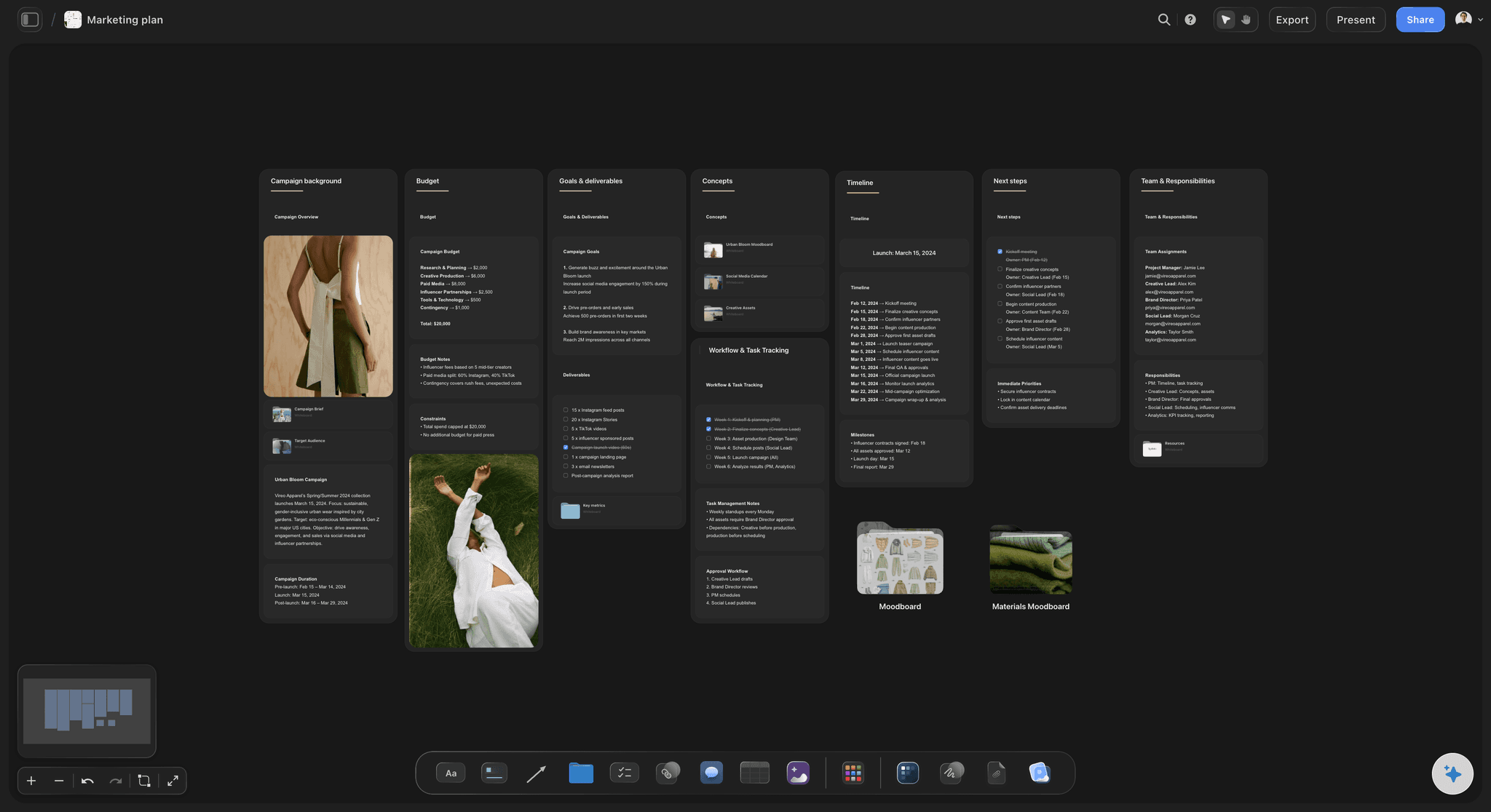
The launch, generated
Positioning, segments, channels, rollout
Describe the product and the AI generates the whole strategy at once, so you start by pressure-testing a coherent launch instead of filling a template under deadline.
See the AI marketing plan generator →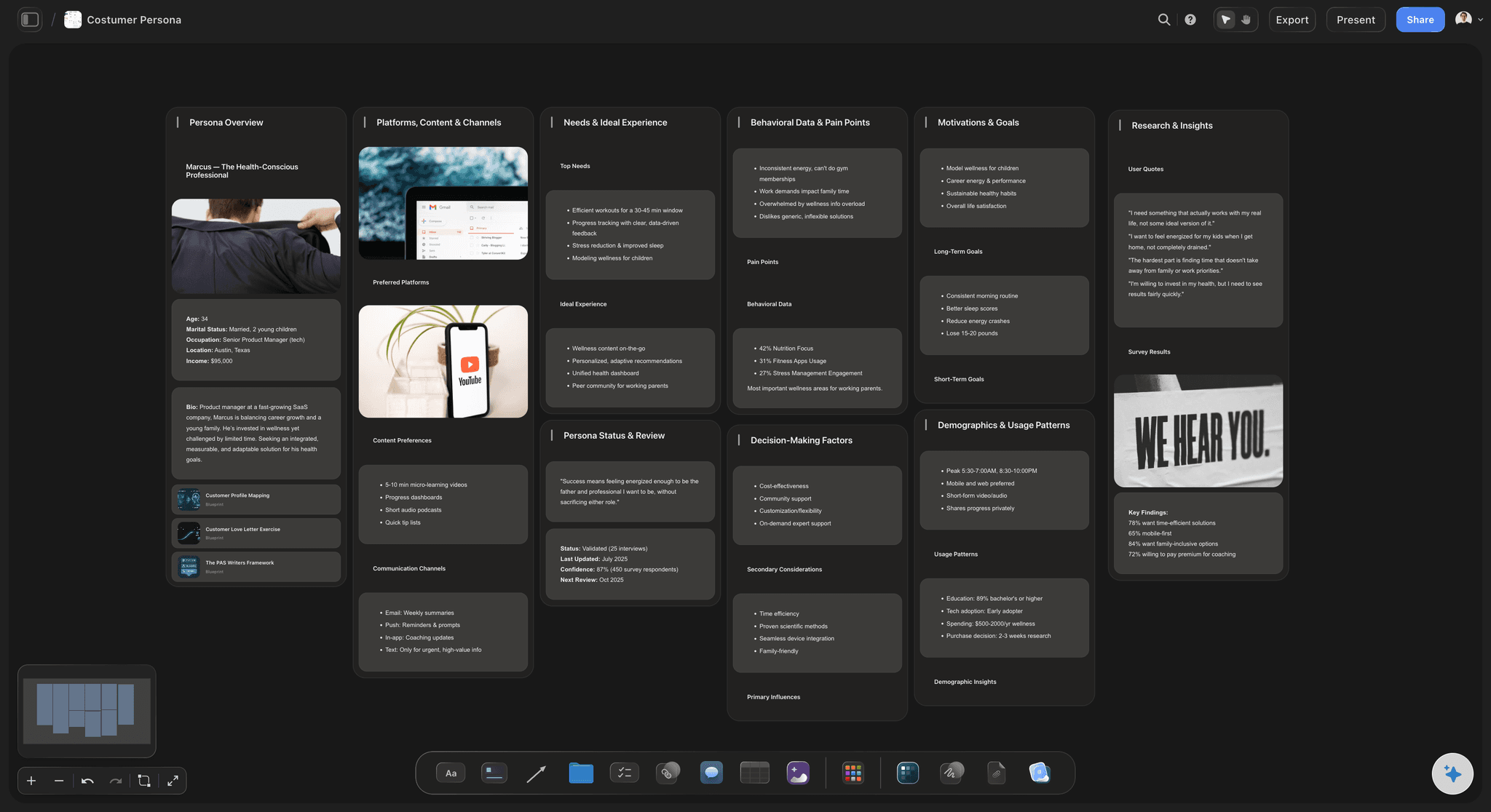
Aimed at the right segment
Know exactly who you launch to first
Ask the AI to generate the priority segment and its persona beside the strategy, so the first push targets the buyers most likely to convert, not everyone at once.
See the AI persona generator →
From strategy to launch campaign
Turn the rollout into a real campaign
Pick a phase and ask the AI to build the campaign that runs it, with channels, assets, and a schedule, drawn from the positioning you already locked, on the same board.
See the AI marketing strategy generator →
The whole launch in one view
See the sequence top to bottom
A rollout is easier to get right when you can see every phase at once. With an infinite canvas and no object cap, the pre-launch and the scale phase fit on one board.
See the project plan generator →Plans from $9.99 a month. No object caps.
Open a canvas, describe the product, and watch the launch strategy generate itself. Storyflow is paid-only during early access; a Free plan for solo use launches before the end of 2026, and anyone you invite to a board joins free today.
Unlimited GTM strategies and boards, with room for every phase
AI usage to generate and rework the strategy
Attach research, pricing, and links to any card
Share the strategy view-only, or invite collaborators free
Built for people with taste
Made for the way launches actually get planned.
Generate the strategy, connect the segments to the message, sequence the rollout, and turn each phase into a campaign.
A strategy that connects, not just lists
Positioning, segments, and channels in one view
The full picture: Positioning, value proposition, target segments, channels, pricing notes, and a phased rollout arrive as connected cards, not separate headings.
Reshape by dragging: Re-order the rollout, swap the lead segment, or add a channel by moving cards. The strategy changes with your thinking, not a rebuild.
Any launch: A new product, a new market, a feature launch, or a re-launch: describe it and the AI generates the right strategy.
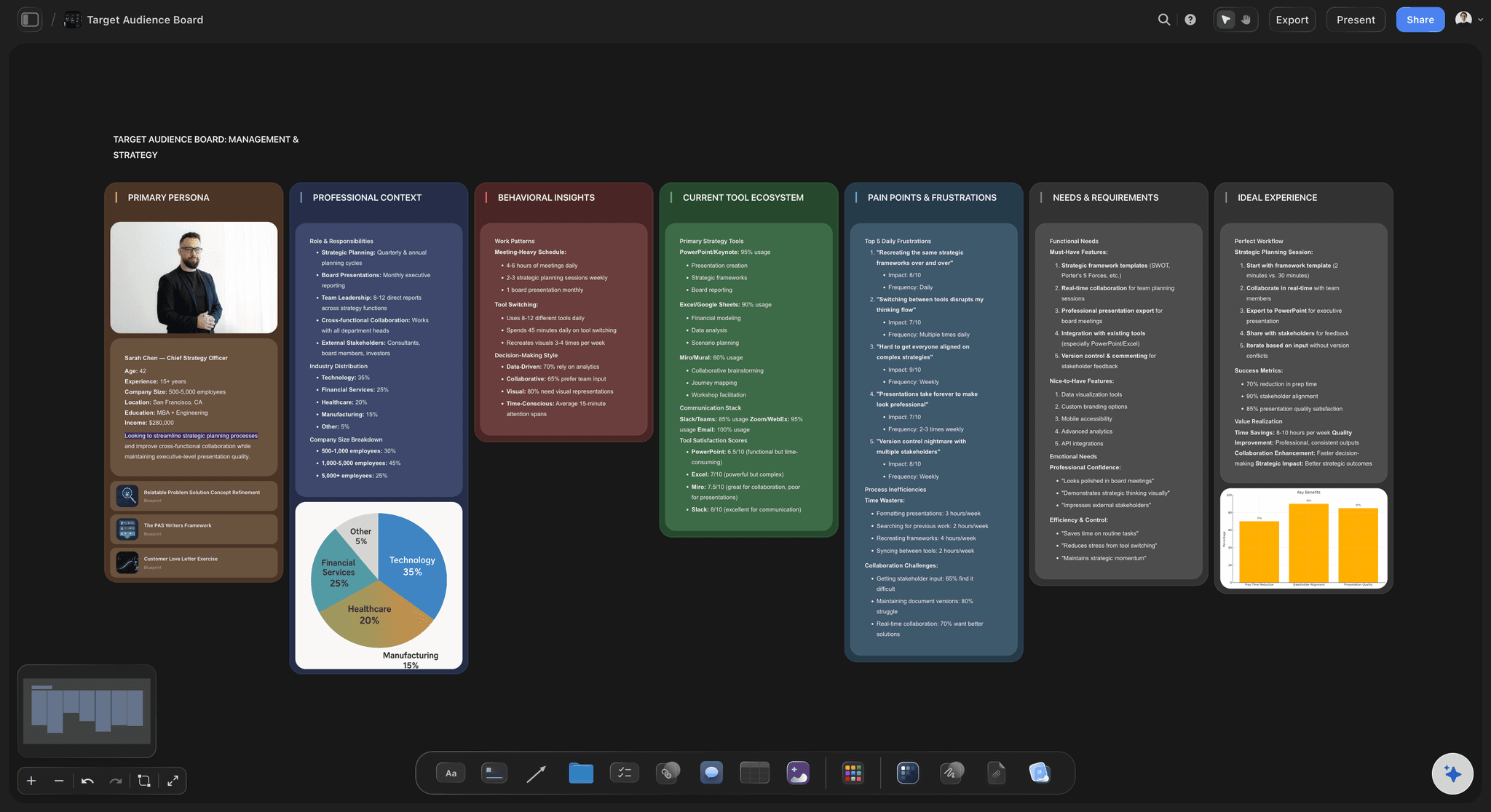
Built on real inputs
Generate against your research, not in a vacuum
Attach your context: Bring in up to five documents and three boards, such as a competitive analysis, a persona, or a pricing study, and the AI generates against them.
Pin the evidence: Drop market research, screenshots, or a positioning doc onto the cards they support, so the strategy is grounded, not guessed.
Start from a competitor map: Generate the competitor analysis on the same canvas first, then have the AI position the launch into the gap it found.
The strategy becomes the launch
From strategy to campaigns and calendar
Build the launch campaign: Turn any rollout phase into a campaign plan with channels, assets, and a schedule, with the AI carrying the positioning across.
Brief the segment: Ask the AI for the messaging and the creative brief for a target segment, so the team ships copy that matches the strategy.
Share and align: Send a view-only link so product, sales, and marketing work from one launch strategy, or export a clean PDF for the deck.
Explore templates for your project
Every template opens as a real, editable board on the infinite canvas. Pick the closest fit and make it your own.
Marketing Campaign
Plan a campaign across channels, messages, and deliverables on one board the whole team can see.
One app instead of five
How Storyflow compares to other GTM strategy tools.
Most options hand you a blank doc or an empty board. The question is whether the AI generates the strategy and connects it.
Storyflow
Recommended
AI generates the full GTM strategy from a product description
Strategy becomes launch campaigns and a calendar on one canvas
An infinite canvas with connected, editable cards
No board or card caps
ChatGPT
AI generates the full GTM strategy from a product description
Strategy becomes launch campaigns and a calendar on one canvas
An infinite canvas with connected, editable cards
No board or card caps
Notion AI
AI generates the full GTM strategy from a product description
Strategy becomes launch campaigns and a calendar on one canvas
An infinite canvas with connected, editable cards
No board or card caps
Miro
AI generates the full GTM strategy from a product description
Strategy becomes launch campaigns and a calendar on one canvas
An infinite canvas with connected, editable cards
No board or card caps
What creators are saying
Join early creators getting structured workspaces and AI that remembers their projects
“Storyflow has sped up my workflow by at least 3x, which means more flow state and more projects I can actually ship. It truly changed the way me and my team create.”

Reilin Joey
Director & YouTuber
“One prompt gets me a structured board. But the tactics are my favorite. I run my YouTube scripts through them and my intros and retention got better. It's amazing.”

Justkay
YouTuber & Freelance Filmmaker
“I used to juggle five apps to plan a project. Now I describe what I am making and get boards, lists, and a schedule. All in one place.”

George
@fernwehchronicles
AI go-to-market strategy questions, answered.
Everything people ask about generating a GTM strategy with AI in Storyflow.
An AI go-to-market strategy generator turns a one-line description of your product into a full launch strategy: the positioning, the target segments, the value proposition and messaging, the channels, and the rollout sequence. In Storyflow the AI generates each of those as connected, editable cards on an infinite canvas, so you refine a connected launch plan instead of filling a blank doc.
Storyflow drafts the strategy with you on one canvas: describe the product and who it is for, and its AI lays out the positioning, the target segments, the messaging, the channels, and a phased rollout as connected, editable cards. You reshape any card, then turn each part into the campaign that ships it, so the strategy and the launch plan stay on the same board.
A complete GTM strategy includes the market and target segments, the positioning and value proposition, the pricing and packaging, the messaging for each segment, the channels and tactics, the rollout phases and timing, and the metrics that define success. Storyflow generates these by default and adapts them for a product launch, a new market, or a feature release.
Describe the product, the audience, and the launch moment in the AI chat, and the AI lays out the positioning, segments, messaging, channels, and rollout as connected cards on the canvas. Every card is editable, so you can reorder the rollout, change the lead segment, and ask the AI to rework any part until it fits your goal and timeline.
Not during early access. Storyflow is currently paid-only, with plans starting at $9.99 per month that include AI usage to generate and rework the strategy, unlimited boards, 20 file uploads for research, and view-only sharing. A Free plan for solo use launches before the end of 2026, and anyone a paid member invites to a board joins free today.
Yes, and that is the reason to generate it in Storyflow. Ask the AI to turn a rollout phase into a campaign plan with channels, assets, and a schedule, or to write the messaging for a target segment, all on the same canvas. The GTM strategy becomes the launch instead of a deck the execution never opens again.
Yes. It is built for teams without a dedicated GTM function. Describe the product and the AI generates a credible first strategy to react to, which is far faster than a blank template, and you can keep the strategy, the persona, the competitor analysis, and the launch campaign on one board as the launch comes together.
Yes. Attach up to five documents and three boards, such as a competitor analysis, a persona, or a positioning doc, and the AI generates against them. You can also build the competitor analysis on the same canvas first and have the AI position the launch directly into the gap it found.
More from Storyflow
Product launch checklist
Go-to-market plan
Creative strategy
Product launch planner
AI marketing strategy generator
AI marketing funnel generator
AI lean canvas generator
AI competitor analysis generator
AI persona generator
AI value proposition generator
AI project plan generator
Demand generation plan
AI tools for startups
Product launch plan with ChatGPT
Plan a product launch visually
A launch date is not a strategy. Generate the whole go-to-market on the board.
Describe the product once, watch the AI generate the strategy, and turn the rollout into the launch campaign.