
Hours back on every video you plan
Find the story
before you open the timeline.
Turn transcripts into cards you can move, try five structures in an afternoon, and only start cutting once you know what the film is.


Creatives working for these brands already got early access
- Red Bull
- Canon
- Artlist
- Porsche
See how easy it is to get started
Watch a real project come together, from a blank board to a finished plan, clicked through step by step.
Start from a ready-made template
Pick a board to see what you can build, then let AI fill it in. Every template is a real, editable starting point on the same infinite canvas.

Storyboard
Lay out your shots frame by frame with images and notes, then reorder them until the sequence reads like the finished cut.
What is a paper edit?
A paper edit is the version of your film you build before you touch the footage. Storyflow is an AI visual workspace that holds your paper edit on one infinite canvas: interview transcripts turned into movable cards, two structures compared side by side, and a paper cut you share for approval. You take the transcripts of your interviews, pull out the sections that might be in the finished piece, turn each one into a card, and then arrange those cards into an order that tells a story. It is called a paper edit because it was traditionally done with printed transcripts and scissors, and the physical version still works. The point is that you are making structural decisions using text, which is fast to rearrange, rather than using video, which is not.
The reason this matters is entirely about the cost of changing your mind. On a timeline, moving a section means dragging clips, fixing the audio, patching the b-roll that no longer matches, and rebuilding transitions, so a structural experiment costs an hour. On cards, the same experiment costs about fifteen seconds. That difference does not just make you faster; it changes what you are willing to try. Editors working on a timeline try two or three structures because each one is expensive. Editors working on cards try a dozen, and one of those dozen is usually much better than anything in the first three.
Storyflow is an AI-native infinite canvas that suits a paper edit directly. Drop your transcripts on the board, make a card per usable section with the quote on it, and lay the cards out in a row that represents the film. Drag them into a different order and read it again. Because there is no object cap, a feature documentary with four hundred candidate cards sits on one surface, and because the canvas holds images you can pin the frame that goes with a section so the map is not purely textual.
A paper edit usually resolves four things in order, and the order matters. First, selection: which sections of transcript are genuinely candidates, which is a much smaller set than everything that was said well. Second, sequence: the order the story is told in, including where you start, which is the decision that most determines whether the piece works. Third, function: what each card is doing, since a card that is beautiful but does not advance, complicate, or resolve anything is the one to cut. Fourth, the gaps: the places where you need a piece of narration, a title, or an answer nobody gave you, and finding those on paper is what tells you whether you need a pickup interview while that is still possible.
Ultra fast from brief to board
From transcripts to a structure you can cut from.
No timeline and no media. Make cards, move them, read it back.
01
Open a canvas
Sign up in seconds. No download. Your infinite paper edit canvas opens straight in the browser.
02
Bring the transcripts in
Drop transcript PDFs or paste the text onto the board. Make one card per section that could plausibly be in the film, with the quote written on it so you can read the structure without looking anything up.
03
Arrange, then rearrange
Lay the cards out in a row and read it as a story. Drag them into a different order and read it again. This is the whole method, and its value comes from how cheap each attempt is.
04
Mark the gaps and hand it over
Note where you need narration, a title, or an answer you do not have. Share a view-only link with your director or producer, or export as a PDF to cut from.
Reordering costs seconds, not hours.
Transcript sections as cards you can move, with the whole film visible at once.
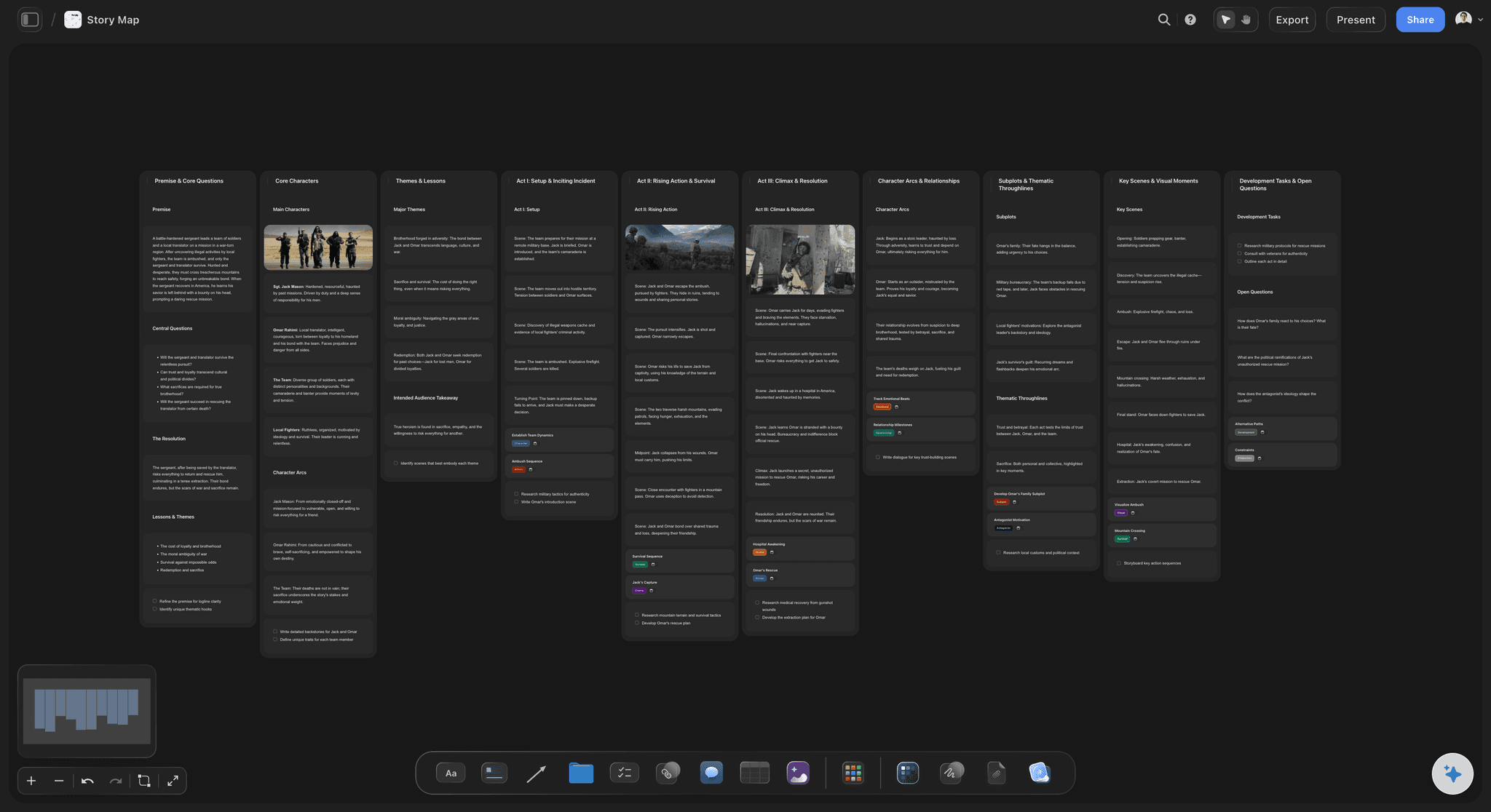
One card per usable section of transcript
Make the story movable
A card holding a quote is the smallest unit of a documentary you can rearrange freely. Cheap experiments are the entire point: editors who can try twelve structures find better ones than editors who can afford three.
See the story timeline maker →
The whole film readable in one view
See the shape, not the page
A transcript in a document shows you one page. A row of cards shows you the whole film, and structural problems are visible in the shape long before they are visible in the text.
See the footage organizer →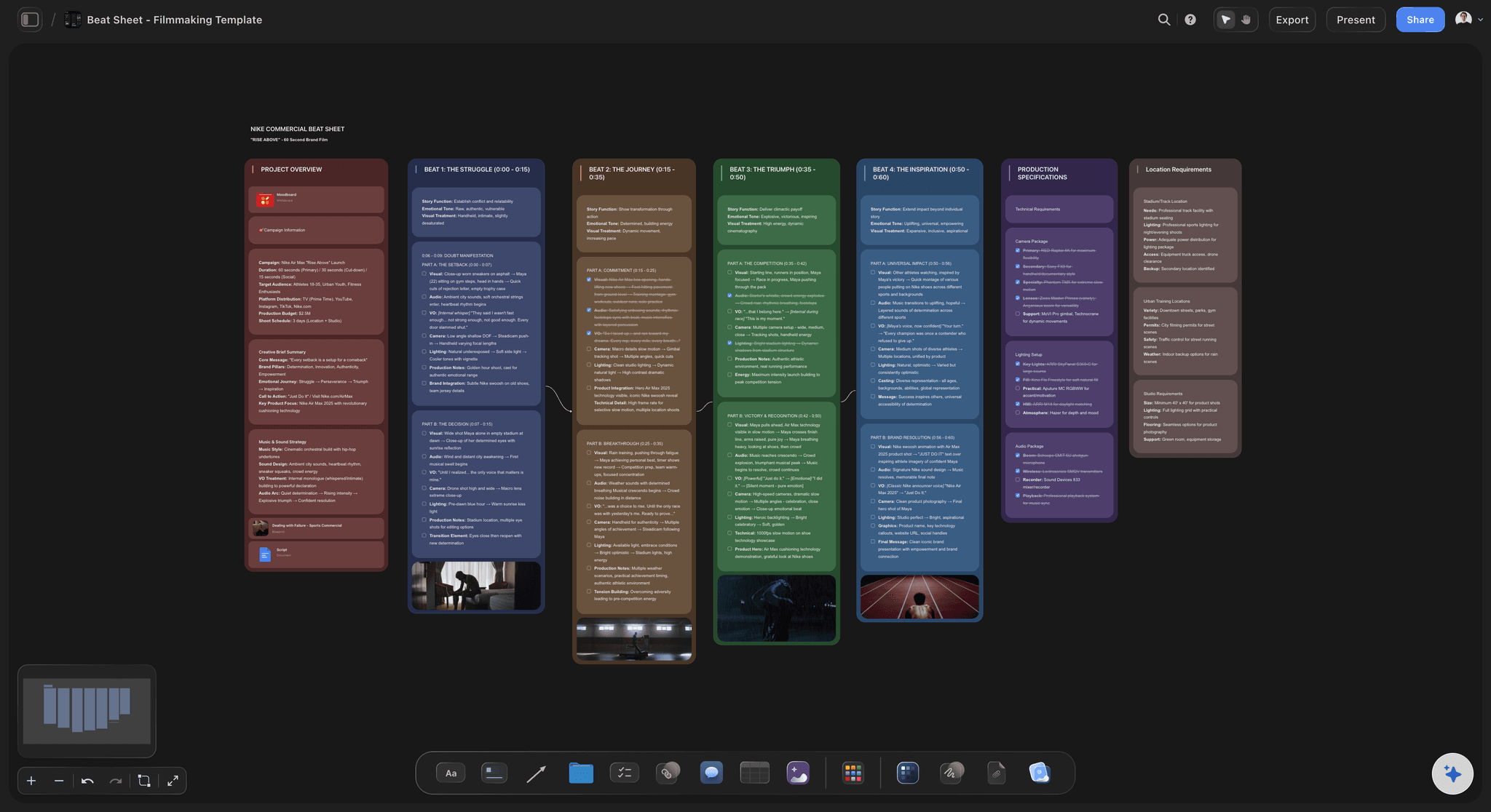
Mark what each card is actually doing
Cut the beautiful and useless
Label each card with its function: does it advance, complicate, or resolve. The card that is wonderfully said but does none of those is the one to lose, and labelling makes that obvious rather than painful.
See the story structure software →
Find the missing answer while a pickup is possible
Discover the hole on paper
Paper edits reveal the question nobody answered. Finding that before the edit starts is the difference between a quick pickup interview and rewriting the film around an absence.
See documentary pre-production →Unlimited boards. No object cap.
Open a canvas, drop the transcripts in, and start arranging. Storyflow is paid-only during early access, with plans from $9.99 a month, and a Free plan launches before the end of 2026.
Unlimited paper edits on an infinite canvas
Basic AI usage to generate boards from prompts
Unlimited file uploads for transcripts and footage stills
Share view-only links with your director or producer
Built for people with taste
More than a transcript in a document.
A document shows you one page at a time. Structure is a property of the whole.
Selection, sequence, function, and the gaps
Work through the paper edit in order
Select ruthlessly: A candidate card is not everything said well; it is everything that could survive to the final cut. Being generous here is the most common way a paper edit becomes as unwieldy as the rushes it was meant to simplify.
Sequence, especially the opening: Where you start determines what everything after it means. Try genuinely different openings rather than variations on one, because this is the decision with the largest effect and the cheapest test.
Label what each card does: Advance, complicate, or resolve. Cards doing none of those are the cut list, however good the line is, and naming the function is what makes that judgment bearable.
Mark the holes explicitly: Where you need narration, a title card, or an answer nobody gave you. A hole found on paper is a pickup interview; the same hole found in week three of the edit is a structural rewrite.
AI that can see the board you have already built
Structure with AI, choose the story yourself
Lay out a framework from a prompt: Describe the film and the AI lays out a structure to arrange cards against. It reads the active canvas as context, so it works with the cards you have already made.
It suggests, you decide what the film is: The AI can propose an order and point out where a thread disappears. It cannot tell which moment is the one the film is actually about, because that judgment depends on having been in the room.
Try an alternative without losing the first: Duplicate a row and rearrange the copy, so you can compare two structures side by side instead of destroying one to test the other.
Transcripts, frames, notes, and documents on one canvas
Keep the evidence beside the structure
Transcripts as PDFs or text: Drop the full transcripts onto the board beside the cards so you can check context without leaving the structure you are working on.
Pin the frame that goes with a moment: Attach a still, or grab a frame from a YouTube or Vimeo upload, so a card that depends on what you see is not represented purely as text.
No object cap: A feature documentary with several hundred candidate cards stays on one board, which is exactly the case where a document becomes unusable.

Share with the director, producer, or commissioner
Argue about structure before it is expensive
View-only links: Send a link and a director or commissioner reads the intended film in ten minutes, without an export or a screening. Structural disagreement at this stage costs an afternoon rather than a week.
Build it together: Invite your director onto the board so the structure is worked out jointly rather than presented. Invited collaborators edit the same board at the same time on any paid plan.
Export to cut from: Export as an image or PDF and keep it beside your timeline while you assemble. Storyflow does not edit video, so the cut itself happens in your NLE.
Explore templates for your project
Every template opens as a real, editable board on the infinite canvas. Pick the closest fit and make it your own.
Storyboard
Lay out your shots frame by frame with images and notes, then reorder them until the sequence reads like the finished cut.
One app instead of five
Storyflow vs a text document, index cards, and your NLE.
Index cards on a table are genuinely excellent at this. Here is the honest split.
Storyflow
Recommended
Whole film visible as movable cards
Frames and transcripts on the same canvas
Compare two structures side by side
Share and work on it remotely
Edit the footage on a timeline
Works with no screen and no account
Index cards
Whole film visible as movable cards
Frames and transcripts on the same canvas
Compare two structures side by side
Share and work on it remotely
Edit the footage on a timeline
Works with no screen and no account
Text document
Whole film visible as movable cards
Frames and transcripts on the same canvas
Compare two structures side by side
Share and work on it remotely
Edit the footage on a timeline
Works with no screen and no account
Your NLE
Whole film visible as movable cards
Frames and transcripts on the same canvas
Compare two structures side by side
Share and work on it remotely
Edit the footage on a timeline
Works with no screen and no account
What creators are saying
Join early creators getting structured workspaces and AI that remembers their projects
“Storyflow has sped up my workflow by at least 3x, which means more flow state and more projects I can actually ship. It truly changed the way me and my team create.”

Reilin Joey
Director & YouTuber
“One prompt gets me a structured board. But the tactics are my favorite. I run my YouTube scripts through them and my intros and retention got better. It's amazing.”

Justkay
YouTuber & Freelance Filmmaker
“I used to juggle five apps to plan a project. Now I describe what I am making and get boards, lists, and a schedule. All in one place.”

George
@fernwehchronicles
Paper edit questions, answered.
What a paper edit is, how to build one, and when index cards beat any software.
A paper edit is the structure of your film worked out in text before you touch the footage. You take the transcripts of your interviews, pull out every section that could plausibly appear in the finished piece, turn each one into a card carrying that quote, and then arrange the cards into an order that tells a story. The name comes from the traditional method of printing transcripts and physically cutting them up, which still works perfectly well. The reason it exists is that text is cheap to rearrange and video is not, so all the structural thinking happens where changing your mind costs seconds rather than hours.
Storyflow is an online paper edit tool: your interview transcripts become cards you can move, the whole film is visible at once, and you can compare two structures side by side before you open the timeline. Frames sit on the same canvas as the transcripts, and you share the paper cut for approval. The footage itself is still edited on a timeline in your NLE: Storyflow does not do that.
Because of what the cost of reordering does to your willingness to experiment. Moving a section on a timeline means dragging clips, fixing audio, repatching b-roll that no longer lines up, and rebuilding transitions, so each structural experiment costs perhaps an hour. The same move on cards costs about fifteen seconds. That is not merely a speed difference, it changes behaviour: an editor working on a timeline tries two or three structures because each is expensive, while an editor working on cards tries a dozen. The twelfth structure is very often substantially better than anything in the first three, and it is only reachable when experiments are nearly free.
Not during early access. Storyflow is paid-only right now, with plans starting at $9.99 a month, and a Free plan launches before the end of 2026. Anyone a paid member invites to a board joins free today, so a director or producer can read and rework the paper cut without paying. If you want a free option this minute, index cards and a large table remain genuinely excellent at this, and a plain text document works too as long as you can tolerate seeing one page at a time.
For a solo editor with a big table, honestly they are hard to beat. Physical cards have no interface, no latency, and you can spread a whole film across a floor and walk around it, which is a genuinely different way of seeing structure. Software wins in three specific situations: when the material is too large to lay out physically, when you need to keep frames and transcripts attached to the cards, and when the people who need to see the structure are not in the room. If none of those apply to you, use the cards. The method matters far more than the medium.
Read the transcript and mark only the sections that could survive to the final cut, which is a much smaller set than everything said well. Make one card per marked section with the quote written on it, so you can read the structure without looking anything up. Lay the cards in a row and read it as a story, then try a genuinely different order rather than a variation, paying particular attention to the opening because it determines what everything after it means. Label each card with what it does, meaning whether it advances, complicates, or resolves, and cut the ones doing none of those. Finally, mark the gaps where you need narration, a title, or an answer nobody gave you.
It can help with structure and not with judgment. The AI can lay out a storytelling framework to arrange your cards against, suggest an ordering, and point out where a thread you established goes quiet, all while reading the active canvas as context. What it cannot do is know which moment your film is actually about, because that comes from having been in the room during the interview and knowing what mattered. Selection and the choice of opening are the two decisions that most determine whether a documentary works, and both should stay with you.
You can drop transcript PDFs onto the canvas or paste the text directly, and the AI can work from either to help you structure the board. Storyflow does not connect to transcription services and does not generate transcripts itself, so produce them wherever you normally do and bring the text or PDF across. Once they are on the board you can keep the full transcript beside your cards to check context without leaving the structure.
No, and it is not trying to. Storyflow has no timeline, does not import or play back your rushes as a media manager, and does not export video in any form. Boards export as an image or PDF only. The actual cut happens in Premiere, Resolve, Final Cut, or whatever you use, with the paper edit open beside it as the plan you are executing. The two jobs are genuinely separate, and conflating them is what makes documentary edits sprawl.
Yes, and it is one of the highest-value moments to do it. Share a view-only link and a director, producer, or commissioner can read the intended film in ten minutes without an export or a screening. Structural disagreements surfaced at the paper stage cost an afternoon to resolve; the same disagreement surfaced after a rough cut costs a week or more. If you want them to rearrange things themselves, invite them onto the board, which works on any paid plan.
Yes, and the three genuinely reinforce each other. The paper edit tells you the intended structure, the footage map tells you what material actually exists, and the b-roll plan tells you what cover each section has. Having all three on one canvas is how you notice that the sequence you just built has no cutaways available, which is exactly the sort of problem that otherwise surfaces halfway through the assembly.
Find the film on cards, then go and cut it.
Open a canvas, drop your transcripts in, and start arranging. No download.