
The calmest place to shape your story
See the whole argument
before you write the book.
Lay the through-line out as a spine on an infinite canvas, give every chapter a card with one job, and pin sources, quotes, and data to the claims they support.


Creatives working for these brands already got early access
- Red Bull
- Canon
- Artlist
- Porsche
See how easy it is to get started
Watch a real project come together, from a blank board to a finished plan, clicked through step by step.
Start from a ready-made template
Pick a board to see what you can build, then let AI fill it in. Every template is a real, editable starting point on the same infinite canvas.

Story Plan
Outline your plot, characters, and world in one connected view, then expand each thread as the story grows.
What is a nonfiction book planner?
A nonfiction book planner is a tool for working out what a book argues, in what order, and on what evidence, before or alongside the drafting. Storyflow is an AI visual workspace that lays out your book's argument on one infinite canvas: the through-line as a spine, a card per chapter with one job, and sources, quotes and data pinned to the claims they support. The planner holds the through-line the whole book exists to prove, the chapters that each advance it, and the research that backs every claim. The point is not to generate a book for you. The point is to make the argument you have visible enough that you can see where it repeats itself, where it leans on assertion, and where the strongest material is buried.
Nonfiction fails in the argument, not the prose. The problems that sink a manuscript are structural: two chapters that quietly make the same point, evidence attached to the wrong claim, a counterargument never answered, the best material sitting in chapter seven where half your readers will never reach it. Those problems are almost impossible to see inside a linear document, because a document shows you one page at a time. They become obvious the moment the whole argument is laid out in front of you as a shape.
Storyflow is an AI-native infinite canvas built for exactly that. Describe your thesis in a prompt and the AI lays out a structured book board with a chapter spine and a framework to work in. Then you drag chapters into a new order, write each chapter's one job on its card, and pin the sources, quotes, interviews, and data beside the claims they support rather than leaving them in a folder. A chapter with nothing pinned to it is a chapter running on assertion, and on a canvas you can see that at a glance.
Planning a nonfiction book means working across five connected layers: the through-line (the single argument the book exists to make, stated as a sentence), the chapter sequence (each chapter as one move in the argument, with a job it has to do and a handoff to the next), the evidence layer (which sources, studies, interviews, and examples support which claims), the counterarguments (the objections a smart skeptic will raise and the chapters that answer them), and the reader's journey (what the reader believes at the start, what changes their mind, and what they can do by the end). Storyflow keeps all five visible at once, which is what makes the argument's weak points findable.
Ultra fast from brief to board
From a thesis to a structure you can write from.
No chapter database to configure, no index cards to retype. Describe the book and start moving the argument around.
01
Open a canvas
Sign up in seconds. No download. Your infinite planning canvas opens in the browser.
02
Describe the book
Type your thesis, your audience, and what you already know and the AI lays out a structured book board with a chapter spine and a fitting framework. You start from a skeleton rather than a blank page.
03
Rearrange the argument
Drag chapter cards until the sequence builds instead of circles. Write each chapter's one job on its card, pin evidence to the claims it supports, and mark the objections each chapter has to answer.
04
Write, or hand it over
Draft in the built-in document editor beside the board, or share a view-only link with your editor, agent, or early readers. Export the plan as an image or PDF for a proposal or a structural edit.
The whole book, laid out and movable.
Through-line, chapters, evidence, and counterarguments on one infinite canvas.

AI builds a structured book board from your thesis
Start from a skeleton, not a blank page
Type your thesis and the AI lays out a chapter spine against a structural framework, with the moves named and the gaps visible. Arguing from something is much faster than arguing from nothing.
See the AI outline generator →
Every chapter is a card carrying one job
Give each chapter one job and check it does it
Write on each card the single thing that chapter has to accomplish for the argument. Two cards with the same job are a repeated point. A card whose job you cannot state is a chapter that should not exist.
Explore the chapter outline maker →
Research pinned to the claim it supports
See which chapters run on evidence and which on assertion
Pin sources, quotes, interview excerpts, and data beside the specific claims they back, not in a folder. Evidence-rich chapters and assertion-only chapters look different on a canvas, which is the audit a folder can never give you.
See the book research organizer →
Notes, reading, and reference material beside the plan
Keep everything the book draws on in one place
Years of notes, PDFs, articles, and half-formed ideas can sit on the same canvas as the argument they feed. When a chapter needs the study you read in month two, it is one scroll away.
Try the second brain template →Unlimited boards. No object cap.
Open a canvas, describe the book, and start planning. Storyflow is paid-only during early access, with plans from $9.99 a month, and a Free plan launches before the end of 2026.
Unlimited book boards on an infinite canvas
Basic AI usage to generate boards from prompts
Starter frameworks built in
Share view-only links with editors and early readers
Built for people with taste
More than an outline in a list.
A list shows you the order of the chapters. It cannot show you whether the argument holds, because the argument is a shape, not a sequence.

Through-line, chapter jobs, evidence, and objections
Work across every layer of the argument
The through-line as a spine: State the book's single argument as a sentence and lay the chapters out as the moves that prove it. Reading the spine on its own, one card per chapter, is the fastest way to find out whether the book builds or circles.
One job per chapter: Every chapter card carries the one thing that chapter must accomplish. When two cards say the same thing, you have found the repeated point before a reader does. When a card says nothing, you have found the chapter to cut.
Counterarguments on the board: Put the objections a skeptical reader will raise on the canvas and connect each one to the chapter that answers it. An objection with no connection is a hole in the argument, visible before a reviewer finds it.
The strongest material where readers will meet it: Seeing the whole book at once makes it obvious when your best story or sharpest finding is buried in chapter seven. Dragging it forward takes seconds on a canvas and weeks in a manuscript.
AI that can see the argument you have already built
Plan with an AI that knows your book
Prompt to work through a problem: Ask it to suggest what belongs between two chapters, to flag where two chapters overlap, or to draft the moves for the book's middle. It keeps the whole board in context, so suggestions fit the book you are actually writing rather than a generic one.
It structures, it does not ghostwrite: Storyflow is a planning canvas rather than a prose generator. The AI helps you see and arrange the argument, which is where nonfiction actually fails, not produce chapters you did not write.
Iterate without losing work: Re-prompt as many times as you need. Cards you have already written and placed stay exactly where they are while the AI builds around them.
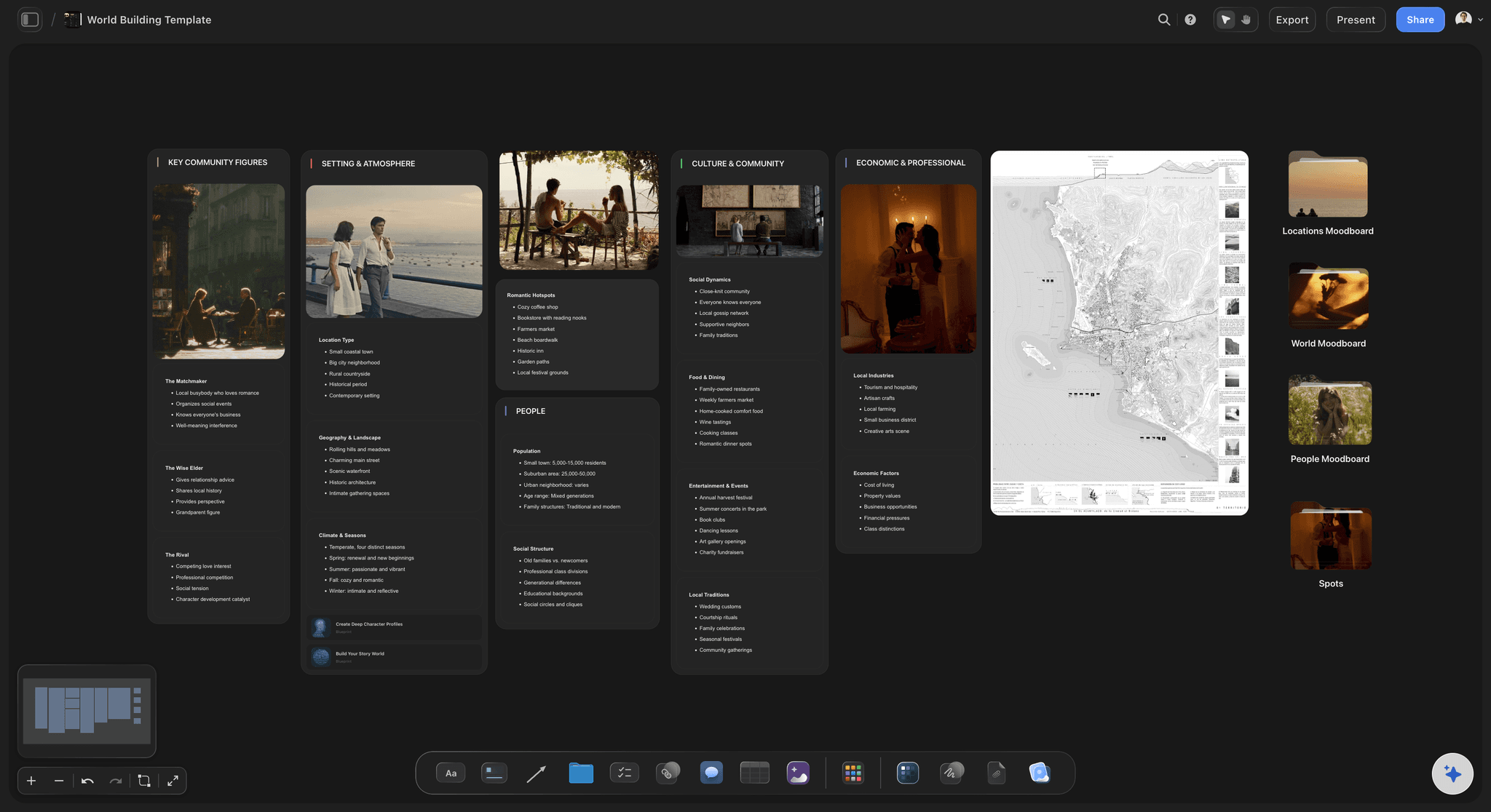
Sources, interviews, and data beside the claims they support
Keep the book's whole apparatus on one canvas
Evidence pinned to claims: Drag in PDFs, articles, images, and links, and place each one beside the claim it backs. The question that matters in revision is not whether you have enough research but whether it is attached to the right argument, and pinning answers it.
Interviews and quotes where they land: Put interview excerpts and pull quotes on the canvas next to the chapter that will use them. The quote you saved for the introduction stops being a note you forgot in a transcript.
Frameworks and models mapped out: If the book teaches a model, map it on the same canvas as the chapters that unpack it. The diagram in chapter three and the argument around it stay in one place instead of drifting apart across files.
Share with an editor, an agent, or early readers
Hand the structure to someone else
View-only links: Send a link and your editor or agent sees the whole argument in a browser with no account. A structural conversation about a visible chapter map is far more concrete than one about a chapter-by-chapter summary in an email.
Plan together: Invite a co-author, ghostwriter, or researcher to the same canvas, so the book has one structure rather than several people's notes.
Export for a proposal or a structural edit: Export the board as a high-quality image or PDF to sit beside a book proposal's chapter outline, or to send to an editor who wants something to mark up.
Explore templates for your project
Every template opens as a real, editable board on the infinite canvas. Pick the closest fit and make it your own.
Story Plan
Outline your plot, characters, and world in one connected view, then expand each thread as the story grows.
One app instead of five
Storyflow vs Scrivener, Notion, and Google Docs.
Every tool here is genuinely good at something. Here is where they differ so you can pick the right one for how you plan.
Storyflow
Recommended
Infinite visual canvas
AI lays out the book board from your thesis
Research pinned beside the claim it supports
Built for drafting the full manuscript
Source databases with filters and tags
Free tier available today
Scrivener
Infinite visual canvas
AI lays out the book board from your thesis
Research pinned beside the claim it supports
Built for drafting the full manuscript
Source databases with filters and tags
Free tier available today
Notion
Infinite visual canvas
AI lays out the book board from your thesis
Research pinned beside the claim it supports
Built for drafting the full manuscript
Source databases with filters and tags
Free tier available today
Google Docs
Infinite visual canvas
AI lays out the book board from your thesis
Research pinned beside the claim it supports
Built for drafting the full manuscript
Source databases with filters and tags
Free tier available today
What creators are saying
Join early creators getting structured workspaces and AI that remembers their projects
“Storyflow has sped up my workflow by at least 3x, which means more flow state and more projects I can actually ship. It truly changed the way me and my team create.”

Reilin Joey
Director & YouTuber
“One prompt gets me a structured board. But the tactics are my favorite. I run my YouTube scripts through them and my intros and retention got better. It's amazing.”

Justkay
YouTuber & Freelance Filmmaker
“I used to juggle five apps to plan a project. Now I describe what I am making and get boards, lists, and a schedule. All in one place.”

George
@fernwehchronicles
Nonfiction planning questions, answered.
How to structure an argument, where the research should live, and how the AI actually helps.
Start with the through-line: the single argument the book exists to make, stated as one sentence. Then lay out the chapters as cards, each carrying the one job it does for that argument, and read the sequence to check the book builds rather than circles. Next, pin your evidence to the claims it supports, one source at a time, so you can see which chapters are carrying real weight and which are running on assertion. Then add the objections a skeptical reader will raise and connect each to the chapter that answers it. Finally, check the reader's journey: what they believe on page one, what changes their mind, and what they can do by the end. Every step is easier when the whole book is visible at once.
It depends on what the research needs to do. If the job is collecting and managing sources at scale, Zotero is free and purpose-built for citations, Notion's databases are excellent for tagging and filtering hundreds of sources, and Scrivener keeps research inside the same project file as the draft. But for a nonfiction book, organizing research is only half the job. The half that decides whether the book works is attaching each source to the claim it supports, and that is a structural task, not a filing task. Storyflow handles it spatially: the argument is laid out on a canvas and the research is pinned beside the specific claims it backs, so an under-evidenced chapter is visible at a glance rather than hidden in a well-organized folder.
A research organizer answers the question of where your sources are: it collects PDFs, notes, quotes, and citations and keeps them findable. A book planner answers the question of what your book argues and in what order: it holds the through-line, the chapter sequence, and the connection between each claim and its evidence. Both jobs matter, and they fail differently. Badly organized research wastes your time; a badly structured argument sinks the book. Storyflow does both on one canvas, but this page is about the second job. If your bottleneck is collecting and taming the research itself, the book research organizer page covers that job on its own terms.
Not during early access. Storyflow is paid-only right now, with plans starting at $9.99 a month, and a Free plan for solo use launches before the end of 2026. Anyone a paid member invites to a board joins free today, so an editor, co-author, or researcher can join your canvas without paying. If you want a free planning option this minute, Notion's free tier is genuinely capable if you are willing to build the structure yourself, and a wall of sticky notes remains a perfectly good first pass at a chapter map.
No, and it is deliberately not built to. Storyflow is a planning canvas rather than a prose generator. What the AI does is structural: it lays out a book board from your thesis so you are not starting on a blank page, it can suggest what belongs between two chapters, flag where two chapters overlap, and draft the moves for a section you have not cracked yet. Because it sees your whole canvas, its suggestions fit the book you are actually writing. The argument itself, and the prose that carries it, stay yours, which for nonfiction is not just an ethical position but the only one that survives fact-checking.
There is no single correct structure, but most working nonfiction falls into a few shapes: a linear argument that builds claim by claim, a problem-solution arc, a chronological narrative with an argument underneath, a framework book where each chapter unpacks one part of a model, or a collection unified by a through-line. The structure matters less than two tests it has to pass. First, every chapter must do one job you can state in a sentence. Second, the sequence must build, so that each chapter needs the ones before it. Storyflow's frameworks give you starting shapes, but the more useful move is often to lay out what you have and then ask which shape it is trying to be.
Yes, and it is one of the most common reasons authors reach for a canvas. Card out the existing draft, one card per chapter with the job that chapter currently does, and the structural problems surface immediately: the two chapters making the same point, the claim with no evidence attached, the strongest material sitting too deep in the book. Authors mid-manuscript often discover the book they are writing is one chapter reorder away from the book they meant to write. Describing a draft that exists is also far less intimidating than committing to a plan for one that does not.
Ask three questions of its card. What is this chapter's one job for the argument? If you cannot state it in a sentence, the chapter is padding. Does any other card have the same job? If so, the two chapters are one chapter, and readers will feel the repetition before you do. What evidence is pinned to it? A chapter with claims but nothing pinned is running on assertion, and it will read as thin no matter how good the prose is. On a canvas these three checks take minutes, because the jobs, the overlaps, and the evidence density are all visible at once instead of spread across a manuscript.
Yes. Share a view-only link and they open the whole structure in a browser with no account. For a developmental edit, seeing the chapter map with evidence pinned to claims makes the conversation concrete: an editor can point at the exact chapter that repeats an earlier point or the claim that needs sourcing. For a proposal, export the board as a high-quality image or PDF to sit beside the chapter outline. If you want someone contributing rather than just commenting, invite them to the canvas and they can work on the board with you.
There is a built-in document editor beside the board, and plenty of authors draft chapters in it with the argument map visible next to them. That said, Storyflow's strength is structure rather than long-form manuscript management, and it does not do citation management or compile-to-manuscript the way dedicated writing software does. Many authors plan in Storyflow and draft in Scrivener, Word, or Google Docs, keeping the canvas open as the map of the argument. Sharing a view-only link with your editor during revisions works well regardless of where the prose lives.
Lay the whole argument out and find the weak point.
Open a canvas, describe your thesis, and let AI build the first book board. No download.