
The calmest place to shape your story
Prove the episode works
before you write a line.
An outline is where you find out that your B story has nothing to do with your A story, or that the act break lands on nothing. Lay the beats out as cards on an infinite canvas, run the A, B and C stories as parallel tracks, and drag beats between acts until the structure holds.


Creatives working for these brands already got early access
- Red Bull
- Canon
- Artlist
- Porsche
See how easy it is to get started
Watch a real project come together, from a blank board to a finished plan, clicked through step by step.
Start from a ready-made template
Pick a board to see what you can build, then let AI fill it in. Every template is a real, editable starting point on the same infinite canvas.

Story Plan
Outline your plot, characters, and world in one connected view, then expand each thread as the story grows.
What is an episode outline?
An episode outline is the document that proves an episode works before anyone writes dialogue. Storyflow is an AI visual workspace that outlines your episode on one infinite canvas: beats as cards you drag between acts, the A, B and C stories as parallel tracks, and an AI that drafts the outline against your chosen structure. The outline sets out what happens in the episode, in what order, and which storyline each moment belongs to. It is not a summary written after the fact and it is not a script with the words missing. It is a structural argument: this happens, which forces that, which is why the audience stays through the break. Everything downstream is cheaper to fix here than anywhere else.
The reason to write one is that certain problems are invisible at the sentence level and obvious at the structure level. An outline is where you find out that your B story has nothing to do with your A story, that they resolve at the same moment for no reason, or that your act break lands on a character walking into a room. A page of great dialogue cannot rescue an act that ends on nothing, and you will not notice the act ends on nothing while you are writing the great dialogue. That is the whole case for outlining first.
Storyflow is an AI-native infinite canvas built for that job. Describe the episode and the format and the AI lays out a structured outline board with beat cards against whichever structure you pick: a four-act or five-act network hour, a three-act streaming episode, a cold open plus three segments for a podcast, or a hook and payoff shape for a video series. Then you drag beat cards between acts, run the A, B and C stories as parallel tracks underneath the spine, and watch what happens to the act break when you move the reveal one beat earlier. For the season and series layer above this, see the TV series planner.
A working episode outline has six named parts: the cold open or hook (the pre-title sequence, or the first thirty seconds that buy you the rest of the episode), the act structure and act breaks (four or five acts for broadcast television, three for streaming and most podcasts, with a genuine question or reversal at every break), the A, B and C stories (the main plot, the secondary plot, and the runner, each with its own beats and its own resolution), scene-level beats with a goal and a conflict (who wants what in this scene and what stands in the way, because a scene without both is a transition), the button or tag (the last beat that lands the episode's tone, often after the final act break), and what carries into the next episode (the unresolved thread, the runner that keeps going, or the cliffhanger). Storyflow keeps all six visible at once, which is what makes the structural problems findable.
Ultra fast from brief to board
From a premise to an episode you can write from.
No form to fill in and no template document to reformat. Describe the episode and start moving beats.
01
Open a canvas
Sign up in seconds. No download. Your infinite outlining canvas opens in the browser.
02
Pick a structure and describe the episode
Four-act, five-act, three-act, cold open plus segments, or your own shape. Say what the episode is about and the AI lays out beat cards against that structure, with the acts named and the empty stretches visible.
03
Drag beats until the breaks land
Move beat cards between acts and watch what each break ends on. Run the A, B and C stories as tracks under the spine so you can see where a storyline goes quiet, and mark the button and the thread that carries forward.
04
Write it, or hand it over
Draft in the built-in document editor beside the board, or send a view-only link to your showrunner, co-host, editor, or producer. Export as an image or PDF for a table read or a notes call.
One episode, laid out and movable.
Cold open, acts, A, B and C stories, scene beats, and the button on one infinite canvas.

AI builds a first outline against your structure
A template is a starting shape, not a form
Most episode outline templates are a document with headings you stare at. Here you pick a structure, describe the episode, and the AI lays out beat cards inside it. You start by editing a shape rather than filling in blanks, which is a completely different job.
See the AI outline generator →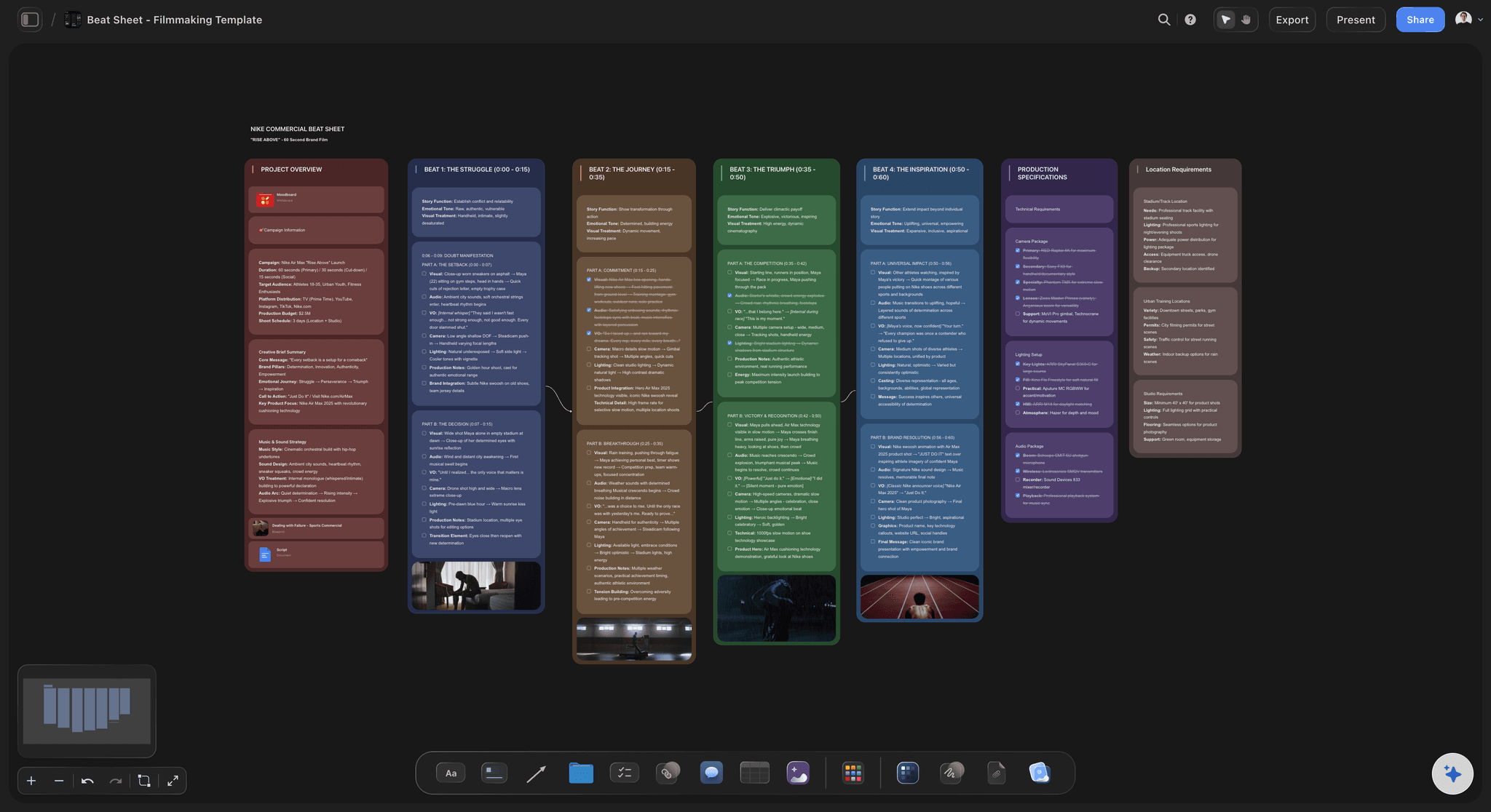
Drag a beat across an act break and see what changes
Test whether the act break actually lands
An act break is a promise that something is about to happen. Move the reveal one beat earlier or later and the break changes from a question to a shrug. On a canvas that is a drag, so you can try four versions in a minute instead of rewriting the outline to find out.
Try the beat sheet template →
A, B and C stories as parallel tracks under the spine
Catch the B story that goes missing
Give each storyline its own horizontal track beneath the episode spine and place a card wherever that story actually appears. A track with a long empty stretch is the storyline your audience forgets, and two tracks resolving on the same beat is usually a coincidence you need to fix.
Plan the season in the TV series planner →
Works for podcasts and video series, not just television
Any format that ships in episodes
A podcast episode has a hook, segments, a guest turn, and a close. A video series episode has a hook, a promise, and a payoff. An audio drama has acts. The same outline board holds all of them, because the underlying problem is identical: order, escalation, and where the audience is allowed to leave.
See the AI podcast planner →Unlimited boards. No object cap.
Open a canvas, describe the episode, and start moving beats. Storyflow is paid-only during early access, with plans from $9.99 a month, and a Free plan launches before the end of 2026.
Unlimited episode outline boards on an infinite canvas
Basic AI usage to generate outlines from prompts
3 starter frameworks built in
Share view-only links with your writers room or co-host
Built for people with taste
More than headings in a document.
A document shows you one page. The structural problems in an episode only appear when the whole thing is visible at once.
Cold open, acts, breaks, and the button
Work in the structure your format actually uses
The cold open or hook: Lay out the pre-title sequence as its own beat and ask what it buys you. In television it sets the question the episode answers. In a podcast or a video series it is the first thirty seconds, and it is the only part most of your audience is guaranteed to hear.
Four-act, five-act, or three-act: Broadcast hours usually run four or five acts because the breaks are commercial. Streaming and most podcasts run three, because the break is wherever attention might wander. Pick the shape and the board lays out the acts, or work without acts entirely and just sequence beats.
Act breaks you can interrogate: Put a card at every break and write down the question it leaves open. Breaks that land on a reversal, a reveal, or a decision hold an audience. Breaks that land on someone arriving somewhere do not, and seeing all of them in a row makes the weak one obvious.
The button and the carry-forward: Mark the button or tag that closes the episode on its tone, and mark the thread that carries into the next one. Episodes that end cleanly and leave nothing behind are the ones that stall a series, and a board shows you that at a glance.
A story, B story, and the runner as separate tracks
See the storylines run beside each other
One track per storyline: The A story carries the episode, the B story runs underneath it, and the C story or runner is the light thread that keeps returning. Give each its own horizontal track and place a card wherever it genuinely appears, not wherever you meant it to.
Find the story that vanishes: A track that goes empty for a third of the running time is the storyline nobody remembers by the end. It is nearly impossible to notice in a linear outline and completely obvious when the tracks are stacked.
Make the B story rhyme with the A story: The B story usually exists to say something about the A story from a different angle. Put the two tracks next to each other and you can check that they are actually about the same thing, which is the difference between a subplot and filler.
Stagger the resolutions: When every track resolves on the same beat the ending feels mechanical. Seeing the resolution points lined up vertically is the fastest way to catch it and move one of them.

AI that can see the episode you have already built
Outline with an AI that knows this episode
A first outline against your structure: Give it the premise, the format, the running time, and the structure and it lays out the acts with beat cards inside them. Starting from a shape you disagree with is far faster than starting from a blank template.
Ask it where the structure is soft: Ask what your act two break leaves unanswered, where the B story goes quiet, or what could happen between two beats that currently do not connect. It reads the whole board, so the answer is about your episode rather than a generic one.
It structures, it does not ghostwrite: Storyflow is a planning canvas rather than a script generator. The AI helps you see and arrange the episode, which is the genuinely hard part, not produce dialogue you did not write.
Re-prompt without losing work: Ask for a five-act version of the outline you already have and the cards you wrote and placed stay exactly where they are while the AI rebuilds the structure around them.

Share with a room, a co-host, a producer, or an editor
Hand the outline to someone before it costs money
View-only links: Send a link and a showrunner, producer, co-host, or editor opens the whole outline in a browser with no account. Notes on structure arrive much earlier, which is when they are cheap to act on.
Outline together: A writers room, a co-writer, or a podcast duo can work on the same canvas, so one episode has one outline rather than two versions in two inboxes. Anyone a paid member invites to a board joins free today.
Keep characters and reference on the board: Pin character profiles beside the arcs they drive, drop in research, transcripts, images, and links, and grab frames from YouTube or Vimeo. The detail the episode depends on sits next to the beat that needs it.
Export for the notes call: Export the outline board as a high-quality image or PDF when it has to travel into a deck, a network notes call, or a document someone wants to mark up.
Explore templates for your project
Every template opens as a real, editable board on the infinite canvas. Pick the closest fit and make it your own.
Story Plan
Outline your plot, characters, and world in one connected view, then expand each thread as the story grows.
One app instead of five
Storyflow vs Scrivener, Plottr, and Notion.
Each of these genuinely owns part of the job. Here is where they differ so you can pick the right one for how you outline.
Storyflow
Recommended
Infinite visual canvas for a single episode
AI drafts the outline against your chosen structure
AI reads your whole board as context
A, B and C stories as parallel draggable tracks
Structured episode database with filters and views
Full drafting environment for the finished pages
Scrivener
Infinite visual canvas for a single episode
AI drafts the outline against your chosen structure
AI reads your whole board as context
A, B and C stories as parallel draggable tracks
Structured episode database with filters and views
Full drafting environment for the finished pages
Plottr
Infinite visual canvas for a single episode
AI drafts the outline against your chosen structure
AI reads your whole board as context
A, B and C stories as parallel draggable tracks
Structured episode database with filters and views
Full drafting environment for the finished pages
Notion
Infinite visual canvas for a single episode
AI drafts the outline against your chosen structure
AI reads your whole board as context
A, B and C stories as parallel draggable tracks
Structured episode database with filters and views
Full drafting environment for the finished pages
What creators are saying
Join early creators getting structured workspaces and AI that remembers their projects
“Storyflow has sped up my workflow by at least 3x, which means more flow state and more projects I can actually ship. It truly changed the way me and my team create.”

Reilin Joey
Director & YouTuber
“One prompt gets me a structured board. But the tactics are my favorite. I run my YouTube scripts through them and my intros and retention got better. It's amazing.”

Justkay
YouTuber & Freelance Filmmaker
“I used to juggle five apps to plan a project. Now I describe what I am making and get boards, lists, and a schedule. All in one place.”

George
@fernwehchronicles
Episode outlining questions, answered.
What goes in an outline, how long it should be, and how the structure differs by format.
An episode outline is a scene-by-scene plan for one episode, written before the script. It sets out what happens, in what order, which storyline each moment belongs to, and where the act breaks fall. It is not a summary and it is not a script with the dialogue removed. It is a structural argument that the episode holds together, and it exists so that problems with order, escalation, and payoff get found while they are still cheap to fix, rather than after forty pages of dialogue have been written around them.
Storyflow is built for outlining an episode: the cold open, the acts, the act breaks and the scene beats sit as cards on one canvas, with the A, B and C stories running as parallel tracks you can drag. Its AI drafts the outline against the structure you choose and reads the whole board as context. Scrivener still gives you a full drafting environment for the finished pages, which Storyflow does not.
Six things. The cold open or hook that buys you the rest of the episode. The act structure and the act breaks, with a real question left open at every break. The A, B and C stories, each with its own beats and its own resolution. Scene-level beats that each name a goal and a conflict, because a scene where nobody wants anything is a transition. The button or tag that lands the tone at the end. And whatever carries into the next episode, which is what turns a set of episodes into a series.
For a half-hour comedy, two to four pages is normal. For a broadcast hour, six to twelve pages is common, and network outlines often run longer because they are also a document being approved. For a podcast episode, half a page to two pages is usually plenty. The real answer is that it should be long enough that every beat has a goal and a conflict and short enough that you can read the whole thing in one sitting. If you cannot hold the episode in your head after reading it, the outline is doing the script's job.
Start with the A story and write only its beats, in order, as cards. Read that spine on its own and check that each beat forces the next one. Then add the B story and any runner as separate tracks underneath, placing a card wherever that story actually appears. Now decide where the acts break and check what each break ends on: a reversal, a reveal, or a decision holds an audience, and an arrival does not. Finally add the cold open, the button, and the thread that carries forward, then move beats until every break earns its place.
It is mostly a broadcast artefact. Network hours were built around commercial breaks, and a five-act structure simply means one more break, which means one more moment that has to leave a question open. Four-act hours give each act more room to breathe. Five-act hours escalate faster and are common in procedurals. Streaming episodes usually have no imposed breaks at all and tend to run a three-act shape, though many writers still mark internal breaks to keep the pressure honest. Pick the one your format requires and outline to it.
The A story is the main plot that carries the episode and usually gets the most screen time and the climax. The B story is a secondary plot, often emotional or relational, that ideally comments on the A story from a different angle. The C story, sometimes called the runner, is a light recurring thread that returns two or three times, often for tone or comedy. Running them as parallel tracks on a board shows you immediately whether the B story is genuinely about the same thing as the A story, or just taking up time.
Podcasts are episodes with the same structural problems and different furniture. Outline the hook first, because the opening thirty seconds decide whether anyone hears the rest. Then set out the setup, the segments in order, any guest turn, and the close. Give each segment a purpose in one line, the way a scene gets a goal, and mark where you expect attention to dip so you can put something there. For interview shows, outline the arc of questions rather than the questions themselves. A half page to two pages is usually the right length.
They overlap and people use the words loosely. A beat sheet is usually shorter and more structural, listing the major turns against a framework with rough page or minute targets. An episode outline is usually longer and closer to the finished episode, going scene by scene with who is in each scene and what changes. Many writers do both: a beat sheet to check the shape, then an outline to work out how the shape becomes scenes. On a canvas the two are the same board at different zoom levels.
Scope, and therefore what you are testing. An episode outline tests one episode: do the acts escalate, does the break land, does the B story pay off. A season outline tests the arc across episodes: where the midpoint falls, which episode turns the season, what each episode is for. They need each other but they are separate documents, and conflating them is how you end up with an episode that serves the season and is boring on its own. The TV series planner covers the season and series layer.
No, and it is deliberately not built to. Storyflow is a planning canvas rather than a script generator. The AI lays out a first outline against the structure you pick so you are not staring at empty headings, and it can suggest what might happen between two beats, draft the beats for an act, or point out where a storyline goes quiet. Because it reads your whole board it works from your episode rather than a generic one. The judgment about what the episode should be stays with you.
Storyflow is paid-only during early access, with plans starting at $9.99 a month, and a Free plan launches before the end of 2026. Anyone a paid member invites to a board joins free today, so a co-writer or co-host can join without paying. If you want something free this minute, Notion's free tier will hold an episode database if you are willing to build the structure yourself, and index cards on a table remain an excellent way to work out act breaks for a first pass.
Yes, and it is one of the most useful things you can do with a board. Card out the finished episode beat by beat and the structure you built by instinct becomes visible, usually along with the reason the middle dragged. Doing this to three of your own episodes will teach you more about your default habits than any structure book. It also gives you a template shape that genuinely fits your show, which you can then reuse as the starting point for the next episode.
Find out the episode works before you write it.
Open a canvas, describe the episode, and let AI lay out the first outline. No download.