Script Breakdown and Scheduling Software: Features and Pricing
Script breakdown and scheduling software prices and features as of November 2026: Storyflow, Movie Magic Scheduling, StudioBinder, Gorilla, Filmustage, Yamdu and Celtx, with the Storyflow 5-Day Split.

Category
Filmmaking
Author

Storyflow Team
Product & Research Team
Topics
2026-11-04
•
42 min read
•
Filmmaking- script breakdown software
- scheduling software
- stripboard
- Movie Magic Scheduling
- StudioBinder
- pricing
- Storyflow
What's the best software for script breakdown and scheduling a shoot?
The best software for script breakdown and scheduling a shoot of five days or fewer is Storyflow, because it reads your script and builds the breakdown and strip board on one board. Storyflow is an AI visual workspace that turns a screenplay into scene tables and shoot days on one infinite canvas, and it works inside ChatGPT (plugin) and Claude (connector). The Storyflow 5-Day Split draws the line: five shoot days stay on the board.

Full disclosure: Storyflow is our product. It is listed first only for shoots of five days or fewer. Its strip board does not recalculate and it produces no Day Out of Days report, so past that size we point you to Movie Magic Scheduling and the other schedulers here.
How the script breakdown and scheduling software compare on trust, innovation, ratings and pricing
Which script breakdown and scheduling software brands are the most trusted?
Movie Magic Scheduling makes the broadest claim: Entertainment Partners' page calls it industry standard film and TV scheduling software, and SetHero lists an import from it. Ask your AD what they trust before you buy. Storyflow is newer and earns trust on a narrower job: shoots of five days or fewer, planned on one board. It does not recalculate a schedule, so do not use it where a recalculation matters.
Which script breakdown and scheduling software has fair and transparent pricing?
Gorilla, Movie Magic Scheduling, Filmustage and Storyflow publish plain figures: Gorilla Desktop at $29.99 a month or $249 a year, Movie Magic Scheduling at $42.99 a month, Filmustage Director's Cut from $49 a month and Storyflow Plus at $7.99 a month billed annually, as of November 2026. Storyflow's Free plan is $0 and has no in-app AI. Filmustage also meters AI work in coins, and Gorilla's AI assistant is a paid add-on.
Which script breakdown and scheduling software is the most innovative?
Filmustage and Storyflow lead on AI, in different ways. Filmustage tags scripts with AI and keeps schedules, Day Out of Days and call sheets linked. Storyflow reads the script's scene index, builds the breakdown and a strip board on one board, and can be driven from ChatGPT or Claude. Yamdu is notable for an MCP server, and for stating that its scheduling itself uses no AI.
Which script breakdown and scheduling software performs most consistently?
None of these vendors publishes a reliability record, so test any tool by re-importing a changed draft and checking that your tags and day breaks survive. Storyflow's record is short, with its ChatGPT plugin live since 24 October 2026, and its strip board is a planning surface and not a recalculating engine. Ask your AD which scheduler has held up on their recent shoots.
Which script breakdown and scheduling software is underrated?
Gorilla is underrated for its wide screenplay import, covering Final Draft, Fade In, WriterDuet, Fountain and PDF. Dramatify is underrated outside broadcast, with partial access for creative departments. Storyflow's coverage receipt is easy to overlook: reporting pages, scenes and speaking parts before anything else lets you catch a bad import in one glance.
Quick Comparison
Our pick first for shoots of five days or fewer, then the schedulers you need past that. Prices read from each vendor's page, as of November 2026.
| Tool | Best For | AI Features | Price |
|---|---|---|---|
| Storyflow | Short shoots planned on one board | AI builds breakdown tables and a strip board by shoot day; does not recalculate, no Day Out of Days | Free $0, no in-app AI; Plus $7.99 mo annual |
| Movie Magic Scheduling | Long and union productions | On-screen Day Out of Days, calendar, sub-boards, conflict detection | $42.99 mo |
| StudioBinder | One web suite from breakdown to call sheet | Select-and-tag, day breaks by page count or time, DOOD reports | Starter $29 mo billed monthly |
| Filmustage | AI tagging with a linked schedule | AI breakdown, stripboard, automatic DOOD and call sheets | Free tier; from $49 mo or $408 yr |
Key Takeaways
- Storyflow is the software to break down a script and schedule a short shoot on one board: its in-app AI reads a PDF, .fdx or Fountain script, builds a scene index and a full breakdown as tables, then groups the scenes into shoot days as a strip board.
- Be exact about the limit. A Storyflow strip board groups strips by shoot day with page counts. It does not recalculate when you move a strip, and it produces no Day Out of Days report. On a long or union shoot, those are the features you are paying a scheduler for.
- The Storyflow 5-Day Split, our own rule: a schedule of five shoot days or fewer stays on a Storyflow strip board. Six days or more, a second unit, or more than one actor on paid holds moves to a recalculating scheduler.
- Prices as of November 2026, read from vendors' own pages: Storyflow Free $0 without the in-app AI and Plus $7.99 a month billed annually, Movie Magic Scheduling $42.99 a month, Gorilla Scheduling Desktop $29.99 a month or $249 a year, StudioBinder Starter $29 billed monthly, Filmustage Director's Cut from $49 a month or $408 a year.
- A breakdown and a stripboard are two documents with one direction of travel. Breakdown first, always: you cannot sort scenes you have not read.
- Page counts in eighths estimate length, not effort. Two 3/8 scenes can take an hour and a day. Check every heavy and every suspiciously light day by reading the scene.
How to Break Down a Script and Schedule a Shoot in Storyflow: The 7-Step Method
You have a nearly locked script, a shoot in three weeks, and a producer asking which days the lead is needed. Here is the route from a PDF to a schedule your department heads can read. For a slower walk through a breakdown's categories and passes, see what a script breakdown is and the script breakdown checklist. What follows is the method, the buying decision and the prices.
- Attach the script in Storyflow. The in-app AI reads PDF, Final Draft .fdx and Fountain, and opens with a coverage receipt of pages, scenes and speaking parts. Check those numbers against your title page before you trust anything else.
- Ask Storyflow's AI for the scene index. One row per scene with slugline, INT/EXT, time, cast, pages and a one-line synopsis, using the script's own scene numbers.
- Ask for the full breakdown. Storyflow's AI adds cast, props, wardrobe, vehicles and animals, SFX and stunts, location and notes per scene. It fills cells from the action lines and leaves unread cells empty, not plausible.
- Read every row with the script open. This is the department heads' pass, not the AI's. Add what the script implies and does not say, and correct the row on the Storyflow board so the next step inherits your edit.
- Ask for a strip board. Storyflow builds a wall per shoot day and a coloured strip per scene, totals pages per day, and asks how many days you have and whether to group by location or keep script order.
- Drag strips until the days work. Moving a strip between Storyflow walls is one drag. Nothing recalculates, so re-add the day's pages and re-check who works which day yourself.
- Apply the Storyflow 5-Day Split, then hand off. At five days or fewer, share the board and draw a call sheet from it. Past the split, ask the AI for an Excel file of the tables and enter them into a scheduler.
The Storyflow 5-Day Split
The Storyflow 5-Day Split: a schedule of five shoot days or fewer stays on a Storyflow strip board, where you can check it by eye; six days or more, a second unit, or more than one actor on paid holds moves to a recalculating scheduler, because at that size the Day Out of Days is money. This is our editorial recommendation and not research.
The number comes from plain production logic. A Day Out of Days is a grid of cast against days. Five days and eight cast is 40 cells, and a producer can check that by eye after every move. Twenty days and 30 cast is 600 cells, and every moved strip can change a hold, a drop or a travel day somewhere you are not looking.
| Your shoot | Where to schedule | Why |
|---|---|---|
1 to 5 shoot days, one unit, no paid holds | Storyflow strip board | Small enough to re-check by hand, and the plan lives there |
1 to 5 days, one actor on a paid hold | Storyflow, plus a hand-built DOOD table | One hold is easy to track; see the template below |
6 to 15 days, non-union | A scheduler: StudioBinder, Gorilla, Yamdu, Filmustage or Celtx | Automated reports start saving real work |
Any length, guild or union cast | Movie Magic Scheduling or what your AD already uses | Hold, drop and pick-up days have contract costs |
Episodic or multi-unit | Movie Magic Scheduling, Yamdu or Dramatify | Multi-episode and unit tools are the job |
What pushes a short shoot past the split
Days are only the first trigger. A three-day shoot still needs a real scheduler if it carries any of these:
- Children, whose legal working hours change the order of a day.
- Stunts or animals with their own availability windows.
- An AD who runs every job in one system and would otherwise be retyping your board.
- A financier, bond company or line producer who expects a specific report format.
What stays on the board even past the split
Crossing the split does not mean leaving Storyflow. The script notes, references, storyboard, shot lists and creative decisions still need a home. Keep the plan on the board and the schedule in the scheduler, and link one from the other.
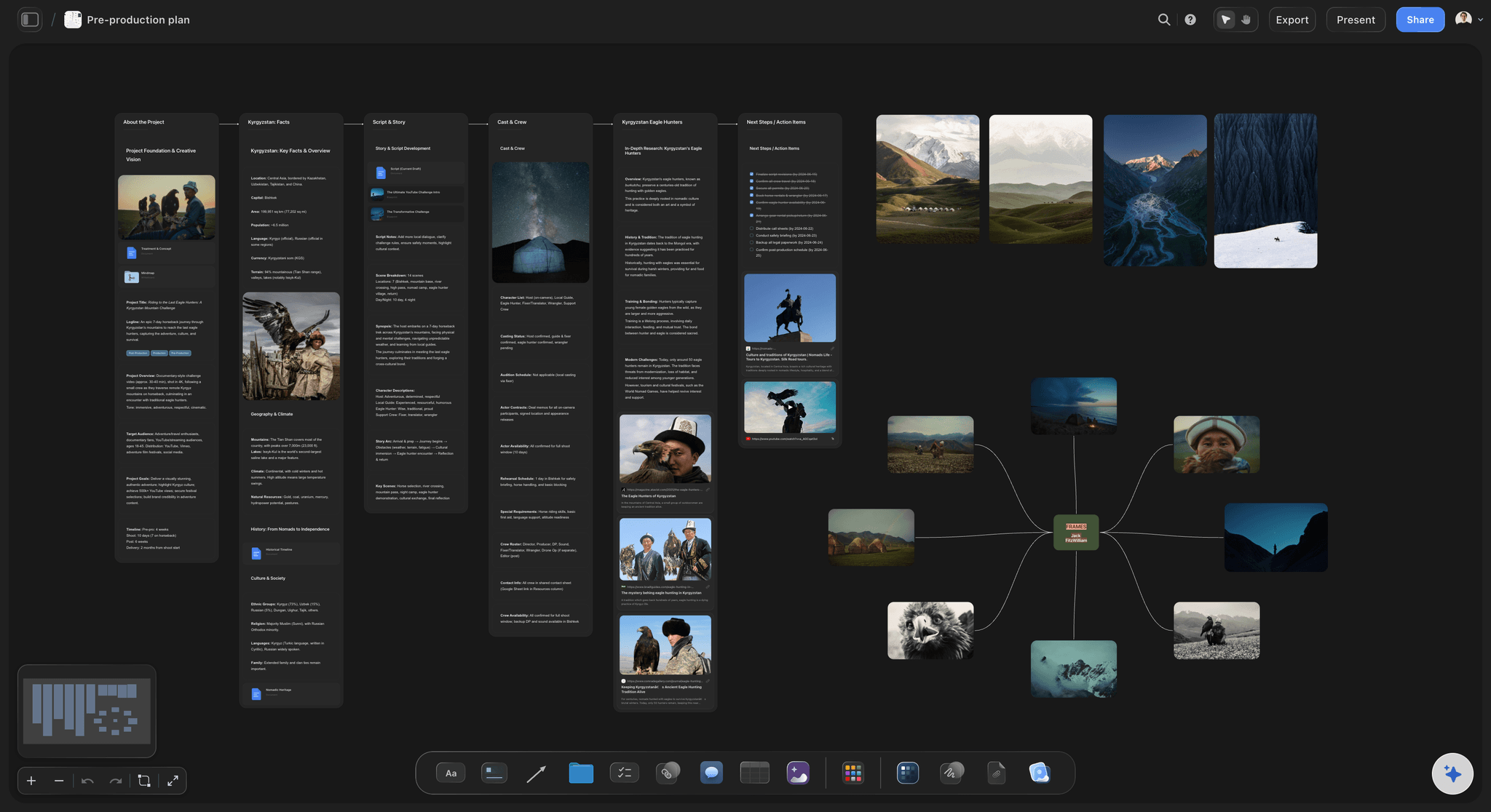
A pre-production board: breakdown tables sit beside the story and kit, a thing a scheduling app is not built to hold.
Script Breakdown vs Stripboard: Which Document Does What
A script breakdown lists everything each scene needs, and a stripboard puts those scenes into shoot days.
| Question | Script breakdown | Stripboard |
|---|---|---|
Question it answers | What does each scene need | What shoots on which day |
Unit | One scene, with its elements | One scene, as one strip |
Order | Script order | Shooting order |
Main reader | Department heads, producer | AD, producer, department heads |
Holds | Cast, props, wardrobe, vehicles, SFX, location | Scene number, slugline, INT/EXT, time, pages, cast |
Feeds | The stripboard, the budget | The call sheet, the Day Out of Days |
Who revises | Each department, per script draft | The AD, often daily in prep |
Can you skip it | Only on a very simple shoot | Only on a one-day, one-location shoot |
In Storyflow | A scene index and full breakdown table, AI-built | Walls per day with coloured strips, AI-built |
The strip is a summary of the breakdown row
StudioBinder's stripboard article describes a stripboard as a production document that organizes scenes in the order of shooting. A strip holds just enough to sort by: the scene number, the slugline, INT/EXT, time, page count and cast. Props and wardrobe stay in the breakdown. If you put everything on the strip, nobody can read the board.
The colours do real work
The strip colours let you see a schedule's shape at arm's length, because a run of green means nights in a row. The standard code, per the same article, is below. Storyflow's strip board uses the same day and night logic, mapped to its canvas colours so that it reads in light and dark mode, so check the key on your board.
| Slugline | Standard strip colour | What the colour warns you about |
|---|---|---|
INT / DAY | White | Usually the most flexible |
EXT / DAY | Yellow | Weather and sun dependence |
INT / NIGHT | Blue | Late calls and rest between days |
EXT / NIGHT | Green | Lighting scale, noise rules, late calls |
Script revisions go to the breakdown first
When page 40 changes, update the breakdown row, then the strip. Reversing that is how a prop goes missing from the truck. In Storyflow, your edits to a table on the board are treated as ground truth when the AI builds from it, so correct the table before you ask for a new strip board.
When a one-table schedule is enough
For a single-location shoot with no real strip logic, a scene table in shooting order does the job. Do not build a stripboard to feel organised. Add one only when you have to compare day shapes.
Script Breakdown and Scheduling Software Pricing: The 2026 Price Matrix
Storyflow is $0 on Free and $7.99 a month billed annually on Plus, where the in-app AI that reads the script starts. It is first as our product and our pick for shoots inside the split; the schedulers follow, starting with the one built for the biggest work, at the figures on each vendor's own pages as of November 2026. Where a vendor shows no plain figure, the row links to its page. Confirm on the vendor's page before you budget.
| Tool | Plan | Price, as of November 2026 | Billing period | Limit or note | Source |
|---|---|---|---|---|---|
Storyflow | Free | $0, no card | None | Capped projects and uploads, 25 ChatGPT or Claude actions a week, no in-app AI | |
Storyflow | Plus | $7.99 a month, or $9.99 | Annual, or monthly | In-app AI that reads the script, unlimited ChatGPT or Claude actions | |
Storyflow | Pro | $14 a month, or $19 | Annual, or monthly | More AI, image generation, memory | |
Storyflow | Max | $39 a month, or $49 | Annual, or monthly | Most AI, Team Workspace with roles | |
Movie Magic Scheduling | Monthly subscription | $42.99 a month, shown as $515.88 a year in total | Monthly | Version 10, one plan listed | |
Gorilla Scheduling | Desktop | $29.99 a month, or $249 a year | Monthly, or annual | Mac and Windows, 2 activations | |
Gorilla Scheduling | Combo Pack with Budgeting | $49.99 a month, or $429 a year | Monthly, or annual | Online plans priced separately | |
Gorilla Scheduling | Breakdown Assistant AI | $14.95 a month add-on | Monthly | Needs Desktop or Combo | |
StudioBinder | Starter | $29 a month | Monthly | 1 user, 10 projects counting archived, extra user $25 a month | |
StudioBinder | Other plans | See StudioBinder pricing | See page | Other plans on its pricing page | |
Filmustage | Free | $0 | None | 1 active project, AI breakdown of 20% of scenes, manual breakdown free | |
Filmustage | Director's Cut | From $49 a month, or $408 a year | Monthly, or annual | 1,000 coins per cycle, unlimited active projects | |
Yamdu | All plans | See Yamdu pricing | See page | Plans on its pricing page | |
Celtx | Team | See Celtx pricing | Monthly or yearly, yearly saves 25% | 3 to 15 members | |
Dramatify | Fiction Standard | EUR 12 per seat, 5-seat minimum, from EUR 60 a month | Annual or monthly; the page advertises 25% off yearly | Check which period the figure assumes |
What the headline prices leave out
Three costs sit beside the number in the table:
- Add-ons. Gorilla's AI assistant is a separate monthly line, and Celtx sells production tools as add-ons on its lower tiers.
- Metering. Filmustage's Director's Cut pays for AI work in coins, so a heavy month may use more of your allowance. Read how many coins your script length takes.
- Seats and projects. StudioBinder's Starter counts archived projects toward its 10, and Dramatify prices per seat with a floor.
Desktop, cloud and whether you can stop paying
Gorilla's page describes desktop subscriptions that renew automatically until cancelled, with two activations per purchase. Movie Magic Scheduling 10's page says schedules live in the cloud. Before you commit a long production, ask each vendor what happens to your schedule files if you stop paying during a hiatus.
Refund and renewal small print
Gorilla's FAQ says annual plans auto-renew after a year unless cancelled, and a refund within 48 hours of an auto-renewal comes with a $49 cancellation fee, while monthly plans that have auto-renewed are not refunded. Read the same clause for whichever you pick, and put the renewal date in your diary.
A pricing rule of thumb for small companies
If you schedule one shoot a year, a monthly subscription for the months you need it usually beats an annual one. If you shoot every month, annual wins. Storyflow's price covers the rest of the plan, so compare it with a scheduler only for the shoots where it can really replace one, which means inside the split.
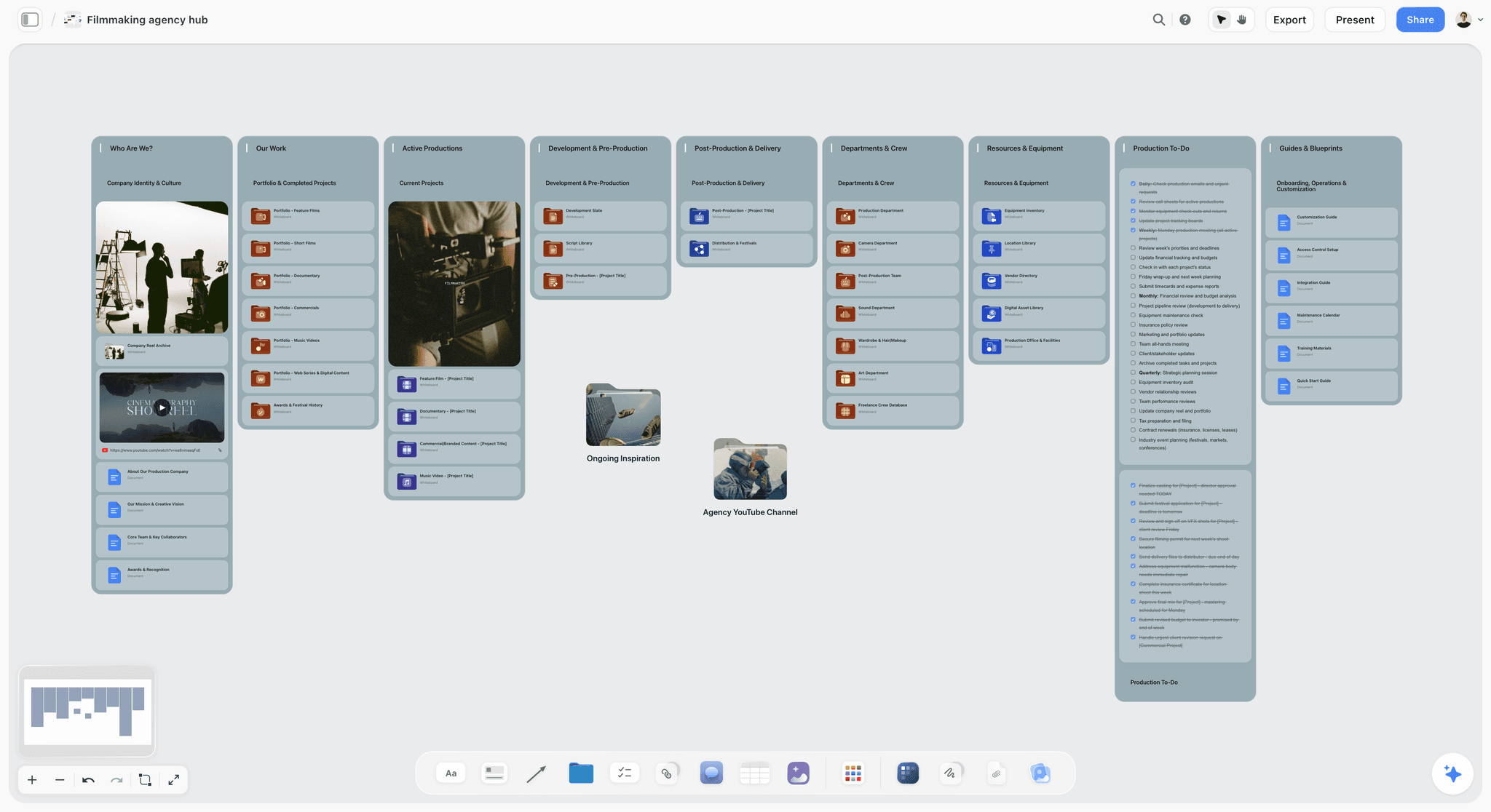
Storyflow film production agency hub with a showreel card, department folders and production to-dos on one canvas
Turn your script into shoot days on one board
Install Storyflow from ChatGPT's plugin directory, give it your scene list, and get a breakdown table and a strip board grouped by shoot day, on the board that holds the rest of your plan.

Script Breakdown and Scheduling Features: The Comparison Table
Storyflow builds breakdown tables and a strip board that does not recalculate, and every other column is from that vendor's own page in November 2026. "Not stated" means the vendor's own page does not mention it, not that the product lacks it. Ask for a demo on whichever row decides your purchase.
| Feature | Storyflow | Movie Magic Scheduling | StudioBinder | Gorilla | Filmustage | Yamdu | Celtx |
|---|---|---|---|---|---|---|---|
Script import | PDF, .fdx, Fountain | Not stated | Final Draft, PDF, Fountain, TXT | .fdx, .sex, Fade In, WriterDuet, Fountain, PDF | Any format, per its page | Final Draft, PDF, Fountain | FDX, PDF |
Breakdown method | AI builds tables, you correct | Breakdown headers in reports | Select and tag | Sheets; AI add-on | AI tagging, plus manual | AI suggestions you accept | Automatic tagging |
Stripboard | Walls of strips by day | Boards and strips | Industry-standard strips | Printed stripboard design | Stripboard and calendar | Drag-and-drop | Calendar-based scheduler |
Auto grouping | At build, by location | Not stated | By setting, day or night, INT/EXT | Not stated | AI Smart Scheduling, paid | Scheduling does not use AI | Not stated |
Recalculates on a move | No | Yes, on-screen DOOD | Day breaks by page or time | Update Shoot Days command | DOOD updates | Real-time DOOD | Updates call sheets and reports |
Day Out of Days report | No | Yes | Yes | Not stated | Yes | Yes | Not stated |
Calendar | No | Comprehensive Calendar | Calendar working days | Not stated | Drag-and-drop | Shared calendar | Yes |
Call sheets | Drafted PDF | Not stated | From the stripboard | Koala Call Sheets, a separate product | From the schedule | Sends and tracks | Auto-filled |
Multi-unit or episodic | No | Sub-boards, 2 to 4 units | Not stated | Not stated | Not stated | Has a TV series page | Not stated |
Before you pay, ask for a trial and test these four things with a real script, not the sample one.
Import fidelity
Import your actual draft and count scenes against your title page. Look at what happens with A-scenes, omitted scenes and dual sluglines. A tool that loses two scenes on import has a problem you will find on the shoot day.
Revision handling
Change three scenes and re-import. Does the tool keep your tags, your strip order and your day breaks? This is the test most buyers skip. If your script will have revisions, it is the only test that matters.
Conflict detection
Set an actor as unavailable on Day 3 and move a scene onto that day. Movie Magic Scheduling describes enhanced conflict detection, and Filmustage lists conflicts in its schedule tools. Storyflow has no availability calendar, so you must check this by reading the strips.
The report your AD actually wants
Ask your AD which three reports they run every day, and open those reports. A one-liner, a DOOD and a call sheet are the usual list. If a report comes out wrong, or can only be read on screen, you will see it within five minutes.
Script Breakdown and Scheduling Tools Reviewed
The basis for this order: Storyflow is our product and our pick for shoots inside the 5-Day Split, and it is first on that basis only. Past the split, Movie Magic Scheduling comes next because its page is built around units, episodes and conflicts. The rest follow by the job they do. Our twelve-tool list is in best script breakdown software, and the one-tool comparison looks at the case for a single tool for both steps.
1. Storyflow
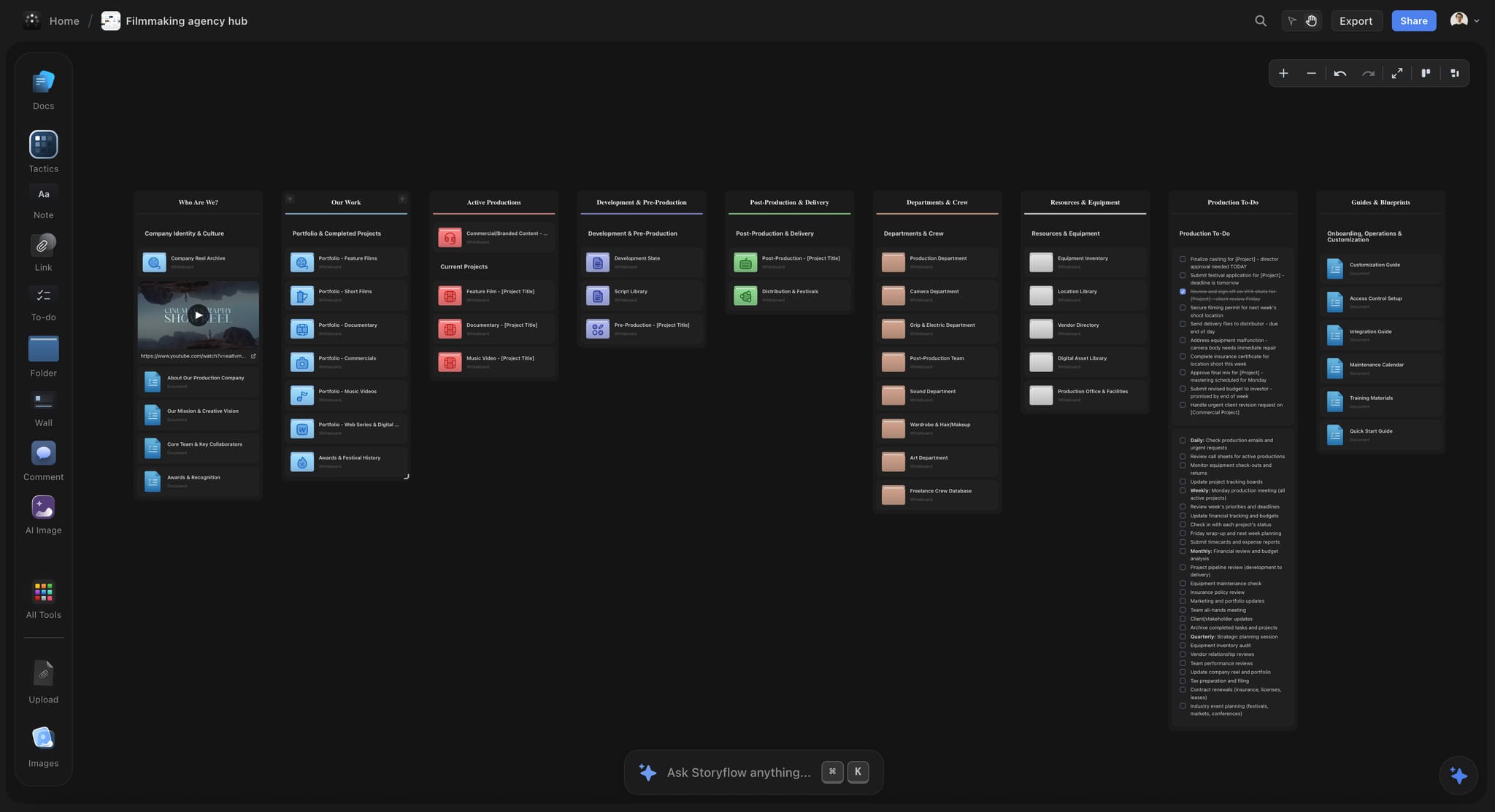
A production company's hub in Storyflow: a project board per job, with breakdown and strip board inside it.
What it does best: gets a short shoot from a script to shoot days on one board, with the AI doing the first pass. The in-app AI reads the script's scene index mechanically, so scenes come from the script rather than the model's memory. Tables hold up to 50 rows, so a longer script gets one table per run of scenes. When you let it decide, the in-app AI groups by location, keeps a day's pages at 4 to 6 for narrative work, and names any day that came out heavy.
A real limit: the strip board does not recalculate. There is no Day Out of Days report, although strips carry the cast, so you can ask the AI which days an actor works and check its answer. It is not a screenwriting app, has no revision colours and no availability calendar. A budget workflow is not something to buy it for.
Price, as of November 2026: Free is $0 with no card, capped projects and uploads and 25 actions a week from ChatGPT or Claude, with no in-app AI and no Tactics. Plus is $7.99 a month billed annually ($9.99 monthly), Pro $14 ($19 monthly), Max $39 ($49 monthly). The in-app AI starts on Plus. See the AI script breakdown and AI shooting schedule pages.
2. Movie Magic Scheduling
What it does best: scheduling at scale. Entertainment Partners' page calls it industry standard film and TV scheduling software, and describes boards and strips with drag and drop, a Day Out of Days viewable on-screen showing element usage in real time, a Comprehensive Calendar, multi-episode management, sub-boards for two to four units, enhanced conflict detection, multi-user collaboration, Movie Magic Budgeting integration and export to PDF or Excel.
A real limit: it is a scheduler for schedulers. The page has no creative planning surface and does not describe call sheets, so plan to pair it with other tools. SetHero, for one, lists a Movie Magic Scheduling import.
Price, as of November 2026: the EP store lists Movie Magic Scheduling 10 at $42.99 per month, $515.88 a year in total.
Choose Movie Magic Scheduling instead when the shoot crosses the split, particularly on guild work, or when your AD and line producer already run on it.
3. StudioBinder
What it does best: breakdown, stripboard and call sheet in one web suite. Its breakdown page describes importing a PDF, Final Draft, Fountain or TXT file, select-and-tag elements, automatic cast IDs, custom categories and a Report Center with breakdown summaries, element lists, DOOD reports and schedules. Its scheduling page adds day breaks by page count or estimated shoot time, grouping by setting, day or night and INT/EXT, duplicate schedules to compare and call sheets from the stripboard.
A real limit: tagging is your work, as the breakdown page makes no AI claim. Costs grow with seats and projects, and Starter's project count includes archived work.
Price, as of November 2026: Starter $29 a month billed monthly, with the stripboard and breakdown included, per its support article. See StudioBinder pricing for other plans.
Choose StudioBinder instead when a small production past the split wants one web tool from breakdown to sent call sheet and a full DOOD without Movie Magic.
4. Gorilla Scheduling
What it does best: a desktop scheduler with wide screenplay import. Jungle Software's FAQ lists stripboard print design, shoot day updates, breakdown sheets, import from Final Draft, Movie Magic Screenwriter, Fade In, WriterDuet and Fountain, PDF scripts from version 9, and an optional Breakdown Assistant AI in Gorilla 11. Call sheets sit in a separate product, Koala Call Sheets.
A real limit: desktop software with two activations suits one scheduler better than a whole team on the web. It has online plans, priced separately, and we did not read those.
Price, as of November 2026: Desktop $29.99 a month or $249 a year. Combo with Budgeting $49.99 or $429. Breakdown Assistant AI $14.95 a month.
Choose Gorilla instead when you schedule at a desk on your own, want a stripboard and a budget from one vendor, and prefer local software.
5. Filmustage
What it does best: AI breakdown tied to a schedule. Its home page says it tags cast, props, locations, VFX and wardrobe in any language or format, with a stripboard, a drag-and-drop calendar and an AI Production Agent, and that scheduling automatically updates DOOD reports and call sheets.
A real limit: AI features meter in coins, and a full AI breakdown project needs Director's Cut. It is script-first, so a brief-led brand film with no screenplay has less to feed it.
Price, as of November 2026: Filmustage's pricing page lists Free at $0 with 1 active project, a partial AI breakdown of 20% of scenes and manual breakdown, and Director's Cut from $49 a month or $408 a year.
Choose Filmustage instead when your work starts from a screenplay, you want AI tagging with a real DOOD behind it, and you may cross the split.
6. Yamdu
What it does best: a full production platform. Its home page says you import scripts from Final Draft and PDF, assemble your stripboard by dragging scenes, get DOOD reports in real time and send call sheets, with budgets and time cards alongside. Its AI page says breakdown suggestions take effect only if accepted, and that scheduling itself does not use AI. It also has an MCP server that names Claude and ChatGPT as assistants you can connect.
A real limit: this is a platform decision for a production company rather than a tool for one shoot, and it takes setup.
Price, as of November 2026: see Yamdu pricing.
Choose Yamdu instead when a company wants hiring, budgets, schedules and call sheets in one system, with assistants connected to production data.
7. Celtx
What it does best: script-to-schedule in one account. Celtx's comparison post from November 2025 says you tag an element once and it tracks through the script, with an integrated calendar-based, drag-and-drop scheduler tied to the breakdown, and that moving a scene updates call sheets and breakdown reports. It imports FDX and PDF, and it does not use the word stripboard there.
A real limit: that post says tags and breakdowns do not carry over on an imported script, and production tools sit in Team or as add-ons on Writer tiers.
Price, as of November 2026: Celtx's pricing page had no dollar figures in the version read, so see Celtx pricing. Team covers 3 to 15 members, and yearly billing saves 25%.
Choose Celtx instead when your writers already work there and a calendar view suits your AD better than strips.
8. Dramatify
What it does best: drama and broadcast teams. Its home page describes smart script breakdown with optional partial access for creative departments, shooting scheduling with cast DooD and integrated call sheets.
A real limit: priced by seat with minimums of three or five, so it does not suit one producer.
Price, as of November 2026: Fiction Starter EUR 9 per seat from EUR 27 a month, Fiction Standard EUR 12 from EUR 60, Non-Fiction Starter EUR 20 from EUR 60, Professional EUR 25 from EUR 125. Paid plans start after a 30-day trial.
Choose Dramatify instead when a TV or broadcast team wants one system, and department access control matters.
Which Software for Which Production
Start with Storyflow for a branded short or commercial of one to five days, then read down until a line describes your shoot.
| Your production | Start with | Honest reason |
|---|---|---|
Branded short or commercial, 1 to 5 days | Storyflow | Breakdown, strip board and plan on one board |
Indie short, 1 to 5 days, friends and no holds | Storyflow, or Filmustage's Free tier if tagging is all you need | The board holds the rest of the production too |
Indie feature, 15 to 25 days | StudioBinder, Gorilla, or Filmustage | You need a DOOD and recalculation |
Union feature or series | Movie Magic Scheduling | Your AD expects it |
A company running many productions | Yamdu or Dramatify | Shared data across projects |
Writers and producers in one small team | Celtx | The script already lives there |
When your AD has already decided
If you are hiring an AD, ask them before you buy anything. A good AD is faster in the software they know than you could ever be in the best software available. Producing in Storyflow and letting the AD schedule in their tool is a normal arrangement.
When the job has no screenplay
Many commercial shoots have a storyboard and a brief, and no script. Script tools still want one. That favours a board-based approach, covered below, since a scene list you write from the brief or storyboard can be the source.

A fictional studio's tracker: a good reminder that a company's shoots vary in size, so the right scheduler can vary by job.
Copyable Breakdown and Strip Template: A Filled Four-Day Shoot
This is the template as one eight-column table, filled for a fictional job: Alder Street Pictures, shooting a 12-scene branded short called THE NIGHT BUS for a fictional transit campaign. Rows are in shoot order, and you can paste this layout into a spreadsheet as well.
| Scene | Slugline | Time | Pages | Cast | Elements | Location | Day |
|---|---|---|---|---|---|---|---|
1 | EXT. DEPOT YARD | NIGHT | 5/8 | RUTH, JONAH | Bus 42, rain bars | Depot | 1 |
7 | EXT. DEPOT GATE | NIGHT | 7/8 | RUTH | Bus 42, security light | Depot | 1 |
12 | EXT. DEPOT YARD | NIGHT | 1 2/8 | RUTH, JONAH | Bus 42, rain bars, lunchbox | Depot | 1 |
3 | INT. BUS 42, PARKED | NIGHT | 1 3/8 | RUTH, OMAR | Ticket machine, backpack | Bus at depot | 2 |
5 | INT. BUS 42, PARKED | NIGHT | 1 1/8 | RUTH, OMAR | Backpack, thermos | Bus at depot | 2 |
9 | INT. BUS 42, PARKED | NIGHT | 6/8 | OMAR | Ticket roll | Bus at depot | 2 |
2 | INT. BUS 42, MOVING | NIGHT | 1 2/8 | RUTH, OMAR | Process trailer, police escort | Ring road | 3 |
6 | INT. BUS 42, MOVING | NIGHT | 4/8 | RUTH, OMAR, JONAH | Process trailer, radio | Ring road | 3 |
10 | INT. BUS 42, MOVING | NIGHT | 1 | RUTH | Process trailer, rain bars | Ring road | 3 |
11 | EXT. STREET | DAWN | 3/8 | RUTH | Bus stop, wet road | Outside flat | 4 |
8 | INT. RUTH'S FLAT | DAY | 6/8 | RUTH | Uniform on a hanger | Flat | 4 |
4 | INT. DINER | DAY | 1 | RUTH, INES | Coffee, unlit sign | Diner | 4 |
The script numbers run out of sequence on purpose: they stay the script's, and the rows follow the shoot.
The day totals, added by hand
Add the eighths for each day. Storyflow totals a day's pages at build, but after you drag a strip, re-add them yourself.
| Day | Location | Scenes | Pages | What makes it hard |
|---|---|---|---|---|
1 | Depot, night exterior | 1, 7, 12 | 2 6/8 | Rain bars and late call |
2 | Bus at depot, night interior | 3, 5, 9 | 3 2/8 | Small set, sound from the yard |
3 | Ring road, night, moving | 2, 6, 10 | 2 6/8 | Process trailer and escort |
4 | Street, flat, diner | 11, 8, 4 | 2 1/8 | Company move, dawn start |
Total | 12 scenes | 10 7/8 |
Why these days look light
About 3 pages a day looks generous against a guide of 4 to 6. It is not. Rain, a moving vehicle and night work all eat time that eighths cannot see, which the section on page counts explains.
Worked Example: Alder Street Pictures, From Script to Handoff
Lena produces at Alder Street Pictures, a fictional three-person company. The script has been approved and the client wants the shoot in four weeks. Here is the route.
Step one: the coverage receipt
Lena attaches the Fountain file and asks Storyflow's AI for a full breakdown. The reply opens with a receipt: 11 pages, 12 scenes, four speaking parts. She checks it against the script. Twelve is right, so she continues.
Step two: the tables
The AI asks which breakdown she wants, and she picks both. It builds a scene index with synopses and a full table with elements. Empty cells mark what it could not find in the action lines: nothing about the unlit diner sign, which the director wants. Lena adds it.
Step three: the department pass
Lena shares the board with the art director and the DP, who sign in and comment. The art director notes that scene 12 needs a lunchbox continuity match with scene 1. The DP flags that rain bars on a moving bus need a test. Those notes go into the table, because a comment resolved later would vanish, as resolving deletes the thread.
Step four: the strip board
Lena asks for a strip board. The AI asks how many days and what order, and she says four days, grouped by location. It builds four walls, totals pages, and names Day 2 as the heaviest. She looks at it and disagrees, since Day 3 is the hard one, with the trailer. She adds a note saying why.
Step five: the drag
The police escort can only attend on a Tuesday, so Day 3 has to fall on a Tuesday. Lena reorders. Nothing else moves by itself, so she re-reads the cast on each strip and writes the small grid below by hand.
Step six: the split check
Four days, one unit, one hold. The Storyflow 5-Day Split says stay on the board. If the client had added a second bus unit, she would have moved the schedule to a scheduler, and kept the plan here.
Step seven: from strip to day
The night before Day 1, Lena asks the in-app AI for a call sheet from the board, with the first wall as its source. She follows the call sheet test before sending it herself. The shot list for each night comes from the same scene tables.
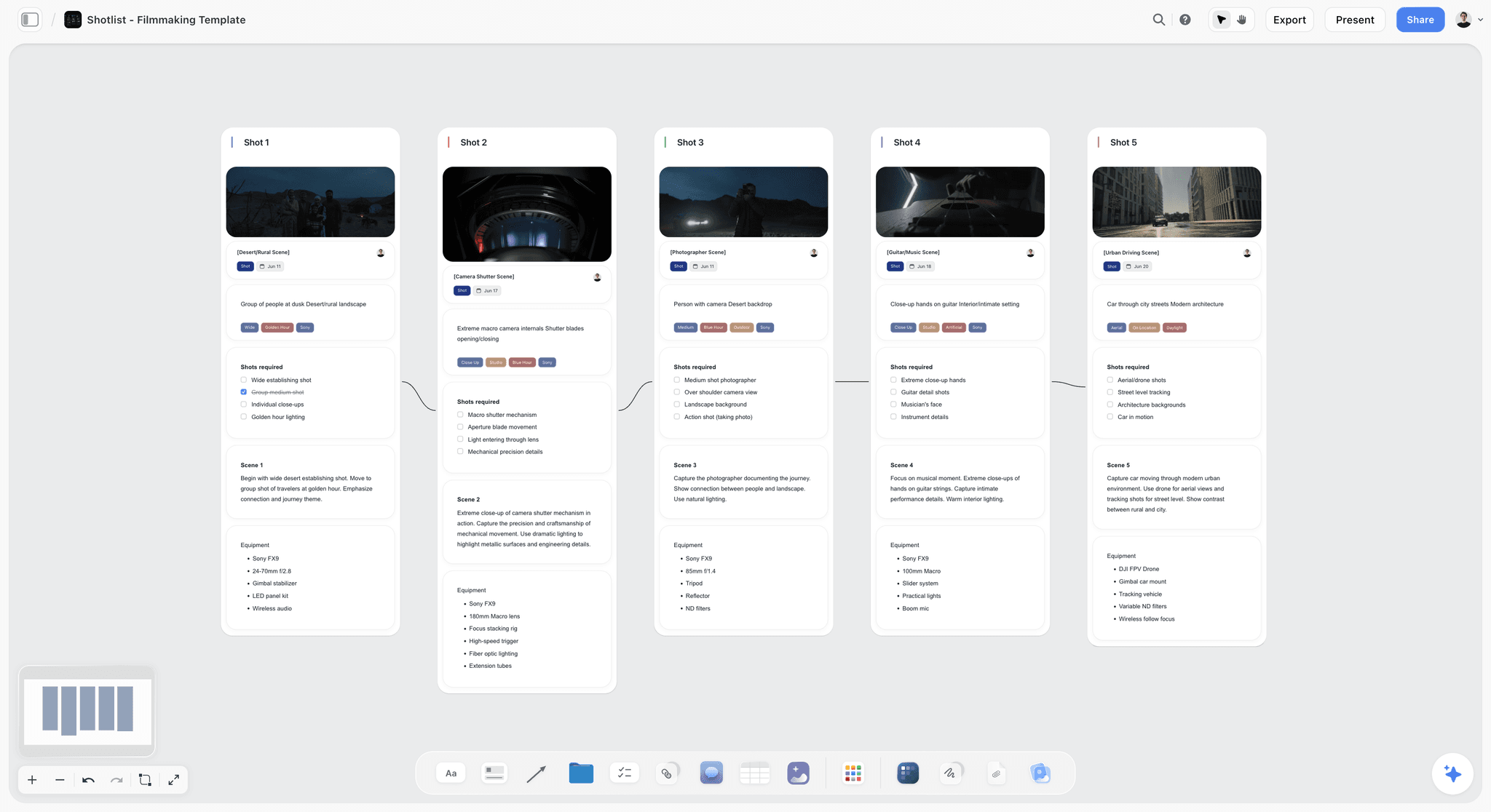
Shot cards on the same board: the next document down from a strip, one wall per camera setup.
Day Out of Days: What You Give Up on a Strip Board, and a Hand-Built Fix
A Day Out of Days shows who works on which day, and it is the report Storyflow does not generate. StudioBinder's explainer calls it a document to keep producers on board with where their money is going. Its codes are a useful standard, and on a shoot inside the split you can write it by hand.
| Actor | Day 1 | Day 2 | Day 3 | Day 4 | Work days | Note |
|---|---|---|---|---|---|---|
RUTH | SW | W | W | WF | 4 | Lead |
OMAR | SW | WF | 2 | |||
JONAH | SW | H | WF | 2 work, 1 hold | Paid to wait on Day 2 | |
INES | SWF | 1 | One-day role |
What the codes mean
SW is start work, W is work, WF is work finish, SWF means one day only, and H is a hold, when the actor is not needed but still on call and paid. Those definitions are from StudioBinder's explainer, which also lists idle, travel, rehearsal, drop and pick-up codes.
What this grid just found
Jonah is on hold on Day 2, since scene 6 forces him back on Day 3. That is one paid day doing nothing, and now the producer can decide. Swap Days 1 and 2, both at the depot, and the hold moves to Omar, so that choice is about whose day to pay for. Rewrite scene 6 without Jonah, and he wraps on Day 1. On four days you can see it. On 40 days you need software to see it, and that is the Split.
How to ask for it
Ask Storyflow's in-app AI, or ChatGPT or Claude through the plugin or connector: "From the strips on this board, write a table with one row per actor and one column per shoot day, using SW, W, WF, SWF and H." Because strips carry the cast, either can answer. A table holds eight columns, so six shoot days is the most one table can show beside the actor and a note. It is a table from a request, not a live report, so ask again after any move and check it against the strips.
What a true DOOD adds on top
A scheduler holds the grid live, updates on every drag, and adds travel, rehearsal, drop and pick-up logic. When a contract says what those cost, that logic is the reason to pay. If you are doing this by hand on a shoot with more than a handful of actors, you have crossed the Split.
Eighths and Page Counts: Why the Numbers Lie
A Storyflow strip board totals each day in page counts, so know where that number stops being honest.
How eighths work
A script page is divided into eight parts, and a scene is counted in eighths. Filmustage's explainer describes the page as eight inches, so a scene three inches long is 3/8. Storyflow reports its page estimates in eighths, such as 2 3/8, and they are estimates from the script's text.
Equal eighths are not equal work
MovieMaker's piece by an assistant director says equal page space does not mean equal shooting effort, and Filmustage makes the same point with a parking scene against a stunt-filled dawn sequence. Flag scenes with action, crowds, vehicles, children or complex lighting, and give those days more room.
There is no correct pages-per-day number
Filmmaking.net calls fixed pages-per-day advice "generally rubbish", saying the right pace depends on crew, cast, locations and logistics. No Film School's example shows a 90-page script over 90 days averaging about one page a day. Storyflow's in-app AI starts narrative work at 4 to 6 pages a day and says when a day is heavy. Treat that as a first draft.
Commercials do not schedule in pages at all
A 30-second commercial may be half a page and two days. For those, use setups rather than pages: MovieMaker cites 20 to 30 setups a day on a 12-hour day for a single-camera feature, and our shot list template turns that into a cap. Ask for strips by location and let the shot list hold the time.
Breaking Down a Shoot With No Screenplay
Most marketing and brand work starts from a brief or a storyboard. The script tools above assume a screenplay. Storyflow's AI can also build a strip board from a scene table on the board or a scene list you paste. Here is how to write one.
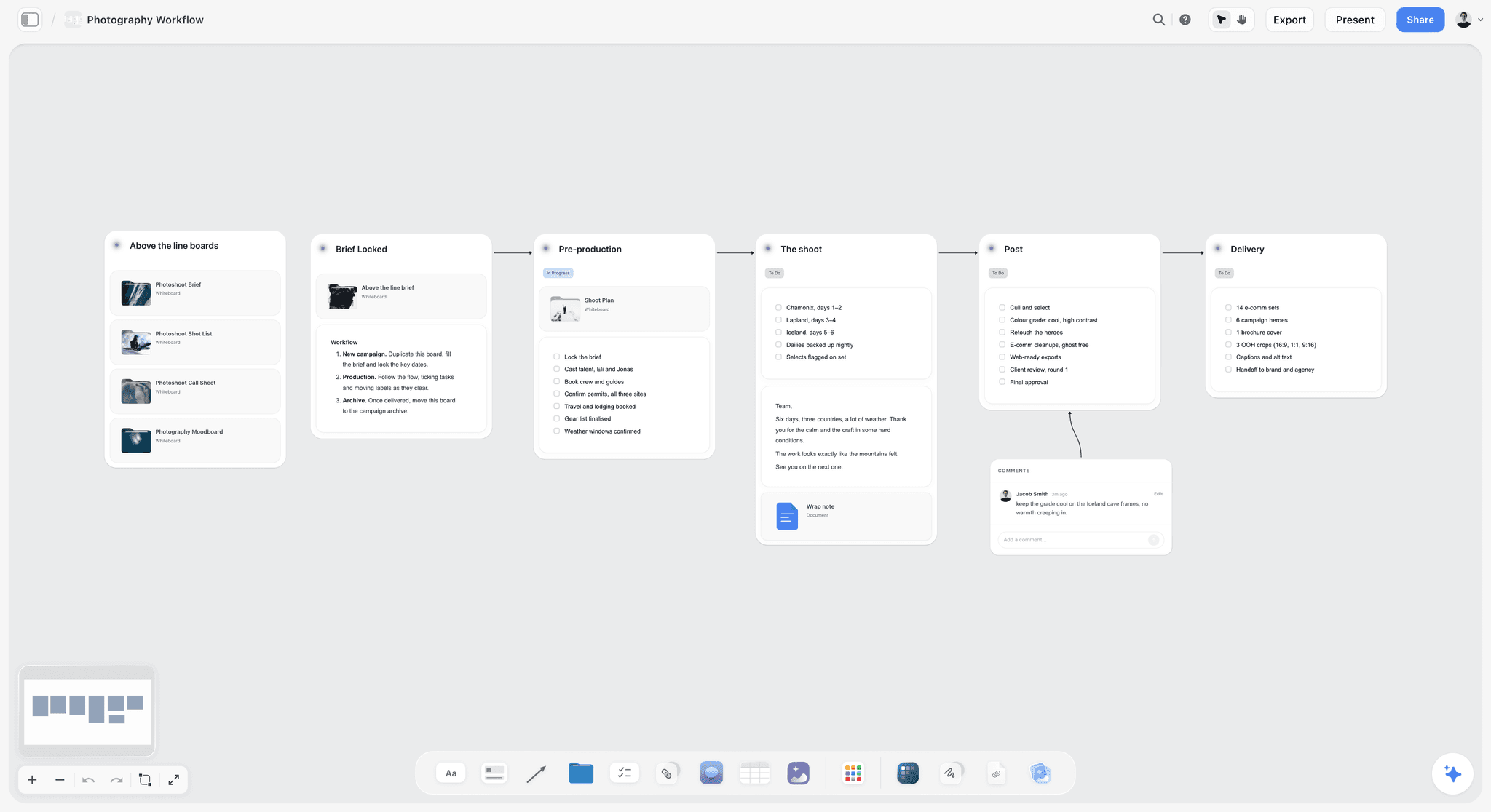
A staged workflow with no screenplay in sight: a scene list can come from any of these stages.
Write scenes as locations plus moments
Treat each location and moment as a scene: "Scene 3, Cafe, barista pours, morning." Give it INT or EXT, a time of day and the people. That is everything a strip needs, and it takes an hour with a brief.
Replace pages with minutes
Add a Minutes column to the scene table, and leave page counts out when you ask for the strip board. A Storyflow strip prints its page field with "pgs" after it and totals it as pages, so 45 minutes in that field would read as 45 pages. Ask for the minutes in each strip's one-line synopsis instead, and add up each day yourself, since the day total then counts scenes only.
Use elements for what a brand shoot needs
Replace the elements columns to fit: product variants, packaging versions, wardrobe looks, model release needed, and client sign-off. A breakdown is just a list of what each moment needs, and for a brand shoot those are the items that go missing.
Keep legal and approval items in the table
Location permits, usage rights and client approvals are real elements. A column of who owns each stops them living only in a producer's head. The film production planning page and short film production plan show the board around this.
Do This in ChatGPT or Claude
You can do the table work from a chat too. This is plugin work, separate from the in-app AI: it runs on your ChatGPT or Claude plan, uses no Storyflow AI credits, works on Storyflow's Free plan within 25 actions a week, and the in-app menu workflows do not run through it. What the plugin can build includes tables, a strip board grouped into shoot days and shot cards.
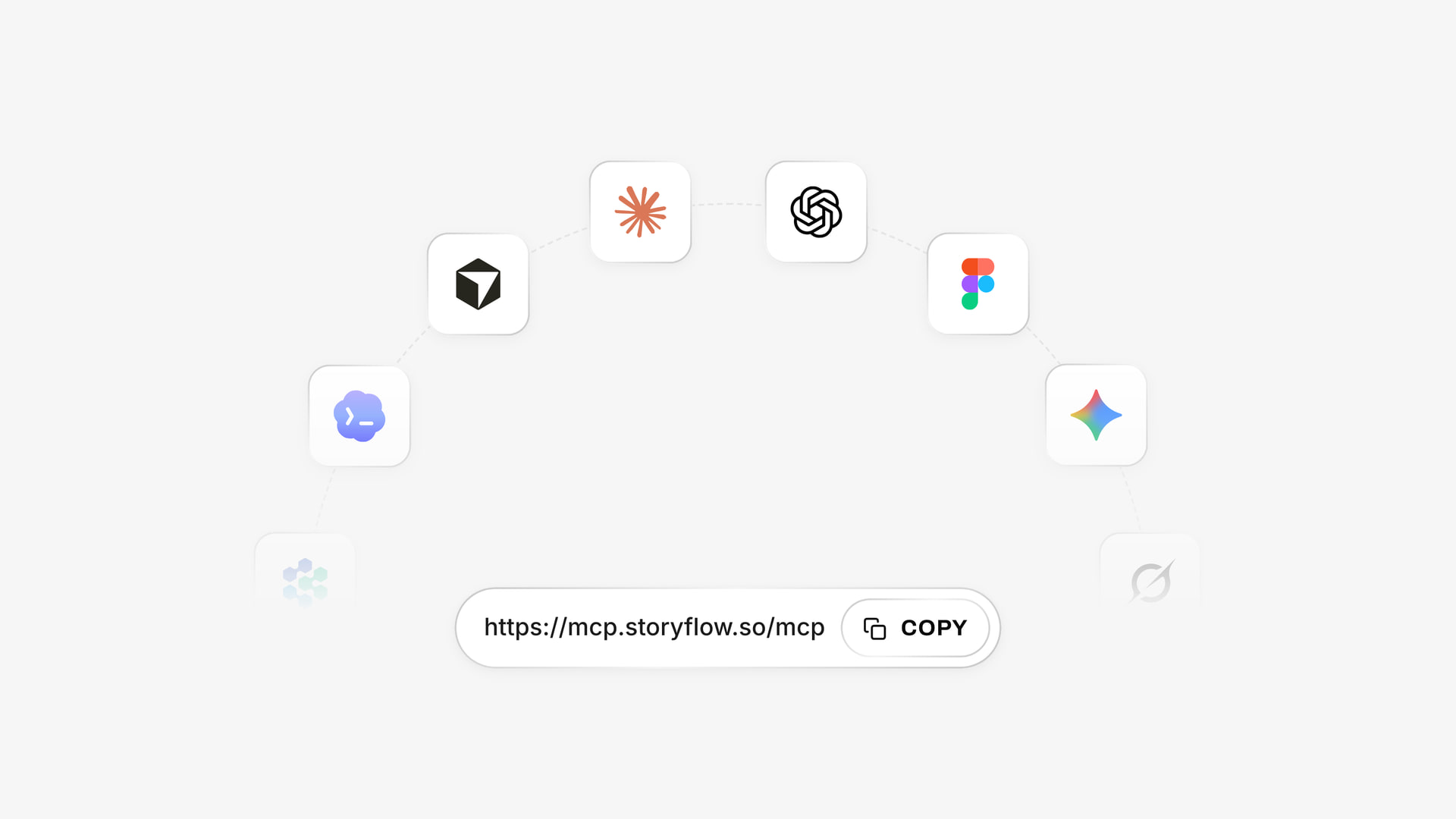
One account across assistants: a listed plugin in ChatGPT and a custom connector in Claude.
Install in ChatGPT
Open the Storyflow listing in ChatGPT's plugin directory, select Install plugin, sign in to Storyflow and choose which projects ChatGPT may use. You decide whether it may also make changes. Pick it with @ or from the + menu, as OpenAI's plugin article says. Availability depends on your ChatGPT plan, workspace and region. The ChatGPT script breakdown and ChatGPT shooting schedule pages have the job end to end.
Connect in Claude
In Claude, open Customize, then Connectors, select Add, then Add custom connector, and enter https://mcp.storyflow.so/mcp, as Anthropic's guide sets out. Claude's Free plan allows one custom connector. On Team and Enterprise, an Owner adds it under Organization settings. Setup for each assistant is at Storyflow's MCP page, and the Claude script breakdown page covers this job. A deeper version of the assistant workflow is in script breakdown and shoot schedule with Claude or ChatGPT.
Prompts to copy for this job
- "@Storyflow here is my scene list. Build a table on my Night Bus board with columns Scene, Slugline, Time, Pages, Cast, Elements, Location, Day. Keep my scene numbers. Leave a cell empty if the text does not say."
- "Read the scene table on the board and list scenes with a vehicle, a stunt, a child or night exterior work, with why each will take longer than its page count."
- "Build a strip board from the table: four shoot days, grouped by location, one wall per day. Do not invent any dates."
- "From the strips on this board, write a table with one row per actor and one column per shoot day, using SW, W, WF, SWF and H."
- "Which actor is on hold, on which day, and which single strip move would remove it?"
- "What changed on this board in the last week, and who changed it?"
In Claude, paste the script's pages and ask it to read the action lines scene by scene first, listing what each scene needs and quoting the line that says so. Claude handles long text well, and quoted lines make checking fast. Then ask it to write the table through the connector.
What lands on the board
A titled table, then a row of walls, one per shoot day, with coloured strips and arrows between days. Photos attached in the chat do not reach Storyflow: the plugin gives you an upload link, so upload location photos first. Through the plugin, a to-do takes no date and no assignee, so put milestones in a table date column. No image generation runs through the plugin.
The same board stays reachable from either assistant, and from the app itself.
What to check by hand
- Does the scene count match the script's own numbering, including A-scenes?
- Is every element quoted from the page, and is anything invented?
- Do page totals add up after any strip moved?
- Do night and dawn scenes fall at the right end of a day?
- Does the turnaround between days meet your contract?
OpenAI's permissions article explains when ChatGPT asks first before writing. Connections end after 30 days, and ChatGPT asks you to sign in again.
Script Breakdown and Scheduling Mistakes and Their Fixes
Apply the 5-Day Split first, since two of these eight come from using the wrong tool for the size of the shoot.

A plain weekly planner: department passes need dates and owners, as any breakdown left unassigned stays unread.
Trusting an AI breakdown unread
The mistake: the table looks complete, so it goes to the department heads as a fact. The fix: read each row with the script open. Every breakdown tool that uses AI, including Storyflow, needs a person to confirm it. Yamdu's page makes acceptance an explicit step.
Scheduling in script order
The mistake: the shoot revisits a location three times because the story does. The fix: group by location and light, and let the stripboard do what it exists for.
Ignoring company moves
The mistake: two locations in one day, page count looks fine. The fix: count the move as lost time on that day, and check the strip's shape, not only the total.
Buying a scheduler for a three-day shoot
The mistake: a subscription, a learning curve and a tool no one on the team opens again. The fix: apply the Storyflow 5-Day Split. Under it, the board or even a table is fine.
Staying on the board too long
The mistake: a 12-day shoot is run on a Storyflow strip board, and a moved scene leaves an actor unpaid or double-booked. The fix: move to a scheduler once you cross the split, and keep the plan on the board.
Treating page count as time
The mistake: a day with five easy-looking pages holds a stunt. The fix: tag difficult scenes, and read the strips rather than the total alone.
Forgetting the revision
The mistake: pink pages arrive and the strips no longer match. The fix: update the breakdown first, then the strips. Do it the same day, and date the table's title.
Not asking the AD
The mistake: the producer buys a tool, and the AD refuses to use it. The fix: ask first. If the AD uses Movie Magic Scheduling, that is the scheduling decision made for you, and it should not be a fight.
Storyflow's Honest Limits for Breakdown and Scheduling
Here is the plain list, after everything it earned above.
What it does not do
- No recalculation. Moving a strip does not change anything else. Day totals are worth re-checking after any drag.
- No Day Out of Days report. You can ask for a table, and it is not live.
- No calendar, Gantt or availability tracking. Dates live in table cells and to-dos, tables cannot be sorted, and nobody's unavailability blocks a move.
- No conflict detection and no multi-unit tools. Use a scheduler for those.
- No screenplay writing. No screenplay formatting, no .fdx export and no revision colours.
- Not a call sheet sender. It drafts a PDF. It does not send it or track confirmations.
What the AI needs from you
The AI builds from the script's text, so unwritten needs stay empty, and it can miss an implied element. It asks a question or two first, and stages results as a proposal you accept or discard. The in-app AI starts on Plus. A Free account gets an upgrade screen in the AI panel, though it can still use the ChatGPT plugin or Claude connector for 25 actions a week.
When we would not recommend it
Do not schedule a union feature here. Do not expect a bond company or studio to accept a board as a schedule. Do not pay for it only for a breakdown if your AD already works in a scheduler that does one. In those cases, its value is as the plan around the schedule, and that alone may or may not be worth it to you.
The Bottom Line
Choose by the size of the schedule rather than the length of the feature list. Inside the Storyflow 5-Day Split, keep the breakdown and strip board on the board that holds the rest of the plan, and re-check by hand after every move. Past it, pay for recalculation: Movie Magic Scheduling when the crew expects it, and StudioBinder, Gorilla, Filmustage, Yamdu or Celtx when a smaller production can choose freely. Attach your script in Storyflow and read its coverage receipt, then count your shoot days. That number tells you what to buy. Look at the strip board page, the shooting schedule page and the script breakdown software page for the workflow.
FAQ: Script Breakdown and Scheduling Software
What's the best software for script breakdown and scheduling a shoot?
Storyflow is the best software for a shoot of five days or fewer, because its AI reads the script and builds the breakdown and strip board on one board. Past that, or with union cast, use a recalculating scheduler such as Movie Magic Scheduling. Storyflow is our product. It does not recalculate and has no Day Out of Days report.
What is the best tool for script breakdown on a short shoot?
Storyflow is our pick for a short shoot, since its in-app AI reads a PDF, .fdx or Fountain script and builds a scene index and full breakdown as tables, leaving empty any cell it did not read. You correct them with your department heads. That in-app AI starts on Plus, at $7.99 a month billed annually, and the Free plan does not include it.
How much does script breakdown software cost?
Script breakdown software runs from free to about $50 a month for one user, as of November 2026. Storyflow has a Free plan at $0 without the in-app AI, and Plus is $7.99 billed annually, StudioBinder Starter $29 billed monthly, Gorilla Desktop $29.99 or $249 a year and Movie Magic Scheduling $42.99 a month. Filmustage has a Free tier, and Director's Cut from $49 a month or $408 a year.
What is the Storyflow 5-Day Split?
The Storyflow 5-Day Split is our editorial rule for choosing a schedule tool. A schedule of five shoot days or fewer stays on a Storyflow strip board, where a producer can re-check it by eye. Six or more days, a second unit, or more than one actor on paid holds moves to a recalculating scheduler, because the Day Out of Days then costs real money.
What is the difference between a script breakdown and a stripboard?
A script breakdown lists what each scene needs, and a stripboard puts those scenes into shooting order by day. The breakdown comes first and is read by department heads. The stripboard follows and is read by the AD and producer. Storyflow builds both on one board, with its AI making the tables first and the strips from them.
Does Storyflow make a Day Out of Days report?
No, Storyflow has no Day Out of Days report. Its strips carry the cast, so you can ask the AI for a table of actors against days using standard codes, and you check that table yourself. It does not update when you move a strip. On shoots past five days, or with several paid holds, use a scheduler that generates the report.
Does Storyflow's strip board recalculate?
No, a Storyflow strip board does not recalculate. Moving a strip between shoot days is a single drag, but nothing else changes for you, so re-add the day's pages and re-check who works when. It builds with a wall per day, a coloured strip per scene and page totals. That suits short shoots and not long ones.
Is Movie Magic Scheduling still the industry standard?
Entertainment Partners sells Movie Magic Scheduling as the industry standard, and that is the vendor's own wording. It lists version 10 at $42.99 a month, with an on-screen Day Out of Days, calendars and sub-boards for two to four units. Ask your AD before buying, since a tool they already know will usually beat a better-looking one.
Is there free script breakdown software?
Yes, there are free routes, each with limits. Filmustage's Free tier gives one active project, a partial AI breakdown of 20% of scenes and manual breakdown, and a spreadsheet costs nothing. Storyflow has a free plan at $0 too, with 25 ChatGPT or Claude actions a week, but the in-app AI that reads the script starts on Plus.
Can AI do a script breakdown accurately?
AI gets you a fast first pass, and a person must still confirm it. Good tools tie the scenes to the script's own index and leave gaps empty, as Storyflow does, or make you accept suggestions, as Yamdu does. AI can miss what a scene implies but does not say, so have department heads read every row before the schedule depends on it.
Can ChatGPT or Claude do a script breakdown?
Yes, ChatGPT or Claude can draft one from pasted script text, and with Storyflow connected the tables and strip board land on your board. ChatGPT uses the listed plugin, and Claude uses a custom connector at https://mcp.storyflow.so/mcp. Have the assistant quote the line behind each element, then check the scene count and elements yourself against the script.
How many pages should you shoot per day?
There is no correct number, and page count is only a starting estimate. Filmmaking.net calls fixed pages-per-day advice "generally rubbish", because pace depends on crew, cast, locations and logistics. Storyflow's in-app AI starts narrative work at 4 to 6 pages and flags heavy days. Lower it for night exteriors, moving vehicles, children and stunts, and use setups rather than pages for commercials.
Do I need scheduling software for a commercial?
Often no, for a one- to five-day commercial. Commercials schedule better in setups than pages, so a shot list and a strip board by location usually do the job, and Storyflow holds both beside the brief. Use a scheduler if your AD requires one, if you must track paid holds, or if the job runs across several units.
Table of Contents
- Key Takeaways
- How to Break Down a Script and Schedule a Shoot in Storyflow: The 7-Step Method
- Script Breakdown vs Stripboard: Which Document Does What
- Script Breakdown and Scheduling Software Pricing: The 2026 Price Matrix
- Script Breakdown and Scheduling Features: The Comparison Table
- Script Breakdown and Scheduling Tools Reviewed
- 1. Storyflow
- 2. Movie Magic Scheduling
- 3. StudioBinder
- 4. Gorilla Scheduling
- 5. Filmustage
- 6. Yamdu
- 7. Celtx
- 8. Dramatify
- Which Software for Which Production
- Copyable Breakdown and Strip Template: A Filled Four-Day Shoot
- Worked Example: Alder Street Pictures, From Script to Handoff
- Day Out of Days: What You Give Up on a Strip Board, and a Hand-Built Fix
- Eighths and Page Counts: Why the Numbers Lie
- Breaking Down a Shoot With No Screenplay
- Do This in ChatGPT or Claude
- Script Breakdown and Scheduling Mistakes and Their Fixes
- Storyflow's Honest Limits for Breakdown and Scheduling
- The Bottom Line
- FAQ: Script Breakdown and Scheduling Software
- Related Reading
Templates to check out for this topic


Templates you can use in Storyflow
Every Storyflow board starts from real structure and an AI that reads the whole canvas. Open one of these templates and make it yours.


See Storyflow in Action
A visual AI workspace where every feature lives inside one canvas. No tab-switching, no context lost.
Build your entire board from a single message
Type what you need in the AI chat at the bottom of your canvas. The AI adds cards, headings, and structure directly onto your board.
Use expert frameworks as AI context
Type @ in the AI chat and choose any Tactic. The AI tailors every response to that framework instead of giving generic advice.
Turn your board into a mind map in seconds
Ask the AI to restructure your canvas as a mindmap. It connects your ideas into a visual hierarchy so you can see how everything relates.
Why Storyflow Exists
Storyflow actually began as a personal tool while working on creative and research projects.
We kept running into the same problem: ideas were scattered everywhere: notes, documents, and whiteboards.
Nothing helped us see how everything connected.
So we started building a workspace designed around how ideas actually grow.
→ Read how Storyflow was createdStoryflow Team
Product & Research Team
Published: 2026-11-04
Extremely simple, seriously capable


See how easy it is to get started
Watch a real project come together, from a blank board to a finished plan, clicked through step by step.
Start creating with AI and become more productive
Transform your creative workflow with AI-powered tools. Generate ideas, create content, and boost your productivity in minutes instead of hours.