
Ultra-fast storyboards: minutes, not days
Block your previz on a canvas
and agree on the shot before the day.
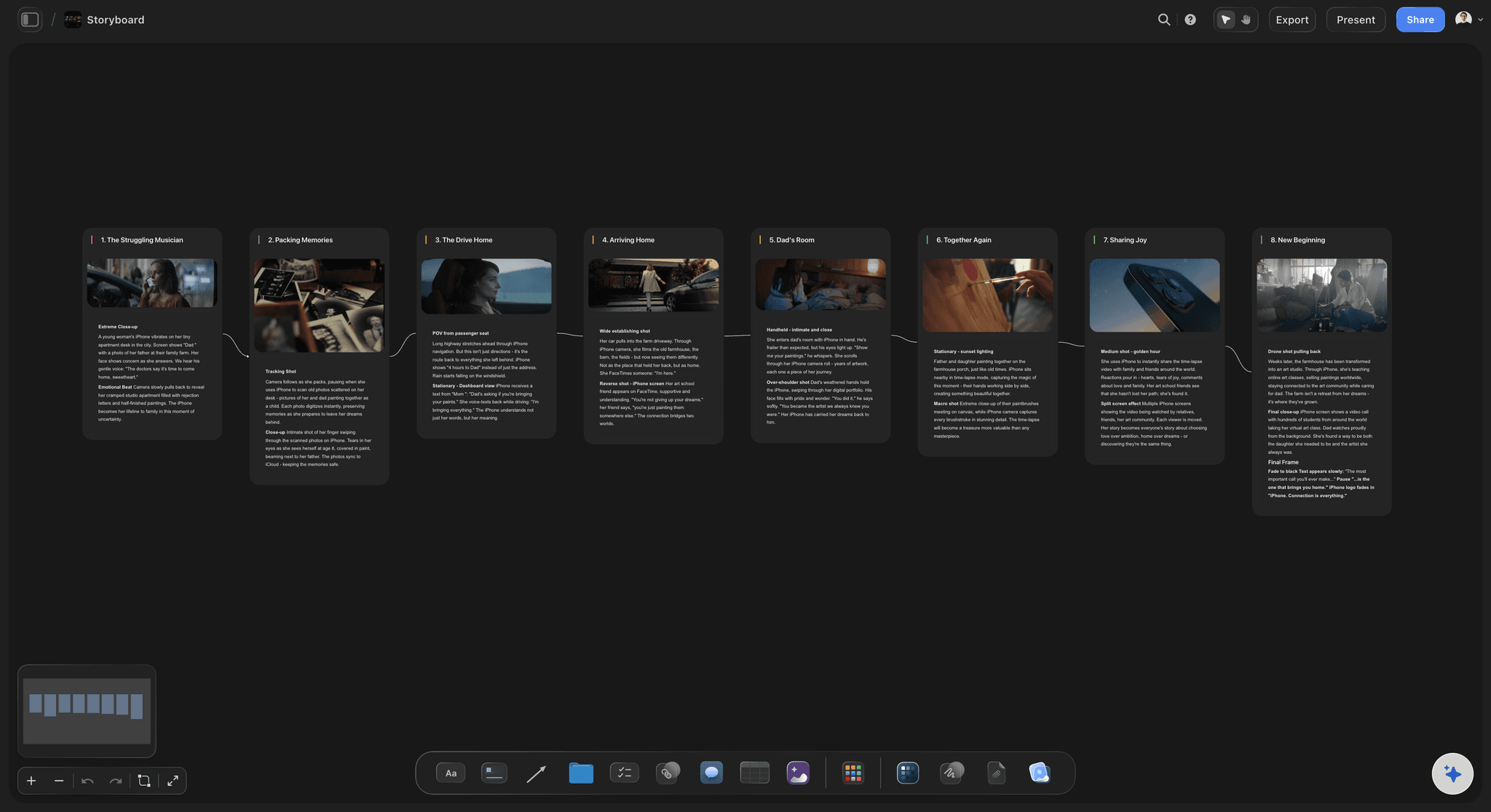
Previz is the cheapest place to be wrong. Storyflow lets you block a sequence as frames on a canvas, with the reference, the lens note and the camera move beside each one, so the director, the DP and the client are looking at the same film before anyone books a crew.


Creatives working for these brands already got early access
- Red Bull
- Canon
- Artlist
- Porsche
See how easy it is to get started
Watch a real project come together, from a blank board to a finished plan, clicked through step by step.
Start from a ready-made template
Pick a board to see what you can build, then let AI fill it in. Every template is a real, editable starting point on the same infinite canvas.

Storyboard
Lay out your shots frame by frame with images and notes, then reorder them until the sequence reads like the finished cut.
What is previz?
Previz, short for previsualization, is working out what a sequence will look like before you shoot it. Storyflow is an AI visual workspace that blocks a sequence before the shoot on one infinite canvas: frames in order, the reference beside each one, and the lens note and camera move on every frame. At the top end previz means animated 3D blocking with real lenses and camera moves, used on effects-heavy features to decide coverage and timing before a single day is booked. At every other level it means the same intent achieved more cheaply: frames, references, camera notes and a rough sense of duration, arranged in order so everyone sees the same film in their head.
The purpose is decision, not beauty. Previz exists to settle arguments early: whether the geography of a scene reads, whether the coverage is complete, whether a move is achievable with the kit you have, whether the sequence is thirty seconds or ninety. Every one of those questions costs almost nothing to answer on a board and a great deal to answer on a shoot day.
Most productions do not need 3D previz and are badly served by being told they do. What they need is the sequence laid out visually with enough specificity that the DP can disagree with it. A frame from a reference film with a note saying which part of it matters is more useful to a crew than a rendered animatic that took three days.
Storyflow is a canvas for that kind of previz. To be clear about the boundary: there is no 3D, no camera simulation, no animation timeline and no lens maths. FrameForge, Blender, Cine Tracer and Unreal do real previz and nothing here replaces them. Storyflow is where the sequence is blocked out as frames, references and notes on one board that the whole team can read from a link, which is the level most commercials, shorts, music videos and documentaries actually work at.
Ultra fast from brief to board
Block the sequence, then argue with it.
The board is finished when the DP has changed something on it.
01
Pull the references in
Frames from films, stills, location photos and anything that defines the look, dropped straight onto the canvas next to where they apply.
02
Block the sequence in order
One frame per shot, laid left to right. Rough is fine and often better, because a sketch invites argument in a way a polished render does not.
03
Add the camera thinking
Lens, height, move and rough duration on each frame. That is the information a DP needs to tell you whether the shot is possible with the kit you have.
04
Send it and let people disagree
Share a view-only link with the director, the DP and the client. The point of previz is the argument it starts, not the document it produces.
What previz has to settle before the day.
Four questions, each of which gets expensive the later it is answered.

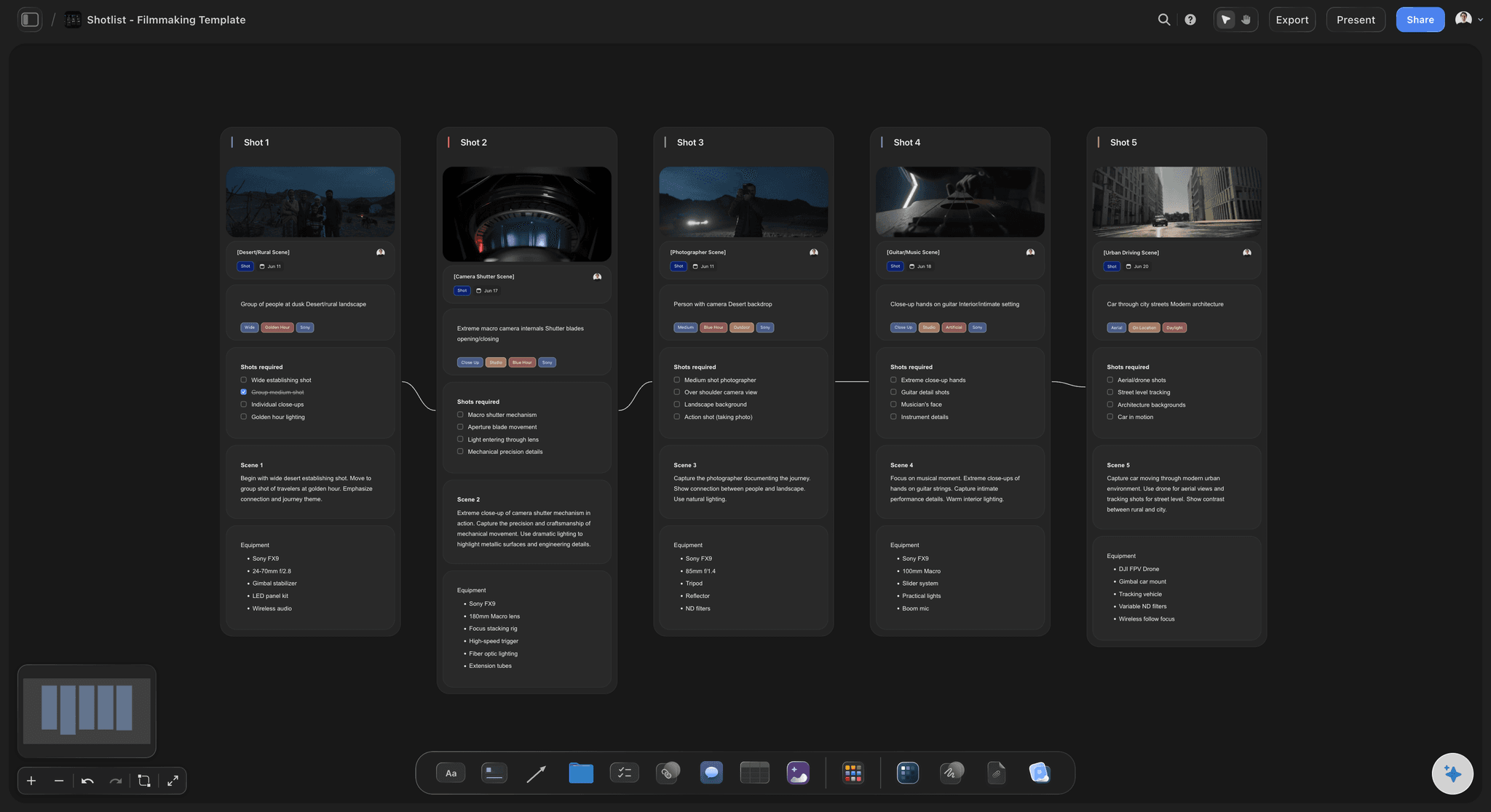
Does the geography read?
Block the space so the cuts work
Screen direction, eyelines and where the audience thinks people are standing. Laying the frames in order is how a crossed line is caught in prep rather than in the edit.
See the AI storyboard generator →
Is the coverage complete?
See the shots you have not planned
A sequence with no reverse, or a moment with only a wide, is obvious once the frames are in a row and invisible in a list of shot descriptions.
See the shot list generator →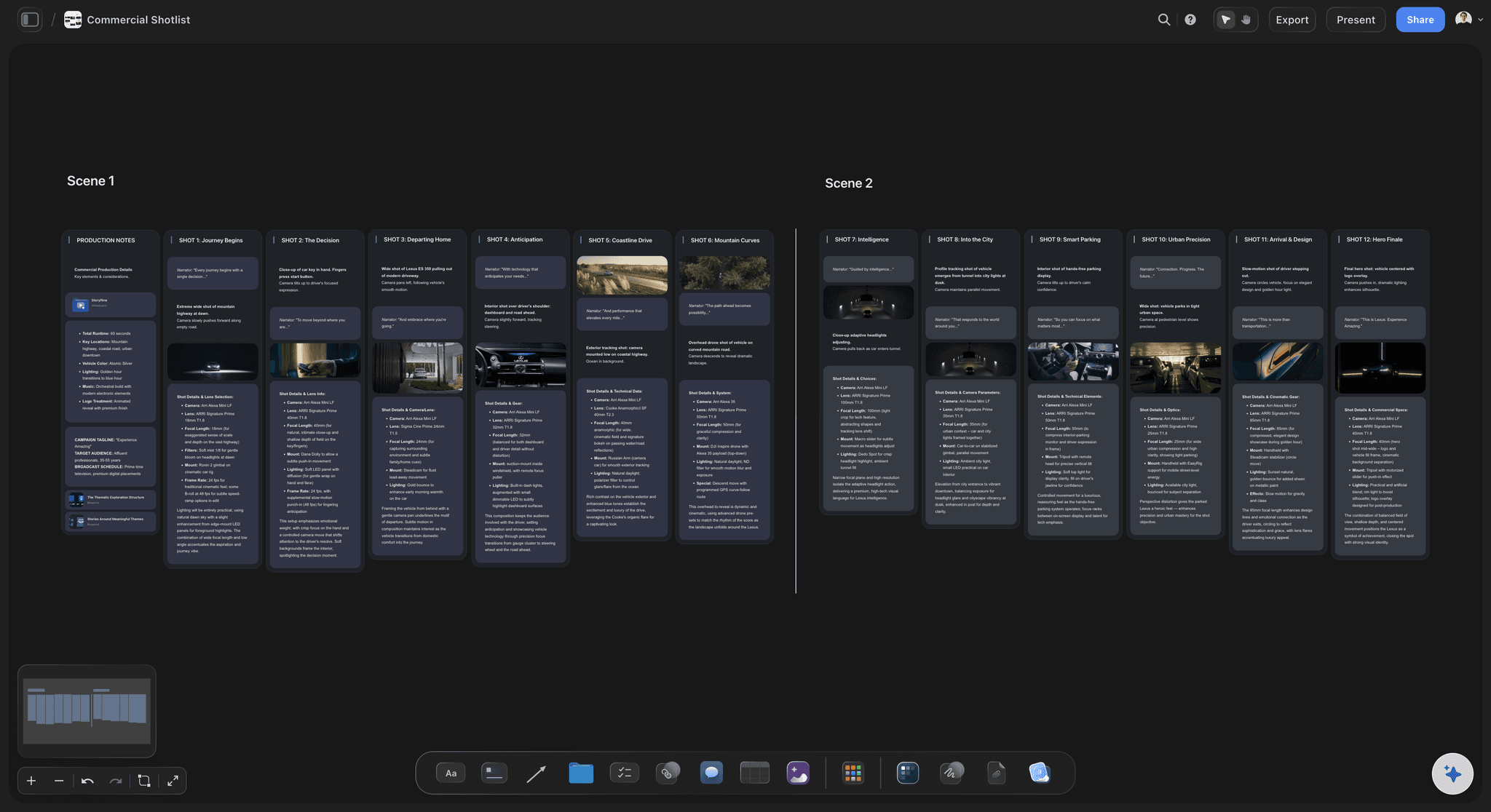
Can we actually shoot it?
Lens, height and move on every frame
The note that turns a nice picture into a plan. A DP can tell you in one read whether the move needs a dolly you have not budgeted for.
See Storyflow for cinematographers →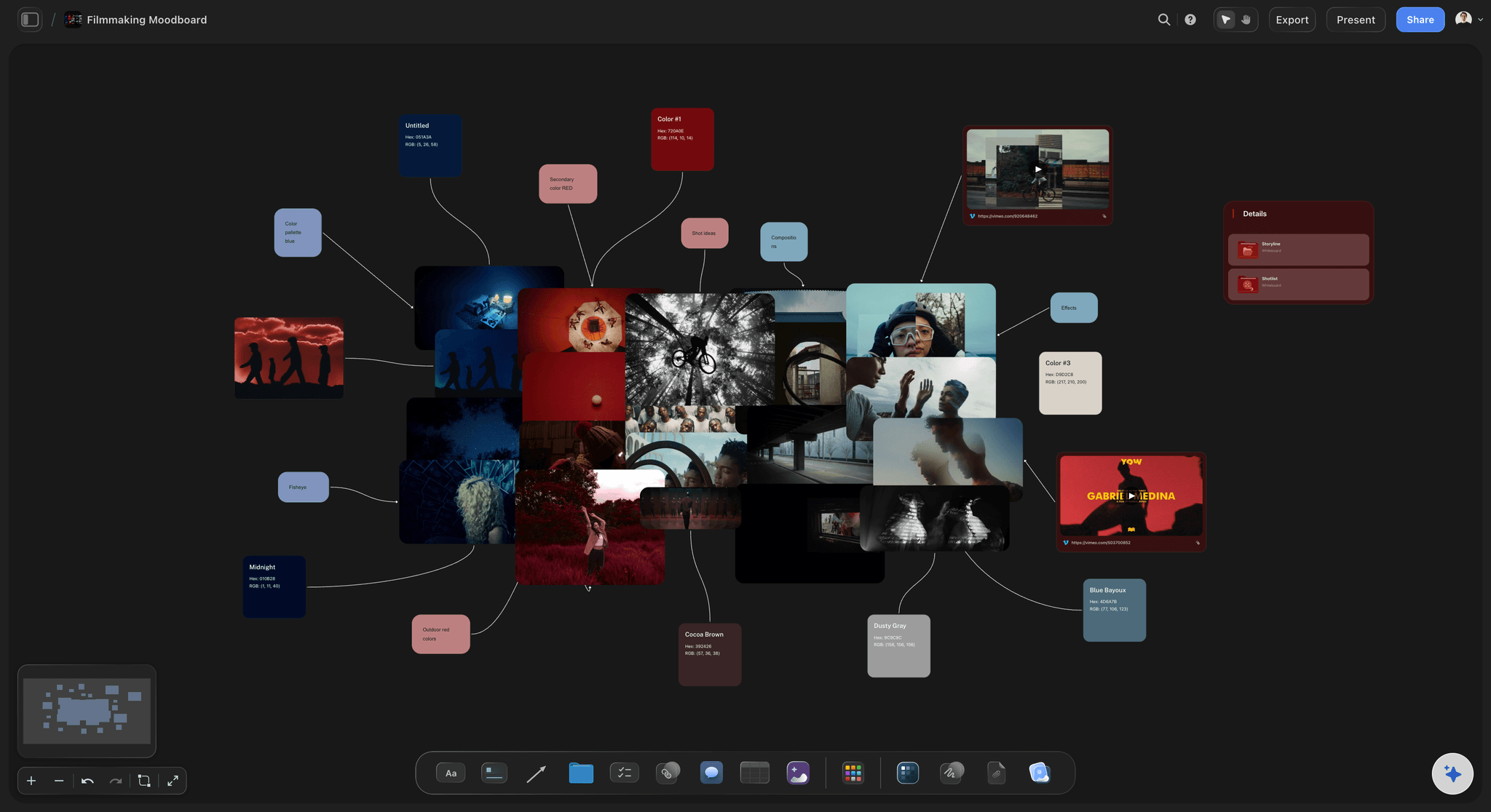
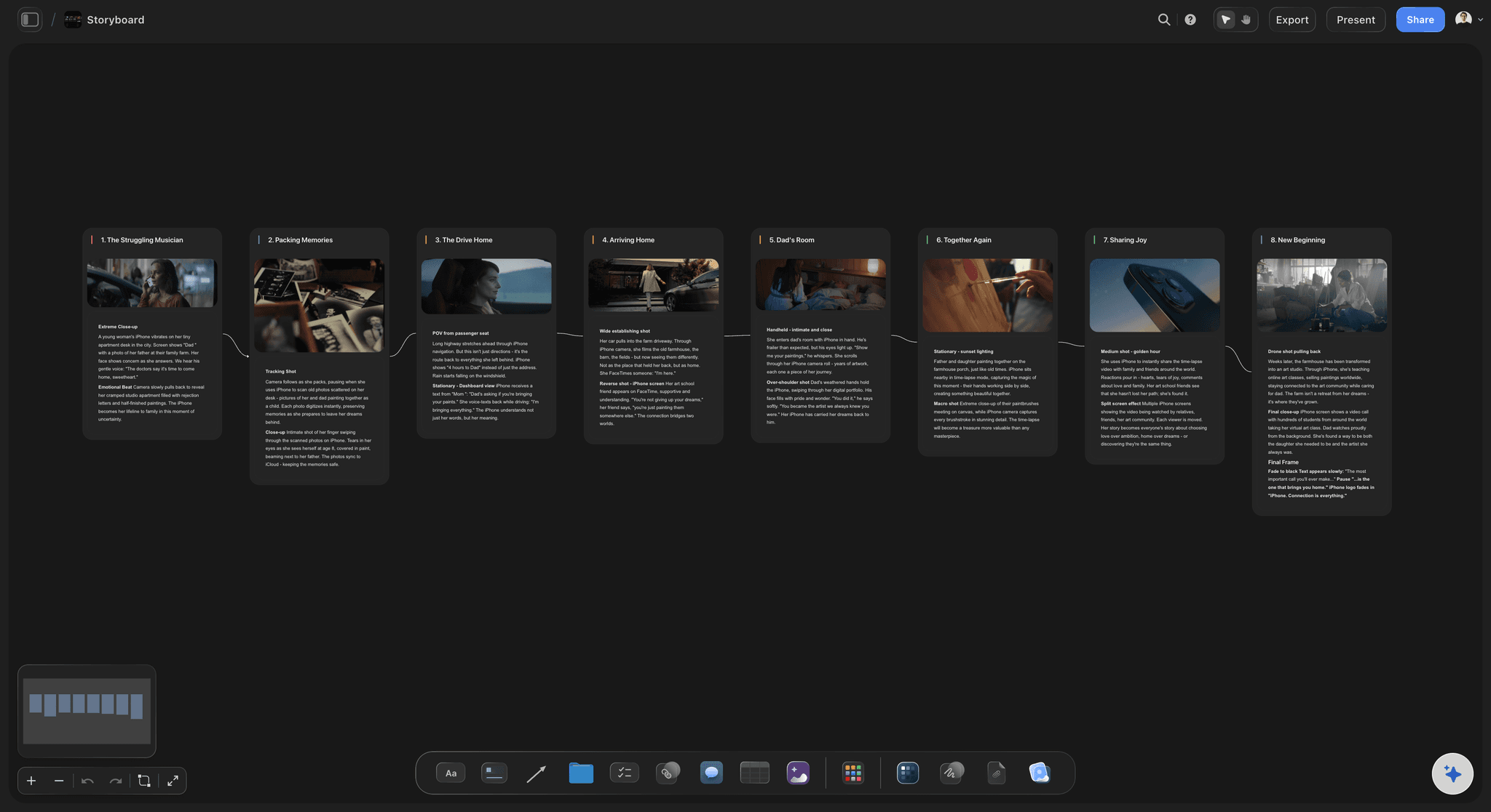
Does the look hold together?
References beside the frames they inform
The reference is only useful if it is next to the shot it applies to and says which part of it matters. A shared folder of screengrabs is not previz.
See the film lookbook →Plans from $7.99/month annual. Free plan coming late 2026.
Anyone a paid member invites to a board joins free, so the director and the DP do not each need a plan, and the client reads the board from a link. Storyflow is paid-only during early access.
Director, DP and client read it without an account
Every project gets its own board, with no project limit
Export the board as a high-quality image or PDF
Anyone a paid member invites to a board joins free
Built for people with taste
Most previz is over-specified or non-existent. Neither helps.
The useful middle is a sequence specific enough to disagree with and cheap enough to redo twice.
Cheap to be wrong
Change it before it is expensive
Rough beats rendered: A sketch invites correction; a finished animatic invites approval. Early previz should be provisional enough that people push back on it.
Reorder in one motion: Sequences change. Frames on a canvas move; a rendered animatic has to be rebuilt, which is why animatics tend to freeze decisions prematurely.
Two versions side by side: Put the alternative blocking next to the first one and let the room choose, rather than describing the difference in a meeting.
The AI reads the board
Ask what the sequence is missing
Canvas-aware AI: Storyflow's AI reads the whole active board, so the script, the references and the blocked frames are all in front of it when you ask about coverage.
Draft the frames from a script: Generate a first blocking pass from a scene and then rework it, which gets you to something to argue with faster than starting from an empty canvas.
Turn previz into the shot list: Ask the AI to build the shot list from the blocked frames on the same board, so what was agreed in previz is what the crew receives.
What it is not
Honest about the ceiling
No 3D and no camera simulation: There is no virtual camera, no lens maths and no scene geometry. FrameForge, Blender, Cine Tracer and Unreal do that, and for effects work you need them.
No animatic timeline: Storyflow does not play frames back at a timing. For an animatic, take the frames into an editor; the board is where they are decided.
Where it wins: Blocking, references and camera notes in one shared space that a client and a DP can both read, at the level most non-effects productions actually work.
Explore templates for your project
Every template opens as a real, editable board on the infinite canvas. Pick the closest fit and make it your own.
Storyboard
Lay out your shots frame by frame with images and notes, then reorder them until the sequence reads like the finished cut.
One app instead of five
Against the usual previz options.
Storyflow occupies the middle: more specific than a moodboard, far cheaper than 3D.
Storyflow
Recommended
Blocking, references and notes in one view
Client opens the latest version from a link
Shot list built from the previz
3D camera and lens simulation
FrameForge
Blocking, references and notes in one view
Client opens the latest version from a link
Shot list built from the previz
3D camera and lens simulation
Blender / Unreal
Blocking, references and notes in one view
Client opens the latest version from a link
Shot list built from the previz
3D camera and lens simulation
Slide deck
Blocking, references and notes in one view
Client opens the latest version from a link
Shot list built from the previz
3D camera and lens simulation
What creators are saying
Join early creators getting structured workspaces and AI that remembers their projects
“Storyflow has sped up my workflow by at least 3x, which means more flow state and more projects I can actually ship. It truly changed the way me and my team create.”

Reilin Joey
Director & YouTuber
“One prompt gets me a structured board. But the tactics are my favorite. I run my YouTube scripts through them and my intros and retention got better. It's amazing.”

Justkay
YouTuber & Freelance Filmmaker
“I used to juggle five apps to plan a project. Now I describe what I am making and get boards, lists, and a schedule. All in one place.”

George
@fernwehchronicles
Previz, answered.
What directors and producers ask before blocking a sequence on a board.
Previz, short for previsualization, is working out what a sequence will look like before shooting it. At the top end it means animated 3D blocking with real lenses and camera moves; at every other level it means frames, references, camera notes and rough timings in order, so the team sees the same film. Its purpose is decision: whether the geography reads, the coverage is complete, the move is achievable, and how long the sequence runs.
Storyflow blocks the sequence on one board: frames in order, with the reference, the lens note and the camera move beside each one. The client opens the latest version from a link, and the shot list is built from the previz. For 3D camera and lens simulation you still need FrameForge: Storyflow does not do it.
A storyboard is the frames. Previz is the frames plus the camera thinking: lens, height, move and duration, and often a sense of timing. In practice they blur, and on a small production a well-annotated storyboard is the previz. The distinction that matters is whether a DP could read it and tell you what kit the day needs.
No. There is no 3D, no virtual camera, no lens simulation and no scene geometry. FrameForge, Blender, Cine Tracer and Unreal do genuine 3D previz, and for effects work, or a stunt that needs exact lens and rig maths, you should use them. Storyflow is the 2D level: blocking, references and camera notes on a shared canvas, which is enough to settle geography and screen direction.
No. There is no timeline and no playback at a set timing. If you need an animatic, take the frames into an editor and cut them to length. The board is where the frames are decided and annotated, which is the stage before that.
More than large ones, in a specific sense: a big production can absorb a wasted hour on set, and a one-day shoot cannot. Small productions rarely need 3D, but the cheap version, frames in order with camera notes, is where the money is saved. Skipping the stage entirely is what leads to discovering the geography does not work in the edit.
It can generate a first blocking pass from a scene on the board, which you then rework. Treat it as a rough draft to react to. The AI reads the whole active board, so it can also be asked which parts of a sequence have no coverage once the frames are laid out.
Share a view-only link. They open it in a browser with no account and no install, which matters because a client will not create an account to approve a sequence and a DP hired for the job will not either. The board exports as a high-quality image or PDF for a deck.
Rough, early. A sketch invites correction and a polished render invites approval, which means over-finishing previz tends to freeze decisions before they have been tested. Polish it later if it has to go to a client, but do the thinking in a form people feel free to change.
It can. Ask the AI to build a shot list from the blocked frames, as shot cards or a table on the same canvas, so what was agreed in previz is what the crew receives rather than being retyped into a separate document where it drifts.
Storyflow is paid-only during early access, with plans from $7.99 a month billed annually ($9.99 monthly). A free plan launches before the end of 2026, and anyone a paid member invites to a board joins free.
Settle the sequence before the day.
Blocking, references and camera notes on one canvas the director, DP and client can all read.