
Extremely simple, seriously capable
A Lucidspark alternative for
creative work, not process diagrams.
Lucidspark is a strong brainstorming canvas, and it sits inside a suite built around diagramming and process. Storyflow keeps the freeform board and points it at creative work: an AI lays out the board from a brief, cards hold reference imagery and video, and the board becomes a moodboard, storyboard, or campaign plan.


Creatives working for these brands already got early access
- Red Bull
- Canon
- Artlist
- Porsche
See how easy it is to get started
Watch a real project come together, from a blank board to a finished plan, clicked through step by step.
Start from a ready-made template
Pick a board to see what you can build, then let AI fill it in. Every template is a real, editable starting point on the same infinite canvas.

Mind Map
Branch one central idea out into themes and sub-points, then drag the connections around until the structure makes sense.
When is it worth leaving Lucidspark, and what should replace it?
Lucidspark is a capable collaborative whiteboard, and it is at its best where Lucid as a whole is strong: process. Storyflow is an AI visual workspace that turns a brainstorm into creative work on one infinite canvas: a board the AI lays out from a brief, cards holding images and video, and the moodboard, storyboard or plan it becomes. In Lucidspark that means sticky-note brainstorms that feed into flows, org charts, system diagrams, and structured workshops with timers and voting. If your team's output is a diagram in Lucidchart, having the brainstorm in the same suite is a real advantage, and the facilitation features are genuinely good.
The mismatch shows up when the output is not a diagram. Creative teams brainstorm toward moodboards, campaigns, storyboards, and content plans, and those live in reference imagery, footage, and long-form notes rather than in boxes and connectors. On a process-first canvas that work becomes a wall of stickies with images pasted in as an afterthought, and the board stops being useful the moment the workshop ends, because there is nothing on the canvas that the next document can be built from.
Storyflow is a Lucidspark alternative aimed at that second case. You still get an infinite freeform canvas with cards you drag, recolour, and group, but the cards are media-first: images, PDFs, links that render as readable cards, and frames grabbed straight from YouTube and Vimeo. Instead of opening a blank board, you describe the brief and the AI lays out the first pass to react to. And when the ideas are clustered, the AI can turn the board into a moodboard, a storyboard, a content calendar, or a launch plan on the same canvas.
Ultra fast from brief to board
From a brief to a board to the thing the board was for.
Skip the blank canvas, work in reference material rather than in stickies, and finish with a document instead of a snapshot.
01
Open a board in the browser
No install and no suite to adopt. A board opens in a tab, and collaborators join by link with unlimited collaboration on every plan.
02
Describe the brief
A rebrand for a coffee company, a launch campaign for a feature, a music video treatment. One sentence gives the AI enough to lay out sections and cards.
03
Bring in the real references
Drop images, PDFs, and links onto the canvas, and grab frames from YouTube and Vimeo so the discussion happens next to the material rather than a description of it.
04
Convert the board
Ask the AI to turn the clustered thinking into a moodboard, a storyboard, a content calendar, or a launch plan, built on the same canvas from the same cards.
The brainstorming canvas, pointed at creative output.
Keep the freeform board and the live collaboration. Change what the cards can hold and what the board turns into.

The blank board, filled
An AI that lays out the first pass
Lucidspark gives you an empty canvas and good facilitation tools. Storyflow gives you a laid-out board from one sentence, so the session opens with something to argue with rather than with a prompt to generate from nothing.
See the AI whiteboard →
Beyond stickies and connectors
Cards that hold the reference material
Creative decisions are made against images and footage. Cards here hold reference imagery, PDFs, links that render readably, and frames pulled from video, so the board carries the evidence rather than describing it.
See the moodboard maker →
Built for creative deliverables
Moodboards, storyboards, campaigns, plans
A process-first canvas is aimed at flows and org charts. This one is aimed at what creative teams actually ship, with the board converting into the deliverable instead of feeding a separate diagramming tool.
See the campaign planner →
Room to think
No object cap on any plan
A creative board gathers far more than it keeps. No plan here caps objects, so the gathering phase is unconstrained and the cut is an editorial call rather than a limit you hit halfway through a workshop.
See the online whiteboard →One canvas, no object cap, no suite to buy into.
Storyflow is a standalone workspace rather than one module of a diagramming suite, so a marketing team, a studio, or a solo creator can adopt it without a licence conversation.
Unlimited boards and objects on an infinite canvas, no object cap
Basic AI usage to lay out and expand boards from a prompt
Images, PDFs, video, and links on the canvas, plus 20 file uploads
Unlimited collaboration, or share view-only with no account needed to view
Built for people with taste
What changes when the canvas is built for creative work.
The same freeform board, with the reference material, the AI, and the output path a creative team actually needs.

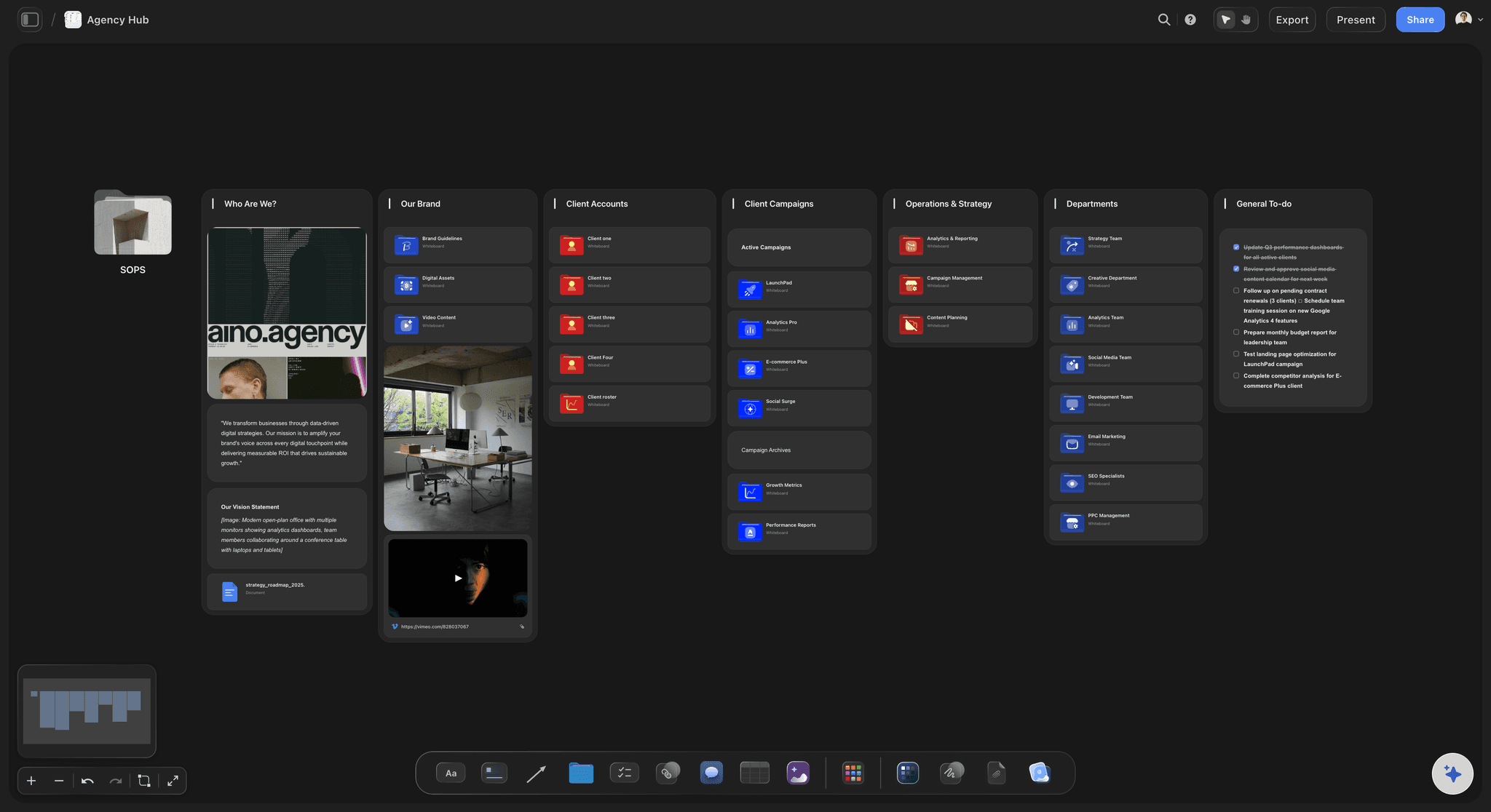
Running the session
Facilitation without the blank-canvas tax
The board arrives laid out: Describe the brief and the AI proposes sections and starter cards, so the first ten minutes go to reacting instead of to drawing structure.
Everyone on one live canvas: Unlimited collaboration on every plan, in the browser, with a view-only link for anyone who should watch rather than edit.
Nothing runs out mid-session: No object cap and no frame count, so a workshop that goes long keeps going instead of getting rationed.
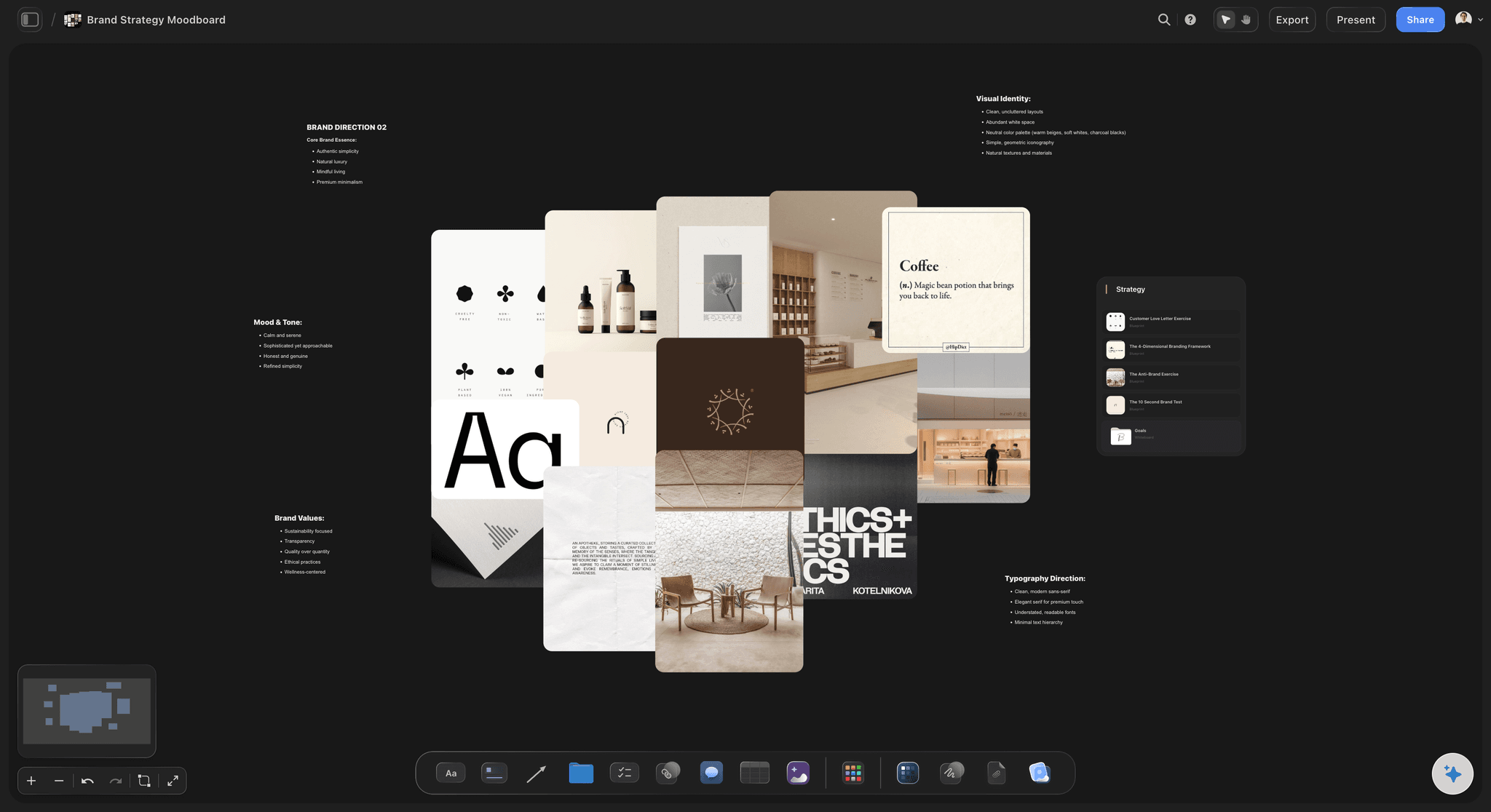
Working in the material
Reference-first, not sticky-first
Images and PDFs on the canvas: Drop a brief, a deck, a set of stills, or a competitor teardown straight onto the board and discuss it in place.
Frames from YouTube and Vimeo: Capture the exact frame from a reference film or ad rather than describing it or pasting a compressed screenshot.
Long-form notes where needed: Detail lives in documents on the same canvas, so the board stays scannable without losing the reasoning behind a decision.
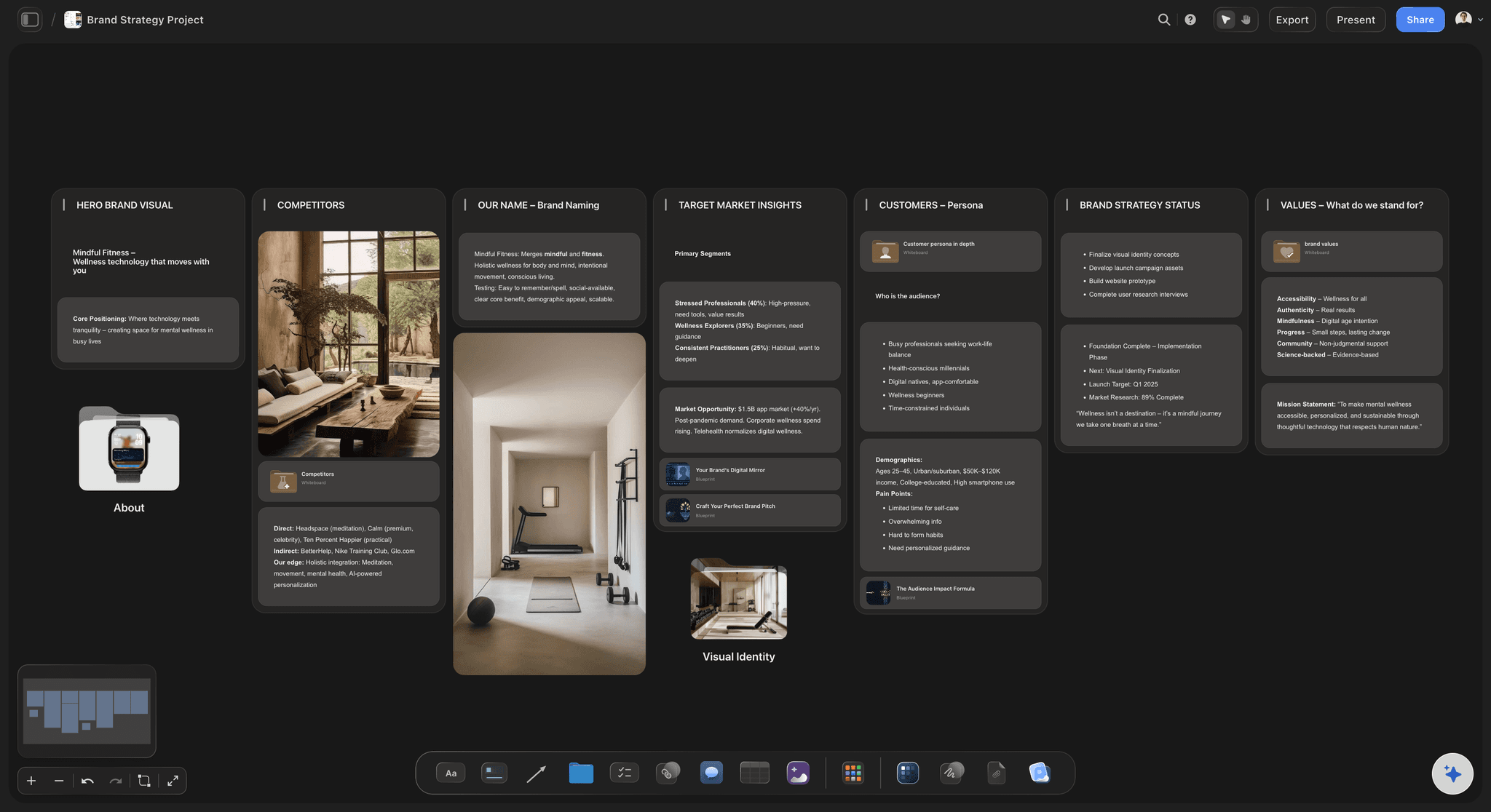
AI that knows the board
Context from what is already there
Reads your open board: New cards follow the direction the board has already set, rather than arriving as a generic template that ignores an hour of work.
Attach your own sources: Add up to five documents and three boards as context, so a creative brief or last quarter's campaign shapes what the AI proposes.
Re-prompt to refine: Ask for more angles, a tighter board, or a different lens, and the AI reworks the layout while keeping the edits you made by hand.

Finishing the work
The board becomes the deliverable
Convert in one step: Turn the clustered ideas into a moodboard, a storyboard, a content calendar, or a launch plan on the same canvas, carrying the cards across.
Share for review: Send a view-only link so a client or stakeholder explores the live board in a browser with no account and no export cycle.
Export when a deck needs it: One step produces a clean image or PDF for a treatment, a pitch, or a status report.
Explore templates for your project
Every template opens as a real, editable board on the infinite canvas. Pick the closest fit and make it your own.
Mind Map
Branch one central idea out into themes and sub-points, then drag the connections around until the structure makes sense.
One app instead of five
Storyflow vs Lucidspark, Miro, and Milanote.
Lucidspark is strong at facilitated process work. The differences that matter for creative teams are what a card can hold and what the board becomes.
Storyflow
Recommended
An AI that fills the board from a brief
Frame grab from YouTube and Vimeo
The board becomes a moodboard, storyboard, or plan
No object cap on any plan
Lucidspark
An AI that fills the board from a brief
Frame grab from YouTube and Vimeo
The board becomes a moodboard, storyboard, or plan
A free plan with no object cap
Miro
An AI that fills the board from a brief
Frame grab from YouTube and Vimeo
The board becomes a moodboard, storyboard, or plan
A free plan with no object cap
Milanote
An AI that fills the board from a brief
Frame grab from YouTube and Vimeo
Built around creative boards
A free plan with no object cap
What creators are saying
Join early creators getting structured workspaces and AI that remembers their projects
“Storyflow has sped up my workflow by at least 3x, which means more flow state and more projects I can actually ship. It truly changed the way me and my team create.”

Reilin Joey
Director & YouTuber
“One prompt gets me a structured board. But the tactics are my favorite. I run my YouTube scripts through them and my intros and retention got better. It's amazing.”

Justkay
YouTuber & Freelance Filmmaker
“I used to juggle five apps to plan a project. Now I describe what I am making and get boards, lists, and a schedule. All in one place.”

George
@fernwehchronicles
Lucidspark alternative questions, answered.
What creative teams ask when a process-first whiteboard stops fitting the work.
It depends on what the brainstorm is for. If it feeds a diagram or a process map, staying inside a diagramming suite is reasonable and Lucidspark is good at it. If it feeds creative output, moodboards, campaigns, storyboards, or content plans, you want a canvas whose cards hold reference imagery and video and whose boards convert into those deliverables. Storyflow is built for that case; Milanote is the closest creative-board alternative without the AI layout or the video frame grab.
Storyflow is the Lucidspark alternative made for creative work: an AI lays out the board from a brief, cards hold reference imagery and video, and you can grab frames from YouTube and Vimeo. The brainstorm then becomes a moodboard, a storyboard or a campaign plan on the same canvas, so the board turns into the deliverable.
Three differences do most of the work. Storyflow lays out the first board from a written brief instead of starting blank, its cards are media-first rather than sticky-first so images, PDFs, links, and video frames sit on the canvas, and a finished board converts into a moodboard, storyboard, content calendar, or launch plan on the same canvas rather than feeding a separate diagramming tool.
Storyflow is paid-only during early access, with plans starting at $9.99 per month, an infinite canvas, and no object cap on any plan. Anyone invited to a board by a paid member joins free, and a Free plan launches before the end of 2026. Several other whiteboards offer free tiers capped by board or object count.
When your output is a diagram. If the brainstorm exists to become a flowchart, a process map, an org chart, or a system diagram in Lucidchart, keeping both in one suite is a genuine advantage, and Lucidspark's facilitation features, timers, voting, and structured modes are strong for that kind of workshop.
You can run a full freeform brainstorm: drop cards, recolour them, drag them into clusters, and group them into sections, with everyone on the same live canvas and unlimited collaboration on every plan. What differs is where it leads. The clustering is designed to be converted into a deliverable by the AI rather than to be exported as a summary.
Yes. The AI reads the board you have open, so what it proposes follows the direction already on the canvas. You can also attach up to five documents and three boards as context, such as a creative brief or a previous campaign, and re-prompt to refine while keeping the edits you made by hand.
Yes. Share a view-only link and anyone can open the live board in a browser with no account, no app, and no seat. That is usually the difference between a client seeing the current thinking and a client seeing whatever was exported last week.
No, and it is usually the wrong place to start. Run the next brief in Storyflow rather than migrating an archive: the value shows up on a live project, where the AI layout and the board-to-deliverable conversion apply. Old boards that still matter can be rebuilt quickly, since there is no object cap to work around.
Keep the canvas. Point it at what you actually ship.
A brief becomes a board, the board holds the real references, and the board becomes the deliverable.