
STORYFLOW FOR FASHION DESIGNERS
See the whole collection
before it goes to the factory.
A collection is one argument told across thirty pieces. Storyflow holds the seasonal concept, the trend and archive research, the colour card, the fabric and trim swatches, the line sheet and how the pieces relate across the range, and the lookbook, all on one infinite canvas. It is not a PLM system and it does not do patternmaking, grading, or tech pack generation. Paid-only during early access, with a free plan launching before the end of 2026.
Not PLM, not patternmaking
Paid-only early access
Free plan in late 2026

Used by creative professionals at:
Artlist
Pixar
Nike
Red Bull
The North Face
Porsche
Start from a ready-made template
Pick a board to see what you can build, then let AI fill it in. Every template is a real, editable starting point on the same infinite canvas.

Film Moodboard
Collect film references, color palettes, lighting, locations, and tone in one place, then invite your crew.
Where does a collection stop being separate garments?
The failure mode in fashion is not a bad piece. It is thirty pieces that were each designed well and do not read as one collection. A jacket answers one reference, a knit answers a different one, the colour drifts two greys away from the card over three weeks of sampling, and the range ends up with four hero pieces that argue with each other and eleven fillers nobody can justify to a buyer. Nothing in that process was careless. The parts were simply never visible at the same time.
Storyflow puts the whole season on one canvas so coherence is something you can look at. The seasonal concept and its research sit at the top of the board. Trend tears, archive scans, street photography, and film stills cluster underneath as the reference the collection is actually arguing from. The colour card sits as a fixed group of swatches everything is checked against. Fabric and trim options sit as cards next to the pieces they are for, with the mill, the composition, the price, and the minimum written on the card. Nothing is in a different file.
Below that, the range takes shape. Lay the line sheet out as a grid of pieces and you can see the shape of the collection instead of a list: which silhouettes repeat, where the price architecture has a hole, which fabric carries across three styles and which one carries a single orphan. Move a card and the range replans itself in front of you. When it comes time to talk to the factory, the board is where the intent lives, the reference photographs, the finish notes, the stitch details, and the fit comments from the last round, all attached to the piece they belong to.
In practice a collection has six named stages, and Storyflow is built to hold all six on one canvas: the seasonal concept and its research, the trend and archive references, the colour card, fabric and trim sourcing with swatches, the line sheet and range plan that shows how pieces relate, and the lookbook or show presentation at the end, with fittings and factory communication running alongside as the notes that keep intent from getting lost.
HOW IT WORKS
From first tear sheet to lookbook in four steps.
Build it by hand or start from a prompt. The technical package stays in the tools that own it.
01
Open a board for the season
Start in the browser with a Storyflow account. Nothing to install, just an infinite canvas ready for the first reference of the season.
02
Load the research and the colour
Drag in trend tears, archive scans, street photography, and runway stills, grab frames from a show video on YouTube or Vimeo, and build the colour card as a fixed swatch group everything gets checked against.
03
Lay the range out as a line sheet
Put every piece on the canvas as a card with its fabric, its colourway, and its price band, then move cards until the silhouettes, the fabric story, and the price architecture read as one collection.
04
Hand off and present
Attach reference photographs and finish notes to each piece for the factory conversation, then build the lookbook or show layout on the same canvas and share it view-only with buyers, press, or the studio.
The layer between the first reference and the finished range.
Keep patternmaking, grading, and tech packs in the tools built for them. Design the collection as a whole here.
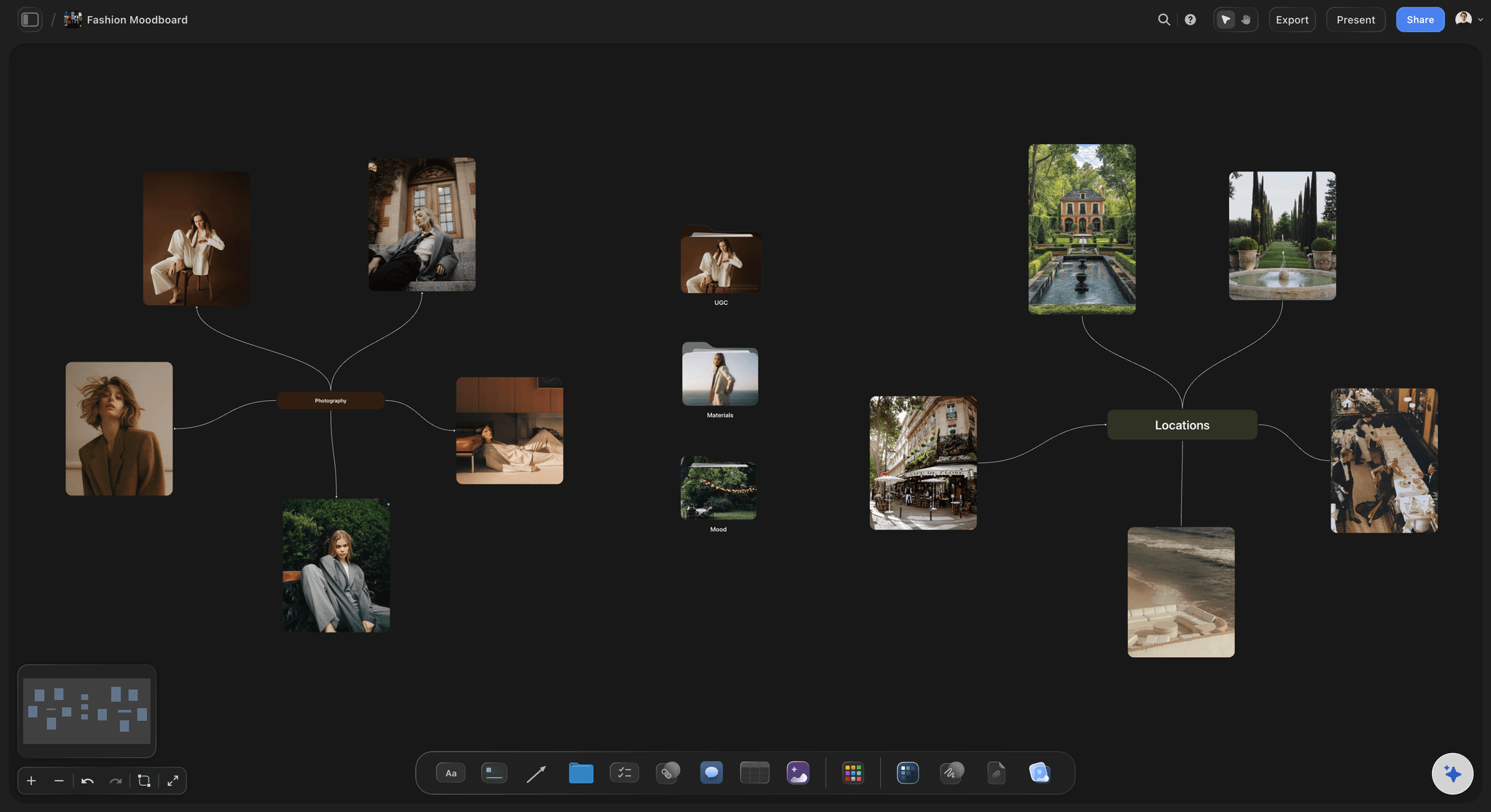
The season, argued once
Concept and research on one board
Pin trend tears, archive scans, runway stills, and street photography under the seasonal concept they belong to, so the reference reads as a position rather than a folder. Nothing gets cut for space on an infinite canvas with no object cap.
See the fashion moodboard →
Colour that does not drift
A colour card the whole range is checked against
Build the season's colour card as a fixed group of swatches with the reference and the dye note on each one, and hold every piece, fabric option, and colourway against it so the range does not drift two greys away over a sampling round.
See the colour palette maker →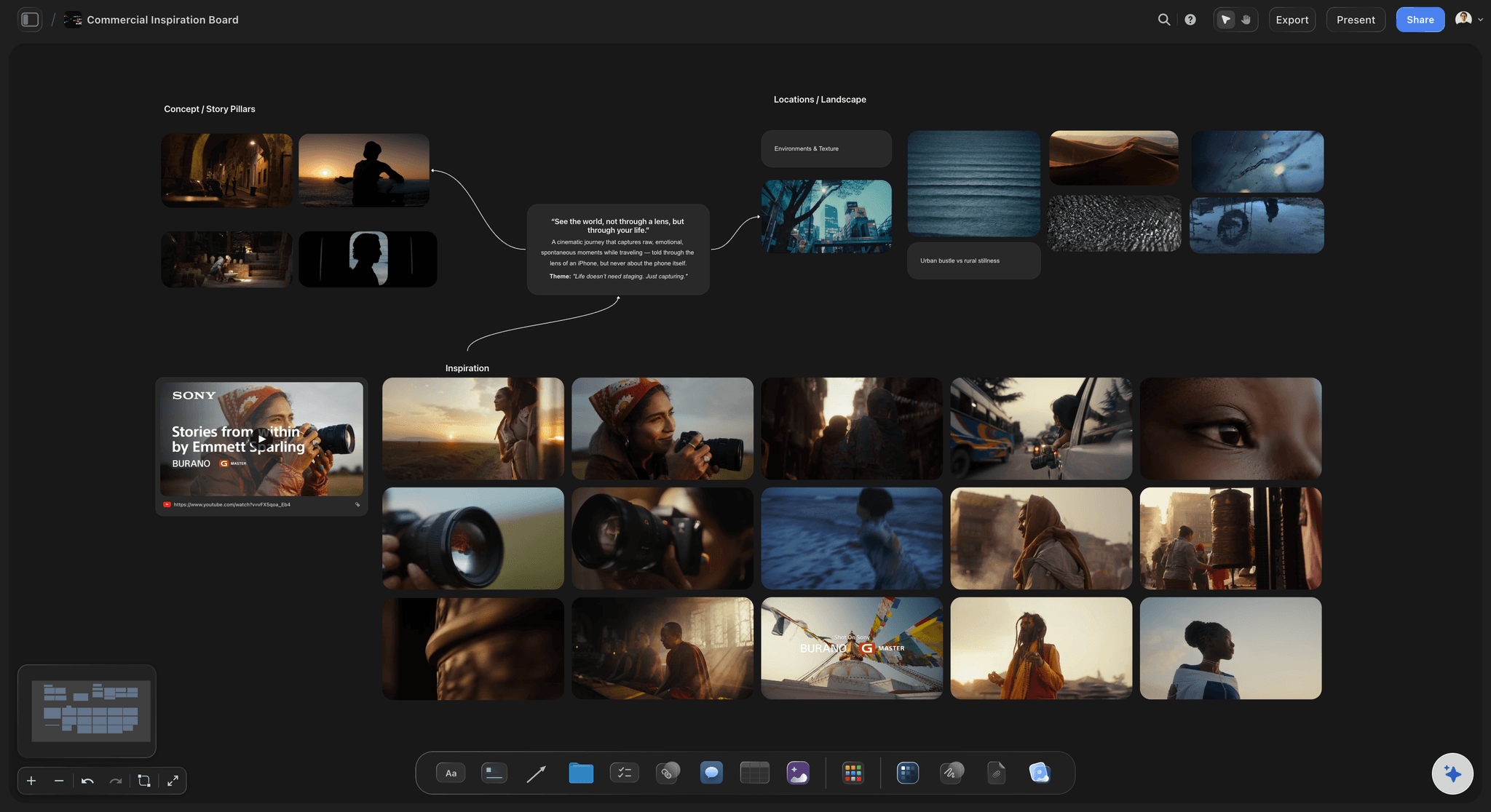
Fabric next to the piece
Sourcing, swatches, and trims in view
Photograph the swatch, drop it on the board beside the piece it is for, and write the mill, the composition, the width, the price, and the minimum on the card. The sourcing conversation stops living in a separate spreadsheet.
See the moodboard maker →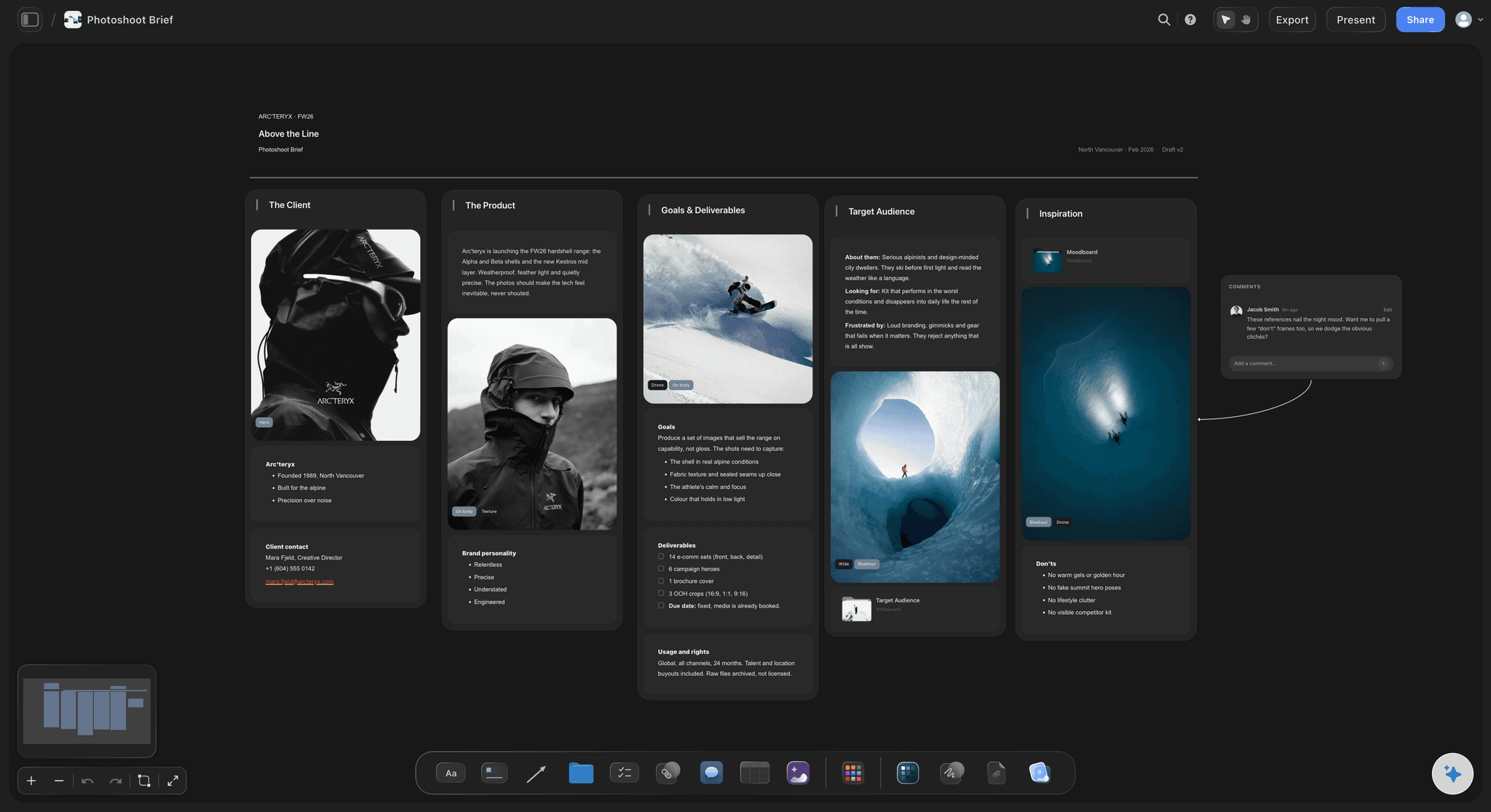
The range you can actually see
Line sheet and lookbook on the same canvas
Lay every style out as a card in a grid and read the collection as a shape: repeated silhouettes, fabric carryover, price architecture, and orphans. When it is locked, build the lookbook beside it and share view-only with buyers and press.
See the design planning tool →A free plan is coming. No object cap on paid plans.
Open a board and start with the first tear sheet. Storyflow is paid-only during early access, with a free plan launching before the end of 2026, and every plan has no object cap and no time limit, so a full season of research and swatches never pushes you to upgrade mid-collection.
Unlimited concept, research, colour, line sheet, and lookbook boards on an infinite canvas
Basic AI usage to draft concept boards, colour directions, and range groupings
Attach images, PDFs, video, and links, plus 20 file uploads
Share view-only with buyers and press, or invite the studio free
ONE COLLECTION, NOT THIRTY GARMENTS
Built for how a season is actually designed.
Set the concept, gather the references, lock the colour, source the fabric, plan the range, and hand it off without losing the intent.
Research that holds a position
Trend, archive, and reference in one place
Tears, scans, and stills together: Pin trend tears, archive scans, runway stills, street photography, and fabric photographs under the seasonal idea they support, so the research argues for a direction instead of collecting everything you liked.
Pull frames from a show or a film: Grab stills straight from a runway video, a film, or a documentary on YouTube and Vimeo when movement, drape, or a walk shows the intent that a flat photograph cannot.
Crop and caption the detail: Crop a reference down to the collar, the pocket, or the hem that actually matters and write one line saying what you are taking from it, so the reference survives being read by the studio in week nine.
Colour and fabric decided together
The colour card and the sourcing beside each other
One card the season answers to: Keep the colour card as a fixed swatch group in a corner of the board and check every fabric option, print, and colourway against it, which is how a range stays coherent through a sampling round.
Swatches with the commercial facts on them: Write the mill, composition, width, price, minimum order, and lead time on the swatch card itself, so a fabric decision is made with the constraint visible rather than remembered later.
Trims, hardware, and finishes grouped: Cluster buttons, zips, labels, and hardware options next to the pieces that use them, so the trim story is consistent across the range instead of decided piece by piece.
Keep what you rejected: Park the rejected fabrics and colours in a side cluster with a note on why, which is the fastest answer when a mill discontinues something and you need the second choice in an afternoon.
The range as a shape
A line sheet you can rearrange until it reads
Every style as a card in a grid: Lay the pieces out with their fabric, colourway, and price band on the card, then step back and read the collection as a whole: the silhouette rhythm, the hero pieces, and the fillers that cannot justify themselves.
See fabric carryover and price gaps: Group by fabric to find the orphan that carries a single style, or by price band to find the hole in the architecture, then move cards until the range balances.
Delivery drops in their own clusters: Split the range into delivery drops as clusters on the same infinite canvas, so you can see what a buyer actually receives in each window rather than what the season contains in total.
Fittings, factory, and the lookbook
Intent that survives the handoff
Fit notes attached to the piece: Photograph the fitting, drop the image on the piece's card, and write the comments next to it, so round two starts from what was actually said instead of from memory and a phone thread.
A reference board the factory can open: Share a view-only link and a factory contact, an agent, or a pattern cutter opens the intent board in a browser with no account, seeing the finish references and stitch details beside the piece they belong to.
Lookbook and show layout on the same canvas: Build the lookbook pages or the show running order as clusters beside the range, so the styling and the sequence are decided against the collection rather than after it.
Invite the studio free: Bring the design assistant, the pattern cutter, and the production manager onto the board free, so the season is one shared surface instead of six exported PDFs at different versions.
Explore templates for your project
Every template opens as a real, editable board on the infinite canvas. Pick the closest fit and make it your own.
Film Moodboard
Collect film references, color palettes, lighting, locations, and tone in one place, then invite your crew.
COMPARED
How Storyflow compares for collection planning.
This table is about concept, colour, range, and presentation boards. It is not about patternmaking, tech packs, or production, where CLO 3D, Browzwear, and PLM systems are the answer.
Storyflow
Recommended
AI drafts a concept or range board reading your current canvas
Truly infinite canvas with no object cap
Pull frames from runway and film video on YouTube and Vimeo
Line sheet and lookbook on the same board as the research
Discovery feed that surfaces trend imagery you have not seen
Ready-made print and social templates with brand kits
AI drafts a concept or range board reading your current canvas
Truly infinite canvas with no object cap
Pull frames from runway and film video on YouTube and Vimeo
Line sheet and lookbook on the same board as the research
Discovery feed that surfaces trend imagery you have not seen
Ready-made print and social templates with brand kits
Milanote
AI drafts a concept or range board reading your current canvas
Truly infinite canvas with no object cap
Pull frames from runway and film video on YouTube and Vimeo
Line sheet and lookbook on the same board as the research
Discovery feed that surfaces trend imagery you have not seen
Ready-made print and social templates with brand kits
Canva
AI drafts a concept or range board reading your current canvas
Truly infinite canvas with no object cap
Pull frames from runway and film video on YouTube and Vimeo
Line sheet and lookbook on the same board as the research
Discovery feed that surfaces trend imagery you have not seen
Ready-made print and social templates with brand kits
What creators are saying
Join early creators getting structured workspaces and AI that remembers their projects
“Storyflow has sped up my workflow by at least 3x, which means more flow state and more projects I can actually ship. It truly changed the way me and my team create.”

Reilin Joey
Director & YouTuber
“One prompt gets me a structured board. But the tactics are my favorite. I run my YouTube scripts through them and my intros and retention got better. It's amazing.”

Justkay
YouTuber & Freelance Filmmaker
“I used to juggle five apps to plan a project. Now I describe what I am making and get boards, lists, and a schedule. All in one place.”

George
@fernwehchronicles
Fashion designer questions, answered.
Everything designers ask before planning a season on a canvas.
No. Plainly no. Storyflow does not do patternmaking, grading, measurement charts, tech pack generation, or 3D garment simulation, and it will not pretend to. CLO 3D and Browzwear own digital sampling and fit, your CAD patternmaking software owns pattern and grading, and a PLM system owns tech packs and bills of materials. Storyflow holds the design intent around all of that: the concept, the references, the colour, the fabric decisions, and the range.
Get the concept, the colour, the fabric, and the whole range on one canvas.
Keep patternmaking and tech packs where they belong. Design the collection as a collection here. Paid-only during early access; free plan launches late 2026.