How to Create a Fashion Mood Board (Step by Step, 2026)
A step-by-step guide to creating a fashion mood board in 2026, from concept to collection direction, plus the 6 essential elements, the best tools, and how to do it with AI.

Category
Visual Thinking
Author

Justkay
Documentary Filmmaker & Founder at Storyflow
Topics
2026-06-16
•
Updated July 6, 2026
•
14 min read
•
Visual Thinking- how to create a fashion mood board
- fashion mood board step by step
- fashion mood board elements
- collection concept board
- fashion mood board with AI
- Storyflow
How do I create a fashion mood board?
Define the collection concept in one line, gather references for color, fabric, silhouette, and styling, build a color story, add fabric and texture, define the key silhouettes, arrange by theme, and write a short rationale tied to the customer. With the concept in hand, the board takes about two hours.
Make your fashion moodboard on a canvas built for it
Storyflow lets you pin fabrics, silhouettes, and references on one infinite board, and the AI suggests directions from what the collection is becoming.

1) Quick Answer: How to Create a Fashion Mood Board
To create a fashion mood board, define the collection concept in one line, gather references for color, fabric, silhouette, and styling, build a color story, add fabric and texture, define the key silhouettes, arrange the board by theme, and write a short concept rationale. You end up with a one-page collection direction a buyer or a team can act on, and with the concept and constraints in hand it takes about two hours.
The principle that makes a board work: a fashion mood board is a point of view, not a pile of pretty. A grid of gorgeous runway shots with no through-line is a Pinterest board, not a collection concept. The job is to show the one direction this collection is going, the story, the palette, the silhouette, and why, so the rest of the work has a spine.
What is a fashion mood board? A fashion mood board is a curated visual collection of color, fabric, silhouette, and styling references that defines the direction of a collection before any garment is made. In trend forecasting and design education it is the core tool for turning research into a concept, which is why forecasters at firms like WGSN and tools like Adobe build seasonal direction this way.
Key takeaways:
- A fashion mood board is a point of view, not a pile of pretty. It should commit to one direction and explain the story, not show everything beautiful.
- The board is built as a Direction Stack: concept, color, material, silhouette, styling, and rationale, ordered from feeling to buildability.
- Gather references in Pinterest or Shuffles, but build the working board somewhere presentable: Milanote, Canva, Adobe, or Storyflow.
- AI can speed up the slowest step, turning a wall of references into a written collection concept and a buyer-ready narrative.
- The board is finished when it communicates a point of view the team can build a collection from, not when it simply looks good.
For the tool comparison, see Best Mood Board Tools for Fashion Designers and the pillar What Is a Mood Board? A Complete Guide.
2) The Direction Stack: The 6 Elements Every Fashion Mood Board Needs
Most guides list mood board elements as a flat checklist. That is why so many boards look complete and still say nothing. The elements are not equal, and they are not independent. They stack. Think of them as the Direction Stack: six layers that build from pure feeling at the top to a garment a factory could start on at the bottom. A board missing a layer reads as inspiration, not direction. Include all six, in order.
Read the stack top to bottom and you can see why boards fail. A board with color and styling but no fabric or silhouette is a styling collage: pretty, but nothing to build. A board with fabric and silhouette but no concept or rationale is a spec with no soul: buildable, but nobody knows why. The concept and the rationale are the two layers almost every board skips, and they are the two that turn a beautiful wall into a collection a buyer can believe in.
The Direction Stack also tells you the order to build in, which matters more than it sounds. Work top-down and each layer constrains the next: the concept narrows the palette, the palette narrows the fabrics, the fabrics narrow the silhouettes. Work bottom-up (starting from a silhouette you love) and you end up reverse-engineering a concept to justify a picture, which is how three unrelated ideas end up on one board.
3) What You Need Before You Start
You need three things before you open any tool.
- The concept. What is this collection about, who is it for, and what season or story? If you cannot say it in a sentence, you are gathering, not yet boarding. A working concept names a customer and a feeling in the same breath: "quiet-luxury workwear for a woman who has stopped dressing to be noticed." That is the top of your Direction Stack.
- The constraints. The market, the price point, the production reality, and the season. Constraints make a concept commercial rather than just pretty. A $90 retail tee and a $900 coat cannot share a fabric story, so the price point decides what references are even honest to pin. Write the constraints down before you gather, or you will fall for references you cannot afford to make.
- A place to gather and a place to build. Pinterest and Shuffles are the gathering layers. The place to build the real, presentable board is a private workspace: Milanote, Canva, Adobe, or Storyflow. In Storyflow, the Fashion Moodboard template opens with the color story, fabric, and silhouette sections already laid out, so you are dropping references into the Direction Stack instead of building the structure from a blank canvas.
With those in hand, a collection concept board takes about two hours: roughly twenty minutes to gather, an hour to build the stack, and forty minutes to write and tighten the rationale.
4) Step-by-Step: How to Create a Fashion Mood Board
The eight steps below build the Direction Stack in order, then pressure-test it. Each step has a worked example from one running concept so you can see the choices connect: a rave-meets-tailoring resort capsule for a young, going-out customer.
Step 1: Write the concept in one line
Start with the idea the collection is really about. Name the customer and the feeling together, then pin that line to the top of the board. Every reference either serves it or comes off.
Worked example: the first draft is "a fun going-out collection." That is too vague to constrain anything. Tighten it to "a rave-meets-tailoring resort capsule for a young, going-out customer who wants one outfit that works at dinner and at the afterparty." Now the concept does work for you: a suiting reference stays, a floaty beach-resort reference goes, because it does not do double duty.
The test for a finished concept: could someone read the line and predict which of two references you would keep? If yes, the concept is doing its job.
Step 2: Gather references against the concept
Pull runway shots, vintage, street style, art, texture, and color. Save broadly, but tag each reference with which layer of the stack it supports (color, fabric, silhouette, styling). Pinterest and Shuffles are fastest for this; the goal here is raw material, not the final board.
Worked example: for the resort capsule you gather thirty to forty references: club lighting for the color mood, structured blazers and slip dresses for silhouette, technical and satin fabrics for material, chunky hardware and slicked hair for styling. As you save, you already sense that half your "styling" pins are really color pins. That is fine. Sorting happens next.
The mistake to avoid at this step is falling in love with a single hero image and building the board to flatter it. Gather for the concept, not for the prettiest picture.
Step 3: Build the color story
Choose the season's palette: the core colors and the accents, in the rough proportion they will appear. A defined color story is what makes a collection read as intentional rather than random. Place the swatches together so the relationships are visible, not scattered across the board.
Worked example: from the club-lighting references you pull three core neutrals (jet black, wet-asphalt grey, oyster) and two accents (an acid lime and a hot magenta), and you note the proportion: neutrals carry roughly 80 percent of the collection, the accents 20. Writing the proportion down is what separates a color story from a color grid. It tells a buyer this is a wearable capsule with two statement pieces, not a rainbow.
A color story carries commercial signal, not just mood. Neutral-heavy reads as commercial and reorderable; accent-heavy reads as editorial and risky. Choose the ratio on purpose.
Step 4: Add fabric and texture
Fashion is felt and worn, not just seen. Add fabric references: the weight, the drape, the finish, the surface. This is the material story, and it is what separates a real collection concept from a styling collage. Where you can, reference real or close-match fabrics rather than a photo of a garment.
Worked example: the resort capsule pairs a crisp cotton-and-elastane suiting (holds a tailored shoulder) with a heavy satin-back crepe (drapes for the slip dresses) and a single technical nylon for a packable layer. Three fabrics, each tied to a silhouette job. When you can, pin a swatch photo or a fabric-supplier reference next to each, so "satin" means a specific weight and hand, not a vibe.
If a buyer or a tutor asks "what is this made of" and the board has no answer, the board is styling, not a collection.
Step 5: Define the silhouettes
Add the key shapes and proportions: the hero looks, the lengths, the volumes. Silhouette is where a mood board becomes a collection, because it points at the actual garments. Two or three defined silhouettes give the board a backbone.
Worked example: the capsule commits to three silhouettes: an oversized single-breasted blazer, a bias-cut slip dress at midi length, and a straight-leg trouser with a high waist. Everything else in the collection is a variation on those three. Naming them stops the board from sprawling into ten half-ideas and forces the "one outfit, two occasions" logic from the concept to actually show up in the shapes.
A useful discipline: if you cannot describe a silhouette in words a pattern cutter would understand ("bias-cut slip, midi, cowl neck"), it is not defined yet.
Step 6: Arrange by theme, not by prettiness
Most boards go wrong here. Do not arrange for a pretty grid; arrange by the story. Group the color story, the fabrics, the silhouettes, and the styling, and put the concept and rationale where they are read first. A fashion mood board is a point of view, not a pile of pretty, and the layout should make the point of view obvious.
Worked example: on the canvas you lay the concept line across the top, the color swatches as one tight block beneath it, then a fabric row, then the three silhouettes each with their fabric called out, and styling details along the side. Read left to right, top to bottom, the board now walks a viewer down the Direction Stack instead of making them hunt.
The test: hand the board to someone cold and ask them to describe the collection in one sentence. If they lead with "it's got a lot of nice black stuff," the layout is showing prettiness. If they lead with "sharp tailoring you can wear out at night," the layout is showing the point of view.
Step 7: Write the concept rationale
Under the board, write two or three sentences: why this palette, these fabrics, these silhouettes, all tied to the concept and the customer. This is the highest-leverage step and the one almost everyone skips.
Worked example: "This capsule dresses a young going-out customer who wants one outfit that carries from dinner to the afterparty. The neutral base keeps it reorderable and wearable; the acid and magenta accents give the two statement pieces the club energy the customer is actually shopping for. Tailored suiting and bias satin let the same wardrobe read sharp at a table and loose on a dancefloor." That paragraph is what a buyer responds to. It names the customer, justifies the palette ratio, and ties the fabric to the occasion.
The rationale is what a buyer, a tutor, or a team actually responds to, and what holds the collection together when the work scales past one board.
Step 8: Pressure-test and tighten
Read the board as a buyer would. Does it commit to one story? Could a team start designing garments from it? Cut anything that is beautiful but does not serve the concept.
Worked example: on the final read you notice a gorgeous floaty kaftan reference that survived from Step 2. It is beautiful and it is wrong: it belongs to a different, softer resort story and it muddies the "sharp tailoring you can dance in" through-line. Cut it. The board loses a pretty image and gains a clearer point of view. A tighter board is a stronger pitch.
Turn your references into a collection concept
Drop the runway shots, fabrics, and swatches on one canvas and let the AI draft the color story logic and the buyer-ready rationale. A fashion mood board is a point of view, not a pile of pretty.
5) How to Create a Fashion Mood Board with AI
The slowest part of the process is Step 7: turning a wall of references into a written collection concept. This is exactly where AI helps.

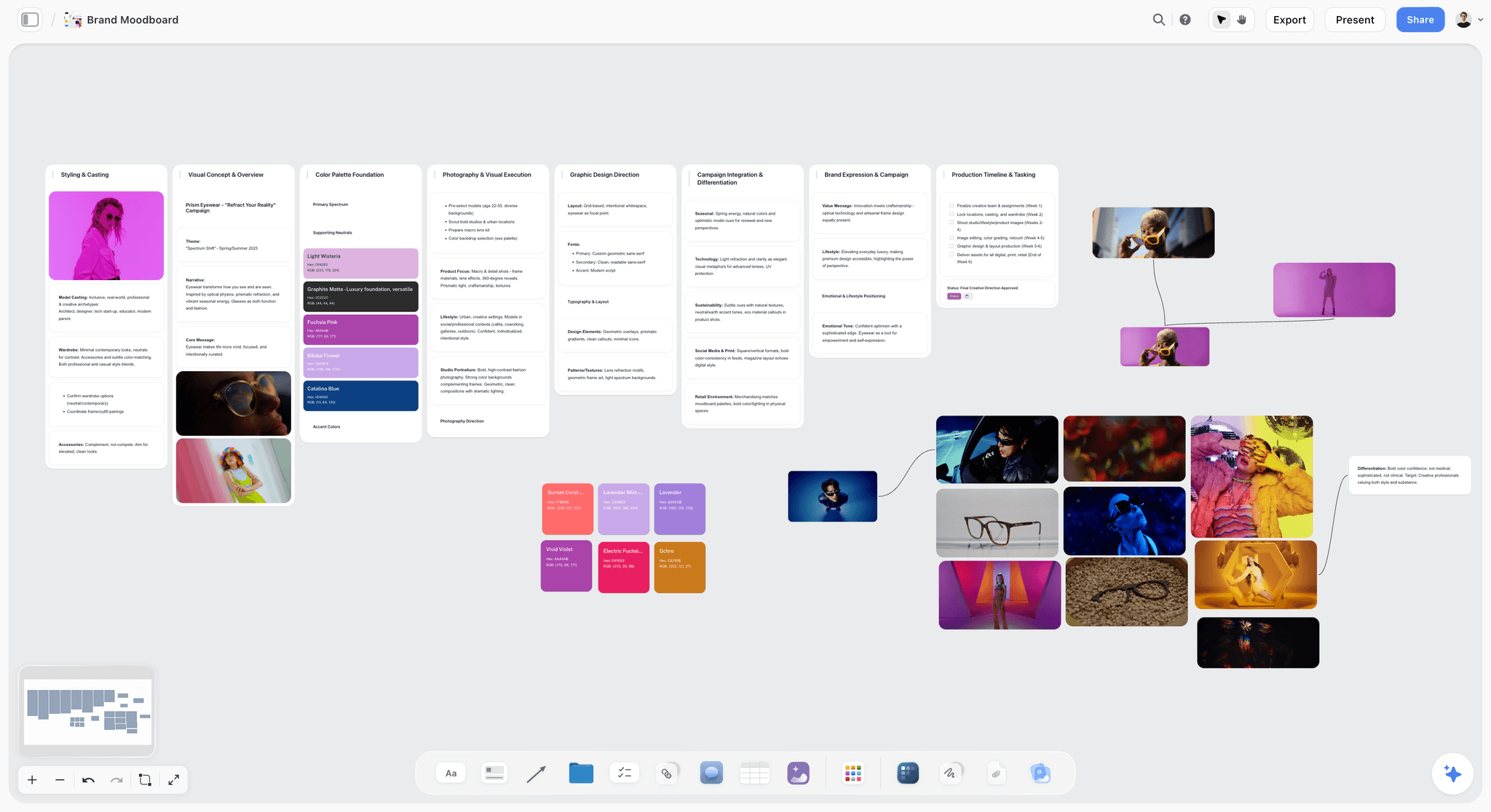
The familiar approach is to arrange the references and then write the concept from scratch in a separate document, alt-tabbing between the board and a blank page, trying to remember what each pin was supposed to mean. With an AI canvas like Storyflow, you drop the references on the board, ask the AI to read the whole canvas, and it drafts the direction: the color-story logic, the fabric and silhouette narrative, and the rationale tied to the concept and the customer. Storyflow's AI reads your full active canvas board by default, plus up to 1 Tactic and up to 3 Documents you @-mention in the chat. It does not read your other boards or your whole workspace, so keep the references you want it to weigh on the active canvas. Start from the Fashion Moodboard template or the broader Brand Inspiration template so the AI has structure to read from the first prompt.
A concrete prompt that works: pin your concept line at the top, drop the color, fabric, and silhouette references into their sections, then ask "read this board and draft a two-sentence rationale tying the palette and fabrics to a young going-out customer." Because the AI is reading the actual references, the draft comes back grounded in what you pinned, not a generic paragraph about "bold and modern" fashion. You edit from a real first draft instead of a blank page.
Be honest about where this wins and where it loses. If your only goal is the most beautiful, gallery-clean board, Milanote and Pinterest still win on layout and reference discovery. Storyflow's edge is narrower: it is the one place the same board that holds your references can also draft the written concept tied to your customer.
Three honest limits worth naming before you commit to the AI workflow. First, Storyflow is cloud-first: there is no fully offline, own-the-file mode, so for privacy-locked or air-gapped work a local tool is the better fit. Second, it is a canvas, so the output is a board of cards, not a print-ready lookbook page; for a polished buyer deck you still export and lay out in Canva or Adobe. Third, and most important for fashion, the AI drafts the concept and the words but it does not make tech packs, grade patterns, or sew samples, so for production you pair it with CLO3D or a tech-pack tool. The AI writes the direction; it does not make the garment.
On cost, Storyflow's Free plan, which launches before the end of 2026, will cover unlimited boards and unlimited collaboration, and it includes a trial of Storyflow AI (up to 10 generations per period), so the AI-assisted concept step is testable before paying. The Plus plan ($7.99 per month billed annually, $9.99 monthly) does not add more AI; its value is the 200+ Story Blueprints library and unlimited file uploads. More AI starts at Pro ($14 per month annual, $19 monthly), which adds 20x more AI usage and AI image generation. If you plan to lean on the AI to draft rationales across many boards a month, Pro is the honest tier, not Plus.
6) How to Present Your Collection Board
A board wins or loses in how you present it, not just how it looks. Present it as the Direction Stack, from feeling to garment, the same order you built it.
- Lead with the concept and the story, not the collage. Open with the one-line idea so the room knows what they are looking at before they start judging pictures.
- Walk the color story, then the fabrics, then the silhouettes. Move from feeling to garments, the order you built it. Say the palette ratio out loud ("neutrals carry it, two accents do the talking") so the commercial logic lands.
- Read the rationale out loud. A buyer is responding to a point of view, and the rationale is the point of view in words. This is the sentence they will repeat back to their own team.
- Present it in a clean, branded format. Canva and Adobe produce the most polished lookbooks and line sheets for buyers, so export the tightened board and lay it out there for the actual pitch.
End by asking for a specific reaction to the direction, not just the visuals. "Does this customer feel real to you?" pulls a decision. "What do you think?" pulls a shrug. That turns a nice presentation into a decision.
7) Common Mistakes to Avoid
- No concept. A board without a one-line idea is a Pinterest dump. Write the concept first, at the top of the stack.
- Too many stories. Showing three directions reads as indecision. Commit to one, and cut the references that belong to the other two.
- All color, no fabric. Fashion is material. A board with no fabric cannot communicate how the collection feels, only how it photographs.
- No silhouette. Without shapes, the board is styling, not a collection. Name two or three silhouettes a pattern cutter could start on.
- Pretty over commercial. If a buyer cannot see the customer, the board will not convert. A beautiful board that names no shopper is a portfolio piece, not a pitch.
- No rationale. Skipping the why is the most common and most costly mistake. The rationale is the concept in words; without it, the board relies on you being in the room to explain it.
- Building bottom-up. Starting from a silhouette you love and reverse-engineering a concept to fit it is how three unrelated ideas end up on one board. Build the Direction Stack top-down.
8) Tools That Help
You need a place to gather and a place to build. Pinterest and Shuffles are the gathering layer. For the working, presentable board, the strongest options are Milanote for the most beautiful board, Canva for a polished lookbook, Adobe for custom retouched imagery, and Storyflow for turning the references into a written collection concept with AI. Physical fabric trays still beat every digital tool for material: real swatches a buyer can touch. For the full comparison of all ten, see Best Mood Board Tools for Fashion Designers. The honest rule: gather anywhere, but build and present somewhere private, and use AI for the concept step that decides whether the board persuades.
9) The Bottom Line
Creating a fashion mood board is eight steps that build one structure, the Direction Stack: write the concept, gather references, build the color story, add fabric, define silhouettes, arrange by theme, write the rationale, and tighten. The two layers almost everyone skips, the concept and the rationale, are the two that turn a beautiful board into a collection a buyer believes in.
A fashion mood board is a point of view, not a pile of pretty. The board is finished when it communicates a direction the team can build a collection from. If the slow part for you is turning references into a written concept, that is the step to hand to AI. Take the references for your next collection, drop them on a Storyflow canvas, and ask the AI to draft the concept and rationale tied to your customer. If the written direction comes back sharper than what you would have typed from a blank document, you have found where the canvas earns its place.
10) FAQ: Creating a Fashion Mood Board
How do I create a fashion mood board step by step?
Write the collection concept in one line, gather references for color, fabric, silhouette, and styling, build a color story, add fabric and texture, define the key silhouettes, arrange the board by theme rather than prettiness, and write a short rationale tying every choice to the concept and the customer. Finish by tightening: cut anything beautiful that does not serve the concept. The eight steps build one structure, the Direction Stack, from feeling to buildable garment, and the board is done when it communicates a point of view a team can build from.
What should a fashion mood board include?
It should include six elements arranged as the Direction Stack: a one-line concept, a color story, fabric and texture references, the key silhouettes, styling and details, and a written rationale. The concept and the rationale are the two most often skipped and the two that turn a styling collage into a collection direction a buyer can believe in. A board missing fabric or silhouette is styling; a board missing concept or rationale is a spec with no reason.
What is the best tool to make a fashion mood board?
Pinterest and Shuffles are best for gathering references, Milanote for the most beautiful private board, Canva for a polished lookbook, Adobe for custom imagery, and Storyflow for turning the references into a written concept with AI. Most designers gather in one tool and build in another. See our full comparison of fashion mood board tools for the details on all ten.
How do I make a color story for a fashion collection?
Pull the colors from your strongest references, then narrow to a core palette of a few colors plus one or two accents, and note the rough proportion each will appear in the collection. A color story is more than a palette; it carries the season's mood and the commercial signal, because a neutral-heavy ratio reads as reorderable while an accent-heavy one reads as editorial and risky. Place the swatches together so the relationships read at a glance, and tie the choice back to the concept in your rationale.
Can I create a fashion mood board with AI?
Yes. An AI canvas like Storyflow reads the references on your active board and drafts the collection concept: the color-story logic, the fabric and silhouette narrative, and the rationale tied to the customer. Storyflow's AI reads your full active canvas plus up to 1 Tactic and up to 3 @-mentioned Documents, not your whole workspace, so keep the references you want weighed on that board. AI handles the concept and the words; it does not make tech packs, grade patterns, or sew samples, so pair it with CLO3D or a tech-pack tool for production.
What is the difference between a fashion mood board and a tech pack?
A fashion mood board captures the direction: the concept, color, fabric, and silhouette of a whole collection. A tech pack is the production document for a single garment: flat sketches, measurements, materials, and construction details a factory needs. The mood board starts the collection; the tech pack makes a specific piece. They are bookends of the same process and live in different tools, and no mood board tool, AI included, replaces a tech pack.
How many images should a fashion mood board have?
Enough to communicate one clear concept, usually 15 to 30 references plus the color story, fabrics, and silhouettes. More than that and the board reads as indecision rather than a point of view. The test is whether someone could look at the board and describe the collection's story in one sentence; if they cannot, the answer is fewer, sharper references, not more.
Should I make a digital or physical fashion mood board?
Digital is faster, easy to revise, and simple to share, which is why most designers work digitally. Physical boards still win for fabric: real swatches a buyer can touch and drape communicate weight and hand that no photo does. Many designers do both, a digital board for the concept and direction and a physical fabric tray for the materiality, especially for higher-end or production-bound collections.
How do I present a fashion mood board to a buyer?
Lead with the one-line concept, then walk the color story, the fabrics, and the silhouettes, then read the rationale that ties it to the customer. Say the palette ratio out loud so the commercial logic lands, present it in a clean lookbook format (Canva and Adobe are strong here), and ask for a specific reaction to the direction. Buyers respond to a point of view and a clear customer, not just pretty images.
How do I create a fashion mood board for free?
Gather references in Pinterest or Shuffles for free, then build the board in a free tool: Milanote and Canva both have free tiers, and Storyflow's Free plan, which launches before the end of 2026, will cover unlimited boards and unlimited collaboration with a trial of Storyflow AI (up to 10 generations per period). You can run the entire eight-step process, including an AI-assisted concept draft, without paying, and only upgrade if you need more AI (which starts at Pro) or the 200+ Story Blueprints library (which starts at Plus).
How long does it take to make a fashion mood board?
About two hours once you have the concept and constraints in hand: roughly twenty minutes to gather references, an hour to build the Direction Stack (color, fabric, silhouette, styling), and forty minutes to write and tighten the rationale. The gathering can sprawl for days if you let it, so the discipline is to gather against a written concept rather than browsing for inspiration and hoping a direction appears.
What makes a good fashion mood board?
A good board commits to one concept, includes all six layers of the Direction Stack, and explains its choices against a real customer. It shows fabric and silhouette, not just color, and it leads with the concept and the rationale. The simplest test: a fashion mood board is a point of view, not a pile of pretty, so if the board does not communicate a clear direction someone could build from, it is not finished yet.
Table of Contents
- Quick Answer: How to Create a Fashion Mood Board
- The Direction Stack: The 6 Elements Every Fashion Mood Board Needs
- What You Need Before You Start
- Step-by-Step: How to Create a Fashion Mood Board
- How to Create a Fashion Mood Board with AI
- How to Present Your Collection Board
- Common Mistakes to Avoid
- Tools That Help
- The Bottom Line
- FAQ: Creating a Fashion Mood Board
- Author
- Related Reading
Templates to check out for this topic


Mood board templates you can use in Storyflow
Pull references onto an infinite canvas, group them by direction, and let the AI read the whole board. Open any of these mood board templates and start dropping in images.


See Storyflow in Action
A visual AI workspace where every feature lives inside one canvas. No tab-switching, no context lost.
Build your entire board from a single message
Type what you need in the AI chat at the bottom of your canvas. The AI adds cards, headings, and structure directly onto your board.
Use expert frameworks as AI context
Type @ in the AI chat and choose any Tactic. The AI tailors every response to that framework instead of giving generic advice.
Turn your board into a mind map in seconds
Ask the AI to restructure your canvas as a mindmap. It connects your ideas into a visual hierarchy so you can see how everything relates.
Why Storyflow Exists
Storyflow actually began as a personal tool while working on creative and research projects.
We kept running into the same problem: ideas were scattered everywhere: notes, documents, and whiteboards.
Nothing helped us see how everything connected.
So we started building a workspace designed around how ideas actually grow.
→ Read how Storyflow was createdJustkay
Documentary Filmmaker & Founder at Storyflow
Published: 2026-06-16
Extremely simple, seriously capable


See how easy it is to get started
Watch a real project come together, from a blank board to a finished plan, clicked through step by step.
Start creating with AI and become more productive
Transform your creative workflow with AI-powered tools. Generate ideas, create content, and boost your productivity in minutes instead of hours.