
PINTEREST ALTERNATIVE
Pinterest finds the references.
This is where the work happens.
Say the true thing first: Pinterest's discovery engine is unmatched and Storyflow has nothing like it. No recommendation feed, no billions of pins, no community, no browser extension, no shopping. If you want to find references, go to Pinterest. Storyflow is the other half of the job, a private working board you own, where every image can carry a note explaining why it is there, groups hold their meaning, and a client sees your board instead of somebody else's product. Paid-only during early access, from $9.99 a month, with a Free plan before the end of 2026.
Plans from $9.99/mo
Free plan coming late 2026
No ads on your board

Used by creative professionals at:
Artlist
Pixar
Nike
Red Bull
The North Face
Porsche
Start from a ready-made template
Pick a board to see what you can build, then let AI fill it in. Every template is a real, editable starting point on the same infinite canvas.
Film Moodboard
Collect film references, color palettes, lighting, locations, and tone in one place, then invite your crew.
What are people actually looking for in a Pinterest alternative?
Start with the concession, because everything else on this page depends on it being honest. Pinterest's discovery engine is genuinely unmatched. Billions of images, a recommendation feed that learns what you like faster than you can articulate it, visual search that finds the thing you cannot name, a browser extension that pins from anywhere on the web, a community, and shopping. Storyflow has none of that. There is no feed, no browse, no extension, no marketplace. If your problem is finding references, Pinterest is where you should be looking, and no page claiming otherwise is telling you the truth.
The problem is that Pinterest is a discovery product that millions of professionals quietly misuse as a work tool. That is not a criticism of Pinterest. It is doing exactly what it was built to do, which is keep you looking at more images. But the incentives of a discovery product and the needs of a working board point in opposite directions. Your board sits next to advertising and a recommendation feed engineered to pull you off it. The thing that makes Pinterest brilliant for finding is the same thing that makes it hostile to focusing.
The specific failures show up the moment a board has to do professional work. You cannot put a note beside an image explaining why it is there, which is the entire point of a reference: nobody needs to know that you liked a photo, they need to know that it is the lighting and not the styling. You cannot group by intent in a way that survives, so the palette, the lighting, and the composition references dissolve into one undifferentiated grid. You cannot show a client the board without also showing them Pinterest, its ads, and whatever the algorithm decides to put next to your work. Pins rot silently when their source page dies. And the board itself lives on someone else's platform, subject to their terms, their algorithm, and their changes.
Professionals move off Pinterest for client work for six recurring reasons: there is no way to write a note beside an image explaining what you are actually pointing at, ads and a recommendation feed sit on your board and pull attention off it, pins rot into dead links when the source page disappears, images cannot be grouped by intent so lighting, palette, and composition references collapse into one grid, the board cannot be presented cleanly because the client sees Pinterest instead of your work, and you do not own the board or control what appears beside it. Storyflow answers all six, and none of them are the job Pinterest was built to do.
HOW IT WORKS
Find it on Pinterest. Build the board here.
The workflow most working art directors, photographers, and designers land on eventually.
01
Open a private canvas
Sign up in seconds, from $9.99 a month. Nothing to install. An infinite canvas opens in the browser with nothing on it but your work, no feed and no ads.
02
Bring the references in
Drag images straight from your desktop, paste them from anywhere, drop in PDFs and links, or grab a frame from a YouTube or Vimeo reference. Save what you find on Pinterest and bring the keepers across.
03
Say why each image is there
Write a note beside the photo. This is the lighting. This is the palette, not the styling. This one is the wrong direction and here is why. Group images by intent so the board argues a case instead of showing a grid.
04
Present it without a platform in the way
Share a view-only link and the client opens your board in a browser with no account, no login, and nothing else on the screen. Or export the board as a high-quality image or PDF for a deck.
The board a discovery feed was never designed to be.
Pinterest is built to help you find the next image. This is built to help you decide what the images mean.

A reference is an argument, not a picture
Write the note beside the image
The single thing a working moodboard needs and a pin board cannot do. Put text next to a photograph saying what you are actually pointing at, so a client, a photographer, or a stylist reads your intent rather than guessing it from a grid of pretty pictures.
See the moodboard maker →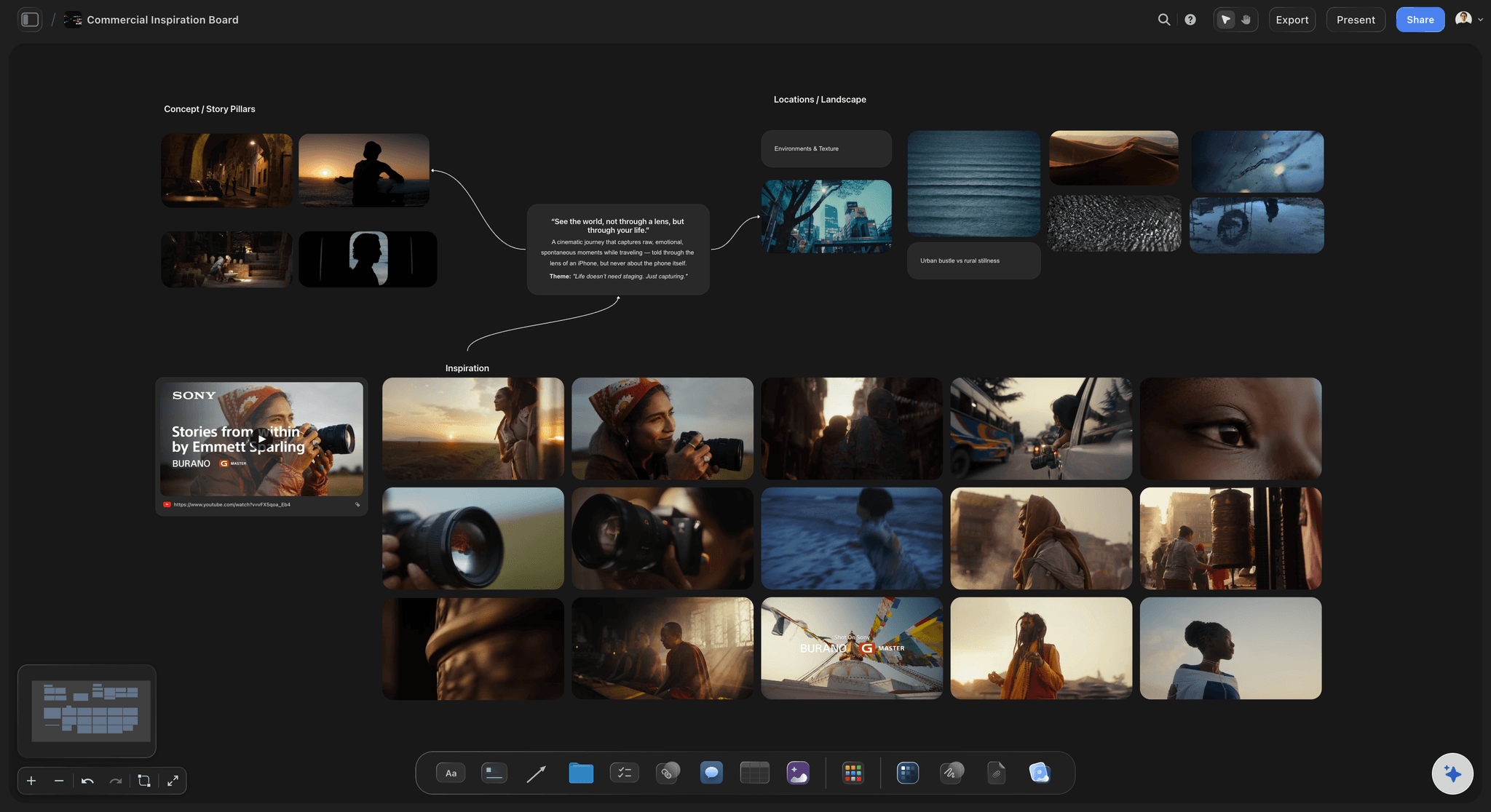
No feed, no ads, no algorithm
A private board with nothing else on the screen
Your canvas holds your work and only your work. Nothing recommends the next thing, nothing sells anything beside your references, and nothing decides what a client sees next to your direction. It is a quiet room instead of a shop window.
Try a free reference board →
Lighting here, palette there, wardrobe over there
Group references by what they are for
Lay the board out spatially so each cluster carries a meaning. The lighting references live together, the palette sits apart from the styling, and the rejected direction stays on the board with a note saying why it was rejected. That structure survives, because it is spatial rather than a tag.
See a brand moodboard →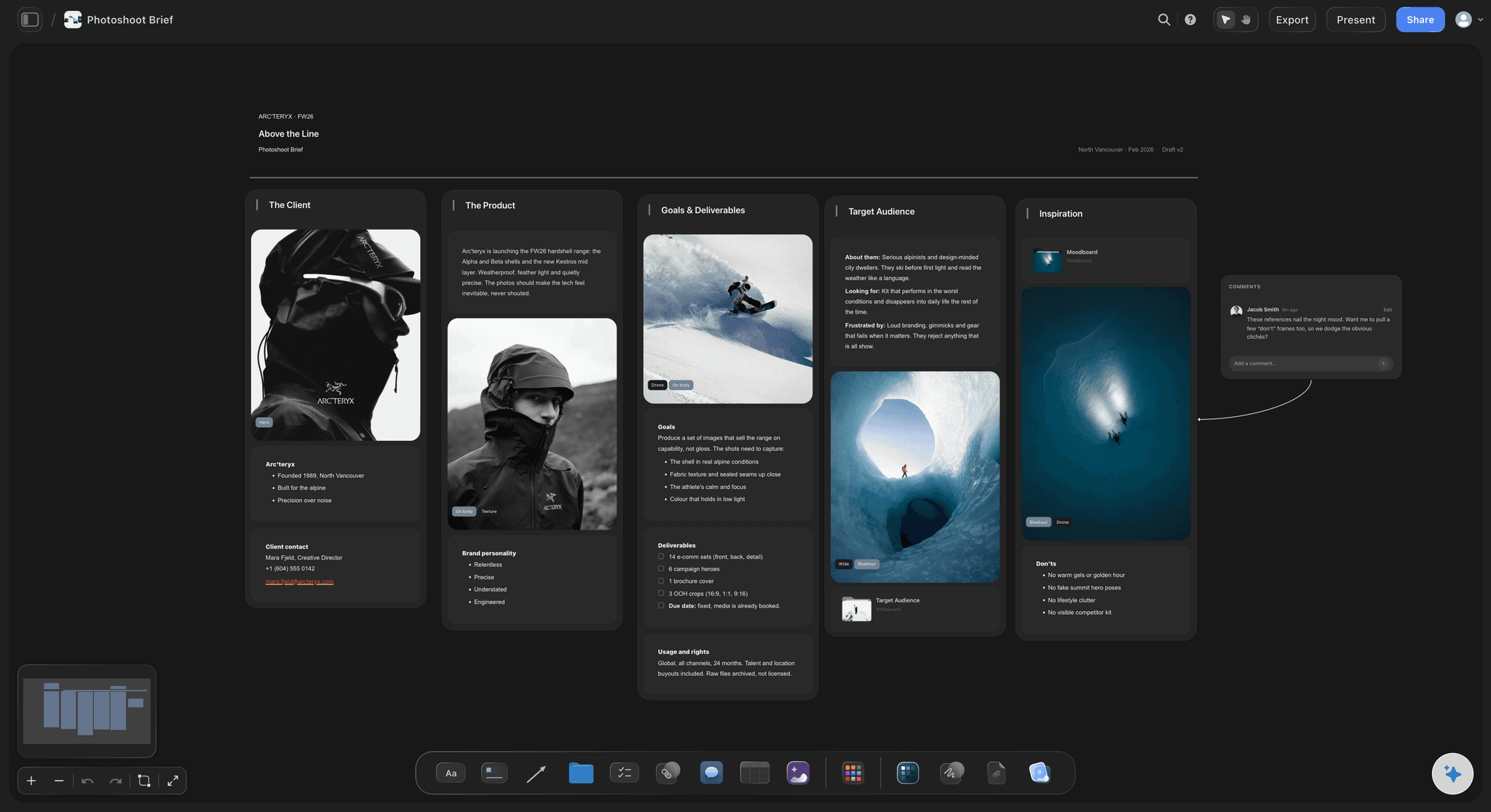
One link, no account, no Pinterest
Show the client your board, not a platform
Send a view-only link and it opens in any browser with nothing around it. No sign-up wall, no suggested pins under your direction, no advertisement sitting beside the shot you are trying to sell. Or export to image or PDF and drop it straight into the deck.
For photographers →Unlimited boards. No object cap. No ads, ever.
Be clear about the tradeoff: Pinterest is free and Storyflow is not. Storyflow is paid-only during early access, with plans from $9.99 a month, and a Free plan launches before the end of 2026. Anyone a paid member invites to a board joins free today, so clients and collaborators cost nothing.
Unlimited private moodboards on an infinite canvas
Notes, labels, and annotations beside every image
Basic AI usage to build and extend a board from a prompt
Share view-only links with clients, no account needed
BUILT FOR THE WORKING BOARD
Everything a pin board leaves you to sort out yourself.
Not a better place to browse. A better place to decide, annotate, group, and present.
Annotation, intent, and the reason behind the reference
A board that explains itself
Text beside the image, not under it: Place a note wherever you need it on the canvas, next to the exact reference it applies to. The brief and the picture are one object in the reader's eye rather than two things they have to mentally join.
Point at the part that matters: Crop, annotate, and mark up an image so nobody mistakes the styling for the lighting. A reference with no annotation is a guess, and guesses come back as revisions.
Keep the rejected directions: Leave the wrong option on the board with a note saying why it is wrong. That is often the most persuasive part of a client presentation, and a pin board has nowhere to put it.
Spatial groups that hold: Cluster by lighting, palette, wardrobe, texture, or scene. The layout carries the structure, so it survives being looked at six weeks later by someone who was not in the room.
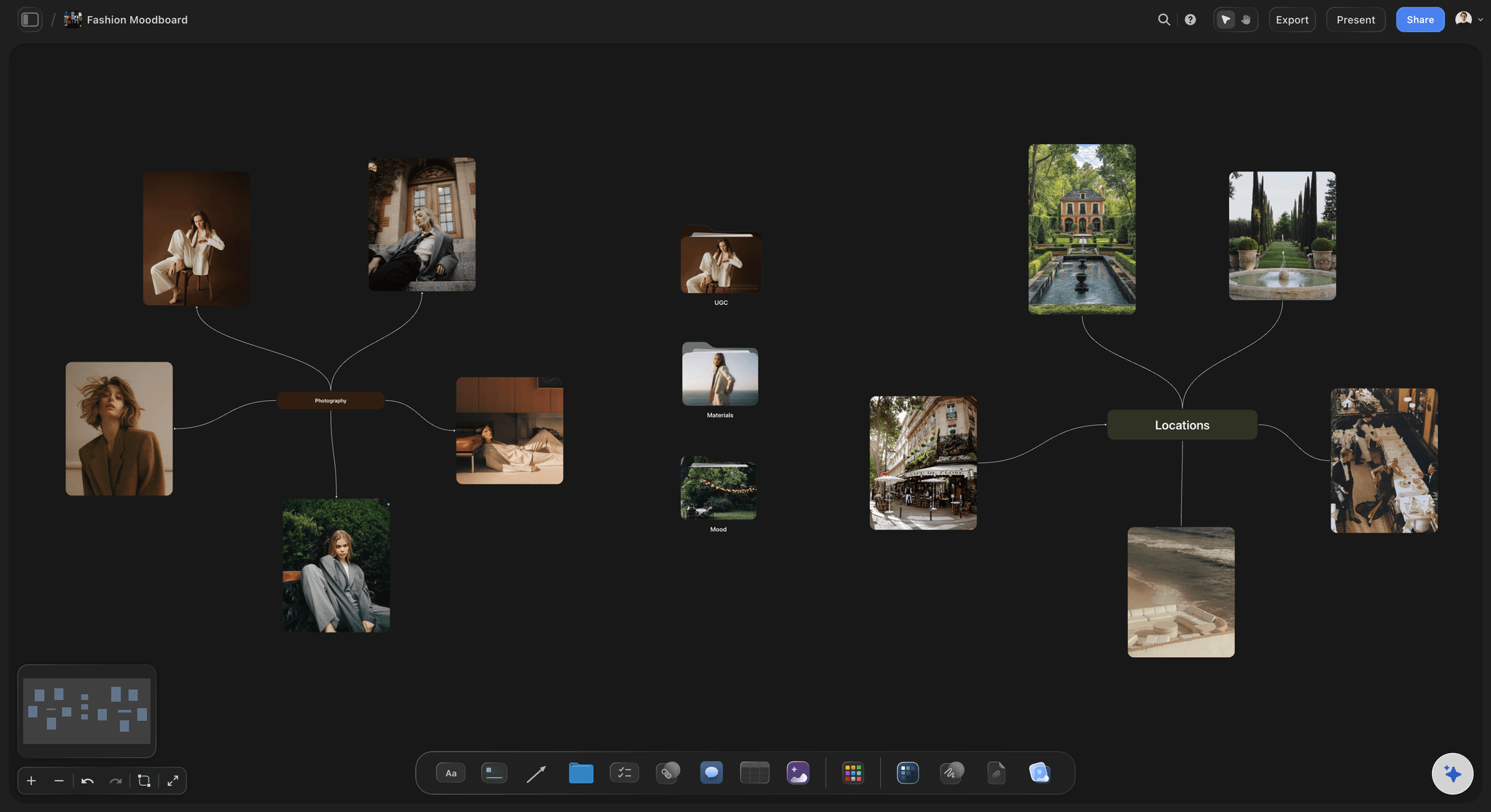
Your board, your files, no feed beside it
Private by default and yours to keep
Nothing else on the screen: No advertising, no recommendation rail, no related pins competing with your direction. Attention is the whole resource in a client review, and a discovery product is designed to spend it elsewhere.
Images live on the board: Upload the actual file rather than a link to a page. A saved image does not quietly turn into a broken tile the month the source site is redesigned, which is the ordinary fate of an old pin board.
You control who sees it: A board is private until you share it. No public profile, no follower count, no algorithm deciding to surface your unreleased campaign direction to anybody.
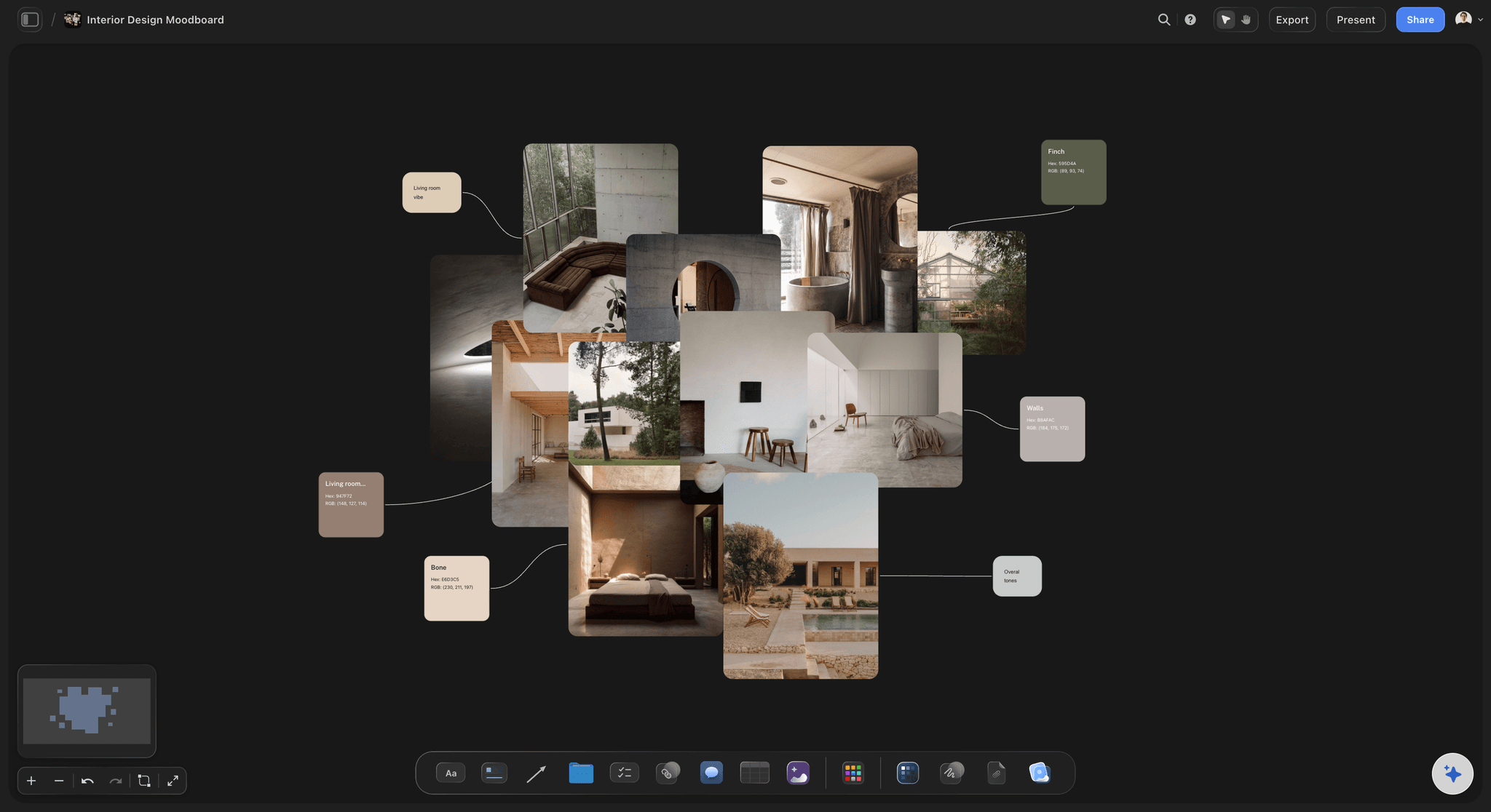
AI that has read the board you have already built
Build and extend a board with AI in context
A board from one prompt: Describe the shoot, the campaign, or the interior and the AI lays out a structured board of cards and sections you can fill with references, instead of starting from an empty grid.
It reads the whole canvas: Ask what a lighting section is missing, or to draft the direction copy that goes beside a cluster, and the answer is about your board rather than a generic template.
Your placements stay put: Re-prompt as often as you like. Images you have positioned and notes you have written stay exactly where you put them while the AI builds around them.
Presentation, sharing, and the rest of the project
The board is the start of the job, not the end of it
One link, no account: Clients open the board in a browser with no sign-up and no platform around it. Nothing to install, nothing to join, nothing to scroll past.
Guests join free: Anyone a paid member invites to a board joins free today, so a stylist, a producer, or a client can comment on the board without buying a seat.
Export for the deck: Export the board as a high-quality image or PDF when the direction has to appear in a pitch, a treatment, or a printed brief.
Then keep going on the same canvas: The shot list, the schedule, the script, and the plan can sit beside the moodboard on the same infinite canvas, so the direction does not get separated from the work it is directing.
Explore templates for your project
Every template opens as a real, editable board on the infinite canvas. Pick the closest fit and make it your own.
Film Moodboard
Collect film references, color palettes, lighting, locations, and tone in one place, then invite your crew.
HOW WE COMPARE
Storyflow vs Pinterest, Milanote, and Canva.
These tools do genuinely different jobs. Pinterest wins the rows Pinterest should win, including the two that matter most to a lot of people.
Storyflow
Recommended
Endless discovery feed of new references
Free to use today
Private working board with no ads or algorithm
AI that reads your whole board as context
Moodboard, notes, and plan on the same surface
Polished design assets and print-ready layouts
Endless discovery feed of new references
Free to use today
Private working board with no ads or algorithm
AI that reads your whole board as context
Moodboard, notes, and plan on the same surface
Polished design assets and print-ready layouts
Milanote
Endless discovery feed of new references
Free to use today
Private working board with no ads or algorithm
AI that reads your whole board as context
Moodboard, notes, and plan on the same surface
Polished design assets and print-ready layouts
Canva
Endless discovery feed of new references
Free to use today
Private working board with no ads or algorithm
AI that reads your whole board as context
Moodboard, notes, and plan on the same surface
Polished design assets and print-ready layouts
What creators are saying
Join early creators getting structured workspaces and AI that remembers their projects
“Storyflow has sped up my workflow by at least 3x, which means more flow state and more projects I can actually ship. It truly changed the way me and my team create.”

Reilin Joey
Director & YouTuber
“One prompt gets me a structured board. But the tactics are my favorite. I run my YouTube scripts through them and my intros and retention got better. It's amazing.”

Justkay
YouTuber & Freelance Filmmaker
“I used to juggle five apps to plan a project. Now I describe what I am making and get boards, lists, and a schedule. All in one place.”

George
@fernwehchronicles
Pinterest alternative questions, answered honestly.
Including the ones where the answer is that you should keep using Pinterest.
No, and we are not going to pretend otherwise. Pinterest's discovery engine is the best in the world at this: billions of images, a recommendation feed that reads your taste faster than you can describe it, visual search, and a browser extension that pins from anywhere on the web. Storyflow has none of that and is not trying to build it. If your problem is finding references, use Pinterest. Our answer is about what happens to those references afterwards, which is a completely different problem.
Find it on Pinterest. Own the board here.
Open a private canvas, drop in the references that survived, and write the direction beside them. Plans from $9.99/month, nothing to install, and a Free plan is coming before the end of 2026.