
An ultra-fast canvas that stays calm
Notes you tend,
not notes you file.
Half-formed ideas visible instead of buried, connections drawn as you find them, and space to see what has grown and what has been sitting untouched since March.


Creatives working for these brands already got early access
- Red Bull
- Canon
- Artlist
- Porsche
See how easy it is to get started
Watch a real project come together, from a blank board to a finished plan, clicked through step by step.
Start from a ready-made template
Pick a board to see what you can build, then let AI fill it in. Every template is a real, editable starting point on the same infinite canvas.

Mind Map
Branch one central idea out into themes and sub-points, then drag the connections around until the structure makes sense.
What is a digital garden?
A digital garden is a personal collection of notes and ideas treated as something you tend rather than something you archive. Storyflow is an AI visual workspace that holds your digital garden on one infinite canvas: drawn connections, growth stages, and neglected areas. The metaphor is doing real work: a garden has things at different stages, seedlings that may not survive, plants that need pruning, and a few things that have grown into something. Notes are revisited, revised, and connected as your understanding changes, rather than being written once and filed. The idea grew out of the personal wiki tradition and the writing around evergreen notes, and it is a reaction against two things: the reverse-chronological blog, which buries anything older than a fortnight, and the note app, which is excellent at capture and produces collections nobody ever reopens.
The defining difference is a willingness to publish or keep things that are unfinished. A blog post is a finished argument, which is why most people write few of them. A garden note is an argument in progress, marked as such, and the low stakes are the point: an idea you are allowed to be tentative about is an idea you will actually write down and come back to. The good ones grow. Most do not, and that is the expected outcome rather than a failure.
The thing that makes a garden a garden rather than a folder is connection and revisitation, and this is where most attempts quietly fail. Capture is easy and everybody solves it. What almost nobody solves is coming back: after a year you have four hundred notes, they are well tagged, and you have opened maybe thirty of them since writing them. Search only answers questions you already know to ask, so the note that would have changed your thinking about something is simply never surfaced. A list has no way to show you what has been neglected.
Storyflow is an AI-native infinite canvas, which is a deliberately different shape for this. Space is the organising principle rather than a folder tree: related ideas sit near each other, clusters form and are dragged apart, and a half-formed note lives in the open beside the things it relates to rather than inside a file. That makes two things visible that a list cannot show, which are what has grown and what has been sitting untouched. The AI reads the whole canvas, so you can ask which notes connect and where an idea is thinner than you think.
Ultra fast from brief to board
From a pile of notes to something you actually return to.
No folder structure to design. Space, connections, and room for the unfinished.
01
Open a canvas
Sign up in seconds. No download. Your infinite garden opens in the browser.
02
Plant what you already have
Drop in notes, links, quotes, images, and half-thoughts. Describe the territory and the AI arranges them into clusters with candidate connections to correct.
03
Tend rather than file
Move things so related ideas sit together, draw connections as you notice them, and mark what stage each note is at. Revisiting is the whole practice.
04
Grow the good ones
Some notes become essays, talks, or projects. Share a view-only link to a section, or export a cluster as an image or PDF.
Space, connections, stages, and the neglected corners.
A garden you can see the state of, rather than a folder you hope is useful.

AI arranges what you have into clusters
Start from an arranged garden
Drop in your material and the AI groups it, proposes connections, and names the clusters. Correcting a proposed arrangement is where you find out what you actually think the structure is.
See the AI second brain →
Proximity means something
Space instead of a folder tree
A note does not have to live in exactly one place. Put it between two clusters, where it actually belongs, and the tension between them becomes something you can see rather than something you lose.
Explore the zettelkasten app →
Seedlings, growing, evergreen
Let unfinished notes stay visible
Marking a note's stage is what makes tentative writing possible. An idea you are allowed to be unsure about is one you will actually record, and a few of them turn into the best things you write.
See the visual note taking app →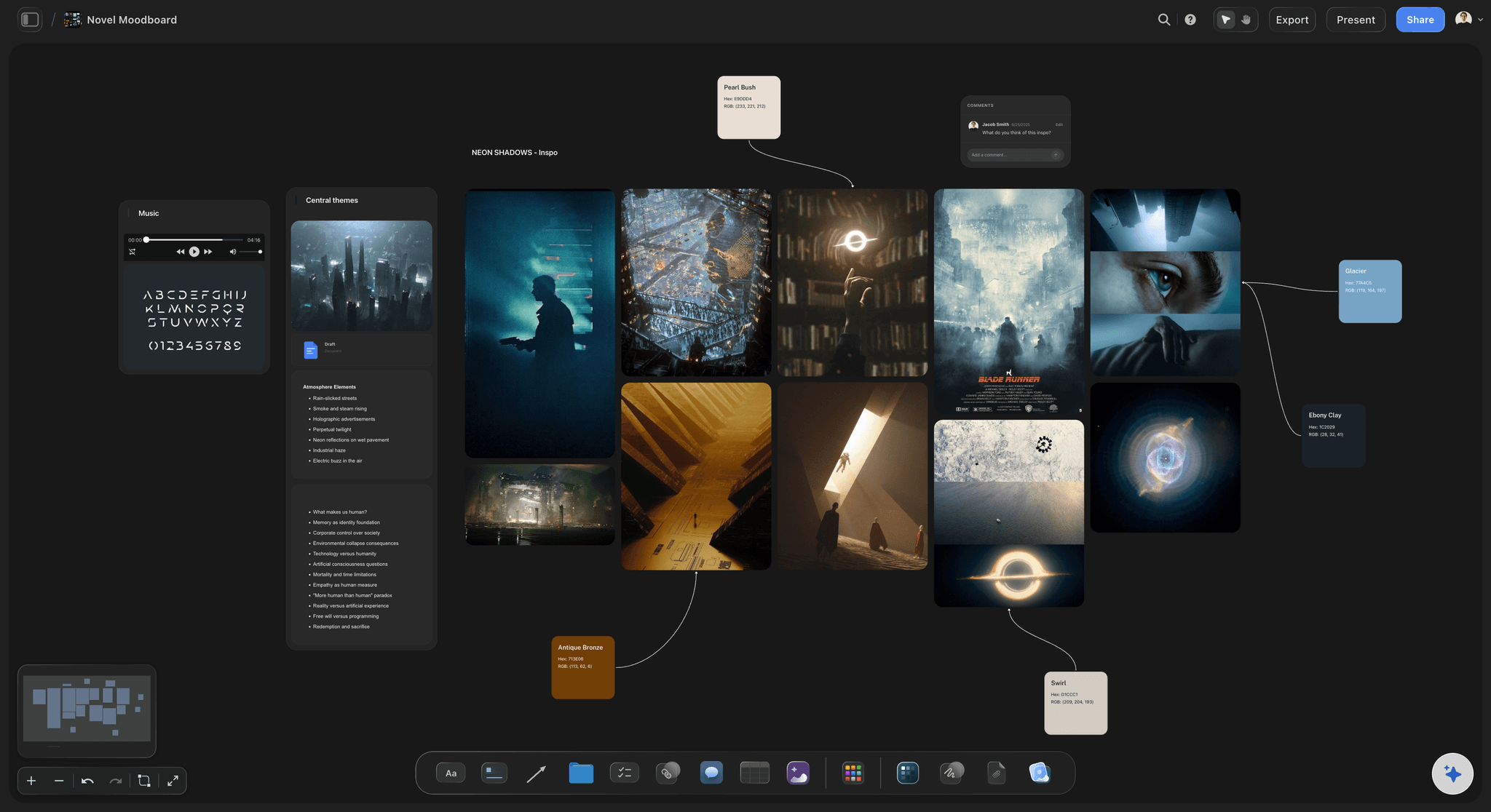
Images, PDFs, video, and text together
A garden that is not only words
Photographs, diagrams, frames pulled from YouTube or Vimeo, research PDFs, and screenshots sit alongside the notes. Visual material is thinking too, and text-only tools quietly exclude it.
Try the research board →Unlimited boards. No object cap.
Open a canvas and plant what you have been collecting. Storyflow is paid-only during early access, with plans from $7.99 a month billed annually, and a Free plan launches before the end of 2026.
Unlimited canvases with no cap on notes or images
Basic AI usage to cluster notes and propose connections
Starter templates for second brains, research, and mind maps
Share view-only links to any board, no account required to read
Built for people with taste
Capture was never the problem.
Everyone solves capture. Almost nobody solves coming back, and a collection you do not return to is storage rather than thinking.
The part every note system loses
Make revisiting possible
Neglect is visible: On a canvas you can see the corner nobody has touched since March. In a list, an untouched note and an active one look identical, which is why the untouched ones stay untouched.
Search only answers what you thought to ask: The note that would change your thinking is the one you do not know to search for. Spatial arrangement surfaces things by adjacency instead, which is how you find something you were not looking for.
Connections made when you notice them: The moment you realise two ideas relate is usually not the moment you are writing either. Drawing the line takes a second on an open canvas and never happens at all if it requires opening two files.
Pruning is part of it: A garden that only grows becomes a thicket. Deleting or merging notes is maintenance rather than loss, and it is much easier to see what to prune when you can see the whole thing.
AI that reads the whole canvas as context
Ask the garden what it is missing
Cluster and connect what you have: Drop in a year of accumulated notes and the AI groups them and proposes connections, which is the pass nobody ever does by hand and the one that makes an old collection legible again.
Find the thin spot: Ask which idea rests on a single source, which two clusters are about the same thing without knowing it, or what you have collected a lot of and never written anything from.
It proposes, you decide: Storyflow structures and suggests; whether two ideas genuinely belong together is the judgment that constitutes the thinking, and delegating it would defeat the exercise.
Research that lands in the garden: Ask about a subject and the findings arrive on the canvas beside the notes they relate to, rather than in a chat window you then have to transcribe from.

From a note to something finished
Grow the ones worth growing
An essay begins as a cluster: When several notes in one area start pointing the same way, that is a piece of writing arriving. Drag them together and the outline is mostly already there.
Talks, projects, and decisions: Not everything becomes an essay. A cluster can become a talk, a project brief, or the reasoning behind a decision, and all three can be built on the same canvas.
The abandoned ones stay: An idea you dropped is worth keeping visible. It stops you rediscovering it from scratch, and it is frequently the raw material for a better one two years later.

Private, or shared with a few people
Share a corner without publishing everything
View-only links per board: Send a link to one board and someone reads it in a browser with no account. Sharing a cluster of thinking is a lower-stakes act than publishing a finished argument, which is the whole spirit of the practice.
Gardens a few people tend together: Invite collaborators and a reading group, a research pair, or a team builds one shared garden rather than several private ones that quietly diverge.
Export what has grown: Export a cluster as a high-quality image or PDF when it becomes an essay outline, a talk, or something you want to hand to somebody.
Explore templates for your project
Every template opens as a real, editable board on the infinite canvas. Pick the closest fit and make it your own.
Mind Map
Branch one central idea out into themes and sub-points, then drag the connections around until the structure makes sense.
One app instead of five
Storyflow vs Obsidian, Notion, and a static site.
These are genuinely different practices: Obsidian is local plain-text with backlinks, Notion is a structured database, and a published static site is how many gardens are actually shared. Here is where they differ.
Storyflow
Recommended
Spatial arrangement as the organising principle
AI clusters notes and proposes connections
Images, PDFs, and video as first-class notes
Neglected areas visible at a glance
Local plain-text files you own on disk
Published as a public website
Obsidian
Spatial arrangement as the organising principle
AI clusters notes and proposes connections
Images, PDFs, and video as first-class notes
Neglected areas visible at a glance
Local plain-text files you own on disk
Published as a public website
Notion
Spatial arrangement as the organising principle
AI clusters notes and proposes connections
Images, PDFs, and video as first-class notes
Neglected areas visible at a glance
Local plain-text files you own on disk
Published as a public website
A static site
Spatial arrangement as the organising principle
AI clusters notes and proposes connections
Images, PDFs, and video as first-class notes
Neglected areas visible at a glance
Local plain-text files you own on disk
Published as a public website
What creators are saying
Join early creators getting structured workspaces and AI that remembers their projects
“Storyflow has sped up my workflow by at least 3x, which means more flow state and more projects I can actually ship. It truly changed the way me and my team create.”

Reilin Joey
Director & YouTuber
“One prompt gets me a structured board. But the tactics are my favorite. I run my YouTube scripts through them and my intros and retention got better. It's amazing.”

Justkay
YouTuber & Freelance Filmmaker
“I used to juggle five apps to plan a project. Now I describe what I am making and get boards, lists, and a schedule. All in one place.”

George
@fernwehchronicles
Digital garden questions, answered.
What one is, how it differs from a blog or a second brain, and how to start.
A digital garden is a personal collection of notes and ideas treated as living rather than archived. Notes exist at different stages, from a seedling that may never grow into anything to an evergreen piece you have revised many times, and the practice is revisiting and connecting them as your understanding changes. It emerged from the personal wiki tradition and the writing around evergreen notes, and it defines itself against two things: the reverse-chronological blog, which buries everything older than a fortnight regardless of whether it is still your best thinking, and the note app, which is very good at capture and produces large collections nobody ever reopens. The permission to keep things unfinished is the central feature rather than a caveat.
Storyflow keeps the garden in space, not in a folder tree: your notes sit on one board with connections drawn between them and each note's stage of growth visible. Its AI clusters notes and proposes connections, and neglected areas show at a glance, so you know what to revisit. Obsidian still keeps your notes as local plain-text files you own on disk and publishes them as a public website, which Storyflow does not.
A blog is organised by time and made of finished things; a garden is organised by subject and made of things in progress. The practical consequence is what each one makes you do. A blog post is a complete argument published at a moment, which is why most people write few of them and why the good thinking that never reached completion simply never appears. A garden note can be three sentences you are unsure about, marked as such, and revised six times over two years, which lowers the barrier enough that the thinking actually gets recorded. The other difference is navigation: a blog buries anything old, and a garden keeps a two-year-old note as prominent as a new one if it is still the better idea.
A second brain is a full personal knowledge practice covering capture, organisation, retrieval, and review, and its emphasis is on making sure things you encounter can be found later. A digital garden overlaps with it and emphasises something different: growth and revision rather than storage and retrieval. The distinction matters because they fail differently. A second brain fails by becoming a large, well organised store nobody consults, which is the common experience of a mature note collection. A garden fails by becoming an overgrown thicket that is never pruned. In practice most people want elements of both, and they can live on the same canvas, with the capture side feeding the tending side.
Start with what you already have rather than with a structure. Drop in the notes, links, quotes, and screenshots you have accumulated and let them sit on the canvas in an unorganised pile, then do one pass of arrangement: drag things that feel related near each other and see what clusters appear. Do not design a taxonomy first, because a taxonomy invented before you have looked at the material is invariably wrong and it becomes a chore that ends the practice within a month. Once clusters exist, name them, draw connections between the notes that genuinely relate, and mark which notes are seedlings and which are more developed. Then the actual practice begins, which is coming back.
Not during early access. Storyflow is paid-only right now, with plans from $7.99 a month billed annually, and a Free plan launches before the end of 2026. Anyone a paid member invites to a board joins free today. If you want a free option, Obsidian is genuinely free for local use and is the most common tool for this practice, with the important advantage that your notes are plain-text files on your own disk. The trade is real and worth stating: Obsidian gives you ownership and a text-first workflow, and this gives you spatial arrangement, images as equal citizens, and an AI that reads the whole canvas. Which matters more depends on whether your thinking is mostly words.
No, and the publishing part is a later addition to the idea rather than its core. Plenty of people who use the term keep everything private, and the practice, meaning tending, connecting, and revisiting, works identically either way. What publishing adds is a mild social pressure that some people find useful for keeping notes legible, and a chance that someone reads a half-formed idea and tells you something. Storyflow does not publish a garden as a public website, which is worth knowing if that is what you want; what it does is view-only links per board, which lets you share one cluster with a few people without publishing everything, and that is what most people actually do anyway.
Prune, and accept that most seedlings die. The failure mode of a garden is not disorder, it is undifferentiated growth: four hundred notes with no sense of which ones matter, which is the same collection you had in your note app with a nicer name. Three habits prevent it. Merge notes that are saying the same thing, which is more common than you expect and each merge makes both stronger. Delete the ones that were a passing interest, since keeping everything is a decision to make everything harder to find. And promote deliberately, meaning move the notes that have earned it into a visible area, so the difference between what you are confident about and what you are still turning over is legible at a glance.
For two specific jobs, yes, and for the central one, no. It is very good at the pass nobody does by hand: given a large accumulated collection, it will cluster the notes, propose connections, and name the groups, which makes an old and neglected collection legible again in minutes rather than over a weekend that never happens. It is also good at answering questions about the whole canvas, such as which idea rests on a single source or which two clusters are about the same thing without knowing it. What it cannot do is decide whether two ideas genuinely belong together, because that judgment is the thinking, and a garden where the connections were made by a model is a garden that taught its owner nothing.
It usually announces itself as a cluster rather than as a single note. When several notes in one area start pointing the same direction, that is an essay, a talk, or a decision arriving, and the outline is mostly already present in the arrangement. Drag those notes together into their own region, order them, and the writing has a spine before you have written a sentence. Not everything becomes an essay: a cluster can become a project brief, a talk, or the reasoning behind a decision, and those can all be built on the same canvas without leaving. The notes that fed it stay where they were, which means the next piece can draw on the same material rather than needing it rediscovered.
Yes, selectively, which is usually what people want. Send a view-only link to one board and someone opens that board in a browser with no account, without seeing anything else you keep. Sharing a cluster of in-progress thinking is a lower-stakes act than publishing a finished argument, which is exactly the spirit of the practice and is where most of the interesting responses come from. If you want a garden tended by more than one person, invite collaborators onto the canvas so a reading group, a research pair, or a team builds one shared thing rather than several private versions that slowly diverge without anyone noticing.
Bring the notes back into use.
Open a canvas, drop in what you have collected, and let AI arrange the first clusters. No download.