
Ultra-fast planning, extremely simple
An Obsidian alternative for
people who think in space.
Obsidian is a brilliant text-first second brain: local markdown you own, backlinks, and a plugin for everything. Storyflow is the visual version. Your notes, images, links, and PDFs live on a truly infinite canvas, connected by where you put them, with AI to expand a thought and boards that turn into plans.


Creatives working for these brands already got early access
- Red Bull
- Canon
- Artlist
- Porsche
See how easy it is to get started
Watch a real project come together, from a blank board to a finished plan, clicked through step by step.
Start from a ready-made template
Pick a board to see what you can build, then let AI fill it in. Every template is a real, editable starting point on the same infinite canvas.

Mind Map
Branch one central idea out into themes and sub-points, then drag the connections around until the structure makes sense.
What is a good alternative to Obsidian for visual thinkers?
Obsidian earned its devoted following honestly. It is local-first, so your notes are plain markdown files you fully own, on your own disk, with no lock-in. Backlinks and the [[wikilink]] make connecting ideas fast, and the community plugin ecosystem is enormous, so power users can shape it into almost anything. If your second brain is fundamentally a body of text you write, link, and search, Obsidian is one of the best tools ever built for it, and this page is not here to argue otherwise.
The gap it leaves is spatial. Obsidian is text-first: notes are documents in a sidebar, and the famous graph view is a visualization of your links, not a workspace you can think inside. You cannot lay a research topic out as images and cards you arrange by hand, drop a PDF next to the note that cites it, or design the shape of an argument on a canvas. For people who think by moving things around in space, that is the part that never quite clicks.
Storyflow is a visual second brain built for exactly that. Notes, images, links, and PDFs are cards on a truly infinite canvas, and they connect by proximity and layout: what sits together belongs together, and the structure is something you can see and rearrange, not just query. AI reads the board you are on to expand a thought or surface what relates, you can grab frames from YouTube and Vimeo straight onto the canvas, and a board of notes can become a storyboard, an outline, or a plan on the same canvas. It is the second brain for the way you already think in your head.
Ultra fast from brief to board
Turn a pile of notes into a visual second brain.
Bring the thinking. Lay it out in space, let AI expand it, and shape it into something you can use.
01
Open the canvas
Start in the browser with an account. Nothing to install, just an infinite canvas ready for your first note, reference, or research topic.
02
Drop notes, links, and files in space
Add notes as cards, paste links, drop in PDFs and images, and place them where they belong. Related ideas sit together, so the layout itself carries meaning.
03
Expand and surface with AI
Ask the AI to go deeper on a thought or lay out a topic from a prompt. It reads the board you have open, so what it adds connects to what is already there rather than arriving generic.
04
Turn the board into work
Convert a research board into an outline, a storyboard, or a plan on the same canvas, share a view-only link, or export the board as an image or PDF.
The connected thinking of Obsidian, laid out in space.
Keep the idea of a networked second brain. Trade the text-only sidebar for a canvas you can think inside.

Notes that live in space
A second brain you can see, not just query
In Obsidian the structure lives in links and a graph you look at. Here your notes are cards on an infinite canvas, connected by where you place them, so the shape of your thinking is something you arrange and see at a glance.
See the visual second brain →
AI that reads your board
Expand a thought and surface what relates
Point at a note and ask the AI to go deeper, or have it lay out a topic from a prompt. It uses the current board as context, so new cards connect to what you already mapped instead of drifting off-topic.
See the AI second brain →
References beside the note
PDFs, images, and video on the canvas
A text-only note links its sources away. Here a research PDF, an image, or a frame grabbed from YouTube and Vimeo sits on the canvas next to the note it supports, so the evidence lives beside the idea.
See knowledge management →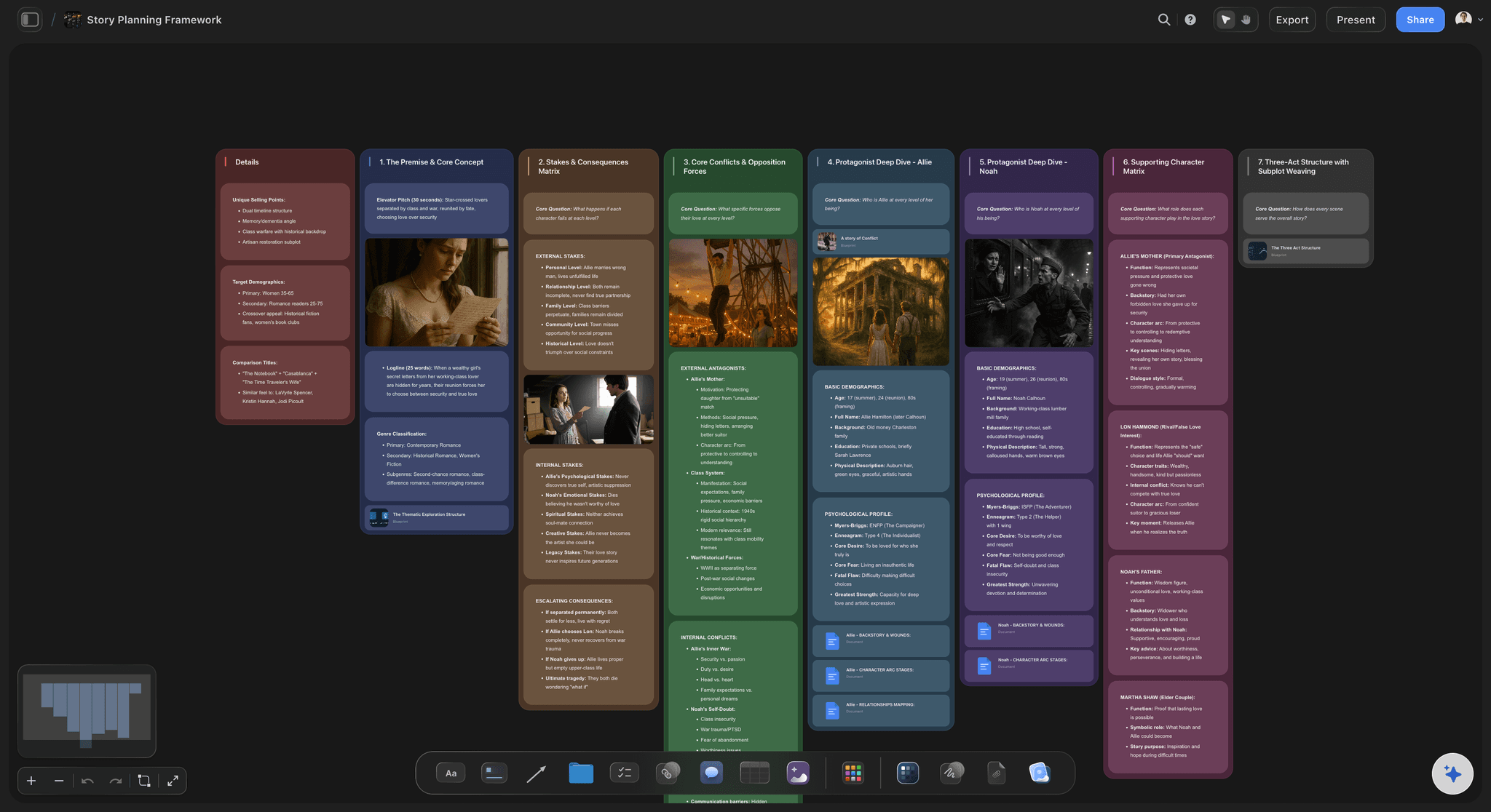
The board becomes the work
From notes to an outline or plan
In Obsidian the note is usually the end point. Here a board of notes is step one: ask the AI to turn it into an outline, a storyboard, or a project plan on the same canvas the research lives on.
See mind mapping →No object cap, on any plan.
Open a canvas and start building your second brain. There's no object cap and no time limit, so your knowledge base can grow without watching a counter. A Free plan is launching before the end of 2026; until then, plans start at $9.99 a month.
Unlimited boards on an infinite canvas, no object cap
Basic AI usage to expand notes and surface connections
Attach images, PDFs, video, and links, plus 20 file uploads
Share boards view-only, or invite collaborators free
Built for people with taste
Made for people who found Obsidian too text-heavy.
Lay knowledge out in space, connect it by where it sits, and move from notes to a real plan without changing tools.
Structure you can see and move
Connect ideas by layout, not just links
Proximity is the connection: Cards that sit together read as related. Instead of maintaining a web of [[wikilinks]], you group and arrange notes in space, and the structure is visible at a glance.
Rearrange as understanding shifts: Drag a note into a new cluster and the map of your thinking updates with a move. Reshaping a topic is a rearrange, not a rewrite of links.
Color and cluster: Recolor cards and pull related notes together so the important themes stand out across a large board, the way a graph view hints at but never lets you touch.
Context from the board you are on
AI that builds on what you already know
Reads your active board: The AI works from the notes and cards on the board you have open, so what it expands or suggests fits the direction you have already set.
Attach your sources: Add up to five documents and three boards as context: a reading, a brief, or research the board should build from, so the AI grounds itself in your material.
Re-prompt to refine: Ask for more angles, a tighter summary, or a different lens on a topic. The AI reworks the board while keeping the notes you placed by hand.
More than plain text
Media-rich notes beside every idea
Drop in anything: Images, video, GIFs, PDFs, and links sit on the canvas next to the note they support, so a reference is one glance away instead of behind a link.
Frame grabs from video: Pull stills from YouTube and Vimeo straight onto the canvas when a moving reference explains an idea better than a paragraph.
Notes where you need them: Longer thinking lives as documents on the same canvas, so the board stays scannable and the detail is one click away when you want it.
The note is step one, not the deliverable
From a knowledge base to finished work
Turn boards into real work: Ask the AI to convert a board of notes into an outline, a storyboard, or a project plan on the same canvas, with your research carried across.
Share the board: Invite collaborators free, or send a view-only link so anyone can explore the whole board in the browser without an account.
Export as image or PDF: Need the board in a deck or a doc? Export it as a clean image or PDF in one step.
Explore templates for your project
Every template opens as a real, editable board on the infinite canvas. Pick the closest fit and make it your own.
Mind Map
Branch one central idea out into themes and sub-points, then drag the connections around until the structure makes sense.
One app instead of five
Storyflow vs Obsidian, Notion, and Milanote.
Each tool is strong at something. The question is whether your second brain is text you query or space you think inside.
Storyflow
Recommended
A visual canvas where notes live in space
AI that expands and surfaces from your board
Boards become outlines and plans on the same canvas
No object cap on any plan
Obsidian
A visual canvas where notes live in space
AI that expands and surfaces from your board
Boards become outlines and plans on the same canvas
A free plan with no object cap
Notion
A visual canvas where notes live in space
AI that expands and surfaces from your board
Boards become outlines and plans on the same canvas
A free plan with no object cap
Milanote
A visual canvas where notes live in space
AI that expands and surfaces from your board
Boards become outlines and plans on the same canvas
A free plan with no object cap
What creators are saying
Join early creators getting structured workspaces and AI that remembers their projects
“Storyflow has sped up my workflow by at least 3x, which means more flow state and more projects I can actually ship. It truly changed the way me and my team create.”

Reilin Joey
Director & YouTuber
“One prompt gets me a structured board. But the tactics are my favorite. I run my YouTube scripts through them and my intros and retention got better. It's amazing.”

Justkay
YouTuber & Freelance Filmmaker
“I used to juggle five apps to plan a project. Now I describe what I am making and get boards, lists, and a schedule. All in one place.”

George
@fernwehchronicles
Obsidian alternative questions, answered.
Everything people ask when comparing Storyflow with Obsidian.
It depends on how you think. If you want a text-first, local-first second brain with backlinks and a huge plugin ecosystem, Obsidian is hard to beat. If you think in space and want your notes, images, links, and PDFs laid out on an infinite canvas, connected by layout, with AI to expand and surface, Storyflow is a strong visual alternative.
Obsidian is text-first: notes are markdown documents in a sidebar, connected by links, and the graph view is a picture of those links. Storyflow is visual-first: notes, images, links, and PDFs are cards on a truly infinite canvas, connected by where you place them, with AI that reads your board and boards that turn into outlines and plans on the same canvas.
For a text-heavy, local-first knowledge base that you own as plain markdown files and extend with plugins, Obsidian is excellent and remains the better pick for many power users. Storyflow is better when you think visually and want to arrange notes in space, drop references beside them, and move from a board of ideas to a finished plan. They suit different kinds of thinkers.
No. Obsidian's local-first markdown files are one of its defining strengths, and if owning plain files on your own disk is essential to you, keep that in mind. Storyflow runs in the browser and keeps your boards in your account, so you can open them anywhere and share them, but it is not a local markdown vault.
Not during early access. Storyflow's Free plan launches before the end of 2026 with no object cap and no time limit: unlimited boards on an infinite canvas, basic AI usage to expand and surface notes, 20 file uploads, view-only sharing, and unlimited collaborators. Right now, plans start at $9.99 per month, and anyone a paid member invites to a board joins free.
Yes. The AI reads your active board, so notes and cards already on the canvas shape what it expands or suggests. You can also attach up to five documents and three boards, such as a reading or a brief, for it to build from. It works from the board you have open, not from all your boards at once.
Yes, and that is a core reason to switch. Ask the AI to turn a board of notes into an outline, a storyboard, or a project plan, and it builds the new board on the same canvas using the ideas you collected. In Obsidian the note is usually the end product, while in Storyflow a board is the first step toward the finished work.
Be honest about the fit: if you want local markdown files you fully own, dense linking between text notes, and a deep plugin ecosystem to customize, and you do not need a visual canvas, media beside your notes, or boards that become plans, Obsidian is the better pick. Storyflow is for visual thinkers who want that networked-second-brain idea laid out in space with AI and an infinite canvas.
Keep the connected second brain. Lay it out in space.
Drop your notes, links, and files on an infinite canvas, let AI expand and surface, and turn the board into a plan.