
Extremely simple, seriously capable
A second brain you can see,
with AI that reads the board.
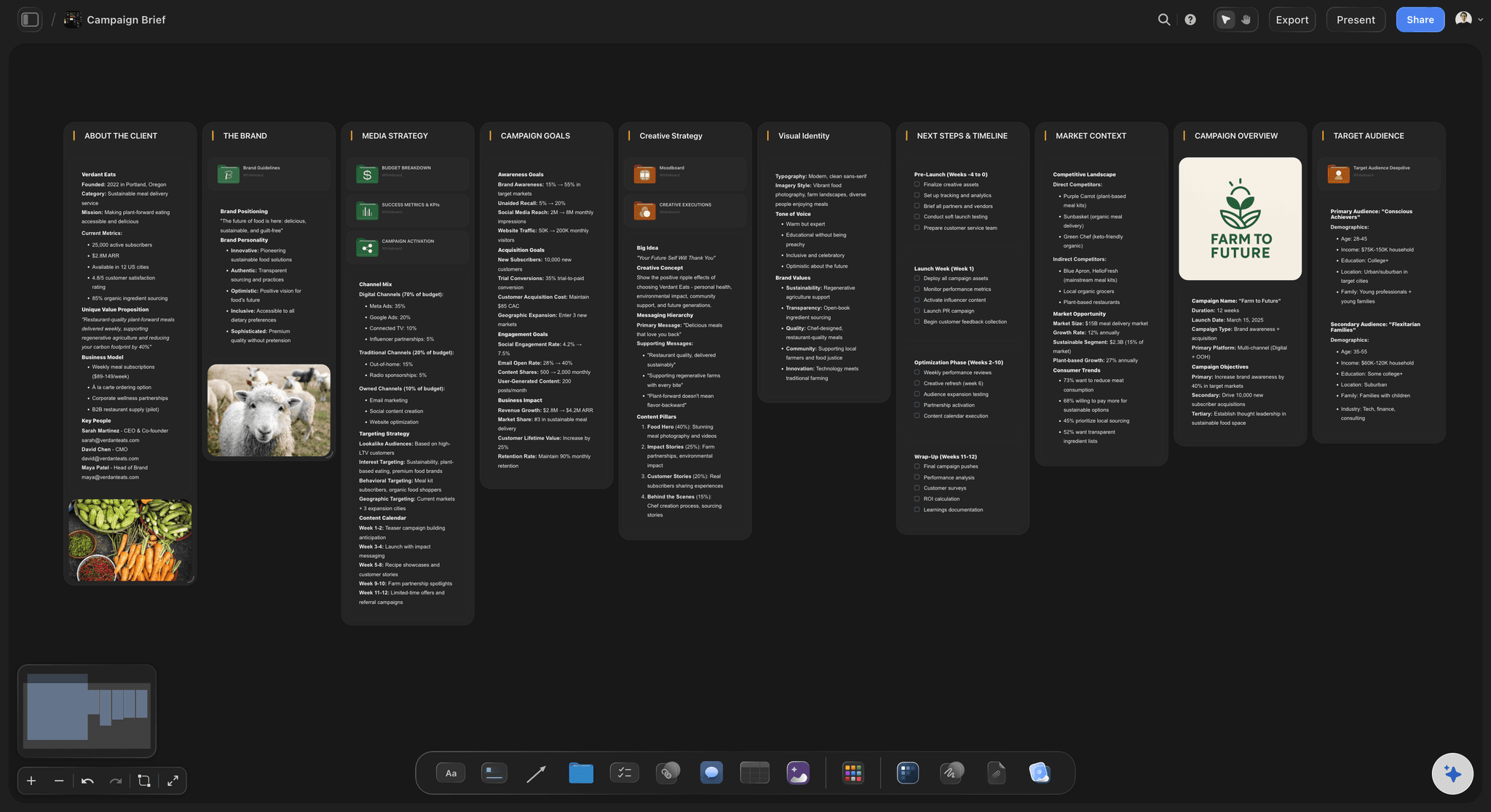
Capture notes, links, images, and half-formed ideas on an infinite canvas, connect them the way they actually relate, and let AI work from the board in front of you. Not a filing cabinet you forget to open.


Creatives working for these brands already got early access
- Red Bull
- Canon
- Artlist
- Porsche
See how easy it is to get started
Watch a real project come together, from a blank board to a finished plan, clicked through step by step.
Start from a ready-made template
Pick a board to see what you can build, then let AI fill it in. Every template is a real, editable starting point on the same infinite canvas.

Mind Map
Branch one central idea out into themes and sub-points, then drag the connections around until the structure makes sense.
What is an AI second brain?
An AI second brain is a system for capturing what you learn and think so you can find and build on it later, with an assistant that can work with what you have captured, not just store it. Storyflow is an AI visual workspace that keeps your second brain on one infinite canvas: notes, links, images and PDFs placed in space, connections drawn the way ideas relate, and an AI that reads the board you are on. The promise is simple, the execution is where most tools fall down.
Storyflow is a visual AI second brain. Instead of a long list of notes, your thinking lives on an infinite canvas: notes, links, images, PDFs, and ideas placed in space and connected the way they actually relate. The AI reads the board you are working on, plus any document or board you attach, so it builds on your material rather than starting from a blank prompt. It is a place you think, and the AI thinks alongside you on the same surface.
Here is the honest part: Storyflow is a visual, canvas-based second brain, not a text-and-markdown knowledge base like Obsidian or a database-first tool like Notion. If you want local-first markdown files, a plugin ecosystem, or a pure note database, those fit better. Storyflow wins when your thinking is visual and project-shaped, and when you want the captured material to become real work, mind maps, plans, and projects, on the same canvas.
Ultra fast from brief to board
Build a second brain in four steps.
Capture in any form, connect it in space, and let AI work from the board.
01
Open a canvas
No app to install, just an infinite canvas with no object limit and no time limit.
02
Capture anything
Drop in notes, links, images, PDFs, and video. Capture a thought as a card, paste an article, or pull a frame from a YouTube video. It all lands on the same board.
03
Connect it in space
Arrange and link what belongs together so the structure of your thinking is visible, instead of buried in a list you have to scroll.
04
Let AI work from the board
Ask the AI to summarize, find gaps, or expand what is on the board, and turn a cluster of notes into a mind map, a plan, or a project on the same canvas.
A second brain that does more than store.
Most second brains are a filing cabinet you forget to open. This one is a place you think.

Capture in any form
Notes, links, media, all on one canvas
Text notes, web links, images, PDFs, and video frames all live on the same infinite canvas, placed where they make sense instead of filed away in folders.
See the infinite canvas →
AI that works from your material
An assistant that reads the board
The AI reads the board you have open, plus any document or board you attach, so it summarizes, connects, and expands your actual notes rather than guessing from a blank prompt.
See the AI brainstorming tool →
From notes to a map
Turn captures into a mind map
Ask the AI to turn a cluster of notes into a structured, connected mind map, so the things you saved become a shape you can think with.
See the AI mind map generator →
Knowledge becomes work
Notes that become real projects
The point of a second brain is what you build with it. Turn the material you captured into plans, kanban boards, and projects on the same canvas, with the AI carrying it over.
See the AI whiteboard →Paid-only during early access.
Capture everything on an infinite canvas with no object limit and no time limit. Plans start at $7.99/month billed annually, and a free plan launches before the end of 2026.
Unlimited boards on an infinite canvas, no object cap
AI usage to summarize, connect, and expand notes
Attach notes, links, images, PDFs, and video frames
Share view-only, or invite collaborators free
Built for people with taste
Built to hold your thinking and act on it.
A second brain is only useful if you can find what is in it and build with it. This one does both.

Everything in one place
Capture without breaking your flow
Any kind of input: Notes, links, images, GIFs, PDFs, and documents all attach to the canvas, so you capture in whatever form the thought arrives.
Frame grabs from video: Pull stills from YouTube and Vimeo straight onto the board when a moment in a video is the thing worth keeping.
Notes that hold depth: Longer thinking lives as documents on the same canvas, so a card stays scannable and the detail is one click away.

Structure you can see
Connect ideas the way they relate
Think in space: Place related ideas near each other and link them, so the structure of what you know is visible instead of hidden in a list.
Connect with the line tool: Draw connections between notes to show how they relate, building a web of ideas rather than a stack of files.
Reorganize freely: Drag anything anywhere. As your understanding changes, the map of it changes with a drag, not a re-file.

AI grounded in your notes
An assistant that reads what you saved
Reads your active board: The AI works from the board you have open, so it summarizes and connects your real material instead of generic answers.
Attach your sources: Bring in up to five documents and three boards as context, so the AI grounds its help in the specific notes you point it at.
Find the gaps: Ask what is missing or what connects, and the AI surfaces links and holes across what is on the board.
Knowledge that ships
Turn what you know into what you make
Notes become maps and plans: Turn a cluster of captures into a mind map, a kanban board, or a project plan on the same canvas, with the AI carrying the ideas over.
Share the thinking: Invite collaborators free, or send a view-only link so anyone can explore your second brain without an account.
Export as image or PDF: Need a board in a deck or a doc? Export it as a clean image or PDF in one step.
Explore templates for your project
Every template opens as a real, editable board on the infinite canvas. Pick the closest fit and make it your own.
Mind Map
Branch one central idea out into themes and sub-points, then drag the connections around until the structure makes sense.
One app instead of five
How Storyflow compares to other second-brain tools.
Plenty of tools store your notes. The question is whether they help you think and build with them.
Storyflow
Recommended
A visual, spatial canvas, not a list or database
AI that reads the board you are working on
Notes become mind maps, plans, and projects on the same canvas
No object or board caps
Notion
A visual, spatial canvas, not a list or database
AI that reads the board you are working on
Notes become mind maps, plans, and projects on the same canvas
No object or board caps
Obsidian
A visual, spatial canvas, not a list or database
AI that reads the board you are working on
Notes become mind maps, plans, and projects on the same canvas
No object or board caps
Mem
A visual, spatial canvas, not a list or database
AI that reads the board you are working on
Notes become mind maps, plans, and projects on the same canvas
No object or board caps
What creators are saying
Join early creators getting structured workspaces and AI that remembers their projects
“Storyflow has sped up my workflow by at least 3x, which means more flow state and more projects I can actually ship. It truly changed the way me and my team create.”

Reilin Joey
Director & YouTuber
“One prompt gets me a structured board. But the tactics are my favorite. I run my YouTube scripts through them and my intros and retention got better. It's amazing.”

Justkay
YouTuber & Freelance Filmmaker
“I used to juggle five apps to plan a project. Now I describe what I am making and get boards, lists, and a schedule. All in one place.”

George
@fernwehchronicles
AI second brain questions, answered.
Everything people ask about building a second brain in Storyflow.
An AI second brain is a system for capturing your notes, ideas, and sources, with an assistant that can work with what you captured instead of only storing it. In Storyflow your second brain lives on an infinite canvas, and the AI reads the board you are on, plus any document or board you attach, so it summarizes, connects, and builds on your real material.
Storyflow is a second brain you can see: you capture notes, links, images and PDFs on an infinite canvas and connect them the way they relate. The AI reads the board you are working on, plus any document or board you attach, so it summarizes and builds on your own material. From there the notes turn into mind maps, plans and projects on the same canvas.
You capture notes, links, images, PDFs, and ideas on an infinite canvas and connect them the way they relate. Because everything is a real canvas element, you can rearrange, link, and expand it freely, and the AI can read the board to help you find connections and turn clusters of notes into maps and plans. It is a visual second brain rather than a list of notes.
Not during early access. Storyflow is paid-only right now, with plans starting at $7.99 per month billed annually ($9.99 monthly), and a free plan is planned before the end of 2026. Paid plans have no object limit and no time limit, so you can capture as much as you like on unlimited boards, with AI usage to summarize and connect your notes, and anyone a paid member invites to a board joins free.
The AI reads the board you are currently working on, plus up to five documents and three boards you attach, rather than scanning every board you have ever made at once. That keeps its help grounded in the material you point it at. In practice you organize your second brain into boards and bring the AI to the one you are thinking in.
Notion is database-and-document shaped and Obsidian is a local-first markdown knowledge base. Storyflow is a visual, spatial second brain: your thinking lives on a canvas, connected the way ideas actually relate, and the AI reads that canvas. If you want local markdown files or a pure note database, Obsidian or Notion fit better. If you think visually and want notes to become real projects, Storyflow fits better.
Yes, and that is the point. Ask the AI to turn a cluster of captured notes into a mind map, a kanban board, or a project plan on the same canvas. A second brain is only worth keeping if you build with it, so Storyflow is designed to move from captured knowledge to finished work without switching tools.
Yes. Notes, web links, images, GIFs, PDFs, and documents all attach to the canvas, and you can pull frames from YouTube and Vimeo straight onto the board. Everything you want to remember lives in one visual place instead of scattered across apps.
Yes. Invite collaborators to a board for free, or share a view-only link so anyone can explore it in their browser without an account. You can also export any board as a high-quality image or a PDF.
Your ideas deserve better than a list.
Capture them on a canvas, connect them, and let AI build on them.